

অ্যান্ড্রয়েড ১৪ ডেভেলপারদের জন্য দারুণ কিছু ফিচার এবং এপিআই নিয়ে এসেছে। নিম্নলিখিত বিষয়গুলো আপনাকে আপনার অ্যাপের জন্য বিভিন্ন ফিচার সম্পর্কে জানতে এবং সংশ্লিষ্ট এপিআইগুলো দিয়ে কাজ শুরু করতে সাহায্য করবে।
যোগ করা, পরিবর্তন করা এবং সরিয়ে দেওয়া API-গুলির বিস্তারিত তালিকার জন্য, API diff রিপোর্টটি পড়ুন। যোগ করা API-গুলির বিশদ বিবরণের জন্য Android API রেফারেন্স দেখুন — Android 14-এর জন্য, API লেভেল 34-এ যোগ করা API-গুলি খুঁজুন। প্ল্যাটফর্মের পরিবর্তনগুলি আপনার অ্যাপগুলিকে কোন কোন ক্ষেত্রে প্রভাবিত করতে পারে সে সম্পর্কে জানতে, Android 14-কে টার্গেট করা অ্যাপগুলির জন্য এবং সমস্ত অ্যাপের জন্য Android 14-এর আচরণগত পরিবর্তনগুলি অবশ্যই দেখে নিন।
আন্তর্জাতিকীকরণ
অ্যাপ-ভিত্তিক ভাষার পছন্দ
Android 14 এই অতিরিক্ত ক্ষমতা সহ Android 13 (API লেভেল 33) এ প্রবর্তিত প্রতি-অ্যাপ ভাষার বৈশিষ্ট্যগুলিতে প্রসারিত হয়:
স্বয়ংক্রিয়ভাবে একটি অ্যাপের
localeConfigতৈরি করুন : Android Studio Giraffe Canary 7 এবং AGP 8.1.0-alpha07 দিয়ে শুরু করে, আপনি স্বয়ংক্রিয়ভাবে প্রতি-অ্যাপ ভাষা পছন্দগুলিকে সমর্থন করার জন্য আপনার অ্যাপ কনফিগার করতে পারেন। আপনার প্রকল্প সংস্থানগুলির উপর ভিত্তি করে, Android Gradle প্লাগইনLocaleConfigফাইল তৈরি করে এবং চূড়ান্ত ম্যানিফেস্ট ফাইলে এটির একটি রেফারেন্স যোগ করে, তাই আপনাকে আর ফাইলটি ম্যানুয়ালি তৈরি বা আপডেট করতে হবে না।LocaleConfigফাইলে অন্তর্ভুক্ত করার জন্য লোকেলগুলি নির্ধারণ করতে AGP আপনার অ্যাপ মডিউলেরresফোল্ডার এবং যেকোনো লাইব্রেরি মডিউল নির্ভরতাগুলির সংস্থানগুলি ব্যবহার করে।একটি অ্যাপের
localeConfigএর জন্য ডায়নামিক আপডেট : ডিভাইসের সিস্টেম সেটিংসে আপনার অ্যাপের সমর্থিত ভাষার তালিকা গতিশীলভাবে আপডেট করতেLocaleManagerএsetOverrideLocaleConfig()এবংgetOverrideLocaleConfig()পদ্ধতি ব্যবহার করুন। প্রতি অঞ্চলে সমর্থিত ভাষার তালিকা কাস্টমাইজ করতে এই নমনীয়তা ব্যবহার করুন, A/B পরীক্ষা চালান, অথবা আপনার অ্যাপ স্থানীয়করণের জন্য সার্ভার-সাইড পুশ ব্যবহার করলে লোকেলের একটি আপডেট করা তালিকা প্রদান করুন।ইনপুট মেথড এডিটর (IMEs)-এর জন্য অ্যাপের ভাষার দৃশ্যমানতা : IMEs বর্তমান অ্যাপের ভাষা চেক করতে
getApplicationLocales()পদ্ধতি ব্যবহার করতে পারে এবং সেই ভাষার সাথে IME ভাষা মেলে।
ব্যাকরণগত বিভক্তি এপিআই
3 বিলিয়ন মানুষ লিঙ্গভিত্তিক ভাষায় কথা বলে: এমন ভাষা যেখানে ব্যাকরণগত বিভাগগুলি-যেমন বিশেষ্য, ক্রিয়া, বিশেষণ এবং অব্যয়গুলি-আপনি যে লোকে এবং বস্তুগুলির সাথে কথা বলেন বা তাদের লিঙ্গ অনুসারে প্রভাবিত করে৷ ঐতিহ্যগতভাবে, অনেক লিঙ্গযুক্ত ভাষা ডিফল্ট বা জেনেরিক লিঙ্গ হিসাবে পুংলিঙ্গ ব্যাকরণগত লিঙ্গ ব্যবহার করে।
ভুল ব্যাকরণগত লিঙ্গে ব্যবহারকারীদের সম্বোধন করা, যেমন পুরুষালি ব্যাকরণগত লিঙ্গে মহিলাদের সম্বোধন করা, তাদের কর্মক্ষমতা এবং মনোভাবকে নেতিবাচকভাবে প্রভাবিত করতে পারে। বিপরীতে, ভাষা সহ একটি UI যা ব্যবহারকারীর ব্যাকরণগত লিঙ্গকে সঠিকভাবে প্রতিফলিত করে ব্যবহারকারীর ব্যস্ততা উন্নত করতে পারে এবং আরও ব্যক্তিগতকৃত এবং স্বাভাবিক-শব্দযুক্ত ব্যবহারকারীর অভিজ্ঞতা প্রদান করতে পারে।
লিঙ্গভিত্তিক ভাষার জন্য একটি ব্যবহারকারী-কেন্দ্রিক UI তৈরি করতে আপনাকে সাহায্য করার জন্য, Android 14 ব্যাকরণগত ইনফ্লেকশন API প্রবর্তন করেছে, যা আপনাকে আপনার অ্যাপ রিফ্যাক্টর না করেই ব্যাকরণগত লিঙ্গের জন্য সমর্থন যোগ করতে দেয়।
,লিঙ্গভিত্তিক ভাষার জন্য একটি ব্যবহারকারী-কেন্দ্রিক UI তৈরি করতে আপনাকে সাহায্য করার জন্য, Android 14 ব্যাকরণগত ইনফ্লেকশন API প্রবর্তন করেছে, যা আপনাকে আপনার অ্যাপ রিফ্যাক্টর না করেই ব্যাকরণগত লিঙ্গের জন্য সমর্থন যোগ করতে দেয়।
,লিঙ্গভিত্তিক ভাষার জন্য একটি ব্যবহারকারী-কেন্দ্রিক UI তৈরি করতে আপনাকে সাহায্য করার জন্য, Android 14 ব্যাকরণগত ইনফ্লেকশন API প্রবর্তন করেছে, যা আপনাকে আপনার অ্যাপ রিফ্যাক্টর না করেই ব্যাকরণগত লিঙ্গের জন্য সমর্থন যোগ করতে দেয়।
,লিঙ্গভিত্তিক ভাষার জন্য একটি ব্যবহারকারী-কেন্দ্রিক UI তৈরি করতে আপনাকে সাহায্য করার জন্য, Android 14 ব্যাকরণগত ইনফ্লেকশন API প্রবর্তন করেছে, যা আপনাকে আপনার অ্যাপ রিফ্যাক্টর না করেই ব্যাকরণগত লিঙ্গের জন্য সমর্থন যোগ করতে দেয়।
আঞ্চলিক পছন্দ
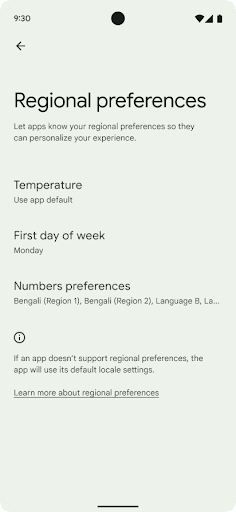
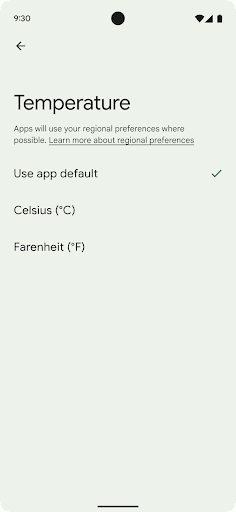
আঞ্চলিক পছন্দগুলি ব্যবহারকারীদের তাপমাত্রা ইউনিট, সপ্তাহের প্রথম দিন এবং নম্বর সিস্টেমগুলিকে ব্যক্তিগতকৃত করতে সক্ষম করে৷ মার্কিন যুক্তরাষ্ট্রে বসবাসকারী একজন ইউরোপীয় ব্যক্তি ফারেনহাইটের পরিবর্তে তাপমাত্রার একক সেলসিয়াসে থাকতে পছন্দ করতে পারেন এবং অ্যাপগুলির জন্য রবিবারের মার্কিন ডিফল্টের পরিবর্তে সোমবারকে সপ্তাহের শুরু হিসাবে বিবেচনা করতে পারে।
এই পছন্দগুলির জন্য নতুন অ্যান্ড্রয়েড সেটিংস মেনুগুলি ব্যবহারকারীদের অ্যাপ পছন্দগুলি পরিবর্তন করতে একটি আবিষ্কারযোগ্য এবং কেন্দ্রীভূত অবস্থান প্রদান করে৷ এই পছন্দগুলি ব্যাকআপ এবং পুনরুদ্ধারের মাধ্যমেও বজায় থাকে। বেশ কিছু API এবং উদ্দেশ্য — যেমন getTemperatureUnit এবং getFirstDayOfWeek — আপনার অ্যাপটিকে ব্যবহারকারীর পছন্দগুলিতে পড়ার অ্যাক্সেস মঞ্জুর করে, যাতে আপনার অ্যাপ কীভাবে তথ্য প্রদর্শন করে তা সামঞ্জস্য করতে পারে৷ আঞ্চলিক পছন্দ পরিবর্তন হলে লোকেল কনফিগারেশন পরিবর্তনগুলি পরিচালনা করতে আপনি ACTION_LOCALE_CHANGED এ একটি BroadcastReceiver নিবন্ধন করতে পারেন৷
এই সেটিংসগুলি খুঁজতে, সেটিংস অ্যাপটি খুলুন এবং সিস্টেম > ভাষা এবং ইনপুট > আঞ্চলিক পছন্দগুলিতে নেভিগেট করুন।
প্রবেশগম্যতা
২০০% পর্যন্ত নন-লিনিয়ার ফন্ট স্কেলিং
অ্যান্ড্রয়েড ১৪ থেকে শুরু করে, সিস্টেমটি ২০০% পর্যন্ত ফন্ট স্কেলিং সমর্থন করে, যা ব্যবহারকারীদের অতিরিক্ত অ্যাক্সেসিবিলিটি বিকল্প প্রদান করে।
স্ক্রিনে বৃহৎ টেক্সট এলিমেন্ট যাতে খুব বেশি স্কেলিং না করে, তার জন্য সিস্টেমটি একটি নন-লিনিয়ার স্কেলিং কার্ভ প্রয়োগ করে। এই স্কেলিং কৌশলের অর্থ হল বৃহৎ টেক্সট ছোট টেক্সটের সমান হারে স্কেলিং করে না। নন-লিনিয়ার ফন্ট স্কেলিং বিভিন্ন আকারের উপাদানের মধ্যে আনুপাতিক স্তরক্রম বজায় রাখতে সাহায্য করে এবং উচ্চ ডিগ্রীতে লিনিয়ার টেক্সট স্কেলিং (যেমন টেক্সট কেটে ফেলা বা অত্যন্ত বড় ডিসপ্লে সাইজের কারণে পড়া কঠিন হয়ে পড়া) সমস্যাগুলি কমাতে সাহায্য করে।
নন-লিনিয়ার ফন্ট স্কেলিং দিয়ে আপনার অ্যাপটি পরীক্ষা করুন
যদি আপনি ইতিমধ্যেই টেক্সট সাইজিং নির্ধারণের জন্য স্কেলড পিক্সেল (sp) ইউনিট ব্যবহার করেন, তাহলে এই অতিরিক্ত বিকল্পগুলি এবং স্কেলিং উন্নতিগুলি আপনার অ্যাপের টেক্সটে স্বয়ংক্রিয়ভাবে প্রয়োগ করা হবে। তবে, আপনার অ্যাপটি সঠিকভাবে ফন্ট সাইজ প্রয়োগ করে এবং ব্যবহারযোগ্যতাকে প্রভাবিত না করে বড় ফন্ট সাইজগুলিকে সামঞ্জস্য করতে পারে তা নিশ্চিত করার জন্য আপনার সর্বোচ্চ ফন্ট সাইজ (200%) সক্ষম করে UI পরীক্ষা করা উচিত।
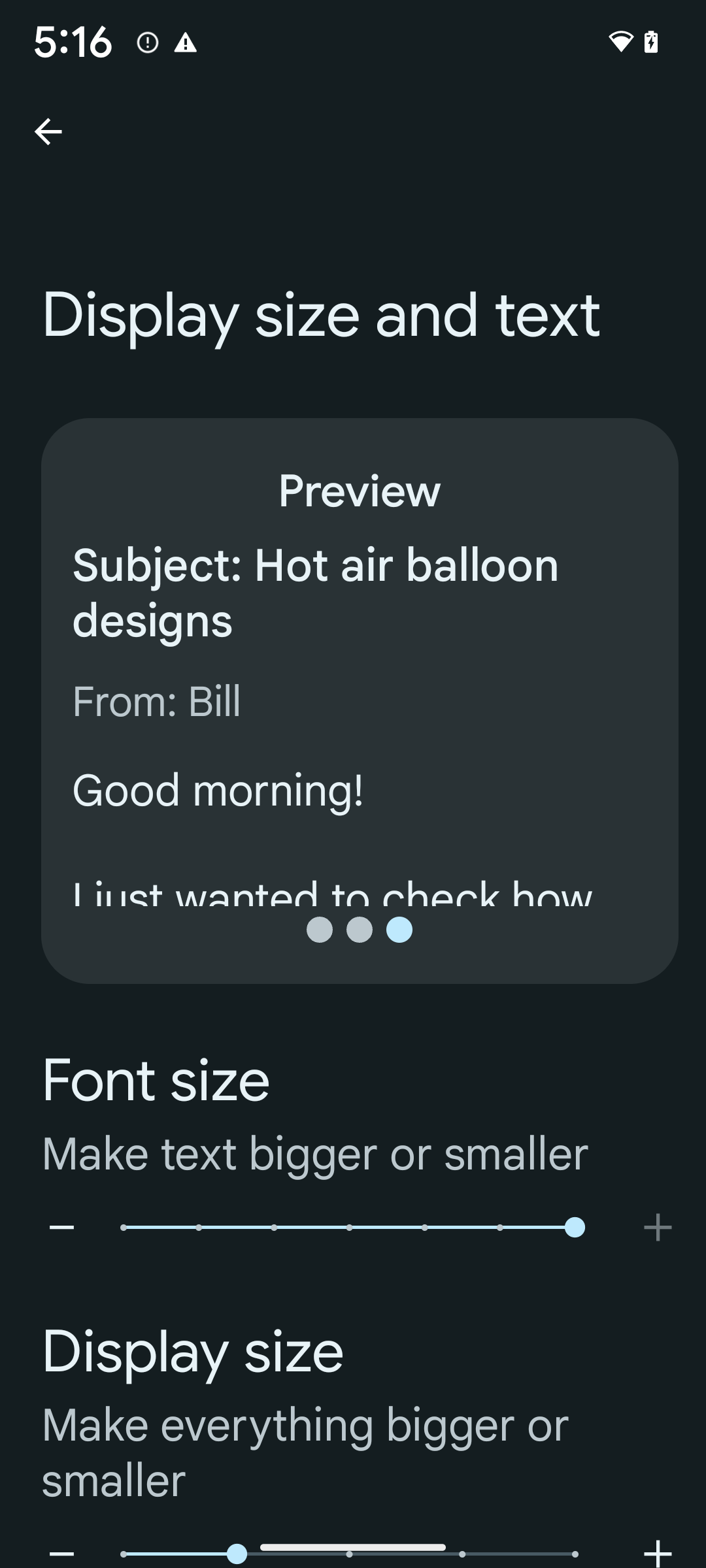
২০০% ফন্ট সাইজ সক্ষম করতে, এই পদক্ষেপগুলি অনুসরণ করুন:
- সেটিংস অ্যাপটি খুলুন এবং অ্যাক্সেসিবিলিটি > ডিসপ্লে সাইজ এবং টেক্সট এ যান।
- ফন্ট সাইজ বিকল্পের জন্য, প্লাস (+) আইকনে ট্যাপ করুন যতক্ষণ না সর্বোচ্চ ফন্ট সাইজ সেটিং সক্ষম হয়, যেমনটি এই বিভাগের সাথে থাকা ছবিতে দেখানো হয়েছে।
টেক্সট-সাইজ এর জন্য স্কেলড পিক্সেল (sp) ইউনিট ব্যবহার করুন
sp ইউনিটে টেক্সট সাইজ সবসময় নির্দিষ্ট করতে ভুলবেন না। যখন আপনার অ্যাপ sp ইউনিট ব্যবহার করে, তখন Android ব্যবহারকারীর পছন্দের টেক্সট সাইজ প্রয়োগ করতে পারে এবং যথাযথভাবে স্কেল করতে পারে।
প্যাডিংয়ের জন্য sp ইউনিট ব্যবহার করবেন না বা অন্তর্নিহিত প্যাডিং ধরে নিয়ে ভিউ হাইট নির্ধারণ করবেন না: নন-লিনিয়ার ফন্ট স্কেলিংয়ে sp মাত্রা সমানুপাতিক নাও হতে পারে, তাই 4sp + 20sp 24sp এর সমান নাও হতে পারে।
স্কেলড পিক্সেল (sp) ইউনিট রূপান্তর করুন
sp ইউনিট থেকে পিক্সেলে রূপান্তর করতে TypedValue.applyDimension() ব্যবহার করুন, এবং পিক্সেলকে sp তে রূপান্তর করতে TypedValue.deriveDimension() ব্যবহার করুন। এই পদ্ধতিগুলি স্বয়ংক্রিয়ভাবে উপযুক্ত নন-লিনিয়ার স্কেলিং কার্ভ প্রয়োগ করে।
Configuration.fontScale অথবা DisplayMetrics.scaledDensity ব্যবহার করে হার্ডকোডিং সমীকরণ এড়িয়ে চলুন । যেহেতু ফন্ট স্কেলিং অরৈখিক, তাই scaledDensity ক্ষেত্রটি আর সঠিক নয়। fontScale ক্ষেত্রটি কেবল তথ্যের উদ্দেশ্যে ব্যবহার করা উচিত কারণ ফন্টগুলি আর একক স্কেলার মান দিয়ে স্কেল করা হয় না।
লাইনহাইটের জন্য sp ইউনিট ব্যবহার করুন
সর্বদা dp এর পরিবর্তে sp ইউনিট ব্যবহার করে android:lineHeight সংজ্ঞায়িত করুন, যাতে লাইনের উচ্চতা আপনার টেক্সটের সাথে স্কেল হয়। অন্যথায়, যদি আপনার টেক্সট sp হয় কিন্তু আপনার lineHeight dp বা px এ থাকে, তাহলে এটি স্কেল করে না এবং সঙ্কুচিত দেখায়। TextView স্বয়ংক্রিয়ভাবে lineHeight সংশোধন করে যাতে আপনার অভিপ্রেত অনুপাতগুলি সংরক্ষিত থাকে, তবে শুধুমাত্র যদি textSize এবং lineHeight উভয়ই sp ইউনিটে সংজ্ঞায়িত করা হয়।
ক্যামেরা এবং মিডিয়া
ছবির জন্য আল্ট্রা এইচডিআর
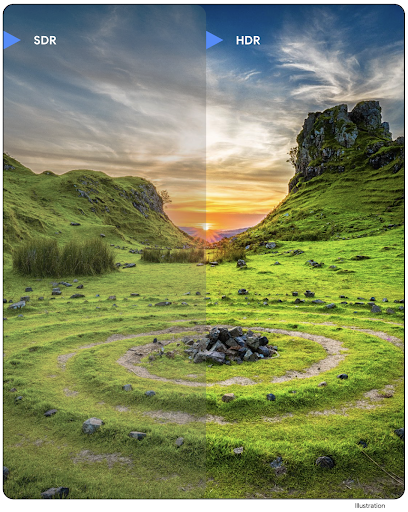
Android 14 হাই ডায়নামিক রেঞ্জ (HDR) চিত্রগুলির জন্য সমর্থন যোগ করে যা একটি ফটো তোলার সময় সেন্সর থেকে আরও তথ্য ধরে রাখে, যা প্রাণবন্ত রঙ এবং বৃহত্তর বৈসাদৃশ্য সক্ষম করে। অ্যান্ড্রয়েড আল্ট্রা এইচডিআর ফরম্যাট ব্যবহার করে, যা JPEG ছবির সাথে সম্পূর্ণ পশ্চাৎপদ সামঞ্জস্যপূর্ণ, অ্যাপগুলিকে HDR চিত্রগুলির সাথে নির্বিঘ্নে আন্তঃঅপারেটিং করার অনুমতি দেয়, সেগুলিকে প্রয়োজন অনুসারে স্ট্যান্ডার্ড ডায়নামিক রেঞ্জে (SDR) প্রদর্শন করে৷
HDR-এ UI-তে এই ছবিগুলি রেন্ডার করা ফ্রেমওয়ার্ক দ্বারা স্বয়ংক্রিয়ভাবে সম্পন্ন হয় যখন আপনার অ্যাপটি তার কার্যকলাপ উইন্ডোর জন্য HDR UI ব্যবহার করতে বেছে নেয়, হয় একটি ম্যানিফেস্ট এন্ট্রির মাধ্যমে বা রানটাইমে Window.setColorMode() কল করে । আপনি সমর্থিত ডিভাইসগুলিতে সংকুচিত আল্ট্রা এইচডিআর স্থির চিত্রগুলিও ক্যাপচার করতে পারেন। সেন্সর থেকে আরো রং উদ্ধারের সাথে, পোস্টে সম্পাদনা আরও নমনীয় হতে পারে। আল্ট্রা এইচডিআর ইমেজের সাথে যুক্ত Gainmap OpenGL বা Vulkan ব্যবহার করে রেন্ডার করতে ব্যবহার করা যেতে পারে।
Android 14 হাই ডায়নামিক রেঞ্জ (HDR) চিত্রগুলির জন্য সমর্থন যোগ করে যা একটি ফটো তোলার সময় সেন্সর থেকে আরও তথ্য ধরে রাখে, যা প্রাণবন্ত রঙ এবং বৃহত্তর বৈসাদৃশ্য সক্ষম করে। অ্যান্ড্রয়েড আল্ট্রা এইচডিআর ফরম্যাট ব্যবহার করে, যা JPEG ছবির সাথে সম্পূর্ণ পশ্চাৎপদ সামঞ্জস্যপূর্ণ, অ্যাপগুলিকে HDR চিত্রগুলির সাথে নির্বিঘ্নে আন্তঃঅপারেটিং করার অনুমতি দেয়, সেগুলিকে প্রয়োজন অনুসারে স্ট্যান্ডার্ড ডায়নামিক রেঞ্জে (SDR) প্রদর্শন করে৷
HDR-এ UI-তে এই ছবিগুলি রেন্ডার করা ফ্রেমওয়ার্ক দ্বারা স্বয়ংক্রিয়ভাবে সম্পন্ন হয় যখন আপনার অ্যাপটি তার কার্যকলাপ উইন্ডোর জন্য HDR UI ব্যবহার করতে বেছে নেয়, হয় একটি ম্যানিফেস্ট এন্ট্রির মাধ্যমে বা রানটাইমে Window.setColorMode() কল করে । আপনি সমর্থিত ডিভাইসগুলিতে সংকুচিত আল্ট্রা এইচডিআর স্থির চিত্রগুলিও ক্যাপচার করতে পারেন। সেন্সর থেকে আরো রং পুনরুদ্ধার করার সাথে, পোস্টে সম্পাদনা আরও নমনীয় হতে পারে। আল্ট্রা এইচডিআর ইমেজের সাথে যুক্ত Gainmap OpenGL বা Vulkan ব্যবহার করে রেন্ডার করতে ব্যবহার করা যেতে পারে।
ক্যামেরা এক্সটেনশনে জুম, ফোকাস, পোস্টভিউ এবং আরও অনেক কিছু।
অ্যান্ড্রয়েড 14 ক্যামেরা এক্সটেনশানগুলিকে আপগ্রেড করে এবং উন্নত করে, অ্যাপগুলিকে দীর্ঘ প্রক্রিয়াকরণের সময়গুলি পরিচালনা করার অনুমতি দেয়, যা সমর্থিত ডিভাইসগুলিতে কম-আলো ফটোগ্রাফির মতো গণনা-নিবিড় অ্যালগরিদম ব্যবহার করে উন্নত ছবিগুলিকে সক্ষম করে৷ ক্যামেরা এক্সটেনশন ক্ষমতা ব্যবহার করার সময় এই বৈশিষ্ট্যগুলি ব্যবহারকারীদের আরও শক্তিশালী অভিজ্ঞতা দেয়। এই উন্নতিগুলির উদাহরণগুলির মধ্যে রয়েছে:
- ডায়নামিক স্টিল ক্যাপচার প্রসেসিং লেটেন্সি অনুমান বর্তমান দৃশ্য এবং পরিবেশ পরিস্থিতির উপর ভিত্তি করে অনেক বেশি সঠিক এখনও ক্যাপচার লেটেন্সি অনুমান প্রদান করে। একটি
StillCaptureLatencyঅবজেক্ট পেতেCameraExtensionSession.getRealtimeStillCaptureLatency()কল করুন যাতে দুটি লেটেন্সি অনুমান পদ্ধতি রয়েছে৷getCaptureLatency()পদ্ধতিটিonCaptureStartedএবংonCaptureProcessStarted()এর মধ্যে আনুমানিক লেটেন্সি প্রদান করে এবংgetProcessingLatency()পদ্ধতিটিonCaptureProcessStarted()এবং উপলব্ধ চূড়ান্ত প্রক্রিয়াকৃত ফ্রেমের মধ্যে আনুমানিক লেটেন্সি প্রদান করে। - ক্যাপচার অগ্রগতি কলব্যাকগুলির জন্য সমর্থন যাতে অ্যাপগুলি দীর্ঘ-চলমান, স্থির-ক্যাপচার প্রক্রিয়াকরণ ক্রিয়াকলাপগুলির বর্তমান অগ্রগতি প্রদর্শন করতে পারে। আপনি
CameraExtensionCharacteristics.isCaptureProcessProgressAvailableএর সাথে এই বৈশিষ্ট্যটি উপলব্ধ কিনা তা পরীক্ষা করতে পারেন, এবং যদি এটি হয়, তাহলে আপনিonCaptureProcessProgressed()কলব্যাক প্রয়োগ করেন, যার অগ্রগতি (0 থেকে 100 পর্যন্ত) একটি প্যারামিটার হিসাবে পাস করা হয়েছে৷ এক্সটেনশন নির্দিষ্ট মেটাডেটা, যেমন
CaptureRequest.EXTENSION_STRENGTHএকটি এক্সটেনশন প্রভাবের পরিমাণে ডায়াল করার জন্য, যেমনEXTENSION_BOKEHএর সাথে ব্যাকগ্রাউন্ড ব্লারের পরিমাণ।ক্যামেরা এক্সটেনশনগুলিতে স্টিল ক্যাপচারের জন্য পোস্টভিউ বৈশিষ্ট্য, যা চূড়ান্ত চিত্রের চেয়ে কম প্রক্রিয়াজাত চিত্র প্রদান করে। যদি একটি এক্সটেনশন প্রসেসিং লেটেন্সি বাড়িয়ে দেয়, তাহলে UX উন্নত করার জন্য একটি পোস্টভিউ ইমেজ প্লেসহোল্ডার হিসেবে প্রদান করা যেতে পারে এবং পরে চূড়ান্ত ইমেজের জন্য স্যুইচ আউট করা যেতে পারে। আপনি
CameraExtensionCharacteristics.isPostviewAvailableএর সাথে এই বৈশিষ্ট্যটি উপলব্ধ কিনা তা পরীক্ষা করতে পারেন। তারপর আপনিExtensionSessionConfiguration.setPostviewOutputConfigurationএ একটিOutputConfigurationপাস করতে পারেন।SurfaceViewএর জন্য সমর্থন আরও অপ্টিমাইজ করা এবং শক্তি-দক্ষ প্রিভিউ রেন্ডার পাথের জন্য অনুমতি দেয়।এক্সটেনশন ব্যবহারের সময় ফোকাস এবং জুম করার জন্য ট্যাপ করার জন্য সমর্থন।
ইন-সেন্সর জুম
যখন CameraCharacteristics REQUEST_AVAILABLE_CAPABILITIES_STREAM_USE_CASE SCALER_AVAILABLE_STREAM_USE_CASES_CROPPED_RAW থাকে, তখন আপনার অ্যাপ উন্নত সেন্সর ক্ষমতা ব্যবহার করতে পারে একটি ক্রপ করা RAW স্ট্রীম ব্যবহার করে যেটি ক্যাপচারের পুরো ক্ষেত্রটি ক্যাপচারের সাথে CaptureRequest ব্যবহার করে CameraMetadata.SCALER_AVAILABLE_STREAM_USE_CASES_CROPPED_RAW এ সেট করা হয়েছে। অনুরোধ ওভাররাইড নিয়ন্ত্রণ বাস্তবায়ন করে, আপডেট করা ক্যামেরা ব্যবহারকারীদের জুম নিয়ন্ত্রণ দেয় এমনকি অন্যান্য ক্যামেরা নিয়ন্ত্রণ প্রস্তুত হওয়ার আগেই।
লসলেস ইউএসবি অডিও
Android 14 USB তারযুক্ত হেডসেটের মাধ্যমে অডিওফাইল-স্তরের অভিজ্ঞতার জন্য ক্ষতিহীন অডিও ফর্ম্যাটের জন্য সমর্থন লাভ করে। আপনি একটি USB ডিভাইসের পছন্দের মিক্সার অ্যাট্রিবিউটের জন্য প্রশ্ন করতে পারেন, পছন্দের মিক্সার অ্যাট্রিবিউটের পরিবর্তনের জন্য একজন শ্রোতা নিবন্ধন করতে পারেন এবং AudioMixerAttributes ক্লাস ব্যবহার করে মিক্সার অ্যাট্রিবিউট কনফিগার করতে পারেন। এই শ্রেণীটি বিন্যাস উপস্থাপন করে, যেমন চ্যানেল মাস্ক, নমুনা হার এবং অডিও মিক্সারের আচরণ। ক্লাস অডিও সরাসরি পাঠানোর অনুমতি দেয়, মিশ্রণ, ভলিউম সমন্বয়, বা প্রক্রিয়াকরণ প্রভাব ছাড়াই।
ডেভেলপারদের উৎপাদনশীলতা এবং সরঞ্জাম
ক্রেডেনশিয়াল ম্যানেজার
অ্যান্ড্রয়েড ১৪-এ ক্রেডেনশিয়াল ম্যানেজারকে একটি প্ল্যাটফর্ম এপিআই হিসেবে যুক্ত করা হয়েছে এবং গুগল প্লে সার্ভিসেস ব্যবহার করে একটি জেটপ্যাক লাইব্রেরির মাধ্যমে অ্যান্ড্রয়েড ৪.৪ (এপিআই লেভেল ১৯) ডিভাইস পর্যন্ত অতিরিক্ত সাপোর্ট রয়েছে। ক্রেডেনশিয়াল ম্যানেজারের লক্ষ্য হলো এমন এপিআই-এর মাধ্যমে ব্যবহারকারীদের জন্য সাইন-ইন সহজ করা, যা ব্যবহারকারী-কনফিগার করা ক্রেডেনশিয়াল প্রোভাইডারদের কাছে ক্রেডেনশিয়াল পুনরুদ্ধার ও সংরক্ষণ করে। ক্রেডেনশিয়াল ম্যানেজার একটি একক এপিআই-এর অধীনে ইউজারনেম ও পাসওয়ার্ড, পাসকি এবং ফেডারেটেড সাইন-ইন সলিউশন (যেমন সাইন-ইন উইথ গুগল) সহ একাধিক সাইন-ইন পদ্ধতি সমর্থন করে।
পাসকি অনেক সুবিধা প্রদান করে। উদাহরণস্বরূপ, পাসকিগুলো ইন্ডাস্ট্রির স্ট্যান্ডার্ড অনুযায়ী তৈরি হয়, বিভিন্ন অপারেটিং সিস্টেম ও ব্রাউজার ইকোসিস্টেমে কাজ করতে পারে এবং ওয়েবসাইট ও অ্যাপ উভয়ের সাথেই ব্যবহার করা যায়।
আরও তথ্যের জন্য, ক্রেডেনশিয়াল ম্যানেজার ও পাসকি ডকুমেন্টেশন এবং ক্রেডেনশিয়াল ম্যানেজার ও পাসকি সম্পর্কিত ব্লগপোস্টটি দেখুন।
স্বাস্থ্য সংযোগ
Health Connect হল ব্যবহারকারীর স্বাস্থ্য এবং ফিটনেস ডেটার জন্য একটি অন-ডিভাইস সংগ্রহস্থল। এটি ব্যবহারকারীদের তাদের পছন্দের অ্যাপগুলির মধ্যে ডেটা শেয়ার করতে দেয়, এই অ্যাপগুলির সাথে তারা কোন ডেটা ভাগ করতে চায় তা নিয়ন্ত্রণ করতে একটি একক জায়গা দিয়ে।
Android 14-এর পূর্বে Android সংস্করণে চলমান ডিভাইসগুলিতে, Health Connect Google Play স্টোরে একটি অ্যাপ হিসেবে ডাউনলোড করার জন্য উপলব্ধ। Android 14 দিয়ে শুরু করে, Health Connect হল প্ল্যাটফর্মের অংশ এবং আলাদা ডাউনলোডের প্রয়োজন ছাড়াই Google Play সিস্টেম আপডেটের মাধ্যমে আপডেট গ্রহণ করে। এটির সাহায্যে, Health Connect ঘন ঘন আপডেট করা যেতে পারে এবং আপনার অ্যাপগুলি Android 14 বা উচ্চতর সংস্করণে চালিত ডিভাইসগুলিতে উপলব্ধ থাকা Health Connect-এর উপর নির্ভর করতে পারে। ব্যবহারকারীরা তাদের ডিভাইসের সেটিংস থেকে, সিস্টেম সেটিংসে একত্রিত গোপনীয়তা নিয়ন্ত্রণ সহ Health Connect অ্যাক্সেস করতে পারে৷
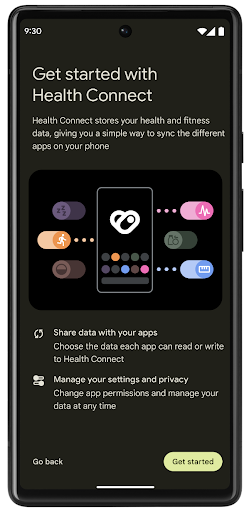
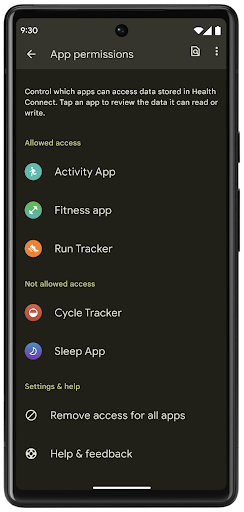
হেলথ কানেক্ট এন্ড্রয়েড 14-এ বেশ কিছু নতুন বৈশিষ্ট্য অন্তর্ভুক্ত করে, যেমন ব্যায়াম রুট, ব্যবহারকারীদের তাদের ওয়ার্কআউটের একটি রুট শেয়ার করার অনুমতি দেয় যা ম্যাপে ভিজ্যুয়ালাইজ করা যায়। একটি রুটকে সময়ের একটি উইন্ডোর মধ্যে সংরক্ষিত অবস্থানগুলির একটি তালিকা হিসাবে সংজ্ঞায়িত করা হয় এবং আপনার অ্যাপ ব্যায়াম সেশনে রুটগুলিকে একত্রে সংযুক্ত করে সন্নিবেশ করতে পারে৷ ব্যবহারকারীদের এই সংবেদনশীল ডেটার উপর সম্পূর্ণ নিয়ন্ত্রণ আছে তা নিশ্চিত করতে, ব্যবহারকারীদের অবশ্যই অন্যান্য অ্যাপের সাথে পৃথক রুট শেয়ার করার অনুমতি দিতে হবে।
আরও তথ্যের জন্য, স্বাস্থ্য সংযোগ ডকুমেন্টেশন এবং অ্যান্ড্রয়েড হেলথ-এ নতুন কী আছে ব্লগপোস্ট দেখুন।
OpenJDK 17 আপডেট
অ্যান্ড্রয়েড 14 অ্যাপ এবং প্ল্যাটফর্ম ডেভেলপারদের জন্য লাইব্রেরি আপডেট এবং জাভা 17 ভাষা সমর্থন উভয় সহ সর্বশেষ OpenJDK LTS রিলিজের বৈশিষ্ট্যগুলির সাথে সারিবদ্ধ করার জন্য Android এর মূল লাইব্রেরিগুলিকে রিফ্রেশ করার কাজ চালিয়ে যাচ্ছে।
নিম্নলিখিত বৈশিষ্ট্য এবং উন্নতি অন্তর্ভুক্ত করা হয়েছে:
- জাভা 17 সমর্থনে প্রায় 300টি
java.baseক্লাস আপডেট করা হয়েছে। - টেক্সট ব্লক , যা জাভা প্রোগ্রামিং ভাষায় মাল্টি-লাইন স্ট্রিং লিটারেল প্রবর্তন করে।
- instanceof-এর জন্য প্যাটার্ন ম্যাচিং , যা কোনো বস্তুকে কোনো অতিরিক্ত ভেরিয়েবল ছাড়াই একটি
instanceofএকটি নির্দিষ্ট ধরণ হিসেবে গণ্য করার অনুমতি দেয়। - সীলমোহর করা ক্লাস , যা আপনাকে কোন ক্লাস এবং ইন্টারফেসগুলিকে প্রসারিত বা প্রয়োগ করতে পারে তা সীমাবদ্ধ করতে দেয়।
গুগল প্লে সিস্টেম আপডেট (প্রজেক্ট মেইনলাইন) এর জন্য ধন্যবাদ, 600 মিলিয়নেরও বেশি ডিভাইস সর্বশেষতম অ্যান্ড্রয়েড রানটাইম (ART) আপডেট পেতে সক্ষম হয়েছে যাতে এই পরিবর্তনগুলি অন্তর্ভুক্ত রয়েছে। এটি আমাদের অঙ্গীকারের অংশ যাতে অ্যাপগুলিকে ডিভাইস জুড়ে আরও সামঞ্জস্যপূর্ণ, সুরক্ষিত পরিবেশ দেওয়া যায় এবং প্ল্যাটফর্ম রিলিজ ছাড়া ব্যবহারকারীদের কাছে নতুন বৈশিষ্ট্য এবং ক্ষমতা প্রদান করা যায়।
Java এবং OpenJDK হল ওরাকল এবং/অথবা এর সহযোগীদের ট্রেডমার্ক বা নিবন্ধিত ট্রেডমার্ক।
অ্যাপ স্টোরগুলির জন্য উন্নতি
অ্যান্ড্রয়েড 14 বেশ কয়েকটি PackageInstaller এপিআই প্রবর্তন করে যা অ্যাপ স্টোরগুলিকে তাদের ব্যবহারকারীর অভিজ্ঞতা উন্নত করতে দেয়।
ডাউনলোড করার আগে ইনস্টল করার অনুমোদনের জন্য অনুরোধ করুন
একটি অ্যাপ ইনস্টল বা আপডেট করার জন্য ব্যবহারকারীর অনুমোদনের প্রয়োজন হতে পারে। উদাহরণস্বরূপ, যখন একটি ইনস্টলার REQUEST_INSTALL_PACKAGES অনুমতি ব্যবহার করে একটি নতুন অ্যাপ ইনস্টল করার চেষ্টা করে৷ পূর্ববর্তী অ্যান্ড্রয়েড সংস্করণগুলিতে, অ্যাপ স্টোরগুলি শুধুমাত্র ইনস্টল সেশনে APK লেখার পরে এবং সেশনটি প্রতিশ্রুতিবদ্ধ হওয়ার পরে ব্যবহারকারীর অনুমোদনের অনুরোধ করতে পারে৷
Android 14 দিয়ে শুরু করে, requestUserPreapproval() পদ্ধতিটি ইনস্টলারদের ইনস্টল সেশন করার আগে ব্যবহারকারীর অনুমোদনের অনুরোধ করতে দেয়। এই উন্নতিটি ব্যবহারকারীর দ্বারা ইনস্টলেশন অনুমোদন না হওয়া পর্যন্ত একটি অ্যাপ স্টোরকে যেকোনো APK ডাউনলোড করা স্থগিত করতে দেয়। অধিকন্তু, একবার একজন ব্যবহারকারী ইনস্টলেশন অনুমোদন করলে, অ্যাপ স্টোর ব্যবহারকারীকে বাধা না দিয়ে পটভূমিতে অ্যাপটি ডাউনলোড এবং ইনস্টল করতে পারে।
ভবিষ্যতের আপডেটের জন্য দায়িত্ব দাবি করুন
setRequestUpdateOwnership() পদ্ধতিটি একটি ইনস্টলারকে সিস্টেমকে নির্দেশ করতে দেয় যে এটি ইনস্টল করা একটি অ্যাপের ভবিষ্যতের আপডেটের জন্য দায়ী হতে চায়। এই ক্ষমতা আপডেট মালিকানা এনফোর্সমেন্টকে সক্ষম করে, যার মানে শুধুমাত্র আপডেট মালিককে অ্যাপে স্বয়ংক্রিয় আপডেট ইনস্টল করার অনুমতি দেওয়া হয়। আপডেট মালিকানা এনফোর্সমেন্ট নিশ্চিত করতে সাহায্য করে যে ব্যবহারকারীরা শুধুমাত্র প্রত্যাশিত অ্যাপ স্টোর থেকে আপডেট পান।
INSTALL_PACKAGES অনুমতি ব্যবহার করা সহ অন্য যেকোনো ইনস্টলারকে একটি আপডেট ইনস্টল করার জন্য স্পষ্ট ব্যবহারকারীর অনুমোদন পেতে হবে। যদি একজন ব্যবহারকারী অন্য উৎস থেকে আপডেট নিয়ে এগিয়ে যাওয়ার সিদ্ধান্ত নেন, তাহলে আপডেটের মালিকানা হারিয়ে যায়।
কম ব্যাঘাতমূলক সময়ে অ্যাপ আপডেট করুন
অ্যাপ স্টোরগুলি সাধারণত সক্রিয়ভাবে ব্যবহার করা একটি অ্যাপ আপডেট করা এড়াতে চায় কারণ এটি অ্যাপের চলমান প্রক্রিয়াগুলিকে হত্যার দিকে নিয়ে যায়, যা ব্যবহারকারী যা করছিল তা সম্ভাব্যভাবে বাধা দেয়।
Android 14 দিয়ে শুরু করে, InstallConstraints API ইনস্টলারদের তাদের অ্যাপ আপডেটগুলি একটি উপযুক্ত মুহূর্তে ঘটে তা নিশ্চিত করার একটি উপায় দেয়। উদাহরণ স্বরূপ, একটি অ্যাপ স্টোর commitSessionAfterInstallConstraintsAreMet() পদ্ধতিতে কল করতে পারে যাতে নিশ্চিত করা যায় যে একটি আপডেট শুধুমাত্র তখনই প্রতিশ্রুতিবদ্ধ যখন ব্যবহারকারী আর প্রশ্নযুক্ত অ্যাপের সাথে ইন্টারঅ্যাক্ট করছেন না।
নির্বিঘ্নে ঐচ্ছিক বিভাজন ইনস্টল করুন
বিভক্ত APK-এর সাহায্যে, কোনো অ্যাপের বৈশিষ্ট্যগুলিকে একচেটিয়া APK না করে আলাদা APK ফাইলে বিতরণ করা যেতে পারে। স্প্লিট APK অ্যাপ স্টোরগুলিকে বিভিন্ন অ্যাপের উপাদানের ডেলিভারি অপ্টিমাইজ করার অনুমতি দেয়। উদাহরণস্বরূপ, অ্যাপ স্টোরগুলি লক্ষ্য ডিভাইসের বৈশিষ্ট্যের উপর ভিত্তি করে অপ্টিমাইজ করতে পারে। PackageInstaller API API স্তর 22-এ প্রবর্তনের পর থেকে বিভাজন সমর্থন করেছে।
Android 14-এ, setDontKillApp() পদ্ধতিটি একটি ইনস্টলারকে ইঙ্গিত করতে দেয় যে নতুন স্প্লিটগুলি ইনস্টল করার সময় অ্যাপের চলমান প্রক্রিয়াগুলিকে হত্যা করা উচিত নয়। অ্যাপ স্টোরগুলি ব্যবহারকারী অ্যাপটি ব্যবহার করার সময় একটি অ্যাপের নতুন বৈশিষ্ট্যগুলি নির্বিঘ্নে ইনস্টল করতে এই বৈশিষ্ট্যটি ব্যবহার করতে পারে।
অ্যাপ মেটাডেটা বান্ডেল
অ্যান্ড্রয়েড 14 থেকে শুরু করে, অ্যান্ড্রয়েড প্যাকেজ ইনস্টলার আপনাকে অ্যাপ মেটাডেটা নির্দিষ্ট করতে দেয়, যেমন ডেটা নিরাপত্তা অনুশীলন, অ্যাপ স্টোর পৃষ্ঠাগুলিতে অন্তর্ভুক্ত করার জন্য যেমন Google Play।
ব্যবহারকারীরা কখন ডিভাইসের স্ক্রিনশট নেয় তা শনাক্ত করুন
স্ক্রিনশট শনাক্তকরণের জন্য আরও একটি মানসম্মত অভিজ্ঞতা তৈরি করতে, অ্যান্ড্রয়েড ১৪ একটি গোপনীয়তা-সংরক্ষক স্ক্রিনশট ডিটেকশন এপিআই (API) চালু করেছে। এই এপিআই অ্যাপগুলোকে প্রতিটি অ্যাক্টিভিটির জন্য আলাদাভাবে কলব্যাক রেজিস্টার করার সুযোগ দেয়। যখন কোনো অ্যাক্টিভিটি দৃশ্যমান থাকা অবস্থায় ব্যবহারকারী একটি স্ক্রিনশট নেন, তখন এই কলব্যাকগুলো সক্রিয় হয় এবং ব্যবহারকারীকে অবহিত করা হয়।
ব্যবহারকারীর অভিজ্ঞতা
শেয়ারশিট কাস্টম অ্যাকশন এবং উন্নত র্যাঙ্কিং
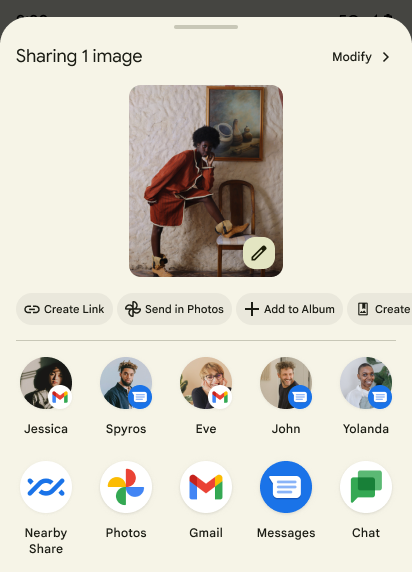
অ্যান্ড্রয়েড 14 ব্যবহারকারীদের জন্য কাস্টম অ্যাপ অ্যাকশন এবং আরও তথ্যপূর্ণ পূর্বরূপ ফলাফল সমর্থন করতে সিস্টেম শেয়ারশীট আপডেট করে।
কাস্টম অ্যাকশন যোগ করুন
অ্যান্ড্রয়েড 14 এর সাথে, আপনার অ্যাপটি এটি যে সিস্টেম শেয়ারশীটে আহ্বান করে তাতে কাস্টম অ্যাকশন যোগ করতে পারে।
সরাসরি শেয়ার লক্ষ্যের র্যাঙ্কিং উন্নত করুন
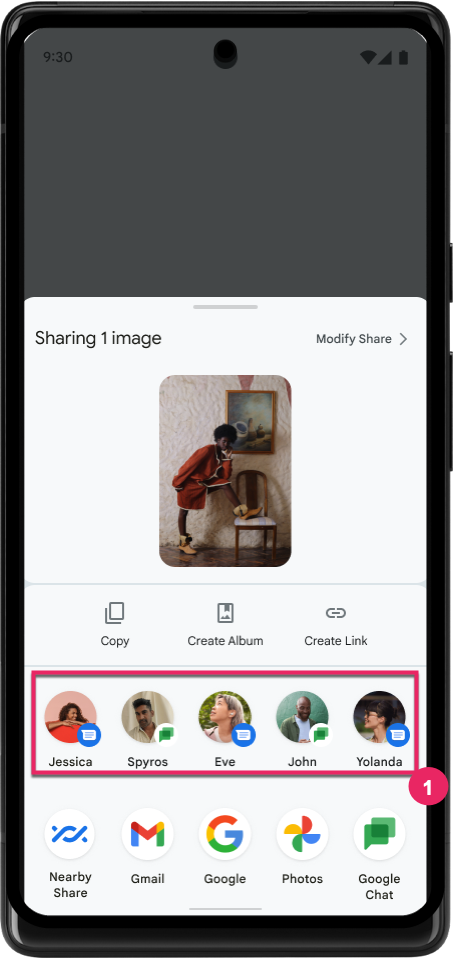
অ্যান্ড্রয়েড 14 ব্যবহারকারীর জন্য আরও সহায়ক ফলাফল প্রদানের জন্য সরাসরি শেয়ারের লক্ষ্যগুলির র্যাঙ্কিং নির্ধারণ করতে অ্যাপ থেকে আরও বেশি সংকেত ব্যবহার করে। র্যাঙ্কিংয়ের জন্য সবচেয়ে দরকারী সংকেত প্রদান করতে, আপনার সরাসরি শেয়ার লক্ষ্যগুলির র্যাঙ্কিং উন্নত করার জন্য নির্দেশিকা অনুসরণ করুন। যোগাযোগ অ্যাপগুলি বহির্গামী এবং আগত বার্তাগুলির জন্য শর্টকাট ব্যবহারেরও রিপোর্ট করতে পারে।
প্রেডিক্টিভ ব্যাক-এর জন্য বিল্ট-ইন এবং কাস্টম অ্যানিমেশনের সমর্থন
Android 13 একটি বিকাশকারী বিকল্পের পিছনে ভবিষ্যদ্বাণীমূলক ব্যাক-টু-হোম অ্যানিমেশন চালু করেছে। ডেভেলপার বিকল্প চালু থাকা সমর্থিত অ্যাপে ব্যবহার করা হলে, পিছনে সোয়াইপ করা একটি অ্যানিমেশন দেখায় যা নির্দেশ করে যে পিছনের অঙ্গভঙ্গি অ্যাপ থেকে হোম স্ক্রিনে ফিরে আসে।
অ্যান্ড্রয়েড 14-এ একাধিক উন্নতি এবং ভবিষ্যদ্বাণীমূলক পিছনের জন্য নতুন নির্দেশিকা রয়েছে:
- আপনি সমগ্র অ্যাপের পরিবর্তে ক্রিয়াকলাপ প্রতি পূর্বাভাসমূলক ব্যাক সিস্টেম অ্যানিমেশন নির্বাচন করতে
android:enableOnBackInvokedCallback=trueসেট করতে পারেন। - আমরা অ্যান্ড্রয়েড 13 থেকে হোম-টু-হোম অ্যানিমেশনের সাথে নতুন সিস্টেম অ্যানিমেশন যোগ করেছি। নতুন সিস্টেম অ্যানিমেশনগুলি হল ক্রস-অ্যাক্টিভিটি এবং ক্রস-টাস্ক, যা আপনি প্রেডিকটিভ ব্যাক-এ স্থানান্তরিত করার পরে স্বয়ংক্রিয়ভাবে পেয়ে যাবেন।
- আমরা নীচের শীট , সাইড শীট এবং অনুসন্ধানের জন্য নতুন উপাদান উপাদান অ্যানিমেশন যুক্ত করেছি।
- আমরা কাস্টম ইন-অ্যাপ অ্যানিমেশন এবং ট্রানজিশন তৈরি করার জন্য ডিজাইন নির্দেশিকা তৈরি করেছি।
- কাস্টম ইন-অ্যাপ ট্রানজিশন অ্যানিমেশন সমর্থন করার জন্য আমরা নতুন API যোগ করেছি:
-
OnBackPressedCallbackinhandleOnBackStarted,handleOnBackProgressed,handleOnBackCancelled -
onBackStarted,onBackProgressed,OnBackAnimationCallbackinonBackCancelled - ট্রানজিশনের জন্য ওভাররাইড অ্যাক্টিভিটি
overridePendingTransitionপরিবর্তেoverrideActivityTransitionট্রানজিশন ব্যবহার করুন যা ব্যবহারকারীর পিছনে সোয়াইপ করার সাথে সাথে প্রতিক্রিয়া জানায়।
-
এই অ্যান্ড্রয়েড 14 প্রিভিউ রিলিজের সাথে, প্রেডিকটিভ ব্যাকের সমস্ত বৈশিষ্ট্য একটি বিকাশকারী বিকল্পের পিছনে থাকে। আপনার অ্যাপ্লিকেশানটিকে পূর্বাভাসমূলক পিছনে স্থানান্তর করতে বিকাশকারী নির্দেশিকা দেখুন, সেইসাথে কাস্টম ইন-অ্যাপ ট্রানজিশন তৈরি করার জন্য বিকাশকারী নির্দেশিকা দেখুন৷
বড় স্ক্রিনের ডিভাইস প্রস্তুতকারকের প্রতি-অ্যাপ ওভাররাইড
প্রতি-অ্যাপ ওভাররাইডগুলি ডিভাইস নির্মাতাদের বড় স্ক্রিনের ডিভাইসে অ্যাপের আচরণ পরিবর্তন করতে সক্ষম করে। উদাহরণ স্বরূপ, FORCE_RESIZE_APP ওভাররাইড সিস্টেমকে ডিসপ্লে ডাইমেনশনের সাথে ফিট করার জন্য অ্যাপের আকার পরিবর্তন করার নির্দেশ দেয় (আকারের সামঞ্জস্য মোড এড়িয়ে যাওয়া) এমনকি যদি অ্যাপ ম্যানিফেস্টে resizeableActivity="false" সেট করা থাকে।
ওভাররাইডগুলি বড় স্ক্রিনে ব্যবহারকারীর অভিজ্ঞতা উন্নত করার উদ্দেশ্যে করা হয়েছে৷
নতুন ম্যানিফেস্ট বৈশিষ্ট্যগুলি আপনাকে আপনার অ্যাপের জন্য কিছু ডিভাইস প্রস্তুতকারক ওভাররাইড অক্ষম করতে সক্ষম করে৷
বড় স্ক্রিনের ব্যবহারকারীর জন্য অ্যাপ-ভিত্তিক ওভাররাইড
প্রতি-অ্যাপ ওভাররাইড বড় স্ক্রিনের ডিভাইসে অ্যাপের আচরণ পরিবর্তন করে। উদাহরণস্বরূপ, OVERRIDE_MIN_ASPECT_RATIO_LARGE ডিভাইস নির্মাতা ওভাররাইড অ্যাপের কনফিগারেশন নির্বিশেষে অ্যাপের আকৃতির অনুপাত 16:9 এ সেট করে।
Android 14 QPR1 ব্যবহারকারীদের বড় স্ক্রিনের ডিভাইসে একটি নতুন সেটিংস মেনুর মাধ্যমে প্রতি-অ্যাপ ওভাররাইড প্রয়োগ করতে সক্ষম করে।
অ্যাপ স্ক্রিন শেয়ারিং
অ্যাপ স্ক্রিন শেয়ারিং ব্যবহারকারীদের স্ক্রিন সামগ্রী রেকর্ডিংয়ের সময় পুরো ডিভাইস স্ক্রীনের পরিবর্তে একটি অ্যাপ উইন্ডো শেয়ার করতে সক্ষম করে।
অ্যাপ স্ক্রিন ভাগ করে নেওয়ার সাথে, স্ট্যাটাস বার, নেভিগেশন বার, বিজ্ঞপ্তি এবং অন্যান্য সিস্টেম UI উপাদানগুলি ভাগ করা ডিসপ্লে থেকে বাদ দেওয়া হয়। শুধুমাত্র নির্বাচিত অ্যাপের বিষয়বস্তু শেয়ার করা হয়।
অ্যাপ স্ক্রিন শেয়ারিং ব্যবহারকারীদের একাধিক অ্যাপ চালাতে সক্ষম করার মাধ্যমে উৎপাদনশীলতা এবং গোপনীয়তা উন্নত করে কিন্তু কন্টেন্ট শেয়ারিংকে একটি অ্যাপে সীমিত করে।
পিক্সেল ৮ প্রো-এর জিবোর্ডে এলএলএম-চালিত স্মার্ট রিপ্লাই
ডিসেম্বর ফিচার ড্রপ সহ Pixel 8 Pro ডিভাইসে, ডেভেলপাররা Google Tensor-এ চলমান অন-ডিভাইস লার্জ ল্যাঙ্গুয়েজ মডেল (LLMs) দ্বারা চালিত Gboard-এ উচ্চ মানের স্মার্ট উত্তর ব্যবহার করে দেখতে পারেন।
এই বৈশিষ্ট্যটি হোয়াটসঅ্যাপ, লাইন এবং KakaoTalk-এ US ইংরেজির জন্য সীমিত প্রিভিউ হিসাবে উপলব্ধ। আপনার কীবোর্ড হিসাবে Gboard সহ একটি Pixel 8 Pro ডিভাইস ব্যবহার করতে হবে।
এটি ব্যবহার করে দেখতে, প্রথমে সেটিংস > বিকাশকারী বিকল্প > AiCore সেটিংস > Aicore Persistent সক্ষম করুন এ বৈশিষ্ট্যটি সক্ষম করুন।
এরপর, ইনকামিং মেসেজের প্রতিক্রিয়ায় Gboard-এর সাজেশন স্ট্রিপে LLM-চালিত স্মার্ট রিপ্লাই দেখতে একটি সমর্থিত অ্যাপে একটি কথোপকথন খুলুন।
গ্রাফিক্স
পাথগুলি কোয়েরিযোগ্য এবং ইন্টারপোলেটযোগ্য
অ্যান্ড্রয়েডের Path এপিআই হল ভেক্টর গ্রাফিক্স তৈরি এবং রেন্ডার করার জন্য একটি শক্তিশালী এবং নমনীয় প্রক্রিয়া, একটি পাথ স্ট্রোক বা পূরণ করার ক্ষমতা, লাইন সেগমেন্ট বা চতুর্ভুজ বা ঘনবক্ররেখা থেকে একটি পথ তৈরি করা, আরও জটিল আকার পেতে বুলিয়ান অপারেশন সম্পাদন করা, বা সমস্ত এই একযোগে. একটি সীমাবদ্ধতা হল একটি পথ বস্তুতে আসলে কী আছে তা খুঁজে বের করার ক্ষমতা; বস্তুর অভ্যন্তরীণগুলি সৃষ্টির পরে কলারদের কাছে অস্বচ্ছ।
একটি Path তৈরি করতে, আপনি পাথ সেগমেন্ট যোগ করার জন্য moveTo() , lineTo() , এবং cubicTo() এর মতো পদ্ধতিগুলিকে কল করুন৷ কিন্তু সেগমেন্টগুলি কী তা জিজ্ঞাসা করার কোনও উপায় নেই, তাই আপনাকে সৃষ্টির সময় সেই তথ্যটি ধরে রাখতে হবে।
অ্যান্ড্রয়েড 14 থেকে শুরু করে, আপনি সেগুলির ভিতরে কী আছে তা খুঁজে পেতে পাথগুলি অনুসন্ধান করতে পারেন৷ প্রথমে, আপনাকে Path.getPathIterator API ব্যবহার করে একটি PathIterator অবজেক্ট পেতে হবে:
কোটলিন
val path = Path().apply {
    moveTo(1.0f, 1.0f)
    lineTo(2.0f, 2.0f)
    close()
}
val pathIterator = path.pathIterator
জাভা
Path path = new Path();
path.moveTo(1.0F, 1.0F);
path.lineTo(2.0F, 2.0F);
path.close();
PathIterator pathIterator = path.getPathIterator();
এর পরে, আপনি প্রতিটি সেগমেন্টের জন্য প্রয়োজনীয় সমস্ত ডেটা পুনরুদ্ধার করে একের পর এক সেগমেন্টের মাধ্যমে পুনরাবৃত্তি করতে PathIterator কল করতে পারেন। এই উদাহরণটি PathIterator.Segment অবজেক্ট ব্যবহার করে, যা আপনার জন্য ডেটা প্যাকেজ করে:
কোটলিন
for (segment in pathIterator) {
    println("segment: ${segment.verb}, ${segment.points}")
}
জাভা
while (pathIterator.hasNext()) {
    PathIterator.Segment segment = pathIterator.next();
    Log.i(LOG_TAG, "segment: " + segment.getVerb() + ", " + segment.getPoints());
}
PathIterator এর একটি নন-অ্যালোকেটিং সংস্করণ রয়েছে next() যেখানে আপনি পয়েন্ট ডেটা ধরে রাখতে একটি বাফারে পাস করতে পারেন।
Path ডেটা অনুসন্ধানের গুরুত্বপূর্ণ ব্যবহারের ক্ষেত্রে একটি হল ইন্টারপোলেশন। উদাহরণস্বরূপ, আপনি দুটি ভিন্ন পথের মধ্যে অ্যানিমেট (বা morph ) করতে চাইতে পারেন। সেই ব্যবহারের ক্ষেত্রে আরও সরল করার জন্য, Android 14-এ Path interpolate() পদ্ধতিও অন্তর্ভুক্ত রয়েছে। দুটি পাথের একই অভ্যন্তরীণ কাঠামো রয়েছে বলে ধরে নিলে, interpolate() পদ্ধতিটি সেই ইন্টারপোলেটেড ফলাফলের সাথে একটি নতুন Path তৈরি করে। এই উদাহরণটি এমন একটি পথ প্রদান করে যার আকৃতি অর্ধেক পথ (.5 এর রৈখিক ইন্টারপোলেশন) path এবং otherPath মধ্যে:
কোটলিন
val interpolatedResult = Path()
if (path.isInterpolatable(otherPath)) {
    path.interpolate(otherPath, .5f, interpolatedResult)
}
জাভা
Path interpolatedResult = new Path();
if (path.isInterpolatable(otherPath)) {
    path.interpolate(otherPath, 0.5F, interpolatedResult);
}
জেটপ্যাক গ্রাফিক্স-পাথ লাইব্রেরি অ্যান্ড্রয়েডের পূর্ববর্তী সংস্করণগুলির জন্যও অনুরূপ API সক্ষম করে।
ভার্টেক্স এবং ফ্র্যাগমেন্ট শেডার সহ কাস্টম মেশ
অ্যান্ড্রয়েড দীর্ঘকাল ধরে কাস্টম শেডিং সহ ত্রিভুজ মেশ অঙ্কনকে সমর্থন করেছে, তবে ইনপুট জাল বিন্যাসটি কয়েকটি পূর্বনির্ধারিত বৈশিষ্ট্য সংমিশ্রণে সীমাবদ্ধ রয়েছে। অ্যান্ড্রয়েড 14 কাস্টম মেশের জন্য সমর্থন যোগ করে, যেটিকে ত্রিভুজ বা ত্রিভুজ স্ট্রিপ হিসাবে সংজ্ঞায়িত করা যেতে পারে এবং ঐচ্ছিকভাবে সূচিবদ্ধ করা যেতে পারে। এই জালগুলি AGSL- এ লেখা কাস্টম বৈশিষ্ট্য , শীর্ষবিন্দু স্ট্রাইড, ভিন্নতা , এবং শীর্ষবিন্দু এবং খণ্ড শেডার দিয়ে নির্দিষ্ট করা হয়েছে।
ভার্টেক্স শেডার বিভিন্নতাকে সংজ্ঞায়িত করে, যেমন অবস্থান এবং রঙ, যখন ফ্র্যাগমেন্ট শেডার ঐচ্ছিকভাবে পিক্সেলের জন্য রঙকে সংজ্ঞায়িত করতে পারে, সাধারণত ভার্টেক্স শেডার দ্বারা সৃষ্ট ভিন্নতা ব্যবহার করে। যদি ফ্র্যাগমেন্ট শেডার দ্বারা রঙ প্রদান করা হয়, তাহলে এটি জাল আঁকার সময় নির্বাচিত ব্লেন্ড মোড ব্যবহার করে বর্তমান Paint রঙের সাথে মিশ্রিত করা হয়। অতিরিক্ত নমনীয়তার জন্য ইউনিফর্মগুলিকে খণ্ড এবং শীর্ষবিন্দুতে প্রেরণ করা যেতে পারে।
ক্যানভাসের জন্য হার্ডওয়্যার বাফার রেন্ডারার
HardwareBuffer হার্ডওয়্যার ত্বরণের সাথে আঁকতে অ্যান্ড্রয়েডের Canvas এপিআই ব্যবহারে সহায়তা করার জন্য, Android 14 HardwareBufferRenderer প্রবর্তন করেছে। এই APIটি বিশেষভাবে উপযোগী হয় যখন আপনার ব্যবহারের ক্ষেত্রে SurfaceControl মাধ্যমে সিস্টেম কম্পোজিটরের সাথে কম-লেটেন্সি অঙ্কনের জন্য যোগাযোগ জড়িত থাকে।