

ב-Android 14 נוספו תכונות וממשקי API מעולים למפתחים. המאמרים הבאים יעזרו לכם להבין את התכונות של האפליקציות ולהתחיל להשתמש בממשקי ה-API שקשורים אליהן.
רשימה מפורטת של ממשקי API שנוספו, שונו או הוסרו מופיעה בדוח ההבדלים בין גרסאות ה-API. פרטים על ממשקי API שנוספו זמינים במאמרי העזרה של ה-Android API. ב-Android 14, אפשר לחפש ממשקי API שנוספו ברמת API 34. כדי לקבל מידע על תחומים שבהם שינויים בפלטפורמה עשויים להשפיע על האפליקציות שלכם, כדאי לעיין בשינויים בהתנהגות ב-Android 14 באפליקציות שמטרגטות ל-Android 14 ובכל האפליקציות.
אינטרנציונליזציה
העדפות שפה לכל אפליקציה
ב-Android 14 נוספו לתכונות של שפה לכל אפליקציה, שהוצגו ב-Android 13 (רמת API 33), היכולות הבאות:
יצירה אוטומטית של
localeConfigשל אפליקציה: החל מ-Android Studio Giraffe Canary 7 ו-AGP 8.1.0-alpha07, אפשר להגדיר את האפליקציה כך שתתמוך באופן אוטומטי בהעדפות שפה לכל אפליקציה. על סמך המשאבים של הפרויקט, הפלאגין של Android Gradle יוצר את הקובץLocaleConfigומוסיף לו הפניה בקובץ המניפסט הסופי, כך שאין יותר צורך ליצור או לעדכן את הקובץ באופן ידני. מערכת AGP משתמשת במשאבים בתיקיותresשל מודולי האפליקציה ובכל יחסי התלות של מודולי הספריות כדי לקבוע את האזורים הגיאוגרפיים שצריך לכלול בקובץLocaleConfig.עדכונים דינמיים של
localeConfigבאפליקציה: משתמשים בשיטותsetOverrideLocaleConfig()ו-getOverrideLocaleConfig()שמפורטות ב-LocaleManagerכדי לעדכן באופן דינמי את רשימת השפות הנתמכות באפליקציה בהגדרות המערכת של המכשיר. הגמישות הזו מאפשרת לכם להתאים אישית את רשימת השפות הנתמכות לפי אזור, להריץ ניסויים מסוג A/B או לספק רשימה מעודכנת של אזורי זמן אם האפליקציה שלכם משתמשת בהעברות (push) בצד השרת לצורך לוקליזציה.הצגת שפת האפליקציה לעורכי שיטות קלט (IME): עורכי שיטות קלט יכולים להשתמש ב-method
getApplicationLocales()כדי לבדוק את שפת האפליקציה הנוכחית ולהתאים את שפת ה-IME לשפה הזו.
Grammatical Inflection API
3 מיליארד אנשים דוברים שפות עם מגדר: שפות שבהן קטגוריות דקדוקיות – כמו שמות עצם, פעלים, שמות תואר ומילות יחס – משתנות בהתאם למגדר של האנשים והאובייקטים שאתם מדברים אליהם או עליהם. באופן מסורתי, בשפות רבות עם מגדר נעשה שימוש במגדר grammatcal masculine כמגדר ברירת המחדל או כמגדר כללי.
שימוש במגדר הדקדוקי הלא נכון למשתמשים, למשל שימוש במגדר הדקדוקי הזכרי לנשים, עלול להשפיע לרעה על הביצועים והגישה שלהם. לעומת זאת, ממשק משתמש עם שפה שמשקפת בצורה נכונה את המגדר הדקדוקי של המשתמש יכול לשפר את המעורבות של המשתמש ולספק חוויית משתמש מותאמת אישית יותר וטבעית יותר.
To help you build a user-centric UI for gendered languages, Android 14 introduces the Grammatical Inflection API, which lets you add support for grammatical gender without refactoring your app.
העדפות הפורמט והמידות
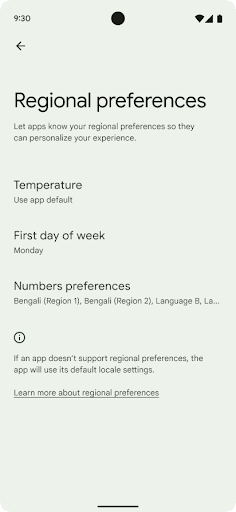
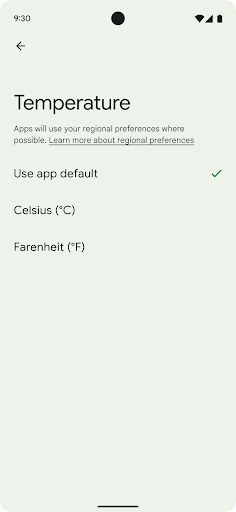
Regional preferences enable users to personalize temperature units, the first day of the week, and numbering systems. A European living in the United States might prefer temperature units to be in Celsius rather than Fahrenheit and for apps to treat Monday as the beginning of the week instead of the US default of Sunday.
New Android Settings menus for these preferences provide users with a
discoverable and centralized location to change app preferences. These
preferences also persist through backup and restore. Several APIs and
intents—such as
getTemperatureUnit
and
getFirstDayOfWeek—
grant your app read access to user preferences, so your app can adjust how it
displays information. You can also register a
BroadcastReceiver on
ACTION_LOCALE_CHANGED
to handle locale configuration changes when regional preferences change.
To find these settings, open the Settings app and navigate to System > Languages & input > Regional preferences.
נגישות
הגדלה לא לינארית של הגופן עד 200%
החל מ-Android 14, המערכת תומכת בהגדלת הגופן עד 200%, וכך מספקת למשתמשים אפשרויות נגישות נוספות.
כדי למנוע מצביעה של אלמנטים גדולים של טקסט במסך להיות גדולה מדי, אפליקציית המערכת משתמשת בעקומת שינוי גודל לא לינארית. משמעות אסטרטגיית ההתאמה הזו היא שטקסט גדול לא מותאם באותו קצב כמו טקסט קטן יותר. שינוי גודל גופן לא לינארי עוזר לשמור על ההיררכיה הפרופורציונלית בין רכיבים בגדלים שונים, וגם לצמצם בעיות שקשורות לשינוי גודל טקסט לינארי במידות גבוהות (למשל, טקסט שנחתך או טקסט שקשה יותר לקרוא בגלל גדלים גדולים במיוחד של המסך).
בדיקת האפליקציה באמצעות שינוי גודל גופן לא לינארי
אם כבר השתמשתם ביחידות של פיקסלים שניתן לשנות (sp) כדי להגדיר את גודל הטקסט, האפשרויות הנוספות האלה והשיפורים בהתאמת הגודל יחולו באופן אוטומטי על הטקסט באפליקציה. עם זאת, עדיין מומלץ לבצע בדיקות של ממשק המשתמש עם גודל הגופן המקסימלי (200%) כדי לוודא שהאפליקציה מגדירה את גדלי הגופן בצורה נכונה, ושהיא יכולה להכיל גדלים גדולים יותר של גופן בלי לפגוע בשימושיות.
כדי להגדיר את גודל הגופן ל-200%, פועלים לפי השלבים הבאים:
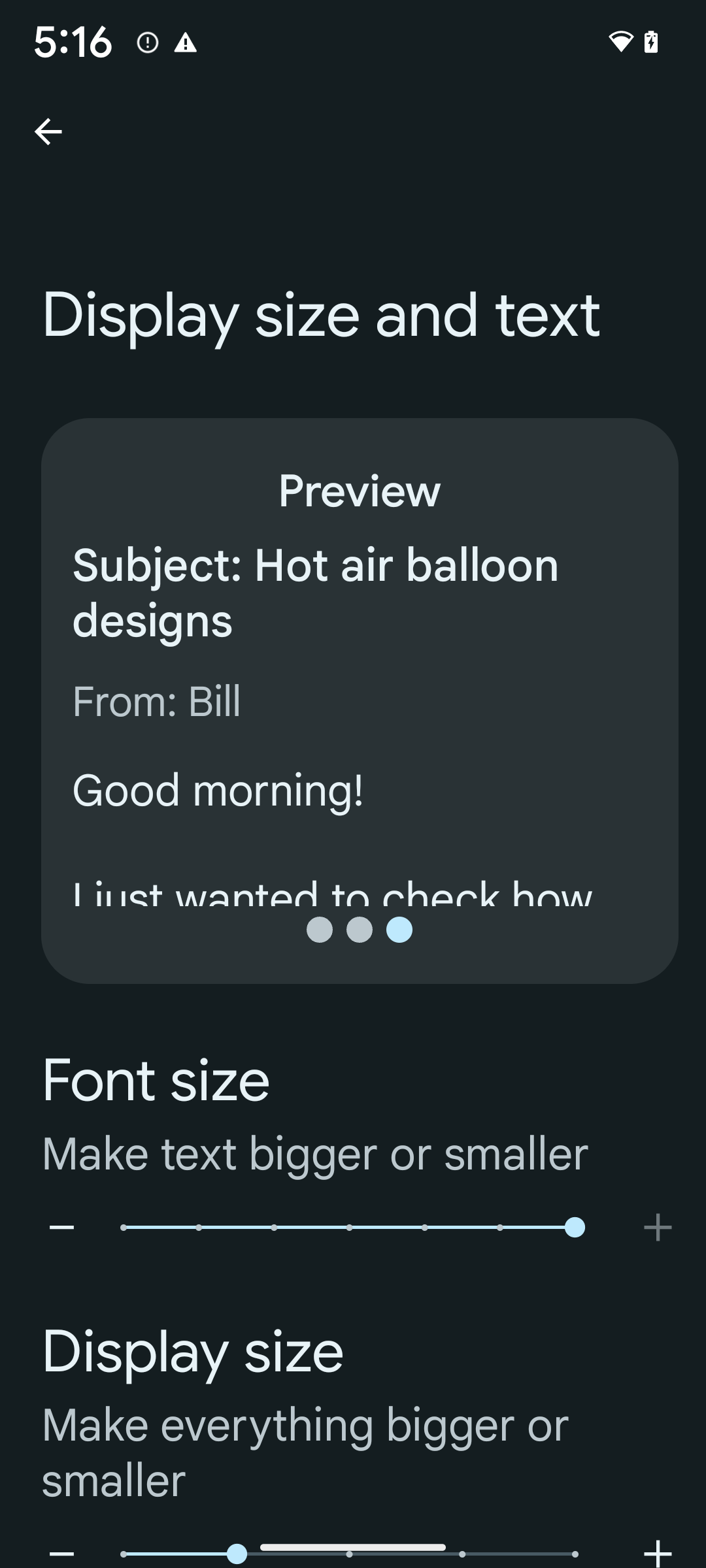
- פותחים את אפליקציית ההגדרות ועוברים אל נגישות > גודל התצוגה והטקסט.
- באפשרות גודל גופן, מקישים על סמל הפלוס (+) עד שמפעילים את הגדרת גודל הגופן המקסימלי, כמו שמוצג בתמונה שמצורפת לקטע הזה.
שימוש ביחידות של פיקסלים משוקללים (sp) לגדלים של טקסט
חשוב לזכור להגדיר תמיד את גודל הטקסט ביחידות sp. כשהאפליקציה משתמשת ביחידות sp, מערכת Android יכולה להחיל את גודל הטקסט המועדף על המשתמש ולשנות את קנה המידה שלו בהתאם.
אל תשתמשו ביחידות sp למרווחים פנימיים או להגדרת גובה התצוגה בהנחה של מרווחים פנימיים מרומזים: בשינוי גודל לא לינארי של גופן, מימדי sp לא בהכרח יהיו פרופורציונליים, ולכן 4sp + 20sp לא בהכרח יהיו שווים ל-24sp.
המרת יחידות של פיקסלים שניתן לשנות (sp)
אפשר להשתמש ב-TypedValue.applyDimension() כדי להמיר יחידות sp לפיקסלים, וב-TypedValue.deriveDimension() כדי להמיר פיקסלים ליחידות sp. השיטות האלה מחילות באופן אוטומטי את עקומת ההתאמה הלא לינארית המתאימה.
אין להשתמש בקידוד קשיח של משוואות באמצעות התגים
Configuration.fontScale או
DisplayMetrics.scaledDensity. ההתאמה של גודל הגופן היא לא ליניארית, ולכן השדה scaledDensity כבר לא מדויק. השדה fontScale
מיועד לצורכי מידע בלבד, כי הגופנים כבר לא מותאמים באמצעות ערך סקלרי יחיד.
שימוש ביחידות sp בשביל lineHeight
תמיד צריך להגדיר את android:lineHeight באמצעות יחידות sp במקום יחידות dp, כדי שגובה השורה יותאם לגודל הטקסט. אחרת, אם הטקסט הוא sp אבל lineHeight הוא dp או px, הוא לא משתנה בהתאם לגודל המסך ונראה צפוף.
TextView מתקן אוטומטית את lineHeight כדי לשמור על הפרופורציות הרצויות, אבל רק אם גם textSize וגם lineHeight מוגדרים ביחידות sp.
מצלמה ומדיה
תמונות ב-Ultra HDR
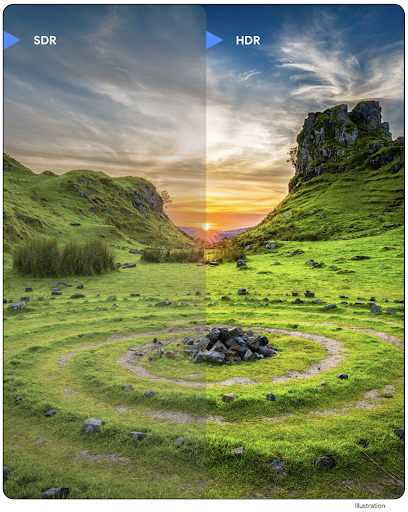
ב-Android 14 נוספה תמיכה בתמונות באיכות HDR (טווח דינמי גבוה), שמאפשרות לשמור יותר מידע מהחיישן בזמן הצילום, וכך לייצר צבעים עזים וניגודיות גבוהה יותר. ב-Android נעשה שימוש בפורמט Ultra HDR, שהוא תואם לאחור לתמונות JPEG. כך האפליקציות יכולות לפעול בצורה חלקה עם תמונות HDR ולהציג אותן בטווח דינמי סטנדרטי (SDR) לפי הצורך.
המערכת מבצעת את העיבוד של התמונות האלה בממשק המשתמש ב-HDR באופן אוטומטי כשהאפליקציה בוחרת להשתמש בממשק משתמש ב-HDR בחלון הפעילות שלה, דרך רשומה במניפסט או במהלך זמן הריצה על ידי קריאה ל-Window.setColorMode(). אפשר גם לצלם תמונות סטילס דחוסות ב-Ultra HDR במכשירים נתמכים. כשהחיישן משחזר יותר צבעים, אפשר לערוך את התמונות בצורה גמישה יותר. אפשר להשתמש ב-Gainmap שמשויך לתמונות Ultra HDR כדי ליצור רינדור שלהן באמצעות OpenGL או Vulkan.
זום, מיקוד, תצוגה מקדימה ועוד בתוספים למצלמה
Android 14 upgrades and improves camera extensions, allowing apps to handle longer processing times, which enables improved images using compute-intensive algorithms like low-light photography on supported devices. These features give users an even more robust experience when using camera extension capabilities. Examples of these improvements include:
- Dynamic still capture processing latency estimation provides much more
accurate still capture latency estimates based on the current scene and
environment conditions. Call
CameraExtensionSession.getRealtimeStillCaptureLatency()to get aStillCaptureLatencyobject that has two latency estimation methods. ThegetCaptureLatency()method returns the estimated latency betweenonCaptureStartedandonCaptureProcessStarted(), and thegetProcessingLatency()method returns the estimated latency betweenonCaptureProcessStarted()and the final processed frame being available. - Support for capture progress callbacks so that apps can display the current
progress of long-running, still-capture processing operations. You can check
if this feature is available with
CameraExtensionCharacteristics.isCaptureProcessProgressAvailable, and if it is, you implement theonCaptureProcessProgressed()callback, which has the progress (from 0 to 100) passed in as a parameter. Extension specific metadata, such as
CaptureRequest.EXTENSION_STRENGTHfor dialing in the amount of an extension effect, such as the amount of background blur withEXTENSION_BOKEH.Postview Feature for Still Capture in camera extensions, which provides a less-processed image more quickly than the final image. If an extension has increased processing latency, a postview image could be provided as a placeholder to improve UX and switched out later for the final image. You can check if this feature is available with
CameraExtensionCharacteristics.isPostviewAvailable. Then you can pass anOutputConfigurationtoExtensionSessionConfiguration.setPostviewOutputConfiguration.Support for
SurfaceViewallowing for a more optimized and power-efficient preview render path.Support for tap to focus and zoom during extension usage.
זום בחיישן
When REQUEST_AVAILABLE_CAPABILITIES_STREAM_USE_CASE in
CameraCharacteristics contains
SCALER_AVAILABLE_STREAM_USE_CASES_CROPPED_RAW, your app
can use advanced sensor capabilities to give a cropped RAW stream the same
pixels as the full field of view by using a CaptureRequest
with a RAW target that has stream use case set to
CameraMetadata.SCALER_AVAILABLE_STREAM_USE_CASES_CROPPED_RAW.
By implementing the request override controls, the updated camera gives users
zoom control even before other camera controls are ready.
אודיו ב-USB ללא אובדן מידע
Android 14 gains support for lossless audio formats for audiophile-level
experiences over USB wired headsets. You can query a USB device for its
preferred mixer attributes, register a listener for changes in preferred mixer
attributes, and configure mixer attributes using the
AudioMixerAttributes class. This class represents the
format, such as channel mask, sample rate, and behavior of the audio mixer. The
class allows for audio to be sent directly, without mixing,
volume adjustment, or processing effects.
פרודוקטיביות וכלים למפתחים
מנהל פרטי הכניסה
ב-Android 14 נוסף Credential Manager כ-API של הפלטפורמה, עם תמיכה נוספת במכשירים עם Android 4.4 (רמת API 19) באמצעות Jetpack Library באמצעות Google Play Services. ממשקי ה-Credential Manager API נועדו להקל על המשתמשים להיכנס לחשבונות. הם מאחזרים ומאחסנים פרטי כניסה באמצעות ספקי פרטי כניסה שהוגדרו על ידי המשתמשים. ממשק Credential Manager API תומך בכמה שיטות כניסה, כולל שם משתמש וסיסמה, מפתחות גישה ופתרונות כניסה מאוחדים (כמו כניסה באמצעות חשבון Google) בממשק API יחיד.
מפתחות גישה מציעים הרבה יתרונות. לדוגמה, מפתחות גישה מבוססים על תקנים מקובלים בתחום, יכולים לפעול במגוון מערכות הפעלה וסביבות עסקיות בדפדפנים, וניתן להשתמש בהם גם באתרים וגם באפליקציות.
מידע נוסף זמין בתיעוד של Credential Manager ומפתחות גישה ובפוסט בבלוג בנושא Credential Manager ומפתחות גישה.
Health Connect
Health Connect היא מאגר במכשיר לנתוני הבריאות והכושר של המשתמש. היא מאפשרת למשתמשים לשתף נתונים בין האפליקציות המועדפות שלהם, ובמקום אחד הם יכולים לקבוע אילו נתונים הם רוצים לשתף עם האפליקציות האלה.
במכשירים עם גרסאות Android שקדמו ל-Android 14, אפשר להוריד את Health Connect כאפליקציה מחנות Google Play. החל מגרסה Android 14, Health Connect היא חלק מהפלטפורמה ומקבלת עדכונים דרך עדכוני המערכת של Google Play, בלי צורך בהורדה נפרדת. כך אפשר לעדכן את Health Connect בתדירות גבוהה, והאפליקציות יכולות להסתמך על כך ש-Health Connect זמין במכשירים עם Android מגרסה 14 ואילך. המשתמשים יכולים לגשת ל-Health Connect מההגדרות במכשיר, עם אמצעי בקרה על הפרטיות שמוטמעים בהגדרות המערכת.
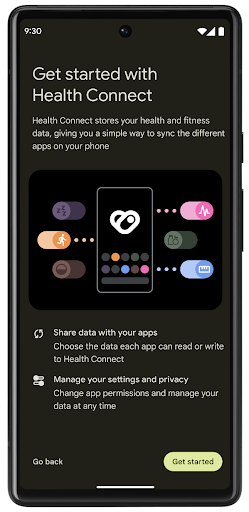
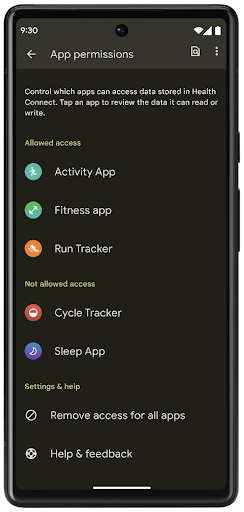
Health Connect כולל כמה תכונות חדשות ב-Android 14, כמו מסלולי אימון, שמאפשרים למשתמשים לשתף מסלול של אימון שאפשר לראות במפה. מסלול מוגדר כרשימה של מיקומים שנשמרו בחלון זמן מסוים, והאפליקציה יכולה להוסיף מסלולים לסשנים של אימונים ולקשר ביניהם. כדי להבטיח שלמשתמשים תהיה שליטה מלאה על המידע הרגיש הזה, הם צריכים לאפשר שיתוף של מסלולים ספציפיים עם אפליקציות אחרות.
מידע נוסף זמין במסמכי התיעוד של Health Connect ובפוסט בבלוג בנושא מה חדש ב-Android Health.
עדכונים ל-OpenJDK 17
Android 14 continues the work of refreshing Android's core libraries to align with the features in the latest OpenJDK LTS releases, including both library updates and Java 17 language support for app and platform developers.
The following features and improvements are included:
- Updated approximately 300
java.baseclasses to Java 17 support. - Text Blocks, which introduce multi-line string literals to the Java programming language.
- Pattern Matching for instanceof, which allows an object to
be treated as having a specific type in an
instanceofwithout any additional variables. - Sealed classes, which allow you restrict which classes and interfaces can extend or implement them.
Thanks to Google Play system updates (Project Mainline), over 600 million devices are enabled to receive the latest Android Runtime (ART) updates that include these changes. This is part of our commitment to give apps a more consistent, secure environment across devices, and to deliver new features and capabilities to users independent of platform releases.
Java and OpenJDK are trademarks or registered trademarks of Oracle and/or its affiliates.
שיפורים בחנויות אפליקציות
ב-Android 14 נוספו כמה ממשקי API של PackageInstaller שמאפשרים לחנויות האפליקציות לשפר את חוויית המשתמש שלהן.
בקשה לאישור התקנה לפני ההורדה
יכול להיות שתצטרכו אישור משתמש כדי להתקין או לעדכן אפליקציה.
לדוגמה, כשתוכנית התקנה שמשתמשת בהרשאה REQUEST_INSTALL_PACKAGES מנסה להתקין אפליקציה חדשה. בגרסאות קודמות של Android, חנויות אפליקציות יכולות לבקש אישור מהמשתמש רק אחרי שקבצי ה-APK נכתבים בסשן ההתקנה והסשן מוגדר.
החל מ-Android 14, השיטה requestUserPreapproval() מאפשרת למתקינים לבקש אישור מהמשתמשים לפני ביצוע סשן ההתקנה. השיפור הזה מאפשר לחנות אפליקציות לדחות את הורדת חבילות ה-APK עד שהמשתמש יאשר את ההתקנה. בנוסף, אחרי שהמשתמש מאשר את ההתקנה, חנות האפליקציות יכולה להוריד ולהתקין את האפליקציה ברקע בלי להפריע למשתמש.
לטעון לבעלות על עדכונים עתידיים
השיטה setRequestUpdateOwnership() מאפשרת למתקין להציין למערכת שהוא מתכוון להיות אחראי על עדכונים עתידיים לאפליקציה שהוא מתקין. היכולת הזו מאפשרת לאכוף את הבעלות על העדכון, כלומר רק בעל העדכון רשאי להתקין עדכונים אוטומטיים לאפליקציה. אכיפת הבעלות על העדכון עוזרת לוודא שהמשתמשים מקבלים עדכונים רק מחנות האפליקציות הצפויה.
כל מתקין אחר, כולל אלה שמשתמשים בהרשאה INSTALL_PACKAGES, צריך לקבל אישור מפורש מהמשתמש כדי להתקין עדכון. אם משתמש מחליט להמשיך עם עדכון ממקור אחר, הבעלות על העדכון אבודה.
עדכון אפליקציות בזמנים פחות מפריעים
בדרך כלל, בחנויות האפליקציות לא רוצים לעדכן אפליקציה שבשימוש פעיל, כי זה מוביל לסגירת התהליכים שפועלים באפליקציה, ויכול להפריע למה שהמשתמש עושה.
החל מ-Android 14, ממשק ה-API של InstallConstraints מאפשר למתקינים לוודא שהעדכונים של האפליקציות שלהם מתבצעים בזמן המתאים. לדוגמה, חנות אפליקציות יכולה להפעיל את השיטה commitSessionAfterInstallConstraintsAreMet() כדי לוודא שהעדכון יאושר רק כשהמשתמש כבר לא יוצר אינטראקציה עם האפליקציה הרלוונטית.
התקנה חלקה של חלוקות אופציונליות
כשמשתמשים ב-APKs מפוצלים, אפשר לספק את התכונות של האפליקציה בקובצי APK נפרדים, במקום כ-APK מונוליתי. קובצי APK מפוצלים מאפשרים לחנויות אפליקציות לבצע אופטימיזציה של העברת הרכיבים השונים של האפליקציה. לדוגמה, חנויות אפליקציות עשויות לבצע אופטימיזציה על סמך המאפיינים של מכשיר היעד. ה-API של PackageInstaller תומך בחלוקות מאז ההשקה שלו ברמת API 22.
ב-Android 14, השיטה setDontKillApp() מאפשרת למנהל ההתקנה לציין שלא צריך להרוג את התהליכים שפועלים באפליקציה כשמתקינים פלחים חדשים. חנויות האפליקציות יכולות להשתמש בתכונה הזו כדי להתקין בצורה חלקה תכונות חדשות של אפליקציה בזמן שהמשתמש משתמש באפליקציה.
חבילות מטא-נתונים של אפליקציות
Starting in Android 14, the Android package installer lets you specify app metadata, such as data safety practices, to include on app store pages such as Google Play.
זיהוי מתי משתמשים מצלמים צילומי מסך במכשיר
To create a more standardized experience for detecting screenshots, Android 14 introduces a privacy-preserving screenshot detection API. This API lets apps register callbacks on a per-activity basis. These callbacks are invoked, and the user is notified, when the user takes a screenshot while that activity is visible.
חוויית משתמש
פעולות מותאמות אישית בקובץ לשיתוף ודירוג משופר
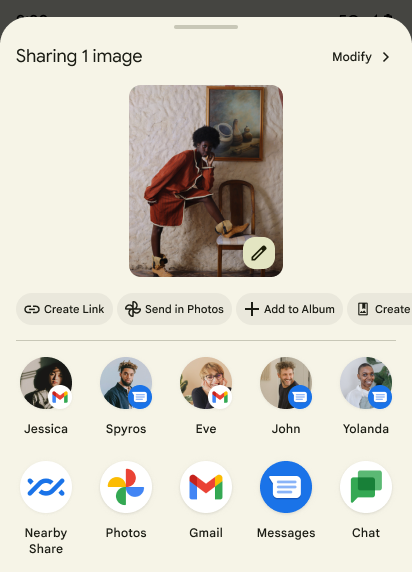
Android 14 updates the system sharesheet to support custom app actions and more informative preview results for users.
Add custom actions
With Android 14, your app can add custom actions to the system sharesheet it invokes.
Improve ranking of Direct Share targets
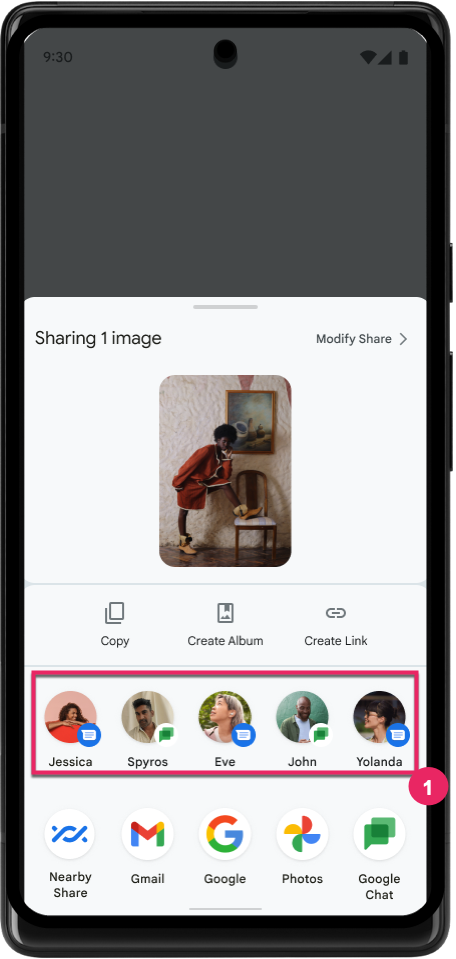
Android 14 uses more signals from apps to determine the ranking of the direct share targets to provide more helpful results for the user. To provide the most useful signal for ranking, follow the guidance for improving rankings of your Direct Share targets. Communication apps can also report shortcut usage for outgoing and incoming messages.
תמיכה באנימציות מובנות ומותאמות אישית לחיזוי של תנועת החזרה
Android 13 introduced the predictive back-to-home animation behind a developer option. When used in a supported app with the developer option enabled, swiping back shows an animation indicating that the back gesture exits the app back to the home screen.
Android 14 includes multiple improvements and new guidance for Predictive Back:
- You can set
android:enableOnBackInvokedCallback=trueto opt in to predictive back system animations per-Activity instead of for the entire app. - We've added new system animations to accompany the back-to-home animation from Android 13. The new system animations are cross-activity and cross-task, which you get automatically after migrating to Predictive Back.
- We've added new Material Component animations for Bottom sheets, Side sheets, and Search.
- We've created design guidance for creating custom in-app animations and transitions.
- We've added new APIs to support custom in-app transition animations:
handleOnBackStarted,handleOnBackProgressed,handleOnBackCancelledinOnBackPressedCallbackonBackStarted,onBackProgressed,onBackCancelledinOnBackAnimationCallback- Use
overrideActivityTransitioninstead ofoverridePendingTransitionfor transitions that respond as the user swipes back.
With this Android 14 preview release, all features of Predictive Back remain behind a developer option. See the developer guide to migrate your app to predictive back, as well as the developer guide to creating custom in-app transitions.
שינויים בהגדרות של אפליקציות ספציפיות במכשירים עם מסך גדול
שינוי הגדרות ברמת האפליקציה מאפשר ליצרני המכשירים לשנות את ההתנהגות של האפליקציות במכשירים עם מסך גדול. לדוגמה, ההחרגה FORCE_RESIZE_APP מורה למערכת לשנות את גודל האפליקציה כך שיתאים למימדי המסך (מבלי להשתמש במצב תאימות לגודל) גם אם הערך resizeableActivity="false" מוגדר בקובץ המניפסט של האפליקציה.
השינויים מברירת המחדל נועדו לשפר את חוויית המשתמש במסכים גדולים.
מאפייני מניפסט חדשים מאפשרים להשבית חלק מהשינויים של יצרן המכשירים באפליקציה שלכם.
שינויים בהגדרות של כל אפליקציה בנפרד למשתמשים במסכים גדולים
Per-app overrides change the behavior of apps on large screen devices. For example, the OVERRIDE_MIN_ASPECT_RATIO_LARGE device manufacturer override sets the app aspect ratio to 16:9 regardless of the app's configuration.
Android 14 QPR1 enables users to apply per‑app overrides by means of a new settings menu on large screen devices.
שיתוף מסך של אפליקציה
App screen sharing enables users to share an app window instead of the entire device screen during screen content recording.
With app screen sharing, the status bar, navigation bar, notifications, and other system UI elements are excluded from the shared display. Only the content of the selected app is shared.
App screen sharing improves productivity and privacy by enabling users to run multiple apps but limit content sharing to a single app.
תשובה מהירה מבוססת-LLM ב-Gboard ב-Pixel 8 Pro
On Pixel 8 Pro devices with the December Feature Drop, developers can try out higher-quality smart replies in Gboard powered by on-device Large Language Models (LLMs) running on Google Tensor.
This feature is available as a limited preview for US English in WhatsApp, Line, and KakaoTalk. It requires using a Pixel 8 Pro device with Gboard as your keyboard.
To try it out, first enable the feature in Settings > Developer Options > AiCore Settings > Enable Aicore Persistent.
Next, open a conversation in a supported app to see LLM-powered Smart Reply in Gboard's suggestion strip in response to incoming messages.
גרפיקה
אפשר להריץ שאילתות על נתיבים ולבצע בהם אינטרפולציה
ה-API Path של Android הוא מנגנון עוצמתי וגמיש ליצירה ולרינדור של גרפיקה וקטורית, עם אפשרות לצייר או למלא נתיב, לבנות נתיב מקטעי קו או מעקומות ריבועיות או ממעלה שלישית, לבצע פעולות בוליאניות כדי לקבל צורות מורכבות יותר או את כל האפשרויות האלה בו-זמנית. אחת מהמגבלות היא היכולת לברר מה נמצא בפועל באובייקט Path. הרכיבים הפנימיים של האובייקט לא גלויים למבצעי הקריאה אחרי היצירה.
כדי ליצור Path, צריך לבצע קריאה ל-methods כמו moveTo(), lineTo() ו-cubicTo() כדי להוסיף קטעי נתיב. אבל לא הייתה אפשרות לשאול את הנתיב הזה מהם הפלחים, ולכן צריך לשמור את המידע הזה בזמן היצירה.
החל מ-Android 14, אפשר לשלוח שאילתות לגבי נתיבים כדי לבדוק מה נמצא בהם.
קודם כול, צריך לקבל אובייקט PathIterator באמצעות API של Path.getPathIterator:
Kotlin
val path = Path().apply {
    moveTo(1.0f, 1.0f)
    lineTo(2.0f, 2.0f)
    close()
}
val pathIterator = path.pathIterator
Java
Path path = new Path();
path.moveTo(1.0F, 1.0F);
path.lineTo(2.0F, 2.0F);
path.close();
PathIterator pathIterator = path.getPathIterator();
לאחר מכן אפשר לקרוא ל-PathIterator כדי לבצע איטרציה אחרי הפילוחים אחד אחרי השני, ולאחזר את כל הנתונים הנדרשים לכל פלח. בדוגמה הזו נעשה שימוש באובייקטים מסוג PathIterator.Segment, שמארזים את הנתונים בשבילכם:
Kotlin
for (segment in pathIterator) {
    println("segment: ${segment.verb}, ${segment.points}")
}
Java
while (pathIterator.hasNext()) {
    PathIterator.Segment segment = pathIterator.next();
    Log.i(LOG_TAG, "segment: " + segment.getVerb() + ", " + segment.getPoints());
}
ב-PathIterator יש גם גרסה של next() שלא מקצה לה, שבה אפשר להעביר במאגר נתונים זמני כדי לשמור את נתוני הנקודות.
אחד מהתרחישים החשובים לדוגמה לשליחת שאילתות לגבי נתוני Path הוא אינטרפולציה. לדוגמה, יכול להיות שתרצו ליצור אנימציה (או טרנספורמציה) בין שני נתיבים שונים. כדי לפשט את התרחיש הזה, Android 14 כולל גם את השיטה interpolate() ב-Path. בהנחה שלשני הנתיבים יש מבנה פנימי זהה, ה-method interpolate() יוצרת Path חדש עם התוצאה בעלת האינטרפולציה. הדוגמה הזו מחזירה נתיב שהצורה שלו היא חצי (אינטרפולציה לינארית של 0 .5) בין path ל-otherPath:
Kotlin
val interpolatedResult = Path()
if (path.isInterpolatable(otherPath)) {
    path.interpolate(otherPath, .5f, interpolatedResult)
}
Java
Path interpolatedResult = new Path();
if (path.isInterpolatable(otherPath)) {
    path.interpolate(otherPath, 0.5F, interpolatedResult);
}
ספריית graphics-path של Jetpack מאפשרת להשתמש בממשקי API דומים גם בגרסאות קודמות של Android.
רשתות מותאמות אישית עם הצללות של קודקודים ושל שברים
כבר זמן רב יש ב-Android תמיכה בציור של רשתות משולשים עם הצללה בהתאמה אישית, אבל פורמט הרשת של הקלט היה מוגבל למספר שילובים מוגדרים מראש של מאפיינים. ב-Android 14 נוספה תמיכה במערכות רשת מותאמות אישית, שאפשר להגדיר כמשולשיים או כרצועות משולשים, ואפשר גם להוסיף אותן לאינדקס. המרקשים האלה מצוינים באמצעות מאפיינים מותאמים אישית, צעדים של קודקודים, משתנים ושגיאות של קודקודים וחלקיקים שנכתבו ב-AGSL.
ב-vertex shader מוגדרים המשתנים, כמו המיקום והצבע, ואילו ב-fragment shader אפשר להגדיר את הצבע של הפיקסל, בדרך כלל באמצעות המשתנים שנוצרו על ידי ה-vertex shader. אם הצבע מסופק על ידי ה-fragment shader, הוא מעורבב עם הצבע הנוכחי של Paint באמצעות מצב המיזוג שנבחר בזמן ציור המכסה. אפשר להעביר מאפיינים אחידים לשדרוגים של הפיקסלים והקודקודים כדי לקבל גמישות נוספת.
מעבד מאגר חומרה ל-Canvas
To assist in using Android's Canvas API to draw with
hardware acceleration into a HardwareBuffer, Android 14
introduces HardwareBufferRenderer. This API is
particularly useful when your use case involves communication with the system
compositor through SurfaceControl for low-latency
drawing.