

Android 14 wprowadza świetne funkcje i interfejsy API dla deweloperów. Poniższe materiały pomogą Ci poznać funkcje aplikacji i zacząć korzystać z powiązanych interfejsów API.
Szczegółową listę dodanych, zmodyfikowanych i usuniętych interfejsów API znajdziesz w raporcie o różnicach w interfejsach API. Szczegółowe informacje o dodanych interfejsach API znajdziesz w dokumentacji interfejsu Android API. W przypadku Androida 14 poszukaj interfejsów API dodanych na poziomie 34. Aby dowiedzieć się, w jakich obszarach zmiany na platformie mogą wpłynąć na Twoje aplikacje, zapoznaj się ze zmianami w działaniu Androida 14 w przypadku aplikacji kierowanych na Androida 14 i w przypadku wszystkich aplikacji.
Internacjonalizacja
Wybór języka według aplikacji
Android 14 rozszerza funkcje języka na poziomie aplikacji, które zostały wprowadzone w Androidzie 13 (poziom API 33), o te dodatkowe możliwości:
Automatyczne generowanie
localeConfigw aplikacji: od wersji Android Studio Giraffe Canary 7 i AGP 8.1.0-alpha07 możesz skonfigurować aplikację tak, aby automatycznie obsługiwała ustawienia języka na poziomie aplikacji. Na podstawie zasobów projektu wtyczka Androida do obsługi Gradle generuje plikLocaleConfigi dodaje do niego odwołanie w pliku manifestu końcowego. Dzięki temu nie musisz już tworzyć ani aktualizować tego pliku ręcznie. AGP korzysta z zasobów w folderachresw modułach aplikacji oraz z zależnych modułów bibliotek, aby określić lokalizacje, które mają być uwzględnione w plikuLocaleConfig.Dynamiczne aktualizacje
localeConfigaplikacji: użyj metodsetOverrideLocaleConfig()igetOverrideLocaleConfig()wLocaleManager, aby dynamicznie aktualizować listę obsługiwanych języków aplikacji w ustawieniach systemu urządzenia. Dzięki tej elastyczności możesz dostosować listę obsługiwanych języków w danym regionie, przeprowadzać eksperymenty A/B lub przesyłać zaktualizowaną listę lokalizacji, jeśli Twoja aplikacja korzysta z push na serwerze do celów lokalizacji.Widoczność języka aplikacji w edytorach metody wprowadzania: edytorzy metody wprowadzania mogą korzystać z metody
getApplicationLocales(), aby sprawdzić język bieżącej aplikacji i dostosować do niego język edytora metody wprowadzania.
Grammatical Inflection API
3 miliardy ludzi mówi językami z płcią: językami, w których kategorie gramatyczne (np. rzeczowniki, czasowniki, przymiotniki i przyimki) odmieniają się w zależności od płci osób i rzeczy, do których się zwracamy lub o których mówimy. Tradycyjnie wiele języków z płcią gramatyczną używa męskiej formy gramatycznej jako domyślnej lub uniwersalnej.
Zwracanie się do użytkowników w niewłaściwym rodzaju gramatycznym, np. do kobiet w męskim rodzaju gramatycznym, może negatywne wpłynąć na ich wyniki i postawę. Z kolei interfejs z językiem, który poprawnie odzwierciedla płeć gramatyczną użytkownika, może zwiększyć zaangażowanie użytkowników i zapewnić bardziej spersonalizowane i naturalne wrażenia.
To help you build a user-centric UI for gendered languages, Android 14 introduces the Grammatical Inflection API, which lets you add support for grammatical gender without refactoring your app.
Preferencje regionalne
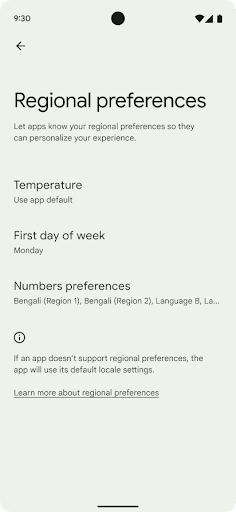
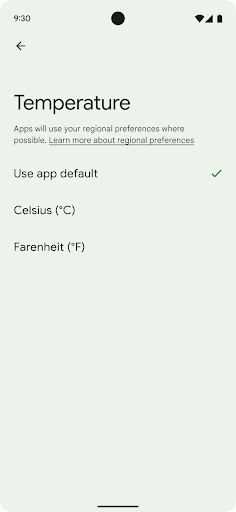
Regional preferences enable users to personalize temperature units, the first day of the week, and numbering systems. A European living in the United States might prefer temperature units to be in Celsius rather than Fahrenheit and for apps to treat Monday as the beginning of the week instead of the US default of Sunday.
New Android Settings menus for these preferences provide users with a
discoverable and centralized location to change app preferences. These
preferences also persist through backup and restore. Several APIs and
intents—such as
getTemperatureUnit
and
getFirstDayOfWeek—
grant your app read access to user preferences, so your app can adjust how it
displays information. You can also register a
BroadcastReceiver on
ACTION_LOCALE_CHANGED
to handle locale configuration changes when regional preferences change.
To find these settings, open the Settings app and navigate to System > Languages & input > Regional preferences.
Ułatwienia dostępu
Nieliniowe skalowanie czcionki do 200%
Od Androida 14 system obsługuje skalowanie czcionek do 200%, co zapewnia użytkownikom dodatkowe opcje ułatwień dostępu.
Aby zapobiec nadmiernemu powiększaniu dużych elementów tekstowych na ekranie, system stosuje nieliniową krzywą skalowania. Ta strategia skalowania oznacza, że duży tekst nie jest skalowany w tym samym tempie co mniejszy. Nieliniowe skalowanie czcionki pomaga zachować proporcjonalną hierarchię między elementami o różnych rozmiarach, a jednocześnie zmniejsza problemy związane z liniowym skalowaniem tekstu przy dużych wartościach (np. ucinanie tekstu lub utrudnianie czytania tekstu z powodu bardzo dużych rozmiarów wyświetlacza).
Testowanie aplikacji z nieliniowym skalowaniem czcionki
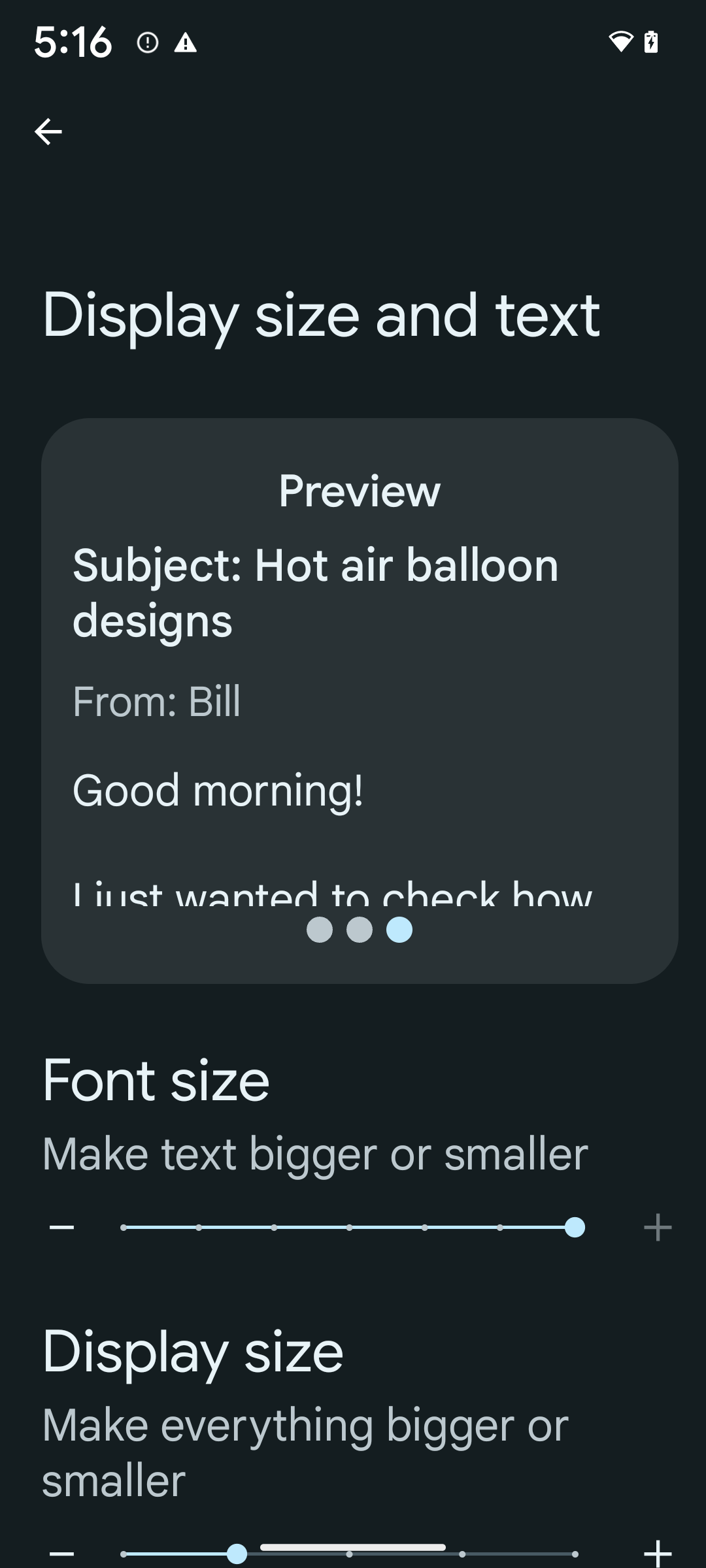
Jeśli do określania rozmiaru tekstu używasz już skalowalnych pikseli (sp), te dodatkowe opcje i ulepszenia skalowania są automatycznie stosowane do tekstu w aplikacji. Mimo to warto przeprowadzić testy interfejsu z włączonym maksymalnym rozmiarem czcionki (200%), aby upewnić się, że aplikacja prawidłowo stosuje rozmiary czcionek i może obsługiwać większe rozmiary bez wpływu na użyteczność.
Aby włączyć rozmiar czcionki 200%, wykonaj te czynności:
- Otwórz aplikację Ustawienia i kliknij Ułatwienia dostępu > Rozmiar wyświetlacza i tekst.
- W przypadku opcji Rozmiar czcionki klikaj ikonę plusa (+), aż włączone zostanie ustawienie maksymalnego rozmiaru czcionki, jak pokazano na ilustracji w tej sekcji.
Używaj skalowanych pikseli (sp) jako jednostek rozmiaru tekstu
Pamiętaj, aby zawsze określać rozmiary tekstu w jednostkach sp. Gdy aplikacja używa jednostek sp, Android może zastosować preferowany przez użytkownika rozmiar tekstu i odpowiednio go przeskalować.
Nie używaj jednostek sp w przypadku dopełnienia ani nie określaj wysokości widoku przy założeniu domyślnego dopełnienia: w przypadku nieliniowego skalowania czcionek wymiary sp mogą nie być proporcjonalne, więc 4 sp + 20 sp może nie być równe 24 sp.
Przeliczanie jednostek skalowalnych pikseli (sp)
Użyj funkcji TypedValue.applyDimension(), aby przekonwertować jednostki sp na piksele, a funkcji TypedValue.deriveDimension(), aby przekonwertować piksele na jednostki sp. Te metody automatycznie stosują odpowiednią nieliniową krzywą skalowania.
Unikaj kodowania na stałe równań za pomocą
Configuration.fontScale lub
DisplayMetrics.scaledDensity. Skalowanie czcionki jest nieliniowe, więc pole scaledDensity nie jest już dokładne. Pola fontScale należy używać wyłącznie do celów informacyjnych, ponieważ czcionki nie są już skalowane za pomocą pojedynczej wartości skalarnej.
Używaj jednostek sp w przypadku lineHeight
Zawsze definiuj android:lineHeight za pomocą jednostek sp zamiast dp, aby wysokość wiersza skalowała się wraz z tekstem. W przeciwnym razie, jeśli tekst jest w jednostkach sp, a lineHeight jest w jednostkach dp lub px, nie będzie skalowany i będzie wyglądać na ściśnięty.
TextView automatycznie koryguje lineHeight, aby zachować zamierzone proporcje, ale tylko wtedy, gdy zarówno textSize, jak i lineHeight są zdefiniowane w jednostkach sp.
Aparat i multimedia
Ultra HDR w przypadku zdjęć

Android 14 obsługuje obrazy High Dynamic Range (HDR), które zachowują więcej informacji z czujnika podczas robienia zdjęcia, co umożliwia uzyskanie żywszych kolorów i większego kontrastu. Android używa formatu ultra HDR, który jest w pełni zgodny z wstecz z obrazami JPEG. Dzięki temu aplikacje mogą płynnie współpracować z obrazami HDR, wyświetlając je w standardowym zakresie dynamiki (SDR), gdy zajdzie taka potrzeba.
Przetwarzanie tych obrazów w interfejsie w HDR jest wykonywane automatycznie przez platformę, gdy aplikacja zechce używać interfejsu HDR w oknie aktywności, albo za pomocą elementu manifestu, albo w czasie działania przez wywołanieWindow.setColorMode(). Na obsługiwanych urządzeniach możesz też robić skompresowane zdjęcia Ultra
HDR. Dzięki większej liczbie kolorów odzyskanych z czujnika edytowanie w postprodukcji może być bardziej elastyczne. Pliki Gainmap powiązane z obrazami Ultra HDR mogą służyć do ich renderowania za pomocą OpenGL lub Vulkan.
Powiększanie, ustawianie ostrości, podgląd i inne funkcje w rozszerzeniach aparatu
Android 14 ulepsza rozszerzenia aparatu, co pozwala aplikacjom na dłuższe przetwarzanie, co z kolei umożliwia uzyskiwanie lepszych zdjęć przy użyciu algorytmów wymagających dużej mocy obliczeniowej, takich jak fotografowanie przy słabym oświetleniu na obsługiwanych urządzeniach. Te funkcje zapewniają użytkownikom jeszcze większą wygodę podczas korzystania z możliwości rozszerzenia aparatu. Przykłady takich ulepszeń:
- Dynamiczna szacowana latencja przetwarzania zdjęć zapewnia znacznie dokładniejsze szacunki czasu przetwarzania zdjęć na podstawie bieżących warunków sceny i otoczenia. Wywołaj metodę
CameraExtensionSession.getRealtimeStillCaptureLatency(), aby uzyskać obiektStillCaptureLatency, który zawiera 2 metody oszacowania opóźnienia. MetodagetCaptureLatency()zwraca szacowane opóźnienie międzyonCaptureStartedaonCaptureProcessStarted(), a metodagetProcessingLatency()zwraca szacowane opóźnienie międzyonCaptureProcessStarted()a dostępnym ostatnim przetworzonym obrazem. - Obsługa wywołań zwrotnych postępu przechwytywania, dzięki którym aplikacje mogą wyświetlać bieżący postęp długotrwałych operacji przetwarzania zdjęć. Możesz sprawdzić, czy ta funkcja jest dostępna w
CameraExtensionCharacteristics.isCaptureProcessProgressAvailable, a jeśli tak, zaimplementować funkcję wywołania zwrotnegoonCaptureProcessProgressed(), która ma jako parametr postęp (od 0 do 100). metadane dotyczące rozszerzenia, takie jak
CaptureRequest.EXTENSION_STRENGTHdo powiększania obrazu, natężenie efektu rozszerzenia, np. rozmycie tła, za pomocąEXTENSION_BOKEH.Funkcja podglądu zdjęć w rozszerzeniach aparatu, która umożliwia wyświetlenie nieprzetworzonego obrazu szybciej niż w przypadku obrazu końcowego. Jeśli rozszerzenie wydłuża czas przetwarzania, obraz po wyświetleniu może być udostępniony jako element zastępczy, aby poprawić UX, a później zastąpiony przez ostateczny obraz. Aby sprawdzić, czy ta funkcja jest dostępna, przejdź do
CameraExtensionCharacteristics.isPostviewAvailable. Następnie możesz przekazać parametrOutputConfigurationdo funkcjiExtensionSessionConfiguration.setPostviewOutputConfiguration.Obsługa
SurfaceView, która umożliwia bardziej zoptymalizowaną i energooszczędną ścieżkę renderowania podglądu.Obsługa funkcji kliknięcia, aby ustawić ostrość i powiększyć widok podczas korzystania z rozszerzenia.
Zoom na matrycy
Gdy REQUEST_AVAILABLE_CAPABILITIES_STREAM_USE_CASE w CameraCharacteristics zawiera SCALER_AVAILABLE_STREAM_USE_CASES_CROPPED_RAW, aplikacja może korzystać z zaawansowanych możliwości czujnika, aby zapewnić przycięty strumień RAW z tymi samymi pikselami co pełne pole widzenia, używając CaptureRequest z docelowym strumieniem RAW, dla którego ustawiono CameraMetadata.SCALER_AVAILABLE_STREAM_USE_CASES_CROPPED_RAW.
Dzięki wdrożeniu ustawień zastąpienia żądania zaktualizowana kamera umożliwia użytkownikom sterowanie zoomem jeszcze przed przygotowaniem innych ustawień.
Bezstratny dźwięk przez USB
Android 14 obsługuje bezstratne formaty dźwięku, dzięki czemu można uzyskać dźwięk w jakości studyjnej w przypadku przewodowych słuchawek USB. Możesz wysyłać zapytania do urządzenia USB w celu uzyskania preferowanych atrybutów miksera, rejestrować słuchacza zmian w preferowanych atrybutach miksera i konfigurować atrybuty miksera za pomocą klasy AudioMixerAttributes. Ta klasa reprezentuje format, np. maskę kanału, częstotliwość próbkowania i zachowanie miksera audio. Ta klasa umożliwia przesyłanie dźwięku bezpośrednio bez miksowania, regulowania głośności ani przetwarzania efektów.
Wydajność i narzędzia dla programistów
Credential Manager
Android 14 adds Credential Manager as a platform API, with additional support back to Android 4.4 (API level 19) devices through a Jetpack Library using Google Play services. Credential Manager aims to make sign-in easier for users with APIs that retrieve and store credentials with user-configured credential providers. Credential Manager supports multiple sign-in methods, including username and password, passkeys, and federated sign-in solutions (such as Sign-in with Google) in a single API.
Passkeys provide many advantages. For example, passkeys are built on industry standards, can work across different operating systems and browser ecosystems, and can be used with both websites and apps.
For more information, see the Credential Manager and passkeys documentation and the blogpost about Credential Manager and passkeys.
Health Connect
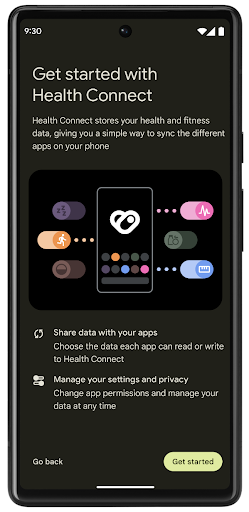
Health Connect is an on-device repository for user health and fitness data. It allows users to share data between their favorite apps, with a single place to control what data they want to share with these apps.
On devices running Android versions prior to Android 14, Health Connect is available to download as an app on the Google Play store. Starting with Android 14, Health Connect is part of the platform and receives updates through Google Play system updates without requiring a separate download. With this, Health Connect can be updated frequently, and your apps can rely on Health Connect being available on devices running Android 14 or higher. Users can access Health Connect from the Settings in their device, with privacy controls integrated into the system settings.
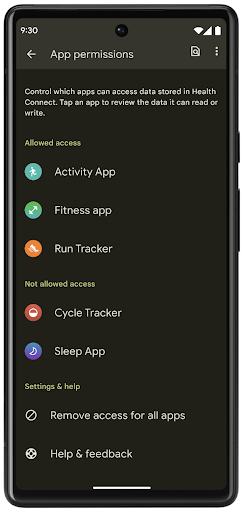
Health Connect includes several new features in Android 14, such as exercise routes, allowing users to share a route of their workout which can be visualized on a map. A route is defined as a list of locations saved within a window of time, and your app can insert routes into exercise sessions, tying them together. To ensure that users have complete control over this sensitive data, users must allow sharing individual routes with other apps.
For more information, see the Health Connection documentation and the blogpost on What's new in Android Health.
Aktualizacje OpenJDK 17
Android 14 continues the work of refreshing Android's core libraries to align with the features in the latest OpenJDK LTS releases, including both library updates and Java 17 language support for app and platform developers.
The following features and improvements are included:
- Updated approximately 300
java.baseclasses to Java 17 support. - Text Blocks, which introduce multi-line string literals to the Java programming language.
- Pattern Matching for instanceof, which allows an object to
be treated as having a specific type in an
instanceofwithout any additional variables. - Sealed classes, which allow you restrict which classes and interfaces can extend or implement them.
Thanks to Google Play system updates (Project Mainline), over 600 million devices are enabled to receive the latest Android Runtime (ART) updates that include these changes. This is part of our commitment to give apps a more consistent, secure environment across devices, and to deliver new features and capabilities to users independent of platform releases.
Java and OpenJDK are trademarks or registered trademarks of Oracle and/or its affiliates.
Ulepszenia w sklepach z aplikacjami
Android 14 introduces several PackageInstaller APIs that
allow app stores to improve their user experience.
Request install approval before downloading
Installing or updating an app might require user approval.
For example, when an installer making use of the
REQUEST_INSTALL_PACKAGES permission attempts to install a
new app. In prior Android versions, app stores can only request user approval
after APKs are written to the install session and the
session is committed.
Starting with Android 14, the requestUserPreapproval()
method lets installers request user approval before committing the install
session. This improvement lets an app store defer downloading any APKs until
after the installation has been approved by the user. Furthermore, once a user
has approved installation, the app store can download and install the app in the
background without interrupting the user.
Claim responsibility for future updates
The setRequestUpdateOwnership() method allows an installer
to indicate to the system that it intends to be responsible for future updates
to an app it is installing. This capability enables update ownership
enforcement, meaning that only the update owner is permitted
to install automatic updates to the app. Update ownership enforcement helps to
ensure that users receive updates only from the expected app store.
Any other installer, including those making use of the
INSTALL_PACKAGES permission, must receive explicit user
approval in order to install an update. If a user decides to proceed with an
update from another source, update ownership is lost.
Update apps at less-disruptive times
App stores typically want to avoid updating an app that is actively in use because this leads to the app's running processes being killed, which potentially interrupts what the user was doing.
Starting with Android 14, the InstallConstraints API
gives installers a way to ensure that their app updates happen at an opportune
moment. For example, an app store can call the
commitSessionAfterInstallConstraintsAreMet() method to
make sure that an update is only committed when the user is no longer
interacting with the app in question.
Seamlessly install optional splits
With split APKs, features of an app can be delivered in separate APK files,
rather than as a monolithic APK. Split APKs allow app stores to optimize the
delivery of different app components. For example, app stores might optimize
based on the properties of the target device. The
PackageInstaller API has supported splits since its
introduction in API level 22.
In Android 14, the setDontKillApp() method allows an
installer to indicate that the app's running processes shouldn't be killed when
new splits are installed. App stores can use this feature to seamlessly install
new features of an app while the user is using the app.
Pakiety metadanych aplikacji
Starting in Android 14, the Android package installer lets you specify app metadata, such as data safety practices, to include on app store pages such as Google Play.
Wykrywanie, kiedy użytkownicy robią zrzuty ekranu urządzenia
Aby zapewnić bardziej standardowe wykrywanie zrzutów ekranu, w Androidzie 14 wprowadziliśmy interfejs API do wykrywania zrzutów ekranu, który zapewnia ochronę prywatności. Ten interfejs API umożliwia aplikacjom rejestrowanie wywołań zwrotnych dla poszczególnych aktywności. Te wywołania zwrotne są wywoływane, a użytkownik jest powiadamiany, gdy zrobi zrzut ekranu podczas wyświetlania danego działania.
Wrażenia użytkownika
Działania niestandardowe na arkuszu udostępniania i ulepszone rankingowanie
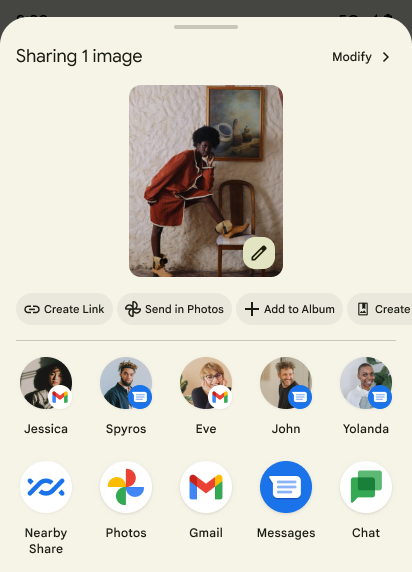
Android 14 aktualizuje systemowy panel udostępniania, aby obsługiwać niestandardowe działania aplikacji i bardziej szczegółowe podglądowe wyniki dla użytkowników.
Dodawanie działań niestandardowych
W Androidzie 14 aplikacja może dodawać niestandardowe działania do wywoływanego przez nią panelu udostępniania.
Ulepszanie rankingu celów udostępniania bezpośredniego
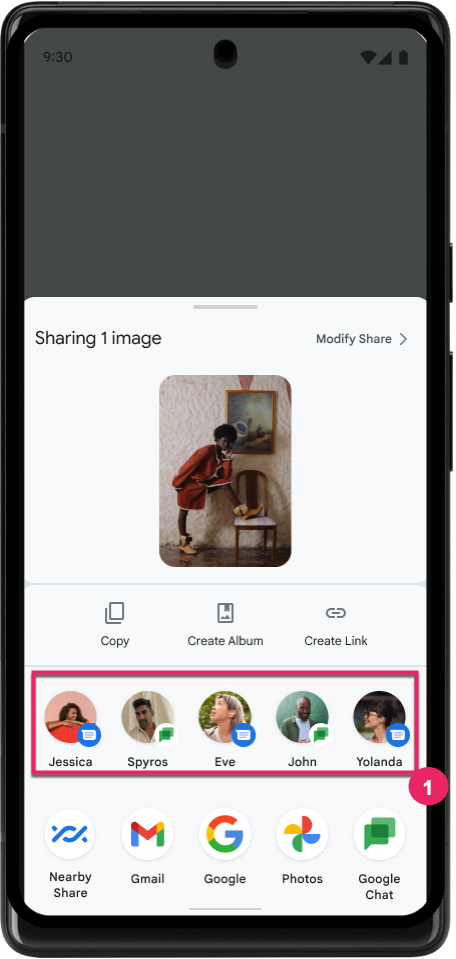
Android 14 używa większej liczby sygnałów z aplikacji, aby określać ranking celów udostępniania bezpośredniego i w ten sposób wyświetlać bardziej przydatne wyniki użytkownikom. Aby zapewnić najbardziej przydatny sygnał dotyczący rankingu, postępuj zgodnie ze wskazówkami dotyczącymi ulepszania pozycji docelowych w ramach funkcji Direct Share. Aplikacje do komunikacji mogą też zgłaszać użycie skrótu w przypadku wychodzących i przyjmowanych wiadomości.
Obsługa wbudowanych i niestandardowych animacji przewidywanego przejścia wstecz
Android 13 introduced the predictive back-to-home animation behind a developer option. When used in a supported app with the developer option enabled, swiping back shows an animation indicating that the back gesture exits the app back to the home screen.
Android 14 includes multiple improvements and new guidance for Predictive Back:
- You can set
android:enableOnBackInvokedCallback=trueto opt in to predictive back system animations per-Activity instead of for the entire app. - We've added new system animations to accompany the back-to-home animation from Android 13. The new system animations are cross-activity and cross-task, which you get automatically after migrating to Predictive Back.
- We've added new Material Component animations for Bottom sheets, Side sheets, and Search.
- We've created design guidance for creating custom in-app animations and transitions.
- We've added new APIs to support custom in-app transition animations:
handleOnBackStarted,handleOnBackProgressed,handleOnBackCancelledinOnBackPressedCallbackonBackStarted,onBackProgressed,onBackCancelledinOnBackAnimationCallback- Use
overrideActivityTransitioninstead ofoverridePendingTransitionfor transitions that respond as the user swipes back.
With this Android 14 preview release, all features of Predictive Back remain behind a developer option. See the developer guide to migrate your app to predictive back, as well as the developer guide to creating custom in-app transitions.
Zastąpienia ustawień producenta urządzenia z dużym ekranem dla poszczególnych aplikacji
Per-app overrides enable device manufacturers to change the behavior of apps on large screen devices. For example, the FORCE_RESIZE_APP override instructs the system to resize the app to fit display dimensions (avoiding size compatibility mode) even if resizeableActivity="false" is set in the app manifest.
Overrides are intended to improve the user experience on large screens.
New manifest properties enable you to disable some device manufacturer overrides for your app.
Zastępowanie ustawień aplikacji na urządzeniach z dużym ekranem
Zastąpienia dla poszczególnych aplikacji zmieniają zachowanie aplikacji na urządzeniach z dużym ekranem. Na przykład OVERRIDE_MIN_ASPECT_RATIO_LARGE zastąpienie producenta urządzenia ustawia format obrazu aplikacji na 16:9 niezależnie od konfiguracji aplikacji.
Android 14 QPR1 umożliwia użytkownikom stosowanie zastąpienia dla poszczególnych aplikacji za pomocą nowego menu ustawień na urządzeniach z dużym ekranem.
Udostępnianie ekranu aplikacji
App screen sharing enables users to share an app window instead of the entire device screen during screen content recording.
With app screen sharing, the status bar, navigation bar, notifications, and other system UI elements are excluded from the shared display. Only the content of the selected app is shared.
App screen sharing improves productivity and privacy by enabling users to run multiple apps but limit content sharing to a single app.
Inteligentna odpowiedź na klawiaturze Gboard na Pixelu 8 Pro oparta na LLM
On Pixel 8 Pro devices with the December Feature Drop, developers can try out higher-quality smart replies in Gboard powered by on-device Large Language Models (LLMs) running on Google Tensor.
This feature is available as a limited preview for US English in WhatsApp, Line, and KakaoTalk. It requires using a Pixel 8 Pro device with Gboard as your keyboard.
To try it out, first enable the feature in Settings > Developer Options > AiCore Settings > Enable Aicore Persistent.
Next, open a conversation in a supported app to see LLM-powered Smart Reply in Gboard's suggestion strip in response to incoming messages.
Grafika
Ścieżki można wyszukiwać i interpolować
Android's Path API is a powerful and flexible mechanism for
creating and rendering vector graphics, with the ability to stroke or fill a
path, construct a path from line segments or quadratic or cubic curves, perform
boolean operations to get even more complex shapes, or all of these
simultaneously. One limitation is the ability to find out what is actually in a
Path object; the internals of the object are opaque to callers after creation.
To create a Path, you call methods such as
moveTo(), lineTo(), and
cubicTo() to add path segments. But there has been no way to
ask that path what the segments are, so you must retain that information at
creation time.
Starting in Android 14, you can query paths to find out what's inside of them.
First, you need to get a PathIterator object using the
Path.getPathIterator API:
Kotlin
val path = Path().apply {
    moveTo(1.0f, 1.0f)
    lineTo(2.0f, 2.0f)
    close()
}
val pathIterator = path.pathIterator
Java
Path path = new Path();
path.moveTo(1.0F, 1.0F);
path.lineTo(2.0F, 2.0F);
path.close();
PathIterator pathIterator = path.getPathIterator();
Next, you can call PathIterator to iterate through the segments
one by one, retrieving all of the necessary data for each segment. This example
uses PathIterator.Segment objects, which packages up the data
for you:
Kotlin
for (segment in pathIterator) {
    println("segment: ${segment.verb}, ${segment.points}")
}
Java
while (pathIterator.hasNext()) {
    PathIterator.Segment segment = pathIterator.next();
    Log.i(LOG_TAG, "segment: " + segment.getVerb() + ", " + segment.getPoints());
}
PathIterator also has a non-allocating version of next() where you can pass
in a buffer to hold the point data.
One of the important use cases of querying Path data is interpolation. For
example, you might want to animate (or morph) between two different paths. To
further simplify that use case, Android 14 also includes the
interpolate() method on Path. Assuming the two paths have
the same internal structure, the interpolate() method creates a new Path
with that interpolated result. This example returns a path whose shape is
halfway (a linear interpolation of .5) between path and otherPath:
Kotlin
val interpolatedResult = Path()
if (path.isInterpolatable(otherPath)) {
    path.interpolate(otherPath, .5f, interpolatedResult)
}
Java
Path interpolatedResult = new Path();
if (path.isInterpolatable(otherPath)) {
    path.interpolate(otherPath, 0.5F, interpolatedResult);
}
The Jetpack graphics-path library enables similar APIs for earlier versions of Android as well.
Niestandardowe siatki z shaderami wierzchołków i fragmentów
Android has long supported drawing triangle meshes with custom shading, but the input mesh format has been limited to a few predefined attribute combinations. Android 14 adds support for custom meshes, which can be defined as triangles or triangle strips, and can, optionally, be indexed. These meshes are specified with custom attributes, vertex strides, varying, and vertex and fragment shaders written in AGSL.
The vertex shader defines the varyings, such as position and color, while the
fragment shader can optionally define the color for the pixel, typically by
using the varyings created by the vertex shader. If color is provided by the
fragment shader, it is then blended with the current Paint
color using the blend mode selected when
drawing the mesh. Uniforms can be passed
into the fragment and vertex shaders for additional flexibility.
Renderowanie bufora sprzętowego w Canvas
To assist in using Android's Canvas API to draw with
hardware acceleration into a HardwareBuffer, Android 14
introduces HardwareBufferRenderer. This API is
particularly useful when your use case involves communication with the system
compositor through SurfaceControl for low-latency
drawing.