

Android 14 में, डेवलपर के लिए बेहतरीन सुविधाएं और एपीआई उपलब्ध हैं. इनकी मदद से, अपने ऐप्लिकेशन के लिए सुविधाओं के बारे में जाना जा सकता है. साथ ही, इनसे जुड़े एपीआई का इस्तेमाल शुरू किया जा सकता है.
जोड़े गए, बदले गए, और हटाए गए एपीआई की पूरी सूची देखने के लिए, एपीआई के अंतर की रिपोर्ट पढ़ें. जोड़े गए एपीआई के बारे में जानने के लिए, Android API रेफ़रंस देखें. Android 14 के लिए, एपीआई लेवल 34 में जोड़े गए एपीआई देखें. प्लेटफ़ॉर्म में किए गए बदलावों से आपके ऐप्लिकेशन पर पड़ने वाले असर के बारे में जानने के लिए, Android 14 के व्यवहार में हुए बदलावों के बारे में ज़रूर पढ़ें. ये बदलाव Android 14 को टारगेट करने वाले ऐप्लिकेशन और सभी ऐप्लिकेशन पर लागू होते हैं.
इंटरनैशनलाइजेशन
हर ऐप्लिकेशन के हिसाब से पसंद की भाषा
Android 14 expands on the per-app language features that were introduced in Android 13 (API level 33) with these additional capabilities:
Automatically generate an app's
localeConfig: Starting with Android Studio Giraffe Canary 7 and AGP 8.1.0-alpha07, you can configure your app to support per-app language preferences automatically. Based on your project resources, the Android Gradle plugin generates theLocaleConfigfile and adds a reference to it in the final manifest file, so you no longer have to create or update the file manually. AGP uses the resources in theresfolders of your app modules and any library module dependencies to determine the locales to include in theLocaleConfigfile.Dynamic updates for an app's
localeConfig: Use thesetOverrideLocaleConfig()andgetOverrideLocaleConfig()methods inLocaleManagerto dynamically update your app's list of supported languages in the device's system settings. Use this flexibility to customize the list of supported languages per region, run A/B experiments, or provide an updated list of locales if your app utilizes server-side pushes for localization.App language visibility for input method editors (IMEs): IMEs can utilize the
getApplicationLocales()method to check the language of the current app and match the IME language to that language.
Grammatical Inflection API
दुनिया भर में 3 अरब लोग लिंग के हिसाब से अलग-अलग तरह से इस्तेमाल होने वाली भाषाएं बोलते हैं. इन भाषाओं में, व्याकरण की कैटगरी, जैसे कि संज्ञा, क्रिया, विशेषण, और प्रीपोज़िशन, उन लोगों और ऑब्जेक्ट के लिंग के हिसाब से बदलते हैं जिनके बारे में बात की जा रही है. आम तौर पर, लैंगिक भेद वाली कई भाषाओं में, मर्दों के लिए इस्तेमाल होने वाले व्याकरण के लिंग को डिफ़ॉल्ट या सामान्य लिंग के तौर पर इस्तेमाल किया जाता है.
उपयोगकर्ताओं को गलत व्याकरण के हिसाब से संबोधित करने से, उनकी परफ़ॉर्मेंस और व्यवहार पर बुरा असर पड़ सकता है. जैसे, महिलाओं को पुल्लिग व्याकरण के हिसाब से संबोधित करना. इसके उलट, यूज़र इंटरफ़ेस (यूआई) में ऐसी भाषा का इस्तेमाल करने से, उपयोगकर्ता के व्याकरण के हिसाब से लिंग की जानकारी सही तरीके से दिखती है. इससे उपयोगकर्ता जुड़ाव बढ़ता है और उपयोगकर्ता को ज़्यादा पसंद के मुताबिक और स्वाभाविक अनुभव मिलता है.
लिंग के आधार पर बोली जाने वाली भाषाओं के लिए, उपयोगकर्ता के हिसाब से यूज़र इंटरफ़ेस (यूआई) बनाने में आपकी मदद करने के लिए, Android 14 में Grammatical Inflection API को जोड़ा गया है. इसकी मदद से, अपने ऐप्लिकेशन को फिर से बनाने के बिना, व्याकरण के हिसाब से लिंग के लिए सहायता जोड़ी जा सकती है.
जगह के हिसाब से प्राथमिकताएं
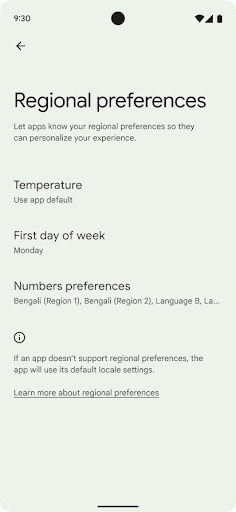
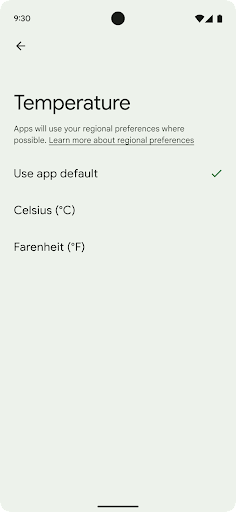
जगह के हिसाब से तापमान सेट करने की सुविधा की मदद से उपयोगकर्ता, तापमान की यूनिट को अपने हिसाब से बना सकते हैं. ऐसा करने के लिए, और क्रमांकन सिस्टम का इस्तेमाल किया जा सकता है. अमेरिका में रहने वाला यूरोपियन शायद तापमान की इकाइयां फ़ैरनहाइट के बजाय सेल्सियस में हों और ऐसे ऐप्लिकेशन जिनका इस्तेमाल सोमवार को हफ़्ते की शुरुआत के तौर पर किया जाता है, न कि अमेरिका की डिफ़ॉल्ट वैल्यू रविवार.
इन प्राथमिकताओं के लिए, Android के नए सेटिंग मेन्यू में उपयोगकर्ताओं को ऐप्लिकेशन की प्राथमिकताएं बदलने के लिए, एक ऐसी जगह मिलती है जहां उन्हें आसानी से ऐप्लिकेशन की प्राथमिकताएं दिखती हैं. ये प्राथमिकताएं, बैकअप लेने और उसे वापस लाने के बाद भी बनी रहती हैं. कई एपीआई और
इंटेंट—जैसे
getTemperatureUnit
और
getFirstDayOfWeek—
अपने ऐप्लिकेशन को उपयोगकर्ता की पसंद के हिसाब से पढ़ने का ऐक्सेस दें, ताकि आपका ऐप्लिकेशन यह तय कर सके कि
जानकारी दिखाता है. आप यह भी रजिस्टर कर सकते हैं कि
BroadcastReceiver का मैंडेट चालू है
ACTION_LOCALE_CHANGED
का इस्तेमाल करें.
इन सेटिंग को खोजने के लिए, सेटिंग ऐप्लिकेशन खोलें और सिस्टम > भाषाएं और इनपुट > जगह के हिसाब से प्राथमिकताएं.
सुलभता
फ़ॉन्ट स्केलिंग को 200% तक बढ़ाने की सुविधा
Starting in Android 14, the system supports font scaling up to 200%, providing users with additional accessibility options.
To prevent large text elements on screen from scaling too large, the system applies a nonlinear scaling curve. This scaling strategy means that large text doesn't scale at the same rate as smaller text. Nonlinear font scaling helps preserve the proportional hierarchy between elements of different sizes while mitigating issues with linear text scaling at high degrees (such as text being cut off or text that becomes harder to read due to an extremely large display sizes).
Test your app with nonlinear font scaling
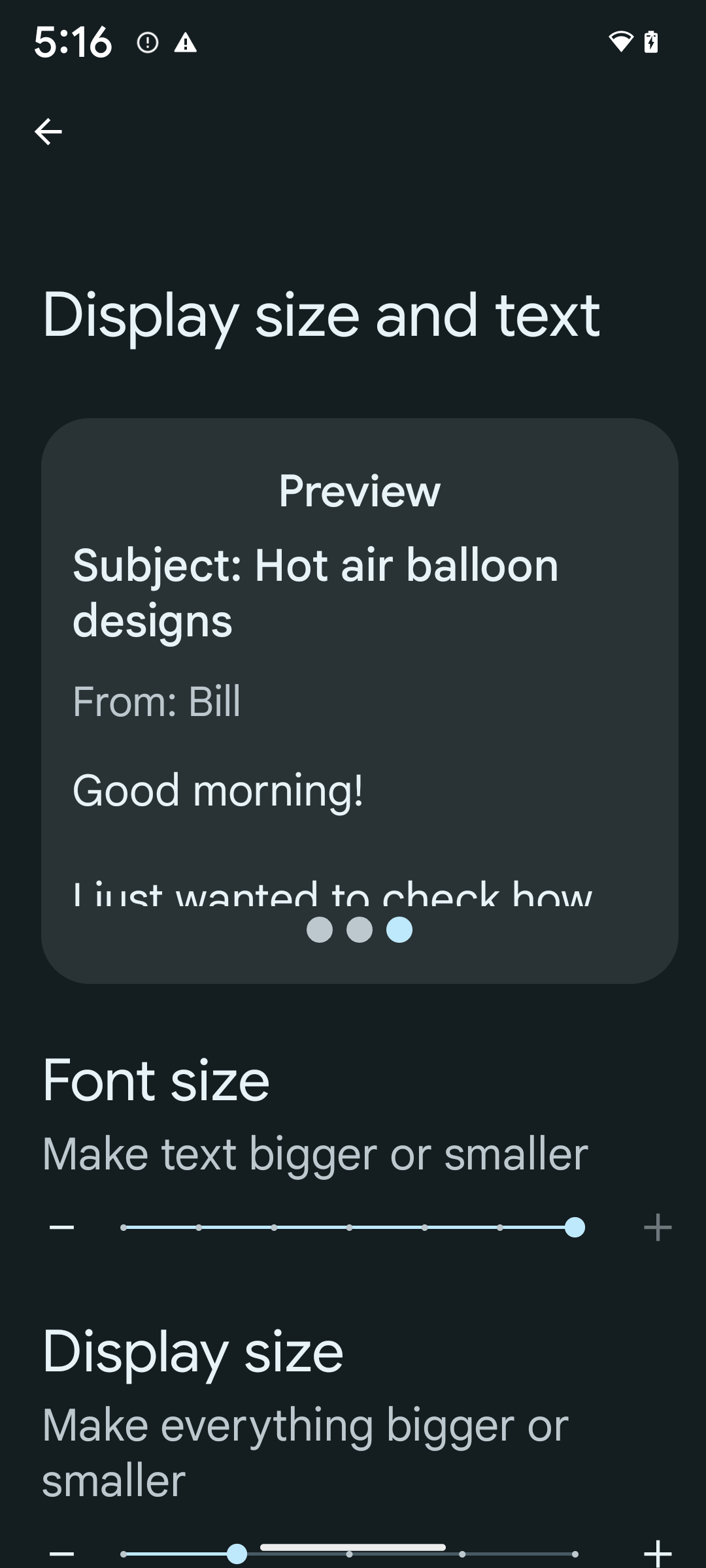
If you already use scaled pixels (sp) units to define text sizing, then these additional options and scaling improvements are applied automatically to the text in your app. However, you should still perform UI testing with the maximum font size enabled (200%) to ensure that your app applies the font sizes correctly and can accommodate larger font sizes without impacting usability.
To enable 200% font size, follow these steps:
- Open the Settings app and navigate to Accessibility > Display size and text.
- For the Font size option, tap the plus (+) icon until the maximum font size setting is enabled, as shown in the image that accompanies this section.
Use scaled pixel (sp) units for text-sizes
Remember to always specify text sizes in sp units. When your app uses sp units, Android can apply the user's preferred text size and scale it appropriately.
Don't use sp units for padding or define view heights assuming implicit padding: with nonlinear font scaling sp dimensions might not be proportional, so 4sp + 20sp might not equal 24sp.
Convert scaled pixel (sp) units
Use TypedValue.applyDimension() to convert from sp units
to pixels, and use TypedValue.deriveDimension() to
convert pixels to sp. These methods apply the appropriate nonlinear scaling
curve automatically.
Avoid hardcoding equations using
Configuration.fontScale or
DisplayMetrics.scaledDensity. Because font scaling is
nonlinear, the scaledDensity field is no longer accurate. The fontScale
field should be used for informational purposes only because fonts are no longer
scaled with a single scalar value.
Use sp units for lineHeight
Always define android:lineHeight using sp units instead
of dp, so the line height scales along with your text. Otherwise, if your text
is sp but your lineHeight is in dp or px, it doesn't scale and looks cramped.
TextView automatically corrects the lineHeight so that your intended
proportions are preserved, but only if both textSize and lineHeight are
defined in sp units.
कैमरा और मीडिया
इमेज के लिए अल्ट्रा एचडीआर की सुविधा

Android 14 adds support for High Dynamic Range (HDR) images that retain more of the information from the sensor when taking a photo, which enables vibrant colors and greater contrast. Android uses the Ultra HDR format, which is fully backward compatible with JPEG images, allowing apps to seamlessly interoperate with HDR images, displaying them in Standard Dynamic Range (SDR) as needed.
Rendering these images in the UI in HDR is done automatically by the framework
when your app opts in to using HDR UI for its Activity Window, either through a
manifest entry or at runtime by calling
Window.setColorMode(). You can also capture compressed Ultra
HDR still images on supported devices. With more colors recovered
from the sensor, editing in post can be more flexible. The
Gainmap associated with Ultra HDR images can be used to render
them using OpenGL or Vulkan.
कैमरा एक्सटेंशन में ज़ूम, फ़ोकस, पोस्टव्यू वगैरह की सुविधा
Android 14 upgrades and improves camera extensions, allowing apps to handle longer processing times, which enables improved images using compute-intensive algorithms like low-light photography on supported devices. These features give users an even more robust experience when using camera extension capabilities. Examples of these improvements include:
- Dynamic still capture processing latency estimation provides much more
accurate still capture latency estimates based on the current scene and
environment conditions. Call
CameraExtensionSession.getRealtimeStillCaptureLatency()to get aStillCaptureLatencyobject that has two latency estimation methods. ThegetCaptureLatency()method returns the estimated latency betweenonCaptureStartedandonCaptureProcessStarted(), and thegetProcessingLatency()method returns the estimated latency betweenonCaptureProcessStarted()and the final processed frame being available. - Support for capture progress callbacks so that apps can display the current
progress of long-running, still-capture processing operations. You can check
if this feature is available with
CameraExtensionCharacteristics.isCaptureProcessProgressAvailable, and if it is, you implement theonCaptureProcessProgressed()callback, which has the progress (from 0 to 100) passed in as a parameter. Extension specific metadata, such as
CaptureRequest.EXTENSION_STRENGTHfor dialing in the amount of an extension effect, such as the amount of background blur withEXTENSION_BOKEH.Postview Feature for Still Capture in camera extensions, which provides a less-processed image more quickly than the final image. If an extension has increased processing latency, a postview image could be provided as a placeholder to improve UX and switched out later for the final image. You can check if this feature is available with
CameraExtensionCharacteristics.isPostviewAvailable. Then you can pass anOutputConfigurationtoExtensionSessionConfiguration.setPostviewOutputConfiguration.Support for
SurfaceViewallowing for a more optimized and power-efficient preview render path.Support for tap to focus and zoom during extension usage.
इन-सेंसर ज़ूम की सुविधा
जब CameraCharacteristics में REQUEST_AVAILABLE_CAPABILITIES_STREAM_USE_CASE में SCALER_AVAILABLE_STREAM_USE_CASES_CROPPED_RAW शामिल होता है, तो आपका ऐप्लिकेशन बेहतर सेंसर की सुविधाओं का इस्तेमाल करके, काटी गई आरएडब्ल्यू स्ट्रीम को पूरे फ़ील्ड ऑफ़ व्यू के बराबर पिक्सल दे सकता है. इसके लिए, CaptureRequest का इस्तेमाल किया जाता है. साथ ही, आरएडब्ल्यू टारगेट के साथ स्ट्रीम के इस्तेमाल का उदाहरण CameraMetadata.SCALER_AVAILABLE_STREAM_USE_CASES_CROPPED_RAW पर सेट किया जाता है.
अनुरोध को बदलने की सुविधा लागू करने पर, अपडेट किए गए कैमरे में उपयोगकर्ताओं को कैमरे के अन्य कंट्रोल तैयार होने से पहले ही, ज़ूम कंट्रोल मिल जाता है.
बिना डेटा लॉस वाले यूएसबी ऑडियो की सुविधा
Android 14 में, USB वायर वाले हेडसेट से बेहतर ऑडियो अनुभव पाने के लिए, लॉसलेस ऑडियो फ़ॉर्मैट का इस्तेमाल किया जा सकता है. यूएसबी डिवाइस के पसंदीदा मिक्सर एट्रिब्यूट के लिए क्वेरी की जा सकती है. साथ ही, पसंदीदा मिक्सर एट्रिब्यूट में होने वाले बदलावों के लिए, किसी लिसनर को रजिस्टर किया जा सकता है. इसके अलावा, AudioMixerAttributes क्लास का इस्तेमाल करके, मिक्सर एट्रिब्यूट को कॉन्फ़िगर किया जा सकता है. यह क्लास, चैनल मास्क, सैंपल रेट, और ऑडियो मिक्सर के व्यवहार जैसे फ़ॉर्मैट को दिखाती है. इस क्लास की मदद से, ऑडियो को सीधे भेजा जा सकता है. इसके लिए, ऑडियो को मिक्स करने, वॉल्यूम अडजस्ट करने या इफ़ेक्ट प्रोसेस करने की ज़रूरत नहीं होती.
डेवलपर के काम करने की क्षमता और टूल
Credential Manager
Android 14 में, Credential Manager को प्लैटफ़ॉर्म एपीआई के तौर पर जोड़ा गया है. साथ ही, Google Play services का इस्तेमाल करने वाली Jetpack Library की मदद से, Android 4.4 (एपीआई लेवल 19) वाले डिवाइसों पर भी यह सुविधा उपलब्ध है. Credential Manager का मकसद, उपयोगकर्ताओं के लिए साइन-इन की प्रोसेस को आसान बनाना है. इसके लिए, ऐसे एपीआई उपलब्ध कराए जाते हैं जो उपयोगकर्ता के कॉन्फ़िगर किए गए क्रेडेंशियल देने वाले प्लैटफ़ॉर्म से क्रेडेंशियल वापस पाते हैं और उन्हें सेव करते हैं. Credential Manager, एक ही एपीआई में साइन-इन के कई तरीकों के साथ काम करता है. इनमें उपयोगकर्ता नाम और पासवर्ड, पासकी, और फ़ेडरेटेड साइन-इन के समाधान (जैसे, 'Google से साइन इन करें') शामिल हैं.
पासकी के कई फ़ायदे हैं. उदाहरण के लिए, पासकी इंडस्ट्री के मानकों के हिसाब से बनाई जाती हैं. इनका इस्तेमाल अलग-अलग ऑपरेटिंग सिस्टम और ब्राउज़र ईकोसिस्टम में किया जा सकता है. साथ ही, वेबसाइटों और ऐप्लिकेशन, दोनों के लिए पासकी इस्तेमाल की जा सकती हैं.
ज़्यादा जानकारी के लिए, Credential Manager और पासकी से जुड़ा दस्तावेज़ और Credential Manager और पासकी के बारे में ब्लॉग पोस्ट देखें.
Health Connect
Health Connect is an on-device repository for user health and fitness data. It allows users to share data between their favorite apps, with a single place to control what data they want to share with these apps.
On devices running Android versions prior to Android 14, Health Connect is available to download as an app on the Google Play store. Starting with Android 14, Health Connect is part of the platform and receives updates through Google Play system updates without requiring a separate download. With this, Health Connect can be updated frequently, and your apps can rely on Health Connect being available on devices running Android 14 or higher. Users can access Health Connect from the Settings in their device, with privacy controls integrated into the system settings.
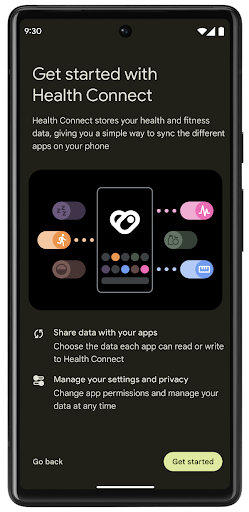
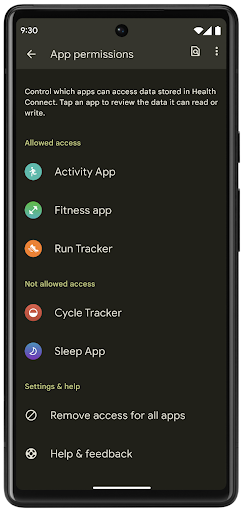
Health Connect includes several new features in Android 14, such as exercise routes, allowing users to share a route of their workout which can be visualized on a map. A route is defined as a list of locations saved within a window of time, and your app can insert routes into exercise sessions, tying them together. To ensure that users have complete control over this sensitive data, users must allow sharing individual routes with other apps.
For more information, see the Health Connection documentation and the blogpost on What's new in Android Health.
OpenJDK 17 के अपडेट
Android 14 में, Android की मुख्य लाइब्रेरी को अपडेट करने की प्रोसेस जारी है, ताकि इसे OpenJDK LTS के नए वर्शन की सुविधाओं के साथ अलाइन किया जा सके. इसमें, ऐप्लिकेशन और प्लैटफ़ॉर्म डेवलपर के लिए, लाइब्रेरी के अपडेट और Java 17 भाषा की सहायता, दोनों शामिल हैं.
इसमें ये सुविधाएं और सुधार शामिल हैं:
- करीब 300
java.baseक्लास को Java 17 के साथ काम करने के लिए अपडेट किया गया. - टेक्स्ट ब्लॉक, जो Java प्रोग्रामिंग लैंग्वेज में मल्टी-लाइन स्ट्रिंग लिटरल का इस्तेमाल करते हैं.
- instanceof के लिए पैटर्न मैचिंग, जिसकी मदद से किसी ऑब्जेक्ट को
instanceofमें किसी खास टाइप के तौर पर माना जा सकता है. इसके लिए, किसी और वैरिएबल की ज़रूरत नहीं होती. - सील की गई क्लास, जिनकी मदद से यह तय किया जा सकता है कि कौनसी क्लास और इंटरफ़ेस उन्हें एक्सटेंड या लागू कर सकते हैं.
Google Play के सिस्टम अपडेट (Project Mainline) की मदद से, 600 करोड़ से ज़्यादा डिवाइसों पर Android Runtime (ART) के नए अपडेट मिल सकते हैं. इन अपडेट में ये बदलाव शामिल हैं. हम ऐप्लिकेशन को सभी डिवाइसों पर एक जैसा और सुरक्षित माहौल देने के लिए प्रतिबद्ध हैं. साथ ही, हम प्लैटफ़ॉर्म के रिलीज़ से अलग, उपयोगकर्ताओं को नई सुविधाएं और क्षमताएं देने के लिए भी काम कर रहे हैं.
Java और OpenJDK, Oracle और/या इससे जुड़ी हुई कंपनियों के ट्रेडमार्क या रजिस्टर किए हुए ट्रेडमार्क हैं.
ऐप्लिकेशन स्टोर के लिए सुधार
Android 14 में कई PackageInstaller एपीआई जोड़े गए हैं. इनकी मदद से, ऐप्लिकेशन स्टोर अपने उपयोगकर्ताओं के अनुभव को बेहतर बना सकते हैं.
डाउनलोड करने से पहले, इंस्टॉल करने की अनुमति का अनुरोध करना
किसी ऐप्लिकेशन को इंस्टॉल या अपडेट करने के लिए, उपयोगकर्ता की अनुमति लेनी पड़ सकती है.
उदाहरण के लिए, जब कोई इंस्टॉलर REQUEST_INSTALL_PACKAGES अनुमति का इस्तेमाल करके नया ऐप्लिकेशन इंस्टॉल करने की कोशिश करता है. Android के पुराने वर्शन में, ऐप्लिकेशन स्टोर सिर्फ़ इसके बाद उपयोगकर्ता की अनुमति का अनुरोध कर सकते हैं, जब APK, इंस्टॉल सेशन में लिखे जाते हैं और सेशन पूरा हो जाता है.
Android 14 से, requestUserPreapproval()
तरीके की मदद से इंस्टॉलर, इंस्टॉलेशन सेशन को शुरू करने से पहले उपयोगकर्ता की अनुमति मांग सकते हैं. इस सुधार की मदद से, ऐप स्टोर किसी भी APK को तब तक डाउनलोड नहीं करेगा, जब तक उपयोगकर्ता ने इंस्टॉल करने की अनुमति नहीं दी है. इसके अलावा, जब कोई उपयोगकर्ता ऐप्लिकेशन इंस्टॉल करने की अनुमति देता है, तो ऐप्लिकेशन स्टोर, उपयोगकर्ता को परेशान किए बिना बैकग्राउंड में ऐप्लिकेशन को डाउनलोड और इंस्टॉल कर सकता है.
आने वाले समय में होने वाले अपडेट की ज़िम्मेदारी का दावा करना
setRequestUpdateOwnership() तरीके से, इंस्टॉलर को सिस्टम को यह बताने की अनुमति मिलती है कि वह इंस्टॉल किए जा रहे ऐप्लिकेशन के आने वाले समय में होने वाले अपडेट के लिए ज़िम्मेदार है. इस सुविधा से, अपडेट के मालिकाना हक को लागू करने की सुविधा चालू होती है. इसका मतलब है कि ऐप्लिकेशन में अपने-आप अपडेट होने की सुविधा को सिर्फ़ अपडेट के मालिक के पास इंस्टॉल करने की अनुमति होती है. अपडेट के मालिकाना हक को लागू करने की सुविधा से यह पक्का करने में मदद मिलती है कि उपयोगकर्ताओं को सिर्फ़ उस ऐप्लिकेशन स्टोर से अपडेट मिलें जिस पर ऐप्लिकेशन उपलब्ध है.
अपडेट इंस्टॉल करने के लिए, किसी भी इंस्टॉलर को उपयोगकर्ता की साफ़ तौर पर अनुमति लेनी होगी. इसमें, INSTALL_PACKAGES अनुमति का इस्तेमाल करने वाले इंस्टॉलर भी शामिल हैं. अगर कोई उपयोगकर्ता किसी दूसरे सोर्स से अपडेट करने का फ़ैसला करता है, तो अपडेट का मालिकाना हक खत्म हो जाता है.
ऐप्लिकेशन को कम रुकावट वाले समय पर अपडेट करना
आम तौर पर, ऐप्लिकेशन स्टोर किसी ऐसे ऐप्लिकेशन को अपडेट नहीं करना चाहते जो इस्तेमाल में है. ऐसा इसलिए, क्योंकि इससे ऐप्लिकेशन की चल रही प्रोसेस बंद हो जाती हैं. इससे, उपयोगकर्ता के काम में रुकावट आ सकती है.
Android 14 से, InstallConstraints एपीआई की मदद से, ऐप्लिकेशन इंस्टॉल करने वाले लोग यह पक्का कर सकते हैं कि उनके ऐप्लिकेशन सही समय पर अपडेट हों. उदाहरण के लिए, कोई ऐप्लिकेशन स्टोर, commitSessionAfterInstallConstraintsAreMet() तरीके का इस्तेमाल करके यह पक्का कर सकता है कि अपडेट सिर्फ़ तब लागू किया जाए, जब उपयोगकर्ता उस ऐप्लिकेशन का इस्तेमाल न कर रहा हो.
आसानी से वैकल्पिक स्प्लिट इंस्टॉल करना
स्प्लिट APK की मदद से, किसी ऐप्लिकेशन की सुविधाओं को एक ही APK के बजाय अलग-अलग APK फ़ाइलों में डिलीवर किया जा सकता है. अलग-अलग APK की मदद से, ऐप्लिकेशन स्टोर अलग-अलग ऐप्लिकेशन कॉम्पोनेंट की डिलीवरी को ऑप्टिमाइज़ कर सकते हैं. उदाहरण के लिए, ऐप्लिकेशन स्टोर, टारगेट किए गए डिवाइस की प्रॉपर्टी के आधार पर ऑप्टिमाइज़ हो सकते हैं. PackageInstaller एपीआई, एपीआई लेवल 22 में लॉन्च होने के बाद से ही, स्प्लिट की सुविधा के साथ काम करता है.
Android 14 में, setDontKillApp() तरीके की मदद से इंस्टॉलर यह बता सकता है कि नए स्प्लिट इंस्टॉल होने पर, ऐप्लिकेशन की चल रही प्रोसेस को बंद नहीं किया जाना चाहिए. ऐप्लिकेशन स्टोर इस सुविधा का इस्तेमाल करके, उपयोगकर्ता के ऐप्लिकेशन इस्तेमाल करते समय, ऐप्लिकेशन की नई सुविधाओं को आसानी से इंस्टॉल कर सकते हैं.
ऐप्लिकेशन के मेटाडेटा बंडल
Android 14 में, Android पैकेज इंस्टॉलर की मदद से, ऐप्लिकेशन का मेटाडेटा दिया जा सकता है. जैसे, डेटा की सुरक्षा के तरीके. इससे, Google Play जैसे ऐप्लिकेशन स्टोर के पेजों पर यह जानकारी शामिल की जा सकती है.
यह पता लगाना कि उपयोगकर्ता डिवाइस के स्क्रीनशॉट कब लेते हैं
To create a more standardized experience for detecting screenshots, Android 14 introduces a privacy-preserving screenshot detection API. This API lets apps register callbacks on a per-activity basis. These callbacks are invoked, and the user is notified, when the user takes a screenshot while that activity is visible.
उपयोगकर्ता अनुभव
शेयरशीट के लिए कस्टम कार्रवाइयां और बेहतर रैंकिंग
Android 14 में सिस्टम की शेयरशीट को अपडेट किया गया है, ताकि उपयोगकर्ताओं को कस्टम ऐप्लिकेशन ऐक्शन और ज़्यादा जानकारी देने वाली झलक के नतीजे दिखाए जा सकें.
कस्टम ऐक्शन जोड़ना
Android 14 में, आपका ऐप्लिकेशन सिस्टम शेयरशीट में कस्टम ऐक्शन जोड़ सकता है.
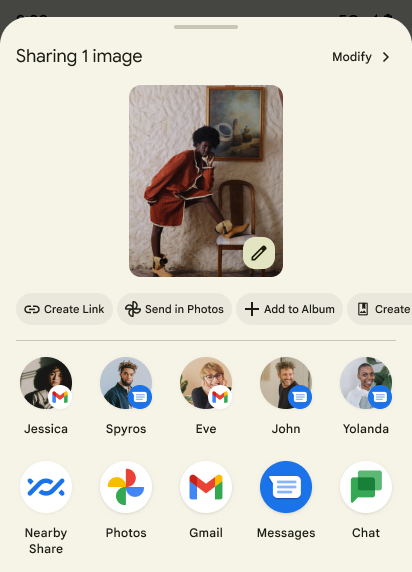
डायरेक्ट शेयर टारगेट की रैंकिंग को बेहतर बनाना
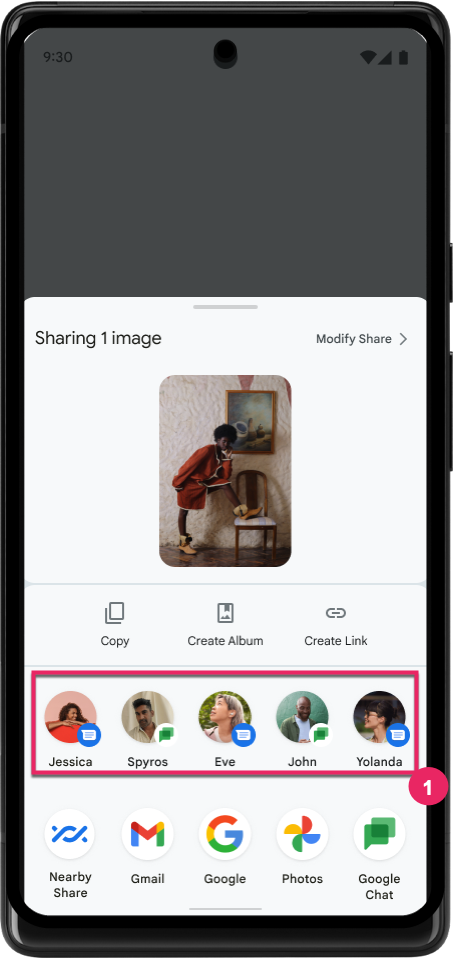
Android 14, डायरेक्ट शेयर टारगेट की रैंकिंग तय करने के लिए, ऐप्लिकेशन से ज़्यादा सिग्नल का इस्तेमाल करता है. इससे उपयोगकर्ता को ज़्यादा मददगार नतीजे मिलते हैं. रैंकिंग के लिए सबसे काम का सिग्नल देने के लिए, डायरेक्ट शेयर टारगेट की रैंकिंग को बेहतर बनाने के लिए दिए गए दिशा-निर्देशों का पालन करें. कम्यूनिकेशन ऐप्लिकेशन, भेजे और पाए गए मैसेज के लिए, शॉर्टकट के इस्तेमाल की रिपोर्ट भी कर सकते हैं.
पीछे जाने पर झलक दिखाने वाले हाथ के जेस्चर के लिए, पहले से मौजूद और कस्टम ऐनिमेशन की सुविधा
Android 13 introduced the predictive back-to-home animation behind a developer option. When used in a supported app with the developer option enabled, swiping back shows an animation indicating that the back gesture exits the app back to the home screen.
Android 14 includes multiple improvements and new guidance for Predictive Back:
- You can set
android:enableOnBackInvokedCallback=trueto opt in to predictive back system animations per-Activity instead of for the entire app. - We've added new system animations to accompany the back-to-home animation from Android 13. The new system animations are cross-activity and cross-task, which you get automatically after migrating to Predictive Back.
- We've added new Material Component animations for Bottom sheets, Side sheets, and Search.
- We've created design guidance for creating custom in-app animations and transitions.
- We've added new APIs to support custom in-app transition animations:
handleOnBackStarted,handleOnBackProgressed,handleOnBackCancelledinOnBackPressedCallbackonBackStarted,onBackProgressed,onBackCancelledinOnBackAnimationCallback- Use
overrideActivityTransitioninstead ofoverridePendingTransitionfor transitions that respond as the user swipes back.
With this Android 14 preview release, all features of Predictive Back remain behind a developer option. See the developer guide to migrate your app to predictive back, as well as the developer guide to creating custom in-app transitions.
बड़ी स्क्रीन वाले डिवाइस बनाने वाली कंपनियों के लिए, हर ऐप्लिकेशन के हिसाब से ओवरराइड की सुविधा
Per-app overrides enable device manufacturers to change the behavior of apps on large screen devices. For example, the FORCE_RESIZE_APP override instructs the system to resize the app to fit display dimensions (avoiding size compatibility mode) even if resizeableActivity="false" is set in the app manifest.
Overrides are intended to improve the user experience on large screens.
New manifest properties enable you to disable some device manufacturer overrides for your app.
बड़ी स्क्रीन वाले उपयोगकर्ताओं के लिए, हर ऐप्लिकेशन के हिसाब से ओवरराइड की सुविधा
Per-app overrides change the behavior of apps on large screen devices. For example, the OVERRIDE_MIN_ASPECT_RATIO_LARGE device manufacturer override sets the app aspect ratio to 16:9 regardless of the app's configuration.
Android 14 QPR1 enables users to apply per‑app overrides by means of a new settings menu on large screen devices.
ऐप्लिकेशन की स्क्रीन शेयर करने की सुविधा
ऐप्लिकेशन की स्क्रीन शेयर करने की सुविधा की मदद से, उपयोगकर्ता स्क्रीन कॉन्टेंट रिकॉर्ड करते समय, डिवाइस की पूरी स्क्रीन के बजाय, ऐप्लिकेशन की विंडो शेयर कर सकते हैं.
ऐप्लिकेशन की स्क्रीन शेयर करने की सुविधा का इस्तेमाल करने पर, स्टेटस बार, नेविगेशन बार, सूचनाएं, और सिस्टम के अन्य यूज़र इंटरफ़ेस (यूआई) एलिमेंट शेयर किए गए डिसप्ले में शामिल नहीं होते. सिर्फ़ चुने गए ऐप्लिकेशन का कॉन्टेंट शेयर किया जाता है.
ऐप्लिकेशन की स्क्रीन शेयर करने की सुविधा से, उपयोगकर्ताओं की प्रोडक्टिविटी और निजता बेहतर होती है. इसकी मदद से, वे एक से ज़्यादा ऐप्लिकेशन चला सकते हैं. हालांकि, कॉन्टेंट शेयर करने की सुविधा सिर्फ़ एक ऐप्लिकेशन के लिए उपलब्ध होती है.
Pixel 8 Pro पर Gboard में, एलएलएम की मदद से स्मार्ट जवाब की सुविधा
On Pixel 8 Pro devices with the December Feature Drop, developers can try out higher-quality smart replies in Gboard powered by on-device Large Language Models (LLMs) running on Google Tensor.
This feature is available as a limited preview for US English in WhatsApp, Line, and KakaoTalk. It requires using a Pixel 8 Pro device with Gboard as your keyboard.
To try it out, first enable the feature in Settings > Developer Options > AiCore Settings > Enable Aicore Persistent.
Next, open a conversation in a supported app to see LLM-powered Smart Reply in Gboard's suggestion strip in response to incoming messages.
ग्राफ़िक
पाथ को क्वेरी किया जा सकता है और इंटरपोलेट किया जा सकता है
Android's Path API is a powerful and flexible mechanism for
creating and rendering vector graphics, with the ability to stroke or fill a
path, construct a path from line segments or quadratic or cubic curves, perform
boolean operations to get even more complex shapes, or all of these
simultaneously. One limitation is the ability to find out what is actually in a
Path object; the internals of the object are opaque to callers after creation.
To create a Path, you call methods such as
moveTo(), lineTo(), and
cubicTo() to add path segments. But there has been no way to
ask that path what the segments are, so you must retain that information at
creation time.
Starting in Android 14, you can query paths to find out what's inside of them.
First, you need to get a PathIterator object using the
Path.getPathIterator API:
Kotlin
val path = Path().apply {
    moveTo(1.0f, 1.0f)
    lineTo(2.0f, 2.0f)
    close()
}
val pathIterator = path.pathIterator
Java
Path path = new Path();
path.moveTo(1.0F, 1.0F);
path.lineTo(2.0F, 2.0F);
path.close();
PathIterator pathIterator = path.getPathIterator();
Next, you can call PathIterator to iterate through the segments
one by one, retrieving all of the necessary data for each segment. This example
uses PathIterator.Segment objects, which packages up the data
for you:
Kotlin
for (segment in pathIterator) {
    println("segment: ${segment.verb}, ${segment.points}")
}
Java
while (pathIterator.hasNext()) {
    PathIterator.Segment segment = pathIterator.next();
    Log.i(LOG_TAG, "segment: " + segment.getVerb() + ", " + segment.getPoints());
}
PathIterator also has a non-allocating version of next() where you can pass
in a buffer to hold the point data.
One of the important use cases of querying Path data is interpolation. For
example, you might want to animate (or morph) between two different paths. To
further simplify that use case, Android 14 also includes the
interpolate() method on Path. Assuming the two paths have
the same internal structure, the interpolate() method creates a new Path
with that interpolated result. This example returns a path whose shape is
halfway (a linear interpolation of .5) between path and otherPath:
Kotlin
val interpolatedResult = Path()
if (path.isInterpolatable(otherPath)) {
    path.interpolate(otherPath, .5f, interpolatedResult)
}
Java
Path interpolatedResult = new Path();
if (path.isInterpolatable(otherPath)) {
    path.interpolate(otherPath, 0.5F, interpolatedResult);
}
The Jetpack graphics-path library enables similar APIs for earlier versions of Android as well.
वर्टेक्स और फ़्रैगमेंट शेडर वाले कस्टम मेश
Android has long supported drawing triangle meshes with custom shading, but the input mesh format has been limited to a few predefined attribute combinations. Android 14 adds support for custom meshes, which can be defined as triangles or triangle strips, and can, optionally, be indexed. These meshes are specified with custom attributes, vertex strides, varying, and vertex and fragment shaders written in AGSL.
The vertex shader defines the varyings, such as position and color, while the
fragment shader can optionally define the color for the pixel, typically by
using the varyings created by the vertex shader. If color is provided by the
fragment shader, it is then blended with the current Paint
color using the blend mode selected when
drawing the mesh. Uniforms can be passed
into the fragment and vertex shaders for additional flexibility.
Canvas के लिए हार्डवेयर बफ़र रेंडरर
Android 14 में HardwareBufferRenderer को शामिल किया गया है. इससे, HardwareBuffer में हार्डवेयर ऐक्सेलरेशन की मदद से ड्रॉ करने के लिए, Android के Canvas एपीआई का इस्तेमाल करने में मदद मिलती है. यह एपीआई, कम इंतज़ार के साथ ड्रॉइंग के लिए, SurfaceControl के ज़रिए सिस्टम कंपोजिटर के साथ कम्यूनिकेशन करने के लिए, खास तौर पर तब फ़ायदेमंद होता है, जब आपके इस्तेमाल के उदाहरण में यह शामिल हो.