

اندروید ۱۴ ویژگیها و APIهای فوقالعادهای را برای توسعهدهندگان معرفی میکند. موارد زیر به شما کمک میکند تا در مورد ویژگیهای برنامههای خود اطلاعات کسب کنید و با APIهای مرتبط شروع به کار کنید.
For a detailed list of added, modified, and removed APIs, read the API diff report . For details on added APIs visit the Android API reference — for Android 14, look for APIs that were added in API level 34. To learn about areas where platform changes might affect your apps, be sure to check out Android 14 behavior changes for apps that target Android 14 and for all apps .
بینالمللیسازی
تنظیمات زبان برای هر برنامه
Android 14 ویژگی های زبان هر برنامه را که در Android 13 (سطح API 33) معرفی شده بود با این قابلیت های اضافی گسترش می دهد:
ایجاد خودکار
localeConfigیک برنامه : با شروع Android Studio Giraffe Canary 7 و AGP 8.1.0-alpha07، میتوانید برنامه خود را به گونهای پیکربندی کنید که از اولویتهای زبان هر برنامه بهطور خودکار پشتیبانی کند. بر اساس منابع پروژه شما، افزونه Android Gradle فایلLocaleConfigرا تولید می کند و یک مرجع به آن در فایل مانیفست نهایی اضافه می کند، بنابراین دیگر نیازی به ایجاد یا به روز رسانی فایل به صورت دستی ندارید. AGP از منابع موجود در پوشههایresماژولهای برنامه شما و هر وابستگی ماژول کتابخانهای برای تعیین مکانهای گنجاندن در فایلLocaleConfigاستفاده میکند.بهروزرسانیهای پویا برای
localeConfigیک برنامه : از روشهایsetOverrideLocaleConfig()وgetOverrideLocaleConfig()درLocaleManagerبرای بهروزرسانی پویا فهرست زبانهای پشتیبانیشده برنامه خود در تنظیمات سیستم دستگاه استفاده کنید. از این انعطافپذیری برای سفارشیسازی فهرست زبانهای پشتیبانیشده در هر منطقه، اجرای آزمایشهای A/B یا ارائه فهرست بهروزرسانیشده از مناطق استفاده کنید، اگر برنامه شما از فشارهای سمت سرور برای محلیسازی استفاده میکند.قابلیت مشاهده زبان برنامه برای ویرایشگرهای روش ورودی (IME) : IMEها می توانند از متد
getApplicationLocales()برای بررسی زبان برنامه فعلی و تطبیق زبان IME با آن زبان استفاده کنند.
API صرف دستوری
3 میلیارد نفر به زبانهای جنسیتی صحبت میکنند: زبانهایی که دستههای دستوری (مانند اسمها، افعال، صفتها و حروف اضافه) بر اساس جنسیت افراد و اشیایی که با آنها صحبت میکنید یا درباره آنها صحبت میکنید، عطف میشوند. به طور سنتی، بسیاری از زبان های جنسیتی از جنسیت دستوری مذکر به عنوان جنسیت پیش فرض یا عمومی استفاده می کنند.
مخاطب قرار دادن کاربران در جنسیت دستوری اشتباه، مانند خطاب قرار دادن زنان در جنسیت دستوری مذکر، می تواند بر عملکرد و نگرش آنها تأثیر منفی بگذارد . در مقابل، یک رابط کاربری با زبانی که به درستی جنسیت گرامری کاربر را منعکس میکند، میتواند تعامل کاربر را بهبود بخشد و تجربه کاربری شخصیتر و طبیعیتر را ارائه دهد.
برای کمک به ایجاد یک رابط کاربر محور برای زبانهای جنسیتی، Android 14 Grammatical Inflection API را معرفی میکند که به شما امکان میدهد بدون تغییر دادن برنامه خود، از جنسیت دستوری پشتیبانی کنید.
،برای کمک به ایجاد یک رابط کاربر محور برای زبانهای جنسیتی، Android 14 Grammatical Inflection API را معرفی میکند که به شما امکان میدهد بدون تغییر دادن برنامه خود، از جنسیت دستوری پشتیبانی کنید.
،برای کمک به ایجاد یک رابط کاربر محور برای زبانهای جنسیتی، Android 14 Grammatical Inflection API را معرفی میکند که به شما امکان میدهد بدون تغییر دادن برنامه خود، از جنسیت دستوری پشتیبانی کنید.
،برای کمک به ایجاد یک رابط کاربر محور برای زبانهای جنسیتی، Android 14 Grammatical Inflection API را معرفی میکند که به شما امکان میدهد بدون تغییر دادن برنامه خود، از جنسیت دستوری پشتیبانی کنید.
ترجیحات منطقهای
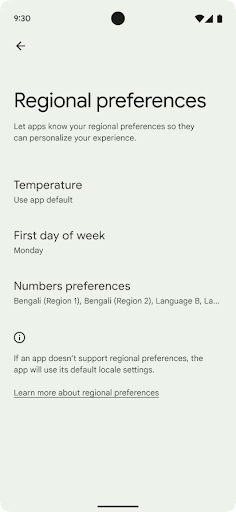
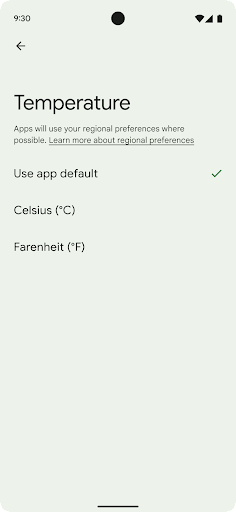
تنظیمات برگزیده منطقه ای به کاربران امکان می دهد واحدهای دما، روز اول هفته و سیستم های شماره گذاری را شخصی کنند. اروپاییای که در ایالات متحده زندگی میکند ممکن است ترجیح دهد واحدهای دما بر حسب سانتیگراد باشد تا فارنهایت و برنامهها به جای پیشفرض یکشنبه ایالات متحده، دوشنبه را بهعنوان آغاز هفته در نظر بگیرند.
منوهای جدید تنظیمات Android برای این تنظیمات برگزیده، مکانی قابل شناسایی و متمرکز را برای تغییر تنظیمات برگزیده برنامه در اختیار کاربران قرار می دهد. این تنظیمات از طریق پشتیبان گیری و بازیابی نیز ادامه می یابد. چندین API و intent - مانند getTemperatureUnit و getFirstDayOfWeek - به برنامه شما اجازه خواندن به تنظیمات برگزیده کاربر را می دهند، بنابراین برنامه شما می تواند نحوه نمایش اطلاعات را تنظیم کند. همچنین میتوانید یک BroadcastReceiver را در ACTION_LOCALE_CHANGED ثبت کنید تا با تغییر تنظیمات منطقهای، تغییرات پیکربندی محلی را مدیریت کنید.
برای پیدا کردن این تنظیمات، برنامه تنظیمات را باز کنید و به سیستم > زبانها و ورودی > تنظیمات برگزیده منطقهای بروید.
دسترسیپذیری
مقیاسبندی فونت غیرخطی تا ۲۰۰٪
با شروع از اندروید ۱۴، این سیستم از مقیاسبندی فونت تا ۲۰۰٪ پشتیبانی میکند و گزینههای دسترسی بیشتری را در اختیار کاربران قرار میدهد.
برای جلوگیری از بزرگ شدن بیش از حد عناصر متنی بزرگ روی صفحه، سیستم یک منحنی مقیاسبندی غیرخطی اعمال میکند. این استراتژی مقیاسبندی به این معنی است که متن بزرگ با همان سرعت متن کوچکتر مقیاسبندی نمیشود. مقیاسبندی فونت غیرخطی به حفظ سلسله مراتب متناسب بین عناصر با اندازههای مختلف کمک میکند و در عین حال مشکلات مربوط به مقیاسبندی متن خطی در درجات بالا (مانند بریده شدن متن یا متنی که به دلیل اندازههای بسیار بزرگ صفحه نمایش، خواندن آن سختتر میشود) را کاهش میدهد.
اپلیکیشن خود را با مقیاسبندی فونت غیرخطی آزمایش کنید
اگر از قبل از واحدهای پیکسلهای مقیاسپذیر (sp) برای تعریف اندازه متن استفاده میکنید، این گزینههای اضافی و بهبودهای مقیاسبندی به طور خودکار روی متن برنامه شما اعمال میشوند. با این حال، شما همچنان باید تست رابط کاربری را با حداکثر اندازه فونت فعال (200٪) انجام دهید تا مطمئن شوید که برنامه شما اندازه فونتها را به درستی اعمال میکند و میتواند اندازه فونتهای بزرگتر را بدون تأثیر بر قابلیت استفاده، در خود جای دهد.
برای فعال کردن اندازه فونت ۲۰۰٪، این مراحل را دنبال کنید:
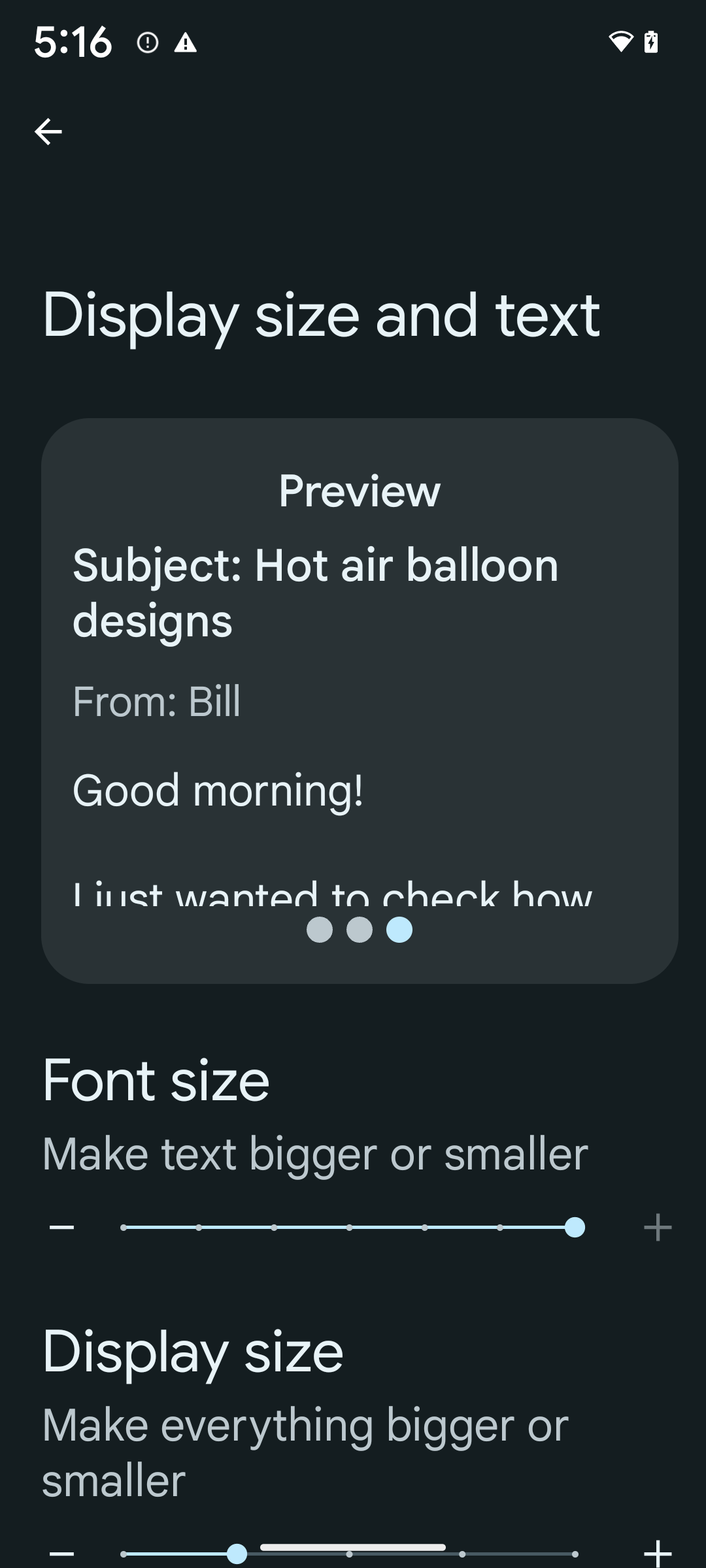
- برنامه تنظیمات را باز کنید و به بخش دسترسیها > اندازه و متن نمایش بروید.
- برای گزینه اندازه فونت ، روی نماد به علاوه (+) ضربه بزنید تا حداکثر تنظیم اندازه فونت فعال شود، همانطور که در تصویر همراه این بخش نشان داده شده است.
برای اندازه متن از واحدهای پیکسل مقیاسبندیشده (sp) استفاده کنید
به یاد داشته باشید که همیشه اندازه متن را با واحدهای sp مشخص کنید . وقتی برنامه شما از واحدهای sp استفاده میکند، اندروید میتواند اندازه متن دلخواه کاربر را اعمال کرده و آن را به طور مناسب مقیاسبندی کند.
از واحدهای sp برای padding استفاده نکنید یا ارتفاع نما را با فرض padding ضمنی تعریف نکنید: با مقیاسبندی فونت غیرخطی، ابعاد sp ممکن است متناسب نباشند، بنابراین 4sp + 20sp ممکن است برابر با 24sp نباشد.
تبدیل واحدهای پیکسل مقیاسپذیر (sp)
از TypedValue.applyDimension() برای تبدیل از واحدهای sp به پیکسل و از TypedValue.deriveDimension() برای تبدیل پیکسل به sp استفاده کنید. این روشها منحنی مقیاسبندی غیرخطی مناسب را بهطور خودکار اعمال میکنند.
از کدگذاری معادلات با استفاده از Configuration.fontScale یا DisplayMetrics.scaledDensity خودداری کنید. از آنجا که مقیاسبندی فونت غیرخطی است، فیلد scaledDensity دیگر دقیق نیست. فیلد fontScale باید فقط برای اهداف اطلاعاتی استفاده شود زیرا فونتها دیگر با یک مقدار اسکالر واحد مقیاسبندی نمیشوند.
برای ارتفاع خط از واحدهای sp استفاده کنید
همیشه android:lineHeight با استفاده از واحدهای sp به جای dp تعریف کنید، تا ارتفاع خط همراه با متن شما تغییر کند. در غیر این صورت، اگر متن شما sp باشد اما lineHeight شما بر حسب dp یا px باشد، تغییر اندازه نمیدهد و کوچک به نظر میرسد. TextView به طور خودکار lineHeight را اصلاح میکند تا نسبتهای مورد نظر شما حفظ شود، اما فقط در صورتی که هم textSize و هم lineHeight بر حسب sp تعریف شده باشند.
دوربین و رسانه
فوق العاده HDR برای تصاویر

اندروید 14 از تصاویر با محدوده دینامیکی بالا (HDR) پشتیبانی می کند که اطلاعات بیشتری را از حسگر هنگام عکس گرفتن حفظ می کند، که رنگ های زنده و کنتراست بیشتر را امکان پذیر می کند. اندروید از فرمت Ultra HDR استفاده میکند که کاملاً با تصاویر JPEG سازگار است و به برنامهها اجازه میدهد تا به طور یکپارچه با تصاویر HDR تعامل داشته باشند و در صورت نیاز آنها را در محدوده دینامیک استاندارد (SDR) نمایش دهند.
رندر کردن این تصاویر در رابط کاربری در HDR زمانی که برنامه شما استفاده از رابط کاربری HDR را برای پنجره فعالیت خود انتخاب میکند، چه از طریق ورودی مانیفست یا در زمان اجرا با فراخوانی Window.setColorMode() به طور خودکار توسط چارچوب انجام میشود. همچنین می توانید تصاویر ثابت Ultra HDR فشرده شده را در دستگاه های پشتیبانی شده ضبط کنید. با بازیابی رنگ های بیشتر از حسگر، ویرایش در پست می تواند انعطاف پذیرتر باشد. Gainmap مرتبط با تصاویر Ultra HDR می تواند برای رندر آنها با استفاده از OpenGL یا Vulkan استفاده شود.
اندروید 14 از تصاویر با محدوده دینامیکی بالا (HDR) پشتیبانی می کند که اطلاعات بیشتری را از حسگر هنگام عکس گرفتن حفظ می کند، که رنگ های زنده و کنتراست بیشتر را امکان پذیر می کند. اندروید از فرمت Ultra HDR استفاده میکند که کاملاً با تصاویر JPEG سازگار است و به برنامهها اجازه میدهد تا به طور یکپارچه با تصاویر HDR تعامل داشته باشند و در صورت نیاز آنها را در محدوده دینامیک استاندارد (SDR) نمایش دهند.
رندر کردن این تصاویر در رابط کاربری در HDR زمانی که برنامه شما استفاده از رابط کاربری HDR را برای پنجره فعالیت خود انتخاب میکند، چه از طریق ورودی مانیفست یا در زمان اجرا با فراخوانی Window.setColorMode() به طور خودکار توسط چارچوب انجام میشود. همچنین می توانید تصاویر ثابت Ultra HDR فشرده شده را در دستگاه های پشتیبانی شده ضبط کنید. با بازیابی رنگ های بیشتر از حسگر، ویرایش در پست می تواند انعطاف پذیرتر باشد. Gainmap مرتبط با تصاویر Ultra HDR می تواند برای رندر آنها با استفاده از OpenGL یا Vulkan استفاده شود.
بزرگنمایی، فوکوس، نمای پس از عمل و موارد دیگر در افزونههای دوربین
Android 14 افزونههای دوربین را ارتقا و بهبود میبخشد، به برنامهها اجازه میدهد تا زمانهای پردازش طولانیتری را مدیریت کنند، که با استفاده از الگوریتمهای محاسباتی فشرده مانند عکاسی در نور کم در دستگاههای پشتیبانیشده، تصاویر بهبودیافته را ممکن میسازد. این ویژگی ها هنگام استفاده از قابلیت های افزونه دوربین، تجربه قوی تری را به کاربران می دهد. نمونه هایی از این پیشرفت ها عبارتند از:
- تخمین تأخیر پردازش عکسبرداری پویا برآوردهای تأخیر ثبت عکس را بر اساس شرایط فعلی صحنه و محیط ارائه می دهد. برای دریافت یک شی
StillCaptureLatencyکه دارای دو روش تخمین تأخیر است،CameraExtensionSession.getRealtimeStillCaptureLatency()را فراخوانی کنید. متدgetCaptureLatency()تاخیر تخمینی بینonCaptureStartedوonCaptureProcessStarted()را برمی گرداند و متدgetProcessingLatency()تاخیر تخمینی بینonCaptureProcessStarted()و فریم پردازش شده نهایی موجود را برمی گرداند. - پشتیبانی از تماسهای پیشروی ضبط بهگونهای که برنامهها میتوانند پیشرفت فعلی عملیات پردازش طولانیمدت را نشان دهند. میتوانید بررسی کنید که آیا این ویژگی با
CameraExtensionCharacteristics.isCaptureProcessProgressAvailableدر دسترس است یا خیر، و در صورت وجود، پاسخ تماسonCaptureProcessProgressed()پیادهسازی میکنید که دارای پیشرفت (از 0 تا 100) به عنوان پارامتر است. فراداده ویژه برنامه افزودنی، مانند
CaptureRequest.EXTENSION_STRENGTHبرای شماره گیری در مقدار افکت افزونه، مانند میزان تاری پس زمینه باEXTENSION_BOKEH.ویژگی Postview برای Still Capture در پسوندهای دوربین، که تصویری با پردازش کمتر سریعتر از تصویر نهایی ارائه می دهد. اگر یک برنامه افزودنی تأخیر پردازش را افزایش داده باشد، میتوان یک تصویر پسنمایش بهعنوان جایبانی برای بهبود UX ارائه کرد و بعداً برای تصویر نهایی جایگزین شد. می توانید بررسی کنید که آیا این ویژگی با
CameraExtensionCharacteristics.isPostviewAvailableموجود است یا خیر. سپس می توانید یکOutputConfigurationبهExtensionSessionConfiguration.setPostviewOutputConfigurationارسال کنید.پشتیبانی از
SurfaceViewکه امکان یک مسیر رندر پیش نمایش بهینه تر و کم مصرف تر را فراهم می کند.پشتیبانی از ضربه برای فوکوس و زوم در طول استفاده از برنامه افزودنی.
زوم درون حسگر
وقتی REQUEST_AVAILABLE_CAPABILITIES_STREAM_USE_CASE در CameraCharacteristics حاوی SCALER_AVAILABLE_STREAM_USE_CASES_CROPPED_RAW است، برنامه شما میتواند از قابلیتهای حسگر پیشرفته استفاده کند تا یک جریان RAW برش داده شده، با استفاده از یک جریان RAW، از همان فیلد CaptureRequest استفاده کند CameraMetadata.SCALER_AVAILABLE_STREAM_USE_CASES_CROPPED_RAW . با اجرای کنترل های لغو درخواست، دوربین به روز شده کنترل زوم را حتی قبل از آماده شدن سایر کنترل های دوربین به کاربران می دهد.
صدای USB بدون افت کیفیت
اندروید 14 از فرمتهای صوتی بدون اتلاف برای تجربه در سطح دوستداران صوتی از طریق هدستهای سیمی USB پشتیبانی میکند. میتوانید از یک دستگاه USB برای ویژگیهای میکسر ترجیحی آن پرس و جو کنید، یک شنونده را برای تغییرات در ویژگیهای میکسر ترجیحی ثبت کنید، و ویژگیهای میکسر را با استفاده از کلاس AudioMixerAttributes پیکربندی کنید. این کلاس فرمت، مانند ماسک کانال، نرخ نمونه و رفتار میکسر صدا را نشان می دهد. این کلاس امکان ارسال مستقیم صدا را بدون میکس، تنظیم صدا یا جلوه های پردازشی را فراهم می کند.
بهرهوری و ابزارهای توسعهدهندگان
مدیر اعتبارنامه
اندروید ۱۴، Credential Manager را به عنوان یک API پلتفرم اضافه میکند و از طریق کتابخانه Jetpack با استفاده از سرویسهای گوگل پلی، پشتیبانی بیشتری را برای دستگاههای اندروید ۴.۴ (سطح API ۱۹) ارائه میدهد. Credential Manager با استفاده از APIهایی که اعتبارنامهها را با ارائهدهندگان اعتبارنامه پیکربندیشده توسط کاربر بازیابی و ذخیره میکنند، قصد دارد ورود به سیستم را برای کاربران آسانتر کند. Credential Manager از چندین روش ورود به سیستم، از جمله نام کاربری و رمز عبور، کلیدهای عبور و راهحلهای ورود به سیستم فدرال (مانند ورود با گوگل) در یک API واحد پشتیبانی میکند.
کلیدهای عبور مزایای زیادی دارند. به عنوان مثال، کلیدهای عبور بر اساس استانداردهای صنعتی ساخته شدهاند ، میتوانند در سیستم عاملها و اکوسیستمهای مرورگر مختلف کار کنند و میتوانند هم با وبسایتها و هم با برنامهها مورد استفاده قرار گیرند.
برای اطلاعات بیشتر، به مستندات Credential Manager and passkeys و پست وبلاگ در مورد Credential Manager and passkeys مراجعه کنید.
ارتباط با سلامت
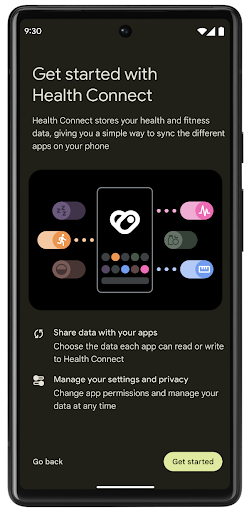
Health Connect یک مخزن روی دستگاه برای داده های سلامت و تناسب اندام کاربر است. این به کاربران اجازه می دهد تا داده ها را بین برنامه های مورد علاقه خود به اشتراک بگذارند، با یک مکان واحد برای کنترل داده هایی که می خواهند با این برنامه ها به اشتراک بگذارند.
در دستگاههایی که نسخههای اندرویدی قبل از Android 14 دارند، Health Connect برای دانلود به عنوان یک برنامه در فروشگاه Google Play در دسترس است. با شروع اندروید 14، Health Connect بخشی از پلتفرم است و بهروزرسانیها را از طریق بهروزرسانیهای سیستم Google Play بدون نیاز به دانلود جداگانه دریافت میکند. با این کار، Health Connect میتواند بهطور مکرر بهروزرسانی شود و برنامههای شما میتوانند متکی باشند که Health Connect در دستگاههای دارای Android نسخه ۱۴ یا بالاتر در دسترس است. کاربران میتوانند با کنترلهای حریم خصوصی که در تنظیمات سیستم یکپارچه شدهاند، از تنظیمات دستگاه خود به Health Connect دسترسی داشته باشند.

Health Connect شامل چندین ویژگی جدید در اندروید 14 است، مانند مسیرهای ورزشی، که به کاربران امکان می دهد مسیری از تمرین خود را به اشتراک بگذارند که می تواند بر روی نقشه تجسم شود. مسیر به عنوان لیستی از مکانهای ذخیره شده در یک پنجره زمانی تعریف میشود و برنامه شما میتواند مسیرها را در جلسات تمرین وارد کند و آنها را به هم گره بزند. برای اطمینان از اینکه کاربران کنترل کاملی بر این داده های حساس دارند، کاربران باید به اشتراک گذاری مسیرهای فردی با سایر برنامه ها را اجازه دهند.
برای اطلاعات بیشتر، به مستندات Health Connection و پست وبلاگ در مورد چه چیزی در سلامت Android جدید است مراجعه کنید.
بهروزرسانیهای OpenJDK 17
Android 14 به کار تازه کردن کتابخانههای اصلی Android ادامه میدهد تا با ویژگیهای جدیدترین نسخه OpenJDK LTS، از جمله بهروزرسانیهای کتابخانه و پشتیبانی از زبان جاوا 17 برای توسعهدهندگان برنامهها و پلتفرمها، هماهنگ شود.
ویژگی ها و بهبودهای زیر گنجانده شده است:
- تقریباً 300 کلاس
java.baseبه پشتیبانی جاوا 17 به روز شد. - بلوک های متنی که رشته های چند خطی را به زبان برنامه نویسی جاوا معرفی می کند.
- تطبیق الگو برای instanceof ، که به یک شی اجازه می دهد تا بدون هیچ متغیر اضافی در یک
instanceofیک نوع خاص در نظر گرفته شود. - کلاسهای مهر و موم شده ، که به شما امکان میدهند کلاسها و رابطهایی را که میتوانند آنها را گسترش یا پیادهسازی کنند محدود کنید.
به لطف بهروزرسانیهای سیستم Google Play (Project Mainline)، بیش از 600 میلیون دستگاه برای دریافت آخرین بهروزرسانیهای Android Runtime (ART) فعال هستند که شامل این تغییرات میشود. این بخشی از تعهد ما برای دادن محیطی سازگارتر و امنتر به برنامهها در سراسر دستگاهها و ارائه ویژگیها و قابلیتهای جدید به کاربران مستقل از نسخههای پلتفرم است.
جاوا و OpenJDK علائم تجاری یا علائم تجاری ثبت شده Oracle و/یا شرکت های وابسته به آن هستند.
بهبودهایی برای فروشگاههای اپلیکیشن
Android 14 چندین API PackageInstaller را معرفی می کند که به فروشگاه های برنامه اجازه می دهد تا تجربه کاربری خود را بهبود بخشند.
قبل از دانلود، تأیید نصب را درخواست کنید
نصب یا بهروزرسانی یک برنامه ممکن است به تأیید کاربر نیاز داشته باشد. به عنوان مثال، هنگامی که نصب کننده ای که از مجوز REQUEST_INSTALL_PACKAGES استفاده می کند، سعی می کند یک برنامه جدید را نصب کند. در نسخههای قبلی اندروید، فروشگاههای برنامه فقط میتوانند تأیید کاربر را پس از نوشتن فایلهای APK در جلسه نصب و انجام جلسه درخواست کنند.
با شروع Android 14، متد requestUserPreapproval() به نصبکنندگان این امکان را میدهد تا قبل از انجام جلسه نصب درخواست تأیید کاربر کنند. این بهبود به فروشگاه برنامه اجازه میدهد دانلود هر فایل APK را تا زمانی که نصب توسط کاربر تأیید شود به تعویق بیاندازد. علاوه بر این، هنگامی که کاربر نصب را تأیید کرد، فروشگاه برنامه میتواند برنامه را در پسزمینه دانلود و نصب کند بدون اینکه کاربر مزاحم شود.
مسئولیت به روز رسانی های آینده را به عهده بگیرید
متد setRequestUpdateOwnership() به نصب کننده اجازه می دهد تا به سیستم نشان دهد که قصد دارد مسئول به روز رسانی های بعدی برنامه ای باشد که در حال نصب است. این قابلیت اجرای مالکیت بهروزرسانی را فعال میکند، به این معنی که فقط مالک بهروزرسانی مجاز است بهروزرسانیهای خودکار را برای برنامه نصب کند. اجرای مالکیت بهروزرسانی کمک میکند تا اطمینان حاصل شود که کاربران بهروزرسانیها را فقط از فروشگاه برنامه مورد انتظار دریافت میکنند.
هر نصبکننده دیگری، از جمله کسانی که از مجوز INSTALL_PACKAGES استفاده میکنند، باید تأیید صریح کاربر را برای نصب بهروزرسانی دریافت کنند. اگر کاربری تصمیم بگیرد بهروزرسانی را از منبع دیگری ادامه دهد، مالکیت بهروزرسانی از بین میرود.
برنامهها را در زمانهای کمتر بهروزرسانی کنید
فروشگاههای برنامه معمولاً میخواهند از بهروزرسانی برنامهای که به طور فعال در حال استفاده است اجتناب کنند، زیرا این امر منجر به از بین رفتن فرآیندهای در حال اجرا برنامه میشود، که به طور بالقوه کاری را که کاربر انجام میداد قطع میکند.
با شروع Android 14، InstallConstraints API راهی را به نصبکنندگان میدهد تا اطمینان حاصل کنند که بهروزرسانیهای برنامهشان در یک لحظه مناسب انجام میشود. به عنوان مثال، یک فروشگاه برنامه می تواند متد commitSessionAfterInstallConstraintsAreMet() را فراخوانی کند تا مطمئن شود که به روز رسانی تنها زمانی انجام می شود که کاربر دیگر با برنامه مورد نظر تعامل نداشته باشد.
یکپارچه تقسیم های اختیاری را نصب کنید
با تقسیمبندی APK، ویژگیهای یک برنامه را میتوان در فایلهای APK جداگانه به جای یک APK یکپارچه ارائه کرد. Split APK به فروشگاههای برنامه اجازه میدهد تا تحویل اجزای مختلف برنامه را بهینه کنند. به عنوان مثال، فروشگاه های برنامه ممکن است بر اساس ویژگی های دستگاه مورد نظر بهینه سازی کنند. PackageInstaller API از زمان معرفی آن در سطح 22 API از تقسیمات پشتیبانی می کند.
در اندروید 14، متد setDontKillApp() به نصب کننده اجازه می دهد تا نشان دهد که فرآیندهای در حال اجرا برنامه نباید در هنگام نصب اسپلیت های جدید از بین بروند. فروشگاه های برنامه می توانند از این ویژگی برای نصب یکپارچه ویژگی های جدید یک برنامه در زمانی که کاربر از برنامه استفاده می کند استفاده کنند.
بستههای فراداده برنامه
با شروع Android 14، نصبکننده بسته Android به شما امکان میدهد ابردادههای برنامه مانند شیوههای ایمنی داده را برای درج در صفحات فروشگاه برنامه مانند Google Play مشخص کنید .
تشخیص زمان گرفتن اسکرینشات توسط کاربران
برای ایجاد یک تجربه استانداردتر برای تشخیص اسکرینشاتها، اندروید ۱۴ یک API تشخیص اسکرینشات با حفظ حریم خصوصی معرفی میکند. این API به برنامهها اجازه میدهد تا بر اساس هر فعالیت، فراخوانیهای برگشتی را ثبت کنند. این فراخوانیهای برگشتی هنگامی که کاربر در حالی که آن فعالیت قابل مشاهده است، اسکرینشات میگیرد، فراخوانی میشوند و به کاربر اطلاع داده میشود.
تجربه کاربری
اقدامات سفارشی Sharesheet و رتبهبندی بهبود یافته
Android 14 اشتراکگذاری سیستم را بهروزرسانی میکند تا از اقدامات برنامه سفارشی و نتایج پیشنمایش آموزندهتر برای کاربران پشتیبانی کند.
افزودن اقدامات سفارشی
با Android 14، برنامه شما میتواند اقدامات سفارشی را به صفحه اشتراک سیستمی که فراخوانی میکند اضافه کند .

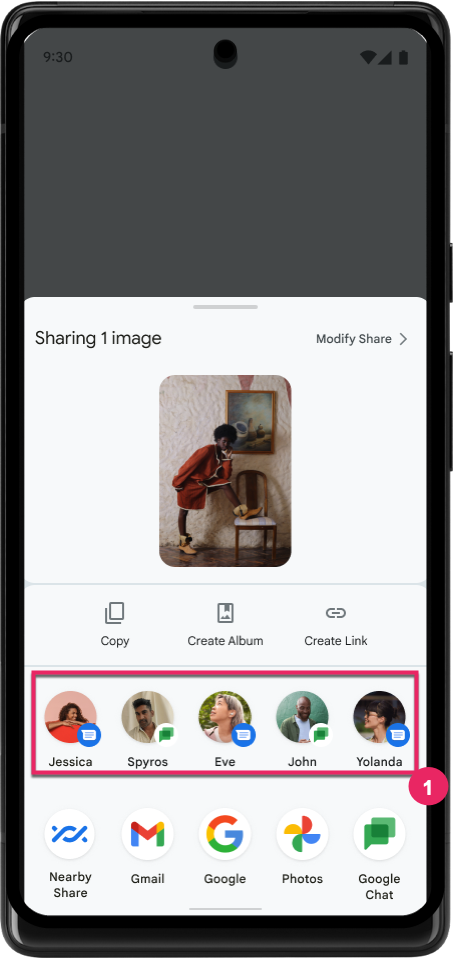
بهبود رتبه بندی اهداف اشتراک مستقیم
Android 14 از سیگنالهای بیشتری از برنامهها برای تعیین رتبهبندی اهداف اشتراک مستقیم استفاده میکند تا نتایج مفیدتری برای کاربر ارائه دهد. برای ارائه مفیدترین سیگنال برای رتبهبندی، راهنمای بهبود رتبهبندی اهداف اشتراک مستقیم خود را دنبال کنید. برنامه های ارتباطی همچنین می توانند استفاده از میانبر برای پیام های خروجی و دریافتی را گزارش کنند .
پشتیبانی از انیمیشنهای داخلی و سفارشی برای پیشبینی بازگشت
اندروید 13 انیمیشن پیش بینی بازگشت به خانه را پشت گزینه توسعه دهنده معرفی کرد. هنگامی که در یک برنامه پشتیبانی شده با فعال بودن گزینه توسعه دهنده استفاده می شود، کشیدن انگشت به عقب انیمیشنی را نشان می دهد که نشان می دهد حرکت برگشت از برنامه به صفحه اصلی خارج می شود.
Android 14 شامل چندین بهبود و راهنمایی جدید برای Predictive Back است:
- میتوانید
android:enableOnBackInvokedCallback=trueبرای انتخاب انیمیشنهای پیشبینیکننده سیستم در هر فعالیت به جای کل برنامه تنظیم کنید. - انیمیشنهای سیستمی جدیدی را برای همراهی انیمیشن بازگشت به خانه از Android 13 اضافه کردهایم. انیمیشنهای سیستمی جدید متقاطع و متقاطع هستند که پس از مهاجرت به Predictive Back به صورت خودکار دریافت میکنید.
- ما انیمیشنهای Material Component جدید را برای صفحات پایین ، صفحات جانبی و جستجو اضافه کردهایم.
- ما راهنمای طراحی برای ایجاد انیمیشنها و انتقالهای درونبرنامه سفارشی ایجاد کردهایم.
- ما API های جدیدی را برای پشتیبانی از انیمیشن های انتقال درون برنامه ای سفارشی اضافه کرده ایم:
-
handleOnBackStarted،handleOnBackProgressed،handleOnBackCancelledinOnBackPressedCallback -
onBackStarted،onBackProgressed،onBackCancelledinOnBackAnimationCallback - از
overrideActivityTransitionبه جایoverridePendingTransitionبرای ترانزیشن هایی استفاده کنید که با کشیدن انگشت کاربر به عقب پاسخ می دهند.
-
با این نسخه پیشنمایش اندروید 14، تمام ویژگیهای Predictive Back پشت یک گزینه توسعهدهنده باقی میماند. راهنمای برنامهنویس برای انتقال برنامهتان به پیشبینی ، و همچنین راهنمای توسعهدهنده ایجاد انتقالهای سفارشی درونبرنامه را ببینید.
تولیدکنندهی دستگاههای دارای صفحه نمایش بزرگ، به ازای هر برنامه، لغو میکند
لغو هر برنامه به سازندگان دستگاه امکان می دهد تا رفتار برنامه ها را در دستگاه های صفحه بزرگ تغییر دهند. به عنوان مثال، لغو FORCE_RESIZE_APP به سیستم دستور میدهد تا اندازه برنامه را برای اندازهگیری ابعاد نمایش تغییر دهد (جلوگیری از حالت سازگاری با اندازه) حتی اگر resizeableActivity="false" در مانیفست برنامه تنظیم شده باشد.
لغوها برای بهبود تجربه کاربر در صفحه نمایش های بزرگ در نظر گرفته شده است.
ویژگیهای مانیفست جدید شما را قادر میسازد برخی از لغوهای سازنده دستگاه را برای برنامه خود غیرفعال کنید.
کاربر در هر برنامه با صفحه نمایش بزرگ، لغو میکند
لغو هر برنامه رفتار برنامه ها را در دستگاه های صفحه بزرگ تغییر می دهد. برای مثال، لغو OVERRIDE_MIN_ASPECT_RATIO_LARGE سازنده دستگاه، نسبت تصویر برنامه را بدون توجه به پیکربندی برنامه روی 16:9 تنظیم میکند.
Android 14 QPR1 کاربران را قادر میسازد تا با استفاده از منوی تنظیمات جدید در دستگاههای صفحهنمایش بزرگ، نادیدهگیریهای هر برنامه را اعمال کنند.
اشتراک گذاری صفحه نمایش برنامه
اشتراکگذاری صفحه برنامه به کاربران این امکان را میدهد تا در حین ضبط محتوای صفحه، یک پنجره برنامه را به جای کل صفحه دستگاه به اشتراک بگذارند.
با اشتراکگذاری صفحه برنامه، نوار وضعیت، نوار پیمایش، اعلانها و سایر عناصر رابط کاربری سیستم از صفحه نمایش مشترک حذف میشوند. فقط محتوای برنامه انتخابی به اشتراک گذاشته می شود.
اشتراکگذاری صفحهنمایش برنامه، بهرهوری و حریم خصوصی را بهبود میبخشد و به کاربران امکان میدهد چندین برنامه را اجرا کنند، اما اشتراکگذاری محتوا را به یک برنامه محدود میکند.
پاسخ هوشمند مبتنی بر LLM در Gboard در Pixel 8 Pro
در دستگاههای Pixel 8 Pro دارای ویژگی دسامبر، توسعهدهندگان میتوانند پاسخهای هوشمند با کیفیت بالاتر را در Gboard که توسط مدلهای زبان بزرگ (LLM) روی دستگاه اجرا میشوند در Google Tensor امتحان کنند.
این ویژگی به عنوان یک پیش نمایش محدود برای انگلیسی ایالات متحده در WhatsApp، Line و KakaoTalk در دسترس است. برای این کار باید از دستگاه Pixel 8 Pro با Gboard به عنوان صفحه کلید استفاده کنید.
برای امتحان کردن، ابتدا این ویژگی را در تنظیمات > گزینههای برنامهنویس > تنظیمات AiCore > فعال کردن Aicore Persistent فعال کنید.
سپس، مکالمهای را در یک برنامه پشتیبانیشده باز کنید تا پاسخ هوشمند مبتنی بر LLM را در نوار پیشنهادی Gboard در پاسخ به پیامهای دریافتی ببینید.
گرافیک
مسیرها قابل پرسوجو و درونیابی هستند
Android's Path API مکانیزمی قدرتمند و منعطف برای ایجاد و رندر گرافیک برداری است، با قابلیت استروک یا پر کردن یک مسیر، ساخت یک مسیر از قسمت های خط یا منحنی های درجه دوم یا مکعب، انجام عملیات بولی برای به دست آوردن اشکال پیچیده تر یا همه موارد. از اینها به طور همزمان یکی از محدودیت ها توانایی یافتن آنچه در واقع در یک شی Path وجود دارد است. درونیات شی پس از ایجاد برای تماس گیرندگان مبهم است.
برای ایجاد یک Path ، متدهایی مانند moveTo() ، lineTo() و cubicTo() را فراخوانی می کنید تا بخش های مسیر را اضافه کنید. اما هیچ راهی برای پرسیدن این مسیر وجود ندارد، بنابراین شما باید آن اطلاعات را در زمان ایجاد حفظ کنید.
با شروع اندروید 14، میتوانید مسیرها را جستجو کنید تا بفهمید داخل آنها چیست. ابتدا باید یک شی PathIterator با استفاده از Path.getPathIterator API دریافت کنید:
کاتلین
val path = Path().apply {
    moveTo(1.0f, 1.0f)
    lineTo(2.0f, 2.0f)
    close()
}
val pathIterator = path.pathIterator
جاوا
Path path = new Path();
path.moveTo(1.0F, 1.0F);
path.lineTo(2.0F, 2.0F);
path.close();
PathIterator pathIterator = path.getPathIterator();
در مرحله بعد، میتوانید PathIterator را فراخوانی کنید تا قسمتها را یک به یک تکرار کند و تمام دادههای لازم برای هر بخش را بازیابی کند. این مثال از اشیاء PathIterator.Segment استفاده می کند که داده ها را برای شما بسته بندی می کند:
کاتلین
for (segment in pathIterator) {
    println("segment: ${segment.verb}, ${segment.points}")
}
جاوا
while (pathIterator.hasNext()) {
    PathIterator.Segment segment = pathIterator.next();
    Log.i(LOG_TAG, "segment: " + segment.getVerb() + ", " + segment.getPoints());
}
PathIterator همچنین دارای یک نسخه غیر تخصیص دهنده از next() است که در آن می توانید بافر را برای نگهداری داده های نقطه ارسال کنید.
یکی از موارد مهم استفاده از کوئری داده های Path ، درون یابی است. برای مثال، ممکن است بخواهید بین دو مسیر مختلف متحرک (یا شکلبندی ) کنید. برای سادهتر کردن این مورد، اندروید 14 متد interpolate() را در Path نیز شامل میشود. با فرض اینکه دو مسیر ساختار داخلی یکسانی دارند، متد interpolate() یک Path جدید با آن نتیجه درون یابی ایجاد می کند. این مثال مسیری را برمی گرداند که شکل آن در نیمه راه است (یک درونیابی خطی 0.5) بین path و otherPath :
کاتلین
val interpolatedResult = Path()
if (path.isInterpolatable(otherPath)) {
    path.interpolate(otherPath, .5f, interpolatedResult)
}
جاوا
Path interpolatedResult = new Path();
if (path.isInterpolatable(otherPath)) {
    path.interpolate(otherPath, 0.5F, interpolatedResult);
}
کتابخانه مسیر گرافیکی Jetpack API های مشابهی را برای نسخه های قبلی اندروید نیز فعال می کند.
مشهای سفارشی با سایهزنهای رأس و قطعه
اندروید مدتهاست که از ترسیم مشهای مثلثی با سایهزنی سفارشی پشتیبانی میکند، اما قالب مش ورودی به چند ترکیب ویژگی از پیش تعریفشده محدود شده است. اندروید 14 پشتیبانی از مش های سفارشی را اضافه می کند که می توانند به صورت مثلث یا نوارهای مثلثی تعریف شوند و به صورت اختیاری می توانند ایندکس شوند. این مشها با ویژگیهای سفارشی ، گامهای راس، متغیر ، و سایهزنهای راس و قطعه نوشته شده در AGSL مشخص میشوند.
سایهزن رأس، تغییراتی مانند موقعیت و رنگ را تعریف میکند، در حالی که سایهزن قطعه میتواند بهطور اختیاری رنگ پیکسل را مشخص کند، معمولاً با استفاده از تغییرات ایجاد شده توسط سایهزن رأس. اگر رنگ توسط shader قطعه ارائه شود، سپس با استفاده از حالت ترکیبی انتخاب شده هنگام کشیدن مش، با رنگ فعلی Paint ترکیب می شود. برای انعطاف بیشتر، میتوان لباسهای یکنواخت را به سایهزنهای قطعه و رأس منتقل کرد.
رندرکننده بافر سختافزاری برای Canvas
برای کمک به استفاده از Canvas API Android برای ترسیم شتاب سختافزاری به یک HardwareBuffer ، Android 14 HardwareBufferRenderer را معرفی میکند. این API به ویژه زمانی مفید است که مورد استفاده شما شامل ارتباط با ترکیب کننده سیستم از طریق SurfaceControl برای ترسیم با تأخیر کم باشد.