

اندروید ۱۴ ویژگیها و APIهای فوقالعادهای را برای توسعهدهندگان معرفی میکند. موارد زیر به شما کمک میکند تا در مورد ویژگیهای برنامههای خود اطلاعات کسب کنید و با APIهای مرتبط شروع به کار کنید.
برای مشاهده لیست کاملی از APIهای اضافه شده، اصلاح شده و حذف شده، گزارش تفاوت API را مطالعه کنید. برای جزئیات بیشتر در مورد APIهای اضافه شده، به مرجع API اندروید مراجعه کنید - برای اندروید ۱۴، به دنبال APIهایی باشید که در سطح API ۳۴ اضافه شدهاند. برای کسب اطلاعات در مورد حوزههایی که تغییرات پلتفرم ممکن است بر برنامههای شما تأثیر بگذارد، حتماً تغییرات رفتاری اندروید ۱۴ را برای برنامههایی که اندروید ۱۴ را هدف قرار میدهند و برای همه برنامهها بررسی کنید.
بینالمللیسازی
تنظیمات زبان برای هر برنامه
Android 14 ویژگی های زبان هر برنامه را که در Android 13 (سطح API 33) معرفی شده بود با این قابلیت های اضافی گسترش می دهد:
ایجاد خودکار
localeConfigیک برنامه : با شروع Android Studio Giraffe Canary 7 و AGP 8.1.0-alpha07، میتوانید برنامه خود را به گونهای پیکربندی کنید که از اولویتهای زبان هر برنامه بهطور خودکار پشتیبانی کند. بر اساس منابع پروژه شما، افزونه Android Gradle فایلLocaleConfigرا تولید می کند و یک مرجع به آن در فایل مانیفست نهایی اضافه می کند، بنابراین دیگر نیازی به ایجاد یا به روز رسانی فایل به صورت دستی ندارید. AGP از منابع موجود در پوشههایresماژولهای برنامه شما و هر وابستگی ماژول کتابخانهای برای تعیین مکانهای گنجاندن در فایلLocaleConfigاستفاده میکند.بهروزرسانیهای پویا برای
localeConfigیک برنامه : از روشهایsetOverrideLocaleConfig()وgetOverrideLocaleConfig()درLocaleManagerبرای بهروزرسانی پویا فهرست زبانهای پشتیبانیشده برنامه خود در تنظیمات سیستم دستگاه استفاده کنید. از این انعطافپذیری برای سفارشیسازی فهرست زبانهای پشتیبانیشده در هر منطقه، اجرای آزمایشهای A/B یا ارائه فهرست بهروزرسانیشده از مناطق استفاده کنید، اگر برنامه شما از فشارهای سمت سرور برای محلیسازی استفاده میکند.قابلیت مشاهده زبان برنامه برای ویرایشگرهای روش ورودی (IME) : IMEها می توانند از متد
getApplicationLocales()برای بررسی زبان برنامه فعلی و تطبیق زبان IME با آن زبان استفاده کنند.
API صرف دستوری
3 میلیارد نفر به زبانهای جنسیتی صحبت میکنند: زبانهایی که دستههای دستوری (مانند اسمها، افعال، صفتها و حروف اضافه) بر اساس جنسیت افراد و اشیایی که با آنها صحبت میکنید یا درباره آنها صحبت میکنید، عطف میشوند. به طور سنتی، بسیاری از زبان های جنسیتی از جنسیت دستوری مذکر به عنوان جنسیت پیش فرض یا عمومی استفاده می کنند.
مخاطب قرار دادن کاربران در جنسیت دستوری اشتباه، مانند خطاب قرار دادن زنان در جنسیت دستوری مذکر، می تواند بر عملکرد و نگرش آنها تأثیر منفی بگذارد . در مقابل، یک رابط کاربری با زبانی که به درستی جنسیت گرامری کاربر را منعکس میکند، میتواند تعامل کاربر را بهبود بخشد و تجربه کاربری شخصیتر و طبیعیتر را ارائه دهد.
To help you build a user-centric UI for gendered languages, Android 14 introduces the Grammatical Inflection API, which lets you add support for grammatical gender without refactoring your app.
ترجیحات منطقهای
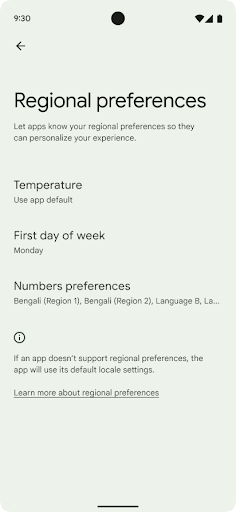
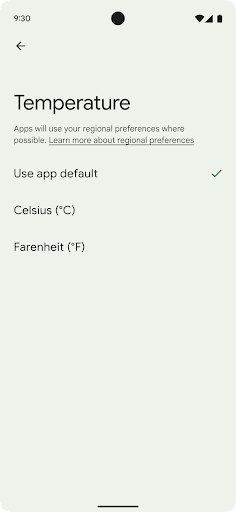
Regional preferences enable users to personalize temperature units, the first day of the week, and numbering systems. A European living in the United States might prefer temperature units to be in Celsius rather than Fahrenheit and for apps to treat Monday as the beginning of the week instead of the US default of Sunday.
New Android Settings menus for these preferences provide users with a
discoverable and centralized location to change app preferences. These
preferences also persist through backup and restore. Several APIs and
intents—such as
getTemperatureUnit
and
getFirstDayOfWeek—
grant your app read access to user preferences, so your app can adjust how it
displays information. You can also register a
BroadcastReceiver on
ACTION_LOCALE_CHANGED
to handle locale configuration changes when regional preferences change.
To find these settings, open the Settings app and navigate to System > Languages & input > Regional preferences.
دسترسیپذیری
مقیاسبندی فونت غیرخطی تا ۲۰۰٪
Starting in Android 14, the system supports font scaling up to 200%, providing users with additional accessibility options.
To prevent large text elements on screen from scaling too large, the system applies a nonlinear scaling curve. This scaling strategy means that large text doesn't scale at the same rate as smaller text. Nonlinear font scaling helps preserve the proportional hierarchy between elements of different sizes while mitigating issues with linear text scaling at high degrees (such as text being cut off or text that becomes harder to read due to an extremely large display sizes).
Test your app with nonlinear font scaling
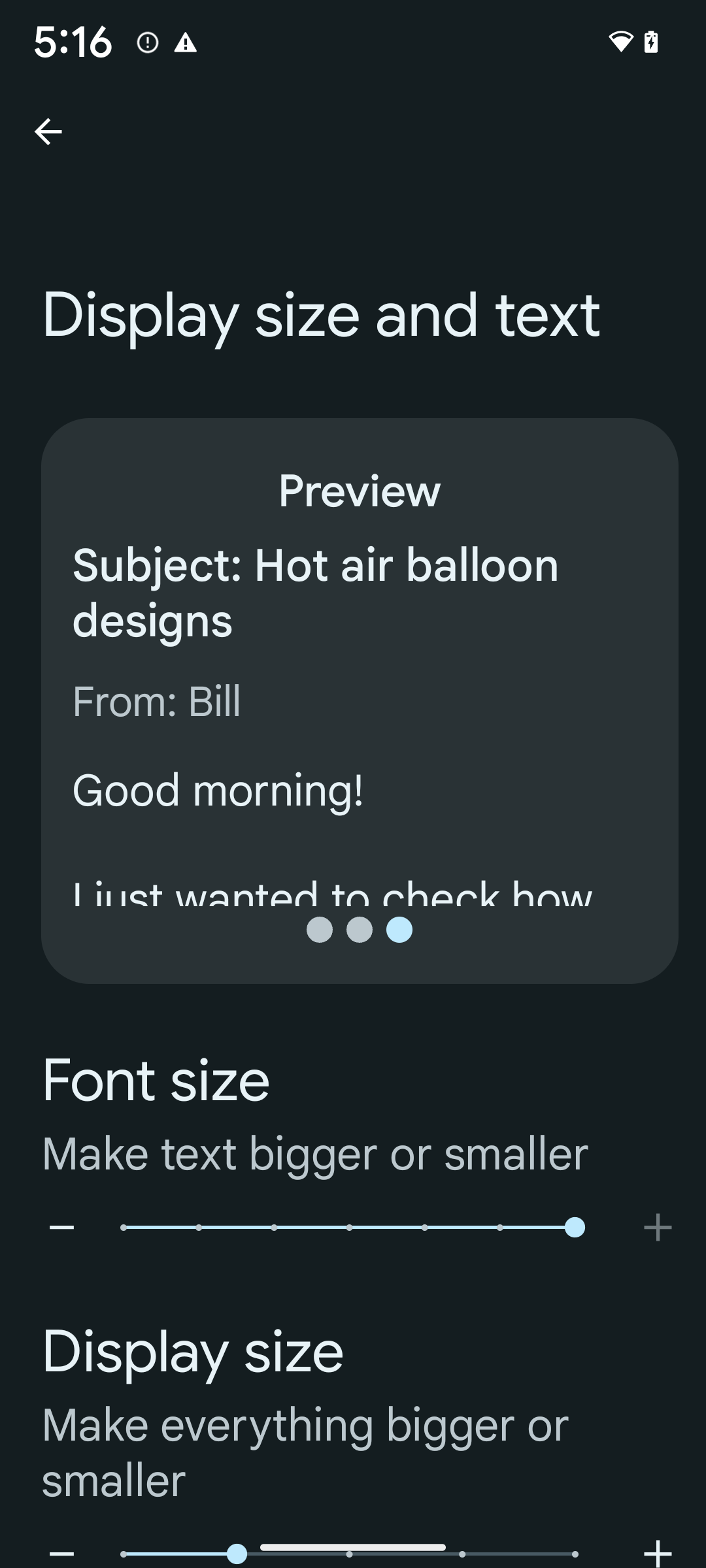
If you already use scaled pixels (sp) units to define text sizing, then these additional options and scaling improvements are applied automatically to the text in your app. However, you should still perform UI testing with the maximum font size enabled (200%) to ensure that your app applies the font sizes correctly and can accommodate larger font sizes without impacting usability.
To enable 200% font size, follow these steps:
- Open the Settings app and navigate to Accessibility > Display size and text.
- For the Font size option, tap the plus (+) icon until the maximum font size setting is enabled, as shown in the image that accompanies this section.
Use scaled pixel (sp) units for text-sizes
Remember to always specify text sizes in sp units. When your app uses sp units, Android can apply the user's preferred text size and scale it appropriately.
Don't use sp units for padding or define view heights assuming implicit padding: with nonlinear font scaling sp dimensions might not be proportional, so 4sp + 20sp might not equal 24sp.
Convert scaled pixel (sp) units
Use TypedValue.applyDimension() to convert from sp units
to pixels, and use TypedValue.deriveDimension() to
convert pixels to sp. These methods apply the appropriate nonlinear scaling
curve automatically.
Avoid hardcoding equations using
Configuration.fontScale or
DisplayMetrics.scaledDensity. Because font scaling is
nonlinear, the scaledDensity field is no longer accurate. The fontScale
field should be used for informational purposes only because fonts are no longer
scaled with a single scalar value.
Use sp units for lineHeight
Always define android:lineHeight using sp units instead
of dp, so the line height scales along with your text. Otherwise, if your text
is sp but your lineHeight is in dp or px, it doesn't scale and looks cramped.
TextView automatically corrects the lineHeight so that your intended
proportions are preserved, but only if both textSize and lineHeight are
defined in sp units.
دوربین و رسانه
فوق العاده HDR برای تصاویر

Android 14 adds support for High Dynamic Range (HDR) images that retain more of the information from the sensor when taking a photo, which enables vibrant colors and greater contrast. Android uses the Ultra HDR format, which is fully backward compatible with JPEG images, allowing apps to seamlessly interoperate with HDR images, displaying them in Standard Dynamic Range (SDR) as needed.
Rendering these images in the UI in HDR is done automatically by the framework
when your app opts in to using HDR UI for its Activity Window, either through a
manifest entry or at runtime by calling
Window.setColorMode(). You can also capture compressed Ultra
HDR still images on supported devices. With more colors recovered
from the sensor, editing in post can be more flexible. The
Gainmap associated with Ultra HDR images can be used to render
them using OpenGL or Vulkan.
بزرگنمایی، فوکوس، نمای پس از عمل و موارد دیگر در افزونههای دوربین
Android 14 upgrades and improves camera extensions, allowing apps to handle longer processing times, which enables improved images using compute-intensive algorithms like low-light photography on supported devices. These features give users an even more robust experience when using camera extension capabilities. Examples of these improvements include:
- Dynamic still capture processing latency estimation provides much more
accurate still capture latency estimates based on the current scene and
environment conditions. Call
CameraExtensionSession.getRealtimeStillCaptureLatency()to get aStillCaptureLatencyobject that has two latency estimation methods. ThegetCaptureLatency()method returns the estimated latency betweenonCaptureStartedandonCaptureProcessStarted(), and thegetProcessingLatency()method returns the estimated latency betweenonCaptureProcessStarted()and the final processed frame being available. - Support for capture progress callbacks so that apps can display the current
progress of long-running, still-capture processing operations. You can check
if this feature is available with
CameraExtensionCharacteristics.isCaptureProcessProgressAvailable, and if it is, you implement theonCaptureProcessProgressed()callback, which has the progress (from 0 to 100) passed in as a parameter. Extension specific metadata, such as
CaptureRequest.EXTENSION_STRENGTHfor dialing in the amount of an extension effect, such as the amount of background blur withEXTENSION_BOKEH.Postview Feature for Still Capture in camera extensions, which provides a less-processed image more quickly than the final image. If an extension has increased processing latency, a postview image could be provided as a placeholder to improve UX and switched out later for the final image. You can check if this feature is available with
CameraExtensionCharacteristics.isPostviewAvailable. Then you can pass anOutputConfigurationtoExtensionSessionConfiguration.setPostviewOutputConfiguration.Support for
SurfaceViewallowing for a more optimized and power-efficient preview render path.Support for tap to focus and zoom during extension usage.
زوم درون حسگر
وقتی REQUEST_AVAILABLE_CAPABILITIES_STREAM_USE_CASE در CameraCharacteristics حاوی SCALER_AVAILABLE_STREAM_USE_CASES_CROPPED_RAW است، برنامه شما میتواند از قابلیتهای حسگر پیشرفته استفاده کند تا یک جریان RAW برش داده شده، با استفاده از یک جریان RAW، از همان فیلد CaptureRequest استفاده کند CameraMetadata.SCALER_AVAILABLE_STREAM_USE_CASES_CROPPED_RAW . با اجرای کنترل های لغو درخواست، دوربین به روز شده کنترل زوم را حتی قبل از آماده شدن سایر کنترل های دوربین به کاربران می دهد.
صدای USB بدون افت کیفیت
Android 14 gains support for lossless audio formats for audiophile-level
experiences over USB wired headsets. You can query a USB device for its
preferred mixer attributes, register a listener for changes in preferred mixer
attributes, and configure mixer attributes using the
AudioMixerAttributes class. This class represents the
format, such as channel mask, sample rate, and behavior of the audio mixer. The
class allows for audio to be sent directly, without mixing,
volume adjustment, or processing effects.
بهرهوری و ابزارهای توسعهدهندگان
مدیر اعتبارنامه
Android 14 adds Credential Manager as a platform API, with additional support back to Android 4.4 (API level 19) devices through a Jetpack Library using Google Play services. Credential Manager aims to make sign-in easier for users with APIs that retrieve and store credentials with user-configured credential providers. Credential Manager supports multiple sign-in methods, including username and password, passkeys, and federated sign-in solutions (such as Sign-in with Google) in a single API.
Passkeys provide many advantages. For example, passkeys are built on industry standards, can work across different operating systems and browser ecosystems, and can be used with both websites and apps.
For more information, see the Credential Manager and passkeys documentation and the blogpost about Credential Manager and passkeys.
ارتباط با سلامت
Health Connect is an on-device repository for user health and fitness data. It allows users to share data between their favorite apps, with a single place to control what data they want to share with these apps.
On devices running Android versions prior to Android 14, Health Connect is available to download as an app on the Google Play store. Starting with Android 14, Health Connect is part of the platform and receives updates through Google Play system updates without requiring a separate download. With this, Health Connect can be updated frequently, and your apps can rely on Health Connect being available on devices running Android 14 or higher. Users can access Health Connect from the Settings in their device, with privacy controls integrated into the system settings.
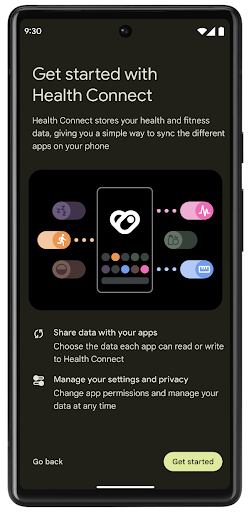
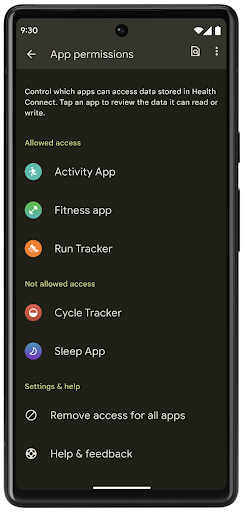
Health Connect includes several new features in Android 14, such as exercise routes, allowing users to share a route of their workout which can be visualized on a map. A route is defined as a list of locations saved within a window of time, and your app can insert routes into exercise sessions, tying them together. To ensure that users have complete control over this sensitive data, users must allow sharing individual routes with other apps.
For more information, see the Health Connection documentation and the blogpost on What's new in Android Health.
بهروزرسانیهای OpenJDK 17
Android 14 continues the work of refreshing Android's core libraries to align with the features in the latest OpenJDK LTS releases, including both library updates and Java 17 language support for app and platform developers.
The following features and improvements are included:
- Updated approximately 300
java.baseclasses to Java 17 support. - Text Blocks, which introduce multi-line string literals to the Java programming language.
- Pattern Matching for instanceof, which allows an object to
be treated as having a specific type in an
instanceofwithout any additional variables. - Sealed classes, which allow you restrict which classes and interfaces can extend or implement them.
Thanks to Google Play system updates (Project Mainline), over 600 million devices are enabled to receive the latest Android Runtime (ART) updates that include these changes. This is part of our commitment to give apps a more consistent, secure environment across devices, and to deliver new features and capabilities to users independent of platform releases.
Java and OpenJDK are trademarks or registered trademarks of Oracle and/or its affiliates.
بهبودهایی برای فروشگاههای اپلیکیشن
Android 14 چندین API PackageInstaller را معرفی می کند که به فروشگاه های برنامه اجازه می دهد تا تجربه کاربری خود را بهبود بخشند.
قبل از دانلود، تأیید نصب را درخواست کنید
نصب یا بهروزرسانی یک برنامه ممکن است به تأیید کاربر نیاز داشته باشد. به عنوان مثال، هنگامی که نصب کننده ای که از مجوز REQUEST_INSTALL_PACKAGES استفاده می کند، سعی می کند یک برنامه جدید را نصب کند. در نسخههای قبلی اندروید، فروشگاههای برنامه فقط میتوانند تأیید کاربر را پس از نوشتن فایلهای APK در جلسه نصب و انجام جلسه درخواست کنند.
با شروع Android 14، متد requestUserPreapproval() به نصبکنندگان این امکان را میدهد تا قبل از انجام جلسه نصب درخواست تأیید کاربر کنند. این بهبود به فروشگاه برنامه اجازه میدهد دانلود هر فایل APK را تا زمانی که نصب توسط کاربر تأیید شود به تعویق بیاندازد. علاوه بر این، هنگامی که کاربر نصب را تأیید کرد، فروشگاه برنامه میتواند برنامه را در پسزمینه دانلود و نصب کند بدون اینکه کاربر مزاحم شود.
مسئولیت به روز رسانی های آینده را به عهده بگیرید
متد setRequestUpdateOwnership() به نصب کننده اجازه می دهد تا به سیستم نشان دهد که قصد دارد مسئول به روز رسانی های بعدی برنامه ای باشد که در حال نصب است. این قابلیت اجرای مالکیت بهروزرسانی را فعال میکند، به این معنی که فقط مالک بهروزرسانی مجاز است بهروزرسانیهای خودکار را برای برنامه نصب کند. اجرای مالکیت بهروزرسانی کمک میکند تا اطمینان حاصل شود که کاربران بهروزرسانیها را فقط از فروشگاه برنامه مورد انتظار دریافت میکنند.
هر نصبکننده دیگری، از جمله کسانی که از مجوز INSTALL_PACKAGES استفاده میکنند، باید تأیید صریح کاربر را برای نصب بهروزرسانی دریافت کنند. اگر کاربری تصمیم بگیرد بهروزرسانی را از منبع دیگری ادامه دهد، مالکیت بهروزرسانی از بین میرود.
برنامهها را در زمانهای کمتر بهروزرسانی کنید
فروشگاههای برنامه معمولاً میخواهند از بهروزرسانی برنامهای که به طور فعال در حال استفاده است اجتناب کنند، زیرا این امر منجر به از بین رفتن فرآیندهای در حال اجرا برنامه میشود، که به طور بالقوه کاری را که کاربر انجام میداد قطع میکند.
با شروع Android 14، InstallConstraints API راهی را به نصبکنندگان میدهد تا اطمینان حاصل کنند که بهروزرسانیهای برنامهشان در یک لحظه مناسب انجام میشود. به عنوان مثال، یک فروشگاه برنامه می تواند متد commitSessionAfterInstallConstraintsAreMet() را فراخوانی کند تا مطمئن شود که به روز رسانی تنها زمانی انجام می شود که کاربر دیگر با برنامه مورد نظر تعامل نداشته باشد.
یکپارچه تقسیم های اختیاری را نصب کنید
با تقسیمبندی APK، ویژگیهای یک برنامه را میتوان در فایلهای APK جداگانه به جای یک APK یکپارچه ارائه کرد. Split APK به فروشگاههای برنامه اجازه میدهد تا تحویل اجزای مختلف برنامه را بهینه کنند. به عنوان مثال، فروشگاه های برنامه ممکن است بر اساس ویژگی های دستگاه مورد نظر بهینه سازی کنند. PackageInstaller API از زمان معرفی آن در سطح 22 API از تقسیمات پشتیبانی می کند.
در اندروید 14، متد setDontKillApp() به نصب کننده اجازه می دهد تا نشان دهد که فرآیندهای در حال اجرا برنامه نباید در هنگام نصب اسپلیت های جدید از بین بروند. فروشگاه های برنامه می توانند از این ویژگی برای نصب یکپارچه ویژگی های جدید یک برنامه در زمانی که کاربر از برنامه استفاده می کند استفاده کنند.
بستههای فراداده برنامه
Starting in Android 14, the Android package installer lets you specify app metadata, such as data safety practices, to include on app store pages such as Google Play.
تشخیص زمان گرفتن اسکرینشات توسط کاربران
برای ایجاد یک تجربه استانداردتر برای تشخیص اسکرینشاتها، اندروید ۱۴ یک API تشخیص اسکرینشات با حفظ حریم خصوصی معرفی میکند. این API به برنامهها اجازه میدهد تا بر اساس هر فعالیت، فراخوانیهای برگشتی را ثبت کنند. این فراخوانیهای برگشتی هنگامی که کاربر در حالی که آن فعالیت قابل مشاهده است، اسکرینشات میگیرد، فراخوانی میشوند و به کاربر اطلاع داده میشود.
تجربه کاربری
اقدامات سفارشی Sharesheet و رتبهبندی بهبود یافته
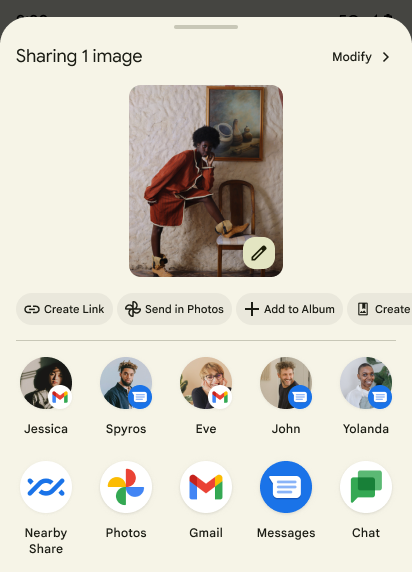
Android 14 updates the system sharesheet to support custom app actions and more informative preview results for users.
Add custom actions
With Android 14, your app can add custom actions to the system sharesheet it invokes.
Improve ranking of Direct Share targets
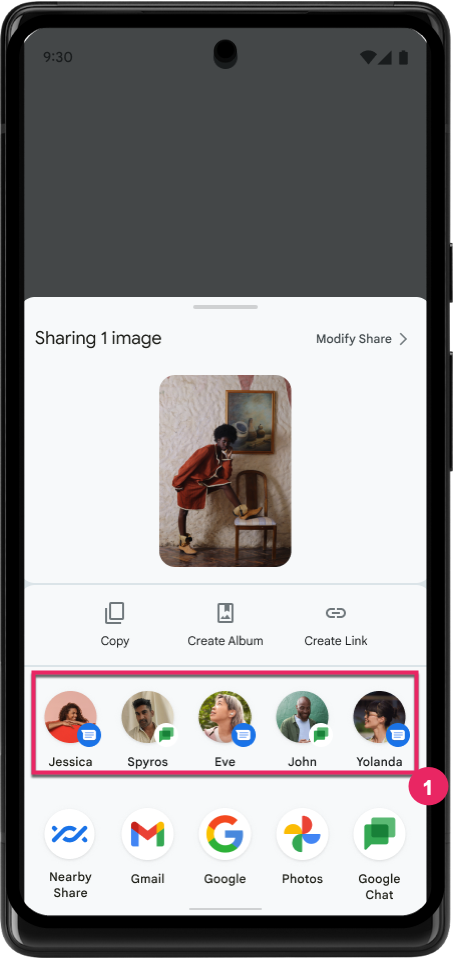
Android 14 uses more signals from apps to determine the ranking of the direct share targets to provide more helpful results for the user. To provide the most useful signal for ranking, follow the guidance for improving rankings of your Direct Share targets. Communication apps can also report shortcut usage for outgoing and incoming messages.
پشتیبانی از انیمیشنهای داخلی و سفارشی برای پیشبینی بازگشت
Android 13 introduced the predictive back-to-home animation behind a developer option. When used in a supported app with the developer option enabled, swiping back shows an animation indicating that the back gesture exits the app back to the home screen.
Android 14 includes multiple improvements and new guidance for Predictive Back:
- You can set
android:enableOnBackInvokedCallback=trueto opt in to predictive back system animations per-Activity instead of for the entire app. - We've added new system animations to accompany the back-to-home animation from Android 13. The new system animations are cross-activity and cross-task, which you get automatically after migrating to Predictive Back.
- We've added new Material Component animations for Bottom sheets, Side sheets, and Search.
- We've created design guidance for creating custom in-app animations and transitions.
- We've added new APIs to support custom in-app transition animations:
handleOnBackStarted,handleOnBackProgressed,handleOnBackCancelledinOnBackPressedCallbackonBackStarted,onBackProgressed,onBackCancelledinOnBackAnimationCallback- Use
overrideActivityTransitioninstead ofoverridePendingTransitionfor transitions that respond as the user swipes back.
With this Android 14 preview release, all features of Predictive Back remain behind a developer option. See the developer guide to migrate your app to predictive back, as well as the developer guide to creating custom in-app transitions.
تولیدکنندهی دستگاههای دارای صفحه نمایش بزرگ، به ازای هر برنامه، لغو میکند
لغو هر برنامه به سازندگان دستگاه امکان می دهد تا رفتار برنامه ها را در دستگاه های صفحه بزرگ تغییر دهند. به عنوان مثال، لغو FORCE_RESIZE_APP به سیستم دستور میدهد تا اندازه برنامه را برای اندازهگیری ابعاد نمایش تغییر دهد (جلوگیری از حالت سازگاری با اندازه) حتی اگر resizeableActivity="false" در مانیفست برنامه تنظیم شده باشد.
لغوها برای بهبود تجربه کاربر در صفحه نمایش های بزرگ در نظر گرفته شده است.
ویژگیهای مانیفست جدید شما را قادر میسازد برخی از لغوهای سازنده دستگاه را برای برنامه خود غیرفعال کنید.
کاربر در هر برنامه با صفحه نمایش بزرگ، لغو میکند
لغو هر برنامه رفتار برنامه ها را در دستگاه های صفحه بزرگ تغییر می دهد. برای مثال، لغو OVERRIDE_MIN_ASPECT_RATIO_LARGE سازنده دستگاه، نسبت تصویر برنامه را بدون توجه به پیکربندی برنامه روی 16:9 تنظیم میکند.
Android 14 QPR1 کاربران را قادر میسازد تا با استفاده از منوی تنظیمات جدید در دستگاههای صفحهنمایش بزرگ، نادیدهگیریهای هر برنامه را اعمال کنند.
اشتراک گذاری صفحه نمایش برنامه
اشتراکگذاری صفحه برنامه به کاربران این امکان را میدهد تا در حین ضبط محتوای صفحه، یک پنجره برنامه را به جای کل صفحه دستگاه به اشتراک بگذارند.
با اشتراکگذاری صفحه برنامه، نوار وضعیت، نوار پیمایش، اعلانها و سایر عناصر رابط کاربری سیستم از صفحه نمایش مشترک حذف میشوند. فقط محتوای برنامه انتخابی به اشتراک گذاشته می شود.
اشتراکگذاری صفحهنمایش برنامه، بهرهوری و حریم خصوصی را بهبود میبخشد و به کاربران امکان میدهد چندین برنامه را اجرا کنند، اما اشتراکگذاری محتوا را به یک برنامه محدود میکند.
پاسخ هوشمند مبتنی بر LLM در Gboard در Pixel 8 Pro
در دستگاههای Pixel 8 Pro دارای ویژگی دسامبر، توسعهدهندگان میتوانند پاسخهای هوشمند با کیفیت بالاتر را در Gboard که توسط مدلهای زبان بزرگ (LLM) روی دستگاه اجرا میشوند در Google Tensor امتحان کنند.
این ویژگی به عنوان یک پیش نمایش محدود برای انگلیسی ایالات متحده در WhatsApp، Line و KakaoTalk در دسترس است. برای این کار باید از دستگاه Pixel 8 Pro با Gboard به عنوان صفحه کلید استفاده کنید.
برای امتحان کردن، ابتدا این ویژگی را در تنظیمات > گزینههای برنامهنویس > تنظیمات AiCore > فعال کردن Aicore Persistent فعال کنید.
سپس، مکالمهای را در یک برنامه پشتیبانیشده باز کنید تا پاسخ هوشمند مبتنی بر LLM را در نوار پیشنهادی Gboard در پاسخ به پیامهای دریافتی ببینید.
گرافیک
مسیرها قابل پرسوجو و درونیابی هستند
Android's Path API is a powerful and flexible mechanism for
creating and rendering vector graphics, with the ability to stroke or fill a
path, construct a path from line segments or quadratic or cubic curves, perform
boolean operations to get even more complex shapes, or all of these
simultaneously. One limitation is the ability to find out what is actually in a
Path object; the internals of the object are opaque to callers after creation.
To create a Path, you call methods such as
moveTo(), lineTo(), and
cubicTo() to add path segments. But there has been no way to
ask that path what the segments are, so you must retain that information at
creation time.
Starting in Android 14, you can query paths to find out what's inside of them.
First, you need to get a PathIterator object using the
Path.getPathIterator API:
Kotlin
val path = Path().apply {
    moveTo(1.0f, 1.0f)
    lineTo(2.0f, 2.0f)
    close()
}
val pathIterator = path.pathIterator
Java
Path path = new Path();
path.moveTo(1.0F, 1.0F);
path.lineTo(2.0F, 2.0F);
path.close();
PathIterator pathIterator = path.getPathIterator();
Next, you can call PathIterator to iterate through the segments
one by one, retrieving all of the necessary data for each segment. This example
uses PathIterator.Segment objects, which packages up the data
for you:
Kotlin
for (segment in pathIterator) {
    println("segment: ${segment.verb}, ${segment.points}")
}
Java
while (pathIterator.hasNext()) {
    PathIterator.Segment segment = pathIterator.next();
    Log.i(LOG_TAG, "segment: " + segment.getVerb() + ", " + segment.getPoints());
}
PathIterator also has a non-allocating version of next() where you can pass
in a buffer to hold the point data.
One of the important use cases of querying Path data is interpolation. For
example, you might want to animate (or morph) between two different paths. To
further simplify that use case, Android 14 also includes the
interpolate() method on Path. Assuming the two paths have
the same internal structure, the interpolate() method creates a new Path
with that interpolated result. This example returns a path whose shape is
halfway (a linear interpolation of .5) between path and otherPath:
Kotlin
val interpolatedResult = Path()
if (path.isInterpolatable(otherPath)) {
    path.interpolate(otherPath, .5f, interpolatedResult)
}
Java
Path interpolatedResult = new Path();
if (path.isInterpolatable(otherPath)) {
    path.interpolate(otherPath, 0.5F, interpolatedResult);
}
The Jetpack graphics-path library enables similar APIs for earlier versions of Android as well.
مشهای سفارشی با سایهزنهای رأس و قطعه
Android has long supported drawing triangle meshes with custom shading, but the input mesh format has been limited to a few predefined attribute combinations. Android 14 adds support for custom meshes, which can be defined as triangles or triangle strips, and can, optionally, be indexed. These meshes are specified with custom attributes, vertex strides, varying, and vertex and fragment shaders written in AGSL.
The vertex shader defines the varyings, such as position and color, while the
fragment shader can optionally define the color for the pixel, typically by
using the varyings created by the vertex shader. If color is provided by the
fragment shader, it is then blended with the current Paint
color using the blend mode selected when
drawing the mesh. Uniforms can be passed
into the fragment and vertex shaders for additional flexibility.
رندرکننده بافر سختافزاری برای Canvas
To assist in using Android's Canvas API to draw with
hardware acceleration into a HardwareBuffer, Android 14
introduces HardwareBufferRenderer. This API is
particularly useful when your use case involves communication with the system
compositor through SurfaceControl for low-latency
drawing.