

Android 14 bietet Entwicklern viele neue Funktionen und APIs. Die folgenden Ressourcen helfen Ihnen, sich über Funktionen für Ihre Apps zu informieren und mit den zugehörigen APIs zu beginnen.
Eine detaillierte Liste der hinzugefügten, geänderten und entfernten APIs finden Sie im API-Vergleichsbericht. Details zu den hinzugefügten APIs finden Sie in der Android-API-Referenz. Suchen Sie dort nach APIs, die in API-Level 34 hinzugefügt wurden. Informationen zu Bereichen, in denen sich Plattformänderungen auf Ihre Apps auswirken können, finden Sie unter „Verhaltensänderungen in Android 14“ für Apps, die auf Android 14 ausgerichtet sind, und für alle Apps.
Lokalisierung
App-spezifische Spracheinstellungen
Android 14 expands on the per-app language features that were introduced in Android 13 (API level 33) with these additional capabilities:
Automatically generate an app's
localeConfig: Starting with Android Studio Giraffe Canary 7 and AGP 8.1.0-alpha07, you can configure your app to support per-app language preferences automatically. Based on your project resources, the Android Gradle plugin generates theLocaleConfigfile and adds a reference to it in the final manifest file, so you no longer have to create or update the file manually. AGP uses the resources in theresfolders of your app modules and any library module dependencies to determine the locales to include in theLocaleConfigfile.Dynamic updates for an app's
localeConfig: Use thesetOverrideLocaleConfig()andgetOverrideLocaleConfig()methods inLocaleManagerto dynamically update your app's list of supported languages in the device's system settings. Use this flexibility to customize the list of supported languages per region, run A/B experiments, or provide an updated list of locales if your app utilizes server-side pushes for localization.App language visibility for input method editors (IMEs): IMEs can utilize the
getApplicationLocales()method to check the language of the current app and match the IME language to that language.
Grammatical Inflection API
3 Milliarden Menschen sprechen geschlechterspezifische Sprachen: Sprachen, in denen grammatische Kategorien wie Substantive, Verben, Adjektive und Präpositionen je nach Geschlecht der Personen und Objekte, mit denen oder über die gesprochen wird, konjugiert werden. Traditionell wird in vielen Sprachen mit Geschlechtern das männliche grammatische Geschlecht als Standard- oder generisches Geschlecht verwendet.
Wenn Sie Nutzer im falschen grammatischen Geschlecht ansprechen, z. B. Frauen im maskulinen grammatischen Geschlecht, kann sich das negativ auf ihre Leistung und Einstellung auswirken. Eine Benutzeroberfläche mit einer Sprache, die das grammatische Geschlecht des Nutzers korrekt widerspiegelt, kann das Nutzer-Engagement verbessern und eine personalisiertere und natürlicher klingende Nutzererfahrung bieten.
Mit der Grammatical Inflection API in Android 14 können Sie eine nutzerzentrierte Benutzeroberfläche für Sprachen mit grammatischem Geschlecht erstellen. So können Sie die Unterstützung für das grammatische Geschlecht hinzufügen, ohne Ihre App umbauen zu müssen.
Regionale Einstellungen
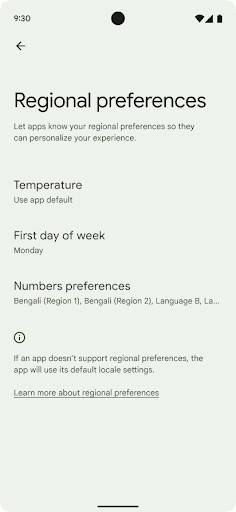
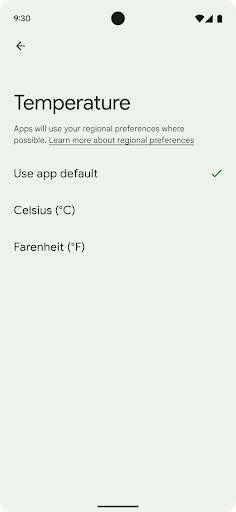
Mit den regionalen Einstellungen können Nutzer Temperatureinheiten, den Wochentag und das Nummerierungssystem anpassen. Ein Europäer, der in den USA lebt, möchte möglicherweise, dass Temperatureinheiten in Celsius statt in Fahrenheit angegeben werden und dass Apps Montag als Wochenbeginn verwenden, anstatt den US-Standardsonntag.
Die neuen Android-Einstellungen für diese Einstellungen bieten Nutzern eine leicht auffindbare und zentrale Stelle, an der sie die App-Einstellungen ändern können. Diese Einstellungen bleiben auch nach dem Sichern und Wiederherstellen erhalten. Mehrere APIs und
Intents, wie z. B.
getTemperatureUnit
und
getFirstDayOfWeek–
Ihrer App Lesezugriff auf Nutzereinstellungen zu gewähren, damit sie anpassen kann, wie sie
werden Informationen angezeigt. Du kannst auch eine BroadcastReceiver unter ACTION_LOCALE_CHANGED registrieren, um Änderungen an der Gebietsschemakonfiguration zu verarbeiten, wenn sich die regionalen Einstellungen ändern.
Sie finden diese Einstellungen in den Einstellungen unter System > Sprachen und Eingabe > Regionale Einstellungen.
Bedienungshilfen
Nicht lineare Skalierung der Schriftgröße auf 200%
Ab Android 14 unterstützt das System die Schriftartskalierung auf bis zu 200 % und bietet Nutzern so zusätzliche Optionen für die Barrierefreiheit.
Damit große Textelemente auf dem Bildschirm nicht zu groß skaliert werden, wendet das System eine nichtlineare Skalierungskurve an. Bei dieser Skalierungsstrategie wird großer Text nicht im gleichen Maße skaliert wie kleiner Text. Die nicht lineare Skalierung von Schriftarten trägt dazu bei, die proportionale Hierarchie zwischen Elementen unterschiedlicher Größe beizubehalten und gleichzeitig Probleme mit der linearen Textskalierung bei hohen Graden zu vermeiden, z. B. wenn Text abgeschnitten wird oder aufgrund einer extrem großen Displaygröße schwerer zu lesen ist.
App mit nicht linearer Schriftgrößenskalierung testen
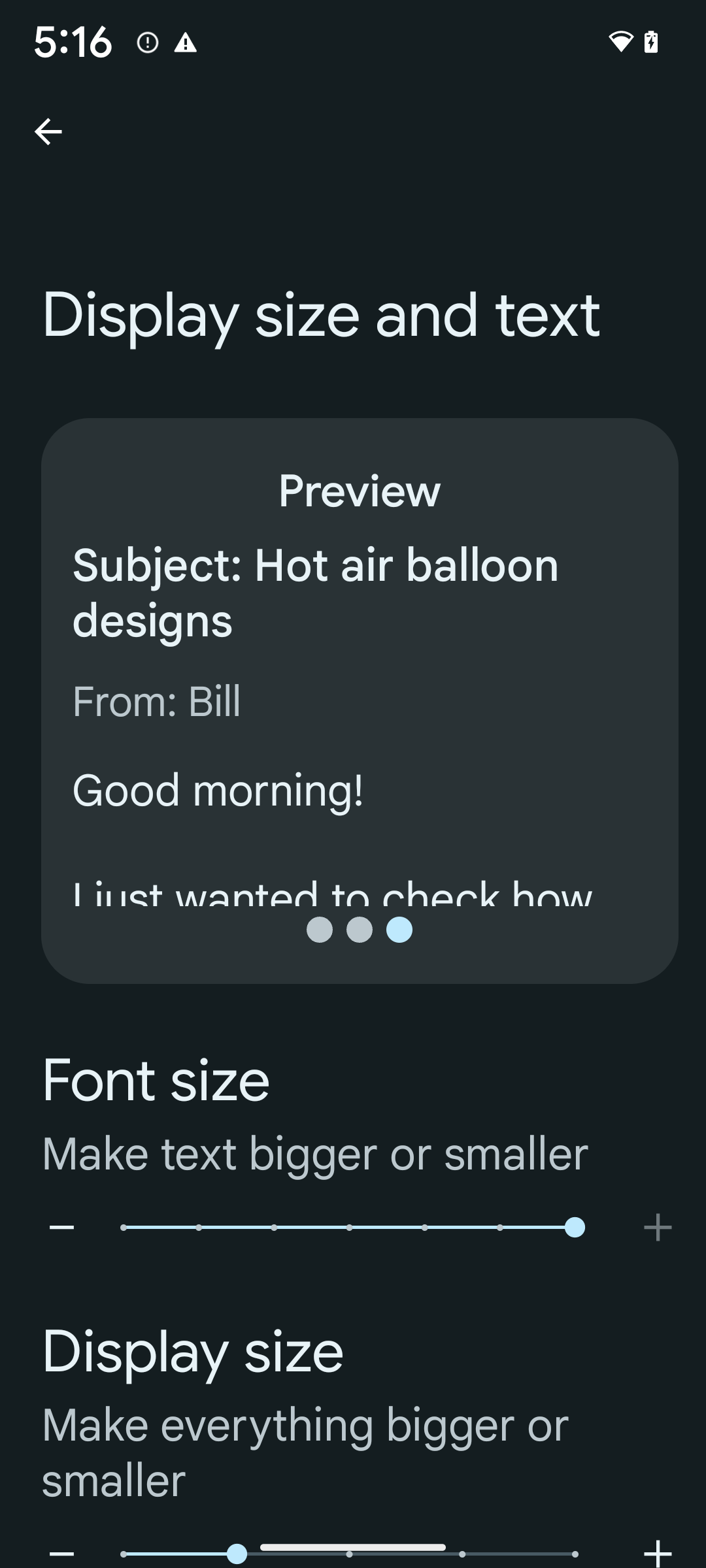
Wenn Sie bereits skalierbare Pixel (sp) zum Definieren der Textgröße verwenden, werden diese zusätzlichen Optionen und Verbesserungen der Skalierung automatisch auf den Text in Ihrer App angewendet. Sie sollten jedoch trotzdem UI-Tests mit aktivierter maximaler Schriftgröße (200%) durchführen, um sicherzustellen, dass Ihre App die Schriftgrößen korrekt anwendet und größere Schriftgrößen ohne Beeinträchtigung der Nutzerfreundlichkeit unterstützt.
So aktivieren Sie die Schriftgröße von 200 %:
- Öffnen Sie die Einstellungen und gehen Sie zu Bedienungshilfen > Anzeigegröße und Text.
- Tippen Sie für die Option Schriftgröße auf das Pluszeichen (+), bis die maximale Schriftgröße eingestellt ist, wie im Bild zu diesem Abschnitt zu sehen.
Skalierbare Pixel (sp) für Textgrößen verwenden
Denken Sie daran, Textgrößen immer in sp-Einheiten anzugeben. Wenn Ihre App „sp“-Einheiten verwendet, kann Android die bevorzugte Textgröße des Nutzers anwenden und entsprechend skalieren.
Verwenden Sie keine „sp“-Einheiten für den Innenabstand und definieren Sie keine Ansichtshöhen, die einen impliziten Innenabstand voraussetzen: Bei nicht linearer Schriftartskalierung sind „sp“-Dimensionen möglicherweise nicht proportional. Daher ist 4sp + 20sp möglicherweise nicht gleich 24sp.
Einheiten für skalierte Pixel (sp) umrechnen
Verwenden Sie TypedValue.applyDimension(), um von sp-Einheiten in Pixel umzurechnen, und TypedValue.deriveDimension(), um Pixel in sp umzurechnen. Bei diesen Methoden wird automatisch die entsprechende nichtlineare Skalierungskurve angewendet.
Vermeiden Sie das Hardcodieren von Gleichungen mit Configuration.fontScale oder DisplayMetrics.scaledDensity. Da die Schriftartskalierung nicht linear ist, ist das Feld scaledDensity nicht mehr genau. Das Feld fontScale sollte nur zu Informationszwecken verwendet werden, da Schriftarten nicht mehr mit einem einzelnen Skalarwert skaliert werden.
„sp“-Einheiten für „lineHeight“ verwenden
Definieren Sie android:lineHeight immer in sp-Einheiten anstelle von dp, damit die Zeilenhöhe mit dem Text skaliert wird. Wenn Ihr Text in sp, Ihre lineHeight aber in dp oder px angegeben ist, wird er nicht skaliert und sieht gequetscht aus.
TextView korrigiert die lineHeight automatisch, sodass die beabsichtigten Proportionen beibehalten werden. Das funktioniert jedoch nur, wenn sowohl textSize als auch lineHeight in sp-Einheiten definiert sind.
Kamera und Medien
Ultra HDR für Bilder
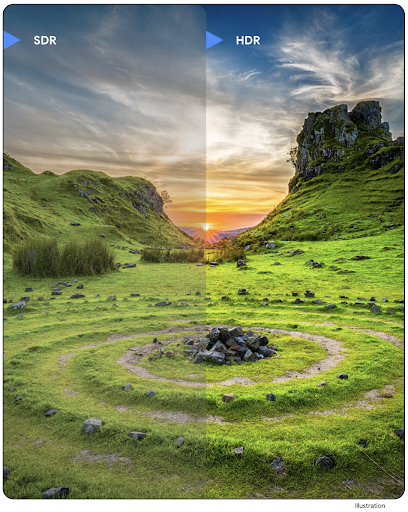
Android 14 adds support for High Dynamic Range (HDR) images that retain more of the information from the sensor when taking a photo, which enables vibrant colors and greater contrast. Android uses the Ultra HDR format, which is fully backward compatible with JPEG images, allowing apps to seamlessly interoperate with HDR images, displaying them in Standard Dynamic Range (SDR) as needed.
Rendering these images in the UI in HDR is done automatically by the framework
when your app opts in to using HDR UI for its Activity Window, either through a
manifest entry or at runtime by calling
Window.setColorMode(). You can also capture compressed Ultra
HDR still images on supported devices. With more colors recovered
from the sensor, editing in post can be more flexible. The
Gainmap associated with Ultra HDR images can be used to render
them using OpenGL or Vulkan.
Zoom, Fokus, Postview und mehr in Kameraerweiterungen
Android 14 upgrades and improves camera extensions, allowing apps to handle longer processing times, which enables improved images using compute-intensive algorithms like low-light photography on supported devices. These features give users an even more robust experience when using camera extension capabilities. Examples of these improvements include:
- Dynamic still capture processing latency estimation provides much more
accurate still capture latency estimates based on the current scene and
environment conditions. Call
CameraExtensionSession.getRealtimeStillCaptureLatency()to get aStillCaptureLatencyobject that has two latency estimation methods. ThegetCaptureLatency()method returns the estimated latency betweenonCaptureStartedandonCaptureProcessStarted(), and thegetProcessingLatency()method returns the estimated latency betweenonCaptureProcessStarted()and the final processed frame being available. - Support for capture progress callbacks so that apps can display the current
progress of long-running, still-capture processing operations. You can check
if this feature is available with
CameraExtensionCharacteristics.isCaptureProcessProgressAvailable, and if it is, you implement theonCaptureProcessProgressed()callback, which has the progress (from 0 to 100) passed in as a parameter. Extension specific metadata, such as
CaptureRequest.EXTENSION_STRENGTHfor dialing in the amount of an extension effect, such as the amount of background blur withEXTENSION_BOKEH.Postview Feature for Still Capture in camera extensions, which provides a less-processed image more quickly than the final image. If an extension has increased processing latency, a postview image could be provided as a placeholder to improve UX and switched out later for the final image. You can check if this feature is available with
CameraExtensionCharacteristics.isPostviewAvailable. Then you can pass anOutputConfigurationtoExtensionSessionConfiguration.setPostviewOutputConfiguration.Support for
SurfaceViewallowing for a more optimized and power-efficient preview render path.Support for tap to focus and zoom during extension usage.
In-Sensor-Zoom
Wenn REQUEST_AVAILABLE_CAPABILITIES_STREAM_USE_CASE in CameraCharacteristics SCALER_AVAILABLE_STREAM_USE_CASES_CROPPED_RAW enthält, kann Ihre App mithilfe erweiterter Sensorfunktionen einem zugeschnittenen RAW-Stream dieselben Pixel wie das vollständige Sichtfeld zuweisen. Verwenden Sie dazu einen CaptureRequest mit einem RAW-Ziel, für das der Stream-Nutzungsfall auf CameraMetadata.SCALER_AVAILABLE_STREAM_USE_CASES_CROPPED_RAW festgelegt ist.
Durch die Implementierung der Steuerelemente für die Überschreibung von Anfragen können Nutzer mit der aktualisierten Kamera den Zoom bereits steuern, bevor andere Kamerasteuerelemente verfügbar sind.
Lossless-USB-Audio
Android 14 gains support for lossless audio formats for audiophile-level
experiences over USB wired headsets. You can query a USB device for its
preferred mixer attributes, register a listener for changes in preferred mixer
attributes, and configure mixer attributes using the
AudioMixerAttributes class. This class represents the
format, such as channel mask, sample rate, and behavior of the audio mixer. The
class allows for audio to be sent directly, without mixing,
volume adjustment, or processing effects.
Produktivität von Entwicklern und Tools
Credential Manager
Android 14 adds Credential Manager as a platform API, with additional support back to Android 4.4 (API level 19) devices through a Jetpack Library using Google Play services. Credential Manager aims to make sign-in easier for users with APIs that retrieve and store credentials with user-configured credential providers. Credential Manager supports multiple sign-in methods, including username and password, passkeys, and federated sign-in solutions (such as Sign-in with Google) in a single API.
Passkeys provide many advantages. For example, passkeys are built on industry standards, can work across different operating systems and browser ecosystems, and can be used with both websites and apps.
For more information, see the Credential Manager and passkeys documentation and the blogpost about Credential Manager and passkeys.
Health Connect
Health Connect is an on-device repository for user health and fitness data. It allows users to share data between their favorite apps, with a single place to control what data they want to share with these apps.
On devices running Android versions prior to Android 14, Health Connect is available to download as an app on the Google Play store. Starting with Android 14, Health Connect is part of the platform and receives updates through Google Play system updates without requiring a separate download. With this, Health Connect can be updated frequently, and your apps can rely on Health Connect being available on devices running Android 14 or higher. Users can access Health Connect from the Settings in their device, with privacy controls integrated into the system settings.
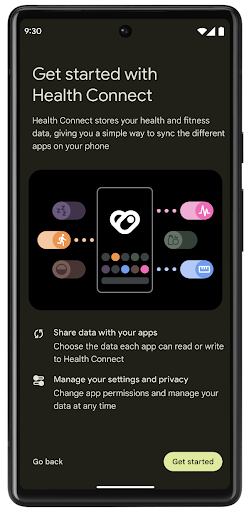
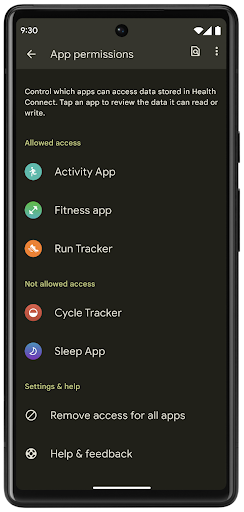
Health Connect includes several new features in Android 14, such as exercise routes, allowing users to share a route of their workout which can be visualized on a map. A route is defined as a list of locations saved within a window of time, and your app can insert routes into exercise sessions, tying them together. To ensure that users have complete control over this sensitive data, users must allow sharing individual routes with other apps.
For more information, see the Health Connection documentation and the blogpost on What's new in Android Health.
OpenJDK 17-Updates
Android 14 continues the work of refreshing Android's core libraries to align with the features in the latest OpenJDK LTS releases, including both library updates and Java 17 language support for app and platform developers.
The following features and improvements are included:
- Updated approximately 300
java.baseclasses to Java 17 support. - Text Blocks, which introduce multi-line string literals to the Java programming language.
- Pattern Matching for instanceof, which allows an object to
be treated as having a specific type in an
instanceofwithout any additional variables. - Sealed classes, which allow you restrict which classes and interfaces can extend or implement them.
Thanks to Google Play system updates (Project Mainline), over 600 million devices are enabled to receive the latest Android Runtime (ART) updates that include these changes. This is part of our commitment to give apps a more consistent, secure environment across devices, and to deliver new features and capabilities to users independent of platform releases.
Java and OpenJDK are trademarks or registered trademarks of Oracle and/or its affiliates.
Verbesserungen für App-Shops
Android 14 introduces several PackageInstaller APIs that
allow app stores to improve their user experience.
Request install approval before downloading
Installing or updating an app might require user approval.
For example, when an installer making use of the
REQUEST_INSTALL_PACKAGES permission attempts to install a
new app. In prior Android versions, app stores can only request user approval
after APKs are written to the install session and the
session is committed.
Starting with Android 14, the requestUserPreapproval()
method lets installers request user approval before committing the install
session. This improvement lets an app store defer downloading any APKs until
after the installation has been approved by the user. Furthermore, once a user
has approved installation, the app store can download and install the app in the
background without interrupting the user.
Claim responsibility for future updates
The setRequestUpdateOwnership() method allows an installer
to indicate to the system that it intends to be responsible for future updates
to an app it is installing. This capability enables update ownership
enforcement, meaning that only the update owner is permitted
to install automatic updates to the app. Update ownership enforcement helps to
ensure that users receive updates only from the expected app store.
Any other installer, including those making use of the
INSTALL_PACKAGES permission, must receive explicit user
approval in order to install an update. If a user decides to proceed with an
update from another source, update ownership is lost.
Update apps at less-disruptive times
App stores typically want to avoid updating an app that is actively in use because this leads to the app's running processes being killed, which potentially interrupts what the user was doing.
Starting with Android 14, the InstallConstraints API
gives installers a way to ensure that their app updates happen at an opportune
moment. For example, an app store can call the
commitSessionAfterInstallConstraintsAreMet() method to
make sure that an update is only committed when the user is no longer
interacting with the app in question.
Seamlessly install optional splits
With split APKs, features of an app can be delivered in separate APK files,
rather than as a monolithic APK. Split APKs allow app stores to optimize the
delivery of different app components. For example, app stores might optimize
based on the properties of the target device. The
PackageInstaller API has supported splits since its
introduction in API level 22.
In Android 14, the setDontKillApp() method allows an
installer to indicate that the app's running processes shouldn't be killed when
new splits are installed. App stores can use this feature to seamlessly install
new features of an app while the user is using the app.
App-Metadaten-Bundles
Starting in Android 14, the Android package installer lets you specify app metadata, such as data safety practices, to include on app store pages such as Google Play.
Erkennen, wenn Nutzer Screenshots aufnehmen
Um die Erkennung von Screenshots zu standardisieren, wird in Android 14 eine datenschutzfreundliche API zur Erkennung von Screenshots eingeführt. Mit dieser API können Apps Rückrufe pro Aktivität registrieren. Diese Rückrufe werden aufgerufen und der Nutzer wird benachrichtigt, wenn er einen Screenshot aufnimmt, während diese Aktivität sichtbar ist.
Nutzererfahrung
Benutzerdefinierte Aktionen im Freigabeblatt und verbessertes Ranking
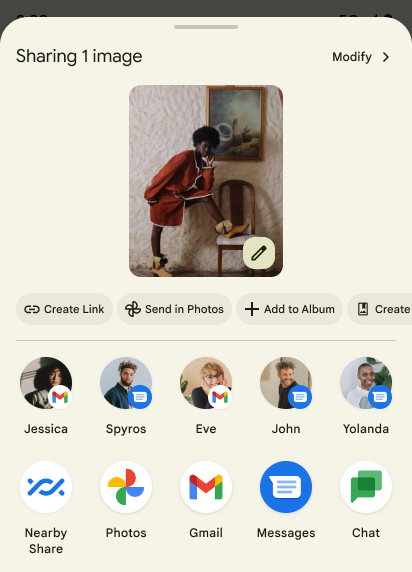
Unter Android 14 wird das System-Freigabe-Dialogfeld aktualisiert, um benutzerdefinierte App-Aktionen und informativere Vorschauergebnisse für Nutzer zu unterstützen.
Benutzerdefinierte Aktionen hinzufügen
Unter Android 14 kann Ihre App dem freigegebenen System-Sheet benutzerdefinierte Aktionen hinzufügen.
Rang der Ziele für die direkte Freigabe verbessern
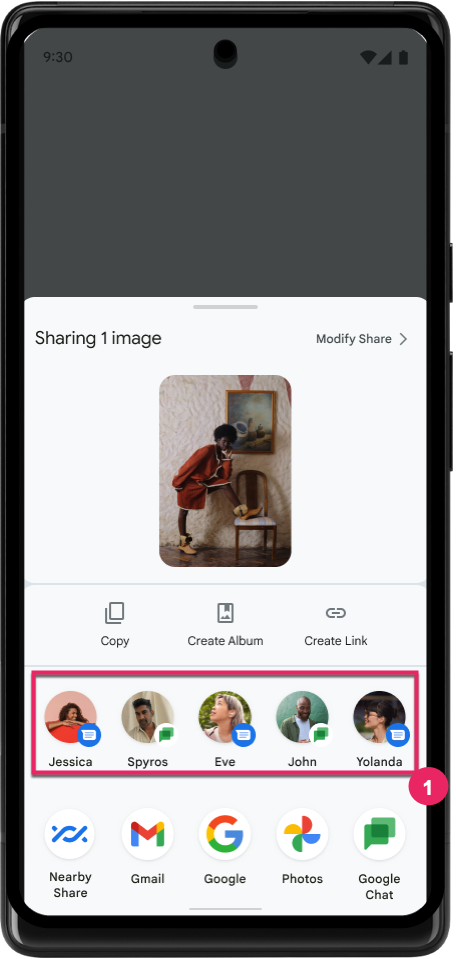
Unter Android 14 werden mehr Signale aus Apps verwendet, um das Ranking der Ziele für die direkte Freigabe zu bestimmen und so hilfreichere Ergebnisse für den Nutzer zu liefern. Folgen Sie der Anleitung unter Rankings Ihrer Ziele für die direkte Freigabe verbessern, um das nützlichste Signal für das Ranking bereitzustellen. Kommunikations-Apps können auch die Nutzung von Tastenkürzeln für ausgehende und eingehende Nachrichten melden.
Unterstützung für integrierte und benutzerdefinierte Animationen für die intelligente „Zurück“-Touchgeste
Android 13 introduced the predictive back-to-home animation behind a developer option. When used in a supported app with the developer option enabled, swiping back shows an animation indicating that the back gesture exits the app back to the home screen.
Android 14 includes multiple improvements and new guidance for Predictive Back:
- You can set
android:enableOnBackInvokedCallback=trueto opt in to predictive back system animations per-Activity instead of for the entire app. - We've added new system animations to accompany the back-to-home animation from Android 13. The new system animations are cross-activity and cross-task, which you get automatically after migrating to Predictive Back.
- We've added new Material Component animations for Bottom sheets, Side sheets, and Search.
- We've created design guidance for creating custom in-app animations and transitions.
- We've added new APIs to support custom in-app transition animations:
handleOnBackStarted,handleOnBackProgressed,handleOnBackCancelledinOnBackPressedCallbackonBackStarted,onBackProgressed,onBackCancelledinOnBackAnimationCallback- Use
overrideActivityTransitioninstead ofoverridePendingTransitionfor transitions that respond as the user swipes back.
With this Android 14 preview release, all features of Predictive Back remain behind a developer option. See the developer guide to migrate your app to predictive back, as well as the developer guide to creating custom in-app transitions.
Herstellerspezifische Überschreibungen für Apps auf Geräten mit großem Display
Mit Überschreibungen pro App können Gerätehersteller das Verhalten von Apps auf Geräten mit großen Bildschirmen ändern. Die Überschreibung FORCE_RESIZE_APP weist das System beispielsweise an, die App an die Displayabmessungen anzupassen (um den Kompatibilitätsmodus zu vermeiden), auch wenn resizeableActivity="false" im App-Manifest festgelegt ist.
Überschreibungen sollen die Nutzererfahrung auf großen Bildschirmen verbessern.
Mit neuen Manifesteigenschaften können Sie einige Überschreibungen von Geräteherstellern für Ihre App deaktivieren.
App-spezifische Überschreibungen für Nutzer mit großen Bildschirmen
Per-app overrides change the behavior of apps on large screen devices. For example, the OVERRIDE_MIN_ASPECT_RATIO_LARGE device manufacturer override sets the app aspect ratio to 16:9 regardless of the app's configuration.
Android 14 QPR1 enables users to apply per‑app overrides by means of a new settings menu on large screen devices.
App-Bildschirmfreigabe
Bei der App-Bildschirmfreigabe können Nutzer beim Aufzeichnen von Bildschirminhalten ein App-Fenster anstelle des gesamten Gerätebildschirms freigeben.
Bei der Bildschirmfreigabe für Apps werden die Statusleiste, die Navigationsleiste, Benachrichtigungen und andere Elemente der System-UI vom geteilten Display ausgeschlossen. Es werden nur die Inhalte der ausgewählten App freigegeben.
Die Bildschirmfreigabe von Apps verbessert die Produktivität und den Datenschutz, da Nutzer mehrere Apps ausführen, die Freigabe von Inhalten jedoch auf eine einzelne App beschränken können.
LLM-basierte Funktion „Intelligente Antworten“ in Gboard auf dem Pixel 8 Pro
On Pixel 8 Pro devices with the December Feature Drop, developers can try out higher-quality smart replies in Gboard powered by on-device Large Language Models (LLMs) running on Google Tensor.
This feature is available as a limited preview for US English in WhatsApp, Line, and KakaoTalk. It requires using a Pixel 8 Pro device with Gboard as your keyboard.
To try it out, first enable the feature in Settings > Developer Options > AiCore Settings > Enable Aicore Persistent.
Next, open a conversation in a supported app to see LLM-powered Smart Reply in Gboard's suggestion strip in response to incoming messages.
Grafik
Pfade können abgefragt und interpoliert werden
Android's Path API is a powerful and flexible mechanism for
creating and rendering vector graphics, with the ability to stroke or fill a
path, construct a path from line segments or quadratic or cubic curves, perform
boolean operations to get even more complex shapes, or all of these
simultaneously. One limitation is the ability to find out what is actually in a
Path object; the internals of the object are opaque to callers after creation.
To create a Path, you call methods such as
moveTo(), lineTo(), and
cubicTo() to add path segments. But there has been no way to
ask that path what the segments are, so you must retain that information at
creation time.
Starting in Android 14, you can query paths to find out what's inside of them.
First, you need to get a PathIterator object using the
Path.getPathIterator API:
Kotlin
val path = Path().apply {
    moveTo(1.0f, 1.0f)
    lineTo(2.0f, 2.0f)
    close()
}
val pathIterator = path.pathIterator
Java
Path path = new Path();
path.moveTo(1.0F, 1.0F);
path.lineTo(2.0F, 2.0F);
path.close();
PathIterator pathIterator = path.getPathIterator();
Next, you can call PathIterator to iterate through the segments
one by one, retrieving all of the necessary data for each segment. This example
uses PathIterator.Segment objects, which packages up the data
for you:
Kotlin
for (segment in pathIterator) {
    println("segment: ${segment.verb}, ${segment.points}")
}
Java
while (pathIterator.hasNext()) {
    PathIterator.Segment segment = pathIterator.next();
    Log.i(LOG_TAG, "segment: " + segment.getVerb() + ", " + segment.getPoints());
}
PathIterator also has a non-allocating version of next() where you can pass
in a buffer to hold the point data.
One of the important use cases of querying Path data is interpolation. For
example, you might want to animate (or morph) between two different paths. To
further simplify that use case, Android 14 also includes the
interpolate() method on Path. Assuming the two paths have
the same internal structure, the interpolate() method creates a new Path
with that interpolated result. This example returns a path whose shape is
halfway (a linear interpolation of .5) between path and otherPath:
Kotlin
val interpolatedResult = Path()
if (path.isInterpolatable(otherPath)) {
    path.interpolate(otherPath, .5f, interpolatedResult)
}
Java
Path interpolatedResult = new Path();
if (path.isInterpolatable(otherPath)) {
    path.interpolate(otherPath, 0.5F, interpolatedResult);
}
The Jetpack graphics-path library enables similar APIs for earlier versions of Android as well.
Benutzerdefinierte Meshes mit Vertex- und Fragment-Shadern
Android has long supported drawing triangle meshes with custom shading, but the input mesh format has been limited to a few predefined attribute combinations. Android 14 adds support for custom meshes, which can be defined as triangles or triangle strips, and can, optionally, be indexed. These meshes are specified with custom attributes, vertex strides, varying, and vertex and fragment shaders written in AGSL.
The vertex shader defines the varyings, such as position and color, while the
fragment shader can optionally define the color for the pixel, typically by
using the varyings created by the vertex shader. If color is provided by the
fragment shader, it is then blended with the current Paint
color using the blend mode selected when
drawing the mesh. Uniforms can be passed
into the fragment and vertex shaders for additional flexibility.
Hardware-Buffer-Renderer für Canvas
To assist in using Android's Canvas API to draw with
hardware acceleration into a HardwareBuffer, Android 14
introduces HardwareBufferRenderer. This API is
particularly useful when your use case involves communication with the system
compositor through SurfaceControl for low-latency
drawing.