

В сопрограммах поток — это тип данных, который может последовательно выдавать несколько значений, в отличие от функций приостановки , которые возвращают только одно значение. Например, поток можно использовать для получения обновлений в реальном времени из базы данных.
Потоки строятся на основе сопрограмм и могут передавать несколько значений. Поток — это, по сути, поток данных , который может обрабатываться асинхронно. Выдаваемые значения должны быть одного типа. Например, Flow<Int> — это поток, который выдает целочисленные значения.
Поток очень похож на Iterator , который генерирует последовательность значений, но использует функции приостановки для асинхронной генерации и потребления значений. Это означает, например, что поток может безопасно отправлять сетевой запрос для получения следующего значения, не блокируя основной поток.
There are three entities involved in streams of data:
- A producer produces data that is added to the stream. Thanks to coroutines, flows can also produce data asynchronously.
- (Optional) Intermediaries can modify each value emitted into the stream or the stream itself.
- Потребитель получает значения из потока.
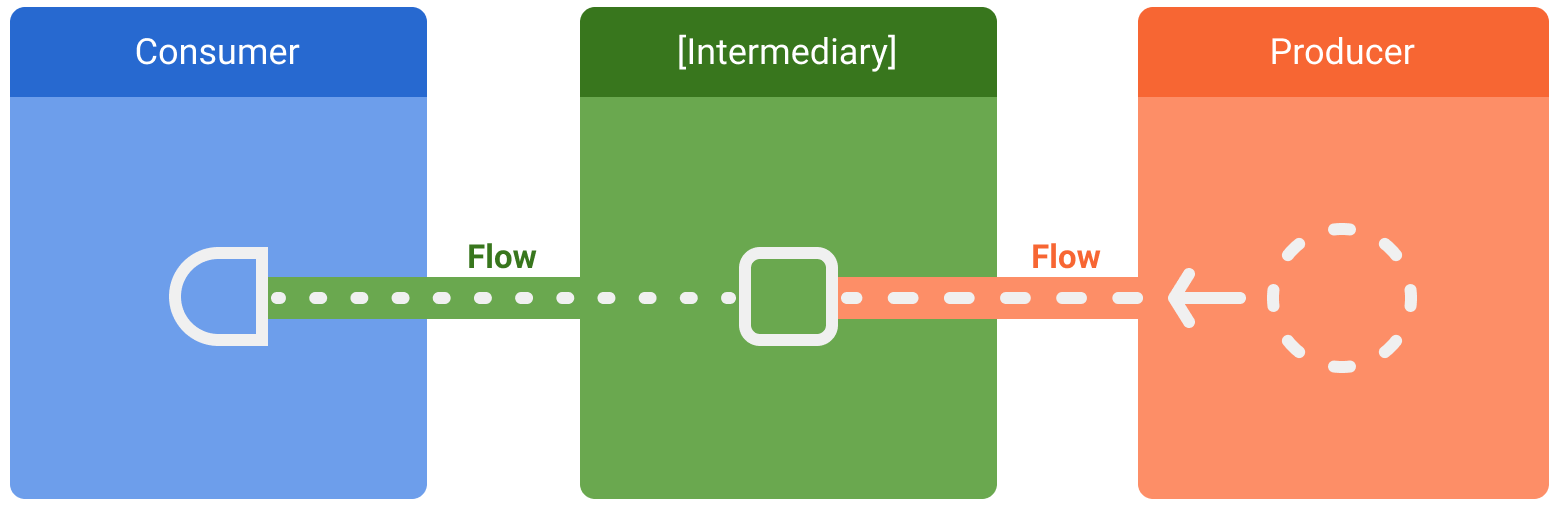
В Android репозиторий обычно выступает в роли производителя данных пользовательского интерфейса, а сам пользовательский интерфейс является потребителем, который в конечном итоге отображает эти данные. В других случаях слой пользовательского интерфейса является производителем событий ввода пользователя, а другие слои иерархии их обрабатывают. Слои между производителем и потребителем обычно выступают в качестве посредников, которые изменяют поток данных, чтобы адаптировать его к требованиям следующего слоя.
Создание потока
To create flows, use the flow builder APIs. The flow builder function creates a new flow where you can manually emit new values into the stream of data using the emit function.
В следующем примере источник данных автоматически получает последние новости через фиксированный интервал. Поскольку функция приостановки не может возвращать несколько последовательных значений, источник данных создает и возвращает поток для выполнения этого требования. В данном случае источник данных выступает в роли производителя.
class NewsRemoteDataSource( private val newsApi: NewsApi, private val refreshIntervalMs: Long = 5000 ) { val latestNews: Flow<List<ArticleHeadline>> = flow { while (true) { val latestNews = newsApi.fetchLatestNews() emit(latestNews) // Emits the result of the request to the flow delay(refreshIntervalMs) // Suspends the coroutine for some time } } } // Interface that provides a way to make network requests with suspend functions interface NewsApi { suspend fun fetchLatestNews(): List<ArticleHeadline> }
The flow builder is executed within a coroutine. Thus, it benefits from the same asynchronous APIs, but some restrictions apply:
- Потоки данных являются последовательными . Поскольку производитель находится в сопрограмме, при вызове функции приостановки он приостанавливает выполнение до тех пор, пока эта функция не вернет результат. В примере производитель приостанавливает выполнение до завершения сетевого запроса
fetchLatestNews. Только после этого результат передается в поток. - При использовании конструктора
flowпроизводитель не можетemitзначения из другогоCoroutineContext. Поэтому не следует вызывать методemitв другомCoroutineContext, создавая новые корутины или используя блоки кодаwithContext. В таких случаях можно использовать другие конструкторы потоков, напримерcallbackFlow.
Модификация потока
Промежуточные операторы могут использовать промежуточные операторы для изменения потока данных без потребления значений. Эти операторы представляют собой функции, которые при применении к потоку данных запускают цепочку операций, которые не выполняются до тех пор, пока значения не будут потреблены в будущем. Подробнее о промежуточных операторах см. в справочной документации Flow .
In the example below, the repository layer uses the intermediate operator map to transform the data to be displayed on the View :
class NewsRepository( private val newsRemoteDataSource: NewsRemoteDataSource, private val userData: UserData ) { /** * Returns the favorite latest news applying transformations on the flow. * These operations are lazy and don't trigger the flow. They just transform * the current value emitted by the flow at that point in time. */ val favoriteLatestNews: Flow<List<ArticleHeadline>> = newsRemoteDataSource.latestNews // Intermediate operation to filter the list of favorite topics .map { news -> news.filter { userData.isFavoriteTopic(it) } } // Intermediate operation to save the latest news in the cache .onEach { news -> saveInCache(news) } }
Промежуточные операторы могут применяться один за другим, образуя цепочку операций, которые выполняются лениво при появлении элемента в потоке. Следует отметить, что простое применение промежуточного оператора к потоку не запускает сборку мусора.
Сбор из потока
Используйте терминальный оператор , чтобы запустить поток и начать прослушивание значений. Чтобы получать все значения в потоке по мере их поступления, используйте collect . Подробнее об терминальных операторах можно узнать в официальной документации Flow .
Поскольку collect — это функция с приостановкой выполнения, её необходимо выполнять внутри сопрограммы. Она принимает в качестве параметра лямбда-функцию, которая вызывается при каждом новом значении. Так как это функция с приостановкой выполнения, сопрограмма, вызывающая collect может приостанавливать выполнение до тех пор, пока поток не будет завершен.
Continuing the previous example, here's a simple implementation of a ViewModel consuming the data from the repository layer:
class LatestNewsViewModel( private val newsRepository: NewsRepository ) : ViewModel() { init { viewModelScope.launch { // Trigger the flow and consume its elements using collect newsRepository.favoriteLatestNews.collect { favoriteNews -> // Update UI with the latest favorite news } } } }
Сбор потока данных запускает генератор, который обновляет последние новости и выдает результат сетевого запроса с фиксированным интервалом. Поскольку генератор всегда остается активным в цикле while(true) , поток данных будет закрыт, когда ViewModel будет очищен и viewModelScope будет отменен.
Flow collection can stop for the following reasons:
- The coroutine that collects is cancelled, as shown in the previous example. This also stops the underlying producer.
- The producer finishes emitting items. In this case, the stream of data is closed and the coroutine that called
collectresumes execution.
Потоки являются «холодными» и «ленивыми», если не указаны другие промежуточные операторы. Это означает, что код производителя выполняется каждый раз, когда вызывается терминальный оператор для потока. В предыдущем примере наличие нескольких сборщиков потоков приводит к тому, что источник данных получает последние новости несколько раз с разными фиксированными интервалами. Для оптимизации и совместного использования потока, когда несколько потребителей собирают данные одновременно, используйте оператор shareIn .
Обнаружение непредвиденных исключений
The implementation of the producer can come from a third party library. This means that it can throw unexpected exceptions. To handle these exceptions, use the catch intermediate operator.
class LatestNewsViewModel( private val newsRepository: NewsRepository ) : ViewModel() { init { viewModelScope.launch { newsRepository.favoriteLatestNews // Intermediate catch operator. If an exception is thrown, // catch and update the UI .catch { exception -> notifyError(exception) } .collect { favoriteNews -> // Update UI with the latest favorite news } } } }
In the previous example, when an exception occurs, the collect lambda isn't called, as a new item hasn't been received.
catch can also emit items to the flow. The example repository layer could emit the cached values instead:
class NewsRepository( // ... ) { val favoriteLatestNews: Flow<List<ArticleHeadline>> = newsRemoteDataSource.latestNews .map { news -> news.filter { userData.isFavoriteTopic(it) } } .onEach { news -> saveInCache(news) } // If an error happens, emit the last cached values .catch { exception -> emit(lastCachedNews()) } }
In this example, when an exception occurs, the collect lambda is called, as a new item has been emitted to the stream because of the exception.
Выполнение в другом контексте сопрограммы
По умолчанию, производитель конструктора flow выполняется в CoroutineContext той корутины, которая собирает данные из него, и, как уже упоминалось, он не может emit значения из другого CoroutineContext . Такое поведение может быть нежелательным в некоторых случаях. Например, в примерах, используемых в этой теме, слой репозитория не должен выполнять операции над Dispatchers.Main , который используется viewModelScope .
Для изменения CoroutineContext потока используйте промежуточный оператор flowOn . flowOn изменяет CoroutineContext вышестоящего потока , то есть производителя и любых промежуточных операторов, примененных до (или после) flowOn . Нижестоящий поток (промежуточные операторы после flowOn вместе с потребителем) не затрагивается и выполняется в CoroutineContext , используемом для collect из потока. Если операторов flowOn несколько, каждый из них изменяет вышестоящий поток из его текущего местоположения.
class NewsRepository( private val newsRemoteDataSource: NewsRemoteDataSource, private val userData: UserData, private val defaultDispatcher: CoroutineDispatcher ) { val favoriteLatestNews: Flow<List<ArticleHeadline>> = newsRemoteDataSource.latestNews .map { news -> // Executes on the default dispatcher news.filter { userData.isFavoriteTopic(it) } } .onEach { news -> // Executes on the default dispatcher saveInCache(news) } // flowOn affects the upstream flow ↑ .flowOn(defaultDispatcher) // the downstream flow ↓ is not affected .catch { exception -> // Executes in the consumer's context emit(lastCachedNews()) } }
With this code, the onEach and map operators use the defaultDispatcher , whereas the catch operator and the consumer are executed on Dispatchers.Main used by viewModelScope .
As the data source layer is doing I/O work, you should use a dispatcher that is optimized for I/O operations:
class NewsRemoteDataSource( // ... private val ioDispatcher: CoroutineDispatcher ) { val latestNews: Flow<List<ArticleHeadline>> = flow { // Executes on the IO dispatcher // ... } .flowOn(ioDispatcher) }
Потоки в библиотеках Jetpack
Flow is integrated into many Jetpack libraries, and it's popular among Android third party libraries. Flow is a great fit for live data updates and endless streams of data.
You can use Flow with Room to be notified of changes in a database. When using data access objects (DAO) , return a Flow type to get live updates.
@Dao abstract class ExampleDao { @Query("SELECT * FROM Example") abstract fun getExamples(): Flow<List<Example>> }
Every time there's a change in the Example table, a new list is emitted with the new items in the database.
Преобразуйте API на основе обратных вызовов в потоки обработки событий.
callbackFlow is a flow builder that lets you convert callback-based APIs into flows. As an example, the Firebase Firestore Android APIs use callbacks.
To convert these APIs to flows and listen for Firestore database updates, you can use the following code:
class FirestoreUserEventsDataSource(
    private val firestore: FirebaseFirestore
) {
    // Method to get user events from the Firestore database
    fun getUserEvents(): Flow<UserEvents> = callbackFlow {

        // Reference to use in Firestore
        var eventsCollection: CollectionReference? = null
        try {
            eventsCollection = FirebaseFirestore.getInstance()
                .collection("collection")
                .document("app")
        } catch (e: Throwable) {
            // If Firebase cannot be initialized, close the stream of data
            // flow consumers will stop collecting and the coroutine will resume
            close(e)
        }

        // Registers callback to firestore, which will be called on new events
        val subscription = eventsCollection?.addSnapshotListener { snapshot, _ ->
            if (snapshot == null) { return@addSnapshotListener }
            // Sends events to the flow! Consumers will get the new events
            try {
                trySend(snapshot.getEvents())
            } catch (e: Throwable) {
                // Event couldn't be sent to the flow
            }
        }

        // The callback inside awaitClose will be executed when the flow is
        // either closed or cancelled.
        // In this case, remove the callback from Firestore
        awaitClose { subscription?.remove() }
    }
}
Unlike the flow builder, callbackFlow allows values to be emitted from a different CoroutineContext with the send function or outside a coroutine with the trySend function.
Внутри callbackFlow используется канал , который концептуально очень похож на блокирующую очередь . Канал настраивается с параметром capacity — максимальным количеством элементов, которые могут быть буферизованы. Канал, созданный в callbackFlow имеет емкость по умолчанию в 64 элемента. При попытке добавить новый элемент в заполненный канал, send приостанавливает работу производителя до тех пор, пока не освободится место для нового элемента, тогда как trySend не добавляет элемент в канал и немедленно возвращает false .
trySend immediately adds the specified element to the channel, only if this doesn't violate its capacity restrictions, and then returns the successful result.
Дополнительные потоковые ресурсы
- Тестирование Kotlin-процессов на Android
-
StateFlowиSharedFlow - Additional resources for Kotlin coroutines and flow