

チャットボットやエージェントとのやり取りなど、リアルタイムで低レイテンシの音声サポートが必要なアプリケーションの場合、Gemini Live API を使用すると、Gemini モデルの入力と出力の両方を最適化された方法でストリーミングできます。Firebase AI Logic を使用すると、バックエンド統合を行わずに、Android アプリから Gemini Live API を直接呼び出すことができます。このガイドでは、Firebase AI Logic を使用して Android アプリで Gemini Live API を使用する方法について説明します。
始める
始める前に、アプリがAPI レベル 23 以降 をターゲットにしていることを確認してください。
まだ行っていない場合は、Firebase プロジェクトを設定し、アプリを Firebase に接続します。詳細については、Firebase AI Logic のドキュメントをご覧ください。
Android プロジェクトを設定する
アプリレベルの
build.gradle.kts ファイルまたは build.gradle ファイルに Firebase AI Logic ライブラリの依存関係を追加します。ライブラリのバージョンを管理するには、Firebase Android
部品構成表(BoM)を使用します。
dependencies {
  // Import the Firebase BoM
  implementation(platform("com.google.firebase:firebase-bom:34.13.0"))
  // Add the dependency for the Firebase AI Logic library
  // When using the BoM, you don't specify versions in Firebase library dependencies
  implementation("com.google.firebase:firebase-ai")
}
依存関係を追加したら、Android プロジェクトを Gradle と同期します。
Firebase AI Logic を統合して生成モデルを初期化する
アプリケーションの AndroidManifest.xml ファイルに RECORD_AUDIO 権限を追加します。
<uses-permission android:name="android.permission.RECORD_AUDIO" />
Gemini Developer API バックエンド サービスを初期化して、LiveModel にアクセスします。
gemini-2.5-flash-native-audio-preview-12-2025 などの Live API
をサポートするモデルを使用します。利用可能なモデルについては、Firebase のドキュメントをご覧ください。
音声を指定するには、音声名を
speechConfigオブジェクト内に、モデル構成の一部として設定します。音声を指定しない場合、デフォルトは
Puck です。
Kotlin
// Initialize the `LiveModel` val model = Firebase.ai(backend = GenerativeBackend.googleAI()).liveModel( modelName = "gemini-2.5-flash-native-audio-preview-12-2025", generationConfig = liveGenerationConfig { responseModality = ResponseModality.AUDIO speechConfig = SpeechConfig(voice = Voice("FENRIR")) } )
Java
// Initialize the `LiveModel`
LiveGenerativeModel model = FirebaseAI
       .getInstance(GenerativeBackend.googleAI())
       .liveModel(
              "gemini-2.5-flash-native-audio-preview-12-2025",
              new LiveGenerationConfig.Builder()
                     .setResponseModality(ResponseModality.AUDIO)
                     .setSpeechConfig(new SpeechConfig(new Voice("FENRIR"))
              ).build(),
        null,
        null
);
システム指示を設定して、モデルが果たすペルソナまたは役割を定義することもできます。
Kotlin
val systemInstruction = content { text("You are a helpful assistant, you main role is [...]") } val model = Firebase.ai(backend = GenerativeBackend.googleAI()).liveModel( modelName = "gemini-2.5-flash-native-audio-preview-12-2025", generationConfig = liveGenerationConfig { responseModality = ResponseModality.AUDIO speechConfig = SpeechConfig(voice = Voice("FENRIR")) }, systemInstruction = systemInstruction, )
Java
Content systemInstruction = new Content.Builder()
       .addText("You are a helpful assistant, you main role is [...]")
       .build();

LiveGenerativeModel model = FirebaseAI
       .getInstance(GenerativeBackend.googleAI())
       .liveModel(
              "gemini-2.5-flash-native-audio-preview-12-2025",
              new LiveGenerationConfig.Builder()
                     .setResponseModality(ResponseModality.AUDIO)
                     .setSpeechConfig(new SpeechConfig(new Voice("FENRIR"))
              ).build(),
        tools, // null if you don't want to use function calling
        systemInstruction
);
システム指示を使用してアプリに固有のコンテキスト(ユーザーのアプリ内アクティビティ履歴など)を提供することで、モデルとの会話をさらに特化させることができます。
Live API セッションを初期化する
LiveModel インスタンスを作成したら、model.connect() を呼び出して LiveSession
オブジェクトを作成し、低レイテンシのストリーミングでモデルとの永続的な接続を確立します。LiveSession を使用すると、音声セッションの開始と停止、テキストの送受信を行うことで、モデルとやり取りできます。
次に、startAudioConversation() を呼び出して、モデルとの会話を開始します。
Kotlin
val session = model.connect() session.startAudioConversation()
Java
LiveModelFutures model = LiveModelFutures.from(liveModel);
ListenableFuture<LiveSession> sessionFuture = model.connect();

Futures.addCallback(sessionFuture, new FutureCallback<LiveSession>() {
    @Override
    public void onSuccess(LiveSession ses) {
        LiveSessionFutures session = LiveSessionFutures.from(ses);
        session.startAudioConversation();
    }
    @Override
    public void onFailure(Throwable t) {
        // Handle exceptions
    }
}, executor);
モデルとの会話では、中断は処理されません。また、Live API は双方向なので、同じ接続を使用してコンテンツを送受信します。
Gemini Live API を使用して、さまざまな入力モダリティから音声を生成することもできます。
- テキスト入力を送信する。
- 動画入力を送信する( Firebase クイックスタート アプリをご覧ください)
関数呼び出し: Gemini Live API をアプリに接続する
さらに、関数呼び出しを使用して、モデルがアプリのロジックと直接やり取りできるようにすることもできます。
関数呼び出し(またはツール呼び出し)は、生成 AI 実装の機能で、モデルが独自にアクションを実行するために関数を呼び出すことができます。関数に出力がある場合、モデルはその出力をコンテキストに追加し、後続の生成に使用します。
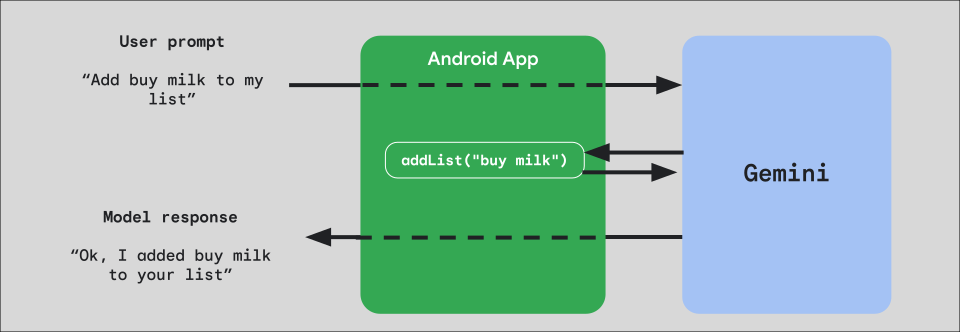
アプリに関数呼び出しを実装するには、まず、モデルに公開する関数ごとに FunctionDeclaration オブジェクトを作成します。
たとえば、文字列のリストに文字列を追加する addList 関数を Gemini に公開するには、まず、関数の名前と簡単な説明(英語)を含む FunctionDeclaration 変数を作成します。
Kotlin
val itemList = mutableListOf<String>() fun addList(item: String) { itemList.add(item) } val addListFunctionDeclaration = FunctionDeclaration( name = "addList", description = "Function adding an item the list", parameters = mapOf( "item" to Schema.string("A short string describing the item to add to the list") ) )
Java
HashMap<String, Schema> addListParams = new HashMap<String, Schema>(1);

addListParams.put("item", Schema.str("A short string describing the item to add to the list"));

FunctionDeclaration addListFunctionDeclaration = new FunctionDeclaration(
    "addList",
    "Function adding an item the list",
    addListParams,
    Collections.emptyList()
);
次に、インスタンス化するときに、この FunctionDeclaration を Tool としてモデルに渡します。
Kotlin
val addListTool = Tool.functionDeclarations(listOf(addListFunctionDeclaration)) val model = Firebase.ai(backend = GenerativeBackend.googleAI()).liveModel( modelName = "gemini-2.5-flash-native-audio-preview-12-2025", generationConfig = liveGenerationConfig { responseModality = ResponseModality.AUDIO speechConfig = SpeechConfig(voice = Voice("FENRIR")) }, systemInstruction = systemInstruction, tools = listOf(addListTool) )
Java
LiveGenerativeModel model = FirebaseAI.getInstance(
    GenerativeBackend.googleAI()).liveModel(
        "gemini-2.5-flash-native-audio-preview-12-2025",
  new LiveGenerationConfig.Builder()
        .setResponseModalities(ResponseModality.AUDIO)
        .setSpeechConfig(new SpeechConfig(new Voice("FENRIR")))
        .build(),
  List.of(Tool.functionDeclarations(List.of(addListFunctionDeclaration))),
               null,
               systemInstruction
        );
最後に、ハンドラ関数を実装して、モデルが行うツール呼び出しを処理し、レスポンスを返します。startAudioConversation
を呼び出すときに LiveSession に提供されるこのハンドラ関数は、FunctionCallPart パラメータを受け取り、FunctionResponsePart
を返します。
Kotlin
session.startAudioConversation(::functionCallHandler) // ... fun functionCallHandler(functionCall: FunctionCallPart): FunctionResponsePart { return when (functionCall.name) { "addList" -> { // Extract function parameter from functionCallPart val itemName = functionCall.args["item"]!!.jsonPrimitive.content // Call function with parameter addList(itemName) // Confirm the function call to the model val response = JsonObject( mapOf( "success" to JsonPrimitive(true), "message" to JsonPrimitive("Item $itemName added to the todo list") ) ) FunctionResponsePart(functionCall.name, response) } else -> { val response = JsonObject( mapOf( "error" to JsonPrimitive("Unknown function: ${functionCall.name}") ) ) FunctionResponsePart(functionCall.name, response) } } }
Java
Futures.addCallback(sessionFuture, new FutureCallback<LiveSessionFutures>() {

    @RequiresPermission(Manifest.permission.RECORD_AUDIO)
    @Override
    @OptIn(markerClass = PublicPreviewAPI.class)
    public void onSuccess(LiveSessionFutures ses) {
        ses.startAudioConversation(::handleFunctionCallFuture);
    }

    @Override
    public void onFailure(Throwable t) {
        // Handle exceptions
    }
}, executor);

// ...

ListenableFuture<JsonObject> handleFunctionCallFuture = Futures.transform(response, result -> {
    for (FunctionCallPart functionCall : result.getFunctionCalls()) {
        if (functionCall.getName().equals("addList")) {
            Map<String, JsonElement> args = functionCall.getArgs();
            String item =
                    JsonElementKt.getContentOrNull(
                            JsonElementKt.getJsonPrimitive(
                                    locationJsonObject.get("item")));
            return addList(item);
        }
    }
    return null;
}, Executors.newSingleThreadExecutor());
次のステップ
- Android AI カタログ サンプルアプリで Gemini Live API を試す。
- Gemini Live API の詳細について、Firebase AI Logic ドキュメントを読む。
- 利用可能な Gemini モデル の詳細を確認する。
- 関数呼び出しの詳細を確認する。
- プロンプト設計戦略について調べる。