

פלטפורמת Android 15 כוללת שינויים בהתנהגות שעשויים להשפיע על האפליקציה שלכם. שינויי ההתנהגות הבאים חלים על כל האפליקציות כשהן פועלות ב-Android 15, בלי קשר ל-targetSdkVersion. מומלץ לבדוק את האפליקציה ולשנות אותה לפי הצורך כדי לתמוך בהן בצורה תקינה, במקרים הרלוונטיים.
חשוב גם לעיין ברשימת השינויים בהתנהגות שמשפיעים רק על אפליקציות שמטרגטות ל-Android 15.
פונקציונליות עיקרית
Android 15 משנה או מרחיב יכולות ליבה שונות של מערכת Android.
שינויים במצב העצירה של החבילה
המטרה של מצב החבילה FLAG_STOPPED (המשתמש יכול להפעיל אותו בגרסאות build של AOSP בלחיצה ארוכה על סמל האפליקציה ובחירה באפשרות 'השבתה בכוח') הייתה תמיד להשאיר אפליקציות במצב הזה עד שהמשתמש יסיר אותן במפורש מהמצב הזה על ידי הפעלה ישירה של האפליקציה או אינטראקציה עקיפה עם האפליקציה (דרך חלונית השיתוף או ווידג'ט, בחירה באפליקציה כטפט חי וכו'). ב-Android 15 עדכנו את התנהגות המערכת כך שתתאים להתנהגות המיועדת הזו. אפליקציות צריכות להסיר מהמצב 'מושבת' רק כתוצאה מפעולת משתמש ישירה או עקיפה.
כדי לתמוך בהתנהגות הרצויה, בנוסף להגבלות הקיימות, המערכת מבטלת גם את כל כוונות הפנייה בהמתנה כשהאפליקציה נכנסת למצב מושהה במכשיר עם Android מגרסה 15 ואילך. כשהפעולות של המשתמש מסירות את האפליקציה מהמצב המושהה, ההודעה ACTION_BOOT_COMPLETED מועברת לאפליקציה ומאפשרת לרשום מחדש את כל הכוונות בהמתנה.
אפשר להפעיל את השיטה החדשה ApplicationStartInfo.wasForceStopped() כדי לוודא שהאפליקציה הועברה למצב מושהה.
תמיכה בגודלי דפים של 16KB
בעבר, מערכת Android תמכה רק בדפים עם זיכרון בגודל 4KB, מה שאפשר למערכת לייעל את הביצועים של הזיכרון הכולל במכשירים עם נפח זיכרון ממוצע. החל מ-Android 15, AOSP תומך במכשירים שמגדירים בהם גודל דף של 16KB (מכשירים עם 16KB). אם האפליקציה שלך משתמשת בספריות NDK, באופן ישיר או בעקיפין דרך SDK, תצטרכו לבנות מחדש את האפליקציה כדי שהיא תפעל במכשירים האלה עם 16 KB.
יצרני המכשירים ממשיכים לפתח מכשירים עם נפחים גדולים יותר של זיכרון פיזי (RAM). במכשירים רבים כאלה יוטמעו דפים בגודל 16KB (ובסופו של דבר בגודל גדול יותר) כדי לשפר את הביצועים של המכשיר. הוספת תמיכה במכשירים עם גודל דף של 16KB מאפשרת לאפליקציה לפעול במכשירים האלה, וליהנות משיפורי הביצועים שקשורים לכך. בלי קומפילציה מחדש, האפליקציות לא יפעלו במכשירים עם 16 KB בגרסאות עתידיות של Android.
כדי לעזור לכם להוסיף תמיכה לאפליקציה, סיפקנו הנחיות בנושא בדיקה אם יש השפעה על האפליקציה, בנייה מחדש של האפליקציה (אם רלוונטי) ובדיקת האפליקציה בסביבה של 16KB באמצעות אמולטורים (כולל תמונות מערכת של Android 15 לאמולטור של Android).
יתרונות ושיפור בביצועים
Devices configured with 16 KB page sizes use slightly more memory on average, but also gain various performance improvements for both the system and apps:
- Lower app launch times while the system is under memory pressure: 3.16% lower on average, with more significant improvements (up to 30%) for some apps that we tested
- Reduced power draw during app launch: 4.56% reduction on average
- Faster camera launch: 4.48% faster hot starts on average, and 6.60% faster cold starts on average
- Improved system boot time: improved by 8% (approximately 950 milliseconds) on average
These improvements are based on our initial testing, and results on actual devices will likely differ. We'll provide additional analysis of potential gains for apps as we continue our testing.
איך בודקים אם האפליקציה שלכם מושפעת
If your app uses any native code, then you should rebuild your app with support for 16 KB devices. If you are unsure if your app uses native code, you can use the APK Analyzer to identify whether any native code is present and then check the alignment of ELF segments for any shared libraries that you find. Android Studio also provides features that help you to automatically detect alignment issues.
If your app only uses code written in the Java programming language or in Kotlin, including all libraries or SDKs, then your app already supports 16 KB devices. Nevertheless, we recommend that you test your app in a 16 KB environment to verify that there are no unexpected regressions in app behavior.
שינויים שנדרשים בחלק מהאפליקציות כדי לתמוך במרחב הפרטי
מרחב פרטי הוא תכונה חדשה ב-Android 15 שמאפשרת למשתמשים ליצור מרחב נפרד במכשיר שבו הם יכולים להסתיר אפליקציות עם מידע אישי רגיש, באמצעות שכבת אימות נוספת. מאחר שלאפליקציות במרחב הפרטי יש חשיפה מוגבלת, יש לבצע פעולות נוספות כדי שסוגי אפליקציות מסוימים יוכלו לראות את האפליקציות במרחב הפרטי של המשתמש ולנהל איתן אינטראקציה.
כל האפליקציות
מאחר שהאפליקציות במרחב הפרטי נשמרות בפרופיל משתמש נפרד, בדומה לפרופילים לעבודה, האפליקציות לא צריכות להניח שעותקים מותקנים של האפליקציה שלהן שלא נמצאים בפרופיל הראשי נמצאים בפרופיל העבודה. אם באפליקציה שלכם יש לוגיקה שקשורה לאפליקציות בפרופיל העבודה שמבוססת על ההנחה הזו, תצטרכו לשנות את הלוגיקה הזו.
אפליקציות רפואיות
כשמשתמש נועל את המרחב הפרטי, כל האפליקציות במרחב הפרטי מופסקות, והן לא יכולות לבצע פעילויות בחזית או ברקע, כולל הצגת התראות. ההתנהגות הזו עשויה להשפיע באופן משמעותי על השימוש ועל הפעולה של אפליקציות רפואיות שמותקנות במרחב הפרטי.
בתהליך ההגדרה של המרחב הפרטי, המשתמשים מקבלים אזהרה שהמרחב הפרטי לא מתאים לאפליקציות שצריכות לבצע פעילויות קריטיות בחזית או ברקע, כמו הצגת התראות מאפליקציות רפואיות. עם זאת, אפליקציות לא יכולות לקבוע אם נעשה בהן שימוש במרחב הפרטי, ולכן הן לא יכולות להציג אזהרה למשתמש במקרה כזה.
לכן, אם אתם מפתחים אפליקציה רפואית, כדאי לבדוק איך התכונה הזו עשויה להשפיע על האפליקציה שלכם ולנקוט את הפעולות המתאימות – למשל, להודיע למשתמשים לא להתקין את האפליקציה במרחב הפרטי – כדי למנוע שיבושים ביכולות החיוניות של האפליקציה.
אפליקציות מרכז האפליקציות
אם אתם מפתחים אפליקציית מרכז אפליקציות, עליכם לבצע את הפעולות הבאות כדי שהאפליקציות במרחב הפרטי יהיו גלויות:
- האפליקציה שלכם צריכה להיות מוקצית כאפליקציית ברירת המחדל של מרכז האפליקציות במכשיר, כלומר, היא צריכה להיות מוקצית לתפקיד
ROLE_HOME. - באפליקציה צריך להצהיר על ההרשאה הרגילה
ACCESS_HIDDEN_PROFILESבקובץ המניפסט של האפליקציה.
אפליקציות מרכז האפליקציות שמצהירות על ההרשאה ACCESS_HIDDEN_PROFILES חייבות לטפל בתרחישי השימוש הבאים במרחב הפרטי:
- לאפליקציה צריך להיות מאגר נפרד במרכז האפליקציות לאפליקציות שמותקנות במרחב הפרטי. משתמשים ב-method
getLauncherUserInfo()כדי לקבוע איזה סוג של פרופיל משתמש מנוהל. - המשתמש צריך להיות מסוגל להסתיר ולהציג את הקונטיינר של המרחב הפרטי.
- המשתמש צריך להיות מסוגל לנעול ולפתוח את המרחב הפרטי. משתמשים ב-method
requestQuietModeEnabled()כדי לנעול (על ידי העברתtrue) או לבטל את הנעילה (על ידי העברתfalse) של המרחב הפרטי. כשהמרחב הפרטי נעול, אף אפליקציה במאגר שלו לא אמורה להיות גלויה או ניתנת לגילוי באמצעות מנגנונים כמו חיפוש. האפליקציה צריכה לרשום מקלט לשידורים של
ACTION_PROFILE_AVAILABLEושלACTION_PROFILE_UNAVAILABLE, ולעדכן את ממשק המשתמש באפליקציה כשהסטטוס של המרחב הפרטי (נעול או לא נעול) משתנה. שתי השידורים האלה כוללים את הערךEXTRA_USER, שבעזרתו האפליקציה יכולה להפנות למשתמש בפרופיל הפרטי.אפשר גם להשתמש ב-method
isQuietModeEnabled()כדי לבדוק אם פרופיל המרחב הפרטי נעול או לא.
אפליקציות מחנות האפליקציות
המרחב הפרטי כולל לחצן 'התקנת אפליקציות' שמפעיל כוונה משתמעת להתקין אפליקציות במרחב הפרטי של המשתמש. כדי שהאפליקציה תקבל את הכוונה המשתמעת הזו, צריך להצהיר על <intent-filter> בקובץ המניפסט של האפליקציה עם <category> של CATEGORY_APP_MARKET.
הוסר גופן אמוג'י מבוסס PNG
The legacy, PNG-based emoji font file (NotoColorEmojiLegacy.ttf) has been
removed, leaving just the vector-based file. Beginning with Android 13 (API
level 33), the emoji font file used by the system emoji renderer changed from a
PNG-based file to a vector based file. The system retained
the legacy font file in Android 13 and 14 for compatibility reasons, so that
apps with their own font renderers could continue to use the legacy font file
until they were able to upgrade.
To check if your app is affected, search your app's code for references to the
NotoColorEmojiLegacy.ttf file.
You can choose to adapt your app in a number of ways:
- Use platform APIs for text rendering. You can render text to a bitmap-backed
Canvasand use that to get a raw image if necessary. - Add COLRv1 font support to your app. The FreeType open source library supports COLRv1 in version 2.13.0 and higher.
- As a last resort, you can bundle the legacy emoji font file
(
NotoColorEmoji.ttf) into your APK, although in that case your app will be missing the latest emoji updates. For more information, see the Noto Emoji GitHub project page.
הגדלנו את גרסת ה-SDK המינימלית לטירגוט מ-23 ל-24
Android 15 builds on the
the changes that were made in Android 14 and extends this
security further. In Android 15, apps with a
targetSdkVersion lower than 24 can't be installed.
Requiring apps to meet modern API levels helps to ensure better security and
privacy.
Malware often targets lower API levels in order to bypass security and privacy
protections that have been introduced in higher Android versions. For example,
some malware apps use a targetSdkVersion of 22 to avoid being subjected to the
runtime permission model introduced in 2015 by Android 6.0 Marshmallow (API
level 23). This Android 15 change makes it harder for malware to avoid security
and privacy improvements. Attempting to install an app targeting a lower API
level results in an installation failure, with a message like the following one
appearing in Logcat:
INSTALL_FAILED_DEPRECATED_SDK_VERSION: App package must target at least SDK version 24, but found 7
On devices upgrading to Android 15, any apps with a targetSdkVersion lower
than 24 remain installed.
If you need to test an app targeting an older API level, use the following ADB command:
adb install --bypass-low-target-sdk-block FILENAME.apk
אבטחה ופרטיות
Android 15 introduces robust measures to combat one-time passcode (OTP) fraud and to protect the user's sensitive content, focusing on hardening the Notification Listener Service and screenshare protections. Key enhancements include redacting OTPs from notifications accessible to untrusted apps, hiding notifications during screenshare, and securing app activities when OTPs are posted. These changes aim to keep the user's sensitive content safe from unauthorized actors.
Developers need to be aware of the following to ensure their apps are compatible with the changes in Android 15:
OTP Redaction
Android will stop untrusted apps that implement a
NotificationListenerService from reading unredacted content
from notifications where an OTP has been detected. Trusted apps such as
companion device manager associations are exempt from these restrictions.
Screenshare Protection
- Notification content is hidden during screen sharing sessions to preserve
the user's privacy. If the app implements
setPublicVersion(), Android shows the public version of the notification which serves as a replacement notification in insecure contexts. Otherwise, the notification content is redacted without any further context. - Sensitive content like password input is hidden from remote viewers to prevent revealing the user's sensitive information.
- Activities from apps that post notifications during screenshare where an OTP has been detected will be hidden. App content is hidden from the remote viewer when launched.
- Beyond Android's automatic identification of sensitive fields, developers
can manually mark parts of their app as sensitive using
setContentSensitivity, which is hidden from remote viewers during screenshare. - Developers can choose to toggle the Disable screen share protections option under Developer Options to be exempted from the screenshare protections for demo or testing purposes. The default system screen recorder is exempted from these changes, since the recordings remain on-device.
מצלמה ומדיה
ב-Android 15 בוצעו השינויים הבאים בהתנהגות של המצלמה והמדיה בכל האפליקציות.
הפעלה ישירה של אודיו או העברה של אודיו לזיכרון המטמון מבטלת את התוקף של טראקים קודמים של אודיו שהועברו לזיכרון המטמון או הופעלו ישירות, כשמגיעים למגבלות המשאבים
Before Android 15, if an app requested direct or offload audio playback while
another app was playing audio and the resource limits were reached, the app
would fail to open a new AudioTrack.
Beginning with Android 15, when an app requests direct or offload
playback and the resource
limits are reached, the system invalidates any currently open
AudioTrack objects which prevent fulfilling the new track request.
(Direct and offload audio tracks are typically opened for playback of compressed audio formats. Common use-cases for playing direct audio include streaming encoded audio over HDMI to a TV. Offload tracks are typically used to play compressed audio on a mobile device with hardware DSP acceleration.)
חוויית המשתמש וממשק המשתמש של המערכת
Android 15 כוללת כמה שינויים שנועדו ליצור חוויית משתמש עקבית ואינטואיטיבית יותר.
אנימציות של חיזוי תנועת החזרה מופעלות באפליקציות שהביעו הסכמה
החל מגרסה 15 של Android, האפשרות למפתחים לאנימציות חיזוי של תנועת החזרה הוסרה. אנימציות מערכת כמו חזרה למסך הבית, מעבר בין משימות ופעילויות, מופיעות עכשיו באפליקציות שהסכימו להשתמש בתנועת החזרה החזוי, באופן מלא או ברמת הפעילות. אם האפליקציה שלכם מושפעת, עליכם לבצע את הפעולות הבאות:
- מוודאים שהאפליקציה הועברה בצורה תקינה כדי להשתמש בתנועת החזרה החזוי.
- מוודאים שהמעבר בין הקטעים פועל עם ניווט חזרה חזוי.
- עוברים משימוש באנימציות ובמעברים של מסגרות, ומשתמשים במקום זאת ב-Animator ובמעברים של androidx.
- להעביר את הקוד מסטאקים קודמים ש-
FragmentManagerלא מכיר. במקום זאת, כדאי להשתמש בסטאקים קודמים שמנוהלים על ידיFragmentManagerאו על ידי רכיב הניווט.
ווידג'טים מושבתים כשמשתמש סוגר אפליקציה בכוח
אם משתמש מפסיק אפליקציה בכוח במכשיר עם Android 15, המערכת משביתה באופן זמני את כל הווידג'טים של האפליקציה. הווידג'טים מופיעים באפור והמשתמשים לא יכולים לבצע איתם פעולות. הסיבה לכך היא שמתחילת Android 15, המערכת מבטלת את כל הכוונות בהמתנה של האפליקציה כשהיא מופסקת בכוח.
המערכת מפעילה מחדש את הווידג'טים האלה בפעם הבאה שהמשתמש מפעיל את האפליקציה.
מידע נוסף זמין במאמר שינויים במצב 'החבילה הופסקה'.
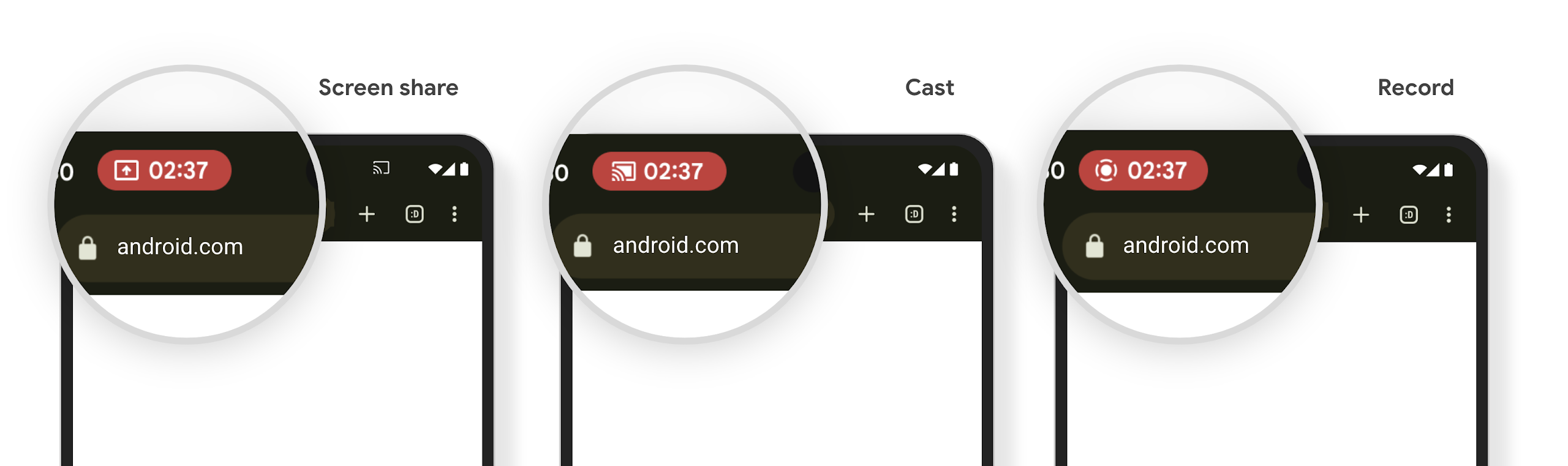
שבב בשורת הסטטוס של הקרנת מדיה מתריע למשתמשים על שיתוף מסך, הפעלת Cast והקלטה
Screen projection exploits expose private user data such as financial information because users don't realize their device screen is being shared.
For apps running on devices with Android 15 QPR1 or higher, a status bar chip that is large and prominent alerts users to any in‑progress screen projection. Users can tap the chip to stop their screen from being shared, cast, or recorded. Also, screen projection automatically stops when the device screen is locked.
Check if your app is impacted
By default, your app includes the status bar chip and automatically suspends screen projection when the lock screen activates.
To learn more about how to test your app for these use cases, see Status bar chip and auto stop.
הגבלות על גישה לרשת ברקע
In Android 15, apps that start a network request outside of a valid process
lifecycle receive an exception. Typically, an
UnknownHostException or other socket-related
IOException. Network requests that happen outside of a valid lifecycle are
usually due to apps unknowingly continuing a network request even after the app
is no longer active.
To mitigate this exception, ensure your network requests are lifecycle aware and cancelled upon leaving a valid process lifecycle by using lifecycle aware components. If it is important that the network request should happen even when the user leaves the application, consider scheduling the network request using WorkManager or continue a user visible task using Foreground Service.
הפסקת תמיכה
יכול להיות שבכל גרסה של Android, ממשקי API ספציפיים של Android יהפכו ללא רלוונטיים או שיצטרכו לעבור שינוי כדי לשפר את חוויית המפתחים או לתמוך ביכולות חדשות של הפלטפורמה. במקרים כאלה, אנחנו מוציאים רשמית משימוש את ממשקי ה-API המיושנים ומפנים את המפתחים לממשקי API חלופיים שבהם הם יכולים להשתמש במקום זאת.
הוצאה משימוש פירושה שסיימנו את התמיכה הרשמית בממשקי ה-API, אבל הם ימשיכו להיות זמינים למפתחים. מידע נוסף על הוצאות משימוש חשובות בגרסה הזו של Android זמין בדף ההוצאות משימוש.