

مانند نسخههای قبلی، اندروید ۱۵ شامل تغییرات رفتاری است که ممکن است بر برنامه شما تأثیر بگذارد. تغییرات رفتاری زیر منحصراً برای برنامههایی اعمال میشود که اندروید ۱۵ یا بالاتر را هدف قرار میدهند. اگر برنامه شما اندروید ۱۵ یا بالاتر را هدف قرار میدهد، باید برنامه خود را اصلاح کنید تا در صورت لزوم، از این رفتارها به درستی پشتیبانی کند.
حتماً فهرست تغییرات رفتاری که صرف نظر از targetSdkVersion برنامه شما، بر همه برنامههای در حال اجرا در اندروید ۱۵ تأثیر میگذارند را نیز بررسی کنید.
عملکرد اصلی
اندروید ۱۵ قابلیتهای اصلی مختلف سیستم اندروید را تغییر داده یا گسترش میدهد.
تغییرات در سرویسهای پیشزمینه
ما در حال انجام تغییرات زیر در سرویس های پیش زمینه با اندروید 15 هستیم.
- رفتار درنگ سرویس پیش زمینه همگام سازی داده ها
- نوع سرویس پیش زمینه پردازش رسانه جدید
- محدودیت در گیرنده های پخش
BOOT_COMPLETEDکه خدمات پیش زمینه را راه اندازی می کنند - محدودیتهایی برای شروع سرویسهای پیشزمینه در زمانی که برنامه دارای مجوز
SYSTEM_ALERT_WINDOWاست
رفتار درنگ سرویس پیش زمینه همگام سازی داده ها
Android 15 برای برنامههایی که Android 15 (سطح API 35) یا بالاتر را هدف قرار میدهند، رفتار مهلت زمانی جدیدی را برای dataSync معرفی میکند. این رفتار همچنین برای نوع جدید سرویس پیشزمینه mediaProcessing اعمال میشود.
این سیستم به سرویسهای dataSync یک برنامه اجازه میدهد در یک دوره 24 ساعته در مجموع 6 ساعت اجرا شوند، پس از آن سیستم سرویس سرویس در حال اجرا را متد Service.onTimeout(int, int) (معرفی شده در اندروید 15) فراخوانی میکند. در این زمان، سرویس چند ثانیه فرصت دارد تا Service.stopSelf() فراخوانی کند. هنگامی که Service.onTimeout() فراخوانی می شود، سرویس دیگر یک سرویس پیش زمینه در نظر گرفته نمی شود. اگر سرویس Service.stopSelf() را فراخوانی نکند، سیستم یک استثنا داخلی ایجاد می کند. استثنا با پیام زیر در Logcat وارد شده است:
Fatal Exception: android.app.RemoteServiceException: "A foreground service of
type dataSync did not stop within its timeout: [component name]"
برای جلوگیری از مشکلات ناشی از این تغییر رفتار، می توانید یک یا چند مورد از موارد زیر را انجام دهید:
- از سرویس خود بخواهید روش جدید
Service.onTimeout(int, int)را پیاده سازی کند. وقتی برنامه شما پاسخ تماس را دریافت کرد، مطمئن شوید که در عرض چند ثانیهstopSelf()تماس بگیرید. (اگر برنامه را فورا متوقف نکنید، سیستم خراب می شود.) - مطمئن شوید که سرویسهای
dataSyncبرنامه شما در هر دوره 24 ساعته در مجموع بیش از 6 ساعت اجرا نمیشوند (مگر اینکه کاربر با برنامه تعامل داشته باشد و تایمر را بازنشانی کند). - خدمات پیش زمینه
dataSyncفقط در نتیجه تعامل مستقیم کاربر شروع کنید. از آنجایی که برنامه شما هنگام شروع سرویس در پیش زمینه است، سرویس شما شش ساعت کامل پس از رفتن برنامه به پسزمینه است. - به جای استفاده از سرویس پیش زمینه
dataSync، از یک API جایگزین استفاده کنید.
اگر سرویسهای پیشزمینه dataSync برنامه شما در 24 ساعت گذشته به مدت 6 ساعت اجرا شده است، نمیتوانید سرویس پیشزمینه dataSync دیگری را راهاندازی کنید مگر اینکه کاربر برنامه شما را به پیشزمینه آورده باشد (که تایمر را بازنشانی میکند). اگر میخواهید سرویس پیشزمینه dataSync دیگری را راهاندازی کنید، سیستم ForegroundServiceStartNotAllowedException را با یک پیام خطایی مانند «محدودیت زمانی برای نوع سرویس پیشزمینه dataSync تمام شده است» پرتاب میکند.
تست کردن
برای آزمایش رفتار برنامهتان، میتوانید وقفههای همگامسازی دادهها را فعال کنید، حتی اگر برنامه شما Android 15 را هدف قرار ندهد (تا زمانی که برنامه روی دستگاه Android 15 اجرا شود). برای فعال کردن بازه زمانی، دستور adb زیر را اجرا کنید:
adb shell am compat enable FGS_INTRODUCE_TIME_LIMITS your-package-name
همچنین میتوانید دوره وقفه را تنظیم کنید تا آزمایش نحوه عملکرد برنامهتان در زمان رسیدن به محدودیت آسانتر شود. برای تنظیم یک بازه زمانی جدید، دستور adb زیر را اجرا کنید:
adb shell device_config put activity_manager data_sync_fgs_timeout_duration duration-in-milliseconds
نوع سرویس پیش زمینه پردازش رسانه جدید
اندروید 15 یک نوع سرویس پیش زمینه جدید، mediaProcessing را معرفی می کند. این نوع سرویس برای عملیاتی مانند رمزگذاری فایل های رسانه ای مناسب است. به عنوان مثال، یک برنامه رسانه ممکن است یک فایل صوتی را دانلود کند و قبل از پخش آن را به فرمت دیگری تبدیل کند. میتوانید از سرویس پیشزمینه mediaProcessing استفاده کنید تا مطمئن شوید که تبدیل حتی زمانی که برنامه در پسزمینه است ادامه مییابد.
این سیستم به سرویسهای mediaProcessing یک برنامه اجازه میدهد در مجموع 6 ساعت در یک دوره 24 ساعته اجرا شوند، پس از آن سیستم سرویس سرویس در حال اجرا را متد Service.onTimeout(int, int) (معرفی شده در Android 15) فراخوانی میکند. در این زمان، سرویس چند ثانیه فرصت دارد تا Service.stopSelf() را فراخوانی کند. اگر سرویس Service.stopSelf() را فراخوانی نکند، سیستم یک استثنا داخلی ایجاد می کند. استثنا با پیام زیر در Logcat وارد شده است:
Fatal Exception: android.app.RemoteServiceException: "A foreground service of
type mediaProcessing did not stop within its timeout: [component name]"
برای جلوگیری از استثناء، می توانید یکی از موارد زیر را انجام دهید:
- از سرویس خود بخواهید روش جدید
Service.onTimeout(int, int)را پیاده سازی کند. هنگامی که برنامه شما پاسخ تماس را دریافت کرد، مطمئن شوید که در عرض چند ثانیهstopSelf()تماس بگیرید. (اگر برنامه را فوراً متوقف نکنید، سیستم یک خرابی ایجاد می کند.) - مطمئن شوید که سرویسهای
mediaProcessingبرنامه شما در هر دوره ۲۴ ساعته در مجموع بیش از ۶ ساعت اجرا نمیشوند (مگر اینکه کاربر با برنامه تعامل داشته باشد و تایمر را بازنشانی کند). - خدمات پیش زمینه
mediaProcessingرا فقط در نتیجه تعامل مستقیم کاربر شروع کنید. از آنجایی که هنگام شروع سرویس، برنامه شما در پیش زمینه است، سرویس شما شش ساعت کامل پس از رفتن برنامه به پسزمینه است. - به جای استفاده از سرویس پیش زمینه
mediaProcessing، از یک API جایگزین مانند WorkManager استفاده کنید.
اگر سرویسهای پیشزمینه mediaProcessing برنامهتان در 24 ساعت گذشته به مدت 6 ساعت اجرا شده است، نمیتوانید سرویس پیشزمینه mediaProcessing دیگری را راهاندازی کنید ، مگر اینکه کاربر برنامه شما را به پیشزمینه آورده باشد (که تایمر را بازنشانی میکند). اگر بخواهید سرویس پیشزمینه mediaProcessing دیگری را راهاندازی کنید، سیستم ForegroundServiceStartNotAllowedException را با پیام خطایی مانند "محدودیت زمانی برای نوع سرویس پیشزمینه mediaProcessing تمام شده است" میفرستد.
برای اطلاعات بیشتر در مورد نوع سرویس mediaProcessing ، به تغییرات در انواع خدمات پیش زمینه برای Android 15 مراجعه کنید: پردازش رسانه .
تست کردن
برای آزمایش رفتار برنامهتان، میتوانید وقفههای زمانی پردازش رسانه را فعال کنید، حتی اگر برنامه شما Android 15 را هدف قرار ندهد (تا زمانی که برنامه روی دستگاه Android 15 اجرا شود). برای فعال کردن بازه زمانی، دستور adb زیر را اجرا کنید:
adb shell am compat enable FGS_INTRODUCE_TIME_LIMITS your-package-name
همچنین میتوانید مدت زمان وقفه را تنظیم کنید تا آزمایش نحوه عملکرد برنامهتان در زمان رسیدن به محدودیت آسانتر شود. برای تنظیم یک بازه زمانی جدید، دستور adb زیر را اجرا کنید:
adb shell device_config put activity_manager media_processing_fgs_timeout_duration duration-in-milliseconds
محدودیت در گیرنده های پخش BOOT_COMPLETED که خدمات پیش زمینه را راه اندازی می کنند
محدودیت های جدیدی برای گیرنده های پخش BOOT_COMPLETED وجود دارد که خدمات پیش زمینه را راه اندازی می کنند. گیرنده های BOOT_COMPLETED مجاز به راه اندازی انواع خدمات پیش زمینه زیر نیستند :
-
dataSync -
camera -
mediaPlayback -
phoneCall -
mediaProjection -
microphone(این محدودیت از اندروید 14 برایmicrophoneاعمال شده است)
اگر یک گیرنده BOOT_COMPLETED سعی کند هر یک از آن نوع خدمات پیش زمینه را راه اندازی کند، سیستم ForegroundServiceStartNotAllowedException پرتاب می کند.
تست کردن
برای آزمایش رفتار برنامهتان، میتوانید این محدودیتهای جدید را فعال کنید، حتی اگر برنامه شما اندروید 15 را هدف قرار ندهد (تا زمانی که برنامه روی دستگاه Android 15 اجرا شود). دستور adb زیر را اجرا کنید:
adb shell am compat enable FGS_BOOT_COMPLETED_RESTRICTIONS your-package-name
برای ارسال یک پخش BOOT_COMPLETED بدون راه اندازی مجدد دستگاه، دستور adb زیر را اجرا کنید:
adb shell am broadcast -a android.intent.action.BOOT_COMPLETED your-package-name
محدودیتهایی برای شروع سرویسهای پیشزمینه در زمانی که برنامه دارای مجوز SYSTEM_ALERT_WINDOW است
قبلاً، اگر برنامهای مجوز SYSTEM_ALERT_WINDOW را داشت، میتوانست یک سرویس پیشزمینه راهاندازی کند، حتی اگر برنامه در حال حاضر در پسزمینه باشد (همانطور که در معافیتها از محدودیتهای شروع پسزمینه بحث شد).
اگر برنامه ای اندروید 15 را هدف قرار دهد، این معافیت اکنون محدودتر شده است. اکنون برنامه باید مجوز SYSTEM_ALERT_WINDOW را داشته باشد و همچنین یک پنجره همپوشانی قابل مشاهده داشته باشد. یعنی برنامه باید ابتدا یک پنجره TYPE_APPLICATION_OVERLAY راه اندازی کند و قبل از شروع سرویس پیش زمینه باید پنجره قابل مشاهده باشد.
اگر برنامه شما سعی کند یک سرویس پیشزمینه را از پسزمینه راهاندازی کند، بدون اینکه این الزامات جدید را برآورده کند (و معافیت دیگری ندارد)، سیستم ForegroundServiceStartNotAllowedException را پرتاب میکند.
اگر برنامه شما مجوز SYSTEM_ALERT_WINDOW را اعلام کند و خدمات پیشزمینه را از پسزمینه راهاندازی کند، ممکن است تحت تأثیر این تغییر قرار گیرد. اگر برنامه شما یک ForegroundServiceStartNotAllowedException دریافت می کند، ترتیب عملکرد برنامه خود را بررسی کنید و مطمئن شوید که برنامه شما قبلاً یک پنجره همپوشانی فعال دارد قبل از اینکه بخواهد یک سرویس پیش زمینه را از پس زمینه راه اندازی کند. میتوانید با فراخوانی View.getWindowVisibility() بررسی کنید که آیا پنجره همپوشانی شما قابل مشاهده است یا خیر، یا میتوانید View.onWindowVisibilityChanged() را لغو کنید تا هر زمان که قابلیت مشاهده تغییر کرد مطلع شوید.
تست کردن
برای آزمایش رفتار برنامهتان، میتوانید این محدودیتهای جدید را فعال کنید، حتی اگر برنامه شما اندروید 15 را هدف قرار ندهد (تا زمانی که برنامه روی دستگاه Android 15 اجرا شود). برای فعال کردن این محدودیتهای جدید برای شروع خدمات پیشزمینه از پسزمینه، دستور adb زیر را اجرا کنید:
adb shell am compat enable FGS_SAW_RESTRICTIONS your-package-name
تغییراتی در زمانهایی که برنامهها میتوانند وضعیت کلی حالت «مزاحم نشوید» را تغییر دهند
برنامههایی که Android 15 (سطح API 35) و بالاتر را هدف قرار میدهند، دیگر نمیتوانند وضعیت کلی یا خطمشی «مزاحم نشوید» (DND) را در دستگاه تغییر دهند (چه با تغییر تنظیمات کاربر یا خاموش کردن حالت DND). در عوض، برنامهها باید یک AutomaticZenRule ارائه دهند، که سیستم آن را در یک خطمشی جهانی با طرح موجود بیشترین محدودیتکننده-سیاست-برنده ترکیب میکند. تماسهای APIهای موجود که قبلاً بر وضعیت جهانی تأثیر میگذاشتند ( setInterruptionFilter ، setNotificationPolicy ) منجر به ایجاد یا بهروزرسانی یک AutomaticZenRule ضمنی میشود که بسته به چرخه تماس آن فراخوانهای API، روشن و خاموش میشود.
توجه داشته باشید که این تغییر تنها در صورتی بر رفتار قابل مشاهده تأثیر میگذارد که برنامه setInterruptionFilter(INTERRUPTION_FILTER_ALL) را فراخوانی کند و انتظار دارد که این تماس AutomaticZenRule را که قبلاً توسط صاحبان آن فعال شده است غیرفعال کند.
تغییرات API در OpenJDK
اندروید ۱۵ همچنان به بهروزرسانی کتابخانههای اصلی اندروید ادامه میدهد تا با ویژگیهای جدیدترین نسخههای OpenJDK LTS هماهنگ شود.
برخی از این تغییرات میتوانند بر سازگاری برنامهها برای اندروید ۱۵ (سطح API ۳۵) تأثیر بگذارند:
تغییرات در APIهای قالببندی رشته : اعتبارسنجی اندیس آرگومان، پرچمها، عرض و دقت، اکنون هنگام استفاده از APIهای
String.format()وFormatter.format()زیر، سختگیرانهتر شده است:-
String.format(String, Object[]) -
String.format(Locale, String, Object[]) -
Formatter.format(String, Object[]) -
Formatter.format(Locale, String, Object[])
برای مثال، وقتی از اندیس آرگومان ۰ استفاده میشود (
%0در رشته فرمت)، خطای زیر رخ میدهد:IllegalFormatArgumentIndexException: Illegal format argument index = 0در این حالت، مشکل را میتوان با استفاده از اندیس آرگومان ۱ (
%1در رشته قالببندی) برطرف کرد.-
تغییرات در نوع کامپوننت
Arrays.asList(...).toArray(): هنگام استفاده ازArrays.asList(...).toArray()، نوع کامپوننت آرایه حاصل اکنون یکObjectاست - نه نوع عناصر آرایه زیرین. بنابراین کد زیر یکClassCastExceptionایجاد میکند:String[] elements = (String[]) Arrays.asList("one", "two").toArray();در این مورد، برای حفظ نوع کامپوننت
Stringدر آرایه حاصل، میتوانید ازCollection.toArray(Object[])استفاده کنید:String[] elements = Arrays.asList("two", "one").toArray(new String[0]);تغییرات در مدیریت کد زبان : هنگام استفاده از API
Locale، کدهای زبان برای عبری، ییدیش و اندونزیایی دیگر به شکلهای منسوخشدهشان تبدیل نمیشوند (عبری:iw، ییدیش:jiو اندونزیایی:in). هنگام مشخص کردن کد زبان برای یکی از این زبانها، به جای آن از کدهای ISO 639-1 استفاده کنید (عبری:he، ییدیش:yiو اندونزیایی:id).تغییرات در توالیهای تصادفی اعداد صحیح : پیرو تغییرات ایجاد شده در https://bugs.openjdk.org/browse/JDK-8301574 ، متدهای
Random.ints()زیر اکنون توالی متفاوتی از اعداد را نسبت به متدهایRandom.nextInt()برمیگردانند:به طور کلی، این تغییر نباید منجر به رفتار توقف برنامه شود، اما کد شما نباید انتظار داشته باشد که توالی تولید شده از متدهای
Random.ints()باRandom.nextInt()مطابقت داشته باشد.
API جدید SequencedCollection میتواند پس از بهروزرسانی compileSdk در پیکربندی ساخت برنامه برای استفاده از اندروید ۱۵ (سطح API ۳۵)، بر سازگاری برنامه شما تأثیر بگذارد:
برخورد با توابع الحاقی
MutableList.removeFirst()وMutableList.removeLast()درkotlin-stdlibنوع
Listدر جاوا به نوعMutableListدر کاتلین نگاشت شده است. از آنجا که APIهایList.removeFirst()وList.removeLast()در اندروید ۱۵ (سطح API ۳۵) معرفی شدهاند، کامپایلر کاتلین فراخوانیهای تابع، برای مثالlist.removeFirst()، را به صورت ایستا به APIهایListجدید به جای توابع افزونه درkotlin-stdlibحل میکند.اگر یک برنامه با
compileSdkتنظیم شده روی35وminSdkتنظیم شده روی34یا پایینتر، دوباره کامپایل شود و سپس برنامه روی اندروید ۱۴ و پایینتر اجرا شود، یک خطای زمان اجرا رخ میدهد:java.lang.NoSuchMethodError: No virtual method removeFirst()Ljava/lang/Object; in class Ljava/util/ArrayList;گزینهی
NewApilint موجود در افزونهی Gradle اندروید میتواند این کاربردهای جدید API را دریافت کند../gradlew lintMainActivity.kt:41: Error: Call requires API level 35 (current min is 34): java.util.List#removeFirst [NewApi] list.removeFirst()برای رفع خطاهای runtime exception و lint، فراخوانیهای تابع
removeFirst()وremoveLast()را میتوان به ترتیب باremoveAt(0)وremoveAt(list.lastIndex)در کاتلین جایگزین کرد. اگر از Android Studio Ladybug | 2024.1.3 یا بالاتر استفاده میکنید، این نسخه همچنین یک گزینه رفع سریع برای این خطاها ارائه میدهد.اگر گزینه lint غیرفعال شده است، حذف
@SuppressLint("NewApi")وlintOptions { disable 'NewApi' }را در نظر بگیرید.برخورد با متدهای دیگر در جاوا
متدهای جدیدی به انواع موجود اضافه شدهاند، برای مثال،
ListوDeque. این متدهای جدید ممکن است با متدهایی با نام و نوع آرگومان مشابه در رابطها و کلاسهای دیگر سازگار نباشند. در صورت برخورد امضای متد با ناسازگاری، کامپایلرjavacخطای زمان ساخت را صادر میکند. برای مثال:مثال خطای ۱:
javac MyList.javaMyList.java:135: error: removeLast() in MyList cannot implement removeLast() in List public void removeLast() { ^ return type void is not compatible with Object where E is a type-variable: E extends Object declared in interface Listمثال خطای ۲:
javac MyList.javaMyList.java:7: error: types Deque<Object> and List<Object> are incompatible; public class MyList implements List<Object>, Deque<Object> { both define reversed(), but with unrelated return types 1 errorمثال خطای ۳:
javac MyList.javaMyList.java:43: error: types List<E#1> and MyInterface<E#2> are incompatible; public static class MyList implements List<Object>, MyInterface<Object> { class MyList inherits unrelated defaults for getFirst() from types List and MyInterface where E#1,E#2 are type-variables: E#1 extends Object declared in interface List E#2 extends Object declared in interface MyInterface 1 errorبرای رفع این خطاهای ساخت، کلاسی که این رابطها را پیادهسازی میکند باید متد را با یک نوع بازگشتی سازگار، بازنویسی کند. برای مثال:
@Override
public Object getFirst() {
    return List.super.getFirst();
}
امنیت
اندروید ۱۵ شامل تغییراتی است که امنیت سیستم را ارتقا میدهد تا به محافظت از برنامهها و کاربران در برابر برنامههای مخرب کمک کند.
نسخههای محدود TLS
اندروید 15 استفاده از TLS نسخه 1.0 و 1.1 را محدود می کند. این نسخهها قبلاً در اندروید منسوخ شده بودند، اما اکنون برای برنامههایی که اندروید 15 را هدف قرار میدهند غیرمجاز هستند.
فعالیت پسزمینه امن راهاندازی میشود
اندروید ۱۵ با افزودن تغییراتی که مانع از اجرای برنامههای مخرب در پسزمینه توسط برنامههای دیگر، افزایش سطح دسترسی و سوءاستفاده از تعامل کاربر میشود، از کاربران در برابر برنامههای مخرب محافظت میکند و به آنها کنترل بیشتری بر دستگاههایشان میدهد. از اندروید ۱۰ (سطح API ۲۹) فعالیتهای پسزمینه محدود شدهاند.
تغییرات دیگر
- سازندگان
PendingIntentطوری تغییر دهید که به طور پیشفرض، فعالیتهای پسزمینه را مسدود کنند . این کار به جلوگیری از ایجاد تصادفیPendingIntentتوسط برنامهها که میتواند توسط افراد مخرب مورد سوءاستفاده قرار گیرد، کمک میکند. - هیچ برنامهای را به پیشزمینه نیاورید، مگر اینکه فرستندهی
PendingIntentاجازه دهد . هدف این تغییر جلوگیری از سوءاستفادهی برنامههای مخرب از قابلیت شروع فعالیتها در پسزمینه است. بهطور پیشفرض، برنامهها مجاز به آوردن پشتهی وظایف به پیشزمینه نیستند، مگر اینکه سازندهی برنامه اجازهی اجرای فعالیت در پسزمینه را داده باشد یا فرستنده امتیاز اجرای فعالیت در پسزمینه را داشته باشد. - کنترل کنید که فعالیت برتر یک پشته وظیفه چگونه میتواند وظیفه خود را به پایان برساند . اگر فعالیت برتر یک وظیفه را به پایان برساند، اندروید به آخرین وظیفه فعال خود برمیگردد. علاوه بر این، اگر یک فعالیت غیر برتر وظیفه خود را به پایان برساند، اندروید به صفحه اصلی برمیگردد؛ و پایان این فعالیت غیر برتر را مسدود نمیکند.
- جلوگیری از اجرای فعالیتهای دلخواه از برنامههای دیگر به وظیفه خودتان . این تغییر مانع از آن میشود که برنامههای مخرب با ایجاد فعالیتهایی که به نظر میرسد از برنامههای دیگر هستند، کاربران را فیشینگ کنند.
- جلوگیری از در نظر گرفتن پنجرههای غیرقابل مشاهده برای اجرای فعالیتهای پسزمینه . این کار به جلوگیری از سوءاستفاده برنامههای مخرب از اجرای فعالیتهای پسزمینه برای نمایش محتوای ناخواسته یا مخرب به کاربران کمک میکند.
مقاصد امنتر
اندروید ۱۵ StrictMode برای intentها معرفی میکند.
برای مشاهده گزارشهای دقیق در مورد تخلفات استفاده Intent ، از روش زیر استفاده کنید:
کاتلین
fun onCreate() {
    StrictMode.setVmPolicy(VmPolicy.Builder()
        .detectUnsafeIntentLaunch()
        .build()
    )
}
جاوا
public void onCreate() {
    StrictMode.setVmPolicy(new VmPolicy.Builder()
            .detectUnsafeIntentLaunch()
            .build());
}
تجربه کاربری و رابط کاربری سیستم
اندروید ۱۵ شامل تغییراتی است که برای ایجاد یک تجربه کاربری سازگارتر و شهودیتر در نظر گرفته شدهاند.
تغییرات درج پنجره
در اندروید 15 دو تغییر مربوط به ورودیهای پنجره وجود دارد: لبه به لبه بهطور پیشفرض اعمال میشود و همچنین تغییراتی در پیکربندی وجود دارد، مانند پیکربندی پیشفرض نوارهای سیستم.
اجرای لبه به لبه
اگر برنامهها برای اندروید ۱۵ (سطح API 35) طراحی شده باشند، بهطور پیشفرض در دستگاههایی که اندروید ۱۵ را اجرا میکنند، لبه به لبه هستند.
این یک تغییر اساسی است که ممکن است تأثیر منفی بر رابط کاربری برنامه شما بگذارد. این تغییرات بر روی بخشهای زیر از رابط کاربری تأثیر میگذارند:
- نوار ناوبری با استفاده از ژستهای حرکتی
- به طور پیشفرض شفاف.
- افست پایین غیرفعال است، بنابراین محتوا پشت نوار ناوبری سیستم ترسیم میشود، مگر اینکه از insets استفاده شود.
-
setNavigationBarColorوR.attr#navigationBarColorمنسوخ شدهاند و بر ناوبری ژستها تأثیری ندارند. -
setNavigationBarContrastEnforcedوR.attr#navigationBarContrastEnforcedهمچنان هیچ تاثیری بر ناوبری ژستها ندارند.
- ناوبری ۳ دکمهای
- میزان شفافیت (Opacity) به طور پیشفرض روی ۸۰٪ تنظیم شده است، و احتمالاً رنگ آن با پسزمینه پنجره مطابقت دارد.
- افست پایین غیرفعال است، بنابراین محتوا پشت نوار ناوبری سیستم ترسیم میشود، مگر اینکه از insets استفاده شود.
-
setNavigationBarColorوR.attr#navigationBarColorبه طور پیشفرض طوری تنظیم شدهاند که با پسزمینه پنجره مطابقت داشته باشند. برای اینکه این پیشفرض اعمال شود، پسزمینه پنجره باید رنگی قابل ترسیم داشته باشد. این API منسوخ شده است اما همچنان بر ناوبری سه دکمهای تأثیر میگذارد. -
setNavigationBarContrastEnforcedوR.attr#navigationBarContrastEnforcedبه طور پیشفرض روی true تنظیم شدهاند که یک پسزمینه مات ۸۰٪ به ناوبری ۳ دکمهای اضافه میکند.
- نوار وضعیت
- به طور پیشفرض شفاف.
- فاصلهی بالایی غیرفعال است، بنابراین محتوا پشت نوار وضعیت رسم میشود، مگر اینکه از insets استفاده شود.
-
setStatusBarColorوR.attr#statusBarColorمنسوخ شدهاند و هیچ تاثیری روی اندروید ۱۵ ندارند. -
setStatusBarContrastEnforcedوR.attr#statusBarContrastEnforcedمنسوخ شدهاند اما هنوز هم روی اندروید ۱۵ تأثیر دارند.
- برش نمایشگر
-
layoutInDisplayCutoutModeپنجرههای غیر شناور بایدLAYOUT_IN_DISPLAY_CUTOUT_MODE_ALWAYSباشد.SHORT_EDGES،NEVERوDEFAULTبه عنوانALWAYSتفسیر میشوند تا کاربران نوار سیاه ناشی از بریدگی صفحه نمایش را نبینند و صفحه نمایش لبه به لبه به نظر برسد.
-
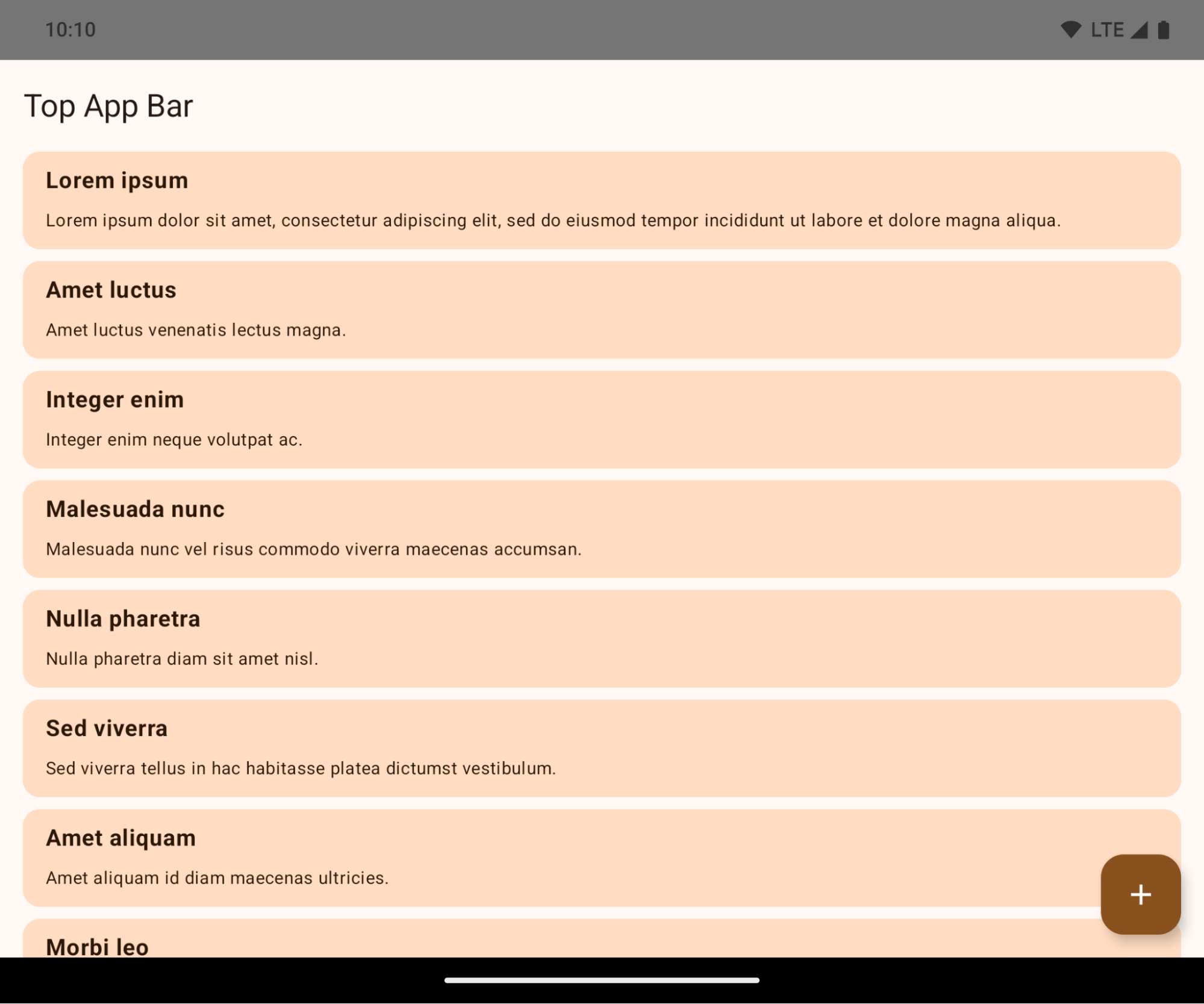
مثال زیر یک برنامه را قبل و بعد از هدف قرار دادن اندروید ۱۵ (سطح API ۳۵) و قبل و بعد از اعمال insets نشان میدهد. این مثال جامع نیست، ممکن است در Android Auto متفاوت به نظر برسد.
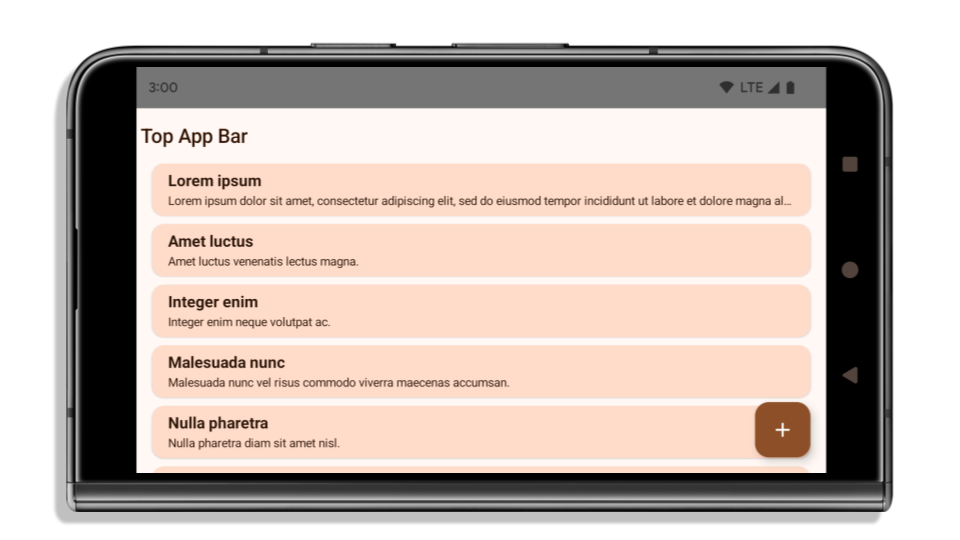
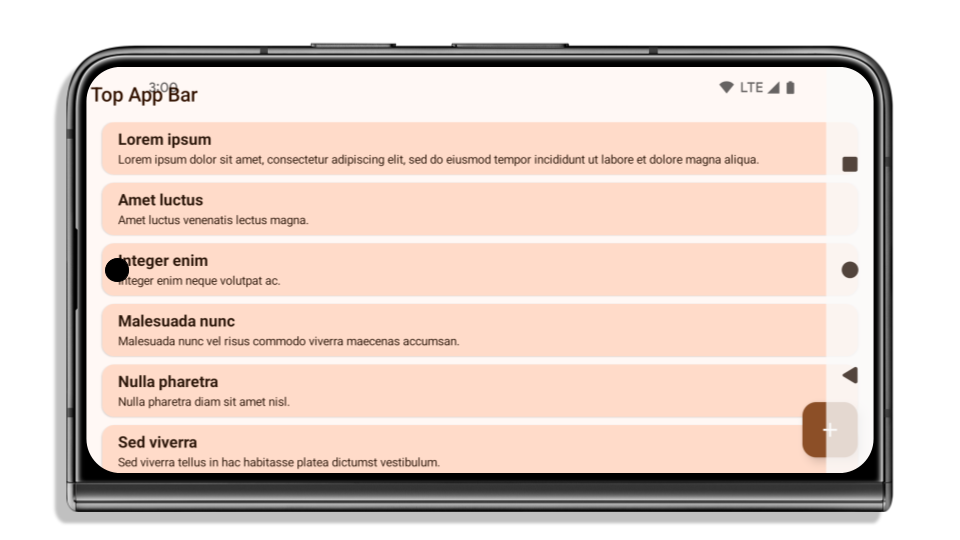
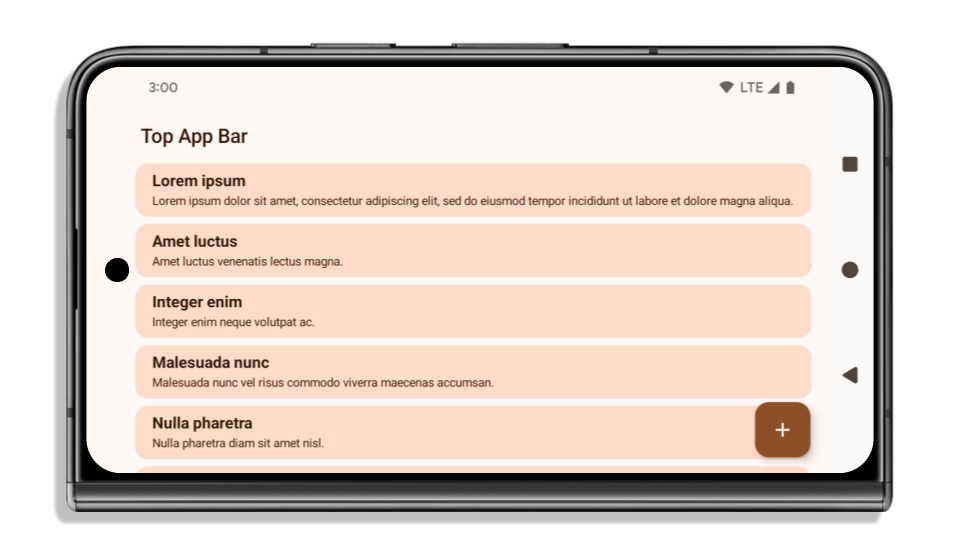
اگر برنامه شما از قبل edge-to-edge است، چه مواردی را باید بررسی کنید؟
اگر برنامه شما از قبل لبه به لبه است و از insets استفاده میکند، به جز در سناریوهای زیر، اکثراً تحت تأثیر قرار نگرفتهاید. با این حال، حتی اگر فکر میکنید تحت تأثیر قرار نگرفتهاید، توصیه میکنیم برنامه خود را آزمایش کنید.
- شما یک پنجره غیرشناور دارید، مانند یک
Activityکه ازSHORT_EDGES،NEVERیاDEFAULTبه جایLAYOUT_IN_DISPLAY_CUTOUT_MODE_ALWAYSاستفاده میکند. اگر برنامه شما هنگام اجرا از کار میافتد، ممکن است به دلیل صفحه شروع (splashscreen) شما باشد. میتوانید وابستگی اصلی صفحه شروع را به 1.2.0-alpha01 یا بالاتر ارتقا دهید یاwindow.attributes.layoutInDisplayCutoutMode = WindowManager.LayoutInDisplayCutoutMode.alwaysقرار دهید. - ممکن است صفحات کمبازدیدتری با رابط کاربری مسدود شده وجود داشته باشند. بررسی کنید که این صفحات کمبازدید رابط کاربری مسدود شده نداشته باشند. صفحات کمبازدید شامل موارد زیر هستند:
- صفحات ورود یا ورود به سیستم
- صفحات تنظیمات
اگر برنامه شما از قبل edge-to-edge نیست، چه مواردی را باید بررسی کنید؟
اگر برنامه شما از قبل edge-to-edge نیست، به احتمال زیاد تحت تأثیر قرار گرفتهاید. علاوه بر سناریوهایی برای برنامههایی که از قبل edge-to-edge هستند، باید موارد زیر را در نظر بگیرید:
- اگر برنامه شما از کامپوننتهای Material 3 (
androidx.compose.material3) در compose استفاده میکند، مانندTopAppBar،BottomAppBarوNavigationBar، این کامپوننتها احتمالاً تحت تأثیر قرار نمیگیرند زیرا به طور خودکار insetها را مدیریت میکنند. - اگر برنامه شما از کامپوننتهای Material 2 (
androidx.compose.material) در Compose استفاده میکند، این کامپوننتها به طور خودکار insetها را مدیریت نمیکنند. با این حال، میتوانید به insetها دسترسی داشته باشید و آنها را به صورت دستی اعمال کنید. در androidx.compose.material 1.6.0 و بالاتر، از پارامترwindowInsetsبرای اعمال insetها به صورت دستی برایBottomAppBar،TopAppBar،BottomNavigationوNavigationRailاستفاده کنید. به همین ترتیب، از پارامترcontentWindowInsetsبرایScaffoldاستفاده کنید. - اگر برنامه شما از نماها و کامپوننتهای متریال (
com.google.android.material) استفاده میکند، اکثر کامپوننتهای متریال مبتنی بر نماها مانندBottomNavigationView،BottomAppBar،NavigationRailViewیاNavigationView، درجها را مدیریت میکنند و نیازی به کار اضافی ندارند. با این حال، اگر ازAppBarLayoutاستفاده میکنید، بایدandroid:fitsSystemWindows="true"را اضافه کنید. - برای کامپوننتهای سفارشی، insetها را به صورت دستی به عنوان padding اعمال کنید. اگر محتوای شما درون یک
Scaffoldاست، میتوانید insetها را با استفاده از مقادیر paddingScaffoldاستفاده کنید. در غیر این صورت، padding را با استفاده از یکی ازWindowInsetsاعمال کنید. - اگر برنامه شما از viewها و
BottomSheet،SideSheetیا containerهای سفارشی استفاده میکند، با استفاده ازViewCompat.setOnApplyWindowInsetsListener، فاصلهگذاری (padding) را اعمال کنید. برایRecyclerView، با استفاده از این listener، فاصلهگذاری را اعمال کنید و همچنینclipToPadding="false"را اضافه کنید.
اگر برنامه شما نیاز به ارائه محافظت از پسزمینه سفارشی دارد، چه مواردی را بررسی کنید؟
اگر برنامه شما باید محافظت از پسزمینه سفارشی را برای ناوبری سه دکمهای یا نوار وضعیت ارائه دهد، برنامه شما باید با استفاده از WindowInsets.Type#tappableElement() یک عنصر ترکیبی یا یک view را در پشت نوار سیستم قرار دهد تا ارتفاع نوار ناوبری سه دکمهای یا WindowInsets.Type#statusBars دریافت کند.
منابع اضافی و بهروز
برای ملاحظات بیشتر در مورد اعمال درج، به راهنماهای « نمای لبه به لبه» و «نوشتن لبه به لبه» مراجعه کنید.
API های منسوخ شده
API های زیر منسوخ شده اند اما غیرفعال نشده اند:
-
R.attr#enforceStatusBarContrast -
R.attr#navigationBarColor(برای ناوبری ۳ دکمهای، با آلفای ۸۰٪) -
Window#isStatusBarContrastEnforced -
Window#setNavigationBarColor(برای ناوبری ۳ دکمهای، با آلفای ۸۰٪) -
Window#setStatusBarContrastEnforced
API های زیر منسوخ و غیرفعال شده اند:
-
R.attr#navigationBarColor(برای ناوبری با اشاره) -
R.attr#navigationBarDividerColor -
R.attr#statusBarColor -
Window#setDecorFitsSystemWindows -
Window#getNavigationBarColor -
Window#getNavigationBarDividerColor -
Window#getStatusBarColor -
Window#setNavigationBarColor(برای پیمایش با اشاره) -
Window#setNavigationBarDividerColor -
Window#setStatusBarColor
پیکربندی پایدار
اگر برنامه شما اندروید ۱۵ (سطح API 35) یا بالاتر را هدف قرار میدهد، Configuration دیگر نوارهای سیستم را حذف نمیکند. اگر از اندازه صفحه نمایش در کلاس Configuration برای محاسبه طرحبندی استفاده میکنید، باید آن را با گزینههای بهتری مانند ViewGroup ، WindowInsets یا WindowMetricsCalculator مناسب، بسته به نیاز خود، جایگزین کنید.
Configuration از API 1 در دسترس بوده است. معمولاً از Activity.onConfigurationChanged به دست میآید. این فایل اطلاعاتی مانند تراکم پنجره، جهتگیری و اندازهها را ارائه میدهد. یکی از ویژگیهای مهم در مورد اندازههای پنجره که از Configuration برگردانده میشود این است که قبلاً نوارهای سیستم را حذف میکرد.
اندازه پیکربندی معمولاً برای انتخاب منابع استفاده میشود، مانند /res/layout-h500dp ، و این هنوز یک مورد استفاده معتبر است. با این حال، استفاده از آن برای محاسبه طرحبندی همیشه توصیه نشده است. اگر این کار را میکنید، باید همین حالا از آن صرف نظر کنید. شما باید بسته به مورد استفاده خود، استفاده از Configuration را با چیزی مناسبتر جایگزین کنید.
اگر از آن برای محاسبهی طرحبندی استفاده میکنید، از یک ViewGroup مناسب مانند CoordinatorLayout یا ConstraintLayout استفاده کنید. اگر از آن برای تعیین ارتفاع نوار ناوبری سیستم استفاده میکنید، WindowInsets استفاده کنید. اگر میخواهید اندازهی فعلی پنجرهی برنامهی خود را بدانید، از computeCurrentWindowMetrics استفاده کنید.
لیست زیر فیلدهایی را که تحت تأثیر این تغییر قرار میگیرند، شرح میدهد:
- اندازههای
Configuration.screenWidthDpوscreenHeightDpدیگر نوارهای سیستم را شامل نمیشوند. -
Configuration.smallestScreenWidthDpبه طور غیرمستقیم تحت تأثیر تغییراتscreenWidthDpوscreenHeightDpقرار میگیرد. -
Configuration.orientationبه طور غیرمستقیم تحت تأثیر تغییراتscreenWidthDpوscreenHeightDpدر دستگاههای نزدیک به مربع قرار میگیرد. -
Display.getSize(Point)به طور غیرمستقیم تحت تأثیر تغییرات درConfigurationقرار میگیرد. این تابع از سطح API 30 منسوخ شده است. -
Display.getMetrics()از API سطح ۳۳ به این صورت کار میکرده است.
مقدار پیشفرض ویژگی elegantTextHeight برابر با true است.
برای برنامههایی که Android 15 (سطح API 35) را هدف قرار میدهند، ویژگی elegantTextHeight TextView بهطور پیشفرض true میشود و فونت فشردهای را که بهطور پیشفرض استفاده میشود با برخی از اسکریپتهایی که معیارهای عمودی بزرگی دارند با فونتی که بسیار خواناتر است جایگزین میکند. فونت فشرده برای جلوگیری از شکستن طرحبندیها معرفی شد. Android 13 (سطح API 33) از بسیاری از این شکستگیها جلوگیری میکند و به طرح متن اجازه میدهد تا ارتفاع عمودی را با استفاده از ویژگی fallbackLineSpacing کشیده شود.
در اندروید 15، فونت فشرده همچنان در سیستم باقی میماند، بنابراین برنامه شما میتواند elegantTextHeight را روی false تنظیم کند تا رفتار قبلی را داشته باشد، اما بعید است که در نسخههای آینده پشتیبانی شود. بنابراین، اگر برنامه شما از اسکریپت های زیر پشتیبانی می کند: عربی، لائوس، میانمار، تامیل، گجراتی، کانادا، مالایالام، اودیا، تلوگو یا تایلندی، برنامه خود را با تنظیم elegantTextHeight روی true تست کنید.

elegantTextHeight برای برنامههایی که Android 14 (سطح API 34) و پایینتر را هدف قرار میدهند. 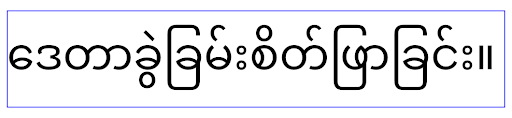
elegantTextHeight برای برنامه هایی که اندروید 15 را هدف قرار می دهند.تغییر عرض TextView برای شکلهای پیچیده حروف
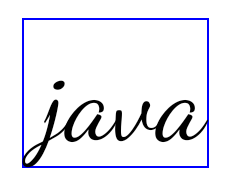
در نسخههای قبلی اندروید، برخی از فونتهای شکسته یا زبانهایی که شکل پیچیدهای دارند، ممکن است حروف را در ناحیه شخصیت قبلی یا بعدی بکشند. در برخی موارد، چنین حروفی در موقعیت آغاز یا پایان بریده می شدند. با شروع اندروید 15، یک TextView عرض را برای ترسیم فضای کافی برای چنین حروفی اختصاص میدهد و به برنامهها اجازه میدهد تا برای جلوگیری از برش، بالشتکهای اضافی را در سمت چپ درخواست کنند.
از آنجایی که این تغییر بر نحوه تعیین عرض یک TextView تأثیر میگذارد، اگر برنامه Android 15 (سطح API 35) یا بالاتر را هدف قرار دهد، TextView به طور پیشفرض عرض بیشتری را اختصاص میدهد. می توانید این رفتار را با فراخوانی API setUseBoundsForWidth در TextView فعال یا غیرفعال کنید.
از آنجایی که افزودن پد سمت چپ ممکن است باعث ایجاد ناهماهنگی در طرحبندیهای موجود شود، این پد بهطور پیشفرض حتی برای برنامههایی که Android 15 یا بالاتر را هدف قرار میدهند، اضافه نمیشود. با این حال، میتوانید با فراخوانی setShiftDrawingOffsetForStartOverhang ، بالشتک اضافی برای جلوگیری از بریدن اضافه کنید.
مثالهای زیر نشان میدهند که چگونه این تغییرات میتوانند طرحبندی متن را برای برخی از فونتها و زبانها بهبود بخشند.

<TextView
    android:fontFamily="cursive"
    android:text="java" />
<TextView
    android:fontFamily="cursive"
    android:text="java"
    android:useBoundsForWidth="true"
    android:shiftDrawingOffsetForStartOverhang="true" />
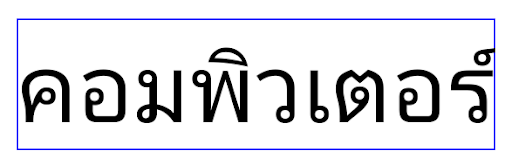
<TextView
    android:text="คอมพิวเตอร์" />
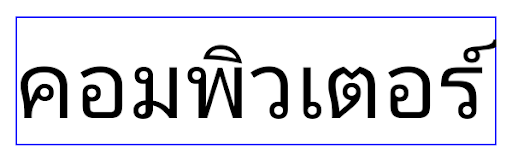
<TextView
    android:text="คอมพิวเตอร์"
    android:useBoundsForWidth="true"
    android:shiftDrawingOffsetForStartOverhang="true" />
ارتفاع خط پیشفرضِ آگاه از زبان برای EditText
در نسخههای قبلی اندروید، طرحبندی متن، ارتفاع متن را به اندازه ارتفاع خط فونتی که با منطقه فعلی مطابقت دارد، افزایش میداد. به عنوان مثال، اگر محتوا به زبان ژاپنی بود، چون ارتفاع خط فونت ژاپنی کمی بزرگتر از فونت لاتین است، ارتفاع متن کمی بزرگتر می شد. با این حال، علیرغم این تفاوتها در ارتفاع خط، عنصر EditText بدون توجه به منطقه مورد استفاده، همانطور که در تصویر زیر نشان داده شده است، اندازه یکسانی داشت:

EditText که می تواند حاوی متنی از انگلیسی (en)، ژاپنی (ja) و برمه ای (my) باشد. ارتفاع EditText یکسان است، حتی اگر این زبان ها دارای ارتفاع خطوط متفاوت از یکدیگر باشند. برای برنامههایی که Android 15 (سطح API 35) را هدف قرار میدهند، اکنون یک حداقل ارتفاع خط برای EditText محفوظ است تا با فونت مرجع برای Locale مشخصشده مطابقت داشته باشد، همانطور که در تصویر زیر نشان داده شده است:

EditText که می تواند حاوی متنی از انگلیسی (en)، ژاپنی (ja) و برمه ای (my) باشد. ارتفاع EditText اکنون شامل فضایی برای قرار دادن ارتفاع خط پیشفرض برای فونتهای این زبانها میشود. در صورت نیاز، برنامه شما میتواند رفتار قبلی را با تعیین ویژگی useLocalePreferredLineHeightForMinimum به false بازیابی کند، و برنامه شما میتواند حداقل معیارهای عمودی سفارشی را با استفاده از setMinimumFontMetrics API در Kotlin و Java تنظیم کند.
دوربین و رسانه
اندروید ۱۵ تغییرات زیر را در رفتار دوربین و رسانه برای برنامههایی که اندروید ۱۵ یا بالاتر را هدف قرار میدهند، ایجاد میکند.
محدودیتهای درخواست فوکوس صوتی
برنامههایی که Android 15 (سطح API 35) را هدف قرار میدهند باید برنامه برتر باشند یا یک سرویس پیشزمینه را اجرا کنند تا فوکوس صوتی را درخواست کنند . اگر برنامهای بخواهد فوکوس را درخواست کند در حالی که یکی از این شرایط را برآورده نمیکند، تماس AUDIOFOCUS_REQUEST_FAILED را برمیگرداند.
میتوانید در مدیریت فوکوس صوتی درباره فوکوس صوتی اطلاعات بیشتری کسب کنید.
محدودیتهای غیر SDK بهروزرسانی شدند
اندروید ۱۵ شامل فهرستهای بهروز شدهای از رابطهای کاربری محدود شده غیر SDK بر اساس همکاری با توسعهدهندگان اندروید و آخرین آزمایشهای داخلی است. در صورت امکان، قبل از محدود کردن رابطهای کاربری غیر SDK، مطمئن میشویم که جایگزینهای عمومی در دسترس هستند.
اگر برنامه شما اندروید ۱۵ را هدف قرار نمیدهد، ممکن است برخی از این تغییرات بلافاصله شما را تحت تأثیر قرار ندهند. با این حال، اگرچه بسته به سطح API هدف برنامه ، ممکن است برنامه شما به برخی از رابطهای غیر SDK دسترسی داشته باشد، استفاده از هر روش یا فیلد غیر SDK همیشه خطر بالای خرابی برنامه شما را به همراه دارد.
اگر مطمئن نیستید که برنامه شما از رابطهای غیر SDK استفاده میکند، میتوانید برنامه خود را آزمایش کنید تا متوجه شوید. اگر برنامه شما به رابطهای غیر SDK متکی است، باید برنامهریزی برای مهاجرت به جایگزینهای SDK را آغاز کنید. با این وجود، ما درک میکنیم که برخی از برنامهها موارد استفاده معتبری برای استفاده از رابطهای غیر SDK دارند. اگر نمیتوانید جایگزینی برای استفاده از رابط غیر SDK برای یک ویژگی در برنامه خود پیدا کنید، باید یک API عمومی جدید درخواست کنید .
برای اطلاعات بیشتر در مورد تغییرات این نسخه از اندروید، بهروزرسانیهای محدودیتهای رابط غیر SDK در Android 15 را ببینید. برای کسب اطلاعات بیشتر در مورد رابط های غیر SDK به طور کلی، به محدودیت ها در رابط های غیر SDK مراجعه کنید.