

注意:自 2021 年 8 月起,所有新應用程式都必須以 App Bundle 格式發布。如果您將應用程式發布到 Google Play,請建構並上傳 Android App Bundle。這麼做之後,Google Play 會自動為每位使用者的裝置設定產生並提供最佳化 APK,因此使用者只會下載執行應用程式所需的程式碼和資源。如果您發布到不支援 AAB 格式的商店,發布多個 APK 就很有用。在此情況下,您必須自行建構、簽署及管理各個 APK。
雖然您應盡可能建構單一 APK 來支援所有目標裝置,但這可能會因為檔案需要支援多個應用程式二進位檔介面 (ABI),而導致 APK 過大。減少 APK 大小的方法之一,就是建立含有特定 ABI 檔案的多個 APK。
Gradle 可以建立單獨的 APK,其中僅包含每個 ABI 專屬的程式碼和資源。本頁說明如何設定版本以產生多個 APK。如果您需要建立不是根據 ABI 的不同應用程式版本,請改用建構變數。
為多個 APK 設定版本
如要為多個 APK 設定版本,請將 splits 區塊新增至模組層級 build.gradle 檔案。在 splits 區塊中,提供 abi 區塊,指定 Gradle 如何依每個 ABI 產生 APK。
為 ABI 設定多個 APK
如要針對不同的 ABI 建立個別的 APK,請在 splits 區塊中新增 abi 區塊。在 abi 區塊中,提供所需的 ABI 清單。
下列 Gradle DSL 選項可為每個 ABI 設定多個 APK:
-
Groovy 的
enable或 Kotlin 指令碼的isEnable - 如果將這項元素設為
true,Gradle 會根據您定義的 ABI 產生多個 APK。預設值為false。 -
exclude -
指定您不希望 Gradle 產生個別 APK 的 ABI 清單 (以半形逗號分隔)。如果要為大部分 ABI 產生 APK,但是需要排除應用程式不支援的某些 ABI,請使用
exclude。 -
reset() -
清除 ABI 的預設清單。只有在與
include元素搭配使用以指定要新增的 ABI 時才能使用。下列程式碼片段會呼叫
reset()以清除清單並使用include,將 ABI 清單設為x86和x86_64:reset() // Clears the default list from all ABIs to no ABIs. include "x86", "x86_64" // Specifies the two ABIs we want to generate APKs for.
-
include -
指定 Gradle 要產生 APK 的 ABI 清單 (以半形逗號分隔)。只有在與
reset()搭配以指定明確的 ABI 清單時才能使用。 -
Groovy 的
universalApk或 Kotlin 指令碼的isUniversalApk -
如果為
true,除了個別 ABI APK 以外,Gradle 還會產生通用 APK。通用 APK 會在單一 APK 內含有所有 ABI 的程式碼和資源。預設值為false。
下列範例會為每個 ABI 產生單獨的 APK:x86 和 x86_64。方法是使用 reset() 從 ABI 的空白清單開始,後面接著以 include 提供會個別取得一個 APK 的 ABI 清單。
Groovy
android {
  ...
  splits {

    // Configures multiple APKs based on ABI.
    abi {

      // Enables building multiple APKs per ABI.
      enable true

      // By default all ABIs are included, so use reset() and include to specify that you only
      // want APKs for x86 and x86_64.

      // Resets the list of ABIs for Gradle to create APKs for to none.
      reset()

      // Specifies a list of ABIs for Gradle to create APKs for.
      include "x86", "x86_64"

      // Specifies that you don't want to also generate a universal APK that includes all ABIs.
      universalApk false
    }
  }
}
Kotlin
android {
  ...
  splits {

    // Configures multiple APKs based on ABI.
    abi {

      // Enables building multiple APKs per ABI.
      isEnable = true

      // By default all ABIs are included, so use reset() and include to specify that you only
      // want APKs for x86 and x86_64.

      // Resets the list of ABIs for Gradle to create APKs for to none.
      reset()

      // Specifies a list of ABIs for Gradle to create APKs for.
      include("x86", "x86_64")

      // Specifies that you don't want to also generate a universal APK that includes all ABIs.
      isUniversalApk = false
    }
  }
}
如需支援 ABI 的清單,請參閱「支援的 ABI」。
不含原生/C++ 程式碼的專案
如果專案沒有原生/C++ 程式碼,「Build Variants」面板會有兩個資料欄:「Module」和「Active Build Variant」,如圖 1 所示。

圖 1. 「Build Variants」面板會為沒有原生/C++ 程式碼的專案提供兩個資料欄。
模組的「Active Build Variant」值會決定即將部署且顯示在編輯器中的建構變數。如要切換建構變數,請針對模組按一下「Active Build Variant」儲存格,然後從清單欄位中選擇所需的變數。
含有原生/C++ 程式碼的專案
如果專案具有原生/C++ 程式碼,「Build Variants」面板會包含三個資料欄:「Module」、「Active Build Variant」和「Active ABI」,如圖 2 所示。
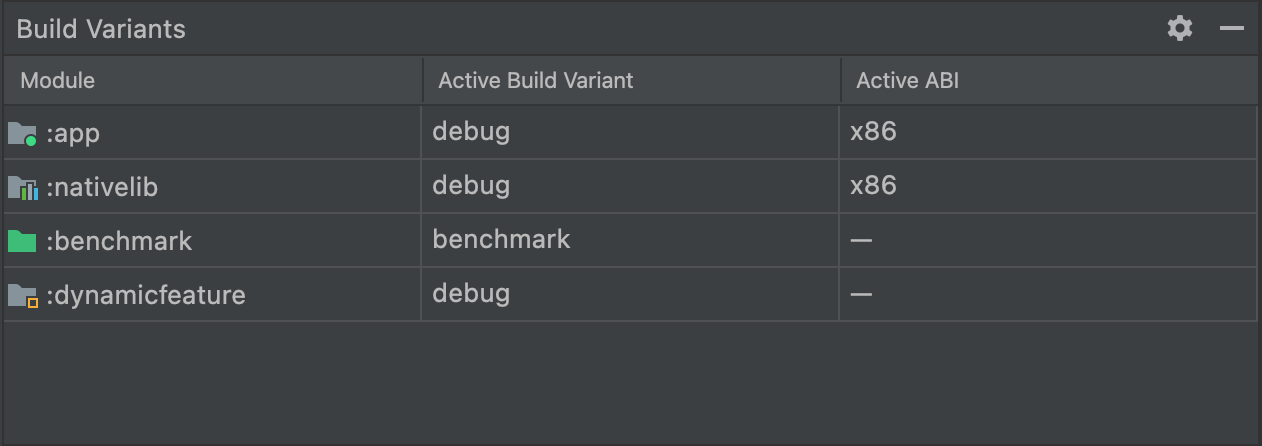 圖 2. 「Build Variants」面板會為含有原生/C++ 程式碼的專案新增「Active ABI」欄。
模組的「Active Build Variant」值會決定即將部署且顯示在編輯器中的建構變數。以原生模組來說,「Active ABI」值會決定編輯器使用的 ABI,但不會影響部署的內容。
如要變更建構類型或 ABI,請按照下列步驟操作:
- 按一下「Active Build Variant」或「Active ABI」資料欄的儲存格。
- 從清單欄位中選擇所需的變數或 ABI。系統會自動執行新的同步作業。
變更應用程式或程式庫模組的任一資料欄後,該變更會套用至所有相依資料列。
設定版本管理
根據預設,Gradle 在產生多個 APK 時,每個 APK 都會有相同的版本資訊,如同模組層級 build.gradle 或 build.gradle.kts 檔案所指定。由於 Google Play 商店不允許同一個應用程式使用多個全都具有相同版本資訊的 APK,因此您必須確保每個 APK 都有各自專屬的
versionCode,然後再上傳至 Play 商店。
您可以將模組層級的 build.gradle 檔案覆寫每個 APK 的 versionCode。透過建立對應,為設定多個 APK 的每個 ABI 指派不重複的數值,您可將定義在 defaultConfig 中的版本代碼或與指派給 ABI 數值的 productFlavors 區塊合併,用此值來覆寫輸出版本代碼。
在以下範例中,x86 ABI 的 APK 會取得 2004 的 versionCode,x86_64 ABI 則會取得 3004 的 versionCode。
如果指派版本代碼時採用較大的遞增數額 (例如 1000),那麼往後需要更新應用程式時,就可以指派不重複的版本代碼。舉例來說,如果 defaultConfig.versionCode 在後續更新中疊代至 5,Gradle 會指派 2005 的 versionCode 給 x86 APK,指派 3005 給 x86_64 APK。
提示:如果您的版本包含通用 APK,請為其指派一個低於任何其他 APK 版本代碼的 versionCode。由於 Google Play 商店會安裝與目標裝置相容的應用程式版本,並具有最高的 versionCode,因此將較低的 versionCode 指派給通用 APK 可確保 Google Play 商店會先嘗試安裝其中一個 APK,然後才退回使用通用 APK。下列程式碼範例處理這個問題而不會覆寫通用 APK 的預設 versionCode。
Groovy
android {
  ...
  defaultConfig {
    ...
    versionCode 4
  }
  splits {
    ...
  }
}

// Map for the version code that gives each ABI a value.
ext.abiCodes = ['armeabi-v7a':1, x86:2, x86_64:3]

import com.android.build.OutputFile

// For each APK output variant, override versionCode with a combination of
// ext.abiCodes * 1000 + variant.versionCode. In this example, variant.versionCode
// is equal to defaultConfig.versionCode. If you configure product flavors that
// define their own versionCode, variant.versionCode uses that value instead.
android.applicationVariants.all { variant ->

  // Assigns a different version code for each output APK
  // other than the universal APK.
  variant.outputs.each { output ->

    // Stores the value of ext.abiCodes that is associated with the ABI for this variant.
    def baseAbiVersionCode =
            // Determines the ABI for this variant and returns the mapped value.
            project.ext.abiCodes.get(output.getFilter(OutputFile.ABI))

    // Because abiCodes.get() returns null for ABIs that are not mapped by ext.abiCodes,
    // the following code doesn't override the version code for universal APKs.
    // However, because you want universal APKs to have the lowest version code,
    // this outcome is desirable.
    if (baseAbiVersionCode != null) {

      // Assigns the new version code to versionCodeOverride, which changes the
      // version code for only the output APK, not for the variant itself. Skipping
      // this step causes Gradle to use the value of variant.versionCode for the APK.
      output.versionCodeOverride =
              baseAbiVersionCode * 1000 + variant.versionCode
    }
  }
}
Kotlin
android {
  ...
  defaultConfig {
    ...
    versionCode = 4
  }
  splits {
    ...
  }
}

// Map for the version code that gives each ABI a value.
val abiCodes = mapOf("armeabi-v7a" to 1, "x86" to 2, "x86_64" to 3)

import com.android.build.api.variant.FilterConfiguration.FilterType.*

// For each APK output variant, override versionCode with a combination of
// abiCodes * 1000 + variant.versionCode. In this example, variant.versionCode
// is equal to defaultConfig.versionCode. If you configure product flavors that
// define their own versionCode, variant.versionCode uses that value instead.
androidComponents {
    onVariants { variant ->

        // Assigns a different version code for each output APK
        // other than the universal APK.
        variant.outputs.forEach { output ->
            val name = output.filters.find { it.filterType == ABI }?.identifier

            // Stores the value of abiCodes that is associated with the ABI for this variant.
            val baseAbiCode = abiCodes[name]
            // Because abiCodes.get() returns null for ABIs that are not mapped by ext.abiCodes,
            // the following code doesn't override the version code for universal APKs.
            // However, because you want universal APKs to have the lowest version code,
            // this outcome is desirable.
            if (baseAbiCode != null) {
                // Assigns the new version code to output.versionCode, which changes the version code
                // for only the output APK, not for the variant itself.
                output.versionCode.set(baseAbiCode * 1000 + (output.versionCode.get() ?: 0))
            }
        }
    }
}
如要更多替代版本代碼配置的範例,請參閱「指派版本代碼」。
建立多個 APK
設定模組層級的 build.gradle 或 build.gradle.kts 檔案以建構多個 APK 後,按一下「Build」>「Build APK」,為「Project」 窗格中目前選取的模組建構所有 APK。Gradle 會將每個 ABI 的 APK 新增至專案的 build/outputs/apk/ 目錄。
Gradle 會針對您設定的多個 APK 的每個 ABI 建構一個 APK。
舉例來說,下列 build.gradle 程式碼片段可讓您針對 x86 和 x86_64 ABI 建構多個 APK:
Groovy
...
  splits {
    abi {
      enable true
      reset()
      include "x86", "x86_64"
    }
  }
Kotlin
...
  splits {
    abi {
      isEnable = true
      reset()
      include("x86", "x86_64")
    }
  }
範例設定中的輸出內容含有以下 4 個 APK:
app-X86-release.apk:包含x86ABI 的程式碼和資源。app-X86_64-release.apk:包含x86_64ABI 的程式碼和資源。
根據 ABI 建構多個 APK 時,如果您在 build.gradle 檔案 (適用於 Groovy) 的 splits.abi 區塊中指定 universalApk true,或在 build.gradle.kts 檔案 (適用於 Kotlin 指令碼) 的 splits.abi 區塊中指定 isUniversalApk = true,則 Gradle 只會產生含有所有 ABI 適用之程式碼和資源的 APK。
APK 檔案名稱格式
建構多個 APK 時,Gradle 會使用以下配置產生 APK 檔案名稱:
modulename-ABI-buildvariant.apk
配置元件如下:
-
modulename - 指定正在建構的模組名稱。
-
ABI -
如果啟用了多個 ABI 的 APK,請指定 APK 的 ABI,例如
x86。 -
buildvariant -
指定目前建構的建構變數,例如
debug。