

ב-Android 16 יש תכונות חדשות וממשקי API חדשים ושימושיים למפתחים. בקטעים הבאים מופיע סיכום של התכונות האלה שיעזור לכם להתחיל להשתמש בממשקי ה-API הרלוונטיים.
רשימה מפורטת של ממשקי API חדשים, ממשקי API שעברו שינוי וממשקי API שהוסרו מופיעה בדוח השוואה בין גרסאות API. פרטים על ממשקי API חדשים זמינים בהפניית Android API – ממשקי API חדשים מסומנים כדי שיהיה קל לראות אותם.כדאי גם לבדוק תחומים שבהם שינויים בפלטפורמה עשויים להשפיע על האפליקציות שלכם. למידע נוסף, ראו את הדפים הבאים:
- שינויים בהתנהגות שמשפיעים על אפליקציות שמטרגטות ל-Android 16
- שינויים בהתנהגות שמשפיעים על כל האפליקציות בלי קשר ל-
targetSdkVersion.
פונקציונליות עיקרית
Android כוללת ממשקי API חדשים שמרחיבים את יכולות הליבה של מערכת Android.
שתי גרסאות של Android API בשנת 2025
- This preview is for the next major release of Android with a planned launch in Q2 of 2025. This release is similar to all of our API releases in the past, where we can have planned behavior changes that are often tied to a targetSdkVersion.
- We're planning the major release a quarter earlier (Q2 rather than Q3 in prior years) to better align with the schedule of device launches across our ecosystem, so more devices can get the major release of Android sooner. With the major release coming in Q2, you'll need to do your annual compatibility testing a few months earlier than in previous years to make sure your apps are ready.
- We plan to have another release in Q4 of 2025 which also will include new developer APIs. The Q2 major release will be the only release in 2025 to include planned behavior changes that could affect apps.
In addition to new developer APIs, the Q4 minor release will pick up feature updates, optimizations, and bug fixes; it will not include any app-impacting behavior changes.
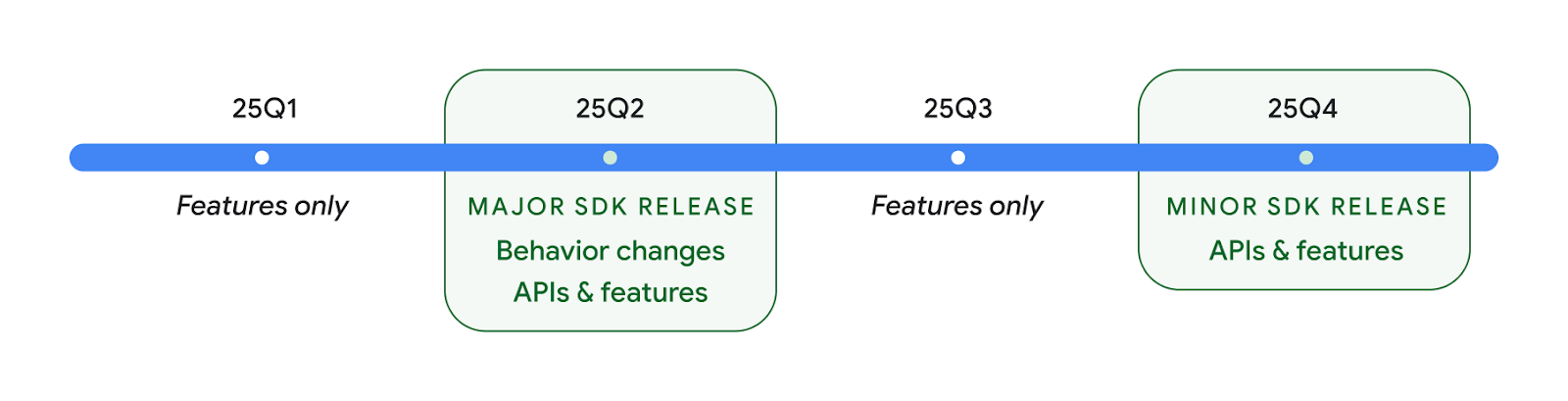
We'll continue to have quarterly Android releases. The Q1 and Q3 updates in-between the API releases will provide incremental updates to help ensure continuous quality. We're actively working with our device partners to bring the Q2 release to as many devices as possible.
Using new APIs with major and minor releases
Guarding a code block with a check for API level is done today using
the SDK_INT constant with
VERSION_CODES. This will continue
to be supported for major Android releases.
if (SDK_INT >= VERSION_CODES.BAKLAVA) {
  // Use APIs introduced in Android 16
}
The new SDK_INT_FULL
constant can be used for API checks against both major and minor versions with
the new VERSION_CODES_FULL
enumeration.
if (SDK_INT_FULL >= VERSION_CODES_FULL.[MAJOR or MINOR RELEASE]) {
  // Use APIs introduced in a major or minor release
}
You can also use the
Build.getMinorSdkVersion()
method to get just the minor SDK version.
val minorSdkVersion = Build.getMinorSdkVersion(VERSION_CODES_FULL.BAKLAVA)
These APIs have not yet been finalized and are subject to change, so please send us feedback if you have any concerns.
חוויית המשתמש וממשק המשתמש של המערכת
ב-Android 16, למפתחי אפליקציות ולמשתמשים יש יותר שליטה וגמישות בהגדרת המכשיר כך שיתאים לצרכים שלהם.
התראות שמתמקדות בהתקדמות
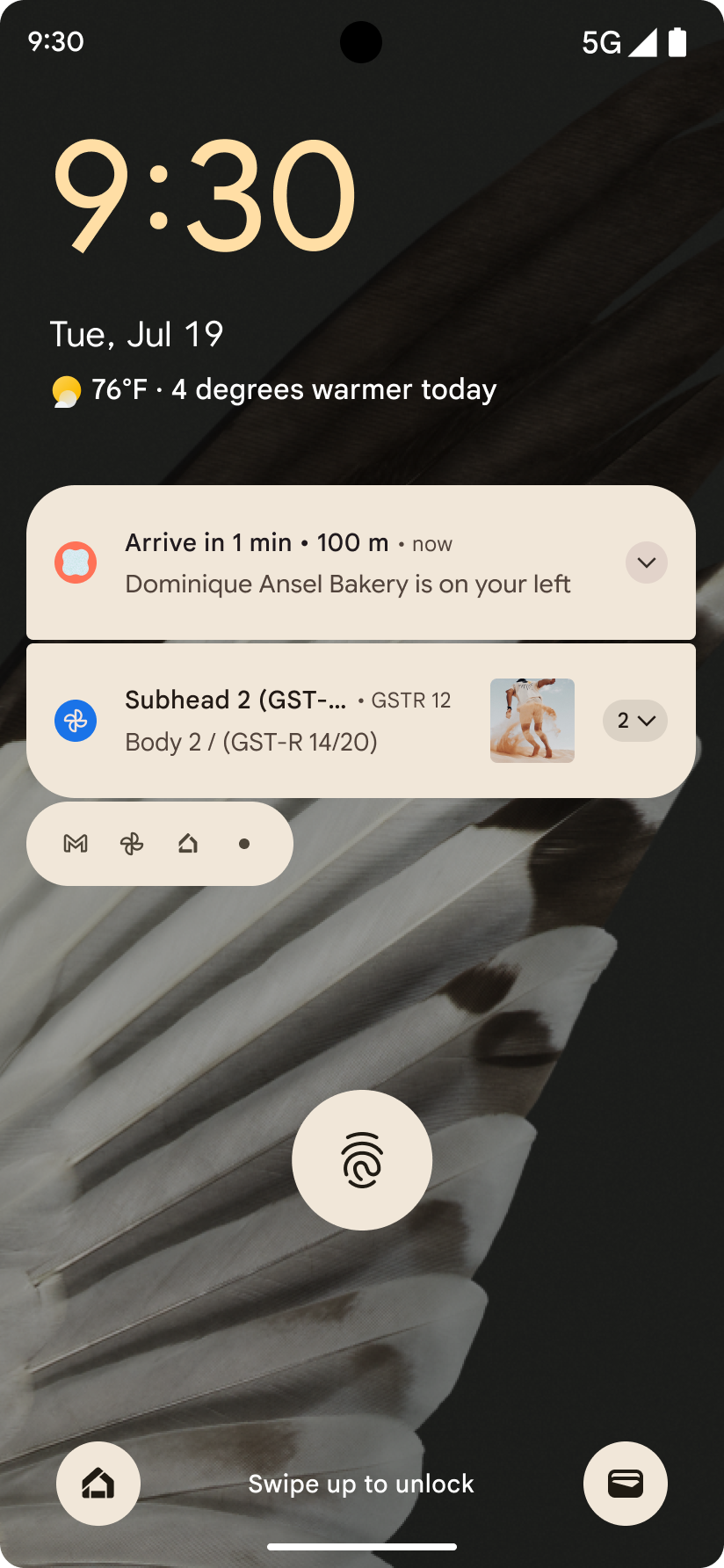
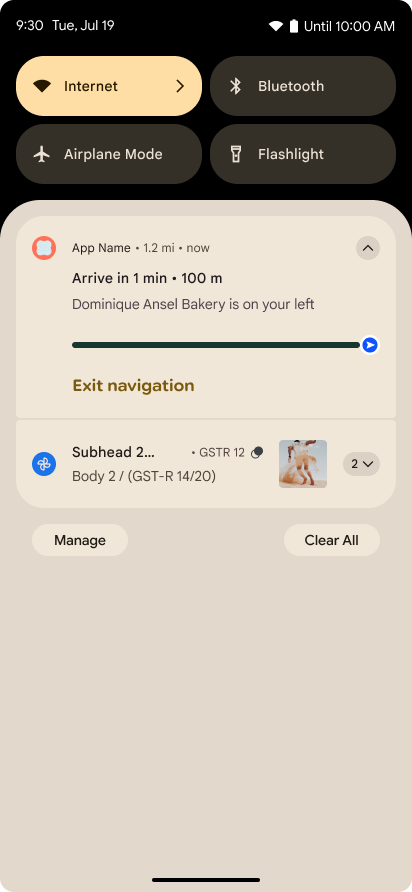
ב-Android 16 נוספו התראות שמתמקדות בהתקדמות, כדי לעזור למשתמשים לעקוב בצורה חלקה אחרי תהליכים שהם יזמו, מתחילתו ועד סופו.
Notification.ProgressStyle הוא סגנון התראות חדש שמאפשר ליצור התראות שמתמקדות בהתקדמות. תרחישי שימוש עיקריים כוללים שיתוף נסיעות, משלוחים וניווט. בתוך הכיתה Notification.ProgressStyle אפשר לציין מצבים ואבני דרך בתהליך השימוש של המשתמש באמצעות נקודות ופלחים.
למידע נוסף, אפשר לעיין בדף המסמכים בנושא התראות שמתמקדות בהתקדמות.
עדכונים של חיזוי החזרה
ב-Android 16 נוספו ממשקי API חדשים שיעזרו לכם להפעיל אנימציות מערכת חזרה חזויות בניווט באמצעות תנועות, כמו אנימציה של חזרה לדף הבית. רישום ה-onBackInvokedCallback באמצעות PRIORITY_SYSTEM_NAVIGATION_OBSERVER החדש מאפשר לאפליקציה לקבל את הקריאה הרגילה onBackInvoked בכל פעם שהמערכת מטפלת בניווט לאחור, בלי להשפיע על תהליך הניווט לאחור הרגיל.
ב-Android 16 נוספו גם הסמלים finishAndRemoveTaskCallback() ו-moveTaskToBackCallback. כשרושמים את הפונקציות האלה באמצעות OnBackInvokedDispatcher, המערכת יכולה להפעיל התנהגויות ספציפיות ולהפעיל אנימציות מתאימות מראש כשמפעילים את תנועת החזרה.
משוב פיזי עשיר יותר
מערכת Android חשפה שליטה על המפעיל הרטט כבר מההתחלה.
ב-Android 11 נוספה תמיכה באפקטים הקטנים והחושתיים (haptic) מורכבים יותר, שיכולים לתמוך במפעילים מתקדמים יותר באמצעות VibrationEffect.Compositions של פרימיטיבים סמנטיים מוגדרים-מכשיר.
ב-Android 16 נוספו ממשקי API לחישה שמאפשרים לאפליקציות להגדיר את עקומות האמפליטודה והתדר של אפקטים לחושיים, תוך התעלמות מהבדלים בין יכולות המכשירים.
פרודוקטיביות וכלים למפתחים
רוב העבודה שלנו לשיפור הפרודוקטיביות מתמקדת בכלים כמו Android Studio, Jetpack פיתוח נייטיב וספריות Android Jetpack, אבל אנחנו תמיד מחפשים דרכים בפלטפורמה לעזור לכם להגשים את החזון שלכם.
טיפול בתוכן של טפטים דינמיים
In Android 16, the live wallpaper framework is gaining a new content API to
address the challenges of dynamic, user-driven wallpapers. Currently, live
wallpapers incorporating user-provided content require complex, service-specific
implementations. Android 16 introduces
WallpaperDescription and
WallpaperInstance. WallpaperDescription lets you
identify distinct instances of a live wallpaper from the same service. For
example, a wallpaper that has instances on both the home screen and on the lock
screen may have unique content in both places. The wallpaper picker and
WallpaperManager use this metadata to better present
wallpapers to users, streamlining the process for you to create diverse and
personalized live wallpaper experiences.
ביצועים וסוללה
Android 16 כולל ממשקי API שעוזרים לאסוף תובנות לגבי האפליקציות שלכם.
יצירת פרופילים שמופעלת על ידי המערכת
ProfilingManager was
added in Android 15, giving apps the ability to
request profiling data collection using Perfetto on public devices in the field.
However, since this profiling must be started from the app, critical flows such
as startups or ANRs would be difficult or impossible for apps to capture.
To help with this, Android 16 introduces system-triggered profiling to
ProfilingManager. Apps can register interest in receiving traces for certain
triggers such as cold start reportFullyDrawn
or ANRs, and then the system starts and stops a trace on the app's behalf. After
the trace completes, the results are delivered to the app's data directory.
הפעלת רכיב ב-ApplicationStartInfo
ApplicationStartInfo was added in Android
15, allowing an app to see reasons
for process start, start type, start times, throttling, and other useful
diagnostic data. Android 16 adds
getStartComponent()
to distinguish what component type triggered the start, which can be helpful for
optimizing the startup flow of your app.
בדיקה עצמית טובה יותר של משרות
ה-API של JobScheduler#getPendingJobReason() מחזיר את הסיבה לכך שמשימת
עשויה להמתין. עם זאת, יכולות להיות כמה סיבות לכך שמשימה נמצאת בהמתנה.
ב-Android 16 אנחנו משיקים ממשק API חדש, JobScheduler#getPendingJobReasons(int jobId), שמציג כמה סיבות לכך שמשימה נמצאת בהמתנה, גם בגלל אילוצים מפורשים שהמפתח הגדיר וגם בגלל אילוצים משתמעים שהמערכת הגדירה.
אנחנו גם משיקים את הפונקציה JobScheduler#getPendingJobReasonsHistory(int jobId), שמחזירה רשימה של השינויים האחרונים באילוצים.
מומלץ להשתמש ב-API כדי לנפות באגים ולגלות למה המשימות לא מתבצעות, במיוחד אם נתוני ההצלחה של משימות מסוימות נמוכים או אם יש באגים בזמן האחזור של משימות מסוימות. לדוגמה, העדכון של הווידג'טים ברקע נכשל או שהקריאה למשימה של אחסון נתונים לפני האצת האפליקציה נכשלה לפני הפעלת האפליקציה.
כך תוכלו גם להבין טוב יותר אם משימות מסוימות לא מסתיימות בגלל אילוצים שהוגדרו על ידי המערכת, לעומת אילוצים שהוגדרו באופן מפורש.
קצב רענון דינמי
Adaptive refresh rate (ARR), introduced in Android 15, enables the display refresh rate on supported hardware to adapt to the content frame rate using discrete VSync steps. This reduces power consumption while eliminating the need for potentially jank-inducing mode-switching.
Android 16 introduces hasArrSupport() and
getSuggestedFrameRate(int) while restoring
getSupportedRefreshRates() to make it easier for your apps to take
advantage of ARR. RecyclerView
1.4 internally supports ARR when it is settling from a fling or
smooth scroll, and we're continuing our work to add ARR
support into more Jetpack libraries. This frame rate article covers
many of the APIs you can use to set the frame rate so that your app can directly
use ARR.
ממשקי Headroom API ב-ADPF
ב-SystemHealthManager מופיעים ממשקי ה-API getCpuHeadroom ו-getGpuHeadroom, שנועדו לספק לאפליקציות ולמשחקים שמשתמשים במשאבים רבים אומדנים של משאבי המעבד (CPU) והמעבד הגרפי (GPU) שזמינים. השיטות האלה מאפשרות לכם להעריך איך אפשר לשפר את בריאות המערכת באמצעות האפליקציה או המשחק, במיוחד כשמשתמשים בהן בשילוב עם ממשקי API אחרים של Android Dynamic Performance Framework (ADPF) שמזוהים את הבקרה על הביצועים כתוצאה מהתחממות.
באמצעות CpuHeadroomParams ו-GpuHeadroomParams במכשירים נתמכים, אפשר להתאים אישית את חלון הזמן שמשמש לחישוב מרווח הנשימה ולבחור בין זמינות משאבים ממוצעת לזמינות משאבים מינימלית. כך תוכלו לצמצם את השימוש במשאבי המעבד או ה-GPU בהתאם, וכתוצאה מכך לשפר את חוויית המשתמש ואת חיי הסוללה.
נגישות
ב-Android 16 נוספו תכונות וממשקי API חדשים לנגישות שיכולים לעזור לכם להנגיש את האפליקציה לכל המשתמשים.
ממשקי API משופרים לנגישות
Android 16 adds additional APIs to enhance UI semantics that help improve consistency for users that rely on accessibility services, such as TalkBack.
Outline text for maximum text contrast
Users with low vision often have reduced contrast sensitivity, making it challenging to distinguish objects from their backgrounds. To help these users, Android 16 introduces outline text, replacing high contrast text, which draws a larger contrasting area around text to greatly improve legibility.
Android 16 contains new AccessibilityManager APIs to let
your apps check or register a listener to
see if this mode is enabled. This is primarily for UI Toolkits like Compose to
offer a similar visual experience. If you maintain a UI Toolkit library or your
app performs custom text rendering that bypasses the
android.text.Layout class then you can use this to know
when outline text is enabled.

Duration added to TtsSpan
Android 16 extends TtsSpan with a TYPE_DURATION,
consisting of ARG_HOURS, ARG_MINUTES,
and ARG_SECONDS. This lets you directly annotate time
duration, ensuring accurate and consistent text-to-speech output with services
like TalkBack.
Support elements with multiple labels
Android currently allows UI elements to derive their accessibility label from
another, and now offers the ability for multiple labels to be associated, a
common scenario in web content. By introducing a list-based API within
AccessibilityNodeInfo, Android can directly support these
multi-label relationships. As part of this change, we've deprecated
AccessibilityNodeInfo#setLabeledBy and
#getLabeledBy in favor of
#addLabeledBy, #removeLabeledBy, and
#getLabeledByList.
Improved support for expandable elements
Android 16 adds accessibility APIs that allow you to convey the expanded or
collapsed state of interactive elements, such as menus and expandable lists. By
setting the expanded state using setExpandedState and
dispatching TYPE_WINDOW_CONTENT_CHANGED AccessibilityEvents
with a CONTENT_CHANGE_TYPE_EXPANDED content change type,
you can ensure that screen readers like TalkBack announce
state changes, providing a more intuitive and inclusive user experience.
Indeterminate ProgressBars
Android 16 adds RANGE_TYPE_INDETERMINATE, giving a way for
you to expose RangeInfo for both determinate and
indeterminate ProgressBar widgets, allowing services like
TalkBack to more consistently provide feedback for progress
indicators.
Tri-state CheckBox
The new AccessibilityNodeInfo
getChecked and setChecked(int)
methods in Android 16 now support a "partially checked" state in addition to
"checked" and "unchecked." This replaces the deprecated boolean
isChecked and setChecked(boolean).
Supplemental descriptions
When an accessibility service describes a ViewGroup, it
combines content labels from its child views. If you provide a
contentDescription for the ViewGroup, accessibility services assume you are
also overriding the description of non-focusable child views. This can be
problematic if you want to label things like a drop-down (for example, "Font
Family") while preserving the current selection for accessibility (for example,
"Roboto"). Android 16 adds setSupplementalDescription so
you can provide text that provides information about a ViewGroup without
overriding information from its children.
Required form fields
Android 16 adds setFieldRequired to
AccessibilityNodeInfo so apps can tell an accessibility
service that input to a form field is required. This is an important scenario
for users filling out many types of forms, even things as simple as a required
terms and conditions checkbox, helping users to consistently identify and
quickly navigate between required fields.
הטלפון כקלט מיקרופון לשיחות קוליות עם מכשירי שמיעה LEA
ב-Android 16 נוספה למשתמשים במכשירי שמיעה עם LE Audio היכולת לעבור בין המיקרופונים המובנים במכשירי השמיעה לבין המיקרופון בטלפון לשיחות קוליות. התכונה הזו יכולה להיות שימושית בסביבות רועשות או במצבים אחרים שבהם יכול להיות שהמיקרופונים של מכשיר השמיעה לא יפעלו טוב.
שליטה בעוצמת הקולות מהסביבה במכשירי שמיעה עם LEA
ב-Android 16 נוספה למשתמשים במכשירי שמיעה עם LE Audio היכולת לשנות את עוצמת הצליל של הסביבה שנקלט במיקרופונים של מכשיר השמיעה. האפשרות הזו יכולה להיות שימושית במצבים שבהם רעשי הרקע רועשים מדי או שקטים מדי.
מצלמה
Android 16 משפר את התמיכה במשתמשים במצלמות מקצועיות, ומאפשר חשיפה אוטומטית היברידית, יחד עם התאמות מדויקות של טמפרטורת הצבע והגוון. אינדיקטור חדש של מצב לילה עוזר לאפליקציה לדעת מתי לעבור להפעלה של המצלמה במצב לילה ומתי לצאת ממנה. Intentפעולות חדשות מאפשרות לצלם תמונות עם תנועה בקלות רבה יותר, ואנחנו ממשיכים לשפר את תמונות ה-UltraHDR עם תמיכה בקידוד HEIC ופרמטרים חדשים מטיוטת התקן ISO 21496-1.
חשיפה אוטומטית היברידית
Android 16 adds new hybrid auto-exposure modes to Camera2, allowing you to manually control specific aspects of exposure while letting the auto-exposure (AE) algorithm handle the rest. You can control ISO + AE, and exposure time + AE, providing greater flexibility compared to the current approach where you either have full manual control or rely entirely on auto-exposure.
fun setISOPriority() {
    // ... (Your existing code before the snippet) ...

    val availablePriorityModes = mStaticInfo.characteristics.get(
        CameraCharacteristics.CONTROL_AE_AVAILABLE_PRIORITY_MODES
    )

    // ... (Your existing code between the snippets) ...

    // Turn on AE mode to set priority mode
    reqBuilder.set(
        CaptureRequest.CONTROL_AE_MODE,
        CameraMetadata.CONTROL_AE_MODE_ON
    )
    reqBuilder.set(
        CaptureRequest.CONTROL_AE_PRIORITY_MODE,
        CameraMetadata.CONTROL_AE_PRIORITY_MODE_SENSOR_SENSITIVITY_PRIORITY
    )
    reqBuilder.set(
        CaptureRequest.SENSOR_SENSITIVITY,
        TEST_SENSITIVITY_VALUE
    )
    val request: CaptureRequest = reqBuilder.build()

    // ... (Your existing code after the snippet) ...
}
התאמות מדויקות של טמפרטורת הצבע והגוון
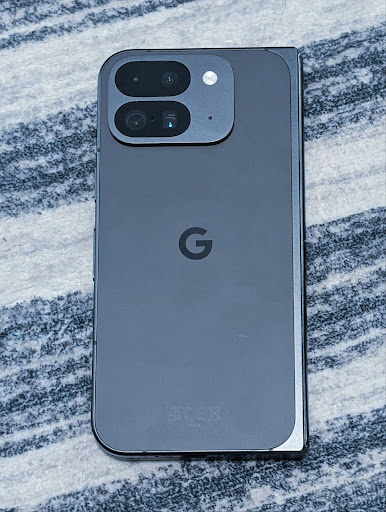
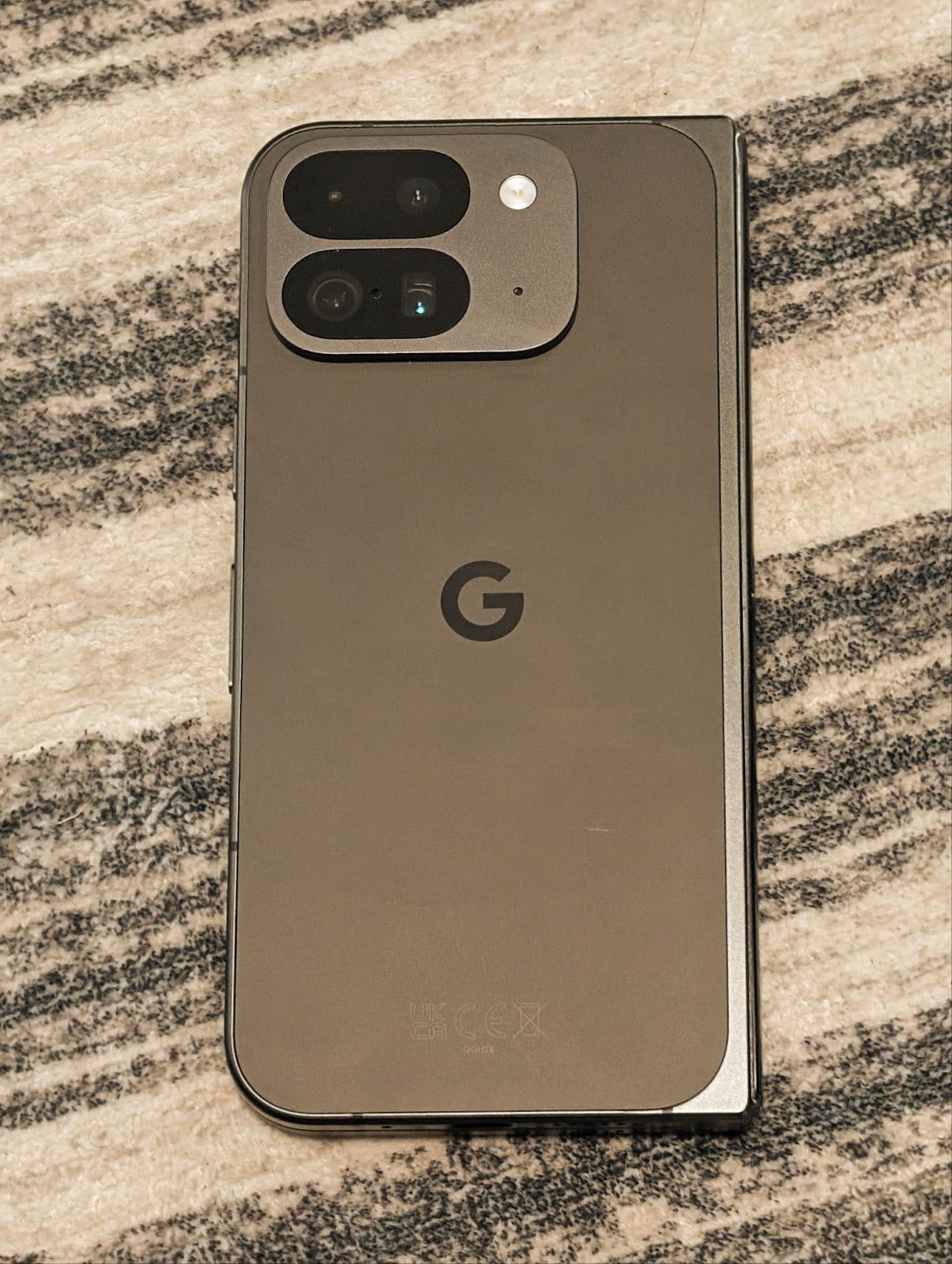
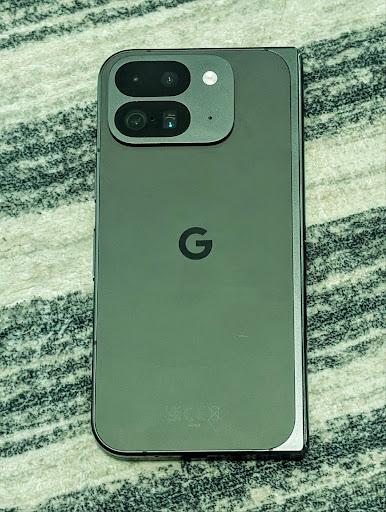
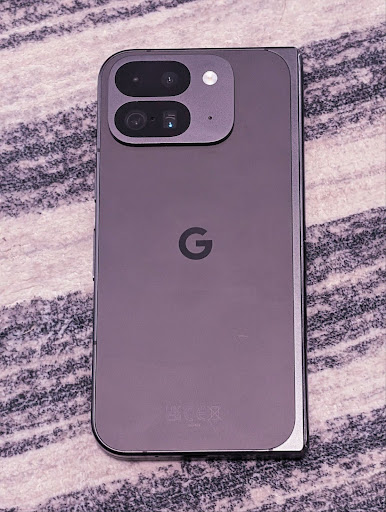
Android 16 adds camera support for fine color temperature and tint adjustments
to better support professional video recording applications. In previous Android
versions, you could control white balance settings through
CONTROL_AWB_MODE, which contains options limited to a
preset list, such as Incandescent,
Cloudy, and Twilight. The
COLOR_CORRECTION_MODE_CCT enables the use of
COLOR_CORRECTION_COLOR_TEMPERATURE and
COLOR_CORRECTION_COLOR_TINT for precise adjustments of
white balance based on the correlated color temperature.
fun setCCT() {
    // ... (Your existing code before this point) ...

    val colorTemperatureRange: Range<Int> =
        mStaticInfo.characteristics[CameraCharacteristics.COLOR_CORRECTION_COLOR_TEMPERATURE_RANGE]

    // Set to manual mode to enable CCT mode
    reqBuilder[CaptureRequest.CONTROL_AWB_MODE] = CameraMetadata.CONTROL_AWB_MODE_OFF
    reqBuilder[CaptureRequest.COLOR_CORRECTION_MODE] = CameraMetadata.COLOR_CORRECTION_MODE_CCT
    reqBuilder[CaptureRequest.COLOR_CORRECTION_COLOR_TEMPERATURE] = 5000
    reqBuilder[CaptureRequest.COLOR_CORRECTION_COLOR_TINT] = 30

    val request: CaptureRequest = reqBuilder.build()

    // ... (Your existing code after this point) ...
}
The following examples show how a photo would look after applying different color temperature and tint adjustments:
זיהוי סצנות במצב לילה במצלמה
To help your app know when to switch to and from a night mode camera session,
Android 16 adds EXTENSION_NIGHT_MODE_INDICATOR. If
supported, it's available in the CaptureResult within
Camera2.
This is the API we briefly mentioned as coming soon in the How Instagram enabled users to take stunning low light photos blog post. That post is a practical guide on how to implement night mode together with a case study that links higher-quality in-app night mode photos with an increase in the number of photos shared from the in-app camera.
פעולות Intent של צילום תמונות עם תנועה
ב-Android 16 נוספו פעולות סטנדרטיות של Intent – ACTION_MOTION_PHOTO_CAPTURE ו-ACTION_MOTION_PHOTO_CAPTURE_SECURE – שמבקשות מאפליקציית המצלמה לצלם תמונה בתנועה ולהחזיר אותה.
צריך להעביר EXTRA_OUTPUT נוסף כדי לקבוע לאן התמונה תירשם, או Uri דרך Intent.setClipData(ClipData). אם לא תגדירו ClipData, הוא יועתק לשם כשתבצעו את השיחה Context.startActivity(Intent).
שיפורים בתמונות UltraHDR

Android 16 continues our work to deliver dazzling image quality with UltraHDR
images. It adds support for UltraHDR images in the HEIC file
format. These images will get ImageFormat type
HEIC_ULTRAHDR and will contain an embedded gainmap similar
to the existing UltraHDR JPEG format. We're working on AVIF support for UltraHDR
as well, so stay tuned.
In addition, Android 16 implements additional parameters in UltraHDR from the ISO 21496-1 draft standard, including the ability to get and set the colorspace that gainmap math should be applied in, as well as support for HDR encoded base images with SDR gainmaps.
גרפיקה
Android 16 כולל את השיפורים האחרונים בגרפיקה, כמו אפקטים גרפיים מותאמים אישית עם AGSL.
אפקטים גרפיים בהתאמה אישית באמצעות AGSL
Android 16 adds RuntimeColorFilter and
RuntimeXfermode, allowing you to author complex effects like
Threshold, Sepia, and Hue Saturation and apply them to draw calls. Since Android
13, you've been able to use AGSL to create custom
RuntimeShaders that extend Shader. The new API
mirrors this, adding an AGSL-powered RuntimeColorFilter that
extends ColorFilter, and a Xfermode effect that
lets you implement AGSL-based custom compositing and blending between source and
destination pixels.
private val thresholdEffectString = """
    uniform half threshold;

    half4 main(half4 c) {
        half luminosity = dot(c.rgb, half3(0.2126, 0.7152, 0.0722));
        half bw = step(threshold, luminosity);
        return bw.xxx1 * c.a;
    }"""

fun setCustomColorFilter(paint: Paint) {
   val filter = RuntimeColorFilter(thresholdEffectString)
   filter.setFloatUniform(0.5);
   paint.colorFilter = filter
}
קישוריות
Android 16 מעדכן את הפלטפורמה כדי לתת לאפליקציה שלכם גישה לחידושים האחרונים בטכנולוגיות תקשורת וטכנולוגיות אלחוטיות.
טווח עם אבטחה משופרת
ב-Android 16 נוספה תמיכה בתכונות אבטחה חזקות במיקום Wi-Fi במכשירים נתמכים עם 802.11az של Wi-Fi 6. התכונות האלה מאפשרות לאפליקציות לשלב בין הדיוק הגבוה יותר, יכולת ההתאמה לעומס הגדולה יותר והתזמון הדינמי של הפרוטוקול עם שיפורים באבטחה, כולל הצפנה מבוססת AES-256 והגנה מפני התקפות MITM. כך אפשר להשתמש בה בבטחה רבה יותר בתרחישי שימוש בסביבה הקרובה, כמו ביטול הנעילה של מחשב נייד או של דלת רכב. 802.11az משתלב בתקן Wi-Fi 6, ומשתמש בתשתית וביכולות שלו כדי לאפשר הטמעה רחבה יותר ופריסה קלה יותר.
ממשקי API כלליים לטווחים
Android 16 כולל את RangingManager החדש, שמספק דרכים לקבוע את המרחק והזווית בחומרה נתמכת בין המכשיר המקומי למכשיר מרוחק. RangingManager תומך במגוון טכנולוגיות למדידת מרחק, כמו בדיקת ערוץ BLE, מדידת מרחק מבוססת RSSI ב-BLE, Ultra Wideband וזמן נסיעה הלוך ושוב ב-Wi-Fi.
נוכחות של מכשיר נלווה
ב-Android 16 נוספו ממשקי API חדשים לקישור של שירות האפליקציה הנלווית. השירות יקושר כש-BLE נמצא בטווח וחיבור ה-Bluetooth פועל, והוא ינותק כש-BLE יהיה מחוץ לטווח או כשחיבור ה-Bluetooth ינותק. האפליקציה תקבל קריאה חוזרת חדשה מסוג 'onDevicePresenceEvent()' על סמך ערכים שונים של DevicePresenceEvent.
פרטים נוספים זמינים במאמר 'startObservingDevicePresence(ObservingDevicePresenceRequest)'.
מדיה
Android 16 כולל מגוון תכונות שמשפרות את חוויית המדיה.
שיפורים בכלי לבחירת תמונות
The photo picker provides a safe, built-in way for users to grant your app access to selected images and videos from both local and cloud storage, instead of their entire media library. Using a combination of Modular System Components through Google System Updates and Google Play services, it's supported back to Android 4.4 (API level 19). Integration requires just a few lines of code with the associated Android Jetpack library.
Android 16 includes the following improvements to the photo picker:
- Embedded photo picker: New APIs that enable apps to embed the photo picker into their view hierarchy. This allows it to feel like a more integrated part of the app while still leveraging the process isolation that allows users to select media without the app needing overly broad permissions. To maximize compatibility across platform versions and simplify your integration, you'll want to use the forthcoming Android Jetpack library if you want to integrate the embedded photo picker.
- Cloud search in photo picker: New APIs that enable searching from the cloud media provider for the Android photo picker. Search functionality in the photo picker is coming soon.
סרטון מקצועי מתקדם
ב-Android 16 נוספה תמיכה בקודק Advanced Professional Video (APV), שנועד לשימוש ברמה מקצועית להקלטת וידאו באיכות גבוהה ולפוסט-פרודקשן.
תקן הקודק APV כולל את התכונות הבאות:
- איכות וידאו ללא אובדן מידע נתפס (קרוב לאיכות וידאו גולמי)
- קידוד בתוך פריים בלבד (ללא חיזוי של תחום הפיקסלים) עם מורכבות נמוכה ונתונים רבים, כדי לתמוך טוב יותר בתהליכי עבודה של עריכה
- תמיכה בטווח של קצב ביט גבוה עד כמה Gbps לתוכן ברזולוציות 2K, 4K ו-8K, באמצעות סכימה קלה של קידוד אנטרופי
- יצירת משבצות של פריימים לתוכן immersive ולאפשרות קידוד ופענוח במקביל
- תמיכה בפורמטים שונים של דגימת צבע ובעומק ביט שונים
- תמיכה במספר פענוחים וקידוד מחדש ללא פגיעה משמעותית באיכות החזותית
- תמיכה בסרטונים של צפייה בכמה משחקים בו-זמנית ובסרטונים משניים כמו סרטוני עומק, סרטוני אלפא וסרטוני תצוגה מקדימה
- תמיכה ב-HDR10/10+ ובמטא-נתונים מוגדרים על ידי משתמשים
יישום עזר של APV זמין דרך פרויקט OpenAPV. ב-Android 16 תהיה תמיכה בפרופיל APV 422-10, שמספק דגימת צבע YUV 422 עם קידוד 10 ביט, וקצב נתונים יעד של עד 2Gbps.
פרטיות
Android 16 כולל מגוון תכונות שעוזרות למפתחי אפליקציות להגן על פרטיות המשתמשים.
עדכונים של Health Connect
Health Connect מוסיף את הערך ACTIVITY_INTENSITY, סוג נתונים שמוגדר בהתאם להנחיות של ארגון הבריאות העולמי לגבי פעילות מתונה ופעילות מאומצת. בכל רשומה צריך לציין את שעת ההתחלה, שעת הסיום ואת מידת העצימות של הפעילות (מתונה או נמרצת).
Health Connect מכיל גם ממשקי API מעודכנים שתומכים בתיקים רפואיים. כך אפליקציות יכולות לקרוא ולכתוב תיעוד רפואי בפורמט FHIR עם הסכמה מפורשת של המשתמשים.
ארגז החול לפרטיות ב-Android
גרסת Android 16 כוללת את הגרסה העדכנית ביותר של ארגז החול לפרטיות ב-Android, כחלק מהעבודה המתמשכת שלנו לפיתוח טכנולוגיות שמאפשרות למשתמשים לדעת שהפרטיות שלהם מוגנת. באתר שלנו יש מידע נוסף על 'ארגז החול לפרטיות' בתוכנית הבטא למפתחי Android, שיעזור לכם להתחיל. כדאי לבדוק את זמן הריצה ל-SDK, שמאפשר לערכות SDK לפעול בסביבת זמן ריצה ייעודית בנפרד מהאפליקציה שבה הן פועלות, ומספק אמצעי הגנה חזקים יותר בנושא איסוף ושיתוף של נתוני משתמשים.
אבטחה
Android 16 כולל תכונות שעוזרות לשפר את האבטחה של האפליקציה ולהגן על הנתונים שלה.
Key sharing API
ב-Android 16 נוספו ממשקי API שתומכים בשיתוף הגישה למפתחות של Android Keystore עם אפליקציות אחרות. הכיתה החדשה KeyStoreManager תומכת בהענקת וביטול גישה למפתחות לפי uid של האפליקציה, וכוללת API לאפליקציות כדי לגשת למפתחות משותפים.
גורמי צורה של מכשירים
Android 16 מספק לאפליקציות שלכם תמיכה שתאפשר להן להפיק את המרב מגורמי הצורה של Android.
מסגרת תקנים לאיכות התמונה והאודיו בטלוויזיות
חבילת MediaQuality החדשה ב-Android 16 חושפת קבוצה של ממשקי API סטנדרטיים לגישה לפרופילים של אודיו ותמונות ולהגדרות שקשורות לחומרה. כך אפליקציות סטרימינג יכולות לבצע שאילתות על פרופילים ולהחיל אותם על מדיה באופן דינמי:
- בסרטים שעברו עיבוד עם טווח דינמי רחב יותר, נדרשת רמת דיוק גבוהה יותר של צבעים כדי לראות פרטים עדינים בצללים ולהתאים את התמונה לאור הסביבה. לכן, יכול להיות שתתאים הגדרת פרופיל שמעדיפה דיוק צבעים על פני בהירות.
- לעיתים קרובות, אירועי ספורט בשידור חי עוברים עיבוד עם טווח דינמי צר, אבל לרוב צופים בהם באור יום, ולכן פרופיל שמעדיף בהירות על פני דיוק צבעים יכול להניב תוצאות טובות יותר.
- כדי להציג תוכן אינטראקטיבי מלא, צריך עיבוד מינימלי כדי לצמצם את זמן האחזור, ושיעור פריימים גבוה יותר. לכן, טלוויזיות רבות מגיעות עם פרופיל משחק.
ה-API מאפשר לאפליקציות לעבור בין פרופילים, ולמשתמשים ליהנות מהתאמה של טלוויזיות נתמכות לתוכן שלהם.
אינטרנציונליזציה
ב-Android 16 נוספו תכונות ויכולות שמשלימות את חוויית המשתמש כשמשתמשים במכשיר בשפות שונות.
טקסט אנכי
ב-Android 16 נוספה תמיכה ברמה נמוכה ברינדור ובמדידה של טקסט אנכית, כדי לספק לתכנת הספריות תמיכה בסיסית בכתיבה אנכית. האפשרות הזו שימושית במיוחד בשפות כמו יפנית, שבהן נעשה שימוש נפוץ בכתב אנכי. הוספנו דגל חדש, VERTICAL_TEXT_FLAG, לכיתה Paint. כשהדגל הזה מוגדר באמצעות Paint.setFlags, ממשקי ה-API למדידת טקסט של Paint ידווחו על התקדמות אנכית במקום על התקדמות אופקית, ו-Canvas ידפיס טקסט באופן אנכי.
val text = "「春は、曙。」"
Box(
    Modifier.padding(innerPadding).background(Color.White).fillMaxSize().drawWithContent {
        drawIntoCanvas { canvas ->
            val paint = Paint().apply { textSize = 64.sp.toPx() }
            // Draw text vertically
            paint.flags = paint.flags or VERTICAL_TEXT_FLAG
            val height = paint.measureText(text)
            canvas.nativeCanvas.drawText(
                text,
                0,
                text.length,
                size.width / 2,
                (size.height - height) / 2,
                paint
            )
        }
    }
) {}
התאמה אישית של שיטת המדידה
Users can now customize their measurement system in regional preferences within
Settings. The user preference is included as part of the locale code, so you can
register a BroadcastReceiver on
ACTION_LOCALE_CHANGED to handle locale configuration changes when
regional preferences change.
Using formatters can help match the local experience. For example, "0.5 in" in English (United States), is "12,7 mm" for a user who has set their phone to English (Denmark) or who uses their phone in English (United States) with the metric system as the measurement system preference.
To find these settings, open the Settings app and navigate to System > Languages & region.