

অ্যান্ড্রয়েড ১৬ ডেভেলপারদের জন্য দারুণ কিছু নতুন ফিচার এবং এপিআই নিয়ে এসেছে। নিচের বিভাগগুলোতে এই ফিচারগুলোর সংক্ষিপ্ত বিবরণ দেওয়া হলো, যা আপনাকে সংশ্লিষ্ট এপিআইগুলো ব্যবহার শুরু করতে সাহায্য করবে।
নতুন, পরিবর্তিত এবং অপসারিত API-গুলির বিস্তারিত তালিকার জন্য API diff report পড়ুন। নতুন API-গুলির বিশদ বিবরণের জন্য Android API reference দেখুন — নতুন API-গুলি সহজে চোখে পড়ার জন্য হাইলাইট করা থাকে।প্ল্যাটফর্মের পরিবর্তন আপনার অ্যাপগুলোকে প্রভাবিত করতে পারে এমন ক্ষেত্রগুলোও পর্যালোচনা করা উচিত। আরও তথ্যের জন্য, নিম্নলিখিত পৃষ্ঠাগুলো দেখুন:
- অ্যান্ড্রয়েড ১৬ টার্গেট করা হলে অ্যাপগুলোর আচরণে যে পরিবর্তনগুলো আসবে
- আচরণগত পরিবর্তন যা
targetSdkVersionনির্বিশেষে সমস্ত অ্যাপকে প্রভাবিত করে ।
মূল কার্যকারিতা
অ্যান্ড্রয়েডে নতুন এপিআই অন্তর্ভুক্ত করা হয়েছে, যা অ্যান্ড্রয়েড সিস্টেমের মূল সক্ষমতাগুলোকে প্রসারিত করে।
২০২৫ সালে দুটি অ্যান্ড্রয়েড এপিআই রিলিজ
- এই প্রিভিউটি 2025 সালের দ্বিতীয় প্রান্তিকে পরিকল্পিত লঞ্চ সহ Android এর পরবর্তী বড় রিলিজের জন্য। এই রিলিজটি অতীতে আমাদের সমস্ত API রিলিজের মতো, যেখানে আমরা পরিকল্পিত আচরণ পরিবর্তন করতে পারি যা প্রায়শই একটি টার্গেটSdkVersion-এর সাথে সংযুক্ত থাকে।
- আমরা আমাদের ইকোসিস্টেম জুড়ে ডিভাইস লঞ্চের সময়সূচীর সাথে আরও ভালভাবে সারিবদ্ধ করার জন্য এক চতুর্থাংশ আগে (আগের বছরগুলিতে Q3 এর চেয়ে Q2) বড় রিলিজের পরিকল্পনা করছি, যাতে আরও ডিভাইস তাড়াতাড়ি Android এর প্রধান রিলিজ পেতে পারে। Q2 এ আসছে প্রধান রিলিজ, আপনার অ্যাপগুলি প্রস্তুত কিনা তা নিশ্চিত করতে আপনাকে আগের বছরের তুলনায় কয়েক মাস আগে আপনার বার্ষিক সামঞ্জস্য পরীক্ষা করতে হবে।
- আমরা 2025 এর Q4 এ আরেকটি রিলিজ করার পরিকল্পনা করছি যাতে নতুন ডেভেলপার API গুলিও অন্তর্ভুক্ত থাকবে। Q2 প্রধান রিলিজটি 2025 সালে একমাত্র রিলিজ হবে যা পরিকল্পিত আচরণের পরিবর্তনগুলি অন্তর্ভুক্ত করবে যা অ্যাপগুলিকে প্রভাবিত করতে পারে।
নতুন ডেভেলপার API ছাড়াও, Q4 মাইনর রিলিজ ফিচার আপডেট, অপ্টিমাইজেশান এবং বাগ ফিক্স গ্রহণ করবে; এটি কোনো অ্যাপ-প্রভাবিত আচরণ পরিবর্তন অন্তর্ভুক্ত করবে না।
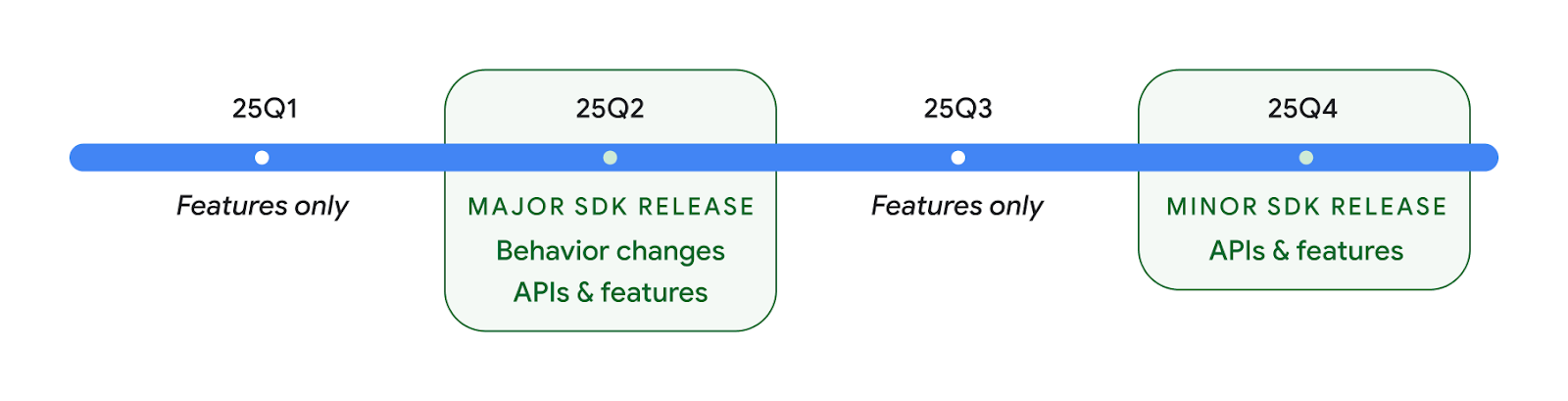
আমরা ত্রৈমাসিক অ্যান্ড্রয়েড রিলিজ চালিয়ে যাব। API রিলিজের মধ্যে Q1 এবং Q3 আপডেটগুলি ক্রমাগত গুণমান নিশ্চিত করতে সাহায্য করার জন্য ক্রমবর্ধমান আপডেট সরবরাহ করবে। Q2 রিলিজ যতটা সম্ভব ডিভাইসে আনতে আমরা সক্রিয়ভাবে আমাদের ডিভাইস অংশীদারদের সাথে কাজ করছি।
বড় এবং ছোট রিলিজের সাথে নতুন API ব্যবহার করা
VERSION_CODES এর সাথে SDK_INT ধ্রুবক ব্যবহার করে আজ API স্তরের জন্য একটি চেক সহ একটি কোড ব্লক পাহারা দেওয়া হয়েছে৷ এটি প্রধান Android রিলিজের জন্য সমর্থিত হতে থাকবে।
if (SDK_INT >= VERSION_CODES.BAKLAVA) {
  // Use APIs introduced in Android 16
}
নতুন SDK_INT_FULL ধ্রুবকটি নতুন VERSION_CODES_FULL গণনার সাথে বড় এবং ছোট উভয় সংস্করণের বিরুদ্ধে API চেকের জন্য ব্যবহার করা যেতে পারে।
if (SDK_INT_FULL >= VERSION_CODES_FULL.[MAJOR or MINOR RELEASE]) {
  // Use APIs introduced in a major or minor release
}
আপনি শুধুমাত্র ছোট SDK সংস্করণ পেতে Build.getMinorSdkVersion() পদ্ধতি ব্যবহার করতে পারেন।
val minorSdkVersion = Build.getMinorSdkVersion(VERSION_CODES_FULL.BAKLAVA)
এই APIগুলি এখনও চূড়ান্ত করা হয়নি এবং পরিবর্তন সাপেক্ষে, তাই আপনার কোন উদ্বেগ থাকলে আমাদের প্রতিক্রিয়া পাঠান।
ব্যবহারকারীর অভিজ্ঞতা এবং সিস্টেম UI
অ্যান্ড্রয়েড ১৬ অ্যাপ ডেভেলপার এবং ব্যবহারকারীদের নিজেদের প্রয়োজন অনুযায়ী ডিভাইস কনফিগার করার ক্ষেত্রে আরও বেশি নিয়ন্ত্রণ ও নমনীয়তা প্রদান করে।
অগ্রগতি-কেন্দ্রিক বিজ্ঞপ্তি
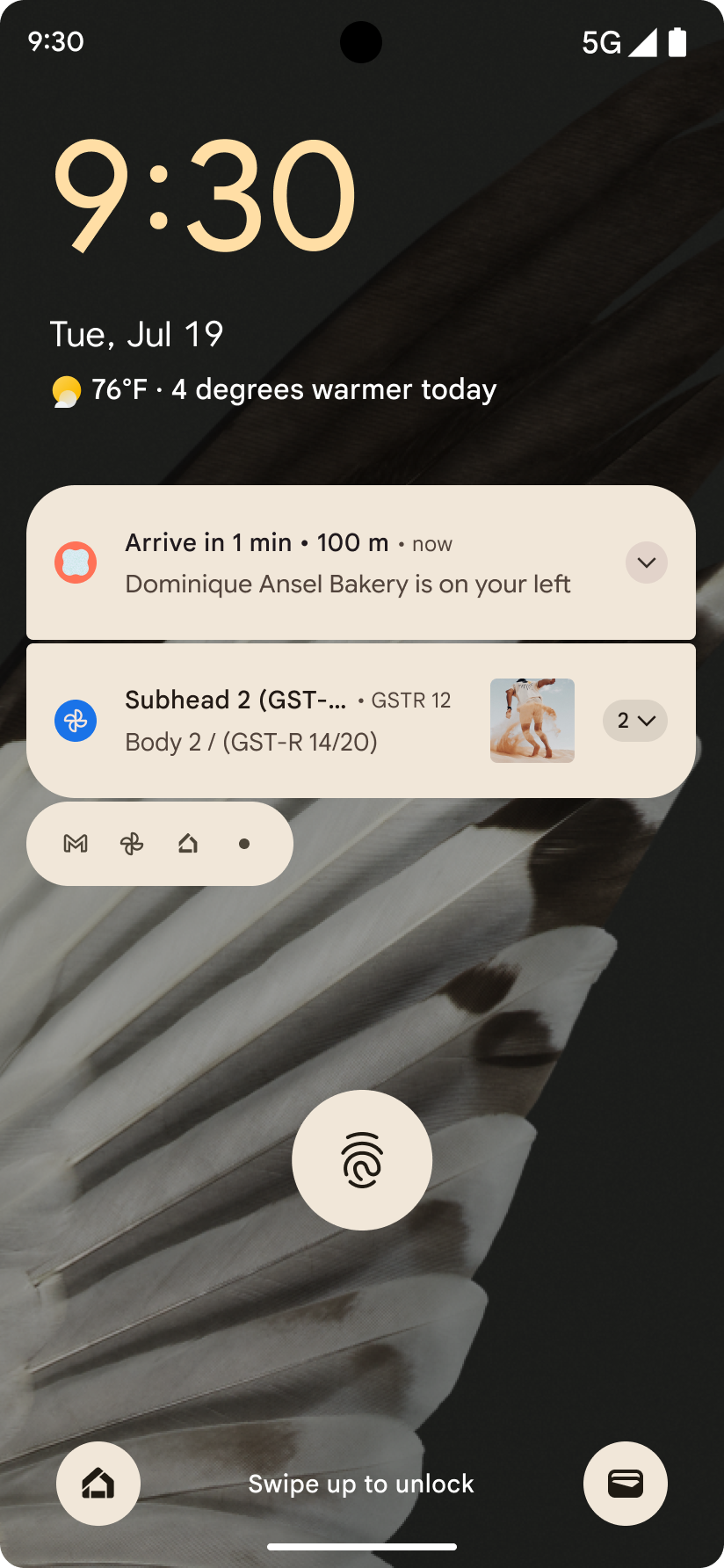
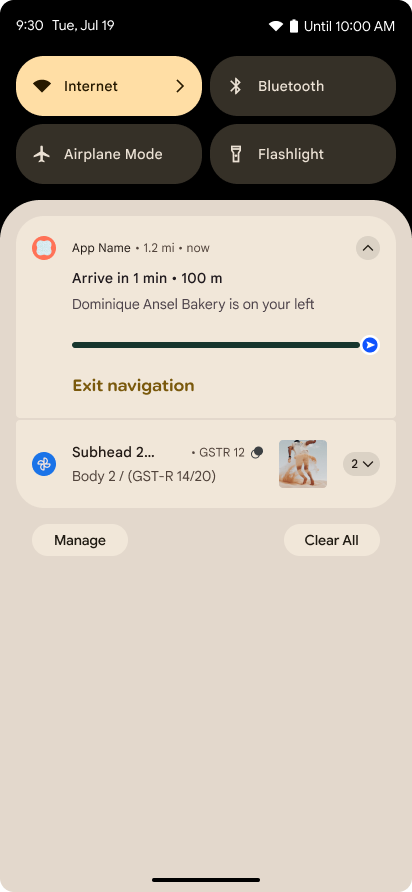
অ্যান্ড্রয়েড 16 প্রগতি-কেন্দ্রিক বিজ্ঞপ্তিগুলি প্রবর্তন করে যাতে ব্যবহারকারীদের নির্বিঘ্নে ব্যবহারকারী-প্রবর্তিত, শুরু থেকে শেষ পর্যন্ত যাত্রা ট্র্যাক করতে সহায়তা করে।
Notification.ProgressStyle হল একটি নতুন বিজ্ঞপ্তি শৈলী যা আপনাকে অগ্রগতি-কেন্দ্রিক বিজ্ঞপ্তি তৈরি করতে দেয়। মূল ব্যবহারের ক্ষেত্রে রাইডশেয়ার, ডেলিভারি এবং নেভিগেশন অন্তর্ভুক্ত। Notification.ProgressStyle ক্লাসের মধ্যে, আপনি পয়েন্ট এবং সেগমেন্ট ব্যবহার করে ব্যবহারকারীর যাত্রায় রাজ্য এবং মাইলফলক নির্দেশ করতে পারেন।
আরও জানতে, অগ্রগতি-কেন্দ্রিক বিজ্ঞপ্তি ডকুমেন্টেশন পৃষ্ঠা দেখুন।
পূর্বাভাসমূলক ব্যাক আপডেট
Android 16 আপনাকে ভবিষ্যদ্বাণীমূলক ব্যাক সিস্টেম অ্যানিমেশনগুলি যেমন ব্যাক-টু-হোম অ্যানিমেশনের মতো ভবিষ্যদ্বাণীমূলক ব্যাক সিস্টেম অ্যানিমেশনগুলি সক্ষম করতে সহায়তা করার জন্য নতুন API যোগ করে। নতুন PRIORITY_SYSTEM_NAVIGATION_OBSERVER এর সাথে onBackInvokedCallback নিবন্ধন করা আপনার অ্যাপটিকে নিয়মিত onBackInvoked কল পাওয়ার অনুমতি দেয় যখনই সিস্টেম স্বাভাবিক ব্যাক নেভিগেশন প্রবাহকে প্রভাবিত না করে ব্যাক নেভিগেশন পরিচালনা করে।
Android 16 অতিরিক্তভাবে finishAndRemoveTaskCallback() এবং moveTaskToBackCallback যোগ করে। OnBackInvokedDispatcher সাথে এই কলব্যাকগুলি নিবন্ধন করার মাধ্যমে, সিস্টেমটি নির্দিষ্ট আচরণগুলিকে ট্রিগার করতে পারে এবং যখন পিছনের অঙ্গভঙ্গিটি আহ্বান করা হয় তখন সময়ের সাথে সম্পর্কিত অ্যানিমেশনগুলি খেলতে পারে৷
আরও সমৃদ্ধ হ্যাপটিক্স
অ্যান্ড্রয়েড তার শুরু থেকেই হ্যাপটিক অ্যাকুয়েটরের উপর নিয়ন্ত্রণ প্রকাশ করেছে।
অ্যান্ড্রয়েড 11 আরও জটিল হ্যাপটিক প্রভাবগুলির জন্য সমর্থন যোগ করেছে যা আরও উন্নত অ্যাকুয়েটর VibrationEffect.Compositions মাধ্যমে সমর্থন করতে পারে৷ ডিভাইস-সংজ্ঞায়িত শব্দার্থিক আদিম উপাদানগুলির রচনা৷
অ্যান্ড্রয়েড 16 হ্যাপটিক এপিআই যুক্ত করে যা অ্যাপগুলিকে হ্যাপটিক প্রভাবের প্রশস্ততা এবং ফ্রিকোয়েন্সি বক্ররেখা নির্ধারণ করতে দেয় এবং ডিভাইসের ক্ষমতার মধ্যে পার্থক্যগুলিকে বিমূর্ত করে।
ডেভেলপারদের উৎপাদনশীলতা এবং সরঞ্জাম
আপনার কর্মদক্ষতা বাড়ানোর জন্য আমাদের বেশিরভাগ কাজ অ্যান্ড্রয়েড স্টুডিও , জেটপ্যাক কম্পোজ এবং অ্যান্ড্রয়েড জেটপ্যাক লাইব্রেরির মতো টুলগুলোকে কেন্দ্র করে হলেও, আমরা প্ল্যাটফর্মের মধ্যেই আপনার স্বপ্নকে বাস্তবে রূপ দেওয়ার উপায় সবসময় খুঁজে থাকি।
লাইভ ওয়ালপেপারের জন্য বিষয়বস্তু পরিচালনা
অ্যান্ড্রয়েড 16-এ, লাইভ ওয়ালপেপার ফ্রেমওয়ার্ক গতিশীল, ব্যবহারকারী-চালিত ওয়ালপেপারগুলির চ্যালেঞ্জ মোকাবেলায় একটি নতুন সামগ্রী API অর্জন করছে। বর্তমানে, ব্যবহারকারী-প্রদত্ত বিষয়বস্তু অন্তর্ভুক্ত লাইভ ওয়ালপেপারগুলির জন্য জটিল, পরিষেবা-নির্দিষ্ট বাস্তবায়ন প্রয়োজন। Android 16 WallpaperDescription এবং WallpaperInstance প্রবর্তন করেছে। WallpaperDescription আপনাকে একই পরিষেবা থেকে একটি লাইভ ওয়ালপেপারের স্বতন্ত্র উদাহরণ সনাক্ত করতে দেয়। উদাহরণ স্বরূপ, হোম স্ক্রীন এবং লক স্ক্রীন উভয় ক্ষেত্রেই উদাহরণ রয়েছে এমন একটি ওয়ালপেপার উভয় স্থানেই অনন্য সামগ্রী থাকতে পারে। ওয়ালপেপার বাছাইকারী এবং WallpaperManager ব্যবহারকারীদের কাছে ওয়ালপেপারগুলিকে আরও ভালভাবে উপস্থাপন করতে এই মেটাডেটা ব্যবহার করে, আপনার জন্য বিভিন্ন এবং ব্যক্তিগতকৃত লাইভ ওয়ালপেপার অভিজ্ঞতা তৈরি করার প্রক্রিয়াটিকে সুগম করে৷
কর্মক্ষমতা এবং ব্যাটারি
অ্যান্ড্রয়েড ১৬-এ এমন এপিআই চালু করা হয়েছে যা আপনার অ্যাপগুলো সম্পর্কে তথ্য সংগ্রহ করতে সাহায্য করে।
সিস্টেম-ট্রিগারড প্রোফাইলিং
অ্যান্ড্রয়েড 15-এ ProfilingManager যোগ করা হয়েছিল, যা অ্যাপগুলিকে ক্ষেত্রের সর্বজনীন ডিভাইসগুলিতে পারফেটো ব্যবহার করে প্রোফাইলিং ডেটা সংগ্রহের অনুরোধ করার ক্ষমতা দেয়। যাইহোক, যেহেতু এই প্রোফাইলিংটি অবশ্যই অ্যাপ থেকে শুরু করতে হবে, তাই স্টার্টআপ বা ANR-এর মতো জটিল প্রবাহগুলি ক্যাপচার করা অ্যাপগুলির পক্ষে কঠিন বা অসম্ভব হবে৷
এতে সাহায্য করার জন্য, Android 16 ProfilingManager এ সিস্টেম-ট্রিগার করা প্রোফাইলিং প্রবর্তন করে। অ্যাপগুলি নির্দিষ্ট ট্রিগারগুলির জন্য ট্রেস পেতে আগ্রহ নিবন্ধন করতে পারে যেমন কোল্ড স্টার্ট reportFullyDrawn বা ANR, এবং তারপরে সিস্টেমটি অ্যাপের পক্ষ থেকে একটি ট্রেস শুরু করে এবং বন্ধ করে দেয়। ট্রেস সম্পূর্ণ হওয়ার পরে, ফলাফলগুলি অ্যাপের ডেটা ডিরেক্টরিতে বিতরণ করা হয়।
ApplicationStartInfo-তে স্টার্ট কম্পোনেন্ট
ApplicationStartInfo Android 15-এ যোগ করা হয়েছিল , একটি অ্যাপকে প্রক্রিয়া শুরু, শুরুর ধরন, শুরুর সময়, থ্রোটলিং এবং অন্যান্য দরকারী ডায়গনিস্টিক ডেটার কারণগুলি দেখতে দেয়৷ অ্যান্ড্রয়েড 16 যোগ করে getStartComponent() কোন কম্পোনেন্ট টাইপ স্টার্টটিকে ট্রিগার করেছে তা আলাদা করতে, যা আপনার অ্যাপের স্টার্টআপ ফ্লো অপ্টিমাইজ করার জন্য সহায়ক হতে পারে।
কাজের আরও ভালো আত্মদর্শন
JobScheduler#getPendingJobReason() API একটি কাজ মুলতুবি থাকার কারণ প্রদান করে। যাইহোক, একাধিক কারণে একটি কাজ মুলতুবি থাকতে পারে।
অ্যান্ড্রয়েড 16-এ, আমরা একটি নতুন API JobScheduler#getPendingJobReasons(int jobId) প্রবর্তন করছি, যা ডেভেলপারের দ্বারা সেট করা সুস্পষ্ট সীমাবদ্ধতা এবং সিস্টেম দ্বারা সেট করা অন্তর্নিহিত সীমাবদ্ধতার কারণে একটি কাজ মুলতুবি থাকার একাধিক কারণ প্রদান করে।
আমরা JobScheduler#getPendingJobReasonsHistory(int jobId) প্রবর্তন করছি, যা সাম্প্রতিক সীমাবদ্ধতার পরিবর্তনের একটি তালিকা প্রদান করে।
আপনার কাজগুলি কেন কার্যকর হচ্ছে না তা ডিবাগ করতে সাহায্য করার জন্য আমরা API ব্যবহার করার পরামর্শ দিই, বিশেষ করে যদি আপনি কিছু নির্দিষ্ট কাজের সাফল্যের হার দেখেন বা নির্দিষ্ট কাজ সমাপ্তির বিলম্বে বাগগুলি দেখতে পান। উদাহরণস্বরূপ, ব্যাকগ্রাউন্ডে উইজেট আপডেট করা ব্যর্থ হয়েছে বা প্রিফেচ জব অ্যাপ শুরুর আগে কল করা যায়নি।
এটি আপনাকে আরও ভালভাবে বুঝতে সাহায্য করতে পারে যে নির্দিষ্ট কাজগুলি সিস্টেম সংজ্ঞায়িত সীমাবদ্ধতা বনাম স্পষ্টভাবে সেট করা সীমাবদ্ধতার কারণে সম্পূর্ণ হচ্ছে না।
অভিযোজিত রিফ্রেশ রেট
অ্যাডাপ্টিভ রিফ্রেশ রেট (ARR), Android 15-এ প্রবর্তিত, সমর্থিত হার্ডওয়্যারে ডিসপ্লে রিফ্রেশ রেটকে আলাদা VSync ধাপগুলি ব্যবহার করে বিষয়বস্তু ফ্রেম হারের সাথে মানিয়ে নিতে সক্ষম করে। সম্ভাব্য জ্যাঙ্ক-ইন্ডুসিং মোড-স্যুইচিংয়ের প্রয়োজনীয়তা দূর করার সময় এটি পাওয়ার খরচ হ্রাস করে।
Android 16 getSupportedRefreshRates() পুনরুদ্ধার করার সময় hasArrSupport() এবং getSuggestedFrameRate(int) প্রবর্তন করে যাতে আপনার অ্যাপগুলিকে ARR-এর সুবিধা নেওয়া সহজ হয়৷ RecyclerView 1.4 অভ্যন্তরীণভাবে ARR-কে সমর্থন করে যখন এটি একটি ফ্লিং বা মসৃণ স্ক্রোল থেকে নিষ্পত্তি হয়, এবং আমরা আরও জেটপ্যাক লাইব্রেরিতে ARR সমর্থন যোগ করার জন্য আমাদের কাজ চালিয়ে যাচ্ছি। এই ফ্রেম রেট নিবন্ধটি এমন অনেক API কভার করে যা আপনি ফ্রেম রেট সেট করতে ব্যবহার করতে পারেন যাতে আপনার অ্যাপ সরাসরি ARR ব্যবহার করতে পারে।
ADPF-এ হেডরুম এপিআই
SystemHealthManager getCpuHeadroom এবং getGpuHeadroom API গুলি প্রবর্তন করে, উপলব্ধ CPU এবং GPU সংস্থানগুলির অনুমান সহ গেমস এবং সংস্থান-নিবিড় অ্যাপগুলি প্রদান করার জন্য ডিজাইন করা হয়েছে৷ এই পদ্ধতিগুলি আপনার অ্যাপ বা গেম কীভাবে সিস্টেমের স্বাস্থ্যের সর্বোত্তম উন্নতি করতে পারে তা পরিমাপ করার একটি উপায় অফার করে, বিশেষ করে যখন অন্যান্য অ্যান্ড্রয়েড ডায়নামিক পারফরম্যান্স ফ্রেমওয়ার্ক (ADPF) APIগুলির সাথে একত্রে ব্যবহার করা হয় যা থার্মাল থ্রটলিং সনাক্ত করে ।
সমর্থিত ডিভাইসগুলিতে CpuHeadroomParams এবং GpuHeadroomParams ব্যবহার করে, আপনি হেডরুম গণনা করতে ব্যবহৃত সময় উইন্ডোটি কাস্টমাইজ করতে পারেন এবং গড় বা ন্যূনতম সংস্থান উপলব্ধতার মধ্যে নির্বাচন করতে পারেন। এটি আপনাকে সেই অনুযায়ী আপনার সিপিইউ বা জিপিইউ রিসোর্স ব্যবহার কমাতে সাহায্য করতে পারে, যা আরও ভাল ব্যবহারকারীর অভিজ্ঞতা এবং উন্নত ব্যাটারি লাইফের দিকে পরিচালিত করে।
প্রবেশগম্যতা
অ্যান্ড্রয়েড ১৬-এ নতুন অ্যাক্সেসিবিলিটি এপিআই এবং ফিচার যুক্ত করা হয়েছে, যা আপনার অ্যাপকে প্রতিটি ব্যবহারকারীর কাছে পৌঁছে দিতে সাহায্য করবে।
উন্নত অ্যাক্সেসিবিলিটি এপিআই
Android 16 অতিরিক্ত API যোগ করে UI শব্দার্থবিদ্যাকে উন্নত করতে যা ব্যবহারকারীদের জন্য ধারাবাহিকতা উন্নত করতে সাহায্য করে যারা অ্যাক্সেসিবিলিটি পরিষেবার উপর নির্ভর করে, যেমন TalkBack ।
সর্বাধিক টেক্সট কনট্রাস্টের জন্য রূপরেখা পাঠ্য
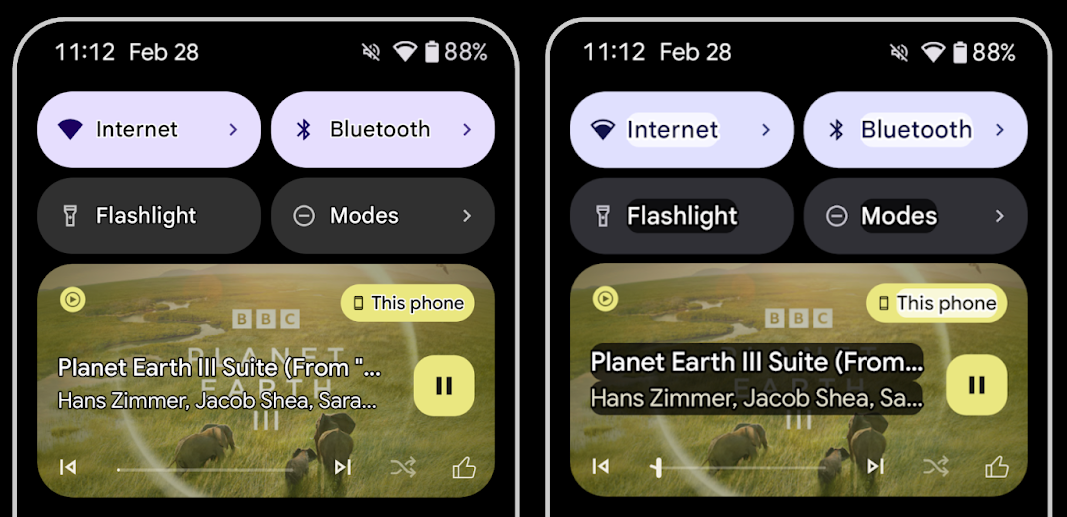
কম দৃষ্টিসম্পন্ন ব্যবহারকারীরা প্রায়শই বৈপরীত্য সংবেদনশীলতা হ্রাস করে, যার ফলে তাদের পটভূমি থেকে বস্তুর পার্থক্য করা কঠিন হয়ে পড়ে। এই ব্যবহারকারীদের সাহায্য করার জন্য, Android 16 উচ্চ কনট্রাস্ট টেক্সট প্রতিস্থাপন করে আউটলাইন টেক্সট প্রবর্তন করে, যা পাঠ্যের চারপাশে একটি বৃহত্তর বৈপরীত্য ক্ষেত্র আঁকে যাতে সুস্পষ্টতা উন্নত হয়।
অ্যান্ড্রয়েড 16-এ নতুন AccessibilityManager এপিআই রয়েছে যাতে আপনার অ্যাপ্লিকেশানগুলি এই মোডটি সক্ষম করা আছে কিনা তা দেখতে একজন শ্রোতাকে পরীক্ষা করতে বা নিবন্ধন করতে দেয়৷ এটি প্রাথমিকভাবে UI টুলকিট যেমন রচনার জন্য একই রকম ভিজ্যুয়াল অভিজ্ঞতা দেওয়ার জন্য। আপনি যদি একটি UI টুলকিট লাইব্রেরি বজায় রাখেন বা আপনার অ্যাপটি কাস্টম টেক্সট রেন্ডারিং করে যা android.text.Layout ক্লাসকে বাইপাস করে তাহলে আপনি এটি ব্যবহার করতে পারেন কখন আউটলাইন টেক্সট সক্ষম করা আছে।
TtsSpan-এ সময়কাল যোগ করা হয়েছে
Android 16 ARG_HOURS , ARG_MINUTES , এবং ARG_SECONDS সমন্বিত একটি TYPE_DURATION এর সাথে TtsSpan প্রসারিত করে৷ এটি আপনাকে টকব্যাকের মতো পরিষেবাগুলির সাথে সঠিক এবং সামঞ্জস্যপূর্ণ পাঠ্য-থেকে-স্পিচ আউটপুট নিশ্চিত করে, সময়কালকে সরাসরি টীকা করতে দেয়৷
একাধিক লেবেল সহ সমর্থন উপাদান
অ্যান্ড্রয়েড বর্তমানে UI উপাদানগুলিকে অন্যের থেকে তাদের অ্যাক্সেসিবিলিটি লেবেল প্রাপ্ত করার অনুমতি দেয় এবং এখন একাধিক লেবেল যুক্ত করার ক্ষমতা অফার করে, ওয়েব সামগ্রীতে একটি সাধারণ দৃশ্য। AccessibilityNodeInfo মধ্যে একটি তালিকা-ভিত্তিক API প্রবর্তন করে, Android সরাসরি এই মাল্টি-লেবেল সম্পর্কগুলিকে সমর্থন করতে পারে। এই পরিবর্তনের অংশ হিসাবে, আমরা #addLabeledBy , #removeLabeledBy , এবং #getLabeledByList এর পক্ষে AccessibilityNodeInfo#setLabeledBy এবং # #getLabeledBy কে বাতিল করেছি।
প্রসারণযোগ্য উপাদানগুলির জন্য উন্নত সমর্থন
অ্যান্ড্রয়েড 16 অ্যাক্সেসিবিলিটি API যুক্ত করে যা আপনাকে মেনু এবং প্রসারণযোগ্য তালিকার মতো ইন্টারেক্টিভ উপাদানগুলির প্রসারিত বা ভেঙে পড়া অবস্থা জানাতে দেয়। setExpandedState ব্যবহার করে প্রসারিত অবস্থা সেট করে এবং CONTENT_CHANGE_TYPE_EXPANDED বিষয়বস্তু পরিবর্তনের ধরন সহ TYPE_WINDOW_CONTENT_CHANGED অ্যাক্সেসিবিলিটি ইভেন্টগুলি প্রেরণ করে, আপনি নিশ্চিত করতে পারেন যে টকব্যাকের মতো স্ক্রিন রিডাররা আরও স্বজ্ঞাত এবং অন্তর্ভুক্ত ব্যবহারকারীর অভিজ্ঞতা প্রদান করে রাজ্যের পরিবর্তনগুলি ঘোষণা করে৷
অনিশ্চিত প্রগতি বার
Android 16 RANGE_TYPE_INDETERMINATE যোগ করে, আপনার জন্য নির্ধারিত এবং অনির্দিষ্ট উভয় ProgressBar উইজেটগুলির জন্য RangeInfo প্রকাশ করার একটি উপায় দেয়, যা TalkBack-এর মতো পরিষেবাগুলিকে আরও ধারাবাহিকভাবে অগ্রগতি সূচকগুলির জন্য প্রতিক্রিয়া প্রদান করার অনুমতি দেয়৷
ত্রি-রাষ্ট্রীয় চেকবক্স
Android 16-এ নতুন AccessibilityNodeInfo getChecked এবং setChecked(int) পদ্ধতিগুলি এখন "চেক করা" এবং "আনচেক করা" ছাড়াও একটি "আংশিকভাবে চেক করা" অবস্থা সমর্থন করে। এটি অপ্রচলিত বুলিয়ান isChecked এবং setChecked(boolean) প্রতিস্থাপন করে।
সম্পূরক বর্ণনা
যখন একটি অ্যাক্সেসিবিলিটি পরিষেবা একটি ViewGroup বর্ণনা করে, তখন এটি তার চাইল্ড ভিউ থেকে কন্টেন্ট লেবেলগুলিকে একত্রিত করে৷ আপনি যদি ViewGroup জন্য একটি contentDescription প্রদান করেন, অ্যাক্সেসিবিলিটি পরিষেবাগুলি অনুমান করে যে আপনি অ-ফোকাসযোগ্য চাইল্ড ভিউগুলির বর্ণনাকেও ওভাররাইড করছেন৷ অ্যাক্সেসযোগ্যতার জন্য বর্তমান নির্বাচন (উদাহরণস্বরূপ, "রোবোটো") সংরক্ষণ করার সময় আপনি যদি ড্রপ-ডাউন (উদাহরণস্বরূপ, "ফন্ট ফ্যামিলি") এর মতো জিনিসগুলিকে লেবেল করতে চান তবে এটি সমস্যাযুক্ত হতে পারে। Android 16 setSupplementalDescription যোগ করে যাতে আপনি পাঠ্য সরবরাহ করতে পারেন যা একটি ViewGroup সম্পর্কে তথ্য প্রদান করে তার বাচ্চাদের তথ্য ওভাররাইড না করে।
প্রয়োজনীয় ফর্ম ক্ষেত্র
Android 16 AccessibilityNodeInfo তে setFieldRequired যোগ করে যাতে অ্যাপগুলি একটি অ্যাক্সেসিবিলিটি পরিষেবাকে বলতে পারে যে একটি ফর্ম ক্ষেত্রে ইনপুট প্রয়োজন। এটি ব্যবহারকারীদের জন্য অনেক ধরনের ফর্ম পূরণ করার জন্য একটি গুরুত্বপূর্ণ দৃশ্য, এমনকি প্রয়োজনীয় শর্তাবলীর চেকবক্সের মতো সহজ জিনিসগুলি, ব্যবহারকারীদের ধারাবাহিকভাবে সনাক্ত করতে এবং প্রয়োজনীয় ক্ষেত্রগুলির মধ্যে দ্রুত নেভিগেট করতে সহায়তা করে৷
LEA হিয়ারিং এইড ব্যবহার করে ভয়েস কলের জন্য ফোনকে মাইক্রোফোন ইনপুট হিসেবে ব্যবহার করা যায়।
অ্যান্ড্রয়েড 16 LE অডিও হিয়ারিং এইড ব্যবহারকারীদের ভয়েস কলের জন্য হিয়ারিং এইডগুলিতে অন্তর্নির্মিত মাইক্রোফোন এবং তাদের ফোনের মাইক্রোফোনের মধ্যে স্যুইচ করার ক্ষমতা যুক্ত করে৷ এটি কোলাহলপূর্ণ পরিবেশে বা অন্যান্য পরিস্থিতিতে সহায়ক হতে পারে যেখানে হিয়ারিং এইডের মাইক্রোফোনগুলি ভাল কাজ করতে পারে না।
LEA হিয়ারিং এইডগুলির জন্য পারিপার্শ্বিক ভলিউম নিয়ন্ত্রণ
অ্যান্ড্রয়েড 16 এলই অডিও হিয়ারিং এইডের ব্যবহারকারীদের জন্য হিয়ারিং এইডের মাইক্রোফোনগুলির দ্বারা বাছাই করা পরিবেষ্টিত শব্দের ভলিউম সামঞ্জস্য করার ক্ষমতা যুক্ত করে৷ এটি এমন পরিস্থিতিতে সহায়ক হতে পারে যেখানে পটভূমির শব্দ খুব জোরে বা খুব শান্ত।
ক্যামেরা
অ্যান্ড্রয়েড ১৬ পেশাদার ক্যামেরা ব্যবহারকারীদের জন্য সাপোর্ট আরও উন্নত করেছে, যার মাধ্যমে হাইব্রিড অটো এক্সপোজারের পাশাপাশি নিখুঁত কালার টেম্পারেচার এবং টিন্ট অ্যাডজাস্টমেন্ট করা যায়। একটি নতুন নাইট মোড ইন্ডিকেটর আপনার অ্যাপকে জানিয়ে দেয় কখন নাইট মোড ক্যামেরা সেশনে যেতে হবে এবং কখন তা থেকে বেরিয়ে আসতে হবে। নতুন Intent অ্যাকশনগুলো মোশন ফটো তোলা আরও সহজ করে তুলেছে, এবং আমরা HEIC এনকোডিং ও ISO 21496-1 ড্রাফট স্ট্যান্ডার্ডের নতুন প্যারামিটারগুলোর সাপোর্টের মাধ্যমে আল্ট্রাএইচডিআর (UltraHDR) ইমেজের মানোন্নয়ন অব্যাহত রেখেছি।
হাইব্রিড অটো-এক্সপোজার
Android 16 Camera2- তে নতুন হাইব্রিড অটো-এক্সপোজার মোড যোগ করে, যা আপনাকে অটো-এক্সপোজার (AE) অ্যালগরিদমকে বাকিগুলি পরিচালনা করতে দিয়ে এক্সপোজারের নির্দিষ্ট দিকগুলিকে ম্যানুয়ালি নিয়ন্ত্রণ করতে দেয়৷ আপনি ISO + AE , এবং এক্সপোজার সময় + AE নিয়ন্ত্রণ করতে পারেন, বর্তমান পদ্ধতির তুলনায় বৃহত্তর নমনীয়তা প্রদান করে যেখানে আপনার হয় সম্পূর্ণ ম্যানুয়াল নিয়ন্ত্রণ রয়েছে বা সম্পূর্ণরূপে স্বয়ংক্রিয় এক্সপোজারের উপর নির্ভর করে।
fun setISOPriority() {
    // ... (Your existing code before the snippet) ...

    val availablePriorityModes = mStaticInfo.characteristics.get(
        CameraCharacteristics.CONTROL_AE_AVAILABLE_PRIORITY_MODES
    )

    // ... (Your existing code between the snippets) ...

    // Turn on AE mode to set priority mode
    reqBuilder.set(
        CaptureRequest.CONTROL_AE_MODE,
        CameraMetadata.CONTROL_AE_MODE_ON
    )
    reqBuilder.set(
        CaptureRequest.CONTROL_AE_PRIORITY_MODE,
        CameraMetadata.CONTROL_AE_PRIORITY_MODE_SENSOR_SENSITIVITY_PRIORITY
    )
    reqBuilder.set(
        CaptureRequest.SENSOR_SENSITIVITY,
        TEST_SENSITIVITY_VALUE
    )
    val request: CaptureRequest = reqBuilder.build()

    // ... (Your existing code after the snippet) ...
}
সঠিক রঙের তাপমাত্রা এবং আভা সমন্বয়
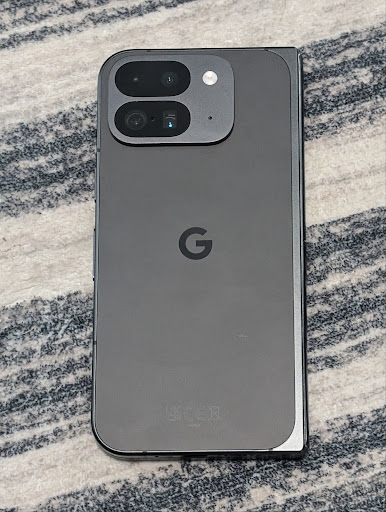
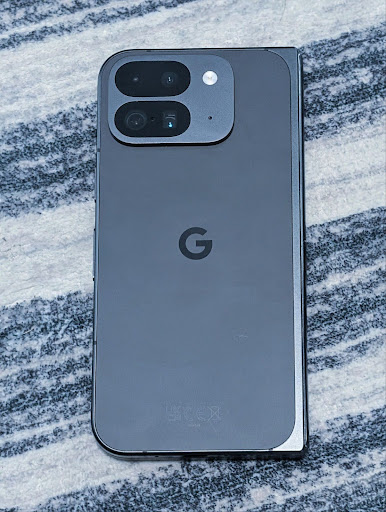
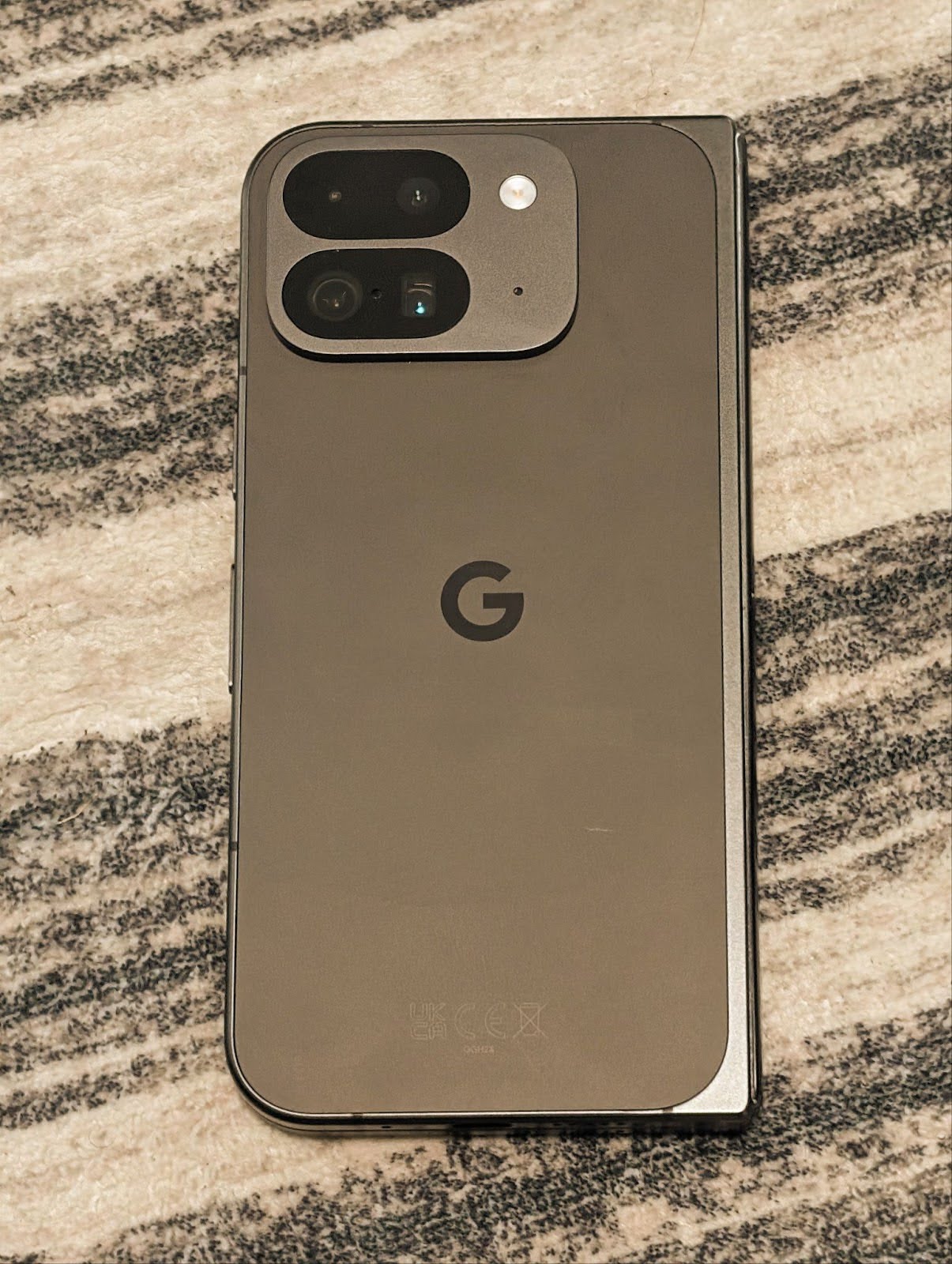
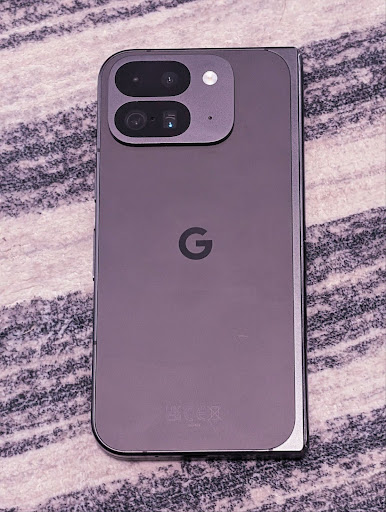
অ্যান্ড্রয়েড 16 পেশাদার ভিডিও রেকর্ডিং অ্যাপ্লিকেশনগুলিকে আরও ভাল সমর্থন করার জন্য সূক্ষ্ম রঙের তাপমাত্রা এবং টিন্ট সামঞ্জস্যের জন্য ক্যামেরা সমর্থন যোগ করে। পূর্ববর্তী অ্যান্ড্রয়েড সংস্করণগুলিতে, আপনি CONTROL_AWB_MODE এর মাধ্যমে সাদা ভারসাম্য সেটিংস নিয়ন্ত্রণ করতে পারেন, যাতে একটি পূর্বনির্ধারিত তালিকার মধ্যে সীমাবদ্ধ বিকল্প রয়েছে, যেমন ইনক্যানডেসেন্ট , মেঘলা , এবং গোধূলি ৷ COLOR_CORRECTION_MODE_CCT পারস্পরিক সম্পর্কযুক্ত রঙের তাপমাত্রার উপর ভিত্তি করে সাদা ভারসাম্যের সুনির্দিষ্ট সমন্বয়ের জন্য COLOR_CORRECTION_COLOR_TEMPERATURE এবং COLOR_CORRECTION_COLOR_TINT ব্যবহার করতে সক্ষম করে৷
fun setCCT() {
    // ... (Your existing code before this point) ...

    val colorTemperatureRange: Range<Int> =
        mStaticInfo.characteristics[CameraCharacteristics.COLOR_CORRECTION_COLOR_TEMPERATURE_RANGE]

    // Set to manual mode to enable CCT mode
    reqBuilder[CaptureRequest.CONTROL_AWB_MODE] = CameraMetadata.CONTROL_AWB_MODE_OFF
    reqBuilder[CaptureRequest.COLOR_CORRECTION_MODE] = CameraMetadata.COLOR_CORRECTION_MODE_CCT
    reqBuilder[CaptureRequest.COLOR_CORRECTION_COLOR_TEMPERATURE] = 5000
    reqBuilder[CaptureRequest.COLOR_CORRECTION_COLOR_TINT] = 30

    val request: CaptureRequest = reqBuilder.build()

    // ... (Your existing code after this point) ...
}
নিম্নলিখিত উদাহরণগুলি দেখায় যে বিভিন্ন রঙের তাপমাত্রা এবং টিন্ট সমন্বয় প্রয়োগ করার পরে একটি ফটো কেমন দেখাবে:

ক্যামেরা নাইট মোড সিন ডিটেকশন
নাইট মোড ক্যামেরা সেশনে কখন স্যুইচ করতে হবে তা জানতে আপনার অ্যাপকে সাহায্য করতে, Android 16 যোগ করে EXTENSION_NIGHT_MODE_INDICATOR । সমর্থিত হলে, এটি Camera2-এর মধ্যে CaptureResult এ উপলব্ধ।
এটি হল এপিআই যা আমরা সংক্ষেপে উল্লেখ করেছি যে শীঘ্রই আসছে ইনস্টাগ্রাম ব্যবহারকারীদের অত্যাশ্চর্য কম আলোর ফটো ব্লগ পোস্ট নিতে সক্ষম করেছে ৷ এই পোস্টটি একটি কেস স্টাডির সাথে একসাথে নাইট মোড কীভাবে প্রয়োগ করা যায় তার একটি ব্যবহারিক নির্দেশিকা যা অ্যাপ-মধ্যস্থ ক্যামেরা থেকে শেয়ার করা ফটোগুলির সংখ্যা বৃদ্ধির সাথে উচ্চ মানের ইন-অ্যাপ নাইট মোড ফটোগুলিকে লিঙ্ক করে।
মোশন ফটো ক্যাপচার অভিপ্রায় ক্রিয়া
Android 16 স্ট্যান্ডার্ড ইনটেন্ট অ্যাকশন যোগ করে — ACTION_MOTION_PHOTO_CAPTURE , এবং ACTION_MOTION_PHOTO_CAPTURE_SECURE — যা অনুরোধ করে যে ক্যামেরা অ্যাপ্লিকেশন একটি মোশন ফটো ক্যাপচার করে এবং এটি ফেরত দেয়।
চিত্রটি কোথায় লেখা হবে তা নিয়ন্ত্রণ করতে আপনাকে হয় একটি অতিরিক্ত EXTRA_OUTPUT পাস করতে হবে, অথবা Intent.setClipData(ClipData) এর মাধ্যমে একটি Uri পাস করতে হবে। আপনি যদি একটি ClipData সেট না করেন তবে Context.startActivity(Intent) কল করার সময় এটি আপনার জন্য সেখানে কপি করা হবে।
আল্ট্রাএইচডিআর ছবির উন্নতি
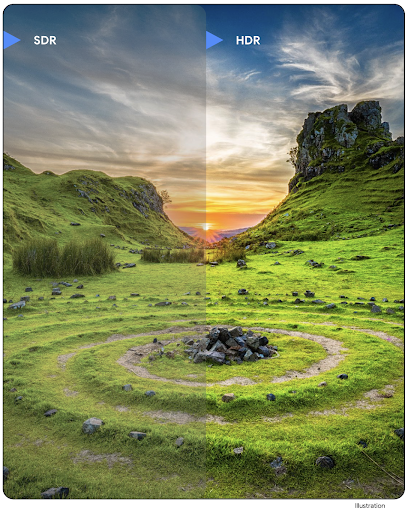
অ্যান্ড্রয়েড 16 আল্ট্রাএইচডিআর ইমেজের সাথে চমকপ্রদ ইমেজ কোয়ালিটি প্রদানের জন্য আমাদের কাজ চালিয়ে যাচ্ছে। এটি HEIC ফাইল বিন্যাসে আল্ট্রাএইচডিআর চিত্রগুলির জন্য সমর্থন যোগ করে। এই ছবিগুলি ImageFormat টাইপ HEIC_ULTRAHDR পাবে এবং বিদ্যমান UltraHDR JPEG ফর্ম্যাটের মতো একটি এমবেডেড গেইনম্যাপ থাকবে৷ আমরা UltraHDR এর জন্য AVIF সমর্থনেও কাজ করছি, তাই সাথে থাকুন।
এছাড়াও, Android 16 ISO 21496-1 ড্রাফ্ট স্ট্যান্ডার্ড থেকে UltraHDR-এ অতিরিক্ত পরামিতি প্রয়োগ করে, যার মধ্যে গেইনম্যাপ গণিত প্রয়োগ করা উচিত এমন কালারস্পেস পাওয়ার এবং সেট করার ক্ষমতা, সেইসাথে SDR গেইনম্যাপের সাথে HDR এনকোডেড বেস ইমেজগুলির জন্য সমর্থন।
গ্রাফিক্স
অ্যান্ড্রয়েড ১৬-এ এজিএসএল (AGSL) সহ কাস্টম গ্রাফিক ইফেক্টের মতো সর্বশেষ গ্রাফিক্স উন্নয়নগুলো অন্তর্ভুক্ত রয়েছে।
AGSL দিয়ে কাস্টম গ্রাফিক্যাল ইফেক্ট
Android 16 RuntimeColorFilter এবং RuntimeXfermode যোগ করে, যা আপনাকে থ্রেশহোল্ড, সেপিয়া এবং হিউ স্যাচুরেশনের মতো জটিল প্রভাবগুলি লিখতে এবং কলগুলি আঁকতে তাদের প্রয়োগ করতে দেয়। Android 13 থেকে, আপনি কাস্টম RuntimeShaders তৈরি করতে AGSL ব্যবহার করতে সক্ষম হয়েছেন যা Shader প্রসারিত করে। নতুন API এটিকে প্রতিফলিত করে, একটি AGSL-চালিত RuntimeColorFilter যোগ করে যা ColorFilter প্রসারিত করে এবং একটি Xfermode প্রভাব যা আপনাকে AGSL-ভিত্তিক কাস্টম কম্পোজিটিং এবং উত্স এবং গন্তব্য পিক্সেলের মধ্যে মিশ্রন প্রয়োগ করতে দেয়।
private val thresholdEffectString = """
    uniform half threshold;

    half4 main(half4 c) {
        half luminosity = dot(c.rgb, half3(0.2126, 0.7152, 0.0722));
        half bw = step(threshold, luminosity);
        return bw.xxx1 * c.a;
    }"""

fun setCustomColorFilter(paint: Paint) {
   val filter = RuntimeColorFilter(thresholdEffectString)
   filter.setFloatUniform(0.5);
   paint.colorFilter = filter
}
সংযোগ
অ্যান্ড্রয়েড ১৬ প্ল্যাটফর্মটিকে আপডেট করে, যার ফলে আপনার অ্যাপ যোগাযোগ এবং ওয়্যারলেস প্রযুক্তির সর্বশেষ অগ্রগতিগুলো ব্যবহারের সুযোগ পায়।
উন্নত নিরাপত্তা সহ রেঞ্জিং
অ্যান্ড্রয়েড 16 Wi-Fi 6 এর 802.11az সহ সমর্থিত ডিভাইসগুলিতে Wi-Fi অবস্থানে শক্তিশালী সুরক্ষা বৈশিষ্ট্যগুলির জন্য সমর্থন যোগ করে, অ্যাপগুলিকে AES-256-ভিত্তিক নিরাপত্তা বৃদ্ধি সহ উচ্চ নির্ভুলতা, বৃহত্তর মাপযোগ্যতা এবং প্রোটোকলের গতিশীল সময়সূচীকে একত্রিত করার অনুমতি দেয়। এমআইটিএম আক্রমণের বিরুদ্ধে এনক্রিপশন এবং সুরক্ষা। এটি ল্যাপটপ বা গাড়ির দরজা আনলক করার মতো প্রক্সিমিটি ব্যবহারের ক্ষেত্রে এটিকে আরও নিরাপদে ব্যবহার করার অনুমতি দেয়। 802.11az ওয়াই-ফাই 6 স্ট্যান্ডার্ডের সাথে একীভূত করা হয়েছে, এর পরিকাঠামো এবং ক্ষমতা ব্যাপকভাবে গ্রহণ এবং সহজে স্থাপনের জন্য ব্যবহার করা হয়েছে।
জেনেরিক রেঞ্জিং এপিআই
Android 16-এ নতুন RangingManager অন্তর্ভুক্ত রয়েছে, যা স্থানীয় ডিভাইস এবং দূরবর্তী ডিভাইসের মধ্যে সমর্থিত হার্ডওয়্যারের দূরত্ব এবং কোণ নির্ধারণ করার উপায় প্রদান করে। RangingManager বিএলই চ্যানেল সাউন্ডিং, বিএলই আরএসএসআই-ভিত্তিক রেঞ্জিং, আল্ট্রা ওয়াইডব্যান্ড এবং ওয়াই-ফাই রাউন্ড ট্রিপ টাইম-এর মতো বিভিন্ন রেঞ্জিং প্রযুক্তির ব্যবহার সমর্থন করে।
সহযোগী ডিভাইস ম্যানেজার ডিভাইসের উপস্থিতি
অ্যান্ড্রয়েড 16-এ, আপনার সঙ্গী অ্যাপ পরিষেবাকে আবদ্ধ করার জন্য নতুন API চালু করা হচ্ছে। BLE সীমার মধ্যে থাকলে এবং ব্লুটুথ সংযুক্ত থাকলে পরিষেবা আবদ্ধ হবে এবং BLE সীমার বাইরে থাকলে বা ব্লুটুথ সংযোগ বিচ্ছিন্ন হলে পরিষেবা আনবাউন্ড হবে৷ অ্যাপটি বিভিন্ন DevicePresenceEvent উপর ভিত্তি করে একটি নতুন 'onDevicePresenceEvent()' কলব্যাক পাবে। আরও বিশদ বিবরণ 'startObservingDevicePresence(ObservingDevicePresenceRequest)'- এ পাওয়া যাবে।
মিডিয়া
অ্যান্ড্রয়েড ১৬-এ বিভিন্ন বৈশিষ্ট্য রয়েছে যা মিডিয়া অভিজ্ঞতাকে উন্নত করে।
ফটো পিকারের উন্নতি
ফটো পিকার ব্যবহারকারীদের তাদের সম্পূর্ণ মিডিয়া লাইব্রেরির পরিবর্তে স্থানীয় এবং ক্লাউড স্টোরেজ উভয় থেকে নির্বাচিত ছবি এবং ভিডিওগুলিতে আপনার অ্যাপ অ্যাক্সেস দেওয়ার জন্য একটি নিরাপদ, অন্তর্নির্মিত উপায় প্রদান করে৷ Google সিস্টেম আপডেট এবং Google Play পরিষেবাগুলির মাধ্যমে মডুলার সিস্টেম উপাদানগুলির সংমিশ্রণ ব্যবহার করে, এটি Android 4.4 (API স্তর 19) এ সমর্থিত। ইন্টিগ্রেশনের জন্য সংশ্লিষ্ট অ্যান্ড্রয়েড জেটপ্যাক লাইব্রেরির সাথে কোডের মাত্র কয়েকটি লাইন প্রয়োজন।
Android 16 ফটো পিকারে নিম্নলিখিত উন্নতিগুলি অন্তর্ভুক্ত করে:
- এমবেডেড ফটো পিকার : নতুন এপিআই যা অ্যাপগুলিকে ফটো পিকারকে তাদের ভিউ হায়ারার্কিতে এম্বেড করতে সক্ষম করে৷ এটি প্রক্রিয়া বিচ্ছিন্নতা ব্যবহার করার সময় এটিকে অ্যাপের আরও সমন্বিত অংশের মতো অনুভব করার অনুমতি দেয় যা ব্যবহারকারীদের অ্যাপের অত্যধিক বিস্তৃত অনুমতির প্রয়োজন ছাড়াই মিডিয়া নির্বাচন করতে দেয়। প্ল্যাটফর্ম সংস্করণ জুড়ে সামঞ্জস্যতা সর্বাধিক করতে এবং আপনার একীকরণ সহজতর করতে, আপনি যদি এমবেডেড ফটো পিকারকে একীভূত করতে চান তবে আপনি আসন্ন অ্যান্ড্রয়েড জেটপ্যাক লাইব্রেরি ব্যবহার করতে চাইবেন।
- ফটো পিকারে ক্লাউড সার্চ : নতুন এপিআই যা অ্যান্ড্রয়েড ফটো পিকারের জন্য ক্লাউড মিডিয়া প্রদানকারী থেকে অনুসন্ধান করতে সক্ষম করে । ফটো পিকারে অনুসন্ধান কার্যকারিতা শীঘ্রই আসছে৷
উন্নত পেশাদার ভিডিও
অ্যান্ড্রয়েড 16 অ্যাডভান্সড প্রফেশনাল ভিডিও (এপিভি) কোডেক এর জন্য সমর্থন প্রবর্তন করে যা পেশাদার স্তরের উচ্চ মানের ভিডিও রেকর্ডিং এবং পোস্ট প্রোডাকশনের জন্য ব্যবহার করার জন্য ডিজাইন করা হয়েছে।
APV কোডেক স্ট্যান্ডার্ডের নিম্নলিখিত বৈশিষ্ট্য রয়েছে:
- ধারণাগতভাবে ক্ষতিহীন ভিডিও গুণমান (কাঁচা ভিডিও মানের কাছাকাছি)
- কম জটিলতা এবং উচ্চ থ্রুপুট ইন্ট্রা-ফ্রেম-শুধুমাত্র কোডিং (পিক্সেল ডোমেন পূর্বাভাস ছাড়া) সম্পাদনা কার্যপ্রবাহকে আরও ভাল সমর্থন করতে
- 2K, 4K এবং 8K রেজোলিউশন সামগ্রীর জন্য কয়েক Gbps পর্যন্ত উচ্চ বিট-রেট রেঞ্জের জন্য সমর্থন, একটি লাইটওয়েট এনট্রপি কোডিং স্কিম দ্বারা সক্ষম
- নিমজ্জিত বিষয়বস্তুর জন্য ফ্রেম টাইলিং এবং সমান্তরাল এনকোডিং এবং ডিকোডিং সক্ষম করার জন্য
- বিভিন্ন ক্রোমা স্যাম্পলিং ফরম্যাট এবং বিট-গভীরতার জন্য সমর্থন
- গুরুতর ভিজ্যুয়াল মানের অবনতি ছাড়াই একাধিক ডিকোডিং এবং পুনরায় এনকোডিংয়ের জন্য সমর্থন
- মাল্টি-ভিউ ভিডিও এবং অক্জিলিয়ারী ভিডিও যেমন গভীরতা, আলফা এবং পূর্বরূপ সমর্থন করে
- HDR10/10+ এবং ব্যবহারকারী-সংজ্ঞায়িত মেটাডেটার জন্য সমর্থন
OpenAPV প্রকল্পের মাধ্যমে APV-এর একটি রেফারেন্স বাস্তবায়ন প্রদান করা হয়। Android 16 APV 422-10 প্রোফাইলের জন্য সমর্থন বাস্তবায়ন করবে যা 10-বিট এনকোডিং সহ YUV 422 রঙের নমুনা প্রদান করে এবং 2Gbps পর্যন্ত লক্ষ্য বিটরেটের জন্য।
গোপনীয়তা
অ্যান্ড্রয়েড ১৬-এ বিভিন্ন ধরনের ফিচার রয়েছে যা অ্যাপ ডেভেলপারদের ব্যবহারকারীর গোপনীয়তা রক্ষা করতে সাহায্য করে।
হেলথ কানেক্ট আপডেট
Health Connect ACTIVITY_INTENSITY যোগ করে, একটি ডেটা টাইপ যা বিশ্ব স্বাস্থ্য সংস্থার নির্দেশিকা অনুসারে পরিমিত এবং জোরালো কার্যকলাপের জন্য সংজ্ঞায়িত করা হয়েছে। প্রতিটি রেকর্ডের জন্য শুরুর সময়, শেষের সময় এবং কার্যকলাপের তীব্রতা মাঝারি বা জোরালো কিনা তা প্রয়োজন।
Health Connect-এ মেডিকেল রেকর্ড সমর্থনকারী আপডেটেড API গুলিও রয়েছে৷ এটি অ্যাপগুলিকে স্পষ্ট ব্যবহারকারীর সম্মতিতে FHIR ফর্ম্যাটে মেডিকেল রেকর্ড পড়তে এবং লিখতে দেয়৷
অ্যান্ড্রয়েডে প্রাইভেসি স্যান্ডবক্স
Android 16 এন্ড্রয়েডের গোপনীয়তা স্যান্ডবক্সের সর্বশেষ সংস্করণকে অন্তর্ভুক্ত করে, প্রযুক্তি বিকাশের জন্য আমাদের চলমান কাজের অংশ যেখানে ব্যবহারকারীরা জানেন যে তাদের গোপনীয়তা সুরক্ষিত। আপনাকে শুরু করতে সাহায্য করার জন্য আমাদের ওয়েবসাইটে Android বিকাশকারী বিটা প্রোগ্রামের গোপনীয়তা স্যান্ডবক্স সম্পর্কে আরও কিছু রয়েছে ৷ SDK রানটাইম দেখুন যা SDKগুলিকে তাদের পরিবেশন করা অ্যাপ থেকে আলাদা একটি ডেডিকেটেড রানটাইম পরিবেশে চালানোর অনুমতি দেয়, ব্যবহারকারীর ডেটা সংগ্রহ এবং ভাগ করে নেওয়ার ক্ষেত্রে শক্তিশালী সুরক্ষা প্রদান করে৷
নিরাপত্তা
অ্যান্ড্রয়েড ১৬-এ এমন সব ফিচার রয়েছে যা আপনার অ্যাপের নিরাপত্তা বাড়াতে এবং অ্যাপের ডেটা সুরক্ষিত রাখতে সাহায্য করে।
কী শেয়ারিং এপিআই
অ্যান্ড্রয়েড 16 এপিআই যুক্ত করে যা অন্যান্য অ্যাপের সাথে অ্যান্ড্রয়েড কীস্টোর কীগুলিতে অ্যাক্সেস ভাগ করে নেওয়া সমর্থন করে। নতুন KeyStoreManager ক্লাস অ্যাপ uid দ্বারা কীগুলিতে অ্যাক্সেস মঞ্জুর করা এবং প্রত্যাহার করাকে সমর্থন করে এবং অ্যাপগুলির শেয়ার্ড কীগুলি অ্যাক্সেস করার জন্য একটি API অন্তর্ভুক্ত করে৷
ডিভাইসের ফর্ম ফ্যাক্টর
অ্যান্ড্রয়েড ১৬ আপনার অ্যাপগুলোকে অ্যান্ড্রয়েডের বিভিন্ন ফর্ম ফ্যাক্টরের সর্বোচ্চ সুবিধা নিতে সহায়তা করে।
টিভির জন্য ছবি ও অডিওর মানসম্মত কাঠামো
অ্যান্ড্রয়েড 16-এ নতুন MediaQuality প্যাকেজ অডিও এবং ছবির প্রোফাইল এবং হার্ডওয়্যার-সম্পর্কিত সেটিংস অ্যাক্সেসের জন্য প্রমিত API-এর একটি সেট প্রকাশ করে। এটি স্ট্রিমিং অ্যাপগুলিকে প্রোফাইল অনুসন্ধান করতে এবং গতিশীলভাবে মিডিয়াতে প্রয়োগ করতে দেয়:
- একটি বৃহত্তর গতিশীল পরিসরের সাথে আয়ত্ত করা চলচ্চিত্রগুলির ছায়ায় সূক্ষ্ম বিবরণ দেখতে এবং পরিবেষ্টিত আলোর সাথে সামঞ্জস্য করতে আরও বেশি রঙের নির্ভুলতার প্রয়োজন হয়, তাই একটি প্রোফাইল যা উজ্জ্বলতার চেয়ে রঙের নির্ভুলতা পছন্দ করে উপযুক্ত হতে পারে।
- লাইভ স্পোর্টিং ইভেন্টগুলি প্রায়শই একটি সংকীর্ণ গতিশীল পরিসরের সাথে আয়ত্ত করা হয়, তবে প্রায়শই দিনের আলোতে দেখা হয়, তাই একটি প্রোফাইল যা রঙের নির্ভুলতার চেয়ে উজ্জ্বলতা পছন্দ করে তা আরও ভাল ফলাফল দিতে পারে।
- সম্পূর্ণ ইন্টারেক্টিভ কন্টেন্ট লেটেন্সি কমাতে ন্যূনতম প্রসেসিং চায়, এবং উচ্চ ফ্রেম রেট চায়, এই কারণেই অনেক টিভি গেম প্রোফাইলের সাথে শিপ করে।
API অ্যাপগুলিকে প্রোফাইল এবং ব্যবহারকারীদের মধ্যে স্যুইচ করার অনুমতি দেয় যাতে তারা তাদের বিষয়বস্তুকে সর্বোত্তম মানানসই করতে টিউনিং সমর্থিত টিভি উপভোগ করতে পারে।
আন্তর্জাতিকীকরণ
অ্যান্ড্রয়েড ১৬ এমন সব ফিচার ও সক্ষমতা যোগ করে, যা বিভিন্ন ভাষায় ডিভাইস ব্যবহারের ক্ষেত্রে ব্যবহারকারীর অভিজ্ঞতাকে আরও উন্নত করে।
উল্লম্ব পাঠ্য
অ্যান্ড্রয়েড 16 লাইব্রেরি ডেভেলপারদের জন্য ভিত্তিগত উল্লম্ব লেখা সমর্থন প্রদানের জন্য উল্লম্বভাবে পাঠ্য রেন্ডারিং এবং পরিমাপের জন্য নিম্ন-স্তরের সমর্থন যোগ করে। এটি বিশেষ করে জাপানি ভাষাগুলির জন্য উপযোগী যেগুলি সাধারণত উল্লম্ব লেখার সিস্টেম ব্যবহার করে। একটি নতুন পতাকা, VERTICAL_TEXT_FLAG , Paint ক্লাসে যোগ করা হয়েছে৷ Paint.setFlags ব্যবহার করে এই পতাকা সেট করা হলে, পেইন্টের পাঠ্য পরিমাপ API অনুভূমিক অগ্রগতির পরিবর্তে উল্লম্ব অগ্রগতির প্রতিবেদন করবে এবং Canvas উল্লম্বভাবে পাঠ্য আঁকবে।
val text = "「春は、曙。」"
Box(
    Modifier.padding(innerPadding).background(Color.White).fillMaxSize().drawWithContent {
        drawIntoCanvas { canvas ->
            val paint = Paint().apply { textSize = 64.sp.toPx() }
            // Draw text vertically
            paint.flags = paint.flags or VERTICAL_TEXT_FLAG
            val height = paint.measureText(text)
            canvas.nativeCanvas.drawText(
                text,
                0,
                text.length,
                size.width / 2,
                (size.height - height) / 2,
                paint
            )
        }
    }
) {}
পরিমাপ সিস্টেম কাস্টমাইজেশন
ব্যবহারকারীরা এখন সেটিংসের মধ্যে আঞ্চলিক পছন্দ অনুযায়ী তাদের পরিমাপ সিস্টেম কাস্টমাইজ করতে পারেন। ব্যবহারকারীর পছন্দ লোকেল কোডের অংশ হিসাবে অন্তর্ভুক্ত করা হয়েছে, তাই আঞ্চলিক পছন্দগুলি পরিবর্তিত হলে আপনি লোকেল কনফিগারেশন পরিবর্তনগুলি পরিচালনা করতে ACTION_LOCALE_CHANGED এ একটি BroadcastReceiver নিবন্ধন করতে পারেন৷
ফরম্যাটারগুলি ব্যবহার করা স্থানীয় অভিজ্ঞতার সাথে মেলে সাহায্য করতে পারে। উদাহরণ স্বরূপ, ইংরেজিতে (মার্কিন যুক্তরাষ্ট্র) "0.5 ইঞ্চি" হল একজন ব্যবহারকারীর জন্য "12,7 মিমি" যিনি তাদের ফোন ইংরেজিতে (ডেনমার্ক) সেট করেছেন বা যিনি তাদের ফোন ইংরেজিতে (মার্কিন যুক্তরাষ্ট্র) মেট্রিক সিস্টেমের সাথে পরিমাপ পদ্ধতির পছন্দ হিসেবে ব্যবহার করেন।
এই সেটিংস খুঁজতে, সেটিংস অ্যাপ খুলুন এবং সিস্টেম > ভাষা ও অঞ্চলে নেভিগেট করুন।