

O Android 15 introduz ótimos recursos e APIs para desenvolvedores. As seções a seguir resumem esses recursos para ajudar você a começar a usar as APIs relacionadas.
Para uma lista detalhada das APIs adicionadas, modificadas e removidas, leia o Relatório de diferenças da API. Para detalhes sobre as APIs adicionadas, acesse a Referência da API do Android. Para o Android 15, procure APIs que foram adicionadas no nível 35 da API. Para saber mais sobre as áreas em que as mudanças na plataforma podem afetar seus apps, confira as mudanças de comportamento do Android 15 para apps destinados ao Android 15 e para todos os apps.
Câmera e mídia
O Android 15 inclui vários recursos que melhoram a experiência de câmera e mídia e dão acesso a ferramentas e hardware para ajudar os criadores de conteúdo a dar vida à visão deles no Android.
Para saber mais sobre os recursos e soluções de desenvolvedores mais recentes para mídia e câmera do Android, assista à palestra Como criar experiências modernas de mídia e câmera no Android do Google I/O.
Aumento do modo pouca luz
Android 15 introduces Low Light Boost, an auto-exposure mode available to both Camera 2 and the night mode camera extension. Low Light Boost adjusts the exposure of the Preview stream in low-light conditions. This is different from how the night mode camera extension creates still images, because night mode combines a burst of photos to create a single, enhanced image. While night mode works very well for creating a still image, it can't create a continuous stream of frames, but Low Light Boost can. Thus, Low Light Boost enables camera capabilities, such as:
- Providing an enhanced image preview, so users are better able to frame their low-light pictures
- Scanning QR codes in low light
If you enable Low Light Boost, it automatically turns on when there's a low light level, and turns off when there's more light.
Apps can record off the Preview stream in low-light conditions to save a brightened video.
For more information, see Low Light Boost.
Controles da câmera no app
Android 15 adds an extension for more control over the camera hardware and its algorithms on supported devices:
- Advanced flash strength adjustments enabling precise control of flash
intensity in both
SINGLEandTORCHmodes while capturing images.
Controle de headroom de HDR
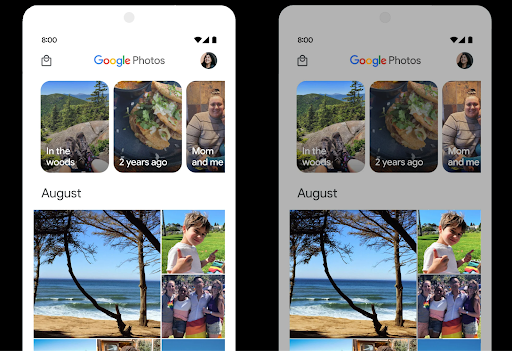
Android 15 chooses HDR headroom that is appropriate for the underlying device
capabilities and bit-depth of the panel. For pages that have lots of SDR
content, such as a messaging app displaying a single HDR thumbnail, this
behavior can end up adversely influencing the perceived brightness of the SDR
content. Android 15 lets you control the HDR headroom with
setDesiredHdrHeadroom to strike a balance between SDR
and HDR content.
Controle de intensidade

Android 15 introduces support for the CTA-2075 loudness standard to help you avoid audio loudness inconsistencies and ensure users don't have to constantly adjust volume when switching between content. The system leverages known characteristics of the output devices (headphones and speaker) along with loudness metadata available in AAC audio content to intelligently adjust the audio loudness and dynamic range compression levels.
To enable this feature, you need to ensure loudness metadata is available in
your AAC content and enable the platform feature in your app. For this, you
instantiate a LoudnessCodecController object by
calling its create factory method with the audio
session ID from the associated AudioTrack; this
automatically starts applying audio updates. You can pass an
OnLoudnessCodecUpdateListener to modify or filter
loudness parameters before they are applied on the
MediaCodec.
// Media contains metadata of type MPEG_4 OR MPEG_D
val mediaCodec = …
val audioTrack = AudioTrack.Builder()
                                .setSessionId(sessionId)
                                .build()
...
// Create new loudness controller that applies the parameters to the MediaCodec
try {
   val lcController = LoudnessCodecController.create(mSessionId)
   // Starts applying audio updates for each added MediaCodec
}
AndroidX media3 ExoPlayer will also be updated to use the
LoudnessCodecController APIs for a seamless app integration.
Dispositivos MIDI 2.0 virtuais
Android 13 added support for connecting to MIDI 2.0 devices using USB, which communicate using Universal MIDI Packets (UMP). Android 15 extends UMP support to virtual MIDI apps, enabling composition apps to control synthesizer apps as a virtual MIDI 2.0 device just like they would with an USB MIDI 2.0 device.
Decodificação de software AV1 mais eficiente

dav1d, the popular AV1 software decoder from VideoLAN is available for Android devices that don't support AV1 decode in hardware. dav1d is up to 3x more performant than the legacy AV1 software decoder, enabling HD AV1 playback for more users, including some low and mid tier devices.
Your app needs to opt-in to using dav1d by invoking it by name
"c2.android.av1-dav1d.decoder". dav1d will be made the default AV1 software
decoder in a subsequent update. This support is standardized and backported to
Android 11 devices that receive Google Play system updates.
Produtividade e ferramentas para desenvolvedores
Embora a maior parte do nosso trabalho para melhorar sua produtividade se concentre em ferramentas como o Android Studio, o Jetpack Compose e as bibliotecas do Android Jetpack, sempre buscamos maneiras na plataforma para ajudar você a realizar sua visão com mais facilidade.
Atualizações do OpenJDK 17
Android 15 continues the work of refreshing Android's core libraries to align with the features in the latest OpenJDK LTS releases.
The following key features and improvements are included:
- Quality-of-life improvements around NIO buffers
- Streams
- Additional
mathandstrictmathmethods utilpackage updates including sequencedcollection,map, andsetByteBuffersupport inDeflater- Security updates such as
X500PrivateCredentialand security key updates
These APIs are updated on over a billion devices running Android 12 (API level 31) and higher through Google Play System updates, so you can target the latest programming features.
Melhorias no PDF
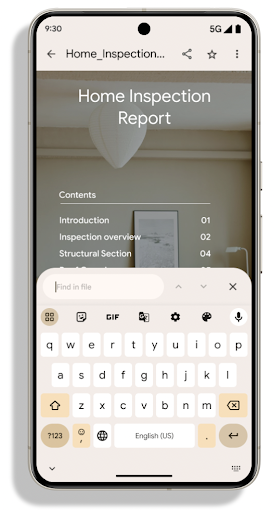
Android 15 includes substantial improvements to the PdfRenderer
APIs. Apps can incorporate advanced features such as rendering
password-protected files, annotations, form editing,
searching, and selection with copy. Linearized PDF
optimizations are supported to speed local PDF viewing and reduce resource use.
The Jetpack PDF library uses these APIs to simplify adding PDF
viewing capabilities to your app.
The PdfRenderer has been moved to a module that can be updated using Google
Play system updates independent of the platform release, and we're supporting
these changes back to Android 11 (API level 30) by creating a compatible
pre-Android 15 version of the API surface, called
PdfRendererPreV.
Refinamentos na troca automática de idioma
Android 14 added on-device, multi-language recognition in audio with automatic
switching between languages, but this can cause words to get dropped,
especially when languages switch with less of a pause between the two
utterances. Android 15 adds additional controls to help apps tune this switching
to their use case.
EXTRA_LANGUAGE_SWITCH_INITIAL_ACTIVE_DURATION_TIME_MILLIS
confines the automatic switching to the beginning of the audio session, while
EXTRA_LANGUAGE_SWITCH_MATCH_SWITCHES deactivates the
language switching after a defined number of switches. These options are
particularly useful if you expect that there will be a single language spoken
during the session that should be autodetected.
API OpenType Variable Font aprimorada
Android 15 improves the usability of the OpenType variable font. You can create
a FontFamily instance from a variable font without specifying weight axes
with the buildVariableFamily API. The text renderer overrides the value
of wght axis to match the displaying text.
Using the API simplifies the code for creating a Typeface considerably:
Kotlin
val newTypeface = Typeface.CustomFallbackBuilder(
            FontFamily.Builder(
                Font.Builder(assets, "RobotoFlex.ttf").build())
                    .buildVariableFamily())
    .build()
Java
Typeface newTypeface = Typeface.CustomFallbackBuilder(
            new FontFamily.Builder(
                new Font.Builder(assets, "RobotoFlex.ttf").build())
                    .buildVariableFamily())
    .build();
Previously, to create the same Typeface, you would need much more code:
Kotlin
val oldTypeface = Typeface.CustomFallbackBuilder(
            FontFamily.Builder(
                Font.Builder(assets, "RobotoFlex.ttf")
                    .setFontVariationSettings("'wght' 400")
                    .setWeight(400)
                    .build())
                .addFont(
                    Font.Builder(assets, "RobotoFlex.ttf")
                        .setFontVariationSettings("'wght' 100")
                        .setWeight(100)
                        .build()
                )
                .addFont(
                    Font.Builder(assets, "RobotoFlex.ttf")
                        .setFontVariationSettings("'wght' 200")
                        .setWeight(200)
                        .build()
                )
                .addFont(
                    Font.Builder(assets, "RobotoFlex.ttf")
                        .setFontVariationSettings("'wght' 300")
                        .setWeight(300)
                        .build()
                )
                .addFont(
                    Font.Builder(assets, "RobotoFlex.ttf")
                        .setFontVariationSettings("'wght' 500")
                        .setWeight(500)
                        .build()
                )
                .addFont(
                    Font.Builder(assets, "RobotoFlex.ttf")
                        .setFontVariationSettings("'wght' 600")
                        .setWeight(600)
                        .build()
                )
                .addFont(
                    Font.Builder(assets, "RobotoFlex.ttf")
                        .setFontVariationSettings("'wght' 700")
                        .setWeight(700)
                        .build()
                )
                .addFont(
                    Font.Builder(assets, "RobotoFlex.ttf")
                        .setFontVariationSettings("'wght' 800")
                        .setWeight(800)
                        .build()
                )
                .addFont(
                    Font.Builder(assets, "RobotoFlex.ttf")
                        .setFontVariationSettings("'wght' 900")
                        .setWeight(900)
                        .build()
                ).build()
        ).build()
Java
Typeface oldTypeface = new Typeface.CustomFallbackBuilder(
    new FontFamily.Builder(
        new Font.Builder(assets, "RobotoFlex.ttf")
            .setFontVariationSettings("'wght' 400")
            .setWeight(400)
            .build()
    )
    .addFont(
        new Font.Builder(assets, "RobotoFlex.ttf")
            .setFontVariationSettings("'wght' 100")
            .setWeight(100)
            .build()
    )
    .addFont(
        new Font.Builder(assets, "RobotoFlex.ttf")
            .setFontVariationSettings("'wght' 200")
            .setWeight(200)
            .build()
    )
    .addFont(
        new Font.Builder(assets, "RobotoFlex.ttf")
            .setFontVariationSettings("'wght' 300")
            .setWeight(300)
            .build()
    )
    .addFont(
        new Font.Builder(assets, "RobotoFlex.ttf")
            .setFontVariationSettings("'wght' 500")
            .setWeight(500)
            .build()
    )
    .addFont(
        new Font.Builder(assets, "RobotoFlex.ttf")
            .setFontVariationSettings("'wght' 600")
            .setWeight(600)
            .build()
    )
    .addFont(
        new Font.Builder(assets, "RobotoFlex.ttf")
            .setFontVariationSettings("'wght' 700")
            .setWeight(700)
            .build()
    )
    .addFont(
        new Font.Builder(assets, "RobotoFlex.ttf")
            .setFontVariationSettings("'wght' 800")
            .setWeight(800)
            .build()
    )
    .addFont(
        new Font.Builder(assets, "RobotoFlex.ttf")
            .setFontVariationSettings("'wght' 900")
            .setWeight(900)
            .build()
    )
    .build()
).build();
Here's an example of how a Typeface created with both the old and new APIs
renders:
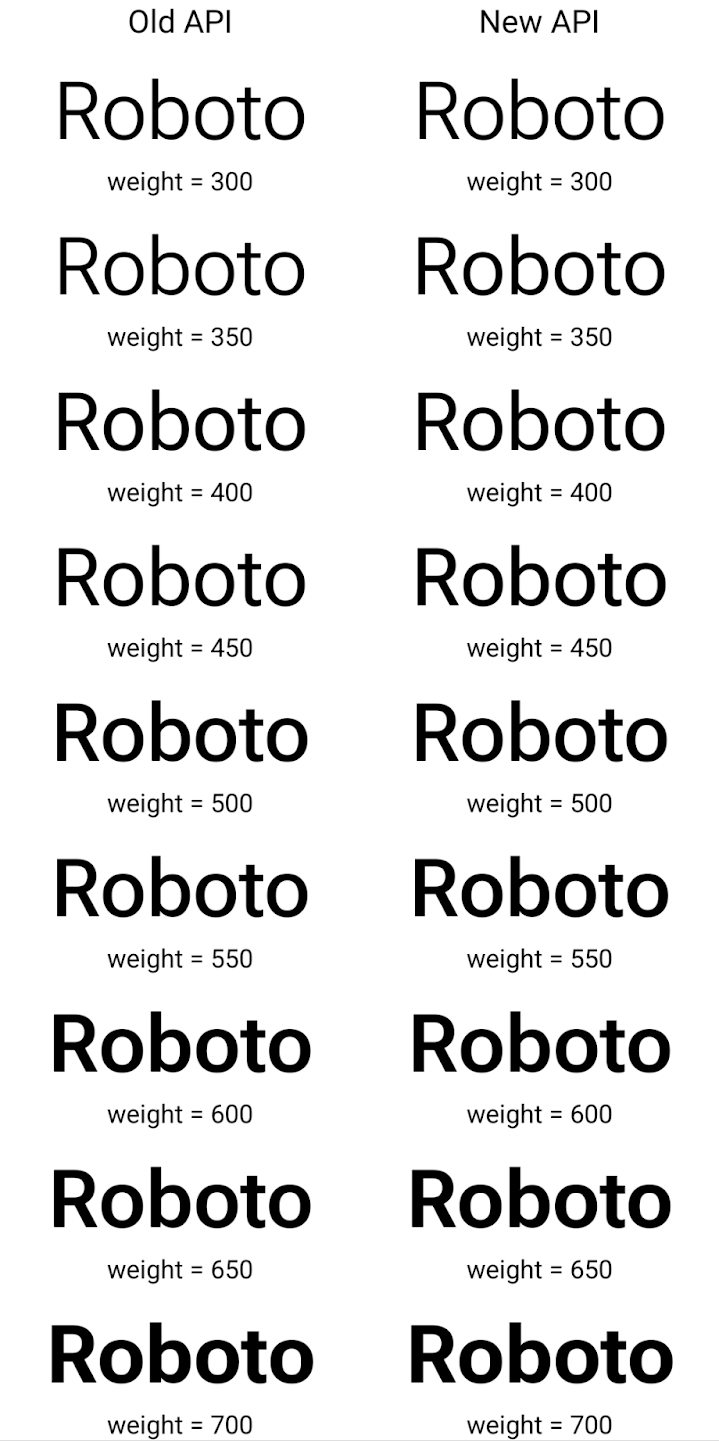
In this example, the Typeface created with the old API doesn't have the
capability to create accurate font weights for the 350, 450, 550 and 650
Font instances, so the renderer falls back to the closest weight. So in
this case, 300 is rendered instead of 350, 400 is rendered instead of 450, and
so on. By contrast, the Typeface created with the new APIs dynamically creates
a Font instance for a given weight, so accurate weights are rendered for 350,
450, 550, and 650 as well.
Controles granulares de quebra de linha
Starting in Android 15, a TextView and the underlying
line breaker can preserve the given portion of text in the same line to improve
readability. You can take advantage of this line break customization by using
the <nobreak> tag in string resources or
createNoBreakSpan. Similarly, you can preserve words from
hyphenation by using the <nohyphen> tag or
createNoHyphenationSpan.
For example, the following string resource doesn't include a line break, and renders with the text "Pixel 8 Pro." breaking in an undesirable place:
<resources>
    <string name="pixel8pro">The power and brains behind Pixel 8 Pro.</string>
</resources>
In contrast, this string resource includes the <nobreak> tag, which wraps the
phrase "Pixel 8 Pro." and prevents line breaks:
<resources>
    <string name="pixel8pro">The power and brains behind <nobreak>Pixel 8 Pro.</nobreak></string>
</resources>
The difference in how these strings are rendered is shown in the following images:
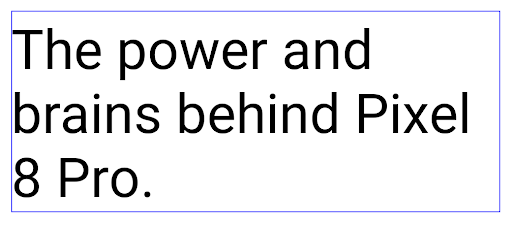
<nobreak> tag.
<nobreak> tag.Arquivamento de apps
Android and Google Play announced support for app archiving last year, allowing users to free up space by partially removing infrequently used apps from the device that were published using Android App Bundle on Google Play. Android 15 includes OS level support for app archiving and unarchiving, making it easier for all app stores to implement it.
Apps with the REQUEST_DELETE_PACKAGES permission can call the
PackageInstaller requestArchive method to request archiving an
installed app package, which removes the APK and any cached files, but persists
user data. Archived apps are returned as displayable apps through the
LauncherApps APIs; users will see a UI treatment to highlight that those
apps are archived. If a user taps on an archived app, the responsible installer
will get a request to unarchive it, and the restoration process can be
monitored by the ACTION_PACKAGE_ADDED broadcast.
Ativar o modo 16 KB em um dispositivo usando as opções do desenvolvedor
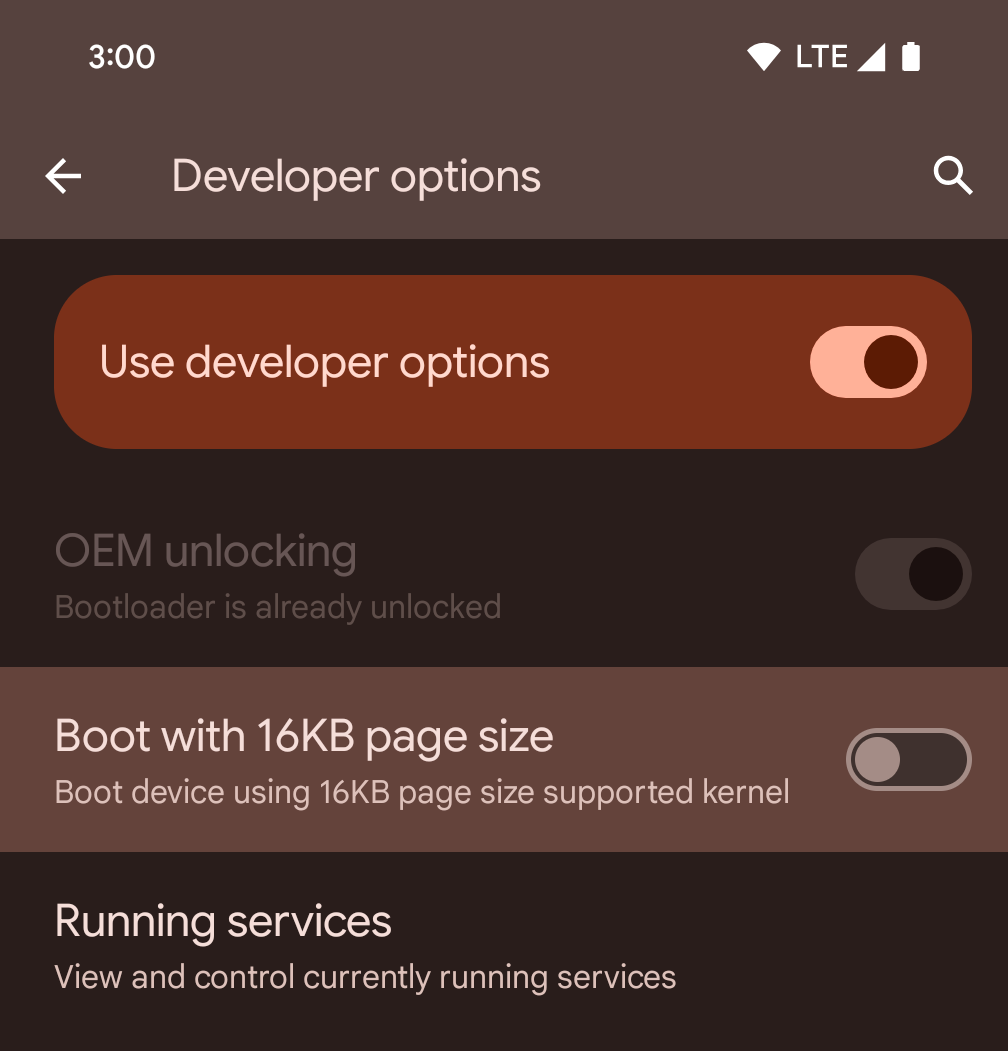
Ative a opção de desenvolvedor Inicializar com tamanho de página de 16 KB para inicializar um dispositivo no modo de 16 KB.
Nas versões QPR do Android 15, é possível usar a opção do desenvolvedor disponível em alguns dispositivos para inicializar o dispositivo no modo de 16 KB e realizar testes no dispositivo. Antes de usar a opção do desenvolvedor, acesse Configurações > Sistema > Atualizações de software e aplique as atualizações disponíveis.
Essa opção para desenvolvedores está disponível nos seguintes dispositivos:
Pixel 8 e 8 Pro (com Android 15 QPR1 ou versões mais recentes)
Pixel 8a (com Android 15 QPR1 ou versões mais recentes)
Pixel 9, 9 Pro e 9 Pro XL (com Android 15 QPR2 ou versões mais recentes)
Pixel 9a (com Android 16 ou versões mais recentes)
Gráficos
O Android 15 traz as melhorias gráficas mais recentes, incluindo ANGLE e adições ao sistema de gráficos Canvas.
Modernização do acesso à GPU do Android

Android hardware has evolved quite a bit from the early days where the core OS would run on a single CPU and GPUs were accessed using APIs based on fixed-function pipelines. The Vulkan® graphics API has been available in the NDK since Android 7.0 (API level 24) with a lower-level abstraction that better reflects modern GPU hardware, scales better to support multiple CPU cores, and offers reduced CPU driver overhead — leading to improved app performance. Vulkan is supported by all modern game engines.
Vulkan is Android's preferred interface to the GPU. Therefore, Android 15 includes ANGLE as an optional layer for running OpenGL® ES on top of Vulkan. Moving to ANGLE will standardize the Android OpenGL implementation for improved compatibility, and, in some cases, improved performance. You can test out your OpenGL ES app stability and performance with ANGLE by enabling the developer option in Settings -> System -> Developer Options -> Experimental: Enable ANGLE on Android 15.
The Android ANGLE on Vulkan roadmap
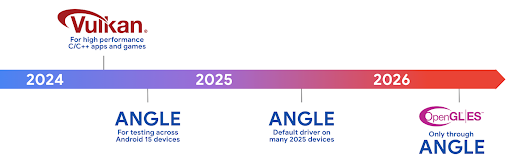
As part of streamlining our GPU stack, going forward we will be shipping ANGLE as the GL system driver on more new devices, with the future expectation that OpenGL/ES will be only available through ANGLE. That being said, we plan to continue support for OpenGL ES on all devices.
Recommended next steps
Use the developer options to select the ANGLE driver for OpenGL ES and test your app. For new projects, we strongly encourage using Vulkan for C/C++.
Melhorias no Canvas
Android 15 continues our modernization of Android's Canvas graphics system with additional capabilities:
Matrix44provides a 4x4 matrix for transforming coordinates that should be used when you want to manipulate the canvas in 3D.clipShaderintersects the current clip with the specified shader, whileclipOutShadersets the clip to the difference of the current clip and the shader, each treating the shader as an alpha mask. This supports the drawing of complex shapes efficiently.
Desempenho e bateria
O Android continua focado em ajudar você a melhorar a performance e a qualidade dos seus apps. O Android 15 apresenta APIs que ajudam a tornar as tarefas no seu app mais eficientes para executar, otimizar o desempenho do app e coletar insights sobre seus apps.
Para conferir práticas recomendadas de eficiência da bateria, depurar o uso de rede e energia e detalhes sobre como estamos melhorando a eficiência da bateria do trabalho em segundo plano no Android 15 e em versões recentes do Android, assista à palestra Como melhorar a eficiência da bateria do trabalho em segundo plano no Android do Google I/O.
API ApplicationStartInfo
In previous versions of Android, app startup has been a bit of a mystery. It was
challenging to determine within your app whether it started from a cold, warm,
or hot state. It was also difficult to know how long your app spent during the
various launch phases: forking the process, calling onCreate, drawing the
first frame, and more. When your Application class was instantiated, you had no
way of knowing whether the app started from a broadcast, a content provider, a
job, a backup, boot complete, an alarm, or an Activity.
The ApplicationStartInfo API on Android 15 provides
all of this and more. You can even choose to add your own timestamps into the
flow to help collect timing data in one place. In addition to collecting
metrics, you can use ApplicationStartInfo to help directly optimize app
startup; for example, you can eliminate the costly instantiation of UI-related
libraries within your Application class when your app is starting up due to a
broadcast.
Informações detalhadas sobre o tamanho do app
Since Android 8.0 (API level 26), Android has included the
StorageStats.getAppBytes API that summarizes the installed
size of an app as a single number of bytes, which is a sum of the APK size, the
size of files extracted from the APK, and files that were generated on the
device such as ahead-of-time (AOT) compiled code. This number is not very
insightful in terms of how your app is using storage.
Android 15 adds the
StorageStats.getAppBytesByDataType([type]) API, which lets
you get insight into how your app is using up all that space, including APK file
splits, AOT and speedup related code, dex metadata, libraries, and guided
profiles.
Criação de perfil gerenciada pelo app
Android 15 includes the ProfilingManager class,
which lets you collect profiling information from within your app such as heap
dumps, heap profiles, stack sampling, and more. It provides a callback to your
app with a supplied tag to identify the output file, which is delivered to your
app's files directory. The API does rate limiting to minimize the performance
impact.
To simplify constructing profiling requests in your app, we recommend using the
corresponding Profiling AndroidX API, available
in Core 1.15.0-rc01 or higher.
Melhorias no banco de dados SQLite
Android 15 introduces SQLite APIs that expose advanced features from the underlying SQLite engine that target specific performance issues that can manifest in apps. These APIs are included with the update of SQLite to version 3.44.3.
Developers should consult best practices for SQLite performance to get the most out of their SQLite database, especially when working with large databases or when running latency-sensitive queries.
- Read-only deferred transactions: when issuing transactions that are
read-only (don't include write statements), use
beginTransactionReadOnly()andbeginTransactionWithListenerReadOnly(SQLiteTransactionListener)to issue read-onlyDEFERREDtransactions. Such transactions can run concurrently with each other, and if the database is in WAL mode, they can run concurrently withIMMEDIATEorEXCLUSIVEtransactions. - Row counts and IDs: APIs were added to retrieve the count of changed
rows or the last inserted row ID without issuing an additional query.
getLastChangedRowCount()returns the number of rows that were inserted, updated, or deleted by the most recent SQL statement within the current transaction, whilegetTotalChangedRowCount()returns the count on the current connection.getLastInsertRowId()returns therowidof the last row to be inserted on the current connection. - Raw statements: issue a raw SQlite statement, bypassing convenience wrappers and any additional processing overhead that they may incur.
Atualizações do Framework de Performance Dinâmica do Android
Android 15 continues our investment in the Android Dynamic Performance Framework (ADPF), a set of APIs that allow games and performance intensive apps to interact more directly with power and thermal systems of Android devices. On supported devices, Android 15 adds ADPF capabilities:
- A power-efficiency mode for hint sessions to indicate that their associated threads should prefer power saving over performance, great for long-running background workloads.
- GPU and CPU work durations can both be reported in hint sessions, allowing the system to adjust CPU and GPU frequencies together to best meet workload demands.
- Thermal headroom thresholds to interpret possible thermal throttling status based on headroom prediction.
To learn more about how to use ADPF in your apps and games, head over to the documentation.
Privacidade
O Android 15 inclui vários recursos que ajudam os desenvolvedores de apps a proteger a privacidade dos usuários.
Detecção de gravação de tela
Android 15 adds support for apps to detect that they are being recorded. A callback is invoked whenever the app transitions between being visible or invisible within a screen recording. An app is considered visible if activities owned by the registering process's UID are being recorded. This way, if your app is performing a sensitive operation, you can inform the user that they're being recorded.
val mCallback = Consumer<Int> { state ->
  if (state == SCREEN_RECORDING_STATE_VISIBLE) {
    // We're being recorded
  } else {
    // We're not being recorded
  }
}

override fun onStart() {
   super.onStart()
   val initialState =
      windowManager.addScreenRecordingCallback(mainExecutor, mCallback)
   mCallback.accept(initialState)
}

override fun onStop() {
    super.onStop()
    windowManager.removeScreenRecordingCallback(mCallback)
}
Recursos expandidos do IntentFilter
Android 15 builds in support for more precise Intent resolution through
UriRelativeFilterGroup, which contains a set of
UriRelativeFilter objects that form a set of Intent
matching rules that must each be satisfied, including URL query parameters, URL
fragments, and blocking or exclusion rules.
These rules can be defined in the AndroidManifest XML file with the
<uri-relative-filter-group> tag, which can optionally include an
android:allow tag. These tags can contain <data> tags that use existing data
tag attributes as well as the android:query and android:fragment
attributes.
Here's an example of the AndroidManifest syntax:
<intent-filter android:autoVerify="true">
  <action android:name="android.intent.action.VIEW" />
  <category android:name="android.intent.category.BROWSABLE" />
  <category android:name="android.intent.category.DEFAULT" />
  <data android:scheme="http" />
  <data android:scheme="https" />
  <data android:host="astore.com" />
  <uri-relative-filter-group>
    <data android:pathPrefix="/auth" />
    <data android:query="region=na" />
  </uri-relative-filter-group>
  <uri-relative-filter-group android:allow="false">
    <data android:pathPrefix="/auth" />
    <data android:query="mobileoptout=true" />
  </uri-relative-filter-group>
  <uri-relative-filter-group android:allow="false">
    <data android:pathPrefix="/auth" />
    <data android:fragmentPrefix="faq" />
  </uri-relative-filter-group>
</intent-filter>
Espaço privado
Private space lets users create a separate space on their device where they can keep sensitive apps away from prying eyes, under an additional layer of authentication. The private space uses a separate user profile. The user can choose to use the device lock or a separate lock factor for the private space.
Apps in the private space show up in a separate container in the launcher, and are hidden from the recents view, notifications, settings, and from other apps when the private space is locked. User-generated and downloaded content (such as media or files) and accounts are separated between the private space and the main space. The system sharesheet and the photo picker can be used to give apps access to content across spaces when the private space is unlocked.
Users can't move existing apps and their data into the private space. Instead, users select an install option in the private space to install an app using whichever app store they prefer. Apps in the private space are installed as separate copies from any apps in the main space (new copies of the same app).
When a user locks the private space, the profile is stopped. While the profile is stopped, apps in the private space are no longer active and can't perform foreground or background activities, including showing notifications.
We recommend that you test your app with private space to make sure your app works as expected, especially if your app falls into one of the following categories:
- Apps with logic for work profiles that assumes that any installed copies of their app that aren't in the main profile are in the work profile.
- Medical apps
- Launcher apps
- App store apps
Consultar a seleção de usuário mais recente para o acesso a fotos selecionadas
Apps can now highlight only the most-recently-selected photos and videos when
partial access to media permissions is granted. This feature can improve
the user experience for apps that frequently request access to photos and
videos. To use this feature in your app, enable the
QUERY_ARG_LATEST_SELECTION_ONLY argument when querying MediaStore
through ContentResolver.
Kotlin
val externalContentUri = MediaStore.Files.getContentUri("external")

val mediaColumns = arrayOf(
   FileColumns._ID,
   FileColumns.DISPLAY_NAME,
   FileColumns.MIME_TYPE,
)

val queryArgs = bundleOf(
   // Return only items from the last selection (selected photos access)
   QUERY_ARG_LATEST_SELECTION_ONLY to true,
   // Sort returned items chronologically based on when they were added to the device's storage
   QUERY_ARG_SQL_SORT_ORDER to "${FileColumns.DATE_ADDED} DESC",
   QUERY_ARG_SQL_SELECTION to "${FileColumns.MEDIA_TYPE} = ? OR ${FileColumns.MEDIA_TYPE} = ?",
   QUERY_ARG_SQL_SELECTION_ARGS to arrayOf(
       FileColumns.MEDIA_TYPE_IMAGE.toString(),
       FileColumns.MEDIA_TYPE_VIDEO.toString()
   )
)
Java
Uri externalContentUri = MediaStore.Files.getContentUri("external");

String[] mediaColumns = {
    FileColumns._ID,
    FileColumns.DISPLAY_NAME,
    FileColumns.MIME_TYPE
};

Bundle queryArgs = new Bundle();
queryArgs.putBoolean(MediaStore.QUERY_ARG_LATEST_SELECTION_ONLY, true);
queryArgs.putString(MediaStore.QUERY_ARG_SQL_SORT_ORDER, FileColumns.DATE_ADDED + " DESC");
queryArgs.putString(MediaStore.QUERY_ARG_SQL_SELECTION, FileColumns.MEDIA_TYPE + " = ? OR " + FileColumns.MEDIA_TYPE + " = ?");
queryArgs.putStringArray(MediaStore.QUERY_ARG_SQL_SELECTION_ARGS, new String[] {
    String.valueOf(FileColumns.MEDIA_TYPE_IMAGE),
    String.valueOf(FileColumns.MEDIA_TYPE_VIDEO)
});
Sandbox de privacidade no Android
Android 15 includes the latest Android Ad Services extensions, incorporating the latest version of the Privacy Sandbox on Android. This addition is part of our work to develop technologies that improve user privacy and enable effective, personalized advertising experiences for mobile apps. Our privacy sandbox page has more information about the Privacy Sandbox on Android developer preview and beta programs to help you get started.
Conexão Saúde
Android 15 integrates the latest extensions around Health Connect by Android, a secure and centralized platform to manage and share app-collected health and fitness data. This update adds support for additional data types across fitness, nutrition, skin temperature, training plans, and more.
Skin temperature tracking allows users to store and share more accurate temperature data from a wearable or other tracking device.
Training plans are structured workout plans to help a user achieve their fitness goals. Training plans support includes a variety of completion and performance goals:
- Completion goals around calories burned, distance, duration, repetition, and steps.
- Performance goals around as many repetitions as possible (AMRAP), cadence, heart rate, power, perceived rate of exertion, and speed.
Learn more about the latest updates to Health Connect in Android in the Building adaptable experiences with Android Health talk from Google I/O.
Compartilhamento de tela de app
Android 15 supports app screen sharing so users can share or record just an
app window rather than the entire device screen. This feature, first enabled in
Android 14 QPR2, includes
MediaProjection callbacks that allow your app
to customize the app screen sharing experience. Note that for apps targeting
Android 14 (API level 34) or higher,
user consent is required for each
MediaProjection capture session.
Experiência do usuário e interface do sistema
O Android 15 oferece aos desenvolvedores de apps e usuários mais controle e flexibilidade para configurar o dispositivo de acordo com as necessidades.
Para saber mais sobre como usar as melhorias mais recentes do Android 15 para melhorar a experiência do usuário do seu app, assista à palestra Melhorar a experiência do usuário do seu app Android no Google I/O.
Prévia de widgets mais completa com a API Generated Previews
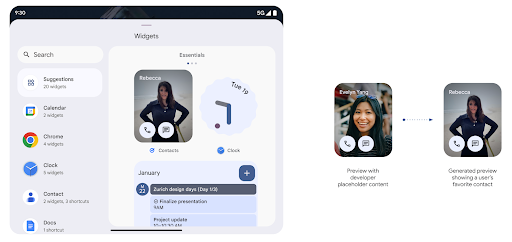
Before Android 15, the only way to provide widget picker previews was to specify a static image or layout resource. These previews often differ significantly from the look of the actual widget when it is placed on the home screen. Also, static resources can't be created with Jetpack Glance, so a Glance developer had to screenshot their widget or create an XML layout to have a widget preview.
Android 15 adds support for generated previews. This means that app widget
providers can generate RemoteViews to use as the picker preview, instead
of a static resource.
Push API
Apps can provide generated previews through a push API. Apps can provide
previews at any point in their lifecycle, and don't receive an explicit request
from the host to provide previews. Previews are persisted in AppWidgetService,
and hosts can request them on-demand. The following example loads an XML widget
layout resource and sets it as the preview:
AppWidgetManager.getInstance(appContext).setWidgetPreview(
   ComponentName(
       appContext,
       SociaLiteAppWidgetReceiver::class.java
   ),
   AppWidgetProviderInfo.WIDGET_CATEGORY_HOME_SCREEN,
   RemoteViews("com.example", R.layout.widget_preview)
)
The expected flow is:
- At any time, the widget provider calls
setWidgetPreview. The provided previews are persisted inAppWidgetServicewith other provider info. setWidgetPreviewnotifies hosts of an updated preview through theAppWidgetHost.onProvidersChangedcallback. In response, the widget host reloads all of its provider information.- When displaying a widget preview, the host checks
AppWidgetProviderInfo.generatedPreviewCategories, and if the chosen category is available, callsAppWidgetManager.getWidgetPreviewto return the saved preview for this provider.
When to call setWidgetPreview
Because there is no callback to provide previews, apps can choose to send previews at any point when they are running. How often to update the preview depends on the widget's use case.
The following list describes the two main categories of preview use cases:
- Providers that show real data in their widget previews, such as personalized or recent information. These providers can set the preview once the user has signed in or has done initial configuration in their app. After this, they can set up a periodic task to update the previews at their chosen cadence. Examples of this type of widget could be a photo, calendar, weather or news widget.
- Providers that show static information in previews or quick-action widgets that don't display any data. These providers can set previews once, when the app first launches. Examples of this type of widget include a drive quick actions widget or chrome shortcuts widget.
Some providers might show static previews on the hub mode picker, but real information on the homescreen picker. These providers should follow the guidance for both of these use cases to set previews.
Picture-in-picture
Android 15 introduces changes in Picture-in-Picture (PiP) ensuring an even smoother transition when entering into PiP mode. This will be beneficial for apps having UI elements overlaid on top of their main UI, which goes into PiP.
Developers use the onPictureInPictureModeChanged callback to define logic
that toggles the visibility of the overlaid UI elements. This callback is
triggered when the PiP enter or exit animation is completed. Beginning in
Android 15, the PictureInPictureUiState class includes another state.
With this UI state, apps targeting Android 15 (API level 35) will observe the
Activity#onPictureInPictureUiStateChanged callback being invoked with
isTransitioningToPip() as soon as the PiP animation starts. There are
many UI elements that are not relevant for the app when it is in PiP mode, for
example views or layout that include information such as suggestions, upcoming
video, ratings, and titles. When the app goes to PiP mode, use the
onPictureInPictureUiStateChanged callback to hide these UI elements. When the
app goes to full screen mode from the PiP window, use
onPictureInPictureModeChanged callback to unhide these elements, as shown in
the following examples:
override fun onPictureInPictureUiStateChanged(pipState: PictureInPictureUiState) {
        if (pipState.isTransitioningToPip()) {
          // Hide UI elements
        }
    }
override fun onPictureInPictureModeChanged(isInPictureInPictureMode: Boolean) {
        if (isInPictureInPictureMode) {
          // Unhide UI elements
        }
    }
This quick visibility toggle of irrelevant UI elements (for a PiP window) helps ensure a smoother and flicker-free PiP enter animation.
Regras do modo Não perturbe aprimoradas
AutomaticZenRule lets apps customize Attention
Management (Do Not Disturb) rules and decide when to activate or deactivate
them. Android 15 greatly enhances these rules with the goal of improving the
user experience. The following enhancements are included:
- Adding types to
AutomaticZenRule, allowing the system to apply special treatment to some rules. - Adding an icon to
AutomaticZenRule, helping to make the modes be more recognizable. - Adding a
triggerDescriptionstring toAutomaticZenRulethat describes the conditions on which the rule should become active for the user. - Added
ZenDeviceEffectstoAutomaticZenRule, allowing rules to trigger things like grayscale display, night mode, or dimming the wallpaper.
Definir VibrationEffect para canais de notificação
Android 15 supports setting rich vibrations for incoming notifications by
channel using NotificationChannel.setVibrationEffect, so
your users can distinguish between different types of notifications without
having to look at their device.
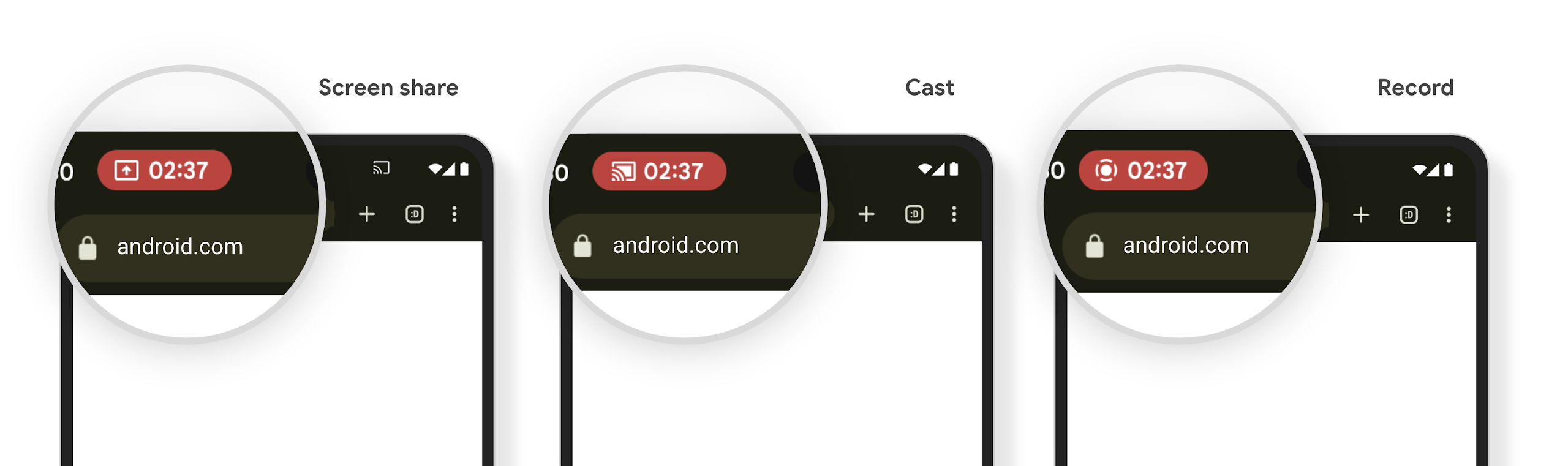
Chip da barra de status de projeção de mídia e parada automática
Media projection can expose private user information. A new, prominent status bar chip makes users aware of any ongoing screen projection. Users can tap the chip to stop screen casting, sharing, or recording. Also, for a more intuitive user experience, any in‑progress screen projection now automatically stops when the device screen is locked.
Telas grandes e formatos
O Android 15 oferece aos seus apps o suporte necessário para aproveitar ao máximo os formatos do Android, incluindo telas grandes, dispositivos dobráveis e flip.
Mais facilidade para várias tarefas em telas grandes
Android 15 gives users better ways to multitask on large screen devices. For example, users can save their favorite split-screen app combinations for quick access and pin the taskbar on screen to quickly switch between apps. This means that making sure your app is adaptive is more important than ever.
Google I/O has sessions on Building adaptive Android apps and Building UI with the Material 3 adaptive library that can help, and our documentation has more to help you Design for large screens.
Suporte à tela de capa
Your app can declare a property that Android 15 uses to
allow your Application or Activity to be presented on the small cover
screens of supported flippable devices. These screens are too small to be
considered as compatible targets for Android apps to run on, but your app can
opt in to supporting them, making your app available in more places.
Conectividade
O Android 15 atualiza a plataforma para dar ao seu app acesso aos avanços mais recentes em tecnologias de comunicação e sem fio.
Suporte a satélite
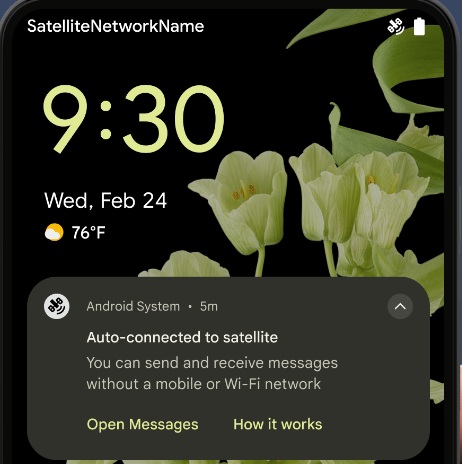
Android 15 continues to extend platform support for satellite connectivity and includes some UI elements to ensure a consistent user experience across the satellite connectivity landscape.
Apps can use ServiceState.isUsingNonTerrestrialNetwork() to
detect when a device is connected to a satellite, giving them more awareness of
why full network services might be unavailable. Additionally, Android 15
provides support for SMS and MMS apps as well as preloaded RCS apps to use
satellite connectivity for sending and receiving messages.
Experiências de NFC mais fluidas
Android 15 is working to make the tap to pay experience more seamless and
reliable while continuing to support Android's robust NFC app ecosystem. On
supported devices, apps can request the NfcAdapter to enter
observe mode, where the device listens but doesn't respond to NFC
readers, sending the app's NFC service PollingFrame
objects to process. The PollingFrame objects can be used to auth
ahead of the first communication to the NFC reader, allowing for a one tap
transaction in many cases.
In addition, apps can register a filter on supported devices so they can be notified of polling loop activity, which allows for smooth operation with multiple NFC-aware applications.
Função da carteira
Android 15 introduces a Wallet role that allows tighter integration with the user's preferred wallet app. This role replaces the NFC default contactless payment setting. Users can manage the Wallet role holder by navigating to Settings > Apps > Default Apps.
The Wallet role is used when routing NFC taps for AIDs registered in the payment category. Taps always go to the Wallet role holder unless another app that is registered for the same AID is running in the foreground.
This role is also used to determine where the Wallet Quick Access tile should go when activated. When the role is set to "None", the Quick Access tile isn't available and payment category NFC taps are only delivered to the foreground app.
Segurança
O Android 15 ajuda você a melhorar a segurança do app, proteger os dados dele e oferecer mais transparência e controle aos usuários sobre os dados deles. Assista à palestra Proteção da segurança do usuário no Android (em inglês) do Google I/O para saber mais sobre o que estamos fazendo para melhorar as proteções do usuário e proteger seu app contra novas ameaças.
Integrar o Credential Manager ao preenchimento automático
Starting with Android 15, developers can link specific views like username or password fields with Credential Manager requests, making it easier to provide a tailored user experience during the sign-in process. When the user focuses on one of these views, a corresponding request is sent to Credential Manager. The resulting credentials are aggregated across providers and displayed in autofill fallback UIs, such as inline suggestions or drop-down suggestions. The Jetpack androidx.credentials library is the preferred endpoint for developers to use and will soon be available to further enhance this feature in Android 15 and higher.
Integrar o processo de login e inscrição com um único toque às solicitações biométricas
Credential Manager integrates biometric prompts into the credential creation and sign-in processes, eliminating the need for providers to manage biometric prompts. As a result, credential providers only need to focus on the results of the create and get flows, augmented with the biometric flow result. This simplified process creates a more efficient and streamlined credential creation and retrieval process.
Gerenciamento de chaves para criptografia de ponta a ponta
We are introducing the E2eeContactKeysManager in Android 15, which
facilitates end-to-end encryption (E2EE) in your Android apps by providing an
OS-level API for the storage of cryptographic public keys.
The E2eeContactKeysManager is designed to integrate with the platform
contacts app to give users a centralized way to manage and verify their
contacts' public keys.
Verificações de permissão em URIs de conteúdo
Android 15 introduces a set of APIs that perform permission checks on content URIs:
Context.checkContentUriPermissionFull: This performs a full permission check on content URIs.Activitymanifest attributerequireContentUriPermissionFromCaller: This enforces specified permissions on the provided content URIs at activity launch.ComponentCallerclass forActivitycallers: This represents the app that launched the activity.
Acessibilidade
O Android 15 adiciona recursos que melhoram a acessibilidade para os usuários.
Braille melhorado
In Android 15, we've made it possible for TalkBack to support Braille displays that are using the HID standard over both USB and secure Bluetooth.
This standard, much like the one used by mice and keyboards, will help Android support a wider range of Braille displays over time.
Internacionalização
O Android 15 adiciona recursos e funcionalidades que complementam a experiência do usuário quando um dispositivo é usado em diferentes idiomas.
Fonte variável CJK
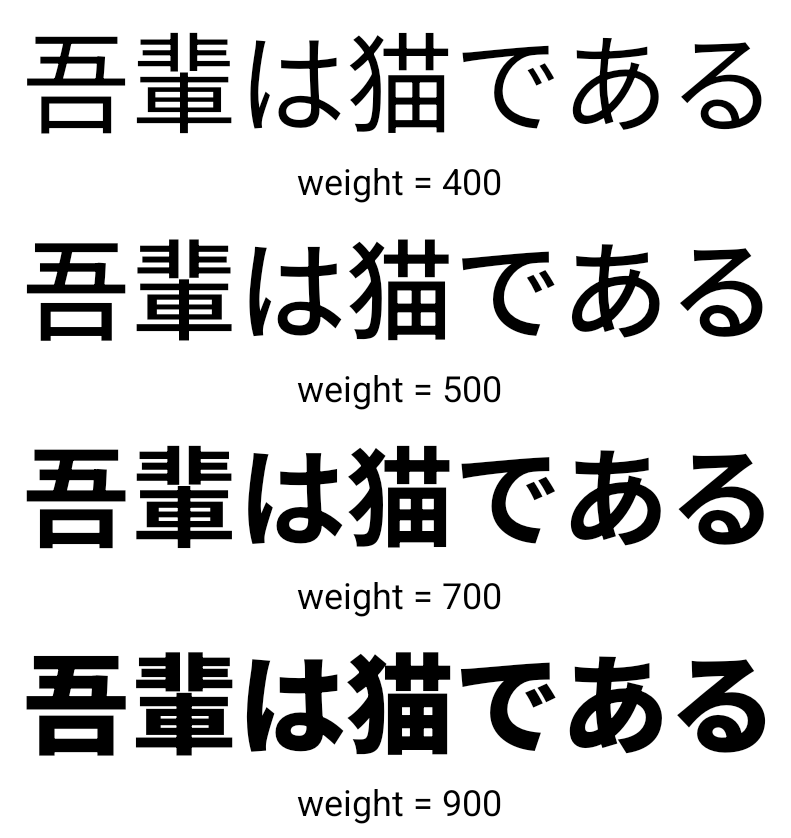
Starting with Android 15, the font file for Chinese, Japanese, and Korean (CJK) languages, NotoSansCJK, is now a variable font. Variable fonts open up possibilities for creative typography in CJK languages. Designers can explore a broader range of styles and create visually striking layouts that were previously difficult or impossible to achieve.
Justificação entre caracteres
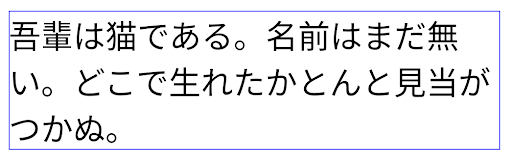
Starting with Android 15, text can be justified utilizing letter spacing by
using JUSTIFICATION_MODE_INTER_CHARACTER. Inter-word justification was
first introduced in Android 8.0 (API level 26), and inter-character
justification provides similar capabilities for languages that use the
whitespace character for segmentation, such as Chinese, Japanese, and others.
JUSTIFICATION_MODE_NONE.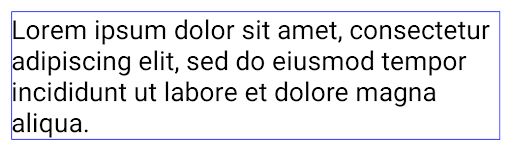
JUSTIFICATION_MODE_NONE.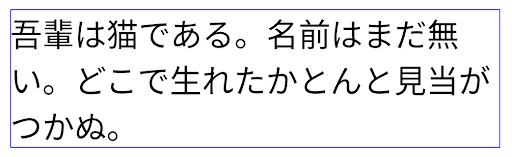
JUSTIFICATION_MODE_INTER_WORD.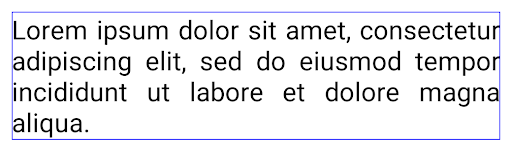
JUSTIFICATION_MODE_INTER_WORD.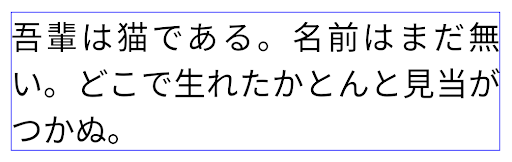
JUSTIFICATION_MODE_INTER_CHARACTER.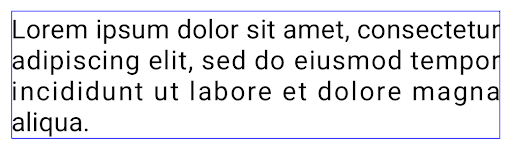
JUSTIFICATION_MODE_INTER_CHARACTER.Configuração automática de quebra de linha
Android started supporting phrase-based line breaks for Japanese and Korean in
Android 13 (API level 33). However, while phrase-based line breaks improve the
readability of short lines of text, they don't work well for long lines of text.
In Android 15, apps can apply phrase-based line breaks only for short lines
of text, using the LINE_BREAK_WORD_STYLE_AUTO
option. This option selects the best word style option for the text.
For short lines of text, phrase-based line breaks are used, functioning the same
as LINE_BREAK_WORD_STYLE_PHRASE, as shown in the
following image:
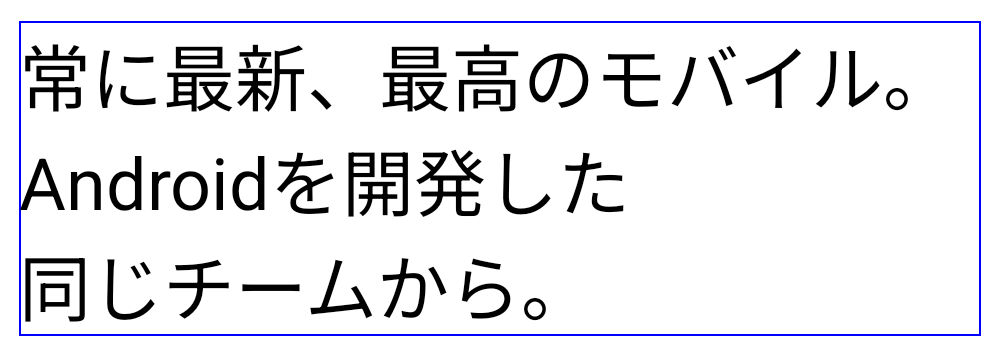
LINE_BREAK_WORD_STYLE_AUTO
applies phrase-based line breaks to improve the readability of the text.
This is the same as applying
LINE_BREAK_WORD_STYLE_PHRASE.For longer lines of text, LINE_BREAK_WORD_STYLE_AUTO uses a no
line-break word style, functioning the same as
LINE_BREAK_WORD_STYLE_NONE, as shown in the
following image:
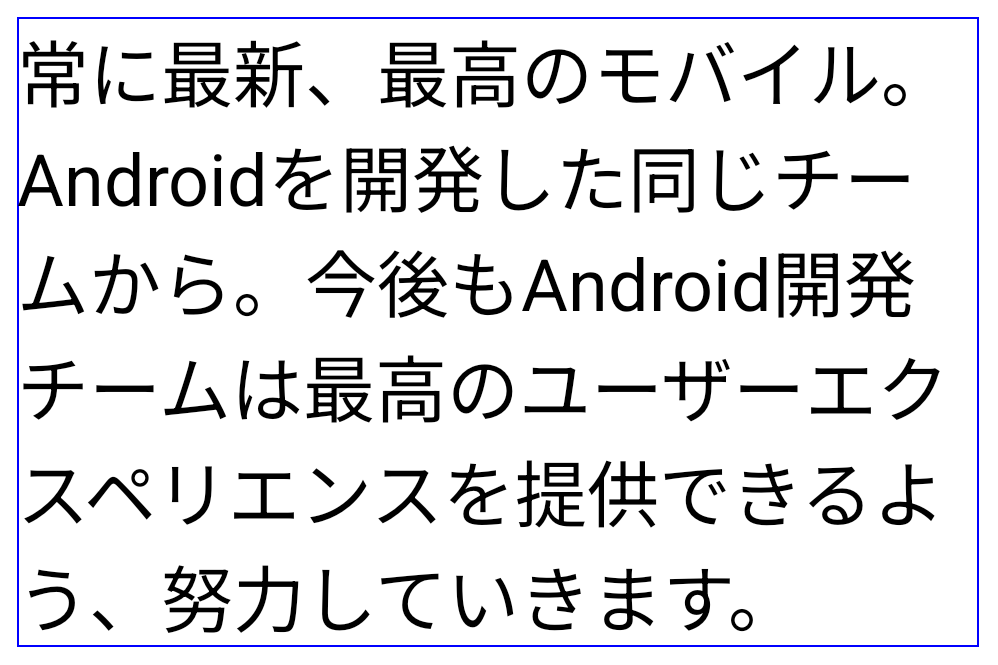
LINE_BREAK_WORD_STYLE_AUTO
applies no line-break word style to improve the readability of the text.
This is the same as applying
LINE_BREAK_WORD_STYLE_NONE.Fonte Hentaigana japonesa adicional
In Android 15, a font file for old Japanese Hiragana (known as Hentaigana) is bundled by default. The unique shapes of Hentaigana characters can add a distinctive flair to artwork or design while also helping to preserve accurate transmission and understanding of ancient Japanese documents.

VideoLAN cone Copyright (c) 1996-2010 VideoLAN. This logo or a modified version may be used or modified by anyone to refer to the VideoLAN project or any product developed by the VideoLAN team, but does not indicate endorsement by the project.
Vulkan and the Vulkan logo are registered trademarks of the Khronos Group Inc.
OpenGL is a registered trademark and the OpenGL ES logo is a trademark of Hewlett Packard Enterprise used by permission by Khronos.