

অ্যান্ড্রয়েড ১৫ ডেভেলপারদের জন্য দারুণ কিছু ফিচার ও এপিআই নিয়ে এসেছে। নিচের বিভাগগুলোতে এই ফিচারগুলোর সংক্ষিপ্ত বিবরণ দেওয়া হলো, যা আপনাকে সংশ্লিষ্ট এপিআইগুলো ব্যবহার শুরু করতে সাহায্য করবে।
যোগ করা, পরিবর্তন করা এবং সরিয়ে দেওয়া API-গুলির বিস্তারিত তালিকার জন্য, API diff রিপোর্টটি পড়ুন। যোগ করা API-গুলির বিশদ বিবরণের জন্য Android API রেফারেন্স দেখুন — Android 15-এর জন্য, API লেভেল 35-এ যোগ করা API-গুলি খুঁজুন। প্ল্যাটফর্মের পরিবর্তনগুলি আপনার অ্যাপগুলিকে কোন কোন ক্ষেত্রে প্রভাবিত করতে পারে সে সম্পর্কে জানতে, Android 15-কে টার্গেট করা অ্যাপগুলির জন্য এবং সমস্ত অ্যাপের জন্য Android 15-এর আচরণগত পরিবর্তনগুলি অবশ্যই দেখে নিন।
ক্যামেরা এবং মিডিয়া
অ্যান্ড্রয়েড ১৫-এ এমন বিভিন্ন ফিচার রয়েছে যা ক্যামেরা ও মিডিয়ার অভিজ্ঞতাকে উন্নত করে এবং নির্মাতাদের তাদের কল্পনাকে অ্যান্ড্রয়েডে বাস্তবে রূপ দিতে প্রয়োজনীয় টুলস ও হার্ডওয়্যার ব্যবহারের সুযোগ দেয়।
অ্যান্ড্রয়েড মিডিয়া ও ক্যামেরার সর্বশেষ ফিচার এবং ডেভেলপার সমাধান সম্পর্কে আরও জানতে, গুগল আই/ও-তে অনুষ্ঠিত 'বিল্ডিং মডার্ন অ্যান্ড্রয়েড মিডিয়া অ্যান্ড ক্যামেরা এক্সপেরিয়েন্সেস' শীর্ষক আলোচনাটি দেখুন।
কম আলোতে বুস্ট
Android 15 introduces Low Light Boost, an auto-exposure mode available to both Camera 2 and the night mode camera extension. Low Light Boost adjusts the exposure of the Preview stream in low-light conditions. This is different from how the night mode camera extension creates still images, because night mode combines a burst of photos to create a single, enhanced image. While night mode works very well for creating a still image, it can't create a continuous stream of frames, but Low Light Boost can. Thus, Low Light Boost enables camera capabilities, such as:
- Providing an enhanced image preview, so users are better able to frame their low-light pictures
- Scanning QR codes in low light
If you enable Low Light Boost, it automatically turns on when there's a low light level, and turns off when there's more light.
Apps can record off the Preview stream in low-light conditions to save a brightened video.
For more information, see Low Light Boost.
অ্যাপের মধ্যে ক্যামেরা নিয়ন্ত্রণ
অ্যান্ড্রয়েড 15 সমর্থিত ডিভাইসগুলিতে ক্যামেরা হার্ডওয়্যার এবং এর অ্যালগরিদমগুলির উপর আরও নিয়ন্ত্রণের জন্য একটি এক্সটেনশন যুক্ত করে:
- উন্নত ফ্ল্যাশ শক্তি সমন্বয় ইমেজ ক্যাপচার করার সময়
SINGLEএবংTORCHউভয় মোডে ফ্ল্যাশ তীব্রতার সুনির্দিষ্ট নিয়ন্ত্রণ সক্ষম করে।
HDR হেডরুম নিয়ন্ত্রণ
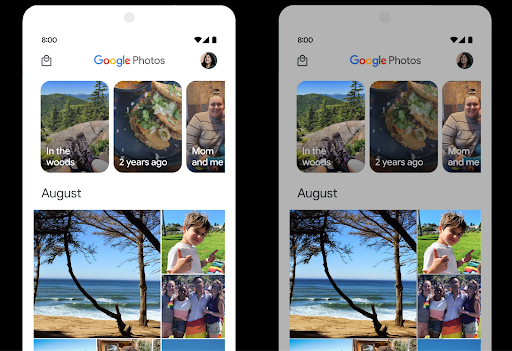
Android 15 HDR হেডরুম বেছে নেয় যা অন্তর্নিহিত ডিভাইসের ক্ষমতা এবং প্যানেলের বিট-গভীরতার জন্য উপযুক্ত। যে পৃষ্ঠাগুলিতে প্রচুর SDR সামগ্রী রয়েছে, যেমন একটি মেসেজিং অ্যাপ একটি একক HDR থাম্বনেল প্রদর্শন করে, এই আচরণটি SDR সামগ্রীর অনুভূত উজ্জ্বলতাকে বিরূপভাবে প্রভাবিত করতে পারে৷ Android 15 আপনাকে SDR এবং HDR সামগ্রীর মধ্যে ভারসাম্য বজায় রাখতে setDesiredHdrHeadroom সহ HDR হেডরুম নিয়ন্ত্রণ করতে দেয়।
শব্দ নিয়ন্ত্রণ

Android 15 introduces support for the CTA-2075 loudness standard to help you avoid audio loudness inconsistencies and ensure users don't have to constantly adjust volume when switching between content. The system leverages known characteristics of the output devices (headphones and speaker) along with loudness metadata available in AAC audio content to intelligently adjust the audio loudness and dynamic range compression levels.
To enable this feature, you need to ensure loudness metadata is available in
your AAC content and enable the platform feature in your app. For this, you
instantiate a LoudnessCodecController object by
calling its create factory method with the audio
session ID from the associated AudioTrack; this
automatically starts applying audio updates. You can pass an
OnLoudnessCodecUpdateListener to modify or filter
loudness parameters before they are applied on the
MediaCodec.
// Media contains metadata of type MPEG_4 OR MPEG_D
val mediaCodec = …
val audioTrack = AudioTrack.Builder()
                                .setSessionId(sessionId)
                                .build()
...
// Create new loudness controller that applies the parameters to the MediaCodec
try {
   val lcController = LoudnessCodecController.create(mSessionId)
   // Starts applying audio updates for each added MediaCodec
}
AndroidX media3 ExoPlayer will also be updated to use the
LoudnessCodecController APIs for a seamless app integration.
ভার্চুয়াল মিডি ২.০ ডিভাইস
Android 13 added support for connecting to MIDI 2.0 devices using USB, which communicate using Universal MIDI Packets (UMP). Android 15 extends UMP support to virtual MIDI apps, enabling composition apps to control synthesizer apps as a virtual MIDI 2.0 device just like they would with an USB MIDI 2.0 device.
আরও কার্যকর AV1 সফটওয়্যার ডিকোডিং

dav1d , VideoLAN-এর জনপ্রিয় AV1 সফ্টওয়্যার ডিকোডার Android ডিভাইসগুলির জন্য উপলব্ধ যা হার্ডওয়্যারে AV1 ডিকোড সমর্থন করে না। dav1d লিগ্যাসি AV1 সফ্টওয়্যার ডিকোডারের চেয়ে 3 গুণ বেশি পারফরম্যান্ট, কিছু নিম্ন এবং মধ্য স্তরের ডিভাইস সহ আরও ব্যবহারকারীদের জন্য HD AV1 প্লেব্যাক সক্ষম করে৷
আপনার অ্যাপটিকে "c2.android.av1-dav1d.decoder" নামে ডাকার মাধ্যমে dav1d ব্যবহার করতে অপ্ট-ইন করতে হবে। পরবর্তী আপডেটে dav1d কে ডিফল্ট AV1 সফ্টওয়্যার ডিকোডার করা হবে। এই সমর্থনটি প্রমিত এবং Android 11 ডিভাইসগুলিতে ব্যাকপোর্ট করা হয়েছে যা Google Play সিস্টেম আপডেটগুলি গ্রহণ করে।
ডেভেলপারদের উৎপাদনশীলতা এবং সরঞ্জাম
আপনার কর্মদক্ষতা বাড়ানোর জন্য আমাদের বেশিরভাগ কাজ অ্যান্ড্রয়েড স্টুডিও , জেটপ্যাক কম্পোজ এবং অ্যান্ড্রয়েড জেটপ্যাক লাইব্রেরির মতো টুলগুলোকে কেন্দ্র করে হলেও, আমরা প্ল্যাটফর্মের মধ্যেই এমন উপায় খুঁজি যা আপনাকে আপনার পরিকল্পনা আরও সহজে বাস্তবায়ন করতে সাহায্য করবে।
OpenJDK 17 আপডেট
Android 15 continues the work of refreshing Android's core libraries to align with the features in the latest OpenJDK LTS releases.
The following key features and improvements are included:
- Quality-of-life improvements around NIO buffers
- Streams
- Additional
mathandstrictmathmethods utilpackage updates including sequencedcollection,map, andsetByteBuffersupport inDeflater- Security updates such as
X500PrivateCredentialand security key updates
These APIs are updated on over a billion devices running Android 12 (API level 31) and higher through Google Play System updates, so you can target the latest programming features.
পিডিএফ উন্নতি
Android 15-এ PdfRenderer API-এর উল্লেখযোগ্য উন্নতি রয়েছে। অ্যাপগুলি পাসওয়ার্ড-সুরক্ষিত ফাইল রেন্ডারিং, টীকা, ফর্ম সম্পাদনা , অনুসন্ধান এবং অনুলিপি সহ নির্বাচনের মতো উন্নত বৈশিষ্ট্যগুলিকে অন্তর্ভুক্ত করতে পারে৷ লিনিয়ারাইজড পিডিএফ অপ্টিমাইজেশানগুলি স্থানীয় পিডিএফ দেখার গতি এবং সম্পদের ব্যবহার কমাতে সমর্থিত। জেটপ্যাক পিডিএফ লাইব্রেরি আপনার অ্যাপে পিডিএফ দেখার ক্ষমতা যোগ করা সহজ করতে এই APIগুলি ব্যবহার করে।
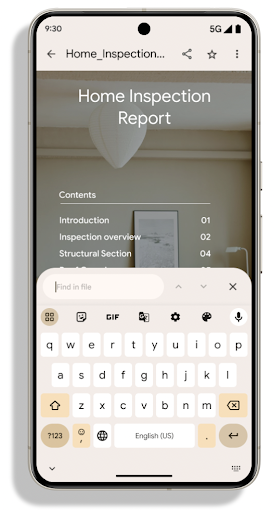
PdfRenderer একটি মডিউলে সরানো হয়েছে যা প্ল্যাটফর্ম রিলিজ ছাড়া Google Play সিস্টেম আপডেটগুলি ব্যবহার করে আপডেট করা যেতে পারে, এবং আমরা এই পরিবর্তনগুলিকে Android 11 (API স্তর 30)-এ একটি সামঞ্জস্যপূর্ণ প্রি-Android 15 সংস্করণ তৈরি করে সমর্থন করছি। API পৃষ্ঠ, PdfRendererPreV নামে পরিচিত।
Android 15-এ PdfRenderer API-এর উল্লেখযোগ্য উন্নতি রয়েছে। অ্যাপগুলি পাসওয়ার্ড-সুরক্ষিত ফাইল রেন্ডারিং, টীকা, ফর্ম সম্পাদনা , অনুসন্ধান এবং অনুলিপি সহ নির্বাচনের মতো উন্নত বৈশিষ্ট্যগুলিকে অন্তর্ভুক্ত করতে পারে৷ লিনিয়ারাইজড পিডিএফ অপ্টিমাইজেশানগুলি স্থানীয় পিডিএফ দেখার গতি এবং সম্পদের ব্যবহার কমাতে সমর্থিত। জেটপ্যাক পিডিএফ লাইব্রেরি আপনার অ্যাপে পিডিএফ দেখার ক্ষমতা যোগ করা সহজ করতে এই APIগুলি ব্যবহার করে।
PdfRenderer একটি মডিউলে সরানো হয়েছে যা প্ল্যাটফর্ম রিলিজ ছাড়া Google Play সিস্টেম আপডেটগুলি ব্যবহার করে আপডেট করা যেতে পারে, এবং আমরা এই পরিবর্তনগুলিকে Android 11 (API স্তর 30)-এ একটি সামঞ্জস্যপূর্ণ প্রি-Android 15 সংস্করণ তৈরি করে সমর্থন করছি। API পৃষ্ঠ, PdfRendererPreV নামে পরিচিত।
Android 15-এ PdfRenderer API-এর উল্লেখযোগ্য উন্নতি রয়েছে। অ্যাপগুলি পাসওয়ার্ড-সুরক্ষিত ফাইল রেন্ডারিং, টীকা, ফর্ম সম্পাদনা , অনুসন্ধান এবং অনুলিপি সহ নির্বাচনের মতো উন্নত বৈশিষ্ট্যগুলিকে অন্তর্ভুক্ত করতে পারে৷ লিনিয়ারাইজড পিডিএফ অপ্টিমাইজেশানগুলি স্থানীয় পিডিএফ দেখার গতি এবং সম্পদের ব্যবহার কমাতে সমর্থিত। জেটপ্যাক পিডিএফ লাইব্রেরি আপনার অ্যাপে পিডিএফ দেখার ক্ষমতা যোগ করা সহজ করতে এই APIগুলি ব্যবহার করে।
PdfRenderer একটি মডিউলে সরানো হয়েছে যা প্ল্যাটফর্ম রিলিজ ছাড়া Google Play সিস্টেম আপডেটগুলি ব্যবহার করে আপডেট করা যেতে পারে, এবং আমরা এই পরিবর্তনগুলিকে Android 11 (API স্তর 30)-এ একটি সামঞ্জস্যপূর্ণ প্রি-Android 15 সংস্করণ তৈরি করে সমর্থন করছি। API পৃষ্ঠ, PdfRendererPreV নামে পরিচিত।
স্বয়ংক্রিয় ভাষা পরিবর্তনের পরিমার্জন
অ্যান্ড্রয়েড 14 অডিওতে অন-ডিভাইস, বহু-ভাষা স্বীকৃতি যোগ করেছে ভাষাগুলির মধ্যে স্বয়ংক্রিয় পরিবর্তনের সাথে, কিন্তু এর ফলে শব্দগুলি বাদ পড়তে পারে, বিশেষ করে যখন ভাষা দুটি উচ্চারণের মধ্যে কম বিরতির সাথে স্যুইচ করে। Android 15 অ্যাপগুলিকে তাদের ব্যবহারের ক্ষেত্রে এই সুইচিং টিউন করতে সাহায্য করার জন্য অতিরিক্ত নিয়ন্ত্রণ যোগ করে। EXTRA_LANGUAGE_SWITCH_INITIAL_ACTIVE_DURATION_TIME_MILLIS স্বয়ংক্রিয় স্যুইচিংকে অডিও সেশনের শুরুতে সীমাবদ্ধ করে, যখন EXTRA_LANGUAGE_SWITCH_MATCH_SWITCHES একটি নির্দিষ্ট সংখ্যক স্যুইচের পরে ভাষা স্যুইচিং নিষ্ক্রিয় করে। এই বিকল্পগুলি বিশেষভাবে উপযোগী যদি আপনি আশা করেন যে অধিবেশন চলাকালীন একটি একক ভাষা বলা হবে যা স্বয়ংক্রিয়ভাবে সনাক্ত করা উচিত।
উন্নত ওপেনটাইপ ভেরিয়েবল ফন্ট এপিআই
Android 15 OpenType ভেরিয়েবল ফন্টের ব্যবহারযোগ্যতা উন্নত করে। আপনি buildVariableFamily API এর সাথে ওজন অক্ষ উল্লেখ না করে একটি পরিবর্তনশীল ফন্ট থেকে একটি FontFamily উদাহরণ তৈরি করতে পারেন। টেক্সট রেন্ডারার প্রদর্শন করা টেক্সট মেলে wght অক্ষের মান ওভাররাইড করে।
এপিআই ব্যবহার করে একটি Typeface তৈরির জন্য কোডটিকে যথেষ্ট সরল করে:
কোটলিন
val newTypeface = Typeface.CustomFallbackBuilder(
            FontFamily.Builder(
                Font.Builder(assets, "RobotoFlex.ttf").build())
                    .buildVariableFamily())
    .build()
জাভা
Typeface newTypeface = Typeface.CustomFallbackBuilder(
            new FontFamily.Builder(
                new Font.Builder(assets, "RobotoFlex.ttf").build())
                    .buildVariableFamily())
    .build();
পূর্বে, একই Typeface তৈরি করতে, আপনার আরও অনেক কোডের প্রয়োজন হবে:
কোটলিন
val oldTypeface = Typeface.CustomFallbackBuilder(
            FontFamily.Builder(
                Font.Builder(assets, "RobotoFlex.ttf")
                    .setFontVariationSettings("'wght' 400")
                    .setWeight(400)
                    .build())
                .addFont(
                    Font.Builder(assets, "RobotoFlex.ttf")
                        .setFontVariationSettings("'wght' 100")
                        .setWeight(100)
                        .build()
                )
                .addFont(
                    Font.Builder(assets, "RobotoFlex.ttf")
                        .setFontVariationSettings("'wght' 200")
                        .setWeight(200)
                        .build()
                )
                .addFont(
                    Font.Builder(assets, "RobotoFlex.ttf")
                        .setFontVariationSettings("'wght' 300")
                        .setWeight(300)
                        .build()
                )
                .addFont(
                    Font.Builder(assets, "RobotoFlex.ttf")
                        .setFontVariationSettings("'wght' 500")
                        .setWeight(500)
                        .build()
                )
                .addFont(
                    Font.Builder(assets, "RobotoFlex.ttf")
                        .setFontVariationSettings("'wght' 600")
                        .setWeight(600)
                        .build()
                )
                .addFont(
                    Font.Builder(assets, "RobotoFlex.ttf")
                        .setFontVariationSettings("'wght' 700")
                        .setWeight(700)
                        .build()
                )
                .addFont(
                    Font.Builder(assets, "RobotoFlex.ttf")
                        .setFontVariationSettings("'wght' 800")
                        .setWeight(800)
                        .build()
                )
                .addFont(
                    Font.Builder(assets, "RobotoFlex.ttf")
                        .setFontVariationSettings("'wght' 900")
                        .setWeight(900)
                        .build()
                ).build()
        ).build()
জাভা
Typeface oldTypeface = new Typeface.CustomFallbackBuilder(
    new FontFamily.Builder(
        new Font.Builder(assets, "RobotoFlex.ttf")
            .setFontVariationSettings("'wght' 400")
            .setWeight(400)
            .build()
    )
    .addFont(
        new Font.Builder(assets, "RobotoFlex.ttf")
            .setFontVariationSettings("'wght' 100")
            .setWeight(100)
            .build()
    )
    .addFont(
        new Font.Builder(assets, "RobotoFlex.ttf")
            .setFontVariationSettings("'wght' 200")
            .setWeight(200)
            .build()
    )
    .addFont(
        new Font.Builder(assets, "RobotoFlex.ttf")
            .setFontVariationSettings("'wght' 300")
            .setWeight(300)
            .build()
    )
    .addFont(
        new Font.Builder(assets, "RobotoFlex.ttf")
            .setFontVariationSettings("'wght' 500")
            .setWeight(500)
            .build()
    )
    .addFont(
        new Font.Builder(assets, "RobotoFlex.ttf")
            .setFontVariationSettings("'wght' 600")
            .setWeight(600)
            .build()
    )
    .addFont(
        new Font.Builder(assets, "RobotoFlex.ttf")
            .setFontVariationSettings("'wght' 700")
            .setWeight(700)
            .build()
    )
    .addFont(
        new Font.Builder(assets, "RobotoFlex.ttf")
            .setFontVariationSettings("'wght' 800")
            .setWeight(800)
            .build()
    )
    .addFont(
        new Font.Builder(assets, "RobotoFlex.ttf")
            .setFontVariationSettings("'wght' 900")
            .setWeight(900)
            .build()
    )
    .build()
).build();
পুরানো এবং নতুন উভয় API এর সাথে কীভাবে একটি Typeface তৈরি হয় তার একটি উদাহরণ এখানে দেওয়া হল:
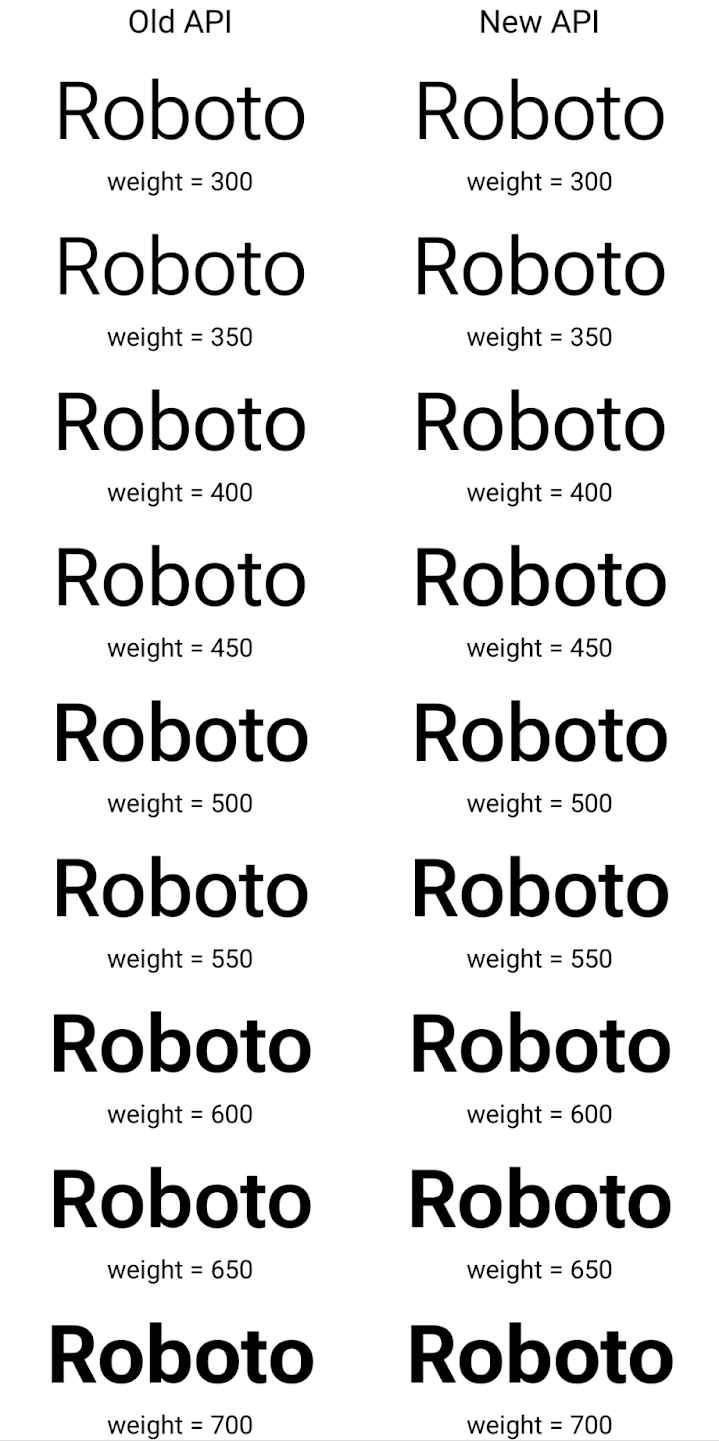
এই উদাহরণে, পুরানো API দিয়ে তৈরি করা Typeface 350, 450, 550 এবং 650 Font উদাহরণগুলির জন্য সঠিক ফন্টের ওজন তৈরি করার ক্ষমতা রাখে না, তাই রেন্ডারার সবচেয়ে কাছের ওজনে ফিরে আসে। সুতরাং এই ক্ষেত্রে, 350 এর পরিবর্তে 300 রেন্ডার করা হয়, 450 এর পরিবর্তে 400 রেন্ডার করা হয়, ইত্যাদি। বিপরীতে, নতুন এপিআইগুলির সাথে তৈরি Typeface গতিশীলভাবে একটি প্রদত্ত ওজনের জন্য একটি Font উদাহরণ তৈরি করে, তাই সঠিক ওজন 350, 450, 550 এবং 650 এর জন্যও রেন্ডার করা হয়।
দানাদার লাইন ব্রেক নিয়ন্ত্রণ
অ্যান্ড্রয়েড 15 থেকে শুরু করে, পাঠযোগ্যতা উন্নত করতে একটি TextView এবং অন্তর্নিহিত লাইন ব্রেকার একই লাইনে পাঠ্যের প্রদত্ত অংশ সংরক্ষণ করতে পারে। আপনি স্ট্রিং রিসোর্সে <nobreak> ট্যাগ ব্যবহার করে অথবা createNoBreakSpan এই লাইন ব্রেক কাস্টমাইজেশনের সুবিধা নিতে পারেন। একইভাবে, আপনি <nohyphen> ট্যাগ বা createNoHyphenationSpan ব্যবহার করে হাইফেনেশন থেকে শব্দ সংরক্ষণ করতে পারেন।
উদাহরণ স্বরূপ, নিম্নলিখিত স্ট্রিং রিসোর্সে লাইন ব্রেক নেই এবং "Pixel 8 Pro" লেখার সাথে রেন্ডার করা হয়। একটি অবাঞ্ছিত জায়গায় ভাঙ্গা:
<resources>
    <string name="pixel8pro">The power and brains behind Pixel 8 Pro.</string>
</resources>
বিপরীতে, এই স্ট্রিং রিসোর্সটিতে <nobreak> ট্যাগ অন্তর্ভুক্ত রয়েছে, যা "Pixel 8 Pro" শব্দটিকে মোড়ানো। এবং লাইন ব্রেক প্রতিরোধ করে:
<resources>
    <string name="pixel8pro">The power and brains behind <nobreak>Pixel 8 Pro.</nobreak></string>
</resources>
এই স্ট্রিংগুলি কীভাবে রেন্ডার করা হয় তার পার্থক্য নিম্নলিখিত চিত্রগুলিতে দেখানো হয়েছে:
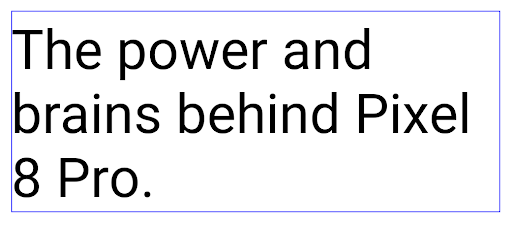
<nobreak> ট্যাগ ব্যবহার করে মোড়ানো হয় না। 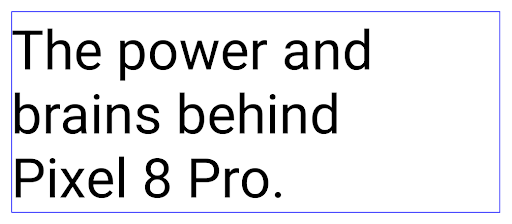
<nobreak> ট্যাগ ব্যবহার করে মোড়ানো হয়।অ্যাপ আর্কাইভ করা
Android and Google Play announced support for app archiving last year, allowing users to free up space by partially removing infrequently used apps from the device that were published using Android App Bundle on Google Play. Android 15 includes OS level support for app archiving and unarchiving, making it easier for all app stores to implement it.
Apps with the REQUEST_DELETE_PACKAGES permission can call the
PackageInstaller requestArchive method to request archiving an
installed app package, which removes the APK and any cached files, but persists
user data. Archived apps are returned as displayable apps through the
LauncherApps APIs; users will see a UI treatment to highlight that those
apps are archived. If a user taps on an archived app, the responsible installer
will get a request to unarchive it, and the restoration process can be
monitored by the ACTION_PACKAGE_ADDED broadcast.
ডেভেলপার অপশন ব্যবহার করে একটি ডিভাইসে ১৬ কেবি মোড সক্ষম করুন
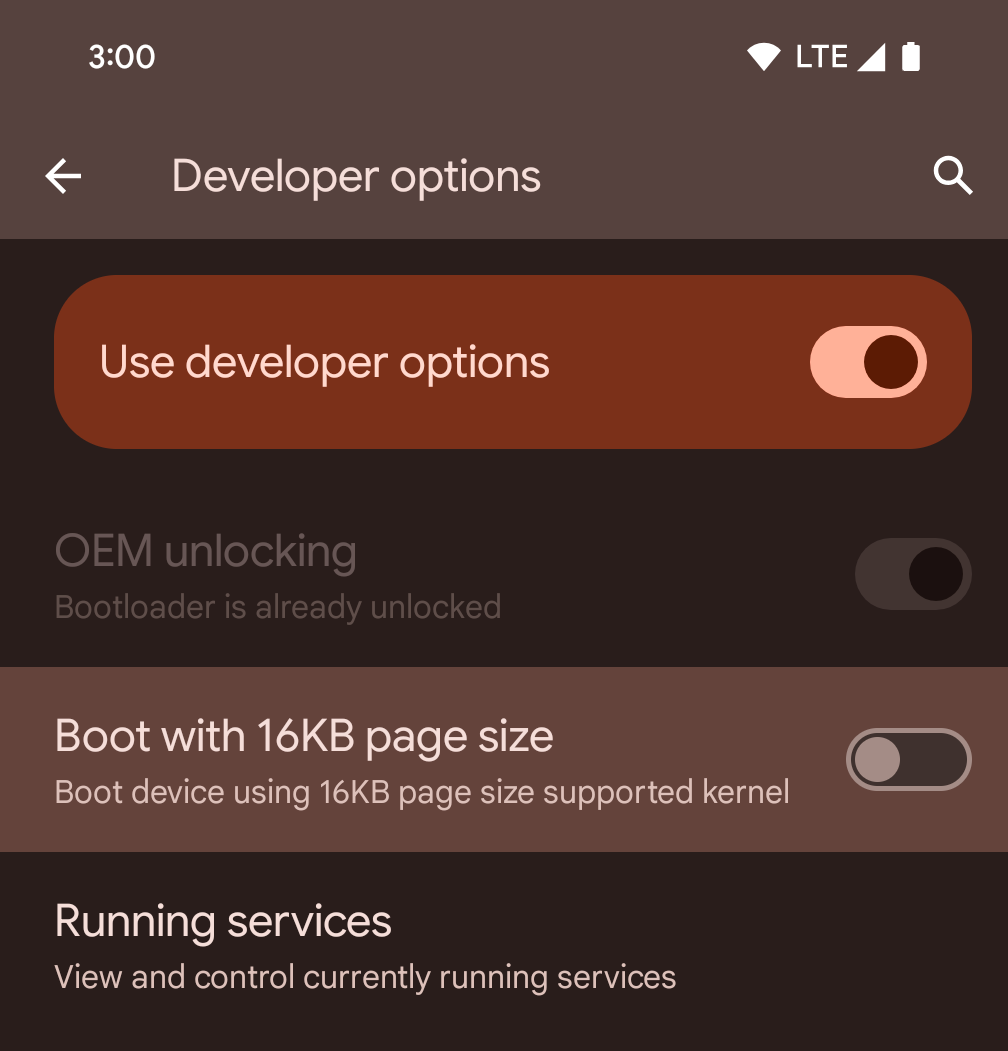
১৬ কেবি মোডে একটি ডিভাইস বুট করতে ১৬ কেবি পৃষ্ঠা আকারের ডেভেলপার বিকল্পটি টগল করুন।
অ্যান্ড্রয়েড ১৫ এর QPR সংস্করণগুলিতে, আপনি নির্দিষ্ট ডিভাইসে উপলব্ধ ডেভেলপার বিকল্পটি ব্যবহার করে ডিভাইসটিকে ১৬ KB মোডে বুট করতে এবং অন-ডিভাইস পরীক্ষা করতে পারেন। ডেভেলপার বিকল্পটি ব্যবহার করার আগে, সেটিংস > সিস্টেম > সফ্টওয়্যার আপডেটে যান এবং উপলব্ধ যেকোনো আপডেট প্রয়োগ করুন।
এই ডেভেলপার বিকল্পটি নিম্নলিখিত ডিভাইসগুলিতে উপলব্ধ:
Pixel 8 এবং 8 Pro (Android 15 QPR1 বা তার উচ্চতর ভার্সন সহ)
Pixel 8a (Android 15 QPR1 বা তার উচ্চতর ভার্সন সহ)
Pixel 9, 9 Pro, এবং 9 Pro XL (Android 15 QPR2 বা তার উচ্চতর ভার্সন সহ)
Pixel 9a (Android 16 বা তার উচ্চতর ভার্সন সহ)
গ্রাফিক্স
অ্যান্ড্রয়েড ১৫ সর্বশেষ গ্রাফিক্স উন্নয়ন নিয়ে এসেছে, যার মধ্যে ANGLE এবং ক্যানভাস গ্রাফিক্স সিস্টেমে নতুন সংযোজন অন্তর্ভুক্ত রয়েছে।
অ্যান্ড্রয়েডের জিপিইউ অ্যাক্সেস আধুনিকীকরণ

Android hardware has evolved quite a bit from the early days where the core OS would run on a single CPU and GPUs were accessed using APIs based on fixed-function pipelines. The Vulkan® graphics API has been available in the NDK since Android 7.0 (API level 24) with a lower-level abstraction that better reflects modern GPU hardware, scales better to support multiple CPU cores, and offers reduced CPU driver overhead — leading to improved app performance. Vulkan is supported by all modern game engines.
Vulkan is Android's preferred interface to the GPU. Therefore, Android 15 includes ANGLE as an optional layer for running OpenGL® ES on top of Vulkan. Moving to ANGLE will standardize the Android OpenGL implementation for improved compatibility, and, in some cases, improved performance. You can test out your OpenGL ES app stability and performance with ANGLE by enabling the developer option in Settings -> System -> Developer Options -> Experimental: Enable ANGLE on Android 15.
The Android ANGLE on Vulkan roadmap
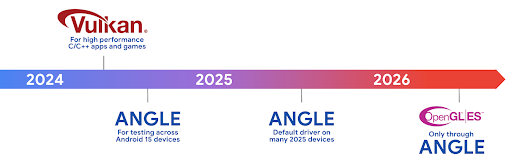
As part of streamlining our GPU stack, going forward we will be shipping ANGLE as the GL system driver on more new devices, with the future expectation that OpenGL/ES will be only available through ANGLE. That being said, we plan to continue support for OpenGL ES on all devices.
Recommended next steps
Use the developer options to select the ANGLE driver for OpenGL ES and test your app. For new projects, we strongly encourage using Vulkan for C/C++.
ক্যানভাসের জন্য উন্নতি
Android 15 continues our modernization of Android's Canvas graphics system with additional capabilities:
Matrix44provides a 4x4 matrix for transforming coordinates that should be used when you want to manipulate the canvas in 3D.clipShaderintersects the current clip with the specified shader, whileclipOutShadersets the clip to the difference of the current clip and the shader, each treating the shader as an alpha mask. This supports the drawing of complex shapes efficiently.
কর্মক্ষমতা এবং ব্যাটারি
অ্যান্ড্রয়েড আপনার অ্যাপের পারফরম্যান্স এবং গুণমান উন্নত করতে সাহায্য করার উপর মনোযোগ অব্যাহত রেখেছে। অ্যান্ড্রয়েড ১৫ এমন কিছু এপিআই (API) চালু করেছে যা আপনার অ্যাপের কাজগুলোকে আরও দক্ষতার সাথে সম্পাদন করতে, অ্যাপের পারফরম্যান্স অপ্টিমাইজ করতে এবং আপনার অ্যাপ সম্পর্কে তথ্য সংগ্রহ করতে সাহায্য করে।
ব্যাটারি-সাশ্রয়ী সেরা অনুশীলন, নেটওয়ার্ক ও পাওয়ার ব্যবহারের ডিবাগিং, এবং অ্যান্ড্রয়েড ১৫ ও অ্যান্ড্রয়েডের সাম্প্রতিক সংস্করণগুলিতে ব্যাকগ্রাউন্ড কাজের ব্যাটারি দক্ষতা আমরা কীভাবে উন্নত করছি সে সম্পর্কে বিস্তারিত জানতে, গুগল আই/ও (Google I/O)-তে উপস্থাপিত "অ্যান্ড্রয়েডে ব্যাকগ্রাউন্ড কাজের ব্যাটারি দক্ষতা উন্নত করা" শীর্ষক আলোচনাটি দেখুন।
অ্যাপ্লিকেশনস্টার্টইনফো এপিআই
In previous versions of Android, app startup has been a bit of a mystery. It was
challenging to determine within your app whether it started from a cold, warm,
or hot state. It was also difficult to know how long your app spent during the
various launch phases: forking the process, calling onCreate, drawing the
first frame, and more. When your Application class was instantiated, you had no
way of knowing whether the app started from a broadcast, a content provider, a
job, a backup, boot complete, an alarm, or an Activity.
The ApplicationStartInfo API on Android 15 provides
all of this and more. You can even choose to add your own timestamps into the
flow to help collect timing data in one place. In addition to collecting
metrics, you can use ApplicationStartInfo to help directly optimize app
startup; for example, you can eliminate the costly instantiation of UI-related
libraries within your Application class when your app is starting up due to a
broadcast.
অ্যাপের আকারের বিস্তারিত তথ্য
Since Android 8.0 (API level 26), Android has included the
StorageStats.getAppBytes API that summarizes the installed
size of an app as a single number of bytes, which is a sum of the APK size, the
size of files extracted from the APK, and files that were generated on the
device such as ahead-of-time (AOT) compiled code. This number is not very
insightful in terms of how your app is using storage.
Android 15 adds the
StorageStats.getAppBytesByDataType([type]) API, which lets
you get insight into how your app is using up all that space, including APK file
splits, AOT and speedup related code, dex metadata, libraries, and guided
profiles.
অ্যাপ-পরিচালিত প্রোফাইলিং
Android 15 includes the ProfilingManager class,
which lets you collect profiling information from within your app such as heap
dumps, heap profiles, stack sampling, and more. It provides a callback to your
app with a supplied tag to identify the output file, which is delivered to your
app's files directory. The API does rate limiting to minimize the performance
impact.
To simplify constructing profiling requests in your app, we recommend using the
corresponding Profiling AndroidX API, available
in Core 1.15.0-rc01 or higher.
SQLite ডেটাবেসের উন্নতি
Android 15 introduces SQLite APIs that expose advanced features from the underlying SQLite engine that target specific performance issues that can manifest in apps. These APIs are included with the update of SQLite to version 3.44.3.
Developers should consult best practices for SQLite performance to get the most out of their SQLite database, especially when working with large databases or when running latency-sensitive queries.
- Read-only deferred transactions: when issuing transactions that are
read-only (don't include write statements), use
beginTransactionReadOnly()andbeginTransactionWithListenerReadOnly(SQLiteTransactionListener)to issue read-onlyDEFERREDtransactions. Such transactions can run concurrently with each other, and if the database is in WAL mode, they can run concurrently withIMMEDIATEorEXCLUSIVEtransactions. - Row counts and IDs: APIs were added to retrieve the count of changed
rows or the last inserted row ID without issuing an additional query.
getLastChangedRowCount()returns the number of rows that were inserted, updated, or deleted by the most recent SQL statement within the current transaction, whilegetTotalChangedRowCount()returns the count on the current connection.getLastInsertRowId()returns therowidof the last row to be inserted on the current connection. - Raw statements: issue a raw SQlite statement, bypassing convenience wrappers and any additional processing overhead that they may incur.
অ্যান্ড্রয়েড ডায়নামিক পারফরম্যান্স ফ্রেমওয়ার্ক আপডেট
Android 15 continues our investment in the Android Dynamic Performance Framework (ADPF), a set of APIs that allow games and performance intensive apps to interact more directly with power and thermal systems of Android devices. On supported devices, Android 15 adds ADPF capabilities:
- A power-efficiency mode for hint sessions to indicate that their associated threads should prefer power saving over performance, great for long-running background workloads.
- GPU and CPU work durations can both be reported in hint sessions, allowing the system to adjust CPU and GPU frequencies together to best meet workload demands.
- Thermal headroom thresholds to interpret possible thermal throttling status based on headroom prediction.
To learn more about how to use ADPF in your apps and games, head over to the documentation.
গোপনীয়তা
অ্যান্ড্রয়েড ১৫-এ বিভিন্ন ধরনের ফিচার রয়েছে যা অ্যাপ ডেভেলপারদের ব্যবহারকারীর গোপনীয়তা রক্ষা করতে সাহায্য করে।
স্ক্রিন রেকর্ডিং সনাক্তকরণ
Android 15 adds support for apps to detect that they are being recorded. A callback is invoked whenever the app transitions between being visible or invisible within a screen recording. An app is considered visible if activities owned by the registering process's UID are being recorded. This way, if your app is performing a sensitive operation, you can inform the user that they're being recorded.
val mCallback = Consumer<Int> { state ->
  if (state == SCREEN_RECORDING_STATE_VISIBLE) {
    // We're being recorded
  } else {
    // We're not being recorded
  }
}

override fun onStart() {
   super.onStart()
   val initialState =
      windowManager.addScreenRecordingCallback(mainExecutor, mCallback)
   mCallback.accept(initialState)
}

override fun onStop() {
    super.onStop()
    windowManager.removeScreenRecordingCallback(mCallback)
}
সম্প্রসারিত ইন্টেন্টফিল্টার ক্ষমতা
Android 15 builds in support for more precise Intent resolution through
UriRelativeFilterGroup, which contains a set of
UriRelativeFilter objects that form a set of Intent
matching rules that must each be satisfied, including URL query parameters, URL
fragments, and blocking or exclusion rules.
These rules can be defined in the AndroidManifest XML file with the
<uri-relative-filter-group> tag, which can optionally include an
android:allow tag. These tags can contain <data> tags that use existing data
tag attributes as well as the android:query and android:fragment
attributes.
Here's an example of the AndroidManifest syntax:
<intent-filter android:autoVerify="true">
  <action android:name="android.intent.action.VIEW" />
  <category android:name="android.intent.category.BROWSABLE" />
  <category android:name="android.intent.category.DEFAULT" />
  <data android:scheme="http" />
  <data android:scheme="https" />
  <data android:host="astore.com" />
  <uri-relative-filter-group>
    <data android:pathPrefix="/auth" />
    <data android:query="region=na" />
  </uri-relative-filter-group>
  <uri-relative-filter-group android:allow="false">
    <data android:pathPrefix="/auth" />
    <data android:query="mobileoptout=true" />
  </uri-relative-filter-group>
  <uri-relative-filter-group android:allow="false">
    <data android:pathPrefix="/auth" />
    <data android:fragmentPrefix="faq" />
  </uri-relative-filter-group>
</intent-filter>
ব্যক্তিগত স্থান
Private space lets users create a separate space on their device where they can keep sensitive apps away from prying eyes, under an additional layer of authentication. The private space uses a separate user profile. The user can choose to use the device lock or a separate lock factor for the private space.
Apps in the private space show up in a separate container in the launcher, and are hidden from the recents view, notifications, settings, and from other apps when the private space is locked. User-generated and downloaded content (such as media or files) and accounts are separated between the private space and the main space. The system sharesheet and the photo picker can be used to give apps access to content across spaces when the private space is unlocked.
Users can't move existing apps and their data into the private space. Instead, users select an install option in the private space to install an app using whichever app store they prefer. Apps in the private space are installed as separate copies from any apps in the main space (new copies of the same app).
When a user locks the private space, the profile is stopped. While the profile is stopped, apps in the private space are no longer active and can't perform foreground or background activities, including showing notifications.
We recommend that you test your app with private space to make sure your app works as expected, especially if your app falls into one of the following categories:
- Apps with logic for work profiles that assumes that any installed copies of their app that aren't in the main profile are in the work profile.
- Medical apps
- Launcher apps
- App store apps
নির্বাচিত ফটোগুলোর অ্যাক্সেসের জন্য ব্যবহারকারীর সর্বশেষ নির্বাচন সম্পর্কে জিজ্ঞাসা করুন।
Apps can now highlight only the most-recently-selected photos and videos when
partial access to media permissions is granted. This feature can improve
the user experience for apps that frequently request access to photos and
videos. To use this feature in your app, enable the
QUERY_ARG_LATEST_SELECTION_ONLY argument when querying MediaStore
through ContentResolver.
Kotlin
val externalContentUri = MediaStore.Files.getContentUri("external")

val mediaColumns = arrayOf(
   FileColumns._ID,
   FileColumns.DISPLAY_NAME,
   FileColumns.MIME_TYPE,
)

val queryArgs = bundleOf(
   // Return only items from the last selection (selected photos access)
   QUERY_ARG_LATEST_SELECTION_ONLY to true,
   // Sort returned items chronologically based on when they were added to the device's storage
   QUERY_ARG_SQL_SORT_ORDER to "${FileColumns.DATE_ADDED} DESC",
   QUERY_ARG_SQL_SELECTION to "${FileColumns.MEDIA_TYPE} = ? OR ${FileColumns.MEDIA_TYPE} = ?",
   QUERY_ARG_SQL_SELECTION_ARGS to arrayOf(
       FileColumns.MEDIA_TYPE_IMAGE.toString(),
       FileColumns.MEDIA_TYPE_VIDEO.toString()
   )
)
Java
Uri externalContentUri = MediaStore.Files.getContentUri("external");

String[] mediaColumns = {
    FileColumns._ID,
    FileColumns.DISPLAY_NAME,
    FileColumns.MIME_TYPE
};

Bundle queryArgs = new Bundle();
queryArgs.putBoolean(MediaStore.QUERY_ARG_LATEST_SELECTION_ONLY, true);
queryArgs.putString(MediaStore.QUERY_ARG_SQL_SORT_ORDER, FileColumns.DATE_ADDED + " DESC");
queryArgs.putString(MediaStore.QUERY_ARG_SQL_SELECTION, FileColumns.MEDIA_TYPE + " = ? OR " + FileColumns.MEDIA_TYPE + " = ?");
queryArgs.putStringArray(MediaStore.QUERY_ARG_SQL_SELECTION_ARGS, new String[] {
    String.valueOf(FileColumns.MEDIA_TYPE_IMAGE),
    String.valueOf(FileColumns.MEDIA_TYPE_VIDEO)
});
অ্যান্ড্রয়েডে প্রাইভেসি স্যান্ডবক্স
Android 15 includes the latest Android Ad Services extensions, incorporating the latest version of the Privacy Sandbox on Android. This addition is part of our work to develop technologies that improve user privacy and enable effective, personalized advertising experiences for mobile apps. Our privacy sandbox page has more information about the Privacy Sandbox on Android developer preview and beta programs to help you get started.
স্বাস্থ্য সংযোগ
Android 15 integrates the latest extensions around Health Connect by Android, a secure and centralized platform to manage and share app-collected health and fitness data. This update adds support for additional data types across fitness, nutrition, skin temperature, training plans, and more.
Skin temperature tracking allows users to store and share more accurate temperature data from a wearable or other tracking device.
Training plans are structured workout plans to help a user achieve their fitness goals. Training plans support includes a variety of completion and performance goals:
- Completion goals around calories burned, distance, duration, repetition, and steps.
- Performance goals around as many repetitions as possible (AMRAP), cadence, heart rate, power, perceived rate of exertion, and speed.
Learn more about the latest updates to Health Connect in Android in the Building adaptable experiences with Android Health talk from Google I/O.
অ্যাপ স্ক্রিন শেয়ারিং
Android 15 supports app screen sharing so users can share or record just an
app window rather than the entire device screen. This feature, first enabled in
Android 14 QPR2, includes
MediaProjection callbacks that allow your app
to customize the app screen sharing experience. Note that for apps targeting
Android 14 (API level 34) or higher,
user consent is required for each
MediaProjection capture session.
ব্যবহারকারীর অভিজ্ঞতা এবং সিস্টেম UI
অ্যান্ড্রয়েড ১৫ অ্যাপ ডেভেলপার এবং ব্যবহারকারীদের নিজেদের প্রয়োজন অনুযায়ী ডিভাইস কনফিগার করার ক্ষেত্রে আরও বেশি নিয়ন্ত্রণ ও নমনীয়তা প্রদান করে।
আপনার অ্যাপের ইউজার এক্সপেরিয়েন্স উন্নত করতে অ্যান্ড্রয়েড ১৫-এর সর্বশেষ উন্নতিগুলো কীভাবে ব্যবহার করবেন সে সম্পর্কে আরও জানতে, গুগল আই/ও (Google I/O)-এর “আপনার অ্যান্ড্রয়েড অ্যাপের ইউজার এক্সপেরিয়েন্স উন্নত করুন” (Improve the user experience of your Android app ) শীর্ষক আলোচনাটি দেখুন।
জেনারেটেড প্রিভিউ এপিআই-এর মাধ্যমে আরও সমৃদ্ধ উইজেট প্রিভিউ
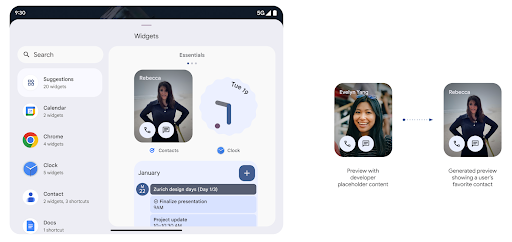
Before Android 15, the only way to provide widget picker previews was to specify a static image or layout resource. These previews often differ significantly from the look of the actual widget when it is placed on the home screen. Also, static resources can't be created with Jetpack Glance, so a Glance developer had to screenshot their widget or create an XML layout to have a widget preview.
Android 15 adds support for generated previews. This means that app widget
providers can generate RemoteViews to use as the picker preview, instead
of a static resource.
Push API
Apps can provide generated previews through a push API. Apps can provide
previews at any point in their lifecycle, and don't receive an explicit request
from the host to provide previews. Previews are persisted in AppWidgetService,
and hosts can request them on-demand. The following example loads an XML widget
layout resource and sets it as the preview:
AppWidgetManager.getInstance(appContext).setWidgetPreview(
   ComponentName(
       appContext,
       SociaLiteAppWidgetReceiver::class.java
   ),
   AppWidgetProviderInfo.WIDGET_CATEGORY_HOME_SCREEN,
   RemoteViews("com.example", R.layout.widget_preview)
)
The expected flow is:
- At any time, the widget provider calls
setWidgetPreview. The provided previews are persisted inAppWidgetServicewith other provider info. setWidgetPreviewnotifies hosts of an updated preview through theAppWidgetHost.onProvidersChangedcallback. In response, the widget host reloads all of its provider information.- When displaying a widget preview, the host checks
AppWidgetProviderInfo.generatedPreviewCategories, and if the chosen category is available, callsAppWidgetManager.getWidgetPreviewto return the saved preview for this provider.
When to call setWidgetPreview
Because there is no callback to provide previews, apps can choose to send previews at any point when they are running. How often to update the preview depends on the widget's use case.
The following list describes the two main categories of preview use cases:
- Providers that show real data in their widget previews, such as personalized or recent information. These providers can set the preview once the user has signed in or has done initial configuration in their app. After this, they can set up a periodic task to update the previews at their chosen cadence. Examples of this type of widget could be a photo, calendar, weather or news widget.
- Providers that show static information in previews or quick-action widgets that don't display any data. These providers can set previews once, when the app first launches. Examples of this type of widget include a drive quick actions widget or chrome shortcuts widget.
Some providers might show static previews on the hub mode picker, but real information on the homescreen picker. These providers should follow the guidance for both of these use cases to set previews.
পিকচার-ইন-পিকচার
Android 15 introduces changes in Picture-in-Picture (PiP) ensuring an even smoother transition when entering into PiP mode. This will be beneficial for apps having UI elements overlaid on top of their main UI, which goes into PiP.
Developers use the onPictureInPictureModeChanged callback to define logic
that toggles the visibility of the overlaid UI elements. This callback is
triggered when the PiP enter or exit animation is completed. Beginning in
Android 15, the PictureInPictureUiState class includes another state.
With this UI state, apps targeting Android 15 (API level 35) will observe the
Activity#onPictureInPictureUiStateChanged callback being invoked with
isTransitioningToPip() as soon as the PiP animation starts. There are
many UI elements that are not relevant for the app when it is in PiP mode, for
example views or layout that include information such as suggestions, upcoming
video, ratings, and titles. When the app goes to PiP mode, use the
onPictureInPictureUiStateChanged callback to hide these UI elements. When the
app goes to full screen mode from the PiP window, use
onPictureInPictureModeChanged callback to unhide these elements, as shown in
the following examples:
override fun onPictureInPictureUiStateChanged(pipState: PictureInPictureUiState) {
        if (pipState.isTransitioningToPip()) {
          // Hide UI elements
        }
    }
override fun onPictureInPictureModeChanged(isInPictureInPictureMode: Boolean) {
        if (isInPictureInPictureMode) {
          // Unhide UI elements
        }
    }
This quick visibility toggle of irrelevant UI elements (for a PiP window) helps ensure a smoother and flicker-free PiP enter animation.
উন্নত Do Not Disturb নিয়মাবলী
AutomaticZenRule অ্যাপগুলিকে অ্যাটেনশন ম্যানেজমেন্ট (বিরক্ত করবেন না) নিয়ম কাস্টমাইজ করতে দেয় এবং কখন সেগুলি সক্রিয় বা নিষ্ক্রিয় করতে হবে তা নির্ধারণ করতে দেয়। অ্যান্ড্রয়েড 15 ব্যবহারকারীর অভিজ্ঞতা উন্নত করার লক্ষ্যে এই নিয়মগুলিকে ব্যাপকভাবে উন্নত করে। নিম্নলিখিত উন্নতিগুলি অন্তর্ভুক্ত করা হয়েছে:
-
AutomaticZenRuleতে প্রকারগুলি যোগ করা, সিস্টেমটিকে কিছু নিয়মে বিশেষ চিকিত্সা প্রয়োগ করার অনুমতি দেয়৷ -
AutomaticZenRuleএ একটি আইকন যুক্ত করা, মোডগুলিকে আরও স্বীকৃত করতে সাহায্য করে৷ -
AutomaticZenRuleএ একটিtriggerDescriptionস্ট্রিং যোগ করা যা ব্যবহারকারীর জন্য নিয়মটি সক্রিয় হওয়া উচিত এমন শর্তগুলি বর্ণনা করে। -
AutomaticZenRuleZenDeviceEffectsযোগ করা হয়েছে, নিয়মগুলিকে গ্রেস্কেল ডিসপ্লে, নাইট মোড বা ওয়ালপেপারকে আবছা করার মতো জিনিসগুলিকে ট্রিগার করার অনুমতি দেয়৷
নোটিফিকেশন চ্যানেলগুলির জন্য ভাইব্রেশন এফেক্ট সেট করুন
Android 15 supports setting rich vibrations for incoming notifications by
channel using NotificationChannel.setVibrationEffect, so
your users can distinguish between different types of notifications without
having to look at their device.
মিডিয়া প্রজেকশন স্ট্যাটাস বার চিপ এবং অটো স্টপ
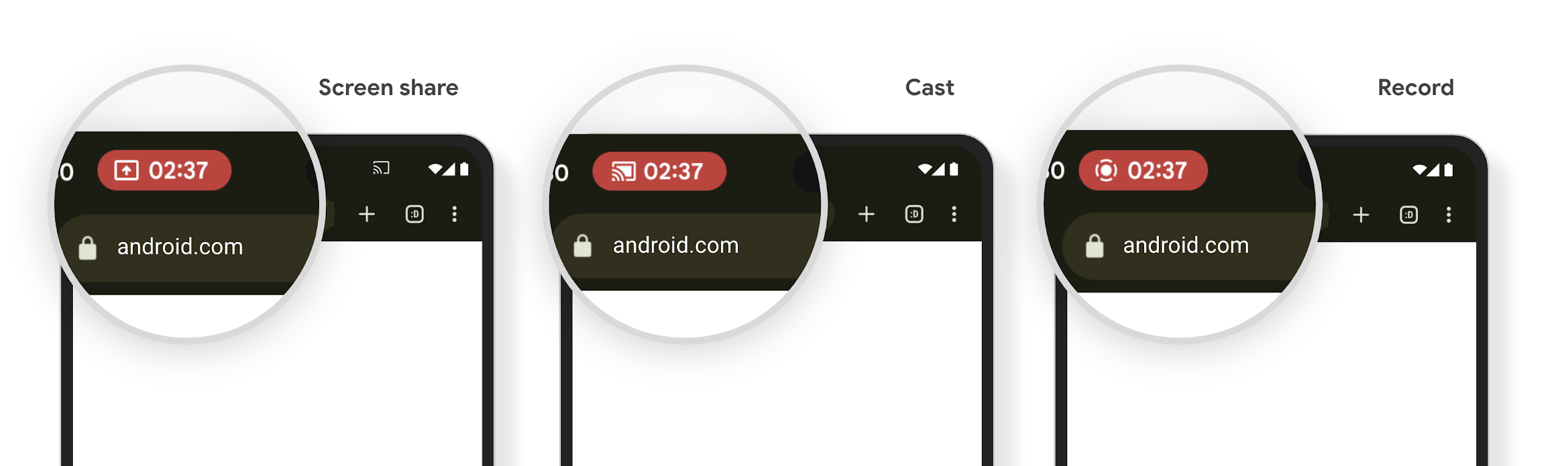
Media projection can expose private user information. A new, prominent status bar chip makes users aware of any ongoing screen projection. Users can tap the chip to stop screen casting, sharing, or recording. Also, for a more intuitive user experience, any in‑progress screen projection now automatically stops when the device screen is locked.
বড় পর্দা এবং ফর্ম ফ্যাক্টর
অ্যান্ড্রয়েড ১৫ আপনার অ্যাপগুলোকে অ্যান্ড্রয়েডের বিভিন্ন ফর্ম ফ্যাক্টর, যেমন—বড় স্ক্রিন, ফ্লিপেবল ও ফোল্ডেবল ডিভাইস থেকে সর্বোচ্চ সুবিধা পাওয়ার সুযোগ করে দেয়।
উন্নত বড় স্ক্রিন মাল্টিটাস্কিং
Android 15 gives users better ways to multitask on large screen devices. For example, users can save their favorite split-screen app combinations for quick access and pin the taskbar on screen to quickly switch between apps. This means that making sure your app is adaptive is more important than ever.
Google I/O has sessions on Building adaptive Android apps and Building UI with the Material 3 adaptive library that can help, and our documentation has more to help you Design for large screens.
কভার স্ক্রিন সমর্থন
Your app can declare a property that Android 15 uses to
allow your Application or Activity to be presented on the small cover
screens of supported flippable devices. These screens are too small to be
considered as compatible targets for Android apps to run on, but your app can
opt in to supporting them, making your app available in more places.
সংযোগ
অ্যান্ড্রয়েড ১৫ প্ল্যাটফর্মটিকে আপডেট করে, যার ফলে আপনার অ্যাপ যোগাযোগ এবং ওয়্যারলেস প্রযুক্তির সর্বশেষ অগ্রগতিগুলো ব্যবহারের সুযোগ পায়।
স্যাটেলাইট সমর্থন
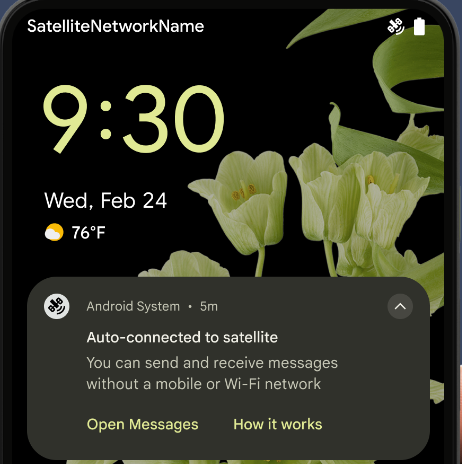
Android 15 স্যাটেলাইট সংযোগের জন্য প্ল্যাটফর্ম সমর্থন প্রসারিত করে চলেছে এবং স্যাটেলাইট সংযোগের ল্যান্ডস্কেপ জুড়ে একটি সামঞ্জস্যপূর্ণ ব্যবহারকারীর অভিজ্ঞতা নিশ্চিত করতে কিছু UI উপাদান অন্তর্ভুক্ত করে।
অ্যাপগুলি ServiceState.isUsingNonTerrestrialNetwork() ব্যবহার করে শনাক্ত করতে পারে যখন একটি ডিভাইস একটি স্যাটেলাইটের সাথে সংযুক্ত থাকে, কেন সম্পূর্ণ নেটওয়ার্ক পরিষেবাগুলি অনুপলব্ধ হতে পারে সে সম্পর্কে তাদের আরও সচেতনতা দেয়৷ উপরন্তু, Android 15 এসএমএস এবং এমএমএস অ্যাপের পাশাপাশি বার্তা পাঠানো এবং গ্রহণ করার জন্য স্যাটেলাইট সংযোগ ব্যবহার করার জন্য প্রিলোড করা RCS অ্যাপগুলির জন্য সমর্থন প্রদান করে।
মসৃণতর এনএফসি অভিজ্ঞতা
Android 15 is working to make the tap to pay experience more seamless and
reliable while continuing to support Android's robust NFC app ecosystem. On
supported devices, apps can request the NfcAdapter to enter
observe mode, where the device listens but doesn't respond to NFC
readers, sending the app's NFC service PollingFrame
objects to process. The PollingFrame objects can be used to auth
ahead of the first communication to the NFC reader, allowing for a one tap
transaction in many cases.
In addition, apps can register a filter on supported devices so they can be notified of polling loop activity, which allows for smooth operation with multiple NFC-aware applications.
ওয়ালেটের ভূমিকা
Android 15 introduces a Wallet role that allows tighter integration with the user's preferred wallet app. This role replaces the NFC default contactless payment setting. Users can manage the Wallet role holder by navigating to Settings > Apps > Default Apps.
The Wallet role is used when routing NFC taps for AIDs registered in the payment category. Taps always go to the Wallet role holder unless another app that is registered for the same AID is running in the foreground.
This role is also used to determine where the Wallet Quick Access tile should go when activated. When the role is set to "None", the Quick Access tile isn't available and payment category NFC taps are only delivered to the foreground app.
নিরাপত্তা
অ্যান্ড্রয়েড ১৫ আপনার অ্যাপের নিরাপত্তা বাড়াতে, অ্যাপের ডেটা সুরক্ষিত রাখতে এবং ব্যবহারকারীদের তাদের ডেটার উপর আরও বেশি স্বচ্ছতা ও নিয়ন্ত্রণ প্রদান করতে সাহায্য করে। ব্যবহারকারীদের সুরক্ষা উন্নত করতে এবং নতুন হুমকি থেকে আপনার অ্যাপকে রক্ষা করার জন্য আমরা কী কী করছি, সে সম্পর্কে আরও জানতে গুগল আই/ও (Google I/O) -তে ‘অ্যান্ড্রয়েডে ব্যবহারকারীর নিরাপত্তা সুরক্ষা’ (Safeguarding user security on Android) শীর্ষক আলোচনাটি দেখুন।
ক্রেডেনশিয়াল ম্যানেজারকে অটোফিলের সাথে একীভূত করুন
Starting with Android 15, developers can link specific views like username or password fields with Credential Manager requests, making it easier to provide a tailored user experience during the sign-in process. When the user focuses on one of these views, a corresponding request is sent to Credential Manager. The resulting credentials are aggregated across providers and displayed in autofill fallback UIs, such as inline suggestions or drop-down suggestions. The Jetpack androidx.credentials library is the preferred endpoint for developers to use and will soon be available to further enhance this feature in Android 15 and higher.
বায়োমেট্রিক নির্দেশনার সাথে এক ট্যাপে সাইন-আপ এবং সাইন-ইন সংযুক্ত করুন।
Credential Manager integrates biometric prompts into the credential creation and sign-in processes, eliminating the need for providers to manage biometric prompts. As a result, credential providers only need to focus on the results of the create and get flows, augmented with the biometric flow result. This simplified process creates a more efficient and streamlined credential creation and retrieval process.
এন্ড-টু-এন্ড এনক্রিপশনের জন্য কী ব্যবস্থাপনা
আমরা Android 15-এ E2eeContactKeysManager প্রবর্তন করছি, যা ক্রিপ্টোগ্রাফিক পাবলিক কীগুলির স্টোরেজের জন্য একটি OS-স্তরের API প্রদান করে আপনার Android অ্যাপগুলিতে এন্ড-টু-এন্ড এনক্রিপশন (E2EE) সুবিধা দেয়।
E2eeContactKeysManager ব্যবহারকারীদের তাদের পরিচিতিগুলির সর্বজনীন কীগুলি পরিচালনা এবং যাচাই করার জন্য একটি কেন্দ্রীভূত উপায় দিতে প্ল্যাটফর্ম পরিচিতি অ্যাপের সাথে একীভূত করার জন্য ডিজাইন করা হয়েছে৷
কন্টেন্ট ইউআরআই-এর উপর অনুমতি যাচাই
Android 15 introduces a set of APIs that perform permission checks on content URIs:
Context.checkContentUriPermissionFull: This performs a full permission check on content URIs.Activitymanifest attributerequireContentUriPermissionFromCaller: This enforces specified permissions on the provided content URIs at activity launch.ComponentCallerclass forActivitycallers: This represents the app that launched the activity.
প্রবেশগম্যতা
অ্যান্ড্রয়েড ১৫ এমন কিছু ফিচার যোগ করেছে যা ব্যবহারকারীদের জন্য অ্যাক্সেসিবিলিটি উন্নত করে।
উন্নত ব্রেইল
In Android 15, we've made it possible for TalkBack to support Braille displays that are using the HID standard over both USB and secure Bluetooth.
This standard, much like the one used by mice and keyboards, will help Android support a wider range of Braille displays over time.
আন্তর্জাতিকীকরণ
অ্যান্ড্রয়েড ১৫ এমন সব ফিচার ও সক্ষমতা যোগ করে, যা বিভিন্ন ভাষায় ডিভাইস ব্যবহারের ক্ষেত্রে ব্যবহারকারীর অভিজ্ঞতাকে আরও উন্নত করে।
CJK পরিবর্তনশীল ফন্ট
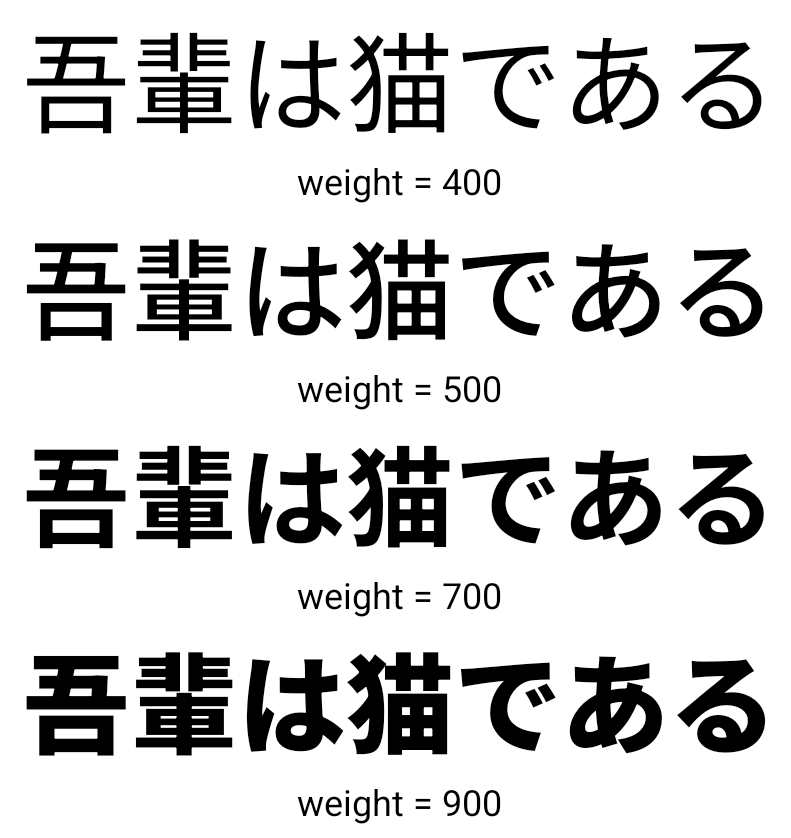
অ্যান্ড্রয়েড 15 দিয়ে শুরু করে, চাইনিজ, জাপানিজ এবং কোরিয়ান (CJK) ভাষার ফন্ট ফাইল, NotoSansCJK, এখন একটি পরিবর্তনশীল ফন্ট। পরিবর্তনশীল ফন্টগুলি CJK ভাষায় সৃজনশীল টাইপোগ্রাফির জন্য সম্ভাবনা উন্মুক্ত করে। ডিজাইনাররা শৈলীর একটি বিস্তৃত পরিসর অন্বেষণ করতে পারে এবং দৃশ্যত আকর্ষণীয় লেআউট তৈরি করতে পারে যা অর্জন করা আগে কঠিন বা অসম্ভব ছিল।
আন্তঃ-চরিত্র ন্যায্যতা
Android 15 দিয়ে শুরু করে, JUSTIFICATION_MODE_INTER_CHARACTER ব্যবহার করে অক্ষর ব্যবধান ব্যবহার করে পাঠ্যকে ন্যায়সঙ্গত করা যেতে পারে। আন্তঃশব্দ ন্যায্যতা প্রথম Android 8.0 (API স্তর 26) এ প্রবর্তন করা হয়েছিল, এবং আন্তঃ-অক্ষর ন্যায্যতা সেই ভাষাগুলির জন্য অনুরূপ ক্ষমতা প্রদান করে যেগুলি সেগমেন্টেশনের জন্য হোয়াইটস্পেস অক্ষর ব্যবহার করে, যেমন চাইনিজ, জাপানিজ এবং অন্যান্য।
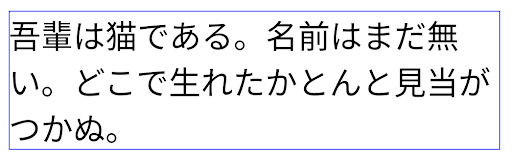
JUSTIFICATION_MODE_NONE ব্যবহার করে জাপানি পাঠ্যের বিন্যাস। 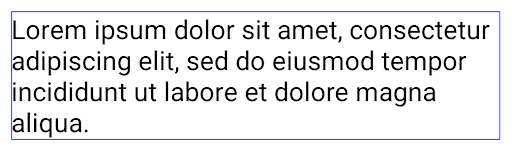
JUSTIFICATION_MODE_NONE ব্যবহার করে ইংরেজি পাঠ্যের বিন্যাস। 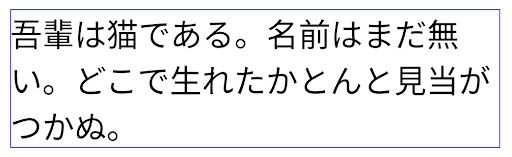
JUSTIFICATION_MODE_INTER_WORD ব্যবহার করে জাপানি পাঠ্যের বিন্যাস। 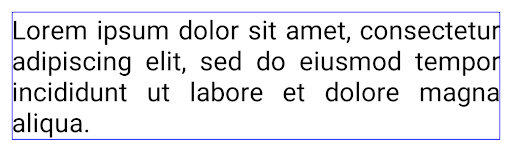
JUSTIFICATION_MODE_INTER_WORD ব্যবহার করে ইংরেজি পাঠ্যের বিন্যাস। 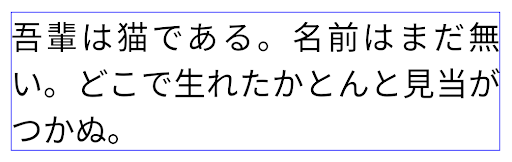
JUSTIFICATION_MODE_INTER_CHARACTER ব্যবহার করে জাপানি পাঠ্যের জন্য লেআউট। 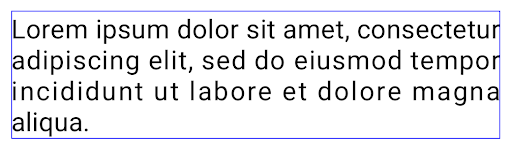
JUSTIFICATION_MODE_INTER_CHARACTER ব্যবহার করে ইংরেজি পাঠ্যের বিন্যাস।স্বয়ংক্রিয় লাইন ব্রেক কনফিগারেশন
Android started supporting phrase-based line breaks for Japanese and Korean in
Android 13 (API level 33). However, while phrase-based line breaks improve the
readability of short lines of text, they don't work well for long lines of text.
In Android 15, apps can apply phrase-based line breaks only for short lines
of text, using the LINE_BREAK_WORD_STYLE_AUTO
option. This option selects the best word style option for the text.
For short lines of text, phrase-based line breaks are used, functioning the same
as LINE_BREAK_WORD_STYLE_PHRASE, as shown in the
following image:
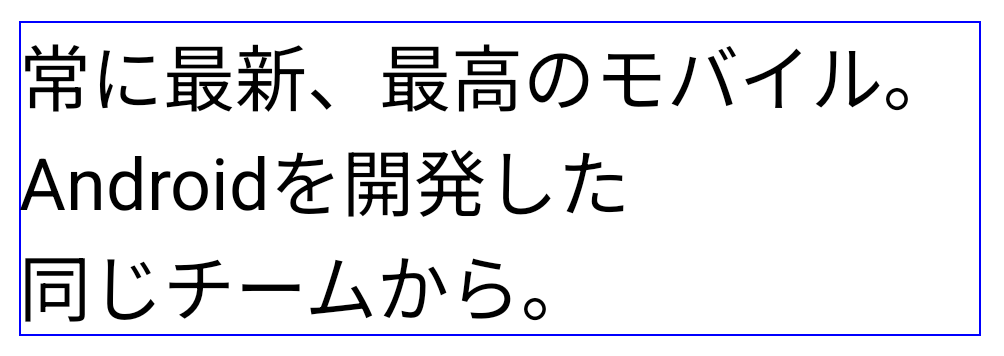
LINE_BREAK_WORD_STYLE_AUTO
applies phrase-based line breaks to improve the readability of the text.
This is the same as applying
LINE_BREAK_WORD_STYLE_PHRASE.For longer lines of text, LINE_BREAK_WORD_STYLE_AUTO uses a no
line-break word style, functioning the same as
LINE_BREAK_WORD_STYLE_NONE, as shown in the
following image:
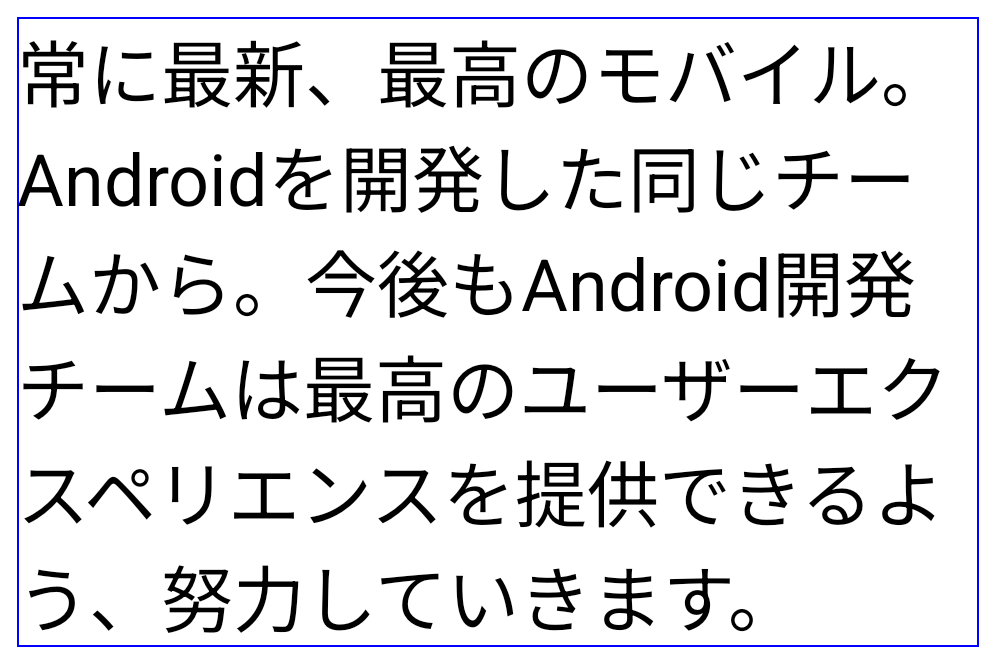
LINE_BREAK_WORD_STYLE_AUTO
applies no line-break word style to improve the readability of the text.
This is the same as applying
LINE_BREAK_WORD_STYLE_NONE.অতিরিক্ত জাপানি হেন্টাইগানা ফন্ট
In Android 15, a font file for old Japanese Hiragana (known as Hentaigana) is bundled by default. The unique shapes of Hentaigana characters can add a distinctive flair to artwork or design while also helping to preserve accurate transmission and understanding of ancient Japanese documents.
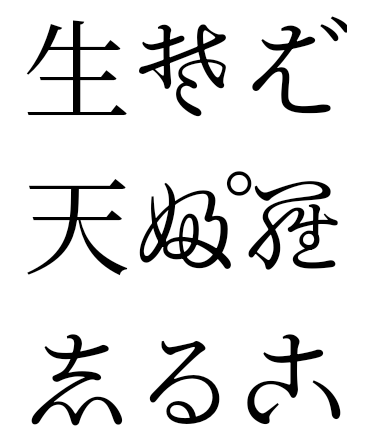
VideoLAN শঙ্কু কপিরাইট (c) 1996-2010 VideoLAN। এই লোগো বা একটি পরিবর্তিত সংস্করণ যে কেউ VideoLAN প্রকল্প বা VideoLAN টিম দ্বারা বিকশিত কোনো পণ্য উল্লেখ করার জন্য ব্যবহার বা পরিবর্তিত হতে পারে, কিন্তু প্রকল্পের দ্বারা অনুমোদন নির্দেশ করে না।
Vulkan এবং Vulkan লোগো হল Khronos Group Inc এর নিবন্ধিত ট্রেডমার্ক।
OpenGL হল একটি নিবন্ধিত ট্রেডমার্ক এবং OpenGL ES লোগো হল Hewlett Packard Enterprise-এর একটি ট্রেডমার্ক যা Khronos-এর অনুমতিতে ব্যবহৃত হয়।