

ב-Android 15 נוספו תכונות וממשקי API מעולים למפתחים. בקטעים הבאים מופיע סיכום של התכונות האלה שיעזור לכם להתחיל להשתמש בממשקי ה-API הקשורים.
רשימה מפורטת של ממשקי API שנוספו, שונו או הוסרו מופיעה בדוח ההבדלים בין גרסאות ה-API. לפרטים על ממשקי API שנוספו, אפשר לעיין בהפניה ל-Android API. ב-Android 15, מחפשים ממשקי API שנוספו ברמת API 35. כדי לקבל מידע על תחומים שבהם שינויים בפלטפורמה עשויים להשפיע על האפליקציות שלכם, כדאי לעיין בשינויים בהתנהגות ב-Android 15 באפליקציות שמיועדות ל-Android 15 ובכל האפליקציות.
מצלמה ומדיה
Android 15 כולל מגוון תכונות שמשפרות את חוויית השימוש במצלמה ובמדיה, ומאפשרות לכם לגשת לכלים ולחומרה כדי לתמוך ביוצרים בהגשמת החזון שלהם ב-Android.
מידע נוסף על התכונות והפתרונות העדכניים למפתחים בנושא מדיה ומצלמה ב-Android זמין בשיחה Building modern Android media and camera experiences (יצירת חוויות מודרניות של מדיה ומצלמה ב-Android) מ-Google I/O.
שיפור תנאי תאורה ירודים
ב-Android 15 נוספה התכונה שיפור התמונה בתאורה חלשה, מצב חשיפה אוטומטי שזמין גם ב-Camera 2 וגם בתוסף המצלמה של מצב לילה. התכונה 'הגברת התאורה החלשה' מכווננת את החשיפת הסטרימינג של התצוגה המקדימה בתנאים של תאורה חלשה. זה שונה מהאופן שבו התוסף של מצב הלילה במצלמה יוצר תמונות סטילס, כי במצב הלילה נעשה שימוש ברצף של תמונות כדי ליצור תמונה אחת משופרת. מצב לילה מתאים מאוד ליצירת תמונה סטילס, אבל אי אפשר ליצור בו שידור רציף של פריימים. לעומת זאת, התכונה 'שיפור תמונה בתאורה חלשה' מאפשרת לעשות זאת. לכן, התכונה 'שיפור איכות בתנאי תאורה חלשה' מאפשרת למצלמה לבצע פעולות כמו:
- הצגת תצוגה מקדימה משופרת של התמונות, כדי שהמשתמשים יוכלו לבחור מסגרת טובה יותר לתמונות שצולמו בתאורה חלשה
- סריקת קודי QR בתאורה חלשה
אם מפעילים את התכונה'הגברת התאורה החלשה', היא מופעלת באופן אוטומטי כשרמת התאורה נמוכה, ומושבתת כשיש יותר אור.
אפליקציות יכולות לצלם את מקור הווידאו של התצוגה המקדימה בתנאים של תאורה חלשה כדי לשמור סרטון בהיר יותר.
מידע נוסף זמין במאמר שיפור התמונה בתאורה נמוכה.
אמצעי בקרה למצלמה באפליקציה
ב-Android 15 נוספה תוספת שמאפשרת יותר שליטה בחומרה של המצלמה ובאלגוריתמים שלה במכשירים נתמכים:
- כוונונים מתקדמים של עוצמת הפלאש שמאפשרים לשלוט בצורה מדויקת בעוצמת הפלאש במצבים
SINGLEו-TORCHבזמן הצילום.
שליטה במרווח הדינמי של HDR
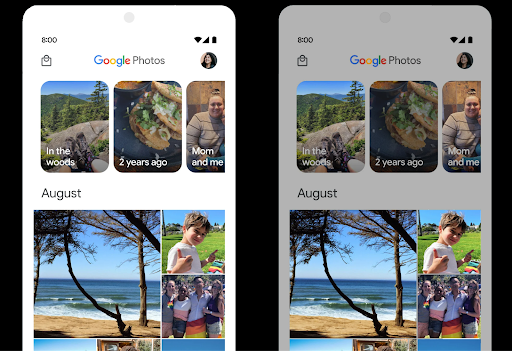
מערכת Android 15 בוחרת את מרווח ה-HDR שמתאים ליכולות המכשיר ולעומק הביטים של המסך. בדפים שיש בהם הרבה תוכן SDR, כמו אפליקציית הודעות שמציגה תמונה ממוזערת אחת ב-HDR, ההתנהגות הזו עלולה להשפיע לרעה על הבהירות של תוכן ה-SDR. ב-Android 15 אפשר לשלוט במרווח העליון של HDR באמצעות setDesiredHdrHeadroom כדי לשמור על איזון בין תוכן SDR לתוכן HDR.
בקרת עוצמת הקול

Android 15 introduces support for the CTA-2075 loudness standard to help you avoid audio loudness inconsistencies and ensure users don't have to constantly adjust volume when switching between content. The system leverages known characteristics of the output devices (headphones and speaker) along with loudness metadata available in AAC audio content to intelligently adjust the audio loudness and dynamic range compression levels.
To enable this feature, you need to ensure loudness metadata is available in
your AAC content and enable the platform feature in your app. For this, you
instantiate a LoudnessCodecController object by
calling its create factory method with the audio
session ID from the associated AudioTrack; this
automatically starts applying audio updates. You can pass an
OnLoudnessCodecUpdateListener to modify or filter
loudness parameters before they are applied on the
MediaCodec.
// Media contains metadata of type MPEG_4 OR MPEG_D
val mediaCodec = …
val audioTrack = AudioTrack.Builder()
                                .setSessionId(sessionId)
                                .build()
...
// Create new loudness controller that applies the parameters to the MediaCodec
try {
   val lcController = LoudnessCodecController.create(mSessionId)
   // Starts applying audio updates for each added MediaCodec
}
AndroidX media3 ExoPlayer will also be updated to use the
LoudnessCodecController APIs for a seamless app integration.
מכשירי MIDI וירטואליים 2.0
ב-Android 13 נוספה תמיכה בחיבור למכשירי MIDI 2.0 באמצעות USB, שמתקשרים באמצעות חבילות MIDI אוניברסליות (UMP). ב-Android 15 הורחבה התמיכה ב-UMP לאפליקציות MIDI וירטואליות, כך שאפליקציות ליצירת מוזיקה יכולות לשלוט באפליקציות סינתיסייזר כמכשיר MIDI 2.0 וירטואלי, בדיוק כמו שהן יכולות לשלוט במכשיר USB MIDI 2.0.
פענוח קוד יעיל יותר של תוכנת AV1

dav1d, מקודד התוכנה הפופולרי של AV1 מ-VideoLAN, זמין למכשירי Android שלא תומכים בפענוח AV1 בחומרה. הביצועים של dav1d טובים פי 3 מאלה של מקודד התוכנה הקודם של AV1, ומאפשרים להפעיל פורמט AV1 באיכות HD למשתמשים רבים יותר, כולל במכשירים מסוימים ברמה נמוכה ובינונית.
כדי להשתמש ב-dav1d, האפליקציה צריכה להביע הסכמה להפעלה שלו בשם "c2.android.av1-dav1d.decoder". בעדכון עתידי, dav1d יהפוך למפענח התוכנה המוגדר כברירת מחדל של AV1. התמיכה הזו סטנדרטית ומועברת לאחור למכשירי Android 11 שמקבלים עדכוני מערכת של Google Play.
פרודוקטיביות וכלים למפתחים
רוב העבודה שלנו לשיפור הפרודוקטיביות מתמקדת בכלים כמו Android Studio, Jetpack Compose וספריות Android Jetpack, אבל אנחנו תמיד מחפשים דרכים בפלטפורמה שיעזרו לכם להגשים את החזון שלכם בקלות רבה יותר.
עדכונים ל-OpenJDK 17
ב-Android 15 ממשיכים בתהליך הרענון של ספריות הליבה של Android, כדי להתאים אותן לתכונות בגרסאות ה-LTS האחרונות של OpenJDK.
התכונות והשיפורים העיקריים שכלולים בגרסה הזו:
- שיפורים באיכות החיים של מאגרי NIO
- Streams
- שיטות נוספות של
mathו-strictmath - עדכוני חבילות של
util, כוללcollection, mapו-set - תמיכה ב-
ByteBufferב-Deflater - עדכוני אבטחה כמו
X500PrivateCredentialועדכוני מפתחות אבטחה
ממשקי ה-API האלה מתעדכנים ביותר ממיליארד מכשירים עם Android 12 (רמת API 31) ואילך דרך עדכוני המערכת של Google Play, כך שתוכלו לטרגט לתכונות התכנות העדכניות ביותר.
שיפורים ב-PDF
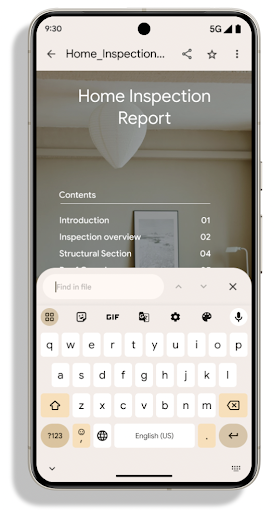
Android 15 includes substantial improvements to the PdfRenderer
APIs. Apps can incorporate advanced features such as rendering
password-protected files, annotations, form editing,
searching, and selection with copy. Linearized PDF
optimizations are supported to speed local PDF viewing and reduce resource use.
The Jetpack PDF library uses these APIs to simplify adding PDF
viewing capabilities to your app.
The PdfRenderer has been moved to a module that can be updated using Google
Play system updates independent of the platform release, and we're supporting
these changes back to Android 11 (API level 30) by creating a compatible
pre-Android 15 version of the API surface, called
PdfRendererPreV.
שיפורים בהחלפת שפה אוטומטית
Android 14 added on-device, multi-language recognition in audio with automatic
switching between languages, but this can cause words to get dropped,
especially when languages switch with less of a pause between the two
utterances. Android 15 adds additional controls to help apps tune this switching
to their use case.
EXTRA_LANGUAGE_SWITCH_INITIAL_ACTIVE_DURATION_TIME_MILLIS
confines the automatic switching to the beginning of the audio session, while
EXTRA_LANGUAGE_SWITCH_MATCH_SWITCHES deactivates the
language switching after a defined number of switches. These options are
particularly useful if you expect that there will be a single language spoken
during the session that should be autodetected.
שיפור של OpenType Variable Font API
ב-Android 15 שיפרנו את נוחות השימוש בגופן המשתנה OpenType. אפשר ליצור
מופע FontFamily מגופן משתנה בלי לציין צירי משקל
באמצעות ממשק ה-API של buildVariableFamily. הכלי לרינדור הטקסט מבטל את הערך
של ציר wght כדי להתאים לטקסט המוצג.
השימוש ב-API מפשט באופן משמעותי את הקוד ליצירת Typeface:
Kotlin
val newTypeface = Typeface.CustomFallbackBuilder(
            FontFamily.Builder(
                Font.Builder(assets, "RobotoFlex.ttf").build())
                    .buildVariableFamily())
    .build()
Java
Typeface newTypeface = Typeface.CustomFallbackBuilder(
            new FontFamily.Builder(
                new Font.Builder(assets, "RobotoFlex.ttf").build())
                    .buildVariableFamily())
    .build();
בעבר, כדי ליצור את אותו Typeface, היה צורך בקוד הרבה יותר ארוך:
Kotlin
val oldTypeface = Typeface.CustomFallbackBuilder(
            FontFamily.Builder(
                Font.Builder(assets, "RobotoFlex.ttf")
                    .setFontVariationSettings("'wght' 400")
                    .setWeight(400)
                    .build())
                .addFont(
                    Font.Builder(assets, "RobotoFlex.ttf")
                        .setFontVariationSettings("'wght' 100")
                        .setWeight(100)
                        .build()
                )
                .addFont(
                    Font.Builder(assets, "RobotoFlex.ttf")
                        .setFontVariationSettings("'wght' 200")
                        .setWeight(200)
                        .build()
                )
                .addFont(
                    Font.Builder(assets, "RobotoFlex.ttf")
                        .setFontVariationSettings("'wght' 300")
                        .setWeight(300)
                        .build()
                )
                .addFont(
                    Font.Builder(assets, "RobotoFlex.ttf")
                        .setFontVariationSettings("'wght' 500")
                        .setWeight(500)
                        .build()
                )
                .addFont(
                    Font.Builder(assets, "RobotoFlex.ttf")
                        .setFontVariationSettings("'wght' 600")
                        .setWeight(600)
                        .build()
                )
                .addFont(
                    Font.Builder(assets, "RobotoFlex.ttf")
                        .setFontVariationSettings("'wght' 700")
                        .setWeight(700)
                        .build()
                )
                .addFont(
                    Font.Builder(assets, "RobotoFlex.ttf")
                        .setFontVariationSettings("'wght' 800")
                        .setWeight(800)
                        .build()
                )
                .addFont(
                    Font.Builder(assets, "RobotoFlex.ttf")
                        .setFontVariationSettings("'wght' 900")
                        .setWeight(900)
                        .build()
                ).build()
        ).build()
Java
Typeface oldTypeface = new Typeface.CustomFallbackBuilder(
    new FontFamily.Builder(
        new Font.Builder(assets, "RobotoFlex.ttf")
            .setFontVariationSettings("'wght' 400")
            .setWeight(400)
            .build()
    )
    .addFont(
        new Font.Builder(assets, "RobotoFlex.ttf")
            .setFontVariationSettings("'wght' 100")
            .setWeight(100)
            .build()
    )
    .addFont(
        new Font.Builder(assets, "RobotoFlex.ttf")
            .setFontVariationSettings("'wght' 200")
            .setWeight(200)
            .build()
    )
    .addFont(
        new Font.Builder(assets, "RobotoFlex.ttf")
            .setFontVariationSettings("'wght' 300")
            .setWeight(300)
            .build()
    )
    .addFont(
        new Font.Builder(assets, "RobotoFlex.ttf")
            .setFontVariationSettings("'wght' 500")
            .setWeight(500)
            .build()
    )
    .addFont(
        new Font.Builder(assets, "RobotoFlex.ttf")
            .setFontVariationSettings("'wght' 600")
            .setWeight(600)
            .build()
    )
    .addFont(
        new Font.Builder(assets, "RobotoFlex.ttf")
            .setFontVariationSettings("'wght' 700")
            .setWeight(700)
            .build()
    )
    .addFont(
        new Font.Builder(assets, "RobotoFlex.ttf")
            .setFontVariationSettings("'wght' 800")
            .setWeight(800)
            .build()
    )
    .addFont(
        new Font.Builder(assets, "RobotoFlex.ttf")
            .setFontVariationSettings("'wght' 900")
            .setWeight(900)
            .build()
    )
    .build()
).build();
דוגמה לאופן שבו Typeface שנוצר באמצעות ה-API הישן והחדש מומר:
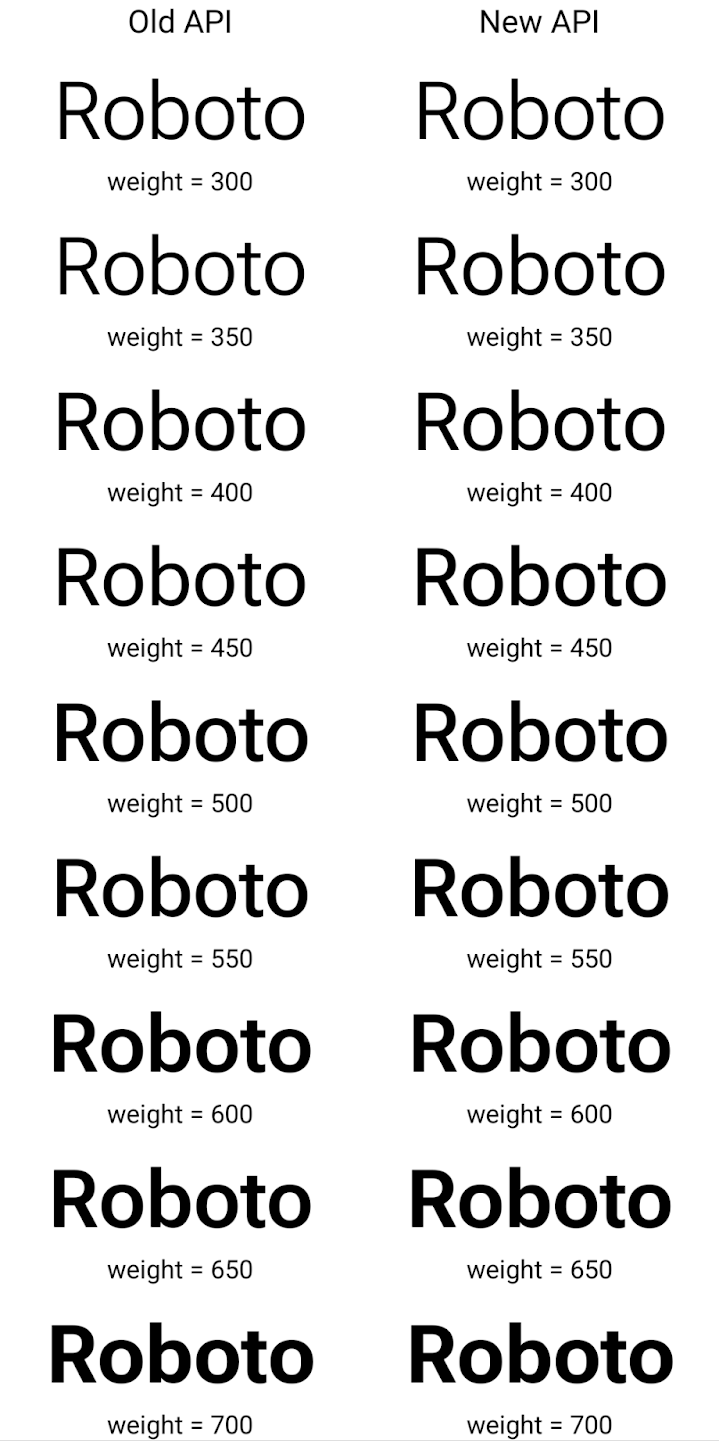
בדוגמה הזו, ה-Typeface שנוצר באמצעות ה-API הישן לא כולל את
יכולת ליצור משקלים מדויקים של גופנים עבור 350, 450, 550 ו-650
מופעים של Font, כך שהכלי לרינדור חוזר למשקל הקרוב ביותר. לכן במקרה הזה, 300 יומר במקום 350, 400 יומר במקום 450 וכן הלאה. לעומת זאת, ה-Typeface שנוצר באמצעות ממשקי ה-API החדשים יוצר באופן דינמי.
את המכונה Font למשקל נתון, כך שהתוצאה המדויקת של משקולות היא 350,
450, 550 ו-650.
אמצעי בקרה מפורטים למעברי שורה
Starting in Android 15, a TextView and the underlying
line breaker can preserve the given portion of text in the same line to improve
readability. You can take advantage of this line break customization by using
the <nobreak> tag in string resources or
createNoBreakSpan. Similarly, you can preserve words from
hyphenation by using the <nohyphen> tag or
createNoHyphenationSpan.
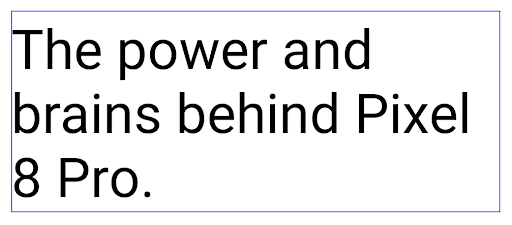
For example, the following string resource doesn't include a line break, and renders with the text "Pixel 8 Pro." breaking in an undesirable place:
<resources>
    <string name="pixel8pro">The power and brains behind Pixel 8 Pro.</string>
</resources>
In contrast, this string resource includes the <nobreak> tag, which wraps the
phrase "Pixel 8 Pro." and prevents line breaks:
<resources>
    <string name="pixel8pro">The power and brains behind <nobreak>Pixel 8 Pro.</nobreak></string>
</resources>
The difference in how these strings are rendered is shown in the following images:
<nobreak> tag.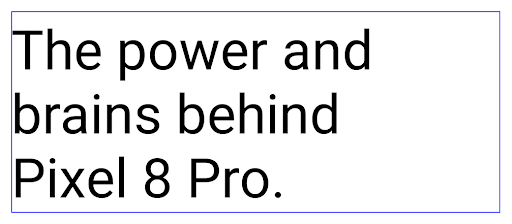
<nobreak> tag.העברת אפליקציות לארכיון
Android and Google Play announced support for app archiving last year, allowing users to free up space by partially removing infrequently used apps from the device that were published using Android App Bundle on Google Play. Android 15 includes OS level support for app archiving and unarchiving, making it easier for all app stores to implement it.
Apps with the REQUEST_DELETE_PACKAGES permission can call the
PackageInstaller requestArchive method to request archiving an
installed app package, which removes the APK and any cached files, but persists
user data. Archived apps are returned as displayable apps through the
LauncherApps APIs; users will see a UI treatment to highlight that those
apps are archived. If a user taps on an archived app, the responsible installer
will get a request to unarchive it, and the restoration process can be
monitored by the ACTION_PACKAGE_ADDED broadcast.
הפעלת מצב 16 KB במכשיר באמצעות אפשרויות למפתחים
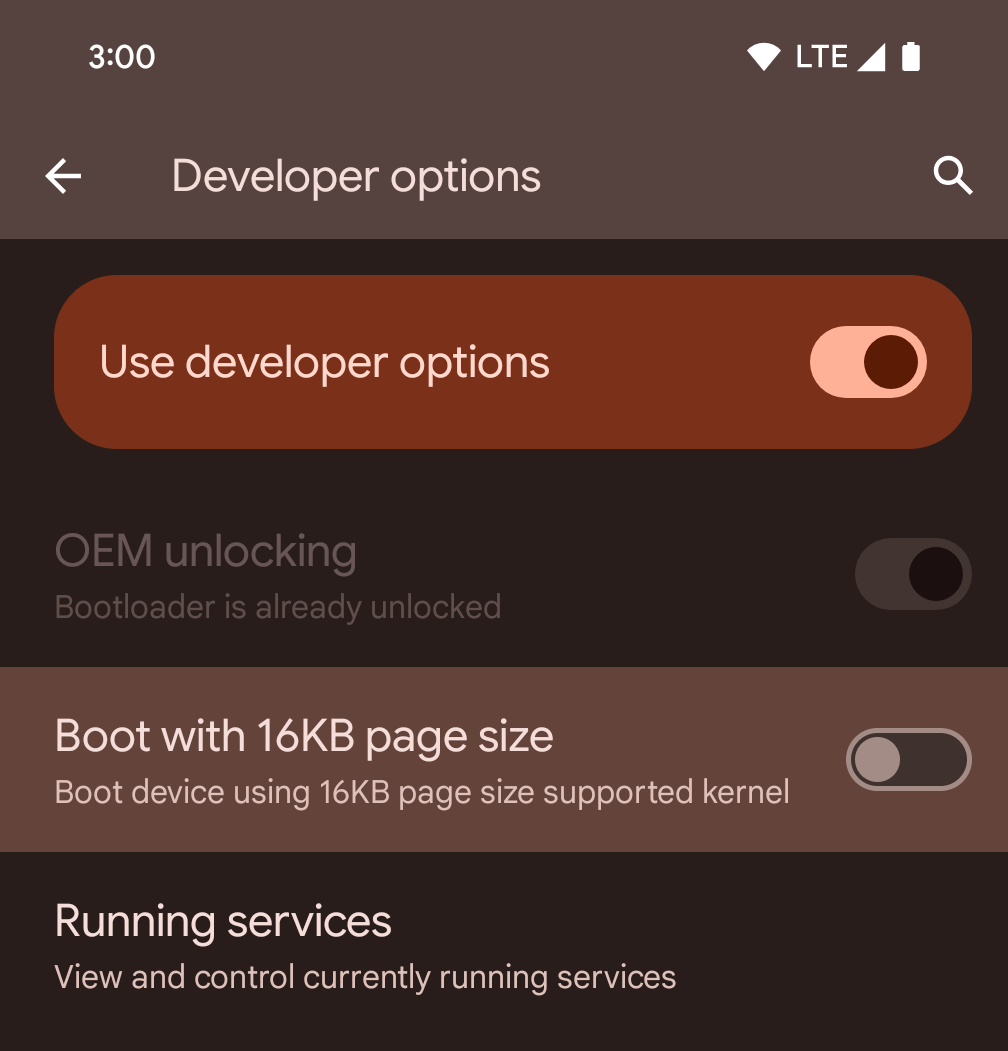
כדי להפעיל מכשיר במצב 16KB, מעבירים את המתג של אפשרות המפתחים הפעלה בגודל דף של 16KB.
בגרסאות QPR של Android 15, אפשר להשתמש באפשרות למפתחים שזמינה במכשירים מסוימים כדי להפעיל את המכשיר במצב 16KB ולבצע בדיקות במכשיר. לפני שמשתמשים באפשרות למפתחים, עוברים אל הגדרות > מערכת > עדכוני תוכנה ומחילים את כל העדכונים שזמינים.
אפשרות למפתחים זו זמינה במכשירים הבאים:
Pixel 8 ו-Pixel 8 Pro (עם Android 15 QPR1 ומעלה)
Pixel 8a (עם Android 15 QPR1 ומעלה)
Pixel 9, Pixel 9 Pro ו-Pixel 9 Pro XL (עם Android 15 QPR2 ומעלה)
Pixel 9a (עם Android מגרסה 16 ואילך)
גרפיקה
Android 15 כולל את השיפורים האחרונים בגרפיקה, כולל ANGLE ותוספות למערכת הגרפיקה Canvas.
מודרניזציה של הגישה ל-GPU ב-Android

חומרת Android התפתחה משמעותית מאז הימים הראשונים שבהם הליבה של מערכת ההפעלה רצה על מעבד יחיד, והגישה ל-GPU התבצעה באמצעות ממשקי API שמבוססים על צינורות עיבוד נתונים עם פונקציות קבועות. Vulkan® graphics API זמין ב-NDK מאז Android 7.0 (רמת API 24) עם הפשטה ברמה נמוכה יותר שמשקפת טוב יותר את החומרה המודרנית של המעבד הגרפי, מתאימה טוב יותר לתמיכה בכמה ליבות של מעבדים ומציעה עלות ריבית נמוכה יותר של מנהל ה-CPU – וכך משפרת את ביצועי האפליקציה. כל מנועי המשחקים המודרניים תומכים ב-Vulkan.
Vulkan הוא הממשק המועדף של Android ל-GPU. לכן, Android 15 כולל את ANGLE כשכבה אופציונלית להרצת OpenGL® ES מעל Vulkan. המעבר ל-ANGLE יעזור לסטנדרטיזציה של הטמעת OpenGL ב-Android, כדי לשפר את התאימות ובמקרים מסוימים גם את הביצועים. כדי לבדוק את היציבות והביצועים של אפליקציות OpenGL ES באמצעות ANGLE, מפעילים את האפשרות למפתחים ב-Android 15: הגדרות -> מערכת -> אפשרויות למפתחים -> ניסיוני: הפעלת ANGLE.
מפת הדרכים של Android ANGLE ב-Vulkan
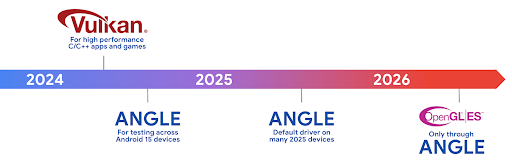
כחלק מהיעילות של סטאק ה-GPU שלנו, מעכשיו נתחיל לשלוח את ANGLE בתור מנהל המערכת GL במכשירים חדשים נוספים, ומצפים שבעתיד OpenGL/ES תהיה זמינה רק דרך ANGLE. עם זאת, אנחנו מתכננים להמשיך את התמיכה ב-OpenGL ES בכל המכשירים.
השלבים המומלצים הבאים
אפשר להשתמש באפשרויות למפתחים כדי לבחור את הנהג ANGLE ל-OpenGL ES ולבדוק את האפליקציה. בפרויקטים חדשים, מומלץ מאוד להשתמש ב-Vulkan ל-C/C++.
שיפורים ב-Canvas
ב-Android 15 אנחנו ממשיכים בתהליך המודרניזציה של מערכת הגרפיקה של Android ב-Canvas, עם יכולות נוספות:
Matrix44מספק מטריקס 4x4 לטרנספורמציה של קואורדינטות, שצריך להשתמש בו כשרוצים לבצע פעולות על הלוח ב-3D.- הפונקציה
clipShaderיוצרת חפיפה בין הקליפ הנוכחי לבין ה-shader שצוין, ואילו הפונקציהclipOutShaderמגדירה את הקליפ כהפרש בין הקליפ הנוכחי לבין ה-shader, כאשר כל אחת מהן מתייחסת ל-shader כלמסיכת אלפא. כך אפשר לצייר בצורה יעילה צורות מורכבות.
ביצועים וסוללה
אנחנו ממשיכים להתמקד בשיפור הביצועים והאיכות של האפליקציות שלכם ב-Android. ב-Android 15 מוצגים ממשקי API שעוזרים לבצע משימות באפליקציה בצורה יעילה יותר, לבצע אופטימיזציה של ביצועי האפליקציה ולאסוף תובנות לגבי האפליקציות.
כדי לקבל מידע על שיטות מומלצות לשימוש יעיל בסוללה, על ניפוי באגים בשימוש ברשת ובצריכת החשמל ועל שיפור היעילות של הסוללה בעבודה ברקע ב-Android 15 ובגרסאות עדכניות של Android, אפשר לצפות בהרצאה Improving battery efficiency of background work on Android מ-Google I/O.
ApplicationStartInfo API
In previous versions of Android, app startup has been a bit of a mystery. It was
challenging to determine within your app whether it started from a cold, warm,
or hot state. It was also difficult to know how long your app spent during the
various launch phases: forking the process, calling onCreate, drawing the
first frame, and more. When your Application class was instantiated, you had no
way of knowing whether the app started from a broadcast, a content provider, a
job, a backup, boot complete, an alarm, or an Activity.
The ApplicationStartInfo API on Android 15 provides
all of this and more. You can even choose to add your own timestamps into the
flow to help collect timing data in one place. In addition to collecting
metrics, you can use ApplicationStartInfo to help directly optimize app
startup; for example, you can eliminate the costly instantiation of UI-related
libraries within your Application class when your app is starting up due to a
broadcast.
מידע מפורט על גודל האפליקציה
החל מגרסה 8.0 של Android (רמת API 26), מערכת Android כוללת את ה-API StorageStats.getAppBytes שמסכם את הגודל ההתקנה של אפליקציה כמספר יחיד של בייטים, שהוא סכום של גודל ה-APK, גודל הקבצים שחולצו מה-APK וקבצים שנוצרו במכשיר, כמו קוד שעבר הידור מראש (AOT). המספר הזה לא מספק הרבה תובנות לגבי האופן שבו האפליקציה משתמשת באחסון.
ב-Android 15 נוספה ה-API StorageStats.getAppBytesByDataType([type]), שמאפשרת לקבל תובנות לגבי האופן שבו האפליקציה משתמשת בכל האחסון הזה, כולל חלוקות של קובצי APK, קוד שקשור ל-AOT ולשיפור המהירות, מטא-נתונים של dex, ספריות ופרופילים מודרכים.
יצירת פרופילים שמנוהלת על ידי האפליקציה
מערכת Android 15 כוללת את הכיתה ProfilingManager, שמאפשרת לאסוף מידע על פרופיל האפליקציה, כמו דיווחים על אשכול, פרופילים של אשכול, דגימות מ-stack ועוד. הוא מספק קריאה חוזרת לאפליקציה עם תג שסופק כדי לזהות את קובץ הפלט, שמועבר לספריית הקבצים של האפליקציה. ממשק ה-API מגביל את קצב הבקשות כדי למזער את ההשפעה על הביצועים.
כדי לפשט את תהליך היצירה של בקשות ליצירת פרופילים באפליקציה, מומלץ להשתמש ב-Profiling AndroidX API המתאים, שזמין ב-Core 1.15.0-rc01 ואילך.
שיפורים במסד נתונים של SQLite
Android 15 introduces SQLite APIs that expose advanced features from the underlying SQLite engine that target specific performance issues that can manifest in apps. These APIs are included with the update of SQLite to version 3.44.3.
Developers should consult best practices for SQLite performance to get the most out of their SQLite database, especially when working with large databases or when running latency-sensitive queries.
- Read-only deferred transactions: when issuing transactions that are
read-only (don't include write statements), use
beginTransactionReadOnly()andbeginTransactionWithListenerReadOnly(SQLiteTransactionListener)to issue read-onlyDEFERREDtransactions. Such transactions can run concurrently with each other, and if the database is in WAL mode, they can run concurrently withIMMEDIATEorEXCLUSIVEtransactions. - Row counts and IDs: APIs were added to retrieve the count of changed
rows or the last inserted row ID without issuing an additional query.
getLastChangedRowCount()returns the number of rows that were inserted, updated, or deleted by the most recent SQL statement within the current transaction, whilegetTotalChangedRowCount()returns the count on the current connection.getLastInsertRowId()returns therowidof the last row to be inserted on the current connection. - Raw statements: issue a raw SQlite statement, bypassing convenience wrappers and any additional processing overhead that they may incur.
עדכונים ל-Android Dynamic Performance Framework
ב-Android 15 אנחנו ממשיכים להשקיע ב-Android Dynamic Performance Framework (ADPF), קבוצה של ממשקי API שמאפשרים למשחקים ולאפליקציות עם ביצועים כבדים לקיים אינטראקציה ישירה יותר עם מערכות החשמל והתרמית של מכשירי Android. במכשירים נתמכים, Android 15 מוסיף יכולות ADPF:
- מצב חיסכון באנרגיה לסשנים של רמזים, כדי לציין שהשרשורים המשויכים צריכים להעדיף חיסכון באנרגיה על פני ביצועים. המצב הזה מתאים מאוד לעומסי עבודה ארוכים ברקע.
- אפשר לדווח על משכי העבודה של ה-GPU ושל המעבד במהלך סשנים של הנחיות, וכך לאפשר למערכת לשנות את התדרים של המעבד ושל ה-GPU יחד כדי לעמוד בצורה הטובה ביותר בדרישות של עומס העבודה.
- סף מרווח תרמי כדי לפרש את סטטוס הצמצום התרמי האפשרי על סמך תחזית של מרווח.
במסמכי העזרה תוכלו לקרוא מידע נוסף על השימוש ב-ADPF באפליקציות ובמשחקים.
פרטיות
Android 15 כולל מגוון תכונות שעוזרות למפתחי אפליקציות להגן על פרטיות המשתמשים.
זיהוי של הקלטת מסך
Android 15 adds support for apps to detect that they are being recorded. A callback is invoked whenever the app transitions between being visible or invisible within a screen recording. An app is considered visible if activities owned by the registering process's UID are being recorded. This way, if your app is performing a sensitive operation, you can inform the user that they're being recorded.
val mCallback = Consumer<Int> { state ->
  if (state == SCREEN_RECORDING_STATE_VISIBLE) {
    // We're being recorded
  } else {
    // We're not being recorded
  }
}

override fun onStart() {
   super.onStart()
   val initialState =
      windowManager.addScreenRecordingCallback(mainExecutor, mCallback)
   mCallback.accept(initialState)
}

override fun onStop() {
    super.onStop()
    windowManager.removeScreenRecordingCallback(mCallback)
}
יכולות מורחבות של IntentFilter
Android 15 builds in support for more precise Intent resolution through
UriRelativeFilterGroup, which contains a set of
UriRelativeFilter objects that form a set of Intent
matching rules that must each be satisfied, including URL query parameters, URL
fragments, and blocking or exclusion rules.
These rules can be defined in the AndroidManifest XML file with the
<uri-relative-filter-group> tag, which can optionally include an
android:allow tag. These tags can contain <data> tags that use existing data
tag attributes as well as the android:query and android:fragment
attributes.
Here's an example of the AndroidManifest syntax:
<intent-filter android:autoVerify="true">
  <action android:name="android.intent.action.VIEW" />
  <category android:name="android.intent.category.BROWSABLE" />
  <category android:name="android.intent.category.DEFAULT" />
  <data android:scheme="http" />
  <data android:scheme="https" />
  <data android:host="astore.com" />
  <uri-relative-filter-group>
    <data android:pathPrefix="/auth" />
    <data android:query="region=na" />
  </uri-relative-filter-group>
  <uri-relative-filter-group android:allow="false">
    <data android:pathPrefix="/auth" />
    <data android:query="mobileoptout=true" />
  </uri-relative-filter-group>
  <uri-relative-filter-group android:allow="false">
    <data android:pathPrefix="/auth" />
    <data android:fragmentPrefix="faq" />
  </uri-relative-filter-group>
</intent-filter>
המרחב הפרטי
המרחב הפרטי מאפשר למשתמשים ליצור מרחב נפרד במכשיר שבו הם יכולים לשמור אפליקציות עם מידע אישי רגיש מפני עיניים זרות, באמצעות שכבת אימות נוספת. במרחב הפרטי נעשה שימוש בפרופיל משתמש נפרד. המשתמש יכול לבחור אם להשתמש בנעילת המכשיר או בשיטת ביטול נעילה נפרדת למרחב הפרטי.
האפליקציות במרחב הפרטי מופיעות במאגר נפרד במרכז האפליקציות, והן מוסתרות מהתצוגה של האפליקציות האחרונות, מההתראות, מההגדרות ומאפליקציות אחרות כשהמרחב הפרטי נעול. תוכן שנוצר על ידי משתמשים והורדתם (כמו מדיה או קבצים) וחשבונות מופרדים בין המרחב הפרטי למרחב הראשי. אתם יכולים להשתמש בלוח השיתוף של המערכת ובכלי לבחירת תמונות כדי לתת לאפליקציות גישה לתוכן במרחבים השונים כשהמרחב הפרטי לא נעול.
המשתמשים לא יכולים להעביר אפליקציות קיימות ואת הנתונים שלהן למרחב הפרטי. במקום זאת, המשתמשים בוחרים אפשרות התקנה במרחב הפרטי כדי להתקין אפליקציה באמצעות חנות האפליקציות המועדפת עליהם. אפליקציות במרחב הפרטי מותקנות כעותקים נפרדים מאפליקציות במרחב הראשי (עותקים חדשים של אותה אפליקציה).
כשמשתמש נועל את המרחב הפרטי, הפרופיל מושבת. כשהפרופיל מושבת, האפליקציות במרחב הפרטי כבר לא פעילות ולא יכולות לבצע פעילויות בחזית או ברקע, כולל הצגת התראות.
מומלץ לבדוק את האפליקציה במרחב הפרטי כדי לוודא שהיא פועלת כצפוי, במיוחד אם האפליקציה שייכת לאחת מהקטגוריות הבאות:
- אפליקציות עם לוגיקה לפרופילי עבודה שמניחות שכל העותק המותקנים של האפליקציה שלא נמצאים בפרופיל הראשי נמצאים בפרופיל העבודה.
- אפליקציות רפואיות
- אפליקציות מרכז האפליקציות
- אפליקציות בחנות האפליקציות
שאילתה לבחירת המשתמש העדכנית ביותר לגישה לתמונות נבחרות
Apps can now highlight only the most-recently-selected photos and videos when
partial access to media permissions is granted. This feature can improve
the user experience for apps that frequently request access to photos and
videos. To use this feature in your app, enable the
QUERY_ARG_LATEST_SELECTION_ONLY argument when querying MediaStore
through ContentResolver.
Kotlin
val externalContentUri = MediaStore.Files.getContentUri("external")

val mediaColumns = arrayOf(
   FileColumns._ID,
   FileColumns.DISPLAY_NAME,
   FileColumns.MIME_TYPE,
)

val queryArgs = bundleOf(
   // Return only items from the last selection (selected photos access)
   QUERY_ARG_LATEST_SELECTION_ONLY to true,
   // Sort returned items chronologically based on when they were added to the device's storage
   QUERY_ARG_SQL_SORT_ORDER to "${FileColumns.DATE_ADDED} DESC",
   QUERY_ARG_SQL_SELECTION to "${FileColumns.MEDIA_TYPE} = ? OR ${FileColumns.MEDIA_TYPE} = ?",
   QUERY_ARG_SQL_SELECTION_ARGS to arrayOf(
       FileColumns.MEDIA_TYPE_IMAGE.toString(),
       FileColumns.MEDIA_TYPE_VIDEO.toString()
   )
)
Java
Uri externalContentUri = MediaStore.Files.getContentUri("external");

String[] mediaColumns = {
    FileColumns._ID,
    FileColumns.DISPLAY_NAME,
    FileColumns.MIME_TYPE
};

Bundle queryArgs = new Bundle();
queryArgs.putBoolean(MediaStore.QUERY_ARG_LATEST_SELECTION_ONLY, true);
queryArgs.putString(MediaStore.QUERY_ARG_SQL_SORT_ORDER, FileColumns.DATE_ADDED + " DESC");
queryArgs.putString(MediaStore.QUERY_ARG_SQL_SELECTION, FileColumns.MEDIA_TYPE + " = ? OR " + FileColumns.MEDIA_TYPE + " = ?");
queryArgs.putStringArray(MediaStore.QUERY_ARG_SQL_SELECTION_ARGS, new String[] {
    String.valueOf(FileColumns.MEDIA_TYPE_IMAGE),
    String.valueOf(FileColumns.MEDIA_TYPE_VIDEO)
});
ארגז החול לפרטיות ב-Android
Android 15 כולל את התוספים העדכניים ביותר של Android Ad Services, שמשלבים את הגרסה העדכנית ביותר של ארגז החול לפרטיות ב-Android. ההוספה הזו היא חלק מהמאמצים שלנו לפתח טכנולוגיות שישפרו את פרטיות המשתמשים ויאפשרו חוויית פרסום יעילה ומותאמת אישית באפליקציות לנייד. בדף של ארגז החול לפרטיות מפורט מידע נוסף על ארגז החול לפרטיות בתוכניות הבטא ובגרסת ה-Preview למפתחים של Android, שיעזרו לכם להתחיל.
Health Connect
ב-Android 15 משולבים התוספים העדכניים ביותר של Health Connect by Android, פלטפורמה מאובטחת ומרכזית לניהול ולשיתוף של נתוני בריאות וכושר שנאספים באפליקציות. העדכון הזה מוסיף תמיכה בסוגי נתונים נוספים בנושאי כושר, תזונה, טמפרטורת העור, תוכניות אימון ועוד.
מעקב אחרי טמפרטורת העור מאפשר למשתמשים לאחסן ולשתף נתוני טמפרטורה מדויקים יותר ממכשיר לבישה או ממכשיר מעקב אחר פעילות אחר.
תוכניות אימונים הן תוכניות אימונים מובנות שיעזרו למשתמש להשיג את יעדי הכושר שלו. תוכניות האימונים כוללות תמיכה במגוון מטרות להשגה וביעדי ביצועים:
- יעדי השלמה לגבי קלוריות שנשרפו, מרחק, משך זמן, חזרה וצעדים.
- יעדי ביצועים כ- חזרות רבות ככל האפשר (AMRAP), קצב הלב, קצב הלב, חשמל, שיעור תפיסת הפעילות הגופנית, וגם מהירות.
מידע נוסף על העדכונים האחרונים של Health Connect ב-Android זמין יצירת חוויות שניתנות להתאמה עם Android שיחות בתחום הבריאות מ-Google I/O.
שיתוף מסך של אפליקציה
Android 15 supports app screen sharing so users can share or record just an
app window rather than the entire device screen. This feature, first enabled in
Android 14 QPR2, includes
MediaProjection callbacks that allow your app
to customize the app screen sharing experience. Note that for apps targeting
Android 14 (API level 34) or higher,
user consent is required for each
MediaProjection capture session.
חוויית המשתמש וממשק המשתמש של המערכת
ב-Android 15, מפתחי אפליקציות והמשתמשים מקבלים יותר שליטה וגמישות בהגדרת המכשיר כך שיתאים לצרכים שלהם.
כדי לקבל מידע נוסף על השיפורים האחרונים ב-Android 15 שיעזרו לכם לשפר את חוויית המשתמש באפליקציה, כדאי לצפות בהרצאה שיפור חוויית המשתמש באפליקציית Android מ-Google I/O.
תצוגות מקדימות עשירות יותר של ווידג'טים באמצעות Generated Previews API
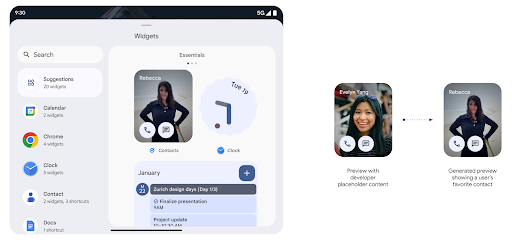
Before Android 15, the only way to provide widget picker previews was to specify a static image or layout resource. These previews often differ significantly from the look of the actual widget when it is placed on the home screen. Also, static resources can't be created with Jetpack Glance, so a Glance developer had to screenshot their widget or create an XML layout to have a widget preview.
Android 15 adds support for generated previews. This means that app widget
providers can generate RemoteViews to use as the picker preview, instead
of a static resource.
Push API
Apps can provide generated previews through a push API. Apps can provide
previews at any point in their lifecycle, and don't receive an explicit request
from the host to provide previews. Previews are persisted in AppWidgetService,
and hosts can request them on-demand. The following example loads an XML widget
layout resource and sets it as the preview:
AppWidgetManager.getInstance(appContext).setWidgetPreview(
   ComponentName(
       appContext,
       SociaLiteAppWidgetReceiver::class.java
   ),
   AppWidgetProviderInfo.WIDGET_CATEGORY_HOME_SCREEN,
   RemoteViews("com.example", R.layout.widget_preview)
)
The expected flow is:
- At any time, the widget provider calls
setWidgetPreview. The provided previews are persisted inAppWidgetServicewith other provider info. setWidgetPreviewnotifies hosts of an updated preview through theAppWidgetHost.onProvidersChangedcallback. In response, the widget host reloads all of its provider information.- When displaying a widget preview, the host checks
AppWidgetProviderInfo.generatedPreviewCategories, and if the chosen category is available, callsAppWidgetManager.getWidgetPreviewto return the saved preview for this provider.
When to call setWidgetPreview
Because there is no callback to provide previews, apps can choose to send previews at any point when they are running. How often to update the preview depends on the widget's use case.
The following list describes the two main categories of preview use cases:
- Providers that show real data in their widget previews, such as personalized or recent information. These providers can set the preview once the user has signed in or has done initial configuration in their app. After this, they can set up a periodic task to update the previews at their chosen cadence. Examples of this type of widget could be a photo, calendar, weather or news widget.
- Providers that show static information in previews or quick-action widgets that don't display any data. These providers can set previews once, when the app first launches. Examples of this type of widget include a drive quick actions widget or chrome shortcuts widget.
Some providers might show static previews on the hub mode picker, but real information on the homescreen picker. These providers should follow the guidance for both of these use cases to set previews.
תמונה בתוך תמונה
Android 15 introduces changes in Picture-in-Picture (PiP) ensuring an even smoother transition when entering into PiP mode. This will be beneficial for apps having UI elements overlaid on top of their main UI, which goes into PiP.
Developers use the onPictureInPictureModeChanged callback to define logic
that toggles the visibility of the overlaid UI elements. This callback is
triggered when the PiP enter or exit animation is completed. Beginning in
Android 15, the PictureInPictureUiState class includes another state.
With this UI state, apps targeting Android 15 (API level 35) will observe the
Activity#onPictureInPictureUiStateChanged callback being invoked with
isTransitioningToPip() as soon as the PiP animation starts. There are
many UI elements that are not relevant for the app when it is in PiP mode, for
example views or layout that include information such as suggestions, upcoming
video, ratings, and titles. When the app goes to PiP mode, use the
onPictureInPictureUiStateChanged callback to hide these UI elements. When the
app goes to full screen mode from the PiP window, use
onPictureInPictureModeChanged callback to unhide these elements, as shown in
the following examples:
override fun onPictureInPictureUiStateChanged(pipState: PictureInPictureUiState) {
        if (pipState.isTransitioningToPip()) {
          // Hide UI elements
        }
    }
override fun onPictureInPictureModeChanged(isInPictureInPictureMode: Boolean) {
        if (isInPictureInPictureMode) {
          // Unhide UI elements
        }
    }
This quick visibility toggle of irrelevant UI elements (for a PiP window) helps ensure a smoother and flicker-free PiP enter animation.
שיפורים בכללים של 'נא לא להפריע'
AutomaticZenRule מאפשר לאפליקציות להתאים אישית את תשומת הלב
כללי ניהול (נא לא להפריע) ומחליטים מתי להפעיל או להשבית
אותם. ב-Android 15 יש שיפור משמעותי בכללים האלה, במטרה לשפר את חוויית המשתמש. השיפורים הבאים כלולים:
- הוספת סוגים ל-
AutomaticZenRuleמאפשרת למערכת להחיל סוגים מיוחדים לטיפול בכללים מסוימים. - הוספת סמל אל
AutomaticZenRuleעוזרת לשפר את המצבים מה אפשר לזהות. - הוספת מחרוזת
triggerDescriptionל-AutomaticZenRuleשמתארת התנאים שבהם הכלל צריך להיות פעיל עבור המשתמש. - תאריך ההוספה
ZenDeviceEffectsעדAutomaticZenRule, כך שהכללים יכולים להפעיל פעולות כמו גווני אפור תצוגה, מצב לילה או עמעום הטפט.
הגדרת VibrationEffect לערוצי התראות
ב-Android 15 יש תמיכה בהגדרת רטט עשירים להתראות נכנסות באמצעות
הערוץ באמצעות NotificationChannel.setVibrationEffect, כך
המשתמשים יכולים להבחין בין סוגים שונים של התראות,
שצריך לבדוק את המכשיר שלהם.
צ'יפ בסרגל הסטטוס של הקרנת מדיה ועצירה אוטומטית
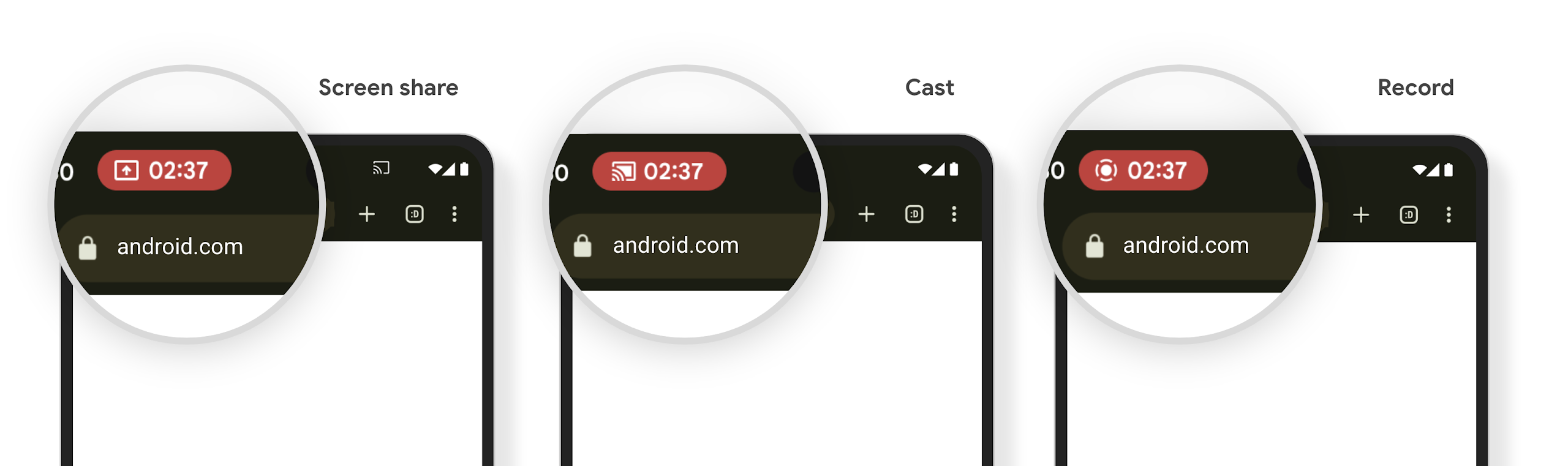
Media projection can expose private user information. A new, prominent status bar chip makes users aware of any ongoing screen projection. Users can tap the chip to stop screen casting, sharing, or recording. Also, for a more intuitive user experience, any in‑progress screen projection now automatically stops when the device screen is locked.
מסכים גדולים וגורמי צורה
Android 15 מאפשר לאפליקציות שלכם לתמוך במגוון גורמי הצורה של Android, כולל מסכים גדולים, מכשירים מתקפלים ומכשירים עם מסך מתהפך.
שיפורים בריבוי משימות במסך גדול
Android 15 gives users better ways to multitask on large screen devices. For example, users can save their favorite split-screen app combinations for quick access and pin the taskbar on screen to quickly switch between apps. This means that making sure your app is adaptive is more important than ever.
Google I/O has sessions on Building adaptive Android apps and Building UI with the Material 3 adaptive library that can help, and our documentation has more to help you Design for large screens.
תמיכה במסך החיצוני
האפליקציה יכולה להצהיר על מאפיין שמערכת Android 15 משתמשת בו כדי לאפשר להציג את Application או את Activity במסכי הכיסוי הקטנים של מכשירים נפתחים נתמכים. המסכים האלה קטנים מדי כדי להיחשב כיעדים תואמים להרצה של אפליקציות ל-Android, אבל אפשר להביע הסכמה לכך שהאפליקציה תתמוך בהם, וכך להפוך אותה לזמינה במקומות נוספים.
קישוריות
ב-Android 15, הפלטפורמה מתעדכנת כדי לתת לאפליקציה שלכם גישה לחידושים האחרונים בטכנולוגיות תקשורת וטכנולוגיות אלחוטיות.
תמיכה בלוויין
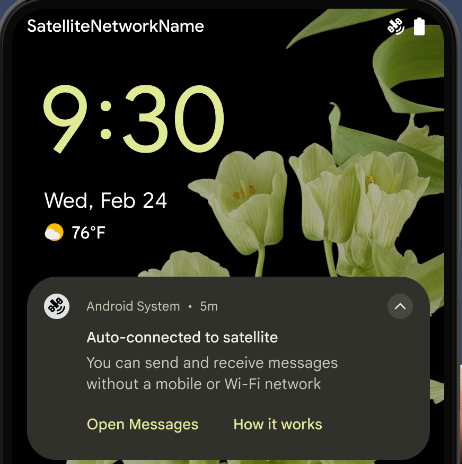
ב-Android 15 אנחנו ממשיכים להרחיב את תמיכת הפלטפורמה בקישוריות לווינית, ומוסיפים כמה רכיבי ממשק משתמש כדי להבטיח חוויית משתמש עקבית בכל סביבות הקישוריות הלווינית.
אפליקציות יכולות להשתמש ב-ServiceState.isUsingNonTerrestrialNetwork() כדי
לזהות מכשירים שמחוברים ללוויין, וכך להגביר את המוּדעוּת
מדוע שירותי רשת מלאים אינם זמינים. בנוסף, ב-Android 15 יש תמיכה באפליקציות SMS ו-MMS, וגם באפליקציות RCS שהוגדרו מראש, כדי להשתמש בחיבור לווין לשליחה ולקבלה של הודעות.
חוויות NFC חלקות יותר
Android 15 is working to make the tap to pay experience more seamless and
reliable while continuing to support Android's robust NFC app ecosystem. On
supported devices, apps can request the NfcAdapter to enter
observe mode, where the device listens but doesn't respond to NFC
readers, sending the app's NFC service PollingFrame
objects to process. The PollingFrame objects can be used to auth
ahead of the first communication to the NFC reader, allowing for a one tap
transaction in many cases.
In addition, apps can register a filter on supported devices so they can be notified of polling loop activity, which allows for smooth operation with multiple NFC-aware applications.
תפקיד בארנק
Android 15 introduces a Wallet role that allows tighter integration with the user's preferred wallet app. This role replaces the NFC default contactless payment setting. Users can manage the Wallet role holder by navigating to Settings > Apps > Default Apps.
The Wallet role is used when routing NFC taps for AIDs registered in the payment category. Taps always go to the Wallet role holder unless another app that is registered for the same AID is running in the foreground.
This role is also used to determine where the Wallet Quick Access tile should go when activated. When the role is set to "None", the Quick Access tile isn't available and payment category NFC taps are only delivered to the foreground app.
אבטחה
Android 15 עוזרת לכם לשפר את האבטחה של האפליקציה, להגן על הנתונים של האפליקציה ולספק למשתמשים שקיפות ושליטה רבה יותר על הנתונים שלהם. בשיחה שמירה על אבטחת המשתמשים ב-Android בכנס Google I/O מוסבר מה אנחנו עושים כדי לשפר את אמצעי ההגנה על המשתמשים ולהגן על האפליקציה שלכם מפני איומים חדשים.
שילוב של Credential Manager עם מילוי אוטומטי
Starting with Android 15, developers can link specific views like username or password fields with Credential Manager requests, making it easier to provide a tailored user experience during the sign-in process. When the user focuses on one of these views, a corresponding request is sent to Credential Manager. The resulting credentials are aggregated across providers and displayed in autofill fallback UIs, such as inline suggestions or drop-down suggestions. The Jetpack androidx.credentials library is the preferred endpoint for developers to use and will soon be available to further enhance this feature in Android 15 and higher.
שילוב של הרשמה וכניסה בלחיצה אחת עם הנחיות ביומטריות
Credential Manager integrates biometric prompts into the credential creation and sign-in processes, eliminating the need for providers to manage biometric prompts. As a result, credential providers only need to focus on the results of the create and get flows, augmented with the biometric flow result. This simplified process creates a more efficient and streamlined credential creation and retrieval process.
ניהול מפתחות להצפנה מקצה לקצה
We are introducing the E2eeContactKeysManager in Android 15, which
facilitates end-to-end encryption (E2EE) in your Android apps by providing an
OS-level API for the storage of cryptographic public keys.
The E2eeContactKeysManager is designed to integrate with the platform
contacts app to give users a centralized way to manage and verify their
contacts' public keys.
בדיקות הרשאות בכתובות URI של תוכן
ב-Android 15 נוספה קבוצה של ממשקי API שמבצעים בדיקות הרשאות על מזהי URI של תוכן:
Context.checkContentUriPermissionFull: מתבצעת בדיקת הרשאות מלאה על URI של תוכן.- מאפיין המניפסט
ActivityrequireContentUriPermissionFromCaller: המאפיין הזה אוכף הרשאות ספציפיות על מזהי ה-URI של התוכן שסופקו בזמן ההפעלה של הפעילות. - הקלאס
ComponentCallerלמפעיליActivity: הוא מייצג את האפליקציה שהפעילה את הפעילות.
נגישות
ב-Android 15 נוספו תכונות שמשפרות את הנגישות למשתמשים.
שיפורים בברייל
In Android 15, we've made it possible for TalkBack to support Braille displays that are using the HID standard over both USB and secure Bluetooth.
This standard, much like the one used by mice and keyboards, will help Android support a wider range of Braille displays over time.
אינטרנציונליזציה
ב-Android 15 נוספו תכונות ויכולות שמשלימות את חוויית המשתמש כשמשתמשים במכשיר בשפות שונות.
גופן משתנה של CJK
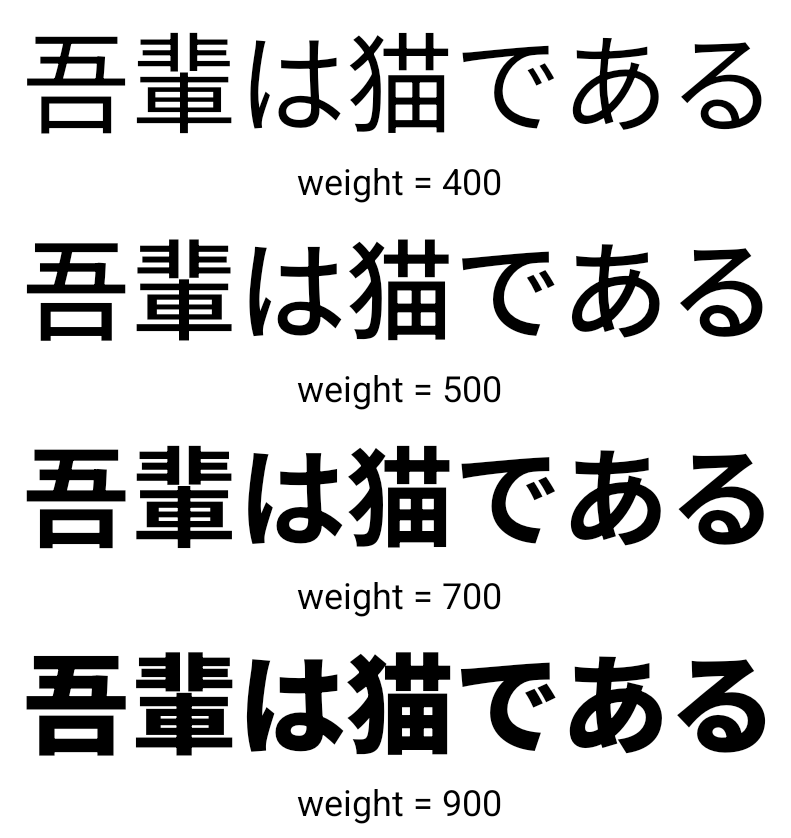
החל מגרסה 15 של Android, קובץ הגופן של השפות הסינית, היפנית והקוריאנית (CJK), NotoSansCJK, הוא עכשיו גופן משתנה. גופנים משתנים פותחים אפשרויות לטיפוגרפיה קריאייטיב בשפות CJK. מעצבים יכולים לבחור מתוך מגוון רחב יותר של סגנונות וליצור פריסות חזותיות מרהיבות שקשה או בלתי אפשרי ליצור אותן בדרכים אחרות.
הצדקה בין תווים
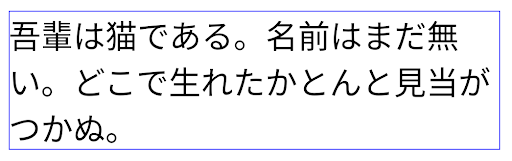
החל מ-Android 15, אפשר להצדיק את הטקסט עם ריווח של אותיות
באמצעות JUSTIFICATION_MODE_INTER_CHARACTER. ההצדקה בין המילים הייתה
הושקה לראשונה ב-Android 8.0 (רמת API 26),
להצדקה מספק יכולות דומות לשפות שמשתמשות
לצורך פילוח, כמו סינית, יפנית ועוד.
JUSTIFICATION_MODE_NONE.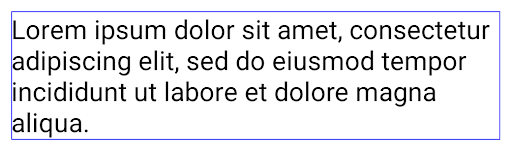
JUSTIFICATION_MODE_NONE.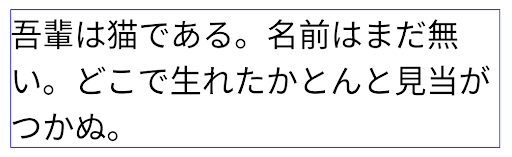
JUSTIFICATION_MODE_INTER_WORD.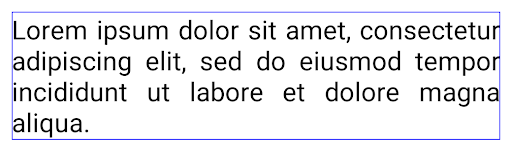
JUSTIFICATION_MODE_INTER_WORD.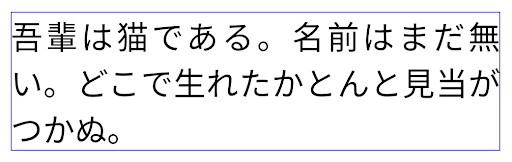
JUSTIFICATION_MODE_INTER_CHARACTER.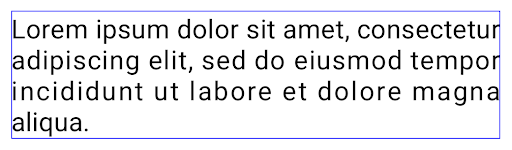
JUSTIFICATION_MODE_INTER_CHARACTER.הגדרה אוטומטית של מעברי שורה
Android started supporting phrase-based line breaks for Japanese and Korean in
Android 13 (API level 33). However, while phrase-based line breaks improve the
readability of short lines of text, they don't work well for long lines of text.
In Android 15, apps can apply phrase-based line breaks only for short lines
of text, using the LINE_BREAK_WORD_STYLE_AUTO
option. This option selects the best word style option for the text.
For short lines of text, phrase-based line breaks are used, functioning the same
as LINE_BREAK_WORD_STYLE_PHRASE, as shown in the
following image:
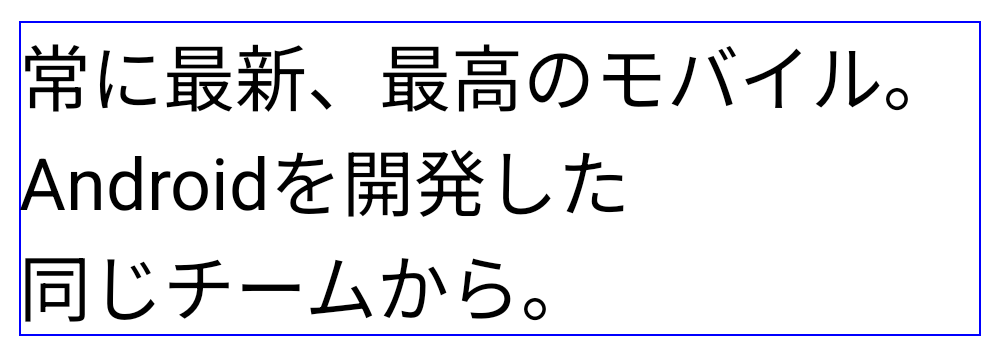
LINE_BREAK_WORD_STYLE_AUTO
applies phrase-based line breaks to improve the readability of the text.
This is the same as applying
LINE_BREAK_WORD_STYLE_PHRASE.For longer lines of text, LINE_BREAK_WORD_STYLE_AUTO uses a no
line-break word style, functioning the same as
LINE_BREAK_WORD_STYLE_NONE, as shown in the
following image:
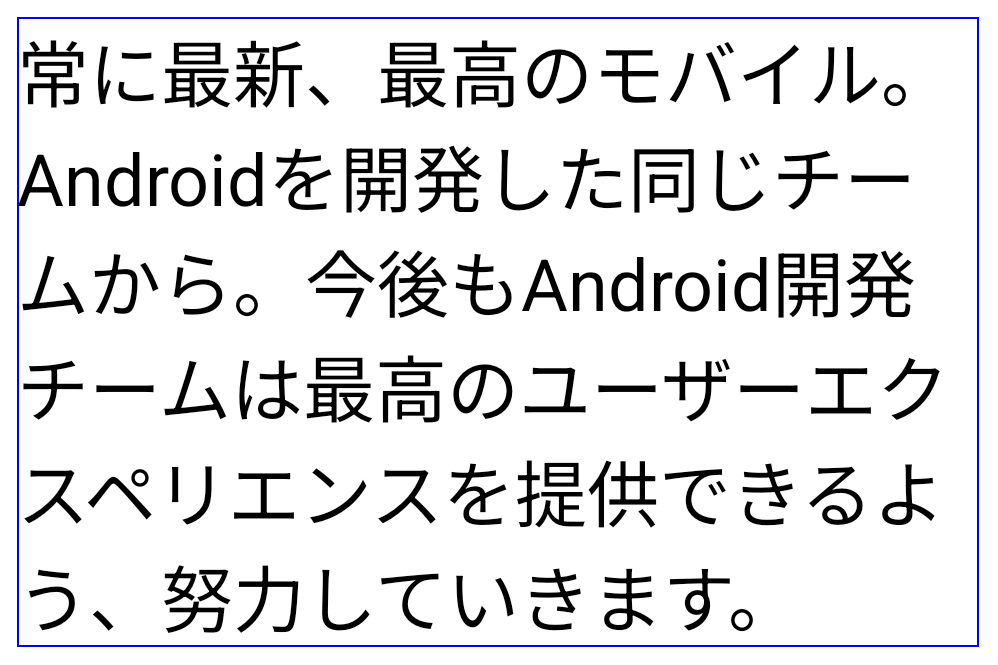
LINE_BREAK_WORD_STYLE_AUTO
applies no line-break word style to improve the readability of the text.
This is the same as applying
LINE_BREAK_WORD_STYLE_NONE.גופן נוסף של הנטאיגנה יפנית
In Android 15, a font file for old Japanese Hiragana (known as Hentaigana) is bundled by default. The unique shapes of Hentaigana characters can add a distinctive flair to artwork or design while also helping to preserve accurate transmission and understanding of ancient Japanese documents.
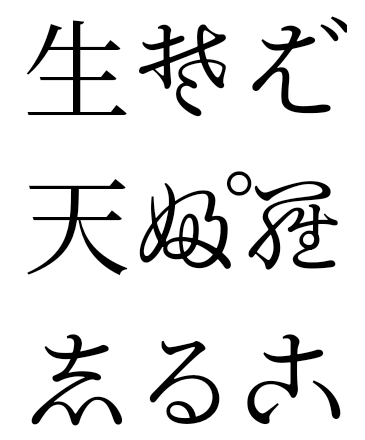
VideoLAN cone Copyright (c) 1996-2010 VideoLAN. כל אחד יכול להשתמש בלוגו הזה או בגרסה שונה שלו כדי להפנות לפרויקט VideoLAN או לכל מוצר שפותח על ידי צוות VideoLAN, אבל השימוש בלוגו לא מעיד על תמיכה בפרויקט.
Vulkan והלוגו של Vulkan הם סימנים מסחריים רשומים של Khronos Group Inc.
OpenGL הוא סימן מסחרי רשום והלוגו של OpenGL ES הוא סימן מסחרי של Hewlett Packard Enterprise, ש-Khronos משתמשת בו ברשות.