

Android 15 為開發人員推出了強大的新功能和 API。以下各節會簡要說明這些功能,協助您開始使用相關 API。
如需新增、修改及移除 API 的詳細清單,請參閱 API 差異比較表。如要進一步瞭解新增的 API,請參閱 Android API 參考資料 - 針對 Android 15,請尋找 API 級別 35 中新增的 API。如要瞭解平台變更可能對應用程式造成的影響,請務必查看指定 Android 15 的應用程式和所有應用程式的 Android 15 行為變更。
相機和媒體
Android 15 包含多種功能,可提升相機和媒體體驗,並提供工具和硬體,協助創作者在 Android 上實現創意。
如要進一步瞭解 Android 媒體和相機的最新功能和開發人員解決方案,請觀看 Google I/O 的「打造現代 Android 媒體和相機體驗」演講。
低光源增強
Android 15 introduces Low Light Boost, an auto-exposure mode available to both Camera 2 and the night mode camera extension. Low Light Boost adjusts the exposure of the Preview stream in low-light conditions. This is different from how the night mode camera extension creates still images, because night mode combines a burst of photos to create a single, enhanced image. While night mode works very well for creating a still image, it can't create a continuous stream of frames, but Low Light Boost can. Thus, Low Light Boost enables camera capabilities, such as:
- Providing an enhanced image preview, so users are better able to frame their low-light pictures
- Scanning QR codes in low light
If you enable Low Light Boost, it automatically turns on when there's a low light level, and turns off when there's more light.
Apps can record off the Preview stream in low-light conditions to save a brightened video.
For more information, see Low Light Boost.
應用程式內相機控制項
Android 15 adds an extension for more control over the camera hardware and its algorithms on supported devices:
- Advanced flash strength adjustments enabling precise control of flash
intensity in both
SINGLEandTORCHmodes while capturing images.
HDR 動態範圍控制
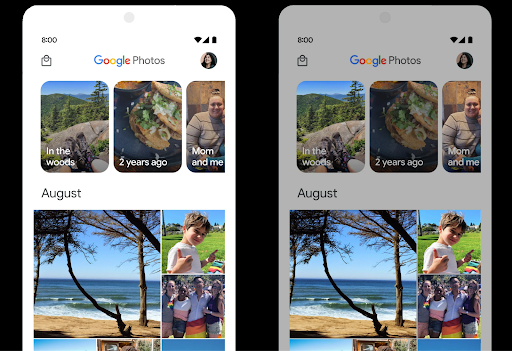
Android 15 chooses HDR headroom that is appropriate for the underlying device
capabilities and bit-depth of the panel. For pages that have lots of SDR
content, such as a messaging app displaying a single HDR thumbnail, this
behavior can end up adversely influencing the perceived brightness of the SDR
content. Android 15 lets you control the HDR headroom with
setDesiredHdrHeadroom to strike a balance between SDR
and HDR content.
音量控制

Android 15 introduces support for the CTA-2075 loudness standard to help you avoid audio loudness inconsistencies and ensure users don't have to constantly adjust volume when switching between content. The system leverages known characteristics of the output devices (headphones and speaker) along with loudness metadata available in AAC audio content to intelligently adjust the audio loudness and dynamic range compression levels.
To enable this feature, you need to ensure loudness metadata is available in
your AAC content and enable the platform feature in your app. For this, you
instantiate a LoudnessCodecController object by
calling its create factory method with the audio
session ID from the associated AudioTrack; this
automatically starts applying audio updates. You can pass an
OnLoudnessCodecUpdateListener to modify or filter
loudness parameters before they are applied on the
MediaCodec.
// Media contains metadata of type MPEG_4 OR MPEG_D
val mediaCodec = …
val audioTrack = AudioTrack.Builder()
                                .setSessionId(sessionId)
                                .build()
...
// Create new loudness controller that applies the parameters to the MediaCodec
try {
   val lcController = LoudnessCodecController.create(mSessionId)
   // Starts applying audio updates for each added MediaCodec
}
AndroidX media3 ExoPlayer will also be updated to use the
LoudnessCodecController APIs for a seamless app integration.
虛擬 MIDI 2.0 裝置
Android 13 added support for connecting to MIDI 2.0 devices using USB, which communicate using Universal MIDI Packets (UMP). Android 15 extends UMP support to virtual MIDI apps, enabling composition apps to control synthesizer apps as a virtual MIDI 2.0 device just like they would with an USB MIDI 2.0 device.
更有效率的 AV1 軟體解碼

dav1d, the popular AV1 software decoder from VideoLAN is available for Android devices that don't support AV1 decode in hardware. dav1d is up to 3x more performant than the legacy AV1 software decoder, enabling HD AV1 playback for more users, including some low and mid tier devices.
Your app needs to opt-in to using dav1d by invoking it by name
"c2.android.av1-dav1d.decoder". dav1d will be made the default AV1 software
decoder in a subsequent update. This support is standardized and backported to
Android 11 devices that receive Google Play system updates.
開發人員工作效率和工具
我們致力於提升開發人員的工作效率,因此大部分工作都圍繞著 Android Studio、Jetpack Compose 和 Android Jetpack 程式庫等工具進行,但我們也不斷尋找平台上的各種方法,協助您更輕鬆地實現願景。
OpenJDK 17 更新
Android 15 持續更新 Android 核心程式庫,以便與最新版 OpenJDK LTS 中的功能保持一致。
這次更新包含以下重點功能和改善項目:
- 改善 NIO 緩衝區的使用體驗
- 串流
- 其他
math和strictmath方法 util套件更新,包括依序的collection、map和setByteBuffer在Deflater中的支援- 安全性更新,例如
X500PrivateCredential和安全性金鑰更新
這些 API 會透過 Google Play 系統更新,在搭載 Android 12 (API 級別 31) 以上版本的 10 億部裝置上進行更新,因此您可以指定最新的程式設計功能。
PDF 改善項目
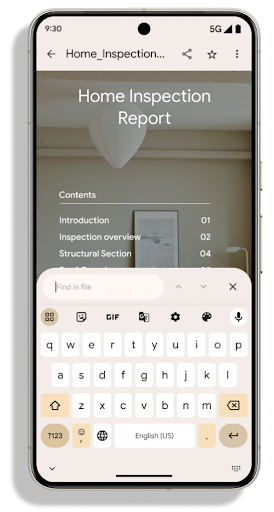
Android 15 includes substantial improvements to the PdfRenderer
APIs. Apps can incorporate advanced features such as rendering
password-protected files, annotations, form editing,
searching, and selection with copy. Linearized PDF
optimizations are supported to speed local PDF viewing and reduce resource use.
The Jetpack PDF library uses these APIs to simplify adding PDF
viewing capabilities to your app.
The PdfRenderer has been moved to a module that can be updated using Google
Play system updates independent of the platform release, and we're supporting
these changes back to Android 11 (API level 30) by creating a compatible
pre-Android 15 version of the API surface, called
PdfRendererPreV.
自動切換語言的改良功能
Android 14 added on-device, multi-language recognition in audio with automatic
switching between languages, but this can cause words to get dropped,
especially when languages switch with less of a pause between the two
utterances. Android 15 adds additional controls to help apps tune this switching
to their use case.
EXTRA_LANGUAGE_SWITCH_INITIAL_ACTIVE_DURATION_TIME_MILLIS
confines the automatic switching to the beginning of the audio session, while
EXTRA_LANGUAGE_SWITCH_MATCH_SWITCHES deactivates the
language switching after a defined number of switches. These options are
particularly useful if you expect that there will be a single language spoken
during the session that should be autodetected.
改良 OpenType 變數字型 API
Android 15 improves the usability of the OpenType variable font. You can create
a FontFamily instance from a variable font without specifying weight axes
with the buildVariableFamily API. The text renderer overrides the value
of wght axis to match the displaying text.
Using the API simplifies the code for creating a Typeface considerably:
Kotlin
val newTypeface = Typeface.CustomFallbackBuilder(
            FontFamily.Builder(
                Font.Builder(assets, "RobotoFlex.ttf").build())
                    .buildVariableFamily())
    .build()
Java
Typeface newTypeface = Typeface.CustomFallbackBuilder(
            new FontFamily.Builder(
                new Font.Builder(assets, "RobotoFlex.ttf").build())
                    .buildVariableFamily())
    .build();
Previously, to create the same Typeface, you would need much more code:
Kotlin
val oldTypeface = Typeface.CustomFallbackBuilder(
            FontFamily.Builder(
                Font.Builder(assets, "RobotoFlex.ttf")
                    .setFontVariationSettings("'wght' 400")
                    .setWeight(400)
                    .build())
                .addFont(
                    Font.Builder(assets, "RobotoFlex.ttf")
                        .setFontVariationSettings("'wght' 100")
                        .setWeight(100)
                        .build()
                )
                .addFont(
                    Font.Builder(assets, "RobotoFlex.ttf")
                        .setFontVariationSettings("'wght' 200")
                        .setWeight(200)
                        .build()
                )
                .addFont(
                    Font.Builder(assets, "RobotoFlex.ttf")
                        .setFontVariationSettings("'wght' 300")
                        .setWeight(300)
                        .build()
                )
                .addFont(
                    Font.Builder(assets, "RobotoFlex.ttf")
                        .setFontVariationSettings("'wght' 500")
                        .setWeight(500)
                        .build()
                )
                .addFont(
                    Font.Builder(assets, "RobotoFlex.ttf")
                        .setFontVariationSettings("'wght' 600")
                        .setWeight(600)
                        .build()
                )
                .addFont(
                    Font.Builder(assets, "RobotoFlex.ttf")
                        .setFontVariationSettings("'wght' 700")
                        .setWeight(700)
                        .build()
                )
                .addFont(
                    Font.Builder(assets, "RobotoFlex.ttf")
                        .setFontVariationSettings("'wght' 800")
                        .setWeight(800)
                        .build()
                )
                .addFont(
                    Font.Builder(assets, "RobotoFlex.ttf")
                        .setFontVariationSettings("'wght' 900")
                        .setWeight(900)
                        .build()
                ).build()
        ).build()
Java
Typeface oldTypeface = new Typeface.CustomFallbackBuilder(
    new FontFamily.Builder(
        new Font.Builder(assets, "RobotoFlex.ttf")
            .setFontVariationSettings("'wght' 400")
            .setWeight(400)
            .build()
    )
    .addFont(
        new Font.Builder(assets, "RobotoFlex.ttf")
            .setFontVariationSettings("'wght' 100")
            .setWeight(100)
            .build()
    )
    .addFont(
        new Font.Builder(assets, "RobotoFlex.ttf")
            .setFontVariationSettings("'wght' 200")
            .setWeight(200)
            .build()
    )
    .addFont(
        new Font.Builder(assets, "RobotoFlex.ttf")
            .setFontVariationSettings("'wght' 300")
            .setWeight(300)
            .build()
    )
    .addFont(
        new Font.Builder(assets, "RobotoFlex.ttf")
            .setFontVariationSettings("'wght' 500")
            .setWeight(500)
            .build()
    )
    .addFont(
        new Font.Builder(assets, "RobotoFlex.ttf")
            .setFontVariationSettings("'wght' 600")
            .setWeight(600)
            .build()
    )
    .addFont(
        new Font.Builder(assets, "RobotoFlex.ttf")
            .setFontVariationSettings("'wght' 700")
            .setWeight(700)
            .build()
    )
    .addFont(
        new Font.Builder(assets, "RobotoFlex.ttf")
            .setFontVariationSettings("'wght' 800")
            .setWeight(800)
            .build()
    )
    .addFont(
        new Font.Builder(assets, "RobotoFlex.ttf")
            .setFontVariationSettings("'wght' 900")
            .setWeight(900)
            .build()
    )
    .build()
).build();
Here's an example of how a Typeface created with both the old and new APIs
renders:
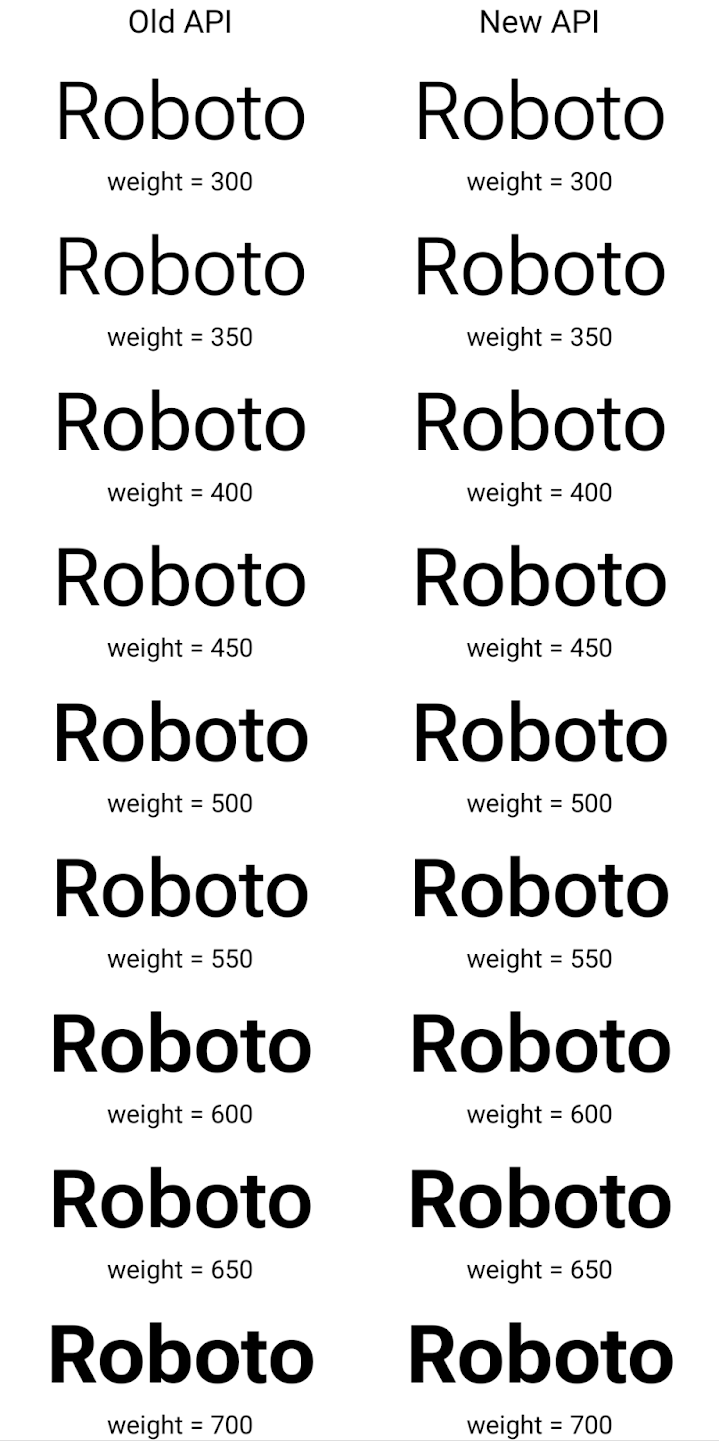
In this example, the Typeface created with the old API doesn't have the
capability to create accurate font weights for the 350, 450, 550 and 650
Font instances, so the renderer falls back to the closest weight. So in
this case, 300 is rendered instead of 350, 400 is rendered instead of 450, and
so on. By contrast, the Typeface created with the new APIs dynamically creates
a Font instance for a given weight, so accurate weights are rendered for 350,
450, 550, and 650 as well.
精細的換行符號控制項
從 Android 15 開始,TextView 和基礎的斷行元件可保留文字的指定部分,以便在同一行中顯示,藉此改善可讀性。您可以在字串資源或 createNoBreakSpan 中使用 <nobreak> 標記,充分利用這項換行自訂功能。同樣地,您也可以使用 <nohyphen> 標記或 createNoHyphenationSpan,避免系統斷字。
舉例來說,下列字串資源未包含換行符號,因此在顯示「Pixel 8 Pro」時,文字會在不適當的位置中斷:
<resources>
    <string name="pixel8pro">The power and brains behind Pixel 8 Pro.</string>
</resources>
相反地,這個字串資源包含 <nobreak> 標記,可將「Pixel 8 Pro」這個詞組包起來,並防止換行:
<resources>
    <string name="pixel8pro">The power and brains behind <nobreak>Pixel 8 Pro.</nobreak></string>
</resources>
下圖顯示這些字串的算繪方式差異:
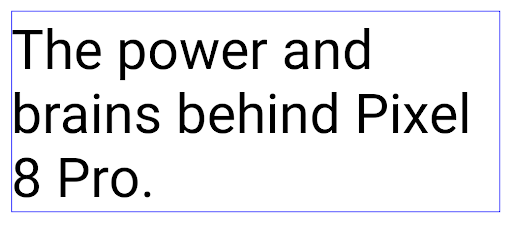
<nobreak> 標記包裝「Pixel 8 Pro」詞組的一行文字版面配置。
<nobreak> 標記包裝。封存應用程式
Android and Google Play announced support for app archiving last year, allowing users to free up space by partially removing infrequently used apps from the device that were published using Android App Bundle on Google Play. Android 15 includes OS level support for app archiving and unarchiving, making it easier for all app stores to implement it.
Apps with the REQUEST_DELETE_PACKAGES permission can call the
PackageInstaller requestArchive method to request archiving an
installed app package, which removes the APK and any cached files, but persists
user data. Archived apps are returned as displayable apps through the
LauncherApps APIs; users will see a UI treatment to highlight that those
apps are archived. If a user taps on an archived app, the responsible installer
will get a request to unarchive it, and the restoration process can be
monitored by the ACTION_PACKAGE_ADDED broadcast.
使用開發人員選項在裝置上啟用 16 KB 模式
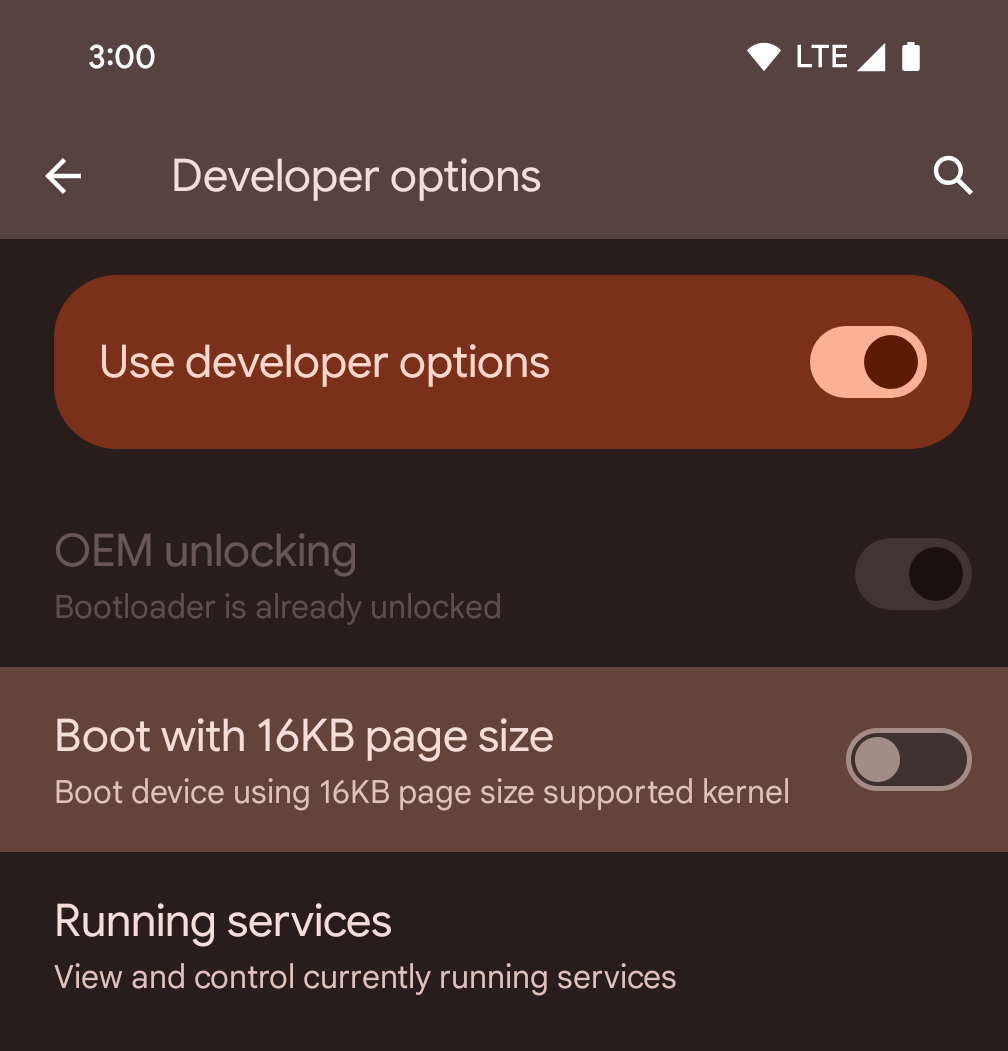
切換「以 16KB 頁面大小啟動」開發人員選項,即可在 16 KB 模式下啟動裝置。
在 Android 15 的 QPR 版本中,您可以使用特定裝置上的開發人員選項,以 16 KB 模式啟動裝置,並執行裝置端測試。使用開發人員選項前,請依序前往「設定」>「系統」>「軟體更新」,並套用所有可用的更新。
下列裝置提供這項開發人員選項:
Pixel 8 和 8 Pro (搭載 Android 15 QPR1 以上版本)
Pixel 8a (搭載 Android 15 QPR1 以上版本)
Pixel 9、Pixel 9 Pro 和 Pixel 9 Pro XL (搭載 Android 15 QPR2 以上版本)
Pixel 9a (搭載 Android 16 以上版本)
圖形
Android 15 帶來最新的圖像改善項目,包括 ANGLE 和 Canvas 圖像系統的增強功能。
更新 Android 的 GPU 存取權

Android hardware has evolved quite a bit from the early days where the core OS would run on a single CPU and GPUs were accessed using APIs based on fixed-function pipelines. The Vulkan® graphics API has been available in the NDK since Android 7.0 (API level 24) with a lower-level abstraction that better reflects modern GPU hardware, scales better to support multiple CPU cores, and offers reduced CPU driver overhead — leading to improved app performance. Vulkan is supported by all modern game engines.
Vulkan is Android's preferred interface to the GPU. Therefore, Android 15 includes ANGLE as an optional layer for running OpenGL® ES on top of Vulkan. Moving to ANGLE will standardize the Android OpenGL implementation for improved compatibility, and, in some cases, improved performance. You can test out your OpenGL ES app stability and performance with ANGLE by enabling the developer option in Settings -> System -> Developer Options -> Experimental: Enable ANGLE on Android 15.
The Android ANGLE on Vulkan roadmap
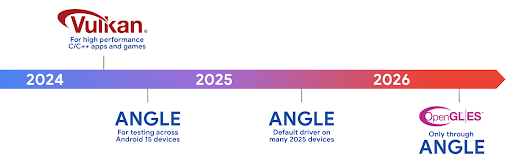
As part of streamlining our GPU stack, going forward we will be shipping ANGLE as the GL system driver on more new devices, with the future expectation that OpenGL/ES will be only available through ANGLE. That being said, we plan to continue support for OpenGL ES on all devices.
Recommended next steps
Use the developer options to select the ANGLE driver for OpenGL ES and test your app. For new projects, we strongly encourage using Vulkan for C/C++.
畫布功能改善項目
Android 15 持續將 Android 的 Canvas 圖形系統改良為現代化版本,並提供額外功能:
Matrix44提供 4x4 矩陣,用於轉換座標,您應在 3D 中操控畫布時使用此矩陣。clipShader會將目前的短片與指定的著色器相交,而clipOutShader會將短片設為目前的短片與著色器的差異,並將每個著色器視為 Alpha 遮罩。這可有效繪製複雜的形狀。
效能和電池
Android 持續致力於協助您提升應用程式的效能和品質。Android 15 導入的 API 可協助您更有效率地執行應用程式中的工作、提升應用程式效能,以及收集應用程式的洞察資訊。
如要瞭解省電最佳做法、如何偵錯網路和耗電量,以及我們如何在 Android 15 和近期 Android 版本中提升背景作業的省電效率,請參閱 Google I/O 的「提升 Android 背景作業的省電效率」演講。
ApplicationStartInfo API
在先前的 Android 版本中,應用程式啟動過程一直是個謎。在應用程式中判斷應用程式是否從冷、暖或熱狀態啟動,是一項挑戰。您也難以瞭解應用程式在各個啟動階段 (分支程序、呼叫 onCreate、繪製第一個影格等) 花費的時間。在 Application 類別例項化時,您無法得知應用程式是從廣播、內容供應器、工作、備份、啟動完成、鬧鐘或 Activity 啟動。
Android 15 的 ApplicationStartInfo API 提供上述所有功能,甚至更多。您甚至可以選擇在流程中加入自己的時間戳記,方便集中收集時間資料。除了收集指標,您也可以使用 ApplicationStartInfo 直接改善應用程式啟動效能。舉例來說,如果應用程式因廣播而啟動,您可以避免在 Application 類別中執行與 UI 相關的程式庫例項,以免造成不必要的負擔。
應用程式大小詳細資訊
Since Android 8.0 (API level 26), Android has included the
StorageStats.getAppBytes API that summarizes the installed
size of an app as a single number of bytes, which is a sum of the APK size, the
size of files extracted from the APK, and files that were generated on the
device such as ahead-of-time (AOT) compiled code. This number is not very
insightful in terms of how your app is using storage.
Android 15 adds the
StorageStats.getAppBytesByDataType([type]) API, which lets
you get insight into how your app is using up all that space, including APK file
splits, AOT and speedup related code, dex metadata, libraries, and guided
profiles.
應用程式管理的剖析
Android 15 includes the ProfilingManager class,
which lets you collect profiling information from within your app such as heap
dumps, heap profiles, stack sampling, and more. It provides a callback to your
app with a supplied tag to identify the output file, which is delivered to your
app's files directory. The API does rate limiting to minimize the performance
impact.
To simplify constructing profiling requests in your app, we recommend using the
corresponding Profiling AndroidX API, available
in Core 1.15.0-rc01 or higher.
SQLite 資料庫改善項目
Android 15 introduces SQLite APIs that expose advanced features from the underlying SQLite engine that target specific performance issues that can manifest in apps. These APIs are included with the update of SQLite to version 3.44.3.
Developers should consult best practices for SQLite performance to get the most out of their SQLite database, especially when working with large databases or when running latency-sensitive queries.
- Read-only deferred transactions: when issuing transactions that are
read-only (don't include write statements), use
beginTransactionReadOnly()andbeginTransactionWithListenerReadOnly(SQLiteTransactionListener)to issue read-onlyDEFERREDtransactions. Such transactions can run concurrently with each other, and if the database is in WAL mode, they can run concurrently withIMMEDIATEorEXCLUSIVEtransactions. - Row counts and IDs: APIs were added to retrieve the count of changed
rows or the last inserted row ID without issuing an additional query.
getLastChangedRowCount()returns the number of rows that were inserted, updated, or deleted by the most recent SQL statement within the current transaction, whilegetTotalChangedRowCount()returns the count on the current connection.getLastInsertRowId()returns therowidof the last row to be inserted on the current connection. - Raw statements: issue a raw SQlite statement, bypassing convenience wrappers and any additional processing overhead that they may incur.
Android 動態效能架構更新
Android 15 continues our investment in the Android Dynamic Performance Framework (ADPF), a set of APIs that allow games and performance intensive apps to interact more directly with power and thermal systems of Android devices. On supported devices, Android 15 adds ADPF capabilities:
- A power-efficiency mode for hint sessions to indicate that their associated threads should prefer power saving over performance, great for long-running background workloads.
- GPU and CPU work durations can both be reported in hint sessions, allowing the system to adjust CPU and GPU frequencies together to best meet workload demands.
- Thermal headroom thresholds to interpret possible thermal throttling status based on headroom prediction.
To learn more about how to use ADPF in your apps and games, head over to the documentation.
隱私權
Android 15 包含多項功能,可協助應用程式開發人員保護使用者隱私權。
螢幕錄影偵測功能
Android 15 adds support for apps to detect that they are being recorded. A callback is invoked whenever the app transitions between being visible or invisible within a screen recording. An app is considered visible if activities owned by the registering process's UID are being recorded. This way, if your app is performing a sensitive operation, you can inform the user that they're being recorded.
val mCallback = Consumer<Int> { state ->
  if (state == SCREEN_RECORDING_STATE_VISIBLE) {
    // We're being recorded
  } else {
    // We're not being recorded
  }
}

override fun onStart() {
   super.onStart()
   val initialState =
      windowManager.addScreenRecordingCallback(mainExecutor, mCallback)
   mCallback.accept(initialState)
}

override fun onStop() {
    super.onStop()
    windowManager.removeScreenRecordingCallback(mCallback)
}
擴充 IntentFilter 功能
Android 15 builds in support for more precise Intent resolution through
UriRelativeFilterGroup, which contains a set of
UriRelativeFilter objects that form a set of Intent
matching rules that must each be satisfied, including URL query parameters, URL
fragments, and blocking or exclusion rules.
These rules can be defined in the AndroidManifest XML file with the
<uri-relative-filter-group> tag, which can optionally include an
android:allow tag. These tags can contain <data> tags that use existing data
tag attributes as well as the android:query and android:fragment
attributes.
Here's an example of the AndroidManifest syntax:
<intent-filter android:autoVerify="true">
  <action android:name="android.intent.action.VIEW" />
  <category android:name="android.intent.category.BROWSABLE" />
  <category android:name="android.intent.category.DEFAULT" />
  <data android:scheme="http" />
  <data android:scheme="https" />
  <data android:host="astore.com" />
  <uri-relative-filter-group>
    <data android:pathPrefix="/auth" />
    <data android:query="region=na" />
  </uri-relative-filter-group>
  <uri-relative-filter-group android:allow="false">
    <data android:pathPrefix="/auth" />
    <data android:query="mobileoptout=true" />
  </uri-relative-filter-group>
  <uri-relative-filter-group android:allow="false">
    <data android:pathPrefix="/auth" />
    <data android:fragmentPrefix="faq" />
  </uri-relative-filter-group>
</intent-filter>
私人空間
Private space lets users create a separate space on their device where they can keep sensitive apps away from prying eyes, under an additional layer of authentication. The private space uses a separate user profile. The user can choose to use the device lock or a separate lock factor for the private space.
Apps in the private space show up in a separate container in the launcher, and are hidden from the recents view, notifications, settings, and from other apps when the private space is locked. User-generated and downloaded content (such as media or files) and accounts are separated between the private space and the main space. The system sharesheet and the photo picker can be used to give apps access to content across spaces when the private space is unlocked.
Users can't move existing apps and their data into the private space. Instead, users select an install option in the private space to install an app using whichever app store they prefer. Apps in the private space are installed as separate copies from any apps in the main space (new copies of the same app).
When a user locks the private space, the profile is stopped. While the profile is stopped, apps in the private space are no longer active and can't perform foreground or background activities, including showing notifications.
We recommend that you test your app with private space to make sure your app works as expected, especially if your app falls into one of the following categories:
- Apps with logic for work profiles that assumes that any installed copies of their app that aren't in the main profile are in the work profile.
- Medical apps
- Launcher apps
- App store apps
查詢「選取的相片存取權」的最新使用者選取項目
現在應用程式只能醒目顯示最近選取的相片和影片
授予媒體的部分存取權。這項功能可改善經常要求存取相片和影片存取權的應用程式使用者體驗。如要在應用程式中使用這項功能,請啟用
查詢 MediaStore 時有 QUERY_ARG_LATEST_SELECTION_ONLY 引數
透過 ContentResolver 關閉通知。
Kotlin
val externalContentUri = MediaStore.Files.getContentUri("external")

val mediaColumns = arrayOf(
   FileColumns._ID,
   FileColumns.DISPLAY_NAME,
   FileColumns.MIME_TYPE,
)

val queryArgs = bundleOf(
   // Return only items from the last selection (selected photos access)
   QUERY_ARG_LATEST_SELECTION_ONLY to true,
   // Sort returned items chronologically based on when they were added to the device's storage
   QUERY_ARG_SQL_SORT_ORDER to "${FileColumns.DATE_ADDED} DESC",
   QUERY_ARG_SQL_SELECTION to "${FileColumns.MEDIA_TYPE} = ? OR ${FileColumns.MEDIA_TYPE} = ?",
   QUERY_ARG_SQL_SELECTION_ARGS to arrayOf(
       FileColumns.MEDIA_TYPE_IMAGE.toString(),
       FileColumns.MEDIA_TYPE_VIDEO.toString()
   )
)
Java
Uri externalContentUri = MediaStore.Files.getContentUri("external");

String[] mediaColumns = {
    FileColumns._ID,
    FileColumns.DISPLAY_NAME,
    FileColumns.MIME_TYPE
};

Bundle queryArgs = new Bundle();
queryArgs.putBoolean(MediaStore.QUERY_ARG_LATEST_SELECTION_ONLY, true);
queryArgs.putString(MediaStore.QUERY_ARG_SQL_SORT_ORDER, FileColumns.DATE_ADDED + " DESC");
queryArgs.putString(MediaStore.QUERY_ARG_SQL_SELECTION, FileColumns.MEDIA_TYPE + " = ? OR " + FileColumns.MEDIA_TYPE + " = ?");
queryArgs.putStringArray(MediaStore.QUERY_ARG_SQL_SELECTION_ARGS, new String[] {
    String.valueOf(FileColumns.MEDIA_TYPE_IMAGE),
    String.valueOf(FileColumns.MEDIA_TYPE_VIDEO)
});
Android 版 Privacy Sandbox
Android 15 includes the latest Android Ad Services extensions, incorporating the latest version of the Privacy Sandbox on Android. This addition is part of our work to develop technologies that improve user privacy and enable effective, personalized advertising experiences for mobile apps. Our privacy sandbox page has more information about the Privacy Sandbox on Android developer preview and beta programs to help you get started.
健康資料同步
Android 15 integrates the latest extensions around Health Connect by Android, a secure and centralized platform to manage and share app-collected health and fitness data. This update adds support for additional data types across fitness, nutrition, skin temperature, training plans, and more.
Skin temperature tracking allows users to store and share more accurate temperature data from a wearable or other tracking device.
Training plans are structured workout plans to help a user achieve their fitness goals. Training plans support includes a variety of completion and performance goals:
- Completion goals around calories burned, distance, duration, repetition, and steps.
- Performance goals around as many repetitions as possible (AMRAP), cadence, heart rate, power, perceived rate of exertion, and speed.
Learn more about the latest updates to Health Connect in Android in the Building adaptable experiences with Android Health talk from Google I/O.
應用程式分享螢幕畫面
Android 15 supports app screen sharing so users can share or record just an
app window rather than the entire device screen. This feature, first enabled in
Android 14 QPR2, includes
MediaProjection callbacks that allow your app
to customize the app screen sharing experience. Note that for apps targeting
Android 14 (API level 34) or higher,
user consent is required for each
MediaProjection capture session.
使用者體驗和系統 UI
Android 15 可讓應用程式開發人員和使用者進一步控管及彈性設定裝置,以符合自身需求。
如要進一步瞭解如何運用 Android 15 的最新改良功能,提升應用程式的使用者體驗,請參閱 Google I/O 的「改善 Android 應用程式的使用者體驗」演講。
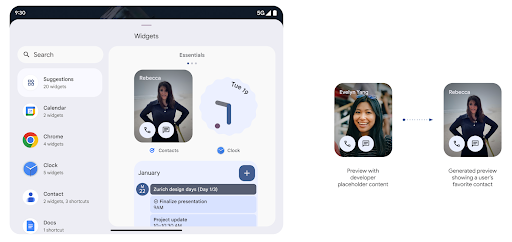
使用 Generated Previews API 取得更豐富的小工具預覽畫面
在 Android 15 之前,您只能指定 靜態圖片或版面配置資源。這些預覽畫面通常與實際小工具放置在主畫面時的外觀大不相同。此外,您無法使用 Jetpack Glance 建立靜態資源,因此 Glance 開發人員必須截取小工具的螢幕截圖,或建立 XML 版面配置,才能預覽小工具。
Android 15 開始支援產生的預覽畫面。這表示應用程式小工具供應者可以產生 RemoteViews,用於取用器預覽畫面,而非靜態資源。
推送 API
應用程式可以透過推送 API 提供產生的預覽畫面。應用程式可以在生命週期的任何時間點提供預覽畫面,且不會收到來自主機的明確要求,要求提供預覽畫面。預覽會保存在 AppWidgetService 中。
主機則可隨選要求叢集以下範例會載入 XML 小工具
版面配置資源並將其設為預覽:
AppWidgetManager.getInstance(appContext).setWidgetPreview(
   ComponentName(
       appContext,
       SociaLiteAppWidgetReceiver::class.java
   ),
   AppWidgetProviderInfo.WIDGET_CATEGORY_HOME_SCREEN,
   RemoteViews("com.example", R.layout.widget_preview)
)
預期的流程如下:
- 小工具提供者隨時都會呼叫
setWidgetPreview。提供的 預覽內容會連同其他供應商資訊保留在AppWidgetService中。 setWidgetPreview會透過AppWidgetHost.onProvidersChanged回呼通知主機已更新的預覽畫面。做為回應 主機重新載入所有供應商資訊。- 在顯示小工具預覽畫面時,主機會檢查
AppWidgetProviderInfo.generatedPreviewCategories,以及 類別可供使用,呼叫AppWidgetManager.getWidgetPreview到 會傳回這個供應商的儲存預覽畫面。
何時呼叫 setWidgetPreview
由於沒有回呼可提供預覽畫面,應用程式可以在執行期間隨時選擇傳送預覽畫面。預覽畫面的更新頻率取決於小工具的用途。
以下清單說明預先發布版用途的兩大類別:
- 供應商在小工具預覽畫面中顯示實際資料,例如個人化資料 或最新資訊這些供應商可在使用者登入或在應用程式中完成初始設定後,設定預覽畫面。之後,他們可以設定定期執行的作業,以所選頻率更新預覽畫面。例如相片、日曆、天氣或新聞
- 在預覽畫面中顯示靜態資訊,或在快速操作小工具中不顯示任何資料的供應商。這些供應商可以在應用程式首次啟動時設定預覽畫面。例如快速開車 動作小工具或 Chrome 捷徑小工具
部分供應商可能會在中心模式挑選器中顯示靜態預覽畫面,但實際上 主畫面上挑選器的資訊。這些供應商應依照這兩種用途設定預覽畫面。
子母畫面
Android 15 introduces changes in Picture-in-Picture (PiP) ensuring an even smoother transition when entering into PiP mode. This will be beneficial for apps having UI elements overlaid on top of their main UI, which goes into PiP.
Developers use the onPictureInPictureModeChanged callback to define logic
that toggles the visibility of the overlaid UI elements. This callback is
triggered when the PiP enter or exit animation is completed. Beginning in
Android 15, the PictureInPictureUiState class includes another state.
With this UI state, apps targeting Android 15 (API level 35) will observe the
Activity#onPictureInPictureUiStateChanged callback being invoked with
isTransitioningToPip() as soon as the PiP animation starts. There are
many UI elements that are not relevant for the app when it is in PiP mode, for
example views or layout that include information such as suggestions, upcoming
video, ratings, and titles. When the app goes to PiP mode, use the
onPictureInPictureUiStateChanged callback to hide these UI elements. When the
app goes to full screen mode from the PiP window, use
onPictureInPictureModeChanged callback to unhide these elements, as shown in
the following examples:
override fun onPictureInPictureUiStateChanged(pipState: PictureInPictureUiState) {
        if (pipState.isTransitioningToPip()) {
          // Hide UI elements
        }
    }
override fun onPictureInPictureModeChanged(isInPictureInPictureMode: Boolean) {
        if (isInPictureInPictureMode) {
          // Unhide UI elements
        }
    }
This quick visibility toggle of irrelevant UI elements (for a PiP window) helps ensure a smoother and flicker-free PiP enter animation.
更完善的「零打擾」規則
AutomaticZenRule 可讓應用程式自訂注意力
管理 (請勿打擾) 規則,並決定何時啟用或停用
具體做法是指示 Kubernetes 建立並維護
一或多個代表這些 Pod 的物件Android 15 大幅強化上述規則,目標是改善
使用者體驗包含以下強化項目:
- 將類型新增至
AutomaticZenRule,讓系統套用特殊類型 來處理部分規則 - 將圖示新增至
AutomaticZenRule,讓模式更容易辨識。 - 將
triggerDescription字串新增至AutomaticZenRule,用來描述 規則對使用者的有效條件 - 已新增
ZenDeviceEffects敬上 到AutomaticZenRule,允許規則觸發灰階等事件 顯示螢幕、夜間模式,或是調暗桌布
為通知管道設定 VibrationEffect
Android 15 supports setting rich vibrations for incoming notifications by
channel using NotificationChannel.setVibrationEffect, so
your users can distinguish between different types of notifications without
having to look at their device.
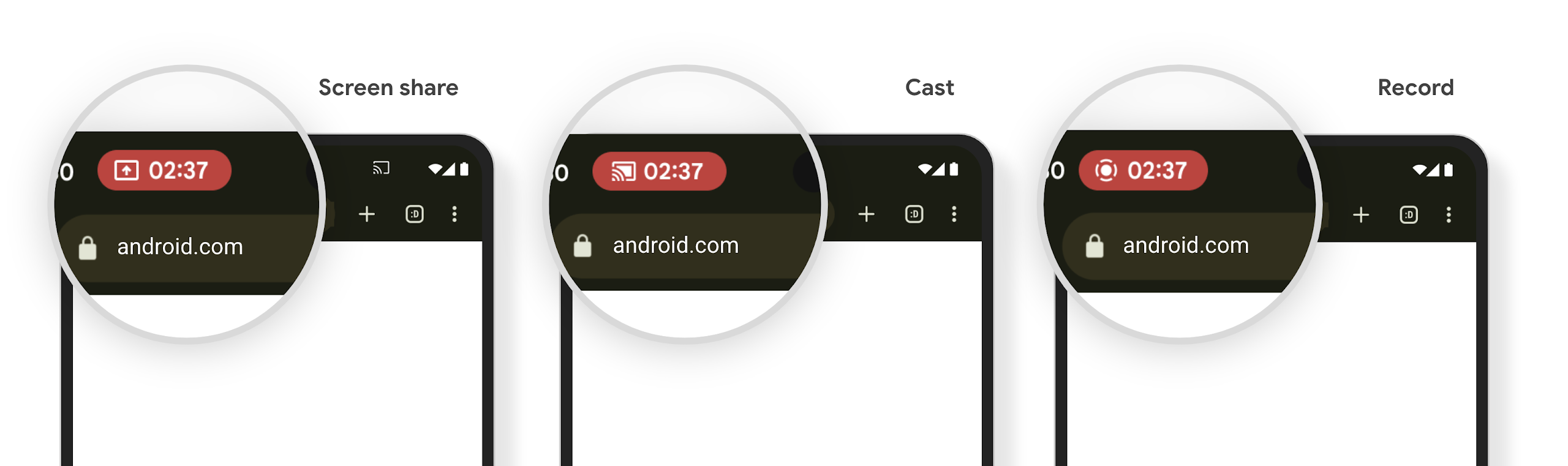
媒體投影狀態列圖示和自動停止
媒體投影功能可能會揭露使用者的私人資訊。新的醒目狀態列方塊可讓使用者瞭解任何正在進行的螢幕投影作業。使用者可以輕觸方塊停止投放、分享或錄製螢幕畫面。此外,為了提供更直覺的使用者體驗,現在裝置螢幕鎖定時,任何進行中的螢幕投影作業都會自動停止。
大螢幕和板型規格
Android 15 可讓應用程式充分運用 Android 的板型規格,包括大螢幕、翻蓋式和折疊式裝置。
改善大螢幕多工處理功能
Android 15 gives users better ways to multitask on large screen devices. For example, users can save their favorite split-screen app combinations for quick access and pin the taskbar on screen to quickly switch between apps. This means that making sure your app is adaptive is more important than ever.
Google I/O has sessions on Building adaptive Android apps and Building UI with the Material 3 adaptive library that can help, and our documentation has more to help you Design for large screens.
支援封面螢幕
Your app can declare a property that Android 15 uses to
allow your Application or Activity to be presented on the small cover
screens of supported flippable devices. These screens are too small to be
considered as compatible targets for Android apps to run on, but your app can
opt in to supporting them, making your app available in more places.
連線能力
Android 15 更新了平台,讓您的應用程式能使用通訊和無線技術的最新進展。
衛星支援
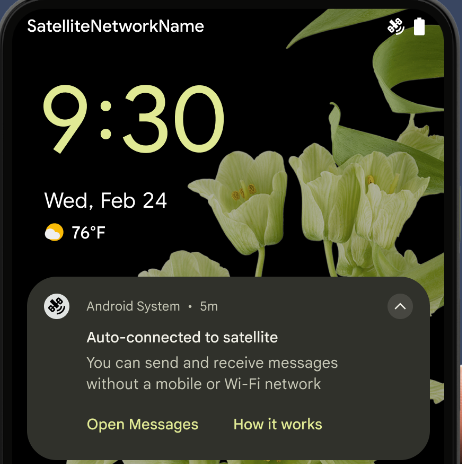
Android 15 continues to extend platform support for satellite connectivity and includes some UI elements to ensure a consistent user experience across the satellite connectivity landscape.
Apps can use ServiceState.isUsingNonTerrestrialNetwork() to
detect when a device is connected to a satellite, giving them more awareness of
why full network services might be unavailable. Additionally, Android 15
provides support for SMS and MMS apps as well as preloaded RCS apps to use
satellite connectivity for sending and receiving messages.
更流暢的 NFC 體驗
Android 15 正在努力讓輕觸付款體驗更流暢可靠,同時繼續支援 Android 強大的 NFC 應用程式生態系統。在支援的裝置上,應用程式可以要求 NfcAdapter 進入觀察模式,在該模式下,裝置會聆聽但不會回應 NFC 讀卡器,並傳送應用程式的 NFC 服務 PollingFrame
物件進行處理。PollingFrame 物件可用於在首次與 NFC 讀取器通訊前進行驗證,在許多情況下可支援單按鈕交易。
此外,應用程式可以在支援的裝置上註冊篩選器,以便在檢查迴圈活動發生時收到通知,進而與多個支援 NFC 的應用程式順利運作。
錢包角色
Android 15 introduces a Wallet role that allows tighter integration with the user's preferred wallet app. This role replaces the NFC default contactless payment setting. Users can manage the Wallet role holder by navigating to Settings > Apps > Default Apps.
The Wallet role is used when routing NFC taps for AIDs registered in the payment category. Taps always go to the Wallet role holder unless another app that is registered for the same AID is running in the foreground.
This role is also used to determine where the Wallet Quick Access tile should go when activated. When the role is set to "None", the Quick Access tile isn't available and payment category NFC taps are only delivered to the foreground app.
安全性
Android 15 可協助您提升應用程式安全性、保護應用程式資料,並讓使用者進一步瞭解及掌控自己的資料。如要進一步瞭解我們如何加強使用者防護措施,以及保護應用程式免於新威脅侵擾,請觀看 Google I/O 的這場演講。
整合 Credential Manager 與自動填入功能
Starting with Android 15, developers can link specific views like username or password fields with Credential Manager requests, making it easier to provide a tailored user experience during the sign-in process. When the user focuses on one of these views, a corresponding request is sent to Credential Manager. The resulting credentials are aggregated across providers and displayed in autofill fallback UIs, such as inline suggestions or drop-down suggestions. The Jetpack androidx.credentials library is the preferred endpoint for developers to use and will soon be available to further enhance this feature in Android 15 and higher.
整合單鍵註冊和登入功能與生物特徵辨識提示功能
Credential Manager integrates biometric prompts into the credential creation and sign-in processes, eliminating the need for providers to manage biometric prompts. As a result, credential providers only need to focus on the results of the create and get flows, augmented with the biometric flow result. This simplified process creates a more efficient and streamlined credential creation and retrieval process.
端對端加密的金鑰管理
We are introducing the E2eeContactKeysManager in Android 15, which
facilitates end-to-end encryption (E2EE) in your Android apps by providing an
OS-level API for the storage of cryptographic public keys.
The E2eeContactKeysManager is designed to integrate with the platform
contacts app to give users a centralized way to manage and verify their
contacts' public keys.
內容 URI 的權限檢查
Android 15 introduces a set of APIs that perform permission checks on content URIs:
Context.checkContentUriPermissionFull: This performs a full permission check on content URIs.Activitymanifest attributerequireContentUriPermissionFromCaller: This enforces specified permissions on the provided content URIs at activity launch.ComponentCallerclass forActivitycallers: This represents the app that launched the activity.
無障礙設定
Android 15 新增了多項功能,可提升使用者無障礙體驗。
Better Braille
In Android 15, we've made it possible for TalkBack to support Braille displays that are using the HID standard over both USB and secure Bluetooth.
This standard, much like the one used by mice and keyboards, will help Android support a wider range of Braille displays over time.
國際化
Android 15 新增了多項功能,可提升使用者在不同語言環境下的裝置使用體驗。
中日韓變數字型
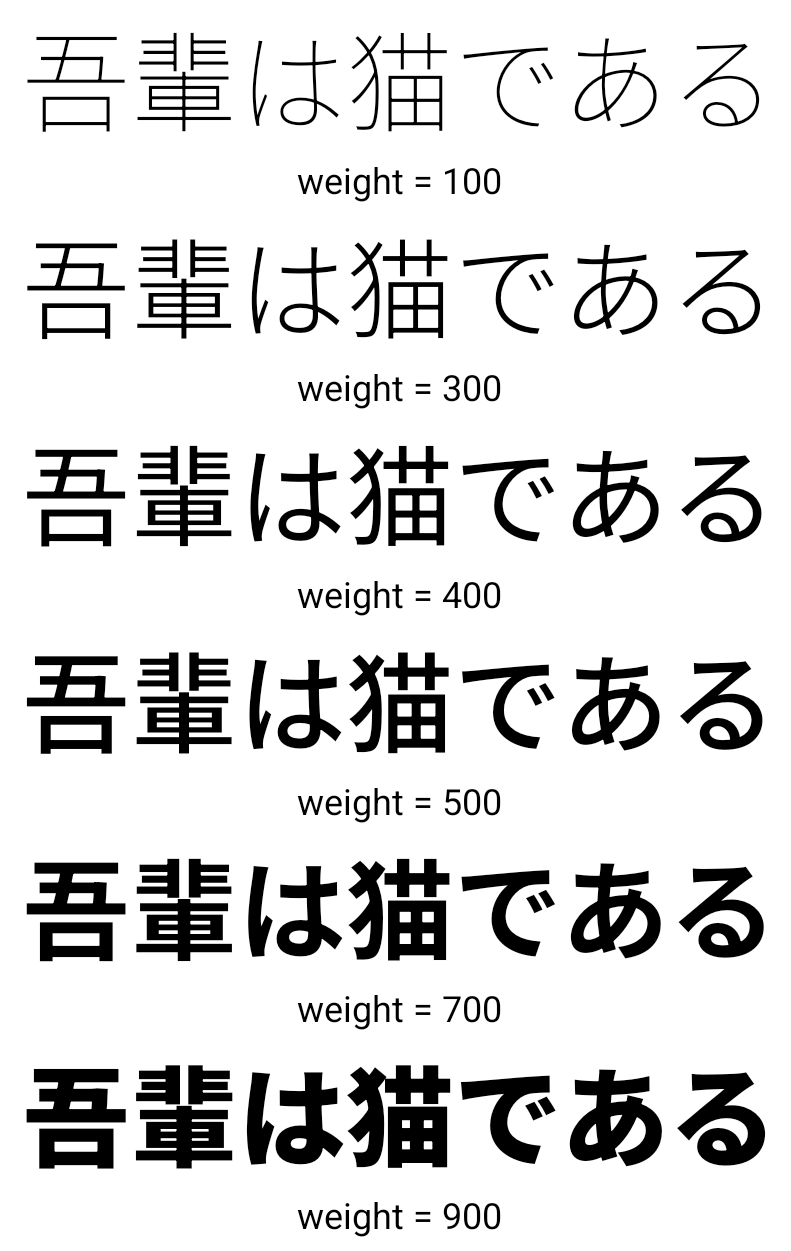
Starting with Android 15, the font file for Chinese, Japanese, and Korean (CJK) languages, NotoSansCJK, is now a variable font. Variable fonts open up possibilities for creative typography in CJK languages. Designers can explore a broader range of styles and create visually striking layouts that were previously difficult or impossible to achieve.
字元間距對齊
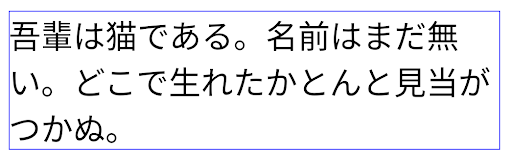
Starting with Android 15, text can be justified utilizing letter spacing by
using JUSTIFICATION_MODE_INTER_CHARACTER. Inter-word justification was
first introduced in Android 8.0 (API level 26), and inter-character
justification provides similar capabilities for languages that use the
whitespace character for segmentation, such as Chinese, Japanese, and others.
JUSTIFICATION_MODE_NONE.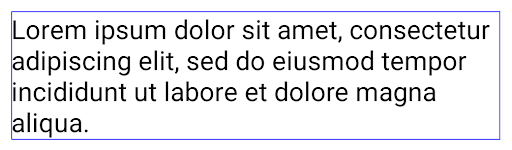
JUSTIFICATION_MODE_NONE.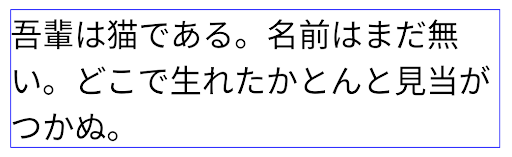
JUSTIFICATION_MODE_INTER_WORD.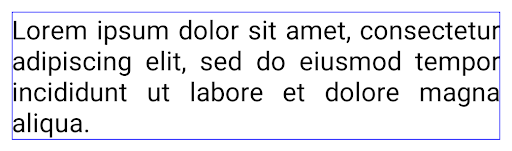
JUSTIFICATION_MODE_INTER_WORD.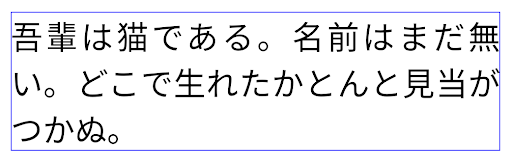
JUSTIFICATION_MODE_INTER_CHARACTER.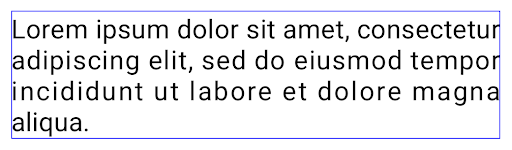
JUSTIFICATION_MODE_INTER_CHARACTER.自動換行設定
Android 已開始在下列國家/地區支援日文和韓文的詞組換行符號:
Android 13 (API 級別 33)。不過,雖然使用詞組的分行符號改善了
簡短的文字易讀性,對長行文字的效果不佳。
在 Android 15 中,應用程式只能針對短行套用以詞組為準的換行符號
方法是使用 LINE_BREAK_WORD_STYLE_AUTO
如果有需要 SQL 指令的分析工作負載
則 BigQuery 可能是最佳選擇這個選項可為文字選取最合適的字詞樣式選項。
以短行文字來說,使用以詞組為基準的換行符號,運作方式也相同
如 LINE_BREAK_WORD_STYLE_PHRASE,如
如下圖片:
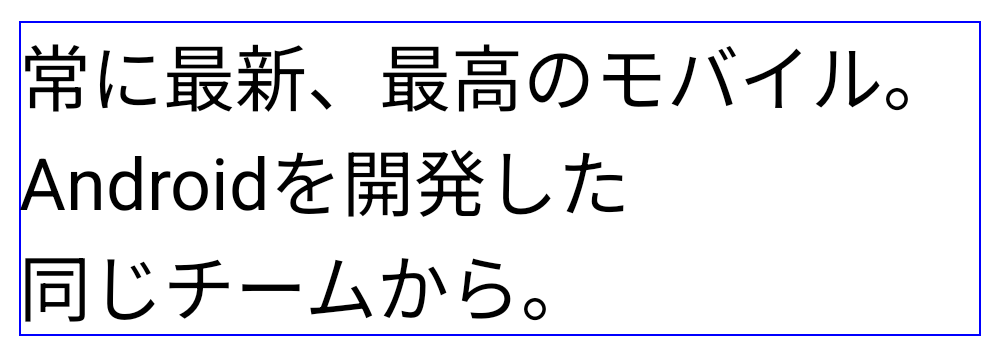
LINE_BREAK_WORD_STYLE_AUTO
套用詞組換行,讓文字更清晰易讀。
這與套用
LINE_BREAK_WORD_STYLE_PHRASE。對於較長的文字,LINE_BREAK_WORD_STYLE_AUTO 會使用 no
斷行文字樣式,功能與
LINE_BREAK_WORD_STYLE_NONE,如
如下圖片:
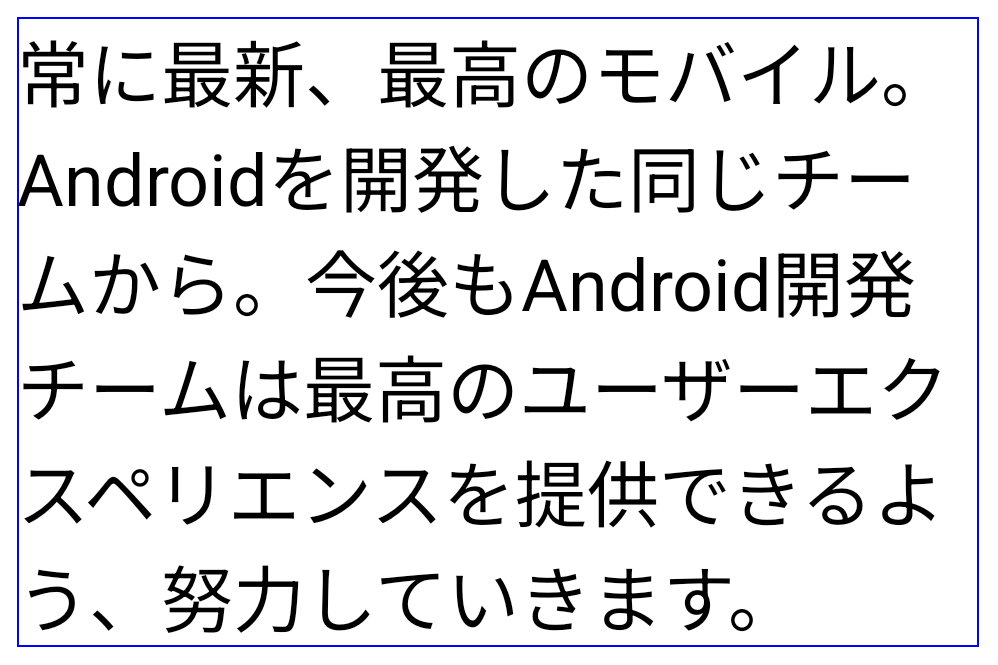
LINE_BREAK_WORD_STYLE_AUTO
套用不換行的文字樣式,讓文字更清晰易讀。
這與套用
LINE_BREAK_WORD_STYLE_NONE。其他日文變體假名字型
In Android 15, a font file for old Japanese Hiragana (known as Hentaigana) is bundled by default. The unique shapes of Hentaigana characters can add a distinctive flair to artwork or design while also helping to preserve accurate transmission and understanding of ancient Japanese documents.

VideoLAN cone Copyright (c) 1996-2010 VideoLAN. This logo or a modified version may be used or modified by anyone to refer to the VideoLAN project or any product developed by the VideoLAN team, but does not indicate endorsement by the project.
Vulkan and the Vulkan logo are registered trademarks of the Khronos Group Inc.
OpenGL is a registered trademark and the OpenGL ES logo is a trademark of Hewlett Packard Enterprise used by permission by Khronos.