

Android 15, geliştiriciler için harika özellikler ve API'ler sunuyor. Aşağıdaki bölümlerde, ilgili API'leri kullanmaya başlamanıza yardımcı olmak için bu özellikler özetlenmiştir.
Eklenen, değiştirilen ve kaldırılan API'lerin ayrıntılı listesi için API farklılıkları raporunu inceleyin. Eklenen API'lerle ilgili ayrıntılar için Android API referansını ziyaret edin. Android 15 için API düzeyi 35'te eklenen API'leri bulun. Platform değişikliklerinin uygulamalarınızı etkileyebileceği alanlar hakkında bilgi edinmek için Android 15'i hedefleyen uygulamalarda ve tüm uygulamalarda Android 15 davranış değişikliklerini inceleyin.
Kamera ve medya içerikleri
Android 15, kamera ve medya deneyimini iyileştiren, içerik üreticilerin vizyonlarını Android'de hayata geçirmelerini destekleyen araçlara ve donanımlara erişmenizi sağlayan çeşitli özellikler içerir.
Android'deki medya ve kamera için en yeni özellikler ve geliştirici çözümleri hakkında daha fazla bilgi edinmek istiyorsanız Google I/O'daki Modern Android medya ve kamera deneyimleri oluşturma başlıklı konuşmayı izleyin.
Düşük ışık güçlendirmesi
Android 15 introduces Low Light Boost, an auto-exposure mode available to both Camera 2 and the night mode camera extension. Low Light Boost adjusts the exposure of the Preview stream in low-light conditions. This is different from how the night mode camera extension creates still images, because night mode combines a burst of photos to create a single, enhanced image. While night mode works very well for creating a still image, it can't create a continuous stream of frames, but Low Light Boost can. Thus, Low Light Boost enables camera capabilities, such as:
- Providing an enhanced image preview, so users are better able to frame their low-light pictures
- Scanning QR codes in low light
If you enable Low Light Boost, it automatically turns on when there's a low light level, and turns off when there's more light.
Apps can record off the Preview stream in low-light conditions to save a brightened video.
For more information, see Low Light Boost.
Uygulama içi kamera kontrolleri
Android 15, desteklenen cihazlarda kamera donanımı ve algoritmaları üzerinde daha fazla kontrol için bir uzantı ekler:
- Görüntü çekerken hem
SINGLEhem deTORCHmodlarında flaşın yoğunluğunu hassas bir şekilde kontrol etmenizi sağlayan gelişmiş flaş gücü ayarları.
HDR headroom kontrolü
Android 15 chooses HDR headroom that is appropriate for the underlying device
capabilities and bit-depth of the panel. For pages that have lots of SDR
content, such as a messaging app displaying a single HDR thumbnail, this
behavior can end up adversely influencing the perceived brightness of the SDR
content. Android 15 lets you control the HDR headroom with
setDesiredHdrHeadroom to strike a balance between SDR
and HDR content.

Ses yüksekliği kontrolü

Android 15 introduces support for the CTA-2075 loudness standard to help you avoid audio loudness inconsistencies and ensure users don't have to constantly adjust volume when switching between content. The system leverages known characteristics of the output devices (headphones and speaker) along with loudness metadata available in AAC audio content to intelligently adjust the audio loudness and dynamic range compression levels.
To enable this feature, you need to ensure loudness metadata is available in
your AAC content and enable the platform feature in your app. For this, you
instantiate a LoudnessCodecController object by
calling its create factory method with the audio
session ID from the associated AudioTrack; this
automatically starts applying audio updates. You can pass an
OnLoudnessCodecUpdateListener to modify or filter
loudness parameters before they are applied on the
MediaCodec.
// Media contains metadata of type MPEG_4 OR MPEG_D
val mediaCodec = …
val audioTrack = AudioTrack.Builder()
                                .setSessionId(sessionId)
                                .build()
...
// Create new loudness controller that applies the parameters to the MediaCodec
try {
   val lcController = LoudnessCodecController.create(mSessionId)
   // Starts applying audio updates for each added MediaCodec
}
AndroidX media3 ExoPlayer will also be updated to use the
LoudnessCodecController APIs for a seamless app integration.
Sanal MIDI 2.0 cihazları
Android 13 added support for connecting to MIDI 2.0 devices using USB, which communicate using Universal MIDI Packets (UMP). Android 15 extends UMP support to virtual MIDI apps, enabling composition apps to control synthesizer apps as a virtual MIDI 2.0 device just like they would with an USB MIDI 2.0 device.
Daha verimli AV1 yazılım kod çözme

VideoLAN'ın popüler AV1 yazılım kod çözücüsü dav1d, donanımda AV1 kod çözmeyi desteklemeyen Android cihazlarda kullanılabilir. Eski AV1 yazılım kod çözücüsüne kıyasla 3 kata kadar daha yüksek performans gösteren dav1d, bazı düşük ve orta sınıf cihazlar da dahil olmak üzere daha fazla kullanıcının HD AV1 oynatmasını sağlar.
Uygulamanızın, dav1d'yi adıyla çağırarak "c2.android.av1-dav1d.decoder" kullanmayı etkinleştirmesi gerekir. dav1d, sonraki bir güncellemede varsayılan AV1 yazılım kod çözücüsü olacak. Bu destek standartlaştırılır ve Google Play sistem güncellemeleri alan Android 11 cihazlara geri bağlanır.
Geliştirici üretkenliği ve araçları
Üretkenliğinizi artırmaya yönelik çalışmalarımızın çoğu Android Studio, Jetpack Compose ve Android Jetpack kitaplıkları gibi araçlara odaklanırken platformda vizyonunuzu daha kolay gerçekleştirmenize yardımcı olacak yollar aramaya devam ediyoruz.
OpenJDK 17 güncellemeleri
Android 15 continues the work of refreshing Android's core libraries to align with the features in the latest OpenJDK LTS releases.
The following key features and improvements are included:
- Quality-of-life improvements around NIO buffers
- Streams
- Additional
mathandstrictmathmethods utilpackage updates including sequencedcollection,map, andsetByteBuffersupport inDeflater- Security updates such as
X500PrivateCredentialand security key updates
These APIs are updated on over a billion devices running Android 12 (API level 31) and higher through Google Play System updates, so you can target the latest programming features.
PDF iyileştirmeleri
Android 15 includes substantial improvements to the PdfRenderer
APIs. Apps can incorporate advanced features such as rendering
password-protected files, annotations, form editing,
searching, and selection with copy. Linearized PDF
optimizations are supported to speed local PDF viewing and reduce resource use.
The Jetpack PDF library uses these APIs to simplify adding PDF
viewing capabilities to your app.

The PdfRenderer has been moved to a module that can be updated using Google
Play system updates independent of the platform release, and we're supporting
these changes back to Android 11 (API level 30) by creating a compatible
pre-Android 15 version of the API surface, called
PdfRendererPreV.
Otomatik dil geçişiyle ilgili iyileştirmeler
Android 14, diller arasında otomatik geçişle birlikte cihaz üzerinde sesli olarak çok dilli tanıma özelliğini ekledi. Ancak bu özellik, özellikle iki ifade arasında daha az duraksama olduğunda kelimelerin atlanmasına neden olabilir. Android 15, uygulamaların bu geçişi kullanım alanlarına göre ayarlamalarına yardımcı olmak için ek kontroller ekler.
EXTRA_LANGUAGE_SWITCH_INITIAL_ACTIVE_DURATION_TIME_MILLIS, otomatik geçişi ses oturumunun başına sınırlar. EXTRA_LANGUAGE_SWITCH_MATCH_SWITCHES ise belirli sayıda geçişten sonra dil geçişini devre dışı bırakır. Bu seçenekler, oturum sırasında otomatik olarak algılanması gereken tek bir dilin konuşulacağını düşünüyorsanız özellikle kullanışlıdır.
Geliştirilmiş OpenType Variable Font API
Android 15 improves the usability of the OpenType variable font. You can create
a FontFamily instance from a variable font without specifying weight axes
with the buildVariableFamily API. The text renderer overrides the value
of wght axis to match the displaying text.
Using the API simplifies the code for creating a Typeface considerably:
Kotlin
val newTypeface = Typeface.CustomFallbackBuilder(
            FontFamily.Builder(
                Font.Builder(assets, "RobotoFlex.ttf").build())
                    .buildVariableFamily())
    .build()
Java
Typeface newTypeface = Typeface.CustomFallbackBuilder(
            new FontFamily.Builder(
                new Font.Builder(assets, "RobotoFlex.ttf").build())
                    .buildVariableFamily())
    .build();
Previously, to create the same Typeface, you would need much more code:
Kotlin
val oldTypeface = Typeface.CustomFallbackBuilder(
            FontFamily.Builder(
                Font.Builder(assets, "RobotoFlex.ttf")
                    .setFontVariationSettings("'wght' 400")
                    .setWeight(400)
                    .build())
                .addFont(
                    Font.Builder(assets, "RobotoFlex.ttf")
                        .setFontVariationSettings("'wght' 100")
                        .setWeight(100)
                        .build()
                )
                .addFont(
                    Font.Builder(assets, "RobotoFlex.ttf")
                        .setFontVariationSettings("'wght' 200")
                        .setWeight(200)
                        .build()
                )
                .addFont(
                    Font.Builder(assets, "RobotoFlex.ttf")
                        .setFontVariationSettings("'wght' 300")
                        .setWeight(300)
                        .build()
                )
                .addFont(
                    Font.Builder(assets, "RobotoFlex.ttf")
                        .setFontVariationSettings("'wght' 500")
                        .setWeight(500)
                        .build()
                )
                .addFont(
                    Font.Builder(assets, "RobotoFlex.ttf")
                        .setFontVariationSettings("'wght' 600")
                        .setWeight(600)
                        .build()
                )
                .addFont(
                    Font.Builder(assets, "RobotoFlex.ttf")
                        .setFontVariationSettings("'wght' 700")
                        .setWeight(700)
                        .build()
                )
                .addFont(
                    Font.Builder(assets, "RobotoFlex.ttf")
                        .setFontVariationSettings("'wght' 800")
                        .setWeight(800)
                        .build()
                )
                .addFont(
                    Font.Builder(assets, "RobotoFlex.ttf")
                        .setFontVariationSettings("'wght' 900")
                        .setWeight(900)
                        .build()
                ).build()
        ).build()
Java
Typeface oldTypeface = new Typeface.CustomFallbackBuilder(
    new FontFamily.Builder(
        new Font.Builder(assets, "RobotoFlex.ttf")
            .setFontVariationSettings("'wght' 400")
            .setWeight(400)
            .build()
    )
    .addFont(
        new Font.Builder(assets, "RobotoFlex.ttf")
            .setFontVariationSettings("'wght' 100")
            .setWeight(100)
            .build()
    )
    .addFont(
        new Font.Builder(assets, "RobotoFlex.ttf")
            .setFontVariationSettings("'wght' 200")
            .setWeight(200)
            .build()
    )
    .addFont(
        new Font.Builder(assets, "RobotoFlex.ttf")
            .setFontVariationSettings("'wght' 300")
            .setWeight(300)
            .build()
    )
    .addFont(
        new Font.Builder(assets, "RobotoFlex.ttf")
            .setFontVariationSettings("'wght' 500")
            .setWeight(500)
            .build()
    )
    .addFont(
        new Font.Builder(assets, "RobotoFlex.ttf")
            .setFontVariationSettings("'wght' 600")
            .setWeight(600)
            .build()
    )
    .addFont(
        new Font.Builder(assets, "RobotoFlex.ttf")
            .setFontVariationSettings("'wght' 700")
            .setWeight(700)
            .build()
    )
    .addFont(
        new Font.Builder(assets, "RobotoFlex.ttf")
            .setFontVariationSettings("'wght' 800")
            .setWeight(800)
            .build()
    )
    .addFont(
        new Font.Builder(assets, "RobotoFlex.ttf")
            .setFontVariationSettings("'wght' 900")
            .setWeight(900)
            .build()
    )
    .build()
).build();
Here's an example of how a Typeface created with both the old and new APIs
renders:
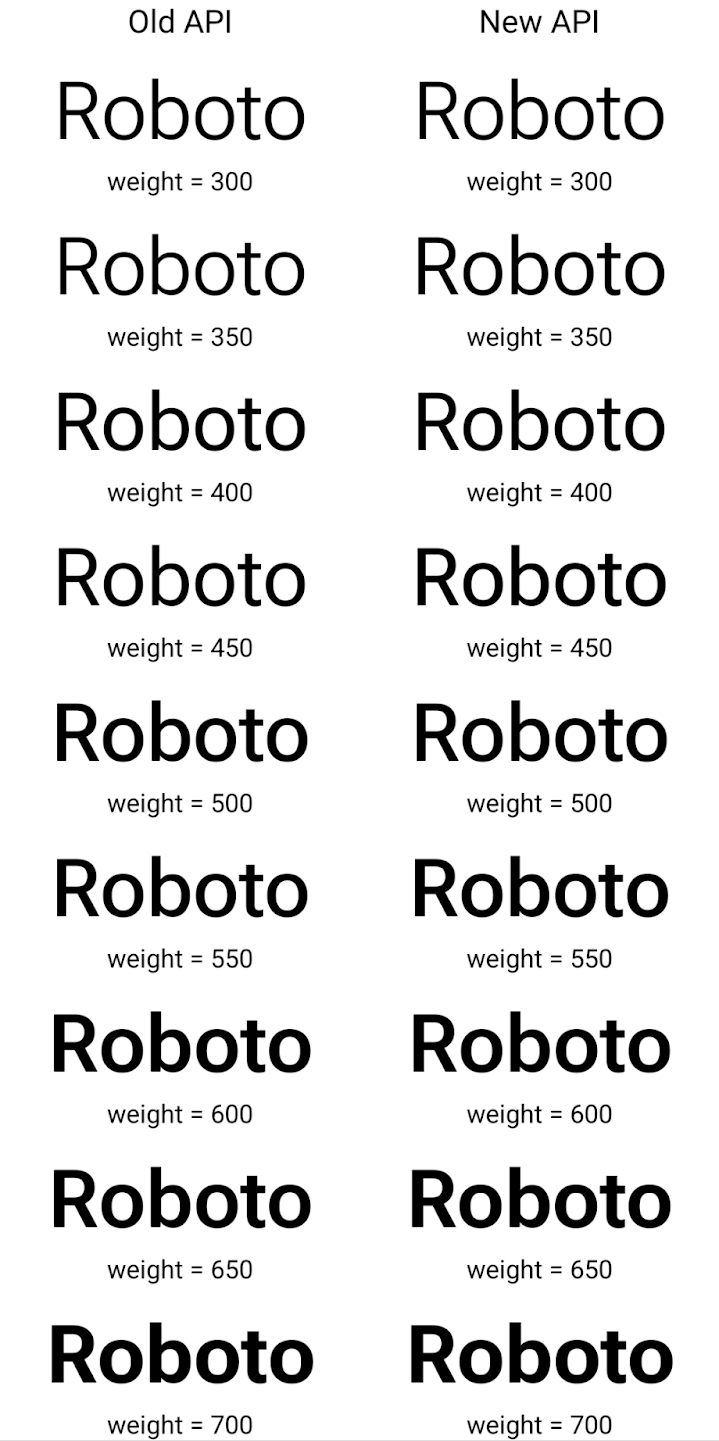
In this example, the Typeface created with the old API doesn't have the
capability to create accurate font weights for the 350, 450, 550 and 650
Font instances, so the renderer falls back to the closest weight. So in
this case, 300 is rendered instead of 350, 400 is rendered instead of 450, and
so on. By contrast, the Typeface created with the new APIs dynamically creates
a Font instance for a given weight, so accurate weights are rendered for 350,
450, 550, and 650 as well.
Ayrıntılı satır sonu kontrolleri
Starting in Android 15, a TextView and the underlying
line breaker can preserve the given portion of text in the same line to improve
readability. You can take advantage of this line break customization by using
the <nobreak> tag in string resources or
createNoBreakSpan. Similarly, you can preserve words from
hyphenation by using the <nohyphen> tag or
createNoHyphenationSpan.
For example, the following string resource doesn't include a line break, and renders with the text "Pixel 8 Pro." breaking in an undesirable place:
<resources>
    <string name="pixel8pro">The power and brains behind Pixel 8 Pro.</string>
</resources>
In contrast, this string resource includes the <nobreak> tag, which wraps the
phrase "Pixel 8 Pro." and prevents line breaks:
<resources>
    <string name="pixel8pro">The power and brains behind <nobreak>Pixel 8 Pro.</nobreak></string>
</resources>
The difference in how these strings are rendered is shown in the following images:

<nobreak> tag.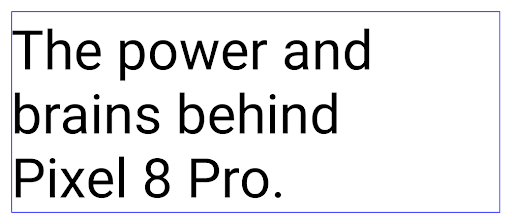
<nobreak> tag.Uygulama arşivleme
Android and Google Play announced support for app archiving last year, allowing users to free up space by partially removing infrequently used apps from the device that were published using Android App Bundle on Google Play. Android 15 includes OS level support for app archiving and unarchiving, making it easier for all app stores to implement it.
Apps with the REQUEST_DELETE_PACKAGES permission can call the
PackageInstaller requestArchive method to request archiving an
installed app package, which removes the APK and any cached files, but persists
user data. Archived apps are returned as displayable apps through the
LauncherApps APIs; users will see a UI treatment to highlight that those
apps are archived. If a user taps on an archived app, the responsible installer
will get a request to unarchive it, and the restoration process can be
monitored by the ACTION_PACKAGE_ADDED broadcast.
Geliştirici seçeneklerini kullanarak bir cihazda 16 KB modunu etkinleştirme
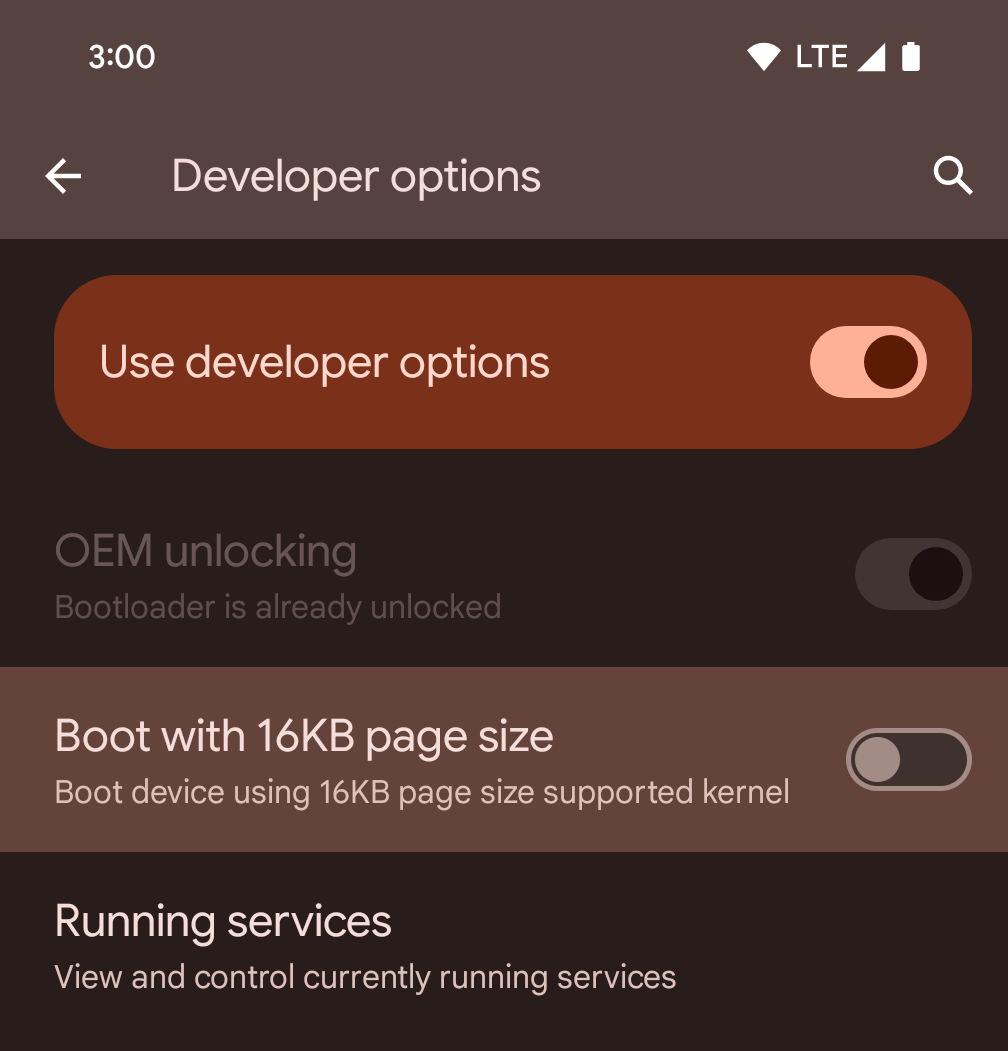
Cihazı 16 KB modunda başlatmak için 16 KB sayfa boyutuyla başlat geliştirici seçeneğini etkinleştirin.
Android 15'in QPR sürümlerinde, cihazı 16 KB modunda başlatmak ve cihaz üzerinde test yapmak için belirli cihazlarda bulunan geliştirici seçeneğini kullanabilirsiniz. Geliştirici seçeneğini kullanmadan önce Ayarlar > Sistem > Yazılım güncellemeleri'ne gidip varsa güncellemeleri uygulayın.
Bu geliştirici seçeneği aşağıdaki cihazlarda kullanılabilir:
Pixel 8 ve 8 Pro (Android 15 QPR1 veya sonraki sürümlerle)
Pixel 8a (Android 15 QPR1 veya sonraki sürümler)
Pixel 9, 9 Pro ve 9 Pro XL (Android 15 QPR2 veya sonraki bir sürüm yüklü)
Pixel 9a (Android 16 veya sonraki sürümler)
Grafik
Android 15, ANGLE ve Canvas grafik sistemine eklemeler de dahil olmak üzere en yeni grafik iyileştirmelerini sunar.
Android'in GPU erişimini modernleştirme

Android donanımı, çekirdek işletim sisteminin tek bir CPU'da çalıştığı ve GPU'lara sabit işlevli ardışık düzenlere dayalı API'ler kullanılarak erişildiği ilk günlerden bu yana oldukça gelişti. Vulkan® grafik API'si, Android 7.0 (API seviyesi 24) sürümünden beri NDK'da mevcuttur. Modern GPU donanımlarını daha iyi yansıtan, birden fazla CPU çekirdeğini desteklemek için daha iyi ölçeklendirilen ve CPU sürücüsünün ek yükünü azaltan bu API, uygulama performansını iyileştirir. Vulkan, tüm modern oyun motorları tarafından desteklenir.
Vulkan, Android'in GPU için tercih ettiği arayüzdür. Bu nedenle Android 15, Vulkan'ın üzerinde OpenGL® ES çalıştırmak için isteğe bağlı bir katman olarak ANGLE'ı içerir. ANGLE'a geçiş, Android OpenGL uygulamasını standartlaştırarak daha iyi uyumluluk ve bazı durumlarda daha iyi performans sağlar. Android 15'te Ayarlar -> Sistem -> Geliştirici Seçenekleri -> Deneysel: ANGLE'ı etkinleştir geliştirici seçeneğini etkinleştirerek OpenGL ES uygulamanızın kararlılığını ve performansını ANGLE ile test edebilirsiniz.
Vulkan'da Android ANGLE yol haritası
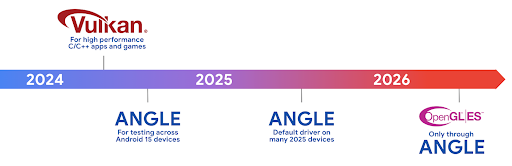
GPU yığınımızı basitleştirme kapsamında, bundan sonra daha fazla yeni cihazda GL sistem sürücüsü olarak ANGLE'ı kullanıma sunacağız. OpenGL/ES'in gelecekte yalnızca ANGLE üzerinden kullanılmasını bekliyoruz. Bununla birlikte, tüm cihazlarda OpenGL ES desteğini sürdürmeyi planlıyoruz.
Sıradaki önerilen adımlar
OpenGL ES için ANGLE sürücüsünü seçmek ve uygulamanızı test etmek üzere geliştirici seçeneklerini kullanın. Yeni projelerde C/C++ için Vulkan'ı kullanmanızı önemle tavsiye ederiz.
Canvas ile ilgili iyileştirmeler
Android 15 continues our modernization of Android's Canvas graphics system with additional capabilities:
Matrix44provides a 4x4 matrix for transforming coordinates that should be used when you want to manipulate the canvas in 3D.clipShaderintersects the current clip with the specified shader, whileclipOutShadersets the clip to the difference of the current clip and the shader, each treating the shader as an alpha mask. This supports the drawing of complex shapes efficiently.
Performans ve pil
Android, uygulamalarınızın performansını ve kalitesini artırmanıza yardımcı olmaya odaklanmaya devam ediyor. Android 15, uygulamanızdaki görevlerin daha verimli bir şekilde yürütülmesine, uygulama performansının optimize edilmesine ve uygulamalarınızla ilgili analizler toplanmasına yardımcı olan API'ler sunar.
Pil verimliliğiyle ilgili en iyi uygulamalar, ağ ve güç kullanımında hata ayıklama ve Android 15 ile Android'in son sürümlerinde arka planda yapılan işlerin pil verimliliğini nasıl artırdığımız hakkında ayrıntılı bilgi için Google I/O'daki Android'de arka planda yapılan işlerin pil verimliliğini artırma başlıklı konuşmayı izleyin.
ApplicationStartInfo API
Android'in önceki sürümlerinde uygulama başlatma biraz gizemli bir konuydu. Uygulamanızın sıfırdan, hazır durumda veya çalışır durumda başlatılıp başlatılmadığını belirlemek zordu. Ayrıca, uygulamanızın çeşitli başlatma aşamalarında (ör. işlemin ayrılması, onCreate çağrılması, ilk karenin çizilmesi) ne kadar süre harcadığını bilmek de zordu. Application sınıfınız oluşturulduğunda, uygulamanın bir yayından, içerik sağlayıcıdan, işten, yedekten, önyüklemenin tamamlanmasından, alarmdan veya Activity'ten başlatılıp başlatılmadığını bilemezdiniz.
Android 15'teki ApplicationStartInfo API'si tüm bunları ve daha fazlasını sunar. Zamanlama verilerini tek bir yerde toplamayı kolaylaştırmak için akışa kendi zaman damgalarınızı eklemeyi bile seçebilirsiniz. Metrikleri toplamanın yanı sıra, uygulamanızın başlatılmasını doğrudan optimize etmek için ApplicationStartInfo'ü kullanabilirsiniz. Örneğin, uygulamanız bir yayın nedeniyle başlatılırken Application sınıfınızda kullanıcı arayüzüyle ilgili kitaplıkların maliyetli şekilde oluşturulmasını ortadan kaldırabilirsiniz.
Ayrıntılı uygulama boyutu bilgileri
Since Android 8.0 (API level 26), Android has included the
StorageStats.getAppBytes API that summarizes the installed
size of an app as a single number of bytes, which is a sum of the APK size, the
size of files extracted from the APK, and files that were generated on the
device such as ahead-of-time (AOT) compiled code. This number is not very
insightful in terms of how your app is using storage.
Android 15 adds the
StorageStats.getAppBytesByDataType([type]) API, which lets
you get insight into how your app is using up all that space, including APK file
splits, AOT and speedup related code, dex metadata, libraries, and guided
profiles.
Uygulama tarafından yönetilen profilleme
Android 15, uygulamanızdan yığın dökümleri, yığın profilleri, yığın örnekleme ve daha fazlası gibi profil oluşturma bilgilerini toplamanıza olanak tanıyan ProfilingManager sınıfını içerir. Uygulamanızın dosya dizinine yayınlanan çıkış dosyasını tanımlamak için sağlanan bir etiketle uygulamanıza geri çağırma sağlar. API, performans üzerindeki etkiyi en aza indirmek için hız sınırlaması yapar.
Uygulamanızda profil oluşturma istekleri oluşturmayı basitleştirmek için Core 1.15.0-rc01 veya sonraki sürümlerde bulunan ilgili Profiling AndroidX API'sini kullanmanızı öneririz.
SQLite veritabanı iyileştirmeleri
Android 15 introduces SQLite APIs that expose advanced features from the underlying SQLite engine that target specific performance issues that can manifest in apps. These APIs are included with the update of SQLite to version 3.44.3.
Developers should consult best practices for SQLite performance to get the most out of their SQLite database, especially when working with large databases or when running latency-sensitive queries.
- Read-only deferred transactions: when issuing transactions that are
read-only (don't include write statements), use
beginTransactionReadOnly()andbeginTransactionWithListenerReadOnly(SQLiteTransactionListener)to issue read-onlyDEFERREDtransactions. Such transactions can run concurrently with each other, and if the database is in WAL mode, they can run concurrently withIMMEDIATEorEXCLUSIVEtransactions. - Row counts and IDs: APIs were added to retrieve the count of changed
rows or the last inserted row ID without issuing an additional query.
getLastChangedRowCount()returns the number of rows that were inserted, updated, or deleted by the most recent SQL statement within the current transaction, whilegetTotalChangedRowCount()returns the count on the current connection.getLastInsertRowId()returns therowidof the last row to be inserted on the current connection. - Raw statements: issue a raw SQlite statement, bypassing convenience wrappers and any additional processing overhead that they may incur.
Android Dynamic Performance Framework güncellemeleri
Android 15 continues our investment in the Android Dynamic Performance Framework (ADPF), a set of APIs that allow games and performance intensive apps to interact more directly with power and thermal systems of Android devices. On supported devices, Android 15 adds ADPF capabilities:
- A power-efficiency mode for hint sessions to indicate that their associated threads should prefer power saving over performance, great for long-running background workloads.
- GPU and CPU work durations can both be reported in hint sessions, allowing the system to adjust CPU and GPU frequencies together to best meet workload demands.
- Thermal headroom thresholds to interpret possible thermal throttling status based on headroom prediction.
To learn more about how to use ADPF in your apps and games, head over to the documentation.
Gizlilik
Android 15, uygulama geliştiricilerin kullanıcı gizliliğini korumasına yardımcı olan çeşitli özellikler içerir.
Ekran kaydı algılama
Android 15 adds support for apps to detect that they are being recorded. A callback is invoked whenever the app transitions between being visible or invisible within a screen recording. An app is considered visible if activities owned by the registering process's UID are being recorded. This way, if your app is performing a sensitive operation, you can inform the user that they're being recorded.
val mCallback = Consumer<Int> { state ->
  if (state == SCREEN_RECORDING_STATE_VISIBLE) {
    // We're being recorded
  } else {
    // We're not being recorded
  }
}

override fun onStart() {
   super.onStart()
   val initialState =
      windowManager.addScreenRecordingCallback(mainExecutor, mCallback)
   mCallback.accept(initialState)
}

override fun onStop() {
    super.onStop()
    windowManager.removeScreenRecordingCallback(mCallback)
}
Genişletilmiş IntentFilter özellikleri
Android 15 builds in support for more precise Intent resolution through
UriRelativeFilterGroup, which contains a set of
UriRelativeFilter objects that form a set of Intent
matching rules that must each be satisfied, including URL query parameters, URL
fragments, and blocking or exclusion rules.
These rules can be defined in the AndroidManifest XML file with the
<uri-relative-filter-group> tag, which can optionally include an
android:allow tag. These tags can contain <data> tags that use existing data
tag attributes as well as the android:query and android:fragment
attributes.
Here's an example of the AndroidManifest syntax:
<intent-filter android:autoVerify="true">
  <action android:name="android.intent.action.VIEW" />
  <category android:name="android.intent.category.BROWSABLE" />
  <category android:name="android.intent.category.DEFAULT" />
  <data android:scheme="http" />
  <data android:scheme="https" />
  <data android:host="astore.com" />
  <uri-relative-filter-group>
    <data android:pathPrefix="/auth" />
    <data android:query="region=na" />
  </uri-relative-filter-group>
  <uri-relative-filter-group android:allow="false">
    <data android:pathPrefix="/auth" />
    <data android:query="mobileoptout=true" />
  </uri-relative-filter-group>
  <uri-relative-filter-group android:allow="false">
    <data android:pathPrefix="/auth" />
    <data android:fragmentPrefix="faq" />
  </uri-relative-filter-group>
</intent-filter>
Özel alan
Private space lets users create a separate space on their device where they can keep sensitive apps away from prying eyes, under an additional layer of authentication. The private space uses a separate user profile. The user can choose to use the device lock or a separate lock factor for the private space.
Apps in the private space show up in a separate container in the launcher, and are hidden from the recents view, notifications, settings, and from other apps when the private space is locked. User-generated and downloaded content (such as media or files) and accounts are separated between the private space and the main space. The system sharesheet and the photo picker can be used to give apps access to content across spaces when the private space is unlocked.
Users can't move existing apps and their data into the private space. Instead, users select an install option in the private space to install an app using whichever app store they prefer. Apps in the private space are installed as separate copies from any apps in the main space (new copies of the same app).
When a user locks the private space, the profile is stopped. While the profile is stopped, apps in the private space are no longer active and can't perform foreground or background activities, including showing notifications.
We recommend that you test your app with private space to make sure your app works as expected, especially if your app falls into one of the following categories:
- Apps with logic for work profiles that assumes that any installed copies of their app that aren't in the main profile are in the work profile.
- Medical apps
- Launcher apps
- App store apps
Seçilen Fotoğraflara Erişim için en son kullanıcı seçimini sorgulama
Apps can now highlight only the most-recently-selected photos and videos when
partial access to media permissions is granted. This feature can improve
the user experience for apps that frequently request access to photos and
videos. To use this feature in your app, enable the
QUERY_ARG_LATEST_SELECTION_ONLY argument when querying MediaStore
through ContentResolver.
Kotlin
val externalContentUri = MediaStore.Files.getContentUri("external")

val mediaColumns = arrayOf(
   FileColumns._ID,
   FileColumns.DISPLAY_NAME,
   FileColumns.MIME_TYPE,
)

val queryArgs = bundleOf(
   // Return only items from the last selection (selected photos access)
   QUERY_ARG_LATEST_SELECTION_ONLY to true,
   // Sort returned items chronologically based on when they were added to the device's storage
   QUERY_ARG_SQL_SORT_ORDER to "${FileColumns.DATE_ADDED} DESC",
   QUERY_ARG_SQL_SELECTION to "${FileColumns.MEDIA_TYPE} = ? OR ${FileColumns.MEDIA_TYPE} = ?",
   QUERY_ARG_SQL_SELECTION_ARGS to arrayOf(
       FileColumns.MEDIA_TYPE_IMAGE.toString(),
       FileColumns.MEDIA_TYPE_VIDEO.toString()
   )
)
Java
Uri externalContentUri = MediaStore.Files.getContentUri("external");

String[] mediaColumns = {
    FileColumns._ID,
    FileColumns.DISPLAY_NAME,
    FileColumns.MIME_TYPE
};

Bundle queryArgs = new Bundle();
queryArgs.putBoolean(MediaStore.QUERY_ARG_LATEST_SELECTION_ONLY, true);
queryArgs.putString(MediaStore.QUERY_ARG_SQL_SORT_ORDER, FileColumns.DATE_ADDED + " DESC");
queryArgs.putString(MediaStore.QUERY_ARG_SQL_SELECTION, FileColumns.MEDIA_TYPE + " = ? OR " + FileColumns.MEDIA_TYPE + " = ?");
queryArgs.putStringArray(MediaStore.QUERY_ARG_SQL_SELECTION_ARGS, new String[] {
    String.valueOf(FileColumns.MEDIA_TYPE_IMAGE),
    String.valueOf(FileColumns.MEDIA_TYPE_VIDEO)
});
Android'de Özel Korumalı Alan
Android 15 includes the latest Android Ad Services extensions, incorporating the latest version of the Privacy Sandbox on Android. This addition is part of our work to develop technologies that improve user privacy and enable effective, personalized advertising experiences for mobile apps. Our privacy sandbox page has more information about the Privacy Sandbox on Android developer preview and beta programs to help you get started.
Health Connect
Android 15 integrates the latest extensions around Health Connect by Android, a secure and centralized platform to manage and share app-collected health and fitness data. This update adds support for additional data types across fitness, nutrition, skin temperature, training plans, and more.
Skin temperature tracking allows users to store and share more accurate temperature data from a wearable or other tracking device.
Training plans are structured workout plans to help a user achieve their fitness goals. Training plans support includes a variety of completion and performance goals:
- Completion goals around calories burned, distance, duration, repetition, and steps.
- Performance goals around as many repetitions as possible (AMRAP), cadence, heart rate, power, perceived rate of exertion, and speed.
Learn more about the latest updates to Health Connect in Android in the Building adaptable experiences with Android Health talk from Google I/O.
Uygulama ekran paylaşımı
Android 15, uygulama ekranı paylaşımını destekler. Böylece kullanıcılar cihaz ekranının tamamını değil, yalnızca bir uygulama penceresini paylaşabilir veya kaydedebilir. İlk olarak Android 14 QPR2'de etkinleştirilen bu özellik, uygulamanızın uygulama ekranı paylaşımı deneyimini özelleştirmesine olanak tanıyan MediaProjection geri çağırma işlevlerini içerir. Android 14 (API düzeyi 34) veya sonraki sürümleri hedefleyen uygulamalarda her MediaProjection yakalama oturumu için kullanıcı izninin gerekli olduğunu unutmayın.
Kullanıcı deneyimi ve sistem arayüzü
Android 15, uygulama geliştiricilere ve kullanıcılara cihazlarını ihtiyaçlarına göre yapılandırma konusunda daha fazla kontrol ve esneklik sunar.
Android 15'teki en yeni iyileştirmeleri kullanarak uygulamanızın kullanıcı deneyimini nasıl iyileştireceğiniz hakkında daha fazla bilgi edinmek için Google I/O'daki Android uygulamanızın kullanıcı deneyimini iyileştirme başlıklı konuşmayı izleyin.
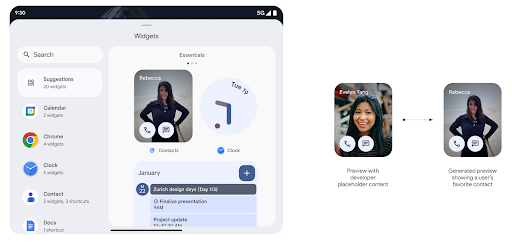
Generated Previews API ile daha zengin widget önizlemeleri
Before Android 15, the only way to provide widget picker previews was to specify a static image or layout resource. These previews often differ significantly from the look of the actual widget when it is placed on the home screen. Also, static resources can't be created with Jetpack Glance, so a Glance developer had to screenshot their widget or create an XML layout to have a widget preview.
Android 15 adds support for generated previews. This means that app widget
providers can generate RemoteViews to use as the picker preview, instead
of a static resource.
Push API
Apps can provide generated previews through a push API. Apps can provide
previews at any point in their lifecycle, and don't receive an explicit request
from the host to provide previews. Previews are persisted in AppWidgetService,
and hosts can request them on-demand. The following example loads an XML widget
layout resource and sets it as the preview:
AppWidgetManager.getInstance(appContext).setWidgetPreview(
   ComponentName(
       appContext,
       SociaLiteAppWidgetReceiver::class.java
   ),
   AppWidgetProviderInfo.WIDGET_CATEGORY_HOME_SCREEN,
   RemoteViews("com.example", R.layout.widget_preview)
)
The expected flow is:
- At any time, the widget provider calls
setWidgetPreview. The provided previews are persisted inAppWidgetServicewith other provider info. setWidgetPreviewnotifies hosts of an updated preview through theAppWidgetHost.onProvidersChangedcallback. In response, the widget host reloads all of its provider information.- When displaying a widget preview, the host checks
AppWidgetProviderInfo.generatedPreviewCategories, and if the chosen category is available, callsAppWidgetManager.getWidgetPreviewto return the saved preview for this provider.
When to call setWidgetPreview
Because there is no callback to provide previews, apps can choose to send previews at any point when they are running. How often to update the preview depends on the widget's use case.
The following list describes the two main categories of preview use cases:
- Providers that show real data in their widget previews, such as personalized or recent information. These providers can set the preview once the user has signed in or has done initial configuration in their app. After this, they can set up a periodic task to update the previews at their chosen cadence. Examples of this type of widget could be a photo, calendar, weather or news widget.
- Providers that show static information in previews or quick-action widgets that don't display any data. These providers can set previews once, when the app first launches. Examples of this type of widget include a drive quick actions widget or chrome shortcuts widget.
Some providers might show static previews on the hub mode picker, but real information on the homescreen picker. These providers should follow the guidance for both of these use cases to set previews.
Pencere İçinde Pencere
Android 15 introduces changes in Picture-in-Picture (PiP) ensuring an even smoother transition when entering into PiP mode. This will be beneficial for apps having UI elements overlaid on top of their main UI, which goes into PiP.
Developers use the onPictureInPictureModeChanged callback to define logic
that toggles the visibility of the overlaid UI elements. This callback is
triggered when the PiP enter or exit animation is completed. Beginning in
Android 15, the PictureInPictureUiState class includes another state.
With this UI state, apps targeting Android 15 (API level 35) will observe the
Activity#onPictureInPictureUiStateChanged callback being invoked with
isTransitioningToPip() as soon as the PiP animation starts. There are
many UI elements that are not relevant for the app when it is in PiP mode, for
example views or layout that include information such as suggestions, upcoming
video, ratings, and titles. When the app goes to PiP mode, use the
onPictureInPictureUiStateChanged callback to hide these UI elements. When the
app goes to full screen mode from the PiP window, use
onPictureInPictureModeChanged callback to unhide these elements, as shown in
the following examples:
override fun onPictureInPictureUiStateChanged(pipState: PictureInPictureUiState) {
        if (pipState.isTransitioningToPip()) {
          // Hide UI elements
        }
    }
override fun onPictureInPictureModeChanged(isInPictureInPictureMode: Boolean) {
        if (isInPictureInPictureMode) {
          // Unhide UI elements
        }
    }
This quick visibility toggle of irrelevant UI elements (for a PiP window) helps ensure a smoother and flicker-free PiP enter animation.
İyileştirilmiş Rahatsız Etmeyin kuralları
AutomaticZenRule lets apps customize Attention
Management (Do Not Disturb) rules and decide when to activate or deactivate
them. Android 15 greatly enhances these rules with the goal of improving the
user experience. The following enhancements are included:
- Adding types to
AutomaticZenRule, allowing the system to apply special treatment to some rules. - Adding an icon to
AutomaticZenRule, helping to make the modes be more recognizable. - Adding a
triggerDescriptionstring toAutomaticZenRulethat describes the conditions on which the rule should become active for the user. - Added
ZenDeviceEffectstoAutomaticZenRule, allowing rules to trigger things like grayscale display, night mode, or dimming the wallpaper.
Bildirim kanalları için VibrationEffect ayarlama
Android 15 supports setting rich vibrations for incoming notifications by
channel using NotificationChannel.setVibrationEffect, so
your users can distinguish between different types of notifications without
having to look at their device.
Medya projeksiyonu durum çubuğu çipi ve otomatik durdurma
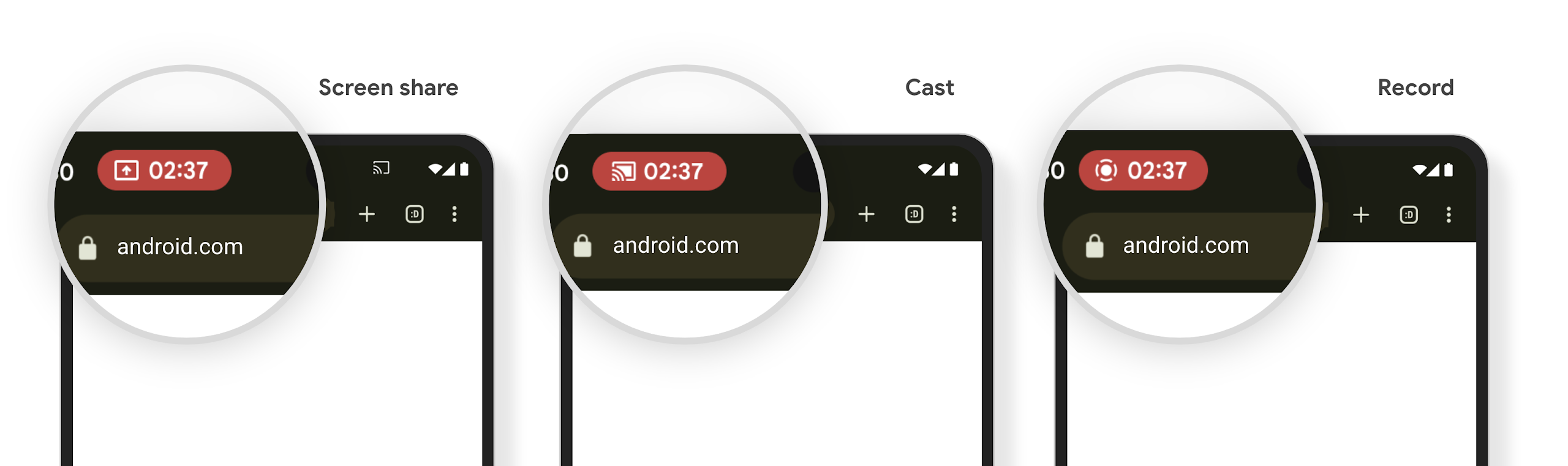
Medya yansıtma, kullanıcıların gizli bilgilerini açığa çıkarabilir. Yeni ve belirgin bir durum çubuğu çipi, devam eden ekran projeksiyonlarından kullanıcıları haberdar eder. Kullanıcılar ekran aktarmayı, paylaşımı veya kaydı durdurmak için çipe dokunabilir. Ayrıca, daha sezgisel bir kullanıcı deneyimi için devam eden ekran projeksiyonları artık cihaz ekranı kilitlendiğinde otomatik olarak durdurulur.
Büyük ekranlar ve form faktörleri
Android 15, uygulamalarınızın büyük ekranlar, çevrilebilir ve katlanabilir cihazlar gibi Android'in form faktörlerinden en iyi şekilde yararlanmasını sağlar.
Büyük ekranda çoklu görev deneyimi artık daha iyi
Android 15 gives users better ways to multitask on large screen devices. For example, users can save their favorite split-screen app combinations for quick access and pin the taskbar on screen to quickly switch between apps. This means that making sure your app is adaptive is more important than ever.
Google I/O has sessions on Building adaptive Android apps and Building UI with the Material 3 adaptive library that can help, and our documentation has more to help you Design for large screens.
Kapak ekranı desteği
Your app can declare a property that Android 15 uses to
allow your Application or Activity to be presented on the small cover
screens of supported flippable devices. These screens are too small to be
considered as compatible targets for Android apps to run on, but your app can
opt in to supporting them, making your app available in more places.
Bağlantı
Android 15, platformu güncelleyerek uygulamanızın iletişim ve kablosuz teknolojilerdeki en son gelişmelere erişmesini sağlar.
Uydu desteği
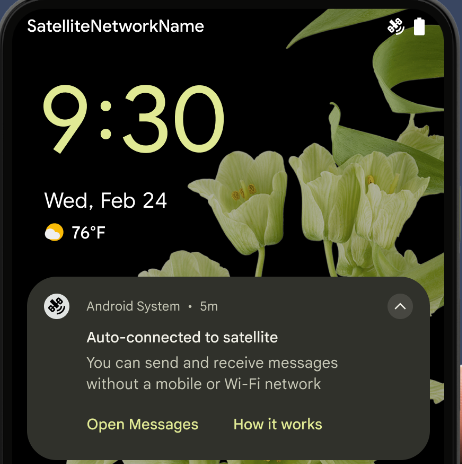
Android 15, uydu bağlantısı için platform desteğini genişletmeye ve Kullanıcı deneyiminin tutarlı bir uydu bağlantısı durumu.
Uygulamalar, bir cihazın uyduya ne zaman bağlandığını algılamak için ServiceState.isUsingNonTerrestrialNetwork() kullanabilir. Bu sayede, tam ağ hizmetlerinin neden kullanılamayabileceği konusunda daha fazla bilgi sahibi olabilirler. Ayrıca Android 15, mesaj göndermek ve almak için uydu bağlantısını kullanmak üzere SMS ve MMS uygulamalarının yanı sıra önceden yüklenmiş RCS uygulamaları için destek sunar.
Daha sorunsuz NFC deneyimleri
Android 15 is working to make the tap to pay experience more seamless and
reliable while continuing to support Android's robust NFC app ecosystem. On
supported devices, apps can request the NfcAdapter to enter
observe mode, where the device listens but doesn't respond to NFC
readers, sending the app's NFC service PollingFrame
objects to process. The PollingFrame objects can be used to auth
ahead of the first communication to the NFC reader, allowing for a one tap
transaction in many cases.
In addition, apps can register a filter on supported devices so they can be notified of polling loop activity, which allows for smooth operation with multiple NFC-aware applications.
Cüzdan rolü
Android 15, kullanıcının tercih ettiği cüzdan uygulamasıyla daha sıkı entegrasyon sağlayan bir Cüzdan rolü sunar. Bu rol, NFC'nin varsayılan temassız ödeme ayarının yerini alır. Kullanıcılar, Ayarlar > Uygulamalar > Varsayılan Uygulamalar'a giderek Cüzdan rolü sahibini yönetebilir.
Cüzdan rolü, ödeme kategorisine kayıtlı AID'ler için NFC dokunma işlemlerini yönlendirirken kullanılır. Aynı AID için kayıtlı başka bir uygulama ön planda çalışmıyorsa dokunma işlemleri her zaman Cüzdan rol sahibine gider.
Bu rol, Cüzdan Hızlı Erişim kartının etkinleştirildiğinde nereye yerleştirileceğini belirlemek için de kullanılır. Rol "Yok" olarak ayarlandığında Hızlı Erişim kutusu kullanılamaz ve ödeme kategorisi NFC dokunuşları yalnızca ön plan uygulamasına gönderilir.
Güvenlik
Android 15, uygulamanızın güvenliğini artırmanıza, uygulamanızın verilerini korumanıza ve kullanıcılara verileri üzerinde daha fazla şeffaflık ve kontrol imkanı sunmanıza yardımcı olur. Kullanıcı korumalarını iyileştirmek ve uygulamanızı yeni tehditlere karşı korumak için yaptığımız çalışmalar hakkında daha fazla bilgi edinmek isterseniz Google I/O'daki Android'de kullanıcı güvenliğini sağlama konuşmasına göz atın.
Kimlik Bilgisi Yöneticisi'ni otomatik doldurma ile entegre etme
Android 15'ten itibaren geliştiriciler kullanıcı adı veya şifre alanları gibi belirli görünümleri Kimlik Bilgisi Yöneticisi istekleriyle bağlayabilir. Bu sayede, oturum açma işlemi sırasında özelleştirilmiş bir kullanıcı deneyimi sunmak daha kolay hale gelir. Kullanıcı bu görünümlerden birine odaklandığında Kimlik Bilgisi Yöneticisi'ne ilgili bir istek gönderilir. Elde edilen kimlik bilgileri sağlayıcılar arasında toplanır ve satır içi öneriler veya açılır liste önerileri gibi otomatik doldurma yedek kullanıcı arayüzlerinde gösterilir. Jetpack androidx.credentials kitaplığı, geliştiricilerin tercih ettiği uç noktadır ve yakında Android 15 ve sonraki sürümlerde bu özelliği daha da geliştirmek için kullanıma sunulacaktır.
Tek dokunuşla kaydolma ve oturum açma özelliğini biyometrik istemlerle entegre etme
Credential Manager integrates biometric prompts into the credential creation and sign-in processes, eliminating the need for providers to manage biometric prompts. As a result, credential providers only need to focus on the results of the create and get flows, augmented with the biometric flow result. This simplified process creates a more efficient and streamlined credential creation and retrieval process.
Uçtan uca şifreleme için anahtar yönetimi
We are introducing the E2eeContactKeysManager in Android 15, which
facilitates end-to-end encryption (E2EE) in your Android apps by providing an
OS-level API for the storage of cryptographic public keys.
The E2eeContactKeysManager is designed to integrate with the platform
contacts app to give users a centralized way to manage and verify their
contacts' public keys.
İçerik URI'lerinde izin kontrolleri
Android 15, içerik URI'lerinde izin kontrolleri gerçekleştiren bir dizi API'yi kullanıma sunar:
Context.checkContentUriPermissionFull: Bu seçenek, içerik URI'lerinde tam izin kontrolü gerçekleştirir.Activitymanifest özelliğirequireContentUriPermissionFromCaller: Bu özellik, etkinlik başlatıldığında sağlanan içerik URI'lerinde belirtilen izinleri zorunlu kılar.Activityçağırıcıları içinComponentCallersınıfı: Bu, etkinliği başlatan uygulamayı temsil eder.
Erişilebilirlik
Android 15, kullanıcılar için erişilebilirliği artıran özellikler ekler.
Daha iyi Braille
In Android 15, we've made it possible for TalkBack to support Braille displays that are using the HID standard over both USB and secure Bluetooth.
This standard, much like the one used by mice and keyboards, will help Android support a wider range of Braille displays over time.
Uluslararası hale getirme
Android 15, bir cihaz farklı dillerde kullanıldığında kullanıcı deneyimini tamamlayan özellikler ve işlevler ekler.
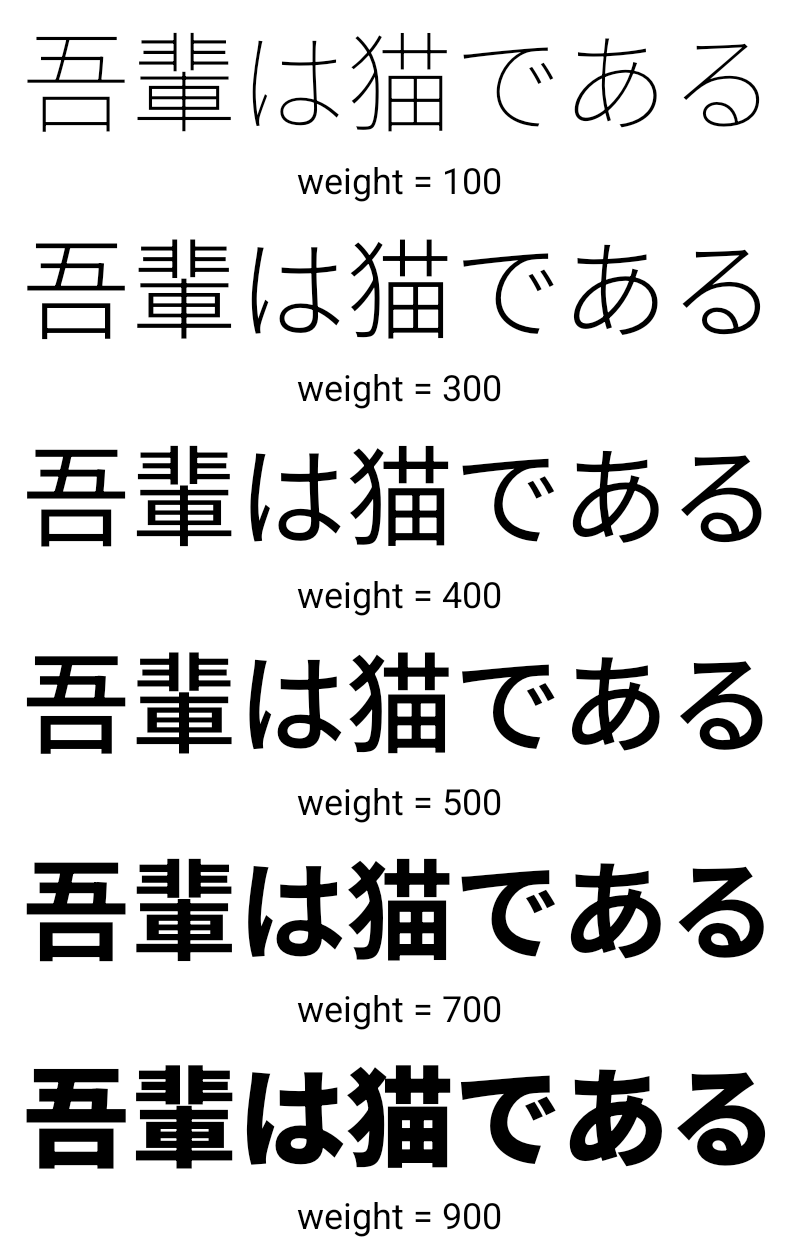
CJK değişken yazı tipi
Starting with Android 15, the font file for Chinese, Japanese, and Korean (CJK) languages, NotoSansCJK, is now a variable font. Variable fonts open up possibilities for creative typography in CJK languages. Designers can explore a broader range of styles and create visually striking layouts that were previously difficult or impossible to achieve.
Karakterler arası gerekçe
Starting with Android 15, text can be justified utilizing letter spacing by
using JUSTIFICATION_MODE_INTER_CHARACTER. Inter-word justification was
first introduced in Android 8.0 (API level 26), and inter-character
justification provides similar capabilities for languages that use the
whitespace character for segmentation, such as Chinese, Japanese, and others.
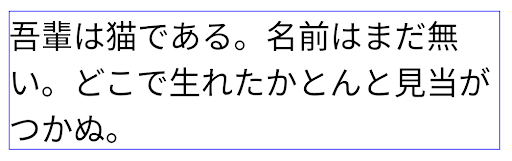
JUSTIFICATION_MODE_NONE.
JUSTIFICATION_MODE_NONE.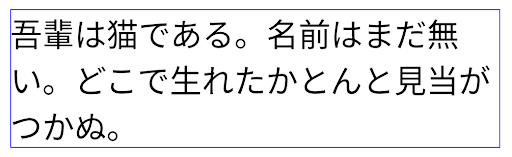
JUSTIFICATION_MODE_INTER_WORD.
JUSTIFICATION_MODE_INTER_WORD.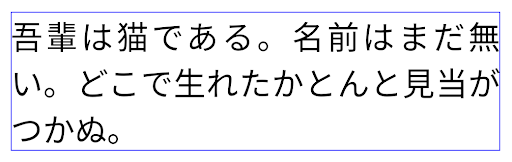
JUSTIFICATION_MODE_INTER_CHARACTER.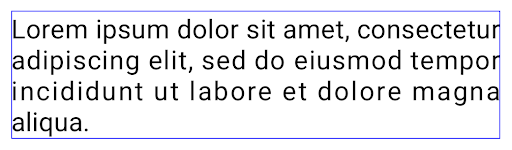
JUSTIFICATION_MODE_INTER_CHARACTER.Otomatik satır sonu yapılandırması
Android started supporting phrase-based line breaks for Japanese and Korean in
Android 13 (API level 33). However, while phrase-based line breaks improve the
readability of short lines of text, they don't work well for long lines of text.
In Android 15, apps can apply phrase-based line breaks only for short lines
of text, using the LINE_BREAK_WORD_STYLE_AUTO
option. This option selects the best word style option for the text.
For short lines of text, phrase-based line breaks are used, functioning the same
as LINE_BREAK_WORD_STYLE_PHRASE, as shown in the
following image:
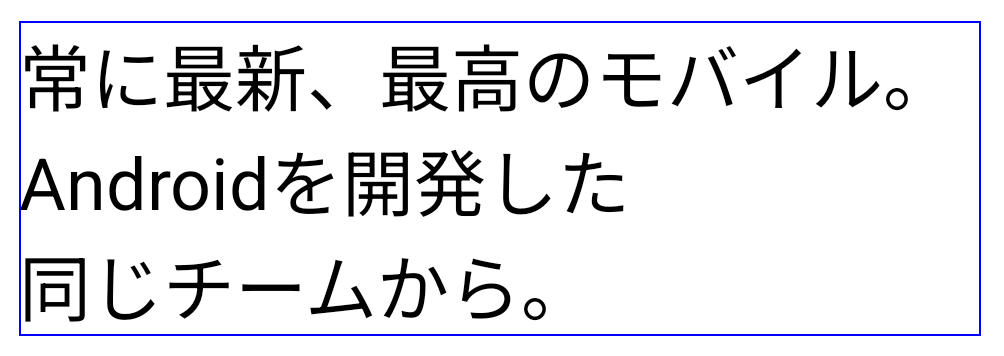
LINE_BREAK_WORD_STYLE_AUTO
applies phrase-based line breaks to improve the readability of the text.
This is the same as applying
LINE_BREAK_WORD_STYLE_PHRASE.For longer lines of text, LINE_BREAK_WORD_STYLE_AUTO uses a no
line-break word style, functioning the same as
LINE_BREAK_WORD_STYLE_NONE, as shown in the
following image:
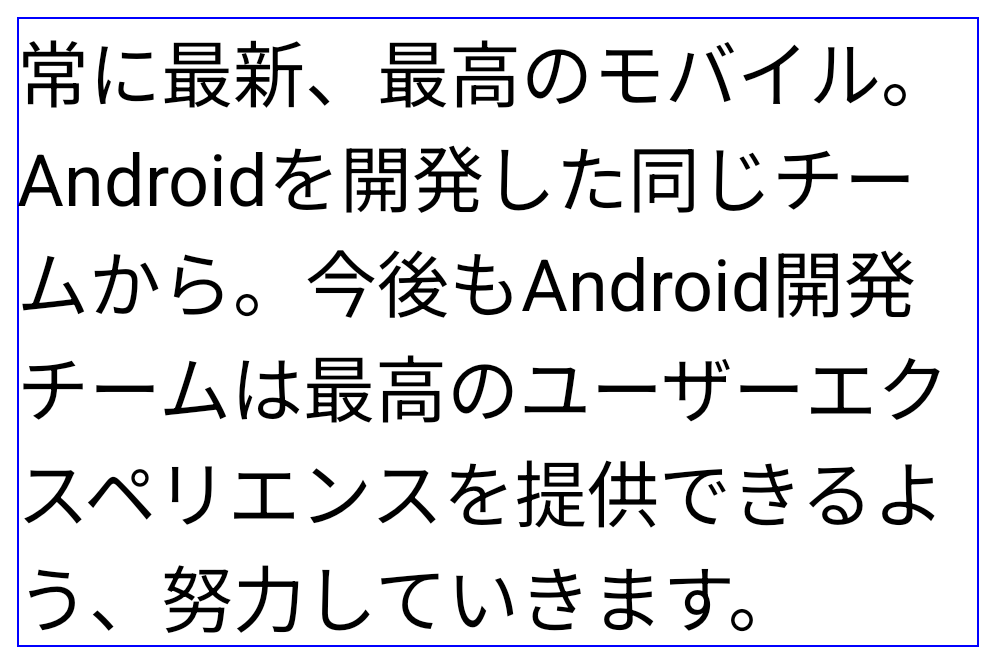
LINE_BREAK_WORD_STYLE_AUTO
applies no line-break word style to improve the readability of the text.
This is the same as applying
LINE_BREAK_WORD_STYLE_NONE.Ek Japonca Hentaigana Yazı Tipi
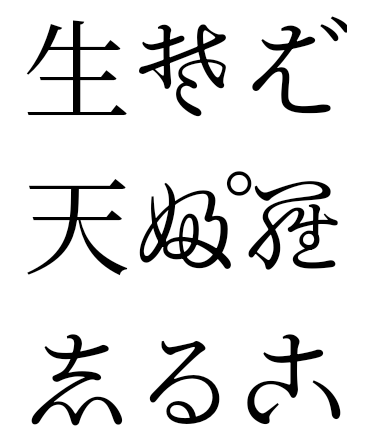
Android 15'te eski Japonca Hiragana (Hentaigana olarak bilinir) yazı tipi dosyası varsayılan olarak paketlenmiştir. Hentaigana karakterlerinin benzersiz şekilleri sanat eseri veya tasarımda ayırt edici bir dokunuş katar ve aynı zamanda doğru hazineleri eski Japon belgelerinin iletimi ve anlaşılması.
VideoLAN cone Copyright (c) 1996-2010 VideoLAN. This logo or a modified version may be used or modified by anyone to refer to the VideoLAN project or any product developed by the VideoLAN team, but does not indicate endorsement by the project.
Vulkan and the Vulkan logo are registered trademarks of the Khronos Group Inc.
OpenGL is a registered trademark and the OpenGL ES logo is a trademark of Hewlett Packard Enterprise used by permission by Khronos.