

اندروید ۱۵ ویژگیها و APIهای فوقالعادهای را برای توسعهدهندگان معرفی میکند. بخشهای زیر این ویژگیها را خلاصه میکنند تا به شما در شروع کار با APIهای مرتبط کمک کنند.
برای مشاهده لیست کاملی از APIهای اضافه شده، اصلاح شده و حذف شده، گزارش تفاوت API را مطالعه کنید. برای جزئیات بیشتر در مورد APIهای اضافه شده، به مرجع API اندروید مراجعه کنید - برای اندروید ۱۵، به دنبال APIهایی باشید که در سطح API ۳۵ اضافه شدهاند. برای کسب اطلاعات در مورد حوزههایی که تغییرات پلتفرم ممکن است بر برنامههای شما تأثیر بگذارد، حتماً تغییرات رفتاری اندروید ۱۵ را برای برنامههایی که اندروید ۱۵ را هدف قرار میدهند و برای همه برنامهها بررسی کنید.
دوربین و رسانه
اندروید ۱۵ شامل ویژگیهای متنوعی است که تجربه دوربین و رسانه را بهبود میبخشد و به شما امکان دسترسی به ابزارها و سختافزارهایی را میدهد که به سازندگان در تحقق بخشیدن به دیدگاههایشان در اندروید کمک میکند.
برای اطلاعات بیشتر در مورد جدیدترین ویژگیها و راهحلهای توسعهدهندگان برای رسانه و دوربین اندروید، به سخنرانی « ساختن تجربیات مدرن رسانه و دوربین اندروید» از کنفرانس Google I/O مراجعه کنید.
تقویت نور کم
Android 15 introduces Low Light Boost, an auto-exposure mode available to both Camera 2 and the night mode camera extension. Low Light Boost adjusts the exposure of the Preview stream in low-light conditions. This is different from how the night mode camera extension creates still images, because night mode combines a burst of photos to create a single, enhanced image. While night mode works very well for creating a still image, it can't create a continuous stream of frames, but Low Light Boost can. Thus, Low Light Boost enables camera capabilities, such as:
- Providing an enhanced image preview, so users are better able to frame their low-light pictures
- Scanning QR codes in low light
If you enable Low Light Boost, it automatically turns on when there's a low light level, and turns off when there's more light.
Apps can record off the Preview stream in low-light conditions to save a brightened video.
For more information, see Low Light Boost.
کنترلهای دوربین درون برنامهای
Android 15 adds an extension for more control over the camera hardware and its algorithms on supported devices:
- Advanced flash strength adjustments enabling precise control of flash
intensity in both
SINGLEandTORCHmodes while capturing images.
کنترل فضای سر در HDR
اندروید 15 فضای سر HDR را انتخاب میکند که برای قابلیتهای دستگاه زیربنایی و عمق بیت پانل مناسب است. برای صفحاتی که محتوای SDR زیادی دارند، مانند برنامه پیامرسانی که یک تصویر کوچک HDR را نمایش میدهد، این رفتار میتواند در نهایت بر روشنایی درک شده محتوای SDR تأثیر منفی بگذارد. اندروید 15 به شما امکان میدهد تا فضای سر HDR را با setDesiredHdrHeadroom کنترل کنید تا بین محتوای SDR و HDR تعادل برقرار کنید.

کنترل بلندی صدا

اندروید 15 از استاندارد بلندی صدای CTA-2075 پشتیبانی می کند تا به شما کمک کند از تناقضات بلندی صدا جلوگیری کنید و اطمینان حاصل کنید که کاربران مجبور نیستند به طور مداوم صدا را هنگام جابجایی بین محتوا تنظیم کنند. این سیستم از ویژگی های شناخته شده دستگاه های خروجی (هدفون و بلندگو) به همراه ابرداده بلندی صدای موجود در محتوای صوتی AAC استفاده می کند تا به طور هوشمندانه میزان بلندی صدا و تراکم دامنه پویا را تنظیم کند.
برای فعال کردن این ویژگی، باید مطمئن شوید که ابرداده بلندی صدا در محتوای AAC شما موجود است و ویژگی پلتفرم را در برنامه خود فعال کنید. برای این کار، یک شی LoudnessCodecController را با فراخوانی متد create factory آن با شناسه جلسه صوتی از AudioTrack مرتبط، نمونه سازی می کنید. این به طور خودکار شروع به اعمال به روز رسانی های صوتی می کند. می توانید یک OnLoudnessCodecUpdateListener را برای اصلاح یا فیلتر کردن پارامترهای بلندی صدا قبل از اعمال آنها در MediaCodec ارسال کنید.
// Media contains metadata of type MPEG_4 OR MPEG_D
val mediaCodec = …
val audioTrack = AudioTrack.Builder()
                                .setSessionId(sessionId)
                                .build()
...
// Create new loudness controller that applies the parameters to the MediaCodec
try {
   val lcController = LoudnessCodecController.create(mSessionId)
   // Starts applying audio updates for each added MediaCodec
}
AndroidX media3 ExoPlayer همچنین برای استفاده از API های LoudnessCodecController برای یکپارچه سازی یکپارچه برنامه به روز می شود.
دستگاههای مجازی MIDI 2.0
Android 13 added support for connecting to MIDI 2.0 devices using USB, which communicate using Universal MIDI Packets (UMP). Android 15 extends UMP support to virtual MIDI apps, enabling composition apps to control synthesizer apps as a virtual MIDI 2.0 device just like they would with an USB MIDI 2.0 device.
رمزگشایی نرمافزار AV1 کارآمدتر

dav1d ، رمزگشای محبوب نرم افزار AV1 از VideoLAN برای دستگاه های اندرویدی که از رمزگشایی AV1 در سخت افزار پشتیبانی نمی کنند، در دسترس است. عملکرد dav1d تا 3 برابر بیشتر از رمزگشای نرمافزار AV1 قدیمی است و امکان پخش HD AV1 را برای کاربران بیشتری از جمله برخی دستگاههای سطح پایین و متوسط فراهم میکند.
برنامه شما باید با فراخوانی آن با نام "c2.android.av1-dav1d.decoder" استفاده از dav1d را انتخاب کند. dav1d در به روز رسانی بعدی به عنوان رمزگشای پیش فرض نرم افزار AV1 تبدیل خواهد شد. این پشتیبانی استاندارد شده و برای دستگاههای Android 11 که بهروزرسانیهای سیستم Google Play را دریافت میکنند، پشتیبانی میشود.
بهرهوری و ابزارهای توسعهدهندگان
در حالی که بیشتر کار ما برای بهبود بهرهوری شما حول ابزارهایی مانند اندروید استودیو ، جتپک کامپوز و کتابخانههای اندروید جتپک میچرخد، ما همیشه به دنبال راههایی در پلتفرم هستیم تا به شما کمک کنیم راحتتر به چشماندازتان برسید.
بهروزرسانیهای OpenJDK 17
اندروید 15 به کار تازه سازی کتابخانه های اصلی اندروید برای هماهنگی با ویژگی های آخرین نسخه OpenJDK LTS ادامه می دهد.
ویژگیها و بهبودهای کلیدی زیر شامل میشوند:
- بهبود کیفیت زندگی در اطراف بافرهای NIO
- جریان ها
- روشهای اضافی
mathوstrictmath -
utilبسته شاملcollectionمتوالی،mapوset - پشتیبانی
ByteBufferدرDeflater - به روز رسانی های امنیتی مانند
X500PrivateCredentialو به روز رسانی های کلید امنیتی
این APIها در بیش از یک میلیارد دستگاه دارای Android 12 (سطح API 31) و بالاتر از طریق بهروزرسانیهای سیستم Google Play بهروزرسانی میشوند، بنابراین میتوانید آخرین ویژگیهای برنامهنویسی را هدف قرار دهید.
بهبودهای پیدیاف
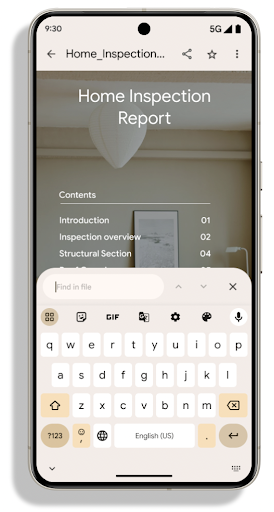
Android 15 includes substantial improvements to the PdfRenderer
APIs. Apps can incorporate advanced features such as rendering
password-protected files, annotations, form editing,
searching, and selection with copy. Linearized PDF
optimizations are supported to speed local PDF viewing and reduce resource use.
The Jetpack PDF library uses these APIs to simplify adding PDF
viewing capabilities to your app.
The PdfRenderer has been moved to a module that can be updated using Google
Play system updates independent of the platform release, and we're supporting
these changes back to Android 11 (API level 30) by creating a compatible
pre-Android 15 version of the API surface, called
PdfRendererPreV.
اصلاحات تغییر خودکار زبان
Android 14 added on-device, multi-language recognition in audio with automatic
switching between languages, but this can cause words to get dropped,
especially when languages switch with less of a pause between the two
utterances. Android 15 adds additional controls to help apps tune this switching
to their use case.
EXTRA_LANGUAGE_SWITCH_INITIAL_ACTIVE_DURATION_TIME_MILLIS
confines the automatic switching to the beginning of the audio session, while
EXTRA_LANGUAGE_SWITCH_MATCH_SWITCHES deactivates the
language switching after a defined number of switches. These options are
particularly useful if you expect that there will be a single language spoken
during the session that should be autodetected.
بهبود رابط برنامهنویسی کاربردی فونت متغیر OpenType
Android 15 improves the usability of the OpenType variable font. You can create
a FontFamily instance from a variable font without specifying weight axes
with the buildVariableFamily API. The text renderer overrides the value
of wght axis to match the displaying text.
Using the API simplifies the code for creating a Typeface considerably:
Kotlin
val newTypeface = Typeface.CustomFallbackBuilder(
            FontFamily.Builder(
                Font.Builder(assets, "RobotoFlex.ttf").build())
                    .buildVariableFamily())
    .build()
Java
Typeface newTypeface = Typeface.CustomFallbackBuilder(
            new FontFamily.Builder(
                new Font.Builder(assets, "RobotoFlex.ttf").build())
                    .buildVariableFamily())
    .build();
Previously, to create the same Typeface, you would need much more code:
Kotlin
val oldTypeface = Typeface.CustomFallbackBuilder(
            FontFamily.Builder(
                Font.Builder(assets, "RobotoFlex.ttf")
                    .setFontVariationSettings("'wght' 400")
                    .setWeight(400)
                    .build())
                .addFont(
                    Font.Builder(assets, "RobotoFlex.ttf")
                        .setFontVariationSettings("'wght' 100")
                        .setWeight(100)
                        .build()
                )
                .addFont(
                    Font.Builder(assets, "RobotoFlex.ttf")
                        .setFontVariationSettings("'wght' 200")
                        .setWeight(200)
                        .build()
                )
                .addFont(
                    Font.Builder(assets, "RobotoFlex.ttf")
                        .setFontVariationSettings("'wght' 300")
                        .setWeight(300)
                        .build()
                )
                .addFont(
                    Font.Builder(assets, "RobotoFlex.ttf")
                        .setFontVariationSettings("'wght' 500")
                        .setWeight(500)
                        .build()
                )
                .addFont(
                    Font.Builder(assets, "RobotoFlex.ttf")
                        .setFontVariationSettings("'wght' 600")
                        .setWeight(600)
                        .build()
                )
                .addFont(
                    Font.Builder(assets, "RobotoFlex.ttf")
                        .setFontVariationSettings("'wght' 700")
                        .setWeight(700)
                        .build()
                )
                .addFont(
                    Font.Builder(assets, "RobotoFlex.ttf")
                        .setFontVariationSettings("'wght' 800")
                        .setWeight(800)
                        .build()
                )
                .addFont(
                    Font.Builder(assets, "RobotoFlex.ttf")
                        .setFontVariationSettings("'wght' 900")
                        .setWeight(900)
                        .build()
                ).build()
        ).build()
Java
Typeface oldTypeface = new Typeface.CustomFallbackBuilder(
    new FontFamily.Builder(
        new Font.Builder(assets, "RobotoFlex.ttf")
            .setFontVariationSettings("'wght' 400")
            .setWeight(400)
            .build()
    )
    .addFont(
        new Font.Builder(assets, "RobotoFlex.ttf")
            .setFontVariationSettings("'wght' 100")
            .setWeight(100)
            .build()
    )
    .addFont(
        new Font.Builder(assets, "RobotoFlex.ttf")
            .setFontVariationSettings("'wght' 200")
            .setWeight(200)
            .build()
    )
    .addFont(
        new Font.Builder(assets, "RobotoFlex.ttf")
            .setFontVariationSettings("'wght' 300")
            .setWeight(300)
            .build()
    )
    .addFont(
        new Font.Builder(assets, "RobotoFlex.ttf")
            .setFontVariationSettings("'wght' 500")
            .setWeight(500)
            .build()
    )
    .addFont(
        new Font.Builder(assets, "RobotoFlex.ttf")
            .setFontVariationSettings("'wght' 600")
            .setWeight(600)
            .build()
    )
    .addFont(
        new Font.Builder(assets, "RobotoFlex.ttf")
            .setFontVariationSettings("'wght' 700")
            .setWeight(700)
            .build()
    )
    .addFont(
        new Font.Builder(assets, "RobotoFlex.ttf")
            .setFontVariationSettings("'wght' 800")
            .setWeight(800)
            .build()
    )
    .addFont(
        new Font.Builder(assets, "RobotoFlex.ttf")
            .setFontVariationSettings("'wght' 900")
            .setWeight(900)
            .build()
    )
    .build()
).build();
Here's an example of how a Typeface created with both the old and new APIs
renders:

In this example, the Typeface created with the old API doesn't have the
capability to create accurate font weights for the 350, 450, 550 and 650
Font instances, so the renderer falls back to the closest weight. So in
this case, 300 is rendered instead of 350, 400 is rendered instead of 450, and
so on. By contrast, the Typeface created with the new APIs dynamically creates
a Font instance for a given weight, so accurate weights are rendered for 350,
450, 550, and 650 as well.
کنترلهای تفکیک خطوط به صورت جزئی
با شروع در اندروید 15، یک TextView و خط شکن زیرین میتوانند بخش داده شده از متن را در همان خط حفظ کنند تا خوانایی را بهبود بخشند. شما می توانید با استفاده از تگ <nobreak> در منابع رشته یا createNoBreakSpan از این سفارشی سازی خط شکن استفاده کنید. به طور مشابه، میتوانید با استفاده از تگ <nohyphen> یا createNoHyphenationSpan ، کلمات را از خط فاصله حفظ کنید.
به عنوان مثال، منبع رشته زیر شامل یک خط شکسته نمیشود و با متن «Pixel 8 Pro» رندر میشود. شکستن در محل نامطلوب:
<resources>
    <string name="pixel8pro">The power and brains behind Pixel 8 Pro.</string>
</resources>
در مقابل، این منبع رشته شامل تگ <nobreak> است که عبارت "Pixel 8 Pro" را میپیچد. و از شکستگی خطوط جلوگیری می کند:
<resources>
    <string name="pixel8pro">The power and brains behind <nobreak>Pixel 8 Pro.</nobreak></string>
</resources>
تفاوت در نحوه رندر شدن این رشته ها در تصاویر زیر نشان داده شده است:

<nobreak> پیچیده نشده است. 
<nobreak> پیچیده شده است.بایگانی برنامه
Android و Google Play سال گذشته پشتیبانی از بایگانی برنامه را اعلام کردند و به کاربران این امکان را داد تا با حذف بخشی از برنامههای کم استفاده از دستگاه که با استفاده از Android App Bundle در Google Play منتشر شدهاند، فضا را آزاد کنند. اندروید 15 شامل پشتیبانی سطح سیستم عامل برای بایگانی و حذف بایگانی برنامه است که اجرای آن را برای همه فروشگاه های برنامه آسان تر می کند.
برنامههای دارای مجوز REQUEST_DELETE_PACKAGES میتوانند با روش PackageInstaller requestArchive تماس بگیرند تا بایگانی یک بسته برنامه نصبشده را درخواست کنند، که APK و هر فایل حافظه پنهان را حذف میکند، اما دادههای کاربر را حفظ میکند. برنامه های آرشیو شده به عنوان برنامه های قابل نمایش از طریق API های LauncherApps برگردانده می شوند. کاربران برای برجسته کردن آرشیو بودن آن برنامه ها، یک رابط کاربری را مشاهده خواهند کرد. اگر کاربر روی یک برنامه بایگانی شده ضربه بزند، نصب کننده مسئول درخواستی برای حذف بایگانی آن دریافت می کند و فرآیند بازیابی می تواند توسط پخش ACTION_PACKAGE_ADDED نظارت شود.
فعال کردن حالت ۱۶ کیلوبایت روی دستگاه با استفاده از گزینههای توسعهدهنده
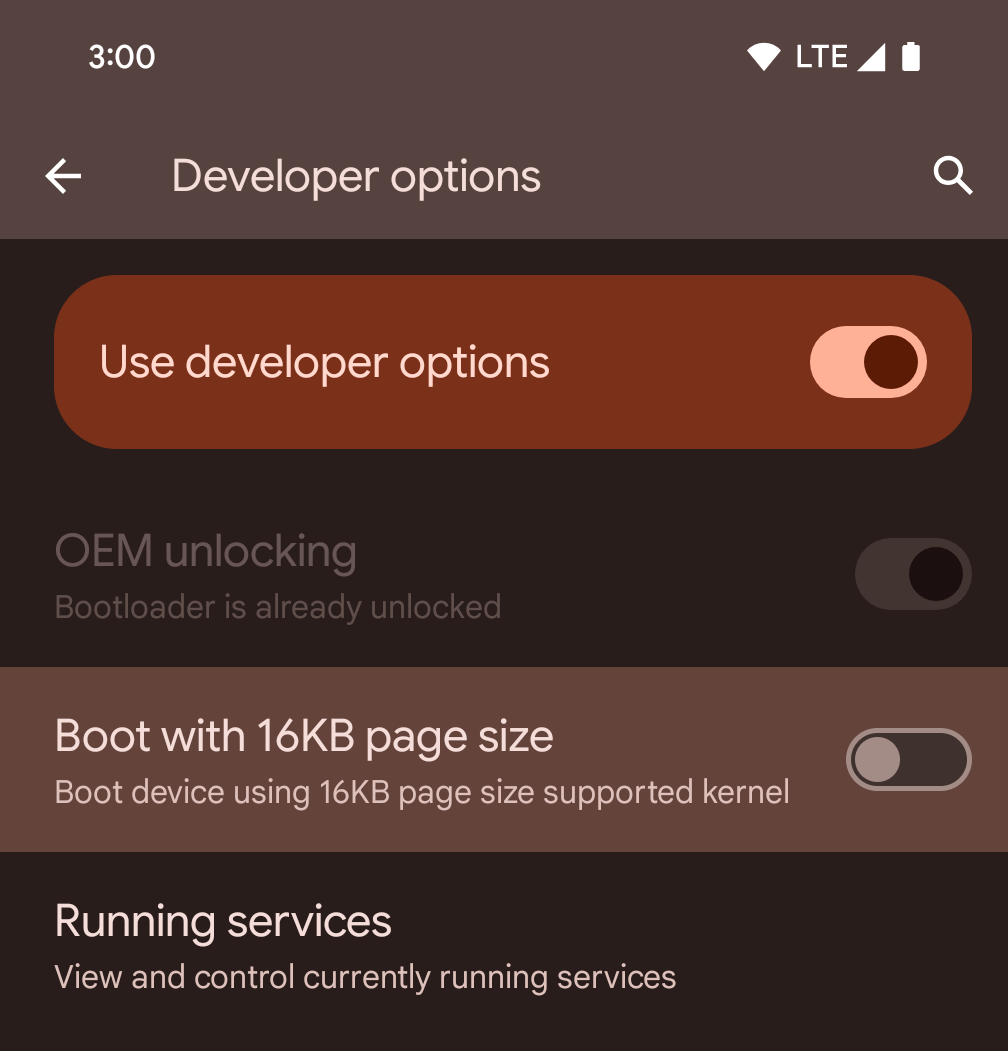
برای بوت کردن دستگاه در حالت ۱۶ کیلوبایت، گزینه توسعهدهنده Boot with 16KB page size را فعال یا غیرفعال کنید.
در نسخههای QPR اندروید ۱۵، میتوانید از گزینه توسعهدهنده که در دستگاههای خاصی موجود است، برای بوت کردن دستگاه در حالت ۱۶ کیلوبایت و انجام آزمایش روی دستگاه استفاده کنید . قبل از استفاده از گزینه توسعهدهنده، به تنظیمات > سیستم > بهروزرسانیهای نرمافزار بروید و هرگونه بهروزرسانی موجود را اعمال کنید.
این گزینه توسعهدهنده در دستگاههای زیر موجود است:
پیکسل ۸ و ۸ پرو (با اندروید ۱۵ QPR1 یا بالاتر)
پیکسل ۸a (با اندروید ۱۵ QPR1 یا بالاتر)
پیکسل ۹، ۹ پرو و ۹ پرو ایکسال (با اندروید ۱۵ نسخه QPR2 یا بالاتر)
پیکسل ۹a (با اندروید ۱۶ یا بالاتر)
گرافیک
اندروید ۱۵ جدیدترین پیشرفتهای گرافیکی، از جمله ANGLE و اضافات سیستم گرافیکی Canvas را به ارمغان میآورد.
مدرنسازی دسترسی به پردازنده گرافیکی اندروید

Android hardware has evolved quite a bit from the early days where the core OS would run on a single CPU and GPUs were accessed using APIs based on fixed-function pipelines. The Vulkan® graphics API has been available in the NDK since Android 7.0 (API level 24) with a lower-level abstraction that better reflects modern GPU hardware, scales better to support multiple CPU cores, and offers reduced CPU driver overhead — leading to improved app performance. Vulkan is supported by all modern game engines.
Vulkan is Android's preferred interface to the GPU. Therefore, Android 15 includes ANGLE as an optional layer for running OpenGL® ES on top of Vulkan. Moving to ANGLE will standardize the Android OpenGL implementation for improved compatibility, and, in some cases, improved performance. You can test out your OpenGL ES app stability and performance with ANGLE by enabling the developer option in Settings -> System -> Developer Options -> Experimental: Enable ANGLE on Android 15.
The Android ANGLE on Vulkan roadmap
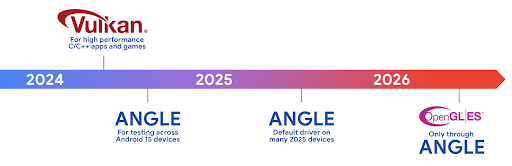
As part of streamlining our GPU stack, going forward we will be shipping ANGLE as the GL system driver on more new devices, with the future expectation that OpenGL/ES will be only available through ANGLE. That being said, we plan to continue support for OpenGL ES on all devices.
Recommended next steps
Use the developer options to select the ANGLE driver for OpenGL ES and test your app. For new projects, we strongly encourage using Vulkan for C/C++.
بهبودهایی برای Canvas
اندروید 15 به مدرن سازی سیستم گرافیکی Canvas اندروید با قابلیت های اضافی ادامه می دهد:
-
Matrix44یک ماتریس 4x4 برای تبدیل مختصات ارائه می دهد که باید برای دستکاری بوم به صورت سه بعدی استفاده شود. -
clipShaderکلیپ فعلی را با سایهزن مشخص شده قطع میکند، در حالی کهclipOutShaderکلیپ را روی تفاوت کلیپ فعلی و سایهزن تنظیم میکند و هر کدام سایهزن را به عنوان یک ماسک آلفا در نظر میگیرند. این از ترسیم اشکال پیچیده به طور موثر پشتیبانی می کند.
عملکرد و باتری
اندروید همچنان بر کمک به شما در بهبود عملکرد و کیفیت برنامههایتان تمرکز دارد. اندروید ۱۵ رابطهای برنامهنویسی کاربردی (API) را معرفی میکند که به شما کمک میکنند وظایف موجود در برنامه خود را کارآمدتر اجرا کنید، عملکرد برنامه را بهینه کنید و در مورد برنامههای خود بینش کسب کنید.
برای بهترین شیوههای صرفهجویی در مصرف باتری، اشکالزدایی در مصرف شبکه و برق، و جزئیات مربوط به نحوه بهبود بهرهوری باتری در فعالیتهای پسزمینه در اندروید ۱۵ و نسخههای اخیر اندروید، به « بهبود بهرهوری باتری در فعالیتهای پسزمینه در گفتگوی اندروید» از Google I/O مراجعه کنید.
API اطلاعات شروع برنامه
In previous versions of Android, app startup has been a bit of a mystery. It was
challenging to determine within your app whether it started from a cold, warm,
or hot state. It was also difficult to know how long your app spent during the
various launch phases: forking the process, calling onCreate, drawing the
first frame, and more. When your Application class was instantiated, you had no
way of knowing whether the app started from a broadcast, a content provider, a
job, a backup, boot complete, an alarm, or an Activity.
The ApplicationStartInfo API on Android 15 provides
all of this and more. You can even choose to add your own timestamps into the
flow to help collect timing data in one place. In addition to collecting
metrics, you can use ApplicationStartInfo to help directly optimize app
startup; for example, you can eliminate the costly instantiation of UI-related
libraries within your Application class when your app is starting up due to a
broadcast.
اطلاعات دقیق حجم برنامه
از Android 8.0 (سطح API 26)، Android دارای StorageStats.getAppBytes API است که اندازه نصب شده یک برنامه را به صورت یک تعداد بایت خلاصه می کند، که مجموع اندازه APK، اندازه فایل های استخراج شده از APK است. و فایل هایی که روی دستگاه تولید شده اند مانند کدهای کامپایل شده پیش از زمان (AOT). این عدد از نظر نحوه استفاده برنامه شما از فضای ذخیرهسازی خیلی روشنکننده نیست.
Android 15 API StorageStats.getAppBytesByDataType([type]) را اضافه می کند، که به شما امکان می دهد بینشی در مورد نحوه استفاده برنامه شما از این فضا، از جمله تقسیم فایل های APK، AOT و کدهای مربوط به سرعت بخشیدن، داده های dex، کتابخانه ها و نمایه های هدایت شونده داشته باشید.
پروفایلسازی مدیریتشده توسط برنامه
Android 15 includes the ProfilingManager class,
which lets you collect profiling information from within your app such as heap
dumps, heap profiles, stack sampling, and more. It provides a callback to your
app with a supplied tag to identify the output file, which is delivered to your
app's files directory. The API does rate limiting to minimize the performance
impact.
To simplify constructing profiling requests in your app, we recommend using the
corresponding Profiling AndroidX API, available
in Core 1.15.0-rc01 or higher.
بهبودهای پایگاه داده SQLite
Android 15 introduces SQLite APIs that expose advanced features from the underlying SQLite engine that target specific performance issues that can manifest in apps. These APIs are included with the update of SQLite to version 3.44.3.
Developers should consult best practices for SQLite performance to get the most out of their SQLite database, especially when working with large databases or when running latency-sensitive queries.
- Read-only deferred transactions: when issuing transactions that are
read-only (don't include write statements), use
beginTransactionReadOnly()andbeginTransactionWithListenerReadOnly(SQLiteTransactionListener)to issue read-onlyDEFERREDtransactions. Such transactions can run concurrently with each other, and if the database is in WAL mode, they can run concurrently withIMMEDIATEorEXCLUSIVEtransactions. - Row counts and IDs: APIs were added to retrieve the count of changed
rows or the last inserted row ID without issuing an additional query.
getLastChangedRowCount()returns the number of rows that were inserted, updated, or deleted by the most recent SQL statement within the current transaction, whilegetTotalChangedRowCount()returns the count on the current connection.getLastInsertRowId()returns therowidof the last row to be inserted on the current connection. - Raw statements: issue a raw SQlite statement, bypassing convenience wrappers and any additional processing overhead that they may incur.
بهروزرسانیهای چارچوب عملکرد پویای اندروید
Android 15 به سرمایه گذاری ما در Android Dynamic Performance Framework (ADPF) ادامه می دهد، مجموعه ای از API ها که به بازی ها و برنامه های فشرده عملکرد اجازه می دهد تا به طور مستقیم با سیستم های قدرت و حرارت دستگاه های Android ارتباط برقرار کنند. در دستگاههای پشتیبانیشده، Android 15 قابلیتهای ADPF را اضافه میکند:
- یک حالت بهره وری انرژی برای جلسات راهنمایی که نشان می دهد رشته های مرتبط آنها باید صرفه جویی در مصرف انرژی را به عملکرد ترجیح دهند، که برای بارهای کاری پس زمینه طولانی مدت عالی است.
- مدت زمان کار GPU و CPU را می توان هر دو در جلسات راهنمایی گزارش کرد و به سیستم اجازه می دهد فرکانس های CPU و GPU را با هم تنظیم کند تا به بهترین شکل نیازهای بار کاری را برآورده کند.
- آستانههای دمایی برای تفسیر وضعیت احتمالی درگیری حرارتی بر اساس پیشبینی فضای سر.
برای کسب اطلاعات بیشتر در مورد نحوه استفاده از ADPF در برنامه ها و بازی های خود، به مستندات مراجعه کنید .
،Android 15 به سرمایه گذاری ما در Android Dynamic Performance Framework (ADPF) ادامه می دهد، مجموعه ای از API ها که به بازی ها و برنامه های فشرده عملکرد اجازه می دهد تا به طور مستقیم با سیستم های قدرت و حرارت دستگاه های Android ارتباط برقرار کنند. در دستگاههای پشتیبانیشده، Android 15 قابلیتهای ADPF را اضافه میکند:
- یک حالت بهره وری انرژی برای جلسات راهنمایی که نشان می دهد رشته های مرتبط آنها باید صرفه جویی در مصرف انرژی را به عملکرد ترجیح دهند، که برای بارهای کاری پس زمینه طولانی مدت عالی است.
- مدت زمان کار GPU و CPU را می توان هر دو در جلسات راهنمایی گزارش کرد و به سیستم اجازه می دهد فرکانس های CPU و GPU را با هم تنظیم کند تا به بهترین شکل نیازهای بار کاری را برآورده کند.
- آستانههای دمایی برای تفسیر وضعیت احتمالی درگیری حرارتی بر اساس پیشبینی فضای سر.
برای کسب اطلاعات بیشتر در مورد نحوه استفاده از ADPF در برنامه ها و بازی های خود، به مستندات مراجعه کنید .
،Android 15 به سرمایه گذاری ما در Android Dynamic Performance Framework (ADPF) ادامه می دهد، مجموعه ای از API ها که به بازی ها و برنامه های فشرده عملکرد اجازه می دهد تا به طور مستقیم با سیستم های قدرت و حرارت دستگاه های Android ارتباط برقرار کنند. در دستگاههای پشتیبانیشده، Android 15 قابلیتهای ADPF را اضافه میکند:
- یک حالت بهره وری انرژی برای جلسات راهنمایی که نشان می دهد رشته های مرتبط آنها باید صرفه جویی در مصرف انرژی را به عملکرد ترجیح دهند، که برای بارهای کاری پس زمینه طولانی مدت عالی است.
- مدت زمان کار GPU و CPU را می توان هر دو در جلسات راهنمایی گزارش کرد و به سیستم اجازه می دهد فرکانس های CPU و GPU را با هم تنظیم کند تا به بهترین شکل نیازهای بار کاری را برآورده کند.
- آستانههای دمایی برای تفسیر وضعیت احتمالی درگیری حرارتی بر اساس پیشبینی فضای سر.
برای کسب اطلاعات بیشتر در مورد نحوه استفاده از ADPF در برنامه ها و بازی های خود، به مستندات مراجعه کنید .
حریم خصوصی
اندروید ۱۵ شامل ویژگیهای متنوعی است که به توسعهدهندگان برنامهها کمک میکند تا از حریم خصوصی کاربران محافظت کنند.
تشخیص ضبط صفحه نمایش
Android 15 adds support for apps to detect that they are being recorded. A callback is invoked whenever the app transitions between being visible or invisible within a screen recording. An app is considered visible if activities owned by the registering process's UID are being recorded. This way, if your app is performing a sensitive operation, you can inform the user that they're being recorded.
val mCallback = Consumer<Int> { state ->
  if (state == SCREEN_RECORDING_STATE_VISIBLE) {
    // We're being recorded
  } else {
    // We're not being recorded
  }
}

override fun onStart() {
   super.onStart()
   val initialState =
      windowManager.addScreenRecordingCallback(mainExecutor, mCallback)
   mCallback.accept(initialState)
}

override fun onStop() {
    super.onStop()
    windowManager.removeScreenRecordingCallback(mCallback)
}
قابلیتهای گسترشیافتهی IntentFilter
Android 15 builds in support for more precise Intent resolution through
UriRelativeFilterGroup, which contains a set of
UriRelativeFilter objects that form a set of Intent
matching rules that must each be satisfied, including URL query parameters, URL
fragments, and blocking or exclusion rules.
These rules can be defined in the AndroidManifest XML file with the
<uri-relative-filter-group> tag, which can optionally include an
android:allow tag. These tags can contain <data> tags that use existing data
tag attributes as well as the android:query and android:fragment
attributes.
Here's an example of the AndroidManifest syntax:
<intent-filter android:autoVerify="true">
  <action android:name="android.intent.action.VIEW" />
  <category android:name="android.intent.category.BROWSABLE" />
  <category android:name="android.intent.category.DEFAULT" />
  <data android:scheme="http" />
  <data android:scheme="https" />
  <data android:host="astore.com" />
  <uri-relative-filter-group>
    <data android:pathPrefix="/auth" />
    <data android:query="region=na" />
  </uri-relative-filter-group>
  <uri-relative-filter-group android:allow="false">
    <data android:pathPrefix="/auth" />
    <data android:query="mobileoptout=true" />
  </uri-relative-filter-group>
  <uri-relative-filter-group android:allow="false">
    <data android:pathPrefix="/auth" />
    <data android:fragmentPrefix="faq" />
  </uri-relative-filter-group>
</intent-filter>
فضای خصوصی
Private space lets users create a separate space on their device where they can keep sensitive apps away from prying eyes, under an additional layer of authentication. The private space uses a separate user profile. The user can choose to use the device lock or a separate lock factor for the private space.
Apps in the private space show up in a separate container in the launcher, and are hidden from the recents view, notifications, settings, and from other apps when the private space is locked. User-generated and downloaded content (such as media or files) and accounts are separated between the private space and the main space. The system sharesheet and the photo picker can be used to give apps access to content across spaces when the private space is unlocked.
Users can't move existing apps and their data into the private space. Instead, users select an install option in the private space to install an app using whichever app store they prefer. Apps in the private space are installed as separate copies from any apps in the main space (new copies of the same app).
When a user locks the private space, the profile is stopped. While the profile is stopped, apps in the private space are no longer active and can't perform foreground or background activities, including showing notifications.
We recommend that you test your app with private space to make sure your app works as expected, especially if your app falls into one of the following categories:
- Apps with logic for work profiles that assumes that any installed copies of their app that aren't in the main profile are in the work profile.
- Medical apps
- Launcher apps
- App store apps
پرس و جو در مورد جدیدترین انتخاب کاربر برای دسترسی به عکسهای انتخاب شده
Apps can now highlight only the most-recently-selected photos and videos when
partial access to media permissions is granted. This feature can improve
the user experience for apps that frequently request access to photos and
videos. To use this feature in your app, enable the
QUERY_ARG_LATEST_SELECTION_ONLY argument when querying MediaStore
through ContentResolver.
Kotlin
val externalContentUri = MediaStore.Files.getContentUri("external")

val mediaColumns = arrayOf(
   FileColumns._ID,
   FileColumns.DISPLAY_NAME,
   FileColumns.MIME_TYPE,
)

val queryArgs = bundleOf(
   // Return only items from the last selection (selected photos access)
   QUERY_ARG_LATEST_SELECTION_ONLY to true,
   // Sort returned items chronologically based on when they were added to the device's storage
   QUERY_ARG_SQL_SORT_ORDER to "${FileColumns.DATE_ADDED} DESC",
   QUERY_ARG_SQL_SELECTION to "${FileColumns.MEDIA_TYPE} = ? OR ${FileColumns.MEDIA_TYPE} = ?",
   QUERY_ARG_SQL_SELECTION_ARGS to arrayOf(
       FileColumns.MEDIA_TYPE_IMAGE.toString(),
       FileColumns.MEDIA_TYPE_VIDEO.toString()
   )
)
Java
Uri externalContentUri = MediaStore.Files.getContentUri("external");

String[] mediaColumns = {
    FileColumns._ID,
    FileColumns.DISPLAY_NAME,
    FileColumns.MIME_TYPE
};

Bundle queryArgs = new Bundle();
queryArgs.putBoolean(MediaStore.QUERY_ARG_LATEST_SELECTION_ONLY, true);
queryArgs.putString(MediaStore.QUERY_ARG_SQL_SORT_ORDER, FileColumns.DATE_ADDED + " DESC");
queryArgs.putString(MediaStore.QUERY_ARG_SQL_SELECTION, FileColumns.MEDIA_TYPE + " = ? OR " + FileColumns.MEDIA_TYPE + " = ?");
queryArgs.putStringArray(MediaStore.QUERY_ARG_SQL_SELECTION_ARGS, new String[] {
    String.valueOf(FileColumns.MEDIA_TYPE_IMAGE),
    String.valueOf(FileColumns.MEDIA_TYPE_VIDEO)
});
سندباکس حریم خصوصی در اندروید
Android 15 شامل جدیدترین برنامههای افزودنی Android Ad Services است که جدیدترین نسخه جعبه ایمنی حریم خصوصی در Android را در خود جای داده است. این افزوده بخشی از کار ما برای توسعه فناوریهایی است که حریم خصوصی کاربر را بهبود میبخشد و تجربههای تبلیغاتی شخصی و مؤثر را برای برنامههای تلفن همراه امکانپذیر میسازد. صفحه جعبه ایمنی حریم خصوصی ما اطلاعات بیشتری درباره Privacy Sandbox در برنامههای پیشنمایش برنامهنویس Android و بتا دارد تا به شما در شروع کار کمک کند.
ارتباط با سلامت
Android 15 جدیدترین برنامههای افزودنی پیرامون Health Connect توسط Android را یکپارچه میکند، یک پلتفرم امن و متمرکز برای مدیریت و اشتراکگذاری دادههای سلامت و تناسب اندام جمعآوریشده توسط برنامه. این بهروزرسانی از انواع دادههای اضافی در تناسب اندام ، تغذیه ، دمای پوست، برنامههای تمرینی و موارد دیگر پشتیبانی میکند.
ردیابی دمای پوست به کاربران این امکان را می دهد که داده های دمایی دقیق تری را از یک دستگاه پوشیدنی یا دستگاه ردیابی دیگر ذخیره و به اشتراک بگذارند.
برنامه های تمرینی برنامه های تمرینی ساختاری برای کمک به کاربر برای دستیابی به اهداف تناسب اندام خود هستند. پشتیبانی برنامه های آموزشی شامل انواع اهداف تکمیل و عملکرد است:
- اهداف تکمیل در مورد کالری سوزانده شده ، مسافت ، مدت زمان ، تکرار ، و مراحل .
- اهداف عملکردی حول هرچه بیشتر تکرارها (AMRAP) ، آهنگ ، ضربان قلب ، قدرت ، میزان تلاش درک شده و سرعت .
درباره آخرین بهروزرسانیهای Health Connect در Android در تجربههای سازگار با Android Health از Google I/O در ساختمان، بیشتر بیاموزید.
،Android 15 جدیدترین برنامههای افزودنی پیرامون Health Connect توسط Android را یکپارچه میکند، یک پلتفرم امن و متمرکز برای مدیریت و اشتراکگذاری دادههای سلامت و تناسب اندام جمعآوریشده توسط برنامه. این بهروزرسانی از انواع دادههای اضافی در تناسب اندام ، تغذیه ، دمای پوست، برنامههای تمرینی و موارد دیگر پشتیبانی میکند.
ردیابی دمای پوست به کاربران این امکان را می دهد که داده های دمایی دقیق تری را از یک دستگاه پوشیدنی یا دستگاه ردیابی دیگر ذخیره و به اشتراک بگذارند.
برنامه های تمرینی برنامه های تمرینی ساختاری برای کمک به کاربر برای دستیابی به اهداف تناسب اندام خود هستند. پشتیبانی برنامه های آموزشی شامل انواع اهداف تکمیل و عملکرد است:
- اهداف تکمیل در مورد کالری سوزانده شده ، مسافت ، مدت زمان ، تکرار ، و مراحل .
- اهداف عملکردی حول هرچه بیشتر تکرارها (AMRAP) ، آهنگ ، ضربان قلب ، قدرت ، میزان تلاش درک شده و سرعت .
درباره آخرین بهروزرسانیهای Health Connect در Android در تجربههای سازگار با Android Health از Google I/O در ساختمان، بیشتر بیاموزید.
اشتراک گذاری صفحه نمایش برنامه
Android 15 supports app screen sharing so users can share or record just an
app window rather than the entire device screen. This feature, first enabled in
Android 14 QPR2, includes
MediaProjection callbacks that allow your app
to customize the app screen sharing experience. Note that for apps targeting
Android 14 (API level 34) or higher,
user consent is required for each
MediaProjection capture session.
تجربه کاربری و رابط کاربری سیستم
اندروید ۱۵ به توسعهدهندگان اپلیکیشن و کاربران کنترل و انعطافپذیری بیشتری برای پیکربندی دستگاهشان متناسب با نیازهایشان میدهد.
برای کسب اطلاعات بیشتر در مورد نحوه استفاده از آخرین پیشرفتها در اندروید ۱۵ برای بهبود تجربه کاربری برنامه خود، به بخش « بهبود تجربه کاربری برنامه اندروید شما» در کنفرانس Google I/O مراجعه کنید.
پیشنمایشهای غنیتر ویجت با رابط برنامهنویسی کاربردی پیشنمایشهای تولید شده
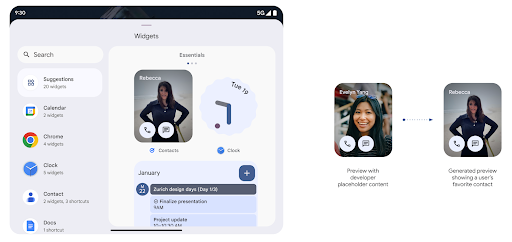
Before Android 15, the only way to provide widget picker previews was to specify a static image or layout resource. These previews often differ significantly from the look of the actual widget when it is placed on the home screen. Also, static resources can't be created with Jetpack Glance, so a Glance developer had to screenshot their widget or create an XML layout to have a widget preview.
Android 15 adds support for generated previews. This means that app widget
providers can generate RemoteViews to use as the picker preview, instead
of a static resource.
Push API
Apps can provide generated previews through a push API. Apps can provide
previews at any point in their lifecycle, and don't receive an explicit request
from the host to provide previews. Previews are persisted in AppWidgetService,
and hosts can request them on-demand. The following example loads an XML widget
layout resource and sets it as the preview:
AppWidgetManager.getInstance(appContext).setWidgetPreview(
   ComponentName(
       appContext,
       SociaLiteAppWidgetReceiver::class.java
   ),
   AppWidgetProviderInfo.WIDGET_CATEGORY_HOME_SCREEN,
   RemoteViews("com.example", R.layout.widget_preview)
)
The expected flow is:
- At any time, the widget provider calls
setWidgetPreview. The provided previews are persisted inAppWidgetServicewith other provider info. setWidgetPreviewnotifies hosts of an updated preview through theAppWidgetHost.onProvidersChangedcallback. In response, the widget host reloads all of its provider information.- When displaying a widget preview, the host checks
AppWidgetProviderInfo.generatedPreviewCategories, and if the chosen category is available, callsAppWidgetManager.getWidgetPreviewto return the saved preview for this provider.
When to call setWidgetPreview
Because there is no callback to provide previews, apps can choose to send previews at any point when they are running. How often to update the preview depends on the widget's use case.
The following list describes the two main categories of preview use cases:
- Providers that show real data in their widget previews, such as personalized or recent information. These providers can set the preview once the user has signed in or has done initial configuration in their app. After this, they can set up a periodic task to update the previews at their chosen cadence. Examples of this type of widget could be a photo, calendar, weather or news widget.
- Providers that show static information in previews or quick-action widgets that don't display any data. These providers can set previews once, when the app first launches. Examples of this type of widget include a drive quick actions widget or chrome shortcuts widget.
Some providers might show static previews on the hub mode picker, but real information on the homescreen picker. These providers should follow the guidance for both of these use cases to set previews.
تصویر در تصویر
Android 15 introduces changes in Picture-in-Picture (PiP) ensuring an even smoother transition when entering into PiP mode. This will be beneficial for apps having UI elements overlaid on top of their main UI, which goes into PiP.
Developers use the onPictureInPictureModeChanged callback to define logic
that toggles the visibility of the overlaid UI elements. This callback is
triggered when the PiP enter or exit animation is completed. Beginning in
Android 15, the PictureInPictureUiState class includes another state.
With this UI state, apps targeting Android 15 (API level 35) will observe the
Activity#onPictureInPictureUiStateChanged callback being invoked with
isTransitioningToPip() as soon as the PiP animation starts. There are
many UI elements that are not relevant for the app when it is in PiP mode, for
example views or layout that include information such as suggestions, upcoming
video, ratings, and titles. When the app goes to PiP mode, use the
onPictureInPictureUiStateChanged callback to hide these UI elements. When the
app goes to full screen mode from the PiP window, use
onPictureInPictureModeChanged callback to unhide these elements, as shown in
the following examples:
override fun onPictureInPictureUiStateChanged(pipState: PictureInPictureUiState) {
        if (pipState.isTransitioningToPip()) {
          // Hide UI elements
        }
    }
override fun onPictureInPictureModeChanged(isInPictureInPictureMode: Boolean) {
        if (isInPictureInPictureMode) {
          // Unhide UI elements
        }
    }
This quick visibility toggle of irrelevant UI elements (for a PiP window) helps ensure a smoother and flicker-free PiP enter animation.
بهبود قوانین «مزاحم نشوید»
AutomaticZenRule lets apps customize Attention
Management (Do Not Disturb) rules and decide when to activate or deactivate
them. Android 15 greatly enhances these rules with the goal of improving the
user experience. The following enhancements are included:
- Adding types to
AutomaticZenRule, allowing the system to apply special treatment to some rules. - Adding an icon to
AutomaticZenRule, helping to make the modes be more recognizable. - Adding a
triggerDescriptionstring toAutomaticZenRulethat describes the conditions on which the rule should become active for the user. - Added
ZenDeviceEffectstoAutomaticZenRule, allowing rules to trigger things like grayscale display, night mode, or dimming the wallpaper.
تنظیم جلوه لرزشی برای کانالهای اعلان
Android 15 از تنظیم ارتعاشات غنی برای اعلانهای دریافتی توسط کانال با استفاده از NotificationChannel.setVibrationEffect پشتیبانی میکند، بنابراین کاربران شما میتوانند بدون نیاز به نگاه کردن به دستگاه خود، بین انواع مختلف اعلانها تمایز قائل شوند.
تراشه نوار وضعیت طرح رسانه و توقف خودکار
طرح رسانه ای می تواند اطلاعات خصوصی کاربر را در معرض نمایش بگذارد. یک تراشه نوار وضعیت برجسته و جدید، کاربران را از هرگونه نمایش صفحه نمایش در حال انجام آگاه می کند. کاربران میتوانند روی تراشه ضربه بزنند تا پخش، اشتراکگذاری یا ضبط صفحه را متوقف کنند. همچنین، برای تجربه کاربری شهودیتر، هر گونه نمایش صفحه نمایش در حال پیشرفت اکنون به طور خودکار با قفل شدن صفحه نمایش دستگاه متوقف میشود.

صفحه نمایشهای بزرگ و فاکتورهای شکل ظاهری
اندروید ۱۵ به برنامههای شما این پشتیبانی را میدهد تا از فرم فکتورهای اندروید، از جمله صفحه نمایشهای بزرگ، گوشیهای تاشو و تاشو، نهایت استفاده را ببرند.
بهبود چندوظیفگی روی صفحه نمایش بزرگ
Android 15 gives users better ways to multitask on large screen devices. For example, users can save their favorite split-screen app combinations for quick access and pin the taskbar on screen to quickly switch between apps. This means that making sure your app is adaptive is more important than ever.
Google I/O has sessions on Building adaptive Android apps and Building UI with the Material 3 adaptive library that can help, and our documentation has more to help you Design for large screens.
پشتیبانی از صفحه نمایش کاور
برنامه شما میتواند ویژگیای را اعلام کند که Android 15 از آن استفاده میکند تا به Application یا Activity شما اجازه دهد روی صفحهنمایشهای کوچک روی جلد دستگاههای قابل انعطاف پشتیبانیشده ارائه شود. این صفحهها بسیار کوچک هستند و نمیتوان آنها را بهعنوان اهداف سازگار برای اجرای برنامههای Android در نظر گرفت، اما برنامه شما میتواند از آنها پشتیبانی کند و برنامه شما را در مکانهای بیشتری در دسترس قرار دهد.
اتصال
اندروید ۱۵ پلتفرم را بهروزرسانی میکند تا به برنامه شما امکان دسترسی به جدیدترین پیشرفتها در فناوریهای ارتباطی و بیسیم را بدهد.
پشتیبانی ماهوارهای
Android 15 به گسترش پشتیبانی پلت فرم برای اتصال ماهوارهای ادامه میدهد و شامل برخی از عناصر رابط کاربری برای اطمینان از تجربه کاربری ثابت در سراسر چشمانداز اتصال ماهوارهای است.
برنامهها میتوانند از ServiceState.isUsingNonTerrestrialNetwork() برای تشخیص اینکه یک دستگاه به یک ماهواره متصل است، استفاده کنند و به آنها آگاهی بیشتری نسبت به اینکه چرا خدمات شبکه کامل ممکن است در دسترس نباشد، میدهند. علاوه بر این، اندروید 15 از برنامه های SMS و MMS و همچنین برنامه های RCS از پیش بارگذاری شده برای استفاده از اتصال ماهواره ای برای ارسال و دریافت پیام پشتیبانی می کند.

تجربه روانتر NFC
Android 15 is working to make the tap to pay experience more seamless and
reliable while continuing to support Android's robust NFC app ecosystem. On
supported devices, apps can request the NfcAdapter to enter
observe mode, where the device listens but doesn't respond to NFC
readers, sending the app's NFC service PollingFrame
objects to process. The PollingFrame objects can be used to auth
ahead of the first communication to the NFC reader, allowing for a one tap
transaction in many cases.
In addition, apps can register a filter on supported devices so they can be notified of polling loop activity, which allows for smooth operation with multiple NFC-aware applications.
نقش کیف پول
اندروید 15 نقش کیف پول را معرفی میکند که اجازه میدهد با برنامه کیف پول ترجیحی کاربر یکپارچهتر شود. این نقش جایگزین تنظیم پیشفرض پرداخت بدون تماس NFC میشود. کاربران می توانند با رفتن به تنظیمات > برنامه ها > برنامه های پیش فرض، دارنده نقش Wallet را مدیریت کنند.
نقش Wallet هنگام مسیریابی شیرهای NFC برای ایدزهای ثبت شده در دسته پرداخت استفاده می شود. ضربه ها همیشه به دارنده نقش Wallet می روند مگر اینکه برنامه دیگری که برای همان AID ثبت شده باشد در پیش زمینه اجرا شود.
این نقش همچنین برای تعیین محل قرار گرفتن کاشی دسترسی سریع کیف پول هنگام فعال شدن استفاده می شود. وقتی نقش روی «هیچکدام» تنظیم شود، کاشی دسترسی سریع در دسترس نیست و ضربههای NFC دسته پرداخت فقط به برنامه پیشزمینه تحویل داده میشود.
امنیت
اندروید ۱۵ به شما کمک میکند تا امنیت برنامه خود را افزایش دهید، از دادههای برنامه خود محافظت کنید و به کاربران شفافیت و کنترل بیشتری بر دادههایشان میدهد. برای اطلاعات بیشتر در مورد کارهایی که ما برای بهبود حفاظت از کاربر و محافظت از برنامه شما در برابر تهدیدات جدید انجام میدهیم، به گفتگوی «حفاظت از امنیت کاربر در اندروید» از Google I/O مراجعه کنید.
ادغام مدیریت اعتبارنامه با تکمیل خودکار
با شروع Android 15، توسعهدهندگان میتوانند نماهای خاصی مانند فیلدهای نام کاربری یا گذرواژه را با درخواستهای Credential Manager پیوند دهند ، که ارائه یک تجربه کاربری مناسب در طول فرآیند ورود به سیستم را آسانتر میکند. هنگامی که کاربر روی یکی از این نماها تمرکز می کند، درخواست مربوطه به Credential Manager ارسال می شود. اعتبارنامههای بهدستآمده در بین ارائهدهندگان جمعآوری میشوند و در رابطهای کاربری جایگزین تکمیل خودکار، مانند پیشنهادات درون خطی یا پیشنهادات کشویی نمایش داده میشوند. کتابخانه Jetpack androidx.credentials نقطه پایانی ترجیحی برای استفاده توسعه دهندگان است و به زودی برای بهبود بیشتر این ویژگی در اندروید 15 و بالاتر در دسترس خواهد بود.
ثبت نام و ورود با یک لمس را با درخواستهای بیومتریک ادغام کنید
Credential Manager integrates biometric prompts into the credential creation and sign-in processes, eliminating the need for providers to manage biometric prompts. As a result, credential providers only need to focus on the results of the create and get flows, augmented with the biometric flow result. This simplified process creates a more efficient and streamlined credential creation and retrieval process.
مدیریت کلید برای رمزگذاری سرتاسری
We are introducing the E2eeContactKeysManager in Android 15, which
facilitates end-to-end encryption (E2EE) in your Android apps by providing an
OS-level API for the storage of cryptographic public keys.
The E2eeContactKeysManager is designed to integrate with the platform
contacts app to give users a centralized way to manage and verify their
contacts' public keys.
بررسی مجوزها روی URIهای محتوا
اندروید 15 مجموعهای از APIها را معرفی میکند که بررسیهای مجوز را روی URI محتوا انجام میدهند:
-
Context.checkContentUriPermissionFull: این یک بررسی کامل مجوز در URIهای محتوا را انجام می دهد. - ویژگی مانیفست
ActivityrequireContentUriPermissionFromCaller: این مجوزهای مشخص شده را در URIهای محتوای ارائه شده در هنگام راه اندازی فعالیت اعمال می کند. - کلاس
ComponentCallerبرای تماس گیرندگانActivity: این نشان دهنده برنامه ای است که فعالیت را راه اندازی کرده است.
دسترسیپذیری
اندروید ۱۵ ویژگیهایی را اضافه میکند که دسترسی کاربران را بهبود میبخشد.
بریل بهتر
در Android 15، ما این امکان را برای TalkBack فراهم کردهایم که از نمایشگرهای بریل که از استاندارد HID از طریق USB و بلوتوث ایمن استفاده میکنند، پشتیبانی کند.
این استاندارد، دقیقاً مشابه استانداردی که توسط ماوس ها و صفحه کلیدها استفاده می شود، به اندروید کمک می کند تا در طول زمان از طیف وسیع تری از نمایشگرهای بریل پشتیبانی کند.
بینالمللیسازی
اندروید ۱۵ ویژگیها و قابلیتهایی را اضافه میکند که هنگام استفاده از دستگاه به زبانهای مختلف، تجربه کاربری را تکمیل میکنند.
فونت متغیر CJK
با شروع Android 15، فایل فونت برای زبان های چینی، ژاپنی و کره ای (CJK)، NotoSansCJK، اکنون یک فونت متغیر است. فونت های متغیر فرصت هایی را برای تایپوگرافی خلاقانه در زبان های CJK باز می کنند. طراحان میتوانند طیف وسیعتری از سبکها را بررسی کنند و طرحبندیهای بصری چشمگیری ایجاد کنند که قبلاً دستیابی به آنها دشوار یا غیرممکن بود.

توجیه بین کاراکتری
با شروع Android 15، متن را می توان با استفاده از فاصله حروف با استفاده از JUSTIFICATION_MODE_INTER_CHARACTER توجیه کرد. توجیه بین کلمه ای برای اولین بار در اندروید 8.0 (سطح API 26) معرفی شد و توجیه بین نویسه ها قابلیت های مشابهی را برای زبان هایی که از کاراکتر فضای خالی برای تقسیم بندی استفاده می کنند، مانند چینی، ژاپنی و غیره ارائه می دهد.

JUSTIFICATION_MODE_NONE . 
JUSTIFICATION_MODE_NONE . 
JUSTIFICATION_MODE_INTER_WORD . 
JUSTIFICATION_MODE_INTER_WORD . 
JUSTIFICATION_MODE_INTER_CHARACTER . 
JUSTIFICATION_MODE_INTER_CHARACTER .پیکربندی خودکار شکستن خط
Android started supporting phrase-based line breaks for Japanese and Korean in
Android 13 (API level 33). However, while phrase-based line breaks improve the
readability of short lines of text, they don't work well for long lines of text.
In Android 15, apps can apply phrase-based line breaks only for short lines
of text, using the LINE_BREAK_WORD_STYLE_AUTO
option. This option selects the best word style option for the text.
For short lines of text, phrase-based line breaks are used, functioning the same
as LINE_BREAK_WORD_STYLE_PHRASE, as shown in the
following image:

LINE_BREAK_WORD_STYLE_AUTO
applies phrase-based line breaks to improve the readability of the text.
This is the same as applying
LINE_BREAK_WORD_STYLE_PHRASE.For longer lines of text, LINE_BREAK_WORD_STYLE_AUTO uses a no
line-break word style, functioning the same as
LINE_BREAK_WORD_STYLE_NONE, as shown in the
following image:

LINE_BREAK_WORD_STYLE_AUTO
applies no line-break word style to improve the readability of the text.
This is the same as applying
LINE_BREAK_WORD_STYLE_NONE.فونت اضافی Hentaigana ژاپنی
در اندروید 15، یک فایل فونت برای هیراگانای ژاپنی قدیمی (معروف به Hentaigana) به طور پیش فرض همراه است. اشکال منحصربهفرد شخصیتهای هنتایگانا میتواند استعدادی متمایز به آثار هنری یا طراحی اضافه کند و در عین حال به حفظ انتقال دقیق و درک اسناد باستانی ژاپنی کمک کند.

VideoLAN cone Copyright (c) 1996-2010 VideoLAN. This logo or a modified version may be used or modified by anyone to refer to the VideoLAN project or any product developed by the VideoLAN team, but does not indicate endorsement by the project.
Vulkan and the Vulkan logo are registered trademarks of the Khronos Group Inc.
OpenGL is a registered trademark and the OpenGL ES logo is a trademark of Hewlett Packard Enterprise used by permission by Khronos.