

مانند نسخههای قبلی، اندروید ۱۵ شامل تغییرات رفتاری است که ممکن است بر برنامه شما تأثیر بگذارد. تغییرات رفتاری زیر منحصراً برای برنامههایی اعمال میشود که اندروید ۱۵ یا بالاتر را هدف قرار میدهند. اگر برنامه شما اندروید ۱۵ یا بالاتر را هدف قرار میدهد، باید برنامه خود را اصلاح کنید تا در صورت لزوم، از این رفتارها به درستی پشتیبانی کند.
حتماً فهرست تغییرات رفتاری که صرف نظر از targetSdkVersion برنامه شما، بر همه برنامههای در حال اجرا در اندروید ۱۵ تأثیر میگذارند را نیز بررسی کنید.
عملکرد اصلی
اندروید ۱۵ قابلیتهای اصلی مختلف سیستم اندروید را تغییر داده یا گسترش میدهد.
تغییرات در سرویسهای پیشزمینه
ما در حال انجام تغییرات زیر در سرویس های پیش زمینه با اندروید 15 هستیم.
- رفتار درنگ سرویس پیش زمینه همگام سازی داده ها
- نوع سرویس پیش زمینه پردازش رسانه جدید
- محدودیت در گیرنده های پخش
BOOT_COMPLETEDکه خدمات پیش زمینه را راه اندازی می کنند - محدودیتهایی برای شروع سرویسهای پیشزمینه در زمانی که برنامه دارای مجوز
SYSTEM_ALERT_WINDOWاست
رفتار درنگ سرویس پیش زمینه همگام سازی داده ها
Android 15 introduces a new timeout behavior to dataSync for apps targeting
Android 15 (API level 35) or higher. This behavior also applies to the new
mediaProcessing foreground service type.
The system permits an app's dataSync services to run for a total of 6 hours
in a 24-hour period, after which the system calls the running service's
Service.onTimeout(int, int) method (introduced in Android
15). At this time, the service has a few seconds to call
Service.stopSelf(). When Service.onTimeout() is called, the
service is no longer considered a foreground service. If the service does not
call Service.stopSelf(), the system throws an internal exception. The
exception is logged in Logcat with the following message:
Fatal Exception: android.app.RemoteServiceException: "A foreground service of
type dataSync did not stop within its timeout: [component name]"
To avoid problems with this behavior change, you can do one or more of the following:
- Have your service implement the new
Service.onTimeout(int, int)method. When your app receives the callback, make sure to callstopSelf()within a few seconds. (If you don't stop the app right away, the system generates a failure.) - Make sure your app's
dataSyncservices don't run for more than a total of 6 hours in any 24-hour period (unless the user interacts with the app, resetting the timer). - Only start
dataSyncforeground services as a result of direct user interaction; since your app is in the foreground when the service starts, your service has the full six hours after the app goes to the background. - Instead of using a
dataSyncforeground service, use an alternative API.
If your app's dataSync foreground services have run for 6 hours in the last
24, you cannot start another dataSync foreground service unless the user
has brought your app to the foreground (which resets the timer). If you try to
start another dataSync foreground service, the system throws
ForegroundServiceStartNotAllowedException
with an error message like "Time limit already exhausted for foreground service
type dataSync".
Testing
To test your app's behavior, you can enable data sync timeouts even if your app
is not targeting Android 15 (as long as the app is running on an Android 15
device). To enable timeouts, run the following adb command:
adb shell am compat enable FGS_INTRODUCE_TIME_LIMITS your-package-name
You can also adjust the timeout period, to make it easier to test how your
app behaves when the limit is reached. To set a new timeout period, run the
following adb command:
adb shell device_config put activity_manager data_sync_fgs_timeout_duration duration-in-milliseconds
نوع سرویس پیش زمینه پردازش رسانه جدید
Android 15 introduces a new foreground service type, mediaProcessing. This
service type is appropriate for operations like transcoding media files. For
example, a media app might download an audio file and need to convert it to a
different format before playing it. You can use a mediaProcessing foreground
service to make sure the conversion continues even while the app is in the
background.
The system permits an app's mediaProcessing services to run for a total of 6
hours in a 24-hour period, after which the system calls the running service's
Service.onTimeout(int, int) method (introduced in Android
15). At this time, the service has a few seconds to call
Service.stopSelf(). If the service does not
call Service.stopSelf(), the system throws an internal exception. The
exception is logged in Logcat with the following message:
Fatal Exception: android.app.RemoteServiceException: "A foreground service of
type mediaProcessing did not stop within its timeout: [component name]"
To avoid having the exception, you can do one of the following:
- Have your service implement the new
Service.onTimeout(int, int)method. When your app receives the callback, make sure to callstopSelf()within a few seconds. (If you don't stop the app right away, the system generates a failure.) - Make sure your app's
mediaProcessingservices don't run for more than a total of 6 hours in any 24-hour period (unless the user interacts with the app, resetting the timer). - Only start
mediaProcessingforeground services as a result of direct user interaction; since your app is in the foreground when the service starts, your service has the full six hours after the app goes to the background. - Instead of using a
mediaProcessingforeground service, use an alternative API, like WorkManager.
If your app's mediaProcessing foreground services have run for 6 hours in the
last 24, you cannot start another mediaProcessing foreground service unless
the user has brought your app to the foreground (which resets the timer). If you
try to start another mediaProcessing foreground service, the system throws
ForegroundServiceStartNotAllowedException
with an error message like "Time limit already exhausted for foreground service
type mediaProcessing".
For more information about the mediaProcessing service type, see Changes to
foreground service types for Android 15: Media processing.
Testing
To test your app's behavior, you can enable media processing timeouts even if
your app is not targeting Android 15 (as long as the app is running on an
Android 15 device). To enable timeouts, run the following adb command:
adb shell am compat enable FGS_INTRODUCE_TIME_LIMITS your-package-name
You can also adjust the timeout period, to make it easier to test how your
app behaves when the limit is reached. To set a new timeout period, run the
following adb command:
adb shell device_config put activity_manager media_processing_fgs_timeout_duration duration-in-milliseconds
محدودیت در گیرنده های پخش BOOT_COMPLETED که خدمات پیش زمینه را راه اندازی می کنند
محدودیت های جدیدی برای گیرنده های پخش BOOT_COMPLETED وجود دارد که خدمات پیش زمینه را راه اندازی می کنند. گیرنده های BOOT_COMPLETED مجاز به راه اندازی انواع خدمات پیش زمینه زیر نیستند :
-
dataSync -
camera -
mediaPlayback -
phoneCall -
mediaProjection -
microphone(این محدودیت از اندروید 14 برایmicrophoneاعمال شده است)
اگر یک گیرنده BOOT_COMPLETED سعی کند هر یک از آن نوع خدمات پیش زمینه را راه اندازی کند، سیستم ForegroundServiceStartNotAllowedException پرتاب می کند.
تست کردن
برای آزمایش رفتار برنامهتان، میتوانید این محدودیتهای جدید را فعال کنید، حتی اگر برنامه شما اندروید 15 را هدف قرار ندهد (تا زمانی که برنامه روی دستگاه Android 15 اجرا شود). دستور adb زیر را اجرا کنید:
adb shell am compat enable FGS_BOOT_COMPLETED_RESTRICTIONS your-package-name
برای ارسال یک پخش BOOT_COMPLETED بدون راه اندازی مجدد دستگاه، دستور adb زیر را اجرا کنید:
adb shell am broadcast -a android.intent.action.BOOT_COMPLETED your-package-name
محدودیتهایی برای شروع سرویسهای پیشزمینه در زمانی که برنامه دارای مجوز SYSTEM_ALERT_WINDOW است
Previously, if an app held the SYSTEM_ALERT_WINDOW permission, it could launch
a foreground service even if the app was currently in the background (as
discussed in exemptions from background start restrictions).
If an app targets Android 15, this exemption is now narrower. The app now needs
to have the SYSTEM_ALERT_WINDOW permission and also have a visible overlay
window. That is, the app needs to first launch a
TYPE_APPLICATION_OVERLAY window and the window
needs to be visible before you start a foreground service.
If your app attempts to start a foreground service from the background without
meeting these new requirements (and it does not have some other exemption), the
system throws ForegroundServiceStartNotAllowedException.
If your app declares the SYSTEM_ALERT_WINDOW permission
and launches foreground services from the background, it may be affected by this
change. If your app gets a ForegroundServiceStartNotAllowedException, check
your app's order of operations and make sure your app already has an active
overlay window before it attempts to start a foreground service from the
background. You can check if your overlay window is currently visible
by calling View.getWindowVisibility(), or you
can override View.onWindowVisibilityChanged()
to get notified whenever the visibility changes.
Testing
To test your app's behavior, you can enable these new restrictions even if your
app is not targeting Android 15 (as long as the app is running on an Android 15
device). To enable these new restrictions on starting foreground services
from the background, run the following adb command:
adb shell am compat enable FGS_SAW_RESTRICTIONS your-package-name
تغییراتی در زمانهایی که برنامهها میتوانند وضعیت کلی حالت «مزاحم نشوید» را تغییر دهند
برنامههایی که Android 15 (سطح API 35) و بالاتر را هدف قرار میدهند، دیگر نمیتوانند وضعیت کلی یا خطمشی «مزاحم نشوید» (DND) را در دستگاه تغییر دهند (چه با تغییر تنظیمات کاربر یا خاموش کردن حالت DND). در عوض، برنامهها باید یک AutomaticZenRule ارائه دهند، که سیستم آن را در یک خطمشی جهانی با طرح موجود بیشترین محدودیتکننده-سیاست-برنده ترکیب میکند. تماسهای APIهای موجود که قبلاً بر وضعیت جهانی تأثیر میگذاشتند ( setInterruptionFilter ، setNotificationPolicy ) منجر به ایجاد یا بهروزرسانی یک AutomaticZenRule ضمنی میشود که بسته به چرخه تماس آن فراخوانهای API، روشن و خاموش میشود.
توجه داشته باشید که این تغییر تنها در صورتی بر رفتار قابل مشاهده تأثیر میگذارد که برنامه setInterruptionFilter(INTERRUPTION_FILTER_ALL) را فراخوانی کند و انتظار دارد که این تماس AutomaticZenRule را که قبلاً توسط صاحبان آن فعال شده است غیرفعال کند.
تغییرات API در OpenJDK
Android 15 continues the work of refreshing Android's core libraries to align with the features in the latest OpenJDK LTS releases.
Some of these changes can affect app compatibility for apps targeting Android 15 (API level 35):
Changes to string formatting APIs: Validation of argument index, flags, width, and precision are now more strict when using the following
String.format()andFormatter.format()APIs:String.format(String, Object[])String.format(Locale, String, Object[])Formatter.format(String, Object[])Formatter.format(Locale, String, Object[])
For example, the following exception is thrown when an argument index of 0 is used (
%0in the format string):IllegalFormatArgumentIndexException: Illegal format argument index = 0In this case, the issue can be fixed by using an argument index of 1 (
%1in the format string).Changes to component type of
Arrays.asList(...).toArray(): When usingArrays.asList(...).toArray(), the component type of the resulting array is now anObject—not the type of the underlying array's elements. So the following code throws aClassCastException:String[] elements = (String[]) Arrays.asList("one", "two").toArray();For this case, to preserve
Stringas the component type in the resulting array, you could useCollection.toArray(Object[])instead:String[] elements = Arrays.asList("two", "one").toArray(new String[0]);Changes to language code handling: When using the
LocaleAPI, language codes for Hebrew, Yiddish, and Indonesian are no longer converted to their obsolete forms (Hebrew:iw, Yiddish:ji, and Indonesian:in). When specifying the language code for one of these locales, use the codes from ISO 639-1 instead (Hebrew:he, Yiddish:yi, and Indonesian:id).Changes to random int sequences: Following the changes made in https://bugs.openjdk.org/browse/JDK-8301574, the following
Random.ints()methods now return a different sequence of numbers than theRandom.nextInt()methods do:Generally, this change shouldn't result in app-breaking behavior, but your code shouldn't expect the sequence generated from
Random.ints()methods to matchRandom.nextInt().
The new SequencedCollection API can affect your app's compatibility
after you update compileSdk in your app's build configuration to use
Android 15 (API level 35):
Collision with
MutableList.removeFirst()andMutableList.removeLast()extension functions inkotlin-stdlibThe
Listtype in Java is mapped to theMutableListtype in Kotlin. Because theList.removeFirst()andList.removeLast()APIs have been introduced in Android 15 (API level 35), the Kotlin compiler resolves function calls, for examplelist.removeFirst(), statically to the newListAPIs instead of to the extension functions inkotlin-stdlib.If an app is re-compiled with
compileSdkset to35andminSdkset to34or lower, and then the app is run on Android 14 and lower, a runtime error is thrown:java.lang.NoSuchMethodError: No virtual method removeFirst()Ljava/lang/Object; in class Ljava/util/ArrayList;The existing
NewApilint option in Android Gradle Plugin can catch these new API usages../gradlew lintMainActivity.kt:41: Error: Call requires API level 35 (current min is 34): java.util.List#removeFirst [NewApi] list.removeFirst()To fix the runtime exception and lint errors, the
removeFirst()andremoveLast()function calls can be replaced withremoveAt(0)andremoveAt(list.lastIndex)respectively in Kotlin. If you're using Android Studio Ladybug | 2024.1.3 or higher, it also provides a quick fix option for these errors.Consider removing
@SuppressLint("NewApi")andlintOptions { disable 'NewApi' }if the lint option has been disabled.Collision with other methods in Java
New methods have been added into the existing types, for example,
ListandDeque. These new methods might not be compatible with the methods with the same name and argument types in other interfaces and classes. In the case of a method signature collision with incompatibility, thejavaccompiler outputs a build-time error. For example:Example error 1:
javac MyList.javaMyList.java:135: error: removeLast() in MyList cannot implement removeLast() in List public void removeLast() { ^ return type void is not compatible with Object where E is a type-variable: E extends Object declared in interface ListExample error 2:
javac MyList.javaMyList.java:7: error: types Deque<Object> and List<Object> are incompatible; public class MyList implements List<Object>, Deque<Object> { both define reversed(), but with unrelated return types 1 errorExample error 3:
javac MyList.javaMyList.java:43: error: types List<E#1> and MyInterface<E#2> are incompatible; public static class MyList implements List<Object>, MyInterface<Object> { class MyList inherits unrelated defaults for getFirst() from types List and MyInterface where E#1,E#2 are type-variables: E#1 extends Object declared in interface List E#2 extends Object declared in interface MyInterface 1 errorTo fix these build errors, the class implementing these interfaces should override the method with a compatible return type. For example:
@Override
public Object getFirst() {
    return List.super.getFirst();
}
امنیت
اندروید ۱۵ شامل تغییراتی است که امنیت سیستم را ارتقا میدهد تا به محافظت از برنامهها و کاربران در برابر برنامههای مخرب کمک کند.
نسخههای محدود TLS
اندروید 15 استفاده از TLS نسخه 1.0 و 1.1 را محدود می کند. این نسخهها قبلاً در اندروید منسوخ شده بودند، اما اکنون برای برنامههایی که اندروید 15 را هدف قرار میدهند غیرمجاز هستند.
فعالیت پسزمینه امن راهاندازی میشود
اندروید ۱۵ با افزودن تغییراتی که مانع از اجرای برنامههای مخرب در پسزمینه توسط برنامههای دیگر، افزایش سطح دسترسی و سوءاستفاده از تعامل کاربر میشود، از کاربران در برابر برنامههای مخرب محافظت میکند و به آنها کنترل بیشتری بر دستگاههایشان میدهد. از اندروید ۱۰ (سطح API ۲۹) فعالیتهای پسزمینه محدود شدهاند.
تغییرات دیگر
- سازندگان
PendingIntentطوری تغییر دهید که به طور پیشفرض، فعالیتهای پسزمینه را مسدود کنند . این کار به جلوگیری از ایجاد تصادفیPendingIntentتوسط برنامهها که میتواند توسط افراد مخرب مورد سوءاستفاده قرار گیرد، کمک میکند. - هیچ برنامهای را به پیشزمینه نیاورید، مگر اینکه فرستندهی
PendingIntentاجازه دهد . هدف این تغییر جلوگیری از سوءاستفادهی برنامههای مخرب از قابلیت شروع فعالیتها در پسزمینه است. بهطور پیشفرض، برنامهها مجاز به آوردن پشتهی وظایف به پیشزمینه نیستند، مگر اینکه سازندهی برنامه اجازهی اجرای فعالیت در پسزمینه را داده باشد یا فرستنده امتیاز اجرای فعالیت در پسزمینه را داشته باشد. - کنترل کنید که فعالیت برتر یک پشته وظیفه چگونه میتواند وظیفه خود را به پایان برساند . اگر فعالیت برتر یک وظیفه را به پایان برساند، اندروید به آخرین وظیفه فعال خود برمیگردد. علاوه بر این، اگر یک فعالیت غیر برتر وظیفه خود را به پایان برساند، اندروید به صفحه اصلی برمیگردد؛ و پایان این فعالیت غیر برتر را مسدود نمیکند.
- جلوگیری از اجرای فعالیتهای دلخواه از برنامههای دیگر به وظیفه خودتان . این تغییر مانع از آن میشود که برنامههای مخرب با ایجاد فعالیتهایی که به نظر میرسد از برنامههای دیگر هستند، کاربران را فیشینگ کنند.
- جلوگیری از در نظر گرفتن پنجرههای غیرقابل مشاهده برای اجرای فعالیتهای پسزمینه . این کار به جلوگیری از سوءاستفاده برنامههای مخرب از اجرای فعالیتهای پسزمینه برای نمایش محتوای ناخواسته یا مخرب به کاربران کمک میکند.
مقاصد امنتر
Android 15 introduces StrictMode for
intents.
In order to see detailed logs about Intent usage violations, use following
method:
Kotlin
fun onCreate() {
    StrictMode.setVmPolicy(VmPolicy.Builder()
        .detectUnsafeIntentLaunch()
        .build()
    )
}
Java
public void onCreate() {
    StrictMode.setVmPolicy(new VmPolicy.Builder()
            .detectUnsafeIntentLaunch()
            .build());
}
تجربه کاربری و رابط کاربری سیستم
اندروید ۱۵ شامل تغییراتی است که برای ایجاد یک تجربه کاربری سازگارتر و شهودیتر در نظر گرفته شدهاند.
تغییرات درج پنجره
There are two changes related to window insets in Android 15: edge-to-edge is enforced by default, and there are also configuration changes, such as the default configuration of system bars.
اجرای لبه به لبه
Apps are edge-to-edge by default on devices running Android 15 if the app is targeting Android 15 (API level 35).
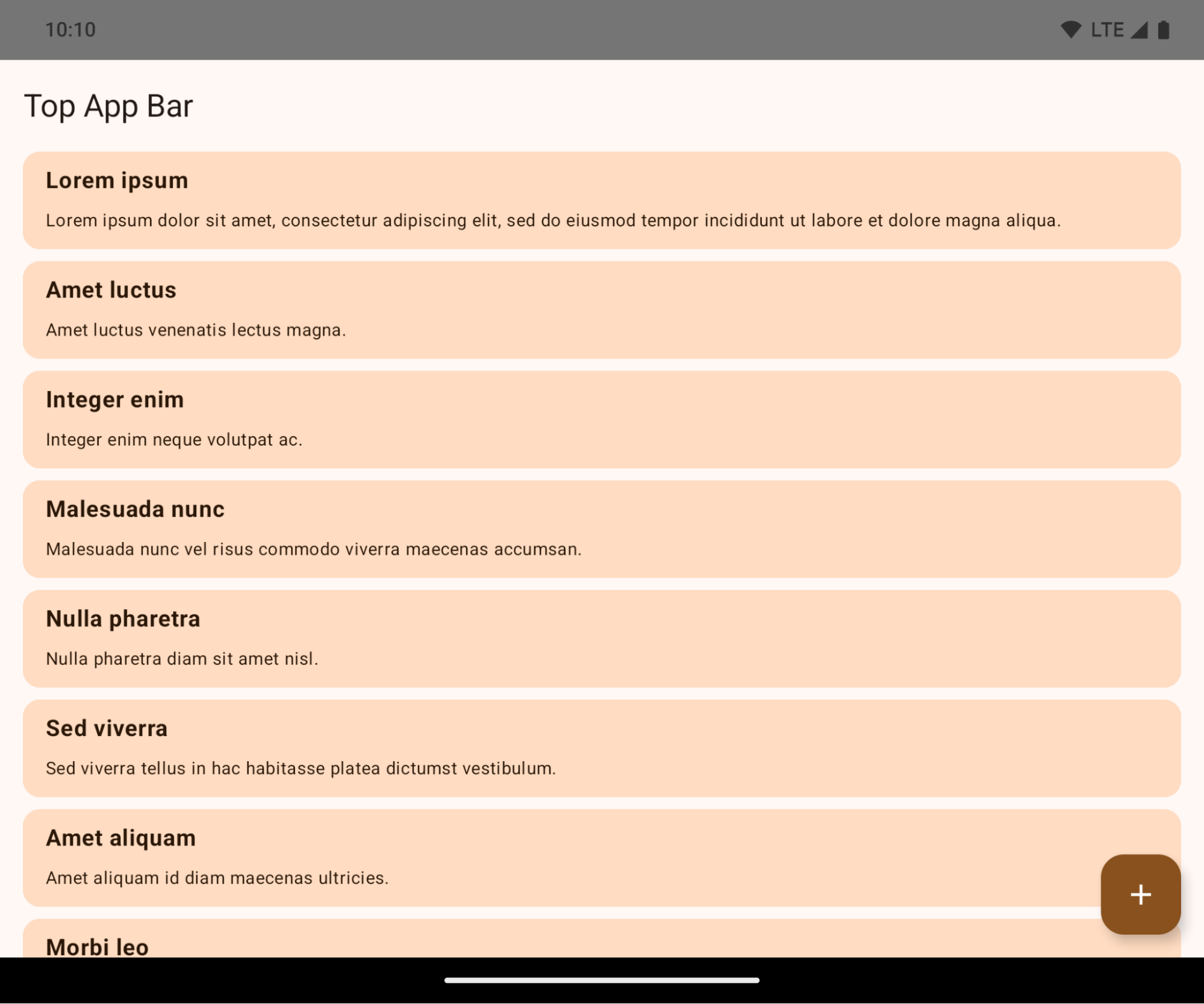
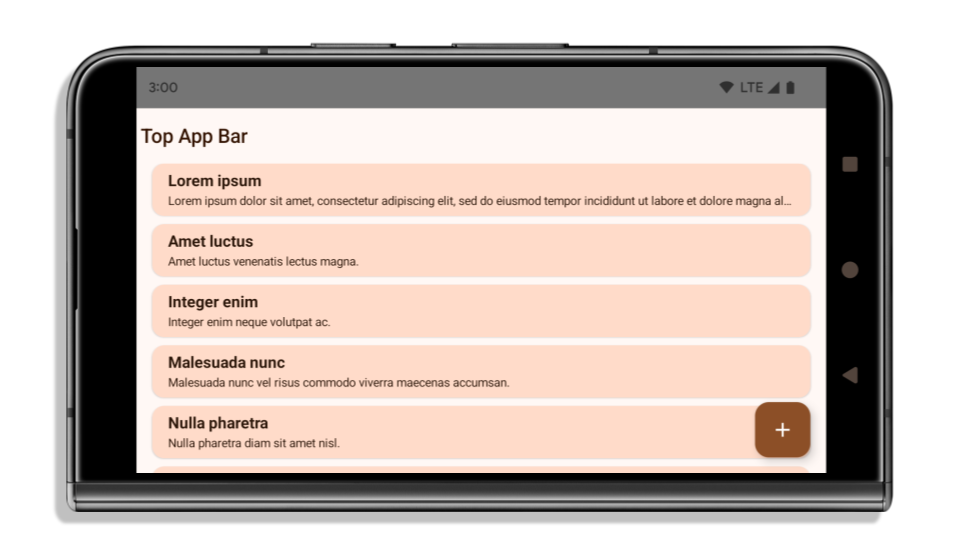
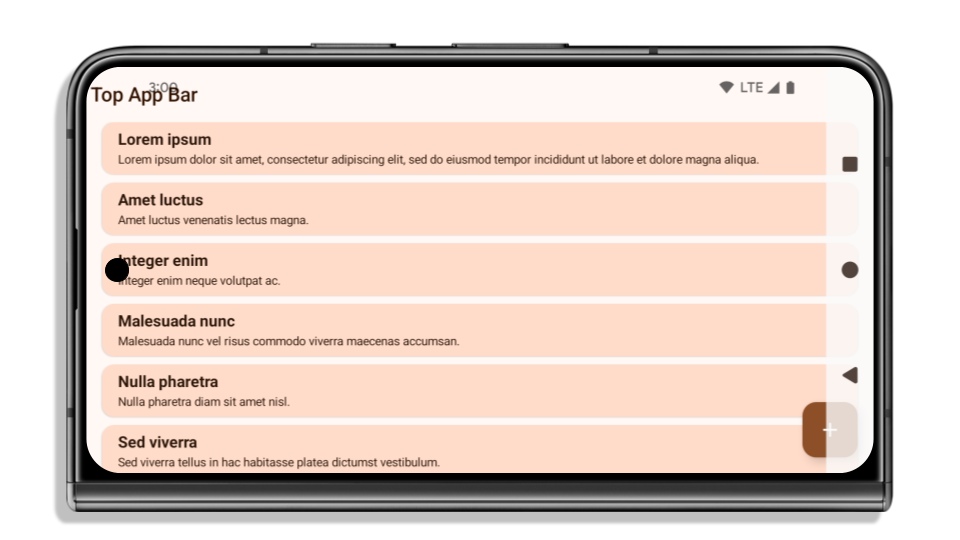
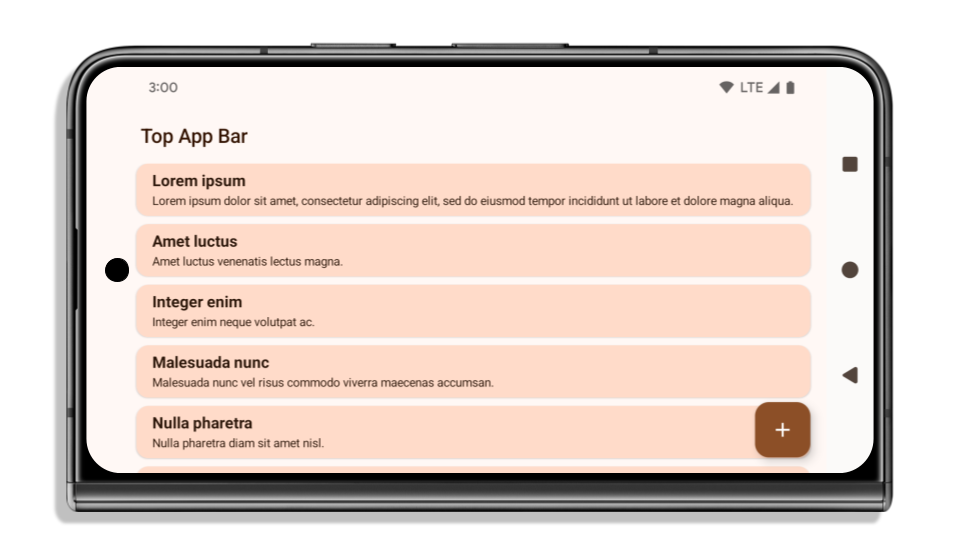
This is a breaking change that might negatively impact your app's UI. The changes affect the following UI areas:
- Gesture handle navigation bar
- Transparent by default.
- Bottom offset is disabled so content draws behind the system navigation bar unless insets are applied.
setNavigationBarColorandR.attr#navigationBarColorare deprecated and don't affect gesture navigation.setNavigationBarContrastEnforcedandR.attr#navigationBarContrastEnforcedcontinue to have no effect on gesture navigation.
- 3-button navigation
- Opacity set to 80% by default, with color possibly matching the window background.
- Bottom offset disabled so content draws behind the system navigation bar unless insets are applied.
setNavigationBarColorandR.attr#navigationBarColorare set to match the window background by default. The window background must be a color drawable for this default to apply. This API is deprecated but continues to affect 3-button navigation.setNavigationBarContrastEnforcedandR.attr#navigationBarContrastEnforcedis true by default, which adds an 80% opaque background across 3-button navigation.
- Status bar
- Transparent by default.
- The top offset is disabled so content draws behind the status bar unless insets are applied.
setStatusBarColorandR.attr#statusBarColorare deprecated and have no effect on Android 15.setStatusBarContrastEnforcedandR.attr#statusBarContrastEnforcedare deprecated but still have an effect on Android 15.
- Display cutout
layoutInDisplayCutoutModeof non-floating windows must beLAYOUT_IN_DISPLAY_CUTOUT_MODE_ALWAYS.SHORT_EDGES,NEVER, andDEFAULTare interpreted asALWAYSso that users don't see a black bar caused by the display cutout and appear edge-to-edge.
The following example shows an app before and after targeting Android 15 (API level 35), and before and after applying insets. This example is not comprehensive, this might appear differently on Android Auto.
What to check if your app is already edge-to-edge
If your app is already edge-to-edge and applies insets, you are mostly unimpacted, except in the following scenarios. However, even if you think you aren't impacted, we recommend you test your app.
- You have a non-floating window, such as an
Activitythat usesSHORT_EDGES,NEVERorDEFAULTinstead ofLAYOUT_IN_DISPLAY_CUTOUT_MODE_ALWAYS. If your app crashes on launch, this might be due to your splashscreen. You can either upgrade the core splashscreen dependency to 1.2.0-alpha01 or later or setwindow.attributes.layoutInDisplayCutoutMode = WindowManager.LayoutInDisplayCutoutMode.always. - There might be lower-traffic screens with occluded UI. Verify these
less-visited screens don't have occluded UI. Lower-traffic screens include:
- Onboarding or sign-in screens
- Settings pages
What to check if your app is not already edge-to-edge
If your app is not already edge-to-edge, you are most likely impacted. In addition to the scenarios for apps that are already edge-to-edge, you should consider the following:
- If your app uses Material 3 Components (
androidx.compose.material3) in compose, such asTopAppBar,BottomAppBar, andNavigationBar, these components are likely not impacted because they automatically handle insets. - If your app is using Material 2 Components (
androidx.compose.material) in Compose, these components don't automatically handle insets. However, you can get access to the insets and apply them manually. In androidx.compose.material 1.6.0 and later, use thewindowInsetsparameter to apply the insets manually forBottomAppBar,TopAppBar,BottomNavigation, andNavigationRail. Likewise, use thecontentWindowInsetsparameter forScaffold. - If your app uses views and Material Components
(
com.google.android.material), most views-based Material Components such asBottomNavigationView,BottomAppBar,NavigationRailView, orNavigationView, handle insets and require no additional work. However, you need to addandroid:fitsSystemWindows="true"if usingAppBarLayout. - For custom composables, apply the insets manually as padding. If your
content is within a
Scaffold, you can consume insets using theScaffoldpadding values. Otherwise, apply padding using one of theWindowInsets. - If your app is using views and
BottomSheet,SideSheetor custom containers, apply padding usingViewCompat.setOnApplyWindowInsetsListener. ForRecyclerView, apply padding using this listener and also addclipToPadding="false".
What to check if your app must offer custom background protection
If your app must offer custom background protection to 3-button navigation or
the status bar, your app should place a composable or view behind the system bar
using WindowInsets.Type#tappableElement() to get the 3-button
navigation bar height or WindowInsets.Type#statusBars.
Additional edge-to-edge resources
See the Edge to Edge Views and Edge to Edge Compose guides for additional considerations on applying insets.
Deprecated APIs
The following APIs are deprecated but not disabled:
R.attr#enforceStatusBarContrastR.attr#navigationBarColor(for 3 button navigation, with 80% alpha)Window#isStatusBarContrastEnforcedWindow#setNavigationBarColor(for 3 button navigation, with 80% alpha)Window#setStatusBarContrastEnforced
The following APIs are deprecated and disabled:
R.attr#navigationBarColor(for gesture navigation)R.attr#navigationBarDividerColorR.attr#statusBarColorWindow#setDecorFitsSystemWindowsWindow#getNavigationBarColorWindow#getNavigationBarDividerColorWindow#getStatusBarColorWindow#setNavigationBarColor(for gesture navigation)Window#setNavigationBarDividerColorWindow#setStatusBarColor
پیکربندی پایدار
اگر برنامه شما اندروید ۱۵ (سطح API 35) یا بالاتر را هدف قرار میدهد، Configuration دیگر نوارهای سیستم را حذف نمیکند. اگر از اندازه صفحه نمایش در کلاس Configuration برای محاسبه طرحبندی استفاده میکنید، باید آن را با گزینههای بهتری مانند ViewGroup ، WindowInsets یا WindowMetricsCalculator مناسب، بسته به نیاز خود، جایگزین کنید.
Configuration از API 1 در دسترس بوده است. معمولاً از Activity.onConfigurationChanged به دست میآید. این فایل اطلاعاتی مانند تراکم پنجره، جهتگیری و اندازهها را ارائه میدهد. یکی از ویژگیهای مهم در مورد اندازههای پنجره که از Configuration برگردانده میشود این است که قبلاً نوارهای سیستم را حذف میکرد.
اندازه پیکربندی معمولاً برای انتخاب منابع استفاده میشود، مانند /res/layout-h500dp ، و این هنوز یک مورد استفاده معتبر است. با این حال، استفاده از آن برای محاسبه طرحبندی همیشه توصیه نشده است. اگر این کار را میکنید، باید همین حالا از آن صرف نظر کنید. شما باید بسته به مورد استفاده خود، استفاده از Configuration را با چیزی مناسبتر جایگزین کنید.
اگر از آن برای محاسبهی طرحبندی استفاده میکنید، از یک ViewGroup مناسب مانند CoordinatorLayout یا ConstraintLayout استفاده کنید. اگر از آن برای تعیین ارتفاع نوار ناوبری سیستم استفاده میکنید، WindowInsets استفاده کنید. اگر میخواهید اندازهی فعلی پنجرهی برنامهی خود را بدانید، از computeCurrentWindowMetrics استفاده کنید.
لیست زیر فیلدهایی را که تحت تأثیر این تغییر قرار میگیرند، شرح میدهد:
- اندازههای
Configuration.screenWidthDpوscreenHeightDpدیگر نوارهای سیستم را شامل نمیشوند. -
Configuration.smallestScreenWidthDpبه طور غیرمستقیم تحت تأثیر تغییراتscreenWidthDpوscreenHeightDpقرار میگیرد. -
Configuration.orientationبه طور غیرمستقیم تحت تأثیر تغییراتscreenWidthDpوscreenHeightDpدر دستگاههای نزدیک به مربع قرار میگیرد. -
Display.getSize(Point)به طور غیرمستقیم تحت تأثیر تغییرات درConfigurationقرار میگیرد. این تابع از سطح API 30 منسوخ شده است. -
Display.getMetrics()از API سطح ۳۳ به این صورت کار میکرده است.
مقدار پیشفرض ویژگی elegantTextHeight برابر با true است.
For apps targeting Android 15 (API level 35), the
elegantTextHeight TextView attribute
becomes true by default, replacing the compact font used by default with some
scripts that have large vertical metrics with one that is much more readable.
The compact font was introduced to prevent breaking layouts; Android 13 (API
level 33) prevents many of these breakages by allowing the text layout to
stretch the vertical height utilizing the fallbackLineSpacing
attribute.
In Android 15, the compact font still remains in the system, so your app can set
elegantTextHeight to false to get the same behavior as before, but it is
unlikely to be supported in upcoming releases. So, if your app supports the
following scripts: Arabic, Lao, Myanmar, Tamil, Gujarati, Kannada, Malayalam,
Odia, Telugu or Thai, test your app by setting elegantTextHeight to true.

elegantTextHeight behavior for apps targeting Android 14 (API level 34) and lower.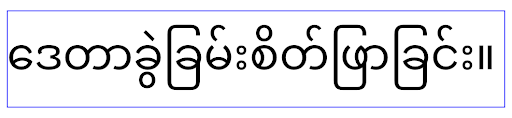
elegantTextHeight behavior for apps targeting Android 15.تغییر عرض TextView برای شکلهای پیچیده حروف
In previous versions of Android, some cursive fonts or languages that have
complex shaping might draw the letters in the previous or next character's area.
In some cases, such letters were clipped at the beginning or ending position.
Starting in Android 15, a TextView allocates width for drawing enough space
for such letters and allows apps to request extra paddings to the left to
prevent clipping.
Because this change affects how a TextView decides the width, TextView
allocates more width by default if the app targets Android 15 (API level 35) or
higher. You can enable or disable this behavior by calling the
setUseBoundsForWidth API on TextView.
Because adding left padding might cause a misalignment for existing layouts, the
padding is not added by default even for apps that target Android 15 or higher.
However, you can add extra padding to preventing clipping by calling
setShiftDrawingOffsetForStartOverhang.
The following examples show how these changes can improve text layout for some fonts and languages.

<TextView
    android:fontFamily="cursive"
    android:text="java" />
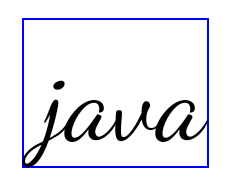
<TextView
    android:fontFamily="cursive"
    android:text="java"
    android:useBoundsForWidth="true"
    android:shiftDrawingOffsetForStartOverhang="true" />
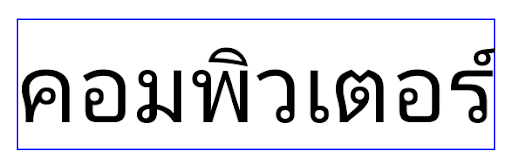
<TextView
    android:text="คอมพิวเตอร์" />
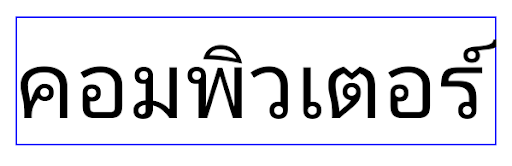
<TextView
    android:text="คอมพิวเตอร์"
    android:useBoundsForWidth="true"
    android:shiftDrawingOffsetForStartOverhang="true" />
ارتفاع خط پیشفرضِ آگاه از زبان برای EditText
در نسخههای قبلی اندروید، طرحبندی متن، ارتفاع متن را به اندازه ارتفاع خط فونتی که با منطقه فعلی مطابقت دارد، افزایش میداد. به عنوان مثال، اگر محتوا به زبان ژاپنی بود، چون ارتفاع خط فونت ژاپنی کمی بزرگتر از فونت لاتین است، ارتفاع متن کمی بزرگتر می شد. با این حال، علیرغم این تفاوتها در ارتفاع خط، عنصر EditText بدون توجه به منطقه مورد استفاده، همانطور که در تصویر زیر نشان داده شده است، اندازه یکسانی داشت:

EditText که می تواند حاوی متنی از انگلیسی (en)، ژاپنی (ja) و برمه ای (my) باشد. ارتفاع EditText یکسان است، حتی اگر این زبان ها دارای ارتفاع خطوط متفاوت از یکدیگر باشند. برای برنامههایی که Android 15 (سطح API 35) را هدف قرار میدهند، اکنون یک حداقل ارتفاع خط برای EditText محفوظ است تا با فونت مرجع برای Locale مشخصشده مطابقت داشته باشد، همانطور که در تصویر زیر نشان داده شده است:

EditText که می تواند حاوی متنی از انگلیسی (en)، ژاپنی (ja) و برمه ای (my) باشد. ارتفاع EditText اکنون شامل فضایی برای قرار دادن ارتفاع خط پیشفرض برای فونتهای این زبانها میشود. در صورت نیاز، برنامه شما میتواند رفتار قبلی را با تعیین ویژگی useLocalePreferredLineHeightForMinimum به false بازیابی کند، و برنامه شما میتواند حداقل معیارهای عمودی سفارشی را با استفاده از setMinimumFontMetrics API در Kotlin و Java تنظیم کند.
دوربین و رسانه
اندروید ۱۵ تغییرات زیر را در رفتار دوربین و رسانه برای برنامههایی که اندروید ۱۵ یا بالاتر را هدف قرار میدهند، ایجاد میکند.
محدودیتهای درخواست فوکوس صوتی
Apps that target Android 15 (API level 35) must be the top app or running a
foreground service in order to request audio focus. If an app
attempts to request focus when it does not meet one of these requirements, the
call returns AUDIOFOCUS_REQUEST_FAILED.
You can learn more about audio focus at Manage audio focus.
محدودیتهای غیر SDK بهروزرسانی شدند
اندروید ۱۵ شامل فهرستهای بهروز شدهای از رابطهای کاربری محدود شده غیر SDK بر اساس همکاری با توسعهدهندگان اندروید و آخرین آزمایشهای داخلی است. در صورت امکان، قبل از محدود کردن رابطهای کاربری غیر SDK، مطمئن میشویم که جایگزینهای عمومی در دسترس هستند.
اگر برنامه شما اندروید ۱۵ را هدف قرار نمیدهد، ممکن است برخی از این تغییرات بلافاصله شما را تحت تأثیر قرار ندهند. با این حال، اگرچه بسته به سطح API هدف برنامه ، ممکن است برنامه شما به برخی از رابطهای غیر SDK دسترسی داشته باشد، استفاده از هر روش یا فیلد غیر SDK همیشه خطر بالای خرابی برنامه شما را به همراه دارد.
اگر مطمئن نیستید که برنامه شما از رابطهای غیر SDK استفاده میکند، میتوانید برنامه خود را آزمایش کنید تا متوجه شوید. اگر برنامه شما به رابطهای غیر SDK متکی است، باید برنامهریزی برای مهاجرت به جایگزینهای SDK را آغاز کنید. با این وجود، ما درک میکنیم که برخی از برنامهها موارد استفاده معتبری برای استفاده از رابطهای غیر SDK دارند. اگر نمیتوانید جایگزینی برای استفاده از رابط غیر SDK برای یک ویژگی در برنامه خود پیدا کنید، باید یک API عمومی جدید درخواست کنید .
To learn more about the changes in this release of Android, see Updates to non-SDK interface restrictions in Android 15. To learn more about non-SDK interfaces generally, see Restrictions on non-SDK interfaces.