

অ্যান্ড্রয়েড ১৪ ডেভেলপারদের জন্য দারুণ কিছু ফিচার এবং এপিআই নিয়ে এসেছে। নিম্নলিখিত বিষয়গুলো আপনাকে আপনার অ্যাপের জন্য বিভিন্ন ফিচার সম্পর্কে জানতে এবং সংশ্লিষ্ট এপিআইগুলো দিয়ে কাজ শুরু করতে সাহায্য করবে।
যোগ করা, পরিবর্তন করা এবং সরিয়ে দেওয়া API-গুলির বিস্তারিত তালিকার জন্য, API diff রিপোর্টটি পড়ুন। যোগ করা API-গুলির বিশদ বিবরণের জন্য Android API রেফারেন্স দেখুন — Android 14-এর জন্য, API লেভেল 34-এ যোগ করা API-গুলি খুঁজুন। প্ল্যাটফর্মের পরিবর্তনগুলি আপনার অ্যাপগুলিকে কোন কোন ক্ষেত্রে প্রভাবিত করতে পারে সে সম্পর্কে জানতে, Android 14-কে টার্গেট করা অ্যাপগুলির জন্য এবং সমস্ত অ্যাপের জন্য Android 14-এর আচরণগত পরিবর্তনগুলি অবশ্যই দেখে নিন।
আন্তর্জাতিকীকরণ
অ্যাপ-ভিত্তিক ভাষার পছন্দ
Android 14 এই অতিরিক্ত ক্ষমতা সহ Android 13 (API লেভেল 33) এ প্রবর্তিত প্রতি-অ্যাপ ভাষার বৈশিষ্ট্যগুলিতে প্রসারিত হয়:
স্বয়ংক্রিয়ভাবে একটি অ্যাপের
localeConfigতৈরি করুন : Android Studio Giraffe Canary 7 এবং AGP 8.1.0-alpha07 দিয়ে শুরু করে, আপনি স্বয়ংক্রিয়ভাবে প্রতি-অ্যাপ ভাষা পছন্দগুলিকে সমর্থন করার জন্য আপনার অ্যাপ কনফিগার করতে পারেন। আপনার প্রকল্প সংস্থানগুলির উপর ভিত্তি করে, Android Gradle প্লাগইনLocaleConfigফাইল তৈরি করে এবং চূড়ান্ত ম্যানিফেস্ট ফাইলে এটির একটি রেফারেন্স যোগ করে, তাই আপনাকে আর ফাইলটি ম্যানুয়ালি তৈরি বা আপডেট করতে হবে না।LocaleConfigফাইলে অন্তর্ভুক্ত করার জন্য লোকেলগুলি নির্ধারণ করতে AGP আপনার অ্যাপ মডিউলেরresফোল্ডার এবং যেকোনো লাইব্রেরি মডিউল নির্ভরতাগুলির সংস্থানগুলি ব্যবহার করে।একটি অ্যাপের
localeConfigএর জন্য ডায়নামিক আপডেট : ডিভাইসের সিস্টেম সেটিংসে আপনার অ্যাপের সমর্থিত ভাষার তালিকা গতিশীলভাবে আপডেট করতেLocaleManagerএsetOverrideLocaleConfig()এবংgetOverrideLocaleConfig()পদ্ধতি ব্যবহার করুন। প্রতি অঞ্চলে সমর্থিত ভাষার তালিকা কাস্টমাইজ করতে এই নমনীয়তা ব্যবহার করুন, A/B পরীক্ষা চালান, অথবা আপনার অ্যাপ স্থানীয়করণের জন্য সার্ভার-সাইড পুশ ব্যবহার করলে লোকেলের একটি আপডেট করা তালিকা প্রদান করুন।ইনপুট মেথড এডিটর (IMEs)-এর জন্য অ্যাপের ভাষার দৃশ্যমানতা : IMEs বর্তমান অ্যাপের ভাষা চেক করতে
getApplicationLocales()পদ্ধতি ব্যবহার করতে পারে এবং সেই ভাষার সাথে IME ভাষা মেলে।
ব্যাকরণগত বিভক্তি এপিআই
3 বিলিয়ন মানুষ লিঙ্গভিত্তিক ভাষায় কথা বলে: এমন ভাষা যেখানে ব্যাকরণগত বিভাগগুলি-যেমন বিশেষ্য, ক্রিয়া, বিশেষণ এবং অব্যয়গুলি-আপনি যে লোকে এবং বস্তুগুলির সাথে কথা বলেন বা তাদের লিঙ্গ অনুসারে প্রভাবিত করে৷ ঐতিহ্যগতভাবে, অনেক লিঙ্গযুক্ত ভাষা ডিফল্ট বা জেনেরিক লিঙ্গ হিসাবে পুংলিঙ্গ ব্যাকরণগত লিঙ্গ ব্যবহার করে।
ভুল ব্যাকরণগত লিঙ্গে ব্যবহারকারীদের সম্বোধন করা, যেমন পুরুষালি ব্যাকরণগত লিঙ্গে মহিলাদের সম্বোধন করা, তাদের কর্মক্ষমতা এবং মনোভাবকে নেতিবাচকভাবে প্রভাবিত করতে পারে। বিপরীতে, ভাষা সহ একটি UI যা ব্যবহারকারীর ব্যাকরণগত লিঙ্গকে সঠিকভাবে প্রতিফলিত করে ব্যবহারকারীর ব্যস্ততা উন্নত করতে পারে এবং আরও ব্যক্তিগতকৃত এবং স্বাভাবিক-শব্দযুক্ত ব্যবহারকারীর অভিজ্ঞতা প্রদান করতে পারে।
To help you build a user-centric UI for gendered languages, Android 14 introduces the Grammatical Inflection API, which lets you add support for grammatical gender without refactoring your app.
আঞ্চলিক পছন্দ
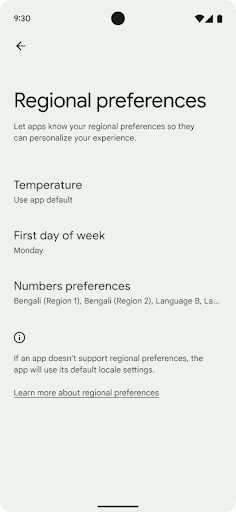
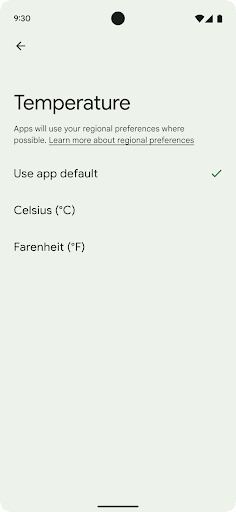
Regional preferences enable users to personalize temperature units, the first day of the week, and numbering systems. A European living in the United States might prefer temperature units to be in Celsius rather than Fahrenheit and for apps to treat Monday as the beginning of the week instead of the US default of Sunday.
New Android Settings menus for these preferences provide users with a
discoverable and centralized location to change app preferences. These
preferences also persist through backup and restore. Several APIs and
intents—such as
getTemperatureUnit
and
getFirstDayOfWeek—
grant your app read access to user preferences, so your app can adjust how it
displays information. You can also register a
BroadcastReceiver on
ACTION_LOCALE_CHANGED
to handle locale configuration changes when regional preferences change.
To find these settings, open the Settings app and navigate to System > Languages & input > Regional preferences.
প্রবেশগম্যতা
২০০% পর্যন্ত নন-লিনিয়ার ফন্ট স্কেলিং
Starting in Android 14, the system supports font scaling up to 200%, providing users with additional accessibility options.
To prevent large text elements on screen from scaling too large, the system applies a nonlinear scaling curve. This scaling strategy means that large text doesn't scale at the same rate as smaller text. Nonlinear font scaling helps preserve the proportional hierarchy between elements of different sizes while mitigating issues with linear text scaling at high degrees (such as text being cut off or text that becomes harder to read due to an extremely large display sizes).
Test your app with nonlinear font scaling
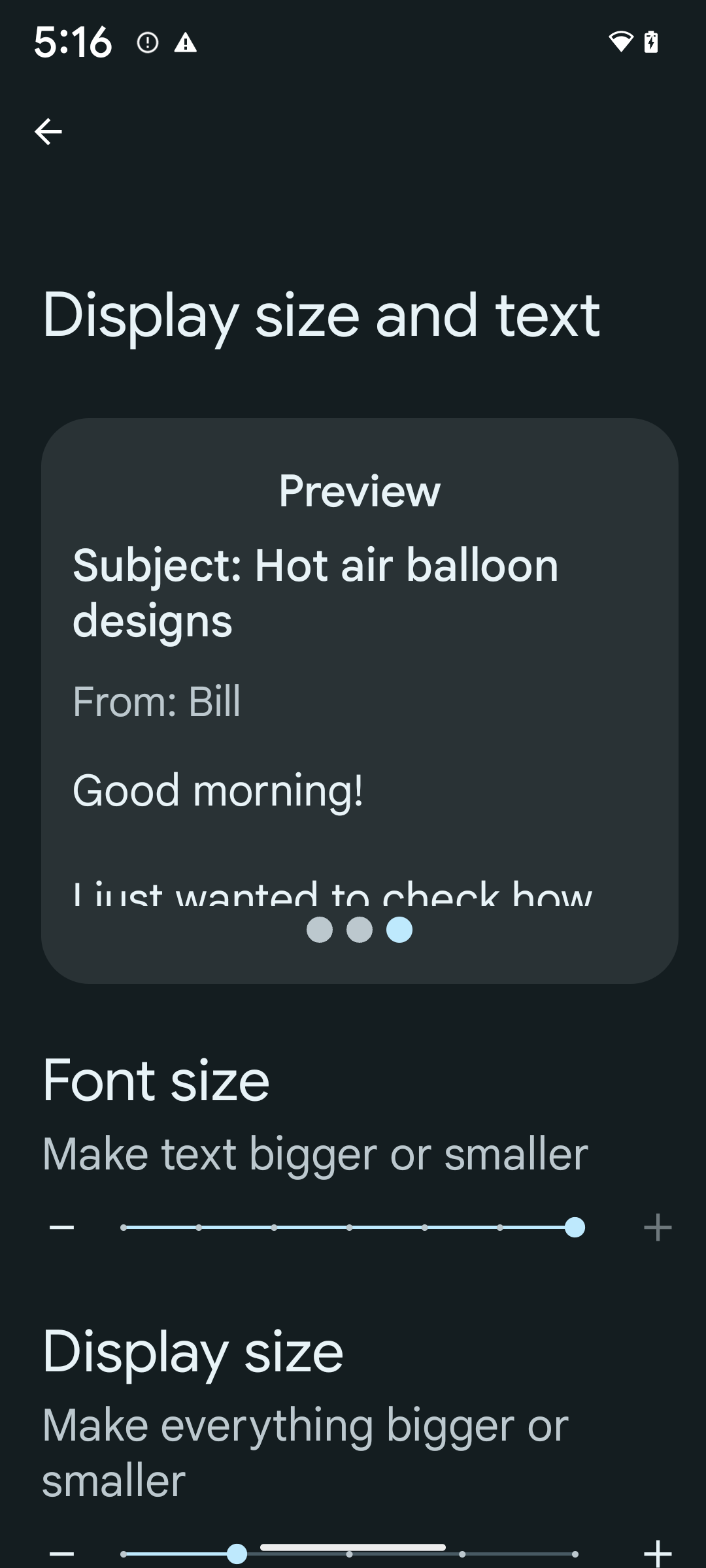
If you already use scaled pixels (sp) units to define text sizing, then these additional options and scaling improvements are applied automatically to the text in your app. However, you should still perform UI testing with the maximum font size enabled (200%) to ensure that your app applies the font sizes correctly and can accommodate larger font sizes without impacting usability.
To enable 200% font size, follow these steps:
- Open the Settings app and navigate to Accessibility > Display size and text.
- For the Font size option, tap the plus (+) icon until the maximum font size setting is enabled, as shown in the image that accompanies this section.
Use scaled pixel (sp) units for text-sizes
Remember to always specify text sizes in sp units. When your app uses sp units, Android can apply the user's preferred text size and scale it appropriately.
Don't use sp units for padding or define view heights assuming implicit padding: with nonlinear font scaling sp dimensions might not be proportional, so 4sp + 20sp might not equal 24sp.
Convert scaled pixel (sp) units
Use TypedValue.applyDimension() to convert from sp units
to pixels, and use TypedValue.deriveDimension() to
convert pixels to sp. These methods apply the appropriate nonlinear scaling
curve automatically.
Avoid hardcoding equations using
Configuration.fontScale or
DisplayMetrics.scaledDensity. Because font scaling is
nonlinear, the scaledDensity field is no longer accurate. The fontScale
field should be used for informational purposes only because fonts are no longer
scaled with a single scalar value.
Use sp units for lineHeight
Always define android:lineHeight using sp units instead
of dp, so the line height scales along with your text. Otherwise, if your text
is sp but your lineHeight is in dp or px, it doesn't scale and looks cramped.
TextView automatically corrects the lineHeight so that your intended
proportions are preserved, but only if both textSize and lineHeight are
defined in sp units.
ক্যামেরা এবং মিডিয়া
ছবির জন্য আল্ট্রা এইচডিআর
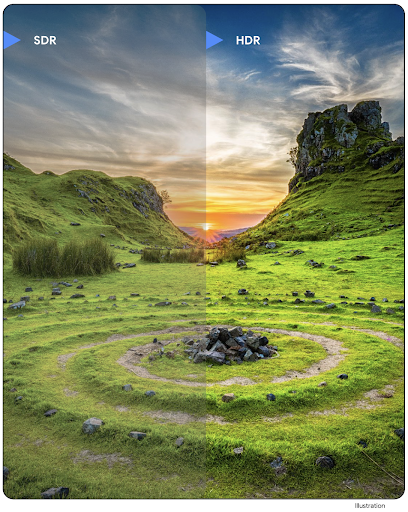
Android 14 adds support for High Dynamic Range (HDR) images that retain more of the information from the sensor when taking a photo, which enables vibrant colors and greater contrast. Android uses the Ultra HDR format, which is fully backward compatible with JPEG images, allowing apps to seamlessly interoperate with HDR images, displaying them in Standard Dynamic Range (SDR) as needed.
Rendering these images in the UI in HDR is done automatically by the framework
when your app opts in to using HDR UI for its Activity Window, either through a
manifest entry or at runtime by calling
Window.setColorMode(). You can also capture compressed Ultra
HDR still images on supported devices. With more colors recovered
from the sensor, editing in post can be more flexible. The
Gainmap associated with Ultra HDR images can be used to render
them using OpenGL or Vulkan.
ক্যামেরা এক্সটেনশনে জুম, ফোকাস, পোস্টভিউ এবং আরও অনেক কিছু।
অ্যান্ড্রয়েড 14 ক্যামেরা এক্সটেনশানগুলিকে আপগ্রেড করে এবং উন্নত করে, অ্যাপগুলিকে দীর্ঘ প্রক্রিয়াকরণের সময়গুলি পরিচালনা করার অনুমতি দেয়, যা সমর্থিত ডিভাইসগুলিতে কম-আলো ফটোগ্রাফির মতো গণনা-নিবিড় অ্যালগরিদম ব্যবহার করে উন্নত ছবিগুলিকে সক্ষম করে৷ ক্যামেরা এক্সটেনশন ক্ষমতা ব্যবহার করার সময় এই বৈশিষ্ট্যগুলি ব্যবহারকারীদের আরও শক্তিশালী অভিজ্ঞতা দেয়। এই উন্নতিগুলির উদাহরণগুলির মধ্যে রয়েছে:
- ডায়নামিক স্টিল ক্যাপচার প্রসেসিং লেটেন্সি অনুমান বর্তমান দৃশ্য এবং পরিবেশ পরিস্থিতির উপর ভিত্তি করে অনেক বেশি সঠিক এখনও ক্যাপচার লেটেন্সি অনুমান প্রদান করে। একটি
StillCaptureLatencyঅবজেক্ট পেতেCameraExtensionSession.getRealtimeStillCaptureLatency()কল করুন যাতে দুটি লেটেন্সি অনুমান পদ্ধতি রয়েছে৷getCaptureLatency()পদ্ধতিটিonCaptureStartedএবংonCaptureProcessStarted()এর মধ্যে আনুমানিক লেটেন্সি প্রদান করে এবংgetProcessingLatency()পদ্ধতিটিonCaptureProcessStarted()এবং উপলব্ধ চূড়ান্ত প্রক্রিয়াকৃত ফ্রেমের মধ্যে আনুমানিক লেটেন্সি প্রদান করে। - ক্যাপচার অগ্রগতি কলব্যাকগুলির জন্য সমর্থন যাতে অ্যাপগুলি দীর্ঘ-চলমান, স্থির-ক্যাপচার প্রক্রিয়াকরণ ক্রিয়াকলাপগুলির বর্তমান অগ্রগতি প্রদর্শন করতে পারে। আপনি
CameraExtensionCharacteristics.isCaptureProcessProgressAvailableএর সাথে এই বৈশিষ্ট্যটি উপলব্ধ কিনা তা পরীক্ষা করতে পারেন, এবং যদি এটি হয়, তাহলে আপনিonCaptureProcessProgressed()কলব্যাক প্রয়োগ করেন, যার অগ্রগতি (0 থেকে 100 পর্যন্ত) একটি প্যারামিটার হিসাবে পাস করা হয়েছে৷ এক্সটেনশন নির্দিষ্ট মেটাডেটা, যেমন
CaptureRequest.EXTENSION_STRENGTHএকটি এক্সটেনশন প্রভাবের পরিমাণে ডায়াল করার জন্য, যেমনEXTENSION_BOKEHএর সাথে ব্যাকগ্রাউন্ড ব্লারের পরিমাণ।ক্যামেরা এক্সটেনশনগুলিতে স্টিল ক্যাপচারের জন্য পোস্টভিউ বৈশিষ্ট্য, যা চূড়ান্ত চিত্রের চেয়ে কম প্রক্রিয়াজাত চিত্র প্রদান করে। যদি একটি এক্সটেনশন প্রসেসিং লেটেন্সি বাড়িয়ে দেয়, তাহলে UX উন্নত করার জন্য একটি পোস্টভিউ ইমেজ প্লেসহোল্ডার হিসেবে প্রদান করা যেতে পারে এবং পরে চূড়ান্ত ইমেজের জন্য স্যুইচ আউট করা যেতে পারে। আপনি
CameraExtensionCharacteristics.isPostviewAvailableএর সাথে এই বৈশিষ্ট্যটি উপলব্ধ কিনা তা পরীক্ষা করতে পারেন। তারপর আপনিExtensionSessionConfiguration.setPostviewOutputConfigurationএ একটিOutputConfigurationপাস করতে পারেন।SurfaceViewএর জন্য সমর্থন আরও অপ্টিমাইজ করা এবং শক্তি-দক্ষ প্রিভিউ রেন্ডার পাথের জন্য অনুমতি দেয়।এক্সটেনশন ব্যবহারের সময় ফোকাস এবং জুম করার জন্য ট্যাপ করার জন্য সমর্থন।
ইন-সেন্সর জুম
যখন CameraCharacteristics REQUEST_AVAILABLE_CAPABILITIES_STREAM_USE_CASE SCALER_AVAILABLE_STREAM_USE_CASES_CROPPED_RAW থাকে, তখন আপনার অ্যাপ উন্নত সেন্সর ক্ষমতা ব্যবহার করতে পারে একটি ক্রপ করা RAW স্ট্রীম ব্যবহার করে যেটি ক্যাপচারের পুরো ক্ষেত্রটি ক্যাপচারের সাথে CaptureRequest ব্যবহার করে CameraMetadata.SCALER_AVAILABLE_STREAM_USE_CASES_CROPPED_RAW এ সেট করা হয়েছে। অনুরোধ ওভাররাইড নিয়ন্ত্রণ বাস্তবায়ন করে, আপডেট করা ক্যামেরা ব্যবহারকারীদের জুম নিয়ন্ত্রণ দেয় এমনকি অন্যান্য ক্যামেরা নিয়ন্ত্রণ প্রস্তুত হওয়ার আগেই।
লসলেস ইউএসবি অডিও
Android 14 USB তারযুক্ত হেডসেটের মাধ্যমে অডিওফাইল-স্তরের অভিজ্ঞতার জন্য ক্ষতিহীন অডিও ফর্ম্যাটের জন্য সমর্থন লাভ করে। আপনি একটি USB ডিভাইসের পছন্দের মিক্সার অ্যাট্রিবিউটের জন্য প্রশ্ন করতে পারেন, পছন্দের মিক্সার অ্যাট্রিবিউটের পরিবর্তনের জন্য একজন শ্রোতা নিবন্ধন করতে পারেন এবং AudioMixerAttributes ক্লাস ব্যবহার করে মিক্সার অ্যাট্রিবিউট কনফিগার করতে পারেন। এই শ্রেণীটি বিন্যাস উপস্থাপন করে, যেমন চ্যানেল মাস্ক, নমুনা হার এবং অডিও মিক্সারের আচরণ। ক্লাস অডিও সরাসরি পাঠানোর অনুমতি দেয়, মিশ্রণ, ভলিউম সমন্বয়, বা প্রক্রিয়াকরণ প্রভাব ছাড়াই।
ডেভেলপারদের উৎপাদনশীলতা এবং সরঞ্জাম
ক্রেডেনশিয়াল ম্যানেজার
Android 14 adds Credential Manager as a platform API, with additional support back to Android 4.4 (API level 19) devices through a Jetpack Library using Google Play services. Credential Manager aims to make sign-in easier for users with APIs that retrieve and store credentials with user-configured credential providers. Credential Manager supports multiple sign-in methods, including username and password, passkeys, and federated sign-in solutions (such as Sign-in with Google) in a single API.
Passkeys provide many advantages. For example, passkeys are built on industry standards, can work across different operating systems and browser ecosystems, and can be used with both websites and apps.
For more information, see the Credential Manager and passkeys documentation and the blogpost about Credential Manager and passkeys.
স্বাস্থ্য সংযোগ
Health Connect হল ব্যবহারকারীর স্বাস্থ্য এবং ফিটনেস ডেটার জন্য একটি অন-ডিভাইস সংগ্রহস্থল। এটি ব্যবহারকারীদের তাদের পছন্দের অ্যাপগুলির মধ্যে ডেটা শেয়ার করতে দেয়, এই অ্যাপগুলির সাথে তারা কোন ডেটা ভাগ করতে চায় তা নিয়ন্ত্রণ করতে একটি একক জায়গা দিয়ে।
Android 14-এর পূর্বে Android সংস্করণে চলমান ডিভাইসগুলিতে, Health Connect Google Play স্টোরে একটি অ্যাপ হিসেবে ডাউনলোড করার জন্য উপলব্ধ। Android 14 দিয়ে শুরু করে, Health Connect হল প্ল্যাটফর্মের অংশ এবং আলাদা ডাউনলোডের প্রয়োজন ছাড়াই Google Play সিস্টেম আপডেটের মাধ্যমে আপডেট গ্রহণ করে। এটির সাহায্যে, Health Connect ঘন ঘন আপডেট করা যেতে পারে এবং আপনার অ্যাপগুলি Android 14 বা উচ্চতর সংস্করণে চালিত ডিভাইসগুলিতে উপলব্ধ থাকা Health Connect-এর উপর নির্ভর করতে পারে। ব্যবহারকারীরা তাদের ডিভাইসের সেটিংস থেকে, সিস্টেম সেটিংসে একত্রিত গোপনীয়তা নিয়ন্ত্রণ সহ Health Connect অ্যাক্সেস করতে পারে৷
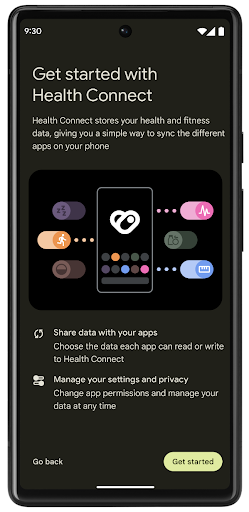
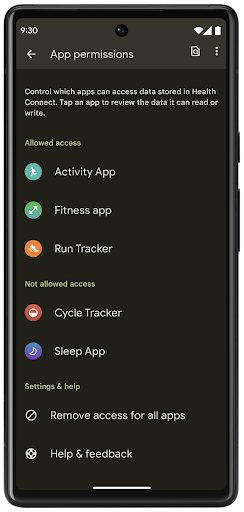
হেলথ কানেক্ট এন্ড্রয়েড 14-এ বেশ কিছু নতুন বৈশিষ্ট্য অন্তর্ভুক্ত করে, যেমন ব্যায়াম রুট, ব্যবহারকারীদের তাদের ওয়ার্কআউটের একটি রুট শেয়ার করার অনুমতি দেয় যা ম্যাপে ভিজ্যুয়ালাইজ করা যায়। একটি রুটকে সময়ের একটি উইন্ডোর মধ্যে সংরক্ষিত অবস্থানগুলির একটি তালিকা হিসাবে সংজ্ঞায়িত করা হয় এবং আপনার অ্যাপ ব্যায়াম সেশনে রুটগুলিকে একত্রে সংযুক্ত করে সন্নিবেশ করতে পারে৷ ব্যবহারকারীদের এই সংবেদনশীল ডেটার উপর সম্পূর্ণ নিয়ন্ত্রণ আছে তা নিশ্চিত করতে, ব্যবহারকারীদের অবশ্যই অন্যান্য অ্যাপের সাথে পৃথক রুট শেয়ার করার অনুমতি দিতে হবে।
আরও তথ্যের জন্য, স্বাস্থ্য সংযোগ ডকুমেন্টেশন এবং অ্যান্ড্রয়েড হেলথ-এ নতুন কী আছে ব্লগপোস্ট দেখুন।
OpenJDK 17 আপডেট
অ্যান্ড্রয়েড 14 অ্যাপ এবং প্ল্যাটফর্ম ডেভেলপারদের জন্য লাইব্রেরি আপডেট এবং জাভা 17 ভাষা সমর্থন উভয় সহ সর্বশেষ OpenJDK LTS রিলিজের বৈশিষ্ট্যগুলির সাথে সারিবদ্ধ করার জন্য Android এর মূল লাইব্রেরিগুলিকে রিফ্রেশ করার কাজ চালিয়ে যাচ্ছে।
নিম্নলিখিত বৈশিষ্ট্য এবং উন্নতি অন্তর্ভুক্ত করা হয়েছে:
- জাভা 17 সমর্থনে প্রায় 300টি
java.baseক্লাস আপডেট করা হয়েছে। - টেক্সট ব্লক , যা জাভা প্রোগ্রামিং ভাষায় মাল্টি-লাইন স্ট্রিং লিটারেল প্রবর্তন করে।
- instanceof-এর জন্য প্যাটার্ন ম্যাচিং , যা কোনো বস্তুকে কোনো অতিরিক্ত ভেরিয়েবল ছাড়াই একটি
instanceofএকটি নির্দিষ্ট ধরণ হিসেবে গণ্য করার অনুমতি দেয়। - সীলমোহর করা ক্লাস , যা আপনাকে কোন ক্লাস এবং ইন্টারফেসগুলিকে প্রসারিত বা প্রয়োগ করতে পারে তা সীমাবদ্ধ করতে দেয়।
গুগল প্লে সিস্টেম আপডেট (প্রজেক্ট মেইনলাইন) এর জন্য ধন্যবাদ, 600 মিলিয়নেরও বেশি ডিভাইস সর্বশেষতম অ্যান্ড্রয়েড রানটাইম (ART) আপডেট পেতে সক্ষম হয়েছে যাতে এই পরিবর্তনগুলি অন্তর্ভুক্ত রয়েছে। এটি আমাদের অঙ্গীকারের অংশ যাতে অ্যাপগুলিকে ডিভাইস জুড়ে আরও সামঞ্জস্যপূর্ণ, সুরক্ষিত পরিবেশ দেওয়া যায় এবং প্ল্যাটফর্ম রিলিজ ছাড়া ব্যবহারকারীদের কাছে নতুন বৈশিষ্ট্য এবং ক্ষমতা প্রদান করা যায়।
Java এবং OpenJDK হল ওরাকল এবং/অথবা এর সহযোগীদের ট্রেডমার্ক বা নিবন্ধিত ট্রেডমার্ক।
অ্যাপ স্টোরগুলির জন্য উন্নতি
Android 14 introduces several PackageInstaller APIs that
allow app stores to improve their user experience.
Request install approval before downloading
Installing or updating an app might require user approval.
For example, when an installer making use of the
REQUEST_INSTALL_PACKAGES permission attempts to install a
new app. In prior Android versions, app stores can only request user approval
after APKs are written to the install session and the
session is committed.
Starting with Android 14, the requestUserPreapproval()
method lets installers request user approval before committing the install
session. This improvement lets an app store defer downloading any APKs until
after the installation has been approved by the user. Furthermore, once a user
has approved installation, the app store can download and install the app in the
background without interrupting the user.
Claim responsibility for future updates
The setRequestUpdateOwnership() method allows an installer
to indicate to the system that it intends to be responsible for future updates
to an app it is installing. This capability enables update ownership
enforcement, meaning that only the update owner is permitted
to install automatic updates to the app. Update ownership enforcement helps to
ensure that users receive updates only from the expected app store.
Any other installer, including those making use of the
INSTALL_PACKAGES permission, must receive explicit user
approval in order to install an update. If a user decides to proceed with an
update from another source, update ownership is lost.
Update apps at less-disruptive times
App stores typically want to avoid updating an app that is actively in use because this leads to the app's running processes being killed, which potentially interrupts what the user was doing.
Starting with Android 14, the InstallConstraints API
gives installers a way to ensure that their app updates happen at an opportune
moment. For example, an app store can call the
commitSessionAfterInstallConstraintsAreMet() method to
make sure that an update is only committed when the user is no longer
interacting with the app in question.
Seamlessly install optional splits
With split APKs, features of an app can be delivered in separate APK files,
rather than as a monolithic APK. Split APKs allow app stores to optimize the
delivery of different app components. For example, app stores might optimize
based on the properties of the target device. The
PackageInstaller API has supported splits since its
introduction in API level 22.
In Android 14, the setDontKillApp() method allows an
installer to indicate that the app's running processes shouldn't be killed when
new splits are installed. App stores can use this feature to seamlessly install
new features of an app while the user is using the app.
অ্যাপ মেটাডেটা বান্ডেল
অ্যান্ড্রয়েড 14 থেকে শুরু করে, অ্যান্ড্রয়েড প্যাকেজ ইনস্টলার আপনাকে অ্যাপ মেটাডেটা নির্দিষ্ট করতে দেয়, যেমন ডেটা নিরাপত্তা অনুশীলন, অ্যাপ স্টোর পৃষ্ঠাগুলিতে অন্তর্ভুক্ত করার জন্য যেমন Google Play।
ব্যবহারকারীরা কখন ডিভাইসের স্ক্রিনশট নেয় তা শনাক্ত করুন
To create a more standardized experience for detecting screenshots, Android 14 introduces a privacy-preserving screenshot detection API. This API lets apps register callbacks on a per-activity basis. These callbacks are invoked, and the user is notified, when the user takes a screenshot while that activity is visible.
ব্যবহারকারীর অভিজ্ঞতা
শেয়ারশিট কাস্টম অ্যাকশন এবং উন্নত র্যাঙ্কিং
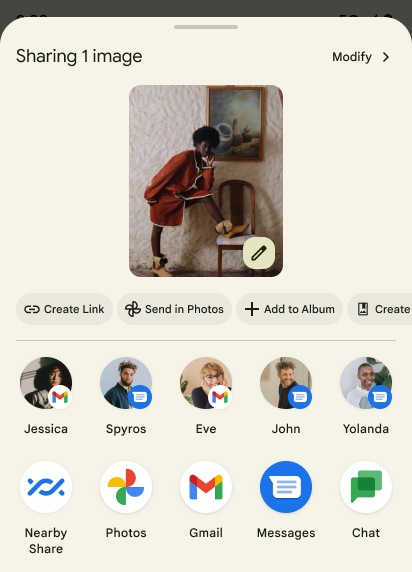
Android 14 updates the system sharesheet to support custom app actions and more informative preview results for users.
Add custom actions
With Android 14, your app can add custom actions to the system sharesheet it invokes.
Improve ranking of Direct Share targets
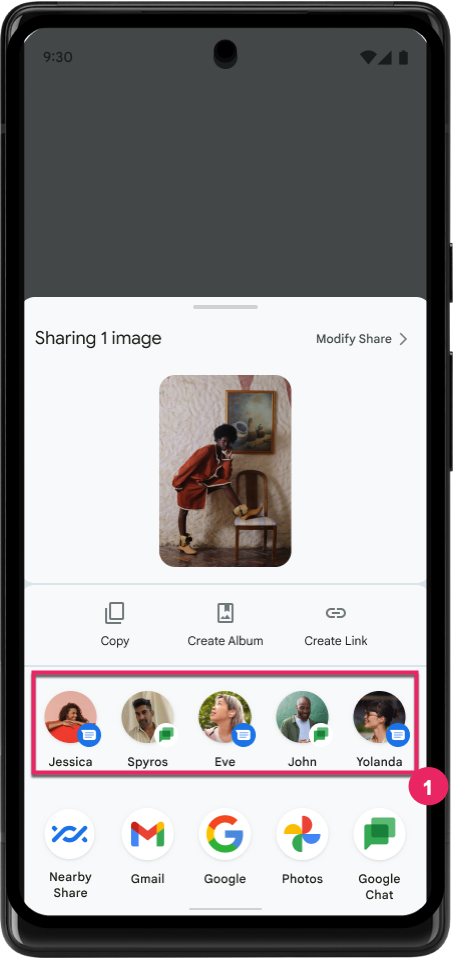
Android 14 uses more signals from apps to determine the ranking of the direct share targets to provide more helpful results for the user. To provide the most useful signal for ranking, follow the guidance for improving rankings of your Direct Share targets. Communication apps can also report shortcut usage for outgoing and incoming messages.
প্রেডিক্টিভ ব্যাক-এর জন্য বিল্ট-ইন এবং কাস্টম অ্যানিমেশনের সমর্থন
Android 13 introduced the predictive back-to-home animation behind a developer option. When used in a supported app with the developer option enabled, swiping back shows an animation indicating that the back gesture exits the app back to the home screen.
Android 14 includes multiple improvements and new guidance for Predictive Back:
- You can set
android:enableOnBackInvokedCallback=trueto opt in to predictive back system animations per-Activity instead of for the entire app. - We've added new system animations to accompany the back-to-home animation from Android 13. The new system animations are cross-activity and cross-task, which you get automatically after migrating to Predictive Back.
- We've added new Material Component animations for Bottom sheets, Side sheets, and Search.
- We've created design guidance for creating custom in-app animations and transitions.
- We've added new APIs to support custom in-app transition animations:
handleOnBackStarted,handleOnBackProgressed,handleOnBackCancelledinOnBackPressedCallbackonBackStarted,onBackProgressed,onBackCancelledinOnBackAnimationCallback- Use
overrideActivityTransitioninstead ofoverridePendingTransitionfor transitions that respond as the user swipes back.
With this Android 14 preview release, all features of Predictive Back remain behind a developer option. See the developer guide to migrate your app to predictive back, as well as the developer guide to creating custom in-app transitions.
বড় স্ক্রিনের ডিভাইস প্রস্তুতকারকের প্রতি-অ্যাপ ওভাররাইড
Per-app overrides enable device manufacturers to change the behavior of apps on large screen devices. For example, the FORCE_RESIZE_APP override instructs the system to resize the app to fit display dimensions (avoiding size compatibility mode) even if resizeableActivity="false" is set in the app manifest.
Overrides are intended to improve the user experience on large screens.
New manifest properties enable you to disable some device manufacturer overrides for your app.
বড় স্ক্রিনের ব্যবহারকারীর জন্য অ্যাপ-ভিত্তিক ওভাররাইড
প্রতি-অ্যাপ ওভাররাইড বড় স্ক্রিনের ডিভাইসে অ্যাপের আচরণ পরিবর্তন করে। উদাহরণস্বরূপ, OVERRIDE_MIN_ASPECT_RATIO_LARGE ডিভাইস নির্মাতা ওভাররাইড অ্যাপের কনফিগারেশন নির্বিশেষে অ্যাপের আকৃতির অনুপাত 16:9 এ সেট করে।
Android 14 QPR1 ব্যবহারকারীদের বড় স্ক্রিনের ডিভাইসে একটি নতুন সেটিংস মেনুর মাধ্যমে প্রতি-অ্যাপ ওভাররাইড প্রয়োগ করতে সক্ষম করে।
অ্যাপ স্ক্রিন শেয়ারিং
অ্যাপ স্ক্রিন শেয়ারিং ব্যবহারকারীদের স্ক্রিন সামগ্রী রেকর্ডিংয়ের সময় পুরো ডিভাইস স্ক্রীনের পরিবর্তে একটি অ্যাপ উইন্ডো শেয়ার করতে সক্ষম করে।
অ্যাপ স্ক্রিন ভাগ করে নেওয়ার সাথে, স্ট্যাটাস বার, নেভিগেশন বার, বিজ্ঞপ্তি এবং অন্যান্য সিস্টেম UI উপাদানগুলি ভাগ করা ডিসপ্লে থেকে বাদ দেওয়া হয়। শুধুমাত্র নির্বাচিত অ্যাপের বিষয়বস্তু শেয়ার করা হয়।
অ্যাপ স্ক্রিন শেয়ারিং ব্যবহারকারীদের একাধিক অ্যাপ চালাতে সক্ষম করার মাধ্যমে উৎপাদনশীলতা এবং গোপনীয়তা উন্নত করে কিন্তু কন্টেন্ট শেয়ারিংকে একটি অ্যাপে সীমিত করে।
পিক্সেল ৮ প্রো-এর জিবোর্ডে এলএলএম-চালিত স্মার্ট রিপ্লাই
On Pixel 8 Pro devices with the December Feature Drop, developers can try out higher-quality smart replies in Gboard powered by on-device Large Language Models (LLMs) running on Google Tensor.
This feature is available as a limited preview for US English in WhatsApp, Line, and KakaoTalk. It requires using a Pixel 8 Pro device with Gboard as your keyboard.
To try it out, first enable the feature in Settings > Developer Options > AiCore Settings > Enable Aicore Persistent.
Next, open a conversation in a supported app to see LLM-powered Smart Reply in Gboard's suggestion strip in response to incoming messages.
গ্রাফিক্স
পাথগুলি কোয়েরিযোগ্য এবং ইন্টারপোলেটযোগ্য
Android's Path API is a powerful and flexible mechanism for
creating and rendering vector graphics, with the ability to stroke or fill a
path, construct a path from line segments or quadratic or cubic curves, perform
boolean operations to get even more complex shapes, or all of these
simultaneously. One limitation is the ability to find out what is actually in a
Path object; the internals of the object are opaque to callers after creation.
To create a Path, you call methods such as
moveTo(), lineTo(), and
cubicTo() to add path segments. But there has been no way to
ask that path what the segments are, so you must retain that information at
creation time.
Starting in Android 14, you can query paths to find out what's inside of them.
First, you need to get a PathIterator object using the
Path.getPathIterator API:
Kotlin
val path = Path().apply {
    moveTo(1.0f, 1.0f)
    lineTo(2.0f, 2.0f)
    close()
}
val pathIterator = path.pathIterator
Java
Path path = new Path();
path.moveTo(1.0F, 1.0F);
path.lineTo(2.0F, 2.0F);
path.close();
PathIterator pathIterator = path.getPathIterator();
Next, you can call PathIterator to iterate through the segments
one by one, retrieving all of the necessary data for each segment. This example
uses PathIterator.Segment objects, which packages up the data
for you:
Kotlin
for (segment in pathIterator) {
    println("segment: ${segment.verb}, ${segment.points}")
}
Java
while (pathIterator.hasNext()) {
    PathIterator.Segment segment = pathIterator.next();
    Log.i(LOG_TAG, "segment: " + segment.getVerb() + ", " + segment.getPoints());
}
PathIterator also has a non-allocating version of next() where you can pass
in a buffer to hold the point data.
One of the important use cases of querying Path data is interpolation. For
example, you might want to animate (or morph) between two different paths. To
further simplify that use case, Android 14 also includes the
interpolate() method on Path. Assuming the two paths have
the same internal structure, the interpolate() method creates a new Path
with that interpolated result. This example returns a path whose shape is
halfway (a linear interpolation of .5) between path and otherPath:
Kotlin
val interpolatedResult = Path()
if (path.isInterpolatable(otherPath)) {
    path.interpolate(otherPath, .5f, interpolatedResult)
}
Java
Path interpolatedResult = new Path();
if (path.isInterpolatable(otherPath)) {
    path.interpolate(otherPath, 0.5F, interpolatedResult);
}
The Jetpack graphics-path library enables similar APIs for earlier versions of Android as well.
ভার্টেক্স এবং ফ্র্যাগমেন্ট শেডার সহ কাস্টম মেশ
অ্যান্ড্রয়েড দীর্ঘকাল ধরে কাস্টম শেডিং সহ ত্রিভুজ মেশ অঙ্কনকে সমর্থন করেছে, তবে ইনপুট জাল বিন্যাসটি কয়েকটি পূর্বনির্ধারিত বৈশিষ্ট্য সংমিশ্রণে সীমাবদ্ধ রয়েছে। অ্যান্ড্রয়েড 14 কাস্টম মেশের জন্য সমর্থন যোগ করে, যেটিকে ত্রিভুজ বা ত্রিভুজ স্ট্রিপ হিসাবে সংজ্ঞায়িত করা যেতে পারে এবং ঐচ্ছিকভাবে সূচিবদ্ধ করা যেতে পারে। এই জালগুলি AGSL- এ লেখা কাস্টম বৈশিষ্ট্য , শীর্ষবিন্দু স্ট্রাইড, ভিন্নতা , এবং শীর্ষবিন্দু এবং খণ্ড শেডার দিয়ে নির্দিষ্ট করা হয়েছে।
ভার্টেক্স শেডার বিভিন্নতাকে সংজ্ঞায়িত করে, যেমন অবস্থান এবং রঙ, যখন ফ্র্যাগমেন্ট শেডার ঐচ্ছিকভাবে পিক্সেলের জন্য রঙকে সংজ্ঞায়িত করতে পারে, সাধারণত ভার্টেক্স শেডার দ্বারা সৃষ্ট ভিন্নতা ব্যবহার করে। যদি ফ্র্যাগমেন্ট শেডার দ্বারা রঙ প্রদান করা হয়, তাহলে এটি জাল আঁকার সময় নির্বাচিত ব্লেন্ড মোড ব্যবহার করে বর্তমান Paint রঙের সাথে মিশ্রিত করা হয়। অতিরিক্ত নমনীয়তার জন্য ইউনিফর্মগুলিকে খণ্ড এবং শীর্ষবিন্দুতে প্রেরণ করা যেতে পারে।
ক্যানভাসের জন্য হার্ডওয়্যার বাফার রেন্ডারার
HardwareBuffer হার্ডওয়্যার ত্বরণের সাথে আঁকতে অ্যান্ড্রয়েডের Canvas এপিআই ব্যবহারে সহায়তা করার জন্য, Android 14 HardwareBufferRenderer প্রবর্তন করেছে। এই APIটি বিশেষভাবে উপযোগী হয় যখন আপনার ব্যবহারের ক্ষেত্রে SurfaceControl মাধ্যমে সিস্টেম কম্পোজিটরের সাথে কম-লেটেন্সি অঙ্কনের জন্য যোগাযোগ জড়িত থাকে।