
This page lists the new features introduced in Android Studio preview releases. The preview builds provide early access to the latest features and improvements in Android Studio. You can download these preview versions. If you encounter any problems using a preview version of Android Studio, let us know. Your bug reports help to make Android Studio better.
Canary releases contain leading edge features under active development, and are lightly tested. While you can use Canary builds for development, be aware that features might be added or changed. Release Candidates (RC) are the next version of Android Studio, and are almost ready for stable release. The feature set for the next version has been stabilized. See Android Studio release names to understand Android Studio version naming.
For the latest news on Android Studio preview releases, including a list of notable fixes in each preview release, see the Release Updates in the Android Studio blog.
Current versions of Android Studio
The following table lists the current versions of Android Studio and their respective channels.
| Version | Channel |
|---|---|
| Android Studio Quail 4 | Stable |
| Android Gradle plugin 9.4.0 | Stable |
| Android Studio Rabbit 1 | RC |
| Android Studio Rabbit 2 | Canary |
Compatibility with Android Gradle plugin previews
Each preview version of Android Studio is published alongside a corresponding version of the Android Gradle plugin (AGP). Preview versions of Studio should work with any compatible stable version of AGP. However, if you're using a preview version of AGP, you must use the corresponding preview version of Studio (for example, Android Studio Chipmunk Canary 7 with AGP 7.2.0-alpha07). Attempts to use divergent versions (for example, Android Studio Chipmunk Beta 1 with AGP 7.2.0-alpha07) will cause a Sync failure, which results in a prompt to update to the corresponding version of AGP.
For a detailed log of Android Gradle plugin API deprecations and removals, see the Android Gradle plugin API updates.
Studio Labs
Studio Labs lets you try out the latest AI experimental features in a stable version of Android Studio, so you can more quickly integrate our AI assistance offerings in your development workflow. For more information, see Studio Labs.
The following are features currently available in Studio Labs.
| Feature | Description | Docs |
|---|---|---|
| Journeys for Android Studio | Use natural language to describe steps and assertions for end-to-end tests. | Journeys for Android Studio |
Android Studio Rabbit 1
The following are new features in Android Studio Rabbit 1.
To see what's been fixed in this version of Android Studio, see the closed issues.
Publish to Google Play for testing
Android Studio now gives you the ability to upload new releases of your app directly to Google Play Console test tracks. You can do this by selecting a new option to continue to 'Publish for Testing' at the end of the Generate Signed App Bundle flow. This integration supports uploading an initial release of a brand-new app to a Play Console internal test track. You can also use this feature to upload releases of existing apps to other types of test tracks. You need to be registered on Google Play Console to take advantage of this functionality.
Android Studio is part of the Gemini Enterprise bundle
Android Studio is now included in the Gemini Enterprise subscription bundle, which enables enterprise development teams to deploy Android Studio using models hosted directly in your organization's Google Cloud infrastructure. Every session runs under Google Cloud's enterprise security controls, data residency guarantees, and the Google Cloud Terms of Service. Android Studio comes with the Gemini Enterprise Standard or Gemini Enterprise Plus subscription plans.
By connecting Android Studio to your Google Cloud project, your organization gains the following benefits:
- Enterprise governance: Operate under your project's existing Google Cloud Terms of Service with centralized administrative controls.
- Data residency and security: Keep code and data inside your secure network. Your prompts, AI responses, code, and telemetry remain in your private network (through VPC Service Controls) and chosen data region.
- Consolidated billing: Pay-as-you-go directly with your existing Google Cloud Billing account with unified invoicing.
For more details about Google Enterprise support for AI developer tools, see AI developer tools overview in the Google Cloud documentation.
Sign in to Android Studio with a Gemini Enterprise subscription
To sign in to Android Studio with a Gemini Enterprise subscription, follow these steps:
- Start Android Studio.
- To open the agent tool window, click Agent
 or click
View > Tool Windows > Agent.
or click
View > Tool Windows > Agent. - Click Sign in to Google to sign in using the browser.
- Click Business account.
- Click Continue with Google Cloud to sign in using the browser.
- If a license (subscription type) is found, it'll be displayed in Android Studio. Select the license that corresponds to the project that you want to open.
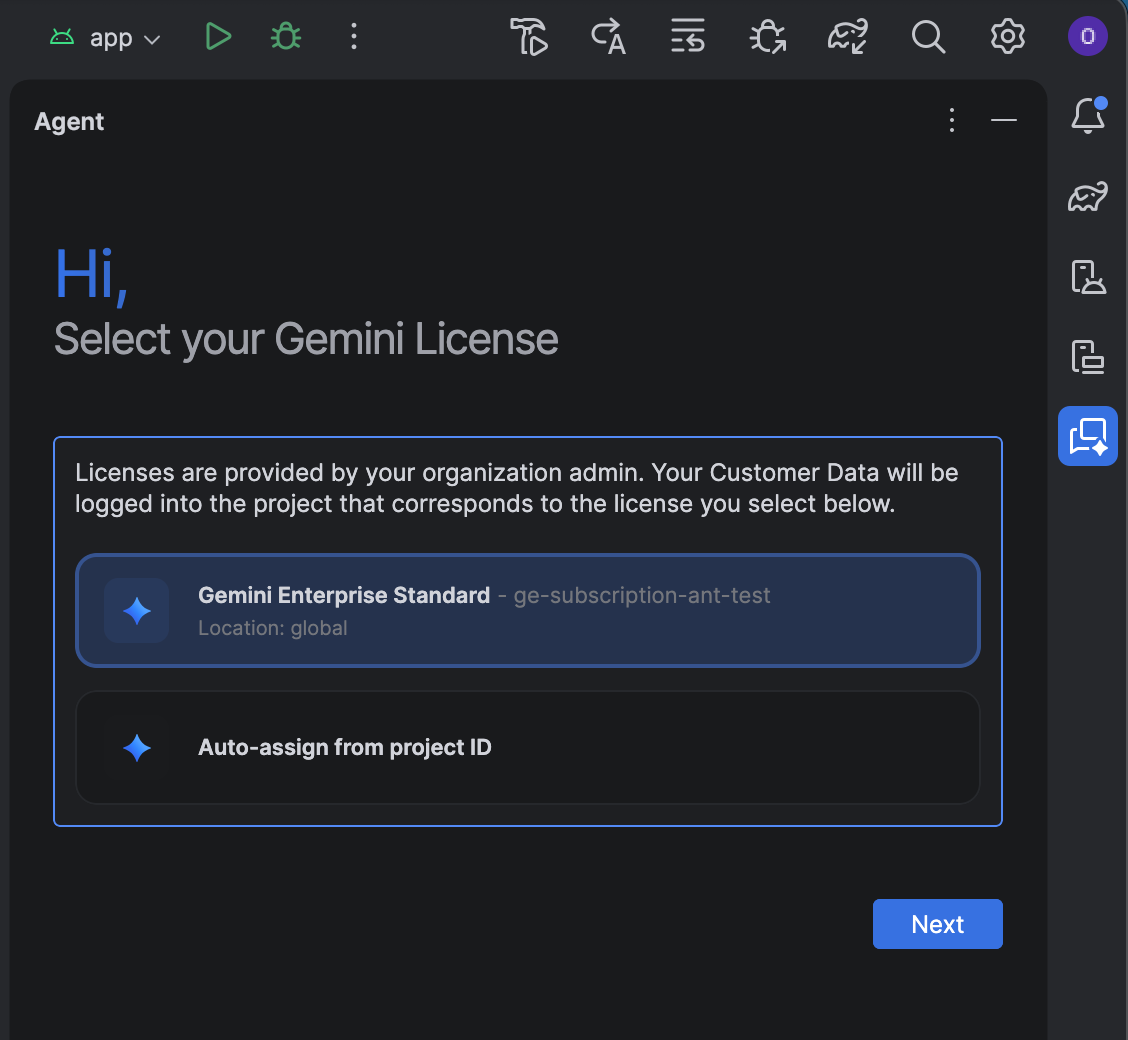
Instead of picking one of the listed licenses, you can self-assign a license:
- Click Auto-assign from project ID.
- Click Next.
- Enter your project ID.
- Enter your location: Global, Europe (EU), or United States (US).
- Confirm the license to save your selection.
If you need to change your license selection or update your project ID later on, go to File (Android Studio on macOS) > Settings > AI > Model Providers and change the selection under Change License.
Troubleshoot issues
If you encounter issues using Android Studio with a Gemini Enterprise subscription, first check that you're using Android Studio Quail 4 Canary 4 or higher. If the issue persists, you need to contact your admin to make configuration changes:
- If no licenses appear during setup, contact your admin to request access. We recommend setting up auto-assignment of licenses.
- If you can't access the latest Gemini models in Android Studio, contact your admin to enable preview models.
Android Studio Rabbit 2
The following are new features in Android Studio Rabbit 2.
To see what's been fixed in this version of Android Studio, see the closed issues.
Compose Preview Screenshot Testing tool
Use the Compose Preview Screenshot Testing tool to test your Compose UIs and prevent regressions. The new tool helps you generate HTML reports that let you visually detect any changes to your app's UI. Learn more at Compose Preview Screenshot Testing.
Model Assignment
The Model Assignment feature lets you pick different AI models for different types of tasks in Android Studio. For example, you can assign a large, pro-tier model for complex reasoning tasks in Agent Mode, and a faster, lightweight model for simpler, latency-sensitive tasks like commit message generation or next edit prediction. This lets you balance quality, speed, and quota usage across features.
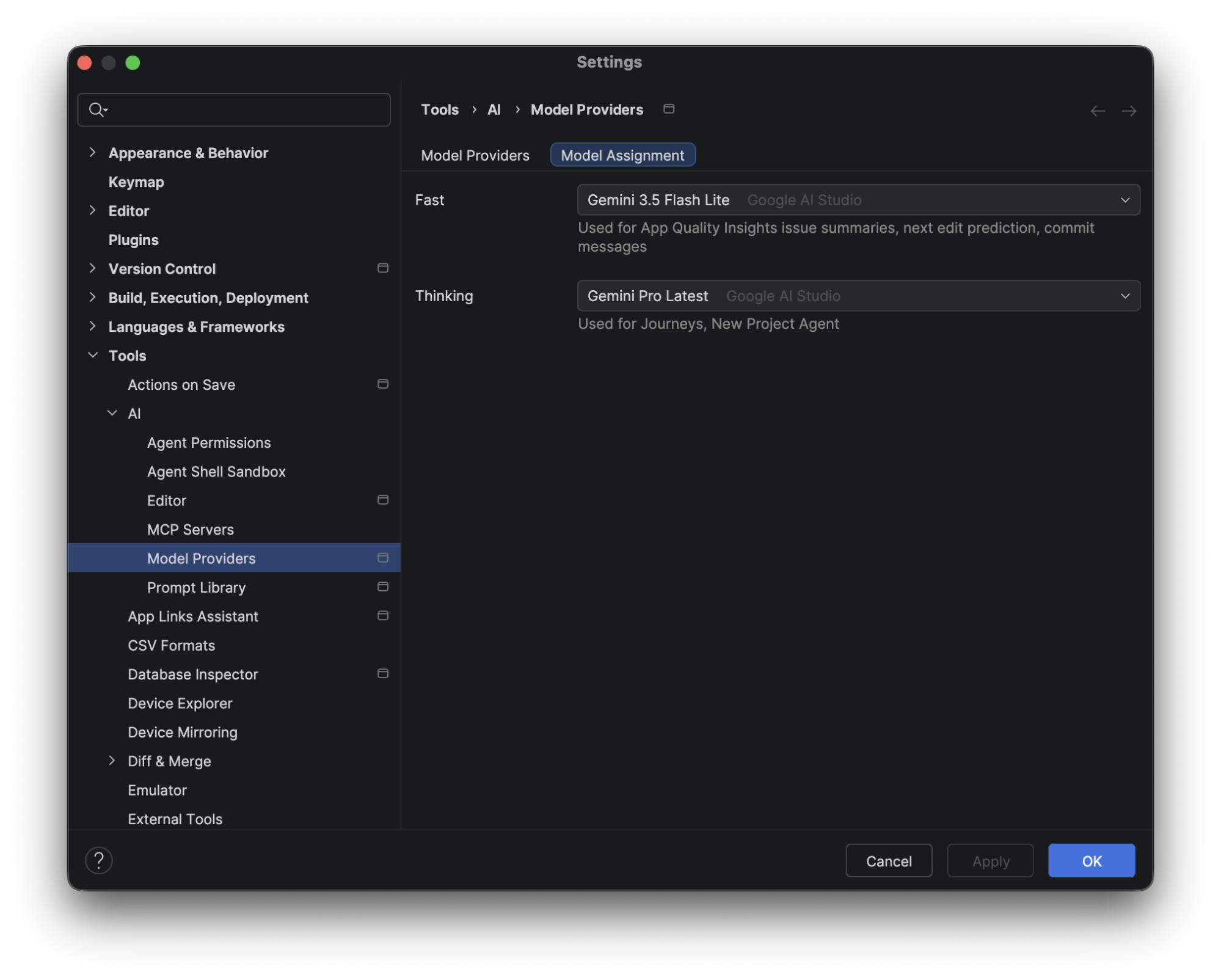
To configure this, go to File (Android Studio on macOS) > Settings > Tools > AI > Model Providers, select the Model Assignment tab, and use the dropdowns to assign a model to each feature category. You can also change the model directly from the model selector dropdown in the Agent Mode panel—the Model Assignment settings for Thinking features will automatically update to reflect your selection.
Parallel sync execution improvements
Starting from Android Studio Rabbit 1 Canary 4, we've made further improvements
to parallel sync execution.
In Android Studio Quail 1 | 2026.1.2 Patch 1,
IDEA parallel model fetching was disabled by default when adding
org.gradle.tooling.parallel=true to your gradle.properties file.
Starting with this release,
IDEA parallel model fetching is enabled by default when using Gradle version
9.4 or higher, provided that org.gradle.tooling.parallel is set to true.
Migrate iOS, Flutter, and React Native apps to Android
You can now migrate existing iOS, Flutter, and React Native projects to native Android using automated migration tooling in Android Studio. From the New Project Wizard, you can call the assistant to convert the selected project to a Kotlin and Jetpack Compose-based Android app. The integrated progress UI provides end-to-end visibility across task planning, code transformation, and compilation checks, producing a functional project that's ready for testing and verification.