

اندروید ۱۶ ویژگیها و APIهای جدید و فوقالعادهای را برای توسعهدهندگان معرفی میکند. بخشهای زیر این ویژگیها را خلاصه میکنند تا به شما در شروع کار با APIهای مرتبط کمک کنند.
برای مشاهده لیست کاملی از APIهای جدید، اصلاحشده و حذفشده، گزارش تفاوت API را مطالعه کنید. برای جزئیات بیشتر در مورد APIهای جدید، به مرجع API اندروید مراجعه کنید - APIهای جدید برای مشاهده، هایلایت شدهاند.همچنین باید حوزههایی را که تغییرات پلتفرم ممکن است بر برنامههای شما تأثیر بگذارد، بررسی کنید. برای اطلاعات بیشتر، به صفحات زیر مراجعه کنید:
- تغییرات رفتاری که هنگام هدف قرار دادن برنامهها در اندروید ۱۶، بر آنها تأثیر میگذارند
- تغییرات رفتاری که صرف نظر از
targetSdkVersion، بر همه برنامهها تأثیر میگذارد .
عملکرد اصلی
اندروید شامل API های جدیدی است که قابلیت های اصلی سیستم اندروید را گسترش می دهند.
دو نسخه از رابط برنامهنویسی اندروید (API) در سال ۲۰۲۵ منتشر خواهد شد
- این پیش نمایش برای نسخه اصلی بعدی اندروید با راه اندازی برنامه ریزی شده در سه ماهه دوم سال 2025 است. این نسخه مشابه همه نسخه های API ما در گذشته است، جایی که می توانیم تغییرات رفتاری برنامه ریزی شده ای داشته باشیم که اغلب به یک targetSdkVersion گره خورده است.
- ما در حال برنامهریزی نسخه اصلی یک ربع زودتر (به جای Q3 در سالهای قبل) هستیم تا با برنامه زمانبندی راهاندازی دستگاهها در سراسر اکوسیستم خود هماهنگی بیشتری داشته باشیم، بنابراین دستگاههای بیشتری بتوانند زودتر نسخه اصلی Android را دریافت کنند. با انتشار اصلی در سه ماهه دوم، باید آزمایش سازگاری سالانه خود را چند ماه زودتر از سالهای گذشته انجام دهید تا مطمئن شوید برنامههایتان آماده هستند.
- ما قصد داریم در سه ماهه چهارم سال 2025 نسخه دیگری داشته باشیم که شامل API های توسعه دهندگان جدید نیز می شود. نسخه اصلی Q2 تنها نسخه در سال 2025 خواهد بود که شامل تغییرات رفتاری برنامه ریزی شده است که می تواند برنامه ها را تحت تأثیر قرار دهد.
علاوه بر APIهای توسعهدهنده جدید، نسخه جزئی Q4 بهروزرسانیها، بهینهسازیها و رفع اشکالها را در اختیار خواهد داشت. این شامل هیچ گونه تغییر رفتاری تأثیرگذار بر برنامه نخواهد بود.
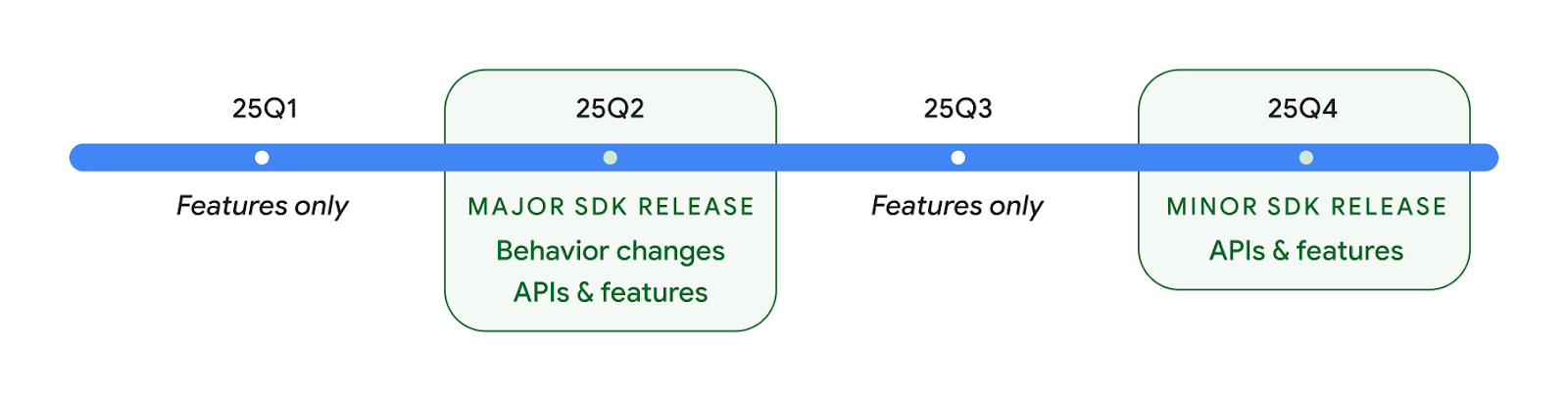
ما به انتشار سه ماهه اندروید ادامه خواهیم داد. بهروزرسانیهای Q1 و Q3 بین نسخههای API بهروزرسانیهای افزایشی را برای اطمینان از کیفیت مداوم ارائه میدهند. ما فعالانه با شرکای دستگاه خود کار می کنیم تا نسخه Q2 را تا حد امکان به دستگاه های بیشتری ارائه کنیم.
استفاده از API های جدید با نسخه های اصلی و فرعی
محافظت از بلوک کد با بررسی سطح API امروز با استفاده از ثابت SDK_INT با VERSION_CODES انجام می شود. این همچنان برای نسخه های اصلی اندروید پشتیبانی می شود.
if (SDK_INT >= VERSION_CODES.BAKLAVA) {
  // Use APIs introduced in Android 16
}
ثابت جدید SDK_INT_FULL می تواند برای بررسی های API در برابر هر دو نسخه اصلی و فرعی با شمارش جدید VERSION_CODES_FULL استفاده شود.
if (SDK_INT_FULL >= VERSION_CODES_FULL.[MAJOR or MINOR RELEASE]) {
  // Use APIs introduced in a major or minor release
}
همچنین میتوانید از متد Build.getMinorSdkVersion() برای دریافت نسخه کوچک SDK استفاده کنید.
val minorSdkVersion = Build.getMinorSdkVersion(VERSION_CODES_FULL.BAKLAVA)
این API ها هنوز نهایی نشده اند و در معرض تغییر هستند، بنابراین لطفاً در صورت داشتن هر گونه نگرانی، بازخورد خود را برای ما ارسال کنید.
تجربه کاربری و رابط کاربری سیستم
اندروید ۱۶ به توسعهدهندگان اپلیکیشن و کاربران کنترل و انعطافپذیری بیشتری برای پیکربندی دستگاهشان متناسب با نیازهایشان میدهد.
اعلانهای متمرکز بر پیشرفت
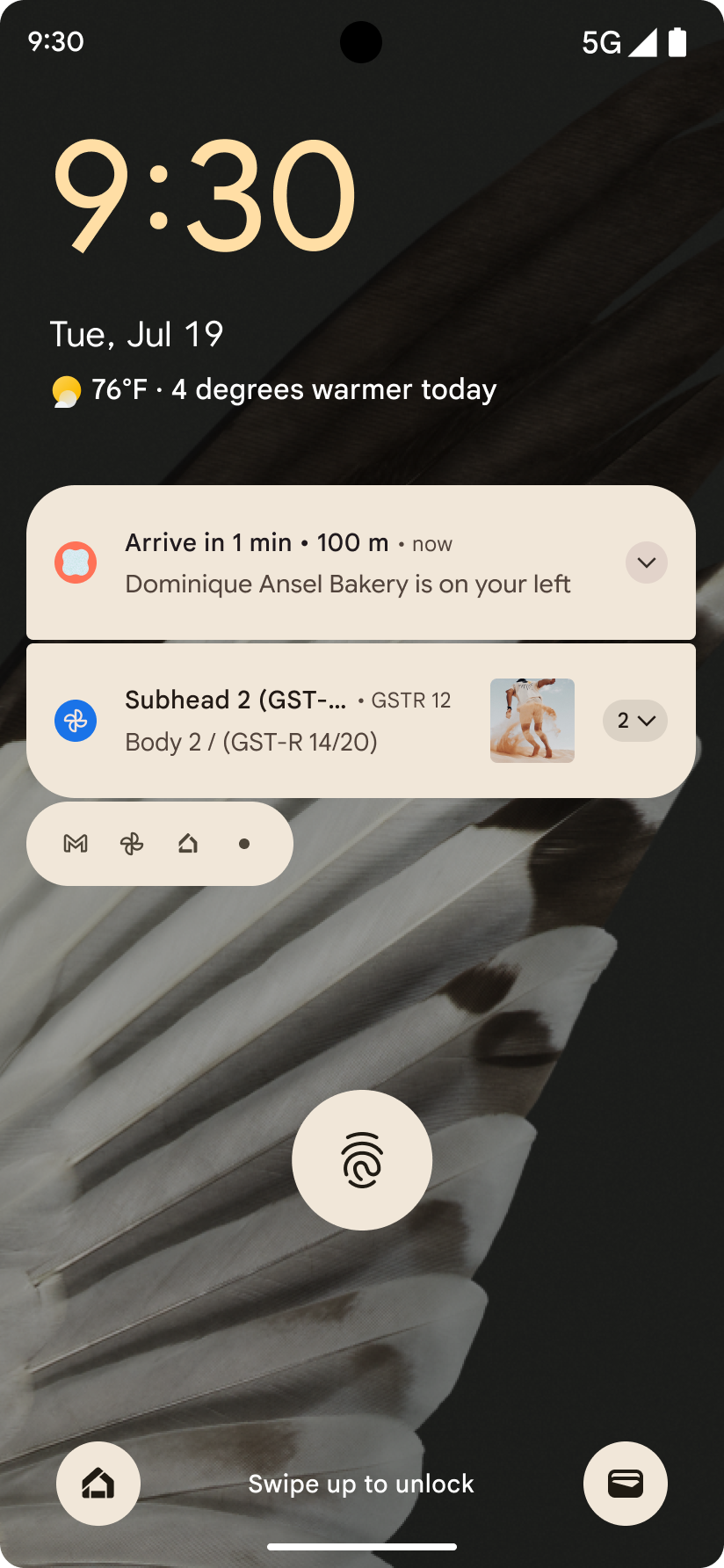
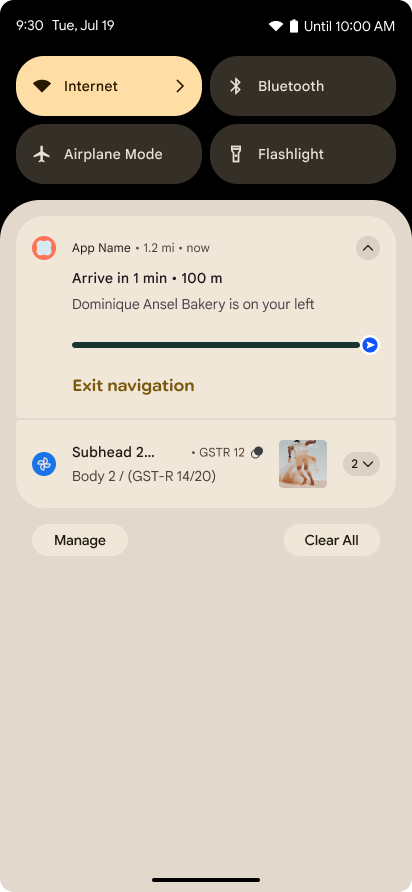
اندروید 16 اعلانهای پیشرفتمحور را معرفی میکند تا به کاربران کمک کند بهطور یکپارچه سفرهای شروع تا پایان توسط کاربر را ردیابی کنند.
Notification.ProgressStyle یک سبک اعلان جدید است که به شما امکان می دهد اعلان های پیشرفت محور ایجاد کنید. موارد استفاده کلیدی شامل rideshare، تحویل، و ناوبری است. در کلاس Notification.ProgressStyle ، میتوانید وضعیتها و نقاط عطف در سفر کاربر را با استفاده از نقاط و بخشها مشخص کنید.
To learn more, see the Progress-centric notifications documentation page.
بهروزرسانیهای پیشبینیشدهی قبلی
Android 16 adds new APIs to help you enable predictive back system animations in
gesture navigation such as the back-to-home animation. Registering the
onBackInvokedCallback with the new
PRIORITY_SYSTEM_NAVIGATION_OBSERVER allows your app to
receive the regular onBackInvoked call whenever the
system handles a back navigation without impacting the normal back navigation
flow.
Android 16 additionally adds the
finishAndRemoveTaskCallback() and
moveTaskToBackCallback. By registering these callbacks
with the OnBackInvokedDispatcher, the system can trigger
specific behaviors and play corresponding ahead-of-time animations when the back
gesture is invoked.
حس لامسه غنیتر
Android has exposed control over the haptic actuator ever since its inception.
Android 11 added support for more complex haptic effects that more advanced
actuators could support through
VibrationEffect.Compositions of device-defined semantic
primitives.
Android 16 adds haptic APIs that let apps define the amplitude and frequency curves of a haptic effect while abstracting away differences between device capabilities.
بهرهوری و ابزارهای توسعهدهندگان
در حالی که بیشتر کار ما برای بهبود بهرهوری شما حول ابزارهایی مانند اندروید استودیو ، جتپک کامپوز و کتابخانههای اندروید جتپک میچرخد، ما همیشه به دنبال راههایی در پلتفرم هستیم تا به شما در تحقق چشماندازتان کمک کنیم.
مدیریت محتوا برای تصاویر پس زمینه زنده
در اندروید 16، چارچوب تصویر زمینه زنده در حال به دست آوردن یک API محتوای جدید برای مقابله با چالشهای والپیپرهای پویا و کاربر محور است. در حال حاضر، والپیپرهای زنده که محتوای ارائه شده توسط کاربر را در خود جای داده اند، به پیاده سازی های پیچیده و خاص سرویس نیاز دارند. Android 16 WallpaperDescription و WallpaperInstance را معرفی می کند. WallpaperDescription به شما امکان می دهد نمونه های متمایز یک تصویر زمینه زنده را از همان سرویس شناسایی کنید. برای مثال، کاغذدیواریای که هم در صفحه اصلی و هم در صفحه قفل دارای نمونههایی است ممکن است در هر دو مکان دارای محتوای منحصربهفرد باشد. انتخابگر کاغذ دیواری و WallpaperManager از این ابرداده برای ارائه بهتر والپیپرها به کاربران استفاده می کنند و فرآیند ایجاد تصاویر پس زمینه زنده متنوع و شخصی سازی شده را برای شما ساده می کنند.
عملکرد و باتری
اندروید ۱۶ رابطهای برنامهنویسی کاربردی (API) را معرفی میکند که به جمعآوری اطلاعات در مورد برنامههای شما کمک میکند.
پروفایلسازی مبتنی بر سیستم
ProfilingManager was
added in Android 15, giving apps the ability to
request profiling data collection using Perfetto on public devices in the field.
However, since this profiling must be started from the app, critical flows such
as startups or ANRs would be difficult or impossible for apps to capture.
To help with this, Android 16 introduces system-triggered profiling to
ProfilingManager. Apps can register interest in receiving traces for certain
triggers such as cold start reportFullyDrawn
or ANRs, and then the system starts and stops a trace on the app's behalf. After
the trace completes, the results are delivered to the app's data directory.
کامپوننت را در ApplicationStartInfo شروع کنید
ApplicationStartInfo در Android 15 اضافه شد و به برنامه اجازه میدهد دلایل شروع فرآیند، نوع شروع، زمان شروع، throttling و سایر دادههای تشخیصی مفید را ببیند. Android 16 getStartComponent() را برای تشخیص اینکه چه نوع مؤلفهای شروع به کار کرده است اضافه میکند، که میتواند برای بهینهسازی جریان راهاندازی برنامه شما مفید باشد.
دروننگری بهتر در مورد شغل
The JobScheduler#getPendingJobReason() API returns a reason why a job
might be pending. However, a job might be pending for multiple reasons.
In Android 16, we are introducing a new API
JobScheduler#getPendingJobReasons(int jobId), which returns multiple
reasons why a job is pending, due to both explicit constraints set by the
developer and implicit constraints set by the system.
We're also introducing
JobScheduler#getPendingJobReasonsHistory(int jobId), which returns a list
of the most recent constraint changes.
We recommend using the API to help you debug why your jobs may not be executing, especially if you're seeing reduced success rates of certain tasks or have bugs around latency of certain job completion. For example, updating widgets in the background failed to occur or prefetch job failed to be called prior to app start.
This can also better help you understand if certain jobs are not completing due to system defined constraints versus explicitly set constraints.
نرخ نوسازی تطبیقی
Adaptive refresh rate (ARR), introduced in Android 15, enables the display refresh rate on supported hardware to adapt to the content frame rate using discrete VSync steps. This reduces power consumption while eliminating the need for potentially jank-inducing mode-switching.
Android 16 introduces hasArrSupport() and
getSuggestedFrameRate(int) while restoring
getSupportedRefreshRates() to make it easier for your apps to take
advantage of ARR. RecyclerView
1.4 internally supports ARR when it is settling from a fling or
smooth scroll, and we're continuing our work to add ARR
support into more Jetpack libraries. This frame rate article covers
many of the APIs you can use to set the frame rate so that your app can directly
use ARR.
رابطهای برنامهنویسی کاربردی سقف (Headroom APIs) در ADPF
SystemHealthManager API های getCpuHeadroom و getGpuHeadroom را معرفی می کند که برای ارائه بازی ها و برنامه های پرمصرف منابع با برآورد منابع CPU و GPU در دسترس طراحی شده اند. این روشها راهی را به شما ارائه میدهند تا بسنجید چگونه برنامه یا بازیتان میتواند سلامت سیستم را به بهترین شکل بهبود بخشد، بهویژه زمانی که در همراهی با سایر APIهای Android Dynamic Performance Framework (ADPF) استفاده میشود که گلوگاه حرارتی را تشخیص میدهند .
با استفاده از CpuHeadroomParams و GpuHeadroomParams در دستگاههای پشتیبانیشده، میتوانید پنجره زمانی مورد استفاده برای محاسبه فضای سر و انتخاب بین متوسط یا حداقل در دسترس بودن منابع را سفارشی کنید. این می تواند به شما کمک کند مصرف منابع CPU یا GPU خود را متناسب با آن کاهش دهید و منجر به تجربه بهتر کاربر و بهبود عمر باتری شود.
دسترسیپذیری
اندروید ۱۶ رابطهای برنامهنویسی کاربردی (API) و ویژگیهای دسترسی جدیدی را اضافه میکند که به شما کمک میکند برنامه خود را در دسترس هر کاربری قرار دهید.
بهبود رابطهای برنامهنویسی کاربردی (API) دسترسیپذیری
Android 16 adds additional APIs to enhance UI semantics that help improve consistency for users that rely on accessibility services, such as TalkBack.
Outline text for maximum text contrast
Users with low vision often have reduced contrast sensitivity, making it challenging to distinguish objects from their backgrounds. To help these users, Android 16 introduces outline text, replacing high contrast text, which draws a larger contrasting area around text to greatly improve legibility.
Android 16 contains new AccessibilityManager APIs to let
your apps check or register a listener to
see if this mode is enabled. This is primarily for UI Toolkits like Compose to
offer a similar visual experience. If you maintain a UI Toolkit library or your
app performs custom text rendering that bypasses the
android.text.Layout class then you can use this to know
when outline text is enabled.

Duration added to TtsSpan
Android 16 extends TtsSpan with a TYPE_DURATION,
consisting of ARG_HOURS, ARG_MINUTES,
and ARG_SECONDS. This lets you directly annotate time
duration, ensuring accurate and consistent text-to-speech output with services
like TalkBack.
Support elements with multiple labels
Android currently allows UI elements to derive their accessibility label from
another, and now offers the ability for multiple labels to be associated, a
common scenario in web content. By introducing a list-based API within
AccessibilityNodeInfo, Android can directly support these
multi-label relationships. As part of this change, we've deprecated
AccessibilityNodeInfo#setLabeledBy and
#getLabeledBy in favor of
#addLabeledBy, #removeLabeledBy, and
#getLabeledByList.
Improved support for expandable elements
Android 16 adds accessibility APIs that allow you to convey the expanded or
collapsed state of interactive elements, such as menus and expandable lists. By
setting the expanded state using setExpandedState and
dispatching TYPE_WINDOW_CONTENT_CHANGED AccessibilityEvents
with a CONTENT_CHANGE_TYPE_EXPANDED content change type,
you can ensure that screen readers like TalkBack announce
state changes, providing a more intuitive and inclusive user experience.
Indeterminate ProgressBars
Android 16 adds RANGE_TYPE_INDETERMINATE, giving a way for
you to expose RangeInfo for both determinate and
indeterminate ProgressBar widgets, allowing services like
TalkBack to more consistently provide feedback for progress
indicators.
Tri-state CheckBox
The new AccessibilityNodeInfo
getChecked and setChecked(int)
methods in Android 16 now support a "partially checked" state in addition to
"checked" and "unchecked." This replaces the deprecated boolean
isChecked and setChecked(boolean).
Supplemental descriptions
When an accessibility service describes a ViewGroup, it
combines content labels from its child views. If you provide a
contentDescription for the ViewGroup, accessibility services assume you are
also overriding the description of non-focusable child views. This can be
problematic if you want to label things like a drop-down (for example, "Font
Family") while preserving the current selection for accessibility (for example,
"Roboto"). Android 16 adds setSupplementalDescription so
you can provide text that provides information about a ViewGroup without
overriding information from its children.
Required form fields
Android 16 adds setFieldRequired to
AccessibilityNodeInfo so apps can tell an accessibility
service that input to a form field is required. This is an important scenario
for users filling out many types of forms, even things as simple as a required
terms and conditions checkbox, helping users to consistently identify and
quickly navigate between required fields.
تلفن به عنوان ورودی میکروفون برای تماسهای صوتی با سمعکهای LEA
Android 16 adds the capability for users of LE Audio hearing aids to switch between the built-in microphones on the hearing aids and the microphone on their phone for voice calls. This can be helpful in noisy environments or other situations where the hearing aid's microphones might not perform well.
کنترلهای صدای محیط برای سمعکهای LEA
اندروید 16 این قابلیت را به کاربران سمعک LE Audio اضافه می کند تا میزان صدای محیطی را که توسط میکروفون های سمعک دریافت می شود تنظیم کنند. این می تواند در شرایطی که نویز پس زمینه خیلی بلند یا خیلی آرام است مفید باشد.
دوربین
اندروید ۱۶ پشتیبانی از کاربران حرفهای دوربین را بهبود میبخشد و امکان نوردهی خودکار هیبریدی را به همراه تنظیم دقیق دمای رنگ و رنگ فراهم میکند. یک نشانگر جدید حالت شب به برنامه شما کمک میکند تا بداند چه زمانی به حالت شب دوربین تغییر وضعیت دهد و چه زمانی از آن خارج شود. اقدامات جدید Intent گرفتن عکسهای متحرک را آسانتر میکند و ما همچنان به بهبود تصاویر UltraHDR با پشتیبانی از رمزگذاری HEIC و پارامترهای جدید از پیشنویس استاندارد ISO 21496-1 ادامه میدهیم.
نوردهی خودکار هیبریدی
اندروید 16 حالتهای نوردهی خودکار ترکیبی جدیدی را به Camera2 اضافه میکند و به شما این امکان را میدهد تا جنبههای خاصی از نوردهی را به صورت دستی کنترل کنید در حالی که به الگوریتم نوردهی خودکار (AE) اجازه میدهید بقیه موارد را کنترل کند. میتوانید ISO + AE و زمان نوردهی + AE را کنترل کنید، که انعطافپذیری بیشتری را در مقایسه با رویکرد فعلی که در آن کنترل دستی کامل دارید یا کاملاً به نوردهی خودکار متکی هستید، ارائه میکنید.
fun setISOPriority() {
    // ... (Your existing code before the snippet) ...

    val availablePriorityModes = mStaticInfo.characteristics.get(
        CameraCharacteristics.CONTROL_AE_AVAILABLE_PRIORITY_MODES
    )

    // ... (Your existing code between the snippets) ...

    // Turn on AE mode to set priority mode
    reqBuilder.set(
        CaptureRequest.CONTROL_AE_MODE,
        CameraMetadata.CONTROL_AE_MODE_ON
    )
    reqBuilder.set(
        CaptureRequest.CONTROL_AE_PRIORITY_MODE,
        CameraMetadata.CONTROL_AE_PRIORITY_MODE_SENSOR_SENSITIVITY_PRIORITY
    )
    reqBuilder.set(
        CaptureRequest.SENSOR_SENSITIVITY,
        TEST_SENSITIVITY_VALUE
    )
    val request: CaptureRequest = reqBuilder.build()

    // ... (Your existing code after the snippet) ...
}
تنظیم دقیق دمای رنگ و ته رنگ
اندروید 16 برای پشتیبانی بهتر از برنامههای فیلمبرداری حرفهای، پشتیبانی دوربین را برای تنظیم دمای رنگ و رنگ خوب اضافه میکند. در نسخههای قبلی اندروید، میتوانید تنظیمات تراز سفیدی را از طریق CONTROL_AWB_MODE کنترل کنید، که شامل گزینههایی محدود به یک لیست از پیش تعیین شده، مانند رشتهای ، ابری ، و گرگ و میش است. COLOR_CORRECTION_MODE_CCT استفاده از COLOR_CORRECTION_COLOR_TEMPERATURE و COLOR_CORRECTION_COLOR_TINT را برای تنظیمات دقیق تراز سفیدی بر اساس دمای رنگ مرتبط امکانپذیر میسازد.
fun setCCT() {
    // ... (Your existing code before this point) ...

    val colorTemperatureRange: Range<Int> =
        mStaticInfo.characteristics[CameraCharacteristics.COLOR_CORRECTION_COLOR_TEMPERATURE_RANGE]

    // Set to manual mode to enable CCT mode
    reqBuilder[CaptureRequest.CONTROL_AWB_MODE] = CameraMetadata.CONTROL_AWB_MODE_OFF
    reqBuilder[CaptureRequest.COLOR_CORRECTION_MODE] = CameraMetadata.COLOR_CORRECTION_MODE_CCT
    reqBuilder[CaptureRequest.COLOR_CORRECTION_COLOR_TEMPERATURE] = 5000
    reqBuilder[CaptureRequest.COLOR_CORRECTION_COLOR_TINT] = 30

    val request: CaptureRequest = reqBuilder.build()

    // ... (Your existing code after this point) ...
}
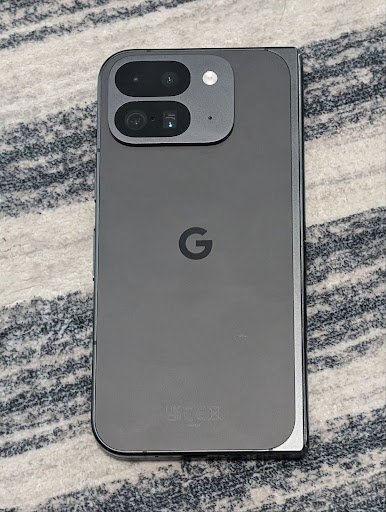
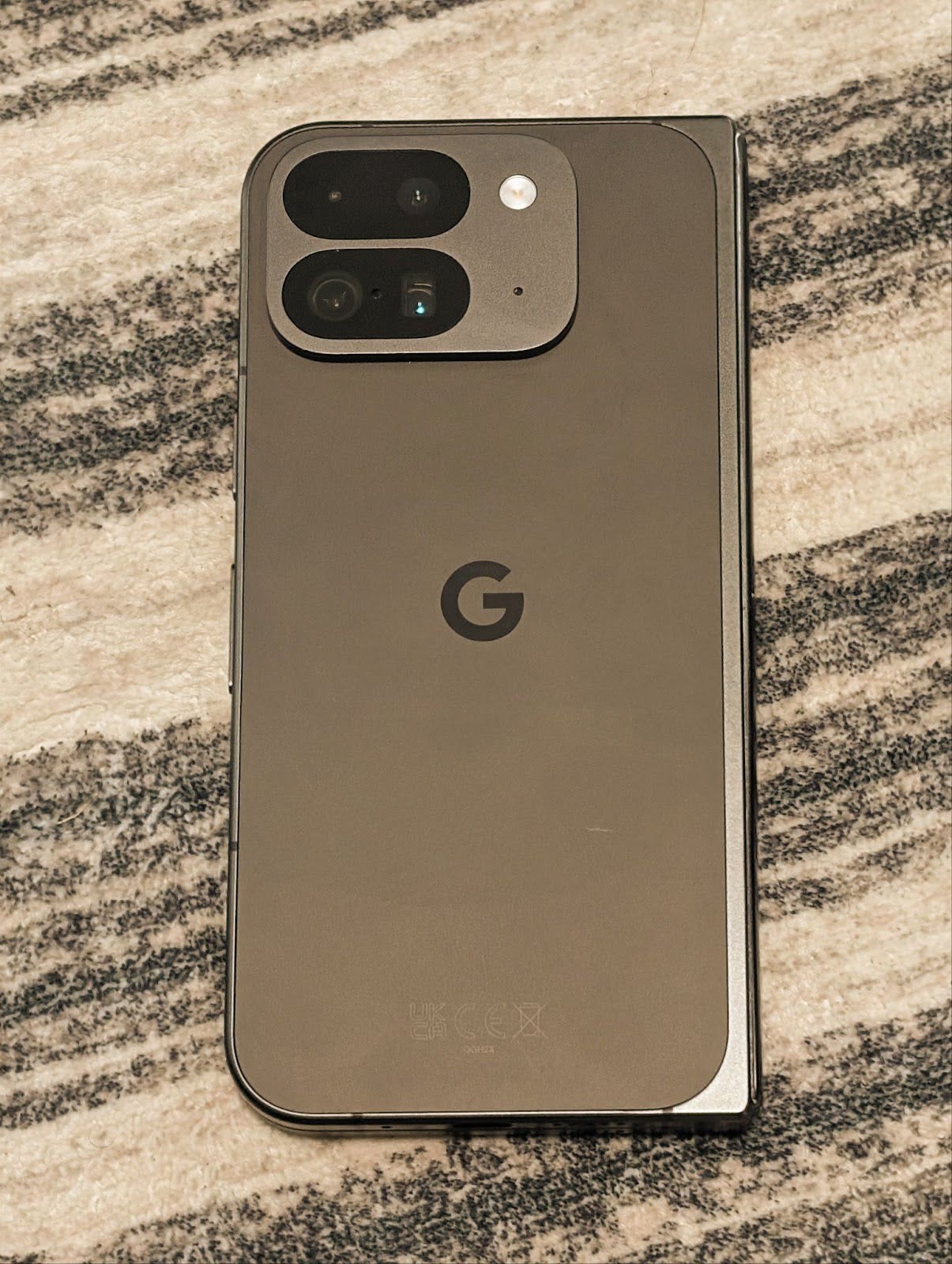
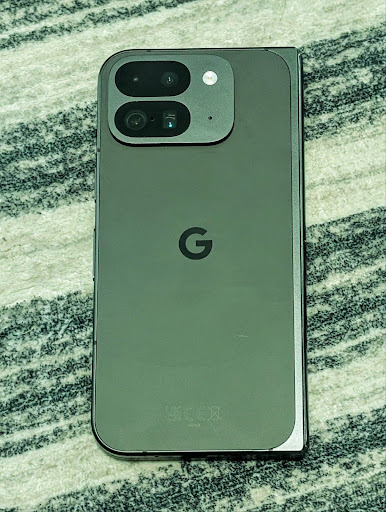
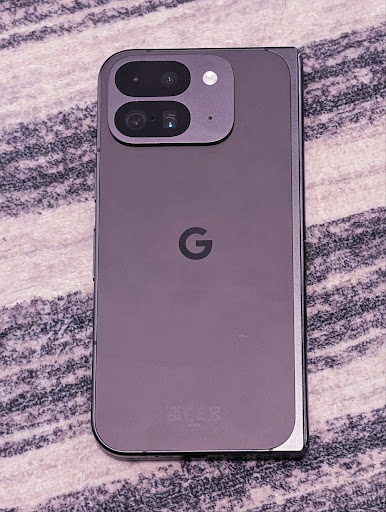
مثالهای زیر نشان میدهند که یک عکس پس از اعمال تنظیمات مختلف دمای رنگ و رنگ چگونه به نظر میرسد:

تشخیص صحنه در حالت شب دوربین
To help your app know when to switch to and from a night mode camera session,
Android 16 adds EXTENSION_NIGHT_MODE_INDICATOR. If
supported, it's available in the CaptureResult within
Camera2.
This is the API we briefly mentioned as coming soon in the How Instagram enabled users to take stunning low light photos blog post. That post is a practical guide on how to implement night mode together with a case study that links higher-quality in-app night mode photos with an increase in the number of photos shared from the in-app camera.
اقدامات مربوط به قصد ثبت عکس متحرک
Android 16 اقدامات استاندارد Intent را اضافه میکند - ACTION_MOTION_PHOTO_CAPTURE و ACTION_MOTION_PHOTO_CAPTURE_SECURE - که از برنامه دوربین درخواست میکند یک عکس متحرک بگیرد و آن را برگرداند.
یا باید یک EXTRA_OUTPUT اضافی برای کنترل محل نوشته شدن تصویر ارسال کنید، یا یک Uri از طریق Intent.setClipData(ClipData) . اگر ClipData تنظیم نکنید، هنگام تماس با Context.startActivity(Intent) برای شما کپی می شود.
بهبود تصاویر با فناوری UltraHDR
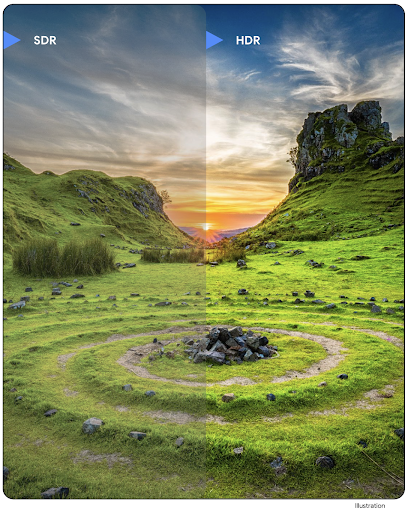
Android 16 continues our work to deliver dazzling image quality with UltraHDR
images. It adds support for UltraHDR images in the HEIC file
format. These images will get ImageFormat type
HEIC_ULTRAHDR and will contain an embedded gainmap similar
to the existing UltraHDR JPEG format. We're working on AVIF support for UltraHDR
as well, so stay tuned.
In addition, Android 16 implements additional parameters in UltraHDR from the ISO 21496-1 draft standard, including the ability to get and set the colorspace that gainmap math should be applied in, as well as support for HDR encoded base images with SDR gainmaps.
گرافیک
اندروید ۱۶ شامل جدیدترین پیشرفتهای گرافیکی، مانند جلوههای گرافیکی سفارشی با AGSL است.
جلوههای گرافیکی سفارشی با AGSL
اندروید 16 RuntimeColorFilter و RuntimeXfermode اضافه میکند که به شما امکان میدهد جلوههای پیچیدهای مانند Threshold، Sepia و Hue Saturation بنویسید و آنها را برای کشیدن تماسها اعمال کنید. از Android 13، میتوانید از AGSL برای ایجاد RuntimeShader سفارشی که Shader گسترش میدهند، استفاده کنید. API جدید این موضوع را منعکس میکند و یک RuntimeColorFilter مجهز به AGSL اضافه میکند که ColorFilter را گسترش میدهد، و یک افکت Xfermode که به شما امکان میدهد ترکیب سفارشی مبتنی بر AGSL و ترکیب بین پیکسلهای مبدا و مقصد را اجرا کنید.
private val thresholdEffectString = """
    uniform half threshold;

    half4 main(half4 c) {
        half luminosity = dot(c.rgb, half3(0.2126, 0.7152, 0.0722));
        half bw = step(threshold, luminosity);
        return bw.xxx1 * c.a;
    }"""

fun setCustomColorFilter(paint: Paint) {
   val filter = RuntimeColorFilter(thresholdEffectString)
   filter.setFloatUniform(0.5);
   paint.colorFilter = filter
}
اتصال
اندروید ۱۶ پلتفرم را بهروزرسانی میکند تا به برنامه شما امکان دسترسی به آخرین پیشرفتها در فناوریهای ارتباطی و بیسیم را بدهد.
محدودهبندی با امنیت پیشرفته
Android 16 adds support for robust security features in Wi-Fi location on supported devices with Wi-Fi 6's 802.11az, allowing apps to combine the higher accuracy, greater scalability, and dynamic scheduling of the protocol with security enhancements including AES-256-based encryption and protection against MITM attacks. This allows it to be used more safely in proximity use cases, such as unlocking a laptop or a vehicle door. 802.11az is integrated with the Wi-Fi 6 standard, leveraging its infrastructure and capabilities for wider adoption and easier deployment.
APIهای عمومیِ محدودهبندیشده
Android 16 includes the new RangingManager, which provides
ways to determine the distance and angle on supported hardware between the local
device and a remote device. RangingManager supports the usage of a variety of
ranging technologies such as BLE channel sounding, BLE RSSI-based ranging, Ultra
Wideband, and Wi-Fi round trip time.
حضور دستگاه مدیر دستگاه همراه
In Android 16, new APIs are being introduced for binding your companion app
service. Service will be bound when BLE is in range and Bluetooth is connected
and service will be unbound when BLE is out of range or Bluetooth is
disconnected. App will receives a new
'onDevicePresenceEvent()' callback based on various
of DevicePresenceEvent.
More details can be found in
'startObservingDevicePresence(ObservingDevicePresenceRequest)'.
رسانه
اندروید ۱۶ شامل ویژگیهای متنوعی است که تجربه رسانهای را بهبود میبخشد.
بهبودهای انتخابگر عکس
The photo picker provides a safe, built-in way for users to grant your app access to selected images and videos from both local and cloud storage, instead of their entire media library. Using a combination of Modular System Components through Google System Updates and Google Play services, it's supported back to Android 4.4 (API level 19). Integration requires just a few lines of code with the associated Android Jetpack library.
Android 16 includes the following improvements to the photo picker:
- Embedded photo picker: New APIs that enable apps to embed the photo picker into their view hierarchy. This allows it to feel like a more integrated part of the app while still leveraging the process isolation that allows users to select media without the app needing overly broad permissions. To maximize compatibility across platform versions and simplify your integration, you'll want to use the forthcoming Android Jetpack library if you want to integrate the embedded photo picker.
- Cloud search in photo picker: New APIs that enable searching from the cloud media provider for the Android photo picker. Search functionality in the photo picker is coming soon.
ویدیوی حرفهای پیشرفته
Android 16 introduces support for the Advanced Professional Video (APV) codec which is designed to be used for professional level high quality video recording and post production.
The APV codec standard has the following features:
- Perceptually lossless video quality (close to raw video quality)
- Low complexity and high throughput intra-frame-only coding (without pixel domain prediction) to better support editing workflows
- Support for high bit-rate range up to a few Gbps for 2K, 4K and 8K resolution content, enabled by a lightweight entropy coding scheme
- Frame tiling for immersive content and for enabling parallel encoding and decoding
- Support for various chroma sampling formats and bit-depths
- Support for multiple decoding and re-encoding without severe visual quality degradation
- Support multi-view video and auxiliary video like depth, alpha, and preview
- Support for HDR10/10+ and user-defined metadata
A reference implementation of APV is provided through the OpenAPV project. Android 16 will implement support for the APV 422-10 Profile that provides YUV 422 color sampling along with 10-bit encoding and for target bitrates of up to 2Gbps.
حریم خصوصی
اندروید ۱۶ شامل ویژگیهای متنوعی است که به توسعهدهندگان برنامهها کمک میکند تا از حریم خصوصی کاربران محافظت کنند.
بهروزرسانیهای Health Connect
Health Connect ACTIVITY_INTENSITY را اضافه می کند، یک نوع داده که بر اساس دستورالعمل های سازمان بهداشت جهانی در مورد فعالیت متوسط و شدید تعریف شده است. هر رکورد به زمان شروع، زمان پایان و اینکه آیا شدت فعالیت متوسط یا شدید است نیاز دارد.
Health Connect همچنین حاوی API های به روز شده ای است که از سوابق پزشکی پشتیبانی می کنند. این به برنامهها اجازه میدهد سوابق پزشکی را در قالب FHIR با رضایت صریح کاربر بخوانند و بنویسند.
سندباکس حریم خصوصی در اندروید
Android 16 دارای آخرین نسخه Privacy Sandbox در Android است که بخشی از کار مداوم ما برای توسعه فناوریهایی است که کاربران بدانند حریم خصوصی آنها محافظت میشود. وبسایت ما اطلاعات بیشتری درباره برنامه بتای برنامهنویس Android Privacy Sandbox دارد تا به شما در شروع کار کمک کند. SDK Runtime را بررسی کنید که به SDK ها اجازه می دهد در یک محیط زمان اجرا اختصاصی جدا از برنامه ای که در حال ارائه آن هستند اجرا شوند، و حفاظت های قوی تری در مورد جمع آوری و به اشتراک گذاری داده های کاربر ارائه می دهد.
امنیت
اندروید ۱۶ شامل ویژگیهایی است که به شما کمک میکند امنیت برنامه خود را افزایش داده و از دادههای برنامه خود محافظت کنید.
API اشتراکگذاری کلید
Android 16 adds APIs that support sharing access to
Android Keystore keys with other apps. The new
KeyStoreManager class supports
granting and revoking access to keys
by app uid, and includes an API for apps to access shared
keys.
فاکتورهای شکل دستگاه
اندروید ۱۶ به برنامههای شما این پشتیبانی را میدهد تا از فرمفکتورهای اندروید نهایت استفاده را ببرند.
چارچوب استاندارد کیفیت تصویر و صدا برای تلویزیونها
The new MediaQuality
package in Android 16 exposes
a set of standardized APIs for access to audio and picture profiles and
hardware-related settings. This allows streaming apps to query profiles and
apply them to media dynamically:
- Movies mastered with a wider dynamic range require greater color accuracy to see subtle details in shadows and adjust to ambient light, so a profile that prefers color accuracy over brightness may be appropriate.
- Live sporting events are often mastered with a narrow dynamic range, but are often watched in daylight, so a profile that preferences brightness over color accuracy can give better results.
- Fully interactive content wants minimal processing to reduce latency, and wants higher frame rates, which is why many TV's ship with a game profile.
The API allows apps to switch between profiles and users to enjoy tuning supported TVs to best suit their content.
بینالمللیسازی
اندروید ۱۶ ویژگیها و قابلیتهایی را اضافه میکند که هنگام استفاده از دستگاه به زبانهای مختلف، تجربه کاربری را تکمیل میکنند.
متن عمودی
Android 16 adds low-level support for rendering and measuring text vertically to
provide foundational vertical writing support for library developers. This is
particularly useful for languages like Japanese that commonly use vertical
writing systems. A new flag,
VERTICAL_TEXT_FLAG,
has been added to the Paint class. When
this flag is set using
Paint.setFlags, Paint's
text measurement APIs will report vertical advances instead of horizontal
advances, and Canvas will draw text
vertically.
val text = "「春は、曙。」"
Box(
    Modifier.padding(innerPadding).background(Color.White).fillMaxSize().drawWithContent {
        drawIntoCanvas { canvas ->
            val paint = Paint().apply { textSize = 64.sp.toPx() }
            // Draw text vertically
            paint.flags = paint.flags or VERTICAL_TEXT_FLAG
            val height = paint.measureText(text)
            canvas.nativeCanvas.drawText(
                text,
                0,
                text.length,
                size.width / 2,
                (size.height - height) / 2,
                paint
            )
        }
    }
) {}
سفارشی سازی سیستم اندازه گیری
Users can now customize their measurement system in regional preferences within
Settings. The user preference is included as part of the locale code, so you can
register a BroadcastReceiver on
ACTION_LOCALE_CHANGED to handle locale configuration changes when
regional preferences change.
Using formatters can help match the local experience. For example, "0.5 in" in English (United States), is "12,7 mm" for a user who has set their phone to English (Denmark) or who uses their phone in English (United States) with the metric system as the measurement system preference.
To find these settings, open the Settings app and navigate to System > Languages & region.