

Android 16 offre aux développeurs de nouvelles fonctionnalités et API de qualité. Les sections suivantes récapitulent ces fonctionnalités pour vous aider à vous lancer avec les API associées.
Pour obtenir une liste détaillée des nouvelles API, des API modifiées et supprimées, consultez le rapport de différences des API. Pour en savoir plus sur les nouvelles API, consultez la documentation de référence des API Android. Les nouvelles API sont mises en évidence pour une meilleure visibilité.Vous devez également examiner les éléments de votre application pouvant être affectés par des modifications de la plate-forme. Pour en savoir plus, consultez les pages suivantes :
- Modifications de comportement qui affectent les applications lorsqu'elles ciblent Android 16
- Modifications de comportement qui affectent toutes les applications, quelle que soit la valeur de
targetSdkVersion
Fonctionnalité de base
Android inclut de nouvelles API qui étendent les fonctionnalités de base du système Android.
Deux versions de l'API Android en 2025
- Cette version Preview concerne la prochaine version majeure d'Android, dont le lancement est prévu pour le deuxième trimestre 2025. Cette version est semblable à toutes nos versions d'API précédentes, où nous pouvons planifier des modifications de comportement souvent liées à une version cible de SDK.
- Nous prévoyons de publier la version majeure un trimestre plus tôt (au deuxième trimestre plutôt qu'au troisième trimestre les années précédentes) afin de mieux nous aligner sur le calendrier de lancement des appareils dans notre écosystème. Ainsi, plus d'appareils pourront bénéficier de la version majeure d'Android plus tôt. La version majeure étant prévue pour le deuxième trimestre, vous devrez effectuer vos tests de compatibilité annuels quelques mois plus tôt que les années précédentes pour vous assurer que vos applications sont prêtes.
- Nous prévoyons de publier une nouvelle version au quatrième trimestre 2025, qui inclura également de nouvelles API pour les développeurs. La version majeure du deuxième trimestre sera la seule version de 2025 à inclure des modifications de comportement planifiées pouvant affecter les applications.
En plus des nouvelles API pour les développeurs, la version mineure du quatrième trimestre comprendra des mises à jour de fonctionnalités, des optimisations et des corrections de bugs. Elle n'inclura aucune modification de comportement affectant les applications.
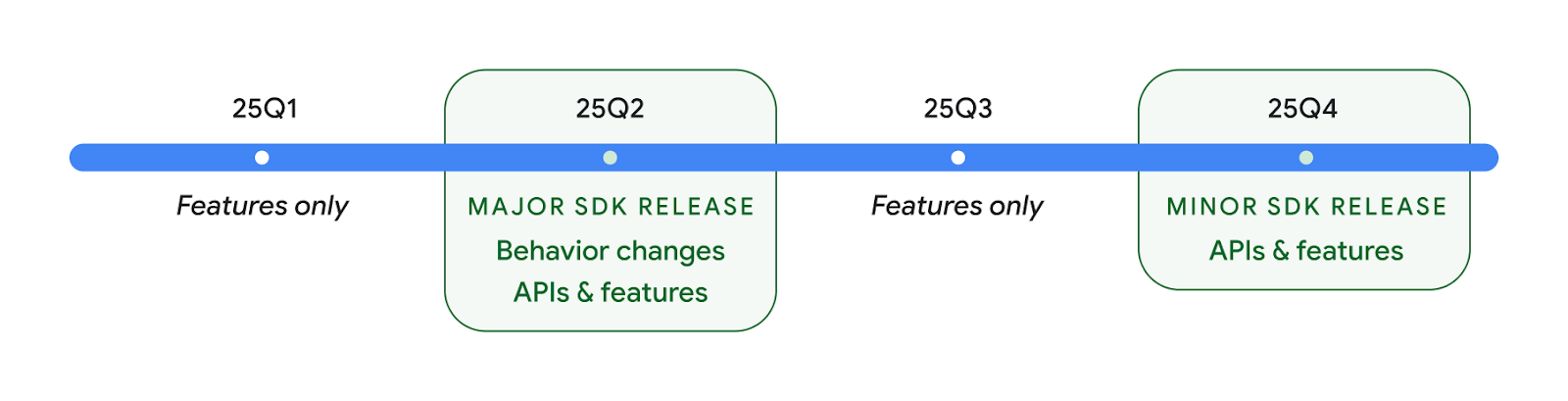
Nous continuerons à publier des versions Android trimestrielles. Les mises à jour du premier et du troisième trimestre entre les versions de l'API fourniront des mises à jour incrémentielles pour garantir une qualité continue. Nous collaborons activement avec nos partenaires pour proposer la version du second trimestre sur autant d'appareils que possible.
Utiliser les nouvelles API avec les versions majeures et mineures
La protection d'un bloc de code avec une vérification du niveau d'API se fait aujourd'hui à l'aide de la constante SDK_INT avec VERSION_CODES. Cette fonctionnalité restera compatible avec les principales versions d'Android.
if (SDK_INT >= VERSION_CODES.BAKLAVA) {
  // Use APIs introduced in Android 16
}
La nouvelle constante SDK_INT_FULL peut être utilisée pour les vérifications d'API sur les versions majeures et mineures avec la nouvelle énumération VERSION_CODES_FULL.
if (SDK_INT_FULL >= VERSION_CODES_FULL.[MAJOR or MINOR RELEASE]) {
  // Use APIs introduced in a major or minor release
}
Vous pouvez également utiliser la méthode Build.getMinorSdkVersion() pour obtenir uniquement la version mineure du SDK.
val minorSdkVersion = Build.getMinorSdkVersion(VERSION_CODES_FULL.BAKLAVA)
Ces API n'ont pas encore été finalisées et sont susceptibles d'être modifiées. N'hésitez donc pas à nous envoyer vos commentaires si vous avez des questions.
Expérience utilisateur et UI du système
Android 16 offre aux développeurs d'applications et aux utilisateurs plus de contrôle et de flexibilité pour configurer leur appareil en fonction de leurs besoins.
Notifications axées sur la progression
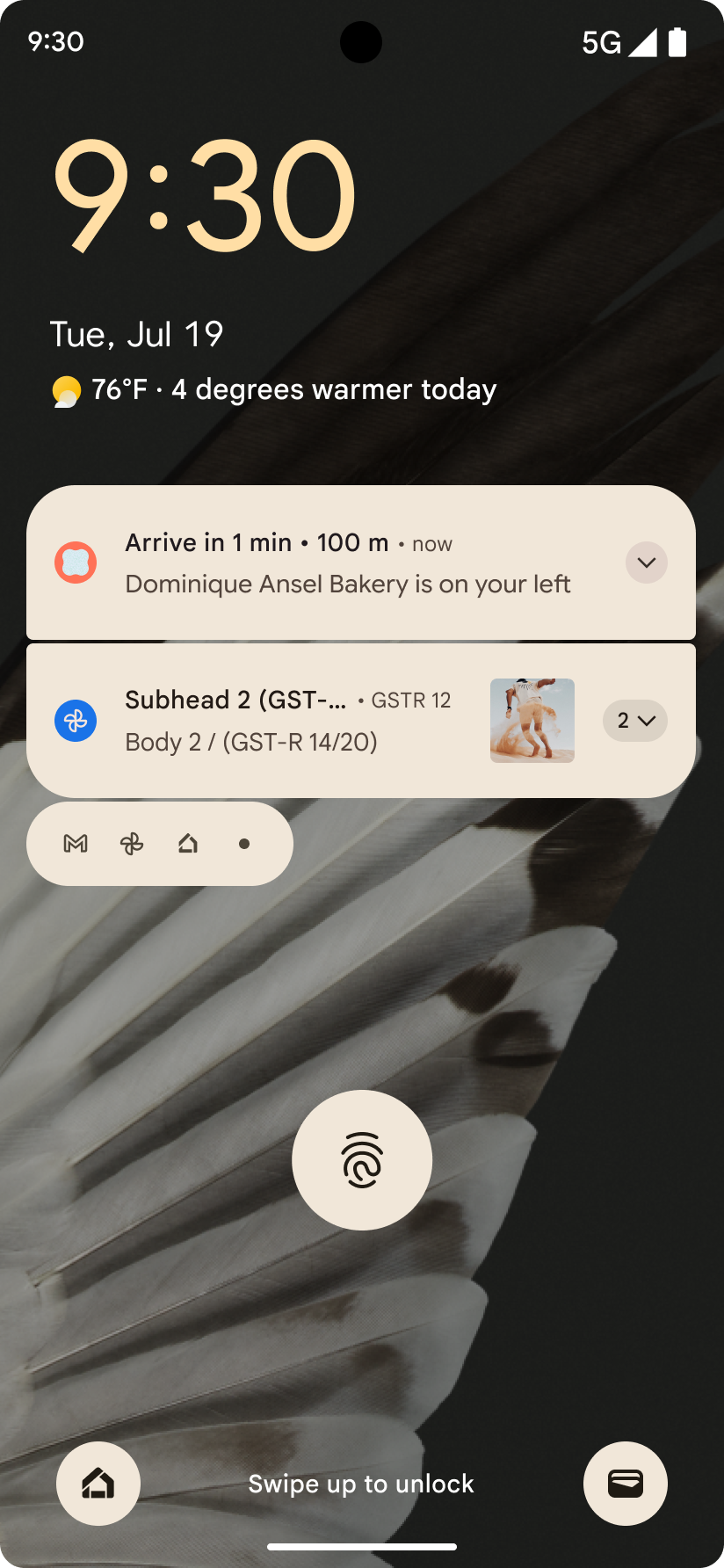
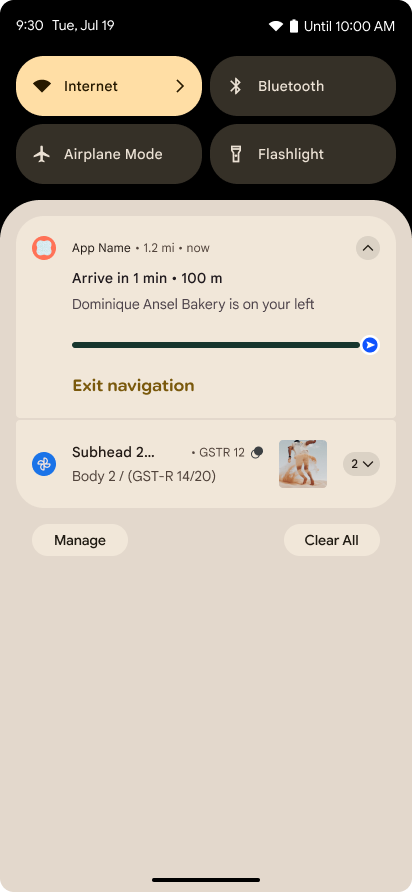
Android 16 introduit des notifications axées sur la progression pour aider les utilisateurs à suivre facilement les parcours de bout en bout initiés par l'utilisateur.
Notification.ProgressStyle est un nouveau style de notification qui vous permet de créer des notifications axées sur la progression. Les principaux cas d'utilisation incluent les services de covoiturage, la livraison et la navigation. Dans la classe Notification.ProgressStyle, vous pouvez indiquer les états et les jalons d'un parcours utilisateur à l'aide de points et de segments.
Pour en savoir plus, consultez la page de documentation sur les notifications axées sur la progression.
Mises à jour de la prévisualisation du Retour
Android 16 ajoute de nouvelles API pour vous aider à activer les animations système de prévisualisation du Retour dans la navigation par gestes, comme l'animation de retour à l'écran d'accueil. Enregistrer onBackInvokedCallback avec le nouveau PRIORITY_SYSTEM_NAVIGATION_OBSERVER permet à votre application de recevoir l'appel onBackInvoked standard chaque fois que le système gère une navigation arrière sans affecter le flux de navigation arrière normal.
Android 16 ajoute également finishAndRemoveTaskCallback() et moveTaskToBackCallback. En enregistrant ces rappels avec OnBackInvokedDispatcher, le système peut déclencher des comportements spécifiques et lire les animations correspondantes à l'avance lorsque le geste Retour est appelé.
Technologies haptiques plus riches
Android expose le contrôle de l'actionneur haptique depuis sa création.
Android 11 a ajouté la prise en charge d'effets haptiques plus complexes que les actionneurs plus avancés peuvent prendre en charge via VibrationEffect.Compositions de primitives sémantiques définies par l'appareil.
Android 16 ajoute des API haptiques qui permettent aux applications de définir les courbes d'amplitude et de fréquence d'un effet haptique tout en éliminant les différences entre les fonctionnalités de l'appareil.
Productivité et outils pour les développeurs
Bien que la plupart de nos efforts pour améliorer votre productivité soient axés sur des outils tels que Android Studio, Jetpack Compose et les bibliothèques Android Jetpack, nous recherchons toujours des moyens de vous aider à concrétiser votre vision sur la plate-forme.
Gestion du contenu pour les fonds d'écran animés
Dans Android 16, le framework de fond d'écran animé bénéficie d'une nouvelle API de contenu pour relever les défis des fonds d'écran dynamiques gérés par l'utilisateur. Actuellement, les fonds d'écran animés intégrant du contenu fourni par l'utilisateur nécessitent des implémentations complexes, spécifiques au service. Android 16 introduit WallpaperDescription et WallpaperInstance. WallpaperDescription vous permet d'identifier des instances distinctes d'un fond d'écran animé à partir du même service. Par exemple, un fond d'écran qui apparaît à la fois sur l'écran d'accueil et sur l'écran de verrouillage peut comporter un contenu unique dans les deux cas. Le sélecteur de fond d'écran et WallpaperManager utilisent ces métadonnées pour mieux présenter les fonds d'écran aux utilisateurs, ce qui vous permet de créer des expériences de fond d'écran animé diversifiées et personnalisées plus facilement.
Performances et batterie
Android 16 introduit des API qui vous aident à recueillir des insights sur vos applications.
Profilage déclenché par le système
ProfilingManager was
added in Android 15, giving apps the ability to
request profiling data collection using Perfetto on public devices in the field.
However, since this profiling must be started from the app, critical flows such
as startups or ANRs would be difficult or impossible for apps to capture.
To help with this, Android 16 introduces system-triggered profiling to
ProfilingManager. Apps can register interest in receiving traces for certain
triggers such as cold start reportFullyDrawn
or ANRs, and then the system starts and stops a trace on the app's behalf. After
the trace completes, the results are delivered to the app's data directory.
Démarrer un composant dans ApplicationStartInfo
ApplicationStartInfo a été ajouté dans Android 15, ce qui permet à une application de voir les raisons du démarrage du processus, le type de démarrage, les heures de démarrage, le débit limité et d'autres données de diagnostic utiles. Android 16 ajoute getStartComponent() pour distinguer le type de composant qui a déclenché le démarrage, ce qui peut être utile pour optimiser le flux de démarrage de votre application.
Meilleure introspection des tâches
L'API JobScheduler#getPendingJobReason() renvoie la raison pour laquelle une tâche peut être en attente. Cependant, une tâche peut être en attente pour plusieurs raisons.
Dans Android 16, nous introduisons une nouvelle API JobScheduler#getPendingJobReasons(int jobId), qui renvoie plusieurs raisons pour lesquelles une tâche est en attente, en raison de contraintes explicites définies par le développeur et de contraintes implicites définies par le système.
Nous lançons également JobScheduler#getPendingJobReasonsHistory(int jobId), qui renvoie une liste des modifications de contraintes les plus récentes.
Nous vous recommandons d'utiliser l'API pour vous aider à déboguer les raisons pour lesquelles vos tâches ne s'exécutent pas, en particulier si vous constatez une baisse des taux de réussite de certaines tâches ou des bugs liés à la latence de certaines tâches. Par exemple, la mise à jour des widgets en arrière-plan n'a pas été effectuée ou la tâche de préchargement n'a pas pu être appelée avant le démarrage de l'application.
Cela peut également vous aider à mieux comprendre si certaines tâches ne sont pas effectuées en raison de contraintes définies par le système plutôt que de contraintes définies explicitement.
Fréquence d'actualisation adaptative
La fréquence d'actualisation adaptative (ARR, Adaptive Refresh Rate), introduite dans Android 15, permet à la fréquence d'actualisation de l'écran sur le matériel compatible de s'adapter à la fréquence d'images du contenu à l'aide d'étapes VSync distinctes. Cela réduit la consommation d'énergie tout en éliminant le besoin de changer de mode, ce qui peut entraîner des à-coups.
Android 16 introduit hasArrSupport() et getSuggestedFrameRate(int), tout en rétablissant getSupportedRefreshRates() pour permettre à vos applications de profiter plus facilement de l'ARR. RecyclerView 1.4 est compatible en interne avec l'ARR lorsqu'il s'installe à partir d'un balayage ou d'un défilement fluide. Nous continuons de travailler pour ajouter la compatibilité avec l'ARR à d'autres bibliothèques Jetpack. Cet article sur la fréquence d'images couvre de nombreuses API que vous pouvez utiliser pour définir la fréquence d'images afin que votre application puisse utiliser directement ARR.
API de marge dans ADPF
SystemHealthManager introduit les API getCpuHeadroom et getGpuHeadroom, conçues pour fournir aux jeux et aux applications gourmandes en ressources des estimations des ressources de processeur et de GPU disponibles. Ces méthodes vous permettent d'évaluer comment votre application ou votre jeu peut améliorer au mieux l'état du système, en particulier lorsqu'elles sont utilisées avec d'autres API Android Dynamic Performance Framework (ADPF) qui détectent le throttling thermique.
En utilisant CpuHeadroomParams et GpuHeadroomParams sur les appareils compatibles, vous pouvez personnaliser la période utilisée pour calculer la marge de manœuvre et choisir entre une disponibilité moyenne ou minimale des ressources. Cela peut vous aider à réduire l'utilisation des ressources du processeur ou du GPU en conséquence, ce qui améliore l'expérience utilisateur et l'autonomie de la batterie.
Accessibilité
Android 16 ajoute de nouvelles API et fonctionnalités d'accessibilité qui peuvent vous aider à rendre votre application accessible à tous les utilisateurs.
API d'accessibilité améliorées
Android 16 ajoute des API supplémentaires pour améliorer la sémantique de l'UI, ce qui permet d'améliorer la cohérence pour les utilisateurs qui s'appuient sur des services d'accessibilité tels que TalkBack.
Ajouter un contour au texte pour optimiser le contraste
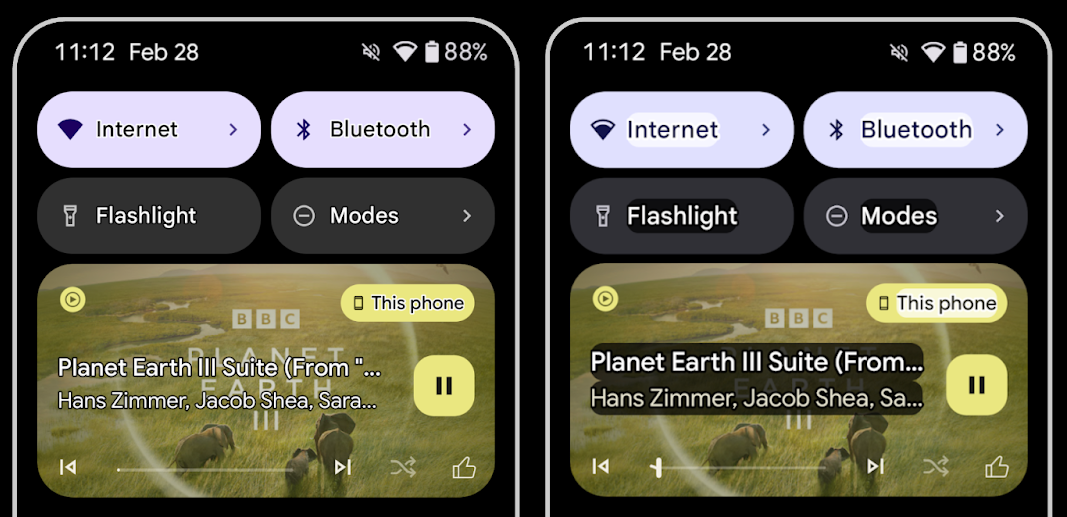
Les utilisateurs malvoyants ont souvent une sensibilité au contraste réduite, ce qui rend difficile la distinction des objets de leur arrière-plan. Pour aider ces utilisateurs, Android 16 introduit le texte en contour, qui remplace le texte à contraste élevé. Il dessine une zone plus contrastée autour du texte pour améliorer considérablement sa lisibilité.
Android 16 contient de nouvelles API AccessibilityManager pour permettre à vos applications de vérifier ou d'enregistrer un écouteur pour voir si ce mode est activé. Cela permet principalement aux boîtes à outils d'UI telles que Compose d'offrir une expérience visuelle similaire. Si vous gérez une bibliothèque UI Toolkit ou si votre application effectue un rendu de texte personnalisé qui contourne la classe android.text.Layout, vous pouvez l'utiliser pour savoir quand le texte en contour est activé.
Durée ajoutée à TtsSpan
Android 16 étend TtsSpan avec un TYPE_DURATION, composé de ARG_HOURS, ARG_MINUTES et ARG_SECONDS. Vous pouvez ainsi annoter directement la durée, ce qui garantit une sortie de synthèse vocale précise et cohérente avec des services tels que TalkBack.
Prendre en charge les éléments avec plusieurs libellés
Android permet actuellement aux éléments d'interface utilisateur de dériver leur libellé d'accessibilité à partir d'un autre. Il permet désormais d'associer plusieurs libellés, un scénario courant dans le contenu Web. En introduisant une API basée sur des listes dans AccessibilityNodeInfo, Android peut prendre en charge directement ces relations multi-libellés. Dans le cadre de ce changement, nous avons abandonné AccessibilityNodeInfo#setLabeledBy et #getLabeledBy au profit de #addLabeledBy, #removeLabeledBy et #getLabeledByList.
Amélioration de la compatibilité avec les éléments extensibles
Android 16 ajoute des API d'accessibilité qui vous permettent de transmettre l'état développé ou réduit des éléments interactifs, tels que les menus et les listes extensibles. En définissant l'état développé à l'aide de setExpandedState et en distribuant des AccessibilityEvents TYPE_WINDOW_CONTENT_CHANGED avec un type de modification de contenu CONTENT_CHANGE_TYPE_EXPANDED, vous pouvez vous assurer que les lecteurs d'écran tels que TalkBack annoncent les changements d'état, offrant ainsi une expérience utilisateur plus intuitive et inclusive.
Barres de progression indéterminées
Android 16 ajoute RANGE_TYPE_INDETERMINATE, ce qui vous permet d'exposer RangeInfo pour les widgets ProgressBar déterminés et indéterminés, ce qui permet à des services tels que TalkBack de fournir des commentaires plus cohérents pour les indicateurs de progression.
Case à cocher à trois états
Les nouvelles méthodes AccessibilityNodeInfo
getChecked et setChecked(int) d'Android 16 acceptent désormais un état "partiellement coché" en plus des états "coché" et "non coché". Cette valeur remplace les valeurs booléennes isChecked et setChecked(boolean), obsolètes.
Descriptions supplémentaires
Lorsqu'un service d'accessibilité décrit un ViewGroup, il combine les libellés de contenu de ses vues enfants. Si vous fournissez un contentDescription pour le ViewGroup, les services d'accessibilité supposent que vous remplacez également la description des vues enfants non sélectionnables. Cela peut poser problème si vous souhaitez ajouter un libellé à un menu déroulant (par exemple, "Famille de polices") tout en conservant la sélection actuelle à des fins d'accessibilité (par exemple, "Roboto"). Android 16 ajoute setSupplementalDescription afin que vous puissiez fournir du texte fournissant des informations sur un ViewGroup sans remplacer les informations de ses enfants.
Champs obligatoires du formulaire
Android 16 ajoute setFieldRequired à AccessibilityNodeInfo afin que les applications puissent indiquer à un service d'accessibilité que la saisie dans un champ de formulaire est obligatoire. Il s'agit d'un scénario important pour les utilisateurs qui remplissent de nombreux types de formulaires, même des éléments aussi simples qu'une case à cocher obligatoire pour les conditions d'utilisation, qui les aident à identifier de manière cohérente les champs obligatoires et à passer rapidement d'un champ à l'autre.
Utiliser le téléphone comme entrée micro pour les appels vocaux avec des appareils auditifs LEA
Android 16 permet aux utilisateurs d'appareils auditifs LE Audio de basculer entre les micros intégrés des appareils auditifs et le micro de leur téléphone pour les appels vocaux. Cela peut être utile dans des environnements bruyants ou dans d'autres situations où les micros de l'appareil auditif peuvent ne pas fonctionner correctement.
Commandes de volume ambiant pour les appareils auditifs LEA
Android 16 permet aux utilisateurs d'appareils auditifs LE Audio d'ajuster le volume du son ambiant capté par les micros de l'appareil auditif. Cela peut être utile lorsque le bruit de fond est trop fort ou trop faible.
Appareil photo
Android 16 améliore la prise en charge des utilisateurs d'appareils photo professionnels en permettant l'exposition automatique hybride, ainsi que des ajustements précis de la température des couleurs et de la teinte. Un nouvel indicateur de mode Nuit aide votre application à savoir quand passer à une session de caméra en mode Nuit et quand en sortir. De nouvelles actions Intent facilitent la capture de photos animées, et nous continuons d'améliorer les images Ultra HDR grâce à la prise en charge de l'encodage HEIC et de nouveaux paramètres de la norme ISO 21496-1.
Exposition automatique hybride
Android 16 ajoute de nouveaux modes d'exposition automatique hybrides à Camera2, ce qui vous permet de contrôler manuellement certains aspects de l'exposition tout en laissant l'algorithme d'exposition automatique (AE) gérer le reste. Vous pouvez contrôler ISO + AE et durée d'exposition + AE, ce qui offre une plus grande flexibilité par rapport à l'approche actuelle, où vous avez un contrôle manuel complet ou vous vous appuyez entièrement sur l'exposition automatique.
fun setISOPriority() {
    // ... (Your existing code before the snippet) ...

    val availablePriorityModes = mStaticInfo.characteristics.get(
        CameraCharacteristics.CONTROL_AE_AVAILABLE_PRIORITY_MODES
    )

    // ... (Your existing code between the snippets) ...

    // Turn on AE mode to set priority mode
    reqBuilder.set(
        CaptureRequest.CONTROL_AE_MODE,
        CameraMetadata.CONTROL_AE_MODE_ON
    )
    reqBuilder.set(
        CaptureRequest.CONTROL_AE_PRIORITY_MODE,
        CameraMetadata.CONTROL_AE_PRIORITY_MODE_SENSOR_SENSITIVITY_PRIORITY
    )
    reqBuilder.set(
        CaptureRequest.SENSOR_SENSITIVITY,
        TEST_SENSITIVITY_VALUE
    )
    val request: CaptureRequest = reqBuilder.build()

    // ... (Your existing code after the snippet) ...
}
Ajustements précis de la température des couleurs et de la teinte
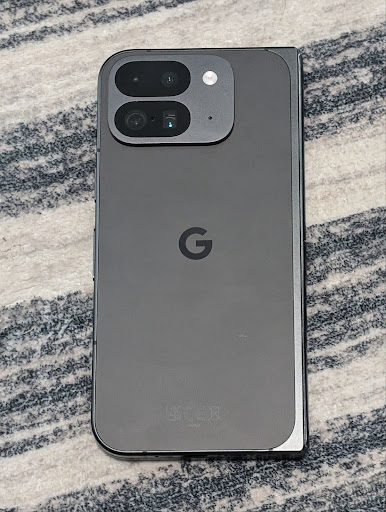
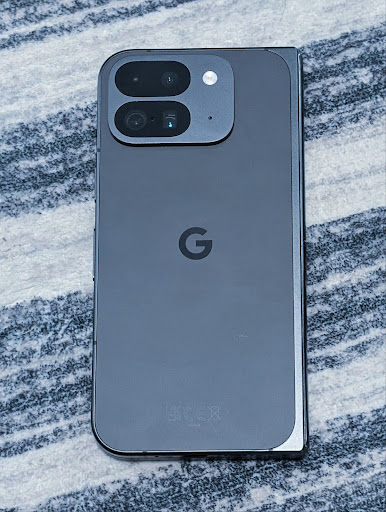
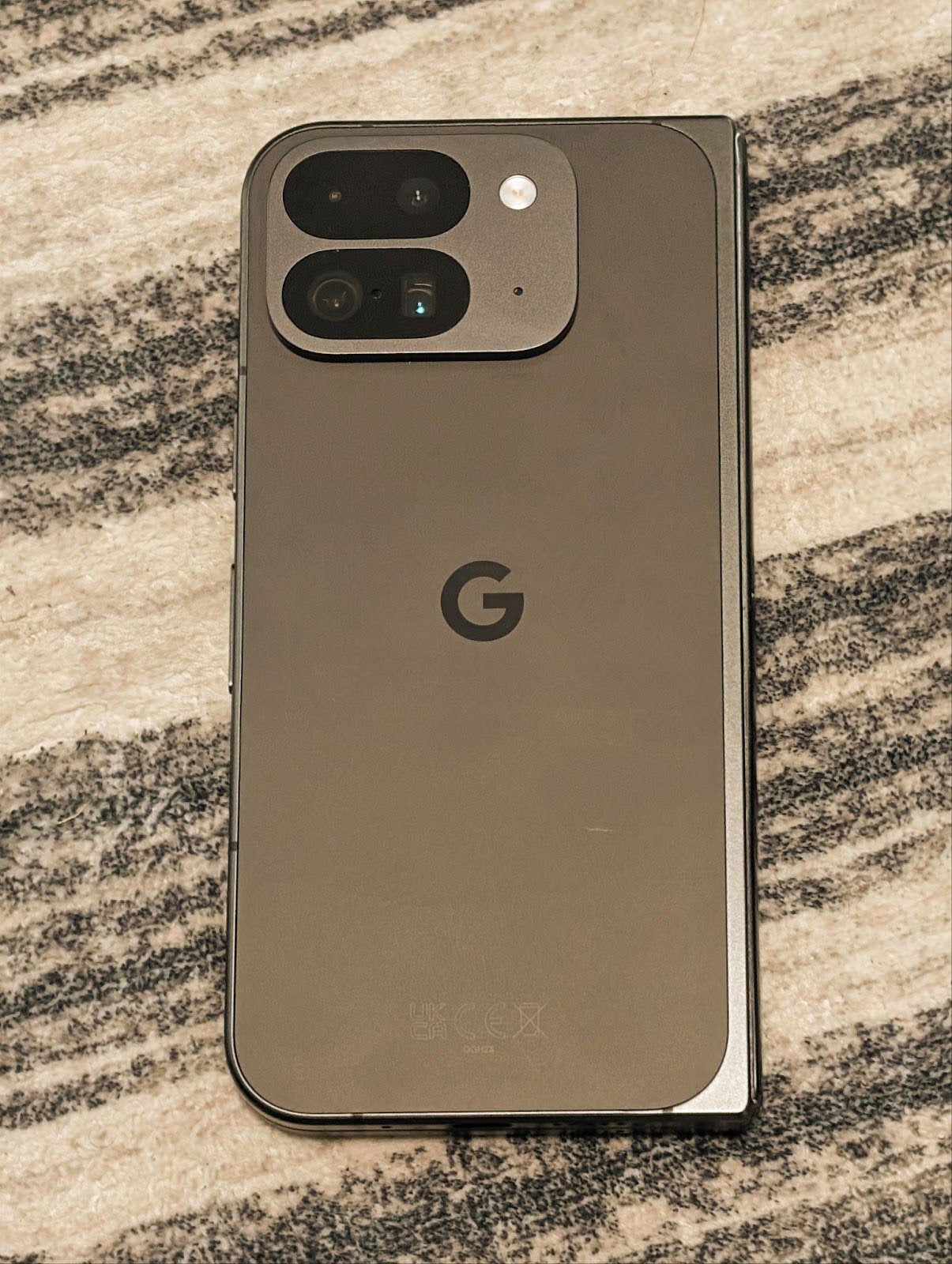
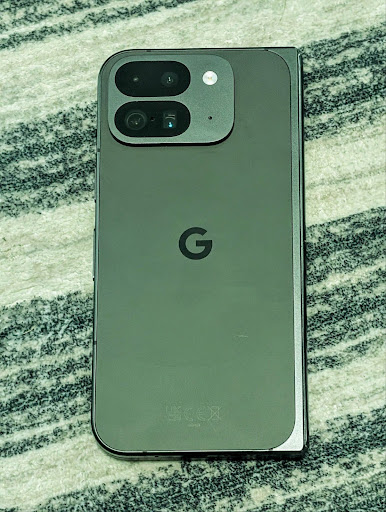
Android 16 permet d'ajuster la température et la teinte des couleurs de l'appareil photo pour mieux prendre en charge les applications d'enregistrement vidéo professionnelles. Dans les versions précédentes d'Android, vous pouviez contrôler les paramètres de balance des blancs via CONTROL_AWB_MODE, qui contient des options limitées à une liste prédéfinie, comme Incandescent (Incandescente), Cloudy (Nuageux) et Twilight (Crépuscule). COLOR_CORRECTION_MODE_CCT permet d'utiliser COLOR_CORRECTION_COLOR_TEMPERATURE et COLOR_CORRECTION_COLOR_TINT pour ajuster précisément la balance des blancs en fonction de la température de couleur corrélée.
fun setCCT() {
    // ... (Your existing code before this point) ...

    val colorTemperatureRange: Range<Int> =
        mStaticInfo.characteristics[CameraCharacteristics.COLOR_CORRECTION_COLOR_TEMPERATURE_RANGE]

    // Set to manual mode to enable CCT mode
    reqBuilder[CaptureRequest.CONTROL_AWB_MODE] = CameraMetadata.CONTROL_AWB_MODE_OFF
    reqBuilder[CaptureRequest.COLOR_CORRECTION_MODE] = CameraMetadata.COLOR_CORRECTION_MODE_CCT
    reqBuilder[CaptureRequest.COLOR_CORRECTION_COLOR_TEMPERATURE] = 5000
    reqBuilder[CaptureRequest.COLOR_CORRECTION_COLOR_TINT] = 30

    val request: CaptureRequest = reqBuilder.build()

    // ... (Your existing code after this point) ...
}
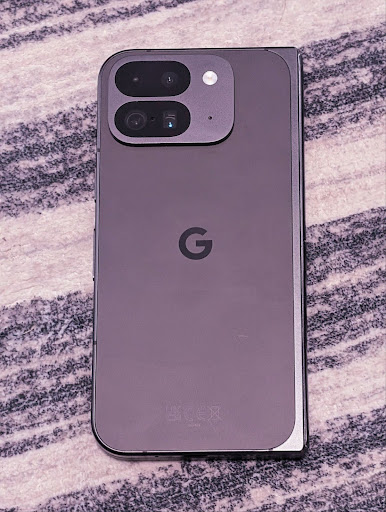
Les exemples suivants montrent à quoi ressemble une photo après avoir appliqué différents ajustements de température et de teinte de couleur:
Détection de scène du mode Nuit de l'appareil photo
Pour aider votre application à savoir quand passer d'une session d'appareil photo en mode Nuit à une autre, Android 16 ajoute EXTENSION_NIGHT_MODE_INDICATOR. Si elle est prise en charge, elle est disponible dans CaptureResult dans Camera2.
Il s'agit de l'API que nous avons brièvement mentionnée comme étant bientôt disponible dans l'article de blog Comment Instagram a permis aux utilisateurs de prendre de superbes photos en basse lumière. Ce post est un guide pratique sur l'implémentation du mode nuit, ainsi qu'une étude de cas qui associe des photos de meilleure qualité dans le mode nuit de l'application à une augmentation du nombre de photos partagées depuis l'appareil photo de l'application.
Actions d'intent pour la capture de photos animées
Android 16 ajoute des actions d'intent standards (ACTION_MOTION_PHOTO_CAPTURE et ACTION_MOTION_PHOTO_CAPTURE_SECURE), qui demandent à l'application Appareil photo de prendre une photo Mouvement et de la renvoyer.
Vous devez transmettre un EXTRA_OUTPUT supplémentaire pour contrôler l'emplacement où l'image sera écrite, ou un Uri via Intent.setClipData(ClipData). Si vous ne définissez pas de ClipData, il sera copié automatiquement lorsque vous appelez Context.startActivity(Intent).
Améliorations des images Ultra HDR
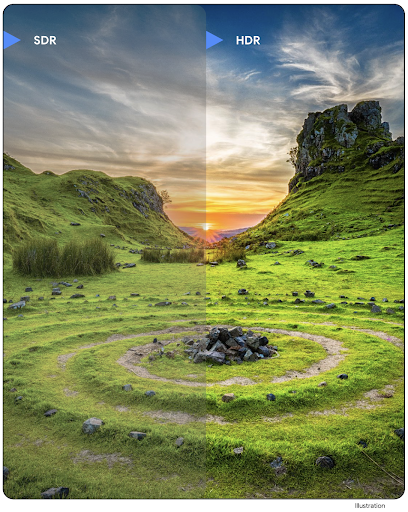
Android 16 poursuit notre travail visant à offrir une qualité d'image éblouissante avec les images UltraHDR. Il est compatible avec les images UltraHDR au format de fichier HEIC. Ces images recevront le type ImageFormat HEIC_ULTRAHDR et contiendront une carte de gain intégrée semblable au format JPEG UltraHDR existant. Nous travaillons également sur la prise en charge d'AVIF pour UltraHDR. Tenez-vous informé.
De plus, Android 16 implémente des paramètres supplémentaires dans UltraHDR à partir de la version préliminaire de la norme ISO 21496-1, y compris la possibilité d'obtenir et de définir l'espace colorimétrique dans lequel les calculs de la carte de gain doivent être appliqués, ainsi que la prise en charge des images de base encodées en HDR avec des cartes de gain SDR.
Graphiques
Android 16 inclut les dernières améliorations graphiques, telles que les effets graphiques personnalisés avec AGSL.
Effets graphiques personnalisés avec AGSL
Android 16 ajoute RuntimeColorFilter et RuntimeXfermode, ce qui vous permet de créer des effets complexes tels que le seuil, le sépia et la saturation de la teinte, et de les appliquer aux appels de dessin. Depuis Android 13, vous pouvez utiliser AGSL pour créer des RuntimeShaders personnalisés qui étendent Shader. La nouvelle API reflète cela, en ajoutant un RuntimeColorFilter compatible avec AGSL qui étend ColorFilter et un effet Xfermode qui vous permet d'implémenter un compositing et un mélange personnalisés basés sur AGSL entre les pixels source et de destination.
private val thresholdEffectString = """
    uniform half threshold;

    half4 main(half4 c) {
        half luminosity = dot(c.rgb, half3(0.2126, 0.7152, 0.0722));
        half bw = step(threshold, luminosity);
        return bw.xxx1 * c.a;
    }"""

fun setCustomColorFilter(paint: Paint) {
   val filter = RuntimeColorFilter(thresholdEffectString)
   filter.setFloatUniform(0.5);
   paint.colorFilter = filter
}
Connectivité
Android 16 met à jour la plate-forme pour permettre à votre application d'accéder aux dernières avancées en matière de technologies de communication et sans fil.
Portée avec sécurité renforcée
Android 16 prend en charge les fonctionnalités de sécurité robustes dans la localisation Wi-Fi sur les appareils compatibles avec la norme 802.11az du Wi-Fi 6, ce qui permet aux applications de combiner la précision, l'évolutivité et la planification dynamique accrues du protocole avec des améliorations de sécurité, y compris le chiffrement basé sur AES-256 et la protection contre les attaques MITM. Cela permet de l'utiliser plus en toute sécurité dans les cas d'utilisation de proximité, comme le déverrouillage d'un ordinateur portable ou d'une porte de véhicule. La norme 802.11az est intégrée à la norme Wi-Fi 6, qui exploite son infrastructure et ses fonctionnalités pour une adoption plus large et un déploiement plus facile.
API de portée génériques
Android 16 includes the new RangingManager, which provides
ways to determine the distance and angle on supported hardware between the local
device and a remote device. RangingManager supports the usage of a variety of
ranging technologies such as BLE channel sounding, BLE RSSI-based ranging, Ultra
Wideband, and Wi-Fi round trip time.
Présence d'appareils dans le gestionnaire d'appareils associés
Dans Android 16, de nouvelles API sont introduites pour lier votre service d'application compagnon. Le service est lié lorsque le BLE est à portée et que le Bluetooth est connecté, et il est dissocié lorsque le BLE est hors de portée ou que le Bluetooth est déconnecté. L'application reçoit un nouveau rappel 'onDevicePresenceEvent()' en fonction de différents DevicePresenceEvent.
Pour en savoir plus, consultez startObservingDevicePresence(ObservingDevicePresenceRequest).
Contenus multimédias
Android 16 inclut diverses fonctionnalités qui améliorent l'expérience multimédia.
Améliorations apportées au sélecteur de photos
Le sélecteur de photos permet aux utilisateurs d'autoriser votre application à accéder de manière sécurisée et intégrée à des images et vidéos sélectionnées à partir de l'espace de stockage local et cloud, plutôt qu'à l'ensemble de leur bibliothèque multimédia. Grâce à une combinaison de composants système modulaires via les mises à jour du système Google et des services Google Play, il est compatible avec Android 4.4 (niveau d'API 19). L'intégration ne nécessite que quelques lignes de code avec la bibliothèque Android Jetpack associée.
Android 16 inclut les améliorations suivantes apportées au sélecteur de photos:
- Sélecteur de photos intégré: nouvelles API qui permettent aux applications d'intégrer le sélecteur de photos à leur hiérarchie de vues. Cela permet de donner l'impression qu'il s'agit d'une partie plus intégrée de l'application, tout en exploitant l'isolation de processus qui permet aux utilisateurs de sélectionner des contenus multimédias sans que l'application ait besoin d'autorisations trop larges. Pour maximiser la compatibilité entre les versions de la plate-forme et simplifier votre intégration, vous devez utiliser la future bibliothèque Android Jetpack si vous souhaitez intégrer le sélecteur de photos intégré.
- Recherche dans le sélecteur de photos dans le cloud : nouvelles API qui permettent de rechercher des éléments à partir du fournisseur de contenu multimédia dans le cloud pour le sélecteur de photos Android. La fonctionnalité de recherche dans le sélecteur de photos sera bientôt disponible.
Vidéo professionnelle avancée
Android 16 introduces support for the Advanced Professional Video (APV) codec which is designed to be used for professional level high quality video recording and post production.
The APV codec standard has the following features:
- Perceptually lossless video quality (close to raw video quality)
- Low complexity and high throughput intra-frame-only coding (without pixel domain prediction) to better support editing workflows
- Support for high bit-rate range up to a few Gbps for 2K, 4K and 8K resolution content, enabled by a lightweight entropy coding scheme
- Frame tiling for immersive content and for enabling parallel encoding and decoding
- Support for various chroma sampling formats and bit-depths
- Support for multiple decoding and re-encoding without severe visual quality degradation
- Support multi-view video and auxiliary video like depth, alpha, and preview
- Support for HDR10/10+ and user-defined metadata
A reference implementation of APV is provided through the OpenAPV project. Android 16 will implement support for the APV 422-10 Profile that provides YUV 422 color sampling along with 10-bit encoding and for target bitrates of up to 2Gbps.
Confidentialité
Android 16 inclut diverses fonctionnalités qui aident les développeurs d'applications à protéger la confidentialité des utilisateurs.
Mises à jour de Santé Connect
Santé Connect ajoute ACTIVITY_INTENSITY, un type de données défini conformément aux directives de l'Organisation mondiale de la santé concernant l'activité modérée et intense. Chaque enregistrement nécessite l'heure de début, l'heure de fin et l'intensité de l'activité (modérée ou intense).
Santé Connect contient également des API mises à jour compatibles avec les dossiers médicaux. Cela permet aux applications de lire et d'écrire des dossiers médicaux au format FHIR avec l'autorisation explicite de l'utilisateur.
Privacy Sandbox sur Android
Android 16 intègre la dernière version de la Privacy Sandbox sur Android, qui fait partie de nos efforts continus visant à développer des technologies dans lesquelles les utilisateurs savent que leur confidentialité est protégée. Pour en savoir plus sur le programme bêta de la Privacy Sandbox sur Android pour les développeurs, consultez notre site Web. Découvrez le SDK Runtime, qui permet aux SDK de s'exécuter dans un environnement d'exécution dédié distinct de l'application qu'ils diffusent, offrant des protections plus strictes concernant la collecte et le partage des données utilisateur.
Sécurité
Android 16 inclut des fonctionnalités qui vous aident à améliorer la sécurité de votre application et à protéger ses données.
API de partage de clés
Android 16 ajoute des API permettant de partager l'accès aux clés Android Keystore avec d'autres applications. La nouvelle classe KeyStoreManager permet d'accorder et de révoquer l'accès aux clés par uid d'application, et inclut une API permettant aux applications d'accéder aux clés partagées.
Facteurs de forme d'appareil
Android 16 permet à vos applications de tirer le meilleur parti des facteurs de forme d'Android.
Framework standardisé de qualité d'image et audio pour les téléviseurs
Le nouveau package MediaQuality d'Android 16 expose un ensemble d'API standardisées pour accéder aux profils audio et image, ainsi qu'aux paramètres liés au matériel. Cela permet aux applications de streaming d'interroger les profils et de les appliquer aux contenus multimédias de manière dynamique:
- Les films masterisés avec une plage dynamique plus large nécessitent une plus grande précision des couleurs pour voir les détails subtils dans les ombres et s'adapter à la lumière ambiante. Un profil qui privilégie la précision des couleurs à la luminosité peut donc être approprié.
- Les événements sportifs en direct sont souvent masterisés avec une plage dynamique étroite, mais sont souvent regardés en plein jour. Un profil qui privilégie la luminosité à la précision des couleurs peut donc donner de meilleurs résultats.
- Les contenus entièrement interactifs nécessitent un traitement minimal pour réduire la latence et une fréquence d'images plus élevée. C'est pourquoi de nombreux téléviseurs sont livrés avec un profil de jeu.
L'API permet aux applications de basculer entre les profils et aux utilisateurs de régler les téléviseurs compatibles pour qu'ils correspondent au mieux à leur contenu.
Internationalisation
Android 16 ajoute des fonctionnalités qui améliorent l'expérience utilisateur lorsqu'un appareil est utilisé dans différentes langues.
Texte vertical
Android 16 ajoute une compatibilité de bas niveau pour l'affichage et la mesure du texte verticalement afin de fournir une compatibilité d'écriture verticale de base aux développeurs de bibliothèques. Cette fonctionnalité est particulièrement utile pour les langues comme le japonais, qui utilisent couramment des systèmes d'écriture verticale. Un nouvel indicateur, VERTICAL_TEXT_FLAG, a été ajouté à la classe Paint. Lorsque cet indicateur est défini à l'aide de Paint.setFlags, les API de mesure du texte de Paint indiquent les avances verticales au lieu des avances horizontales, et Canvas dessine le texte verticalement.
val text = "「春は、曙。」"
Box(
    Modifier.padding(innerPadding).background(Color.White).fillMaxSize().drawWithContent {
        drawIntoCanvas { canvas ->
            val paint = Paint().apply { textSize = 64.sp.toPx() }
            // Draw text vertically
            paint.flags = paint.flags or VERTICAL_TEXT_FLAG
            val height = paint.measureText(text)
            canvas.nativeCanvas.drawText(
                text,
                0,
                text.length,
                size.width / 2,
                (size.height - height) / 2,
                paint
            )
        }
    }
) {}
Personnalisation du système de mesure
Les utilisateurs peuvent désormais personnaliser leur système de mesure dans les préférences régionales dans les paramètres. La préférence de l'utilisateur est incluse dans le code de paramètres régionaux. Vous pouvez donc enregistrer un BroadcastReceiver sur ACTION_LOCALE_CHANGED pour gérer les modifications de configuration des paramètres régionaux lorsque les préférences régionales changent.
L'utilisation de formateurs peut vous aider à adapter l'expérience locale. Par exemple, "0,5 pouce" en anglais (États-Unis) correspond à "12,7 mm" pour un utilisateur qui a défini son téléphone sur l'anglais (Danemark) ou qui utilise son téléphone en anglais (États-Unis) avec le système métrique comme système de mesure préféré.
Pour accéder à ces paramètres, ouvrez l'application Paramètres et accédez à System >Languages & region (Système > Langues et région).