

اندروید ۱۶ ویژگیها و APIهای جدید و فوقالعادهای را برای توسعهدهندگان معرفی میکند. بخشهای زیر این ویژگیها را خلاصه میکنند تا به شما در شروع کار با APIهای مرتبط کمک کنند.
برای مشاهده لیست کاملی از APIهای جدید، اصلاحشده و حذفشده، گزارش تفاوت API را مطالعه کنید. برای جزئیات بیشتر در مورد APIهای جدید، به مرجع API اندروید مراجعه کنید - APIهای جدید برای مشاهده، هایلایت شدهاند.همچنین باید حوزههایی را که تغییرات پلتفرم ممکن است بر برنامههای شما تأثیر بگذارد، بررسی کنید. برای اطلاعات بیشتر، به صفحات زیر مراجعه کنید:
- تغییرات رفتاری که هنگام هدف قرار دادن برنامهها در اندروید ۱۶، بر آنها تأثیر میگذارند
- تغییرات رفتاری که صرف نظر از
targetSdkVersion، بر همه برنامهها تأثیر میگذارد .
عملکرد اصلی
اندروید شامل API های جدیدی است که قابلیت های اصلی سیستم اندروید را گسترش می دهند.
دو نسخه از رابط برنامهنویسی اندروید (API) در سال ۲۰۲۵ منتشر خواهد شد
- این پیش نمایش برای نسخه اصلی بعدی اندروید با راه اندازی برنامه ریزی شده در سه ماهه دوم سال 2025 است. این نسخه مشابه همه نسخه های API ما در گذشته است، جایی که می توانیم تغییرات رفتاری برنامه ریزی شده ای داشته باشیم که اغلب به یک targetSdkVersion گره خورده است.
- ما در حال برنامهریزی نسخه اصلی یک ربع زودتر (به جای Q3 در سالهای قبل) هستیم تا با برنامه زمانبندی راهاندازی دستگاهها در سراسر اکوسیستم خود هماهنگی بیشتری داشته باشیم، بنابراین دستگاههای بیشتری بتوانند زودتر نسخه اصلی Android را دریافت کنند. با انتشار اصلی در سه ماهه دوم، باید آزمایش سازگاری سالانه خود را چند ماه زودتر از سالهای گذشته انجام دهید تا مطمئن شوید برنامههایتان آماده هستند.
- ما قصد داریم در سه ماهه چهارم سال 2025 نسخه دیگری داشته باشیم که شامل API های توسعه دهندگان جدید نیز می شود. نسخه اصلی Q2 تنها نسخه در سال 2025 خواهد بود که شامل تغییرات رفتاری برنامه ریزی شده است که می تواند برنامه ها را تحت تأثیر قرار دهد.
علاوه بر APIهای توسعهدهنده جدید، نسخه جزئی Q4 بهروزرسانیها، بهینهسازیها و رفع اشکالها را در اختیار خواهد داشت. این شامل هیچ گونه تغییر رفتاری تأثیرگذار بر برنامه نخواهد بود.
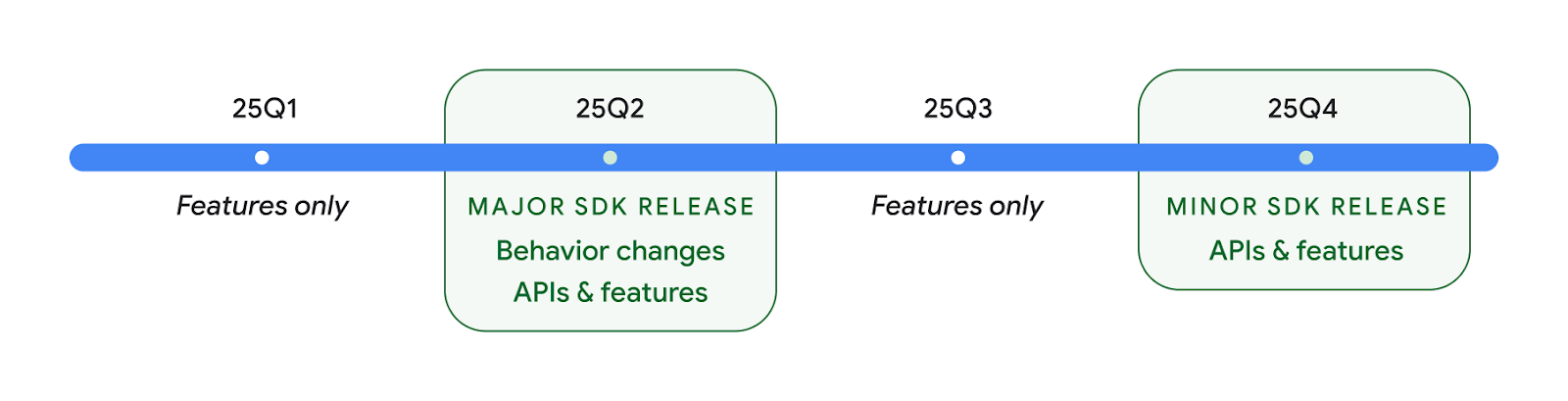
ما به انتشار سه ماهه اندروید ادامه خواهیم داد. بهروزرسانیهای Q1 و Q3 بین نسخههای API بهروزرسانیهای افزایشی را برای اطمینان از کیفیت مداوم ارائه میدهند. ما فعالانه با شرکای دستگاه خود کار می کنیم تا نسخه Q2 را تا حد امکان به دستگاه های بیشتری ارائه کنیم.
استفاده از API های جدید با نسخه های اصلی و فرعی
محافظت از بلوک کد با بررسی سطح API امروز با استفاده از ثابت SDK_INT با VERSION_CODES انجام می شود. این همچنان برای نسخه های اصلی اندروید پشتیبانی می شود.
if (SDK_INT >= VERSION_CODES.BAKLAVA) {
  // Use APIs introduced in Android 16
}
ثابت جدید SDK_INT_FULL می تواند برای بررسی های API در برابر هر دو نسخه اصلی و فرعی با شمارش جدید VERSION_CODES_FULL استفاده شود.
if (SDK_INT_FULL >= VERSION_CODES_FULL.[MAJOR or MINOR RELEASE]) {
  // Use APIs introduced in a major or minor release
}
همچنین میتوانید از متد Build.getMinorSdkVersion() برای دریافت نسخه کوچک SDK استفاده کنید.
val minorSdkVersion = Build.getMinorSdkVersion(VERSION_CODES_FULL.BAKLAVA)
این API ها هنوز نهایی نشده اند و در معرض تغییر هستند، بنابراین لطفاً در صورت داشتن هر گونه نگرانی، بازخورد خود را برای ما ارسال کنید.
تجربه کاربری و رابط کاربری سیستم
اندروید ۱۶ به توسعهدهندگان اپلیکیشن و کاربران کنترل و انعطافپذیری بیشتری برای پیکربندی دستگاهشان متناسب با نیازهایشان میدهد.
اعلانهای متمرکز بر پیشرفت
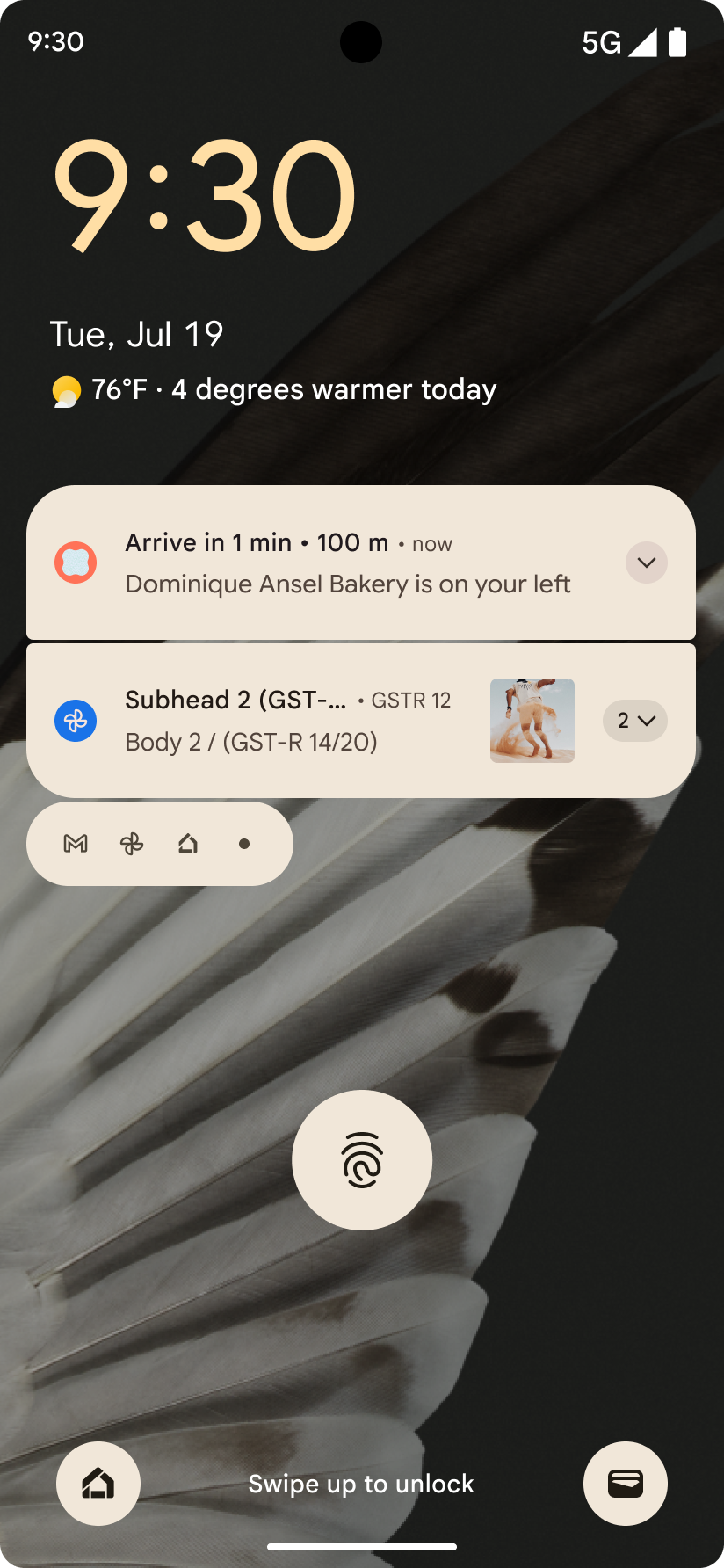
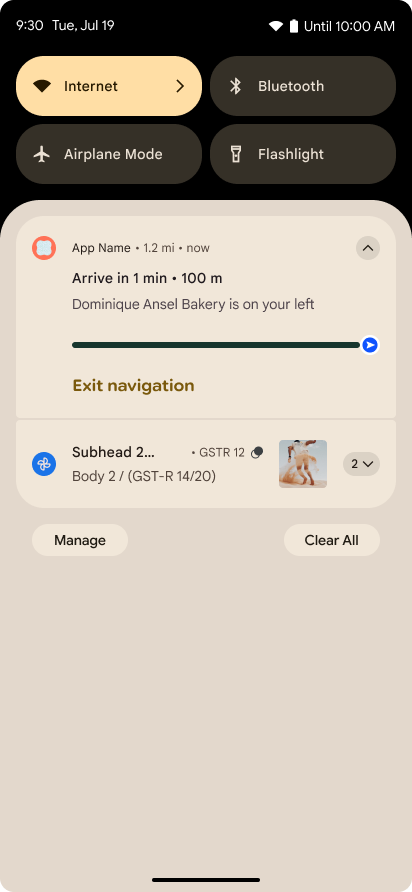
اندروید 16 اعلانهای پیشرفتمحور را معرفی میکند تا به کاربران کمک کند بهطور یکپارچه سفرهای شروع تا پایان توسط کاربر را ردیابی کنند.
Notification.ProgressStyle یک سبک اعلان جدید است که به شما امکان می دهد اعلان های پیشرفت محور ایجاد کنید. موارد استفاده کلیدی شامل rideshare، تحویل، و ناوبری است. در کلاس Notification.ProgressStyle ، میتوانید وضعیتها و نقاط عطف در سفر کاربر را با استفاده از نقاط و بخشها مشخص کنید.
برای کسب اطلاعات بیشتر، به صفحه مستندات اعلانهای پیشرفت محور مراجعه کنید.
بهروزرسانیهای پیشبینیشدهی قبلی
Android 16 API های جدیدی را اضافه می کند تا به شما کمک کند انیمیشن های سیستمی پیش بینی کننده را در جهت یابی حرکتی مانند انیمیشن بازگشت به خانه فعال کنید. ثبت کردن onBackInvokedCallback با PRIORITY_SYSTEM_NAVIGATION_OBSERVER جدید به برنامه شما امکان میدهد هر زمان که سیستم یک پیمایش برگشتی را انجام میدهد، بدون تأثیر بر جریان ناوبری عادی، تماس معمولی onBackInvoked دریافت کند.
اندروید 16 علاوه بر این finishAndRemoveTaskCallback() و moveTaskToBackCallback را اضافه می کند. با ثبت این تماسهای برگشتی با OnBackInvokedDispatcher ، سیستم میتواند رفتارهای خاصی را فعال کند و در هنگام فراخوانی ژست بازگشت، انیمیشنهای مربوطه را پخش کند.
حس لامسه غنیتر
اندروید از زمان آغاز به کار کنترل بر روی محرک لمسی را در معرض دید قرار داده است.
Android 11 از جلوههای لمسی پیچیدهتر پشتیبانی میکند که محرکهای پیشرفتهتر میتوانند از طریق VibrationEffect.Compositions پشتیبانی کنند. ترکیبهایی از مفاهیم اولیه معنایی تعریفشده توسط دستگاه.
Android 16 API های لمسی را اضافه می کند که به برنامه ها اجازه می دهد منحنی های دامنه و فرکانس یک اثر لمسی را تعریف کنند و در عین حال تفاوت های بین قابلیت های دستگاه را حذف کنند.
بهرهوری و ابزارهای توسعهدهندگان
در حالی که بیشتر کار ما برای بهبود بهرهوری شما حول ابزارهایی مانند اندروید استودیو ، جتپک کامپوز و کتابخانههای اندروید جتپک میچرخد، ما همیشه به دنبال راههایی در پلتفرم هستیم تا به شما در تحقق چشماندازتان کمک کنیم.
مدیریت محتوا برای تصاویر پس زمینه زنده
در اندروید 16، چارچوب تصویر زمینه زنده در حال به دست آوردن یک API محتوای جدید برای مقابله با چالشهای والپیپرهای پویا و کاربر محور است. در حال حاضر، والپیپرهای زنده که محتوای ارائه شده توسط کاربر را در خود جای داده اند، به پیاده سازی های پیچیده و خاص سرویس نیاز دارند. Android 16 WallpaperDescription و WallpaperInstance را معرفی می کند. WallpaperDescription به شما امکان می دهد نمونه های متمایز یک تصویر زمینه زنده را از همان سرویس شناسایی کنید. برای مثال، کاغذدیواریای که هم در صفحه اصلی و هم در صفحه قفل دارای نمونههایی است ممکن است در هر دو مکان دارای محتوای منحصربهفرد باشد. انتخابگر کاغذ دیواری و WallpaperManager از این ابرداده برای ارائه بهتر والپیپرها به کاربران استفاده می کنند و فرآیند ایجاد تصاویر پس زمینه زنده متنوع و شخصی سازی شده را برای شما ساده می کنند.
عملکرد و باتری
اندروید ۱۶ رابطهای برنامهنویسی کاربردی (API) را معرفی میکند که به جمعآوری اطلاعات در مورد برنامههای شما کمک میکند.
پروفایلسازی مبتنی بر سیستم
ProfilingManager در اندروید 15 اضافه شد و به برنامهها امکان درخواست جمعآوری دادههای پروفایل با استفاده از Perfetto در دستگاههای عمومی در این زمینه را میدهد. با این حال، از آنجایی که این نمایهسازی باید از برنامه شروع شود، دریافت جریانهای حیاتی مانند راهاندازیها یا ANR برای برنامهها دشوار یا غیرممکن است.
برای کمک به این امر، اندروید 16 پروفایل سیستمی را به ProfilingManager معرفی می کند. برنامهها میتوانند علاقه خود را به دریافت ردیابی برای محرکهای خاصی مانند گزارش شروع سرد reportFullyDrawn یا ANR ثبت کنند و سپس سیستم یک ردیابی را از طرف برنامه شروع و متوقف کند. پس از تکمیل ردیابی، نتایج به فهرست داده های برنامه تحویل داده می شود.
کامپوننت را در ApplicationStartInfo شروع کنید
ApplicationStartInfo در Android 15 اضافه شد و به برنامه اجازه میدهد دلایل شروع فرآیند، نوع شروع، زمان شروع، throttling و سایر دادههای تشخیصی مفید را ببیند. Android 16 getStartComponent() را برای تشخیص اینکه چه نوع مؤلفهای شروع به کار کرده است اضافه میکند، که میتواند برای بهینهسازی جریان راهاندازی برنامه شما مفید باشد.
دروننگری بهتر در مورد شغل
API JobScheduler#getPendingJobReason() دلیلی برای معلق بودن یک کار برمی گرداند. با این حال، یک کار ممکن است به دلایل متعدد در انتظار باشد.
در اندروید 16، یک API جدید JobScheduler#getPendingJobReasons(int jobId) معرفی میکنیم که دلایل متعددی را برای معلق بودن یک کار، به دلیل محدودیتهای صریح توسط توسعهدهنده و محدودیتهای ضمنی تعیینشده توسط سیستم، برمیگرداند.
ما همچنین JobScheduler#getPendingJobReasonsHistory(int jobId) را معرفی می کنیم که لیستی از آخرین تغییرات محدودیت را برمی گرداند.
توصیه میکنیم از API برای کمک به رفع اشکالزدایی کنید که چرا ممکن است کارهایتان اجرا نشوند، بهویژه اگر شاهد کاهش نرخ موفقیت در برخی کارها هستید یا اشکالاتی در مورد تأخیر تکمیل کار خاص دارید. به عنوان مثال، بهروزرسانی ویجتها در پسزمینه انجام نشد یا کار واکشی پیش از شروع برنامه فراخوانی نشد.
این همچنین میتواند به شما کمک کند تا بفهمید که آیا کارهای خاصی به دلیل محدودیتهای تعریفشده سیستم در مقابل محدودیتهای مشخص شده تکمیل نمیشوند یا خیر.
نرخ نوسازی تطبیقی
نرخ تازه سازی تطبیقی (ARR) که در اندروید 15 معرفی شد، نرخ تازه سازی نمایشگر را در سخت افزار پشتیبانی شده قادر می سازد تا با استفاده از مراحل گسسته VSync، با نرخ فریم محتوا سازگار شود. این امر مصرف برق را کاهش می دهد و در عین حال نیاز به تغییر حالت بالقوه تحریک کننده jank را از بین می برد.
اندروید 16 همزمان با بازیابی getSupportedRefreshRates() hasArrSupport() و getSuggestedFrameRate(int) معرفی میکند تا برنامههای شما بتوانند از مزایای ARR راحتتر استفاده کنند. RecyclerView 1.4 به صورت داخلی از ARR پشتیبانی می کند، زمانی که از یک فلش یا اسکرول صاف می نشیند ، و ما به کار خود برای افزودن پشتیبانی ARR به کتابخانه های Jetpack بیشتر ادامه می دهیم. این مقاله نرخ فریم بسیاری از API هایی را پوشش می دهد که می توانید از آنها برای تنظیم نرخ فریم استفاده کنید تا برنامه شما بتواند مستقیماً از ARR استفاده کند.
رابطهای برنامهنویسی کاربردی سقف (Headroom APIs) در ADPF
SystemHealthManager API های getCpuHeadroom و getGpuHeadroom را معرفی می کند که برای ارائه بازی ها و برنامه های پرمصرف منابع با برآورد منابع CPU و GPU در دسترس طراحی شده اند. این روشها راهی را به شما ارائه میدهند تا بسنجید چگونه برنامه یا بازیتان میتواند سلامت سیستم را به بهترین شکل بهبود بخشد، بهویژه زمانی که در همراهی با سایر APIهای Android Dynamic Performance Framework (ADPF) استفاده میشود که گلوگاه حرارتی را تشخیص میدهند .
با استفاده از CpuHeadroomParams و GpuHeadroomParams در دستگاههای پشتیبانیشده، میتوانید پنجره زمانی مورد استفاده برای محاسبه فضای سر و انتخاب بین متوسط یا حداقل در دسترس بودن منابع را سفارشی کنید. این می تواند به شما کمک کند مصرف منابع CPU یا GPU خود را متناسب با آن کاهش دهید و منجر به تجربه بهتر کاربر و بهبود عمر باتری شود.
دسترسیپذیری
اندروید ۱۶ رابطهای برنامهنویسی کاربردی (API) و ویژگیهای دسترسی جدیدی را اضافه میکند که به شما کمک میکند برنامه خود را در دسترس هر کاربری قرار دهید.
بهبود رابطهای برنامهنویسی کاربردی (API) دسترسیپذیری
Android 16 APIهای اضافی را برای بهبود معنای رابط کاربری اضافه میکند که به بهبود سازگاری برای کاربرانی که به خدمات دسترسپذیری متکی هستند، مانند TalkBack کمک میکند.
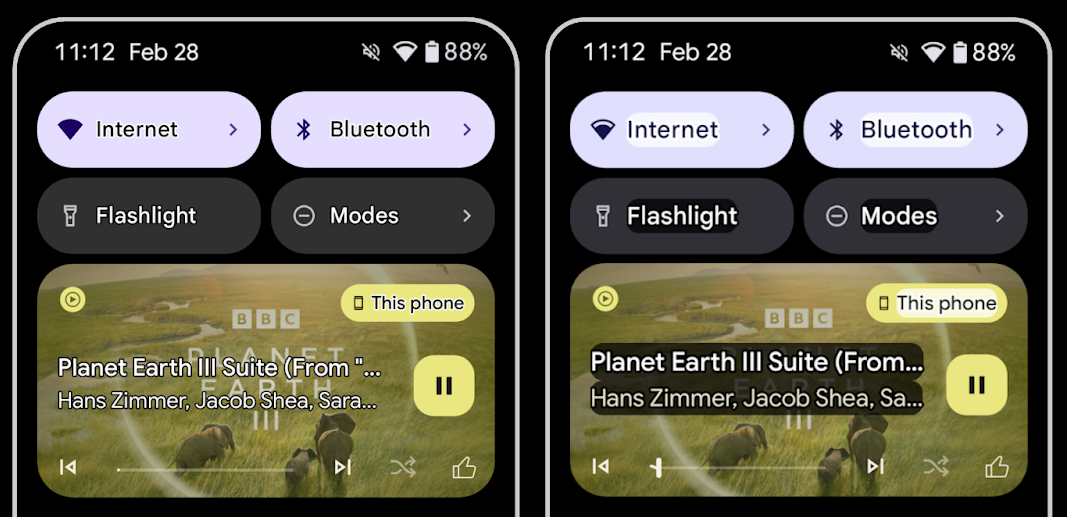
متن را برای حداکثر کنتراست متن ترسیم کنید
کاربرانی که بینایی ضعیفی دارند اغلب حساسیت کنتراست کمتری دارند که تشخیص اشیاء از پسزمینهشان دشوار است. برای کمک به این کاربران، اندروید 16 متن طرح کلی را معرفی میکند و جایگزین متن با کنتراست بالا میشود، که منطقه متضاد بزرگتری را در اطراف متن ترسیم میکند تا خوانایی را تا حد زیادی بهبود بخشد.
Android 16 حاوی API های AccessibilityManager جدیدی است که به برنامه های شما امکان می دهد شنونده را بررسی یا ثبت کنند تا ببینند آیا این حالت فعال است یا خیر. این در درجه اول برای ابزارهای UI مانند Compose است تا تجربه بصری مشابهی را ارائه دهند. اگر یک کتابخانه UI Toolkit دارید یا برنامه شما رندر متن سفارشی را انجام می دهد که کلاس android.text.Layout را دور می زند، می توانید از این برای اطلاع از فعال بودن متن طرح استفاده کنید.
مدت زمان به TtsSpan اضافه شد
Android 16 TtsSpan با TYPE_DURATION ، متشکل از ARG_HOURS ، ARG_MINUTES و ARG_SECONDS گسترش میدهد. این به شما امکان میدهد مستقیماً مدت زمان را حاشیهنویسی کنید و از خروجی متن به گفتار دقیق و ثابت با سرویسهایی مانند TalkBack اطمینان حاصل کنید.
پشتیبانی از عناصر با چندین برچسب
Android در حال حاضر به عناصر UI اجازه می دهد تا برچسب دسترسی خود را از برچسب دیگری استخراج کنند، و اکنون این امکان را برای چندین برچسب ارائه می دهد که یک سناریوی رایج در محتوای وب است. با معرفی یک API مبتنی بر فهرست در AccessibilityNodeInfo ، Android میتواند مستقیماً از این روابط چند برچسبی پشتیبانی کند. به عنوان بخشی از این تغییر، AccessibilityNodeInfo#setLabeledBy و #getLabeledBy را به نفع #addLabeledBy ، #removeLabeledBy و #getLabeledByList منسوخ کردیم.
پشتیبانی بهبود یافته برای عناصر قابل گسترش
Android 16 APIهای دسترسپذیری را اضافه میکند که به شما امکان میدهد حالت گسترده یا جمعشده عناصر تعاملی، مانند منوها و لیستهای قابل ارتقا را منتقل کنید. با تنظیم حالت گسترش یافته با استفاده از setExpandedState و ارسال TYPE_WINDOW_CONTENT_CHANGED AccessibilityEvents با نوع تغییر محتوا CONTENT_CHANGE_TYPE_EXPANDED ، می توانید اطمینان حاصل کنید که صفحه خوان هایی مانند TalkBack تغییرات وضعیت را اعلام می کنند و تجربه کاربری بصری و فراگیرتری را ارائه می دهند.
نوارهای پیشرفت نامشخص
Android 16 RANGE_TYPE_INDETERMINATE اضافه میکند و راهی را برای شما فراهم میکند تا RangeInfo برای ویجتهای ProgressBar معین و نامشخص در معرض نمایش قرار دهید، و به سرویسهایی مانند TalkBack اجازه میدهد تا بازخورد بیشتری برای شاخصهای پیشرفت ارائه دهند.
چک باکس سه حالته
روشهای جدید AccessibilityNodeInfo getChecked و setChecked(int) در اندروید 16 اکنون علاوه بر علامتگذاری شده و علامتنخورده، از حالت «تا حدی بررسی شده» نیز پشتیبانی میکنند. این جایگزین بولی منسوخ شده isChecked و setChecked(boolean) .
توضیحات تکمیلی
وقتی یک سرویس دسترسپذیری یک ViewGroup را توصیف میکند، برچسبهای محتوا را از نماهای فرزند خود ترکیب میکند. اگر یک contentDescription برای ViewGroup ارائه میکنید، سرویسهای دسترسپذیری فرض میکنند که شرح نماهای فرزند غیرقابل تمرکز را نیز نادیده میگیرید. اگر بخواهید مواردی مانند کشویی (مثلاً "Font Family") را با حفظ انتخاب فعلی برای دسترسی (مثلاً "Roboto") برچسب گذاری کنید، می تواند مشکل ساز باشد. Android 16 setSupplementalDescription اضافه میکند تا بتوانید متنی را ارائه کنید که اطلاعاتی درباره یک ViewGroup ارائه میکند بدون اینکه اطلاعاتی را از فرزندان آن حذف کنید.
فیلدهای فرم مورد نیاز
Android 16 setFieldRequired به AccessibilityNodeInfo اضافه میکند تا برنامهها بتوانند به سرویس دسترسپذیری اطلاع دهند که وارد فیلد فرم لازم است. این یک سناریوی مهم برای کاربرانی است که انواع بسیاری از فرمها را پر میکنند، حتی موارد سادهای مانند چک باکس شرایط و ضوابط الزامی، و به کاربران کمک میکند تا به طور مداوم بین فیلدهای مورد نیاز را شناسایی کرده و به سرعت حرکت کنند.
تلفن به عنوان ورودی میکروفون برای تماسهای صوتی با سمعکهای LEA
اندروید 16 این قابلیت را به کاربران سمعک LE Audio اضافه می کند تا بین میکروفون های داخلی سمعک و میکروفون تلفن خود برای تماس صوتی جابجا شوند. این میتواند در محیطهای پر سر و صدا یا سایر موقعیتهایی که میکروفونهای سمعک عملکرد خوبی ندارند، مفید باشد.
کنترلهای صدای محیط برای سمعکهای LEA
اندروید 16 این قابلیت را به کاربران سمعک LE Audio اضافه می کند تا میزان صدای محیطی را که توسط میکروفون های سمعک دریافت می شود تنظیم کنند. این می تواند در شرایطی که نویز پس زمینه خیلی بلند یا خیلی آرام است مفید باشد.
دوربین
اندروید ۱۶ پشتیبانی از کاربران حرفهای دوربین را بهبود میبخشد و امکان نوردهی خودکار هیبریدی را به همراه تنظیم دقیق دمای رنگ و رنگ فراهم میکند. یک نشانگر جدید حالت شب به برنامه شما کمک میکند تا بداند چه زمانی به حالت شب دوربین تغییر وضعیت دهد و چه زمانی از آن خارج شود. اقدامات جدید Intent گرفتن عکسهای متحرک را آسانتر میکند و ما همچنان به بهبود تصاویر UltraHDR با پشتیبانی از رمزگذاری HEIC و پارامترهای جدید از پیشنویس استاندارد ISO 21496-1 ادامه میدهیم.
نوردهی خودکار هیبریدی
اندروید 16 حالتهای نوردهی خودکار ترکیبی جدیدی را به Camera2 اضافه میکند و به شما این امکان را میدهد تا جنبههای خاصی از نوردهی را به صورت دستی کنترل کنید در حالی که به الگوریتم نوردهی خودکار (AE) اجازه میدهید بقیه موارد را کنترل کند. میتوانید ISO + AE و زمان نوردهی + AE را کنترل کنید، که انعطافپذیری بیشتری را در مقایسه با رویکرد فعلی که در آن کنترل دستی کامل دارید یا کاملاً به نوردهی خودکار متکی هستید، ارائه میکنید.
fun setISOPriority() {
    // ... (Your existing code before the snippet) ...

    val availablePriorityModes = mStaticInfo.characteristics.get(
        CameraCharacteristics.CONTROL_AE_AVAILABLE_PRIORITY_MODES
    )

    // ... (Your existing code between the snippets) ...

    // Turn on AE mode to set priority mode
    reqBuilder.set(
        CaptureRequest.CONTROL_AE_MODE,
        CameraMetadata.CONTROL_AE_MODE_ON
    )
    reqBuilder.set(
        CaptureRequest.CONTROL_AE_PRIORITY_MODE,
        CameraMetadata.CONTROL_AE_PRIORITY_MODE_SENSOR_SENSITIVITY_PRIORITY
    )
    reqBuilder.set(
        CaptureRequest.SENSOR_SENSITIVITY,
        TEST_SENSITIVITY_VALUE
    )
    val request: CaptureRequest = reqBuilder.build()

    // ... (Your existing code after the snippet) ...
}
تنظیم دقیق دمای رنگ و ته رنگ
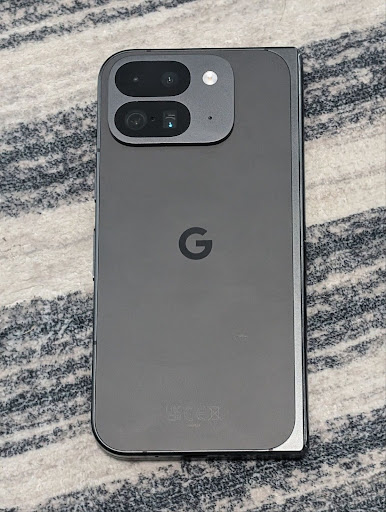
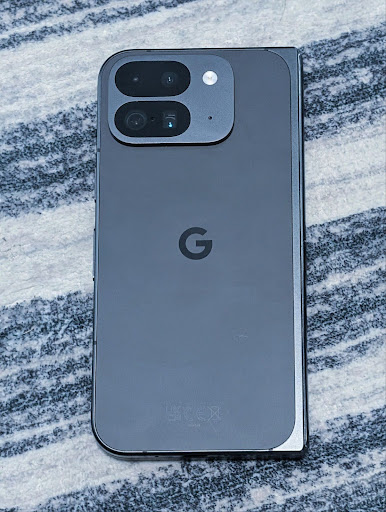
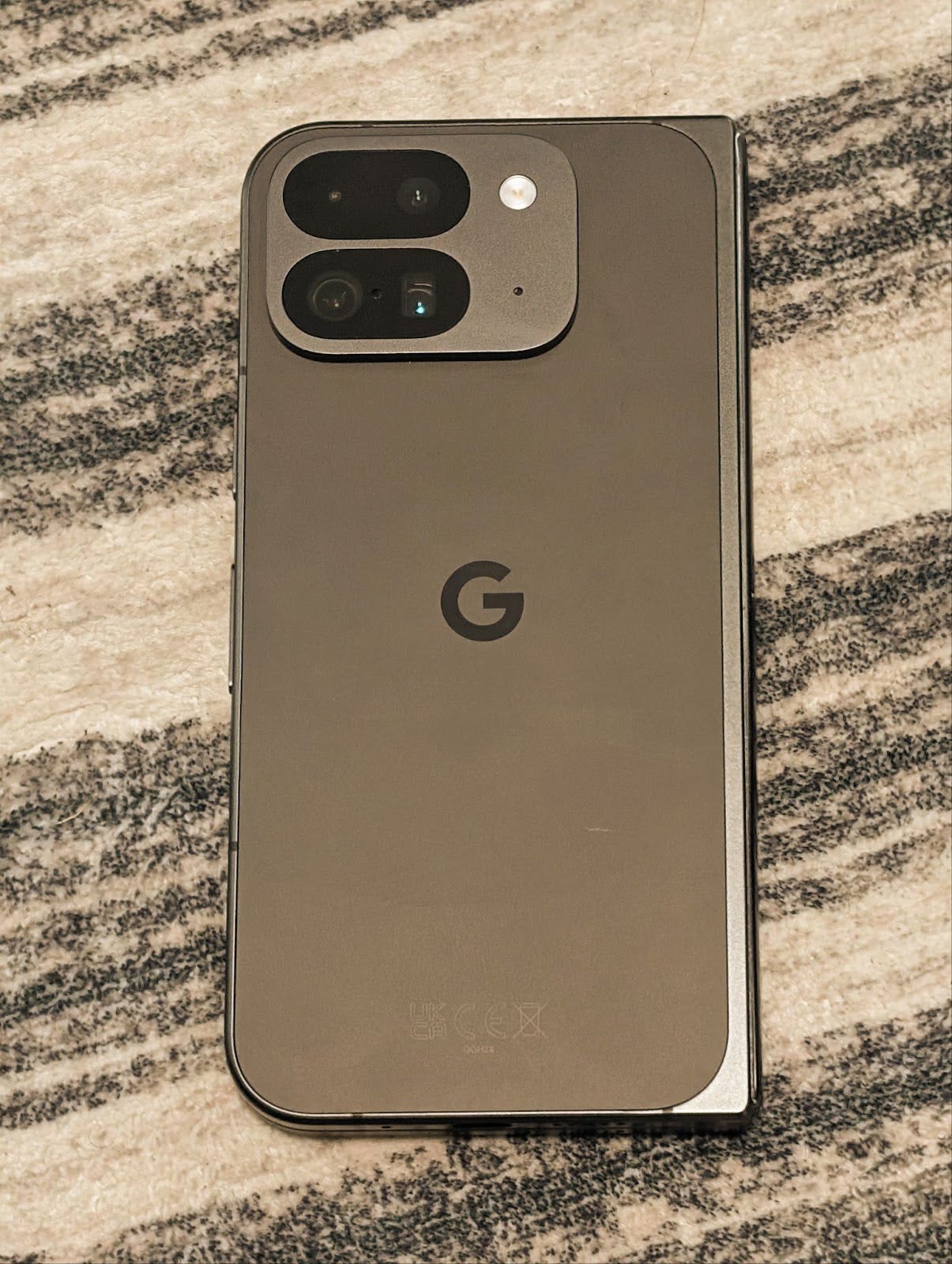
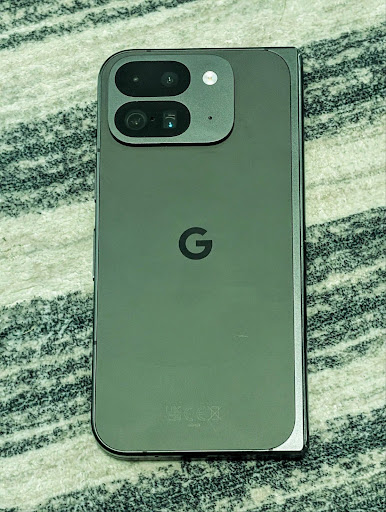
اندروید 16 برای پشتیبانی بهتر از برنامههای فیلمبرداری حرفهای، پشتیبانی دوربین را برای تنظیم دمای رنگ و رنگ خوب اضافه میکند. در نسخههای قبلی اندروید، میتوانید تنظیمات تراز سفیدی را از طریق CONTROL_AWB_MODE کنترل کنید، که شامل گزینههایی محدود به یک لیست از پیش تعیین شده، مانند رشتهای ، ابری ، و گرگ و میش است. COLOR_CORRECTION_MODE_CCT استفاده از COLOR_CORRECTION_COLOR_TEMPERATURE و COLOR_CORRECTION_COLOR_TINT را برای تنظیمات دقیق تراز سفیدی بر اساس دمای رنگ مرتبط امکانپذیر میسازد.
fun setCCT() {
    // ... (Your existing code before this point) ...

    val colorTemperatureRange: Range<Int> =
        mStaticInfo.characteristics[CameraCharacteristics.COLOR_CORRECTION_COLOR_TEMPERATURE_RANGE]

    // Set to manual mode to enable CCT mode
    reqBuilder[CaptureRequest.CONTROL_AWB_MODE] = CameraMetadata.CONTROL_AWB_MODE_OFF
    reqBuilder[CaptureRequest.COLOR_CORRECTION_MODE] = CameraMetadata.COLOR_CORRECTION_MODE_CCT
    reqBuilder[CaptureRequest.COLOR_CORRECTION_COLOR_TEMPERATURE] = 5000
    reqBuilder[CaptureRequest.COLOR_CORRECTION_COLOR_TINT] = 30

    val request: CaptureRequest = reqBuilder.build()

    // ... (Your existing code after this point) ...
}
مثالهای زیر نشان میدهند که یک عکس پس از اعمال تنظیمات مختلف دمای رنگ و رنگ چگونه به نظر میرسد:
تشخیص صحنه در حالت شب دوربین
برای کمک به برنامه شما برای اینکه بداند چه زمانی باید به یک جلسه دوربین در حالت شب بروید و از آن استفاده کنید، Android 16 EXTENSION_NIGHT_MODE_INDICATOR را اضافه میکند. در صورت پشتیبانی، در CaptureResult در Camera2 موجود است.
این API است که به طور خلاصه به آن اشاره کردیم که به زودی در پست وبلاگ چگونه اینستاگرام به کاربران امکان می دهد عکس های خیره کننده ای در نور کم بگیرند . آن پست یک راهنمای عملی در مورد نحوه پیادهسازی حالت شب همراه با مطالعه موردی است که عکسهای حالت شب درون برنامهای با کیفیت بالاتر را با افزایش تعداد عکسهای به اشتراک گذاشته شده از دوربین درونبرنامه مرتبط میکند.
اقدامات مربوط به قصد ثبت عکس متحرک
Android 16 اقدامات استاندارد Intent را اضافه میکند - ACTION_MOTION_PHOTO_CAPTURE و ACTION_MOTION_PHOTO_CAPTURE_SECURE - که از برنامه دوربین درخواست میکند یک عکس متحرک بگیرد و آن را برگرداند.
یا باید یک EXTRA_OUTPUT اضافی برای کنترل محل نوشته شدن تصویر ارسال کنید، یا یک Uri از طریق Intent.setClipData(ClipData) . اگر ClipData تنظیم نکنید، هنگام تماس با Context.startActivity(Intent) برای شما کپی می شود.
بهبود تصاویر با فناوری UltraHDR
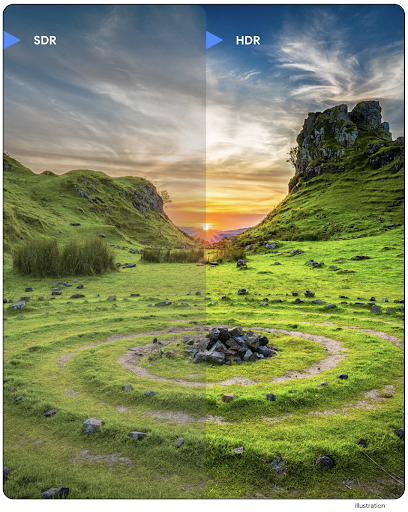
Android 16 به کار ما برای ارائه کیفیت تصویر خیره کننده با تصاویر UltraHDR ادامه می دهد. پشتیبانی از تصاویر UltraHDR در فرمت فایل HEIC را اضافه می کند. این تصاویر نوع ImageFormat HEIC_ULTRAHDR را دریافت خواهند کرد و دارای یک نقشه ی تعبیه شده مشابه فرمت UltraHDR JPEG موجود خواهند بود. ما در حال کار بر روی پشتیبانی AVIF برای UltraHDR نیز هستیم، پس با ما همراه باشید.
علاوه بر این، Android 16 پارامترهای اضافی را در UltraHDR از استاندارد پیشنویس ISO 21496-1 پیادهسازی میکند، از جمله توانایی دریافت و تنظیم فضای رنگی که ریاضیات gainmap باید در آن اعمال شود، و همچنین پشتیبانی از تصاویر پایه کدگذاریشده HDR با بهرهبرداری SDR.
گرافیک
اندروید ۱۶ شامل جدیدترین پیشرفتهای گرافیکی، مانند جلوههای گرافیکی سفارشی با AGSL است.
جلوههای گرافیکی سفارشی با AGSL
اندروید 16 RuntimeColorFilter و RuntimeXfermode اضافه میکند که به شما امکان میدهد جلوههای پیچیدهای مانند Threshold، Sepia و Hue Saturation بنویسید و آنها را برای کشیدن تماسها اعمال کنید. از Android 13، میتوانید از AGSL برای ایجاد RuntimeShader سفارشی که Shader گسترش میدهند، استفاده کنید. API جدید این موضوع را منعکس میکند و یک RuntimeColorFilter مجهز به AGSL اضافه میکند که ColorFilter را گسترش میدهد، و یک افکت Xfermode که به شما امکان میدهد ترکیب سفارشی مبتنی بر AGSL و ترکیب بین پیکسلهای مبدا و مقصد را اجرا کنید.
private val thresholdEffectString = """
    uniform half threshold;

    half4 main(half4 c) {
        half luminosity = dot(c.rgb, half3(0.2126, 0.7152, 0.0722));
        half bw = step(threshold, luminosity);
        return bw.xxx1 * c.a;
    }"""

fun setCustomColorFilter(paint: Paint) {
   val filter = RuntimeColorFilter(thresholdEffectString)
   filter.setFloatUniform(0.5);
   paint.colorFilter = filter
}
اتصال
اندروید ۱۶ پلتفرم را بهروزرسانی میکند تا به برنامه شما امکان دسترسی به آخرین پیشرفتها در فناوریهای ارتباطی و بیسیم را بدهد.
محدودهبندی با امنیت پیشرفته
Android 16 پشتیبانی از ویژگیهای امنیتی قوی در مکان Wi-Fi را در دستگاههای پشتیبانیشده با Wi-Fi 6 802.11az اضافه میکند و به برنامهها اجازه میدهد تا دقت بالاتر، مقیاسپذیری بیشتر و زمانبندی پویا پروتکل را با پیشرفتهای امنیتی از جمله مبتنی بر AES-256 ترکیب کنند. رمزگذاری و محافظت در برابر حملات MITM. این امکان استفاده ایمنتر از آن را در موارد استفاده از مجاورت، مانند باز کردن قفل لپتاپ یا درب خودرو فراهم میکند. 802.11az با استاندارد Wi-Fi 6 ادغام شده است و از زیرساخت ها و قابلیت های آن برای پذیرش گسترده تر و استقرار آسان تر استفاده می کند.
APIهای عمومیِ محدودهبندیشده
اندروید 16 شامل RangingManager جدید است که راه هایی برای تعیین فاصله و زاویه روی سخت افزار پشتیبانی شده بین دستگاه محلی و دستگاه راه دور ارائه می دهد. RangingManager از استفاده از انواع فناوری های محدوده مانند صدای کانال BLE، محدوده مبتنی بر BLE RSSI، Ultra Wideband و زمان رفت و برگشت Wi-Fi پشتیبانی می کند.
حضور دستگاه مدیر دستگاه همراه
در اندروید 16، API های جدیدی برای اتصال به سرویس برنامه همراه شما معرفی می شوند. هنگامی که BLE در محدوده باشد و بلوتوث وصل باشد، سرویس محدود می شود و زمانی که BLE خارج از محدوده باشد یا بلوتوث قطع شده باشد، سرویس قطع خواهد شد. برنامه یک "onDevicePresenceEvent()" جدید بر اساس انواع DevicePresenceEvent دریافت می کند. جزئیات بیشتر را می توان در 'startObservingDevicePresence(ObservingDevicePresenceRequest)' یافت.
رسانه
اندروید ۱۶ شامل ویژگیهای متنوعی است که تجربه رسانهای را بهبود میبخشد.
بهبودهای انتخابگر عکس
انتخابگر عکس راهی ایمن و داخلی را در اختیار کاربران قرار میدهد تا به برنامه شما اجازه دسترسی به تصاویر و ویدیوهای انتخابی از فضای ذخیرهسازی محلی و ابری را به جای کل کتابخانه رسانهای خود بدهد. با استفاده از ترکیبی از اجزای سیستم مدولار از طریق بهروزرسانیهای سیستم Google و سرویسهای Google Play ، به Android 4.4 (سطح API 19) پشتیبانی میشود. ادغام فقط به چند خط کد با کتابخانه Android Jetpack مرتبط نیاز دارد.
اندروید 16 شامل بهبودهای زیر در انتخابگر عکس است:
- انتخابگر عکس جاسازی شده : API های جدیدی که برنامه ها را قادر می سازد انتخابگر عکس را در سلسله مراتب نمای خود جاسازی کنند. این به آن اجازه می دهد تا مانند یک بخش یکپارچه تر از برنامه احساس کند در حالی که همچنان از جداسازی فرآیند استفاده می کند که به کاربران امکان می دهد رسانه ها را بدون نیاز به مجوزهای بیش از حد گسترده انتخاب کنند. برای به حداکثر رساندن سازگاری در نسخههای پلتفرم و سادهسازی یکپارچهسازی خود، اگر میخواهید انتخابگر عکس تعبیهشده را ادغام کنید، باید از کتابخانه Jetpack اندروید آینده استفاده کنید.
- جستجوی ابری در انتخابگر عکس : APIهای جدیدی که جستجو از ارائه دهنده رسانه ابری را برای انتخابگر عکس Android امکان پذیر می کند . قابلیت جستجو در انتخابگر عکس به زودی ارائه می شود.
ویدیوی حرفهای پیشرفته
اندروید 16 پشتیبانی از کدک ویدیوی حرفه ای پیشرفته (APV) را معرفی می کند که برای ضبط ویدیو با کیفیت بالا و تولید پست در سطح حرفه ای طراحی شده است.
استاندارد کدک APV دارای ویژگی های زیر است:
- کیفیت ویدیوی بدون افت ادراکی (نزدیک به کیفیت ویدیوی خام)
- کدنویسی فقط درون فریم با پیچیدگی کم و توان عملیاتی بالا (بدون پیشبینی دامنه پیکسل) برای پشتیبانی بهتر از جریانهای کاری ویرایش
- پشتیبانی از محدوده نرخ بیت بالا تا چند گیگابیت در ثانیه برای محتوای با وضوح 2K، 4K و 8K، که توسط یک طرح کدگذاری آنتروپی سبک وزن فعال شده است.
- کاشی کاری قاب برای محتوای همه جانبه و برای فعال کردن رمزگذاری و رمزگشایی موازی
- پشتیبانی از فرمت های مختلف نمونه برداری رنگی و عمق بیت
- پشتیبانی از رمزگشایی چندگانه و رمزگذاری مجدد بدون کاهش شدید کیفیت بصری
- از ویدئوی چند نمایشی و ویدئوی کمکی مانند عمق، آلفا و پیشنمایش پشتیبانی کنید
- پشتیبانی از HDR10/10+ و ابرداده های تعریف شده توسط کاربر
پیاده سازی مرجع APV از طریق پروژه OpenAPV ارائه شده است. اندروید 16 از نمایه APV 422-10 پشتیبانی میکند که نمونهبرداری رنگی YUV 422 را به همراه رمزگذاری 10 بیتی و نرخ بیت هدف تا 2 گیگابیت در ثانیه ارائه میکند.
حریم خصوصی
اندروید ۱۶ شامل ویژگیهای متنوعی است که به توسعهدهندگان برنامهها کمک میکند تا از حریم خصوصی کاربران محافظت کنند.
بهروزرسانیهای Health Connect
Health Connect ACTIVITY_INTENSITY را اضافه می کند، یک نوع داده که بر اساس دستورالعمل های سازمان بهداشت جهانی در مورد فعالیت متوسط و شدید تعریف شده است. هر رکورد به زمان شروع، زمان پایان و اینکه آیا شدت فعالیت متوسط یا شدید است نیاز دارد.
Health Connect همچنین حاوی API های به روز شده ای است که از سوابق پزشکی پشتیبانی می کنند. این به برنامهها اجازه میدهد سوابق پزشکی را در قالب FHIR با رضایت صریح کاربر بخوانند و بنویسند.
سندباکس حریم خصوصی در اندروید
Android 16 دارای آخرین نسخه Privacy Sandbox در Android است که بخشی از کار مداوم ما برای توسعه فناوریهایی است که کاربران بدانند حریم خصوصی آنها محافظت میشود. وبسایت ما اطلاعات بیشتری درباره برنامه بتای برنامهنویس Android Privacy Sandbox دارد تا به شما در شروع کار کمک کند. SDK Runtime را بررسی کنید که به SDK ها اجازه می دهد در یک محیط زمان اجرا اختصاصی جدا از برنامه ای که در حال ارائه آن هستند اجرا شوند، و حفاظت های قوی تری در مورد جمع آوری و به اشتراک گذاری داده های کاربر ارائه می دهد.
امنیت
اندروید ۱۶ شامل ویژگیهایی است که به شما کمک میکند امنیت برنامه خود را افزایش داده و از دادههای برنامه خود محافظت کنید.
API اشتراکگذاری کلید
Android 16 API هایی را اضافه می کند که از دسترسی به اشتراک گذاری کلیدهای Android Keystore با سایر برنامه ها پشتیبانی می کنند. کلاس جدید KeyStoreManager از اعطای و لغو دسترسی به کلیدها توسط اپلیکیشن uid پشتیبانی میکند و شامل یک API برای برنامهها برای دسترسی به کلیدهای مشترک است.
فاکتورهای شکل دستگاه
اندروید ۱۶ به برنامههای شما این پشتیبانی را میدهد تا از فرمفکتورهای اندروید نهایت استفاده را ببرند.
چارچوب استاندارد کیفیت تصویر و صدا برای تلویزیونها
بسته MediaQuality جدید در اندروید 16 مجموعهای از APIهای استاندارد شده را برای دسترسی به پروفایلهای صوتی و تصویری و تنظیمات مربوط به سختافزار در معرض دید قرار میدهد. این به برنامههای پخش جریانی اجازه میدهد تا نمایهها را پرس و جو کرده و آنها را به صورت پویا در رسانه اعمال کنند:
- فیلمهایی که با دامنه دینامیکی وسیعتر تسلط دارند، برای دیدن جزئیات ظریف در سایهها و تنظیم با نور محیط، به دقت رنگ بیشتری نیاز دارند، بنابراین نمایهای که دقت رنگ را بر روشنایی ترجیح میدهد مناسب باشد.
- رویدادهای ورزشی زنده اغلب با محدوده دینامیکی باریک تسلط دارند، اما اغلب در نور روز تماشا میشوند، بنابراین نمایهای که روشنایی را بر دقت رنگ ترجیح میدهد، میتواند نتایج بهتری به همراه داشته باشد.
- محتوای کاملاً تعاملی حداقل پردازش را برای کاهش تأخیر میخواهد و نرخ فریم بالاتری میخواهد، به همین دلیل است که بسیاری از تلویزیونها با نمایه بازی عرضه میشوند.
API به برنامهها اجازه میدهد بین پروفایلها و کاربران جابهجا شوند تا از تنظیم تلویزیونهای پشتیبانیشده برای مطابقت با محتوای آنها لذت ببرند.
بینالمللیسازی
اندروید ۱۶ ویژگیها و قابلیتهایی را اضافه میکند که هنگام استفاده از دستگاه به زبانهای مختلف، تجربه کاربری را تکمیل میکنند.
متن عمودی
اندروید 16 پشتیبانی سطح پایینی را برای رندر و اندازه گیری متن به صورت عمودی اضافه می کند تا پشتیبانی از نوشتن عمودی اساسی را برای توسعه دهندگان کتابخانه فراهم کند. این به ویژه برای زبان هایی مانند ژاپنی که معمولاً از سیستم های نوشتاری عمودی استفاده می کنند مفید است. یک پرچم جدید، VERTICAL_TEXT_FLAG ، به کلاس Paint اضافه شده است. وقتی این پرچم با استفاده از Paint.setFlags تنظیم میشود، APIهای اندازهگیری متن Paint پیشرفتهای عمودی را به جای پیشرفتهای افقی گزارش میکنند و Canvas متن را به صورت عمودی ترسیم میکند.
val text = "「春は、曙。」"
Box(
    Modifier.padding(innerPadding).background(Color.White).fillMaxSize().drawWithContent {
        drawIntoCanvas { canvas ->
            val paint = Paint().apply { textSize = 64.sp.toPx() }
            // Draw text vertically
            paint.flags = paint.flags or VERTICAL_TEXT_FLAG
            val height = paint.measureText(text)
            canvas.nativeCanvas.drawText(
                text,
                0,
                text.length,
                size.width / 2,
                (size.height - height) / 2,
                paint
            )
        }
    }
) {}
سفارشی سازی سیستم اندازه گیری
کاربران اکنون می توانند سیستم اندازه گیری خود را در تنظیمات برگزیده منطقه ای در تنظیمات سفارشی کنند. تنظیمات برگزیده کاربر به عنوان بخشی از کد محلی گنجانده شده است، بنابراین میتوانید یک BroadcastReceiver در ACTION_LOCALE_CHANGED ثبت کنید تا با تغییر تنظیمات منطقهای، تغییرات پیکربندی منطقه را مدیریت کند.
استفاده از قالبکنندهها میتواند به تطابق با تجربه محلی کمک کند. به عنوان مثال، "0.5 اینچ" در انگلیسی (ایالات متحده)، "12.7 میلی متر" برای کاربری است که تلفن خود را روی انگلیسی (دانمارک) تنظیم کرده است یا از تلفن خود به زبان انگلیسی (ایالات متحده) با سیستم متریک به عنوان اولویت سیستم اندازه گیری استفاده می کند.
برای پیدا کردن این تنظیمات، برنامه تنظیمات را باز کنید و به سیستم > زبانها و منطقه بروید.