

Android 16 では、デベロッパー向けに優れた新しい機能と API が導入されました。以下のセクションでは、これらの機能の概要を説明し、関連する API を使い始めるうえで役立つ情報を提供します。
新しい API、変更された API、削除された API の一覧については、API 差分レポートをご覧ください。新しい API について詳しくは、Android API リファレンスをご覧ください。新しい API は、見つけやすいようにハイライト表示されています。また、プラットフォームの変更がアプリに影響する可能性がある領域も確認する必要があります。詳しくは次のページをご覧ください。
コア機能
Android には、Android システムのコア機能を拡張する新しい API が含まれています。
2025 年に 2 つの Android API リリース
- このプレビューは、2025 年第 2 四半期にリリースが予定されている Android の次のメジャー リリースを対象としています。このリリースは、過去のすべての API リリースと同様に、targetSdkVersion に関連付けられている動作の変更を計画できます。
- エコシステム全体のデバイスのリリース スケジュールに合わせて、メジャー リリースを 1 四半期前倒し(昨年は第 3 四半期でしたが、今年は第 2 四半期)に予定しています。これにより、より多くのデバイスで Android のメジャー リリースを早期に利用できるようになります。メジャー リリースが第 2 四半期に予定されているため、アプリの準備状況を確認するために、年次互換性テストを例年より数か月早く実施する必要があります。
- 2025 年第 4 四半期に、新しいデベロッパー API も含めて、さらにリリースする予定です。2025 年にアプリに影響する可能性がある動作変更が予定されているリリースは、第 2 四半期のメジャー リリースのみです。
4 四半期のマイナー リリースでは、新しいデベロッパー API に加え、機能のアップデート、最適化、バグの修正が含まれます。アプリに影響する動作の変更は含まれません。
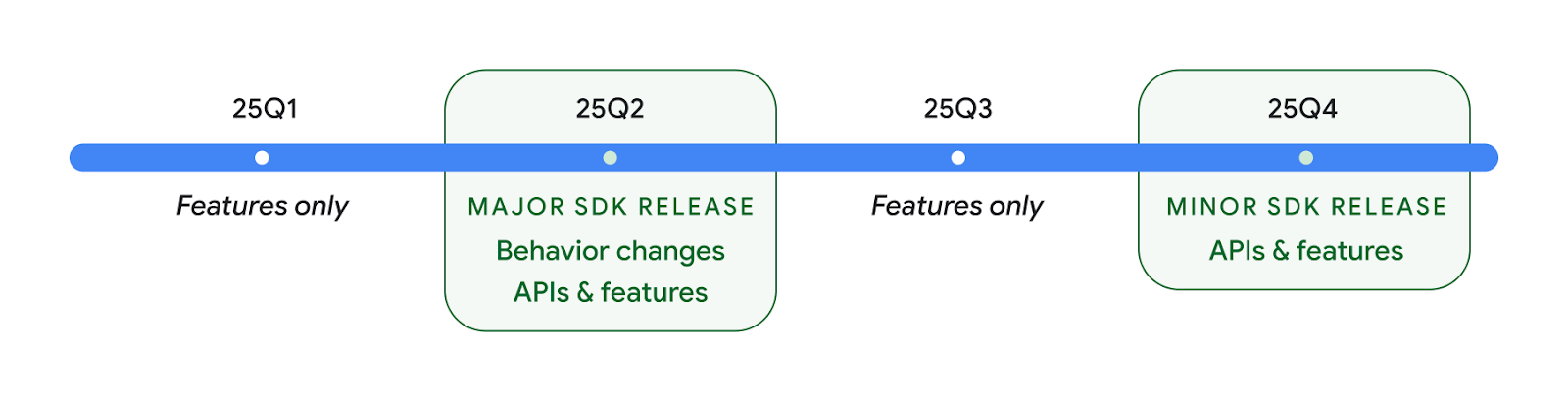
Android のリリースは引き続き四半期ごとに行われます。API リリース間の Q1 と Q3 のアップデートでは、継続的な品質を確保するために増分アップデートが提供されます。Google は、できるだけ多くのデバイスに Q2 リリースを導入できるよう、デバイス パートナーと積極的に連携しています。
メジャー リリースとマイナー リリースで新しい API を使用する
現在、API レベルのチェックでコードブロックを保護するには、VERSION_CODES で SDK_INT 定数を使用します。これは、Android のメジャー リリースで引き続きサポートされます。
if (SDK_INT >= VERSION_CODES.BAKLAVA) {
  // Use APIs introduced in Android 16
}
新しい SDK_INT_FULL 定数は、新しい VERSION_CODES_FULL 列挙型を使用して、メジャー バージョンとマイナー バージョンの両方に対する API チェックに使用できます。
if (SDK_INT_FULL >= VERSION_CODES_FULL.[MAJOR or MINOR RELEASE]) {
  // Use APIs introduced in a major or minor release
}
Build.getMinorSdkVersion() メソッドを使用して、マイナー SDK バージョンのみを取得することもできます。
val minorSdkVersion = Build.getMinorSdkVersion(VERSION_CODES_FULL.BAKLAVA)
これらの API は未確定であり、変更される可能性があります。ご不明な点がございましたら、フィードバックをお送りください。
ユーザー エクスペリエンスとシステム UI
Android 16 では、アプリ デベロッパーとユーザーがニーズに合わせてデバイスを構成するための制御と柔軟性が向上しています。
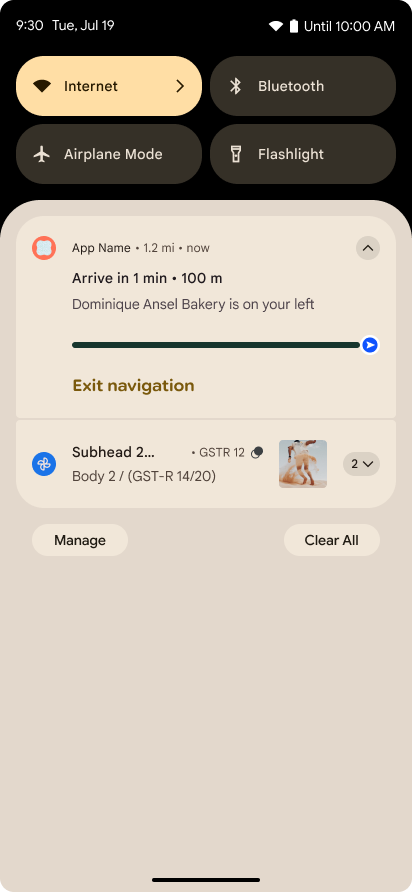
進行状況を中心とした通知
Android 16 introduces progress-centric notifications to help users seamlessly track user-initiated, start-to-end journeys.
Notification.ProgressStyle is a new notification
style that lets you create progress-centric notifications. Key use cases include
rideshare, delivery, and navigation. Within the Notification.ProgressStyle
class, you can denote states and milestones in a user journey using
points and segments.
To learn more, see the Progress-centric notifications documentation page.

予測型「戻る」のアップデート
Android 16 では、ジェスチャー ナビゲーション(ホームに戻るアニメーションなど)で予測型「戻る」システム アニメーションを有効にするための新しい API が追加されました。新しい PRIORITY_SYSTEM_NAVIGATION_OBSERVER に onBackInvokedCallback を登録すると、システムが「戻る」ナビゲーションを処理するたびに、通常の「戻る」ナビゲーション フローに影響を与えることなく、アプリが通常の onBackInvoked 呼び出しを受け取ることができます。
Android 16 では、finishAndRemoveTaskCallback() と moveTaskToBackCallback も追加されています。これらのコールバックを OnBackInvokedDispatcher に登録することで、システムは、戻るジェスチャーが呼び出されたときに特定の動作をトリガーし、対応する事前アニメーションを再生できます。
リッチ ハプティクス
Android has exposed control over the haptic actuator ever since its inception.
Android 11 added support for more complex haptic effects that more advanced
actuators could support through
VibrationEffect.Compositions of device-defined semantic
primitives.
Android 16 adds haptic APIs that let apps define the amplitude and frequency curves of a haptic effect while abstracting away differences between device capabilities.
デベロッパーの生産性とツール
生産性を向上させるための取り組みのほとんどは、Android Studio、Jetpack Compose、Android Jetpack ライブラリなどのツールを中心に行われていますが、プラットフォームでビジョンを実現するための方法も常に探しています。
ライブ壁紙のコンテンツ処理
In Android 16, the live wallpaper framework is gaining a new content API to
address the challenges of dynamic, user-driven wallpapers. Currently, live
wallpapers incorporating user-provided content require complex, service-specific
implementations. Android 16 introduces
WallpaperDescription and
WallpaperInstance. WallpaperDescription lets you
identify distinct instances of a live wallpaper from the same service. For
example, a wallpaper that has instances on both the home screen and on the lock
screen may have unique content in both places. The wallpaper picker and
WallpaperManager use this metadata to better present
wallpapers to users, streamlining the process for you to create diverse and
personalized live wallpaper experiences.
パフォーマンスとバッテリー
Android 16 では、アプリに関する分析情報を収集するのに役立つ API が導入されています。
システム トリガー プロファイリング
ProfilingManager was
added in Android 15, giving apps the ability to
request profiling data collection using Perfetto on public devices in the field.
However, since this profiling must be started from the app, critical flows such
as startups or ANRs would be difficult or impossible for apps to capture.
To help with this, Android 16 introduces system-triggered profiling to
ProfilingManager. Apps can register interest in receiving traces for certain
triggers such as cold start reportFullyDrawn
or ANRs, and then the system starts and stops a trace on the app's behalf. After
the trace completes, the results are delivered to the app's data directory.
ApplicationStartInfo の開始コンポーネント
ApplicationStartInfo was added in Android
15, allowing an app to see reasons
for process start, start type, start times, throttling, and other useful
diagnostic data. Android 16 adds
getStartComponent()
to distinguish what component type triggered the start, which can be helpful for
optimizing the startup flow of your app.
ジョブのイントロスペクションの改善
The JobScheduler#getPendingJobReason() API returns a reason why a job
might be pending. However, a job might be pending for multiple reasons.
In Android 16, we are introducing a new API
JobScheduler#getPendingJobReasons(int jobId), which returns multiple
reasons why a job is pending, due to both explicit constraints set by the
developer and implicit constraints set by the system.
We're also introducing
JobScheduler#getPendingJobReasonsHistory(int jobId), which returns a list
of the most recent constraint changes.
We recommend using the API to help you debug why your jobs may not be executing, especially if you're seeing reduced success rates of certain tasks or have bugs around latency of certain job completion. For example, updating widgets in the background failed to occur or prefetch job failed to be called prior to app start.
This can also better help you understand if certain jobs are not completing due to system defined constraints versus explicitly set constraints.
リフレッシュ レートの自動調整
Adaptive refresh rate (ARR), introduced in Android 15, enables the display refresh rate on supported hardware to adapt to the content frame rate using discrete VSync steps. This reduces power consumption while eliminating the need for potentially jank-inducing mode-switching.
Android 16 introduces hasArrSupport() and
getSuggestedFrameRate(int) while restoring
getSupportedRefreshRates() to make it easier for your apps to take
advantage of ARR. RecyclerView
1.4 internally supports ARR when it is settling from a fling or
smooth scroll, and we're continuing our work to add ARR
support into more Jetpack libraries. This frame rate article covers
many of the APIs you can use to set the frame rate so that your app can directly
use ARR.
ADPF のヘッドルーム API
The SystemHealthManager introduces the
getCpuHeadroom and
getGpuHeadroom APIs, designed to provide games and
resource-intensive apps with estimates of available CPU and GPU resources. These
methods offer a way for you to gauge how your app or game can best improve
system health, particularly when used in conjunction with other Android Dynamic
Performance Framework (ADPF) APIs that detect thermal
throttling.
By using CpuHeadroomParams and
GpuHeadroomParams on supported devices, you can
customize the time window used to compute the headroom and select between
average or minimum resource availability. This can help you reduce your CPU or
GPU resource usage accordingly, leading to better user experiences and improved
battery life.
ユーザー補助
Android 16 では、アプリをすべてのユーザーに提供するのに役立つ新しいユーザー補助 API と機能が追加されています。
Accessibility API の改善
Android 16 adds additional APIs to enhance UI semantics that help improve consistency for users that rely on accessibility services, such as TalkBack.
Outline text for maximum text contrast
Users with low vision often have reduced contrast sensitivity, making it challenging to distinguish objects from their backgrounds. To help these users, Android 16 introduces outline text, replacing high contrast text, which draws a larger contrasting area around text to greatly improve legibility.
Android 16 contains new AccessibilityManager APIs to let
your apps check or register a listener to
see if this mode is enabled. This is primarily for UI Toolkits like Compose to
offer a similar visual experience. If you maintain a UI Toolkit library or your
app performs custom text rendering that bypasses the
android.text.Layout class then you can use this to know
when outline text is enabled.

Duration added to TtsSpan
Android 16 extends TtsSpan with a TYPE_DURATION,
consisting of ARG_HOURS, ARG_MINUTES,
and ARG_SECONDS. This lets you directly annotate time
duration, ensuring accurate and consistent text-to-speech output with services
like TalkBack.
Support elements with multiple labels
Android currently allows UI elements to derive their accessibility label from
another, and now offers the ability for multiple labels to be associated, a
common scenario in web content. By introducing a list-based API within
AccessibilityNodeInfo, Android can directly support these
multi-label relationships. As part of this change, we've deprecated
AccessibilityNodeInfo#setLabeledBy and
#getLabeledBy in favor of
#addLabeledBy, #removeLabeledBy, and
#getLabeledByList.
Improved support for expandable elements
Android 16 adds accessibility APIs that allow you to convey the expanded or
collapsed state of interactive elements, such as menus and expandable lists. By
setting the expanded state using setExpandedState and
dispatching TYPE_WINDOW_CONTENT_CHANGED AccessibilityEvents
with a CONTENT_CHANGE_TYPE_EXPANDED content change type,
you can ensure that screen readers like TalkBack announce
state changes, providing a more intuitive and inclusive user experience.
Indeterminate ProgressBars
Android 16 adds RANGE_TYPE_INDETERMINATE, giving a way for
you to expose RangeInfo for both determinate and
indeterminate ProgressBar widgets, allowing services like
TalkBack to more consistently provide feedback for progress
indicators.
Tri-state CheckBox
The new AccessibilityNodeInfo
getChecked and setChecked(int)
methods in Android 16 now support a "partially checked" state in addition to
"checked" and "unchecked." This replaces the deprecated boolean
isChecked and setChecked(boolean).
Supplemental descriptions
When an accessibility service describes a ViewGroup, it
combines content labels from its child views. If you provide a
contentDescription for the ViewGroup, accessibility services assume you are
also overriding the description of non-focusable child views. This can be
problematic if you want to label things like a drop-down (for example, "Font
Family") while preserving the current selection for accessibility (for example,
"Roboto"). Android 16 adds setSupplementalDescription so
you can provide text that provides information about a ViewGroup without
overriding information from its children.
Required form fields
Android 16 adds setFieldRequired to
AccessibilityNodeInfo so apps can tell an accessibility
service that input to a form field is required. This is an important scenario
for users filling out many types of forms, even things as simple as a required
terms and conditions checkbox, helping users to consistently identify and
quickly navigate between required fields.
LEA 補聴器を使用した音声通話で、スマートフォンをマイク入力として使用
Android 16 adds the capability for users of LE Audio hearing aids to switch between the built-in microphones on the hearing aids and the microphone on their phone for voice calls. This can be helpful in noisy environments or other situations where the hearing aid's microphones might not perform well.
LEA 補聴器の周囲の音の調整
Android 16 adds the capability for users of LE Audio hearing aids to adjust the volume of ambient sound that is picked up by the hearing aid's microphones. This can be helpful in situations where background noise is too loud or too quiet.
カメラ
Android 16 では、プロフェッショナル カメラユーザー向けのサポートが強化され、ハイブリッド自動露出と、色温度と色合いの正確な調整が可能になります。新しいナイトモード インジケーターにより、アプリはナイトモードのカメラ セッションへの切り替えのタイミングを把握できます。新しい Intent アクションにより、モーション フォトの撮影が容易になりました。また、HEIC エンコードと ISO 21496-1 ドラフト標準の新しいパラメータのサポートにより、UltraHDR 画像の改善が継続的に行われています。
ハイブリッド自動露出
Android 16 adds new hybrid auto-exposure modes to Camera2, allowing you to manually control specific aspects of exposure while letting the auto-exposure (AE) algorithm handle the rest. You can control ISO + AE, and exposure time + AE, providing greater flexibility compared to the current approach where you either have full manual control or rely entirely on auto-exposure.
fun setISOPriority() {
    // ... (Your existing code before the snippet) ...

    val availablePriorityModes = mStaticInfo.characteristics.get(
        CameraCharacteristics.CONTROL_AE_AVAILABLE_PRIORITY_MODES
    )

    // ... (Your existing code between the snippets) ...

    // Turn on AE mode to set priority mode
    reqBuilder.set(
        CaptureRequest.CONTROL_AE_MODE,
        CameraMetadata.CONTROL_AE_MODE_ON
    )
    reqBuilder.set(
        CaptureRequest.CONTROL_AE_PRIORITY_MODE,
        CameraMetadata.CONTROL_AE_PRIORITY_MODE_SENSOR_SENSITIVITY_PRIORITY
    )
    reqBuilder.set(
        CaptureRequest.SENSOR_SENSITIVITY,
        TEST_SENSITIVITY_VALUE
    )
    val request: CaptureRequest = reqBuilder.build()

    // ... (Your existing code after the snippet) ...
}
色温度と色合いを正確に調整
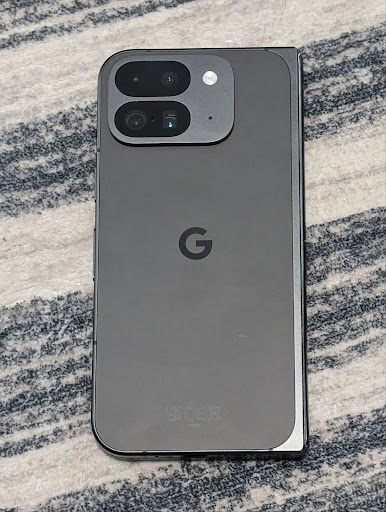
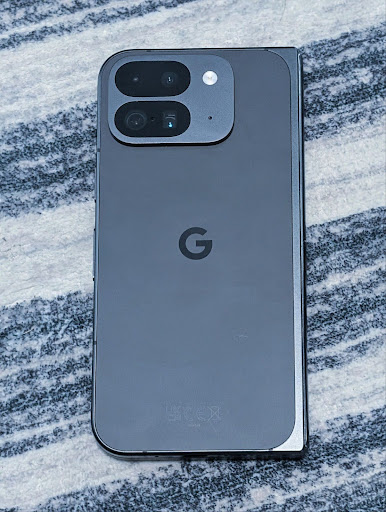
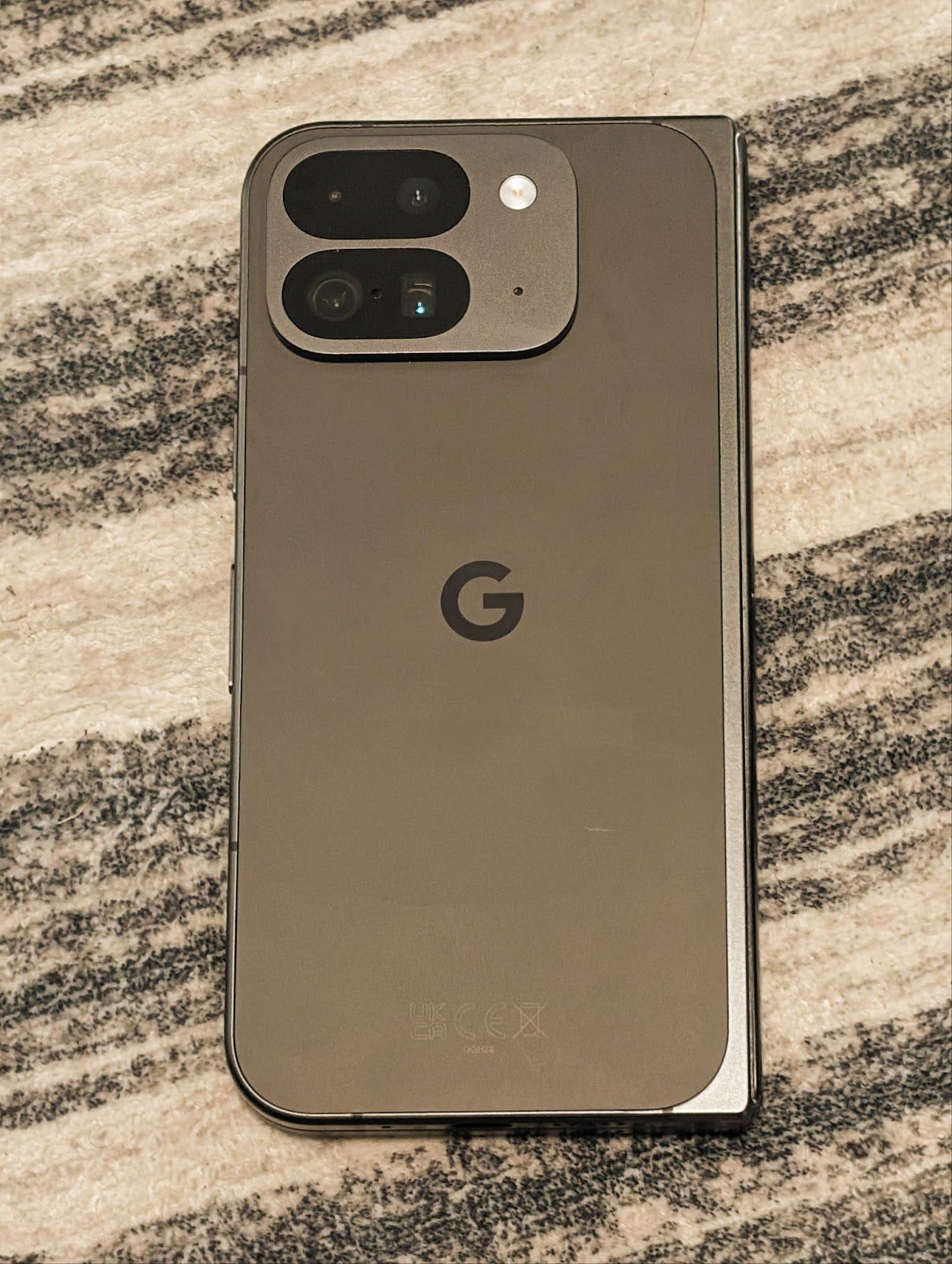
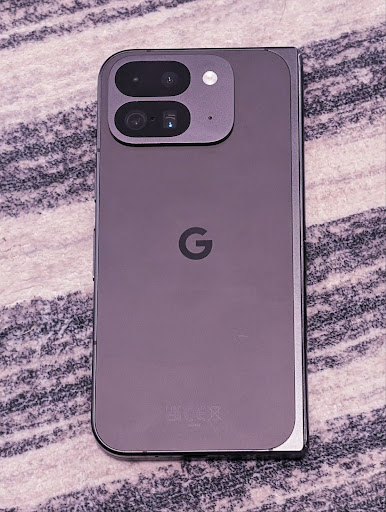
Android 16 では、プロの動画撮影アプリをより適切にサポートするために、カメラで色温度と色合いを微調整できるようになりました。以前の Android バージョンでは、CONTROL_AWB_MODE で白色バランスの設定を制御できました。CONTROL_AWB_MODE には、白熱灯、曇り、夕暮れなど、プリセット リストに限定されたオプションが含まれていました。COLOR_CORRECTION_MODE_CCT を使用すると、COLOR_CORRECTION_COLOR_TEMPERATURE と COLOR_CORRECTION_COLOR_TINT を使用して、相関色温度に基づいてホワイトバランスを正確に調整できます。
fun setCCT() {
    // ... (Your existing code before this point) ...

    val colorTemperatureRange: Range<Int> =
        mStaticInfo.characteristics[CameraCharacteristics.COLOR_CORRECTION_COLOR_TEMPERATURE_RANGE]

    // Set to manual mode to enable CCT mode
    reqBuilder[CaptureRequest.CONTROL_AWB_MODE] = CameraMetadata.CONTROL_AWB_MODE_OFF
    reqBuilder[CaptureRequest.COLOR_CORRECTION_MODE] = CameraMetadata.COLOR_CORRECTION_MODE_CCT
    reqBuilder[CaptureRequest.COLOR_CORRECTION_COLOR_TEMPERATURE] = 5000
    reqBuilder[CaptureRequest.COLOR_CORRECTION_COLOR_TINT] = 30

    val request: CaptureRequest = reqBuilder.build()

    // ... (Your existing code after this point) ...
}
次の例は、さまざまな色温度と色合いの調整を適用した写真の外観を示しています。

カメラの夜間モードのシーン検出
夜間モードのカメラ セッションとの切り替えタイミングをアプリが把握できるように、Android 16 では EXTENSION_NIGHT_MODE_INDICATOR が追加されました。サポートされている場合は、Camera2 内の CaptureResult で使用できます。
これは、Instagram でユーザーが美しい低照度写真を撮影できるようにした方法に関するブログ投稿で、近日提供予定として簡単に言及した API です。この投稿は、夜間モードを実装する方法に関する実用的なガイドです。また、アプリ内カメラで撮影された高画質の夜間モードの写真と、アプリ内カメラから共有される写真数の増加を結びつけるケーススタディも掲載されています。
モーション フォトのキャプチャ インテント アクション
Android 16 adds standard Intent actions —
ACTION_MOTION_PHOTO_CAPTURE, and
ACTION_MOTION_PHOTO_CAPTURE_SECURE — which request that
the camera application capture a motion photo and return
it.
You must either pass an extra EXTRA_OUTPUT to control
where the image will be written, or a Uri through
Intent.setClipData(ClipData). If you don't set a
ClipData, it will be copied there for you when calling
Context.startActivity(Intent).
ウルトラ HDR 画像拡張
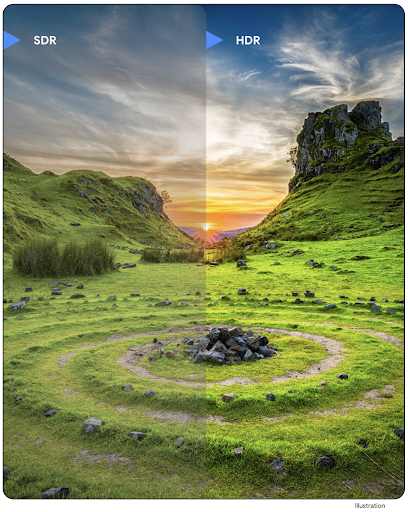
Android 16 では、UltraHDR 画像で鮮明な画質を実現するための取り組みを継続しています。HEIC ファイル形式の UltraHDR 画像のサポートが追加されました。これらの画像は ImageFormat タイプ HEIC_ULTRAHDR になり、既存の UltraHDR JPEG 形式と同様に埋め込みのゲインマップが含まれます。UltraHDR の AVIF サポートにも取り組んでおりますので、どうぞご期待ください。
さらに、Android 16 では、ISO 21496-1 ドラフト標準の UltraHDR に追加のパラメータを実装しています。これには、ゲインマップの計算を適用するカラースペースを取得して設定する機能や、SDR ゲインマップを含む HDR エンコード ベース画像のサポートが含まれます。
グラフィック
Android 16 には、AGSL を使用したカスタム グラフィック効果など、最新のグラフィックの改善が含まれています。
AGSL を使用したカスタム グラフィック効果
Android 16 adds RuntimeColorFilter and
RuntimeXfermode, allowing you to author complex effects like
Threshold, Sepia, and Hue Saturation and apply them to draw calls. Since Android
13, you've been able to use AGSL to create custom
RuntimeShaders that extend Shader. The new API
mirrors this, adding an AGSL-powered RuntimeColorFilter that
extends ColorFilter, and a Xfermode effect that
lets you implement AGSL-based custom compositing and blending between source and
destination pixels.
private val thresholdEffectString = """
    uniform half threshold;

    half4 main(half4 c) {
        half luminosity = dot(c.rgb, half3(0.2126, 0.7152, 0.0722));
        half bw = step(threshold, luminosity);
        return bw.xxx1 * c.a;
    }"""

fun setCustomColorFilter(paint: Paint) {
   val filter = RuntimeColorFilter(thresholdEffectString)
   filter.setFloatUniform(0.5);
   paint.colorFilter = filter
}
接続
Android 16 では、プラットフォームがアップデートされ、アプリで通信技術とワイヤレス技術の最新の進歩を利用できるようになります。
セキュリティ強化による測距
Android 16 では、Wi-Fi 6 の 802.11az を搭載したサポート対象デバイスの Wi-Fi 位置情報で堅牢なセキュリティ機能がサポートされるようになりました。これにより、アプリは、プロトコルの精度、スケーラビリティ、動的スケジューリングの向上と、AES-256 ベースの暗号化や MITM 攻撃からの保護などのセキュリティ強化を組み合わせることができます。これにより、ノートパソコンや車のドアのロック解除など、近接型のユースケースでより安全に使用できます。802.11az は Wi-Fi 6 規格と統合されており、そのインフラストラクチャと機能を活用することで、より広範な導入とより簡単なデプロイを実現します。
汎用的な距離測定 API
Android 16 includes the new RangingManager, which provides
ways to determine the distance and angle on supported hardware between the local
device and a remote device. RangingManager supports the usage of a variety of
ranging technologies such as BLE channel sounding, BLE RSSI-based ranging, Ultra
Wideband, and Wi-Fi round trip time.
コンパニオン デバイス マネージャーのデバイスの存在
Android 16 では、コンパニオン アプリ サービスをバインドするための新しい API が導入されています。BLE が範囲内にあり、Bluetooth が接続されている場合はサービスがバインドされ、BLE が範囲外にあるか Bluetooth が接続されていない場合はサービスがバインド解除されます。アプリは、さまざまな DevicePresenceEvent に基づいて、新しい onDevicePresenceEvent() コールバックを受け取ります。詳しくは、'startObservingDevicePresence(ObservingDevicePresenceRequest)' をご覧ください。
メディア
Android 16 には、メディア エクスペリエンスを向上させるさまざまな機能が含まれています。
写真選択ツールの改善
写真選択ツールは、メディア ライブラリ全体ではなく、ローカル ストレージとクラウド ストレージの両方から選択した画像と動画にアプリがアクセスできるようにする、安全な組み込みツールです。Google システム アップデートを介したモジュラー システム コンポーネントと Google Play 開発者サービスを組み合わせて、Android 4.4(API レベル 19)以前に対応しています。統合に必要なコードは、関連する Android Jetpack ライブラリで数行のみです。
Android 16 では、写真選択ツールが次のように改善されています。
- 埋め込み写真選択ツール: アプリがビュー階層に写真選択ツールを埋め込むことを可能にする新しい API。これにより、アプリのより統合された部分のように感じながら、プロセスの分離を活用して、アプリが過度に広範な権限を必要とせずにユーザーがメディアを選択できるようにします。埋め込みの写真選択ツールを統合する場合は、プラットフォーム バージョン間の互換性を最大限に高め、統合を簡素化するために、今後リリースされる Android Jetpack ライブラリを使用することをおすすめします。
- 写真選択ツールでの Cloud Search: Android の写真選択ツールでクラウド メディア プロバイダからの検索を可能にする新しい API。写真選択ツールの検索機能は近日提供予定です。
高度なプロフェッショナル動画
Android 16 では、プロレベルの高品質な動画の撮影とポストプロダクションに使用するように設計された Advanced Professional Video(APV)コーデックのサポートが導入されています。
APV コーデック標準には次の機能があります。
- 知覚的に損失のない動画品質(RAW 動画品質に近い)
- 複雑さが低く、スループットの高いフレーム内のみのコーディング(ピクセル ドメイン予測なし)により、編集ワークフローをより適切にサポート
- 軽量エントロピー コーディング スキームにより、2K、4K、8K 解像度のコンテンツで最大数 Gbps の高ビットレート範囲をサポート
- 没入型コンテンツと並列エンコードとデコードを可能にするフレーム タイリング
- さまざまなクロマ サンプリング形式とビット深度のサポート
- 画質の大幅な低下なしで複数のデコードと再エンコードをサポート
- マルチビュー動画と補助動画(深度、アルファ、プレビューなど)をサポートする
- HDR10/10+ とユーザー定義メタデータのサポート
APV のリファレンス実装は、OpenAPV プロジェクトで提供されています。Android 16 では、10 ビット エンコードと最大 2 Gbps のターゲット ビットレートを備えた YUV 422 カラー サンプリングを提供する APV 422-10 プロファイルのサポートが実装されます。
プライバシー
Android 16 には、アプリ デベロッパーがユーザーのプライバシーを保護するのに役立つさまざまな機能が含まれています。
ヘルスコネクトの更新
Health Connect adds ACTIVITY_INTENSITY, a data type defined according to World
Health Organization guidelines around moderate and vigorous activity. Each
record requires the start time, the end time, and whether the activity intensity
is moderate or vigorous.
Health Connect also contains updated APIs supporting medical records. This allows apps to read and write medical records in FHIR format with explicit user consent.
Android 版プライバシー サンドボックス
Android 16 incorporates the latest version of the Privacy Sandbox on Android, part of our ongoing work to develop technologies where users know their privacy is protected. Our website has more about the Privacy Sandbox on Android developer beta program to help you get started. Check out the SDK Runtime which allows SDKs to run in a dedicated runtime environment separate from the app they are serving, providing stronger safeguards around user data collection and sharing.
セキュリティ
Android 16 には、アプリのセキュリティを強化し、アプリのデータを保護するのに役立つ機能が含まれています。
キー共有 API
Android 16 adds APIs that support sharing access to
Android Keystore keys with other apps. The new
KeyStoreManager class supports
granting and revoking access to keys
by app uid, and includes an API for apps to access shared
keys.
デバイスのフォーム ファクタ
Android 16 では、Android のフォーム ファクタを最大限に活用するためのサポートがアプリに提供されます。
テレビの画質と音質の標準化されたフレームワーク
The new MediaQuality
package in Android 16 exposes
a set of standardized APIs for access to audio and picture profiles and
hardware-related settings. This allows streaming apps to query profiles and
apply them to media dynamically:
- Movies mastered with a wider dynamic range require greater color accuracy to see subtle details in shadows and adjust to ambient light, so a profile that prefers color accuracy over brightness may be appropriate.
- Live sporting events are often mastered with a narrow dynamic range, but are often watched in daylight, so a profile that preferences brightness over color accuracy can give better results.
- Fully interactive content wants minimal processing to reduce latency, and wants higher frame rates, which is why many TV's ship with a game profile.
The API allows apps to switch between profiles and users to enjoy tuning supported TVs to best suit their content.
国際化
Android 16 では、デバイスが異なる言語で使用される場合のユーザー エクスペリエンスを補完する機能が追加されています。
縦書きテキスト
Android 16 では、テキストの垂直方向のレンダリングと測定に対する低レベルのサポートが追加され、ライブラリ デベロッパー向けの基本的な垂直書き込みサポートが提供されます。これは、縦書きが一般的である日本語などの言語で特に便利です。Paint クラスに新しいフラグ VERTICAL_TEXT_FLAG が追加されました。このフラグが Paint.setFlags を使用して設定されている場合、Paint のテキスト測定 API は水平方向の移動ではなく垂直方向の移動を報告し、Canvas はテキストを垂直方向に描画します。
val text = "「春は、曙。」"
Box(
    Modifier.padding(innerPadding).background(Color.White).fillMaxSize().drawWithContent {
        drawIntoCanvas { canvas ->
            val paint = Paint().apply { textSize = 64.sp.toPx() }
            // Draw text vertically
            paint.flags = paint.flags or VERTICAL_TEXT_FLAG
            val height = paint.measureText(text)
            canvas.nativeCanvas.drawText(
                text,
                0,
                text.length,
                size.width / 2,
                (size.height - height) / 2,
                paint
            )
        }
    }
) {}
測定単位のカスタマイズ
Users can now customize their measurement system in regional preferences within
Settings. The user preference is included as part of the locale code, so you can
register a BroadcastReceiver on
ACTION_LOCALE_CHANGED to handle locale configuration changes when
regional preferences change.
Using formatters can help match the local experience. For example, "0.5 in" in English (United States), is "12,7 mm" for a user who has set their phone to English (Denmark) or who uses their phone in English (United States) with the metric system as the measurement system preference.
To find these settings, open the Settings app and navigate to System > Languages & region.