

Платформа Android 16 включает изменения в поведении, которые могут повлиять на ваше приложение. Следующие изменения в поведении применяются ко всем приложениям, работающим на Android 16, независимо от targetSdkVersion . Вам следует протестировать свое приложение, а затем внести в него необходимые изменения для поддержки этих изменений, где это применимо.
Обязательно ознакомьтесь также со списком изменений в поведении, которые затрагивают только приложения, ориентированные на Android 16 .
Основная функциональность
В Android 16 (уровень API 36) внесены следующие изменения, которые модифицируют или расширяют различные основные возможности системы Android.
Оптимизация квот JobScheduler
Starting in Android 16, we're adjusting regular and expedited job execution runtime quota based on the following factors:
- Which app standby bucket the application is in: in Android 16, active standby buckets will start being enforced by a generous runtime quota.
- If the job starts execution while the app is in a top state: in Android 16, Jobs started while the app is visible to the user and continues after the app becomes invisible, will adhere to the job runtime quota.
- If the job is executing while running a Foreground Service: in Android 16, jobs that are executing concurrently with a foreground service will adhere to the job runtime quota. If you're leveraging jobs for user initiated data transfer, consider using user initiated data transfer jobs instead.
This change impacts tasks scheduled using WorkManager, JobScheduler, and
DownloadManager. To debug why a job was stopped, we recommend logging why your
job was stopped by calling WorkInfo.getStopReason() (for
JobScheduler jobs, call JobParameters.getStopReason()).
For information about how your app's state affects the resources it can use, see Power management resource limits. For more information on battery-optimal best practices, refer to guidance on optimize battery use for task scheduling APIs.
We also recommend leveraging the new
JobScheduler#getPendingJobReasonsHistory API introduced in
Android 16 to understand why a job has not executed.
Testing
To test your app's behavior, you can enable override of certain job quota optimizations as long as the app is running on an Android 16 device.
To disable enforcement of "top state will adhere to job runtime quota", run the
following adb command:
adb shell am compat enable OVERRIDE_QUOTA_ENFORCEMENT_TO_TOP_STARTED_JOBS APP_PACKAGE_NAME
To disable enforcement of "jobs that are executing while concurrently with a
foreground service will adhere to the job runtime quota", run the following
adb command:
adb shell am compat enable OVERRIDE_QUOTA_ENFORCEMENT_TO_FGS_JOBS APP_PACKAGE_NAME
To test certain app standby bucket behavior, you can set the app standby bucket
of your app using the following adb command:
adb shell am set-standby-bucket APP_PACKAGE_NAME active|working_set|frequent|rare|restricted
To understand the app standby bucket your app is in, you can get the app standby
bucket of your app using the following adb command:
adb shell am get-standby-bucket APP_PACKAGE_NAME
Причина прекращения работы на заброшенных вакансиях
Прерванное задание происходит, когда объект JobParameters связанный с заданием, был удален, но JobService#jobFinished(JobParameters, boolean) не был вызван для сигнала о завершении задания. Это указывает на то, что задание может выполняться и перепланироваться без ведома приложения.
Приложения, использующие JobScheduler, не поддерживают строгую ссылку на объект JobParameters , и тайм-ауту теперь будет присвоена новая причина остановки задания STOP_REASON_TIMEOUT_ABANDONED вместо STOP_REASON_TIMEOUT .
Если новые причины прерванной остановки возникают часто, система предпримет меры по смягчению последствий, чтобы снизить частоту выполнения заданий.
Приложения должны использовать новую причину остановки, чтобы обнаруживать и сокращать количество заброшенных заданий.
Если вы используете WorkManager, AsyncTask или DownloadManager, на вас это не повлияет, поскольку эти API управляют жизненным циклом задания от имени вашего приложения.
Полное прекращение поддержки JobInfo#setImportantWhileForeground
Метод JobInfo.Builder#setImportantWhileForeground(boolean) указывает на важность задания, когда приложение планирования находится на переднем плане или когда временно освобождено от фоновых ограничений.
Этот метод устарел с Android 12 (уровень API 31). Начиная с Android 16, он больше не работает эффективно, и вызов этого метода будет игнорироваться.
Это удаление функциональности также применимо к JobInfo#isImportantWhileForeground() . Начиная с Android 16, при вызове метода метод возвращает false .
Область действия приоритета упорядоченной трансляции больше не является глобальной.
Приложениям Android разрешено определять приоритеты приемников вещания, чтобы контролировать порядок, в котором получатели получают и обрабатывают трансляцию. Для получателей, объявленных в манифесте, приложения могут использовать атрибут android:priority для определения приоритета, а для получателей, зарегистрированных в контексте, приложения могут использовать API IntentFilter#setPriority() для определения приоритета. При отправке широковещательной рассылки система доставляет ее получателям в порядке их приоритета, от самого высокого к самому низкому.
В Android 16 порядок широковещательной доставки с использованием атрибута android:priority или IntentFilter#setPriority() между различными процессами не гарантируется. Приоритеты вещания будут соблюдаться только в рамках одного и того же процесса подачи заявки, а не во всех процессах.
Кроме того, приоритеты вещания будут автоматически ограничены диапазоном ( SYSTEM_LOW_PRIORITY + 1, SYSTEM_HIGH_PRIORITY – 1). Только системным компонентам будет разрешено устанавливать SYSTEM_LOW_PRIORITY , SYSTEM_HIGH_PRIORITY в качестве приоритета широковещания.
Ваше приложение может пострадать, если оно выполняет одно из следующих действий:
- Ваше приложение объявило несколько процессов с одним и тем же намерением широковещания и ожидает получения этих намерений в определенном порядке в зависимости от приоритета.
- Процесс вашего приложения взаимодействует с другими процессами и ожидает получения широковещательного намерения в определенном порядке.
Если процессам необходимо координировать друг друга, им следует взаимодействовать, используя другие каналы координации.
внутренние изменения ART
Android 16 включает последние обновления среды выполнения Android (ART), которые улучшают производительность среды выполнения Android (ART) и обеспечивают поддержку дополнительных функций Java. Благодаря обновлениям системы Google Play эти улучшения также доступны более чем миллиарду устройств под управлением Android 12 (уровень API 31) и выше .
После выхода этих изменений библиотеки и код приложений, использующие внутренние структуры ART, могут работать некорректно на устройствах под управлением Android 16, а также на более ранних версиях Android, которые обновляют модуль ART через обновления системы Google Play.
Использование внутренних структур (например, интерфейсов, отличных от SDK ) всегда может привести к проблемам совместимости, но особенно важно избегать использования кода (или библиотек, содержащих код), который использует внутренние структуры ART, поскольку изменения ART не привязаны к платформе. версию, на которой работает устройство, и они распространяются на более чем миллиард устройств через обновления системы Google Play.
Всем разработчикам следует проверить, не затронуто ли их приложение, путем тщательного тестирования своих приложений на Android 16. Кроме того, проверьте известные проблемы , чтобы узнать, зависит ли ваше приложение от каких-либо выявленных нами библиотек, которые полагаются на внутренние структуры ART. Если у вас есть код приложения или зависимости библиотеки, которые затронуты, по возможности ищите альтернативы общедоступным API и запросите общедоступные API для новых вариантов использования, создав запрос функции в нашем отслеживании проблем.
режим совместимости с размером страницы 16 КБ
В Android 15 появилась поддержка страниц памяти размером 16 КБ для оптимизации производительности платформы. В Android 16 добавлен режим совместимости , позволяющий запускать некоторые приложения, созданные для страниц памяти размером 4 КБ, на устройстве, настроенном для страниц памяти 16 КБ.
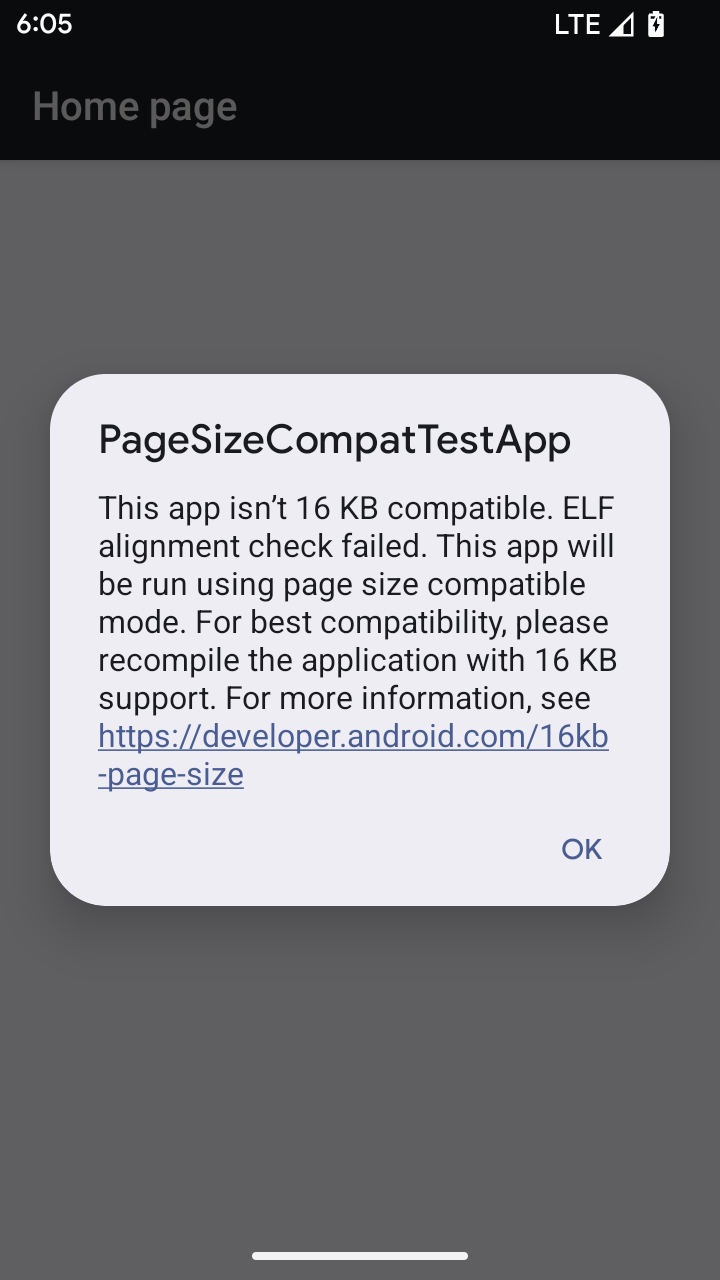
Когда ваше приложение работает на устройстве с Android 16 или более поздней версии, если Android обнаруживает, что ваше приложение имеет выровненные страницы памяти размером 4 КБ, оно автоматически использует режим совместимости и отображает диалоговое окно уведомления для пользователя. Установка свойства android:pageSizeCompat в AndroidManifest.xml для включения режима обратной совместимости предотвратит отображение диалогового окна при запуске вашего приложения. Чтобы использовать свойство android:pageSizeCompat , скомпилируйте приложение с помощью Android 16 SDK .
Для обеспечения максимальной производительности, надежности и стабильности размер вашего приложения по-прежнему должен составлять 16 КБ. Для получения более подробной информации ознакомьтесь с нашей недавней публикацией в блоге об обновлении ваших приложений для поддержки страниц памяти 16 КБ.
Пользовательский опыт и пользовательский интерфейс системы
В Android 16 (уровень API 36) внесены следующие изменения, призванные обеспечить более согласованный и интуитивно понятный пользовательский интерфейс.
Отмена нежелательных объявлений, нарушающих доступность.
Android 16 deprecates accessibility announcements, characterized by the use of
announceForAccessibility or the dispatch of
TYPE_ANNOUNCEMENT accessibility events. These can create
inconsistent user experiences for users of TalkBack and Android's screen reader,
and alternatives better serve a broader range of user needs across a variety of
Android's assistive technologies.
Examples of alternatives:
- For significant UI changes like window changes, use
Activity.setTitle(CharSequence)andsetAccessibilityPaneTitle(java.lang.CharSequence). In Compose, useModifier.semantics { paneTitle = "paneTitle" } - To inform the user of changes to critical UI, use
setAccessibilityLiveRegion(int). In Compose, useModifier.semantics { liveRegion = LiveRegionMode.[Polite|Assertive]}. These should be used sparingly as they may generate announcements every time a View is updated. - To notify users about errors, send an
AccessibilityEventof typeAccessibilityEvent#CONTENT_CHANGE_TYPE_ERRORand setAccessibilityNodeInfo#setError(CharSequence), or useTextView#setError(CharSequence).
The reference documentation for the deprecated
announceForAccessibility API includes more details about
suggested alternatives.
Поддержка навигации с помощью 3 кнопок
Android 16 brings predictive back support to the 3-button navigation for apps that have properly migrated to predictive back. Long-pressing the back button initiates a predictive back animation, giving you a preview of where the back swipe takes you.
This behavior applies across all areas of the system that support predictive back animations, including the system animations (back-to-home, cross-task, and cross-activity).
Автоматические тематические значки приложений
Beginning with Android 16 QPR 2, Android automatically applies themes to app icons to create a cohesive home screen experience. This occurs if an app does not provide its own themed app icon. Apps can control the design of their themed app icon by including a monochrome layer within their adaptive icon and previewing what their app icon will look like in Android Studio.
форм-факторы устройств
В Android 16 (уровень API 36) внесены следующие изменения для приложений, проецируемых на экраны владельцами виртуальных устройств.
Владелец виртуального устройства вносит изменения по своему усмотрению.
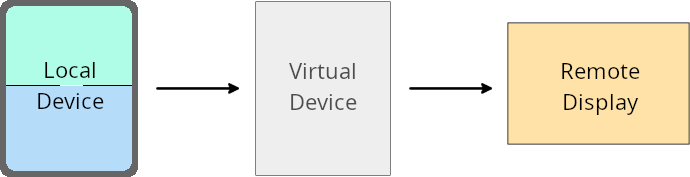
A virtual device owner is a trusted or privileged app that creates and manages a virtual device. Virtual device owners run apps on a virtual device and then project the apps to the display of a remote device, such as a personal computer, virtual reality device, or car infotainment system. The virtual device owner is on a local device, such as a mobile phone.
Per-app overrides
On devices running Android 16 (API level 36), virtual device owners can override app settings on select virtual devices that the virtual device owners manage. For example, to improve app layout, a virtual device owner can ignore orientation, aspect ratio, and resizability restrictions when projecting apps onto an external display.
Common breaking changes
The Android 16 behavior might impact your app's UI on large screen form factors such as car displays or Chromebooks, especially layouts that were designed for small displays in portrait orientation. To learn how to make your app adaptive for all device form factors, see About adaptive layouts.
References
Безопасность
В Android 16 (уровень API 36) внесены изменения, повышающие безопасность системы и помогающие защитить приложения и пользователей от вредоносных программ.
Повышена защита от атак с перенаправлением намерений.
Android 16 provides default security against general Intent redirection
attacks, with minimum compatibility and developer changes required.
We are introducing by-default security hardening solutions to Intent
redirection exploits. In most cases, apps that use intents normally won't
experience any compatibility issues; we've gathered metrics throughout our
development process to monitor which apps might experience breakages.
Intent redirection in Android occurs when an attacker can partly or fully control the contents of an intent used to launch a new component in the context of a vulnerable app, while the victim app launches an untrusted sub-level intent in an extras field of an ("top-level") Intent. This can lead to the attacker app launching private components in the context of the victim app, triggering privileged actions, or gaining URI access to sensitive data, potentially leading to data theft and arbitrary code execution.
Opt out of Intent redirection handling
Android 16 introduces a new API that allows apps to opt out of launch security protections. This might be necessary in specific cases where the default security behavior interferes with legitimate app use cases.
For applications compiling against Android 16 (API level 36) SDK or higher
You can directly use the removeLaunchSecurityProtection() method on the Intent
object.
val i = intent
val iSublevel: Intent? = i.getParcelableExtra("sub_intent")
iSublevel?.removeLaunchSecurityProtection() // Opt out from hardening
iSublevel?.let { startActivity(it) }
For applications compiling against Android 15 (API level 35) or lower
While not recommended, you can use reflection to access the
removeLaunchSecurityProtection() method.
val i = intent
val iSublevel: Intent? = i.getParcelableExtra("sub_intent", Intent::class.java)
try {
    val removeLaunchSecurityProtection = Intent::class.java.getDeclaredMethod("removeLaunchSecurityProtection")
    removeLaunchSecurityProtection.invoke(iSublevel)
} catch (e: Exception) {
    // Handle the exception, e.g., log it
} // Opt-out from the security hardening using reflection
iSublevel?.let { startActivity(it) }
Сопутствующие приложения больше не получают уведомления о превышении времени ожидания обнаружения.
Android 16 introduces a new behavior during
companion device pairing flow to protect the user's location
privacy from malicious apps. All companion apps running on Android 16 are no
longer directly notified of discovery timeout using
RESULT_DISCOVERY_TIMEOUT. Instead, the user is
notified of timeout events with a visual dialog. When the user dismisses
the dialog, the app is alerted of the association failure with
RESULT_USER_REJECTED.
The search duration has also been extended from the original 20 seconds, and the device discovery can be stopped by the user at any point during the search. If at least one device was discovered within the first 20 seconds of starting the search, the CDM stops searching for additional devices.
Подключение
В Android 16 (уровень API 36) внесены следующие изменения в стек Bluetooth для улучшения связи с периферийными устройствами.
Улучшенная обработка убытков по облигациям
Starting in Android 16, the Bluetooth stack has been updated to improve security and user experience when a remote bond loss is detected. Previously, the system would automatically remove the bond and initiate a new pairing process, which could lead to unintentional re-pairing. We have seen in many instances apps not taking care of the bond loss event in a consistent way.
To unify the experience, Android 16 improved the bond loss handling to the system. If a previously bonded Bluetooth device could not be authenticated upon reconnection, the system will disconnect the link, retain local bond information, and display a system dialog informing users of the bond loss and directing them to re-pair.