

La plate-forme Android 16 apporte des modifications de comportement susceptibles d'affecter votre application. Les modifications de comportement suivantes s'appliquent à toutes les applications lorsqu'elles s'exécutent sur Android 16, peu importe la targetSdkVersion. Vous devez tester votre application, puis la modifier si nécessaire afin de prendre en charge ces modifications, le cas échéant.
Veillez également à consulter la liste des modifications de comportement qui n'affectent que les applications ciblant Android 16.
Fonctionnalité de base
Android 16 (niveau d'API 36) inclut les modifications suivantes qui modifient ou étendent diverses fonctionnalités de base du système Android.
Optimisations du quota JobScheduler
À partir d'Android 16, nous ajustons le quota d'exécution des tâches régulières et accélérées en fonction des facteurs suivants :
- Bucket de veille de l'application dans lequel se trouve l'application : dans Android 16, les buckets de veille actifs commenceront à être appliqués par un quota d'exécution généreux.
- Si le job commence à s'exécuter alors que l'application est au premier plan : dans Android 16, les jobs démarrés alors que l'application est visible par l'utilisateur et qui se poursuivent après que l'application est devenue invisible respecteront le quota de temps d'exécution des jobs.
- Si le job s'exécute en même temps qu'un service de premier plan : dans Android 16, les jobs qui s'exécutent en même temps qu'un service de premier plan respectent le quota de temps d'exécution des jobs. Si vous utilisez des tâches pour le transfert de données déclenché par l'utilisateur, pensez à utiliser plutôt les tâches de transfert de données déclenchées par l'utilisateur.
Ce changement a un impact sur les tâches planifiées à l'aide de WorkManager, JobScheduler et DownloadManager. Pour comprendre pourquoi une tâche a été arrêtée, nous vous recommandons de consigner la raison de l'arrêt en appelant WorkInfo.getStopReason() (pour les tâches JobScheduler, appelez JobParameters.getStopReason()).
Pour en savoir plus sur l'impact de l'état de votre application sur les ressources qu'elle peut utiliser, consultez Limites de ressources de gestion de l'alimentation. Pour en savoir plus sur les bonnes pratiques d'optimisation de la batterie, consultez les conseils sur l'optimisation de l'utilisation de la batterie pour les API de planification des tâches.
Nous vous recommandons également d'utiliser la nouvelle API JobScheduler#getPendingJobReasonsHistory introduite dans Android 16 pour comprendre pourquoi une tâche ne s'est pas exécutée.
Tests
Pour tester le comportement de votre application, vous pouvez activer le remplacement de certaines optimisations de quota de tâches tant que l'application s'exécute sur un appareil Android 16.
Pour désactiver l'application de l'option "L'état supérieur respectera le quota de durée d'exécution des tâches", exécutez la commande adb suivante :
adb shell am compat enable OVERRIDE_QUOTA_ENFORCEMENT_TO_TOP_STARTED_JOBS APP_PACKAGE_NAME
Pour désactiver l'application de la règle "Les jobs qui s'exécutent simultanément avec un service de premier plan doivent respecter le quota de temps d'exécution des jobs", exécutez la commande adb suivante :
adb shell am compat enable OVERRIDE_QUOTA_ENFORCEMENT_TO_FGS_JOBS APP_PACKAGE_NAME
Pour tester certains comportements des buckets de mise en veille des applications, vous pouvez définir le bucket de mise en veille de votre application à l'aide de la commande adb suivante :
adb shell am set-standby-bucket APP_PACKAGE_NAME active|working_set|frequent|rare|restricted
Pour connaître le bucket de mise en veille dans lequel se trouve votre application, vous pouvez obtenir le bucket de mise en veille de votre application à l'aide de la commande adb suivante :
adb shell am get-standby-bucket APP_PACKAGE_NAME
Motif d'arrêt des jobs vides abandonnés
Une tâche abandonnée se produit lorsque l'objet JobParameters associé à la tâche a été éliminé par la récupération de mémoire, mais que JobService#jobFinished(JobParameters,
boolean) n'a pas été appelé pour signaler la fin de la tâche. Cela indique que la tâche peut être en cours d'exécution et être reprogrammée sans que l'application en soit informée.
Les applications qui s'appuient sur JobScheduler ne conservent pas de référence forte à l'objet JobParameters. Le délai avant expiration est désormais accordé avec la nouvelle raison d'arrêt de la tâche STOP_REASON_TIMEOUT_ABANDONED, au lieu de STOP_REASON_TIMEOUT.
Si la nouvelle raison d'abandon de la tâche se produit fréquemment, le système prendra des mesures d'atténuation pour réduire la fréquence des tâches.
Les applications doivent utiliser la nouvelle raison d'arrêt pour détecter et réduire les tâches abandonnées.
Si vous utilisez WorkManager, AsyncTask ou DownloadManager, vous n'êtes pas concerné, car ces API gèrent le cycle de vie des tâches pour le compte de votre application.
Abandon complet de JobInfo#setImportantWhileForeground
La méthode JobInfo.Builder#setImportantWhileForeground(boolean) indique l'importance d'une tâche lorsque l'application de planification est au premier plan ou lorsqu'elle est temporairement exemptée des restrictions en arrière-plan.
Cette méthode est obsolète depuis Android 12 (niveau d'API 31). À partir d'Android 16, elle ne fonctionne plus efficacement et l'appel de cette méthode sera ignoré.
Cette suppression de fonctionnalité s'applique également à JobInfo#isImportantWhileForeground(). À partir d'Android 16, si la méthode est appelée, elle renvoie false.
L'ordre de priorité des diffusions ne s'applique plus globalement
Les applications Android sont autorisées à définir des priorités sur les broadcast receivers pour contrôler l'ordre dans lequel les broadcast receivers reçoivent et traitent la diffusion. Pour les récepteurs déclarés dans le fichier manifeste, les applications peuvent utiliser l'attribut android:priority pour définir la priorité. Pour les récepteurs enregistrés dans le contexte, les applications peuvent utiliser l'API IntentFilter#setPriority() pour définir la priorité. Lorsqu'une annonce est envoyée, le système la transmet aux destinataires par ordre de priorité, de la plus élevée à la plus basse.
Dans Android 16, l'ordre de diffusion des diffusions à l'aide de l'attribut android:priority ou IntentFilter#setPriority() dans différents processus n'est pas garanti. Les priorités de diffusion ne seront respectées que dans le même processus d'application, et non dans tous les processus.
De plus, les priorités de diffusion seront automatiquement limitées à la plage (SYSTEM_LOW_PRIORITY + 1, SYSTEM_HIGH_PRIORITY - 1). Seuls les composants système seront autorisés à définir SYSTEM_LOW_PRIORITY et SYSTEM_HIGH_PRIORITY comme priorité de diffusion.
Votre application peut être affectée si elle:
- Votre application a déclaré plusieurs processus avec le même intent de diffusion et a des attentes concernant la réception de ces intents dans un certain ordre en fonction de la priorité.
- Votre processus d'application interagit avec d'autres processus et a des attentes concernant la réception d'un intent de diffusion dans un certain ordre.
Si les processus doivent se coordonner entre eux, ils doivent communiquer via d'autres canaux de coordination.
Modifications internes de l'ART
Android 16 inclut les dernières mises à jour d'Android Runtime (ART) qui améliorent les performances d'Android Runtime (ART) et prennent en charge des fonctionnalités Java supplémentaires. Grâce aux mises à jour du système Google Play, ces améliorations sont également disponibles pour plus d'un milliard d'appareils équipés d'Android 12 (niveau d'API 31) ou version ultérieure.
Lorsque ces modifications seront publiées, les bibliothèques et le code d'application qui s'appuient sur les structures internes d'ART risquent de ne pas fonctionner correctement sur les appareils équipés d'Android 16, ainsi que sur les versions antérieures d'Android qui mettent à jour le module ART via les mises à jour du système Google Play.
S'appuyer sur des structures internes (telles que les interfaces autres que le SDK) peut toujours entraîner des problèmes de compatibilité, mais il est particulièrement important d'éviter de s'appuyer sur du code (ou des bibliothèques contenant du code) qui exploite des structures ART internes, car les modifications ART ne sont pas liées à la version de la plate-forme sur laquelle l'appareil s'exécute et elles sont diffusées auprès de plus d'un milliard d'appareils via les mises à jour du système Google Play.
Tous les développeurs doivent vérifier si leur application est affectée en effectuant des tests approfondis sur Android 16. En outre, consultez les problèmes connus pour voir si votre application dépend de bibliothèques que nous avons identifiées comme s'appuyant sur des structures ART internes. Si vous avez des dépendances de code d'application ou de bibliothèque qui sont concernées, recherchez des alternatives d'API publiques dans la mesure du possible et demandez des API publiques pour de nouveaux cas d'utilisation en créant une demande de fonctionnalité dans notre outil Issue Tracker.
Mode de compatibilité de taille de page de 16 ko
Android 15 a introduit la prise en charge des pages de mémoire de 16 ko pour optimiser les performances de la plate-forme. Android 16 ajoute un mode de compatibilité, qui permet à certaines applications conçues pour des pages de mémoire de 4 ko d'être exécutées sur un appareil configuré pour des pages de mémoire de 16 ko.
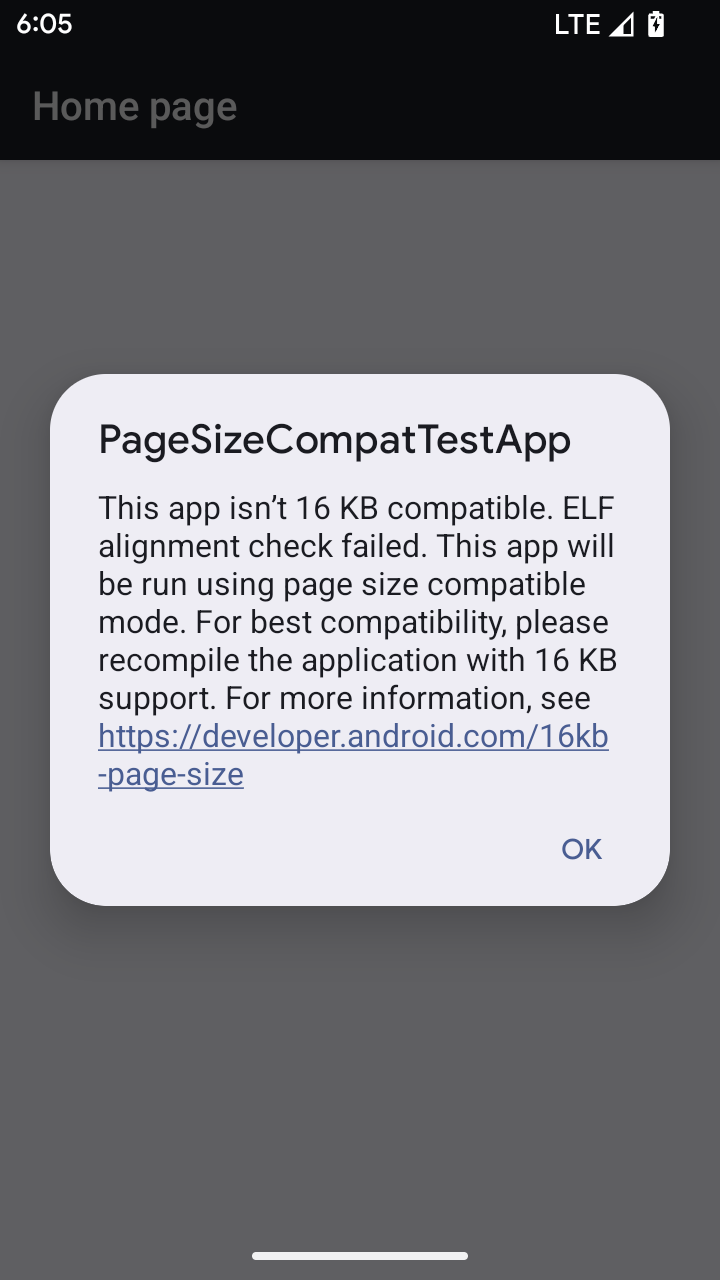
Lorsque votre application s'exécute sur un appareil équipé d'Android 16 ou version ultérieure, si Android détecte que votre application comporte des pages de mémoire alignées sur 4 ko, elle utilise automatiquement le mode de compatibilité et affiche une boîte de dialogue de notification à l'utilisateur. Définir la propriété android:pageSizeCompat dans AndroidManifest.xml pour activer le mode de compatibilité ascendante empêche l'affichage de la boîte de dialogue lorsque votre application démarre. Pour utiliser la propriété android:pageSizeCompat, compilez votre application à l'aide du SDK Android 16.
Pour des performances, une fiabilité et une stabilité optimales, votre application doit toujours être alignée sur 16 ko. Pour en savoir plus, consultez notre article de blog récent sur la mise à jour de vos applications pour qu'elles soient compatibles avec les pages de mémoire de 16 ko.
Expérience utilisateur et UI du système
Android 16 (niveau d'API 36) inclut les modifications suivantes, qui visent à créer une expérience utilisateur plus cohérente et intuitive.
Obsolescence des annonces d'accessibilité intrusives
Android 16 abandonne les annonces d'accessibilité, caractérisées par l'utilisation de announceForAccessibility ou l'envoi d'événements d'accessibilité TYPE_ANNOUNCEMENT. Cela peut créer des expériences utilisateur incohérentes pour les utilisateurs de TalkBack et du lecteur d'écran d'Android. Les alternatives répondent mieux à un plus large éventail de besoins des utilisateurs dans diverses technologies d'assistance d'Android.
Exemples d'alternatives:
- Pour les modifications importantes de l'UI, comme les modifications de fenêtre, utilisez
Activity.setTitle(CharSequence)etsetAccessibilityPaneTitle(java.lang.CharSequence). Dans Compose, utilisezModifier.semantics { paneTitle = "paneTitle" }. - Pour informer l'utilisateur des modifications apportées à l'UI critique, utilisez
setAccessibilityLiveRegion(int). Dans Compose, utilisezModifier.semantics { liveRegion = LiveRegionMode.[Polite|Assertive]}. Ils doivent être utilisés avec parcimonie, car ils peuvent générer des annonces chaque fois qu'une vue est mise à jour. - Pour avertir les utilisateurs des erreurs, envoyez un
AccessibilityEventde typeAccessibilityEvent#CONTENT_CHANGE_TYPE_ERRORet définissezAccessibilityNodeInfo#setError(CharSequence), ou utilisezTextView#setError(CharSequence).
La documentation de référence de l'API announceForAccessibility obsolète inclut plus de détails sur les alternatives suggérées.
Prise en charge de la navigation à trois boutons
Android 16 prend en charge la prévisualisation du Retour dans la navigation à trois boutons pour les applications qui ont correctement migré vers la prévisualisation du Retour. Appuyer de manière prolongée sur le bouton Retour déclenche une animation de prévisualisation du Retour, qui vous permet de prévisualiser la page vers laquelle le geste Retour vous redirige.
Ce comportement s'applique à toutes les zones du système compatibles avec les animations de prévisualisation du Retour, y compris les animations système (retour à l'écran d'accueil, multitâche et multi-activité).
Icônes d'applications à thème automatique
À partir d'Android 16 QPR2, Android applique automatiquement des thèmes aux icônes d'application pour créer une expérience cohérente sur l'écran d'accueil. Cela se produit si une application ne fournit pas sa propre icône d'application à thème. Les applications peuvent contrôler la conception de leur icône d'application à thème en incluant un calque monochrome dans leur icône adaptative et en prévisualisant l'apparence de leur icône d'application dans Android Studio.
Facteurs de forme des appareils
Android 16 (niveau d'API 36) inclut les modifications suivantes pour les applications lorsqu'elles sont projetées sur des écrans par les propriétaires d'appareils virtuels.
Remplacements du propriétaire de l'appareil virtuel
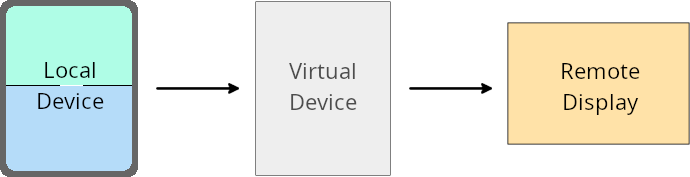
Un propriétaire d'appareil virtuel est une application de confiance ou privilégiée qui crée et gère un appareil virtuel. Les propriétaires d'appareils virtuels exécutent des applications sur un appareil virtuel, puis les projettent sur l'écran d'un appareil distant, tel qu'un ordinateur personnel, un appareil de réalité virtuelle ou un système d'info-divertissement automobile. Le propriétaire de l'appareil virtuel se trouve sur un appareil local, comme un téléphone mobile.
Forçages par application
Sur les appareils exécutant Android 16 (niveau d'API 36), les propriétaires d'appareils virtuels peuvent remplacer les paramètres d'application sur certains appareils virtuels qu'ils gèrent. Par exemple, pour améliorer la mise en page d'une application, le propriétaire d'un appareil virtuel peut ignorer les restrictions d'orientation, de format et de redimensionnement lors de la projection d'applications sur un écran externe.
Modifications destructives courantes
Le comportement d'Android 16 peut avoir un impact sur l'UI de votre application sur les grands écrans tels que les écrans de voiture ou les Chromebooks, en particulier sur les mises en page conçues pour les petits écrans en mode Portrait. Pour découvrir comment rendre votre application adaptative à tous les facteurs de forme des appareils, consultez À propos des mises en page adaptatives.
Références
Streaming d'application associée
Sécurité
Android 16 (niveau d'API 36) inclut des modifications qui renforcent la sécurité du système pour protéger les applications et les utilisateurs contre les applications malveillantes.
Amélioration de la sécurité contre les attaques par redirection d'intent
Android 16 offre une protection par défaut contre les attaques générales par redirection d'Intent, avec une compatibilité minimale et des modifications pour les développeurs.
Nous introduisons des solutions de renforcement de la sécurité par défaut pour les failles de redirection d'Intent. Dans la plupart des cas, les applications qui utilisent des intents normalement ne rencontrent aucun problème de compatibilité. Nous avons collecté des métriques tout au long de notre processus de développement pour surveiller les applications susceptibles de rencontrer des problèmes.
La redirection d'intent sur Android se produit lorsqu'un pirate informatique parvient à contrôler partiellement ou entièrement le contenu d'un intent utilisé pour lancer un nouveau composant dans le contexte d'une application vulnérable, tandis que l'application victime lance un intent de sous-niveau non approuvé dans un champ supplémentaire d'un intent ("de niveau supérieur"). Cela peut entraîner le lancement de composants privés par l'application pirate dans le contexte de l'application victime, le déclenchement d'actions privilégiées ou l'obtention d'un accès URI à des données sensibles, ce qui peut entraîner le vol de données et l'exécution de code arbitraire.
Désactiver la gestion de la redirection d'intent
Android 16 introduit une nouvelle API qui permet aux applications de désactiver les protections de sécurité au lancement. Cela peut être nécessaire dans des cas spécifiques où le comportement de sécurité par défaut interfère avec des cas d'utilisation légitimes de l'application.
Pour les applications compilées avec le SDK Android 16 (niveau d'API 36) ou version ultérieure
Vous pouvez utiliser directement la méthode removeLaunchSecurityProtection() sur l'objet Intent.
val i = intent
val iSublevel: Intent? = i.getParcelableExtra("sub_intent")
iSublevel?.removeLaunchSecurityProtection() // Opt out from hardening
iSublevel?.let { startActivity(it) }
Pour les applications compilées avec Android 15 (niveau d'API 35) ou version antérieure
Bien que cela ne soit pas recommandé, vous pouvez utiliser la réflexion pour accéder à la méthode removeLaunchSecurityProtection().
val i = intent
val iSublevel: Intent? = i.getParcelableExtra("sub_intent", Intent::class.java)
try {
    val removeLaunchSecurityProtection = Intent::class.java.getDeclaredMethod("removeLaunchSecurityProtection")
    removeLaunchSecurityProtection.invoke(iSublevel)
} catch (e: Exception) {
    // Handle the exception, e.g., log it
} // Opt-out from the security hardening using reflection
iSublevel?.let { startActivity(it) }
Les applications associées ne reçoivent plus de notification en cas de délai d'expiration de la découverte
Android 16 introduit un nouveau comportement lors du flux d'association d'appareils compagnons pour protéger la confidentialité de la position de l'utilisateur contre les applications malveillantes. Toutes les applications compagnons exécutées sur Android 16 ne sont plus directement informées du délai avant expiration de la découverte à l'aide de RESULT_DISCOVERY_TIMEOUT. À la place, l'utilisateur est averti des événements de délai avant expiration à l'aide d'une boîte de dialogue visuelle. Lorsque l'utilisateur ferme la boîte de dialogue, l'application est avertie de l'échec de l'association avec RESULT_USER_REJECTED.
La durée de la recherche a également été prolongée par rapport aux 20 secondes d'origine, et l'utilisateur peut arrêter la découverte des appareils à tout moment pendant la recherche. Si au moins un appareil a été détecté dans les 20 premières secondes de la recherche, le CDM cesse de rechercher d'autres appareils.
Connectivité
Android 16 (niveau d'API 36) inclut les modifications suivantes dans la pile Bluetooth pour améliorer la connectivité avec les périphériques.
Amélioration de la gestion des pertes d'obligations
À partir d'Android 16, la pile Bluetooth a été mise à jour pour améliorer la sécurité et l'expérience utilisateur lorsqu'une perte de liaison à distance est détectée. Auparavant, le système supprimait automatiquement l'association et lançait un nouveau processus d'association, ce qui pouvait entraîner une nouvelle association involontaire. Dans de nombreux cas, nous avons constaté que les applications ne géraient pas de manière cohérente l'événement de perte de liaison.
Pour unifier l'expérience, Android 16 a amélioré la gestion de la perte de liaison dans le système. Si un appareil Bluetooth associé précédemment ne peut pas être authentifié lors de la reconnexion, le système interrompt la liaison, conserve les informations d'association locales et affiche une boîte de dialogue système informant les utilisateurs de la perte d'association et les invitant à s'associer à nouveau.