

پلتفرم اندروید ۱۶ شامل تغییرات رفتاری است که ممکن است بر برنامه شما تأثیر بگذارد. تغییرات رفتاری زیر برای همه برنامهها هنگام اجرا در اندروید ۱۶، صرف نظر از targetSdkVersion ، اعمال میشود. شما باید برنامه خود را آزمایش کنید و سپس در صورت لزوم، آن را برای پشتیبانی از این تغییرات، در صورت لزوم، اصلاح کنید.
حتماً فهرست تغییرات رفتاری که فقط بر برنامههای اندروید ۱۶ تأثیر میگذارند را نیز بررسی کنید.
عملکرد اصلی
اندروید ۱۶ (سطح API ۳۶) شامل تغییرات زیر است که قابلیتهای اصلی مختلف سیستم اندروید را اصلاح یا گسترش میدهد.
بهینهسازی سهمیهبندی JobScheduler
Starting in Android 16, we're adjusting regular and expedited job execution runtime quota based on the following factors:
- Which app standby bucket the application is in: in Android 16, active standby buckets will start being enforced by a generous runtime quota.
- If the job starts execution while the app is in a top state: in Android 16, Jobs started while the app is visible to the user and continues after the app becomes invisible, will adhere to the job runtime quota.
- If the job is executing while running a Foreground Service: in Android 16, jobs that are executing concurrently with a foreground service will adhere to the job runtime quota. If you're leveraging jobs for user initiated data transfer, consider using user initiated data transfer jobs instead.
This change impacts tasks scheduled using WorkManager, JobScheduler, and
DownloadManager. To debug why a job was stopped, we recommend logging why your
job was stopped by calling WorkInfo.getStopReason() (for
JobScheduler jobs, call JobParameters.getStopReason()).
For information about how your app's state affects the resources it can use, see Power management resource limits. For more information on battery-optimal best practices, refer to guidance on optimize battery use for task scheduling APIs.
We also recommend leveraging the new
JobScheduler#getPendingJobReasonsHistory API introduced in
Android 16 to understand why a job has not executed.
Testing
To test your app's behavior, you can enable override of certain job quota optimizations as long as the app is running on an Android 16 device.
To disable enforcement of "top state will adhere to job runtime quota", run the
following adb command:
adb shell am compat enable OVERRIDE_QUOTA_ENFORCEMENT_TO_TOP_STARTED_JOBS APP_PACKAGE_NAME
To disable enforcement of "jobs that are executing while concurrently with a
foreground service will adhere to the job runtime quota", run the following
adb command:
adb shell am compat enable OVERRIDE_QUOTA_ENFORCEMENT_TO_FGS_JOBS APP_PACKAGE_NAME
To test certain app standby bucket behavior, you can set the app standby bucket
of your app using the following adb command:
adb shell am set-standby-bucket APP_PACKAGE_NAME active|working_set|frequent|rare|restricted
To understand the app standby bucket your app is in, you can get the app standby
bucket of your app using the following adb command:
adb shell am get-standby-bucket APP_PACKAGE_NAME
دلیل توقف مشاغل خالی رها شده
An abandoned job occurs when the JobParameters object associated with the job
has been garbage collected, but JobService#jobFinished(JobParameters,
boolean) has not been called to signal job completion. This indicates that
the job may be running and being rescheduled without the app's awareness.
Apps that rely on JobScheduler, don't maintain a strong reference to the
JobParameters object, and timeout will now be granted the new job stop reason
STOP_REASON_TIMEOUT_ABANDONED, instead of STOP_REASON_TIMEOUT.
If there are frequent occurrences of the new abandoned stop reason, the system will take mitigation steps to reduce job frequency.
Apps should use the new stop reason to detect and reduce abandoned jobs.
If you're using WorkManager, AsyncTask, or DownloadManager, you aren't impacted because these APIs manage the job lifecycle on your app's behalf.
JobInfo#setImportantWhileForeground کاملاً منسوخ شده است
روش JobInfo.Builder#setImportantWhileForeground(boolean) اهمیت یک کار را در زمانی که برنامه زمانبندی در پیشزمینه است یا به طور موقت از محدودیتهای پسزمینه معاف است، نشان میدهد.
این روش از اندروید 12 (سطح API 31) منسوخ شده است. با شروع اندروید 16، دیگر به طور موثر عمل نمی کند و فراخوانی این روش نادیده گرفته می شود.
این حذف عملکرد برای JobInfo#isImportantWhileForeground() نیز اعمال می شود. با شروع در اندروید 16، اگر متد فراخوانی شود، متد false برمیگرداند.
محدوده اولویت پخش مرتبشده دیگر سراسری نیست
Android apps are allowed to define priorities on broadcast receivers to control
the order in which the receivers receive and process the broadcast. For
manifest-declared receivers, apps can use the
android:priority attribute to define the priority and for
context-registered receivers, apps can use the
IntentFilter#setPriority() API to define the priority. When
a broadcast is sent, the system delivers it to receivers in order of their
priority, from highest to lowest.
In Android 16, broadcast delivery order using the android:priority attribute
or IntentFilter#setPriority() across different processes will not be
guaranteed. Broadcast priorities will only be respected within the same
application process rather than across all processes.
Also, broadcast priorities will be automatically confined to the range
(SYSTEM_LOW_PRIORITY + 1,
SYSTEM_HIGH_PRIORITY - 1). Only system components will be
allowed to set SYSTEM_LOW_PRIORITY, SYSTEM_HIGH_PRIORITY as broadcast
priority.
Your app might be impacted if it does either of the following:
- Your application has declared multiple processes with the same broadcast intent, and has expectations around receiving those intents in a certain order based on the priority.
- Your application process interacts with other processes and has expectations around receiving a broadcast intent in a certain order.
If the processes need to coordinate with each other, they should communicate using other coordination channels.
تغییرات داخلی ART
Android 16 شامل آخرین بهروزرسانیهای Android Runtime (ART) است که عملکرد Android Runtime (ART's) را بهبود میبخشد و از ویژگیهای اضافی جاوا پشتیبانی میکند. از طریق بهروزرسانیهای سیستم Google Play، این بهبودها برای بیش از یک میلیارد دستگاه دارای Android 12 (سطح API 31) و بالاتر نیز در دسترس است.
با انتشار این تغییرات، کتابخانهها و کد برنامههایی که به ساختارهای داخلی ART متکی هستند ممکن است در دستگاههای دارای Android 16 به درستی کار نکنند، همراه با نسخههای قبلی اندروید که ماژول ART را از طریق بهروزرسانیهای سیستم Google Play بهروزرسانی میکنند.
اتکا به ساختارهای داخلی (مانند رابطهای غیر SDK ) همیشه میتواند منجر به مشکلات سازگاری شود، اما بسیار مهم است که از تکیه بر کد (یا کتابخانههای حاوی کد) که از ساختارهای داخلی ART استفاده میکنند، اجتناب کنید، زیرا تغییرات ART به پلتفرم مرتبط نیست. نسخه ای که دستگاه در حال اجرا است و آنها از طریق به روز رسانی سیستم Google Play به بیش از یک میلیارد دستگاه می روند.
همه برنامهنویسها باید با آزمایش کامل برنامههایشان در Android 16 بررسی کنند که آیا برنامهشان تحت تأثیر قرار گرفته است یا خیر. علاوه بر این، مسائل شناختهشده را بررسی کنید تا ببینید آیا برنامه شما به کتابخانههایی وابسته است که ما شناسایی کردهایم که به ساختارهای ART داخلی متکی هستند یا خیر. اگر کد برنامه یا وابستگیهای کتابخانهای دارید که تحت تأثیر قرار گرفتهاند، در صورت امکان به دنبال جایگزینهای API عمومی باشید و با ایجاد یک درخواست ویژگی در ردیاب مشکل ما، APIهای عمومی را برای موارد استفاده جدید درخواست کنید.
حالت سازگاری با اندازه صفحه ۱۶ کیلوبایت
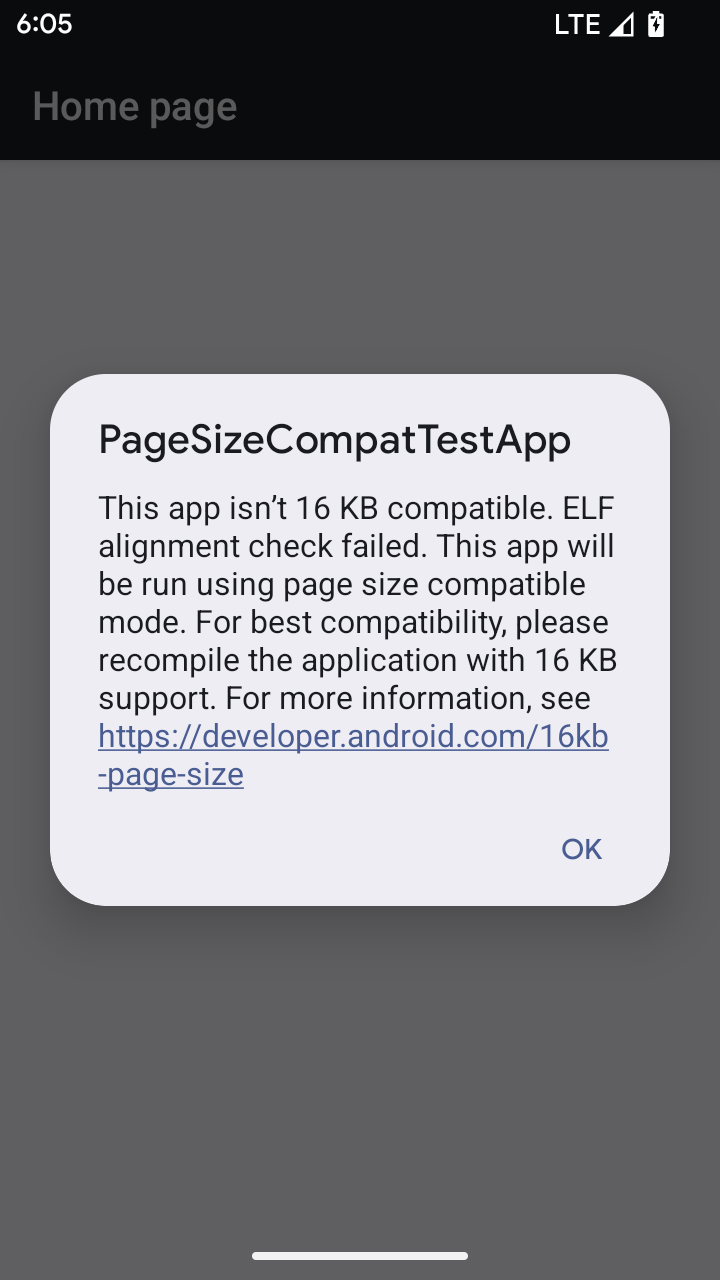
اندروید 15 برای بهینه سازی عملکرد پلتفرم، پشتیبانی از صفحات حافظه 16 کیلوبایتی را معرفی کرد. Android 16 یک حالت سازگاری اضافه می کند که به برخی از برنامه های ساخته شده برای صفحات حافظه 4 کیلوبایتی اجازه می دهد روی دستگاهی که برای صفحات حافظه 16 کیلوبایتی پیکربندی شده است اجرا شوند.
وقتی برنامه شما روی دستگاهی با Android 16 یا بالاتر اجرا می شود، اگر Android تشخیص دهد که برنامه شما دارای صفحات حافظه تراز شده 4 کیلوبایتی است، به طور خودکار از حالت سازگاری استفاده می کند و یک گفتگوی اعلان را به کاربر نمایش می دهد. تنظیم ویژگی android:pageSizeCompat در AndroidManifest.xml برای فعال کردن حالت سازگاری به عقب، از نمایش دیالوگ هنگام راهاندازی برنامه شما جلوگیری میکند. برای استفاده از ویژگی android:pageSizeCompat ، برنامه خود را با استفاده از Android 16 SDK کامپایل کنید.
برای بهترین عملکرد، قابلیت اطمینان و پایداری، برنامه شما همچنان باید 16 کیلوبایت تراز باشد. برای جزئیات بیشتر، پست وبلاگ اخیر ما را در مورد به روز رسانی برنامه های خود برای پشتیبانی از صفحات حافظه 16 کیلوبایتی بررسی کنید.
تجربه کاربری و رابط کاربری سیستم
اندروید ۱۶ (سطح API ۳۶) شامل تغییرات زیر است که برای ایجاد یک تجربه کاربری سازگارتر و شهودیتر در نظر گرفته شدهاند.
بیاعتبار کردن اعلانهای اختلال در دسترسیپذیری
Android 16 اعلامیههای دسترسپذیری را که با استفاده از announceForAccessibility یا ارسال رویدادهای دسترسپذیری TYPE_ANNOUNCEMENT مشخص میشود، منسوخ میکند. اینها میتوانند تجربیات کاربری متناقضی را برای کاربران TalkBack و صفحهخوان Android ایجاد کنند، و جایگزینها بهتر طیف وسیعتری از نیازهای کاربر را در انواع فناوریهای کمکی Android برآورده میکنند.
نمونه هایی از جایگزین ها:
- برای تغییرات مهم رابط کاربری مانند تغییرات پنجره، از
Activity.setTitle(CharSequence)وsetAccessibilityPaneTitle(java.lang.CharSequence)استفاده کنید. در Compose، ازModifier.semantics { paneTitle = "paneTitle" }استفاده کنید - برای اطلاع کاربر از تغییرات در رابط کاربری حیاتی، از
setAccessibilityLiveRegion(int)استفاده کنید. در Compose، ازModifier.semantics { liveRegion = LiveRegionMode.[Polite|Assertive]}استفاده کنید. از این موارد باید به اندازه کافی استفاده شود زیرا ممکن است هر بار که یک View به روز می شود، اعلان ایجاد کند. - برای اطلاع دادن به کاربران در مورد خطاها،
AccessibilityEventاز نوعAccessibilityEvent#CONTENT_CHANGE_TYPE_ERRORارسال کنید وAccessibilityNodeInfo#setError(CharSequence)تنظیم کنید، یاTextView#setError(CharSequence)استفاده کنید.
اسناد مرجع برای announceForAccessibility API منسوخ شده شامل جزئیات بیشتری در مورد جایگزین های پیشنهادی است.
پشتیبانی از ناوبری سه دکمهای
Android 16 brings predictive back support to the 3-button navigation for apps that have properly migrated to predictive back. Long-pressing the back button initiates a predictive back animation, giving you a preview of where the back swipe takes you.
This behavior applies across all areas of the system that support predictive back animations, including the system animations (back-to-home, cross-task, and cross-activity).
آیکونهای برنامه با تم خودکار
با شروع Android 16 QPR 2، Android به طور خودکار تم ها را روی نمادهای برنامه اعمال می کند تا یک تجربه منسجم از صفحه اصلی ایجاد کند. اگر برنامه ای نماد برنامه مضمون خود را ارائه نکند، این اتفاق می افتد. برنامهها میتوانند طراحی نماد برنامه مضمون خود را با قرار دادن یک لایه تک رنگ در نماد تطبیقی خود و پیشنمایش اینکه نماد برنامه آنها در Android Studio چگونه به نظر میرسد، کنترل کنند.
فاکتورهای شکل دستگاه
اندروید ۱۶ (سطح API ۳۶) شامل تغییرات زیر برای برنامهها هنگام نمایش روی نمایشگرها توسط دارندگان دستگاههای مجازی است.
مالک دستگاه مجازی لغو میکند
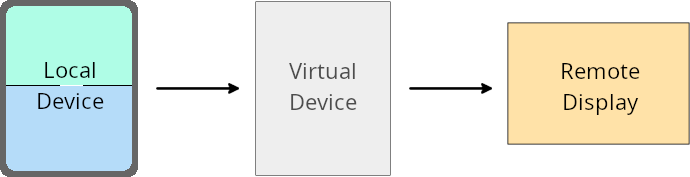
A virtual device owner is a trusted or privileged app that creates and manages a virtual device. Virtual device owners run apps on a virtual device and then project the apps to the display of a remote device, such as a personal computer, virtual reality device, or car infotainment system. The virtual device owner is on a local device, such as a mobile phone.
Per-app overrides
On devices running Android 16 (API level 36), virtual device owners can override app settings on select virtual devices that the virtual device owners manage. For example, to improve app layout, a virtual device owner can ignore orientation, aspect ratio, and resizability restrictions when projecting apps onto an external display.
Common breaking changes
The Android 16 behavior might impact your app's UI on large screen form factors such as car displays or Chromebooks, especially layouts that were designed for small displays in portrait orientation. To learn how to make your app adaptive for all device form factors, see About adaptive layouts.
References
امنیت
اندروید ۱۶ (سطح API ۳۶) شامل تغییراتی است که امنیت سیستم را ارتقا میدهد تا به محافظت از برنامهها و کاربران در برابر برنامههای مخرب کمک کند.
امنیت بهبود یافته در برابر حملات تغییر مسیر Intent
Android 16 provides default security against general Intent redirection
attacks, with minimum compatibility and developer changes required.
We are introducing by-default security hardening solutions to Intent
redirection exploits. In most cases, apps that use intents normally won't
experience any compatibility issues; we've gathered metrics throughout our
development process to monitor which apps might experience breakages.
Intent redirection in Android occurs when an attacker can partly or fully control the contents of an intent used to launch a new component in the context of a vulnerable app, while the victim app launches an untrusted sub-level intent in an extras field of an ("top-level") Intent. This can lead to the attacker app launching private components in the context of the victim app, triggering privileged actions, or gaining URI access to sensitive data, potentially leading to data theft and arbitrary code execution.
Opt out of Intent redirection handling
Android 16 introduces a new API that allows apps to opt out of launch security protections. This might be necessary in specific cases where the default security behavior interferes with legitimate app use cases.
For applications compiling against Android 16 (API level 36) SDK or higher
You can directly use the removeLaunchSecurityProtection() method on the Intent
object.
val i = intent
val iSublevel: Intent? = i.getParcelableExtra("sub_intent")
iSublevel?.removeLaunchSecurityProtection() // Opt out from hardening
iSublevel?.let { startActivity(it) }
For applications compiling against Android 15 (API level 35) or lower
While not recommended, you can use reflection to access the
removeLaunchSecurityProtection() method.
val i = intent
val iSublevel: Intent? = i.getParcelableExtra("sub_intent", Intent::class.java)
try {
    val removeLaunchSecurityProtection = Intent::class.java.getDeclaredMethod("removeLaunchSecurityProtection")
    removeLaunchSecurityProtection.invoke(iSublevel)
} catch (e: Exception) {
    // Handle the exception, e.g., log it
} // Opt-out from the security hardening using reflection
iSublevel?.let { startActivity(it) }
برنامههای همراه دیگر از زمانهای کشف مطلع نمیشوند
اندروید 16 رفتار جدیدی را در جریان جفت شدن دستگاه همراه معرفی می کند تا از حریم خصوصی مکان کاربر در برابر برنامه های مخرب محافظت کند. همه برنامههای همراهی که در Android 16 اجرا میشوند، دیگر مستقیماً با استفاده از RESULT_DISCOVERY_TIMEOUT از مهلت زمانی کشف مطلع نمیشوند. در عوض، کاربر از رویدادهای وقفه با یک گفتگوی بصری مطلع می شود. هنگامی که کاربر گفتگو را رد می کند، برنامه از شکست ارتباط با RESULT_USER_REJECTED آگاه می شود.
مدت زمان جستجو نیز از 20 ثانیه اولیه افزایش یافته است و کاربر در هر نقطه از جستجو می تواند کشف دستگاه را متوقف کند. اگر حداقل یک دستگاه در 20 ثانیه اول شروع جستجو کشف شود، CDM جستجو برای دستگاه های اضافی را متوقف می کند.
اتصال
اندروید ۱۶ (سطح API ۳۶) شامل تغییرات زیر در پشته بلوتوث برای بهبود اتصال با دستگاههای جانبی است.
بهبود مدیریت ضرر اوراق قرضه
با شروع اندروید 16، پشته بلوتوث برای بهبود امنیت و تجربه کاربری در هنگام شناسایی از دست دادن اوراق قرضه از راه دور، به روز شده است. قبلاً، سیستم به طور خودکار پیوند را حذف می کرد و یک فرآیند جفت سازی جدید را آغاز می کرد که می تواند منجر به جفت شدن مجدد ناخواسته شود. ما در بسیاری از موارد دیدهایم که اپلیکیشنها از رویداد از دست دادن اوراق قرضه به روشی ثابت مراقبت نمیکنند.
برای یکسان سازی این تجربه، اندروید 16 مدیریت از دست دادن اوراق قرضه را برای سیستم بهبود بخشید. اگر دستگاه بلوتوثی که قبلاً متصل شده بود، پس از اتصال مجدد تأیید اعتبار نشد، سیستم پیوند را قطع میکند، اطلاعات پیوند محلی را حفظ میکند و یک گفتگوی سیستمی را نمایش میدهد که کاربران را از گم شدن پیوند مطلع میکند و آنها را برای جفت کردن مجدد راهنمایی میکند.
،با شروع اندروید 16، پشته بلوتوث برای بهبود امنیت و تجربه کاربری در هنگام شناسایی از دست دادن اوراق قرضه از راه دور، به روز شده است. قبلاً، سیستم به طور خودکار پیوند را حذف می کرد و یک فرآیند جفت سازی جدید را آغاز می کرد که می تواند منجر به جفت شدن مجدد ناخواسته شود. ما در بسیاری از موارد دیدهایم که اپلیکیشنها از رویداد از دست دادن اوراق قرضه به روشی ثابت مراقبت نمیکنند.
برای یکسان سازی این تجربه، اندروید 16 مدیریت از دست دادن اوراق قرضه را برای سیستم بهبود بخشید. اگر دستگاه بلوتوثی که قبلاً متصل شده بود، پس از اتصال مجدد تأیید اعتبار نشد، سیستم پیوند را قطع میکند، اطلاعات پیوند محلی را حفظ میکند و یک گفتگوی سیستمی را نمایش میدهد که کاربران را از گم شدن پیوند مطلع میکند و آنها را برای جفت کردن مجدد راهنمایی میکند.
،با شروع اندروید 16، پشته بلوتوث برای بهبود امنیت و تجربه کاربری در هنگام شناسایی از دست دادن اوراق قرضه از راه دور، به روز شده است. قبلاً، سیستم به طور خودکار پیوند را حذف می کرد و یک فرآیند جفت سازی جدید را آغاز می کرد که می تواند منجر به جفت شدن مجدد ناخواسته شود. ما در بسیاری از موارد دیدهایم که اپلیکیشنها از رویداد از دست دادن اوراق قرضه به روشی ثابت مراقبت نمیکنند.
برای یکسان سازی این تجربه، اندروید 16 مدیریت از دست دادن اوراق قرضه را در سیستم بهبود بخشید. اگر دستگاه بلوتوثی که قبلاً متصل شده بود، پس از اتصال مجدد تأیید اعتبار نشد، سیستم پیوند را قطع میکند، اطلاعات پیوند محلی را حفظ میکند و یک گفتگوی سیستمی را نمایش میدهد که کاربران را از گم شدن پیوند مطلع میکند و آنها را برای جفت کردن مجدد راهنمایی میکند.