

يتضمّن نظام Android 16 تغييرات في السلوك قد تؤثّر في تطبيقك.
تسري تغييرات السلوك التالية على جميع التطبيقات عند تشغيلها على Android 16،
بغض النظر عن targetSdkVersion. عليك اختبار تطبيقك ثم تعديله حسب الحاجة لدعم هذه التغييرات، حيثما ينطبق ذلك.
احرص أيضًا على مراجعة قائمة تغييرات السلوك التي تؤثّر فقط في التطبيقات التي تستهدف Android 16.
الوظيفة الأساسية
يتضمّن Android 16 (المستوى 36 لواجهة برمجة التطبيقات) التغييرات التالية التي تعدِّل أو توسِّع إمكانات أساسية مختلفة في نظام Android.
تحسينات على حصص JobScheduler
Starting in Android 16, we're adjusting regular and expedited job execution runtime quota based on the following factors:
- Which app standby bucket the application is in: in Android 16, active standby buckets will start being enforced by a generous runtime quota.
- If the job starts execution while the app is in a top state: in Android 16, Jobs started while the app is visible to the user and continues after the app becomes invisible, will adhere to the job runtime quota.
- If the job is executing while running a Foreground Service: in Android 16, jobs that are executing concurrently with a foreground service will adhere to the job runtime quota. If you're leveraging jobs for user initiated data transfer, consider using user initiated data transfer jobs instead.
This change impacts tasks scheduled using WorkManager, JobScheduler, and
DownloadManager. To debug why a job was stopped, we recommend logging why your
job was stopped by calling WorkInfo.getStopReason() (for
JobScheduler jobs, call JobParameters.getStopReason()).
For information about how your app's state affects the resources it can use, see Power management resource limits. For more information on battery-optimal best practices, refer to guidance on optimize battery use for task scheduling APIs.
We also recommend leveraging the new
JobScheduler#getPendingJobReasonsHistory API introduced in
Android 16 to understand why a job has not executed.
Testing
To test your app's behavior, you can enable override of certain job quota optimizations as long as the app is running on an Android 16 device.
To disable enforcement of "top state will adhere to job runtime quota", run the
following adb command:
adb shell am compat enable OVERRIDE_QUOTA_ENFORCEMENT_TO_TOP_STARTED_JOBS APP_PACKAGE_NAME
To disable enforcement of "jobs that are executing while concurrently with a
foreground service will adhere to the job runtime quota", run the following
adb command:
adb shell am compat enable OVERRIDE_QUOTA_ENFORCEMENT_TO_FGS_JOBS APP_PACKAGE_NAME
To test certain app standby bucket behavior, you can set the app standby bucket
of your app using the following adb command:
adb shell am set-standby-bucket APP_PACKAGE_NAME active|working_set|frequent|rare|restricted
To understand the app standby bucket your app is in, you can get the app standby
bucket of your app using the following adb command:
adb shell am get-standby-bucket APP_PACKAGE_NAME
سبب إيقاف الوظائف الفارغة التي تم تجاهلها
تحدث المهمة المهجورة عندما يتم جمع المهملات من عنصر JobParameters المرتبط بالمهمة
، ولكن لم يتم استدعاء JobService#jobFinished(JobParameters,
boolean) للإشارة إلى اكتمال المهمة. يشير ذلك إلى أنّه
قد يكون المهام قيد التشغيل ويتم إعادة جدولتها بدون علم التطبيق.
لا تحافظ التطبيقات التي تعتمد على JobScheduler على إشارة قوية إلى ملف برمجي
JobParameters، وسيتم الآن منح مهلة سبب إيقاف المهمة الجديد
STOP_REASON_TIMEOUT_ABANDONED بدلاً من STOP_REASON_TIMEOUT.
إذا تكرّر سبب الإيقاف الجديد، سيتّخذ النظام خطوات لتخفيف المشكلة من خلال تقليل تكرار المهام.
على التطبيقات استخدام سبب الإيقاف الجديد لرصد المهام المتوقفة عن العمل والحدّ منها.
إذا كنت تستخدم WorkManager أو AsyncTask أو DownloadManager، لن تتأثر بهذه التغييرات، لأنّ واجهات برمجة التطبيقات هذه تدير دورة حياة المهام نيابةً عن تطبيقك.
إيقاف نهائي للوظيفة `JobInfo#setImportantWhileForeground`
The JobInfo.Builder#setImportantWhileForeground(boolean)
method indicates the importance of a job while the scheduling app is in the
foreground or when temporarily exempted from background restrictions.
This method has been deprecated since Android 12 (API level 31). Starting in Android 16, it no longer functions effectively and calling this method will be ignored.
This removal of functionality also applies to
JobInfo#isImportantWhileForeground(). Starting in Android
16, if the method is called, the method returns false.
لم يعُد نطاق أولوية البث المنظَّم عالميًا
يُسمح لتطبيقات Android بتحديد الأولويات في أجهزة استقبال البث للتحكّم في
الترتيب الذي تتلقّى به أجهزة الاستقبال البث وتعالجه. بالنسبة إلى تطبيقات معالجة الإشعارات المُعلَن عنها في البيان، يمكنها استخدام السمة
android:priority لتحديد الأولوية، وبالنسبة إلى تطبيقات معالجة الإشعارات المسجَّلة في السياق، يمكنها استخدام واجهة برمجة التطبيقات
IntentFilter#setPriority() لتحديد الأولوية. عند إرسال بث، يرسله النظام إلى المستلِمين حسب تصاعد
أولويتهم، من الأعلى إلى الأدنى.
في الإصدار Android 16، لن يتم ضمان ترتيب إرسال البث باستخدام سمة android:priority
أو IntentFilter#setPriority() في عمليات مختلفة. سيتم الالتزام بأولويات البث فقط في عملية التقديم نفسها وليس في جميع العمليات.
بالإضافة إلى ذلك، سيتم تلقائيًا حصر أولويات البث في النطاق (SYSTEM_LOW_PRIORITY + 1،
SYSTEM_HIGH_PRIORITY - 1). سيتم السماح فقط لمكونات النظام
بضبط SYSTEM_LOW_PRIORITY وSYSTEM_HIGH_PRIORITY كأولوية
البث.
قد يتأثر تطبيقك إذا كان ينفّذ أيًا مما يلي:
- أعلن تطبيقك عن عمليات متعدّدة باستخدام نية البث نفسها، ولديه توقّعات بشأن تلقّي هذه النوايا بترتيب معين استنادًا إلى الأولوية.
- تتفاعل عملية تقديم الطلب مع عمليات أخرى وتتوقّع تلقّي نية بثّ بترتيب معيّن.
إذا كانت العمليات بحاجة إلى التنسيق مع بعضها، يجب أن تتواصل باستخدام قنوات تنسيق أخرى.
التغييرات الداخلية في وقت تشغيل Android (ART)
Android 16 includes the latest updates to the Android Runtime (ART) that improve the Android Runtime's (ART's) performance and provide support for additional Java features. Through Google Play System updates, these improvements are also available to over a billion devices running Android 12 (API level 31) and higher.
As these changes are released, libraries and app code that rely on internal structures of ART might not work correctly on devices running Android 16, along with earlier Android versions that update the ART module through Google Play system updates.
Relying on internal structures (such as non-SDK interfaces) can always lead to compatibility problems, but it's particularly important to avoid relying on code (or libraries containing code) that leverages internal ART structures, since ART changes aren't tied to the platform version the device is running on and they go out to over a billion devices through Google Play system updates.
All developers should check whether their app is impacted by testing their apps thoroughly on Android 16. In addition, check the known issues to see if your app depends on any libraries that we've identified that rely on internal ART structures. If you do have app code or library dependencies that are affected, seek public API alternatives whenever possible and request public APIs for new use cases by creating a feature request in our issue tracker.
وضع التوافق مع حجم الصفحة 16 كيلوبايت
وفّر الإصدار 15 من Android إمكانية استخدام صفحات ذاكرة بحجم 16 كيلوبايت لتحسين أداء المنصة. يضيف الإصدار 16 من Android وضع ملف شخصي متوافقًا، ما يسمح بتشغيل بعض التطبيقات المُنشأة لصفحات ذاكرة بحجم 4 كيلوبايت على جهاز تم ضبطه لصفحات ذاكرة بحجم 16 كيلوبايت.
عندما يكون تطبيقك قيد التشغيل على جهاز يعمل بنظام Android 16 أو إصدار أحدث، إذا رصد نظام Android أنّ تطبيقك يحتوي على صفحات ذاكرة بحجم 4 كيلوبايت، سيستخدم تلقائيًا وضع التوافق ويعرض مربّع حوار إشعار للمستخدم. سيؤدي ضبط سمة
android:pageSizeCompat في AndroidManifest.xml لتفعيل
وضع التوافق مع الإصدارات القديمة إلى منع عرض مربّع الحوار عند
تشغيل تطبيقك. لاستخدام السمة android:pageSizeCompat، عليك تجميع تطبيقك
باستخدام حزمة تطوير البرامج (SDK) لنظام التشغيل Android 16.
لتحقيق أفضل أداء وموثوقية وثبات، يجب أن يظل تطبيقك متوافقًا مع حجم الصفحة الذي يبلغ 16 كيلوبايت. يمكنك الاطّلاع على مزيد من التفاصيل في مقالتنا الأخيرة في المدونة التي تتناول تحديث تطبيقاتك لتتوافق مع صفحات الذاكرة التي تبلغ سعة كل منها 16 كيلوبايت.

تجربة المستخدم وواجهة مستخدم النظام
يتضمّن Android 16 (المستوى 36 لواجهة برمجة التطبيقات) التغييرات التالية التي تهدف إلى توفير تجربة مستخدم أكثر اتساقًا وسهولة.
إيقاف الإشعارات الخطيرة المتعلّقة بإمكانية الوصول
Android 16 deprecates accessibility announcements, characterized by the use of
announceForAccessibility or the dispatch of
TYPE_ANNOUNCEMENT accessibility events. These can create
inconsistent user experiences for users of TalkBack and Android's screen reader,
and alternatives better serve a broader range of user needs across a variety of
Android's assistive technologies.
Examples of alternatives:
- For significant UI changes like window changes, use
Activity.setTitle(CharSequence)andsetAccessibilityPaneTitle(java.lang.CharSequence). In Compose, useModifier.semantics { paneTitle = "paneTitle" } - To inform the user of changes to critical UI, use
setAccessibilityLiveRegion(int). In Compose, useModifier.semantics { liveRegion = LiveRegionMode.[Polite|Assertive]}. These should be used sparingly as they may generate announcements every time a View is updated. - To notify users about errors, send an
AccessibilityEventof typeAccessibilityEvent#CONTENT_CHANGE_TYPE_ERRORand setAccessibilityNodeInfo#setError(CharSequence), or useTextView#setError(CharSequence).
The reference documentation for the deprecated
announceForAccessibility API includes more details about
suggested alternatives.
التنقّل باستخدام ثلاثة أزرار
Android 16 brings predictive back support to the 3-button navigation for apps that have properly migrated to predictive back. Long-pressing the back button initiates a predictive back animation, giving you a preview of where the back swipe takes you.
This behavior applies across all areas of the system that support predictive back animations, including the system animations (back-to-home, cross-task, and cross-activity).
رموز التطبيقات المستوحاة من مظهر معيّن تلقائيًا
Beginning with Android 16 QPR 2, Android automatically applies themes to app icons to create a cohesive home screen experience. This occurs if an app does not provide its own themed app icon. Apps can control the design of their themed app icon by including a monochrome layer within their adaptive icon and previewing what their app icon will look like in Android Studio.
أشكال الأجهزة
يتضمّن Android 16 (المستوى 36 لواجهة برمجة التطبيقات) التغييرات التالية للتطبيقات عند عرضها على الشاشات من قِبل مالكي الأجهزة الافتراضية.
عمليات إلغاء مالك الجهاز الافتراضي
A virtual device owner is a trusted or privileged app that creates and manages a virtual device. Virtual device owners run apps on a virtual device and then project the apps to the display of a remote device, such as a personal computer, virtual reality device, or car infotainment system. The virtual device owner is on a local device, such as a mobile phone.
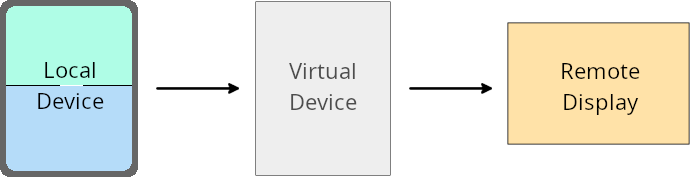
Per-app overrides
On devices running Android 16 (API level 36), virtual device owners can override app settings on select virtual devices that the virtual device owners manage. For example, to improve app layout, a virtual device owner can ignore orientation, aspect ratio, and resizability restrictions when projecting apps onto an external display.
Common breaking changes
The Android 16 behavior might impact your app's UI on large screen form factors such as car displays or Chromebooks, especially layouts that were designed for small displays in portrait orientation. To learn how to make your app adaptive for all device form factors, see About adaptive layouts.
References
الأمان
يتضمّن Android 16 (المستوى 36 لواجهة برمجة التطبيقات) تغييرات تعزّز أمان النظام للمساعدة في حماية التطبيقات والمستخدمين من التطبيقات الضارة.
تحسين الأمان ضدّ هجمات إعادة توجيه Intent
يوفر Android 16 حماية تلقائية من هجمات إعادة توجيه Intent العامة، مع الحد الأدنى من التوافق والتغييرات المطلوبة من المطوّرين.
نحن بصدد طرح حلول تلقائية لتعزيز الأمان من الثغرات الأمنية التي تسمح بإعادة توجيه Intent. في معظم الحالات، لن تواجه التطبيقات التي تستخدم النوايا بشكل طبيعي أي مشاكل في التوافق. لقد جمعنا مقاييس خلال عملية التطوير لمراقبة التطبيقات التي قد تواجه أعطالاً.
تحدث إعادة توجيه النية في Android عندما يتمكّن مهاجم من التحكّم جزئيًا أو كليًا في محتويات نية تُستخدم لتشغيل مكوّن جديد في سياق تطبيق معرّض للخطر، بينما يشغّل تطبيق الضحية نية غير موثوق بها على مستوى فرعي في حقل إضافات لنية ("على المستوى الأعلى"). يمكن أن يؤدي ذلك إلى تشغيل تطبيق المهاجم لمكوّنات خاصة في سياق تطبيق الضحية، أو تشغيل إجراءات مميزة، أو الحصول على إذن الوصول إلى بيانات حساسة باستخدام عنوان URI، ما قد يؤدي إلى سرقة البيانات وتنفيذ تعليمات برمجية عشوائية.
إيقاف معالجة إعادة توجيه النية
يطرح Android 16 واجهة برمجة تطبيقات جديدة تتيح للتطبيقات إيقاف الحماية من مخاطر التشغيل. قد يكون ذلك ضروريًا في حالات معيّنة حيث يتداخل سلوك الأمان التلقائي مع حالات الاستخدام المشروعة للتطبيق.
بالنسبة إلى التطبيقات التي يتم تجميعها باستخدام حزمة تطوير البرامج (SDK) لنظام التشغيل Android 16 (المستوى 36 من واجهة برمجة التطبيقات) أو إصدار أحدث
يمكنك استخدام طريقة removeLaunchSecurityProtection() مباشرةً في عنصر Intent.
val i = intent
val iSublevel: Intent? = i.getParcelableExtra("sub_intent")
iSublevel?.removeLaunchSecurityProtection() // Opt out from hardening
iSublevel?.let { startActivity(it) }
بالنسبة إلى التطبيقات التي يتم تجميعها باستخدام حزمة تطوير البرامج (SDK) لنظام التشغيل Android 15 (المستوى 35 من واجهة برمجة التطبيقات) أو إصدار أقدم
مع أنّ ذلك غير مستحسن، يمكنك استخدام الانعكاس للوصول إلى طريقة removeLaunchSecurityProtection().
val i = intent
val iSublevel: Intent? = i.getParcelableExtra("sub_intent", Intent::class.java)
try {
    val removeLaunchSecurityProtection = Intent::class.java.getDeclaredMethod("removeLaunchSecurityProtection")
    removeLaunchSecurityProtection.invoke(iSublevel)
} catch (e: Exception) {
    // Handle the exception, e.g., log it
} // Opt-out from the security hardening using reflection
iSublevel?.let { startActivity(it) }
لم يعُد يتم إشعار التطبيقات المصاحبة بمهلات الاكتشاف
يقدّم نظام التشغيل Android 16 سلوكًا جديدًا أثناء
عملية إقران الجهاز المصاحب لحماية خصوصية
الموقع الجغرافي للمستخدم من التطبيقات الضارّة. لم يعُد يتم إعلام جميع التطبيقات المصاحبة التي تعمل على الإصدار 16 من Android
بشكل مباشر بوقت الاستراحة في عملية الاكتشاف باستخدام
RESULT_DISCOVERY_TIMEOUT. بدلاً من ذلك، يتم إعلام المستخدم
بأحداث انتهاء مهلة باستخدام مربّع حوار مرئي. عندما يغلِق المستخدم
مربّع الحوار، يتم تنبيه التطبيق بتعذُّر الربط بحساب
RESULT_USER_REJECTED.
تم أيضًا تمديد مدة البحث من 20 ثانية الأصلية، ويمكن للمستخدم إيقاف اكتشاف الجهاز في أي وقت أثناء البحث. إذا تم العثور على جهاز واحد على الأقل خلال أوّل 20 ثانية من بدء البحث، يتوقف "مدير خدمات الطباعة في السحابة الإلكترونية" عن البحث عن أجهزة إضافية.
إمكانية الاتصال
يتضمّن Android 16 (مستوى واجهة برمجة التطبيقات 36) التغييرات التالية في حزمة بروتوكول Bluetooth لتحسين إمكانية الاتصال بالأجهزة الطرفية.
تحسين معالجة فقدان الربط
Starting in Android 16, the Bluetooth stack has been updated to improve security and user experience when a remote bond loss is detected. Previously, the system would automatically remove the bond and initiate a new pairing process, which could lead to unintentional re-pairing. We have seen in many instances apps not taking care of the bond loss event in a consistent way.
To unify the experience, Android 16 improved the bond loss handling to the system. If a previously bonded Bluetooth device could not be authenticated upon reconnection, the system will disconnect the link, retain local bond information, and display a system dialog informing users of the bond loss and directing them to re-pair.