

Android 16 플랫폼에는 앱에 영향을 줄 수 있는 동작 변경사항이 있습니다. targetSdkVersion과 관계없이 Android 16에서 실행되는 모든 앱에 적용되는 동작 변경사항은 다음과 같습니다. 이러한 변경사항을 적절히 지원해야 하는 경우 앱을 테스트한 후 필요에 따라 수정해야 합니다.
또한 Android 16을 타겟팅하는 앱에만 영향을 주는 동작 변경사항 목록을 검토해야 합니다.
핵심 기능
Android 16(API 수준 36)에는 Android 시스템의 다양한 핵심 기능을 수정하거나 확장하는 다음과 같은 변경사항이 포함되어 있습니다.
JobScheduler 할당량 최적화
Android 16부터는 다음 요소를 기반으로 일반 및 신속 작업 실행 런타임 할당량이 조정됩니다.
- 애플리케이션이 속한 앱 대기 버킷: Android 16에서는 활성 대기 버킷이 넉넉한 런타임 할당량에 의해 적용되기 시작합니다.
- 앱이 상단 상태에 있는 동안 작업이 실행을 시작하는 경우: Android 16에서 앱이 사용자에게 표시되는 동안 시작되고 앱이 표시되지 않게 된 후에도 계속되는 작업은 작업 런타임 할당량을 준수합니다.
- 포그라운드 서비스를 실행하는 동안 작업이 실행되는 경우: Android 16에서 포그라운드 서비스와 동시에 실행되는 작업은 작업 런타임 할당량을 준수합니다. 사용자가 시작한 데이터 전송에 작업을 활용하는 경우 대신 사용자가 시작한 데이터 전송 작업을 사용하는 것이 좋습니다.
이 변경사항은 WorkManager, JobScheduler, DownloadManager를 사용하여 예약된 작업에 영향을 미칩니다. 작업이 중지된 이유를 디버깅하려면 WorkInfo.getStopReason()을 호출하여 작업이 중지된 이유를 로깅하는 것이 좋습니다 (JobScheduler 작업의 경우 JobParameters.getStopReason() 호출).
앱의 상태가 사용할 수 있는 리소스에 미치는 영향에 관한 자세한 내용은 전원 관리 리소스 제한을 참고하세요. 배터리 최적화 권장사항에 관한 자세한 내용은 작업 예약 API의 배터리 사용 최적화에 관한 안내를 참고하세요.
또한 Android 16에 도입된 새로운 JobScheduler#getPendingJobReasonsHistory API를 활용하여 작업이 실행되지 않은 이유를 파악하는 것이 좋습니다.
테스트
앱의 동작을 테스트하려면 앱이 Android 16 기기에서 실행되는 동안 특정 작업 할당량 최적화의 재정의를 사용 설정하면 됩니다.
'최상위 상태가 작업 런타임 할당량을 준수함'의 시행을 사용 중지하려면 다음 adb 명령어를 실행합니다.
adb shell am compat enable OVERRIDE_QUOTA_ENFORCEMENT_TO_TOP_STARTED_JOBS APP_PACKAGE_NAME
'포그라운드 서비스와 동시에 실행되는 작업은 작업 런타임 할당량을 준수합니다'의 적용을 사용 중지하려면 다음 adb 명령어를 실행하세요.
adb shell am compat enable OVERRIDE_QUOTA_ENFORCEMENT_TO_FGS_JOBS APP_PACKAGE_NAME
특정 앱 대기 버킷 동작을 테스트하려면 다음 adb 명령어를 사용하여 앱의 앱 대기 버킷을 설정하면 됩니다.
adb shell am set-standby-bucket APP_PACKAGE_NAME active|working_set|frequent|rare|restricted
앱이 속한 앱 대기 버킷을 확인하려면 다음 adb 명령어를 사용하여 앱의 앱 대기 버킷을 가져오면 됩니다.
adb shell am get-standby-bucket APP_PACKAGE_NAME
비어 있는 작업 중지 이유가 삭제됨
포기된 작업은 작업과 연결된 JobParameters 객체가 가비지 컬렉션되었지만 JobService#jobFinished(JobParameters,
boolean)가 호출되어 작업 완료를 알리지 않은 경우에 발생합니다. 이는 앱의 인식 없이 작업이 실행되고 재예약되고 있음을 나타냅니다.
JobScheduler를 사용하는 앱은 JobParameters 객체에 대한 강력한 참조를 유지하지 않으며 이제 제한 시간에 STOP_REASON_TIMEOUT 대신 새 작업 중지 이유 STOP_REASON_TIMEOUT_ABANDONED가 부여됩니다.
새 중단된 중지 이유가 자주 발생하면 시스템은 작업 빈도를 줄이기 위한 완화 조치를 취합니다.
앱은 새 중지 이유를 사용하여 중단된 작업을 감지하고 줄여야 합니다.
WorkManager, AsyncTask 또는 DownloadManager를 사용하는 경우 이러한 API가 앱을 대신하여 작업 수명 주기를 관리하므로 영향을 받지 않습니다.
JobInfo#setImportantWhileForeground 완전히 지원 중단
The JobInfo.Builder#setImportantWhileForeground(boolean)
method indicates the importance of a job while the scheduling app is in the
foreground or when temporarily exempted from background restrictions.
This method has been deprecated since Android 12 (API level 31). Starting in Android 16, it no longer functions effectively and calling this method will be ignored.
This removal of functionality also applies to
JobInfo#isImportantWhileForeground(). Starting in Android
16, if the method is called, the method returns false.
주문된 브로드캐스트 우선순위 범위가 더 이상 전역이 아님
Android apps are allowed to define priorities on broadcast receivers to control
the order in which the receivers receive and process the broadcast. For
manifest-declared receivers, apps can use the
android:priority attribute to define the priority and for
context-registered receivers, apps can use the
IntentFilter#setPriority() API to define the priority. When
a broadcast is sent, the system delivers it to receivers in order of their
priority, from highest to lowest.
In Android 16, broadcast delivery order using the android:priority attribute
or IntentFilter#setPriority() across different processes will not be
guaranteed. Broadcast priorities will only be respected within the same
application process rather than across all processes.
Also, broadcast priorities will be automatically confined to the range
(SYSTEM_LOW_PRIORITY + 1,
SYSTEM_HIGH_PRIORITY - 1). Only system components will be
allowed to set SYSTEM_LOW_PRIORITY, SYSTEM_HIGH_PRIORITY as broadcast
priority.
Your app might be impacted if it does either of the following:
- Your application has declared multiple processes with the same broadcast intent, and has expectations around receiving those intents in a certain order based on the priority.
- Your application process interacts with other processes and has expectations around receiving a broadcast intent in a certain order.
If the processes need to coordinate with each other, they should communicate using other coordination channels.
ART 내부 변경사항
Android 16에는 Android 런타임 (ART)의 성능을 개선하고 추가 Java 기능을 지원하는 Android 런타임 (ART)의 최신 업데이트가 포함되어 있습니다. Google Play 시스템 업데이트를 통해 Android 12 (API 수준 31) 및 이후 버전을 실행하는 10억 대 이상의 기기에서도 이러한 개선사항을 사용할 수 있습니다.
이러한 변경사항이 출시되면 ART의 내부 구조를 사용하는 라이브러리와 앱 코드가 Android 16을 실행하는 기기와 Google Play 시스템 업데이트를 통해 ART 모듈을 업데이트하는 이전 Android 버전에서 제대로 작동하지 않을 수 있습니다.
내부 구조 (예: SDK 이외의 인터페이스)를 사용하면 항상 호환성 문제가 발생할 수 있지만, 내부 ART 구조를 활용하는 코드 (또는 코드가 포함된 라이브러리)를 사용하지 않는 것이 특히 중요합니다. ART 변경사항은 기기가 실행 중인 플랫폼 버전과 연결되지 않으며 Google Play 시스템 업데이트를 통해 10억 대 이상의 기기에 전송되기 때문입니다.
모든 개발자는 Android 16에서 앱을 철저히 테스트하여 앱이 영향을 받는지 확인해야 합니다. 또한 알려진 문제에서 앱이 내부 ART 구조를 사용하는 것으로 확인된 라이브러리에 종속되어 있는지 확인하세요. 영향을 받는 앱 코드 또는 라이브러리 종속 항목이 있는 경우 가능하면 공개 API 대안을 찾고 Issue Tracker에서 기능 요청을 생성하여 새로운 사용 사례에 사용할 공개 API를 요청하세요.
16KB 페이지 크기 호환성 모드
Android 15 introduced support for 16 KB memory pages to optimize performance of the platform. Android 16 adds a compatibility mode, allowing some apps built for 4 KB memory pages to run on a device configured for 16 KB memory pages.
When your app is running on a device with Android 16 or higher, if Android
detects that your app has 4 KB aligned memory pages, it automatically uses
compatibility mode and display a notification dialog to the user. Setting the
android:pageSizeCompat property in the AndroidManifest.xml to enable the
backwards compatibility mode will prevent the display of the dialog when your
app launches. To use the android:pageSizeCompat property, compile your app
using the Android 16 SDK.
For best performance, reliability, and stability, your app should still be 16 KB aligned. Check out our recent blog post on updating your apps to support 16 KB memory pages for more details.

사용자 환경 및 시스템 UI
Android 16(API 수준 36)에는 더 일관되고 직관적인 사용자 환경을 만들기 위한 다음 변경사항이 포함되어 있습니다.
방해가 되는 접근성 안내 지원 중단
Android 16 deprecates accessibility announcements, characterized by the use of
announceForAccessibility or the dispatch of
TYPE_ANNOUNCEMENT accessibility events. These can create
inconsistent user experiences for users of TalkBack and Android's screen reader,
and alternatives better serve a broader range of user needs across a variety of
Android's assistive technologies.
Examples of alternatives:
- For significant UI changes like window changes, use
Activity.setTitle(CharSequence)andsetAccessibilityPaneTitle(java.lang.CharSequence). In Compose, useModifier.semantics { paneTitle = "paneTitle" } - To inform the user of changes to critical UI, use
setAccessibilityLiveRegion(int). In Compose, useModifier.semantics { liveRegion = LiveRegionMode.[Polite|Assertive]}. These should be used sparingly as they may generate announcements every time a View is updated. - To notify users about errors, send an
AccessibilityEventof typeAccessibilityEvent#CONTENT_CHANGE_TYPE_ERRORand setAccessibilityNodeInfo#setError(CharSequence), or useTextView#setError(CharSequence).
The reference documentation for the deprecated
announceForAccessibility API includes more details about
suggested alternatives.
3버튼 탐색 지원
Android 16 brings predictive back support to the 3-button navigation for apps that have properly migrated to predictive back. Long-pressing the back button initiates a predictive back animation, giving you a preview of where the back swipe takes you.
This behavior applies across all areas of the system that support predictive back animations, including the system animations (back-to-home, cross-task, and cross-activity).
자동 테마 앱 아이콘
Android 16 QPR 2부터 Android는 앱 아이콘에 테마를 자동으로 적용하여 일관된 홈 화면 환경을 만듭니다. 이는 앱에서 자체 테마 앱 아이콘을 제공하지 않는 경우 발생합니다. 앱은 적응형 아이콘 내에 단색 레이어를 포함하고 Android 스튜디오에서 앱 아이콘이 어떻게 표시되는지 미리 봄으로써 테마가 적용된 앱 아이콘의 디자인을 제어할 수 있습니다.
기기 폼 팩터
Android 16 (API 수준 36)에는 가상 기기 소유자가 디스플레이에 투영할 때 앱에 적용되는 다음과 같은 변경사항이 포함되어 있습니다.
가상 기기 소유자 재정의
가상 기기 소유자는 가상 기기를 만들고 관리하는 신뢰할 수 있는 앱 또는 권한이 있는 앱입니다. 가상 기기 소유자는 가상 기기에서 앱을 실행한 다음 앱을 원격 기기(예: 개인용 컴퓨터, 가상 현실 기기 또는 자동차 인포테인먼트 시스템)의 디스플레이에 프로젝션합니다. 가상 기기 소유자는 휴대전화와 같은 로컬 기기에 있습니다.
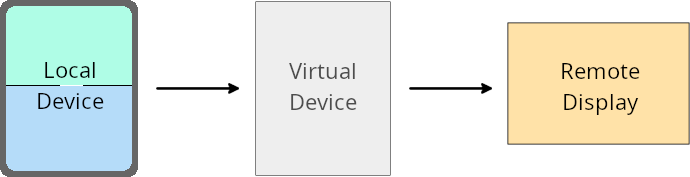
앱별 재정의
Android 16 (API 수준 36)을 실행하는 기기에서 가상 기기 소유자는 가상 기기 소유자가 관리하는 일부 가상 기기의 앱 설정을 재정의할 수 있습니다. 예를 들어 앱 레이아웃을 개선하기 위해 가상 기기 소유자는 앱을 외부 디스플레이에 프로젝션할 때 방향, 가로세로 비율, 크기 조정 제한사항을 무시할 수 있습니다.
일반적인 주요 변경사항
Android 16 동작은 자동차 디스플레이 또는 Chromebook과 같은 대화면 폼 팩터의 앱 UI, 특히 세로 방향의 작은 디스플레이를 위해 설계된 레이아웃에 영향을 미칠 수 있습니다. 모든 기기 폼 팩터에 맞게 앱을 적응형으로 만드는 방법을 알아보려면 적응형 레이아웃 정보를 참고하세요.
참조
보안
Android 16 (API 수준 36)에는 악성 앱으로부터 앱과 사용자를 보호하는 데 도움이 되는 시스템 보안을 강화하는 변경사항이 포함되어 있습니다.
인텐트 리디렉션 공격에 대한 보안 개선
Android 16은 일반적인 Intent 리디렉션 공격에 대한 기본 보안을 제공하며, 최소한의 호환성 및 개발자 변경사항이 필요합니다.
Intent 리디렉션 악용에 기본적으로 보안 강화 솔루션을 도입합니다. 대부분의 경우 인텐트를 정상적으로 사용하는 앱에는 호환성 문제가 발생하지 않습니다. Google은 개발 프로세스 전반에 걸쳐 측정항목을 수집하여 호환성 문제가 발생할 수 있는 앱을 모니터링했습니다.
Android의 인텐트 리디렉션은 공격자가 취약한 앱의 컨텍스트에서 새 구성요소를 실행하는 데 사용되는 인텐트의 콘텐츠를 부분적으로 또는 완전히 제어할 수 있는 반면, 피해자 앱은 ('최상위') 인텐트의 추가 필드에서 신뢰할 수 없는 하위 수준 인텐트를 실행할 때 발생합니다. 이로 인해 공격자 앱이 피해자 앱의 컨텍스트에서 비공개 구성요소를 실행하거나, 권한 있는 작업을 트리거하거나, 민감한 정보에 대한 URI 액세스 권한을 얻어 데이터 도용 및 임의 코드 실행으로 이어질 수 있습니다.
인텐트 리디렉션 처리 선택 해제
Android 16은 앱이 실행 보안 보호를 선택 해제할 수 있는 새로운 API를 도입합니다. 기본 보안 동작이 합법적인 앱 사용 사례를 방해하는 특정 경우에는 이 작업이 필요할 수 있습니다.
Android 16 (API 수준 36) SDK 이상을 대상으로 컴파일하는 애플리케이션의 경우
인텐트 객체에서 removeLaunchSecurityProtection() 메서드를 직접 사용할 수 있습니다.
val i = intent
val iSublevel: Intent? = i.getParcelableExtra("sub_intent")
iSublevel?.removeLaunchSecurityProtection() // Opt out from hardening
iSublevel?.let { startActivity(it) }
Android 15 (API 수준 35) 이하를 대상으로 컴파일하는 애플리케이션의 경우
권장되지는 않지만 리플렉션을 사용하여 removeLaunchSecurityProtection() 메서드에 액세스할 수 있습니다.
val i = intent
val iSublevel: Intent? = i.getParcelableExtra("sub_intent", Intent::class.java)
try {
    val removeLaunchSecurityProtection = Intent::class.java.getDeclaredMethod("removeLaunchSecurityProtection")
    removeLaunchSecurityProtection.invoke(iSublevel)
} catch (e: Exception) {
    // Handle the exception, e.g., log it
} // Opt-out from the security hardening using reflection
iSublevel?.let { startActivity(it) }
호환 앱에 더 이상 검색 시간 제한 알림이 전송되지 않음
Android 16 introduces a new behavior during
companion device pairing flow to protect the user's location
privacy from malicious apps. All companion apps running on Android 16 are no
longer directly notified of discovery timeout using
RESULT_DISCOVERY_TIMEOUT. Instead, the user is
notified of timeout events with a visual dialog. When the user dismisses
the dialog, the app is alerted of the association failure with
RESULT_USER_REJECTED.
The search duration has also been extended from the original 20 seconds, and the device discovery can be stopped by the user at any point during the search. If at least one device was discovered within the first 20 seconds of starting the search, the CDM stops searching for additional devices.
연결
Android 16(API 수준 36)에는 주변기기와의 연결을 개선하기 위해 블루투스 스택에 다음과 같은 변경사항이 포함되어 있습니다.
결합 손실 처리 개선
Starting in Android 16, the Bluetooth stack has been updated to improve security and user experience when a remote bond loss is detected. Previously, the system would automatically remove the bond and initiate a new pairing process, which could lead to unintentional re-pairing. We have seen in many instances apps not taking care of the bond loss event in a consistent way.
To unify the experience, Android 16 improved the bond loss handling to the system. If a previously bonded Bluetooth device could not be authenticated upon reconnection, the system will disconnect the link, retain local bond information, and display a system dialog informing users of the bond loss and directing them to re-pair.