

Nền tảng Android 16 có các thay đổi về hành vi có thể ảnh hưởng đến ứng dụng của bạn.
Những thay đổi về hành vi sau đây áp dụng cho tất cả ứng dụng chạy trên Android 16,
bất kể targetSdkVersion. Bạn nên kiểm thử ứng dụng rồi sửa đổi để hỗ trợ những thay đổi này cho phù hợp (nếu cần).
Ngoài ra, hãy nhớ tham khảo danh sách thay đổi về hành vi chỉ ảnh hưởng đến những ứng dụng nhắm đến Android 16.
Chức năng cốt lõi
Android 16 (cấp độ API 36) có các thay đổi sau đây giúp sửa đổi hoặc mở rộng nhiều khả năng cốt lõi của hệ thống Android.
Tối ưu hoá hạn mức JobScheduler
Starting in Android 16, we're adjusting regular and expedited job execution runtime quota based on the following factors:
- Which app standby bucket the application is in: in Android 16, active standby buckets will start being enforced by a generous runtime quota.
- If the job starts execution while the app is in a top state: in Android 16, Jobs started while the app is visible to the user and continues after the app becomes invisible, will adhere to the job runtime quota.
- If the job is executing while running a Foreground Service: in Android 16, jobs that are executing concurrently with a foreground service will adhere to the job runtime quota. If you're leveraging jobs for user initiated data transfer, consider using user initiated data transfer jobs instead.
This change impacts tasks scheduled using WorkManager, JobScheduler, and
DownloadManager. To debug why a job was stopped, we recommend logging why your
job was stopped by calling WorkInfo.getStopReason() (for
JobScheduler jobs, call JobParameters.getStopReason()).
For information about how your app's state affects the resources it can use, see Power management resource limits. For more information on battery-optimal best practices, refer to guidance on optimize battery use for task scheduling APIs.
We also recommend leveraging the new
JobScheduler#getPendingJobReasonsHistory API introduced in
Android 16 to understand why a job has not executed.
Testing
To test your app's behavior, you can enable override of certain job quota optimizations as long as the app is running on an Android 16 device.
To disable enforcement of "top state will adhere to job runtime quota", run the
following adb command:
adb shell am compat enable OVERRIDE_QUOTA_ENFORCEMENT_TO_TOP_STARTED_JOBS APP_PACKAGE_NAME
To disable enforcement of "jobs that are executing while concurrently with a
foreground service will adhere to the job runtime quota", run the following
adb command:
adb shell am compat enable OVERRIDE_QUOTA_ENFORCEMENT_TO_FGS_JOBS APP_PACKAGE_NAME
To test certain app standby bucket behavior, you can set the app standby bucket
of your app using the following adb command:
adb shell am set-standby-bucket APP_PACKAGE_NAME active|working_set|frequent|rare|restricted
To understand the app standby bucket your app is in, you can get the app standby
bucket of your app using the following adb command:
adb shell am get-standby-bucket APP_PACKAGE_NAME
Lý do dừng công việc trống bị bỏ qua
An abandoned job occurs when the JobParameters object associated with the job
has been garbage collected, but JobService#jobFinished(JobParameters,
boolean) has not been called to signal job completion. This indicates that
the job may be running and being rescheduled without the app's awareness.
Apps that rely on JobScheduler, don't maintain a strong reference to the
JobParameters object, and timeout will now be granted the new job stop reason
STOP_REASON_TIMEOUT_ABANDONED, instead of STOP_REASON_TIMEOUT.
If there are frequent occurrences of the new abandoned stop reason, the system will take mitigation steps to reduce job frequency.
Apps should use the new stop reason to detect and reduce abandoned jobs.
If you're using WorkManager, AsyncTask, or DownloadManager, you aren't impacted because these APIs manage the job lifecycle on your app's behalf.
Hoàn toàn không dùng JobInfo#setImportantWhileForeground nữa
Phương thức JobInfo.Builder#setImportantWhileForeground(boolean) cho biết tầm quan trọng của một công việc trong khi ứng dụng lên lịch chạy ở nền trước hoặc khi tạm thời được miễn các quy định hạn chế về chế độ nền.
Phương thức này không được dùng nữa kể từ Android 12 (API cấp 31). Kể từ Android 16, phương thức này không còn hoạt động hiệu quả và việc gọi phương thức này sẽ bị bỏ qua.
Việc xoá chức năng này cũng áp dụng cho
JobInfo#isImportantWhileForeground(). Kể từ Android 16, nếu được gọi, phương thức này sẽ trả về false.
Phạm vi ưu tiên của chương trình phát sóng theo thứ tự không còn là phạm vi chung nữa
Android apps are allowed to define priorities on broadcast receivers to control
the order in which the receivers receive and process the broadcast. For
manifest-declared receivers, apps can use the
android:priority attribute to define the priority and for
context-registered receivers, apps can use the
IntentFilter#setPriority() API to define the priority. When
a broadcast is sent, the system delivers it to receivers in order of their
priority, from highest to lowest.
In Android 16, broadcast delivery order using the android:priority attribute
or IntentFilter#setPriority() across different processes will not be
guaranteed. Broadcast priorities will only be respected within the same
application process rather than across all processes.
Also, broadcast priorities will be automatically confined to the range
(SYSTEM_LOW_PRIORITY + 1,
SYSTEM_HIGH_PRIORITY - 1). Only system components will be
allowed to set SYSTEM_LOW_PRIORITY, SYSTEM_HIGH_PRIORITY as broadcast
priority.
Your app might be impacted if it does either of the following:
- Your application has declared multiple processes with the same broadcast intent, and has expectations around receiving those intents in a certain order based on the priority.
- Your application process interacts with other processes and has expectations around receiving a broadcast intent in a certain order.
If the processes need to coordinate with each other, they should communicate using other coordination channels.
Thay đổi nội bộ của ART
Android 16 bao gồm các bản cập nhật mới nhất cho Android Runtime (ART) giúp cải thiện hiệu suất của Android Runtime (ART) và hỗ trợ thêm các tính năng Java. Thông qua Bản cập nhật hệ thống Google Play, hơn một tỷ thiết bị chạy Android 12 (API cấp 31) trở lên cũng có thể sử dụng các điểm cải tiến này.
Khi những thay đổi này được phát hành, các thư viện và mã ứng dụng dựa vào cấu trúc nội bộ của ART có thể không hoạt động chính xác trên các thiết bị chạy Android 16, cùng với các phiên bản Android cũ cập nhật mô-đun ART thông qua bản cập nhật hệ thống Google Play.
Việc dựa vào các cấu trúc nội bộ (chẳng hạn như giao diện không phải SDK) luôn có thể dẫn đến các vấn đề về khả năng tương thích, nhưng điều đặc biệt quan trọng là tránh dựa vào mã (hoặc thư viện chứa mã) tận dụng các cấu trúc ART nội bộ, vì các thay đổi về ART không liên quan đến phiên bản nền tảng mà thiết bị đang chạy và các thay đổi này sẽ được áp dụng cho hơn một tỷ thiết bị thông qua các bản cập nhật hệ thống của Google Play.
Tất cả nhà phát triển đều nên kiểm tra xem ứng dụng của họ có bị ảnh hưởng hay không bằng cách kiểm thử kỹ lưỡng ứng dụng trên Android 16. Ngoài ra, hãy kiểm tra các vấn đề đã biết để xem ứng dụng của bạn có phụ thuộc vào bất kỳ thư viện nào mà chúng tôi đã xác định là dựa vào cấu trúc ART nội bộ hay không. Nếu mã ứng dụng hoặc các phần phụ thuộc thư viện của bạn bị ảnh hưởng, hãy tìm các API công khai thay thế bất cứ khi nào có thể và yêu cầu API công khai cho các trường hợp sử dụng mới bằng cách tạo yêu cầu về tính năng trong công cụ theo dõi lỗi của chúng tôi.
Chế độ tương thích với kích thước trang 16 KB
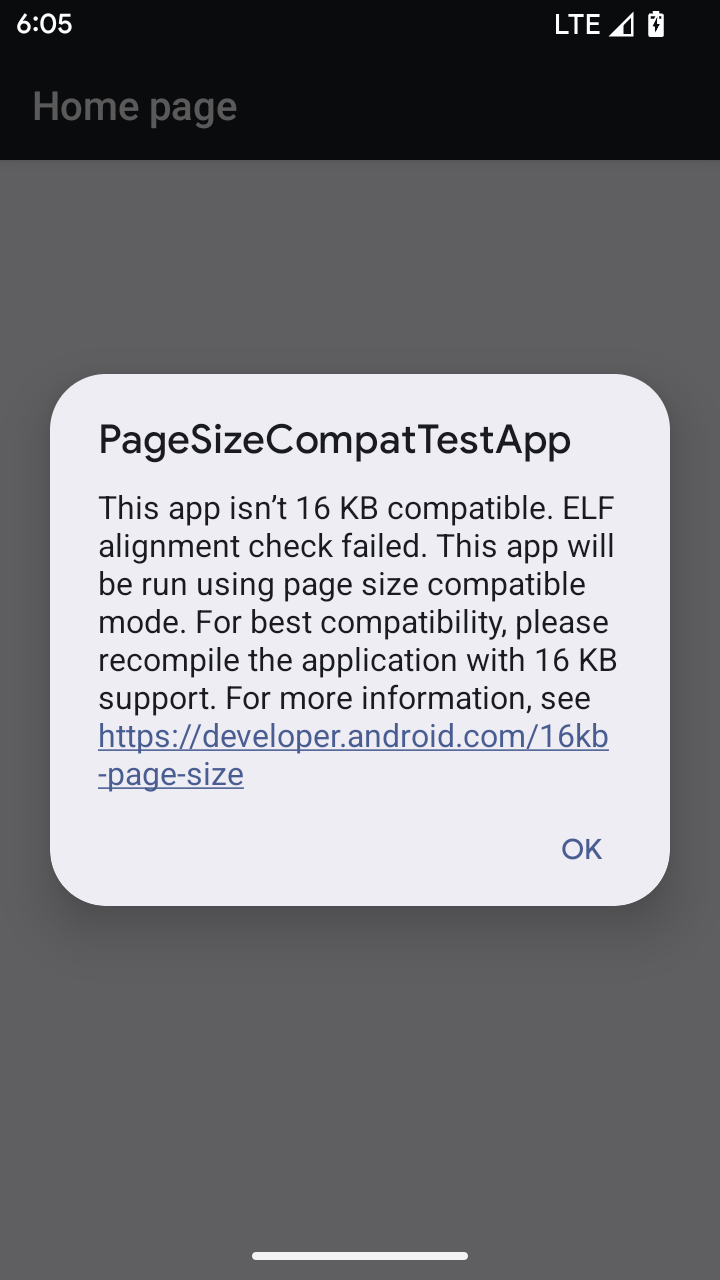
Android 15 introduced support for 16 KB memory pages to optimize performance of the platform. Android 16 adds a compatibility mode, allowing some apps built for 4 KB memory pages to run on a device configured for 16 KB memory pages.
When your app is running on a device with Android 16 or higher, if Android
detects that your app has 4 KB aligned memory pages, it automatically uses
compatibility mode and display a notification dialog to the user. Setting the
android:pageSizeCompat property in the AndroidManifest.xml to enable the
backwards compatibility mode will prevent the display of the dialog when your
app launches. To use the android:pageSizeCompat property, compile your app
using the Android 16 SDK.
For best performance, reliability, and stability, your app should still be 16 KB aligned. Check out our recent blog post on updating your apps to support 16 KB memory pages for more details.
Trải nghiệm người dùng và giao diện người dùng hệ thống
Android 16 (cấp độ API 36) có các thay đổi sau đây nhằm tạo ra trải nghiệm người dùng nhất quán và trực quan hơn.
Không dùng các thông báo hỗ trợ tiếp cận gây gián đoạn nữa
Android 16 deprecates accessibility announcements, characterized by the use of
announceForAccessibility or the dispatch of
TYPE_ANNOUNCEMENT accessibility events. These can create
inconsistent user experiences for users of TalkBack and Android's screen reader,
and alternatives better serve a broader range of user needs across a variety of
Android's assistive technologies.
Examples of alternatives:
- For significant UI changes like window changes, use
Activity.setTitle(CharSequence)andsetAccessibilityPaneTitle(java.lang.CharSequence). In Compose, useModifier.semantics { paneTitle = "paneTitle" } - To inform the user of changes to critical UI, use
setAccessibilityLiveRegion(int). In Compose, useModifier.semantics { liveRegion = LiveRegionMode.[Polite|Assertive]}. These should be used sparingly as they may generate announcements every time a View is updated. - To notify users about errors, send an
AccessibilityEventof typeAccessibilityEvent#CONTENT_CHANGE_TYPE_ERRORand setAccessibilityNodeInfo#setError(CharSequence), or useTextView#setError(CharSequence).
The reference documentation for the deprecated
announceForAccessibility API includes more details about
suggested alternatives.
Hỗ trợ thao tác bằng 3 nút
Android 16 hỗ trợ tính năng xem trước thao tác quay lại cho chế độ điều hướng bằng 3 nút cho các ứng dụng đã di chuyển đúng cách sang tính năng xem trước thao tác quay lại. Thao tác nhấn và giữ nút quay lại sẽ bắt đầu ảnh động xem trước thao tác quay lại, cho bạn xem trước vị trí mà thao tác vuốt ngược sẽ đưa bạn đến.
Hành vi này áp dụng cho tất cả các khu vực của hệ thống hỗ trợ ảnh động xem trước thao tác quay lại, bao gồm cả ảnh động hệ thống (quay lại màn hình chính, giữa các tác vụ và giữa các hoạt động).
Biểu tượng ứng dụng theo chủ đề tự động
Kể từ Android 16 QPR 2, Android sẽ tự động áp dụng các giao diện cho biểu tượng ứng dụng để tạo trải nghiệm nhất quán trên màn hình chính. Tình trạng này xảy ra nếu một ứng dụng không cung cấp biểu tượng ứng dụng theo chủ đề riêng. Các ứng dụng có thể kiểm soát thiết kế của biểu tượng ứng dụng theo chủ đề bằng cách thêm một lớp đơn sắc vào biểu tượng thích ứng và xem trước giao diện của biểu tượng ứng dụng trong Android Studio.
Kiểu dáng thiết bị
Android 16 (cấp độ API 36) có các thay đổi sau đây đối với ứng dụng khi được chủ sở hữu thiết bị ảo chiếu lên màn hình.
Ghi đè của chủ sở hữu thiết bị ảo
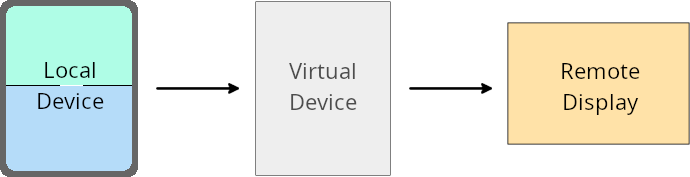
Chủ sở hữu thiết bị ảo là một ứng dụng đáng tin cậy hoặc có đặc quyền, tạo và quản lý một thiết bị ảo. Chủ sở hữu thiết bị ảo chạy các ứng dụng trên một thiết bị ảo, sau đó chiếu các ứng dụng đó lên màn hình của một thiết bị từ xa, chẳng hạn như máy tính cá nhân, thiết bị thực tế ảo hoặc hệ thống thông tin giải trí trên ô tô. Chủ sở hữu thiết bị ảo nằm trên một thiết bị cục bộ, chẳng hạn như điện thoại di động.
Ghi đè cho mỗi ứng dụng
Trên các thiết bị chạy Android 16 (cấp độ API 36), chủ sở hữu thiết bị ảo có thể ghi đè chế độ cài đặt ứng dụng trên một số thiết bị ảo mà chủ sở hữu thiết bị ảo quản lý. Ví dụ: để cải thiện bố cục ứng dụng, chủ sở hữu thiết bị ảo có thể bỏ qua các hạn chế về hướng, tỷ lệ khung hình và khả năng thay đổi kích thước khi chiếu ứng dụng lên màn hình ngoài.
Các thay đổi có thể gây lỗi thường gặp
Hành vi của Android 16 có thể ảnh hưởng đến giao diện người dùng của ứng dụng trên các hệ số hình dạng màn hình lớn, chẳng hạn như màn hình ô tô hoặc Chromebook, đặc biệt là các bố cục được thiết kế cho màn hình nhỏ ở hướng dọc. Để tìm hiểu cách giúp ứng dụng thích ứng với mọi hệ số hình dạng thiết bị, hãy xem bài viết Giới thiệu về bố cục thích ứng.
Tài liệu tham khảo
Truyền phát ứng dụng đồng hành
Bảo mật
Android 16 (cấp độ API 36) có các thay đổi giúp tăng cường bảo mật hệ thống để bảo vệ ứng dụng và người dùng khỏi các ứng dụng độc hại.
Cải thiện độ bảo mật để chống lại các cuộc tấn công chuyển hướng ý định
Android 16 provides default security against general Intent redirection
attacks, with minimum compatibility and developer changes required.
We are introducing by-default security hardening solutions to Intent
redirection exploits. In most cases, apps that use intents normally won't
experience any compatibility issues; we've gathered metrics throughout our
development process to monitor which apps might experience breakages.
Intent redirection in Android occurs when an attacker can partly or fully control the contents of an intent used to launch a new component in the context of a vulnerable app, while the victim app launches an untrusted sub-level intent in an extras field of an ("top-level") Intent. This can lead to the attacker app launching private components in the context of the victim app, triggering privileged actions, or gaining URI access to sensitive data, potentially leading to data theft and arbitrary code execution.
Opt out of Intent redirection handling
Android 16 introduces a new API that allows apps to opt out of launch security protections. This might be necessary in specific cases where the default security behavior interferes with legitimate app use cases.
For applications compiling against Android 16 (API level 36) SDK or higher
You can directly use the removeLaunchSecurityProtection() method on the Intent
object.
val i = intent
val iSublevel: Intent? = i.getParcelableExtra("sub_intent")
iSublevel?.removeLaunchSecurityProtection() // Opt out from hardening
iSublevel?.let { startActivity(it) }
For applications compiling against Android 15 (API level 35) or lower
While not recommended, you can use reflection to access the
removeLaunchSecurityProtection() method.
val i = intent
val iSublevel: Intent? = i.getParcelableExtra("sub_intent", Intent::class.java)
try {
    val removeLaunchSecurityProtection = Intent::class.java.getDeclaredMethod("removeLaunchSecurityProtection")
    removeLaunchSecurityProtection.invoke(iSublevel)
} catch (e: Exception) {
    // Handle the exception, e.g., log it
} // Opt-out from the security hardening using reflection
iSublevel?.let { startActivity(it) }
Ứng dụng đồng hành không còn được thông báo về thời gian chờ phát hiện nữa
Android 16 introduces a new behavior during
companion device pairing flow to protect the user's location
privacy from malicious apps. All companion apps running on Android 16 are no
longer directly notified of discovery timeout using
RESULT_DISCOVERY_TIMEOUT. Instead, the user is
notified of timeout events with a visual dialog. When the user dismisses
the dialog, the app is alerted of the association failure with
RESULT_USER_REJECTED.
The search duration has also been extended from the original 20 seconds, and the device discovery can be stopped by the user at any point during the search. If at least one device was discovered within the first 20 seconds of starting the search, the CDM stops searching for additional devices.
Khả năng kết nối
Android 16 (cấp độ API 36) có các thay đổi sau đây trong ngăn xếp Bluetooth để cải thiện khả năng kết nối với các thiết bị ngoại vi.
Cải thiện khả năng xử lý tình trạng mất liên kết
Kể từ Android 16, ngăn xếp Bluetooth đã được cập nhật để cải thiện tính bảo mật và trải nghiệm người dùng khi phát hiện thấy mất liên kết từ xa. Trước đây, hệ thống sẽ tự động xoá mối liên kết và bắt đầu một quy trình ghép nối mới, điều này có thể dẫn đến việc ghép nối lại ngoài ý muốn. Chúng tôi nhận thấy trong nhiều trường hợp, các ứng dụng không xử lý sự kiện mất liên kết một cách nhất quán.
Để hợp nhất trải nghiệm, Android 16 đã cải thiện khả năng xử lý mất liên kết với hệ thống. Nếu không xác thực được thiết bị Bluetooth đã liên kết trước đó khi kết nối lại, hệ thống sẽ ngắt kết nối đường liên kết, giữ lại thông tin liên kết cục bộ và hiển thị hộp thoại hệ thống thông báo cho người dùng về việc mất liên kết và hướng dẫn họ ghép nối lại.