

অ্যান্ড্রয়েড ১৬ প্ল্যাটফর্মে এমন কিছু আচরণগত পরিবর্তন রয়েছে যা আপনার অ্যাপকে প্রভাবিত করতে পারে। targetSdkVersion নির্বিশেষে, অ্যান্ড্রয়েড ১৬-এ চালিত সমস্ত অ্যাপের ক্ষেত্রে নিম্নলিখিত আচরণগত পরিবর্তনগুলি প্রযোজ্য। আপনার অ্যাপটি পরীক্ষা করে দেখা উচিত এবং তারপরে, যেখানে প্রযোজ্য, এই পরিবর্তনগুলিকে সমর্থন করার জন্য প্রয়োজন অনুযায়ী এটি সংশোধন করা উচিত।
অ্যান্ড্রয়েড ১৬ টার্গেট করা অ্যাপগুলোর জন্য প্রযোজ্য আচরণগত পরিবর্তনের তালিকাটিও পর্যালোচনা করে নিতে ভুলবেন না।
মূল কার্যকারিতা
অ্যান্ড্রয়েড ১৬ (এপিআই লেভেল ৩৬)-এ নিম্নলিখিত পরিবর্তনগুলো অন্তর্ভুক্ত রয়েছে, যা অ্যান্ড্রয়েড সিস্টেমের বিভিন্ন মূল সক্ষমতাকে সংশোধন বা প্রসারিত করে।
জবশিডিউলার কোটা অপ্টিমাইজেশন
অ্যান্ড্রয়েড 16 থেকে শুরু করে, আমরা নিম্নলিখিত বিষয়গুলির উপর ভিত্তি করে নিয়মিত এবং দ্রুত কাজ সম্পাদনের রানটাইম কোটা সামঞ্জস্য করছি:
- অ্যাপ্লিকেশানটি কোন অ্যাপ স্ট্যান্ডবাই বালতিতে রয়েছে : Android 16-এ, সক্রিয় স্ট্যান্ডবাই বাকেটগুলি উদার রানটাইম কোটা দ্বারা প্রয়োগ করা শুরু হবে৷
- অ্যাপটি শীর্ষ অবস্থায় থাকাকালীন চাকরিটি কার্যকর করা শুরু করলে : Android 16-এ, অ্যাপটি ব্যবহারকারীর কাছে দৃশ্যমান থাকাকালীন চাকরি শুরু হয় এবং অ্যাপটি অদৃশ্য হয়ে যাওয়ার পরেও চলতে থাকে, চাকরির রানটাইম কোটা মেনে চলবে।
- যদি একটি ফোরগ্রাউন্ড পরিষেবা চালানোর সময় কাজটি কার্যকর করা হয় : Android 16-এ, যে কাজগুলি একটি ফোরগ্রাউন্ড পরিষেবার সাথে একযোগে কাজ করছে সেগুলি চাকরির রানটাইম কোটা মেনে চলবে। আপনি যদি ব্যবহারকারীর সূচনাকৃত ডেটা স্থানান্তরের জন্য কাজের সুবিধা নিয়ে থাকেন, তবে পরিবর্তে ব্যবহারকারীর সূচিত ডেটা স্থানান্তর কাজগুলি ব্যবহার করার কথা বিবেচনা করুন।
এই পরিবর্তনটি WorkManager, JobScheduler, এবং DownloadManager ব্যবহার করে নির্ধারিত কাজগুলিকে প্রভাবিত করে৷ কেন একটি কাজ বন্ধ করা হয়েছিল তা ডিবাগ করার জন্য, আমরা WorkInfo.getStopReason() (JobScheduler কাজের জন্য, JobParameters.getStopReason() ) কল করে কল করে কেন আপনার কাজ বন্ধ করা হয়েছিল তা লগ করার পরামর্শ দিই।
আপনার অ্যাপের অবস্থা কীভাবে এটি ব্যবহার করতে পারে এমন সংস্থানগুলিকে প্রভাবিত করে সে সম্পর্কে তথ্যের জন্য, পাওয়ার ম্যানেজমেন্ট রিসোর্স সীমা দেখুন৷ ব্যাটারি-অনুকূল সর্বোত্তম অনুশীলন সম্পর্কে আরও তথ্যের জন্য, টাস্ক শিডিউলিং API-এর জন্য ব্যাটারি ব্যবহার অপ্টিমাইজ করার নির্দেশিকা পড়ুন।
আমরা Android 16-এ প্রবর্তিত নতুন JobScheduler#getPendingJobReasonsHistory API ব্যবহার করার পরামর্শ দিচ্ছি কেন একটি চাকরি কার্যকর করা হয়নি তা বোঝার জন্য।
টেস্টিং
আপনার অ্যাপের আচরণ পরীক্ষা করার জন্য, আপনি নির্দিষ্ট চাকরির কোটা অপ্টিমাইজেশনের ওভাররাইড সক্ষম করতে পারেন যতক্ষণ না অ্যাপটি একটি Android 16 ডিভাইসে চলছে।
"শীর্ষ রাষ্ট্র চাকরীর রানটাইম কোটা মেনে চলবে" এর প্রয়োগ অক্ষম করতে, নিম্নলিখিত adb কমান্ডটি চালান:
adb shell am compat enable OVERRIDE_QUOTA_ENFORCEMENT_TO_TOP_STARTED_JOBS APP_PACKAGE_NAME
"যে কাজগুলি একযোগে একটি ফোরগ্রাউন্ড পরিষেবার সাথে কাজ চালানোর সময় কাজ রানটাইম কোটা মেনে চলবে" এর প্রয়োগকে নিষ্ক্রিয় করতে, নিম্নলিখিত adb কমান্ডটি চালান:
adb shell am compat enable OVERRIDE_QUOTA_ENFORCEMENT_TO_FGS_JOBS APP_PACKAGE_NAME
নির্দিষ্ট অ্যাপ স্ট্যান্ডবাই বালতি আচরণ পরীক্ষা করতে, আপনি নিম্নলিখিত adb কমান্ড ব্যবহার করে আপনার অ্যাপের অ্যাপ স্ট্যান্ডবাই বাকেট সেট করতে পারেন:
adb shell am set-standby-bucket APP_PACKAGE_NAME active|working_set|frequent|rare|restricted
আপনার অ্যাপটি যে অ্যাপ স্ট্যান্ডবাই বালতিতে রয়েছে তা বোঝার জন্য, আপনি নিম্নলিখিত adb কমান্ড ব্যবহার করে আপনার অ্যাপের অ্যাপ স্ট্যান্ডবাই বাকেট পেতে পারেন:
adb shell am get-standby-bucket APP_PACKAGE_NAME
পরিত্যক্ত খালি কাজগুলো কারণ থামিয়ে দেয়
একটি পরিত্যক্ত কাজ ঘটে যখন কাজের সাথে যুক্ত JobParameters অবজেক্টটি আবর্জনা সংগ্রহ করা হয়, কিন্তু JobService#jobFinished(JobParameters, boolean) কাজ সমাপ্তির সংকেত দিতে ডাকা হয়নি। এটি ইঙ্গিত দেয় যে অ্যাপের সচেতনতা ছাড়াই চাকরিটি চলমান এবং পুনঃনির্ধারিত হতে পারে।
যে অ্যাপগুলি JobScheduler-এর উপর নির্ভর করে, JobParameters অবজেক্টের একটি শক্তিশালী রেফারেন্স বজায় রাখে না এবং টাইমআউট এখন STOP_REASON_TIMEOUT পরিবর্তে নতুন চাকরি বন্ধের কারণ STOP_REASON_TIMEOUT_ABANDONED দেওয়া হবে।
নতুন পরিত্যক্ত স্টপ কারণের ঘন ঘন ঘটনা ঘটলে, সিস্টেম কাজের ফ্রিকোয়েন্সি কমাতে প্রশমনের পদক্ষেপ নেবে।
অ্যাপ্লিকেশানগুলিকে পরিত্যক্ত কাজগুলি সনাক্ত করতে এবং কমাতে নতুন স্টপ কারণ ব্যবহার করা উচিত৷
আপনি যদি WorkManager, AsyncTask, বা DownloadManager ব্যবহার করেন, তাহলে আপনি প্রভাবিত হবেন না কারণ এই APIগুলি আপনার অ্যাপের হয়ে চাকরির জীবনচক্র পরিচালনা করে।
JobInfo#setImportantWhileForeground সম্পূর্ণরূপে অবজ্ঞা করা হচ্ছে
JobInfo.Builder#setImportantWhileForeground(boolean) পদ্ধতি একটি কাজের গুরুত্ব নির্দেশ করে যখন সময়সূচী অ্যাপটি অগ্রভাগে থাকে বা যখন সাময়িকভাবে ব্যাকগ্রাউন্ড সীমাবদ্ধতা থেকে অব্যাহতি দেওয়া হয়।
Android 12 (API লেভেল 31) থেকে এই পদ্ধতিটি অবমূল্যায়িত হয়েছে। অ্যান্ড্রয়েড 16 থেকে শুরু করে, এটি আর কার্যকরভাবে কাজ করে না এবং এই পদ্ধতিতে কল করা উপেক্ষা করা হবে।
কার্যকারিতার এই অপসারণ JobInfo#isImportantWhileForeground() ক্ষেত্রেও প্রযোজ্য। অ্যান্ড্রয়েড 16 থেকে শুরু করে, যদি পদ্ধতিটি বলা হয়, তবে পদ্ধতিটি false ফেরত দেয়।
অর্ডারকৃত সম্প্রচারের অগ্রাধিকারের পরিধি আর বৈশ্বিক নয়
অ্যান্ড্রয়েড অ্যাপ্লিকেশানগুলিকে ব্রডকাস্ট রিসিভারগুলিতে অগ্রাধিকার নির্ধারণ করার অনুমতি দেওয়া হয় যাতে রিসিভারগুলি সম্প্রচারটি গ্রহণ করে এবং প্রক্রিয়া করে তা নিয়ন্ত্রণ করতে। ম্যানিফেস্ট-ঘোষিত রিসিভারগুলির জন্য, অ্যাপগুলি অগ্রাধিকার নির্ধারণ করতে android:priority বৈশিষ্ট্য ব্যবহার করতে পারে এবং প্রসঙ্গ-নিবন্ধিত রিসিভারগুলির জন্য, অ্যাপগুলি অগ্রাধিকার নির্ধারণ করতে IntentFilter#setPriority() API ব্যবহার করতে পারে৷ যখন একটি সম্প্রচার পাঠানো হয়, সিস্টেমটি সর্বোচ্চ থেকে সর্বনিম্ন পর্যন্ত তাদের অগ্রাধিকারের ক্রমানুসারে রিসিভারদের কাছে পৌঁছে দেয়।
Android 16-এ, বিভিন্ন প্রক্রিয়া জুড়ে android:priority অ্যাট্রিবিউট বা IntentFilter#setPriority() ব্যবহার করে ব্রডকাস্ট ডেলিভারি অর্ডার নিশ্চিত করা হবে না। সম্প্রচার অগ্রাধিকার শুধুমাত্র সমস্ত প্রক্রিয়ার পরিবর্তে একই আবেদন প্রক্রিয়ার মধ্যে সম্মান করা হবে।
এছাড়াও, সম্প্রচারের অগ্রাধিকারগুলি স্বয়ংক্রিয়ভাবে পরিসরে সীমাবদ্ধ থাকবে ( SYSTEM_LOW_PRIORITY + 1, SYSTEM_HIGH_PRIORITY - 1)৷ শুধুমাত্র সিস্টেমের উপাদানগুলিকে SYSTEM_LOW_PRIORITY , SYSTEM_HIGH_PRIORITY সম্প্রচার অগ্রাধিকার হিসাবে সেট করার অনুমতি দেওয়া হবে৷
আপনার অ্যাপটি নিম্নোক্ত যেকোনো একটি করলে প্রভাবিত হতে পারে:
- আপনার আবেদন একই সম্প্রচার অভিপ্রায় সহ একাধিক প্রক্রিয়া ঘোষণা করেছে এবং অগ্রাধিকারের উপর ভিত্তি করে একটি নির্দিষ্ট ক্রমে সেই অভিপ্রায়গুলি পাওয়ার আশেপাশে প্রত্যাশা রয়েছে৷
- আপনার আবেদন প্রক্রিয়া অন্যান্য প্রক্রিয়ার সাথে ইন্টারঅ্যাক্ট করে এবং একটি নির্দিষ্ট ক্রমে একটি সম্প্রচারের অভিপ্রায় প্রাপ্তির আশা রাখে।
যদি প্রক্রিয়াগুলি একে অপরের সাথে সমন্বয় করতে হয়, তবে তাদের অন্যান্য সমন্বয় চ্যানেল ব্যবহার করে যোগাযোগ করা উচিত।
ART অভ্যন্তরীণ পরিবর্তন
অ্যান্ড্রয়েড 16 এ অ্যান্ড্রয়েড রানটাইম (এআরটি) এর সর্বশেষ আপডেটগুলি অন্তর্ভুক্ত করে যা অ্যান্ড্রয়েড রানটাইমের (এআরটি) কর্মক্ষমতা উন্নত করে এবং অতিরিক্ত জাভা বৈশিষ্ট্যগুলির জন্য সমর্থন প্রদান করে। Google Play সিস্টেম আপডেটের মাধ্যমে, এই উন্নতিগুলি Android 12 (API স্তর 31) এবং উচ্চতর চলমান এক বিলিয়নেরও বেশি ডিভাইসে উপলব্ধ।
এই পরিবর্তনগুলি প্রকাশিত হওয়ার সাথে সাথে, ART-এর অভ্যন্তরীণ কাঠামোর উপর নির্ভর করে এমন লাইব্রেরি এবং অ্যাপ কোডগুলি Android 16 চালিত ডিভাইসগুলিতে সঠিকভাবে কাজ নাও করতে পারে, সেই সাথে আগের Android সংস্করণগুলি যা Google Play সিস্টেম আপডেটের মাধ্যমে ART মডিউল আপডেট করে।
অভ্যন্তরীণ কাঠামোর উপর নির্ভর করা (যেমন নন-SDK ইন্টারফেস ) সর্বদা সামঞ্জস্যের সমস্যার দিকে পরিচালিত করতে পারে, তবে অভ্যন্তরীণ এআরটি কাঠামোর উপকার করে এমন কোড (বা কোড ধারণকারী লাইব্রেরি) এর উপর নির্ভর করা এড়ানো বিশেষভাবে গুরুত্বপূর্ণ, যেহেতু ART পরিবর্তনগুলি প্ল্যাটফর্মের সাথে আবদ্ধ নয়। ডিভাইসটির সংস্করণটি চলছে এবং তারা Google Play সিস্টেম আপডেটের মাধ্যমে এক বিলিয়নেরও বেশি ডিভাইসে চলে যায়।
সমস্ত ডেভেলপারদের Android 16-এ তাদের অ্যাপ্লিকেশানগুলি পুঙ্খানুপুঙ্খভাবে পরীক্ষা করে তাদের অ্যাপ প্রভাবিত হয়েছে কিনা তা পরীক্ষা করা উচিত। উপরন্তু, আপনার অ্যাপটি অভ্যন্তরীণ ART কাঠামোর উপর নির্ভর করে এমন কোনও লাইব্রেরির উপর নির্ভর করে যা আমরা চিহ্নিত করেছি কিনা তা দেখতে পরিচিত সমস্যাগুলি পরীক্ষা করুন। আপনার যদি অ্যাপ কোড বা লাইব্রেরি নির্ভরতা থাকে যা প্রভাবিত হয়, যখনই সম্ভব সর্বজনীন API বিকল্পগুলি সন্ধান করুন এবং আমাদের ইস্যু ট্র্যাকারে একটি বৈশিষ্ট্য অনুরোধ তৈরি করে নতুন ব্যবহারের ক্ষেত্রে সর্বজনীন APIগুলির জন্য অনুরোধ করুন৷
১৬ কেবি পেজ সাইজ সামঞ্জস্য মোড
প্ল্যাটফর্মের কর্মক্ষমতা অপ্টিমাইজ করতে Android 15 16 KB মেমরি পৃষ্ঠাগুলির জন্য সমর্থন চালু করেছে। Android 16 একটি সামঞ্জস্যপূর্ণ মোড যোগ করে, যা 4 KB মেমরি পৃষ্ঠাগুলির জন্য নির্মিত কিছু অ্যাপকে 16 KB মেমরি পৃষ্ঠাগুলির জন্য কনফিগার করা ডিভাইসে চালানোর অনুমতি দেয়।
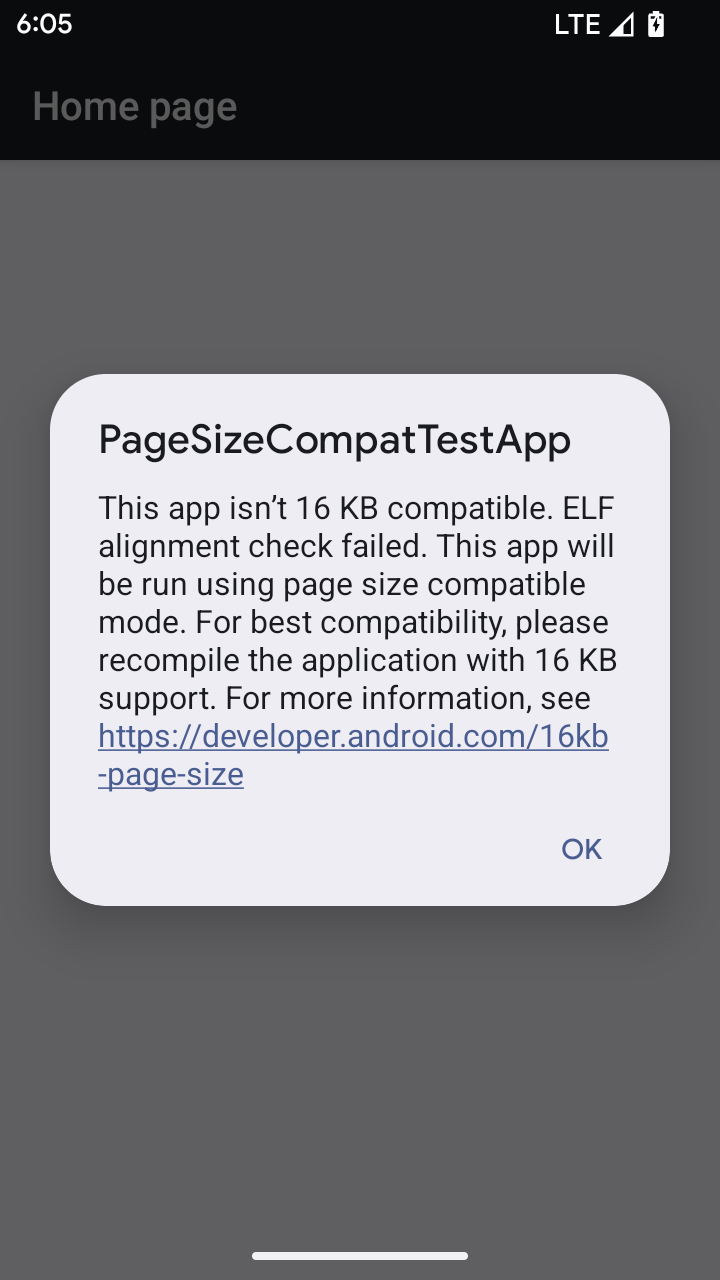
যখন আপনার অ্যাপ Android 16 বা তার উচ্চতর সংস্করণের কোনো ডিভাইসে চলছে, যদি Android শনাক্ত করে যে আপনার অ্যাপে 4 KB সারিবদ্ধ মেমরি পৃষ্ঠা রয়েছে, তাহলে এটি স্বয়ংক্রিয়ভাবে সামঞ্জস্যপূর্ণ মোড ব্যবহার করে এবং ব্যবহারকারীর কাছে একটি বিজ্ঞপ্তি ডায়ালগ প্রদর্শন করে। পিছনের দিকের সামঞ্জস্য মোড সক্ষম করতে AndroidManifest.xml এ android:pageSizeCompat বৈশিষ্ট্য সেট করা আপনার অ্যাপ চালু হওয়ার সময় ডায়ালগ প্রদর্শনকে বাধা দেবে৷ android:pageSizeCompat প্রপার্টি ব্যবহার করতে, Android 16 SDK ব্যবহার করে আপনার অ্যাপ কম্পাইল করুন।
সর্বোত্তম কর্মক্ষমতা, নির্ভরযোগ্যতা এবং স্থিতিশীলতার জন্য, আপনার অ্যাপটি এখনও 16 KB সারিবদ্ধ হওয়া উচিত। আরও বিশদ বিবরণের জন্য 16 KB মেমরি পৃষ্ঠাগুলিকে সমর্থন করার জন্য আপনার অ্যাপগুলি আপডেট করার বিষয়ে আমাদের সাম্প্রতিক ব্লগ পোস্টটি দেখুন৷
ব্যবহারকারীর অভিজ্ঞতা এবং সিস্টেম UI
অ্যান্ড্রয়েড ১৬ (এপিআই লেভেল ৩৬)-এ নিম্নলিখিত পরিবর্তনগুলো অন্তর্ভুক্ত করা হয়েছে, যার উদ্দেশ্য হলো আরও সামঞ্জস্যপূর্ণ ও স্বজ্ঞামূলক ব্যবহারকারীর অভিজ্ঞতা তৈরি করা।
বিঘ্ন সৃষ্টিকারী প্রবেশগম্যতা ঘোষণাগুলির অবমূল্যায়ন
Android 16 অ্যাকসেসিবিলিটি ঘোষণাগুলিকে বাতিল করে, যা announceForAccessibility ব্যবহার বা TYPE_ANNOUNCEMENT অ্যাক্সেসিবিলিটি ইভেন্টগুলির প্রেরণের দ্বারা চিহ্নিত৷ এগুলি টকব্যাক এবং অ্যান্ড্রয়েডের স্ক্রিন রিডার ব্যবহারকারীদের জন্য অসামঞ্জস্যপূর্ণ ব্যবহারকারীর অভিজ্ঞতা তৈরি করতে পারে এবং বিকল্পগুলি Android এর বিভিন্ন সহায়ক প্রযুক্তি জুড়ে ব্যবহারকারীর চাহিদার বিস্তৃত পরিসরকে আরও ভালভাবে পরিবেশন করে৷
বিকল্পের উদাহরণ:
- উইন্ডো পরিবর্তনের মতো উল্লেখযোগ্য UI পরিবর্তনের জন্য
Activity.setTitle(CharSequence)এবংsetAccessibilityPaneTitle(java.lang.CharSequence)ব্যবহার করুন। রচনায়,Modifier.semantics { paneTitle = "paneTitle" } - ব্যবহারকারীকে গুরুত্বপূর্ণ UI-তে পরিবর্তন সম্পর্কে অবহিত করতে,
setAccessibilityLiveRegion(int)ব্যবহার করুন। রচনায়,Modifier.semantics { liveRegion = LiveRegionMode.[Polite|Assertive]}। এগুলি অল্প ব্যবহার করা উচিত কারণ প্রতিবার ভিউ আপডেট করার সময় এগুলি ঘোষণা তৈরি করতে পারে৷ - ব্যবহারকারীদের ত্রুটি সম্পর্কে অবহিত করতে,
AccessibilityEvent#CONTENT_CHANGE_TYPE_ERRORধরনের একটিAccessibilityEventপাঠান এবংAccessibilityNodeInfo#setError(CharSequence)সেট করুন, অথবাTextView#setError(CharSequence)ব্যবহার করুন।
অপ্রচলিত announceForAccessibility API-এর রেফারেন্স ডকুমেন্টেশনে প্রস্তাবিত বিকল্পগুলি সম্পর্কে আরও বিশদ অন্তর্ভুক্ত রয়েছে৷
৩-বাটন নেভিগেশনের জন্য সমর্থন
Android 16 সঠিকভাবে ভবিষ্যদ্বাণীমূলক ব্যাক-এ স্থানান্তরিত অ্যাপগুলির জন্য 3-বোতাম নেভিগেশনে ভবিষ্যদ্বাণীমূলক ব্যাক সমর্থন নিয়ে আসে। পিছনের বোতামটি দীর্ঘক্ষণ চাপলে একটি ভবিষ্যদ্বাণীমূলক ব্যাক অ্যানিমেশন শুরু হয়, যা আপনাকে পিছনের সোয়াইপ আপনাকে কোথায় নিয়ে যায় তার একটি পূর্বরূপ দেয়।
এই আচরণটি সিস্টেমের সমস্ত ক্ষেত্র জুড়ে প্রযোজ্য যা ভবিষ্যদ্বাণীমূলক ব্যাক অ্যানিমেশনগুলিকে সমর্থন করে, যার মধ্যে সিস্টেম অ্যানিমেশনগুলি (ব্যাক-টু-হোম, ক্রস-টাস্ক, এবং ক্রস-অ্যাক্টিভিটি) সহ।
স্বয়ংক্রিয় থিমযুক্ত অ্যাপ আইকন
Android 16 QPR 2 দিয়ে শুরু করে, Android স্বয়ংক্রিয়ভাবে অ্যাপ আইকনগুলিতে থিম প্রয়োগ করে একটি সমন্বিত হোম স্ক্রীন অভিজ্ঞতা তৈরি করে৷ এটি ঘটে যদি একটি অ্যাপ তার নিজস্ব থিমযুক্ত অ্যাপ আইকন প্রদান না করে। অ্যাপ্লিকেশানগুলি তাদের অভিযোজিত আইকনের মধ্যে একটি মনোক্রোম স্তর অন্তর্ভুক্ত করে এবং Android স্টুডিওতে তাদের অ্যাপ আইকনটি কেমন হবে তা পূর্বরূপ দেখার মাধ্যমে তাদের থিমযুক্ত অ্যাপ আইকনের নকশা নিয়ন্ত্রণ করতে পারে৷
ডিভাইসের ফর্ম ফ্যাক্টর
অ্যান্ড্রয়েড ১৬ (এপিআই লেভেল ৩৬)-এ ভার্চুয়াল ডিভাইস মালিকদের দ্বারা ডিসপ্লেতে অ্যাপ প্রজেক্ট করার ক্ষেত্রে নিম্নলিখিত পরিবর্তনগুলো অন্তর্ভুক্ত করা হয়েছে।
ভার্চুয়াল ডিভাইসের মালিক অগ্রাহ্য করে
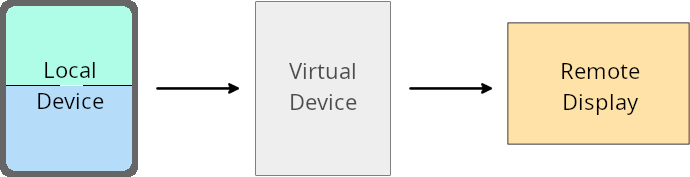
ভার্চুয়াল ডিভাইস ওনার হলো একটি বিশ্বস্ত বা বিশেষাধিকারপ্রাপ্ত অ্যাপ যা একটি ভার্চুয়াল ডিভাইস তৈরি ও পরিচালনা করে। ভার্চুয়াল ডিভাইস ওনাররা একটি ভার্চুয়াল ডিভাইসে অ্যাপ চালায় এবং তারপর সেই অ্যাপগুলোকে একটি দূরবর্তী ডিভাইসের ডিসপ্লেতে প্রদর্শন করে, যেমন একটি পার্সোনাল কম্পিউটার, ভার্চুয়াল রিয়েলিটি ডিভাইস বা গাড়ির ইনফোটেইনমেন্ট সিস্টেম। ভার্চুয়াল ডিভাইস ওনারটি একটি স্থানীয় ডিভাইসে থাকে, যেমন একটি মোবাইল ফোন।
প্রতি-অ্যাপ ওভাররাইড
অ্যান্ড্রয়েড ১৬ (এপিআই লেভেল ৩৬) চালিত ডিভাইসগুলিতে, ভার্চুয়াল ডিভাইসের মালিকরা তাদের দ্বারা পরিচালিত নির্বাচিত ভার্চুয়াল ডিভাইসগুলিতে অ্যাপের সেটিংস পরিবর্তন করতে পারেন। উদাহরণস্বরূপ, অ্যাপের লেআউট উন্নত করার জন্য, একজন ভার্চুয়াল ডিভাইসের মালিক কোনো বাহ্যিক ডিসপ্লেতে অ্যাপ প্রজেক্ট করার সময় ওরিয়েন্টেশন, অ্যাসপেক্ট রেশিও এবং রিসাইজযোগ্যতার সীমাবদ্ধতা উপেক্ষা করতে পারেন।
সাধারণ ব্রেকিং পরিবর্তনগুলি
অ্যান্ড্রয়েড ১৬-এর আচরণ গাড়ির ডিসপ্লে বা ক্রোমবুকের মতো বড় স্ক্রিনের ডিভাইসগুলোতে আপনার অ্যাপের UI-কে প্রভাবিত করতে পারে, বিশেষ করে সেই লেআউটগুলোকে যেগুলো পোর্ট্রেট ওরিয়েন্টেশনে ছোট ডিসপ্লের জন্য ডিজাইন করা হয়েছিল। আপনার অ্যাপকে সব ধরনের ডিভাইসের জন্য কীভাবে অ্যাডাপ্টিভ বা অভিযোজনযোগ্য করে তুলবেন তা জানতে, ‘অ্যাডাপ্টিভ লেআউট সম্পর্কে’ দেখুন।
তথ্যসূত্র
নিরাপত্তা
অ্যান্ড্রয়েড ১৬ (এপিআই লেভেল ৩৬)-এ এমন কিছু পরিবর্তন আনা হয়েছে যা সিস্টেমের নিরাপত্তা বাড়িয়ে অ্যাপ এবং ব্যবহারকারীদের ক্ষতিকর অ্যাপ থেকে সুরক্ষিত রাখতে সাহায্য করে।
ইনটেন্ট রিডাইরেকশন আক্রমণের বিরুদ্ধে উন্নত নিরাপত্তা
অ্যান্ড্রয়েড ১৬ সাধারণ Intent রিডাইরেকশন আক্রমণের বিরুদ্ধে ডিফল্ট নিরাপত্তা প্রদান করে, যার জন্য ন্যূনতম সামঞ্জস্যতা এবং ডেভেলপার পরিবর্তনের প্রয়োজন হয়।
আমরা Intent রিডাইরেকশন এক্সপ্লয়েট মোকাবেলায় ডিফল্টভাবে নিরাপত্তা জোরদার করার সমাধান চালু করছি। বেশিরভাগ ক্ষেত্রে, যে অ্যাপগুলো ইন্টেন্ট ব্যবহার করে, সেগুলোতে সাধারণত কোনো সামঞ্জস্যজনিত সমস্যা হয় না; তবে কোন অ্যাপগুলোতে সমস্যা দেখা দিতে পারে, তা পর্যবেক্ষণ করার জন্য আমরা আমাদের উন্নয়ন প্রক্রিয়া জুড়ে মেট্রিক্স সংগ্রহ করেছি।
অ্যান্ড্রয়েডে ইন্টেন্ট রিডাইরেকশন ঘটে যখন একজন আক্রমণকারী একটি দুর্বল অ্যাপের প্রেক্ষাপটে নতুন কম্পোনেন্ট চালু করার জন্য ব্যবহৃত ইন্টেন্টের বিষয়বস্তু আংশিক বা সম্পূর্ণরূপে নিয়ন্ত্রণ করতে পারে, এবং একই সময়ে ভুক্তভোগী অ্যাপটি তার ("শীর্ষ-স্তরের") ইন্টেন্টের 'এক্সট্রাস' ফিল্ডে একটি অবিশ্বস্ত উপ-স্তরের ইন্টেন্ট চালু করে। এর ফলে আক্রমণকারী অ্যাপটি ভুক্তভোগী অ্যাপের প্রেক্ষাপটে ব্যক্তিগত কম্পোনেন্ট চালু করতে পারে, বিশেষাধিকারপ্রাপ্ত কার্যকলাপ শুরু করতে পারে, অথবা সংবেদনশীল ডেটার URI অ্যাক্সেস পেতে পারে, যা সম্ভাব্যভাবে ডেটা চুরি এবং যথেচ্ছ কোড এক্সিকিউশনের কারণ হতে পারে।
ইনটেন্ট রিডাইরেকশন হ্যান্ডলিং থেকে অপ্ট আউট করুন
অ্যান্ড্রয়েড ১৬ একটি নতুন এপিআই চালু করেছে যা অ্যাপগুলোকে লঞ্চ নিরাপত্তা সুরক্ষা থেকে বেরিয়ে আসার সুযোগ দেয়। কিছু নির্দিষ্ট ক্ষেত্রে এটি প্রয়োজনীয় হতে পারে, যেখানে ডিফল্ট নিরাপত্তা ব্যবস্থা অ্যাপের বৈধ ব্যবহারে বাধা সৃষ্টি করে।
অ্যান্ড্রয়েড ১৬ (এপিআই লেভেল ৩৬) এসডিকে বা তার উচ্চতর সংস্করণের জন্য কম্পাইল করা অ্যাপ্লিকেশনগুলির ক্ষেত্রে
আপনি সরাসরি Intent অবজেক্টের উপর removeLaunchSecurityProtection() মেথডটি ব্যবহার করতে পারেন।
val i = intent
val iSublevel: Intent? = i.getParcelableExtra("sub_intent")
iSublevel?.removeLaunchSecurityProtection() // Opt out from hardening
iSublevel?.let { startActivity(it) }
অ্যান্ড্রয়েড ১৫ (এপিআই লেভেল ৩৫) বা তার নিম্নতর সংস্করণের জন্য কম্পাইল করা অ্যাপ্লিকেশনগুলির জন্য
যদিও এটি সুপারিশ করা হয় না, আপনি রিফ্লেকশন ব্যবহার করে removeLaunchSecurityProtection() মেথডটি অ্যাক্সেস করতে পারেন।
val i = intent
val iSublevel: Intent? = i.getParcelableExtra("sub_intent", Intent::class.java)
try {
    val removeLaunchSecurityProtection = Intent::class.java.getDeclaredMethod("removeLaunchSecurityProtection")
    removeLaunchSecurityProtection.invoke(iSublevel)
} catch (e: Exception) {
    // Handle the exception, e.g., log it
} // Opt-out from the security hardening using reflection
iSublevel?.let { startActivity(it) }
সহযোগী অ্যাপগুলোকে এখন আর ডিসকভারি টাইমআউটের বিষয়ে জানানো হবে না।
অ্যান্ড্রয়েড 16 ব্যবহারকারীর লোকেশন গোপনীয়তাকে ক্ষতিকারক অ্যাপ থেকে রক্ষা করতে সঙ্গী ডিভাইস পেয়ারিং ফ্লো চলাকালীন একটি নতুন আচরণ প্রবর্তন করে। RESULT_DISCOVERY_TIMEOUT ব্যবহার করে অ্যান্ড্রয়েড 16-এ চলমান সমস্ত সঙ্গী অ্যাপগুলিকে আর আবিষ্কারের সময়সীমার বিষয়ে সরাসরি বিজ্ঞপ্তি দেওয়া হয় না। পরিবর্তে, ব্যবহারকারীকে একটি ভিজ্যুয়াল ডায়ালগের মাধ্যমে সময় শেষ হওয়ার ঘটনা সম্পর্কে অবহিত করা হয়। যখন ব্যবহারকারী ডায়ালগ খারিজ করে, অ্যাপটিকে RESULT_USER_REJECTED সাথে অ্যাসোসিয়েশন ব্যর্থতার বিষয়ে সতর্ক করা হয়।
অনুসন্ধানের সময়কালটি মূল 20 সেকেন্ড থেকেও বাড়ানো হয়েছে এবং অনুসন্ধানের সময় ব্যবহারকারী যে কোনও সময়ে ডিভাইস আবিষ্কার বন্ধ করতে পারে। যদি অনুসন্ধান শুরু করার প্রথম 20 সেকেন্ডের মধ্যে অন্তত একটি ডিভাইস আবিষ্কৃত হয়, CDM অতিরিক্ত ডিভাইসগুলির জন্য অনুসন্ধান বন্ধ করে দেয়।
সংযোগ
পেরিফেরাল ডিভাইসগুলোর সাথে সংযোগ উন্নত করার জন্য অ্যান্ড্রয়েড ১৬ (এপিআই লেভেল ৩৬)-এর ব্লুটুথ স্ট্যাকে নিম্নলিখিত পরিবর্তনগুলো অন্তর্ভুক্ত করা হয়েছে।
বন্ড লোকসান ব্যবস্থাপনার উন্নতি
Android 16 থেকে শুরু করে, দূরবর্তী বন্ডের ক্ষতি শনাক্ত হলে নিরাপত্তা এবং ব্যবহারকারীর অভিজ্ঞতা উন্নত করতে ব্লুটুথ স্ট্যাক আপডেট করা হয়েছে। পূর্বে, সিস্টেমটি স্বয়ংক্রিয়ভাবে বন্ডটি সরিয়ে ফেলবে এবং একটি নতুন জোড়া প্রক্রিয়া শুরু করবে, যা অনিচ্ছাকৃতভাবে পুনরায় জোড়া লাগাতে পারে। আমরা অনেক ক্ষেত্রে দেখেছি যে অ্যাপগুলি বন্ড লস ইভেন্টকে সামঞ্জস্যপূর্ণভাবে যত্ন নেয় না।
অভিজ্ঞতা একত্রিত করতে, অ্যান্ড্রয়েড 16 সিস্টেমে বন্ড ক্ষতি পরিচালনার উন্নতি করেছে। যদি পূর্বে বন্ড করা ব্লুটুথ ডিভাইস পুনরায় সংযোগের পরে প্রমাণীকরণ করা না যায়, তাহলে সিস্টেম লিঙ্কটি সংযোগ বিচ্ছিন্ন করবে, স্থানীয় বন্ডের তথ্য বজায় রাখবে এবং একটি সিস্টেম ডায়ালগ প্রদর্শন করবে যা ব্যবহারকারীদের বন্ড হারানোর বিষয়ে অবহিত করবে এবং তাদের পুনরায় জোড়ার নির্দেশ দেবে।
,Android 16 থেকে শুরু করে, দূরবর্তী বন্ডের ক্ষতি শনাক্ত হলে নিরাপত্তা এবং ব্যবহারকারীর অভিজ্ঞতা উন্নত করতে ব্লুটুথ স্ট্যাক আপডেট করা হয়েছে। পূর্বে, সিস্টেমটি স্বয়ংক্রিয়ভাবে বন্ডটি সরিয়ে ফেলবে এবং একটি নতুন জোড়া প্রক্রিয়া শুরু করবে, যা অনিচ্ছাকৃতভাবে পুনরায় জোড়া লাগাতে পারে। আমরা অনেক ক্ষেত্রে দেখেছি যে অ্যাপগুলি বন্ড লস ইভেন্টকে সামঞ্জস্যপূর্ণভাবে যত্ন নেয় না।
অভিজ্ঞতা একত্রিত করতে, অ্যান্ড্রয়েড 16 সিস্টেমে বন্ড ক্ষতি পরিচালনার উন্নতি করেছে। যদি পূর্বে বন্ড করা ব্লুটুথ ডিভাইস পুনরায় সংযোগের পরে প্রমাণীকরণ করা না যায়, তাহলে সিস্টেম লিঙ্কটি সংযোগ বিচ্ছিন্ন করবে, স্থানীয় বন্ডের তথ্য বজায় রাখবে এবং একটি সিস্টেম ডায়ালগ প্রদর্শন করবে যা ব্যবহারকারীদের বন্ড হারানোর বিষয়ে অবহিত করবে এবং তাদের পুনরায় জোড়ার নির্দেশ দেবে।
,Android 16 থেকে শুরু করে, দূরবর্তী বন্ডের ক্ষতি শনাক্ত হলে নিরাপত্তা এবং ব্যবহারকারীর অভিজ্ঞতা উন্নত করতে ব্লুটুথ স্ট্যাক আপডেট করা হয়েছে। পূর্বে, সিস্টেমটি স্বয়ংক্রিয়ভাবে বন্ডটি সরিয়ে ফেলবে এবং একটি নতুন জোড়া প্রক্রিয়া শুরু করবে, যা অনিচ্ছাকৃতভাবে পুনরায় জোড়া লাগাতে পারে। আমরা অনেক ক্ষেত্রে দেখেছি যে অ্যাপগুলি বন্ড লস ইভেন্টকে সামঞ্জস্যপূর্ণভাবে যত্ন নেয় না।
অভিজ্ঞতা একত্রিত করতে, অ্যান্ড্রয়েড 16 সিস্টেমে বন্ড ক্ষতি পরিচালনার উন্নতি করেছে। যদি পূর্বে বন্ড করা ব্লুটুথ ডিভাইস পুনরায় সংযোগের পরে প্রমাণীকরণ করা না যায়, তাহলে সিস্টেম লিঙ্কটি সংযোগ বিচ্ছিন্ন করবে, স্থানীয় বন্ডের তথ্য বজায় রাখবে এবং একটি সিস্টেম ডায়ালগ প্রদর্শন করবে যা ব্যবহারকারীদের বন্ড হারানোর বিষয়ে অবহিত করবে এবং তাদের পুনরায় জোড়ার নির্দেশ দেবে।