

Wie bei früheren Versionen enthält Android 16 Verhaltensänderungen, die sich auf Ihre App auswirken können. Die folgenden Verhaltensänderungen gelten ausschließlich für Apps, die auf Android 16 oder höher ausgerichtet sind. Wenn Ihre App auf Android 16 oder höher ausgerichtet ist, sollten Sie sie gegebenenfalls so ändern, dass sie diese Verhaltensweisen unterstützt.
Sehen Sie sich auch die Liste der Verhaltensänderungen an, die sich auf alle Apps auswirken
die unter Android 16 ausgeführt werden, unabhängig von der targetSdkVersion Ihrer App.
Nutzererfahrung und System-UI
Android 16 (API-Level 36) enthält die folgenden Änderungen, die eine einheitlichere und intuitivere Nutzererfahrung ermöglichen sollen.
Deaktivierung der Option „Nur Foto, ohne Rand“ wird entfernt
Unter Android 15 wurde die randlose Darstellung erzwungen für Apps, die auf Android 15 (API
Level 35) ausgerichtet sind. Ihre App konnte dies jedoch deaktivieren, indem Sie
R.attr#windowOptOutEdgeToEdgeEnforcement auf true gesetzt haben. Bei Apps, die auf Android 16 (API-Level 36) ausgerichtet sind, ist R.attr#windowOptOutEdgeToEdgeEnforcement veraltet und deaktiviert. Ihre App kann die randlose Darstellung nicht deaktivieren.
- Wenn Ihre App auf Android 16 (API-Level 36) ausgerichtet ist und auf einem Android 15-Gerät ausgeführt wird, funktioniert
R.attr#windowOptOutEdgeToEdgeEnforcementweiterhin. - Wenn Ihre App auf Android 16 (API-Level 36) ausgerichtet ist und auf einem Android 16-Gerät ausgeführt wird, ist
R.attr#windowOptOutEdgeToEdgeEnforcementdeaktiviert.
Für Tests unter Android 16 muss Ihre App die randlose Darstellung unterstützen. Entfernen Sie alle Verwendungen von R.attr#windowOptOutEdgeToEdgeEnforcement, damit Ihre App die randlose Darstellung auch auf einem Android 15-Gerät unterstützt. Weitere Informationen zur Unterstützung der randlosen Darstellung finden Sie in den Richtlinien für Compose und Views.
Migration oder Deaktivierung für die intelligente „Zurück“-Geste erforderlich
Bei Apps, die auf Android 16 (API-Level 36) oder höher ausgerichtet sind und auf einem Gerät mit Android 16 oder höher ausgeführt werden, sind die Systemanimationen für die intelligente „Zurück“-Touchgeste (Zurück zum Startbildschirm, Aufgabenübergang und Aktivitätsübergang) standardmäßig aktiviert.
Außerdem wird onBackPressed nicht aufgerufen und
KeyEvent.KEYCODE_BACK nicht mehr gesendet.
Wenn Ihre App das „Zurück“-Ereignis abfängt und Sie noch nicht zur intelligenten „Zurück“-Geste migriert haben, aktualisieren Sie Ihre App, um unterstützte APIs für die Rückwärtsnavigation zu verwenden. Alternativ können Sie die Funktion vorübergehend deaktivieren, indem Sie das android:enableOnBackInvokedCallback-Attribut im <application> oder <activity>-Tag der Datei AndroidManifest.xml Ihrer App auf false setzen.
Elegant Font APIs eingestellt und deaktiviert
Bei Apps, die auf Android 15 (API‑Level 35) ausgerichtet sind, ist das Attribut elegantTextHeight
TextView standardmäßig auf true gesetzt. Dadurch wird die kompakte Schriftart durch eine Schriftart ersetzt, die viel besser lesbar ist. Sie können dies überschreiben, indem Sie das Attribut elegantTextHeight auf false festlegen.
In Android 16 wird das Attribut elegantTextHeight eingestellt. Es wird ignoriert, sobald Ihre App auf Android 16 ausgerichtet ist. Die von diesen APIs gesteuerten „UI-Schriftarten“ werden eingestellt. Sie sollten daher alle Layouts anpassen, um eine konsistente und zukunftssichere Textwiedergabe in Arabisch, Laotisch, Birmanisch, Tamil, Gujarati, Kannada, Malayalam, Odia, Telugu oder Thailändisch zu gewährleisten.

elegantTextHeight-Verhalten für Apps, die auf Android 14 (API-Level 34) oder niedriger ausgerichtet sind, oder für Apps, die auf Android 15 (API-Level 35) ausgerichtet sind und den Standardwert durch Festlegen des Attributs elegantTextHeight auf false überschrieben haben.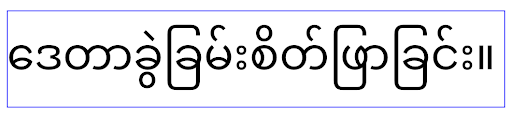
elegantTextHeight-Verhalten für Apps, die auf Android 16 (API-Level 36) ausgerichtet sind, oder für Apps, die auf Android 15 (API-Level 35) ausgerichtet sind und den Standard nicht überschrieben haben, indem sie das Attribut elegantTextHeight auf false gesetzt haben.Hauptfunktion
Android 16 (API-Level 36) enthält die folgenden Änderungen, die verschiedene Kernfunktionen des Android-Systems ändern oder erweitern.
Optimierung der Arbeitsplanung mit fester Rate
Vor der Ausrichtung auf Android 16 wurde bei scheduleAtFixedRate eine Aufgabenausführung verpasst, wenn sich die App nicht in einem gültigen Prozesslebenszyklus befand. In diesem Fall wurden alle verpassten Ausführungen sofort ausgeführt, sobald die App zu einem gültigen Lebenszyklus zurückkehrte.
Wenn Sie Ihre App auf Android 16 ausrichten, wird bei einer verpassten Ausführung von scheduleAtFixedRate höchstens eine Ausführung sofort ausgeführt, wenn die App zu einem gültigen Lebenszyklus zurückkehrt. Durch diese Verhaltensänderung soll sich die App-Leistung verbessern. Testen Sie dieses Verhalten in Ihrer App, um festzustellen, ob sie davon betroffen ist.
Sie können auch das App-Kompatibilitäts-Framework verwenden und das STPE_SKIP_MULTIPLE_MISSED_PERIODIC_TASKS-Kompatibilitätsflag aktivieren.
Formfaktoren von Geräten
Android 16 (API-Level 36) enthält die folgenden Änderungen für Apps, die auf Geräten mit großem Bildschirm angezeigt werden.
Adaptive Layouts
Da Android-Apps jetzt auf einer Vielzahl von Geräten (z. B. Smartphones, Tablets, faltbare Smartphones, Desktops, Autos und Fernseher) und in verschiedenen Fenstermodi auf großen Displays (z. B. im Split-Screen-Modus und im Desktop-Fenstermodus) ausgeführt werden können, sollten Entwickler Android-Apps erstellen, die sich an jede Bildschirm- und Fenstergröße anpassen, unabhängig von der Geräteausrichtung. Paradigmen wie das Einschränken der Ausrichtung und Größenänderung sind in der heutigen Welt mit mehreren Geräten zu restriktiv.
Einschränkungen für Ausrichtung, Größenänderung und Seitenverhältnis ignorieren
Bei Apps, die auf Android 16 (API-Level 36) ausgerichtet sind, gelten Einschränkungen für Ausrichtung, Größenänderung und Seitenverhältnis nicht mehr auf Displays mit einer Breite von mindestens 600 dp. Apps füllen das gesamte Displayfenster, unabhängig vom Seitenverhältnis oder der bevorzugten Ausrichtung des Nutzers, und Pillarboxing wird nicht verwendet.
Mit dieser Änderung wird ein neues Standardplattformverhalten eingeführt. Android entwickelt sich zu einem Modell, bei dem Apps sich an verschiedene Ausrichtungen, Displaygrößen und Seitenverhältnisse anpassen müssen. Einschränkungen wie eine feste Ausrichtung oder eine begrenzte Größenänderung behindern die Anpassungsfähigkeit von Apps. Machen Sie Ihre App anpassungsfähig, um die bestmögliche Nutzererfahrung zu bieten.
Sie können dieses Verhalten auch mit dem
Framework für die App-Kompatibilität testen und das
UNIVERSAL_RESIZABLE_BY_DEFAULT Kompatibilitätsflag aktivieren.
Häufige nicht abwärtskompatible Änderungen
Das Ignorieren von Einschränkungen für Ausrichtung, Größenänderung und Seitenverhältnis kann sich auf die Benutzeroberfläche Ihrer App auf einigen Geräten auswirken, insbesondere auf Elemente, die für kleine Layouts im Hochformat entwickelt wurden. Es kann beispielsweise zu Problemen wie gestreckten Layouts und Animationen und Komponenten außerhalb des Bildschirms kommen. Annahmen zum Seitenverhältnis oder zur Ausrichtung können zu visuellen Problemen mit Ihrer App führen. Weitere Informationen dazu, wie Sie diese vermeiden und das adaptive Verhalten Ihrer App verbessern können
Wenn die Geräteausrichtung zugelassen wird, werden Aktivitäten häufiger neu erstellt. Dadurch können Nutzerdaten verloren gehen, wenn sie nicht ordnungsgemäß gespeichert werden. Informationen zum korrekten Speichern des UI Status finden Sie unter UI-Status speichern.
Details zur Implementierung
Die folgenden Manifestattribute und Runtime-APIs werden auf Geräten mit großen Displays im Vollbild- und Multifenstermodus ignoriert:
screenOrientationresizableActivityminAspectRatiomaxAspectRatiosetRequestedOrientation()getRequestedOrientation()
Die folgenden Werte für screenOrientation, setRequestedOrientation() und getRequestedOrientation() werden ignoriert:
portraitreversePortraitsensorPortraituserPortraitlandscapereverseLandscapesensorLandscapeuserLandscape
In Bezug auf die Größenänderung des Displays haben android:resizeableActivity="false",
android:minAspectRatio und android:maxAspectRatio keine Auswirkungen.
Bei Apps, die auf Android 16 (API-Level 36) ausgerichtet sind, werden Einschränkungen für Ausrichtung, Größenänderung und Seitenverhältnis auf großen Displays standardmäßig ignoriert. Jede App, die noch nicht vollständig bereit ist, kann dieses Verhalten vorübergehend überschreiben, indem sie sich abmeldet. Dadurch wird das vorherige Verhalten beibehalten und die App wird im Kompatibilitätsmodus platziert.
Ausnahmen
Die Einschränkungen für Ausrichtung, Größenänderung und Seitenverhältnis von Android 16 gelten in den folgenden Situationen nicht:
- Spiele (basierend auf dem
android:appCategoryFlag) - Nutzer, die in den Einstellungen für das Seitenverhältnis des Geräts explizit das Standardverhalten der App aktivieren
- Displays, die kleiner als
sw600dpsind
Vorübergehend abmelden
Wenn Sie eine bestimmte Aktivität abmelden möchten, deklarieren Sie die Manifest-Property PROPERTY_COMPAT_ALLOW_RESTRICTED_RESIZABILITY:
<activity ...>
  <property android:name="android.window.PROPERTY_COMPAT_ALLOW_RESTRICTED_RESIZABILITY" android:value="true" />
  ...
</activity>
Wenn zu viele Teile Ihrer App nicht für Android 16 bereit sind, können Sie sich vollständig abmelden, indem Sie dieselbe Property auf Anwendungsebene anwenden:
<application ...>
  <property android:name="android.window.PROPERTY_COMPAT_ALLOW_RESTRICTED_RESIZABILITY" android:value="true" />
</application>
Gesundheit und Fitness
Android 16 (API-Level 36) enthält die folgenden Änderungen in Bezug auf Gesundheits- und Fitnessdaten.
Berechtigungen für Gesundheits- und Fitnessdaten
Für Apps, die auf Android 16 (API‑Level 36) oder höher ausgerichtet sind, werden für BODY_SENSORS-Berechtigungen detailliertere Berechtigungen unter android.permissions.health verwendet, die auch von Health Connect genutzt werden. Ab Android 16 ist für alle APIs, für die bisher BODY_SENSORS oder BODY_SENSORS_BACKGROUND erforderlich war, stattdessen die entsprechende android.permissions.health-Berechtigung erforderlich. Dies betrifft die folgenden Datentypen, APIs und Arten von Diensten im Vordergrund:
HEART_RATE_BPMaus den Gesundheitsdiensten unter Wear OSSensor.TYPE_HEART_RATEaus dem Android Sensor ManagerheartRateAccuracyundheartRateBpmausProtoLayoutunter Wear OSFOREGROUND_SERVICE_TYPE_HEALTH, wobei die entsprechende Berechtigungandroid.permission.healthanstelle vonBODY_SENSORSerforderlich ist
Wenn Ihre App diese APIs verwendet, sollte sie die entsprechenden detaillierten Berechtigungen anfordern:
- Für die Überwachung von Herzfrequenz, SpO2 oder Hauttemperatur während der Nutzung: Fordern Sie die detaillierte Berechtigung unter
android.permissions.healthan, z. B.READ_HEART_RATEanstelle vonBODY_SENSORS. - Für den Zugriff auf Sensoren im Hintergrund: Fordern Sie
READ_HEALTH_DATA_IN_BACKGROUNDanstelle vonBODY_SENSORS_BACKGROUNDan.
Diese Berechtigungen sind dieselben, die den Zugriff auf das Lesen von Daten aus Health Connect, dem Android-Datenspeicher für Gesundheits‑, Fitness‑ und Wellnessdaten, schützen.
Mobile Apps
Mobile Apps, die auf die Verwendung von READ_HEART_RATE und anderen detaillierten Berechtigungen umgestellt werden, müssen auch eine Aktivität deklarieren, um die Datenschutzerklärung der App anzuzeigen. Das ist dieselbe Anforderung wie bei Health Connect.
Konnektivität
Android 16 (API-Level 36) enthält die folgenden Änderungen am Bluetooth-Stack, um die Konnektivität mit Peripheriegeräten zu verbessern.
Neue Intents für den Umgang mit Verbindungsverlusten und Verschlüsselungsänderungen
Im Rahmen der Verbesserten Verarbeitung von Verbindungsverlusten werden in Android 16 außerdem zwei neue Intents eingeführt, um Apps besser über Verbindungsverluste und Verschlüsselungsänderungen zu informieren.
Für Apps, die auf Android 16 ausgerichtet sind, ist jetzt Folgendes möglich:
- Sie erhalten eine
ACTION_KEY_MISSING-Intent, wenn ein Verlust der Remote-Bindung erkannt wird. So können Sie Nutzern informativeres Feedback geben und entsprechende Maßnahmen ergreifen. - Sie erhalten eine
ACTION_ENCRYPTION_CHANGE-Intent, wenn sich der Verschlüsselungsstatus des Links ändert. Dazu gehören Änderungen des Verschlüsselungsstatus, des Verschlüsselungsalgorithmus und der Größe des Verschlüsselungsschlüssels. Apps müssen davon ausgehen, dass die Verknüpfung wiederhergestellt wurde, wenn die Verknüpfung nach Erhalt derACTION_ENCRYPTION_CHANGE-Intent erfolgreich verschlüsselt wurde.
Anpassung an unterschiedliche OEM-Implementierungen
Diese neuen Intents werden in Android 16 eingeführt, ihre Implementierung und Übertragung kann jedoch je nach Gerätehersteller (OEM) variieren. Damit Ihre App auf allen Geräten einheitlich und zuverlässig funktioniert, sollten Entwickler die Verarbeitung von Verbindungsverlusten so gestalten, dass sie sich an diese potenziellen Abweichungen anpasst.
Wir empfehlen folgende App-Verhaltensweisen:
Wenn die
ACTION_KEY_MISSING-Intent gesendet wird:Die ACL-Verbindung (Asynchronous Connectionless) wird vom System getrennt, die Informationen zur Bindung für das Gerät bleiben jedoch erhalten (wie hier beschrieben).
Ihre App sollte diese Intent als primäres Signal für die Erkennung von Verbindungsverlusten verwenden und den Nutzer auffordern, zu bestätigen, dass sich das Remotegerät in Reichweite befindet, bevor das Gerät vergessen oder neu gekoppelt wird.
Wenn die Verbindung eines Geräts nach dem Empfang von
ACTION_KEY_MISSINGgetrennt wird, sollte deine App vorsichtig sein, bevor sie eine neue Verbindung herstellt, da das Gerät möglicherweise nicht mehr mit dem System verbunden ist.Wenn die
ACTION_KEY_MISSING-Intent NICHT gesendet wird:Die ACL-Verbindung bleibt bestehen und die Informationen zur Kopplung des Geräts werden vom System entfernt, genau wie bei Android 15.
In diesem Fall sollte Ihre App die vorhandenen Mechanismen zur Verarbeitung von Verbindungsverlusten wie in früheren Android-Releases fortsetzen, um Verbindungsverluste zu erkennen und zu verwalten.
Neue Möglichkeit zum Entfernen einer Bluetooth-Verbindung
Alle Apps, die auf Android 16 ausgerichtet sind, können jetzt Bluetooth-Geräte über eine öffentliche API in CompanionDeviceManager entkoppeln. Wenn ein Companion-Gerät als CDM-Verknüpfung verwaltet wird, kann die App die Entfernung der Bluetooth-Verknüpfung über die neue removeBond(int) API auf dem verknüpften Gerät auslösen. Die App kann die Änderungen des Kopplungsstatus überwachen, indem sie das Bluetooth-Geräte-Broadcast-Ereignis ACTION_BOND_STATE_CHANGED überwacht.
Sicherheit
Android 16 (API-Level 36) enthält die folgenden Sicherheitsänderungen.
Version von MediaStore gesperrt
Bei Apps, die auf Android 16 oder höher ausgerichtet sind, ist MediaStore#getVersion() jetzt für jede App eindeutig. Dadurch werden identifizierende Eigenschaften aus dem Versionsstring entfernt, um Missbrauch und Verwendung für Fingerprinting-Techniken zu verhindern. Apps dürfen keine Annahmen über das Format dieser Version treffen. Apps sollten Versionsänderungen bereits bei der Verwendung dieser API verarbeiten und in den meisten Fällen sollte ihr aktuelles Verhalten nicht geändert werden müssen, es sei denn, der Entwickler hat versucht, zusätzliche Informationen abzuleiten, die über den beabsichtigten Umfang dieser API hinausgehen.
Sicherere Intents
Die Funktion „Sicherere Intents“ ist eine mehrstufige Sicherheitsinitiative, mit der der Sicherheitsmechanismus für die Intent-Auflösung von Android verbessert werden soll. Ziel ist es, Apps vor böswilligen Aktionen zu schützen, indem bei der Intent-Verarbeitung Prüfungen hinzugefügt und Intents gefiltert werden, die bestimmte Kriterien nicht erfüllen.
In Android 15 lag der Fokus der Funktion auf der sendenden App. Mit Android 16 wird die Kontrolle nun auf die empfangende App verlagert. Entwickler können sich über ihr App-Manifest für eine strenge Intent-Auflösung entscheiden.
Es werden zwei wichtige Änderungen implementiert:
Explizite Intents müssen mit dem Intent-Filter der Zielkomponente übereinstimmen: Wenn ein Intent explizit auf eine Komponente ausgerichtet ist, muss er mit dem Intent-Filter dieser Komponente übereinstimmen.
Intents ohne Aktion können nicht mit einem Intent-Filter übereinstimmen: Intents, für die keine Aktion angegeben ist, sollten nicht zu einem Intent-Filter aufgelöst werden.
Diese Änderungen gelten nur, wenn mehrere Apps beteiligt sind, und haben keine Auswirkungen auf die Intent-Verarbeitung innerhalb einer einzelnen App.
Auswirkungen
Da die Funktion optional ist, müssen Entwickler sie explizit in ihrem App-Manifest aktivieren, damit sie wirksam wird. Die Auswirkungen der Funktion sind daher auf Apps beschränkt, deren Entwickler:
- die Funktion „Sicherere Intents“ und ihre Vorteile kennen.
- aktiv entscheiden, strengere Intent-Verfahren in ihre Apps zu integrieren.
Dieser optionale Ansatz minimiert das Risiko, dass vorhandene Apps beschädigt werden, die möglicherweise auf dem aktuellen, weniger sicheren Intent-Auflösungsverhalten basieren.
Die anfänglichen Auswirkungen in Android 16 sind möglicherweise begrenzt, aber die Initiative „Sicherere Intents“ sieht eine Roadmap für umfassendere Auswirkungen in zukünftigen Android-Releases vor. Es ist geplant, die strenge Intent-Auflösung letztendlich zum Standardverhalten zu machen.
Die Funktion „Sicherere Intents“ kann die Sicherheit des Android-Ökosystems erheblich verbessern, da es für schädliche Apps schwieriger wird, Schwachstellen im Intent-Auflösungsmechanismus auszunutzen.
Die Umstellung auf die Deaktivierung und die obligatorische Durchsetzung muss jedoch sorgfältig verwaltet werden, um potenzielle Kompatibilitätsprobleme mit vorhandenen Apps zu beheben.
Implementierung
Entwickler müssen die strengere Intent-Abstimmung explizit über das
intentMatchingFlags Attribut in ihrem App-Manifest aktivieren.
Hier ist ein Beispiel, bei dem die Funktion für die gesamte App optional ist, aber für einen Empfänger deaktiviert ist:
<application android:intentMatchingFlags="enforceIntentFilter">
    <receiver android:name=".MyBroadcastReceiver" android:exported="true" android:intentMatchingFlags="none">
        <intent-filter>
            <action android:name="com.example.MY_CUSTOM_ACTION" />
        </intent-filter>
        <intent-filter>
            <action android:name="com.example.MY_ANOTHER_CUSTOM_ACTION" />
        </intent-filter>
    </receiver>
</application>
Weitere Informationen zu den unterstützten Flags:
| Flag-Name | Beschreibung |
|---|---|
| enforceIntentFilter | Erzwingt eine strengere Abstimmung für eingehende Intents |
| Keine | Deaktiviert alle speziellen Abstimmungsregeln für eingehende Intents. Wenn mehrere Flags angegeben werden, werden widersprüchliche Werte aufgelöst, indem dem Flag „Keine“ Vorrang eingeräumt wird. |
| allowNullAction | Lockert die Abstimmungsregeln, damit Intents ohne Aktion übereinstimmen können. Dieses Flag muss in Verbindung mit „enforceIntentFilter“ verwendet werden, um ein bestimmtes Verhalten zu erzielen. |
Testen und Fehler beheben
Wenn die Durchsetzung aktiv ist, sollten Apps ordnungsgemäß funktionieren, wenn der Intent-Aufrufer den Intent richtig ausgefüllt hat.
Blockierte Intents lösen jedoch Warnmeldungen wie
"Intent does not match component's intent filter:" und "Access blocked:"
mit dem Tag "PackageManager."
aus. Dies deutet auf ein potenzielles Problem hin, das sich auf die App auswirken kann und behoben werden muss.
Logcat-Filter:
tag=:PackageManager & (message:"Intent does not match component's intent filter:" | message: "Access blocked:")
Filterung von GPU-Systemaufrufen
Um die Mali-GPU-Oberfläche zu härten, wurden Mali-GPU-IOCTLs, die veraltet sind oder ausschließlich für die GPU-Entwicklung vorgesehen sind, in Produktions-Builds blockiert. Außerdem wurden IOCTLs, die für das GPU-Profiling verwendet werden, auf den Shell-Prozess oder debugfähige Anwendungen beschränkt. Weitere Informationen zur Richtlinie auf Plattformebene finden Sie im SAC-Update.
Diese Änderung betrifft Pixel-Geräte mit der Mali-GPU (Pixel 6–9). Arm
hat in der Version r54p2 in
Documentation/ioctl-categories.rst eine offizielle Kategorisierung der IOCTLs vorgenommen. Diese Liste wird auch in zukünftigen Treiberversionen gepflegt.
Diese Änderung hat keine Auswirkungen auf unterstützte Grafik-APIs (einschließlich Vulkan und OpenGL) und wird sich voraussichtlich nicht auf Entwickler oder bestehende Anwendungen auswirken. GPU-Profiling-Tools wie Streamline Performance Analyzer und Android GPU Inspector sind nicht betroffen.
Test
Wenn Sie eine SELinux-Verweigerung sehen, die der folgenden ähnelt, ist Ihre Anwendung wahrscheinlich von dieser Änderung betroffen:
06-30 10:47:18.617 20360 20360 W roidJUnitRunner: type=1400 audit(0.0:85): avc:  denied  { ioctl }
for  path="/dev/mali0" dev="tmpfs" ino=1188 ioctlcmd=0x8023
scontext=u:r:untrusted_app_25:s0:c512,c768 tcontext=u:object_r:gpu_device:s0 tclass=chr_file
permissive=0 app=com.google.android.selinux.pts
Wenn Ihre Anwendung blockierte IOCTLs verwenden muss, melden Sie bitte einen Fehler und weisen Sie ihn android-partner-security@google.com zu.
FAQ
Gilt diese Richtlinienänderung für alle OEMs? Diese Änderung ist optional, aber für alle OEMs verfügbar, die diese Härtungsmethode verwenden möchten. Eine Anleitung zur Implementierung der Änderung finden Sie in der Implementierungsdokumentation.
Müssen Änderungen an der OEM-Codebasis vorgenommen werden, um diese Änderung zu implementieren, oder ist sie standardmäßig in einem neuen AOSP-Release enthalten? Die Änderung auf Plattformebene ist standardmäßig in einem neuen AOSP-Release enthalten. Anbieter können diese Änderung in ihre Codebasis aufnehmen, wenn sie sie anwenden möchten.
Sind SoCs dafür verantwortlich, die IOCTL-Liste auf dem neuesten Stand zu halten? Wenn mein Gerät beispielsweise eine ARM Mali-GPU verwendet, muss ich mich dann bei Änderungen an ARM wenden? Einzelne SoCs müssen ihre IOCTL-Listen pro Gerät nach der Treiberveröffentlichung aktualisieren. ARM aktualisiert beispielsweise die veröffentlichte IOCTL-Liste nach Treiberupdates. OEMs sollten jedoch darauf achten, dass sie die Updates in ihre SEPolicy einbeziehen und ausgewählte benutzerdefinierte IOCTLs nach Bedarf zu den Listen hinzufügen.
Gilt diese Änderung automatisch für alle im Handel erhältlichen Pixel-Geräte oder muss ein Nutzer etwas tun, um diese Änderung anzuwenden? Diese Änderung gilt für alle im Handel erhältlichen Pixel-Geräte mit der Mali-GPU (Pixel 6–9). Es ist keine Nutzeraktion erforderlich, um diese Änderung anzuwenden.
Wirkt sich die Verwendung dieser Richtlinie auf die Leistung des Kernel-Treibers aus? Diese Richtlinie wurde auf der Mali-GPU mit GFXBench getestet. Es wurden keine messbaren Änderungen an der GPU-Leistung festgestellt.
Muss die IOCTL-Liste mit den aktuellen Versionen des Userspace- und Kernel-Treibers übereinstimmen? Ja, die Liste der zulässigen IOCTLs muss mit den IOCTLs synchronisiert werden, die sowohl vom Userspace- als auch vom Kernel-Treiber unterstützt werden. Wenn die IOCTLs im Userspace- oder Kernel-Treiber aktualisiert werden, muss die SEPolicy-IOCTL-Liste entsprechend aktualisiert werden.
ARM hat IOCTLs als „eingeschränkt“ / „Instrumentierung“ kategorisiert, aber wir möchten einige davon in Produktionsanwendungsfällen verwenden und/oder andere ablehnen. Einzelne OEMs/SoCs sind dafür verantwortlich, wie sie die von ihnen verwendeten IOCTLs kategorisieren, basierend auf der Konfiguration ihrer Mali-Bibliotheken im Userspace. Die Liste von ARM kann bei der Entscheidung helfen, aber der Anwendungsfall jedes OEM/SoC kann unterschiedlich sein.
Datenschutz
Android 16 (API-Level 36) enthält die folgenden Änderungen in Bezug auf den Datenschutz.
Berechtigung für das lokale Netzwerk
Auf Geräte im LAN kann von jeder App zugegriffen werden, die die Berechtigung INTERNET hat.
Dadurch können Apps problemlos eine Verbindung zu lokalen Geräten herstellen. Dies hat jedoch auch Auswirkungen auf den Datenschutz, z. B. durch die Erstellung eines Fingerabdrucks des Nutzers und die Verwendung als Proxy für den Standort.
Das Projekt „Local Network Protections“ zielt darauf ab, die Privatsphäre der Nutzer zu schützen, indem der Zugriff auf das lokale Netzwerk durch eine neue Laufzeitberechtigung eingeschränkt wird.
Release-Plan
Diese Änderung wird zwischen zwei Releases eingeführt, nämlich 25Q2 und 26Q2. Entwickler müssen diese Anleitung für das 2. Quartal 2025 unbedingt befolgen und Feedback geben, da diese Schutzmaßnahmen in einem späteren Android-Release erzwungen werden. Außerdem müssen sie Szenarien aktualisieren, die auf implizitem lokalen Netzwerkzugriff basieren. Verwenden Sie dazu die folgende Anleitung und bereiten Sie sich auf die Ablehnung und den Widerruf der neuen Berechtigung durch Nutzer vor.
Auswirkungen
Derzeit ist LNP eine Opt-in-Funktion. Das bedeutet, dass nur die Apps betroffen sind, für die sie aktiviert wurde. In der Opt-in-Phase sollen App-Entwickler herausfinden, welche Teile ihrer App auf impliziten Zugriff auf das lokale Netzwerk angewiesen sind, damit sie sich auf die Berechtigungsanforderungen für die nächste Version vorbereiten können.
Apps sind betroffen, wenn sie über folgende Methoden auf das lokale Netzwerk des Nutzers zugreifen:
- Direkte oder bibliotheksbasierte Verwendung von Raw Sockets für lokale Netzwerkadressen (z.B. mDNS- oder SSDP-Service Discovery-Protokoll)
- Verwendung von Klassen auf Framework-Ebene, die auf das lokale Netzwerk zugreifen (z.B. NsdManager)
Für Traffic zu und von einer lokalen Netzwerkadresse ist die Berechtigung für den Zugriff auf das lokale Netzwerk erforderlich. In der folgenden Tabelle sind einige häufige Fälle aufgeführt:
| Low-Level-Netzwerkbetrieb der App | Berechtigung für das lokale Netzwerk erforderlich |
|---|---|
| Ausgehende TCP-Verbindung herstellen | Ja |
| Eingehende TCP-Verbindungen akzeptieren | Ja |
| Senden eines UDP-Unicast, ‑Multicast oder ‑Broadcast | Ja |
| Empfangen eines eingehenden UDP-Unicast, ‑Multicast oder ‑Broadcast | Ja |
Diese Einschränkungen sind tief im Netzwerk-Stack implementiert und gelten daher für alle Netzwerk-APIs. Dazu gehören Sockets, die in nativem oder verwaltetem Code erstellt wurden, Netzwerkbibliotheken wie Cronet und OkHttp sowie alle APIs, die darauf basieren. Wenn Sie versuchen, Dienste im lokalen Netzwerk aufzulösen (d.h. Dienste mit dem Suffix „.local“), ist die Berechtigung für das lokale Netzwerk erforderlich.
Ausnahmen von den oben genannten Regeln:
- Wenn sich der DNS-Server eines Geräts in einem lokalen Netzwerk befindet, ist für den Traffic zu oder von diesem Gerät (über Port 53) keine Berechtigung für den Zugriff auf das lokale Netzwerk erforderlich.
- Für Anwendungen, die Output Switcher als In-App-Auswahl verwenden, sind keine Berechtigungen für das lokale Netzwerk erforderlich (weitere Informationen folgen im 4. Quartal 2025).
Entwicklerleitfaden (Opt-in)
So aktivieren Sie Einschränkungen für das lokale Netzwerk:
- Flashen Sie das Gerät mit einem Build mit 25Q2 Beta 3 oder höher.
- Installieren Sie die zu testende App.
Aktivieren oder deaktivieren Sie das Appcompat-Flag in adb:
adb shell am compat enable RESTRICT_LOCAL_NETWORK <package_name>Gerät neu starten
Der Zugriff Ihrer App auf das lokale Netzwerk ist jetzt eingeschränkt und jeder Versuch, auf das lokale Netzwerk zuzugreifen, führt zu Socket-Fehlern. Wenn Sie APIs verwenden, die lokale Netzwerkoperationen außerhalb Ihres App-Prozesses ausführen (z. B. NsdManager), sind sie während der Opt-in-Phase nicht betroffen.
Um den Zugriff wiederherzustellen, müssen Sie Ihrer App die Berechtigung für NEARBY_WIFI_DEVICES erteilen.
- Die App muss die Berechtigung
NEARBY_WIFI_DEVICESin ihrem Manifest deklarieren. - Gehen Sie zu Einstellungen > Apps > [Name der App] > Berechtigungen > Geräte in der Nähe > Zulassen.
Der Zugriff Ihrer App auf das lokale Netzwerk sollte jetzt wiederhergestellt sein und alle Ihre Szenarien sollten wie vor der Aktivierung der App funktionieren.
Sobald die Erzwingung des Schutzes des lokalen Netzwerks beginnt, wirkt sich das auf den Netzwerkverkehr der App aus.
| Berechtigung | Ausgehende LAN-Anfrage | Ausgehende/eingehende Internetanfrage | Eingehende LAN-Anfrage |
|---|---|---|---|
| Gewährt | YouTube? | YouTube? | YouTube? |
| Nicht gewährt | Pannen | YouTube? | Pannen |
Verwenden Sie den folgenden Befehl, um das App-Compat-Flag zu deaktivieren:
adb shell am compat disable RESTRICT_LOCAL_NETWORK <package_name>
Fehler
Fehler, die durch diese Einschränkungen entstehen, werden an den aufrufenden Socket zurückgegeben, wenn er „send“ oder eine „send“-Variante für eine lokale Netzwerkadresse aufruft.
Beispiel für Fehlermeldung:
sendto failed: EPERM (Operation not permitted)

sendto failed: ECONNABORTED (Operation not permitted)
Definition des lokalen Netzwerks
Ein lokales Netzwerk in diesem Projekt bezieht sich auf ein IP-Netzwerk, das eine für Broadcasts geeignete Netzwerkschnittstelle wie WLAN oder Ethernet verwendet, jedoch keine Mobilfunk- (WWAN) oder VPN-Verbindungen.
Die folgenden Netzwerke gelten als lokale Netzwerke:
IPv4:
- 169.254.0.0/16 // Link Local
- 100.64.0.0/10 // CGNAT
- 10.0.0.0/8 // RFC1918
- 172.16.0.0/12 // RFC1918
- 192.168.0.0/16 // RFC1918
IPv6:
- Link-Local
- Direkt verbundene Routen
- Stummelnetzwerke wie Thread
- Mehrere Subnetze (noch nicht festgelegt)
Außerdem werden sowohl Multicast-Adressen (224.0.0.0/4, ff00::/8) als auch die IPv4-Broadcast-Adresse (255.255.255.255) als lokale Netzwerkadressen klassifiziert.
App-eigene Fotos
Wenn Nutzer auf Geräten mit Android 16 oder höher von einer App, die auf SDK 36 oder höher ausgerichtet ist, um Berechtigungen für Fotos und Videos gebeten werden und den Zugriff auf ausgewählte Medien einschränken, werden alle Fotos, die der App gehören, in der Bildauswahl vorab ausgewählt angezeigt. Nutzer können die Auswahl dieser Elemente jederzeit aufheben. Dadurch wird der Zugriff der App auf diese Fotos und Videos widerrufen.