

Como nas versões anteriores, o Android 16 inclui mudanças de comportamento que podem afetar seu app. As mudanças de comportamento abaixo se aplicam exclusivamente a apps destinados ao Android 16 ou versões mais recentes. Caso seu app seja direcionado ao Android 16 ou a versões mais recentes, faça modificações para oferecer suporte a esses comportamentos, quando aplicável.
Consulte também a lista de mudanças de comportamento que afetam todos os apps
executados no Android 16, independente da targetSdkVersion do app.
Experiência do usuário e interface do sistema
O Android 16 (nível 36 da API) inclui as seguintes mudanças que visam criar uma experiência do usuário mais consistente e intuitiva.
Fim da opção de recusar a exibição de ponta a ponta
Android 15 enforced edge-to-edge for apps targeting Android 15 (API
level 35), but your app could opt-out by setting
R.attr#windowOptOutEdgeToEdgeEnforcement to true. For apps
targeting Android 16 (API level 36),
R.attr#windowOptOutEdgeToEdgeEnforcement is deprecated and disabled, and your
app can't opt-out of going edge-to-edge.
- If your app targets Android 16 (API level 36) and is running on an
Android 15 device,
R.attr#windowOptOutEdgeToEdgeEnforcementcontinues to work. - If your app targets Android 16 (API level 36) and is running on an
Android 16 device,
R.attr#windowOptOutEdgeToEdgeEnforcementis disabled.
For testing in Android 16, ensure your app supports edge-to-edge and
remove any use of R.attr#windowOptOutEdgeToEdgeEnforcement so that your app
also supports edge-to-edge on an Android 15 device. To support edge-to-edge,
see the Compose and Views guidance.
Migração ou opção de recusar necessária para o botão Voltar preditivo
Em apps direcionados ao Android 16 (nível 36 da API) ou mais recente e executados em um
dispositivo Android 16 ou mais recente, as animações preditivas do sistema de retorno
(voltar para a tela inicial, entre tarefas e entre atividades) são ativadas por padrão.
Além disso, onBackPressed não é chamado, e KeyEvent.KEYCODE_BACK não é mais enviado.
Se o app interceptar o evento de retorno e você ainda não tiver migrado para a volta preditiva,
atualize o app para usar as APIs de navegação de retorno compatíveis ou
desative temporariamente definindo o
atributo android:enableOnBackInvokedCallback como false na
tag <application> ou <activity> do arquivo AndroidManifest.xml do app.
APIs de fontes elegantes descontinuadas e desativadas
Apps targeting Android 15 (API level 35) have the
elegantTextHeight
TextView attribute set to true by
default, replacing the compact font with one that is much more readable. You
could override this by setting the elegantTextHeight attribute to false.
Android 16 deprecates the
elegantTextHeight attribute,
and the attribute will be ignored once your app targets Android 16. The "UI
fonts" controlled by these APIs are being discontinued, so you should adapt any
layouts to ensure consistent and future proof text rendering in Arabic, Lao,
Myanmar, Tamil, Gujarati, Kannada, Malayalam, Odia, Telugu or Thai.

elegantTextHeight behavior for apps targeting Android
14 (API level 34) and lower, or for apps targeting Android 15 (API level 35)
that overrode the default by setting the elegantTextHeight
attribute to false.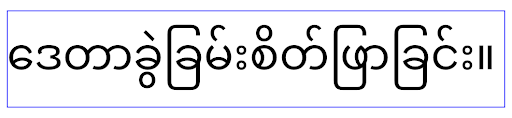
elegantTextHeight behavior for apps targeting Android
16 (API level 36), or for apps targeting Android 15 (API level 35) that didn't
override the default by setting the elegantTextHeight attribute
to false.Funcionalidade principal
O Android 16 (nível 36 da API) inclui as seguintes mudanças que modificam ou expandem vários recursos principais do sistema Android.
Otimização do agendamento de trabalho de taxa fixa
Prior to targeting Android 16, when scheduleAtFixedRate
missed a task execution due to being outside a valid
process lifecycle, all missed executions immediately
execute when the app returns to a valid lifecycle.
When targeting Android 16, at most one missed execution of
scheduleAtFixedRate is immediately executed when the app
returns to a valid lifecycle. This behavior change is expected to improve app
performance. Test this behavior in your app to check if your app is impacted.
You can also test by using the app compatibility framework
and enabling the STPE_SKIP_MULTIPLE_MISSED_PERIODIC_TASKS compat flag.
Formatos de dispositivos
O Android 16 (nível 36 da API) inclui as seguintes mudanças para apps quando exibidos em dispositivos de tela grande.
Layouts adaptáveis
With Android apps now running on a variety of devices (such as phones, tablets, foldables, desktops, cars, and TVs) and windowing modes on large screens (such as split screen and desktop windowing), developers should build Android apps that adapt to any screen and window size, regardless of device orientation. Paradigms like restricting orientation and resizability are too restrictive in today's multidevice world.
Ignore orientation, resizability, and aspect ratio restrictions
For apps targeting Android 16 (API level 36), orientation, resizability, and aspect ratio restrictions no longer apply on displays with smallest width >= 600dp. Apps fill the entire display window, regardless of aspect ratio or a user's preferred orientation, and pillarboxing isn't used.
This change introduces a new standard platform behavior. Android is moving toward a model where apps are expected to adapt to various orientations, display sizes, and aspect ratios. Restrictions like fixed orientation or limited resizability hinder app adaptability. Make your app adaptive to deliver the best possible user experience.
You can also test this behavior by using the
app compatibility framework and enabling the
UNIVERSAL_RESIZABLE_BY_DEFAULT compat flag.
Common breaking changes
Ignoring orientation, resizability, and aspect ratio restrictions might impact your app's UI on some devices, especially elements that were designed for small layouts locked in portrait orientation: for example, issues like stretched layouts and off-screen animations and components. Any assumptions about aspect ratio or orientation can cause visual issues with your app. Learn more about how to avoid them and improve your app's adaptive behaviour.
Allowing device rotation results in more activity re-creation, which can result in losing user state if not properly preserved. Learn how to correctly save UI state in Save UI states.
Implementation details
The following manifest attributes and runtime APIs are ignored across large screen devices in full-screen and multi-window modes:
screenOrientationresizableActivityminAspectRatiomaxAspectRatiosetRequestedOrientation()getRequestedOrientation()
The following values for screenOrientation, setRequestedOrientation(), and
getRequestedOrientation() are ignored:
portraitreversePortraitsensorPortraituserPortraitlandscapereverseLandscapesensorLandscapeuserLandscape
Regarding display resizability, android:resizeableActivity="false",
android:minAspectRatio, and android:maxAspectRatio have no effect.
For apps targeting Android 16 (API level 36), app orientation, resizability, and aspect ratio constraints are ignored on large screens by default. Every app that isn't fully ready can temporarily override this behavior by opting out, which results in the previous behavior of being placed in compatibility mode.
Exceptions
The Android 16 orientation, resizability, and aspect ratio restrictions don't apply in the following situations:
- Games (based on the
android:appCategoryflag) - Users explicitly opting in to the app's default behavior in aspect ratio settings of the device
- Screens that are smaller than
sw600dp
Opt out temporarily
To opt out a specific activity, declare the
PROPERTY_COMPAT_ALLOW_RESTRICTED_RESIZABILITY manifest property:
<activity ...>
  <property android:name="android.window.PROPERTY_COMPAT_ALLOW_RESTRICTED_RESIZABILITY" android:value="true" />
  ...
</activity>
If too many parts of your app aren't ready for Android 16, you can opt out completely by applying the same property at the application level:
<application ...>
  <property android:name="android.window.PROPERTY_COMPAT_ALLOW_RESTRICTED_RESIZABILITY" android:value="true" />
</application>
Saúde e fitness
O Android 16 (nível 36 da API) inclui as seguintes mudanças relacionadas a dados de saúde e fitness.
Permissões de saúde e fitness
For apps targeting Android 16 (API level 36) or higher,
BODY_SENSORS permissions use more granular permissions
under android.permissions.health, which Health Connect
also uses. As of Android 16, any API previously requiring BODY_SENSORS
or BODY_SENSORS_BACKGROUND requires the corresponding
android.permissions.health permission instead. This affects the following data
types, APIs, and foreground service types:
HEART_RATE_BPMfrom Health Services on Wear OSSensor.TYPE_HEART_RATEfrom Android Sensor ManagerheartRateAccuracyandheartRateBpmfromProtoLayouton Wear OSFOREGROUND_SERVICE_TYPE_HEALTHwhere the respectiveandroid.permission.healthpermission is needed in place ofBODY_SENSORS
If your app uses these APIs, it should request the respective granular permissions:
- For while-in-use monitoring of Heart Rate, SpO2, or Skin Temperature:
request the granular permission under
android.permissions.health, such asREAD_HEART_RATEinstead ofBODY_SENSORS. - For background sensor access: request
READ_HEALTH_DATA_IN_BACKGROUNDinstead ofBODY_SENSORS_BACKGROUND.
These permissions are the same as those that guard access to reading data from Health Connect, the Android datastore for health, fitness, and wellness data.
Mobile apps
Mobile apps migrating to use the READ_HEART_RATE and other granular
permissions must also declare an activity to display
the app's privacy policy. This is the same requirement as Health Connect.
Conectividade
O Android 16 (nível 36 da API) inclui as seguintes mudanças na pilha do Bluetooth para melhorar a conectividade com dispositivos periféricos.
Novas intents para processar a perda de vinculação e mudanças de criptografia
As part of the Improved bond loss handling, Android 16 also introduces 2 new intents to provide apps with greater awareness of bond loss and encryption changes.
Apps targeting Android 16 can now:
- Receive an
ACTION_KEY_MISSINGintent when remote bond loss is detected, allowing them to provide more informative user feedback and take appropriate actions. - Receive an
ACTION_ENCRYPTION_CHANGEintent whenever encryption status of the link changes. This includes encryption status change, encryption algorithm change, and encryption key size change. Apps must consider the bond restored if the link is successfully encrypted upon receivingACTION_ENCRYPTION_CHANGEintent later.
Adapting to varying OEM implementations
While Android 16 introduces these new intents, their implementation and broadcasting can vary across different device manufacturers (OEMs). To ensure your app provides a consistent and reliable experience across all devices, developers should design their bond loss handling to gracefully adapt to these potential variations.
We recommend the following app behaviors:
If the
ACTION_KEY_MISSINGintent is broadcast:The ACL (Asynchronous Connection-Less) link will be disconnected by the system, but the bond information for the device will be retained (as described here).
Your app should use this intent as the primary signal for bond loss detection and guiding the user to confirm the remote device is in range before initiating device forgetting or re-pairing.
If a device disconnects after
ACTION_KEY_MISSINGis received, your app should be cautious about reconnecting, as the device may no longer be bonded with the system.If the
ACTION_KEY_MISSINGintent is NOT broadcast:The ACL link will remain connected, and the bond information for the device will be removed by the system, same to behavior in Android 15.
In this scenario, your app should continue its existing bond loss handling mechanisms as in previous Android releases, to detect and manage bond loss events.
Nova maneira de remover a vinculação do Bluetooth
All apps targeting Android 16 are now able to unpair bluetooth devices using a
public API in CompanionDeviceManager. If a companion device is
being managed as a CDM association, then the app can trigger
bluetooth bond removal by using the new removeBond(int) API
on the associated device. The app can monitor the bond state changes by
listening to the bluetooth device broadcast event
ACTION_BOND_STATE_CHANGED.
Segurança
O Android 16 (nível 36 da API) inclui as seguintes mudanças de segurança.
Bloqueio da versão do MediaStore
Para apps destinados ao Android 16 ou mais recente, o MediaStore#getVersion() agora
será exclusivo para cada app. Isso elimina as propriedades de identificação da string
de versão para evitar abuso e uso para técnicas de impressão digital. Os apps não podem
fazer suposições sobre o formato dessa versão. Os apps já precisam
processar mudanças de versão ao usar essa API e, na maioria dos casos, não precisam
mudar o comportamento atual, a menos que o desenvolvedor tenha tentado inferir
informações adicionais que estão além do escopo pretendido dessa API.
Intents mais seguras
O recurso Intents mais seguros é uma iniciativa de segurança multifásica projetada para melhorar a segurança do mecanismo de resolução de intents do Android. O objetivo é proteger os apps contra ações maliciosas adicionando verificações durante o processamento de intents e filtrando intents que não atendem a critérios específicos.
No Android 15, o recurso se concentrou no app de envio. Agora, com o Android 16, o controle muda para o app de recebimento, permitindo que os desenvolvedores ativem a resolução de intents estrita usando o manifesto do app.
Duas mudanças importantes estão sendo implementadas:
As intents explícitas precisam corresponder ao filtro de intent do componente de destino: se uma intent segmentar explicitamente um componente, ela precisará corresponder ao filtro de intent desse componente.
Intents sem uma ação não podem corresponder a nenhum filtro de intent: as intents que não têm uma ação especificada não podem ser resolvidas para nenhum filtro de intent.
Essas mudanças só se aplicam quando vários apps estão envolvidos e não afetam o processamento de intents em um único app.
Impacto
A natureza de ativação significa que os desenvolvedores precisam ativar explicitamente o recurso no manifesto do app para que ele entre em vigor. Como resultado, o impacto do recurso será limitado aos apps cujos desenvolvedores:
- Conhecem o recurso Intents mais seguros e os benefícios dele.
- Escolhem ativamente incorporar práticas de processamento de intents mais rigorosas nos apps.
Essa abordagem de ativação minimiza o risco de quebrar apps atuais que podem depender do comportamento de resolução de intents menos seguro.
Embora o impacto inicial no Android 16 possa ser limitado, a iniciativa Intents mais seguros tem um roteiro para um impacto mais amplo em versões futuras do Android. O plano é tornar a resolução de intents estrita o comportamento padrão.
O recurso Intents mais seguros tem o potencial de melhorar significativamente a segurança do ecossistema Android, dificultando a exploração de vulnerabilidades no mecanismo de resolução de intents por apps maliciosos.
No entanto, a transição para a desativação e a aplicação obrigatória precisa ser gerenciada com cuidado para resolver possíveis problemas de compatibilidade com apps atuais.
Implementação
Os desenvolvedores precisam ativar explicitamente a correspondência de intents mais rigorosa usando o
intentMatchingFlags atributo no manifesto do app.
Confira um exemplo em que o recurso é ativado para todo o app, mas desativado em um receptor:
<application android:intentMatchingFlags="enforceIntentFilter">
    <receiver android:name=".MyBroadcastReceiver" android:exported="true" android:intentMatchingFlags="none">
        <intent-filter>
            <action android:name="com.example.MY_CUSTOM_ACTION" />
        </intent-filter>
        <intent-filter>
            <action android:name="com.example.MY_ANOTHER_CUSTOM_ACTION" />
        </intent-filter>
    </receiver>
</application>
Mais informações sobre as flags aceitas:
| Nome da flag | Descrição |
|---|---|
| enforceIntentFilter | Aplica uma correspondência mais rigorosa para intents recebidas. |
| nenhum | Desativa todas as regras de correspondência especiais para intents recebidas. Ao especificar várias flags, os valores conflitantes são resolvidos dando precedência à flag "nenhum". |
| allowNullAction | Relaxa as regras de correspondência para permitir que intents sem uma ação correspondam. Essa flag precisa ser usada em conjunto com "enforceIntentFilter" para alcançar um comportamento específico. |
Como testar e depurar
Quando a aplicação está ativa, os apps funcionam corretamente se o autor da chamada de intent tiver preenchido a intent corretamente.
No entanto, as intents bloqueadas vão acionar mensagens de registro de aviso como
"Intent does not match component's intent filter:" e "Access blocked:"
com a tag "PackageManager."
Isso indica um possível problema que pode afetar o app e exige
atenção.
Filtro do Logcat:
tag=:PackageManager & (message:"Intent does not match component's intent filter:" | message: "Access blocked:")
Filtragem de chamadas de sistema da GPU
To harden the Mali GPU surface, Mali GPU IOCTLs that have been deprecated or are intended solely for GPU development have been blocked in production builds. Additionally, IOCTLs used for GPU profiling have been restricted to the shell process or debuggable applications. Refer to the SAC update for more details on the platform-level policy.
This change takes place on Pixel devices using the Mali GPU (Pixel 6-9). Arm
has provided official categorization of their IOCTLs in
Documentation/ioctl-categories.rst of their r54p2 release. This
list will continue to be maintained in future driver releases.
This change does not impact supported graphics APIs (including Vulkan and OpenGL), and is not expected to impact developers or existing applications. GPU profiling tools such as the Streamline Performance Analyzer and the Android GPU Inspector won't be affected.
Testing
If you see a SELinux denial similar to the following, it is likely your application has been impacted by this change:
06-30 10:47:18.617 20360 20360 W roidJUnitRunner: type=1400 audit(0.0:85): avc:  denied  { ioctl }
for  path="/dev/mali0" dev="tmpfs" ino=1188 ioctlcmd=0x8023
scontext=u:r:untrusted_app_25:s0:c512,c768 tcontext=u:object_r:gpu_device:s0 tclass=chr_file
permissive=0 app=com.google.android.selinux.pts
If your application needs to use blocked IOCTLs, please file a bug and assign it to android-partner-security@google.com.
FAQ
Does this policy change apply to all OEMs? This change will be opt-in, but available to any OEMs who would like to use this hardening method. Instructions for implementing the change can be found in the implementation documentation.
Is it mandatory to make changes in the OEM codebase to implement this, or does it come with a new AOSP release by default? The platform-level change will come with a new AOSP release by default. Vendors may opt-in to this change in their codebase if they would like to apply it.
Are SoCs responsible for keeping the IOCTL list up to date? For example, if my device uses an ARM Mali GPU, would I need to reach out to ARM for any of the changes? Individual SoCs must update their IOCTL lists per device upon driver release. For example, ARM will update their published IOCTL list upon driver updates. However, OEMs should make sure that they incorporate the updates in their SEPolicy, and add any selected custom IOCTLs to the lists as needed.
Does this change apply to all Pixel in-market devices automatically, or is a user action required to toggle something to apply this change? This change applies to all Pixel in-market devices using the Mali GPU (Pixel 6-9). No user action is required to apply this change.
Will use of this policy impact the performance of the kernel driver? This policy was tested on the Mali GPU using GFXBench, and no measurable change to GPU performance was observed.
Is it necessary for the IOCTL list to align with the current userspace and kernel driver versions? Yes, the list of allowed IOCTLs must be synchronized with the IOCTLs supported by both the userspace and kernel drivers. If the IOCTLs in the user space or kernel driver are updated, the SEPolicy IOCTL list must be updated to match.
ARM has categorized IOCTLs as 'restricted' / 'instrumentation', but we want to use some of them in production use-cases, and/or deny others. Individual OEMs/SoCs are responsible for deciding on how to categorize the IOCTLs they use, based on the configuration of their userspace Mali libraries. ARM's list can be used to help decide on these, but each OEM/SoC's use-case may be different.
Privacidade
O Android 16 (nível 36 da API) inclui as seguintes mudanças de privacidade.
Permissão de rede local
Qualquer app com a permissão INTERNET pode acessar dispositivos na LAN.
Isso facilita a conexão de apps a dispositivos locais, mas também tem implicações de privacidade, como a formação de uma impressão digital do usuário e a atuação como um proxy de localização.
O projeto de proteções de rede local visa proteger a privacidade do usuário, restringindo o acesso à rede local por trás de uma nova permissão de execução.
Plano de lançamento
Essa mudança será implementada entre duas versões, 25Q2 e 26Q2 , respectivamente. É fundamental que os desenvolvedores sigam estas orientações para a 25Q2 e compartilhem feedback, porque essas proteções serão aplicadas em uma versão mais recente do Android. Além disso, eles precisarão atualizar os cenários que dependem do acesso implícito à rede local usando as orientações a seguir e se preparar para a rejeição e revogação da nova permissão pelo usuário.
Impacto
Na fase atual, a LNP é um recurso opcional, o que significa que apenas os apps que ativarem essa opção serão afetados. O objetivo da fase de ativação é que os desenvolvedores de apps entendam quais partes do app dependem do acesso implícito à rede local para que possam se preparar para proteger a permissão na próxima versão.
Os apps serão afetados se acessarem a rede local do usuário usando:
- Uso direto ou de biblioteca de soquetes brutos em endereços de rede local (por exemplo, protocolo de descoberta de serviço mDNS ou SSDP)
- Uso de classes de nível de framework que acessam a rede local (por exemplo, NsdManager)
O tráfego para e de um endereço de rede local exige permissão de acesso à rede local. A tabela a seguir lista alguns casos comuns:
| Operação de rede de baixo nível do app | Permissão de rede local necessária |
|---|---|
| Fazer uma conexão TCP de saída | sim |
| Aceitar conexões TCP recebidas | sim |
| Enviar uma transmissão UDP unicast, multicast, broadcast | sim |
| Receber uma transmissão UDP unicast, multicast, broadcast | sim |
Essas restrições são implementadas profundamente na pilha de rede e, portanto, se aplicam a todas as APIs de rede. Isso inclui soquetes criados em código nativo ou gerenciado, bibliotecas de rede como Cronet e OkHttp e todas as APIs implementadas sobre elas. A tentativa de resolver serviços na rede local (ou seja, aqueles com um sufixo .local) exigirá permissão de rede local.
Exceções às regras acima:
- Se o servidor DNS de um dispositivo estiver em uma rede local, o tráfego de ou para ele (na porta 53) não exigirá permissão de acesso à rede local.
- Os aplicativos que usam o Output Switcher como seletor no app não vão precisar de permissões de rede local (mais orientações serão fornecidas no quarto trimestre de 2025).
Orientação para desenvolvedores (ativação)
Para ativar as restrições de rede local, faça o seguinte:
- Atualize o dispositivo para uma versão com o Android 25Q2 Beta 3 ou mais recente.
- Instale o app a ser testado.
Ative a flag Appcompat no adb:
adb shell am compat enable RESTRICT_LOCAL_NETWORK <package_name>Reinicialize o dispositivo
Agora, o acesso do app à rede local está restrito, e qualquer tentativa de acesso à rede local vai gerar erros de soquete. Se você estiver usando APIs que realizam operações de rede local fora do processo do app (por exemplo, NsdManager), elas não serão afetadas durante a fase de ativação.
Para restaurar o acesso, conceda ao app a permissão NEARBY_WIFI_DEVICES.
- Verifique se o app declara a permissão
NEARBY_WIFI_DEVICESno manifesto. - Acesse Configurações > Apps > [Nome do aplicativo] > Permissões > Dispositivos por perto > Permitir.
Agora, o acesso do app à rede local será restaurado, e todos os cenários vão funcionar como antes da ativação do app.
Quando a aplicação da proteção de rede local começar, o tráfego de rede do app será afetado da seguinte maneira.
| Permissão | Solicitação de LAN de saída | Solicitação de saída/entrada da Internet | Solicitação de LAN de entrada |
|---|---|---|---|
| Concedido | funciona | funciona | funciona |
| Não concedido | Falhas | funciona | Falhas |
Use o comando a seguir para desativar a flag de compatibilidade do app
adb shell am compat disable RESTRICT_LOCAL_NETWORK <package_name>
Erros
Os erros decorrentes dessas restrições serão retornados ao soquete de chamada sempre que ele invocar o envio ou uma variante de envio para um endereço de rede local.
Exemplo de erros:
sendto failed: EPERM (Operation not permitted)

sendto failed: ECONNABORTED (Operation not permitted)
Definição de rede local
Uma rede local neste projeto se refere a uma rede IP que utiliza uma interface de rede com capacidade de transmissão, como Wi-Fi ou Ethernet, mas exclui conexões de rede celular (WWAN) ou VPN.
As seguintes são consideradas redes locais:
IPv4 :
- 169.254.0.0/16 // Link local
- 100.64.0.0/10 // CGNAT
- 10.0.0.0/8 // RFC1918
- 172.16.0.0/12 // RFC1918
- 192.168.0.0/16 // RFC1918
IPv6 :
- Link-local
- Rotas conectadas diretamente
- Redes stub como Thread
- Várias sub-redes (TBD)
Além disso, os endereços multicast (224.0.0.0/4, ff00::/8) e o endereço de transmissão IPv4 (255.255.255.255) são classificados como endereços de rede local.
Fotos pertencentes ao app
When prompted for photo and video permissions by an app targeting SDK 36 or higher on devices running Android 16 or higher, users who choose to limit access to selected media will see any photos owned by the app pre-selected in the photo picker. Users can deselect any of these pre-selected items, which will revoke the app's access to those photos and videos.