

Android 15 平台包含可能對應用程式造成影響的行為變更。無論 targetSdkVersion 為何,當應用程式在 Android 15 上執行時,下列行為變更將會套用至所有應用程式。您應測試應用程式,並視需要修改,以便在適當情況下支援新版本功能。
另請務必查看僅對指定 Android 15 為目標版本的應用程式造成影響的行為變更。
核心功能
Android 15 會修改或擴充 Android 系統的各種核心功能。
套件停止狀態的變更
The intention of the package FLAG_STOPPED state (which users
can engage in AOSP builds by long-pressing an app icon and selecting "Force
Stop") has always been to keep apps in this state until the user explicitly
removes the app from this state by directly launching the app or indirectly
interacting with the app (through the sharesheet or a widget, selecting the app
as live wallpaper, etc.). In Android 15, we've updated the behavior of the
system to be aligned with this intended behavior. Apps should only be removed
from the stopped state through direct or indirect user action.
To support the intended behavior, in addition to the existing restrictions, the
system also cancels all pending intents when the app enters the
stopped state on a device running Android 15. When the user's actions remove the
app from the stopped state, the ACTION_BOOT_COMPLETED
broadcast is delivered to the app providing an opportunity to re-register any
pending intents.
You can call the new
ApplicationStartInfo.wasForceStopped()
method to confirm whether the app was put into the stopped state.
支援 16 KB 頁面大小
Historically, Android has only supported 4 KB memory page sizes, which has optimized system memory performance for the average amount of total memory that Android devices have typically had. Beginning with Android 15, AOSP supports devices that are configured to use a page size of 16 KB (16 KB devices). If your app uses any NDK libraries, either directly or indirectly through an SDK, then you will need to rebuild your app for it to work on these 16 KB devices.
As device manufacturers continue to build devices with larger amounts of physical memory (RAM), many of these devices will adopt 16 KB (and eventually greater) page sizes to optimize the device's performance. Adding support for 16 KB page size devices enables your app to run on these devices and helps your app benefit from the associated performance improvements. Without recompiling, apps won't work on 16 KB devices in future Android releases.
To help you add support for your app, we've provided guidance on how to check if your app is impacted, how to rebuild your app (if applicable), and how to test your app in a 16 KB environment using emulators (including Android 15 system images for the Android Emulator).
Benefits and performance gains
以 16 KB 頁面大小設定的裝置平均會耗用較多記憶體,但系統和應用程式也能獲得各種效能改善:
- 系統面臨記憶體壓力時,應用程式啟動時間越短:平均低 3.16%,部分受測的應用程式還大幅改善 (最多提升 30%)
- 應用程式啟動期間的耗電量降幅:平均減少 4.56%
- 相機啟動速度更快:熱啟動速度平均快了 4.48%,冷啟動速度平均快了 6.60%
- 縮短系統啟動時間:縮短 8% (平均約 950 毫秒)
這些改善項目是根據初步測試結果而來,實際裝置上的結果可能會有所不同。我們會在持續測試的過程中,針對應用程式可能獲得的效益提供額外分析。
Check if your app is impacted
If your app uses any native code, then you should rebuild your app with support for 16 KB devices. If you are unsure if your app uses native code, you can use the APK Analyzer to identify whether any native code is present and then check the alignment of ELF segments for any shared libraries that you find. Android Studio also provides features that help you to automatically detect alignment issues.
If your app only uses code written in the Java programming language or in Kotlin, including all libraries or SDKs, then your app already supports 16 KB devices. Nevertheless, we recommend that you test your app in a 16 KB environment to verify that there are no unexpected regressions in app behavior.
部分應用程式必須進行變更,才能支援私人空間
Private space is a new feature in Android 15 that lets users create a separate space on their device where they can keep sensitive apps away from prying eyes, under an additional layer of authentication. Because apps in the private space have restricted visibility, some types of apps need to take additional steps to be able to see and interact with apps in a user's private space.
All apps
Because apps in the private space are kept in a separate user profile, similar to work profiles, apps shouldn't assume that any installed copies of their app that aren't in the main profile are in the work profile. If your app has logic related to work profile apps that make this assumption, you'll need to adjust this logic.
Medical apps
When a user locks the private space, all apps in the private space are stopped, and those apps can't perform foreground or background activities, including showing notifications. This behavior might critically impact the use and function of medical apps installed in the private space.
The private space setup experience warns users that the private space is not suitable for apps that need to perform critical foreground or background activities, such as showing notifications from medical apps. However, apps can't determine whether or not they're being used in the private space, so they can't show a warning to the user for this case.
For these reasons, if you develop a medical app, review how this feature might impact your app and take appropriate actions—such as informing your users not to install your app in the private space—to avoid disrupting critical app capabilities.
Launcher apps
If you develop a launcher app, you must do the following before apps in the private space will be visible:
- Your app must be assigned as the default launcher app for the device—that
is, possessing the
ROLE_HOMErole. - Your app must declare the
ACCESS_HIDDEN_PROFILESnormal permission in your app's manifest file.
Launcher apps that declare the ACCESS_HIDDEN_PROFILES permission must handle
the following private space use cases:
- Your app must have a separate launcher container for apps installed in the
private space. Use the
getLauncherUserInfo()method to determine which type of user profile is being handled. - The user must be able to hide and show the private space container.
- The user must be able to lock and unlock the private space container. Use
the
requestQuietModeEnabled()method to lock (by passingtrue) or unlock (by passingfalse) the private space. While locked, no apps in the private space container should be visible or discoverable through mechanisms such as search. Your app should register a receiver for the
ACTION_PROFILE_AVAILABLEandACTION_PROFILE_UNAVAILABLEbroadcasts and update the UI in your app when the locked or unlocked state of the private space container changes. Both of these broadcasts includeEXTRA_USER, which your app can use to refer to the private profile user.You can also use the
isQuietModeEnabled()method to check whether the private space profile is locked or not.
App store apps
The private space includes an "Install Apps" button that launches an implicit
intent to install apps into the user's private space. In order for your app to
receive this implicit intent, declare an <intent-filter>
in your app's manifest file with a <category> of
CATEGORY_APP_MARKET.
移除以 PNG 為基礎的表情符號字型
舊版的 PNG 表情符號字型檔案 (NotoColorEmojiLegacy.ttf) 已移除,只保留以向量為基礎的檔案。自 Android 13 (API 級別 33) 起,系統表情符號轉譯器使用的表情符號字型檔案已從以 PNG 為基礎的檔案變更為以向量為基礎的檔案。基於相容性考量,系統會保留 Android 13 和 14 中的舊版字型檔案,讓自有字型轉譯器的應用程式在升級前,可以繼續使用舊版字型檔案。
如要確認您的應用程式是否受到影響,請搜尋應用程式程式碼中是否有 NotoColorEmojiLegacy.ttf 檔案的參照。
您可以透過多種方式調整應用程式:
- 使用平台 API 轉譯文字。您可以將文字算繪至以位圖為後端的
Canvas,並視需要使用該圖片取得原始圖片。 - 為應用程式新增 COLRv1 字型支援功能。FreeType 開放原始碼程式庫在 2.13.0 以上版本中支援 COLRv1。
- 如非萬不得已,您可以將舊版表情符號字型檔案 (
NotoColorEmoji.ttf) 整合至 APK,但這樣一來,您的應用程式就會缺少最新的表情符號更新。詳情請參閱 Noto Emoji GitHub 專案頁面。
目標 SDK 最低版本從 23 提高至 24
Android 15 builds on the
the changes that were made in Android 14 and extends this
security further. In Android 15, apps with a
targetSdkVersion lower than 24 can't be installed.
Requiring apps to meet modern API levels helps to ensure better security and
privacy.
Malware often targets lower API levels in order to bypass security and privacy
protections that have been introduced in higher Android versions. For example,
some malware apps use a targetSdkVersion of 22 to avoid being subjected to the
runtime permission model introduced in 2015 by Android 6.0 Marshmallow (API
level 23). This Android 15 change makes it harder for malware to avoid security
and privacy improvements. Attempting to install an app targeting a lower API
level results in an installation failure, with a message like the following one
appearing in Logcat:
INSTALL_FAILED_DEPRECATED_SDK_VERSION: App package must target at least SDK version 24, but found 7
On devices upgrading to Android 15, any apps with a targetSdkVersion lower
than 24 remain installed.
If you need to test an app targeting an older API level, use the following ADB command:
adb install --bypass-low-target-sdk-block FILENAME.apk
安全性和隱私權
Android 15 introduces robust measures to combat one-time passcode (OTP) fraud and to protect the user's sensitive content, focusing on hardening the Notification Listener Service and screenshare protections. Key enhancements include redacting OTPs from notifications accessible to untrusted apps, hiding notifications during screenshare, and securing app activities when OTPs are posted. These changes aim to keep the user's sensitive content safe from unauthorized actors.
Developers need to be aware of the following to ensure their apps are compatible with the changes in Android 15:
OTP Redaction
Android will stop untrusted apps that implement a
NotificationListenerService from reading unredacted content
from notifications where an OTP has been detected. Trusted apps such as
companion device manager associations are exempt from these restrictions.
Screenshare Protection
- Notification content is hidden during screen sharing sessions to preserve
the user's privacy. If the app implements
setPublicVersion(), Android shows the public version of the notification which serves as a replacement notification in insecure contexts. Otherwise, the notification content is redacted without any further context. - Sensitive content like password input is hidden from remote viewers to prevent revealing the user's sensitive information.
- Activities from apps that post notifications during screenshare where an OTP has been detected will be hidden. App content is hidden from the remote viewer when launched.
- Beyond Android's automatic identification of sensitive fields, developers
can manually mark parts of their app as sensitive using
setContentSensitivity, which is hidden from remote viewers during screenshare. - Developers can choose to toggle the Disable screen share protections option under Developer Options to be exempted from the screenshare protections for demo or testing purposes. The default system screen recorder is exempted from these changes, since the recordings remain on-device.
相機和媒體
Android 15 對所有應用程式的相機和媒體行為進行下列變更。
當達到資源限制時,直接和卸載音訊播放會使先前開啟的直接或卸載音軌失效
Before Android 15, if an app requested direct or offload audio playback while
another app was playing audio and the resource limits were reached, the app
would fail to open a new AudioTrack.
Beginning with Android 15, when an app requests direct or offload
playback and the resource
limits are reached, the system invalidates any currently open
AudioTrack objects which prevent fulfilling the new track request.
(Direct and offload audio tracks are typically opened for playback of compressed audio formats. Common use-cases for playing direct audio include streaming encoded audio over HDMI to a TV. Offload tracks are typically used to play compressed audio on a mobile device with hardware DSP acceleration.)
使用者體驗和系統 UI
Android 15 包含一些變更,旨在打造更一致、直覺的使用者體驗。
為已選擇加入的應用程式啟用預測返回動畫
Beginning in Android 15, the developer option for predictive back animations has been removed. System animations such as back-to-home, cross-task, and cross-activity now appear for apps that have opted in to the predictive back gesture either entirely or at an activity level. If your app is affected, take the following actions:
- Ensure that your app has been properly migrated to use the predictive back gesture.
- Ensure that your fragment transitions work with predictive back navigation.
- Migrate away from animation and framework transitions and use animator and androidx transitions instead.
- Migrate away from back stacks that
FragmentManagerdoesn't know about. Use back stacks managed byFragmentManageror by the Navigation component instead.
使用者強制停止應用程式時,小工具會停用
如果使用者在搭載 Android 15 的裝置上強制停止應用程式,系統會暫時停用所有應用程式小工具。小工具會顯示為灰色,使用者無法與其互動。這是因為從 Android 15 開始,系統會在應用程式強制停止時取消所有應用程式的待處理意圖。
系統會在使用者下次啟動應用程式時,重新啟用這些小工具。
詳情請參閱「套件停止狀態的變更」。
媒體投影狀態列晶片會提醒使用者分享螢幕畫面、投放及錄製畫面
螢幕投影漏洞會洩漏使用者的私人資料,例如財務資訊,因為使用者不會察覺自己的裝置螢幕正在分享。
如果應用程式在搭載 Android 15 QPR1 以上版本的裝置上執行,狀態列的方塊會以大而醒目的方式,提醒使用者任何進行中的螢幕投影作業。使用者可以輕觸方塊,停止分享、投放或錄製螢幕畫面。此外,裝置螢幕鎖定時,螢幕投放功能也會自動停止。
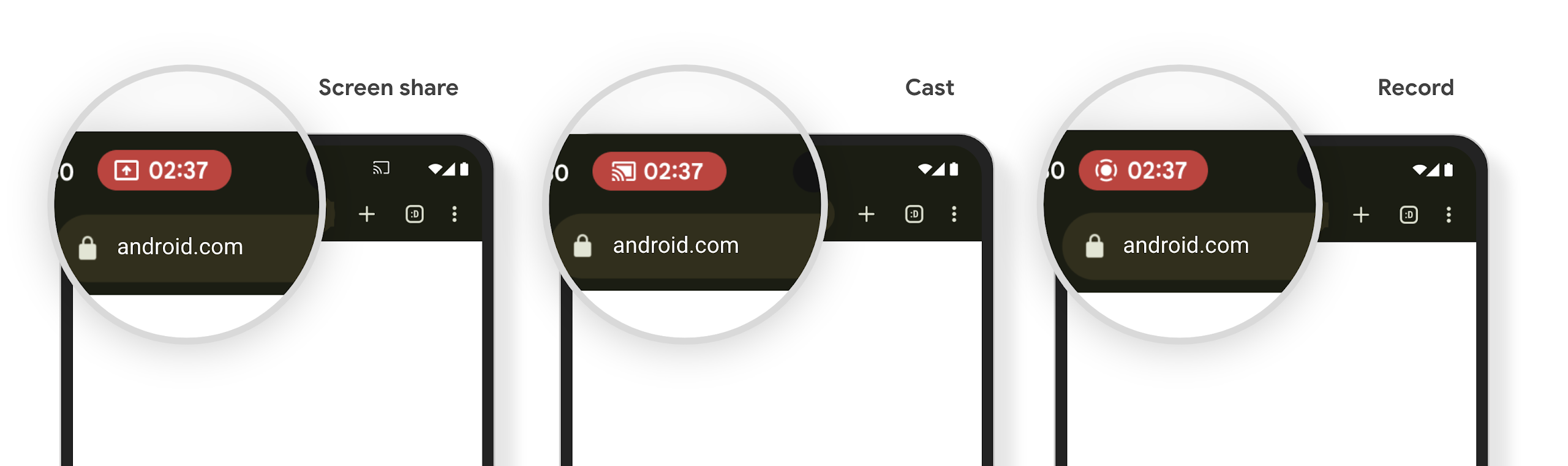
Check if your app is impacted
By default, your app includes the status bar chip and automatically suspends screen projection when the lock screen activates.
To learn more about how to test your app for these use cases, see Status bar chip and auto stop.
背景網路存取權限制
在 Android 15 中,如果應用程式在有效的程序生命週期之外啟動網路要求,就會收到例外狀況。通常是 UnknownHostException 或其他與 Socket 相關的 IOException。在有效生命週期以外發生的網路要求,通常是因為應用程式在不再處於活動狀態後,仍不知情地繼續網路要求。
為減少這種例外狀況,請使用生命週期感知元件,確保網路要求具備生命週期感知功能,並在離開有效程序生命週期時取消。如果您認為網路要求必須在使用者離開應用程式後繼續執行,建議您使用 WorkManager 排程網路要求,或是使用前景服務繼續執行使用者可見的工作。
淘汰項目
每次發布新版本時,特定 Android API 可能會過時,或需要重構,才能提供更優質的開發人員體驗或支援新的平台功能。在這種情況下,我們會正式淘汰過時的 API,並引導開發人員改用其他 API。
淘汰表示我們已停止提供 API 的官方支援,但開發人員仍可繼續使用這些 API。如要進一步瞭解 Android 這個版本的重要淘汰項目,請參閱淘汰項目頁面。