

Android 14 introduce fantastiche funzionalità e API per gli sviluppatori. Le seguenti risorse ti aiutano a scoprire le funzionalità delle tue app e a iniziare a utilizzare le API correlate.
Per un elenco dettagliato delle API aggiunte, modificate e rimosse, consulta il report API diff. Per informazioni dettagliate sulle API aggiunte, visita la documentazione di riferimento delle API Android. Per Android 14, cerca le API aggiunte nel livello API 34. Per scoprire le aree in cui le modifiche alla piattaforma potrebbero influire sulle tue app, assicurati di consultare le modifiche al comportamento di Android 14 per le app che hanno come target Android 14 e per tutte le app.
Internazionalizzazione
Lingua preferita nelle app
Android 14 espande le funzionalità per lingua per app introdotte in Android 13 (livello API 33) con le seguenti funzionalità aggiuntive:
Genera automaticamente il
localeConfigdi un'app: a partire da Android Studio Giraffe Canary 7 e AGP 8.1.0-alpha07, puoi configurare l'app in modo che supporti automaticamente le preferenze per le lingue per app. In base alle risorse del progetto, il plug-in Android per Gradle genera il fileLocaleConfige aggiunge un riferimento al file manifest finale, quindi non devi più creare o aggiornare il file manualmente. AGP utilizza le risorse nelle cartelleresdei moduli dell'app e eventuali dipendenze dei moduli della libreria per determinare le lingue da includere nel fileLocaleConfig.Aggiornamenti dinamici per il
localeConfigdi un'app: utilizza i metodisetOverrideLocaleConfig()egetOverrideLocaleConfig()inLocaleManagerper aggiornare dinamicamente l'elenco delle lingue supportate della tua app nelle impostazioni di sistema del dispositivo. Utilizza questa flessibilità per personalizzare l'elenco delle lingue supportate per regione, eseguire esperimenti A/B o fornire un elenco aggiornato delle impostazioni internazionali se la tua app utilizza i push lato server per la localizzazione.Visibilità della lingua dell'app per gli editor di metodi di immissione (IME): gli IME possono utilizzare il metodo
getApplicationLocales()per controllare la lingua dell'app corrente e associare la lingua dell'IME a quella lingua.
API Grammatical Inflection
Tre miliardi di persone parlano lingue con genere: lingue in cui le categorie grammaticali, come nomi, verbi, aggettivi e preposizioni, si declinano in base al genere delle persone e degli oggetti di cui parli o a cui ti riferisci. Tradizionalmente, molte lingue con genere grammaticale utilizzano il genere grammaticale maschile come genere predefinito o generico.
Rivolgersi agli utenti con il genere grammaticale sbagliato, ad esempio alle donne con il genere grammaticale maschile, può influire negativamente sul loro rendimento e sul loro atteggiamento. Al contrario, un'interfaccia utente con un linguaggio che riflette correttamente il genere grammaticale dell'utente può migliorare il coinvolgimento dell'utente e offrire un'esperienza utente più personalizzata e dal suono naturale.
To help you build a user-centric UI for gendered languages, Android 14 introduces the Grammatical Inflection API, which lets you add support for grammatical gender without refactoring your app.
Preferenze regionali
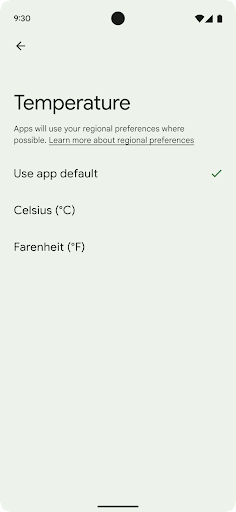
Regional preferences enable users to personalize temperature units, the first day of the week, and numbering systems. A European living in the United States might prefer temperature units to be in Celsius rather than Fahrenheit and for apps to treat Monday as the beginning of the week instead of the US default of Sunday.
New Android Settings menus for these preferences provide users with a
discoverable and centralized location to change app preferences. These
preferences also persist through backup and restore. Several APIs and
intents—such as
getTemperatureUnit
and
getFirstDayOfWeek—
grant your app read access to user preferences, so your app can adjust how it
displays information. You can also register a
BroadcastReceiver on
ACTION_LOCALE_CHANGED
to handle locale configuration changes when regional preferences change.
To find these settings, open the Settings app and navigate to System > Languages & input > Regional preferences.

Accessibilità
Ridimensionamento non lineare dei caratteri fino al 200%
Starting in Android 14, the system supports font scaling up to 200%, providing users with additional accessibility options.
To prevent large text elements on screen from scaling too large, the system applies a nonlinear scaling curve. This scaling strategy means that large text doesn't scale at the same rate as smaller text. Nonlinear font scaling helps preserve the proportional hierarchy between elements of different sizes while mitigating issues with linear text scaling at high degrees (such as text being cut off or text that becomes harder to read due to an extremely large display sizes).
Test your app with nonlinear font scaling

If you already use scaled pixels (sp) units to define text sizing, then these additional options and scaling improvements are applied automatically to the text in your app. However, you should still perform UI testing with the maximum font size enabled (200%) to ensure that your app applies the font sizes correctly and can accommodate larger font sizes without impacting usability.
To enable 200% font size, follow these steps:
- Open the Settings app and navigate to Accessibility > Display size and text.
- For the Font size option, tap the plus (+) icon until the maximum font size setting is enabled, as shown in the image that accompanies this section.
Use scaled pixel (sp) units for text-sizes
Remember to always specify text sizes in sp units. When your app uses sp units, Android can apply the user's preferred text size and scale it appropriately.
Don't use sp units for padding or define view heights assuming implicit padding: with nonlinear font scaling sp dimensions might not be proportional, so 4sp + 20sp might not equal 24sp.
Convert scaled pixel (sp) units
Use TypedValue.applyDimension() to convert from sp units
to pixels, and use TypedValue.deriveDimension() to
convert pixels to sp. These methods apply the appropriate nonlinear scaling
curve automatically.
Avoid hardcoding equations using
Configuration.fontScale or
DisplayMetrics.scaledDensity. Because font scaling is
nonlinear, the scaledDensity field is no longer accurate. The fontScale
field should be used for informational purposes only because fonts are no longer
scaled with a single scalar value.
Use sp units for lineHeight
Always define android:lineHeight using sp units instead
of dp, so the line height scales along with your text. Otherwise, if your text
is sp but your lineHeight is in dp or px, it doesn't scale and looks cramped.
TextView automatically corrects the lineHeight so that your intended
proportions are preserved, but only if both textSize and lineHeight are
defined in sp units.
Fotocamera e contenuti multimediali
Ultra HDR per le immagini

Android 14 aggiunge il supporto per le immagini HDR (High Dynamic Range) che mantengono più informazioni del sensore quando scatti una foto, il che consente di ottenere colori vivaci e un maggiore contrasto. Android utilizza il formato Ultra HDR, che è completamente compatibile con le immagini JPEG, consentendo alle app di dialogare senza problemi con le immagini HDR, visualizzandole in Standard Dynamic Range (SDR) se necessario.
Il rendering di queste immagini nell'interfaccia utente in HDR viene eseguito automaticamente dal framework quando l'app attiva l'utilizzo dell'interfaccia utente HDR per la finestra di attività tramite una voce del manifest o in fase di esecuzione tramite chiamata di Window.setColorMode(). Puoi anche acquisire immagini statiche Ultra HDR compresse sui dispositivi supportati. Con un maggior numero di colori recuperati
dal sensore, la modifica in post può essere più flessibile. Il valore Gainmap associato alle immagini Ultra HDR può essere utilizzato per eseguire il rendering utilizzando OpenGL o Vulkan.
Zoom, messa a fuoco, post-visualizzazione e altro ancora nelle estensioni della fotocamera
Android 14 esegue l'upgrade e migliora le estensioni della fotocamera, consentendo alle app di gestire tempi di elaborazione più lunghi, il che consente di migliorare le immagini utilizzando algoritmi ad alta intensità di calcolo come la fotografia in condizioni di scarsa illuminazione su supportati dispositivi. Queste funzionalità offrono agli utenti un'esperienza ancora più solida quando utilizzano le funzionalità di estensione della videocamera. Ecco alcuni esempi di questi miglioramenti:
- La stima della latenza di elaborazione delle foto dinamiche fornisce stime della latenza di acquisizione delle foto molto più accurate in base alle condizioni ambientali e della scena attuali. Chiama
CameraExtensionSession.getRealtimeStillCaptureLatency()per ottenere un oggettoStillCaptureLatencycon due metodi di stima della latenza. Il metodogetCaptureLatency()restituisce la latenza stimata traonCaptureStartedeonCaptureProcessStarted(), mentre il metodogetProcessingLatency()restituisce la latenza stimata traonCaptureProcessStarted()e il frame elaborato finale disponibile. - Supporto per i callback relativi all'avanzamento dell'acquisizione in modo che le app possano mostrare l'avanzamento corrente delle operazioni di elaborazione di acquisizioni di foto ancora in corso. Puoi verificare se questa funzionalità è disponibile con
CameraExtensionCharacteristics.isCaptureProcessProgressAvailablee, in questo caso, implementare il callbackonCaptureProcessProgressed(), a cui viene passato come parametro il progresso (da 0 a 100). Metadati specifici per le estensioni, ad esempio
CaptureRequest.EXTENSION_STRENGTHper regolare l'intensità di un effetto dell'estensione, ad esempio la quantità di sfocatura dello sfondo conEXTENSION_BOKEH.Funzionalità Postview per l'acquisizione di foto nelle estensioni della fotocamera, che fornisce un'immagine meno elaborata più rapidamente rispetto all'immagine finale. Se un'estensione ha aumentato la latenza di elaborazione, è possibile fornire un'immagine post-visualizzazione come segnaposto per migliorare l'esperienza utente e sostituirla in un secondo momento con l'immagine finale. Puoi verificare se questa funzionalità è disponibile con
CameraExtensionCharacteristics.isPostviewAvailable. Dopodiché puoi passare unOutputConfigurationaExtensionSessionConfiguration.setPostviewOutputConfiguration.Supporto di
SurfaceViewche consente un percorso di rendering dell'anteprima più ottimizzato e a basso consumo energetico.Supporto per il tocco per mettere a fuoco e lo zoom durante l'utilizzo dell'estensione.
Zoom nel sensore
When REQUEST_AVAILABLE_CAPABILITIES_STREAM_USE_CASE in
CameraCharacteristics contains
SCALER_AVAILABLE_STREAM_USE_CASES_CROPPED_RAW, your app
can use advanced sensor capabilities to give a cropped RAW stream the same
pixels as the full field of view by using a CaptureRequest
with a RAW target that has stream use case set to
CameraMetadata.SCALER_AVAILABLE_STREAM_USE_CASES_CROPPED_RAW.
By implementing the request override controls, the updated camera gives users
zoom control even before other camera controls are ready.
Audio USB lossless
Android 14 supporta i formati audio lossless per esperienze di livello audiophile tramite cuffie con cavo USB. Puoi eseguire query su un dispositivo USB per gli attributi del mixer preferiti, registrare un ascoltatore per le modifiche agli attributi del mixer preferiti e configurare gli attributi del mixer utilizzando la classe AudioMixerAttributes. Questa classe rappresenta il formato, ad esempio la maschera del canale, la frequenza di campionamento e il comportamento del mixer audio. La classe consente di inviare l'audio direttamente, senza miscelazione, regolazione del volume o effetti di elaborazione.
Produttività e strumenti per gli sviluppatori
Gestore delle credenziali
Android 14 adds Credential Manager as a platform API, with additional support back to Android 4.4 (API level 19) devices through a Jetpack Library using Google Play services. Credential Manager aims to make sign-in easier for users with APIs that retrieve and store credentials with user-configured credential providers. Credential Manager supports multiple sign-in methods, including username and password, passkeys, and federated sign-in solutions (such as Sign-in with Google) in a single API.
Passkeys provide many advantages. For example, passkeys are built on industry standards, can work across different operating systems and browser ecosystems, and can be used with both websites and apps.
For more information, see the Credential Manager and passkeys documentation and the blogpost about Credential Manager and passkeys.
Connessione Salute
Health Connect is an on-device repository for user health and fitness data. It allows users to share data between their favorite apps, with a single place to control what data they want to share with these apps.
On devices running Android versions prior to Android 14, Health Connect is available to download as an app on the Google Play store. Starting with Android 14, Health Connect is part of the platform and receives updates through Google Play system updates without requiring a separate download. With this, Health Connect can be updated frequently, and your apps can rely on Health Connect being available on devices running Android 14 or higher. Users can access Health Connect from the Settings in their device, with privacy controls integrated into the system settings.


Health Connect includes several new features in Android 14, such as exercise routes, allowing users to share a route of their workout which can be visualized on a map. A route is defined as a list of locations saved within a window of time, and your app can insert routes into exercise sessions, tying them together. To ensure that users have complete control over this sensitive data, users must allow sharing individual routes with other apps.
For more information, see the Health Connection documentation and the blogpost on What's new in Android Health.
Aggiornamenti di OpenJDK 17
Android 14 continues the work of refreshing Android's core libraries to align with the features in the latest OpenJDK LTS releases, including both library updates and Java 17 language support for app and platform developers.
The following features and improvements are included:
- Updated approximately 300
java.baseclasses to Java 17 support. - Text Blocks, which introduce multi-line string literals to the Java programming language.
- Pattern Matching for instanceof, which allows an object to
be treated as having a specific type in an
instanceofwithout any additional variables. - Sealed classes, which allow you restrict which classes and interfaces can extend or implement them.
Thanks to Google Play system updates (Project Mainline), over 600 million devices are enabled to receive the latest Android Runtime (ART) updates that include these changes. This is part of our commitment to give apps a more consistent, secure environment across devices, and to deliver new features and capabilities to users independent of platform releases.
Java and OpenJDK are trademarks or registered trademarks of Oracle and/or its affiliates.
Miglioramenti per gli store
Android 14 introduces several PackageInstaller APIs that
allow app stores to improve their user experience.
Request install approval before downloading
Installing or updating an app might require user approval.
For example, when an installer making use of the
REQUEST_INSTALL_PACKAGES permission attempts to install a
new app. In prior Android versions, app stores can only request user approval
after APKs are written to the install session and the
session is committed.
Starting with Android 14, the requestUserPreapproval()
method lets installers request user approval before committing the install
session. This improvement lets an app store defer downloading any APKs until
after the installation has been approved by the user. Furthermore, once a user
has approved installation, the app store can download and install the app in the
background without interrupting the user.
Claim responsibility for future updates
The setRequestUpdateOwnership() method allows an installer
to indicate to the system that it intends to be responsible for future updates
to an app it is installing. This capability enables update ownership
enforcement, meaning that only the update owner is permitted
to install automatic updates to the app. Update ownership enforcement helps to
ensure that users receive updates only from the expected app store.
Any other installer, including those making use of the
INSTALL_PACKAGES permission, must receive explicit user
approval in order to install an update. If a user decides to proceed with an
update from another source, update ownership is lost.
Update apps at less-disruptive times
App stores typically want to avoid updating an app that is actively in use because this leads to the app's running processes being killed, which potentially interrupts what the user was doing.
Starting with Android 14, the InstallConstraints API
gives installers a way to ensure that their app updates happen at an opportune
moment. For example, an app store can call the
commitSessionAfterInstallConstraintsAreMet() method to
make sure that an update is only committed when the user is no longer
interacting with the app in question.
Seamlessly install optional splits
With split APKs, features of an app can be delivered in separate APK files,
rather than as a monolithic APK. Split APKs allow app stores to optimize the
delivery of different app components. For example, app stores might optimize
based on the properties of the target device. The
PackageInstaller API has supported splits since its
introduction in API level 22.
In Android 14, the setDontKillApp() method allows an
installer to indicate that the app's running processes shouldn't be killed when
new splits are installed. App stores can use this feature to seamlessly install
new features of an app while the user is using the app.
Bundle di metadati dell'app
Starting in Android 14, the Android package installer lets you specify app metadata, such as data safety practices, to include on app store pages such as Google Play.
Rilevare quando gli utenti acquisiscono screenshot del dispositivo
To create a more standardized experience for detecting screenshots, Android 14 introduces a privacy-preserving screenshot detection API. This API lets apps register callbacks on a per-activity basis. These callbacks are invoked, and the user is notified, when the user takes a screenshot while that activity is visible.
Esperienza utente
Azioni personalizzate del foglio di condivisione e ranking migliorato
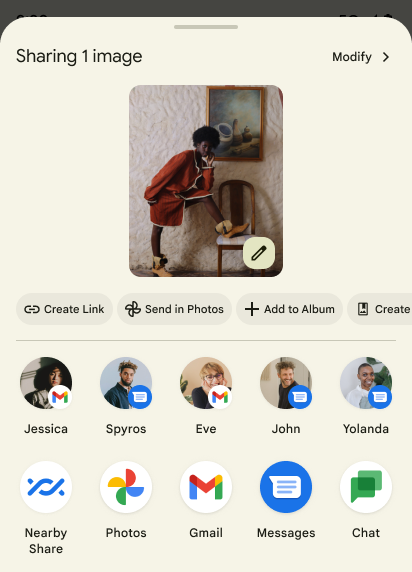
Android 14 updates the system sharesheet to support custom app actions and more informative preview results for users.
Add custom actions
With Android 14, your app can add custom actions to the system sharesheet it invokes.
Improve ranking of Direct Share targets
Android 14 uses more signals from apps to determine the ranking of the direct share targets to provide more helpful results for the user. To provide the most useful signal for ranking, follow the guidance for improving rankings of your Direct Share targets. Communication apps can also report shortcut usage for outgoing and incoming messages.

Supporto di animazioni integrate e personalizzate per Indietro predittivo
Android 13 ha introdotto l'animazione di ritorno alla schermata Home predittiva come opzione per gli sviluppatori. Se viene utilizzato in un'app supportata con l'opzione per gli sviluppatori attivata, lo scorrimento indietro mostra un'animazione che indica che il gesto di ritorno all'indietro fa uscire dall'app e torna alla schermata Home.
Android 14 include diversi miglioramenti e nuove indicazioni per il pulsante Indietro predittivo:
- Puoi impostare
android:enableOnBackInvokedCallback=trueper attivare le animazioni di sistema Indietro predittive per ogni attività anziché per l'intera app. - Abbiamo aggiunto nuove animazioni di sistema per accompagnare l'animazione di ritorno alla home page di Android 13. Le nuove animazioni di sistema sono interattive e inter-attività e vengono visualizzate automaticamente dopo la migrazione a Indietro predittivo.
- Abbiamo aggiunto nuove animazioni dei componenti Material per schede inferiori, schede laterali e Ricerca.
- Abbiamo creato linee guida per il design per la creazione di animazioni e transizioni in-app personalizzate.
- Abbiamo aggiunto nuove API per supportare le animazioni di transizione in-app personalizzate:
handleOnBackStarted,handleOnBackProgressed,handleOnBackCancelledinOnBackPressedCallbackonBackStarted,onBackProgressed,onBackCancelledinOnBackAnimationCallback- Utilizza
overrideActivityTransitionanzichéoverridePendingTransitionper le transizioni che rispondono quando l'utente scorri indietro.
Con questa release di anteprima di Android 14, tutte le funzionalità di Indietro predittivo rimangono nascoste dietro un'opzione per sviluppatori. Consulta la guida per gli sviluppatori per eseguire la migrazione della tua app al flusso di ritorno predittivo, nonché la guida per gli sviluppatori per creare transizioni in-app personalizzate.
Override per app del produttore di dispositivi con schermo grande
Per-app overrides enable device manufacturers to change the behavior of apps on large screen devices. For example, the FORCE_RESIZE_APP override instructs the system to resize the app to fit display dimensions (avoiding size compatibility mode) even if resizeableActivity="false" is set in the app manifest.
Overrides are intended to improve the user experience on large screens.
New manifest properties enable you to disable some device manufacturer overrides for your app.
Override per app per utenti con schermi di grandi dimensioni
Per-app overrides change the behavior of apps on large screen devices. For example, the OVERRIDE_MIN_ASPECT_RATIO_LARGE device manufacturer override sets the app aspect ratio to 16:9 regardless of the app's configuration.
Android 14 QPR1 enables users to apply per‑app overrides by means of a new settings menu on large screen devices.
Condivisione della schermata dell'app
App screen sharing enables users to share an app window instead of the entire device screen during screen content recording.
With app screen sharing, the status bar, navigation bar, notifications, and other system UI elements are excluded from the shared display. Only the content of the selected app is shared.
App screen sharing improves productivity and privacy by enabling users to run multiple apps but limit content sharing to a single app.
Risposta rapida basata su LLM in Gboard su Pixel 8 Pro
Sui dispositivi Pixel 8 Pro con il Feature Drop di dicembre, gli sviluppatori possono provare risposte rapide di qualità superiore in Gboard grazie ai modelli linguistici di grandi dimensioni (LLM) on-device in esecuzione su Google Tensor.
Questa funzionalità è disponibile come anteprima limitata per l'inglese americano in WhatsApp, Line e KakaoTalk. Richiede l'utilizzo di un Pixel 8 Pro con Gboard come tastiera.
Per provarla, attiva prima la funzionalità in Impostazioni > Opzioni sviluppatore > Impostazioni AICore > Attiva AiCore persistente.
Quindi, apri una conversazione in un'app supportata per visualizzare la Risposta rapida basata su LLM nella barra dei suggerimenti di Gboard in risposta ai messaggi in arrivo.
Grafica
I percorsi sono interrogabili e interpolabili
Android's Path API is a powerful and flexible mechanism for
creating and rendering vector graphics, with the ability to stroke or fill a
path, construct a path from line segments or quadratic or cubic curves, perform
boolean operations to get even more complex shapes, or all of these
simultaneously. One limitation is the ability to find out what is actually in a
Path object; the internals of the object are opaque to callers after creation.
To create a Path, you call methods such as
moveTo(), lineTo(), and
cubicTo() to add path segments. But there has been no way to
ask that path what the segments are, so you must retain that information at
creation time.
Starting in Android 14, you can query paths to find out what's inside of them.
First, you need to get a PathIterator object using the
Path.getPathIterator API:
Kotlin
val path = Path().apply {
    moveTo(1.0f, 1.0f)
    lineTo(2.0f, 2.0f)
    close()
}
val pathIterator = path.pathIterator
Java
Path path = new Path();
path.moveTo(1.0F, 1.0F);
path.lineTo(2.0F, 2.0F);
path.close();
PathIterator pathIterator = path.getPathIterator();
Next, you can call PathIterator to iterate through the segments
one by one, retrieving all of the necessary data for each segment. This example
uses PathIterator.Segment objects, which packages up the data
for you:
Kotlin
for (segment in pathIterator) {
    println("segment: ${segment.verb}, ${segment.points}")
}
Java
while (pathIterator.hasNext()) {
    PathIterator.Segment segment = pathIterator.next();
    Log.i(LOG_TAG, "segment: " + segment.getVerb() + ", " + segment.getPoints());
}
PathIterator also has a non-allocating version of next() where you can pass
in a buffer to hold the point data.
One of the important use cases of querying Path data is interpolation. For
example, you might want to animate (or morph) between two different paths. To
further simplify that use case, Android 14 also includes the
interpolate() method on Path. Assuming the two paths have
the same internal structure, the interpolate() method creates a new Path
with that interpolated result. This example returns a path whose shape is
halfway (a linear interpolation of .5) between path and otherPath:
Kotlin
val interpolatedResult = Path()
if (path.isInterpolatable(otherPath)) {
    path.interpolate(otherPath, .5f, interpolatedResult)
}
Java
Path interpolatedResult = new Path();
if (path.isInterpolatable(otherPath)) {
    path.interpolate(otherPath, 0.5F, interpolatedResult);
}
The Jetpack graphics-path library enables similar APIs for earlier versions of Android as well.
Mesh personalizzate con shader di vertici e frammenti
Android has long supported drawing triangle meshes with custom shading, but the input mesh format has been limited to a few predefined attribute combinations. Android 14 adds support for custom meshes, which can be defined as triangles or triangle strips, and can, optionally, be indexed. These meshes are specified with custom attributes, vertex strides, varying, and vertex and fragment shaders written in AGSL.
The vertex shader defines the varyings, such as position and color, while the
fragment shader can optionally define the color for the pixel, typically by
using the varyings created by the vertex shader. If color is provided by the
fragment shader, it is then blended with the current Paint
color using the blend mode selected when
drawing the mesh. Uniforms can be passed
into the fragment and vertex shaders for additional flexibility.
Renderer del buffer hardware per Canvas
Per facilitare l'utilizzo dell'API Canvas di Android per disegnare con accelerazione hardware in un HardwareBuffer, Android 14 introduce HardwareBufferRenderer. Questa API è particolarmente utile quando il caso d'uso prevede la comunicazione con il compositore di sistema tramite SurfaceControl per il disegno con bassa latenza.