

Android 14 mang đến cho nhà phát triển các tính năng và API mới hữu ích. Nội dung dưới đây giúp bạn tìm hiểu các tính năng cho ứng dụng cũng như làm quen với các API liên quan.
Để biết danh sách chi tiết về các API đã thêm, đã sửa đổi và đã xoá, hãy đọc báo cáo điểm khác biệt về API. Để biết thông tin chi tiết về các API đã thêm, hãy truy cập vào tài liệu tham khảo về API cho Android. Đối với Android 14, hãy tìm các API đã được thêm vào API cấp 34. Để tìm hiểu những thay đổi của nền tảng có thể tác động đến ứng dụng của bạn, hãy nhớ tham khảo các thay đổi về hành vi của Android 14 đối với ứng dụng nhắm đến Android 14 và tất cả ứng dụng.
Quốc tế hoá
Lựa chọn ưu tiên về ngôn ngữ cho mỗi ứng dụng
Android 14 expands on the per-app language features that were introduced in Android 13 (API level 33) with these additional capabilities:
Automatically generate an app's
localeConfig: Starting with Android Studio Giraffe Canary 7 and AGP 8.1.0-alpha07, you can configure your app to support per-app language preferences automatically. Based on your project resources, the Android Gradle plugin generates theLocaleConfigfile and adds a reference to it in the final manifest file, so you no longer have to create or update the file manually. AGP uses the resources in theresfolders of your app modules and any library module dependencies to determine the locales to include in theLocaleConfigfile.Dynamic updates for an app's
localeConfig: Use thesetOverrideLocaleConfig()andgetOverrideLocaleConfig()methods inLocaleManagerto dynamically update your app's list of supported languages in the device's system settings. Use this flexibility to customize the list of supported languages per region, run A/B experiments, or provide an updated list of locales if your app utilizes server-side pushes for localization.App language visibility for input method editors (IMEs): IMEs can utilize the
getApplicationLocales()method to check the language of the current app and match the IME language to that language.
API Biến tố ngữ pháp
Có đến 3 tỷ người sử dụng ngôn ngữ có phân biệt giống ngữ pháp: ngôn ngữ mà các danh mục ngữ pháp (chẳng hạn như danh từ, động từ, tính từ và giới từ) sẽ phản ánh theo giống của người và đối tượng mà bạn nói đến hoặc nói về. Theo truyền thống, nhiều ngôn ngữ có phân biệt giống ngữ pháp sử dụng giống đực làm giống mặc định hoặc chung.
Việc xưng hô sai ngữ pháp với người dùng, chẳng hạn như xưng hô với phụ nữ theo ngữ pháp giống đực, có thể ảnh hưởng tiêu cực đến hiệu suất và thái độ của họ. Ngược lại, giao diện người dùng có ngôn ngữ phản ánh chính xác giống ngữ pháp của người dùng có thể cải thiện mức độ tương tác, cũng như mang lại trải nghiệm tự nhiên và phù hợp hơn cho người dùng.
To help you build a user-centric UI for gendered languages, Android 14 introduces the Grammatical Inflection API, which lets you add support for grammatical gender without refactoring your app.
Lựa chọn ưu tiên theo khu vực
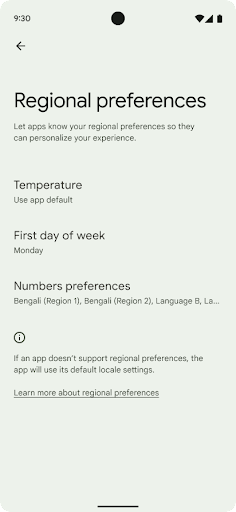
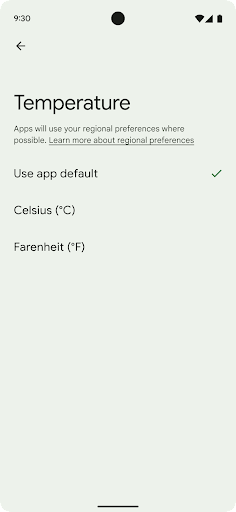
Regional preferences enable users to personalize temperature units, the first day of the week, and numbering systems. A European living in the United States might prefer temperature units to be in Celsius rather than Fahrenheit and for apps to treat Monday as the beginning of the week instead of the US default of Sunday.
New Android Settings menus for these preferences provide users with a
discoverable and centralized location to change app preferences. These
preferences also persist through backup and restore. Several APIs and
intents—such as
getTemperatureUnit
and
getFirstDayOfWeek—
grant your app read access to user preferences, so your app can adjust how it
displays information. You can also register a
BroadcastReceiver on
ACTION_LOCALE_CHANGED
to handle locale configuration changes when regional preferences change.
To find these settings, open the Settings app and navigate to System > Languages & input > Regional preferences.
Hỗ trợ tiếp cận
Điều chỉnh tỷ lệ phông chữ phi tuyến tính lên đến 200%
Starting in Android 14, the system supports font scaling up to 200%, providing users with additional accessibility options.
To prevent large text elements on screen from scaling too large, the system applies a nonlinear scaling curve. This scaling strategy means that large text doesn't scale at the same rate as smaller text. Nonlinear font scaling helps preserve the proportional hierarchy between elements of different sizes while mitigating issues with linear text scaling at high degrees (such as text being cut off or text that becomes harder to read due to an extremely large display sizes).
Test your app with nonlinear font scaling
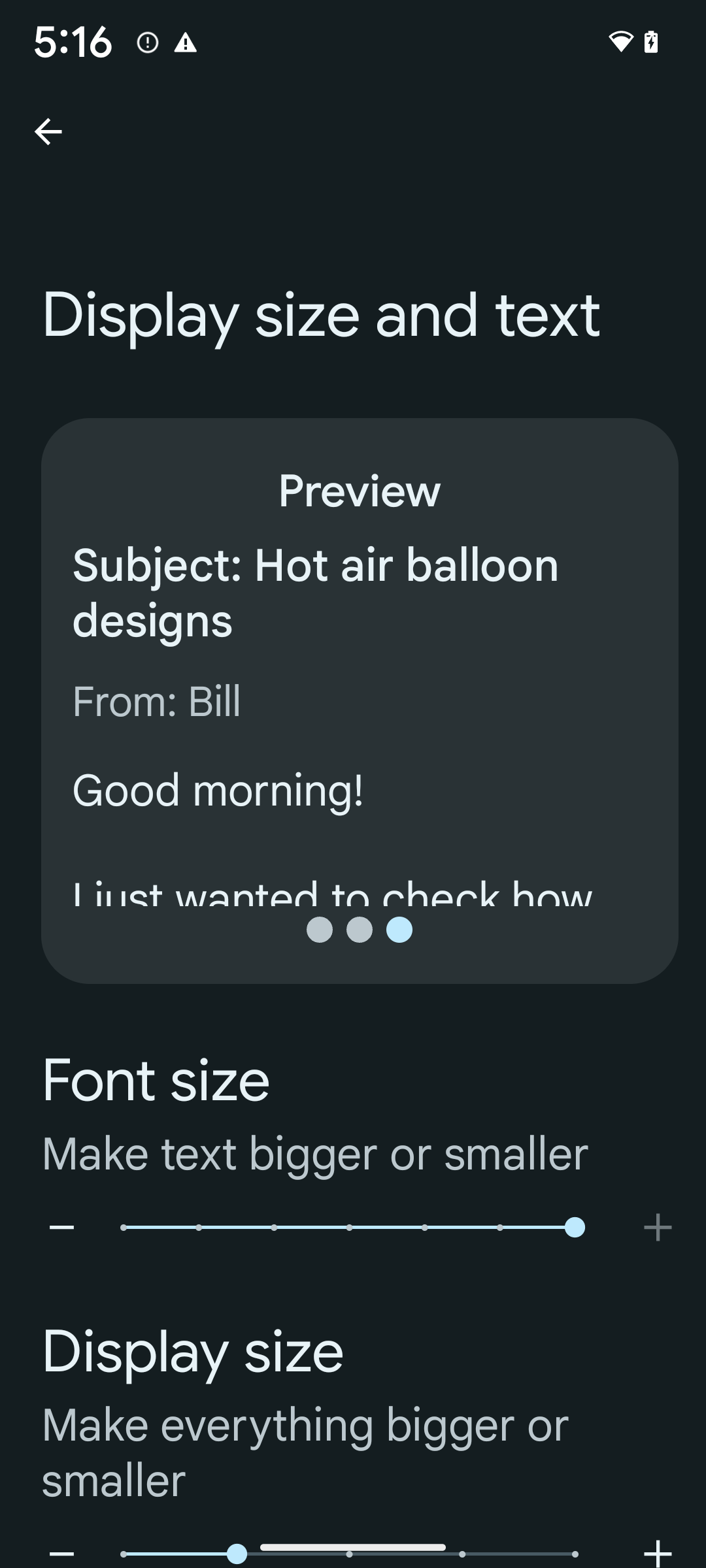
If you already use scaled pixels (sp) units to define text sizing, then these additional options and scaling improvements are applied automatically to the text in your app. However, you should still perform UI testing with the maximum font size enabled (200%) to ensure that your app applies the font sizes correctly and can accommodate larger font sizes without impacting usability.
To enable 200% font size, follow these steps:
- Open the Settings app and navigate to Accessibility > Display size and text.
- For the Font size option, tap the plus (+) icon until the maximum font size setting is enabled, as shown in the image that accompanies this section.
Use scaled pixel (sp) units for text-sizes
Remember to always specify text sizes in sp units. When your app uses sp units, Android can apply the user's preferred text size and scale it appropriately.
Don't use sp units for padding or define view heights assuming implicit padding: with nonlinear font scaling sp dimensions might not be proportional, so 4sp + 20sp might not equal 24sp.
Convert scaled pixel (sp) units
Use TypedValue.applyDimension() to convert from sp units
to pixels, and use TypedValue.deriveDimension() to
convert pixels to sp. These methods apply the appropriate nonlinear scaling
curve automatically.
Avoid hardcoding equations using
Configuration.fontScale or
DisplayMetrics.scaledDensity. Because font scaling is
nonlinear, the scaledDensity field is no longer accurate. The fontScale
field should be used for informational purposes only because fonts are no longer
scaled with a single scalar value.
Use sp units for lineHeight
Always define android:lineHeight using sp units instead
of dp, so the line height scales along with your text. Otherwise, if your text
is sp but your lineHeight is in dp or px, it doesn't scale and looks cramped.
TextView automatically corrects the lineHeight so that your intended
proportions are preserved, but only if both textSize and lineHeight are
defined in sp units.
Camera và nội dung nghe nhìn
Ultra HDR cho hình ảnh
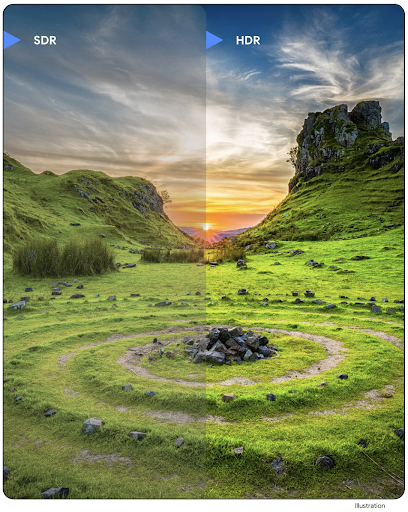
Android 14 hỗ trợ thêm hình ảnh Dải động cao (HDR) giúp giữ lại nhiều thông tin hơn từ cảm biến khi chụp ảnh, nhờ đó mang lại màu sắc sống động và độ tương phản cao hơn. Android sử dụng định dạng Ultra HDR, tương thích hoàn toàn ngược với hình ảnh JPEG, cho phép các ứng dụng tương tác liền mạch với hình ảnh HDR, hiển thị hình ảnh đó ở Dải động tiêu chuẩn (SDR) nếu cần.
Khung sẽ tự động kết xuất các hình ảnh này trong giao diện người dùng ở chế độ HDR khi ứng dụng của bạn chọn sử dụng giao diện người dùng HDR cho Cửa sổ hoạt động, thông qua một mục nhập tệp kê khai hoặc trong thời gian chạy bằng cách gọi Window.setColorMode(). Bạn cũng có thể chụp hình ảnh tĩnh HDR siêu độ nét được nén trên các thiết bị được hỗ trợ. Khi cảm biến khôi phục được nhiều màu hơn, bạn có thể chỉnh sửa linh hoạt hơn sau khi chụp. Bạn có thể sử dụng Gainmap liên kết với hình ảnh Ultra HDR để kết xuất hình ảnh bằng OpenGL hoặc Vulkan.
Thu phóng, Lấy nét, Xem nhanh và nhiều tính năng khác trong các tiện ích camera
Android 14 nâng cấp và cải thiện tiện ích máy ảnh, cho phép các ứng dụng xử lý trong thời gian dài hơn, nhờ đó hình ảnh được cải thiện bằng cách sử dụng các thuật toán chuyên sâu về điện toán như chụp ảnh ở điều kiện ánh sáng yếu trên các thiết bị được hỗ trợ. Các tính năng này mang đến cho người dùng trải nghiệm mạnh mẽ hơn nữa khi sử dụng các tính năng của tiện ích máy ảnh. Sau đây là một số ví dụ về những điểm cải tiến này:
- Tính năng ước tính độ trễ xử lý ảnh tĩnh động cung cấp thông tin ước tính độ trễ chụp ảnh tĩnh chính xác hơn nhiều dựa trên điều kiện môi trường và cảnh hiện tại. Gọi
CameraExtensionSession.getRealtimeStillCaptureLatency()để lấy đối tượngStillCaptureLatencycó hai phương thức ước tính độ trễ. Phương thứcgetCaptureLatency()trả về độ trễ ước tính giữaonCaptureStartedvàonCaptureProcessStarted(), còn phương thứcgetProcessingLatency()trả về độ trễ ước tính giữaonCaptureProcessStarted()và khung hình đã xử lý cuối cùng. - Hỗ trợ các lệnh gọi lại tiến trình chụp để ứng dụng có thể hiển thị tiến trình hiện tại của các thao tác xử lý ảnh chụp tĩnh, chạy trong thời gian dài. Bạn có thể kiểm tra xem tính năng này có dùng được với
CameraExtensionCharacteristics.isCaptureProcessProgressAvailablehay không. Nếu có, bạn sẽ triển khai lệnh gọi lạionCaptureProcessProgressed(), trong đó tiến trình (từ 0 đến 100) được truyền vào dưới dạng tham số. Siêu dữ liệu dành riêng cho tiện ích, chẳng hạn như
CaptureRequest.EXTENSION_STRENGTHđể điều chỉnh mức độ của một hiệu ứng tiện ích, chẳng hạn như mức độ làm mờ nền bằngEXTENSION_BOKEH.Tính năng Xem sau cho tính năng Chụp ảnh tĩnh trong các tiện ích máy ảnh, cung cấp hình ảnh được xử lý ít hơn và nhanh hơn so với hình ảnh cuối cùng. Nếu một tiện ích tăng độ trễ xử lý, thì bạn có thể cung cấp hình ảnh sau khi xem làm phần giữ chỗ để cải thiện trải nghiệm người dùng và sau đó chuyển sang hình ảnh cuối cùng. Bạn có thể kiểm tra xem tính năng này có dùng được với
CameraExtensionCharacteristics.isPostviewAvailablehay không. Sau đó, bạn có thể truyềnOutputConfigurationđếnExtensionSessionConfiguration.setPostviewOutputConfiguration.Hỗ trợ
SurfaceViewcho phép đường dẫn kết xuất bản xem trước được tối ưu hoá và tiết kiệm điện năng hơn.Hỗ trợ tính năng nhấn để lấy nét và thu phóng trong quá trình sử dụng tiện ích.
Thu phóng trong cảm biến
Khi REQUEST_AVAILABLE_CAPABILITIES_STREAM_USE_CASE trong CameraCharacteristics chứa SCALER_AVAILABLE_STREAM_USE_CASES_CROPPED_RAW, ứng dụng của bạn có thể sử dụng các tính năng cảm biến nâng cao để cung cấp luồng RAW đã cắt có cùng số pixel với trường nhìn đầy đủ bằng cách sử dụng CaptureRequest với mục tiêu RAW có trường hợp sử dụng luồng được đặt thành CameraMetadata.SCALER_AVAILABLE_STREAM_USE_CASES_CROPPED_RAW.
Bằng cách triển khai các chế độ điều khiển ghi đè yêu cầu, máy ảnh đã cập nhật sẽ cho phép người dùng điều khiển tính năng thu phóng ngay cả trước khi các chế độ điều khiển khác của máy ảnh sẵn sàng.
Âm thanh qua cổng USB không bị suy hao
Android 14 hỗ trợ các định dạng âm thanh không suy hao để mang lại trải nghiệm âm thanh chất lượng cao qua tai nghe có dây USB. Bạn có thể truy vấn một thiết bị USB để biết các thuộc tính bộ trộn ưu tiên, đăng ký trình nghe cho các thay đổi trong các thuộc tính bộ trộn ưu tiên và định cấu hình các thuộc tính bộ trộn bằng cách sử dụng lớp AudioMixerAttributes. Lớp này đại diện cho định dạng, chẳng hạn như mặt nạ kênh, tốc độ lấy mẫu và hành vi của bộ trộn âm thanh. Lớp này cho phép gửi trực tiếp âm thanh mà không cần trộn, điều chỉnh âm lượng hoặc xử lý hiệu ứng.
Nâng cao năng suất và công cụ cho nhà phát triển
Trình quản lý thông tin xác thực
Android 14 adds Credential Manager as a platform API, with additional support back to Android 4.4 (API level 19) devices through a Jetpack Library using Google Play services. Credential Manager aims to make sign-in easier for users with APIs that retrieve and store credentials with user-configured credential providers. Credential Manager supports multiple sign-in methods, including username and password, passkeys, and federated sign-in solutions (such as Sign-in with Google) in a single API.
Passkeys provide many advantages. For example, passkeys are built on industry standards, can work across different operating systems and browser ecosystems, and can be used with both websites and apps.
For more information, see the Credential Manager and passkeys documentation and the blogpost about Credential Manager and passkeys.
Health Connect
Health Connect is an on-device repository for user health and fitness data. It allows users to share data between their favorite apps, with a single place to control what data they want to share with these apps.
On devices running Android versions prior to Android 14, Health Connect is available to download as an app on the Google Play store. Starting with Android 14, Health Connect is part of the platform and receives updates through Google Play system updates without requiring a separate download. With this, Health Connect can be updated frequently, and your apps can rely on Health Connect being available on devices running Android 14 or higher. Users can access Health Connect from the Settings in their device, with privacy controls integrated into the system settings.
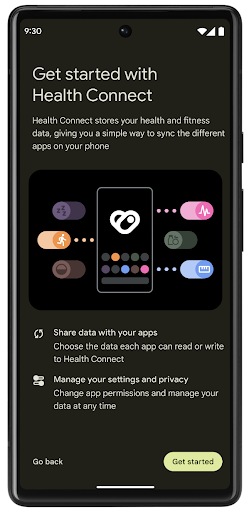
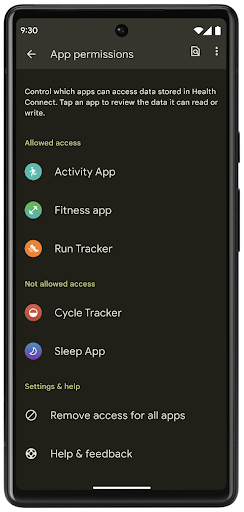
Health Connect includes several new features in Android 14, such as exercise routes, allowing users to share a route of their workout which can be visualized on a map. A route is defined as a list of locations saved within a window of time, and your app can insert routes into exercise sessions, tying them together. To ensure that users have complete control over this sensitive data, users must allow sharing individual routes with other apps.
For more information, see the Health Connection documentation and the blogpost on What's new in Android Health.
Nội dung cập nhật OpenJDK 17
Android 14 tiếp tục công cuộc làm mới các thư viện cốt lõi của Android để phù hợp với các tính năng trong bản phát hành OpenJDK LTS mới nhất, bao gồm cả bản cập nhật thư viện và tính năng hỗ trợ ngôn ngữ Java 17 cho các nhà phát triển ứng dụng và nền tảng.
Bao gồm các tính năng và điểm cải tiến sau đây:
- Cập nhật tính năng hỗ trợ Java 17 cho khoảng 300 lớp
java.base. - Khối văn bản (Text Blocks) ra mắt các giá trị cố định dạng chuỗi nhiều dòng bằng ngôn ngữ lập trình Java.
- So khớp mẫu cho instanceof, cho phép một đối tượng được xem là có một kiểu cụ thể trong
instanceofmà không cần thêm bất cứ biến nào. - Lớp kín (sealed classes) cho phép bạn hạn chế các lớp và giao diện có thể mở rộng hoặc triển khai các lớp đó.
Nhờ các bản cập nhật hệ thống Google Play (Project Mainline), hơn 600 triệu thiết bị được phép nhận các bản cập nhật Android Runtime (ART) mới nhất có các thay đổi này. Đây là một phần trong cam kết của chúng tôi nhằm cung cấp cho các ứng dụng một môi trường nhất quán, bảo mật hơn trên các thiết bị, đồng thời cung cấp các tính năng và chức năng mới cho người dùng độc lập với các bản phát hành nền tảng.
Java và OpenJDK là các nhãn hiệu hoặc nhãn hiệu đã đăng ký của Oracle và/hoặc các đơn vị liên kết với Oracle.
Những điểm cải tiến cho các cửa hàng ứng dụng
Android 14 introduces several PackageInstaller APIs that
allow app stores to improve their user experience.
Request install approval before downloading
Installing or updating an app might require user approval.
For example, when an installer making use of the
REQUEST_INSTALL_PACKAGES permission attempts to install a
new app. In prior Android versions, app stores can only request user approval
after APKs are written to the install session and the
session is committed.
Starting with Android 14, the requestUserPreapproval()
method lets installers request user approval before committing the install
session. This improvement lets an app store defer downloading any APKs until
after the installation has been approved by the user. Furthermore, once a user
has approved installation, the app store can download and install the app in the
background without interrupting the user.
Claim responsibility for future updates
The setRequestUpdateOwnership() method allows an installer
to indicate to the system that it intends to be responsible for future updates
to an app it is installing. This capability enables update ownership
enforcement, meaning that only the update owner is permitted
to install automatic updates to the app. Update ownership enforcement helps to
ensure that users receive updates only from the expected app store.
Any other installer, including those making use of the
INSTALL_PACKAGES permission, must receive explicit user
approval in order to install an update. If a user decides to proceed with an
update from another source, update ownership is lost.
Update apps at less-disruptive times
App stores typically want to avoid updating an app that is actively in use because this leads to the app's running processes being killed, which potentially interrupts what the user was doing.
Starting with Android 14, the InstallConstraints API
gives installers a way to ensure that their app updates happen at an opportune
moment. For example, an app store can call the
commitSessionAfterInstallConstraintsAreMet() method to
make sure that an update is only committed when the user is no longer
interacting with the app in question.
Seamlessly install optional splits
With split APKs, features of an app can be delivered in separate APK files,
rather than as a monolithic APK. Split APKs allow app stores to optimize the
delivery of different app components. For example, app stores might optimize
based on the properties of the target device. The
PackageInstaller API has supported splits since its
introduction in API level 22.
In Android 14, the setDontKillApp() method allows an
installer to indicate that the app's running processes shouldn't be killed when
new splits are installed. App stores can use this feature to seamlessly install
new features of an app while the user is using the app.
Gói siêu dữ liệu ứng dụng
Kể từ Android 14, trình cài đặt gói Android cho phép bạn chỉ định siêu dữ liệu ứng dụng (ví dụ: các biện pháp đảm bảo an toàn dữ liệu) để đưa vào các trang trên cửa hàng ứng dụng như Google Play.
Phát hiện thời điểm người dùng chụp ảnh màn hình thiết bị
To create a more standardized experience for detecting screenshots, Android 14 introduces a privacy-preserving screenshot detection API. This API lets apps register callbacks on a per-activity basis. These callbacks are invoked, and the user is notified, when the user takes a screenshot while that activity is visible.
Trải nghiệm người dùng
Các thao tác tuỳ chỉnh trên Trang chia sẻ nội dung và cách cải thiện thứ hạng
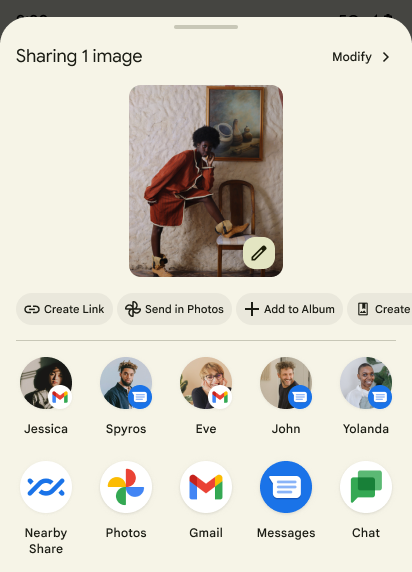
Android 14 updates the system sharesheet to support custom app actions and more informative preview results for users.
Add custom actions
With Android 14, your app can add custom actions to the system sharesheet it invokes.
Improve ranking of Direct Share targets
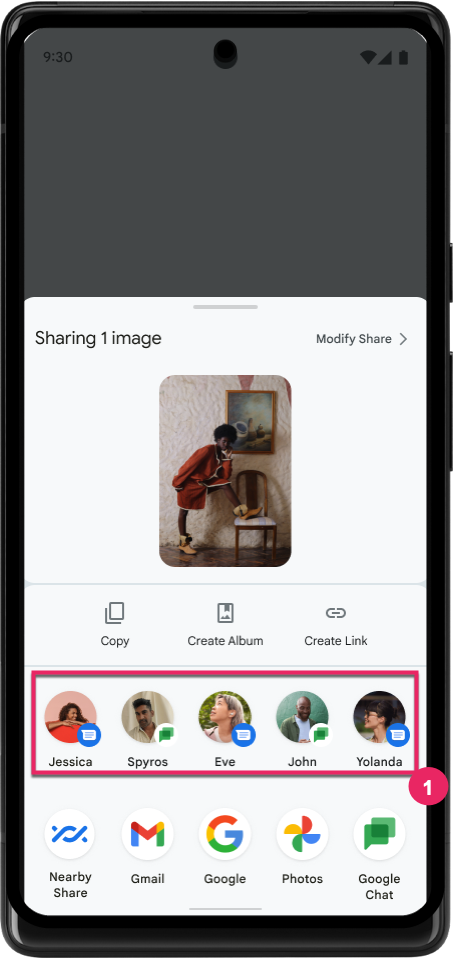
Android 14 uses more signals from apps to determine the ranking of the direct share targets to provide more helpful results for the user. To provide the most useful signal for ranking, follow the guidance for improving rankings of your Direct Share targets. Communication apps can also report shortcut usage for outgoing and incoming messages.
Hỗ trợ ảnh động tích hợp sẵn và ảnh động tuỳ chỉnh cho tính năng Xem trước thao tác quay lại
Android 13 đã giới thiệu ảnh động xem trước thao tác quay lại màn hình chính dưới hình thức tuỳ chọn dành cho nhà phát triển. Khi vuốt ngược lại, trong một ứng dụng được hỗ trợ và tuỳ chọn dành cho nhà phát triển được bật, sẽ xuất hiện ảnh động chỉ ra rằng cử chỉ vuốt ngược là để thoát khỏi ứng dụng và quay lại màn hình chính.
Android 14 có nhiều điểm cải tiến và hướng dẫn mới về tính năng Xem trước thao tác quay lại:
- Bạn có thể thiết lập
android:enableOnBackInvokedCallback=trueđể chọn sử dụng ảnh động xem trước quay lại hệ thống cho mỗi Hoạt động thay vì cho toàn bộ ứng dụng. - Chúng tôi đã thêm ảnh động hệ thống mới để tăng cường cho ảnh động quay lại màn hình chính từ Android 13. Sau khi di chuyển sang tính năng Xem trước thao tác quay lại, bạn sẽ tự động nhận được các ảnh động hệ thống mới trên nhiều hoạt động và nhiều tác vụ.
- Chúng tôi đã thêm ảnh động mới trong Thành phần Material cho Bảng dưới cùng, Bảng bên và Tìm kiếm.
- Chúng tôi đã tạo hướng dẫn thiết kế để tạo ảnh động và hiệu ứng chuyển đổi tuỳ chỉnh trong ứng dụng.
- Chúng tôi đã thêm nhiều API mới để hỗ trợ ảnh động chuyển đổi tuỳ chỉnh trong ứng dụng:
handleOnBackStarted,handleOnBackProgressed,handleOnBackCancelledinOnBackPressedCallbackonBackStarted,onBackProgressed,onBackCancelledinOnBackAnimationCallback- Sử dụng
overrideActivityTransitionthay vìoverridePendingTransitionđối với các hiệu ứng chuyển đổi phản hồi khi người dùng vuốt ngược lại.
Đối với bản thử nghiệm Android 14 này, tất cả tính năng Xem trước thao tác quay lại vẫn là tuỳ chọn dành cho nhà phát triển. Xem hướng dẫn dành cho nhà phát triển để di chuyển ứng dụng sang tính năng Xem trước thao tác quay lại, cũng như hướng dẫn dành cho nhà phát triển để tạo các hiệu ứng chuyển đổi tuỳ chỉnh trong ứng dụng.
Chế độ ghi đè cho mỗi ứng dụng của nhà sản xuất thiết bị có màn hình lớn
Chế độ ghi đè cho mỗi ứng dụng cho phép nhà sản xuất thiết bị thay đổi hành vi của các ứng dụng trên thiết bị có màn hình lớn. Ví dụ: chế độ ghi đè FORCE_RESIZE_APP sẽ hướng dẫn hệ thống đổi kích thước ứng dụng cho vừa với kích thước màn hình (tránh chế độ tương thích với kích thước) ngay cả khi resizeableActivity="false" được thiết lập trong tệp kê khai ứng dụng.
Tính năng ghi đè nhằm cải thiện trải nghiệm người dùng trên màn hình lớn.
Các thuộc tính tệp kê khai mới cho phép bạn tắt một số chế độ ghi đè của nhà sản xuất thiết bị cho ứng dụng của mình.
Chế độ ghi đè cho mỗi ứng dụng của người dùng trên màn hình lớn
Per-app overrides change the behavior of apps on large screen devices. For example, the OVERRIDE_MIN_ASPECT_RATIO_LARGE device manufacturer override sets the app aspect ratio to 16:9 regardless of the app's configuration.
Android 14 QPR1 enables users to apply per‑app overrides by means of a new settings menu on large screen devices.
Chia sẻ màn hình ứng dụng
Tính năng chia sẻ màn hình ứng dụng cho phép người dùng chia sẻ một cửa sổ ứng dụng thay vì toàn bộ màn hình thiết bị trong khi ghi nội dung trên màn hình.
Khi chia sẻ màn hình ứng dụng, thanh trạng thái, thanh điều hướng, thông báo và các thành phần khác trên giao diện người dùng của hệ thống sẽ bị loại trừ khỏi màn hình được chia sẻ. Chỉ nội dung của ứng dụng đã chọn mới được chia sẻ.
Tính năng chia sẻ màn hình ứng dụng giúp cải thiện năng suất và quyền riêng tư bằng cách cho phép người dùng chạy nhiều ứng dụng nhưng chỉ giới hạn việc chia sẻ nội dung ở một ứng dụng.
Tính năng Trả lời thông minh dựa trên LLM trong Gboard trên Pixel 8 Pro
Trên các thiết bị Pixel 8 Pro có Bản phát hành tính năng tháng 12, nhà phát triển có thể dùng thử tính năng trả lời thông minh chất lượng cao hơn trong Gboard nhờ các Mô hình ngôn ngữ lớn (LLM) trên thiết bị chạy trên Google Tensor.
Tính năng này được cung cấp dưới dạng bản dùng thử có giới hạn cho tiếng Anh (Hoa Kỳ) trong WhatsApp, Line và KakaoTalk. Bạn cần sử dụng thiết bị Pixel 8 Pro có Gboard làm bàn phím.
Để dùng thử, trước tiên, hãy bật tính năng này trong phần Settings > Developer Options > AiCore Settings > Enable Aicore Persistent (Cài đặt > Tuỳ chọn cho nhà phát triển > Cài đặt AICore > Bật Aicore Persistent).
Tiếp theo, hãy mở một cuộc trò chuyện trong một ứng dụng được hỗ trợ để xem tính năng Trả lời thông minh dựa trên LLM trong dải đề xuất của Gboard để phản hồi tin nhắn đến.
Đồ hoạ
Các đường dẫn có thể truy vấn và nội suy
Android's Path API is a powerful and flexible mechanism for
creating and rendering vector graphics, with the ability to stroke or fill a
path, construct a path from line segments or quadratic or cubic curves, perform
boolean operations to get even more complex shapes, or all of these
simultaneously. One limitation is the ability to find out what is actually in a
Path object; the internals of the object are opaque to callers after creation.
To create a Path, you call methods such as
moveTo(), lineTo(), and
cubicTo() to add path segments. But there has been no way to
ask that path what the segments are, so you must retain that information at
creation time.
Starting in Android 14, you can query paths to find out what's inside of them.
First, you need to get a PathIterator object using the
Path.getPathIterator API:
Kotlin
val path = Path().apply {
    moveTo(1.0f, 1.0f)
    lineTo(2.0f, 2.0f)
    close()
}
val pathIterator = path.pathIterator
Java
Path path = new Path();
path.moveTo(1.0F, 1.0F);
path.lineTo(2.0F, 2.0F);
path.close();
PathIterator pathIterator = path.getPathIterator();
Next, you can call PathIterator to iterate through the segments
one by one, retrieving all of the necessary data for each segment. This example
uses PathIterator.Segment objects, which packages up the data
for you:
Kotlin
for (segment in pathIterator) {
    println("segment: ${segment.verb}, ${segment.points}")
}
Java
while (pathIterator.hasNext()) {
    PathIterator.Segment segment = pathIterator.next();
    Log.i(LOG_TAG, "segment: " + segment.getVerb() + ", " + segment.getPoints());
}
PathIterator also has a non-allocating version of next() where you can pass
in a buffer to hold the point data.
One of the important use cases of querying Path data is interpolation. For
example, you might want to animate (or morph) between two different paths. To
further simplify that use case, Android 14 also includes the
interpolate() method on Path. Assuming the two paths have
the same internal structure, the interpolate() method creates a new Path
with that interpolated result. This example returns a path whose shape is
halfway (a linear interpolation of .5) between path and otherPath:
Kotlin
val interpolatedResult = Path()
if (path.isInterpolatable(otherPath)) {
    path.interpolate(otherPath, .5f, interpolatedResult)
}
Java
Path interpolatedResult = new Path();
if (path.isInterpolatable(otherPath)) {
    path.interpolate(otherPath, 0.5F, interpolatedResult);
}
The Jetpack graphics-path library enables similar APIs for earlier versions of Android as well.
Lưới tuỳ chỉnh có chương trình đổ bóng đỉnh và mảnh
Android từ lâu đã hỗ trợ vẽ lưới tam giác bằng tính năng tô bóng tuỳ chỉnh, nhưng định dạng lưới đầu vào bị giới hạn ở một số tổ hợp thuộc tính được xác định trước. Android 14 hỗ trợ thêm lưới tuỳ chỉnh. Lưới này có thể được xác định là tam giác hoặc dải tam giác và có thể được lập chỉ mục (không bắt buộc). Các lưới này được chỉ định bằng các thuộc tính tuỳ chỉnh, bước đỉnh, thay đổi, chương trình đổ bóng đỉnh và mảnh được viết bằng AGSL.
Chương trình đổ bóng đỉnh xác định các biến thể, chẳng hạn như vị trí và màu sắc, trong khi chương trình đổ bóng mảnh có thể tuỳ ý xác định màu cho pixel, thường là bằng cách sử dụng các biến thể do chương trình đổ bóng đỉnh tạo ra. Nếu màu được cung cấp bởi chương trình đổ bóng mảnh, thì màu đó sẽ được kết hợp với màu Paint hiện tại bằng cách sử dụng chế độ kết hợp được chọn khi vẽ lưới. Bạn có thể truyền Bộ đồng nhất vào chương trình đổ bóng mảnh và đỉnh để tăng tính linh hoạt.
Trình kết xuất vùng đệm phần cứng cho Canvas
To assist in using Android's Canvas API to draw with
hardware acceleration into a HardwareBuffer, Android 14
introduces HardwareBufferRenderer. This API is
particularly useful when your use case involves communication with the system
compositor through SurfaceControl for low-latency
drawing.