

Android 16에는 개발자를 위한 훌륭한 새로운 기능과 API가 도입되었습니다. 다음 섹션에서는 관련 API를 시작하는 데 도움이 되도록 이러한 기능을 요약합니다.
새로운 API, 수정된 API, 삭제된 API에 관한 자세한 목록은 API 차이점 보고서를 참고하세요. 새로운 API에 관한 자세한 내용은 Android API 참조를 방문하세요. 새로운 API가 강조 표시되어 쉽게 확인 가능합니다.플랫폼 변경사항이 앱에 영향을 미칠 수 있는 영역도 검토해야 합니다. 자세한 내용은 다음 페이지를 참조하세요.
핵심 기능
Android에는 Android 시스템의 핵심 기능을 확장하는 새로운 API가 포함되어 있습니다.
2025년 두 가지 Android API 출시
- This preview is for the next major release of Android with a planned launch in Q2 of 2025. This release is similar to all of our API releases in the past, where we can have planned behavior changes that are often tied to a targetSdkVersion.
- We're planning the major release a quarter earlier (Q2 rather than Q3 in prior years) to better align with the schedule of device launches across our ecosystem, so more devices can get the major release of Android sooner. With the major release coming in Q2, you'll need to do your annual compatibility testing a few months earlier than in previous years to make sure your apps are ready.
- We plan to have another release in Q4 of 2025 which also will include new developer APIs. The Q2 major release will be the only release in 2025 to include planned behavior changes that could affect apps.
In addition to new developer APIs, the Q4 minor release will pick up feature updates, optimizations, and bug fixes; it will not include any app-impacting behavior changes.
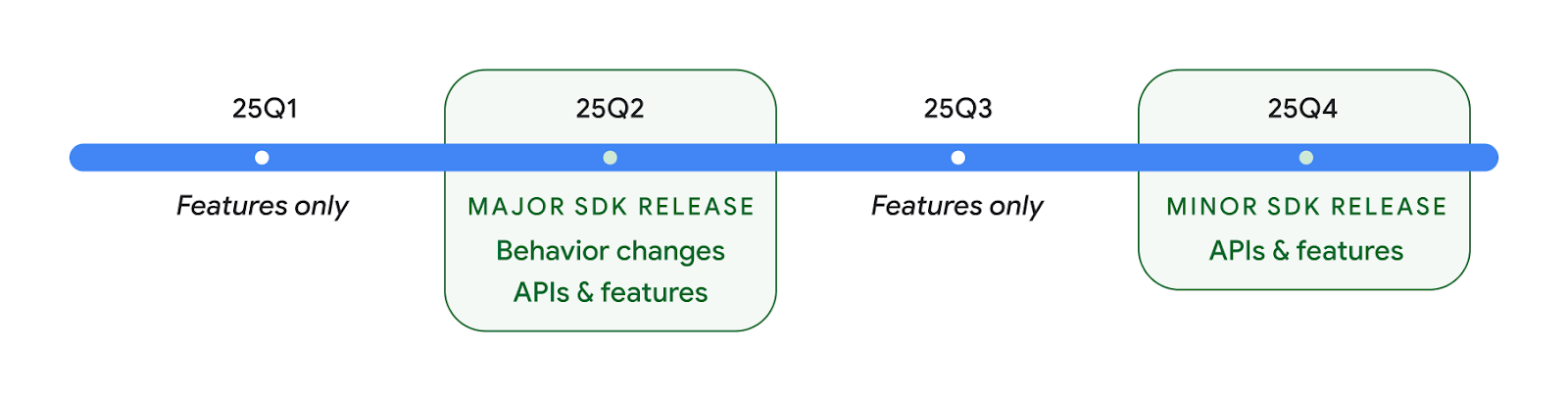
We'll continue to have quarterly Android releases. The Q1 and Q3 updates in-between the API releases will provide incremental updates to help ensure continuous quality. We're actively working with our device partners to bring the Q2 release to as many devices as possible.
Using new APIs with major and minor releases
Guarding a code block with a check for API level is done today using
the SDK_INT constant with
VERSION_CODES. This will continue
to be supported for major Android releases.
if (SDK_INT >= VERSION_CODES.BAKLAVA) {
  // Use APIs introduced in Android 16
}
The new SDK_INT_FULL
constant can be used for API checks against both major and minor versions with
the new VERSION_CODES_FULL
enumeration.
if (SDK_INT_FULL >= VERSION_CODES_FULL.[MAJOR or MINOR RELEASE]) {
  // Use APIs introduced in a major or minor release
}
You can also use the
Build.getMinorSdkVersion()
method to get just the minor SDK version.
val minorSdkVersion = Build.getMinorSdkVersion(VERSION_CODES_FULL.BAKLAVA)
These APIs have not yet been finalized and are subject to change, so please send us feedback if you have any concerns.
사용자 환경 및 시스템 UI
Android 16에서는 앱 개발자와 사용자가 필요에 맞게 기기를 구성할 수 있는 제어 기능과 유연성이 강화되었습니다.
진행 상황 중심 알림
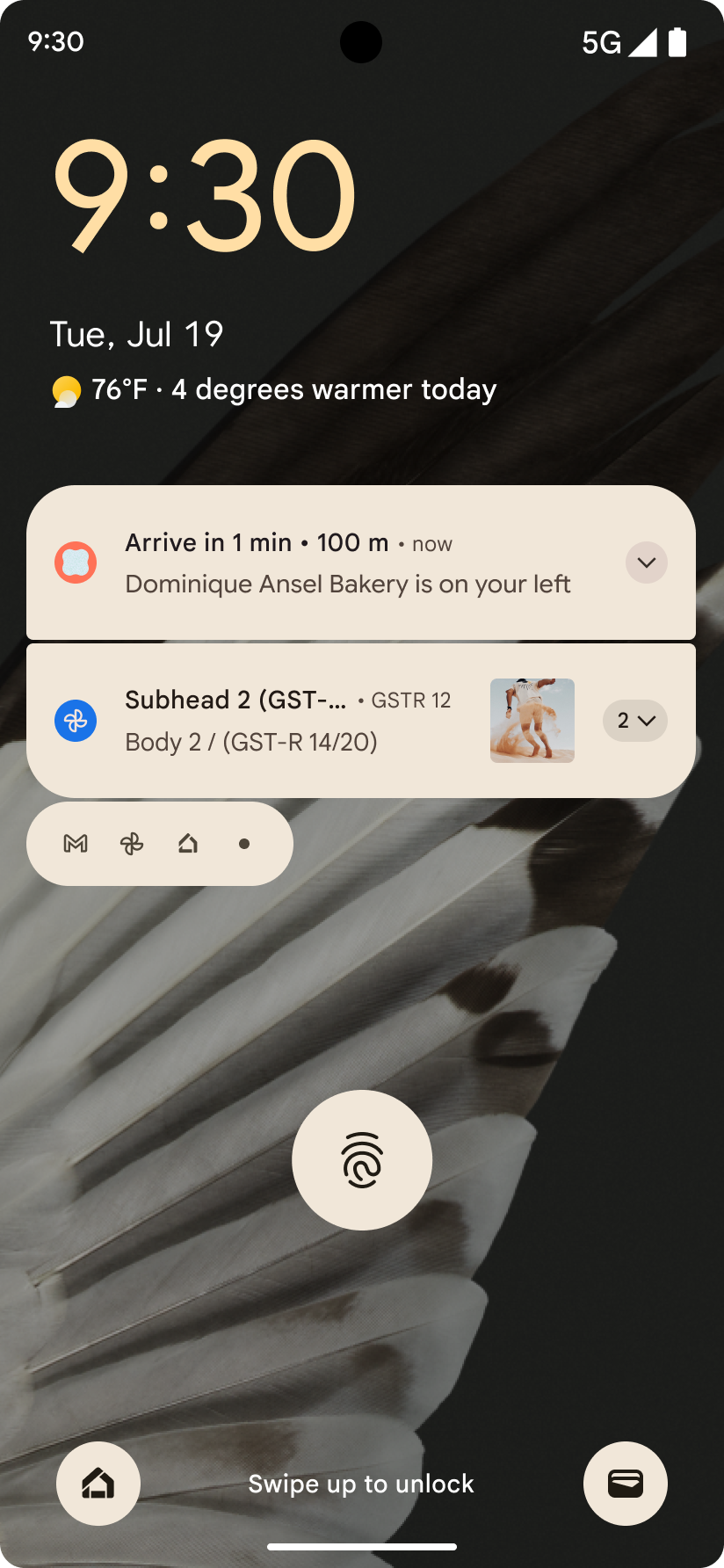
Android 16에서는 사용자가 시작부터 끝까지 사용자 시작 여정을 원활하게 추적할 수 있도록 진행률 중심 알림을 도입합니다.
Notification.ProgressStyle는 진행 상황 중심의 알림을 만들 수 있는 새로운 알림 스타일입니다. 주요 사용 사례로는 차량 공유, 배송, 내비게이션이 있습니다. Notification.ProgressStyle 클래스 내에서 포인트 및 세그먼트를 사용하여 사용자 여정의 상태와 마일스톤을 나타낼 수 있습니다.
To learn more, see the Progress-centric notifications documentation page.

뒤로 탐색 예측 업데이트
Android 16에서는 홈으로 돌아가기 애니메이션과 같은 동작 탐색에서 뒤로 탐색 예측 시스템 애니메이션을 사용 설정하는 데 도움이 되는 새로운 API를 추가합니다. 새로운 PRIORITY_SYSTEM_NAVIGATION_OBSERVER에 onBackInvokedCallback를 등록하면 앱이 일반 뒤로 탐색 흐름에 영향을 주지 않고 시스템이 뒤로 탐색을 처리할 때마다 일반 onBackInvoked 호출을 수신할 수 있습니다.
Android 16에서는 finishAndRemoveTaskCallback() 및 moveTaskToBackCallback도 추가합니다. 이러한 콜백을 OnBackInvokedDispatcher에 등록하면 시스템은 뒤로 동작이 호출될 때 특정 동작을 트리거하고 상응하는 사전 애니메이션을 재생할 수 있습니다.
더 풍부한 햅틱
Android has exposed control over the haptic actuator ever since its inception.
Android 11 added support for more complex haptic effects that more advanced
actuators could support through
VibrationEffect.Compositions of device-defined semantic
primitives.
Android 16 adds haptic APIs that let apps define the amplitude and frequency curves of a haptic effect while abstracting away differences between device capabilities.
개발자 생산성 및 도구
생산성 향상을 위한 대부분의 작업은 Android 스튜디오, Jetpack Compose, Android Jetpack 라이브러리와 같은 도구를 중심으로 이루어지지만, Google에서는 항상 플랫폼에서 비전을 실현할 수 있는 방법을 모색합니다.
라이브 배경화면 콘텐츠 처리
In Android 16, the live wallpaper framework is gaining a new content API to
address the challenges of dynamic, user-driven wallpapers. Currently, live
wallpapers incorporating user-provided content require complex, service-specific
implementations. Android 16 introduces
WallpaperDescription and
WallpaperInstance. WallpaperDescription lets you
identify distinct instances of a live wallpaper from the same service. For
example, a wallpaper that has instances on both the home screen and on the lock
screen may have unique content in both places. The wallpaper picker and
WallpaperManager use this metadata to better present
wallpapers to users, streamlining the process for you to create diverse and
personalized live wallpaper experiences.
성능 및 배터리
Android 16에서는 앱에 관한 유용한 정보를 수집하는 데 도움이 되는 API를 도입합니다.
시스템 트리거 프로파일링
ProfilingManager was
added in Android 15, giving apps the ability to
request profiling data collection using Perfetto on public devices in the field.
However, since this profiling must be started from the app, critical flows such
as startups or ANRs would be difficult or impossible for apps to capture.
To help with this, Android 16 introduces system-triggered profiling to
ProfilingManager. Apps can register interest in receiving traces for certain
triggers such as cold start reportFullyDrawn
or ANRs, and then the system starts and stops a trace on the app's behalf. After
the trace completes, the results are delivered to the app's data directory.
ApplicationStartInfo에서 구성요소 시작
ApplicationStartInfo was added in Android
15, allowing an app to see reasons
for process start, start type, start times, throttling, and other useful
diagnostic data. Android 16 adds
getStartComponent()
to distinguish what component type triggered the start, which can be helpful for
optimizing the startup flow of your app.
작업 인트로스펙션 개선
The JobScheduler#getPendingJobReason() API returns a reason why a job
might be pending. However, a job might be pending for multiple reasons.
In Android 16, we are introducing a new API
JobScheduler#getPendingJobReasons(int jobId), which returns multiple
reasons why a job is pending, due to both explicit constraints set by the
developer and implicit constraints set by the system.
We're also introducing
JobScheduler#getPendingJobReasonsHistory(int jobId), which returns a list
of the most recent constraint changes.
We recommend using the API to help you debug why your jobs may not be executing, especially if you're seeing reduced success rates of certain tasks or have bugs around latency of certain job completion. For example, updating widgets in the background failed to occur or prefetch job failed to be called prior to app start.
This can also better help you understand if certain jobs are not completing due to system defined constraints versus explicitly set constraints.
자동 조절 새로고침 빈도
Adaptive refresh rate (ARR), introduced in Android 15, enables the display refresh rate on supported hardware to adapt to the content frame rate using discrete VSync steps. This reduces power consumption while eliminating the need for potentially jank-inducing mode-switching.
Android 16 introduces hasArrSupport() and
getSuggestedFrameRate(int) while restoring
getSupportedRefreshRates() to make it easier for your apps to take
advantage of ARR. RecyclerView
1.4 internally supports ARR when it is settling from a fling or
smooth scroll, and we're continuing our work to add ARR
support into more Jetpack libraries. This frame rate article covers
many of the APIs you can use to set the frame rate so that your app can directly
use ARR.
ADPF의 여유 공간 API
The SystemHealthManager introduces the
getCpuHeadroom and
getGpuHeadroom APIs, designed to provide games and
resource-intensive apps with estimates of available CPU and GPU resources. These
methods offer a way for you to gauge how your app or game can best improve
system health, particularly when used in conjunction with other Android Dynamic
Performance Framework (ADPF) APIs that detect thermal
throttling.
By using CpuHeadroomParams and
GpuHeadroomParams on supported devices, you can
customize the time window used to compute the headroom and select between
average or minimum resource availability. This can help you reduce your CPU or
GPU resource usage accordingly, leading to better user experiences and improved
battery life.
접근성
Android 16에는 앱을 모든 사용자에게 제공하는 데 도움이 되는 새로운 접근성 API와 기능이 추가되었습니다.
접근성 API 개선
Android 16 adds additional APIs to enhance UI semantics that help improve consistency for users that rely on accessibility services, such as TalkBack.
Outline text for maximum text contrast
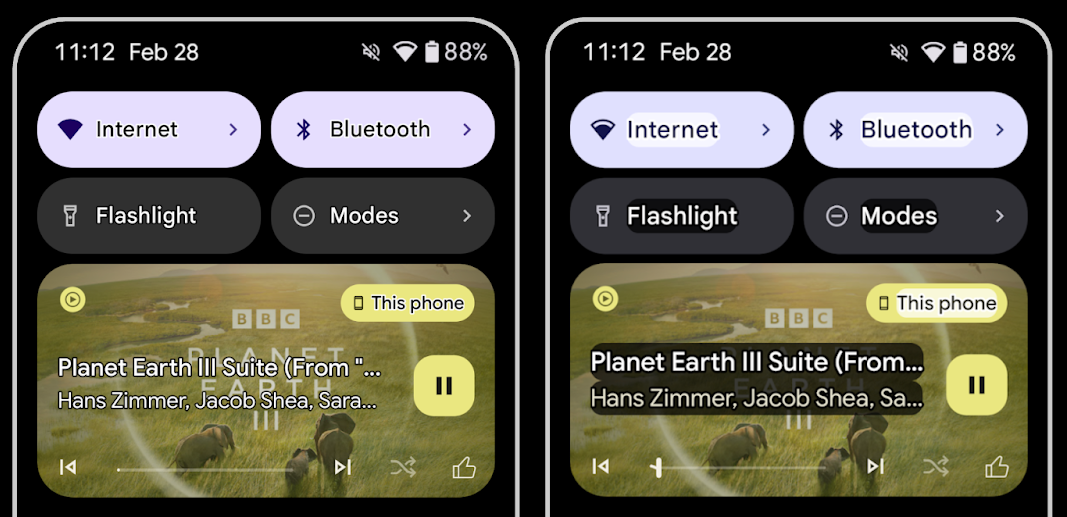
Users with low vision often have reduced contrast sensitivity, making it challenging to distinguish objects from their backgrounds. To help these users, Android 16 introduces outline text, replacing high contrast text, which draws a larger contrasting area around text to greatly improve legibility.
Android 16 contains new AccessibilityManager APIs to let
your apps check or register a listener to
see if this mode is enabled. This is primarily for UI Toolkits like Compose to
offer a similar visual experience. If you maintain a UI Toolkit library or your
app performs custom text rendering that bypasses the
android.text.Layout class then you can use this to know
when outline text is enabled.
Duration added to TtsSpan
Android 16 extends TtsSpan with a TYPE_DURATION,
consisting of ARG_HOURS, ARG_MINUTES,
and ARG_SECONDS. This lets you directly annotate time
duration, ensuring accurate and consistent text-to-speech output with services
like TalkBack.
Support elements with multiple labels
Android currently allows UI elements to derive their accessibility label from
another, and now offers the ability for multiple labels to be associated, a
common scenario in web content. By introducing a list-based API within
AccessibilityNodeInfo, Android can directly support these
multi-label relationships. As part of this change, we've deprecated
AccessibilityNodeInfo#setLabeledBy and
#getLabeledBy in favor of
#addLabeledBy, #removeLabeledBy, and
#getLabeledByList.
Improved support for expandable elements
Android 16 adds accessibility APIs that allow you to convey the expanded or
collapsed state of interactive elements, such as menus and expandable lists. By
setting the expanded state using setExpandedState and
dispatching TYPE_WINDOW_CONTENT_CHANGED AccessibilityEvents
with a CONTENT_CHANGE_TYPE_EXPANDED content change type,
you can ensure that screen readers like TalkBack announce
state changes, providing a more intuitive and inclusive user experience.
Indeterminate ProgressBars
Android 16 adds RANGE_TYPE_INDETERMINATE, giving a way for
you to expose RangeInfo for both determinate and
indeterminate ProgressBar widgets, allowing services like
TalkBack to more consistently provide feedback for progress
indicators.
Tri-state CheckBox
The new AccessibilityNodeInfo
getChecked and setChecked(int)
methods in Android 16 now support a "partially checked" state in addition to
"checked" and "unchecked." This replaces the deprecated boolean
isChecked and setChecked(boolean).
Supplemental descriptions
When an accessibility service describes a ViewGroup, it
combines content labels from its child views. If you provide a
contentDescription for the ViewGroup, accessibility services assume you are
also overriding the description of non-focusable child views. This can be
problematic if you want to label things like a drop-down (for example, "Font
Family") while preserving the current selection for accessibility (for example,
"Roboto"). Android 16 adds setSupplementalDescription so
you can provide text that provides information about a ViewGroup without
overriding information from its children.
Required form fields
Android 16 adds setFieldRequired to
AccessibilityNodeInfo so apps can tell an accessibility
service that input to a form field is required. This is an important scenario
for users filling out many types of forms, even things as simple as a required
terms and conditions checkbox, helping users to consistently identify and
quickly navigate between required fields.
LEA 보청기를 사용한 음성 통화 시 휴대전화를 마이크 입력으로 사용
Android 16 adds the capability for users of LE Audio hearing aids to switch between the built-in microphones on the hearing aids and the microphone on their phone for voice calls. This can be helpful in noisy environments or other situations where the hearing aid's microphones might not perform well.
LEA 보청기의 주변 볼륨 제어
Android 16 adds the capability for users of LE Audio hearing aids to adjust the volume of ambient sound that is picked up by the hearing aid's microphones. This can be helpful in situations where background noise is too loud or too quiet.
카메라
Android 16에서는 전문 카메라 사용자를 위한 지원이 강화되어 정확한 색온도 및 색조 조정과 함께 하이브리드 자동 노출이 가능합니다. 새 야간 모드 표시기를 사용하면 앱이 야간 모드 카메라 세션으로 전환해야 하는 시점을 알 수 있습니다. 새로운 Intent 작업을 통해 모션 사진을 더 쉽게 캡처할 수 있으며, HEIC 인코딩과 ISO 21496-1 초안 표준의 새로운 파라미터를 지원하여 UltraHDR 이미지를 계속 개선하고 있습니다.
하이브리드 자동 노출
Android 16 adds new hybrid auto-exposure modes to Camera2, allowing you to manually control specific aspects of exposure while letting the auto-exposure (AE) algorithm handle the rest. You can control ISO + AE, and exposure time + AE, providing greater flexibility compared to the current approach where you either have full manual control or rely entirely on auto-exposure.
fun setISOPriority() {
    // ... (Your existing code before the snippet) ...

    val availablePriorityModes = mStaticInfo.characteristics.get(
        CameraCharacteristics.CONTROL_AE_AVAILABLE_PRIORITY_MODES
    )

    // ... (Your existing code between the snippets) ...

    // Turn on AE mode to set priority mode
    reqBuilder.set(
        CaptureRequest.CONTROL_AE_MODE,
        CameraMetadata.CONTROL_AE_MODE_ON
    )
    reqBuilder.set(
        CaptureRequest.CONTROL_AE_PRIORITY_MODE,
        CameraMetadata.CONTROL_AE_PRIORITY_MODE_SENSOR_SENSITIVITY_PRIORITY
    )
    reqBuilder.set(
        CaptureRequest.SENSOR_SENSITIVITY,
        TEST_SENSITIVITY_VALUE
    )
    val request: CaptureRequest = reqBuilder.build()

    // ... (Your existing code after the snippet) ...
}
정확한 색상 온도 및 색조 조정
Android 16에서는 전문 동영상 녹화 애플리케이션을 더 효과적으로 지원하기 위해 미세한 색온도 및 색조 조정을 위한 카메라 지원을 추가합니다. 이전 Android 버전에서는 백열, 흐림, 황혼과 같이 사전 설정 목록으로 제한된 옵션이 포함된 CONTROL_AWB_MODE를 통해 화이트 밸런스 설정을 제어할 수 있었습니다. COLOR_CORRECTION_MODE_CCT를 사용하면 COLOR_CORRECTION_COLOR_TEMPERATURE 및 COLOR_CORRECTION_COLOR_TINT를 사용하여 상관 색상 온도에 따라 화이트 밸런스를 정확하게 조정할 수 있습니다.
fun setCCT() {
    // ... (Your existing code before this point) ...

    val colorTemperatureRange: Range<Int> =
        mStaticInfo.characteristics[CameraCharacteristics.COLOR_CORRECTION_COLOR_TEMPERATURE_RANGE]

    // Set to manual mode to enable CCT mode
    reqBuilder[CaptureRequest.CONTROL_AWB_MODE] = CameraMetadata.CONTROL_AWB_MODE_OFF
    reqBuilder[CaptureRequest.COLOR_CORRECTION_MODE] = CameraMetadata.COLOR_CORRECTION_MODE_CCT
    reqBuilder[CaptureRequest.COLOR_CORRECTION_COLOR_TEMPERATURE] = 5000
    reqBuilder[CaptureRequest.COLOR_CORRECTION_COLOR_TINT] = 30

    val request: CaptureRequest = reqBuilder.build()

    // ... (Your existing code after this point) ...
}
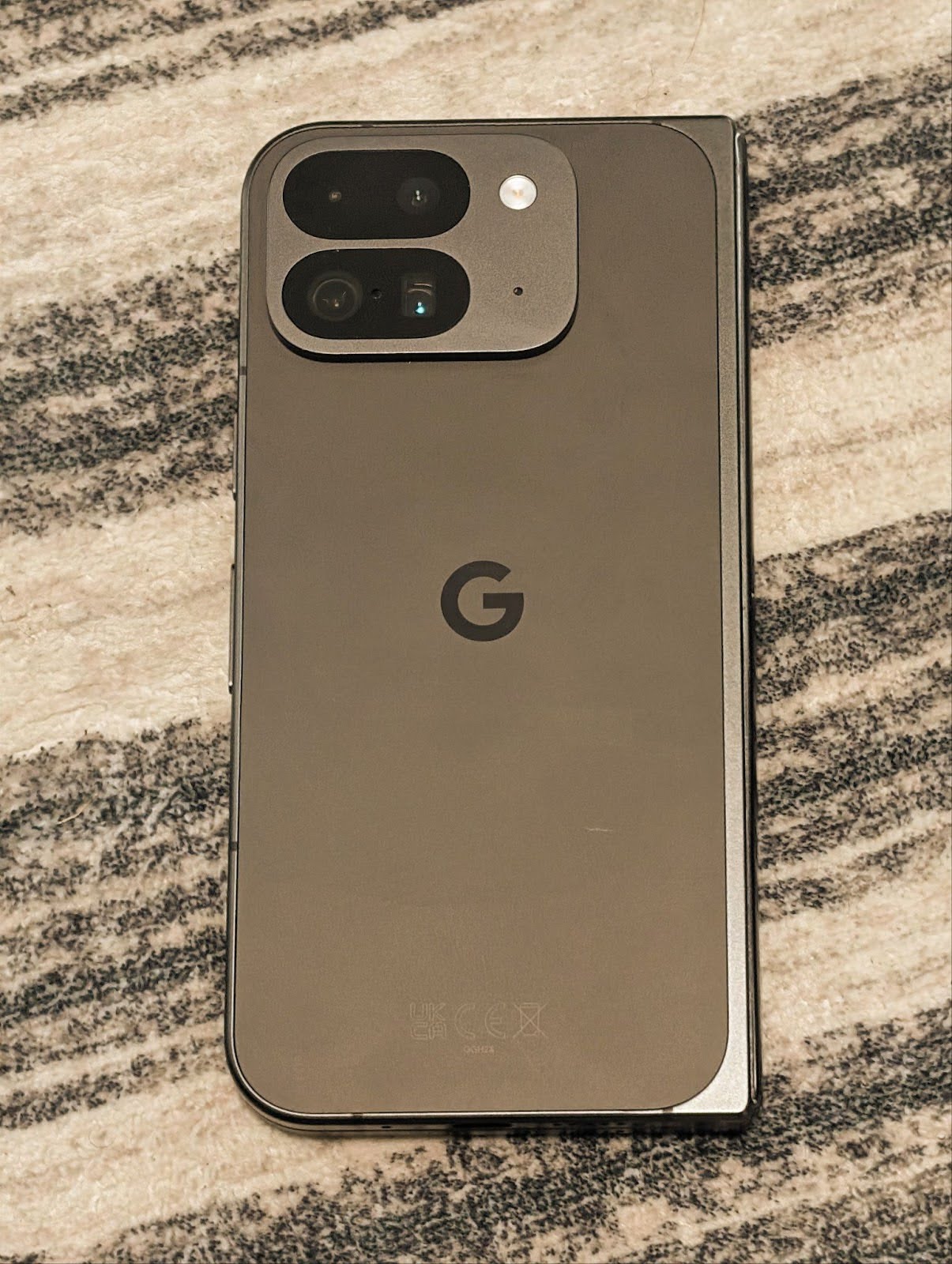
다음 예는 다양한 색온도 및 색조 조정을 적용한 후의 사진 모습을 보여줍니다.




카메라 야간 모드 장면 감지
앱이 야간 모드 카메라 세션을 전환할 시기를 알 수 있도록 Android 16에는 EXTENSION_NIGHT_MODE_INDICATOR가 추가되었습니다. 지원되는 경우 Camera2 내 CaptureResult에서 사용할 수 있습니다.
이 API는 Instagram에서 사용자가 멋진 저조도 사진을 찍을 수 있게 된 방법 블로그 게시물에서 곧 제공될 예정이라고 간단히 언급한 API입니다. 이 게시물은 야간 모드를 구현하는 방법에 관한 실용적인 가이드와 함께 인앱 카메라에서 공유되는 사진 수가 증가함에 따라 인앱 야간 모드 사진의 품질이 향상되는 사례를 보여주는 사례 연구를 제공합니다.
모션 사진 캡처 인텐트 작업
Android 16 adds standard Intent actions —
ACTION_MOTION_PHOTO_CAPTURE, and
ACTION_MOTION_PHOTO_CAPTURE_SECURE — which request that
the camera application capture a motion photo and return
it.
You must either pass an extra EXTRA_OUTPUT to control
where the image will be written, or a Uri through
Intent.setClipData(ClipData). If you don't set a
ClipData, it will be copied there for you when calling
Context.startActivity(Intent).
UltraHDR 이미지 개선

Android 16 continues our work to deliver dazzling image quality with UltraHDR
images. It adds support for UltraHDR images in the HEIC file
format. These images will get ImageFormat type
HEIC_ULTRAHDR and will contain an embedded gainmap similar
to the existing UltraHDR JPEG format. We're working on AVIF support for UltraHDR
as well, so stay tuned.
In addition, Android 16 implements additional parameters in UltraHDR from the ISO 21496-1 draft standard, including the ability to get and set the colorspace that gainmap math should be applied in, as well as support for HDR encoded base images with SDR gainmaps.
그래픽
Android 16에는 AGSL을 사용한 맞춤 그래픽 효과와 같은 최신 그래픽 개선사항이 포함되어 있습니다.
AGSL을 사용한 맞춤 그래픽 효과
Android 16 adds RuntimeColorFilter and
RuntimeXfermode, allowing you to author complex effects like
Threshold, Sepia, and Hue Saturation and apply them to draw calls. Since Android
13, you've been able to use AGSL to create custom
RuntimeShaders that extend Shader. The new API
mirrors this, adding an AGSL-powered RuntimeColorFilter that
extends ColorFilter, and a Xfermode effect that
lets you implement AGSL-based custom compositing and blending between source and
destination pixels.
private val thresholdEffectString = """
    uniform half threshold;

    half4 main(half4 c) {
        half luminosity = dot(c.rgb, half3(0.2126, 0.7152, 0.0722));
        half bw = step(threshold, luminosity);
        return bw.xxx1 * c.a;
    }"""

fun setCustomColorFilter(paint: Paint) {
   val filter = RuntimeColorFilter(thresholdEffectString)
   filter.setFloatUniform(0.5);
   paint.colorFilter = filter
}
연결
Android 16은 앱이 통신 및 무선 기술의 최신 발전에 액세스할 수 있도록 플랫폼을 업데이트합니다.
강화된 보안으로 범위 지정
Android 16 adds support for robust security features in Wi-Fi location on supported devices with Wi-Fi 6's 802.11az, allowing apps to combine the higher accuracy, greater scalability, and dynamic scheduling of the protocol with security enhancements including AES-256-based encryption and protection against MITM attacks. This allows it to be used more safely in proximity use cases, such as unlocking a laptop or a vehicle door. 802.11az is integrated with the Wi-Fi 6 standard, leveraging its infrastructure and capabilities for wider adoption and easier deployment.
일반 범위 지정 API
Android 16 includes the new RangingManager, which provides
ways to determine the distance and angle on supported hardware between the local
device and a remote device. RangingManager supports the usage of a variety of
ranging technologies such as BLE channel sounding, BLE RSSI-based ranging, Ultra
Wideband, and Wi-Fi round trip time.
호환 기기 관리자 기기 감지
Android 16에서는 호환 앱 서비스를 바인딩하기 위한 새로운 API가 도입됩니다. BLE가 범위 내에 있고 블루투스가 연결되어 있으면 서비스가 바인딩되고 BLE가 범위 내에 없거나 블루투스가 연결 해제되면 서비스가 바인딩 해제됩니다. 앱은 다양한 DevicePresenceEvent에 따라 새 'onDevicePresenceEvent()' 콜백을 수신합니다.
자세한 내용은 'startObservingDevicePresence(ObservingDevicePresenceRequest)'를 참고하세요.
미디어
Android 16에는 미디어 환경을 개선하는 다양한 기능이 포함되어 있습니다.
사진 선택 도구 개선사항
The photo picker provides a safe, built-in way for users to grant your app access to selected images and videos from both local and cloud storage, instead of their entire media library. Using a combination of Modular System Components through Google System Updates and Google Play services, it's supported back to Android 4.4 (API level 19). Integration requires just a few lines of code with the associated Android Jetpack library.
Android 16 includes the following improvements to the photo picker:
- Embedded photo picker: New APIs that enable apps to embed the photo picker into their view hierarchy. This allows it to feel like a more integrated part of the app while still leveraging the process isolation that allows users to select media without the app needing overly broad permissions. To maximize compatibility across platform versions and simplify your integration, you'll want to use the forthcoming Android Jetpack library if you want to integrate the embedded photo picker.
- Cloud search in photo picker: New APIs that enable searching from the cloud media provider for the Android photo picker. Search functionality in the photo picker is coming soon.
Advanced Professional Video
Android 16에서는 전문 수준의 고화질 동영상 녹화 및 후반 제작에 사용하도록 설계된 고급 전문 동영상 (APV) 코덱 지원을 도입합니다.
APV 코덱 표준에는 다음과 같은 기능이 있습니다.
- 지각적으로 무손실 동영상 화질 (원시 동영상 화질에 가깝음)
- 편집 워크플로를 더 효과적으로 지원하기 위한 낮은 복잡도와 높은 처리량의 프레임 내부 전용 코딩 (픽셀 도메인 예측 없음)
- 경량 엔트로피 코딩 스킴을 통해 2K, 4K, 8K 해상도 콘텐츠의 최대 몇 Gbps에 이르는 높은 비트 전송률 범위 지원
- 몰입형 콘텐츠를 위한 프레임 타일링 및 병렬 인코딩 및 디코딩 사용
- 다양한 크로마 샘플링 형식 및 비트 깊이 지원
- 심각한 시각적 품질 저하 없이 여러 디코딩 및 재인코딩 지원
- 멀티뷰 동영상 및 깊이, 알파, 미리보기와 같은 보조 동영상 지원
- HDR10/10+ 및 사용자 정의 메타데이터 지원
APV의 참조 구현은 OpenAPV 프로젝트를 통해 제공됩니다. Android 16에서는 10비트 인코딩과 함께 YUV 422 색상 샘플링을 제공하고 최대 2Gbps의 타겟 비트 전송률을 제공하는 APV 422-10 프로필에 대한 지원을 구현합니다.
개인 정보 보호
Android 16에는 앱 개발자가 사용자 개인 정보를 보호하는 데 도움이 되는 다양한 기능이 포함되어 있습니다.
헬스 커넥트 업데이트
헬스 커넥트는 중간 및 고강도 활동에 관한 세계보건기구 가이드라인에 따라 정의된 데이터 유형인 ACTIVITY_INTENSITY를 추가합니다. 각 레코드에는 시작 시간, 종료 시간, 활동 강도가 보통인지 격렬한지 여부가 필요합니다.
헬스 커넥트에는 의료 기록을 지원하는 업데이트된 API도 포함되어 있습니다. 이를 통해 앱은 명시적인 사용자 동의를 얻어 FHIR 형식으로 의료 기록을 읽고 쓸 수 있습니다.
Android의 개인 정보 보호 샌드박스
Android 16 incorporates the latest version of the Privacy Sandbox on Android, part of our ongoing work to develop technologies where users know their privacy is protected. Our website has more about the Privacy Sandbox on Android developer beta program to help you get started. Check out the SDK Runtime which allows SDKs to run in a dedicated runtime environment separate from the app they are serving, providing stronger safeguards around user data collection and sharing.
보안
Android 16에는 앱의 보안을 강화하고 앱의 데이터를 보호하는 데 도움이 되는 기능이 포함되어 있습니다.
키 공유 API
Android 16 adds APIs that support sharing access to
Android Keystore keys with other apps. The new
KeyStoreManager class supports
granting and revoking access to keys
by app uid, and includes an API for apps to access shared
keys.
기기 폼 팩터
Android 16은 앱이 Android의 폼 팩터를 최대한 활용할 수 있도록 지원합니다.
TV용 표준화된 화질 및 음질 프레임워크
The new MediaQuality
package in Android 16 exposes
a set of standardized APIs for access to audio and picture profiles and
hardware-related settings. This allows streaming apps to query profiles and
apply them to media dynamically:
- Movies mastered with a wider dynamic range require greater color accuracy to see subtle details in shadows and adjust to ambient light, so a profile that prefers color accuracy over brightness may be appropriate.
- Live sporting events are often mastered with a narrow dynamic range, but are often watched in daylight, so a profile that preferences brightness over color accuracy can give better results.
- Fully interactive content wants minimal processing to reduce latency, and wants higher frame rates, which is why many TV's ship with a game profile.
The API allows apps to switch between profiles and users to enjoy tuning supported TVs to best suit their content.
다국어 지원
Android 16에서는 기기가 여러 언어로 사용될 때 사용자 환경을 보완하는 기능이 추가되었습니다.
세로 텍스트
Android 16 adds low-level support for rendering and measuring text vertically to
provide foundational vertical writing support for library developers. This is
particularly useful for languages like Japanese that commonly use vertical
writing systems. A new flag,
VERTICAL_TEXT_FLAG,
has been added to the Paint class. When
this flag is set using
Paint.setFlags, Paint's
text measurement APIs will report vertical advances instead of horizontal
advances, and Canvas will draw text
vertically.
val text = "「春は、曙。」"
Box(
    Modifier.padding(innerPadding).background(Color.White).fillMaxSize().drawWithContent {
        drawIntoCanvas { canvas ->
            val paint = Paint().apply { textSize = 64.sp.toPx() }
            // Draw text vertically
            paint.flags = paint.flags or VERTICAL_TEXT_FLAG
            val height = paint.measureText(text)
            canvas.nativeCanvas.drawText(
                text,
                0,
                text.length,
                size.width / 2,
                (size.height - height) / 2,
                paint
            )
        }
    }
) {}
측정 시스템 맞춤설정
Users can now customize their measurement system in regional preferences within
Settings. The user preference is included as part of the locale code, so you can
register a BroadcastReceiver on
ACTION_LOCALE_CHANGED to handle locale configuration changes when
regional preferences change.
Using formatters can help match the local experience. For example, "0.5 in" in English (United States), is "12,7 mm" for a user who has set their phone to English (Denmark) or who uses their phone in English (United States) with the metric system as the measurement system preference.
To find these settings, open the Settings app and navigate to System > Languages & region.