

Android 15 memperkenalkan fitur dan API baru yang hebat untuk para developer. Bagian berikut merangkum fitur ini untuk membantu Anda mulai menggunakan API terkait.
Untuk melihat daftar mendetail tentang API yang ditambahkan, diubah, dan dihapus, baca laporan perbedaan API. Untuk mengetahui detail tentang API yang ditambahkan, buka referensi API Android — untuk Android 15, cari API yang ditambahkan di level API 35. Untuk mempelajari area tempat perubahan platform dapat memengaruhi aplikasi Anda, pastikan untuk memeriksa perubahan perilaku Android 15 untuk aplikasi yang menargetkan Android 15 dan untuk semua aplikasi.
Kamera dan media
Android 15 menyertakan berbagai fitur yang meningkatkan pengalaman kamera dan media serta memberi Anda akses ke alat dan hardware untuk mendukung kreator dalam mewujudkan visi mereka di Android.
Untuk mengetahui informasi selengkapnya tentang fitur dan solusi developer terbaru untuk media dan kamera Android, lihat materi Membangun pengalaman media dan kamera Android modern dari Google I/O.
Peningkatan Cahaya Rendah
Android 15 memperkenalkan Low Light Boost, mode eksposur otomatis yang tersedia untuk Camera 2 dan ekstensi kamera mode malam. Peningkatan Cahaya Redup menyesuaikan eksposur streaming Pratinjau dalam kondisi cahaya redup. Hal ini berbeda dengan cara ekstensi kamera mode malam membuat gambar diam, karena mode malam menggabungkan serangkaian foto untuk membuat satu gambar yang ditingkatkan. Meskipun mode malam berfungsi sangat baik untuk membuat gambar diam, mode ini tidak dapat membuat streaming frame yang berkelanjutan, tetapi Low Light Boost dapat melakukannya. Dengan demikian, Pengoptimalan Cahaya Rendah memungkinkan kemampuan kamera, seperti:
- Memberikan pratinjau gambar yang ditingkatkan, sehingga pengguna dapat lebih baik membingkai gambar dalam kondisi cahaya redup
- Memindai kode QR dalam kondisi cahaya redup
Jika Anda mengaktifkan Peningkatan Cahaya Redup, fitur ini akan otomatis aktif saat ada tingkat cahaya yang rendah, dan nonaktif saat ada lebih banyak cahaya.
Aplikasi dapat merekam dari streaming Pratinjau dalam kondisi cahaya redup untuk menyimpan video yang lebih terang.
Untuk informasi selengkapnya, lihat Penguatan Cahaya Redup.
Kontrol kamera dalam aplikasi
Android 15 adds an extension for more control over the camera hardware and its algorithms on supported devices:
- Advanced flash strength adjustments enabling precise control of flash
intensity in both
SINGLEandTORCHmodes while capturing images.
Kontrol ruang kosong HDR
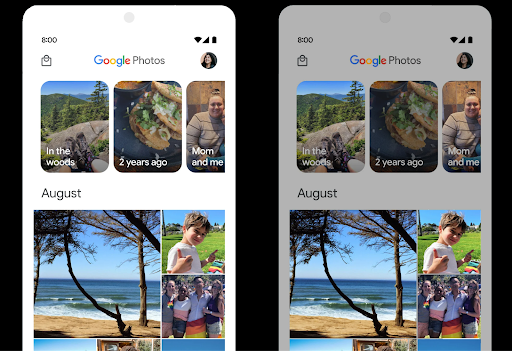
Android 15 chooses HDR headroom that is appropriate for the underlying device
capabilities and bit-depth of the panel. For pages that have lots of SDR
content, such as a messaging app displaying a single HDR thumbnail, this
behavior can end up adversely influencing the perceived brightness of the SDR
content. Android 15 lets you control the HDR headroom with
setDesiredHdrHeadroom to strike a balance between SDR
and HDR content.
Kontrol keras suara

Android 15 memperkenalkan dukungan untuk standar kenyaringan CTA-2075 guna membantu Anda menghindari inkonsistensi kenyaringan audio dan memastikan pengguna tidak perlu terus-menerus menyesuaikan volume saat beralih antarkonten. Sistem ini memanfaatkan informasi karakteristik perangkat output (headphone dan speaker) beserta metadata kenyaringan yang tersedia dalam konten audio AAC untuk menyesuaikan secara cerdas tingkat kenyaringan audio dan rentang dinamis.
Untuk mengaktifkan fitur ini, pastikan metadata kenyaringan tersedia di
konten AAC dan mengaktifkan fitur platform di aplikasi Anda. Untuk itu, Anda dapat
Buat instance objek LoudnessCodecController dengan
memanggil metode factory create-nya dengan audio
ID sesi dari AudioTrack terkait; ingin
otomatis mulai menerapkan pembaruan audio. Anda dapat meneruskan
OnLoudnessCodecUpdateListener untuk mengubah atau memfilter
parameter volume sebelum diterapkan di
MediaCodec.
// Media contains metadata of type MPEG_4 OR MPEG_D
val mediaCodec = …
val audioTrack = AudioTrack.Builder()
                                .setSessionId(sessionId)
                                .build()
...
// Create new loudness controller that applies the parameters to the MediaCodec
try {
   val lcController = LoudnessCodecController.create(mSessionId)
   // Starts applying audio updates for each added MediaCodec
}
AndroidX media3 ExoPlayer juga akan diupdate untuk menggunakan
LoudnessCodecController API untuk integrasi aplikasi yang lancar.
Perangkat MIDI 2.0 virtual
Android 13 added support for connecting to MIDI 2.0 devices using USB, which communicate using Universal MIDI Packets (UMP). Android 15 extends UMP support to virtual MIDI apps, enabling composition apps to control synthesizer apps as a virtual MIDI 2.0 device just like they would with an USB MIDI 2.0 device.
Decoding software AV1 yang lebih efisien

dav1d, the popular AV1 software decoder from VideoLAN is available for Android devices that don't support AV1 decode in hardware. dav1d is up to 3x more performant than the legacy AV1 software decoder, enabling HD AV1 playback for more users, including some low and mid tier devices.
Your app needs to opt-in to using dav1d by invoking it by name
"c2.android.av1-dav1d.decoder". dav1d will be made the default AV1 software
decoder in a subsequent update. This support is standardized and backported to
Android 11 devices that receive Google Play system updates.
Alat dan produktivitas developer
Meskipun sebagian besar upaya kami untuk meningkatkan produktivitas Anda berpusat pada alat seperti Android Studio, Jetpack Compose, dan library Android Jetpack, kami selalu mencari cara di platform untuk membantu Anda mewujudkan visi dengan lebih mudah.
Update OpenJDK 17
Android 15 melanjutkan pekerjaan memuat ulang library inti Android agar selaras dengan fitur dalam rilis OpenJDK LTS terbaru.
Fitur dan peningkatan utama berikut disertakan:
- Peningkatan kualitas hidup di sekitar buffer NIO
- Streaming
- Metode
mathdanstrictmathtambahan - Update paket
utiltermasukcollection,map, dansetyang diurutkan - Dukungan
ByteBufferdiDeflater - Update keamanan seperti
X500PrivateCredentialdan update kunci keamanan
API ini diupdate di lebih dari satu miliar perangkat yang menjalankan Android 12 (API level 31) dan yang lebih tinggi melalui update Sistem Google Play, sehingga Anda dapat menargetkan fitur pemrograman terbaru.
Peningkatan PDF
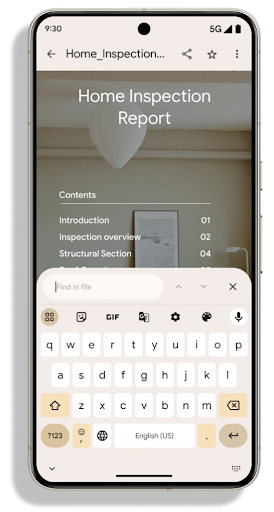
Android 15 menyertakan peningkatan substansial pada PdfRenderer
Google Cloud Platform. Aplikasi dapat menggabungkan fitur lanjutan seperti rendering
file yang dilindungi sandi, anotasi, pengeditan formulir,
penelusuran, dan pemilihan dengan salinan. PDF yang dilinierkan
pengoptimalan didukung untuk mempercepat penayangan PDF lokal dan mengurangi penggunaan resource.
Library Jetpack PDF menggunakan API ini untuk menyederhanakan penambahan PDF
menampilkan aplikasi Anda.
PdfRenderer telah dipindahkan ke modul yang dapat diupdate menggunakan update sistem
Google Play, terlepas dari rilis platform, dan kami mendukung
perubahan ini kembali ke Android 11 (API level 30) dengan membuat platform API
versi pra-Android 15 yang kompatibel, yang disebut
PdfRendererPreV.
Penyempurnaan pengalihan bahasa otomatis
Android 14 added on-device, multi-language recognition in audio with automatic
switching between languages, but this can cause words to get dropped,
especially when languages switch with less of a pause between the two
utterances. Android 15 adds additional controls to help apps tune this switching
to their use case.
EXTRA_LANGUAGE_SWITCH_INITIAL_ACTIVE_DURATION_TIME_MILLIS
confines the automatic switching to the beginning of the audio session, while
EXTRA_LANGUAGE_SWITCH_MATCH_SWITCHES deactivates the
language switching after a defined number of switches. These options are
particularly useful if you expect that there will be a single language spoken
during the session that should be autodetected.
Peningkatan OpenType Variable Font API
Android 15 meningkatkan kegunaan font variabel OpenType. Anda dapat membuat
instance FontFamily dari font variabel tanpa menentukan sumbu bobot
dengan buildVariableFamily API. Perender teks mengganti nilai
dari sumbu wght agar cocok dengan teks yang menampilkan.
Menggunakan API ini sangat menyederhanakan kode untuk membuat Typeface:
Kotlin
val newTypeface = Typeface.CustomFallbackBuilder(
            FontFamily.Builder(
                Font.Builder(assets, "RobotoFlex.ttf").build())
                    .buildVariableFamily())
    .build()
Java
Typeface newTypeface = Typeface.CustomFallbackBuilder(
            new FontFamily.Builder(
                new Font.Builder(assets, "RobotoFlex.ttf").build())
                    .buildVariableFamily())
    .build();
Sebelumnya, untuk membuat Typeface yang sama, Anda memerlukan lebih banyak kode:
Kotlin
val oldTypeface = Typeface.CustomFallbackBuilder(
            FontFamily.Builder(
                Font.Builder(assets, "RobotoFlex.ttf")
                    .setFontVariationSettings("'wght' 400")
                    .setWeight(400)
                    .build())
                .addFont(
                    Font.Builder(assets, "RobotoFlex.ttf")
                        .setFontVariationSettings("'wght' 100")
                        .setWeight(100)
                        .build()
                )
                .addFont(
                    Font.Builder(assets, "RobotoFlex.ttf")
                        .setFontVariationSettings("'wght' 200")
                        .setWeight(200)
                        .build()
                )
                .addFont(
                    Font.Builder(assets, "RobotoFlex.ttf")
                        .setFontVariationSettings("'wght' 300")
                        .setWeight(300)
                        .build()
                )
                .addFont(
                    Font.Builder(assets, "RobotoFlex.ttf")
                        .setFontVariationSettings("'wght' 500")
                        .setWeight(500)
                        .build()
                )
                .addFont(
                    Font.Builder(assets, "RobotoFlex.ttf")
                        .setFontVariationSettings("'wght' 600")
                        .setWeight(600)
                        .build()
                )
                .addFont(
                    Font.Builder(assets, "RobotoFlex.ttf")
                        .setFontVariationSettings("'wght' 700")
                        .setWeight(700)
                        .build()
                )
                .addFont(
                    Font.Builder(assets, "RobotoFlex.ttf")
                        .setFontVariationSettings("'wght' 800")
                        .setWeight(800)
                        .build()
                )
                .addFont(
                    Font.Builder(assets, "RobotoFlex.ttf")
                        .setFontVariationSettings("'wght' 900")
                        .setWeight(900)
                        .build()
                ).build()
        ).build()
Java
Typeface oldTypeface = new Typeface.CustomFallbackBuilder(
    new FontFamily.Builder(
        new Font.Builder(assets, "RobotoFlex.ttf")
            .setFontVariationSettings("'wght' 400")
            .setWeight(400)
            .build()
    )
    .addFont(
        new Font.Builder(assets, "RobotoFlex.ttf")
            .setFontVariationSettings("'wght' 100")
            .setWeight(100)
            .build()
    )
    .addFont(
        new Font.Builder(assets, "RobotoFlex.ttf")
            .setFontVariationSettings("'wght' 200")
            .setWeight(200)
            .build()
    )
    .addFont(
        new Font.Builder(assets, "RobotoFlex.ttf")
            .setFontVariationSettings("'wght' 300")
            .setWeight(300)
            .build()
    )
    .addFont(
        new Font.Builder(assets, "RobotoFlex.ttf")
            .setFontVariationSettings("'wght' 500")
            .setWeight(500)
            .build()
    )
    .addFont(
        new Font.Builder(assets, "RobotoFlex.ttf")
            .setFontVariationSettings("'wght' 600")
            .setWeight(600)
            .build()
    )
    .addFont(
        new Font.Builder(assets, "RobotoFlex.ttf")
            .setFontVariationSettings("'wght' 700")
            .setWeight(700)
            .build()
    )
    .addFont(
        new Font.Builder(assets, "RobotoFlex.ttf")
            .setFontVariationSettings("'wght' 800")
            .setWeight(800)
            .build()
    )
    .addFont(
        new Font.Builder(assets, "RobotoFlex.ttf")
            .setFontVariationSettings("'wght' 900")
            .setWeight(900)
            .build()
    )
    .build()
).build();
Berikut ini contoh cara Typeface dibuat dengan API lama dan baru
merender:
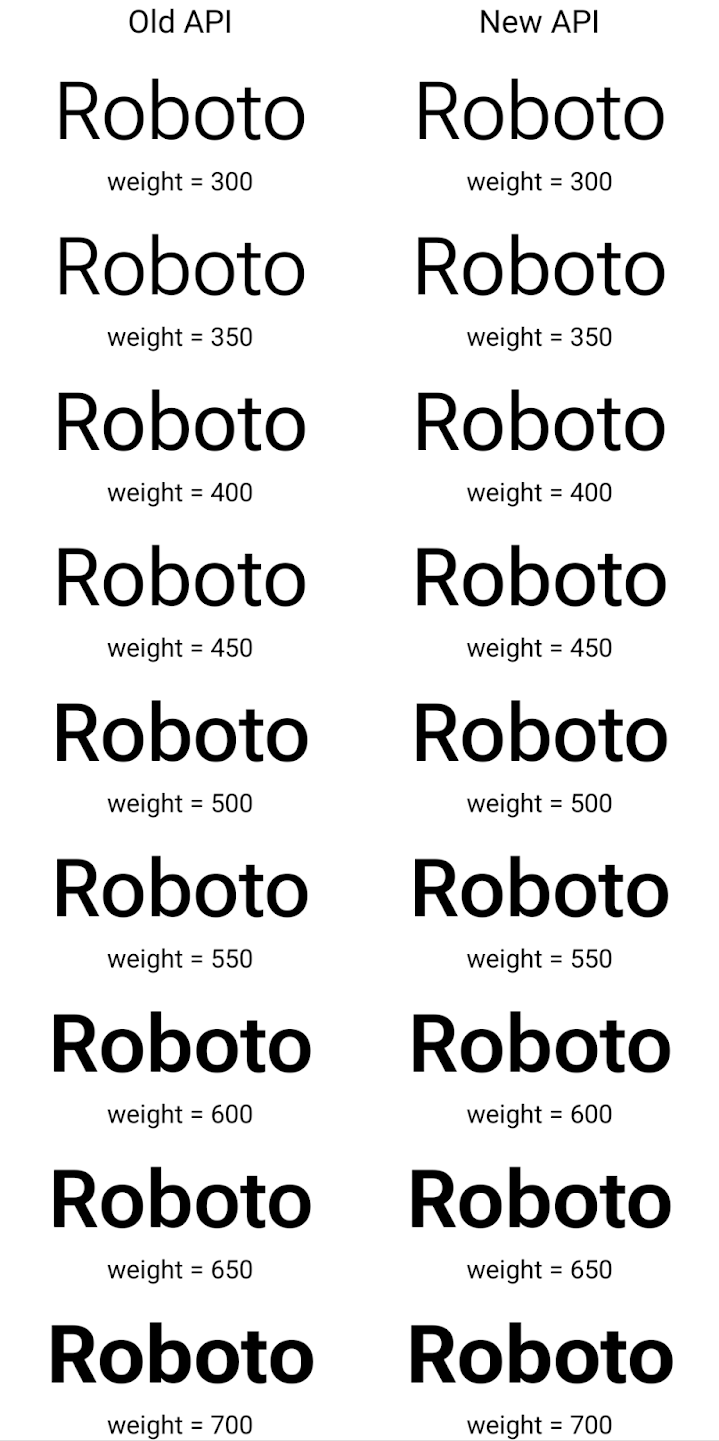
Dalam contoh ini, Typeface yang dibuat dengan API lama tidak memiliki
menciptakan bobot font yang akurat untuk 350, 450, 550 dan 650
Font, sehingga perender akan kembali ke bobot terdekat. Jadi ketika
dalam hal ini, 300 dirender, bukan 350, 400 dirender, bukan 450, dan
dan seterusnya. Sebaliknya, Typeface yang dibuat dengan API baru akan secara dinamis membuat
instance Font untuk bobot tertentu, jadi bobot yang akurat dirender untuk 350,
450, 550, dan 650.
Kontrol pemisah baris terperinci
Starting in Android 15, a TextView and the underlying
line breaker can preserve the given portion of text in the same line to improve
readability. You can take advantage of this line break customization by using
the <nobreak> tag in string resources or
createNoBreakSpan. Similarly, you can preserve words from
hyphenation by using the <nohyphen> tag or
createNoHyphenationSpan.
For example, the following string resource doesn't include a line break, and renders with the text "Pixel 8 Pro." breaking in an undesirable place:
<resources>
    <string name="pixel8pro">The power and brains behind Pixel 8 Pro.</string>
</resources>
In contrast, this string resource includes the <nobreak> tag, which wraps the
phrase "Pixel 8 Pro." and prevents line breaks:
<resources>
    <string name="pixel8pro">The power and brains behind <nobreak>Pixel 8 Pro.</nobreak></string>
</resources>
The difference in how these strings are rendered is shown in the following images:

<nobreak> tag.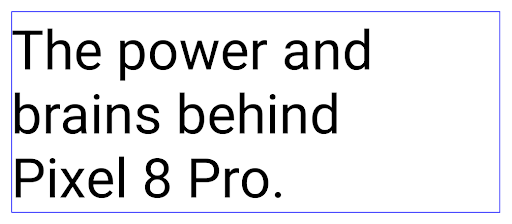
<nobreak> tag.Pengarsipan aplikasi
Android and Google Play announced support for app archiving last year, allowing users to free up space by partially removing infrequently used apps from the device that were published using Android App Bundle on Google Play. Android 15 includes OS level support for app archiving and unarchiving, making it easier for all app stores to implement it.
Apps with the REQUEST_DELETE_PACKAGES permission can call the
PackageInstaller requestArchive method to request archiving an
installed app package, which removes the APK and any cached files, but persists
user data. Archived apps are returned as displayable apps through the
LauncherApps APIs; users will see a UI treatment to highlight that those
apps are archived. If a user taps on an archived app, the responsible installer
will get a request to unarchive it, and the restoration process can be
monitored by the ACTION_PACKAGE_ADDED broadcast.
Mengaktifkan mode 16 KB di perangkat menggunakan opsi developer
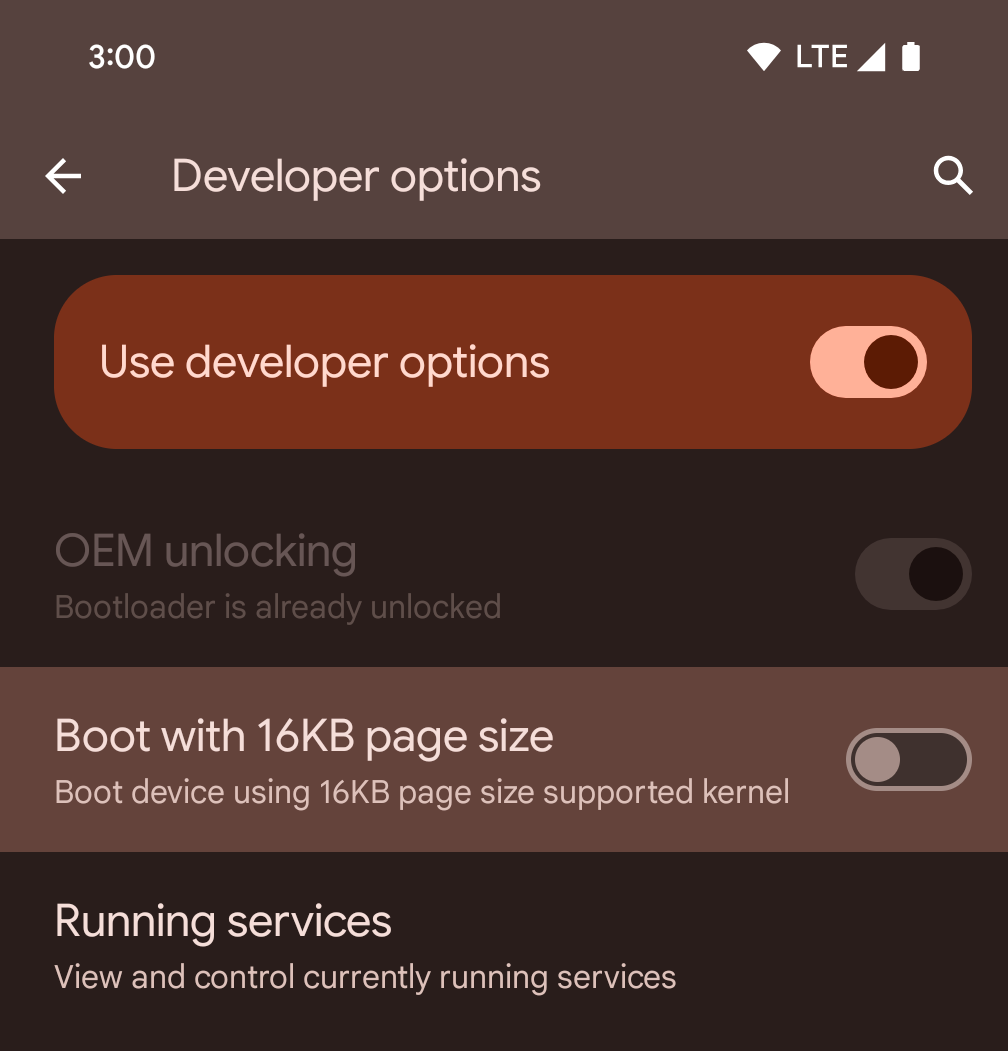
Aktifkan opsi developer Boot dengan ukuran halaman 16 KB untuk mem-boot perangkat dalam mode 16 KB.
Dalam versi QPR Android 15, Anda dapat menggunakan opsi developer yang tersedia di perangkat tertentu untuk mem-boot perangkat dalam mode 16 KB dan melakukan pengujian di perangkat. Sebelum menggunakan opsi developer, buka Setelan > Sistem > Update software dan terapkan update yang tersedia.
Opsi developer ini tersedia di perangkat berikut:
Pixel 8 dan 8 Pro (dengan Android 15 QPR1 atau yang lebih tinggi)
Pixel 8a (dengan Android 15 QPR1 atau yang lebih baru)
Pixel 9, 9 Pro, dan 9 Pro XL (dengan Android 15 QPR2 atau yang lebih baru)
Pixel 9a (dengan Android 16 atau yang lebih baru)
Grafik
Android 15 menghadirkan peningkatan grafis terbaru, termasuk ANGLE dan penambahan pada sistem grafis Canvas.
Memodernisasi akses GPU Android

Android hardware has evolved quite a bit from the early days where the core OS would run on a single CPU and GPUs were accessed using APIs based on fixed-function pipelines. The Vulkan® graphics API has been available in the NDK since Android 7.0 (API level 24) with a lower-level abstraction that better reflects modern GPU hardware, scales better to support multiple CPU cores, and offers reduced CPU driver overhead — leading to improved app performance. Vulkan is supported by all modern game engines.
Vulkan is Android's preferred interface to the GPU. Therefore, Android 15 includes ANGLE as an optional layer for running OpenGL® ES on top of Vulkan. Moving to ANGLE will standardize the Android OpenGL implementation for improved compatibility, and, in some cases, improved performance. You can test out your OpenGL ES app stability and performance with ANGLE by enabling the developer option in Settings -> System -> Developer Options -> Experimental: Enable ANGLE on Android 15.
The Android ANGLE on Vulkan roadmap
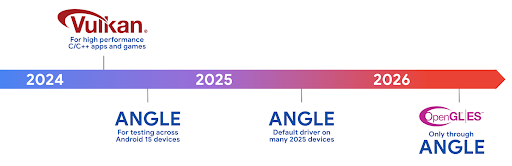
As part of streamlining our GPU stack, going forward we will be shipping ANGLE as the GL system driver on more new devices, with the future expectation that OpenGL/ES will be only available through ANGLE. That being said, we plan to continue support for OpenGL ES on all devices.
Recommended next steps
Use the developer options to select the ANGLE driver for OpenGL ES and test your app. For new projects, we strongly encourage using Vulkan for C/C++.
Peningkatan untuk Canvas
Android 15 continues our modernization of Android's Canvas graphics system with additional capabilities:
Matrix44provides a 4x4 matrix for transforming coordinates that should be used when you want to manipulate the canvas in 3D.clipShaderintersects the current clip with the specified shader, whileclipOutShadersets the clip to the difference of the current clip and the shader, each treating the shader as an alpha mask. This supports the drawing of complex shapes efficiently.
Performa dan baterai
Android terus berfokus untuk membantu Anda meningkatkan performa dan kualitas aplikasi Anda. Android 15 memperkenalkan API yang membantu membuat tugas di aplikasi Anda dieksekusi secara lebih efisien, mengoptimalkan performa aplikasi, dan mengumpulkan insight tentang aplikasi Anda.
Untuk praktik terbaik yang hemat baterai, men-debug penggunaan jaringan dan daya, serta detail tentang cara kami meningkatkan efisiensi baterai untuk tugas latar belakang di Android 15 dan versi Android terbaru, lihat materi Meningkatkan efisiensi baterai untuk tugas latar belakang di Android dari Google I/O.
ApplicationStartInfo API
Pada versi Android sebelumnya, startup aplikasi agak misterius. Sulit
untuk menentukan dalam aplikasi Anda apakah aplikasi dimulai dari status cold, warm,
atau hot. Sulit juga untuk mengetahui berapa lama aplikasi Anda menghabiskan waktu selama
berbagai fase peluncuran: melakukan fork pada proses, memanggil onCreate, menggambar
frame pertama, dan lainnya. Saat class Application dibuat instance-nya, Anda tidak
memiliki cara untuk mengetahui apakah aplikasi dimulai dari siaran, penyedia konten, tugas, pencadangan, booting selesai, alarm, atau Activity.
ApplicationStartInfo API di Android 15 menyediakan
semua hal ini dan lainnya. Anda bahkan dapat memilih untuk menambahkan stempel waktu Anda sendiri ke dalam
alur untuk membantu mengumpulkan data pengaturan waktu di satu tempat. Selain mengumpulkan
metrik, Anda dapat menggunakan ApplicationStartInfo untuk membantu mengoptimalkan langsung
startup aplikasi; misalnya, Anda dapat menghilangkan pembuatan instance library terkait
UI yang mahal dalam class Application saat aplikasi dimulai karena
siaran.
Informasi ukuran aplikasi mendetail
Since Android 8.0 (API level 26), Android has included the
StorageStats.getAppBytes API that summarizes the installed
size of an app as a single number of bytes, which is a sum of the APK size, the
size of files extracted from the APK, and files that were generated on the
device such as ahead-of-time (AOT) compiled code. This number is not very
insightful in terms of how your app is using storage.
Android 15 adds the
StorageStats.getAppBytesByDataType([type]) API, which lets
you get insight into how your app is using up all that space, including APK file
splits, AOT and speedup related code, dex metadata, libraries, and guided
profiles.
Pembuatan profil yang dikelola aplikasi
Android 15 menyertakan class ProfilingManager,
yang memungkinkan Anda mengumpulkan informasi pembuatan profil dari dalam aplikasi seperti heap
dump, profil heap, sampling stack, dan lainnya. Fitur ini memberikan callback ke aplikasi Anda dengan tag yang disediakan untuk mengidentifikasi file output, yang dikirim ke direktori file aplikasi Anda. API melakukan pembatasan kapasitas untuk meminimalkan dampak
performa.
Untuk menyederhanakan pembuatan permintaan pembuatan profil di aplikasi Anda, sebaiknya gunakan
AndroidX API Profiling yang sesuai, yang tersedia
di Core 1.15.0-rc01 atau yang lebih tinggi.
Peningkatan database SQLite
Android 15 memperkenalkan SQLite API yang mengekspos fitur lanjutan dari mesin SQLite dasar yang menargetkan masalah performa tertentu manifes dalam aplikasi. API ini disertakan dengan update SQLite ke versi 3.44.3.
Developer harus membaca praktik terbaik untuk performa SQLite untuk mendapatkan hasil maksimal dari database SQLite, terutama saat menangani {i>database <i}atau saat menjalankan kueri yang sensitif terhadap latensi.
- Transaksi yang ditangguhkan (hanya baca): saat menerbitkan transaksi yang
hanya-baca (tidak sertakan pernyataan tulis), gunakan
beginTransactionReadOnly()danbeginTransactionWithListenerReadOnly(SQLiteTransactionListener)untuk melakukan transaksiDEFERREDhanya baca. Transaksi tersebut dapat berjalan secara bersamaan satu sama lain, dan jika {i>database<i} berada dalam mode WAL, mereka bisa berjalan serentak dengan transaksiIMMEDIATEatauEXCLUSIVE. - Jumlah dan ID baris: API ditambahkan untuk mengambil jumlah baris yang berubah
atau ID baris terakhir yang disisipkan tanpa mengeluarkan kueri tambahan.
getLastChangedRowCount()menampilkan jumlah baris yang dimasukkan, diperbarui, atau dihapus oleh pernyataan SQL terbaru dalam transaksi saat ini, sedangkangetTotalChangedRowCount()mengembalikan jumlah koneksi saat ini.getLastInsertRowId()menampilkanrowidbaris terakhir yang akan disisipkan pada koneksi saat ini. - Pernyataan mentah: mengeluarkan pernyataan SQlite mentah, mengabaikan wrapper kemudahan dan overhead pemrosesan tambahan yang mungkin terjadi.
Update Android Dynamic Performance Framework
Android 15 melanjutkan investasi kami dalam Android Dynamic Performance Framework (ADPF), sekumpulan API yang memungkinkan game dan aplikasi yang membutuhkan performa tinggi untuk berinteraksi lebih langsung dengan sistem daya dan termal perangkat Android. Di perangkat yang didukung, Android 15 menambahkan kemampuan ADPF:
- Mode hemat daya untuk sesi petunjuk guna menunjukkan bahwa thread terkait harus lebih memilih penghematan daya daripada performa, sangat cocok untuk beban kerja latar belakang yang berjalan lama.
- Durasi kerja GPU dan CPU dapat dilaporkan dalam sesi petunjuk, sehingga sistem dapat menyesuaikan frekuensi CPU dan GPU secara bersamaan untuk memenuhi permintaan beban kerja dengan sebaik mungkin.
- Batas headroom termal untuk menafsirkan kemungkinan status throttling termal berdasarkan prediksi headroom.
Untuk mempelajari lebih lanjut cara menggunakan ADPF di aplikasi dan game Anda, buka dokumentasi.
Privasi
Android 15 menyertakan berbagai fitur yang membantu developer aplikasi melindungi privasi pengguna.
Deteksi perekaman layar
Android 15 menambahkan dukungan untuk aplikasi guna mendeteksi bahwa aplikasi sedang direkam. Callback dipanggil setiap kali aplikasi melakukan transisi antara terlihat atau tidak terlihat dalam perekaman layar. Aplikasi dianggap terlihat jika aktivitas yang dimiliki oleh UID proses pendaftaran direkam. Dengan cara ini, jika aplikasi melakukan operasi yang sensitif, Anda dapat memberi tahu pengguna bahwa mereka sedang direkam.
val mCallback = Consumer<Int> { state ->
  if (state == SCREEN_RECORDING_STATE_VISIBLE) {
    // We're being recorded
  } else {
    // We're not being recorded
  }
}

override fun onStart() {
   super.onStart()
   val initialState =
      windowManager.addScreenRecordingCallback(mainExecutor, mCallback)
   mCallback.accept(initialState)
}

override fun onStop() {
    super.onStop()
    windowManager.removeScreenRecordingCallback(mCallback)
}
Kemampuan IntentFilter yang diperluas
Android 15 builds in support for more precise Intent resolution through
UriRelativeFilterGroup, which contains a set of
UriRelativeFilter objects that form a set of Intent
matching rules that must each be satisfied, including URL query parameters, URL
fragments, and blocking or exclusion rules.
These rules can be defined in the AndroidManifest XML file with the
<uri-relative-filter-group> tag, which can optionally include an
android:allow tag. These tags can contain <data> tags that use existing data
tag attributes as well as the android:query and android:fragment
attributes.
Here's an example of the AndroidManifest syntax:
<intent-filter android:autoVerify="true">
  <action android:name="android.intent.action.VIEW" />
  <category android:name="android.intent.category.BROWSABLE" />
  <category android:name="android.intent.category.DEFAULT" />
  <data android:scheme="http" />
  <data android:scheme="https" />
  <data android:host="astore.com" />
  <uri-relative-filter-group>
    <data android:pathPrefix="/auth" />
    <data android:query="region=na" />
  </uri-relative-filter-group>
  <uri-relative-filter-group android:allow="false">
    <data android:pathPrefix="/auth" />
    <data android:query="mobileoptout=true" />
  </uri-relative-filter-group>
  <uri-relative-filter-group android:allow="false">
    <data android:pathPrefix="/auth" />
    <data android:fragmentPrefix="faq" />
  </uri-relative-filter-group>
</intent-filter>
Ruang privasi
Private space lets users create a separate space on their device where they can keep sensitive apps away from prying eyes, under an additional layer of authentication. The private space uses a separate user profile. The user can choose to use the device lock or a separate lock factor for the private space.
Apps in the private space show up in a separate container in the launcher, and are hidden from the recents view, notifications, settings, and from other apps when the private space is locked. User-generated and downloaded content (such as media or files) and accounts are separated between the private space and the main space. The system sharesheet and the photo picker can be used to give apps access to content across spaces when the private space is unlocked.
Users can't move existing apps and their data into the private space. Instead, users select an install option in the private space to install an app using whichever app store they prefer. Apps in the private space are installed as separate copies from any apps in the main space (new copies of the same app).
When a user locks the private space, the profile is stopped. While the profile is stopped, apps in the private space are no longer active and can't perform foreground or background activities, including showing notifications.
We recommend that you test your app with private space to make sure your app works as expected, especially if your app falls into one of the following categories:
- Apps with logic for work profiles that assumes that any installed copies of their app that aren't in the main profile are in the work profile.
- Medical apps
- Launcher apps
- App store apps
Membuat kueri pilihan pengguna terbaru untuk Akses Foto yang Dipilih
Aplikasi kini hanya dapat menyoroti foto dan video yang baru saja dipilih saat
akses sebagian ke izin media diberikan. Fitur ini dapat meningkatkan
pengalaman pengguna untuk aplikasi yang sering meminta akses ke foto dan
video. Untuk menggunakan fitur ini di aplikasi Anda, aktifkan argumen
QUERY_ARG_LATEST_SELECTION_ONLY saat membuat kueri MediaStore
melalui ContentResolver.
Kotlin
val externalContentUri = MediaStore.Files.getContentUri("external")

val mediaColumns = arrayOf(
   FileColumns._ID,
   FileColumns.DISPLAY_NAME,
   FileColumns.MIME_TYPE,
)

val queryArgs = bundleOf(
   // Return only items from the last selection (selected photos access)
   QUERY_ARG_LATEST_SELECTION_ONLY to true,
   // Sort returned items chronologically based on when they were added to the device's storage
   QUERY_ARG_SQL_SORT_ORDER to "${FileColumns.DATE_ADDED} DESC",
   QUERY_ARG_SQL_SELECTION to "${FileColumns.MEDIA_TYPE} = ? OR ${FileColumns.MEDIA_TYPE} = ?",
   QUERY_ARG_SQL_SELECTION_ARGS to arrayOf(
       FileColumns.MEDIA_TYPE_IMAGE.toString(),
       FileColumns.MEDIA_TYPE_VIDEO.toString()
   )
)
Java
Uri externalContentUri = MediaStore.Files.getContentUri("external");

String[] mediaColumns = {
    FileColumns._ID,
    FileColumns.DISPLAY_NAME,
    FileColumns.MIME_TYPE
};

Bundle queryArgs = new Bundle();
queryArgs.putBoolean(MediaStore.QUERY_ARG_LATEST_SELECTION_ONLY, true);
queryArgs.putString(MediaStore.QUERY_ARG_SQL_SORT_ORDER, FileColumns.DATE_ADDED + " DESC");
queryArgs.putString(MediaStore.QUERY_ARG_SQL_SELECTION, FileColumns.MEDIA_TYPE + " = ? OR " + FileColumns.MEDIA_TYPE + " = ?");
queryArgs.putStringArray(MediaStore.QUERY_ARG_SQL_SELECTION_ARGS, new String[] {
    String.valueOf(FileColumns.MEDIA_TYPE_IMAGE),
    String.valueOf(FileColumns.MEDIA_TYPE_VIDEO)
});
Privacy Sandbox di Android
Android 15 includes the latest Android Ad Services extensions, incorporating the latest version of the Privacy Sandbox on Android. This addition is part of our work to develop technologies that improve user privacy and enable effective, personalized advertising experiences for mobile apps. Our privacy sandbox page has more information about the Privacy Sandbox on Android developer preview and beta programs to help you get started.
Health Connect
Android 15 integrates the latest extensions around Health Connect by Android, a secure and centralized platform to manage and share app-collected health and fitness data. This update adds support for additional data types across fitness, nutrition, skin temperature, training plans, and more.
Skin temperature tracking allows users to store and share more accurate temperature data from a wearable or other tracking device.
Training plans are structured workout plans to help a user achieve their fitness goals. Training plans support includes a variety of completion and performance goals:
- Completion goals around calories burned, distance, duration, repetition, and steps.
- Performance goals around as many repetitions as possible (AMRAP), cadence, heart rate, power, perceived rate of exertion, and speed.
Learn more about the latest updates to Health Connect in Android in the Building adaptable experiences with Android Health talk from Google I/O.
Berbagi layar aplikasi
Android 15 supports app screen sharing so users can share or record just an
app window rather than the entire device screen. This feature, first enabled in
Android 14 QPR2, includes
MediaProjection callbacks that allow your app
to customize the app screen sharing experience. Note that for apps targeting
Android 14 (API level 34) or higher,
user consent is required for each
MediaProjection capture session.
Pengalaman pengguna dan UI sistem
Android 15 memberi developer dan pengguna aplikasi kontrol dan fleksibilitas yang lebih besar untuk mengonfigurasi perangkat agar sesuai dengan kebutuhan mereka.
Untuk mempelajari lebih lanjut cara menggunakan peningkatan terbaru di Android 15 untuk meningkatkan pengalaman pengguna aplikasi Anda, tonton video Meningkatkan pengalaman pengguna aplikasi Android Anda dari Google I/O.
Pratinjau widget yang lebih kaya dengan Generated Previews API
Before Android 15, the only way to provide widget picker previews was to specify a static image or layout resource. These previews often differ significantly from the look of the actual widget when it is placed on the home screen. Also, static resources can't be created with Jetpack Glance, so a Glance developer had to screenshot their widget or create an XML layout to have a widget preview.
Android 15 adds support for generated previews. This means that app widget
providers can generate RemoteViews to use as the picker preview, instead
of a static resource.

Push API
Apps can provide generated previews through a push API. Apps can provide
previews at any point in their lifecycle, and don't receive an explicit request
from the host to provide previews. Previews are persisted in AppWidgetService,
and hosts can request them on-demand. The following example loads an XML widget
layout resource and sets it as the preview:
AppWidgetManager.getInstance(appContext).setWidgetPreview(
   ComponentName(
       appContext,
       SociaLiteAppWidgetReceiver::class.java
   ),
   AppWidgetProviderInfo.WIDGET_CATEGORY_HOME_SCREEN,
   RemoteViews("com.example", R.layout.widget_preview)
)
The expected flow is:
- At any time, the widget provider calls
setWidgetPreview. The provided previews are persisted inAppWidgetServicewith other provider info. setWidgetPreviewnotifies hosts of an updated preview through theAppWidgetHost.onProvidersChangedcallback. In response, the widget host reloads all of its provider information.- When displaying a widget preview, the host checks
AppWidgetProviderInfo.generatedPreviewCategories, and if the chosen category is available, callsAppWidgetManager.getWidgetPreviewto return the saved preview for this provider.
When to call setWidgetPreview
Because there is no callback to provide previews, apps can choose to send previews at any point when they are running. How often to update the preview depends on the widget's use case.
The following list describes the two main categories of preview use cases:
- Providers that show real data in their widget previews, such as personalized or recent information. These providers can set the preview once the user has signed in or has done initial configuration in their app. After this, they can set up a periodic task to update the previews at their chosen cadence. Examples of this type of widget could be a photo, calendar, weather or news widget.
- Providers that show static information in previews or quick-action widgets that don't display any data. These providers can set previews once, when the app first launches. Examples of this type of widget include a drive quick actions widget or chrome shortcuts widget.
Some providers might show static previews on the hub mode picker, but real information on the homescreen picker. These providers should follow the guidance for both of these use cases to set previews.
Picture-in-Picture
Android 15 introduces changes in Picture-in-Picture (PiP) ensuring an even smoother transition when entering into PiP mode. This will be beneficial for apps having UI elements overlaid on top of their main UI, which goes into PiP.
Developers use the onPictureInPictureModeChanged callback to define logic
that toggles the visibility of the overlaid UI elements. This callback is
triggered when the PiP enter or exit animation is completed. Beginning in
Android 15, the PictureInPictureUiState class includes another state.
With this UI state, apps targeting Android 15 (API level 35) will observe the
Activity#onPictureInPictureUiStateChanged callback being invoked with
isTransitioningToPip() as soon as the PiP animation starts. There are
many UI elements that are not relevant for the app when it is in PiP mode, for
example views or layout that include information such as suggestions, upcoming
video, ratings, and titles. When the app goes to PiP mode, use the
onPictureInPictureUiStateChanged callback to hide these UI elements. When the
app goes to full screen mode from the PiP window, use
onPictureInPictureModeChanged callback to unhide these elements, as shown in
the following examples:
override fun onPictureInPictureUiStateChanged(pipState: PictureInPictureUiState) {
        if (pipState.isTransitioningToPip()) {
          // Hide UI elements
        }
    }
override fun onPictureInPictureModeChanged(isInPictureInPictureMode: Boolean) {
        if (isInPictureInPictureMode) {
          // Unhide UI elements
        }
    }
This quick visibility toggle of irrelevant UI elements (for a PiP window) helps ensure a smoother and flicker-free PiP enter animation.
Aturan Jangan Ganggu yang ditingkatkan
AutomaticZenRule lets apps customize Attention
Management (Do Not Disturb) rules and decide when to activate or deactivate
them. Android 15 greatly enhances these rules with the goal of improving the
user experience. The following enhancements are included:
- Adding types to
AutomaticZenRule, allowing the system to apply special treatment to some rules. - Adding an icon to
AutomaticZenRule, helping to make the modes be more recognizable. - Adding a
triggerDescriptionstring toAutomaticZenRulethat describes the conditions on which the rule should become active for the user. - Added
ZenDeviceEffectstoAutomaticZenRule, allowing rules to trigger things like grayscale display, night mode, or dimming the wallpaper.
Menetapkan VibrationEffect untuk saluran notifikasi
Android 15 supports setting rich vibrations for incoming notifications by
channel using NotificationChannel.setVibrationEffect, so
your users can distinguish between different types of notifications without
having to look at their device.
Chip status proyeksi media dan penghentian otomatis
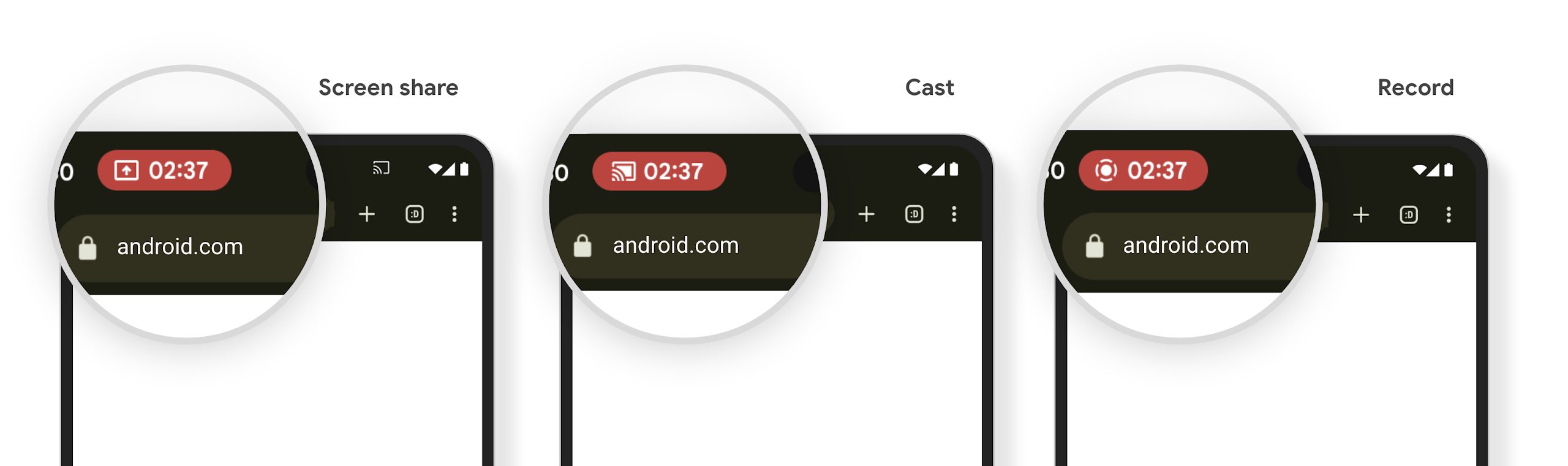
Proyeksi media dapat mengekspos informasi pengguna pribadi. Chip status bar baru yang jelas membuat pengguna mengetahui proyeksi layar yang sedang berlangsung. Pengguna dapat mengetuk chip untuk menghentikan transmisi layar, berbagi, atau perekaman. Selain itu, untuk pengalaman pengguna yang lebih intuitif, setiap proyeksi layar yang sedang berlangsung kini otomatis berhenti saat layar perangkat dikunci.
Layar besar dan faktor bentuk
Android 15 memberi aplikasi Anda dukungan untuk mendapatkan hasil maksimal dari faktor bentuk Android, termasuk layar besar, perangkat flippable, dan perangkat foldable.
Multitasking layar besar yang ditingkatkan
Android 15 gives users better ways to multitask on large screen devices. For example, users can save their favorite split-screen app combinations for quick access and pin the taskbar on screen to quickly switch between apps. This means that making sure your app is adaptive is more important than ever.
Google I/O has sessions on Building adaptive Android apps and Building UI with the Material 3 adaptive library that can help, and our documentation has more to help you Design for large screens.
Dukungan layar luar
Your app can declare a property that Android 15 uses to
allow your Application or Activity to be presented on the small cover
screens of supported flippable devices. These screens are too small to be
considered as compatible targets for Android apps to run on, but your app can
opt in to supporting them, making your app available in more places.
Konektivitas
Android 15 mengupdate platform untuk memberi aplikasi Anda akses ke kemajuan terbaru dalam teknologi nirkabel dan komunikasi.
Dukungan satelit
Android 15 continues to extend platform support for satellite connectivity and includes some UI elements to ensure a consistent user experience across the satellite connectivity landscape.
Apps can use ServiceState.isUsingNonTerrestrialNetwork() to
detect when a device is connected to a satellite, giving them more awareness of
why full network services might be unavailable. Additionally, Android 15
provides support for SMS and MMS apps as well as preloaded RCS apps to use
satellite connectivity for sending and receiving messages.

Pengalaman NFC yang lebih lancar
Android 15 is working to make the tap to pay experience more seamless and
reliable while continuing to support Android's robust NFC app ecosystem. On
supported devices, apps can request the NfcAdapter to enter
observe mode, where the device listens but doesn't respond to NFC
readers, sending the app's NFC service PollingFrame
objects to process. The PollingFrame objects can be used to auth
ahead of the first communication to the NFC reader, allowing for a one tap
transaction in many cases.
In addition, apps can register a filter on supported devices so they can be notified of polling loop activity, which allows for smooth operation with multiple NFC-aware applications.
Peran dompet
Android 15 memperkenalkan peran Wallet yang memungkinkan integrasi yang lebih erat dengan aplikasi dompet pilihan pengguna. Peran ini menggantikan setelan pembayaran nirsentuh default NFC. Pengguna dapat mengelola pemegang peran Wallet dengan membuka Setelan > Aplikasi > Aplikasi Default.
Peran Wallet digunakan saat merutekan tempelan NFC untuk AID yang terdaftar dalam kategori pembayaran. Ketukan selalu mengarah ke pemegang peran Wallet, kecuali jika aplikasi lain yang terdaftar untuk AID yang sama sedang berjalan di latar depan.
Peran ini juga digunakan untuk menentukan tempat kartu Akses Cepat Wallet harus ditempatkan saat diaktifkan. Jika peran disetel ke "Tidak ada", kartu Akses Cepat tidak tersedia dan ketukan NFC kategori pembayaran hanya dikirim ke aplikasi latar depan.
Keamanan
Android 15 membantu Anda meningkatkan keamanan aplikasi, melindungi data aplikasi, dan memberi pengguna lebih banyak transparansi dan kontrol atas data mereka. Tonton video Menjaga keamanan pengguna di Android dari Google I/O untuk mengetahui lebih lanjut tindakan yang kami lakukan untuk meningkatkan pengamanan pengguna dan melindungi aplikasi Anda dari ancaman baru.
Mengintegrasikan Credential Manager dengan isi otomatis
Starting with Android 15, developers can link specific views like username or password fields with Credential Manager requests, making it easier to provide a tailored user experience during the sign-in process. When the user focuses on one of these views, a corresponding request is sent to Credential Manager. The resulting credentials are aggregated across providers and displayed in autofill fallback UIs, such as inline suggestions or drop-down suggestions. The Jetpack androidx.credentials library is the preferred endpoint for developers to use and will soon be available to further enhance this feature in Android 15 and higher.
Mengintegrasikan pendaftaran dan login sekali ketuk dengan perintah biometrik
Credential Manager integrates biometric prompts into the credential creation and sign-in processes, eliminating the need for providers to manage biometric prompts. As a result, credential providers only need to focus on the results of the create and get flows, augmented with the biometric flow result. This simplified process creates a more efficient and streamlined credential creation and retrieval process.
Pengelolaan kunci untuk enkripsi end-to-end
We are introducing the E2eeContactKeysManager in Android 15, which
facilitates end-to-end encryption (E2EE) in your Android apps by providing an
OS-level API for the storage of cryptographic public keys.
The E2eeContactKeysManager is designed to integrate with the platform
contacts app to give users a centralized way to manage and verify their
contacts' public keys.
Pemeriksaan izin pada URI konten
Android 15 introduces a set of APIs that perform permission checks on content URIs:
Context.checkContentUriPermissionFull: This performs a full permission check on content URIs.Activitymanifest attributerequireContentUriPermissionFromCaller: This enforces specified permissions on the provided content URIs at activity launch.ComponentCallerclass forActivitycallers: This represents the app that launched the activity.
Aksesibilitas
Android 15 menambahkan fitur yang meningkatkan aksesibilitas bagi pengguna.
Braille yang Lebih Baik
In Android 15, we've made it possible for TalkBack to support Braille displays that are using the HID standard over both USB and secure Bluetooth.
This standard, much like the one used by mice and keyboards, will help Android support a wider range of Braille displays over time.
Internasionalisasi
Android 15 menambahkan fitur dan kemampuan yang melengkapi pengalaman pengguna saat perangkat digunakan dalam bahasa yang berbeda.
Font variabel CJK
Starting with Android 15, the font file for Chinese, Japanese, and Korean (CJK) languages, NotoSansCJK, is now a variable font. Variable fonts open up possibilities for creative typography in CJK languages. Designers can explore a broader range of styles and create visually striking layouts that were previously difficult or impossible to achieve.

Penjustifikasi antar-karakter
Starting with Android 15, text can be justified utilizing letter spacing by
using JUSTIFICATION_MODE_INTER_CHARACTER. Inter-word justification was
first introduced in Android 8.0 (API level 26), and inter-character
justification provides similar capabilities for languages that use the
whitespace character for segmentation, such as Chinese, Japanese, and others.
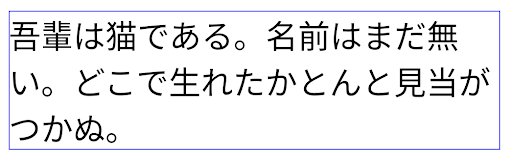
JUSTIFICATION_MODE_NONE.
JUSTIFICATION_MODE_NONE.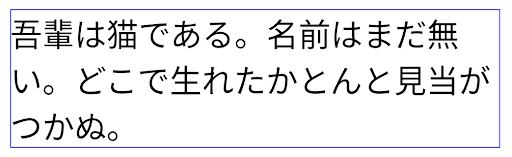
JUSTIFICATION_MODE_INTER_WORD.
JUSTIFICATION_MODE_INTER_WORD.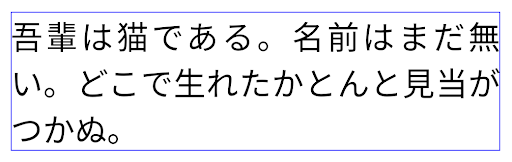
JUSTIFICATION_MODE_INTER_CHARACTER.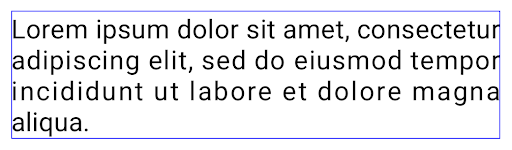
JUSTIFICATION_MODE_INTER_CHARACTER.Konfigurasi jeda baris otomatis
Android started supporting phrase-based line breaks for Japanese and Korean in
Android 13 (API level 33). However, while phrase-based line breaks improve the
readability of short lines of text, they don't work well for long lines of text.
In Android 15, apps can apply phrase-based line breaks only for short lines
of text, using the LINE_BREAK_WORD_STYLE_AUTO
option. This option selects the best word style option for the text.
For short lines of text, phrase-based line breaks are used, functioning the same
as LINE_BREAK_WORD_STYLE_PHRASE, as shown in the
following image:

LINE_BREAK_WORD_STYLE_AUTO
applies phrase-based line breaks to improve the readability of the text.
This is the same as applying
LINE_BREAK_WORD_STYLE_PHRASE.For longer lines of text, LINE_BREAK_WORD_STYLE_AUTO uses a no
line-break word style, functioning the same as
LINE_BREAK_WORD_STYLE_NONE, as shown in the
following image:

LINE_BREAK_WORD_STYLE_AUTO
applies no line-break word style to improve the readability of the text.
This is the same as applying
LINE_BREAK_WORD_STYLE_NONE.Font Hentaigana Jepang Tambahan
In Android 15, a font file for old Japanese Hiragana (known as Hentaigana) is bundled by default. The unique shapes of Hentaigana characters can add a distinctive flair to artwork or design while also helping to preserve accurate transmission and understanding of ancient Japanese documents.

Kegel VideoLAN Hak Cipta (c) 1996-2010 VideoLAN. Logo ini atau versi yang dimodifikasi dapat digunakan atau dimodifikasi oleh siapa saja untuk merujuk ke project VideoLAN atau produk apa pun yang dikembangkan oleh tim VideoLAN, tetapi tidak menunjukkan dukungan oleh project.
Vulkan dan logo Vulkan adalah merek dagang terdaftar dari Khronos Group Inc.
OpenGL adalah merek dagang terdaftar dan logo OpenGL ES adalah merek dagang Hewlett Packard Enterprise yang digunakan dengan izin dari Khronos.