

اندروید ۱۵ ویژگیها و APIهای فوقالعادهای را برای توسعهدهندگان معرفی میکند. بخشهای زیر این ویژگیها را خلاصه میکنند تا به شما در شروع کار با APIهای مرتبط کمک کنند.
برای مشاهده لیست کاملی از APIهای اضافه شده، اصلاح شده و حذف شده، گزارش تفاوت API را مطالعه کنید. برای جزئیات بیشتر در مورد APIهای اضافه شده، به مرجع API اندروید مراجعه کنید - برای اندروید ۱۵، به دنبال APIهایی باشید که در سطح API ۳۵ اضافه شدهاند. برای کسب اطلاعات در مورد حوزههایی که تغییرات پلتفرم ممکن است بر برنامههای شما تأثیر بگذارد، حتماً تغییرات رفتاری اندروید ۱۵ را برای برنامههایی که اندروید ۱۵ را هدف قرار میدهند و برای همه برنامهها بررسی کنید.
دوربین و رسانه
اندروید ۱۵ شامل ویژگیهای متنوعی است که تجربه دوربین و رسانه را بهبود میبخشد و به شما امکان دسترسی به ابزارها و سختافزارهایی را میدهد که به سازندگان در تحقق بخشیدن به دیدگاههایشان در اندروید کمک میکند.
برای اطلاعات بیشتر در مورد جدیدترین ویژگیها و راهحلهای توسعهدهندگان برای رسانه و دوربین اندروید، به سخنرانی « ساختن تجربیات مدرن رسانه و دوربین اندروید» از کنفرانس Google I/O مراجعه کنید.
تقویت نور کم
اندروید 15 کم نور ، حالت نوردهی خودکار را معرفی می کند که هم برای دوربین 2 و هم برای پسوند دوربین حالت شب در دسترس است. Low Light Boost نوردهی جریان پیش نمایش را در شرایط کم نور تنظیم می کند. این با نحوه ایجاد تصاویر ثابت توسط پسوند دوربین حالت شب متفاوت است، زیرا حالت شب مجموعه ای از عکس ها را برای ایجاد یک تصویر واحد و پیشرفته ترکیب می کند. در حالی که حالت شب برای ایجاد یک تصویر ثابت بسیار خوب عمل می کند، نمی تواند یک جریان مداوم از فریم ها ایجاد کند، اما Low Light Boost می تواند. بنابراین، Low Light Boost قابلیت های دوربین را فعال می کند، مانند:
- ارائه یک پیشنمایش تصویر پیشرفته، بنابراین کاربران بهتر میتوانند عکسهای خود را در نور کم قاب کنند
- اسکن کدهای QR در نور کم
اگر Low Light Boost را فعال کنید، هنگامی که سطح نور کم باشد به طور خودکار روشن می شود و زمانی که نور بیشتر باشد خاموش می شود.
برنامهها میتوانند جریان پیشنمایش را در شرایط کمنور ضبط کنند تا یک ویدیوی روشن را ذخیره کنند.
برای اطلاعات بیشتر، Low Light Boost را ببینید.
کنترلهای دوربین درون برنامهای
اندروید 15 یک افزونه برای کنترل بیشتر بر سخت افزار دوربین و الگوریتم های آن در دستگاه های پشتیبانی شده اضافه می کند:
- تنظیمات پیشرفته قدرت فلاش که امکان کنترل دقیق شدت فلاش را در هر دو حالت
SINGLEوTORCHدر هنگام ثبت تصاویر فراهم می کند.
کنترل فضای سر در HDR
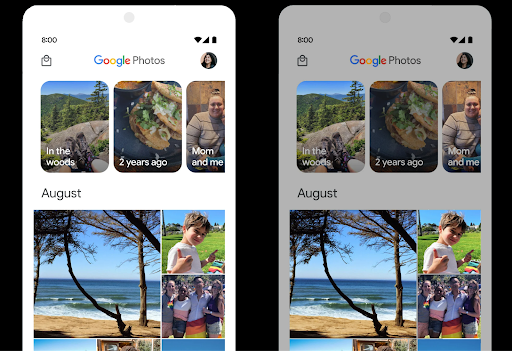
اندروید 15 فضای سر HDR را انتخاب میکند که برای قابلیتهای دستگاه زیربنایی و عمق بیت پانل مناسب است. برای صفحاتی که محتوای SDR زیادی دارند، مانند برنامه پیامرسانی که یک تصویر کوچک HDR را نمایش میدهد، این رفتار میتواند در نهایت بر روشنایی درک شده محتوای SDR تأثیر منفی بگذارد. اندروید 15 به شما امکان میدهد تا فضای سر HDR را با setDesiredHdrHeadroom کنترل کنید تا بین محتوای SDR و HDR تعادل برقرار کنید.
کنترل بلندی صدا

اندروید 15 از استاندارد بلندی صدای CTA-2075 پشتیبانی می کند تا به شما کمک کند از تناقضات بلندی صدا جلوگیری کنید و اطمینان حاصل کنید که کاربران مجبور نیستند به طور مداوم صدا را هنگام جابجایی بین محتوا تنظیم کنند. این سیستم از ویژگی های شناخته شده دستگاه های خروجی (هدفون و بلندگو) به همراه ابرداده بلندی صدای موجود در محتوای صوتی AAC استفاده می کند تا به طور هوشمندانه میزان بلندی صدا و تراکم دامنه پویا را تنظیم کند.
برای فعال کردن این ویژگی، باید مطمئن شوید که ابرداده بلندی صدا در محتوای AAC شما موجود است و ویژگی پلتفرم را در برنامه خود فعال کنید. برای این کار، یک شی LoudnessCodecController را با فراخوانی متد create factory آن با شناسه جلسه صوتی از AudioTrack مرتبط، نمونه سازی می کنید. این به طور خودکار شروع به اعمال به روز رسانی های صوتی می کند. می توانید یک OnLoudnessCodecUpdateListener را برای اصلاح یا فیلتر کردن پارامترهای بلندی صدا قبل از اعمال آنها در MediaCodec ارسال کنید.
// Media contains metadata of type MPEG_4 OR MPEG_D
val mediaCodec = …
val audioTrack = AudioTrack.Builder()
                                .setSessionId(sessionId)
                                .build()
...
// Create new loudness controller that applies the parameters to the MediaCodec
try {
   val lcController = LoudnessCodecController.create(mSessionId)
   // Starts applying audio updates for each added MediaCodec
}
AndroidX media3 ExoPlayer همچنین برای استفاده از API های LoudnessCodecController برای یکپارچه سازی یکپارچه برنامه به روز می شود.
دستگاههای مجازی MIDI 2.0
Android 13 برای اتصال به دستگاههای MIDI 2.0 با استفاده از USB ، که با استفاده از بستههای جهانی MIDI (UMP) ارتباط برقرار میکنند، پشتیبانی اضافه کرد. Android 15 پشتیبانی UMP را به برنامههای MIDI مجازی گسترش میدهد، و برنامههای ترکیب را قادر میسازد تا برنامههای سینتیسایزر را بهعنوان یک دستگاه مجازی MIDI 2.0 مانند دستگاههای USB MIDI 2.0 کنترل کنند.
رمزگشایی نرمافزار AV1 کارآمدتر

dav1d ، رمزگشای محبوب نرم افزار AV1 از VideoLAN برای دستگاه های اندرویدی که از رمزگشایی AV1 در سخت افزار پشتیبانی نمی کنند، در دسترس است. عملکرد dav1d تا 3 برابر بیشتر از رمزگشای نرمافزار AV1 قدیمی است و امکان پخش HD AV1 را برای کاربران بیشتری از جمله برخی دستگاههای سطح پایین و متوسط فراهم میکند.
برنامه شما باید با فراخوانی آن با نام "c2.android.av1-dav1d.decoder" استفاده از dav1d را انتخاب کند. dav1d در به روز رسانی بعدی به عنوان رمزگشای پیش فرض نرم افزار AV1 تبدیل خواهد شد. این پشتیبانی استاندارد شده و برای دستگاههای Android 11 که بهروزرسانیهای سیستم Google Play را دریافت میکنند، پشتیبانی میشود.
بهرهوری و ابزارهای توسعهدهندگان
در حالی که بیشتر کار ما برای بهبود بهرهوری شما حول ابزارهایی مانند اندروید استودیو ، جتپک کامپوز و کتابخانههای اندروید جتپک میچرخد، ما همیشه به دنبال راههایی در پلتفرم هستیم تا به شما کمک کنیم راحتتر به چشماندازتان برسید.
بهروزرسانیهای OpenJDK 17
اندروید 15 به کار تازه سازی کتابخانه های اصلی اندروید برای هماهنگی با ویژگی های آخرین نسخه OpenJDK LTS ادامه می دهد.
ویژگیها و بهبودهای کلیدی زیر شامل میشوند:
- بهبود کیفیت زندگی در اطراف بافرهای NIO
- جریان ها
- روشهای اضافی
mathوstrictmath -
utilبسته شاملcollectionمتوالی،mapوset - پشتیبانی
ByteBufferدرDeflater - به روز رسانی های امنیتی مانند
X500PrivateCredentialو به روز رسانی های کلید امنیتی
این APIها در بیش از یک میلیارد دستگاه دارای Android 12 (سطح API 31) و بالاتر از طریق بهروزرسانیهای سیستم Google Play بهروزرسانی میشوند، بنابراین میتوانید آخرین ویژگیهای برنامهنویسی را هدف قرار دهید.
بهبودهای پیدیاف
اندروید 15 شامل بهبودهای قابل توجهی در APIهای PdfRenderer است. برنامهها میتوانند ویژگیهای پیشرفتهای مانند ارائه فایلهای محافظتشده با رمز عبور ، حاشیهنویسی، ویرایش فرم ، جستجو و انتخاب با کپی را در خود جای دهند. بهینه سازی خطی PDF برای سرعت بخشیدن به مشاهده PDF محلی و کاهش استفاده از منابع پشتیبانی می شود. کتابخانه PDF Jetpack از این APIها برای ساده کردن افزودن قابلیت مشاهده PDF به برنامه شما استفاده می کند.
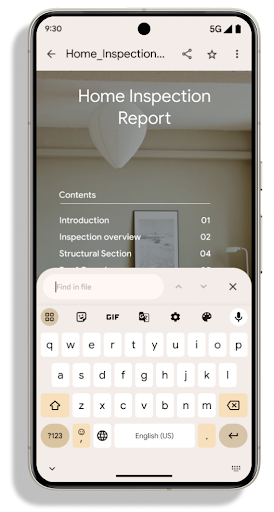
PdfRenderer به ماژولی منتقل شده است که میتواند با استفاده از بهروزرسانیهای سیستم Google Play مستقل از نسخه پلتفرم بهروزرسانی شود، و ما با ایجاد یک نسخه سازگار پیش از Android 15 از این تغییرات به Android 11 (سطح API 30) پشتیبانی میکنیم. سطح API، به نام PdfRendererPreV .
اندروید 15 شامل بهبودهای قابل توجهی در APIهای PdfRenderer است. برنامهها میتوانند ویژگیهای پیشرفتهای مانند ارائه فایلهای محافظتشده با رمز عبور ، حاشیهنویسی، ویرایش فرم ، جستجو و انتخاب با کپی را در خود جای دهند. بهینه سازی خطی PDF برای سرعت بخشیدن به مشاهده PDF محلی و کاهش استفاده از منابع پشتیبانی می شود. کتابخانه PDF Jetpack از این APIها برای ساده کردن افزودن قابلیت مشاهده PDF به برنامه شما استفاده می کند.
PdfRenderer به ماژولی منتقل شده است که میتواند با استفاده از بهروزرسانیهای سیستم Google Play مستقل از نسخه پلتفرم بهروزرسانی شود، و ما با ایجاد یک نسخه سازگار پیش از Android 15 از این تغییرات به Android 11 (سطح API 30) پشتیبانی میکنیم. سطح API، به نام PdfRendererPreV .
اندروید 15 شامل بهبودهای قابل توجهی در APIهای PdfRenderer است. برنامهها میتوانند ویژگیهای پیشرفتهای مانند ارائه فایلهای محافظتشده با رمز عبور ، حاشیهنویسی، ویرایش فرم ، جستجو و انتخاب با کپی را در خود جای دهند. بهینه سازی خطی PDF برای سرعت بخشیدن به مشاهده PDF محلی و کاهش استفاده از منابع پشتیبانی می شود. کتابخانه PDF Jetpack از این APIها برای ساده کردن افزودن قابلیت مشاهده PDF به برنامه شما استفاده می کند.
PdfRenderer به ماژولی منتقل شده است که میتواند با استفاده از بهروزرسانیهای سیستم Google Play مستقل از نسخه پلتفرم بهروزرسانی شود، و ما با ایجاد یک نسخه سازگار پیش از Android 15 از این تغییرات به Android 11 (سطح API 30) پشتیبانی میکنیم. سطح API، به نام PdfRendererPreV .
اصلاحات تغییر خودکار زبان
اندروید 14 روی دستگاه، تشخیص چند زبانه در صدا با جابجایی خودکار بین زبانها را اضافه کرده است، اما این میتواند باعث حذف کلمات شود، به خصوص زمانی که زبانها با مکث کمتری بین دو گفته جابجا میشوند. Android 15 کنترلهای اضافی را اضافه میکند تا به برنامهها کمک کند این تغییر را در مورد استفاده خود تنظیم کنند. EXTRA_LANGUAGE_SWITCH_INITIAL_ACTIVE_DURATION_TIME_MILLIS تغییر خودکار را به ابتدای جلسه صوتی محدود می کند، در حالی که EXTRA_LANGUAGE_SWITCH_MATCH_SWITCHES تغییر زبان را پس از تعداد معینی سوئیچ غیرفعال می کند. این گزینهها مخصوصاً زمانی مفید هستند که انتظار دارید در طول جلسه یک زبان صحبت شود که باید به طور خودکار شناسایی شود.
بهبود رابط برنامهنویسی کاربردی فونت متغیر OpenType
اندروید 15 قابلیت استفاده از فونت متغیر OpenType را بهبود می بخشد. شما می توانید یک نمونه FontFamily از یک فونت متغیر بدون تعیین محورهای وزنی با API buildVariableFamily ایجاد کنید. ارائهدهنده متن، مقدار محور wght را لغو میکند تا با متن نمایش داده شده مطابقت داشته باشد.
استفاده از API کد ایجاد Typeface را به میزان قابل توجهی ساده می کند:
کاتلین
val newTypeface = Typeface.CustomFallbackBuilder(
            FontFamily.Builder(
                Font.Builder(assets, "RobotoFlex.ttf").build())
                    .buildVariableFamily())
    .build()
جاوا
Typeface newTypeface = Typeface.CustomFallbackBuilder(
            new FontFamily.Builder(
                new Font.Builder(assets, "RobotoFlex.ttf").build())
                    .buildVariableFamily())
    .build();
قبلاً، برای ایجاد همان Typeface ، به کد بسیار بیشتری نیاز داشتید:
کاتلین
val oldTypeface = Typeface.CustomFallbackBuilder(
            FontFamily.Builder(
                Font.Builder(assets, "RobotoFlex.ttf")
                    .setFontVariationSettings("'wght' 400")
                    .setWeight(400)
                    .build())
                .addFont(
                    Font.Builder(assets, "RobotoFlex.ttf")
                        .setFontVariationSettings("'wght' 100")
                        .setWeight(100)
                        .build()
                )
                .addFont(
                    Font.Builder(assets, "RobotoFlex.ttf")
                        .setFontVariationSettings("'wght' 200")
                        .setWeight(200)
                        .build()
                )
                .addFont(
                    Font.Builder(assets, "RobotoFlex.ttf")
                        .setFontVariationSettings("'wght' 300")
                        .setWeight(300)
                        .build()
                )
                .addFont(
                    Font.Builder(assets, "RobotoFlex.ttf")
                        .setFontVariationSettings("'wght' 500")
                        .setWeight(500)
                        .build()
                )
                .addFont(
                    Font.Builder(assets, "RobotoFlex.ttf")
                        .setFontVariationSettings("'wght' 600")
                        .setWeight(600)
                        .build()
                )
                .addFont(
                    Font.Builder(assets, "RobotoFlex.ttf")
                        .setFontVariationSettings("'wght' 700")
                        .setWeight(700)
                        .build()
                )
                .addFont(
                    Font.Builder(assets, "RobotoFlex.ttf")
                        .setFontVariationSettings("'wght' 800")
                        .setWeight(800)
                        .build()
                )
                .addFont(
                    Font.Builder(assets, "RobotoFlex.ttf")
                        .setFontVariationSettings("'wght' 900")
                        .setWeight(900)
                        .build()
                ).build()
        ).build()
جاوا
Typeface oldTypeface = new Typeface.CustomFallbackBuilder(
    new FontFamily.Builder(
        new Font.Builder(assets, "RobotoFlex.ttf")
            .setFontVariationSettings("'wght' 400")
            .setWeight(400)
            .build()
    )
    .addFont(
        new Font.Builder(assets, "RobotoFlex.ttf")
            .setFontVariationSettings("'wght' 100")
            .setWeight(100)
            .build()
    )
    .addFont(
        new Font.Builder(assets, "RobotoFlex.ttf")
            .setFontVariationSettings("'wght' 200")
            .setWeight(200)
            .build()
    )
    .addFont(
        new Font.Builder(assets, "RobotoFlex.ttf")
            .setFontVariationSettings("'wght' 300")
            .setWeight(300)
            .build()
    )
    .addFont(
        new Font.Builder(assets, "RobotoFlex.ttf")
            .setFontVariationSettings("'wght' 500")
            .setWeight(500)
            .build()
    )
    .addFont(
        new Font.Builder(assets, "RobotoFlex.ttf")
            .setFontVariationSettings("'wght' 600")
            .setWeight(600)
            .build()
    )
    .addFont(
        new Font.Builder(assets, "RobotoFlex.ttf")
            .setFontVariationSettings("'wght' 700")
            .setWeight(700)
            .build()
    )
    .addFont(
        new Font.Builder(assets, "RobotoFlex.ttf")
            .setFontVariationSettings("'wght' 800")
            .setWeight(800)
            .build()
    )
    .addFont(
        new Font.Builder(assets, "RobotoFlex.ttf")
            .setFontVariationSettings("'wght' 900")
            .setWeight(900)
            .build()
    )
    .build()
).build();
در اینجا مثالی از نحوه رندر یک Typeface ایجاد شده با APIهای قدیمی و جدید آورده شده است:
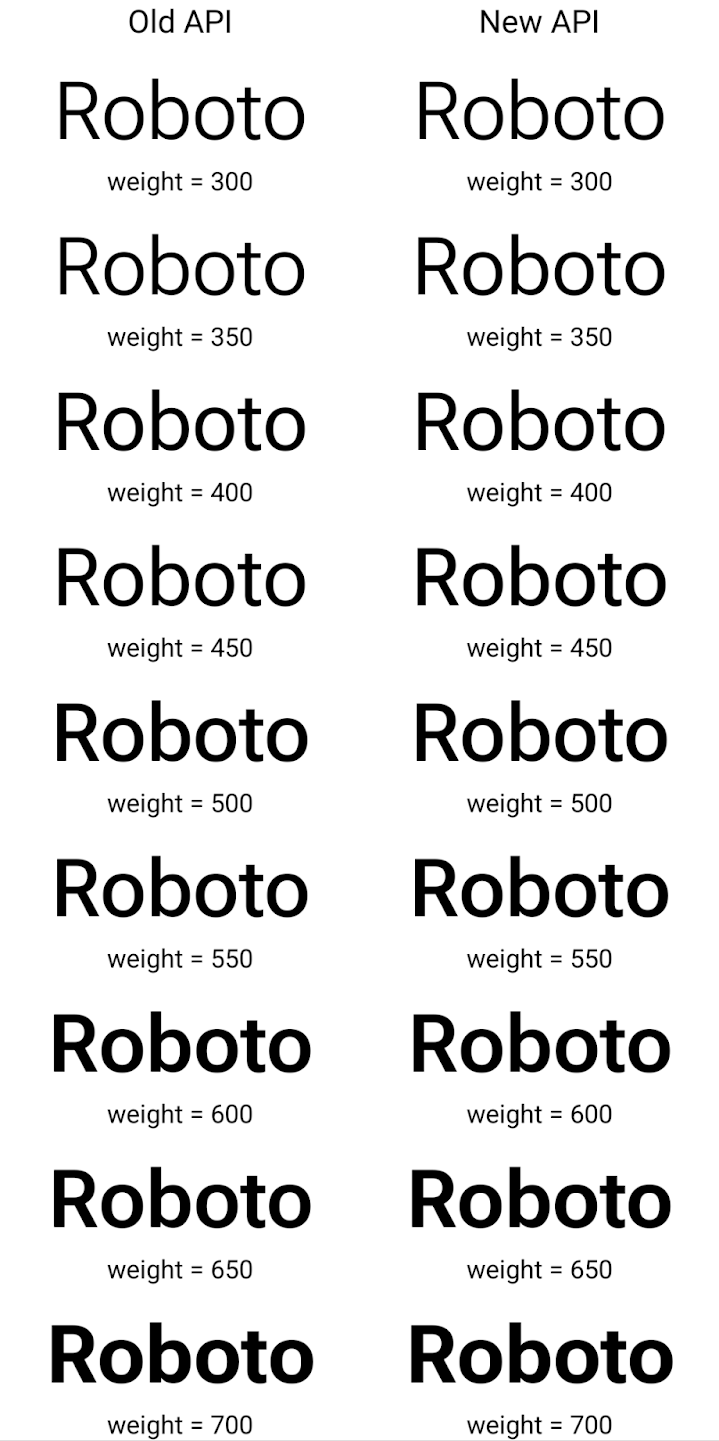
در این مثال، Typeface ایجاد شده با API قدیمی توانایی ایجاد وزن فونت های دقیق برای نمونه های Font 350، 450، 550 و 650 را ندارد، بنابراین رندر به نزدیک ترین وزن باز می گردد. بنابراین در این حالت به جای 350 عدد 300 و به جای 450 عدد 400 و به همین ترتیب رندر می شود. در مقابل، Typeface ایجاد شده با APIهای جدید به صورت پویا یک نمونه Font برای وزن مشخص ایجاد می کند، بنابراین وزن های دقیق برای 350، 450، 550 و 650 نیز ارائه می شود.
کنترلهای تفکیک خطوط به صورت جزئی
با شروع در اندروید 15، یک TextView و خط شکن زیرین میتوانند بخش داده شده از متن را در همان خط حفظ کنند تا خوانایی را بهبود بخشند. شما می توانید با استفاده از تگ <nobreak> در منابع رشته یا createNoBreakSpan از این سفارشی سازی خط شکن استفاده کنید. به طور مشابه، میتوانید با استفاده از تگ <nohyphen> یا createNoHyphenationSpan ، کلمات را از خط فاصله حفظ کنید.
به عنوان مثال، منبع رشته زیر شامل یک خط شکسته نمیشود و با متن «Pixel 8 Pro» رندر میشود. شکستن در محل نامطلوب:
<resources>
    <string name="pixel8pro">The power and brains behind Pixel 8 Pro.</string>
</resources>
در مقابل، این منبع رشته شامل تگ <nobreak> است که عبارت "Pixel 8 Pro" را میپیچد. و از شکستگی خطوط جلوگیری می کند:
<resources>
    <string name="pixel8pro">The power and brains behind <nobreak>Pixel 8 Pro.</nobreak></string>
</resources>
تفاوت در نحوه رندر شدن این رشته ها در تصاویر زیر نشان داده شده است:
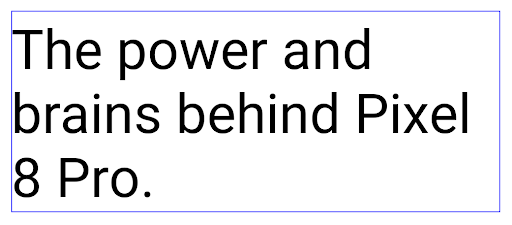
<nobreak> پیچیده نشده است. 
<nobreak> پیچیده شده است.بایگانی برنامه
Android و Google Play سال گذشته پشتیبانی از بایگانی برنامه را اعلام کردند و به کاربران این امکان را داد تا با حذف بخشی از برنامههای کم استفاده از دستگاه که با استفاده از Android App Bundle در Google Play منتشر شدهاند، فضا را آزاد کنند. اندروید 15 شامل پشتیبانی سطح سیستم عامل برای بایگانی و حذف بایگانی برنامه است که اجرای آن را برای همه فروشگاه های برنامه آسان تر می کند.
برنامههای دارای مجوز REQUEST_DELETE_PACKAGES میتوانند با روش PackageInstaller requestArchive تماس بگیرند تا بایگانی یک بسته برنامه نصبشده را درخواست کنند، که APK و هر فایل حافظه پنهان را حذف میکند، اما دادههای کاربر را حفظ میکند. برنامه های آرشیو شده به عنوان برنامه های قابل نمایش از طریق API های LauncherApps برگردانده می شوند. کاربران برای برجسته کردن آرشیو بودن آن برنامه ها، یک رابط کاربری را مشاهده خواهند کرد. اگر کاربر روی یک برنامه بایگانی شده ضربه بزند، نصب کننده مسئول درخواستی برای حذف بایگانی آن دریافت می کند و فرآیند بازیابی می تواند توسط پخش ACTION_PACKAGE_ADDED نظارت شود.
فعال کردن حالت ۱۶ کیلوبایت روی دستگاه با استفاده از گزینههای توسعهدهنده

برای بوت کردن دستگاه در حالت ۱۶ کیلوبایت، گزینه توسعهدهنده Boot with 16KB page size را فعال یا غیرفعال کنید.
در نسخههای QPR اندروید ۱۵، میتوانید از گزینه توسعهدهنده که در دستگاههای خاصی موجود است، برای بوت کردن دستگاه در حالت ۱۶ کیلوبایت و انجام آزمایش روی دستگاه استفاده کنید . قبل از استفاده از گزینه توسعهدهنده، به تنظیمات > سیستم > بهروزرسانیهای نرمافزار بروید و هرگونه بهروزرسانی موجود را اعمال کنید.
این گزینه توسعهدهنده در دستگاههای زیر موجود است:
پیکسل ۸ و ۸ پرو (با اندروید ۱۵ QPR1 یا بالاتر)
پیکسل ۸a (با اندروید ۱۵ QPR1 یا بالاتر)
پیکسل ۹، ۹ پرو و ۹ پرو ایکسال (با اندروید ۱۵ نسخه QPR2 یا بالاتر)
پیکسل ۹a (با اندروید ۱۶ یا بالاتر)
گرافیک
اندروید ۱۵ جدیدترین پیشرفتهای گرافیکی، از جمله ANGLE و اضافات سیستم گرافیکی Canvas را به ارمغان میآورد.
مدرنسازی دسترسی به پردازنده گرافیکی اندروید

سختافزار اندروید از روزهای اولیه که سیستمعامل اصلی بر روی یک CPU اجرا میشد و GPUها با استفاده از APIهای مبتنی بر خطوط لوله با عملکرد ثابت، تقریباً تکامل یافتهاند. API گرافیکی Vulkan® از اندروید 7.0 (سطح API 24) در NDK با انتزاعی سطح پایینتر موجود است که سختافزار مدرن GPU را بهتر منعکس میکند، مقیاس بهتری برای پشتیبانی از چندین هسته CPU دارد و سربار درایور CPU را کاهش میدهد - که منجر به بهبود میشود. عملکرد برنامه Vulkan توسط تمام موتورهای بازی مدرن پشتیبانی می شود.
Vulkan رابط ترجیحی اندروید نسبت به GPU است. بنابراین، Android 15 شامل ANGLE به عنوان یک لایه اختیاری برای اجرای OpenGL® ES در بالای Vulkan است. حرکت به ANGLE اجرای OpenGL Android را برای سازگاری بهتر و در برخی موارد بهبود عملکرد استاندارد می کند. میتوانید پایداری و عملکرد برنامه OpenGL ES خود را با ANGLE با فعال کردن گزینه توسعهدهنده در تنظیمات -> سیستم -> گزینههای برنامهنویس -> تجربی: فعال کردن ANGLE در Android 15 آزمایش کنید.
Android ANGLE در نقشه راه Vulkan
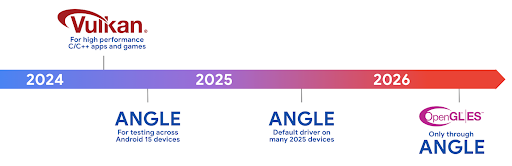
به عنوان بخشی از سادهسازی پشته GPU، در آینده، ANGLE را به عنوان درایور سیستم GL در دستگاههای جدید بیشتری ارسال خواهیم کرد، با این انتظار که در آینده OpenGL/ES فقط از طریق ANGLE در دسترس باشد. همانطور که گفته شد، ما قصد داریم به پشتیبانی از OpenGL ES در همه دستگاهها ادامه دهیم .
مراحل بعدی توصیه می شود
از گزینه های توسعه دهنده برای انتخاب درایور ANGLE برای OpenGL ES و آزمایش برنامه خود استفاده کنید. برای پروژههای جدید، ما قویاً استفاده از Vulkan را برای C/C++ توصیه میکنیم.
بهبودهایی برای Canvas
اندروید 15 به مدرن سازی سیستم گرافیکی Canvas اندروید با قابلیت های اضافی ادامه می دهد:
-
Matrix44یک ماتریس 4x4 برای تبدیل مختصات ارائه می دهد که باید برای دستکاری بوم به صورت سه بعدی استفاده شود. -
clipShaderکلیپ فعلی را با سایهزن مشخص شده قطع میکند، در حالی کهclipOutShaderکلیپ را روی تفاوت کلیپ فعلی و سایهزن تنظیم میکند و هر کدام سایهزن را به عنوان یک ماسک آلفا در نظر میگیرند. این از ترسیم اشکال پیچیده به طور موثر پشتیبانی می کند.
عملکرد و باتری
اندروید همچنان بر کمک به شما در بهبود عملکرد و کیفیت برنامههایتان تمرکز دارد. اندروید ۱۵ رابطهای برنامهنویسی کاربردی (API) را معرفی میکند که به شما کمک میکنند وظایف موجود در برنامه خود را کارآمدتر اجرا کنید، عملکرد برنامه را بهینه کنید و در مورد برنامههای خود بینش کسب کنید.
برای بهترین شیوههای صرفهجویی در مصرف باتری، اشکالزدایی در مصرف شبکه و برق، و جزئیات مربوط به نحوه بهبود بهرهوری باتری در فعالیتهای پسزمینه در اندروید ۱۵ و نسخههای اخیر اندروید، به « بهبود بهرهوری باتری در فعالیتهای پسزمینه در گفتگوی اندروید» از Google I/O مراجعه کنید.
API اطلاعات شروع برنامه
در نسخههای قبلی اندروید، راهاندازی اپلیکیشنها کمی مرموز بوده است. تعیین اینکه برنامه شما از حالت سرد، گرم یا گرم شروع شده است، چالش برانگیز بود. همچنین دشوار بود که بدانید برنامه شما در طول مراحل مختلف راه اندازی چه مدت زمان صرف کرده است: انشعاب فرآیند، فراخوانی onCreate ، ترسیم اولین فریم و موارد دیگر. وقتی کلاس Application شما نمونهسازی شد، هیچ راهی برای دانستن اینکه آیا برنامه از یک پخش، یک ارائهدهنده محتوا، یک کار، پشتیبانگیری، راهاندازی کامل، زنگ هشدار یا یک Activity شروع شده است، نداشتید.
ApplicationStartInfo API در اندروید 15 همه اینها و موارد دیگر را فراهم می کند. حتی می توانید برای کمک به جمع آوری داده های زمان بندی در یک مکان، مهرهای زمانی خود را به جریان اضافه کنید. علاوه بر جمع آوری معیارها، می توانید از ApplicationStartInfo برای کمک به بهینه سازی مستقیم راه اندازی برنامه استفاده کنید. برای مثال، میتوانید نمونهسازی پرهزینه کتابخانههای مرتبط با رابط کاربری را در کلاس Application خود در زمانی که برنامه شما به دلیل پخش در حال راهاندازی است، حذف کنید.
اطلاعات دقیق حجم برنامه
از Android 8.0 (سطح API 26)، Android دارای StorageStats.getAppBytes API است که اندازه نصب شده یک برنامه را به صورت یک تعداد بایت خلاصه می کند، که مجموع اندازه APK، اندازه فایل های استخراج شده از APK است. و فایل هایی که روی دستگاه تولید شده اند مانند کدهای کامپایل شده پیش از زمان (AOT). این عدد از نظر نحوه استفاده برنامه شما از فضای ذخیرهسازی خیلی روشنکننده نیست.
Android 15 API StorageStats.getAppBytesByDataType([type]) را اضافه می کند، که به شما امکان می دهد بینشی در مورد نحوه استفاده برنامه شما از این فضا، از جمله تقسیم فایل های APK، AOT و کدهای مربوط به سرعت بخشیدن، داده های dex، کتابخانه ها و نمایه های هدایت شونده داشته باشید.
پروفایلسازی مدیریتشده توسط برنامه
Android 15 شامل کلاس ProfilingManager است که به شما امکان میدهد اطلاعات پروفایل را از داخل برنامه خود جمعآوری کنید، مانند heap dumps، heap profiles، stack sampling و موارد دیگر. این یک تگ ارائه شده برای شناسایی فایل خروجی که به دایرکتوری فایل های برنامه شما تحویل داده می شود، به برنامه شما پاسخ تماس می دهد. API برای به حداقل رساندن تأثیر عملکرد، نرخ را محدود می کند.
برای سادهسازی درخواستهای نمایهسازی در برنامهتان، توصیه میکنیم از Profiling AndroidX API مربوطه، موجود در Core 1.15.0-rc01 یا بالاتر استفاده کنید.
بهبودهای پایگاه داده SQLite
اندروید 15 APIهای SQLite را معرفی میکند که ویژگیهای پیشرفتهای را از موتور اصلی SQLite نشان میدهد که مشکلات عملکرد خاصی را که میتواند در برنامهها آشکار شود را هدف قرار میدهد. این API ها با به روز رسانی SQLite به نسخه 3.44.3 گنجانده شده اند.
توسعه دهندگان باید از بهترین شیوه ها برای عملکرد SQLite استفاده کنند تا بیشترین بهره را از پایگاه داده SQLite خود ببرند، به ویژه هنگام کار با پایگاه داده های بزرگ یا هنگام اجرای پرس و جوهای حساس به تأخیر.
- تراکنشهای معوق فقط خواندنی : هنگام صدور تراکنشهایی که فقط خواندنی هستند (شرایط نوشتن را شامل نمیشود)، از
beginTransactionReadOnly()وbeginTransactionWithListenerReadOnly(SQLiteTransactionListener)برای صدور تراکنشهایDEFERREDفقط خواندنی استفاده کنید. چنین تراکنش هایی می توانند همزمان با یکدیگر اجرا شوند و اگر پایگاه داده در حالت WAL باشد، می توانند همزمان با تراکنش هایIMMEDIATEیاEXCLUSIVEاجرا شوند. - تعداد ردیف ها و شناسه ها : API ها برای بازیابی تعداد ردیف های تغییر یافته یا آخرین شناسه ردیف درج شده بدون ارسال درخواست اضافی اضافه شدند.
getLastChangedRowCount()تعداد ردیفهایی را که توسط آخرین دستور SQL در تراکنش جاری درج، بهروزرسانی یا حذف شدهاند را برمیگرداند، در حالی کهgetTotalChangedRowCount()تعداد اتصال فعلی را برمیگرداند.getLastInsertRowId()rowidآخرین ردیفی که باید در اتصال فعلی درج شود را برمی گرداند. - بیانیههای خام : یک بیانیه خام SQlite صادر کنید، با دور زدن بستهبندیهای راحت و هر سربار پردازش اضافی که ممکن است متحمل شوند.
بهروزرسانیهای چارچوب عملکرد پویای اندروید
Android 15 به سرمایه گذاری ما در Android Dynamic Performance Framework (ADPF) ادامه می دهد، مجموعه ای از API ها که به بازی ها و برنامه های فشرده عملکرد اجازه می دهد تا به طور مستقیم با سیستم های قدرت و حرارت دستگاه های Android ارتباط برقرار کنند. در دستگاههای پشتیبانیشده، Android 15 قابلیتهای ADPF را اضافه میکند:
- یک حالت بهره وری انرژی برای جلسات راهنمایی که نشان می دهد رشته های مرتبط آنها باید صرفه جویی در مصرف انرژی را به عملکرد ترجیح دهند، که برای بارهای کاری پس زمینه طولانی مدت عالی است.
- مدت زمان کار GPU و CPU را می توان هر دو در جلسات راهنمایی گزارش کرد و به سیستم اجازه می دهد فرکانس های CPU و GPU را با هم تنظیم کند تا به بهترین شکل نیازهای بار کاری را برآورده کند.
- آستانههای دمایی برای تفسیر وضعیت احتمالی درگیری حرارتی بر اساس پیشبینی فضای سر.
برای کسب اطلاعات بیشتر در مورد نحوه استفاده از ADPF در برنامه ها و بازی های خود، به مستندات مراجعه کنید .
،Android 15 به سرمایه گذاری ما در Android Dynamic Performance Framework (ADPF) ادامه می دهد، مجموعه ای از API ها که به بازی ها و برنامه های فشرده عملکرد اجازه می دهد تا به طور مستقیم با سیستم های قدرت و حرارت دستگاه های Android ارتباط برقرار کنند. در دستگاههای پشتیبانیشده، Android 15 قابلیتهای ADPF را اضافه میکند:
- یک حالت بهره وری انرژی برای جلسات راهنمایی که نشان می دهد رشته های مرتبط آنها باید صرفه جویی در مصرف انرژی را به عملکرد ترجیح دهند، که برای بارهای کاری پس زمینه طولانی مدت عالی است.
- مدت زمان کار GPU و CPU را می توان هر دو در جلسات راهنمایی گزارش کرد و به سیستم اجازه می دهد فرکانس های CPU و GPU را با هم تنظیم کند تا به بهترین شکل نیازهای بار کاری را برآورده کند.
- آستانههای دمایی برای تفسیر وضعیت احتمالی درگیری حرارتی بر اساس پیشبینی فضای سر.
برای کسب اطلاعات بیشتر در مورد نحوه استفاده از ADPF در برنامه ها و بازی های خود، به مستندات مراجعه کنید .
،Android 15 به سرمایه گذاری ما در Android Dynamic Performance Framework (ADPF) ادامه می دهد، مجموعه ای از API ها که به بازی ها و برنامه های فشرده عملکرد اجازه می دهد تا به طور مستقیم با سیستم های قدرت و حرارت دستگاه های Android ارتباط برقرار کنند. در دستگاههای پشتیبانیشده، Android 15 قابلیتهای ADPF را اضافه میکند:
- یک حالت بهره وری انرژی برای جلسات راهنمایی که نشان می دهد رشته های مرتبط آنها باید صرفه جویی در مصرف انرژی را به عملکرد ترجیح دهند، که برای بارهای کاری پس زمینه طولانی مدت عالی است.
- مدت زمان کار GPU و CPU را می توان هر دو در جلسات راهنمایی گزارش کرد و به سیستم اجازه می دهد فرکانس های CPU و GPU را با هم تنظیم کند تا به بهترین شکل نیازهای بار کاری را برآورده کند.
- آستانههای دمایی برای تفسیر وضعیت احتمالی درگیری حرارتی بر اساس پیشبینی فضای سر.
برای کسب اطلاعات بیشتر در مورد نحوه استفاده از ADPF در برنامه ها و بازی های خود، به مستندات مراجعه کنید .
حریم خصوصی
اندروید ۱۵ شامل ویژگیهای متنوعی است که به توسعهدهندگان برنامهها کمک میکند تا از حریم خصوصی کاربران محافظت کنند.
تشخیص ضبط صفحه نمایش
اندروید 15 پشتیبانی از برنامه ها را اضافه می کند تا تشخیص دهد که آنها در حال ضبط هستند. هر زمان که برنامه بین حالت قابل مشاهده یا نامرئی در یک صفحه ضبط ضبط شده تغییر می کند، یک تماس برگشتی فراخوانی می شود. اگر فعالیتهای متعلق به UID فرآیند ثبتنام در حال ثبت باشد، یک برنامه قابل مشاهده در نظر گرفته میشود. به این ترتیب، اگر برنامه شما عملیات حساسی را انجام می دهد، می توانید به کاربر اطلاع دهید که آنها در حال ضبط هستند.
val mCallback = Consumer<Int> { state ->
  if (state == SCREEN_RECORDING_STATE_VISIBLE) {
    // We're being recorded
  } else {
    // We're not being recorded
  }
}

override fun onStart() {
   super.onStart()
   val initialState =
      windowManager.addScreenRecordingCallback(mainExecutor, mCallback)
   mCallback.accept(initialState)
}

override fun onStop() {
    super.onStop()
    windowManager.removeScreenRecordingCallback(mCallback)
}
قابلیتهای گسترشیافتهی IntentFilter
Android 15 از طریق UriRelativeFilterGroup که شامل مجموعهای از اشیاء UriRelativeFilter است که مجموعهای از قوانین تطبیق Intent را تشکیل میدهد که هر کدام باید رعایت شوند، از جمله پارامترهای جستجوی URL، قطعات URL، و قوانین مسدود کردن یا حذف، از وضوح دقیقتر Intent پشتیبانی میکند.
این قوانین را می توان در فایل XML AndroidManifest با تگ <uri-relative-filter-group> تعریف کرد، که به صورت اختیاری می تواند یک تگ android:allow داشته باشد. این برچسبها میتوانند حاوی تگهای <data> باشند که از ویژگیهای تگ دادههای موجود و همچنین ویژگیهای android:query و android:fragment استفاده میکنند.
در اینجا مثالی از نحو AndroidManifest آورده شده است:
<intent-filter android:autoVerify="true">
  <action android:name="android.intent.action.VIEW" />
  <category android:name="android.intent.category.BROWSABLE" />
  <category android:name="android.intent.category.DEFAULT" />
  <data android:scheme="http" />
  <data android:scheme="https" />
  <data android:host="astore.com" />
  <uri-relative-filter-group>
    <data android:pathPrefix="/auth" />
    <data android:query="region=na" />
  </uri-relative-filter-group>
  <uri-relative-filter-group android:allow="false">
    <data android:pathPrefix="/auth" />
    <data android:query="mobileoptout=true" />
  </uri-relative-filter-group>
  <uri-relative-filter-group android:allow="false">
    <data android:pathPrefix="/auth" />
    <data android:fragmentPrefix="faq" />
  </uri-relative-filter-group>
</intent-filter>
فضای خصوصی
فضای خصوصی به کاربران این امکان را می دهد که فضای جداگانه ای در دستگاه خود ایجاد کنند که در آن می توانند برنامه های حساس را از چشمان کنجکاو دور نگه دارند، زیر یک لایه دیگر از احراز هویت. فضای خصوصی از یک پروفایل کاربری مجزا استفاده می کند. کاربر می تواند انتخاب کند که از قفل دستگاه یا فاکتور قفل جداگانه برای فضای خصوصی استفاده کند.
برنامههای موجود در فضای خصوصی در یک محفظه جداگانه در راهانداز نمایش داده میشوند و وقتی فضای خصوصی قفل است از نمای اخیر، اعلانها، تنظیمات و از سایر برنامهها پنهان میشوند. محتوای تولید شده و دانلود شده توسط کاربر (مانند رسانه یا فایل ها) و حساب ها بین فضای خصوصی و فضای اصلی جدا می شوند. از اشتراکگذاری سیستم و انتخابگر عکس میتوان برای دسترسی برنامهها به محتوا در فضاهای مختلف زمانی که فضای خصوصی باز است استفاده کرد.
کاربران نمی توانند برنامه های موجود و داده های آنها را به فضای خصوصی منتقل کنند. در عوض، کاربران یک گزینه نصب را در فضای خصوصی برای نصب یک برنامه با استفاده از فروشگاه برنامه ای که ترجیح می دهند انتخاب می کنند. برنامههای موجود در فضای خصوصی بهعنوان نسخههای جداگانه از هر برنامهای در فضای اصلی (کپیهای جدید همان برنامه) نصب میشوند.
وقتی کاربر فضای خصوصی را قفل می کند، نمایه متوقف می شود. وقتی نمایه متوقف شده است، برنامههای موجود در فضای خصوصی دیگر فعال نیستند و نمیتوانند فعالیتهای پیشزمینه یا پسزمینه، از جمله نمایش اعلانها را انجام دهند.
توصیه می کنیم برنامه خود را با فضای خصوصی آزمایش کنید تا مطمئن شوید برنامه شما همانطور که انتظار می رود کار می کند، به خصوص اگر برنامه شما در یکی از دسته های زیر قرار می گیرد:
- برنامههایی با منطق برای نمایههای کاری که فرض میکنند هر نسخه نصبشده برنامهشان که در نمایه اصلی نیست، در نمایه کاری است.
- اپلیکیشن های پزشکی
- برنامه های راه اندازی
- اپلیکیشن های اپ استور
پرس و جو در مورد جدیدترین انتخاب کاربر برای دسترسی به عکسهای انتخاب شده
برنامهها اکنون میتوانند تنها عکسها و ویدیوهایی را که اخیراً انتخاب شدهاند، در صورت اعطای دسترسی جزئی به مجوزهای رسانه، برجسته کنند. این ویژگی میتواند تجربه کاربری را برای برنامههایی که اغلب درخواست دسترسی به عکسها و ویدیوها را دارند، بهبود بخشد. برای استفاده از این ویژگی در برنامه خود، هنگام درخواست MediaStore از طریق ContentResolver آرگومان QUERY_ARG_LATEST_SELECTION_ONLY را فعال کنید.
کاتلین
val externalContentUri = MediaStore.Files.getContentUri("external")

val mediaColumns = arrayOf(
   FileColumns._ID,
   FileColumns.DISPLAY_NAME,
   FileColumns.MIME_TYPE,
)

val queryArgs = bundleOf(
   // Return only items from the last selection (selected photos access)
   QUERY_ARG_LATEST_SELECTION_ONLY to true,
   // Sort returned items chronologically based on when they were added to the device's storage
   QUERY_ARG_SQL_SORT_ORDER to "${FileColumns.DATE_ADDED} DESC",
   QUERY_ARG_SQL_SELECTION to "${FileColumns.MEDIA_TYPE} = ? OR ${FileColumns.MEDIA_TYPE} = ?",
   QUERY_ARG_SQL_SELECTION_ARGS to arrayOf(
       FileColumns.MEDIA_TYPE_IMAGE.toString(),
       FileColumns.MEDIA_TYPE_VIDEO.toString()
   )
)
جاوا
Uri externalContentUri = MediaStore.Files.getContentUri("external");

String[] mediaColumns = {
    FileColumns._ID,
    FileColumns.DISPLAY_NAME,
    FileColumns.MIME_TYPE
};

Bundle queryArgs = new Bundle();
queryArgs.putBoolean(MediaStore.QUERY_ARG_LATEST_SELECTION_ONLY, true);
queryArgs.putString(MediaStore.QUERY_ARG_SQL_SORT_ORDER, FileColumns.DATE_ADDED + " DESC");
queryArgs.putString(MediaStore.QUERY_ARG_SQL_SELECTION, FileColumns.MEDIA_TYPE + " = ? OR " + FileColumns.MEDIA_TYPE + " = ?");
queryArgs.putStringArray(MediaStore.QUERY_ARG_SQL_SELECTION_ARGS, new String[] {
    String.valueOf(FileColumns.MEDIA_TYPE_IMAGE),
    String.valueOf(FileColumns.MEDIA_TYPE_VIDEO)
});
سندباکس حریم خصوصی در اندروید
Android 15 شامل جدیدترین برنامههای افزودنی Android Ad Services است که جدیدترین نسخه جعبه ایمنی حریم خصوصی در Android را در خود جای داده است. این افزوده بخشی از کار ما برای توسعه فناوریهایی است که حریم خصوصی کاربر را بهبود میبخشد و تجربههای تبلیغاتی شخصی و مؤثر را برای برنامههای تلفن همراه امکانپذیر میسازد. صفحه جعبه ایمنی حریم خصوصی ما اطلاعات بیشتری درباره Privacy Sandbox در برنامههای پیشنمایش برنامهنویس Android و بتا دارد تا به شما در شروع کار کمک کند.
ارتباط با سلامت
Android 15 جدیدترین برنامههای افزودنی پیرامون Health Connect توسط Android را یکپارچه میکند، یک پلتفرم امن و متمرکز برای مدیریت و اشتراکگذاری دادههای سلامت و تناسب اندام جمعآوریشده توسط برنامه. این بهروزرسانی از انواع دادههای اضافی در تناسب اندام ، تغذیه ، دمای پوست، برنامههای تمرینی و موارد دیگر پشتیبانی میکند.
ردیابی دمای پوست به کاربران این امکان را می دهد که داده های دمایی دقیق تری را از یک دستگاه پوشیدنی یا دستگاه ردیابی دیگر ذخیره و به اشتراک بگذارند.
برنامه های تمرینی برنامه های تمرینی ساختاری برای کمک به کاربر برای دستیابی به اهداف تناسب اندام خود هستند. پشتیبانی برنامه های آموزشی شامل انواع اهداف تکمیل و عملکرد است:
- اهداف تکمیل در مورد کالری سوزانده شده ، مسافت ، مدت زمان ، تکرار ، و مراحل .
- اهداف عملکردی حول هرچه بیشتر تکرارها (AMRAP) ، آهنگ ، ضربان قلب ، قدرت ، میزان تلاش درک شده و سرعت .
درباره آخرین بهروزرسانیهای Health Connect در Android در تجربههای سازگار با Android Health از Google I/O در ساختمان، بیشتر بیاموزید.
،Android 15 جدیدترین برنامههای افزودنی پیرامون Health Connect توسط Android را یکپارچه میکند، یک پلتفرم امن و متمرکز برای مدیریت و اشتراکگذاری دادههای سلامت و تناسب اندام جمعآوریشده توسط برنامه. این بهروزرسانی از انواع دادههای اضافی در تناسب اندام ، تغذیه ، دمای پوست، برنامههای تمرینی و موارد دیگر پشتیبانی میکند.
ردیابی دمای پوست به کاربران این امکان را می دهد که داده های دمایی دقیق تری را از یک دستگاه پوشیدنی یا دستگاه ردیابی دیگر ذخیره و به اشتراک بگذارند.
برنامه های تمرینی برنامه های تمرینی ساختاری برای کمک به کاربر برای دستیابی به اهداف تناسب اندام خود هستند. پشتیبانی برنامه های آموزشی شامل انواع اهداف تکمیل و عملکرد است:
- اهداف تکمیل در مورد کالری سوزانده شده ، مسافت ، مدت زمان ، تکرار ، و مراحل .
- اهداف عملکردی حول هرچه بیشتر تکرارها (AMRAP) ، آهنگ ، ضربان قلب ، قدرت ، میزان تلاش درک شده و سرعت .
درباره آخرین بهروزرسانیهای Health Connect در Android در تجربههای سازگار با Android Health از Google I/O در ساختمان، بیشتر بیاموزید.
اشتراک گذاری صفحه نمایش برنامه
اندروید 15 از اشتراکگذاری صفحه برنامه پشتیبانی میکند، بنابراین کاربران میتوانند فقط یک پنجره برنامه را بهجای کل صفحه دستگاه به اشتراک بگذارند یا ضبط کنند. این ویژگی که برای اولین بار در Android 14 QPR2 فعال شد، شامل تماسهای MediaProjection میشود که به برنامه شما امکان میدهد تجربه اشتراکگذاری صفحه برنامه را سفارشی کند. توجه داشته باشید که برای برنامههایی که Android 14 (سطح API 34) یا بالاتر را هدف قرار میدهند، رضایت کاربر برای هر جلسه ضبط MediaProjection لازم است.
تجربه کاربری و رابط کاربری سیستم
اندروید ۱۵ به توسعهدهندگان اپلیکیشن و کاربران کنترل و انعطافپذیری بیشتری برای پیکربندی دستگاهشان متناسب با نیازهایشان میدهد.
برای کسب اطلاعات بیشتر در مورد نحوه استفاده از آخرین پیشرفتها در اندروید ۱۵ برای بهبود تجربه کاربری برنامه خود، به بخش « بهبود تجربه کاربری برنامه اندروید شما» در کنفرانس Google I/O مراجعه کنید.
پیشنمایشهای غنیتر ویجت با رابط برنامهنویسی کاربردی پیشنمایشهای تولید شده
قبل از اندروید 15، تنها راه برای ارائه پیشنمایشهای انتخابگر ویجت، تعیین یک تصویر ثابت یا منبع چیدمان بود. این پیشنمایشها اغلب با ظاهر ویجت واقعی زمانی که در صفحه اصلی قرار میگیرد، تفاوت زیادی دارد. همچنین، منابع ثابت را نمی توان با Jetpack Glance ایجاد کرد، بنابراین یک توسعه دهنده Glance مجبور شد از ویجت خود اسکرین شات بگیرد یا یک طرح XML ایجاد کند تا پیش نمایش ویجت داشته باشد.
اندروید 15 پشتیبانی از پیش نمایش های تولید شده را اضافه می کند. این بدان معنی است که ارائه دهندگان ابزارک برنامه می توانند RemoteViews برای استفاده به عنوان پیش نمایش انتخاب کننده، به جای یک منبع ثابت، تولید کنند.

Push API
برنامه ها می توانند پیش نمایش های تولید شده را از طریق یک push API ارائه دهند. برنامهها میتوانند پیشنمایشهایی را در هر مقطعی از چرخه عمر خود ارائه دهند و درخواست صریحی از میزبان برای ارائه پیشنمایش دریافت نمیکنند. پیشنمایشها در AppWidgetService ادامه دارند و میزبانها میتوانند آنها را بر حسب تقاضا درخواست کنند. مثال زیر یک منبع طرح بندی ویجت XML را بارگیری می کند و آن را به عنوان پیش نمایش تنظیم می کند:
AppWidgetManager.getInstance(appContext).setWidgetPreview(
   ComponentName(
       appContext,
       SociaLiteAppWidgetReceiver::class.java
   ),
   AppWidgetProviderInfo.WIDGET_CATEGORY_HOME_SCREEN,
   RemoteViews("com.example", R.layout.widget_preview)
)
جریان مورد انتظار عبارت است از:
- در هر زمان، ارائهدهنده ویجت با
setWidgetPreviewتماس میگیرد. پیشنمایشهای ارائهشده درAppWidgetServiceبا سایر اطلاعات ارائهدهنده وجود دارند. -
setWidgetPreviewاز طریقAppWidgetHost.onProvidersChanged، میزبان ها را از پیش نمایش به روز شده مطلع می کند. در پاسخ، میزبان ویجت تمام اطلاعات ارائه دهنده خود را دوباره بارگیری می کند. - هنگام نمایش یک پیشنمایش ویجت، میزبان
AppWidgetProviderInfo.generatedPreviewCategoriesرا بررسی میکند و اگر دسته انتخابی موجود باشد،AppWidgetManager.getWidgetPreviewرا برای بازگرداندن پیشنمایش ذخیرهشده برای این ارائهدهنده تماس میگیرد.
زمان تماس با setWidgetPreview
از آنجایی که هیچ تماسی برای ارائه پیشنمایش وجود ندارد، برنامهها میتوانند در هر زمانی که در حال اجرا هستند، پیشنمایش ارسال کنند. هر چند وقت یکبار بهروزرسانی پیشنمایش بستگی به مورد استفاده ویجت دارد.
لیست زیر دو دسته اصلی موارد استفاده پیش نمایش را شرح می دهد:
- ارائه دهندگانی که داده های واقعی را در پیش نمایش ویجت خود نشان می دهند، مانند اطلاعات شخصی یا اخیر. این ارائه دهندگان می توانند پس از ورود کاربر به سیستم یا انجام تنظیمات اولیه در برنامه خود، پیش نمایش را تنظیم کنند. پس از این، آنها می توانند یک کار دوره ای برای به روز رسانی پیش نمایش ها در آهنگ انتخابی خود تنظیم کنند. نمونه هایی از این نوع ویجت می تواند ویجت عکس، تقویم، آب و هوا یا اخبار باشد.
- ارائهدهندگانی که اطلاعات ثابت را در پیشنمایشها یا ویجتهای اقدام سریع که هیچ دادهای را نمایش نمیدهند نشان میدهند. این ارائه دهندگان می توانند یک بار، زمانی که برنامه برای اولین بار راه اندازی می شود، پیش نمایش ها را تنظیم کنند. نمونه هایی از این نوع ویجت شامل ویجت اقدامات سریع درایو یا ویجت میانبرهای کروم است.
برخی از ارائه دهندگان ممکن است پیش نمایش های ثابت را در انتخابگر حالت هاب نشان دهند، اما اطلاعات واقعی را در انتخابگر صفحه اصلی نشان می دهند. این ارائهدهندگان باید از دستورالعملهای هر دوی این موارد استفاده برای تنظیم پیشنمایش پیروی کنند.
تصویر در تصویر
اندروید 15 تغییراتی را در Picture-in-Picture (PiP) ارائه میکند که هنگام ورود به حالت PiP، انتقال حتی نرمتر را تضمین میکند. این برای برنامههایی که عناصر UI را در بالای رابط کاربری اصلی خود که به PiP میرود، پوشانده شدهاند، مفید خواهد بود.
توسعهدهندگان از پاسخ به تماس onPictureInPictureModeChanged برای تعریف منطقی استفاده میکنند که نمایان شدن عناصر رابط کاربری روکششده را تغییر میدهد. این تماس پس از تکمیل انیمیشن ورود یا خروج PiP فعال می شود. با شروع اندروید 15، کلاس PictureInPictureUiState شامل حالت دیگری می شود.
با این حالت رابط کاربری، برنامههایی که Android 15 (سطح API 35) را هدف قرار میدهند، به محض شروع انیمیشن PiP، پاسخ تماس Activity#onPictureInPictureUiStateChanged را مشاهده میکنند که با isTransitioningToPip() فراخوانی میشود. بسیاری از عناصر رابط کاربری وجود دارند که زمانی که برنامه در حالت PiP قرار دارد به آن مربوط نیستند، برای مثال نماها یا طرحبندیهایی که شامل اطلاعاتی مانند پیشنهادها، ویدیوهای آینده، رتبهبندیها و عناوین هستند. وقتی برنامه به حالت PiP رفت، از پاسخ تماس onPictureInPictureUiStateChanged برای پنهان کردن این عناصر رابط کاربری استفاده کنید. هنگامی که برنامه از پنجره PiP به حالت تمام صفحه می رود، از onPictureInPictureModeChanged برای باز کردن این عناصر استفاده کنید، همانطور که در مثال های زیر نشان داده شده است:
override fun onPictureInPictureUiStateChanged(pipState: PictureInPictureUiState) {
        if (pipState.isTransitioningToPip()) {
          // Hide UI elements
        }
    }
override fun onPictureInPictureModeChanged(isInPictureInPictureMode: Boolean) {
        if (isInPictureInPictureMode) {
          // Unhide UI elements
        }
    }
این تغییر قابلیت مشاهده سریع عناصر رابط کاربری نامربوط (برای یک پنجره PiP) به اطمینان از ورود یک انیمیشن روانتر و بدون لرزش PiP کمک میکند.
بهبود قوانین «مزاحم نشوید»
AutomaticZenRule به برنامهها اجازه میدهد قوانین مدیریت توجه (مزاحم نشوید) را سفارشی کنند و تصمیم بگیرند که چه زمانی آنها را فعال یا غیرفعال کنند. اندروید 15 با هدف بهبود تجربه کاربری، این قوانین را تا حد زیادی تقویت می کند. پیشرفت های زیر گنجانده شده است:
- افزودن انواع به
AutomaticZenRule، به سیستم اجازه می دهد تا رفتار خاصی را برای برخی از قوانین اعمال کند. - افزودن یک نماد به
AutomaticZenRule، کمک میکند تا حالتها بیشتر قابل تشخیص باشند. - افزودن یک رشته
triggerDescriptionبهAutomaticZenRuleکه شرایطی را که در آن قانون باید برای کاربر فعال شود، توضیح میدهد. -
ZenDeviceEffectsبهAutomaticZenRuleاضافه شده است، که به قوانین اجازه می دهد مواردی مانند صفحه نمایش در مقیاس خاکستری، حالت شب، یا کم نور کردن کاغذ دیواری را فعال کنند.
تنظیم جلوه لرزشی برای کانالهای اعلان
Android 15 از تنظیم ارتعاشات غنی برای اعلانهای دریافتی توسط کانال با استفاده از NotificationChannel.setVibrationEffect پشتیبانی میکند، بنابراین کاربران شما میتوانند بدون نیاز به نگاه کردن به دستگاه خود، بین انواع مختلف اعلانها تمایز قائل شوند.
تراشه نوار وضعیت طرح رسانه و توقف خودکار
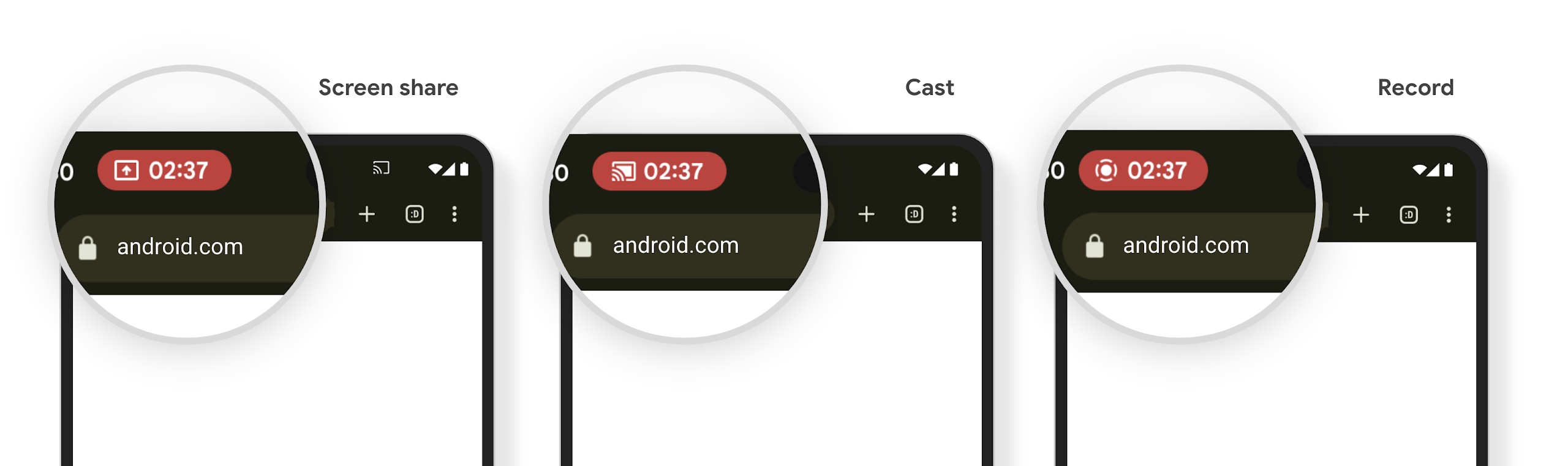
طرح رسانه ای می تواند اطلاعات خصوصی کاربر را در معرض نمایش بگذارد. یک تراشه نوار وضعیت برجسته و جدید، کاربران را از هرگونه نمایش صفحه نمایش در حال انجام آگاه می کند. کاربران میتوانند روی تراشه ضربه بزنند تا پخش، اشتراکگذاری یا ضبط صفحه را متوقف کنند. همچنین، برای تجربه کاربری شهودیتر، هر گونه نمایش صفحه نمایش در حال پیشرفت اکنون به طور خودکار با قفل شدن صفحه نمایش دستگاه متوقف میشود.
صفحه نمایشهای بزرگ و فاکتورهای شکل ظاهری
اندروید ۱۵ به برنامههای شما این پشتیبانی را میدهد تا از فرم فکتورهای اندروید، از جمله صفحه نمایشهای بزرگ، گوشیهای تاشو و تاشو، نهایت استفاده را ببرند.
بهبود چندوظیفگی روی صفحه نمایش بزرگ
اندروید 15 راه های بهتری را برای چندوظیفگی در دستگاه های صفحه نمایش بزرگ به کاربران ارائه می دهد. برای مثال، کاربران میتوانند ترکیبهای برنامههای تقسیمشده مورد علاقه خود را برای دسترسی سریع ذخیره کنند و نوار وظیفه را روی صفحه پین کنند تا به سرعت بین برنامهها جابجا شوند. این بدان معنی است که اطمینان از تطبیق بودن برنامه شما مهمتر از همیشه است.
Google I/O جلساتی در مورد ساخت برنامههای Android تطبیقی و Building UI با کتابخانه تطبیقی Material 3 دارد که میتواند به شما کمک کند، و اسناد ما بیشتر برای کمک به طراحی برای صفحههای بزرگ به شما کمک میکند.
پشتیبانی از صفحه نمایش کاور
برنامه شما میتواند ویژگیای را اعلام کند که Android 15 از آن استفاده میکند تا به Application یا Activity شما اجازه دهد روی صفحهنمایشهای کوچک روی جلد دستگاههای قابل انعطاف پشتیبانیشده ارائه شود. این صفحهها بسیار کوچک هستند و نمیتوان آنها را بهعنوان اهداف سازگار برای اجرای برنامههای Android در نظر گرفت، اما برنامه شما میتواند از آنها پشتیبانی کند و برنامه شما را در مکانهای بیشتری در دسترس قرار دهد.
اتصال
اندروید ۱۵ پلتفرم را بهروزرسانی میکند تا به برنامه شما امکان دسترسی به جدیدترین پیشرفتها در فناوریهای ارتباطی و بیسیم را بدهد.
پشتیبانی ماهوارهای
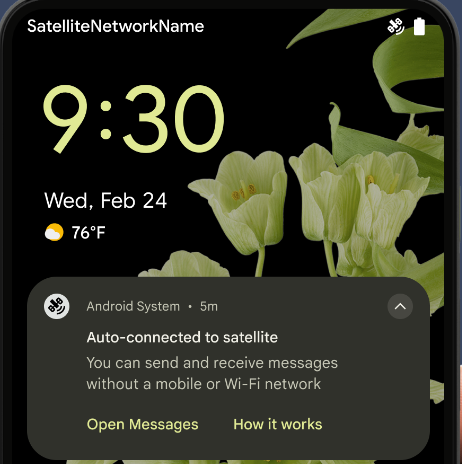
Android 15 به گسترش پشتیبانی پلت فرم برای اتصال ماهوارهای ادامه میدهد و شامل برخی از عناصر رابط کاربری برای اطمینان از تجربه کاربری ثابت در سراسر چشمانداز اتصال ماهوارهای است.
برنامهها میتوانند از ServiceState.isUsingNonTerrestrialNetwork() برای تشخیص اینکه یک دستگاه به یک ماهواره متصل است، استفاده کنند و به آنها آگاهی بیشتری نسبت به اینکه چرا خدمات شبکه کامل ممکن است در دسترس نباشد، میدهند. علاوه بر این، اندروید 15 از برنامه های SMS و MMS و همچنین برنامه های RCS از پیش بارگذاری شده برای استفاده از اتصال ماهواره ای برای ارسال و دریافت پیام پشتیبانی می کند.
تجربه روانتر NFC
Android 15 در تلاش است تا تجربه پرداخت یکپارچهتر و قابلاطمینانتر را ایجاد کند و در عین حال به پشتیبانی از اکوسیستم قدرتمند برنامه NFC اندروید ادامه دهد. در دستگاههای پشتیبانیشده، برنامهها میتوانند از NfcAdapter درخواست کنند تا وارد حالت مشاهده شود، جایی که دستگاه گوش میدهد اما به خوانندههای NFC پاسخ نمیدهد و اشیاء PollingFrame سرویس NFC برنامه را برای پردازش ارسال میکند. اشیاء PollingFrame را می توان برای احراز هویت قبل از اولین ارتباط با خواننده NFC استفاده کرد که در بسیاری از موارد امکان تراکنش با یک ضربه را فراهم می کند.
علاوه بر این، برنامهها میتوانند فیلتری را روی دستگاههای پشتیبانیشده ثبت کنند تا بتوانند از فعالیت حلقه نظرسنجی مطلع شوند، که امکان عملکرد روان با چندین برنامه کاربردی NFC آگاه را فراهم میکند.
نقش کیف پول
اندروید 15 نقش کیف پول را معرفی میکند که اجازه میدهد با برنامه کیف پول ترجیحی کاربر یکپارچهتر شود. این نقش جایگزین تنظیم پیشفرض پرداخت بدون تماس NFC میشود. کاربران می توانند با رفتن به تنظیمات > برنامه ها > برنامه های پیش فرض، دارنده نقش Wallet را مدیریت کنند.
نقش Wallet هنگام مسیریابی شیرهای NFC برای ایدزهای ثبت شده در دسته پرداخت استفاده می شود. ضربه ها همیشه به دارنده نقش Wallet می روند مگر اینکه برنامه دیگری که برای همان AID ثبت شده باشد در پیش زمینه اجرا شود.
این نقش همچنین برای تعیین محل قرار گرفتن کاشی دسترسی سریع کیف پول هنگام فعال شدن استفاده می شود. وقتی نقش روی «هیچکدام» تنظیم شود، کاشی دسترسی سریع در دسترس نیست و ضربههای NFC دسته پرداخت فقط به برنامه پیشزمینه تحویل داده میشود.
امنیت
اندروید ۱۵ به شما کمک میکند تا امنیت برنامه خود را افزایش دهید، از دادههای برنامه خود محافظت کنید و به کاربران شفافیت و کنترل بیشتری بر دادههایشان میدهد. برای اطلاعات بیشتر در مورد کارهایی که ما برای بهبود حفاظت از کاربر و محافظت از برنامه شما در برابر تهدیدات جدید انجام میدهیم، به گفتگوی «حفاظت از امنیت کاربر در اندروید» از Google I/O مراجعه کنید.
ادغام مدیریت اعتبارنامه با تکمیل خودکار
با شروع Android 15، توسعهدهندگان میتوانند نماهای خاصی مانند فیلدهای نام کاربری یا گذرواژه را با درخواستهای Credential Manager پیوند دهند ، که ارائه یک تجربه کاربری مناسب در طول فرآیند ورود به سیستم را آسانتر میکند. هنگامی که کاربر روی یکی از این نماها تمرکز می کند، درخواست مربوطه به Credential Manager ارسال می شود. اعتبارنامههای بهدستآمده در بین ارائهدهندگان جمعآوری میشوند و در رابطهای کاربری جایگزین تکمیل خودکار، مانند پیشنهادات درون خطی یا پیشنهادات کشویی نمایش داده میشوند. کتابخانه Jetpack androidx.credentials نقطه پایانی ترجیحی برای استفاده توسعه دهندگان است و به زودی برای بهبود بیشتر این ویژگی در اندروید 15 و بالاتر در دسترس خواهد بود.
ثبت نام و ورود با یک لمس را با درخواستهای بیومتریک ادغام کنید
Credential Manager اعلانهای بیومتریک را در فرآیندهای ایجاد اعتبار و ورود به سیستم ادغام میکند و نیاز ارائهدهندگان را برای مدیریت درخواستهای بیومتریک از بین میبرد. در نتیجه، ارائه دهندگان اعتبار فقط باید بر نتایج ایجاد و دریافت جریان ها، به همراه نتیجه جریان بیومتریک تمرکز کنند. این فرآیند ساده، فرآیند ایجاد و بازیابی اعتبار کارآمدتر و کارآمدتر را ایجاد می کند.
مدیریت کلید برای رمزگذاری سرتاسری
ما E2eeContactKeysManager را در اندروید 15 معرفی می کنیم که رمزگذاری سرتاسر (E2EE) را در برنامه های اندرویدی شما با ارائه یک API در سطح سیستم عامل برای ذخیره کلیدهای عمومی رمزنگاری تسهیل می کند.
E2eeContactKeysManager برای ادغام با برنامه مخاطبین پلتفرم طراحی شده است تا به کاربران راهی متمرکز برای مدیریت و تأیید کلیدهای عمومی مخاطبینشان بدهد.
بررسی مجوزها روی URIهای محتوا
اندروید 15 مجموعهای از APIها را معرفی میکند که بررسیهای مجوز را روی URI محتوا انجام میدهند:
-
Context.checkContentUriPermissionFull: این یک بررسی کامل مجوز در URIهای محتوا را انجام می دهد. - ویژگی مانیفست
ActivityrequireContentUriPermissionFromCaller: این مجوزهای مشخص شده را در URIهای محتوای ارائه شده در هنگام راه اندازی فعالیت اعمال می کند. - کلاس
ComponentCallerبرای تماس گیرندگانActivity: این نشان دهنده برنامه ای است که فعالیت را راه اندازی کرده است.
دسترسیپذیری
اندروید ۱۵ ویژگیهایی را اضافه میکند که دسترسی کاربران را بهبود میبخشد.
بریل بهتر
در Android 15، ما این امکان را برای TalkBack فراهم کردهایم که از نمایشگرهای بریل که از استاندارد HID از طریق USB و بلوتوث ایمن استفاده میکنند، پشتیبانی کند.
این استاندارد، دقیقاً مشابه استانداردی که توسط ماوس ها و صفحه کلیدها استفاده می شود، به اندروید کمک می کند تا در طول زمان از طیف وسیع تری از نمایشگرهای بریل پشتیبانی کند.
بینالمللیسازی
اندروید ۱۵ ویژگیها و قابلیتهایی را اضافه میکند که هنگام استفاده از دستگاه به زبانهای مختلف، تجربه کاربری را تکمیل میکنند.
فونت متغیر CJK
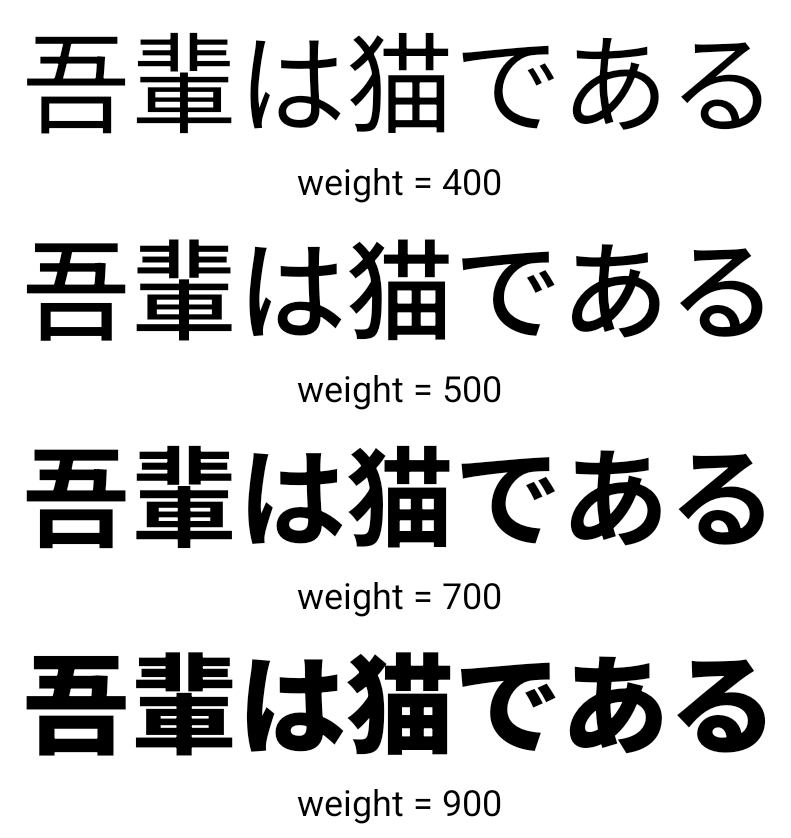
با شروع Android 15، فایل فونت برای زبان های چینی، ژاپنی و کره ای (CJK)، NotoSansCJK، اکنون یک فونت متغیر است. فونت های متغیر فرصت هایی را برای تایپوگرافی خلاقانه در زبان های CJK باز می کنند. طراحان میتوانند طیف وسیعتری از سبکها را بررسی کنند و طرحبندیهای بصری چشمگیری ایجاد کنند که قبلاً دستیابی به آنها دشوار یا غیرممکن بود.
توجیه بین کاراکتری
با شروع Android 15، متن را می توان با استفاده از فاصله حروف با استفاده از JUSTIFICATION_MODE_INTER_CHARACTER توجیه کرد. توجیه بین کلمه ای برای اولین بار در اندروید 8.0 (سطح API 26) معرفی شد و توجیه بین نویسه ها قابلیت های مشابهی را برای زبان هایی که از کاراکتر فضای خالی برای تقسیم بندی استفاده می کنند، مانند چینی، ژاپنی و غیره ارائه می دهد.
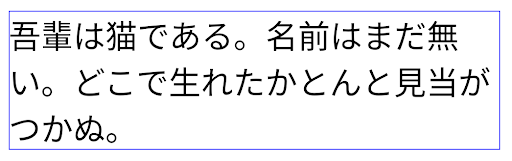
JUSTIFICATION_MODE_NONE . 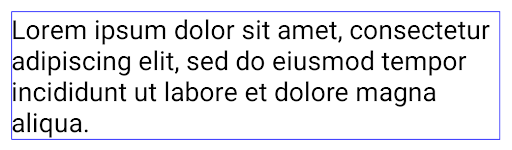
JUSTIFICATION_MODE_NONE . 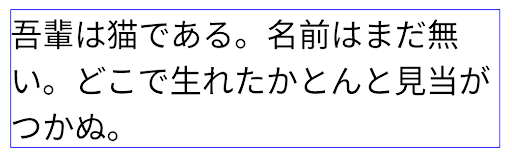
JUSTIFICATION_MODE_INTER_WORD . 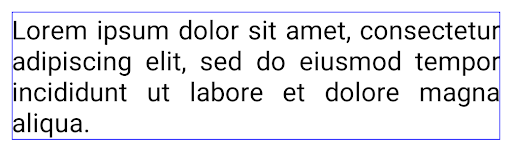
JUSTIFICATION_MODE_INTER_WORD . 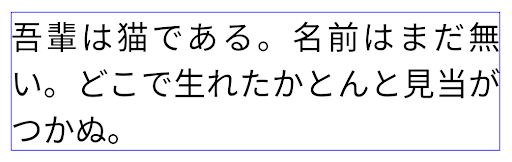
JUSTIFICATION_MODE_INTER_CHARACTER . 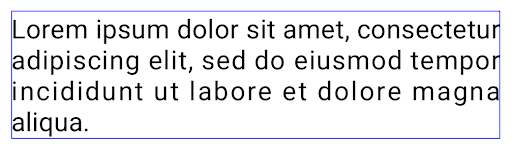
JUSTIFICATION_MODE_INTER_CHARACTER .پیکربندی خودکار شکستن خط
Android شروع به پشتیبانی از شکستن خطوط مبتنی بر عبارت برای ژاپنی و کره ای در Android 13 (سطح API 33) کرد. با این حال، در حالی که شکستن خطوط مبتنی بر عبارت، خوانایی خطوط کوتاه متن را بهبود می بخشد، برای خطوط طولانی متن خوب کار نمی کند. در Android 15، برنامهها میتوانند با استفاده از گزینه LINE_BREAK_WORD_STYLE_AUTO ، شکست خطهای مبتنی بر عبارت را فقط برای خطوط کوتاه متن اعمال کنند. این گزینه بهترین گزینه سبک کلمه را برای متن انتخاب می کند.
برای خطوط کوتاه متن، از شکستههای خط مبتنی بر عبارت استفاده میشود که مانند LINE_BREAK_WORD_STYLE_PHRASE عمل میکند، همانطور که در تصویر زیر نشان داده شده است:
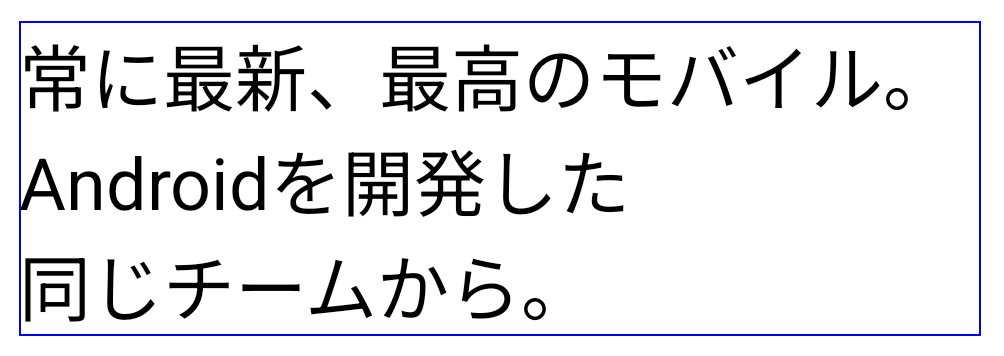
LINE_BREAK_WORD_STYLE_AUTO برای بهبود خوانایی متن، شکستگی های خطی مبتنی بر عبارت را اعمال می کند. این مانند اعمال LINE_BREAK_WORD_STYLE_PHRASE است. برای خطوط طولانیتر متن، LINE_BREAK_WORD_STYLE_AUTO از سبک کلمه بدون خطشکن استفاده میکند، مانند LINE_BREAK_WORD_STYLE_NONE ، همانطور که در تصویر زیر نشان داده شده است:

LINE_BREAK_WORD_STYLE_AUTO برای بهبود خوانایی متن، از سبک کلمه شکسته استفاده نمی کند. این مانند اعمال LINE_BREAK_WORD_STYLE_NONE است.فونت اضافی Hentaigana ژاپنی
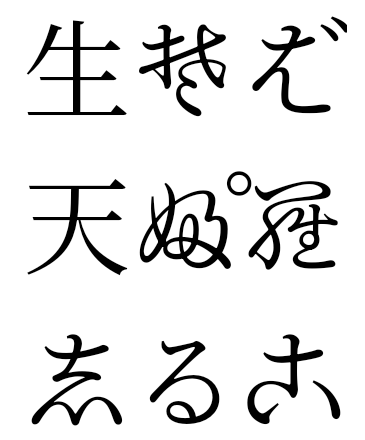
در اندروید 15، یک فایل فونت برای هیراگانای ژاپنی قدیمی (معروف به Hentaigana) به طور پیش فرض همراه است. اشکال منحصربهفرد شخصیتهای هنتایگانا میتواند استعدادی متمایز به آثار هنری یا طراحی اضافه کند و در عین حال به حفظ انتقال دقیق و درک اسناد باستانی ژاپنی کمک کند.
مخروط VideoLAN حق چاپ (ج) 1996-2010 VideoLAN. این لوگو یا نسخه اصلاح شده ممکن است توسط هر کسی برای ارجاع به پروژه VideoLAN یا هر محصولی که توسط تیم VideoLAN توسعه داده شده است استفاده یا اصلاح شود، اما نشان دهنده تایید پروژه نیست.
Vulkan و لوگوی Vulkan علائم تجاری ثبت شده شرکت Khronos Group هستند.
OpenGL یک علامت تجاری ثبت شده است و لوگوی OpenGL ES یک علامت تجاری Hewlett Packard Enterprise است که با مجوز Khronos استفاده می شود.