

پلتفرم اندروید ۱۵ شامل تغییرات رفتاری است که ممکن است بر برنامه شما تأثیر بگذارد. تغییرات رفتاری زیر برای همه برنامهها هنگام اجرا در اندروید ۱۵، صرف نظر از targetSdkVersion ، اعمال میشود. شما باید برنامه خود را آزمایش کنید و سپس در صورت لزوم، آن را برای پشتیبانی صحیح از این موارد، در صورت لزوم، اصلاح کنید.
حتماً لیست تغییرات رفتاری که فقط بر برنامههای اندروید ۱۵ تأثیر میگذارند را نیز بررسی کنید.
عملکرد اصلی
اندروید ۱۵ قابلیتهای اصلی مختلف سیستم اندروید را تغییر داده یا گسترش میدهد.
تغییرات در وضعیت متوقف شدن بسته
هدف از وضعیت بسته FLAG_STOPPED (که کاربران می توانند با فشار طولانی یک نماد برنامه و انتخاب "توقف اجباری" در ساخت های AOSP شرکت کنند) همیشه این بوده است که برنامه ها را در این حالت نگه دارد تا زمانی که کاربر به طور مستقیم برنامه را از این حالت خارج کند. راهاندازی برنامه یا تعامل غیرمستقیم با برنامه (از طریق اشتراکگذاری یا ویجت، انتخاب برنامه به عنوان تصویر زمینه زنده و غیره). در اندروید 15، رفتار سیستم را بهروزرسانی کردهایم تا با این رفتار مورد نظر هماهنگ شود. برنامه ها فقط باید از طریق اقدام مستقیم یا غیرمستقیم کاربر از حالت توقف حذف شوند.
برای پشتیبانی از رفتار در نظر گرفته شده، علاوه بر محدودیتهای موجود، هنگامی که برنامه در دستگاه دارای Android 15 به حالت توقف وارد میشود، سیستم علاوه بر محدودیتهای موجود، تمام اهداف معلق را نیز لغو میکند. هنگامی که اقدامات کاربر برنامه را از حالت توقف خارج میکند، پخش ACTION_BOOT_COMPLETED انجام میشود. به برنامه تحویل داده می شود و فرصتی برای ثبت مجدد هرگونه نیات معلق فراهم می کند.
میتوانید متد جدید ApplicationStartInfo.wasForceStopped() را فراخوانی کنید تا تأیید کنید که آیا برنامه در حالت توقف قرار گرفته است یا خیر.
پشتیبانی از صفحات با حجم ۱۶ کیلوبایت
از لحاظ تاریخی، اندروید تنها از اندازه صفحات حافظه 4 کیلوبایتی پشتیبانی میکند که عملکرد حافظه سیستم را برای میانگین کل حافظهای که دستگاههای اندرویدی معمولا دارند بهینه میکند. با شروع Android 15، AOSP از دستگاه هایی پشتیبانی می کند که برای استفاده از اندازه صفحه 16 کیلوبایت (دستگاه های 16 کیلوبایت) پیکربندی شده اند. اگر برنامه شما از کتابخانه های NDK استفاده می کند، چه به طور مستقیم یا غیرمستقیم از طریق یک SDK، باید برنامه خود را بازسازی کنید تا بتواند روی این دستگاه های 16 کیلوبایتی کار کند.
از آنجایی که سازندگان دستگاهها به ساخت دستگاههایی با حافظه فیزیکی (RAM) بیشتر ادامه میدهند، بسیاری از این دستگاهها از اندازه صفحه ۱۶ کیلوبایت (و در نهایت بیشتر) برای بهینهسازی عملکرد دستگاه استفاده میکنند. افزودن پشتیبانی برای دستگاههای اندازه صفحه 16 کیلوبایت، برنامه شما را قادر میسازد تا در این دستگاهها اجرا شود و به برنامه شما کمک میکند از بهبودهای عملکرد مرتبط بهره مند شود. بدون کامپایل مجدد، برنامه ها در نسخه های بعدی اندروید روی دستگاه های 16 کیلوبایتی کار نخواهند کرد.
برای کمک به اضافه کردن پشتیبانی از برنامه خود، راهنمایی هایی در مورد نحوه بررسی اینکه آیا برنامه شما تحت تأثیر قرار گرفته است ، نحوه بازسازی برنامه خود (در صورت وجود) و نحوه آزمایش برنامه خود در یک محیط 16 کیلوبایتی با استفاده از شبیه سازها (از جمله تصاویر سیستم Android 15 برای شبیه ساز Android) را ارائه کرده ایم.
مزایا و دستاوردهای عملکرد
دستگاه هایی که با اندازه صفحه 16 کیلوبایت پیکربندی شده اند به طور متوسط کمی از حافظه بیشتری استفاده می کنند، اما بهبودهای عملکردی مختلفی را برای سیستم و برنامه ها نیز به دست می آورند:
- زمانهای راهاندازی برنامه کمتر زمانی که سیستم تحت فشار حافظه است: به طور متوسط 3.16٪ کمتر، با بهبودهای قابل توجه (تا 30٪) برای برخی از برنامههایی که آزمایش کردیم.
- کاهش مصرف انرژی در حین راه اندازی برنامه: به طور متوسط 4.56٪ کاهش
- راهاندازی سریعتر دوربین: به طور متوسط 4.48٪ سریعتر استارتهای گرم و 6.60٪ سریعتر شروع سرد.
- بهبود زمان بوت سیستم: به طور متوسط 8٪ (تقریباً 950 میلی ثانیه) بهبود یافته است.
این پیشرفتها بر اساس آزمایش اولیه ما هستند و نتایج روی دستگاههای واقعی احتمالاً متفاوت خواهد بود. در ادامه آزمایش خود، تجزیه و تحلیل بیشتری از دستاوردهای بالقوه برای برنامه ها ارائه خواهیم کرد.
بررسی کنید که آیا برنامه شما تحت تأثیر قرار گرفته است
اگر برنامه شما از هر کد بومی استفاده می کند ، باید برنامه خود را با پشتیبانی از دستگاه های 16 کیلوبایتی بازسازی کنید . اگر مطمئن نیستید که برنامه شما از کد بومی استفاده میکند، میتوانید از APK Analyzer برای شناسایی وجود کد بومی استفاده کنید و سپس تراز بخشهای ELF را برای کتابخانههای مشترکی که پیدا کردید بررسی کنید . Android Studio همچنین ویژگی هایی را ارائه می دهد که به شما کمک می کند تا به طور خودکار مشکلات تراز را تشخیص دهید .
اگر برنامه شما فقط از کدهای نوشته شده به زبان برنامه نویسی جاوا یا کاتلین استفاده می کند که شامل همه کتابخانه ها یا SDK می شود، برنامه شما از قبل از دستگاه های 16 کیلوبایتی پشتیبانی می کند. با این وجود، توصیه می کنیم برنامه خود را در یک محیط 16 کیلوبایتی آزمایش کنید تا مطمئن شوید که هیچ رگرسیون غیرمنتظره ای در رفتار برنامه وجود ندارد.
تغییرات لازم برای پشتیبانی برخی از برنامهها از فضای خصوصی
فضای خصوصی یک ویژگی جدید در اندروید 15 است که به کاربران اجازه میدهد فضای جداگانهای را در دستگاه خود ایجاد کنند تا بتوانند برنامههای حساس را از چشمان کنجکاو دور نگه دارند، زیر یک لایه دیگر از احراز هویت. از آنجایی که برنامههای موجود در فضای خصوصی دید محدودی دارند، برخی از انواع برنامهها باید اقدامات بیشتری را انجام دهند تا بتوانند برنامههای موجود در فضای خصوصی کاربر را ببینند و با آنها تعامل داشته باشند.
همه برنامه ها
از آنجایی که برنامههای موجود در فضای خصوصی در یک نمایه کاربر مجزا مانند نمایههای کاری نگهداری میشوند، برنامهها نباید تصور کنند که هیچ نسخهای نصبشده از برنامهشان که در نمایه اصلی نیست، در نمایه کاری است. اگر برنامه شما دارای منطق مربوط به برنامه های نمایه کاری است که این فرض را ایجاد می کند، باید این منطق را تنظیم کنید.
اپلیکیشن های پزشکی
وقتی کاربر فضای خصوصی را قفل میکند، همه برنامههای موجود در فضای خصوصی متوقف میشوند و آن برنامهها نمیتوانند فعالیتهای پیشزمینه یا پسزمینه، از جمله نمایش اعلانها را انجام دهند. این رفتار ممکن است به شدت بر استفاده و عملکرد برنامه های پزشکی نصب شده در فضای خصوصی تأثیر بگذارد.
تجربه راهاندازی فضای خصوصی به کاربران هشدار میدهد که فضای خصوصی برای برنامههایی که نیاز به انجام فعالیتهای مهم پیشزمینه یا پسزمینه، مانند نمایش اعلانهای برنامههای پزشکی دارند، مناسب نیست. با این حال، برنامهها نمیتوانند تعیین کنند که آیا در فضای خصوصی مورد استفاده قرار میگیرند یا نه، بنابراین نمیتوانند هشداری را برای این مورد به کاربر نشان دهند.
به این دلایل، اگر یک برنامه پزشکی ایجاد میکنید، بررسی کنید که این ویژگی چگونه میتواند بر برنامه شما تأثیر بگذارد و اقدامات مناسب را انجام دهید - مانند اطلاع دادن به کاربران برای عدم نصب برنامه شما در فضای خصوصی - تا از ایجاد اختلال در قابلیتهای مهم برنامه جلوگیری کنید.
برنامه های راه اندازی
اگر یک برنامه راهانداز توسعه میدهید، قبل از اینکه برنامهها در فضای خصوصی قابل مشاهده باشند، باید کارهای زیر را انجام دهید:
- برنامه شما باید به عنوان برنامه راهانداز پیشفرض برای دستگاه اختصاص داده شود، یعنی دارای نقش
ROLE_HOME. - برنامه شما باید مجوز عادی
ACCESS_HIDDEN_PROFILESرا در فایل مانیفست برنامه شما اعلام کند.
برنامههای راهاندازی که مجوز ACCESS_HIDDEN_PROFILES را اعلام میکنند باید موارد استفاده از فضای خصوصی زیر را کنترل کنند:
- برنامه شما باید یک محفظه راهانداز جداگانه برای برنامههای نصب شده در فضای خصوصی داشته باشد. از متد
getLauncherUserInfo()برای تعیین نوع پروفایل کاربری استفاده کنید. - کاربر باید بتواند محفظه فضای خصوصی را پنهان و نشان دهد.
- کاربر باید بتواند محفظه فضای خصوصی را قفل و باز کند. از متد
requestQuietModeEnabled()برای قفل کردن (با عبورtrue) یا باز کردن (با عبورfalse) فضای خصوصی استفاده کنید. در حالی که قفل است، هیچ برنامهای در محفظه فضای خصوصی نباید از طریق مکانیسمهایی مانند جستجو قابل مشاهده یا کشف باشد. برنامه شما باید یک گیرنده برای پخشهای
ACTION_PROFILE_AVAILABLEوACTION_PROFILE_UNAVAILABLEثبت کند و در صورت تغییر وضعیت قفل یا بازشده محفظه فضای خصوصی، رابط کاربری را در برنامه شما بهروزرسانی کند. هر دوی این پخشها شاملEXTRA_USERهستند که برنامه شما میتواند از آن برای ارجاع به کاربر نمایه خصوصی استفاده کند.همچنین می توانید از متد
isQuietModeEnabled()برای بررسی اینکه آیا نمایه فضای خصوصی قفل شده است یا خیر استفاده کنید.
اپلیکیشن های اپ استور
فضای خصوصی شامل دکمه "نصب برنامه ها" است که قصد ضمنی نصب برنامه ها را در فضای خصوصی کاربر راه اندازی می کند. برای اینکه برنامه شما این هدف ضمنی را دریافت کند، یک <intent-filter> را در فایل مانیفست برنامه خود با <category> از CATEGORY_APP_MARKET اعلام کنید.
فونت ایموجی مبتنی بر PNG حذف شد
فایل فونت emoji قدیمی مبتنی بر PNG ( NotoColorEmojiLegacy.ttf ) حذف شده است و فقط فایل مبتنی بر برداری باقی می ماند. با شروع Android 13 (سطح API 33)، فایل فونت emoji مورد استفاده توسط رندر ایموجی سیستم از یک فایل مبتنی بر PNG به یک فایل مبتنی بر برداری تغییر کرد . این سیستم فایل فونت قدیمی را در اندروید 13 و 14 به دلایل سازگاری حفظ کرد، به طوری که برنامههایی با ارائهدهنده فونت خود میتوانند به استفاده از فایل فونت قدیمی تا زمانی که قادر به ارتقا باشند ادامه دهند.
برای بررسی اینکه آیا برنامه شما تحت تأثیر قرار گرفته است، کد برنامه خود را برای ارجاع به فایل NotoColorEmojiLegacy.ttf جستجو کنید.
میتوانید برنامه خود را به روشهای مختلفی تطبیق دهید:
- از API های پلتفرم برای رندر متن استفاده کنید. میتوانید متن را به یک
Canvasبا پشتوانه بیتمپ رندر کنید و در صورت لزوم از آن برای دریافت تصویر خام استفاده کنید. - پشتیبانی از فونت COLRv1 را به برنامه خود اضافه کنید. کتابخانه منبع باز FreeType از COLRv1 در نسخه 2.13.0 و بالاتر پشتیبانی می کند.
- بهعنوان آخرین راهحل، میتوانید فایل فونت emoji قدیمی (
NotoColorEmoji.ttf) را در APK خود قرار دهید، اگرچه در این صورت برنامه شما آخرین بهروزرسانیهای ایموجی را از دست خواهد داد. برای اطلاعات بیشتر، به صفحه پروژه Noto Emoji GitHub مراجعه کنید.
حداقل نسخه SDK هدف از ۲۳ به ۲۴ افزایش یافت.
اندروید 15 بر اساس تغییراتی است که در اندروید 14 ایجاد شده است و این امنیت را بیشتر گسترش می دهد. در اندروید 15، برنامه هایی با targetSdkVersion کمتر از 24 قابل نصب نیستند. نیاز به برنامهها برای مطابقت با سطوح API مدرن به تضمین امنیت و حریم خصوصی بهتر کمک میکند.
بدافزارها اغلب سطوح پایینتر API را هدف قرار میدهند تا از حفاظتهای امنیتی و حریم خصوصی که در نسخههای اندروید بالاتر معرفی شدهاند دور بزنند. برای مثال، برخی از برنامههای بدافزار از targetSdkVersion 22 استفاده میکنند تا در معرض مدل مجوز زمان اجرا قرار نگیرند که در سال 2015 توسط Android 6.0 Marshmallow (سطح API 23) معرفی شد. این تغییر اندروید 15، جلوگیری از بهبود امنیت و حریم خصوصی را برای بدافزارها دشوارتر می کند. تلاش برای نصب برنامهای که سطح API پایینتری را هدف قرار میدهد منجر به عدم موفقیت در نصب میشود و پیامی مانند مورد زیر در Logcat ظاهر میشود:
INSTALL_FAILED_DEPRECATED_SDK_VERSION: App package must target at least SDK version 24, but found 7
در دستگاههایی که به Android 15 ارتقا مییابند، هر برنامهای با targetSdkVersion کمتر از 24 نصب میشود.
اگر نیاز به آزمایش برنامه ای دارید که سطح API قدیمی را هدف قرار می دهد، از دستور ADB زیر استفاده کنید:
adb install --bypass-low-target-sdk-block FILENAME.apk
امنیت و حریم خصوصی
Android 15 اقدامات قوی را برای مبارزه با تقلب با رمز عبور یکبار مصرف (OTP) و محافظت از محتوای حساس کاربر، با تمرکز بر سختتر کردن سرویس شنونده اعلان و محافظتهای اشتراکگذاری صفحه نمایش، معرفی میکند. پیشرفتهای کلیدی شامل ویرایش OTPها از اعلانهای قابل دسترسی به برنامههای غیرقابل اعتماد، پنهان کردن اعلانها در حین اشتراکگذاری صفحه، و ایمن کردن فعالیتهای برنامه هنگام پست شدن OTP است. هدف این تغییرات حفظ محتوای حساس کاربر در برابر عوامل غیرمجاز است.
توسعه دهندگان برای اطمینان از سازگاری برنامه هایشان با تغییرات اندروید 15 باید از موارد زیر آگاه باشند:
ویرایش OTP
Android برنامههای غیرقابل اعتمادی که NotificationListenerService اجرا میکنند را از خواندن محتوای ویرایش نشده از اعلانهایی که در آن OTP شناسایی شده است، متوقف میکند. برنامههای مورد اعتماد مانند انجمنهای مدیریت دستگاه همراه از این محدودیتها مستثنی هستند.
حفاظت از اشتراک گذاری صفحه نمایش
- محتوای اعلان در طول جلسات اشتراکگذاری صفحه پنهان میشود تا حریم خصوصی کاربر حفظ شود. اگر برنامه
setPublicVersion()پیاده سازی کند، Android نسخه عمومی اعلان را نشان می دهد که به عنوان یک اعلان جایگزین در زمینه های ناامن عمل می کند. در غیر این صورت، محتوای اعلان بدون هیچ زمینه دیگری ویرایش می شود. - محتوای حساس مانند ورودی رمز عبور از بینندگان راه دور پنهان می شود تا از افشای اطلاعات حساس کاربر جلوگیری شود.
- فعالیتهای برنامههایی که در حین اشتراکگذاری صفحه نمایش، جایی که OTP شناسایی شده است، اعلان ارسال میکنند، پنهان میشوند. محتوای برنامه هنگام راه اندازی از نمایشگر راه دور پنهان می شود.
- علاوه بر شناسایی خودکار فیلدهای حساس اندروید، توسعهدهندگان میتوانند با استفاده از
setContentSensitivityکه در حین اشتراکگذاری صفحه نمایش از بینندگان راه دور پنهان میشود، بهطور دستی بخشهایی از برنامه خود را بهعنوان حساس علامتگذاری کنند. - توسعهدهندگان میتوانند گزینه غیرفعال کردن محافظتهای اشتراکگذاری صفحه را در زیر گزینههای توسعهدهنده تغییر دهند تا از محافظتهای اشتراکگذاری صفحه برای اهداف آزمایشی یا آزمایشی مستثنی شوند. ضبط کننده صفحه پیش فرض سیستم از این تغییرات مستثنی است، زیرا ضبط ها روی دستگاه باقی می مانند.
Android 15 اقدامات قوی را برای مبارزه با تقلب با رمز عبور یکبار مصرف (OTP) و محافظت از محتوای حساس کاربر، با تمرکز بر سختتر کردن سرویس شنونده اعلان و محافظتهای اشتراکگذاری صفحه نمایش، معرفی میکند. پیشرفتهای کلیدی شامل ویرایش OTPها از اعلانهای قابل دسترسی به برنامههای غیرقابل اعتماد، پنهان کردن اعلانها در حین اشتراکگذاری صفحه، و ایمن کردن فعالیتهای برنامه هنگام پست شدن OTP است. هدف این تغییرات حفظ محتوای حساس کاربر در برابر عوامل غیرمجاز است.
توسعه دهندگان برای اطمینان از سازگاری برنامه هایشان با تغییرات اندروید 15 باید از موارد زیر آگاه باشند:
ویرایش OTP
Android برنامههای غیرقابل اعتمادی که NotificationListenerService اجرا میکنند را از خواندن محتوای ویرایش نشده از اعلانهایی که در آن OTP شناسایی شده است، متوقف میکند. برنامههای مورد اعتماد مانند انجمنهای مدیریت دستگاه همراه از این محدودیتها مستثنی هستند.
حفاظت از اشتراک گذاری صفحه نمایش
- محتوای اعلان در طول جلسات اشتراکگذاری صفحه پنهان میشود تا حریم خصوصی کاربر حفظ شود. اگر برنامه
setPublicVersion()پیاده سازی کند، Android نسخه عمومی اعلان را نشان می دهد که به عنوان یک اعلان جایگزین در زمینه های ناامن عمل می کند. در غیر این صورت، محتوای اعلان بدون هیچ زمینه دیگری ویرایش می شود. - محتوای حساس مانند ورودی رمز عبور از بینندگان راه دور پنهان می شود تا از افشای اطلاعات حساس کاربر جلوگیری شود.
- فعالیتهای برنامههایی که در حین اشتراکگذاری صفحه نمایش، جایی که OTP شناسایی شده است، اعلان ارسال میکنند، پنهان میشوند. محتوای برنامه هنگام راه اندازی از نمایشگر راه دور پنهان می شود.
- علاوه بر شناسایی خودکار فیلدهای حساس اندروید، توسعهدهندگان میتوانند با استفاده از
setContentSensitivityکه در حین اشتراکگذاری صفحه نمایش از بینندگان راه دور پنهان میشود، بهطور دستی بخشهایی از برنامه خود را بهعنوان حساس علامتگذاری کنند. - توسعهدهندگان میتوانند گزینه غیرفعال کردن محافظتهای اشتراکگذاری صفحه را در زیر گزینههای توسعهدهنده تغییر دهند تا از محافظتهای اشتراکگذاری صفحه برای اهداف آزمایشی یا آزمایشی مستثنی شوند. ضبط کننده صفحه پیش فرض سیستم از این تغییرات مستثنی است، زیرا ضبط ها روی دستگاه باقی می مانند.
دوربین و رسانه
اندروید ۱۵ تغییرات زیر را در رفتار دوربین و رسانه برای همه برنامهها ایجاد میکند.
پخش مستقیم و آفلود صدا، آهنگهای صوتی مستقیم یا آفلود باز قبلی را در صورت رسیدن به محدودیت منابع، نامعتبر میکند.
قبل از Android 15، اگر برنامهای درخواست پخش مستقیم یا بیبارگیری صدا را در حالی که برنامه دیگری در حال پخش صدا بود و محدودیتهای منابع برآورده شده بود، میکرد، برنامه در باز کردن AudioTrack جدید شکست میخورد.
با شروع Android 15، زمانی که برنامهای درخواست پخش مستقیم یا تخلیه بار میکند و محدودیتهای منابع به دست میآید، سیستم هر شی AudioTrack را که در حال حاضر باز است که مانع از انجام درخواست آهنگ جدید میشود، باطل میکند.
(تراکهای صوتی مستقیم و بدون بار معمولاً برای پخش فرمتهای صوتی فشرده باز میشوند. موارد رایج برای پخش صدای مستقیم شامل پخش صدای کدگذاری شده از طریق HDMI به تلویزیون است. آهنگهای Offload معمولاً برای پخش صدای فشرده در دستگاه تلفن همراه با DSP سختافزاری استفاده میشوند. شتاب.)
تجربه کاربری و رابط کاربری سیستم
اندروید ۱۵ شامل تغییراتی است که برای ایجاد یک تجربه کاربری سازگارتر و شهودیتر در نظر گرفته شدهاند.
انیمیشنهای پیشبینیکنندهی بازگشت برای برنامههایی که این قابلیت را انتخاب کردهاند، فعال شده است.
با شروع اندروید 15، گزینه توسعه دهنده برای انیمیشن های پیش بینی کننده پشت حذف شده است. اکنون انیمیشنهای سیستمی مانند بازگشت به خانه، تکلیف متقابل و فعالیت متقابل برای برنامههایی ظاهر میشوند که به طور کامل یا در سطح فعالیت در ژست بازگشت پیشبینیکننده شرکت کردهاند . اگر برنامه شما تحت تأثیر قرار گرفته است، اقدامات زیر را انجام دهید:
- مطمئن شوید که برنامه شما به درستی منتقل شده است تا از ژست بازگشت پیش بینی کننده استفاده کنید.
- اطمینان حاصل کنید که انتقال قطعه شما با ناوبری پیشبینی کننده به عقب کار میکند.
- از انتقال انیمیشن و فریمورک دور شوید و به جای آن از انتقال انیماتور و اندرویدکس استفاده کنید.
- از پشتههایی که
FragmentManagerاز آنها اطلاعی ندارد، مهاجرت کنید. به جای آن از پشته های پشته ای استفاده کنید که توسطFragmentManagerیا مؤلفه Navigation مدیریت می شوند.
ابزارکها هنگام توقف اجباری برنامه توسط کاربر غیرفعال میشوند
اگر کاربر به زور برنامه ای را در دستگاهی که اندروید 15 دارد متوقف کند، سیستم به طور موقت تمام ویجت های برنامه را غیرفعال می کند. ویجت ها خاکستری هستند و کاربر نمی تواند با آنها تعامل داشته باشد. این به این دلیل است که با شروع اندروید 15، سیستم تمام اهداف معلق برنامه را با توقف اجباری برنامه لغو می کند.
دفعه بعد که کاربر برنامه را راه اندازی می کند، سیستم دوباره آن ویجت ها را فعال می کند.
برای اطلاعات بیشتر، به تغییرات وضعیت بسته بسته مراجعه کنید.
تراشه نوار وضعیت نمایش رسانه، کاربران را از اشتراکگذاری، پخش و ضبط صفحه نمایش مطلع میکند.
بهرهبرداریهای پیشبینی صفحه، دادههای خصوصی کاربر مانند اطلاعات مالی را در معرض دید کاربران قرار میدهند، زیرا کاربران متوجه نمیشوند که صفحه دستگاهشان به اشتراک گذاشته میشود.
برای برنامههایی که روی دستگاههای دارای Android 15 QPR1 یا بالاتر اجرا میشوند، یک تراشه نوار وضعیت که بزرگ و برجسته است، به کاربران هشدار میدهد که هر گونه نمایش صفحه نمایش در حال پیشرفت را نشان دهند. کاربران میتوانند روی تراشه ضربه بزنند تا از اشتراکگذاری، پخش یا ضبط صفحه نمایش خود جلوگیری کنند. همچنین، با قفل شدن صفحه نمایش دستگاه، نمایش صفحه به طور خودکار متوقف می شود.
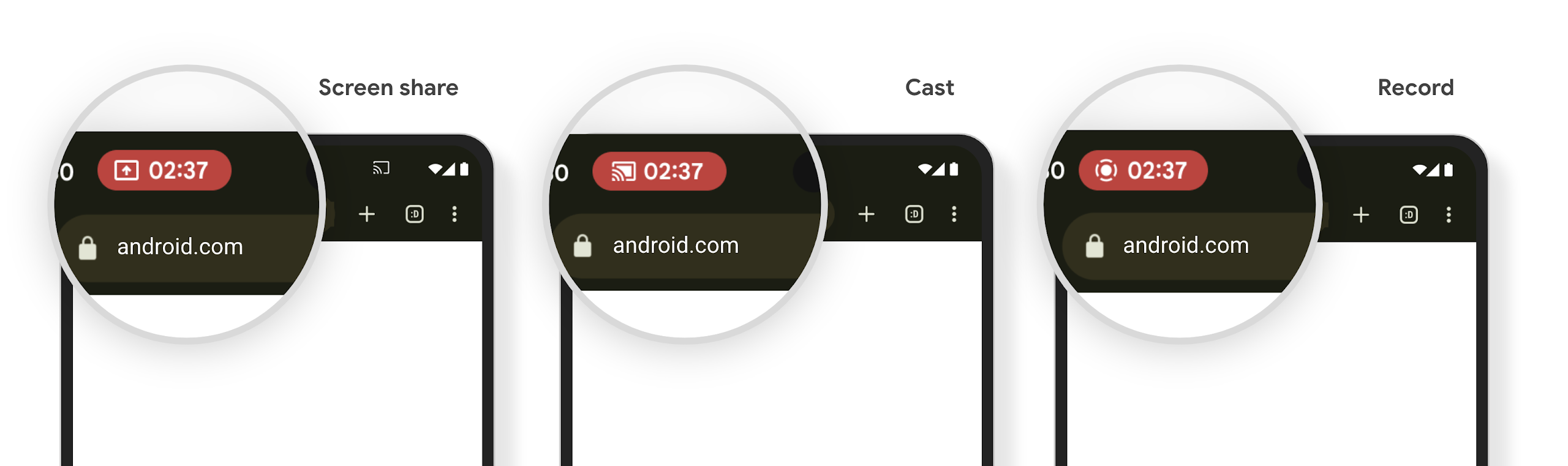
بررسی کنید که آیا برنامه شما تحت تأثیر قرار گرفته است
به طور پیشفرض، برنامه شما شامل تراشه نوار وضعیت است و بهطور خودکار نمایش صفحه نمایش را با فعال شدن صفحه قفل به حالت تعلیق در میآورد.
برای کسب اطلاعات بیشتر درباره نحوه آزمایش برنامه خود برای این موارد استفاده، به تراشه نوار وضعیت و توقف خودکار مراجعه کنید.
محدودیتهای دسترسی به شبکه در پسزمینه
در Android 15، برنامههایی که درخواست شبکه را خارج از چرخه حیات فرآیند معتبر شروع میکنند، استثنا دریافت میکنند. به طور معمول، یک UnknownHostException یا دیگر IOException مربوط به سوکت. درخواستهای شبکه که خارج از یک چرخه حیات معتبر اتفاق میافتند، معمولاً به این دلیل است که برنامهها ناآگاهانه درخواست شبکه را حتی پس از فعال نشدن برنامه ادامه میدهند.
برای کاهش این استثنا، اطمینان حاصل کنید که درخواستهای شبکه شما از چرخه حیات آگاه هستند و با خروج از چرخه حیات فرآیند معتبر با استفاده از مؤلفههای آگاه از چرخه حیات لغو میشوند. اگر مهم است که درخواست شبکه حتی زمانی که کاربر برنامه را ترک میکند اتفاق بیفتد، زمانبندی درخواست شبکه را با استفاده از WorkManager در نظر بگیرید یا با استفاده از خدمات پیشزمینه، یک کار قابل مشاهده توسط کاربر را ادامه دهید.
منسوخشدهها
با هر نسخه، ممکن است APIهای خاص اندروید منسوخ شوند یا نیاز به اصلاح داشته باشند تا تجربه بهتری برای توسعهدهندگان فراهم شود یا از قابلیتهای جدید پلتفرم پشتیبانی کنند. در این موارد، ما رسماً APIهای منسوخ را منسوخ میکنیم و توسعهدهندگان را به سمت APIهای جایگزین هدایت میکنیم تا به جای آنها استفاده کنند.
منسوخ شدن به این معنی است که ما پشتیبانی رسمی از APIها را پایان دادهایم، اما آنها همچنان برای توسعهدهندگان در دسترس خواهند بود. برای کسب اطلاعات بیشتر در مورد منسوخ شدنهای قابل توجه در این نسخه از اندروید، به صفحه منسوخ شدنها مراجعه کنید.