

كما هو الحال في الإصدارات السابقة، يتضمّن Android 15 تغييرات في السلوك قد تؤثر في تطبيقك. تنطبق تغييرات السلوك التالية حصريًا على التطبيقات التي تستهدف الإصدار 15 من نظام التشغيل Android أو الإصدارات الأحدث. إذا كان تطبيقك يستهدف الإصدار 15 من نظام التشغيل Android أو الإصدارات الأحدث، عليك تعديل تطبيقك ليتوافق مع هذه السلوكيات بشكل سليم، حيثما ينطبق ذلك.
احرص أيضًا على مراجعة قائمة التغييرات في السلوك التي تؤثر في جميع التطبيقات
التي تعمل على Android 15 بغض النظر عن targetSdkVersion لتطبيقك.
الوظيفة الأساسية
يعدّل نظام التشغيل Android 15 العديد من الإمكانات الأساسية لنظام Android أو يوسّع نطاقها.
التغييرات على الخدمات التي تعمل في المقدّمة
We are making the following changes to foreground services with Android 15.
- Data sync foreground service timeout behavior
- New media processing foreground service type
- Restrictions on
BOOT_COMPLETEDbroadcast receivers launching foreground services - Restrictions on starting foreground services while an app holds the
SYSTEM_ALERT_WINDOWpermission
Data sync foreground service timeout behavior
يقدّم Android 15 سلوكًا جديدًا للمهلة في dataSync للتطبيقات التي تستهدف Android 15 (المستوى 35 من واجهة برمجة التطبيقات) أو الإصدارات الأحدث. ينطبق هذا السلوك أيضًا على
نوع "mediaProcessing" الجديد للخدمة التي تعمل في المقدّمة.
يسمح النظام بتشغيل خدمات dataSync للتطبيق لمدة 6 ساعات إجمالاً
خلال 24 ساعة، وبعدها يستدعي النظام طريقة
Service.onTimeout(int, int) الخاصة بالخدمة
قيد التشغيل (المتوفرة في Android
15). في هذه المرحلة، تتوفّر للخدمة بضع ثوانٍ للاتصال بالرقم
Service.stopSelf(). عند استدعاء Service.onTimeout()، لن تعود
الخدمة خدمة تعمل في المقدّمة. إذا لم تُشغِّل الخدمة Service.stopSelf()، يُرسِل النظام استثناءً داخليًا. يتم تسجيل
الاستثناء في Logcat مع الرسالة التالية:
Fatal Exception: android.app.RemoteServiceException: "A foreground service of
type dataSync did not stop within its timeout: [component name]"
لتجنُّب المشاكل المتعلّقة بهذا التغيير في السلوك، يمكنك اتّخاذ إجراء أو أكثر من الإجراءات التالية:
- يجب أن تنفِّذ خدمتك طريقة
Service.onTimeout(int, int)الجديدة. عندما يتلقّى تطبيقك المكالمة المُعاد توجيهها، احرص على الاتصال بالرقمstopSelf()في غضون بضع ثوانٍ. (إذا لم توقف التطبيق على الفور، سيُنشئ النظام حالة تعطُّل.) - تأكَّد من أنّ خدمات
dataSyncفي تطبيقك لا تعمل لأكثر من إجمالي 6 ساعات في أي فترة 24 ساعة (ما لم يتفاعل المستخدم مع التطبيق، يؤدي ذلك إلى إعادة ضبط الموقّت). - لا تبدأ
dataSyncالخدمات التي تعمل في المقدّمة إلا نتيجةً لتفاعل مباشر من العميل، لأنّ تطبيقك يكون في المقدّمة عند بدء الخدمة، ويكون لدى خدمتك ست ساعات كاملة بعد انتقال التطبيق إلى الخلفية. - بدلاً من استخدام خدمة
dataSyncتعمل في المقدّمة، استخدِم واجهة برمجة تطبيقات بديلة.
إذا استمر تشغيل خدمات dataSync التي تعمل في المقدّمة في تطبيقك لمدة 6 ساعات في آخر
24 ساعة، لا يمكنك بدء خدمة أخرى تعمل في المقدّمة dataSync ما لم ينقل المستخدم
تطبيقك إلى المقدّمة (ما يؤدي إلى إعادة ضبط الموقّت). إذا حاولت
بدء dataSync خدمة أخرى تعمل في المقدّمة، يُرسِل النظام
ForegroundServiceStartNotAllowedException
رسالة خطأ مثل "انتهت المهلة الزمنية للخدمة التي تعمل في المقدّمة
من النوع dataSync".
الاختبار
لاختبار سلوك تطبيقك، يمكنك تفعيل مهلات مزامنة البيانات حتى إذا كان تطبيقك
لا يستهدف الإصدار 15 من نظام التشغيل Android (ما دام التطبيق يعمل على جهاز
Android 15). لتفعيل المهلات، شغِّل الأمر adb التالي:
adb shell am compat enable FGS_INTRODUCE_TIME_LIMITS your-package-name
يمكنك أيضًا تعديل فترة المهلة لتسهيل اختبار سلوك
تطبيقك عند بلوغ الحدّ الأقصى. لضبط فترة مهلة جديدة، شغِّل adb الأمر التالي:
adb shell device_config put activity_manager data_sync_fgs_timeout_duration duration-in-milliseconds
New media processing foreground service type
يقدّم Android 15 نوعًا جديدًا من الخدمات التي تعمل في المقدّمة، وهو mediaProcessing. هذا نوع الخدمة مناسب لعمليات مثل تحويل ترميز ملفات الوسائط. على سبيل المثال، قد ينزِّل تطبيق وسائط ملفًا صوتيًا ويحتاج إلى تحويله إلى
تنسيق مختلف قبل تشغيله. يمكنك استخدام mediaProcessing
خدمة تعمل في المقدّمة للتأكّد من استمرار الإحالة الناجحة حتى عندما يكون التطبيق في
الخلفية.
يسمح النظام بتشغيل خدمات mediaProcessing للتطبيق لمدة إجمالية تبلغ 6
ساعات خلال فترة 24 ساعة، وبعد ذلك يستدعي النظام أسلوب
Service.onTimeout(int, int) للخدمة التي تعمل (تم تقديمه في Android
15). في هذه المرحلة، تتوفّر للخدمة بضع ثوانٍ للاتصال بالرقم
Service.stopSelf(). إذا لم تُشغِّل الخدمة Service.stopSelf()، يُرسِل النظام استثناءً داخليًا. يتم تسجيل
الاستثناء في Logcat مع الرسالة التالية:
Fatal Exception: android.app.RemoteServiceException: "A foreground service of
type mediaProcessing did not stop within its timeout: [component name]"
لتجنُّب حدوث الاستثناء، يمكنك تنفيذ أحد الإجراءات التالية:
- اطلب من مقدّم الخدمة تنفيذ طريقة
Service.onTimeout(int, int)الجديدة. عندما يتلقّى تطبيقك معاودة الاتصال، احرص على الاتصال بـstopSelf()في غضون بضع ثوانٍ. (إذا لم توقف التطبيق على الفور، سيُنشئ النظام حالة تعطُّل.) - تأكَّد من أنّ خدمات
mediaProcessingفي تطبيقك لا تعمل لأكثر من إجمالي 6 ساعات في أي فترة 24 ساعة (ما لم يتفاعل المستخدم مع التطبيق، يؤدي ذلك إلى إعادة ضبط الموقّت). - لا تبدأ
mediaProcessingالخدمات التي تعمل في المقدّمة إلا نتيجةً لتفاعل مباشر من العميل، لأنّ تطبيقك يكون في المقدّمة عند بدء الخدمة، ويكون لدى خدمتك ست ساعات كاملة بعد انتقال التطبيق إلى الخلفية. - بدلاً من استخدام خدمة
mediaProcessingتعمل في المقدّمة، استخدِم واجهة برمجة تطبيقات بديلة، مثل WorkManager.
إذا استمر تشغيل خدمات mediaProcessing التي تعمل في المقدّمة في تطبيقك لمدة 6 ساعات في
آخر 24 ساعة، لا يمكنك بدء خدمة أخرى تعمل في المقدّمة mediaProcessing ما لم
ينقل المستخدم تطبيقك إلى المقدّمة (ما يؤدي إلى إعادة ضبط الموقّت). إذا حاولت بدء خدمة "mediaProcessing" أخرى تعمل في المقدّمة، سيعرض النظام
ForegroundServiceStartNotAllowedException
رسالة خطأ مثل "تم استنفاد المهلة الزمنية لنوع الخدمة التي تعمل في المقدّمة
mediaProcessing".
لمزيد من المعلومات عن نوع الخدمة mediaProcessing، يُرجى الاطّلاع على المقالة التغييرات التي طرأت على
أنواع الخدمات التي تعمل في المقدّمة لنظام التشغيل Android 15: معالجة الوسائط.
الاختبار
لاختبار سلوك تطبيقك، يمكنك تفعيل مهلات معالجة الوسائط حتى إذا كان
تطبيقك لا يستهدف الإصدار 15 من نظام التشغيل Android (ما دام التطبيق يعمل على
جهاز يعمل بالإصدار 15 من نظام التشغيل Android). لتفعيل مهلات الانتظار، شغِّل الأمر adb التالي:
adb shell am compat enable FGS_INTRODUCE_TIME_LIMITS your-package-name
يمكنك أيضًا تعديل فترة المهلة لتسهيل اختبار سلوك
تطبيقك عند بلوغ الحدّ الأقصى. لضبط فترة مهلة جديدة، شغِّل adb الأمر التالي:
adb shell device_config put activity_manager media_processing_fgs_timeout_duration duration-in-milliseconds
Restrictions on BOOT_COMPLETED broadcast receivers launching foreground services
There are new restrictions on BOOT_COMPLETED broadcast receivers launching
foreground services. BOOT_COMPLETED receivers are not allowed to launch the
following types of foreground services:
dataSynccameramediaPlaybackphoneCallmediaProjectionmicrophone(this restriction has been in place formicrophonesince Android 14)
If a BOOT_COMPLETED receiver tries to launch any of those types of foreground
services, the system throws ForegroundServiceStartNotAllowedException.
Testing
To test your app's behavior, you can enable these new restrictions even if your
app is not targeting Android 15 (as long as the app is running on an Android 15
device). Run the following adb command:
adb shell am compat enable FGS_BOOT_COMPLETED_RESTRICTIONS your-package-name
To send a BOOT_COMPLETED broadcast without restarting the device,
run the following adb command:
adb shell am broadcast -a android.intent.action.BOOT_COMPLETED your-package-name
Restrictions on starting foreground services while an app holds the SYSTEM_ALERT_WINDOW permission
Previously, if an app held the SYSTEM_ALERT_WINDOW permission, it could launch
a foreground service even if the app was currently in the background (as
discussed in exemptions from background start restrictions).
If an app targets Android 15, this exemption is now narrower. The app now needs
to have the SYSTEM_ALERT_WINDOW permission and also have a visible overlay
window. That is, the app needs to first launch a
TYPE_APPLICATION_OVERLAY window and the window
needs to be visible before you start a foreground service.
If your app attempts to start a foreground service from the background without
meeting these new requirements (and it does not have some other exemption), the
system throws ForegroundServiceStartNotAllowedException.
If your app declares the SYSTEM_ALERT_WINDOW permission
and launches foreground services from the background, it may be affected by this
change. If your app gets a ForegroundServiceStartNotAllowedException, check
your app's order of operations and make sure your app already has an active
overlay window before it attempts to start a foreground service from the
background. You can check if your overlay window is currently visible
by calling View.getWindowVisibility(), or you
can override View.onWindowVisibilityChanged()
to get notified whenever the visibility changes.
Testing
To test your app's behavior, you can enable these new restrictions even if your
app is not targeting Android 15 (as long as the app is running on an Android 15
device). To enable these new restrictions on starting foreground services
from the background, run the following adb command:
adb shell am compat enable FGS_SAW_RESTRICTIONS your-package-name
تغييرات على الأوقات التي يمكن فيها للتطبيقات تعديل الحالة العامة لوضع "عدم الإزعاج"
Apps that target Android 15 (API level 35) and higher can no longer change the
global state or policy of Do Not Disturb (DND) on a device (either by modifying
user settings, or turning off DND mode). Instead, apps must contribute an
AutomaticZenRule, which the system combines into a global policy with the
existing most-restrictive-policy-wins scheme. Calls to existing APIs that
previously affected global state (setInterruptionFilter,
setNotificationPolicy) result in the creation or update of an implicit
AutomaticZenRule, which is toggled on and off depending on the call-cycle of
those API calls.
Note that this change only affects observable behavior if the app is calling
setInterruptionFilter(INTERRUPTION_FILTER_ALL) and expects that call to
deactivate an AutomaticZenRule that was previously activated by their owners.
التغييرات في واجهة برمجة التطبيقات OpenJDK
يواصل نظام التشغيل Android 15 عملية تحديث المكتبات الأساسية في Android لتتوافق مع الميزات المتوفّرة في أحدث إصدارات OpenJDK LTS.
يمكن أن تؤثّر بعض هذه التغييرات في توافق التطبيقات التي تستهدف الإصدار 15 من نظام التشغيل Android (المستوى 35 لواجهة برمجة التطبيقات):
تغييرات على واجهات برمجة التطبيقات الخاصة بتنسيق السلاسل: أصبح التحقّق من صحة فهرس الوسيطات والعلامات والعرض والدقة أكثر صرامة عند استخدام واجهتَي برمجة التطبيقات
String.format()وFormatter.format()التاليتَين:String.format(String, Object[])String.format(Locale, String, Object[])Formatter.format(String, Object[])Formatter.format(Locale, String, Object[])
على سبيل المثال، يتم طرح الاستثناء التالي عند استخدام فهرس وسيطة بقيمة 0 (
%0في سلسلة التنسيق):IllegalFormatArgumentIndexException: Illegal format argument index = 0في هذه الحالة، يمكن حلّ المشكلة باستخدام فهرس وسيطة بقيمة 1 (
%1في سلسلة التنسيق).تغييرات على نوع المكوّن في
Arrays.asList(...).toArray(): عند استخدامArrays.asList(...).toArray()، يصبح نوع المكوّن في المصفوفة الناتجةObject، وليس نوع عناصر المصفوفة الأساسية. لذلك، يعرض الرمز التالي الخطأClassCastException:String[] elements = (String[]) Arrays.asList("one", "two").toArray();في هذه الحالة، للحفاظ على
Stringكنوع المكوّن في المصفوفة الناتجة، يمكنك استخدامCollection.toArray(Object[])بدلاً من ذلك:String[] elements = Arrays.asList("two", "one").toArray(new String[0]);تغييرات على طريقة التعامل مع رموز اللغات: عند استخدام واجهة برمجة التطبيقات
Locale، لن يتم بعد الآن تحويل رموز اللغات العبرية واليديشية والإندونيسية إلى أشكالها القديمة (العبرية:iw، واليديشية:ji، والإندونيسية:in). عند تحديد رمز اللغة لإحدى هذه اللغات، استخدِم الرموز من معيار ISO 639-1 بدلاً من ذلك (العبرية:he، واليديشية:yi، والإندونيسية:id).التغييرات على تسلسلات الأعداد الصحيحة العشوائية: بعد التغييرات التي تم إجراؤها في https://bugs.openjdk.org/browse/JDK-8301574، أصبحت طرق
Random.ints()التالية تعرض تسلسلاً مختلفًا من الأرقام عن طرقRandom.nextInt():بشكل عام، من المفترض ألا يؤدي هذا التغيير إلى حدوث مشاكل في التطبيق، ولكن يجب ألا يتوقّع الرمز البرمجي أن يتطابق التسلسل الذي تم إنشاؤه من خلال طرق
Random.ints()معRandom.nextInt().
يمكن أن تؤثّر واجهة برمجة التطبيقات الجديدة SequencedCollection في توافق تطبيقك
بعد تعديل compileSdk في إعدادات التصميم في تطبيقك لاستخدام
الإصدار 15 من نظام التشغيل Android (المستوى 35 لواجهة برمجة التطبيقات):
تعارض مع وظائف الإضافات
MutableList.removeFirst()وMutableList.removeLast()فيkotlin-stdlibيتم ربط النوع
Listفي Java بالنوعMutableListفي Kotlin. بما أنّه تم طرح واجهتَي برمجة التطبيقاتList.removeFirst()وList.removeLast()في نظام التشغيل Android 15 (مستوى واجهة برمجة التطبيقات 35)، يحلّل برنامج التجميع في Kotlin استدعاءات الدوال، مثلlist.removeFirst()، بشكل ثابت إلى واجهات برمجة التطبيقات الجديدةListبدلاً من دوال الإضافة فيkotlin-stdlib.إذا تمت إعادة تجميع تطبيق مع ضبط
compileSdkعلى35وضبطminSdkعلى34أو إصدار أقدم، ثم تم تشغيل التطبيق على الإصدار 14 من نظام التشغيل Android أو إصدار أقدم، سيتم عرض خطأ وقت التشغيل:java.lang.NoSuchMethodError: No virtual method removeFirst()Ljava/lang/Object; in class Ljava/util/ArrayList;يمكن لخيار
NewApilint الحالي في المكوّن الإضافي لنظام Gradle المتوافق مع Android رصد حالات الاستخدام الجديدة لواجهات برمجة التطبيقات../gradlew lintMainActivity.kt:41: Error: Call requires API level 35 (current min is 34): java.util.List#removeFirst [NewApi] list.removeFirst()لحلّ خطأ وقت التشغيل وأخطاء Lint، يمكن استبدال استدعاءات الدالتَين
removeFirst()وremoveLast()بالدالتَينremoveAt(0)وremoveAt(list.lastIndex)على التوالي في Kotlin. إذا كنت تستخدم الإصدار 2024.1.3 من استوديو Android Ladybug أو إصدارًا أحدث، سيتوفّر لك أيضًا خيار إصلاح سريع لهذه الأخطاء.ننصحك بإزالة
@SuppressLint("NewApi")وlintOptions { disable 'NewApi' }إذا تم إيقاف خيار Lint.التعارض مع طرق أخرى في Java
تمت إضافة طرق جديدة إلى الأنواع الحالية، مثل
ListوDeque. قد لا تكون هذه الطرق الجديدة متوافقة مع الطرق التي تحمل الاسم نفسه وأنواع الوسيطات في الواجهات والفئات الأخرى. في حال حدوث تعارض في توقيع الطريقة مع عدم التوافق، سيُخرج برنامج التجميعjavacخطأ في وقت الإصدار. على سبيل المثال:مثال على الخطأ 1:
javac MyList.javaMyList.java:135: error: removeLast() in MyList cannot implement removeLast() in List public void removeLast() { ^ return type void is not compatible with Object where E is a type-variable: E extends Object declared in interface Listمثال على الخطأ 2:
javac MyList.javaMyList.java:7: error: types Deque<Object> and List<Object> are incompatible; public class MyList implements List<Object>, Deque<Object> { both define reversed(), but with unrelated return types 1 errorمثال على الخطأ 3:
javac MyList.javaMyList.java:43: error: types List<E#1> and MyInterface<E#2> are incompatible; public static class MyList implements List<Object>, MyInterface<Object> { class MyList inherits unrelated defaults for getFirst() from types List and MyInterface where E#1,E#2 are type-variables: E#1 extends Object declared in interface List E#2 extends Object declared in interface MyInterface 1 errorلإصلاح أخطاء الإصدار هذه، يجب أن تتجاوز الفئة التي تنفّذ هذه الواجهات الطريقة بنوع إرجاع متوافق. مثلاً:
@Override
public Object getFirst() {
    return List.super.getFirst();
}
الأمان
يتضمّن نظام التشغيل Android 15 تغييرات تعزّز أمان النظام للمساعدة في حماية التطبيقات والمستخدمين من التطبيقات الضارة.
إصدارات TLS المحظورة
Android 15 restricts the usage of TLS versions 1.0 and 1.1. These versions had previously been deprecated in Android, but are now disallowed for apps targeting Android 15.
عمليات تشغيل الأنشطة الآمنة في الخلفية
يحمي Android 15 المستخدمين من التطبيقات الضارة ويمنحهم المزيد من التحكّم في أجهزتهم من خلال إضافة تغييرات تمنع التطبيقات الضارة التي تعمل في الخلفية من نقل تطبيقات أخرى إلى المقدّمة، وزيادة امتيازاتها، وإساءة استخدام تفاعل المستخدم. تم فرض قيود على عمليات تشغيل الأنشطة في الخلفية منذ الإصدار Android 10 (المستوى 29 من واجهة برمجة التطبيقات).
تغييرات أخرى
- تغيير إعدادات
PendingIntentلصنّاع المحتوى إلى حظر عمليات إطلاق نشاط الخلفية تلقائيًا ويساعد ذلك في منع التطبيقات من إنشاءPendingIntentعن طريق الخطأ، ما قد يؤدي إلى إساءة استخدامها من قِبل الجهات المسيئة. - لا تعرض تطبيقًا في المقدّمة ما لم يسمح بذلك مرسل
PendingIntent. يهدف هذا التغيير إلى منع التطبيقات الضارة من إساءة استخدام إمكانية بدء الأنشطة في الخلفية. بشكلٍ تلقائي، لا يُسمح للتطبيقات بنقل حزمة المهام إلى المقدّمة إلا إذا سمح المنشئ بأذونات تشغيل الأنشطة في الخلفية أو إذا كان لدى المرسِل أذونات تشغيل الأنشطة في الخلفية. - التحكّم في كيفية إنهاء النشاط الأعلى في حزمة المهام إذا أنهى النشاط العلوي مهمة، سيعود نظام التشغيل Android إلى المهمة التي كانت نشطة آخر مرة. بالإضافة إلى ذلك، إذا أنهى نشاط غير نشط في المقدّمة مهمته، سيعود نظام التشغيل Android إلى الشاشة الرئيسية، ولن يحظر إنهاء هذا النشاط.
- منع تشغيل أنشطة عشوائية من تطبيقات أخرى في مهمتك يمنع هذا التغيير التطبيقات الضارة من خداع المستخدمين من خلال إنشاء أنشطة تبدو وكأنّها من تطبيقات أخرى.
- حظر النوافذ غير المرئية من أن يتم أخذها في الاعتبار عند تشغيل التطبيقات في الخلفية يساعد ذلك في منع التطبيقات الضارة من إساءة استخدام عمليات تشغيل الأنشطة في الخلفية لعرض محتوى غير مرغوب فيه أو ضار للمستخدمين.
نوايا أكثر أمانًا
Android 15 introduces StrictMode for
intents.
In order to see detailed logs about Intent usage violations, use following
method:
Kotlin
fun onCreate() {
    StrictMode.setVmPolicy(VmPolicy.Builder()
        .detectUnsafeIntentLaunch()
        .build()
    )
}
Java
public void onCreate() {
    StrictMode.setVmPolicy(new VmPolicy.Builder()
            .detectUnsafeIntentLaunch()
            .build());
}
تجربة المستخدم وواجهة مستخدم النظام
يتضمّن Android 15 بعض التغييرات التي تهدف إلى توفير تجربة مستخدم أكثر اتساقًا وسهولة.
تغييرات في المساحة الداخلية للنافذة
هناك تغييران مرتبطان بزوايا النافذة في Android 15: يتم تطبيق التمويه من الحافة إلى الحافة تلقائيًا، وهناك أيضًا تغييرات في الإعدادات، مثل الإعدادات التلقائية لأشرطة النظام.
Edge-to-edge enforcement
Apps are edge-to-edge by default on devices running Android 15 if the app is targeting Android 15 (API level 35).
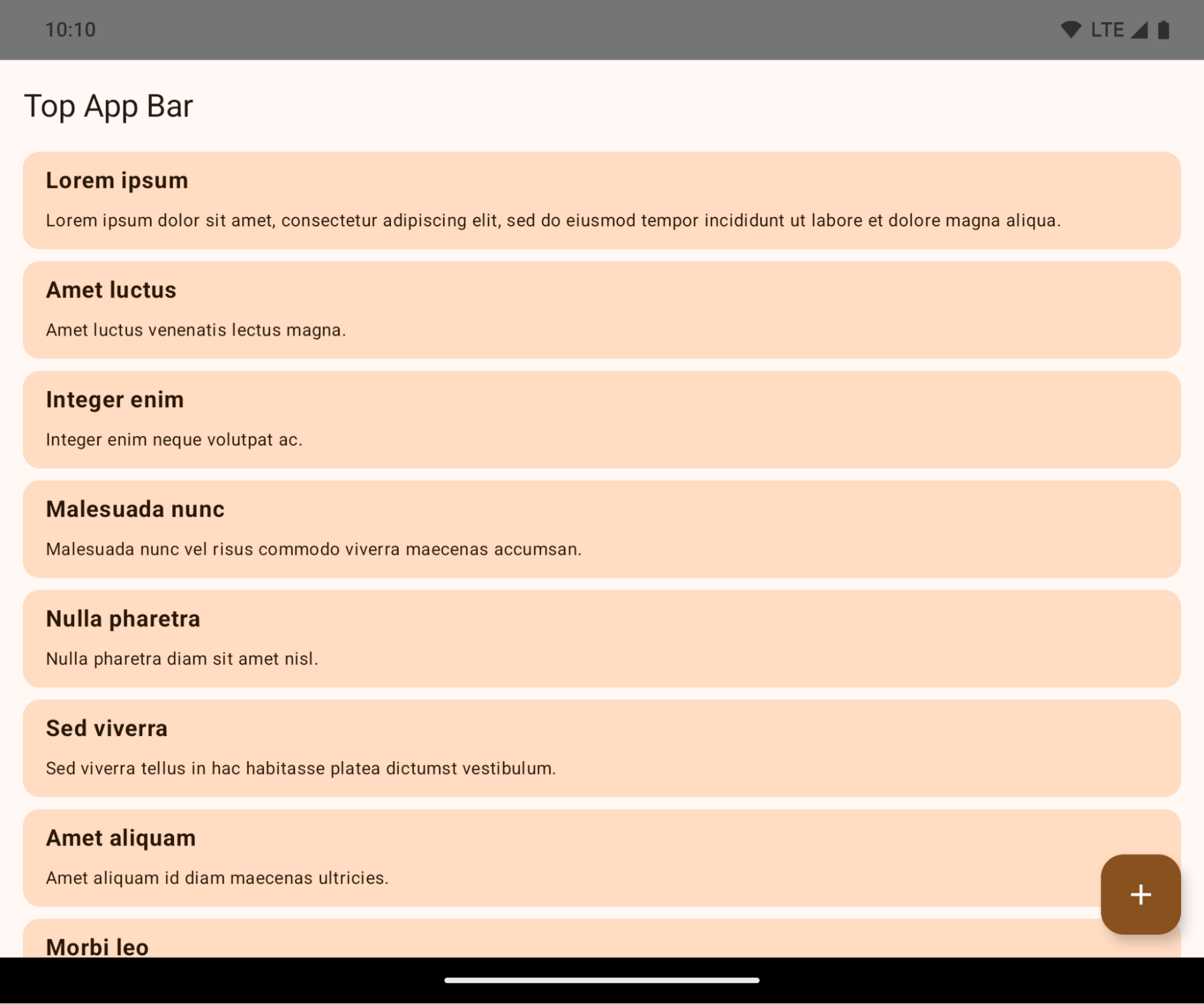
This is a breaking change that might negatively impact your app's UI. The changes affect the following UI areas:
- Gesture handle navigation bar
- Transparent by default.
- Bottom offset is disabled so content draws behind the system navigation bar unless insets are applied.
setNavigationBarColorandR.attr#navigationBarColorare deprecated and don't affect gesture navigation.setNavigationBarContrastEnforcedandR.attr#navigationBarContrastEnforcedcontinue to have no effect on gesture navigation.
- 3-button navigation
- Opacity set to 80% by default, with color possibly matching the window background.
- Bottom offset disabled so content draws behind the system navigation bar unless insets are applied.
setNavigationBarColorandR.attr#navigationBarColorare set to match the window background by default. The window background must be a color drawable for this default to apply. This API is deprecated but continues to affect 3-button navigation.setNavigationBarContrastEnforcedandR.attr#navigationBarContrastEnforcedis true by default, which adds an 80% opaque background across 3-button navigation.
- Status bar
- Transparent by default.
- The top offset is disabled so content draws behind the status bar unless insets are applied.
setStatusBarColorandR.attr#statusBarColorare deprecated and have no effect on Android 15.setStatusBarContrastEnforcedandR.attr#statusBarContrastEnforcedare deprecated but still have an effect on Android 15.
- Display cutout
layoutInDisplayCutoutModeof non-floating windows must beLAYOUT_IN_DISPLAY_CUTOUT_MODE_ALWAYS.SHORT_EDGES,NEVER, andDEFAULTare interpreted asALWAYSso that users don't see a black bar caused by the display cutout and appear edge-to-edge.
The following example shows an app before and after targeting Android 15 (API level 35), and before and after applying insets. This example is not comprehensive, this might appear differently on Android Auto.
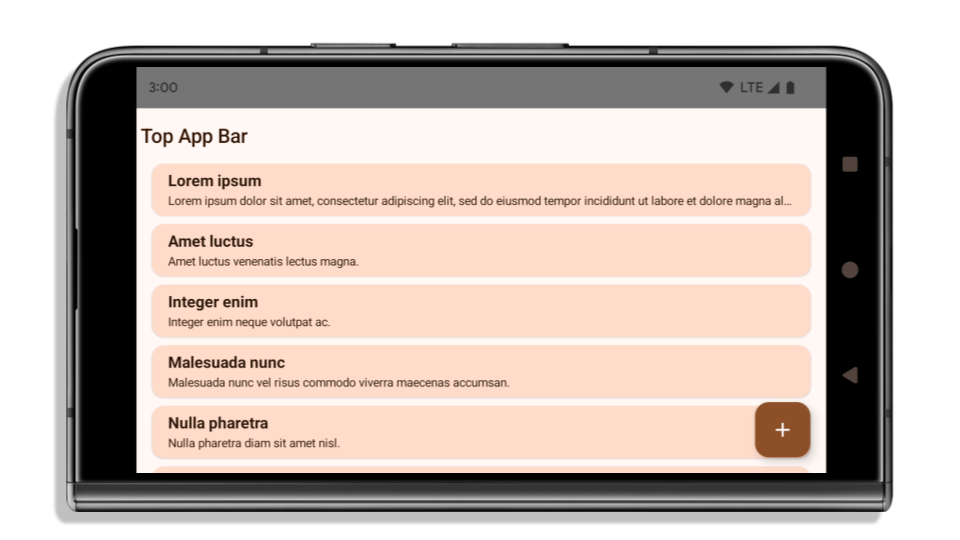
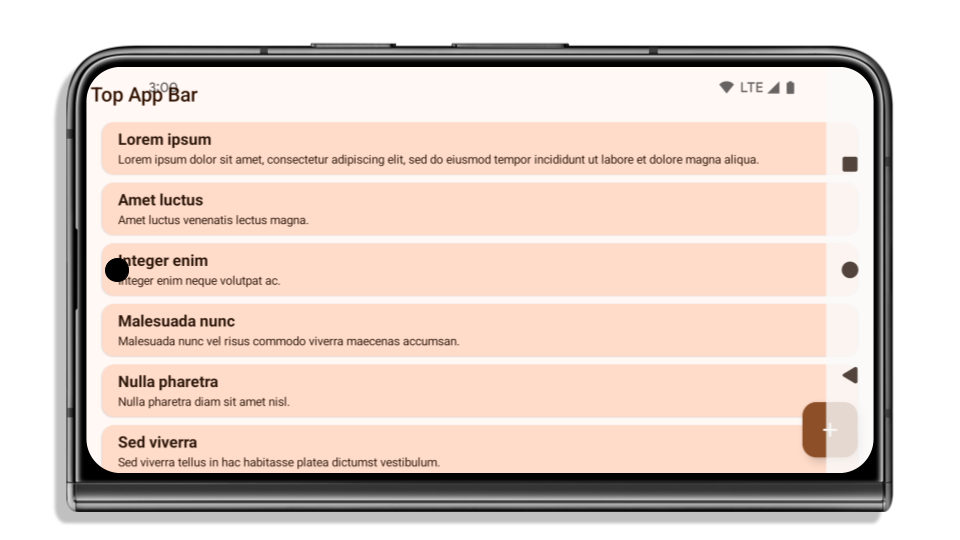
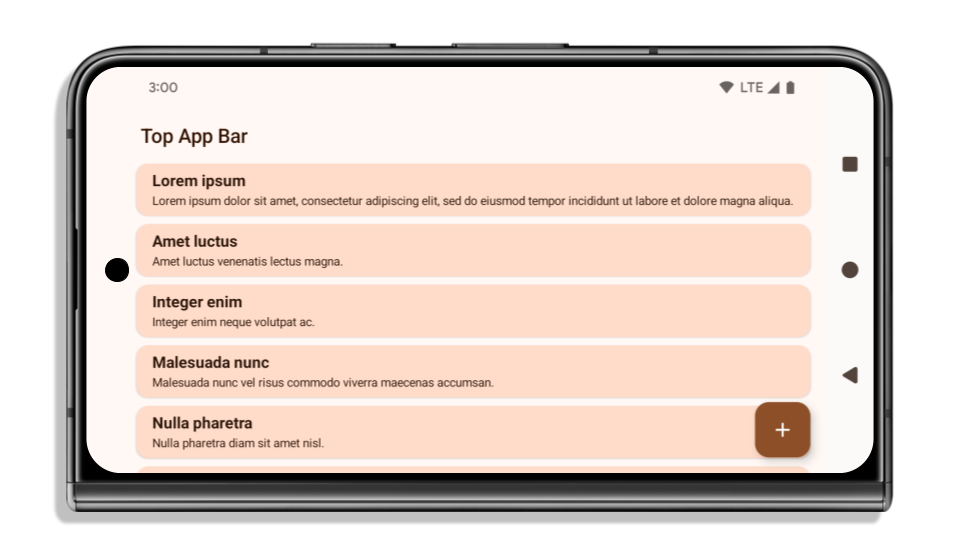
What to check if your app is already edge-to-edge
If your app is already edge-to-edge and applies insets, you are mostly unimpacted, except in the following scenarios. However, even if you think you aren't impacted, we recommend you test your app.
- You have a non-floating window, such as an
Activitythat usesSHORT_EDGES,NEVERorDEFAULTinstead ofLAYOUT_IN_DISPLAY_CUTOUT_MODE_ALWAYS. If your app crashes on launch, this might be due to your splashscreen. You can either upgrade the core splashscreen dependency to 1.2.0-alpha01 or later or setwindow.attributes.layoutInDisplayCutoutMode = WindowManager.LayoutInDisplayCutoutMode.always. - There might be lower-traffic screens with occluded UI. Verify these
less-visited screens don't have occluded UI. Lower-traffic screens include:
- Onboarding or sign-in screens
- Settings pages
What to check if your app is not already edge-to-edge
If your app is not already edge-to-edge, you are most likely impacted. In addition to the scenarios for apps that are already edge-to-edge, you should consider the following:
- If your app uses Material 3 Components (
androidx.compose.material3) in compose, such asTopAppBar,BottomAppBar, andNavigationBar, these components are likely not impacted because they automatically handle insets. - If your app is using Material 2 Components (
androidx.compose.material) in Compose, these components don't automatically handle insets. However, you can get access to the insets and apply them manually. In androidx.compose.material 1.6.0 and later, use thewindowInsetsparameter to apply the insets manually forBottomAppBar,TopAppBar,BottomNavigation, andNavigationRail. Likewise, use thecontentWindowInsetsparameter forScaffold. - If your app uses views and Material Components
(
com.google.android.material), most views-based Material Components such asBottomNavigationView,BottomAppBar,NavigationRailView, orNavigationView, handle insets and require no additional work. However, you need to addandroid:fitsSystemWindows="true"if usingAppBarLayout. - For custom composables, apply the insets manually as padding. If your
content is within a
Scaffold, you can consume insets using theScaffoldpadding values. Otherwise, apply padding using one of theWindowInsets. - If your app is using views and
BottomSheet,SideSheetor custom containers, apply padding usingViewCompat.setOnApplyWindowInsetsListener. ForRecyclerView, apply padding using this listener and also addclipToPadding="false".
What to check if your app must offer custom background protection
If your app must offer custom background protection to 3-button navigation or
the status bar, your app should place a composable or view behind the system bar
using WindowInsets.Type#tappableElement() to get the 3-button
navigation bar height or WindowInsets.Type#statusBars.
Additional edge-to-edge resources
See the Edge to Edge Views and Edge to Edge Compose guides for additional considerations on applying insets.
Deprecated APIs
The following APIs are deprecated but not disabled:
R.attr#enforceStatusBarContrastR.attr#navigationBarColor(for 3 button navigation, with 80% alpha)Window#isStatusBarContrastEnforcedWindow#setNavigationBarColor(for 3 button navigation, with 80% alpha)Window#setStatusBarContrastEnforced
The following APIs are deprecated and disabled:
R.attr#navigationBarColor(for gesture navigation)R.attr#navigationBarDividerColorR.attr#statusBarColorWindow#setDecorFitsSystemWindowsWindow#getNavigationBarColorWindow#getNavigationBarDividerColorWindow#getStatusBarColorWindow#setNavigationBarColor(for gesture navigation)Window#setNavigationBarDividerColorWindow#setStatusBarColor
Stable configuration
If your app targets Android 15 (API level 35) or higher, Configuration no
longer excludes the system bars. If you use the screen size in the
Configuration class for layout calculation, you should replace it with better
alternatives like an appropriate ViewGroup, WindowInsets, or
WindowMetricsCalculator depending on your need.
Configuration has been available since API 1. It is typically obtained from
Activity.onConfigurationChanged. It provides information like window density,
orientation, and sizes. One important characteristic about the window sizes
returned from Configuration is that it previously excluded the system bars.
The configuration size is typically used for resource selection, such as
/res/layout-h500dp, and this is still a valid use case. However, using it for
layout calculation has always been discouraged. If you do so, you should move
away from it now. You should replace the use of Configuration with something
more suitable depending on your use case.
If you use it to calculate the layout, use an appropriate ViewGroup, such as
CoordinatorLayout or ConstraintLayout. If you use it to determine the height
of the system navbar, use WindowInsets. If you want to know the current size
of your app window, use computeCurrentWindowMetrics.
The following list describes the fields affected by this change:
Configuration.screenWidthDpandscreenHeightDpsizes no longer exclude the system bars.Configuration.smallestScreenWidthDpis indirectly affected by changes toscreenWidthDpandscreenHeightDp.Configuration.orientationis indirectly affected by changes toscreenWidthDpandscreenHeightDpon close-to-square devices.Display.getSize(Point)is indirectly affected by the changes inConfiguration. This was deprecated beginning in API level 30.Display.getMetrics()has already worked like this since API level 33.
تكون القيمة التلقائية لسمة elegantTextHeight هي true
بالنسبة إلى التطبيقات التي تستهدف الإصدار 15 من نظام التشغيل Android (المستوى 35 لواجهة برمجة التطبيقات)، تصبح سمة
elegantTextHeight TextView
true تلقائيًا، ما يؤدي إلى استبدال الخط المكثّف المستخدَم تلقائيًا ببعض
النصوص البرمجية التي تحتوي على مقاييس عمودية كبيرة بخط يسهل قراءته.
تم طرح الخط المكثّف لمنع حدوث مشاكل في التنسيقات. يمنع نظام التشغيل Android 13 (المستوى 33 من واجهة برمجة التطبيقات) حدوث العديد من هذه المشاكل من خلال السماح لتنسيق النص بشدّ الارتفاع العمودي باستخدام السمة fallbackLineSpacing
.
في Android 15، سيظل الخط المكثّف متوفّرًا في النظام، لذا يمكن لتطبيقك ضبط
elegantTextHeight على false للحصول على السلوك نفسه كما في السابق، ولكن من المرجّح عدم توفّره في الإصدارات القادمة. لذلك، إذا كان تطبيقك متوافقًا مع
النصوص البرمجية التالية: العربية أو البورمية أو التايلاندية أو التاميل أو الغوجاراتية أو الكجراتية أو الماليالامية أو
الأوديا أو التيلوغوية أو اللاوية، يمكنك اختبار تطبيقك من خلال ضبط القيمة elegantTextHeight على true.

elegantTextHeight للتطبيقات التي تستهدف الإصدار 14 من نظام التشغيل Android (المستوى 34 لواجهة برمجة التطبيقات) والإصدارات الأقدم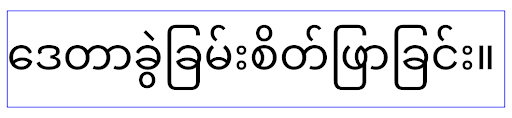
elegantTextHeight للتطبيقات التي تستهدف الإصدار Android 15تغيير عرض TextView لأشكال الحروف المعقّدة
In previous versions of Android, some cursive fonts or languages that have
complex shaping might draw the letters in the previous or next character's area.
In some cases, such letters were clipped at the beginning or ending position.
Starting in Android 15, a TextView allocates width for drawing enough space
for such letters and allows apps to request extra paddings to the left to
prevent clipping.
Because this change affects how a TextView decides the width, TextView
allocates more width by default if the app targets Android 15 (API level 35) or
higher. You can enable or disable this behavior by calling the
setUseBoundsForWidth API on TextView.
Because adding left padding might cause a misalignment for existing layouts, the
padding is not added by default even for apps that target Android 15 or higher.
However, you can add extra padding to preventing clipping by calling
setShiftDrawingOffsetForStartOverhang.
The following examples show how these changes can improve text layout for some fonts and languages.
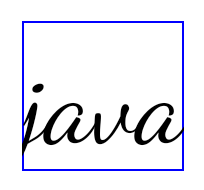
<TextView
    android:fontFamily="cursive"
    android:text="java" />
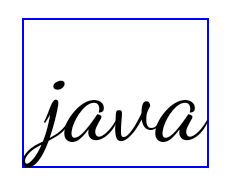
<TextView
    android:fontFamily="cursive"
    android:text="java"
    android:useBoundsForWidth="true"
    android:shiftDrawingOffsetForStartOverhang="true" />
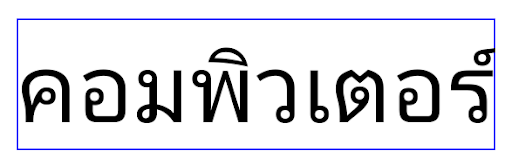
<TextView
    android:text="คอมพิวเตอร์" />
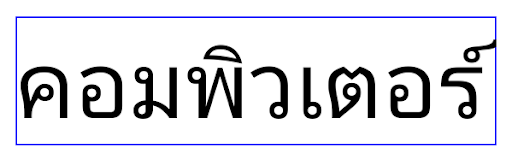
<TextView
    android:text="คอมพิวเตอร์"
    android:useBoundsForWidth="true"
    android:shiftDrawingOffsetForStartOverhang="true" />
ارتفاع السطر التلقائي المتوافق مع اللغة المحلية في EditText
In previous versions of Android, the text layout stretched the height of the
text to meet the line height of the font that matched the current locale. For
example, if the content was in Japanese, because the line height of the Japanese
font is slightly larger than the one of a Latin font, the height of the text
became slightly larger. However, despite these differences in line heights, the
EditText element was sized uniformly, regardless
of the locale being used, as illustrated in the following image:

EditText elements that
can contain text from English (en), Japanese (ja), and Burmese (my). The
height of the EditText is the same, even though these languages
have different line heights from each other.For apps targeting Android 15 (API level 35), a minimum line height is now
reserved for EditText to match the reference font for the specified Locale, as
shown in the following image:

EditText elements that
can contain text from English (en), Japanese (ja), and Burmese (my). The
height of the EditText now includes space to accommodate the
default line height for these languages' fonts.If needed, your app can restore the previous behavior by specifying the
useLocalePreferredLineHeightForMinimum attribute
to false, and your app can set custom minimum vertical metrics using the
setMinimumFontMetrics API in Kotlin and Java.
الكاميرا والوسائط
يُجري الإصدار 15 من نظام التشغيل Android التغييرات التالية على سلوك الكاميرا والوسائط في التطبيقات التي تستهدف الإصدار 15 من نظام التشغيل Android أو الإصدارات الأحدث.
القيود المفروضة على طلب أولويّة الصوت
Apps that target Android 15 (API level 35) must be the top app or running a
foreground service in order to request audio focus. If an app
attempts to request focus when it does not meet one of these requirements, the
call returns AUDIOFOCUS_REQUEST_FAILED.
You can learn more about audio focus at Manage audio focus.
تعديل القيود المفروضة على حِزم تطوير البرامج (SDK) غير التابعة لجهات خارجية
Android 15 includes updated lists of restricted non-SDK interfaces based on collaboration with Android developers and the latest internal testing. Whenever possible, we make sure that public alternatives are available before we restrict non-SDK interfaces.
If your app does not target Android 15, some of these changes might not immediately affect you. However, while it's possible for your app to access some non-SDK interfaces depending on your app's target API level, using any non-SDK method or field always carries a high risk of breaking your app.
If you are unsure if your app uses non-SDK interfaces, you can test your app to find out. If your app relies on non-SDK interfaces, you should begin planning a migration to SDK alternatives. Nevertheless, we understand that some apps have valid use cases for using non-SDK interfaces. If you can't find an alternative to using a non-SDK interface for a feature in your app, you should request a new public API.
To learn more about the changes in this release of Android, see Updates to non-SDK interface restrictions in Android 15. To learn more about non-SDK interfaces generally, see Restrictions on non-SDK interfaces.