

Android 14 memperkenalkan fitur dan API baru yang hebat untuk para developer. Bagian berikut membantu Anda mempelajari fitur-fitur yang tersedia untuk aplikasi Anda, serta mulai menggunakan API yang terkait.
Untuk melihat daftar mendetail tentang API yang ditambahkan, diubah, dan dihapus, baca laporan perbedaan API. Untuk mengetahui detail tentang API yang ditambahkan, buka referensi API Android — untuk Android 14, cari API yang ditambahkan di level API 34. Untuk mempelajari area tempat perubahan platform dapat memengaruhi aplikasi Anda, pastikan untuk memeriksa perubahan perilaku Android 14 untuk aplikasi yang menargetkan Android 14 dan untuk semua aplikasi.
Internasionalisasi
Preferensi bahasa per aplikasi
Android 14 memperluas fitur bahasa per aplikasi yang diperkenalkan di Android 13 (API level 33) dengan kemampuan tambahan berikut:
Otomatis membuat
localeConfigaplikasi: Mulai dari Android Studio Giraffe Canary 7 dan AGP 8.1.0-alpha07, Anda dapat mengonfigurasi aplikasi untuk mendukung preferensi bahasa per aplikasi secara otomatis. Berdasarkan resource project, plugin Android Gradle menghasilkan fileLocaleConfigdan menambahkan referensi ke file tersebut dalam file manifes akhir, sehingga Anda tidak perlu lagi membuat atau memperbarui file secara manual. AGP menggunakan resource dalam folderresmodul aplikasi Anda dan dependensi modul library apa pun untuk menentukan lokalitas yang akan disertakan dalam fileLocaleConfig.Update dinamis untuk
localeConfigaplikasi: Gunakan metodesetOverrideLocaleConfig()dangetOverrideLocaleConfig()diLocaleManageruntuk memperbarui secara dinamis daftar bahasa yang didukung aplikasi Anda di setelan sistem perangkat. Gunakan fleksibilitas ini untuk menyesuaikan daftar bahasa yang didukung per region, menjalankan eksperimen A/B, atau memberikan daftar lokalitas yang diupdate jika aplikasi Anda menggunakan push sisi server untuk pelokalan.Visibilitas bahasa aplikasi untuk editor metode input (IME): IME dapat menggunakan metode
getApplicationLocales()untuk memeriksa bahasa aplikasi saat ini dan mencocokkan bahasa IME dengan bahasa tersebut.
Grammatical Inflection API
Tiga miliar orang menggunakan bahasa bergender: bahasa yang kategori gramatikalnya—seperti kata benda, kata kerja, kata sifat, dan preposisi—diterapkan dengan gender orang dan objek yang Anda ajak bicara atau Anda bicarakan. Secara tradisional, banyak bahasa bergender menggunakan gender gramatikal maskulin sebagai gender default atau generik.
Menjangkau pengguna dalam gender gramatikal yang salah, seperti menyapa perempuan dengan gender gramatikal yang maskulin, dapat memberi dampak negatif pada performa dan sikap mereka. Sebaliknya, UI dengan bahasa yang mencerminkan gender gramatikal pengguna dengan benar dapat meningkatkan interaksi pengguna dan memberikan pengalaman pengguna yang lebih personal dan terdengar alami.
Guna membantu Anda mem-build UI yang berorientasi pengguna untuk bahasa-bahasa bergender, Android 14 memperkenalkan Grammatical Inflection API, yang memungkinkan Anda menambahkan dukungan untuk gender gramatikal tanpa perlu memfaktorkan ulang aplikasi.
Preferensi regional
Regional preferences enable users to personalize temperature units, the first day of the week, and numbering systems. A European living in the United States might prefer temperature units to be in Celsius rather than Fahrenheit and for apps to treat Monday as the beginning of the week instead of the US default of Sunday.
New Android Settings menus for these preferences provide users with a
discoverable and centralized location to change app preferences. These
preferences also persist through backup and restore. Several APIs and
intents—such as
getTemperatureUnit
and
getFirstDayOfWeek—
grant your app read access to user preferences, so your app can adjust how it
displays information. You can also register a
BroadcastReceiver on
ACTION_LOCALE_CHANGED
to handle locale configuration changes when regional preferences change.
To find these settings, open the Settings app and navigate to System > Languages & input > Regional preferences.


Aksesibilitas
Penskalaan font non-linear ke 200%
Mulai Android 14, sistem mendukung penskalaan font hingga 200%, yang memberikan opsi aksesibilitas tambahan kepada pengguna.
Agar elemen teks besar di layar tidak diskalakan terlalu besar, sistem akan menerapkan kurva penskalaan non-linear. Strategi penskalaan ini berarti teks besar tidak diskalakan pada kecepatan yang sama dengan teks yang lebih kecil. Penskalaan font non-linear membantu mempertahankan hierarki proporsional antara elemen dengan ukuran yang berbeda, sekaligus memitigasi masalah dengan penskalaan teks linear pada derajat yang tinggi (seperti teks terpotong atau teks yang menjadi lebih sulit dibaca karena ukuran layar yang sangat besar).
Menguji aplikasi Anda dengan penskalaan font nonlinear

Jika Anda sudah menggunakan unit piksel skalabel (sp) untuk menentukan ukuran teks, opsi tambahan dan peningkatan penskalaan ini akan diterapkan secara otomatis ke teks di aplikasi Anda. Namun, Anda tetap harus melakukan pengujian UI dengan ukuran font maksimum diaktifkan (200%) untuk memastikan aplikasi Anda menerapkan ukuran font dengan benar dan dapat mengakomodasi ukuran font yang lebih besar tanpa memengaruhi kegunaan.
Untuk mengaktifkan ukuran font 200%, ikuti langkah-langkah berikut:
- Buka aplikasi Settings dan buka Accessibility > Display size and text.
- Untuk opsi Font size, ketuk ikon plus (+) hingga setelan ukuran font maksimum diaktifkan, seperti yang ditunjukkan dalam gambar yang menyertai bagian ini.
Menggunakan satuan piksel yang diskalakan (sp) untuk ukuran teks
Ingatlah untuk selalu menentukan ukuran teks dalam unit sp. Saat aplikasi Anda menggunakan unit sp, Android dapat menerapkan ukuran teks pilihan pengguna dan menskalakannya dengan benar.
Jangan gunakan unit sp untuk padding atau tentukan tinggi tampilan dengan asumsi padding implisit: dengan penskalaan font non-linear, dimensi sp mungkin tidak proporsional, sehingga 4sp + 20sp mungkin tidak sama dengan 24sp.
Mengonversi satuan piksel yang diskalakan (sp)
Gunakan TypedValue.applyDimension() untuk mengonversi dari unit sp
ke piksel, dan gunakan TypedValue.deriveDimension() untuk
mengonversi piksel ke sp. Metode ini menerapkan kurva penskalaan
non-linear yang benar secara otomatis.
Hindari persamaan hardcode menggunakan
Configuration.fontScale atau
DisplayMetrics.scaledDensity. Karena penskalaan font bersifat non-linear, kolom scaledDensity tidak lagi akurat. Kolom fontScale
hanya boleh digunakan untuk tujuan informasi karena font tidak lagi
disesuaikan dengan satu nilai skalar.
Menggunakan satuan sp untuk lineHeight
Selalu tentukan android:lineHeight menggunakan unit sp, bukan dp, sehingga tinggi baris diskalakan bersama dengan teks Anda. Jika tidak, jika teks Anda
adalah sp, tetapi lineHeight Anda dalam dp atau px, teks tidak akan diskalakan dan terlihat sempit.
TextView otomatis mengoreksi lineHeight sehingga proporsi yang Anda inginkan tetap dipertahankan, tetapi hanya jika textSize dan lineHeight ditentukan dalam unit sp.
Kamera dan media
Ultra HDR untuk gambar

Android 14 adds support for High Dynamic Range (HDR) images that retain more of the information from the sensor when taking a photo, which enables vibrant colors and greater contrast. Android uses the Ultra HDR format, which is fully backward compatible with JPEG images, allowing apps to seamlessly interoperate with HDR images, displaying them in Standard Dynamic Range (SDR) as needed.
Rendering these images in the UI in HDR is done automatically by the framework
when your app opts in to using HDR UI for its Activity Window, either through a
manifest entry or at runtime by calling
Window.setColorMode(). You can also capture compressed Ultra
HDR still images on supported devices. With more colors recovered
from the sensor, editing in post can be more flexible. The
Gainmap associated with Ultra HDR images can be used to render
them using OpenGL or Vulkan.
Zoom, Fokus, Postview, dan lainnya di ekstensi kamera
Android 14 upgrades and improves camera extensions, allowing apps to handle longer processing times, which enables improved images using compute-intensive algorithms like low-light photography on supported devices. These features give users an even more robust experience when using camera extension capabilities. Examples of these improvements include:
- Dynamic still capture processing latency estimation provides much more
accurate still capture latency estimates based on the current scene and
environment conditions. Call
CameraExtensionSession.getRealtimeStillCaptureLatency()to get aStillCaptureLatencyobject that has two latency estimation methods. ThegetCaptureLatency()method returns the estimated latency betweenonCaptureStartedandonCaptureProcessStarted(), and thegetProcessingLatency()method returns the estimated latency betweenonCaptureProcessStarted()and the final processed frame being available. - Support for capture progress callbacks so that apps can display the current
progress of long-running, still-capture processing operations. You can check
if this feature is available with
CameraExtensionCharacteristics.isCaptureProcessProgressAvailable, and if it is, you implement theonCaptureProcessProgressed()callback, which has the progress (from 0 to 100) passed in as a parameter. Extension specific metadata, such as
CaptureRequest.EXTENSION_STRENGTHfor dialing in the amount of an extension effect, such as the amount of background blur withEXTENSION_BOKEH.Postview Feature for Still Capture in camera extensions, which provides a less-processed image more quickly than the final image. If an extension has increased processing latency, a postview image could be provided as a placeholder to improve UX and switched out later for the final image. You can check if this feature is available with
CameraExtensionCharacteristics.isPostviewAvailable. Then you can pass anOutputConfigurationtoExtensionSessionConfiguration.setPostviewOutputConfiguration.Support for
SurfaceViewallowing for a more optimized and power-efficient preview render path.Support for tap to focus and zoom during extension usage.
Zoom dalam sensor
When REQUEST_AVAILABLE_CAPABILITIES_STREAM_USE_CASE in
CameraCharacteristics contains
SCALER_AVAILABLE_STREAM_USE_CASES_CROPPED_RAW, your app
can use advanced sensor capabilities to give a cropped RAW stream the same
pixels as the full field of view by using a CaptureRequest
with a RAW target that has stream use case set to
CameraMetadata.SCALER_AVAILABLE_STREAM_USE_CASES_CROPPED_RAW.
By implementing the request override controls, the updated camera gives users
zoom control even before other camera controls are ready.
Audio USB lossless
Android 14 gains support for lossless audio formats for audiophile-level
experiences over USB wired headsets. You can query a USB device for its
preferred mixer attributes, register a listener for changes in preferred mixer
attributes, and configure mixer attributes using the
AudioMixerAttributes class. This class represents the
format, such as channel mask, sample rate, and behavior of the audio mixer. The
class allows for audio to be sent directly, without mixing,
volume adjustment, or processing effects.
Alat dan produktivitas developer
Credential Manager
Android 14 adds Credential Manager as a platform API, with additional support back to Android 4.4 (API level 19) devices through a Jetpack Library using Google Play services. Credential Manager aims to make sign-in easier for users with APIs that retrieve and store credentials with user-configured credential providers. Credential Manager supports multiple sign-in methods, including username and password, passkeys, and federated sign-in solutions (such as Sign-in with Google) in a single API.
Passkeys provide many advantages. For example, passkeys are built on industry standards, can work across different operating systems and browser ecosystems, and can be used with both websites and apps.
For more information, see the Credential Manager and passkeys documentation and the blogpost about Credential Manager and passkeys.
Health Connect
Health Connect is an on-device repository for user health and fitness data. It allows users to share data between their favorite apps, with a single place to control what data they want to share with these apps.
On devices running Android versions prior to Android 14, Health Connect is available to download as an app on the Google Play store. Starting with Android 14, Health Connect is part of the platform and receives updates through Google Play system updates without requiring a separate download. With this, Health Connect can be updated frequently, and your apps can rely on Health Connect being available on devices running Android 14 or higher. Users can access Health Connect from the Settings in their device, with privacy controls integrated into the system settings.


Health Connect includes several new features in Android 14, such as exercise routes, allowing users to share a route of their workout which can be visualized on a map. A route is defined as a list of locations saved within a window of time, and your app can insert routes into exercise sessions, tying them together. To ensure that users have complete control over this sensitive data, users must allow sharing individual routes with other apps.
For more information, see the Health Connection documentation and the blogpost on What's new in Android Health.
Update OpenJDK 17
Android 14 continues the work of refreshing Android's core libraries to align with the features in the latest OpenJDK LTS releases, including both library updates and Java 17 language support for app and platform developers.
The following features and improvements are included:
- Updated approximately 300
java.baseclasses to Java 17 support. - Text Blocks, which introduce multi-line string literals to the Java programming language.
- Pattern Matching for instanceof, which allows an object to
be treated as having a specific type in an
instanceofwithout any additional variables. - Sealed classes, which allow you restrict which classes and interfaces can extend or implement them.
Thanks to Google Play system updates (Project Mainline), over 600 million devices are enabled to receive the latest Android Runtime (ART) updates that include these changes. This is part of our commitment to give apps a more consistent, secure environment across devices, and to deliver new features and capabilities to users independent of platform releases.
Java and OpenJDK are trademarks or registered trademarks of Oracle and/or its affiliates.
Peningkatan untuk app store
Android 14 introduces several PackageInstaller APIs that
allow app stores to improve their user experience.
Request install approval before downloading
Installing or updating an app might require user approval.
For example, when an installer making use of the
REQUEST_INSTALL_PACKAGES permission attempts to install a
new app. In prior Android versions, app stores can only request user approval
after APKs are written to the install session and the
session is committed.
Starting with Android 14, the requestUserPreapproval()
method lets installers request user approval before committing the install
session. This improvement lets an app store defer downloading any APKs until
after the installation has been approved by the user. Furthermore, once a user
has approved installation, the app store can download and install the app in the
background without interrupting the user.
Claim responsibility for future updates
The setRequestUpdateOwnership() method allows an installer
to indicate to the system that it intends to be responsible for future updates
to an app it is installing. This capability enables update ownership
enforcement, meaning that only the update owner is permitted
to install automatic updates to the app. Update ownership enforcement helps to
ensure that users receive updates only from the expected app store.
Any other installer, including those making use of the
INSTALL_PACKAGES permission, must receive explicit user
approval in order to install an update. If a user decides to proceed with an
update from another source, update ownership is lost.
Update apps at less-disruptive times
App stores typically want to avoid updating an app that is actively in use because this leads to the app's running processes being killed, which potentially interrupts what the user was doing.
Starting with Android 14, the InstallConstraints API
gives installers a way to ensure that their app updates happen at an opportune
moment. For example, an app store can call the
commitSessionAfterInstallConstraintsAreMet() method to
make sure that an update is only committed when the user is no longer
interacting with the app in question.
Seamlessly install optional splits
With split APKs, features of an app can be delivered in separate APK files,
rather than as a monolithic APK. Split APKs allow app stores to optimize the
delivery of different app components. For example, app stores might optimize
based on the properties of the target device. The
PackageInstaller API has supported splits since its
introduction in API level 22.
In Android 14, the setDontKillApp() method allows an
installer to indicate that the app's running processes shouldn't be killed when
new splits are installed. App stores can use this feature to seamlessly install
new features of an app while the user is using the app.
Paket metadata aplikasi
Mulai Android 14, penginstal paket Android memungkinkan Anda menentukan metadata aplikasi, seperti praktik keamanan data, yang akan disertakan di halaman app store seperti Google Play.
Mendeteksi kapan pengguna mengambil screenshot perangkat
To create a more standardized experience for detecting screenshots, Android 14 introduces a privacy-preserving screenshot detection API. This API lets apps register callbacks on a per-activity basis. These callbacks are invoked, and the user is notified, when the user takes a screenshot while that activity is visible.
Pengalaman pengguna
Tindakan kustom Sharesheet dan peringkat yang ditingkatkan
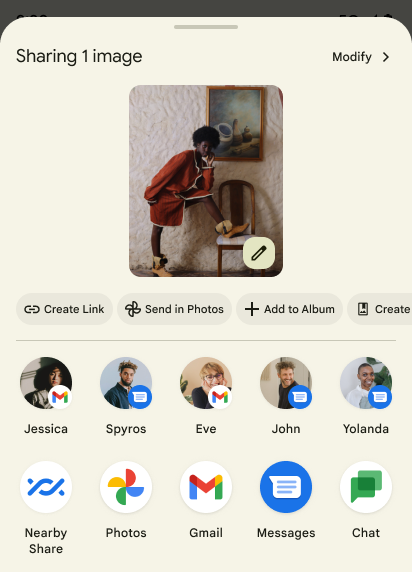
Android 14 mengupdate sharesheet sistem untuk mendukung tindakan aplikasi kustom dan hasil pratinjau yang lebih informatif bagi pengguna.
Menambahkan tindakan kustom
Dengan Android 14, aplikasi Anda dapat menambahkan tindakan kustom ke sharesheet sistem yang dipanggilnya.
Meningkatkan peringkat target Berbagi Langsung
Android 14 menggunakan lebih banyak sinyal dari aplikasi untuk menentukan peringkat target langsung berbagi agar memberikan hasil yang lebih bermanfaat bagi pengguna. Untuk memberikan sinyal yang paling berguna untuk peringkat, ikuti panduan untuk meningkatkan peringkat target Berbagi Langsung. Aplikasi komunikasi juga dapat melaporkan penggunaan pintasan untuk pesan keluar dan masuk.

Dukungan untuk animasi bawaan dan kustom untuk Kembali Prediktif
Android 13 introduced the predictive back-to-home animation behind a developer option. When used in a supported app with the developer option enabled, swiping back shows an animation indicating that the back gesture exits the app back to the home screen.
Android 14 includes multiple improvements and new guidance for Predictive Back:
- You can set
android:enableOnBackInvokedCallback=trueto opt in to predictive back system animations per-Activity instead of for the entire app. - We've added new system animations to accompany the back-to-home animation from Android 13. The new system animations are cross-activity and cross-task, which you get automatically after migrating to Predictive Back.
- We've added new Material Component animations for Bottom sheets, Side sheets, and Search.
- We've created design guidance for creating custom in-app animations and transitions.
- We've added new APIs to support custom in-app transition animations:
handleOnBackStarted,handleOnBackProgressed,handleOnBackCancelledinOnBackPressedCallbackonBackStarted,onBackProgressed,onBackCancelledinOnBackAnimationCallback- Use
overrideActivityTransitioninstead ofoverridePendingTransitionfor transitions that respond as the user swipes back.
With this Android 14 preview release, all features of Predictive Back remain behind a developer option. See the developer guide to migrate your app to predictive back, as well as the developer guide to creating custom in-app transitions.
Penggantian per aplikasi produsen perangkat layar besar
Per-app overrides enable device manufacturers to change the behavior of apps on large screen devices. For example, the FORCE_RESIZE_APP override instructs the system to resize the app to fit display dimensions (avoiding size compatibility mode) even if resizeableActivity="false" is set in the app manifest.
Overrides are intended to improve the user experience on large screens.
New manifest properties enable you to disable some device manufacturer overrides for your app.
Penggantian per aplikasi pengguna perangkat layar besar
Penggantian per aplikasi mengubah perilaku aplikasi di perangkat layar besar. Misalnya, penggantian produsen perangkat OVERRIDE_MIN_ASPECT_RATIO_LARGE menetapkan rasio aspek aplikasi ke 16:9, terlepas dari konfigurasi aplikasi.
Android 14 QPR1 memungkinkan pengguna menerapkan penggantian per aplikasi melalui menu setelan baru di perangkat layar besar.
Berbagi layar aplikasi
Berbagi layar aplikasi memungkinkan pengguna berbagi jendela aplikasi, bukan seluruh layar perangkat selama perekaman konten layar.
Dengan berbagi layar aplikasi, status bar, menu navigasi, notifikasi, dan elemen UI sistem lainnya dikecualikan dari tampilan bersama. Hanya konten aplikasi yang dipilih yang dibagikan.
Berbagi layar aplikasi meningkatkan produktivitas dan privasi dengan memungkinkan pengguna menjalankan beberapa aplikasi, tetapi membatasi berbagi konten ke satu aplikasi.
Smart Reply yang didukung LLM di Gboard pada Pixel 8 Pro
On Pixel 8 Pro devices with the December Feature Drop, developers can try out higher-quality smart replies in Gboard powered by on-device Large Language Models (LLMs) running on Google Tensor.
This feature is available as a limited preview for US English in WhatsApp, Line, and KakaoTalk. It requires using a Pixel 8 Pro device with Gboard as your keyboard.
To try it out, first enable the feature in Settings > Developer Options > AiCore Settings > Enable Aicore Persistent.
Next, open a conversation in a supported app to see LLM-powered Smart Reply in Gboard's suggestion strip in response to incoming messages.
Grafik
Jalur dapat dikueri dan dapat di-interpola
Android's Path API is a powerful and flexible mechanism for
creating and rendering vector graphics, with the ability to stroke or fill a
path, construct a path from line segments or quadratic or cubic curves, perform
boolean operations to get even more complex shapes, or all of these
simultaneously. One limitation is the ability to find out what is actually in a
Path object; the internals of the object are opaque to callers after creation.
To create a Path, you call methods such as
moveTo(), lineTo(), and
cubicTo() to add path segments. But there has been no way to
ask that path what the segments are, so you must retain that information at
creation time.
Starting in Android 14, you can query paths to find out what's inside of them.
First, you need to get a PathIterator object using the
Path.getPathIterator API:
Kotlin
val path = Path().apply {
    moveTo(1.0f, 1.0f)
    lineTo(2.0f, 2.0f)
    close()
}
val pathIterator = path.pathIterator
Java
Path path = new Path();
path.moveTo(1.0F, 1.0F);
path.lineTo(2.0F, 2.0F);
path.close();
PathIterator pathIterator = path.getPathIterator();
Next, you can call PathIterator to iterate through the segments
one by one, retrieving all of the necessary data for each segment. This example
uses PathIterator.Segment objects, which packages up the data
for you:
Kotlin
for (segment in pathIterator) {
    println("segment: ${segment.verb}, ${segment.points}")
}
Java
while (pathIterator.hasNext()) {
    PathIterator.Segment segment = pathIterator.next();
    Log.i(LOG_TAG, "segment: " + segment.getVerb() + ", " + segment.getPoints());
}
PathIterator also has a non-allocating version of next() where you can pass
in a buffer to hold the point data.
One of the important use cases of querying Path data is interpolation. For
example, you might want to animate (or morph) between two different paths. To
further simplify that use case, Android 14 also includes the
interpolate() method on Path. Assuming the two paths have
the same internal structure, the interpolate() method creates a new Path
with that interpolated result. This example returns a path whose shape is
halfway (a linear interpolation of .5) between path and otherPath:
Kotlin
val interpolatedResult = Path()
if (path.isInterpolatable(otherPath)) {
    path.interpolate(otherPath, .5f, interpolatedResult)
}
Java
Path interpolatedResult = new Path();
if (path.isInterpolatable(otherPath)) {
    path.interpolate(otherPath, 0.5F, interpolatedResult);
}
The Jetpack graphics-path library enables similar APIs for earlier versions of Android as well.
Mesh kustom dengan shader vertex dan fragmen
Android telah lama mendukung mesh segitiga gambar dengan bayangan kustom, tetapi format mesh input telah dibatasi untuk beberapa kombinasi atribut yang telah ditentukan. Android 14 menambahkan dukungan untuk mesh kustom, yang dapat didefinisikan sebagai segitiga atau strip segitiga, dan dapat, secara opsional, diindeks. Mesh ini ditentukan dengan atribut kustom, langkah vertex, beragam, serta shader vertex dan fragmen yang ditulis dalam AGSL.
Vertex shader menentukan variasi, seperti posisi dan warna, sedangkan
fragment shader secara opsional dapat menentukan warna untuk piksel, biasanya dengan
menggunakan variasi yang dibuat oleh vertex shader. Jika warna disediakan oleh shader fragmen, warna tersebut akan digabungkan dengan warna Paint saat ini menggunakan mode gabungan yang dipilih saat menggambar mesh. Seragam dapat diteruskan
ke shader fragmen dan vertex untuk fleksibilitas tambahan.
Perender buffer hardware untuk Canvas
Untuk membantu dalam penggunaan Canvas API Android untuk menggambar
akselerasi hardware ke HardwareBuffer, Android 14
memperkenalkan HardwareBufferRenderer. API ini
sangat berguna jika kasus penggunaan Anda melibatkan komunikasi dengan
komponer sistem melalui SurfaceControl untuk gambar
dengan latensi rendah.