
AppFunctions is an Android platform API with an accompanying Jetpack library to simplify Android MCP integration. It empowers your apps to behave like on device MCP servers, contributing functions that act as tools for use by proactive features along with agents and assistants, like Google Gemini. As of May 2026, AppFunctions integration with Gemini is in a private preview with trusted testers. You can begin preparing your apps now to use AppFunctions and development tools.
By defining these AppFunctions, you enable your app to provide services, data, and actions to the registry built into the Android OS, allowing users to complete tasks through agents and system-level interactions.
AppFunctions serve as the mobile equivalent of tools within the Model Context
Protocol (MCP). While MCP traditionally standardizes how agents
connect to server-side tools, AppFunctions provide the same mechanism for
Android apps. This lets you expose your app's capabilities as orchestratable
"tools" that authorized apps (callers) can discover and execute to fulfill user
intents. Callers must have the EXECUTE_APP_FUNCTIONS permission to
discover and execute AppFunctions, and can include agents, apps, and AI
assistants like Gemini.
AppFunctions is available on devices running Android 16 or higher.
Example use cases
AppFunctions provide a powerful mechanism to automate tasks and streamline user interactions. By opening up your app's capabilities, you enable users to accomplish complex goals using natural language, often replacing the need for step-by-step, manual navigation with your UI.
The following scenarios illustrate how AppFunctions can be used to drive experiences within a variety of app categories:
Task management and productivity
- User request: "Remind me to pick up my package at work today at 5 PM".
- AppFunction action: The caller identifies the relevant task management app and invokes a function to create a task, automatically populating the title, time, and location fields based on the user's prompt.
/** * Create a new task or reminder with a title, due time, and location. * * @param title The descriptive title of the task (e.g., "Pick up my package"). * @param dueDateTime The specific date and time when the task should be completed. * @param location The physical location associated with the task (e.g., "Work"). * @return The created Task */ @AppFunction(isDescribedByKDoc = true) suspend fun createTask( title: String, dueDateTime: LocalDateTime? = null, location: String? = null, ): Task = TODO()
Media and entertainment
- User request: "Create a new playlist with the top jazz albums from this year".
- AppFunction action: The caller executes a playlist creation function within a music app, passing context like "top jazz albums for 2026" as the query to generate the playlist immediately.
/** * Create a new music playlist based on a natural language query. * * @param query The description used to generate the playlist (e.g., "top jazz albums from 2026"). * @return The final created playlist based on songs. */ @AppFunction(isDescribedByKDoc = true) suspend fun createPlaylistFromQuery( query: String, ): Playlist = TODO()
Cross-app workflows
- User request: "Find the noodle recipe from Lisa's email and add the ingredients to my shopping list".
- AppFunction action: This request uses functions from multiple apps. First, the caller uses an email app's search function to retrieve the content. Then, it extracts the relevant ingredients and invokes a shopping list app's function to populate the user's list.
/** * Search for emails matching a query or sender name to retrieve content like recipes. * * @param query The search term or contact name (e.g., "Lisa noodle recipe"). * @return A list of matching email summaries containing the requested information. */ @AppFunction(isDescribedByKDoc = true) suspend fun searchEmails( query: String, ): List<EmailSummary> = TODO() /** * Add a list of items or ingredients to the user's active shopping list. * * @param items The names of the ingredients or products to add to the list. * @return The final shopping list with new items added */ @AppFunction(isDescribedByKDoc = true) suspend fun addItemsToShoppingList( items: List<String>, ): ShoppingList = TODO()
Calendar and scheduling
- User request: "Add Mom's birthday party to my calendar for next Monday at 6 PM".
- AppFunction action: The approved agentic app invokes the calendar app's "create event" function, parsing the relevant context like "next Monday" and "6 PM" to create the entry without the user needing to manually open the calendar.
/** * Schedule a new event on the user's primary calendar. * * @param title The name of the calendar event (e.g., "Mom's birthday party"). * @param startDateTime The specific date and time the event is scheduled to begin. * @return The created Event object. */ @AppFunction(isDescribedByKDoc = true) suspend fun createCalendarEvent( title: String, startDateTime: LocalDateTime, ): Event = TODO()
How AppFunctions work
The following diagram illustrates the typical flow of how AppFunctions are shared by apps to an agent and subsequently executed. Agents are likely to consider both server-side remote MCP tools and local AppFunctions together when handling user requests. The detailed flow for using local AppFunctions is as follows:
- AppFunction declaration: The Android app is built to use AppFunctions to make its features available, such as "Create note" or "Send message".
- Schema generation: The AppFunctions Jetpack library generates an XML schema file that lists all the declared AppFunctions in the app. The Android OS uses this file to index the available AppFunctions.
- Metadata retrieval: The agent can retrieve AppFunction metadata by querying it. In addition to function-specific KDocs, developers can define app-level operational patterns and constraints in app metadata to guide agent orchestration across multiple tools.
- AppFunction selection and execution: Based on user prompts, the agent selects and executes the appropriate AppFunction with the appropriate parameters.
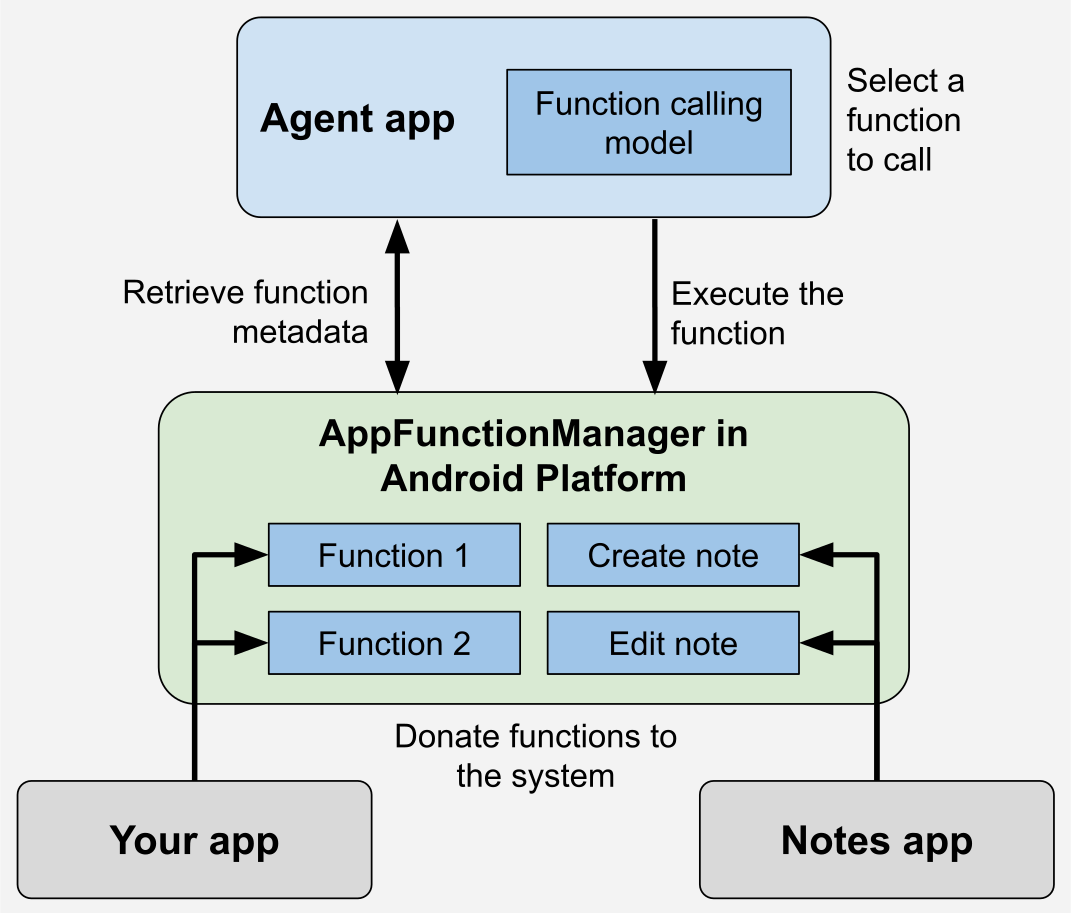
The AppFunctions Jetpack library simplifies exposing your app's functionality.
With the annotation processor, you annotate the functions you want to make
available to agents. Callers can then discover and invoke these indexed
functions using AppFunctionManager.
Before invoking a function, callers should verify that the device supports the
AppFunctions feature by attempting to retrieve an instance of
AppFunctionManager. Once supported, callers can verify whether a specific
function is enabled within a target app using
isAppFunctionEnabled(packageName,functionId). Querying the status of
functions in other packages requires the
android.permission.EXECUTE_APP_FUNCTIONSpermission.
Your app is not required to verify whether the AppFunction feature is supported;
this is automatically handled within the Jetpack library. For example,
AppFunctionManager can verify whether or not the feature is supported.
Here's an example of AppFunctions for a note-taking app with capabilities to create, edit, and list notes:
@RequiresApi(36) @AndroidEntryPoint @AppFunctionServiceEntryPoint( serviceName = "TaskAppFunctionService", appFunctionXmlFileName = "task_app_function_service", ) abstract class BaseTaskAppFunctionService : AppFunctionService() { @Inject internal lateinit var taskRepository: TaskRepository /** * Creates a task based on [createTaskParams]. * * @param createTaskParams The parameter to describe how to create the task. */ @AppFunction(isDescribedByKDoc = true) suspend fun createTask( createTaskParams: CreateTaskParams, ): Task = withContext(Dispatchers.IO) { // Developers can use predefined exceptions to let the agent know // why it failed. if (createTaskParams.title == null && createTaskParams.content == null) { throw AppFunctionInvalidArgumentException("Title or content should be non-null") } val id = taskRepository.createTask( createTaskParams.title, createTaskParams.content ) return@withContext taskRepository .getTask(id) ?.toTask() ?: throw AppFunctionElementNotFoundException("Task not found for ID = $id") } // Maps internal TaskEntity private fun TaskEntity.toTask() = Task(id = id, title = title, content = description) }
/** The parameter to create the task. */ @AppFunctionSerializable(isDescribedByKDoc = true) data class CreateTaskParams( /** The title of the task. */ val title: String?, /** The content of the task. */ val content: String?, ) /** The user-created task. */ @AppFunctionSerializable(isDescribedByKDoc = true) data class Task( /** The ID of the task. */ val id: String, /** The title of the task. */ val title: String, /** The content of the task. */ val content: String, )
Samples, skill, and testing tools
We've made the following available to help you upskill in AppFunctions:
- Explore the AppFunctions sample to verify and explore how everything works on your devices.
- Use the AppFunctions agent skill to accelerate
development across the four-step lifecycle:
- Discovery: Analyze your codebase to identify and recommend high-value features for AI orchestration.
- Implementation & Configuration: Generate Kotlin implementations and configure system metadata and build dependencies.
- KDoc Refinement: Optimize function and property documentation for AI agents and Android MCP.
- Testing & Debugging: Provide ADB commands for local evaluation and debugging on-device.
- For command-line testing and verification, use ADB commands such as
adb
shell cmd app_function ...
as a direct, lightweight way to test function registration, inspect metadata descriptions, and execute functions on-device. - To experience Android MCP in action and test end-to-end workflows without needing any prompts, install and use the AppFunctions testing agent Android app on your device.
Frequently asked questions (FAQs)
The following section addresses frequently asked questions about AppFunctions.
I'm an app developer. Can I implement AppFunctions today?
Yes, it's possible to implement and test AppFunctions within your app by following the guidance detailed in the preceding sections.
What's the difference between AppFunctions and MCP?
Both allow AI agents to orchestrate tools, but have significant differences in their architecture, latency, and required developer effort. AppFunctions are built-in OS-level hooks exclusive to Android that execute locally. By contrast, a standard MCP server is a platform-agnostic solution that relies on cloud execution and network round-trips.
In short, developing with AppFunctions lets you use the existing app state directly on-device and does not require you to maintain services outside your Android app.
I have implemented AppFunctions in my app. Why can my system agent not access them?
AppFunctions are an experimental feature. To carefully evaluate the quality of the overall experience during this experimental phase, only a limited number of apps and system agents can access the entire pipeline.
How can I prepare my app for general availability of AppFunctions?
Consider which features of your app you want to expose to agentic automation.
You can implement AppFunctions in your app. To do so, follow the steps in the
preceding sections on this page, and verify that they are registered on the
device by calling adb shell cmd app_function list-app-functions.
Can I get early access to the end-to-end agentic developer experience?
We're conducting an Early Access Program (EAP) to onboard select apps in testing the end-to-end developer experience required to launch AppFunctions to production on Android. You can register your interest in integrating your AppFunctions through this EAP registration up form. By registering your interest, you do NOT automatically obtain access to the full integration. We'll email you if your app is selected for the EAP, or to let you know when AppFunctions become publicly available.
How can I provide feedback on AppFunctions?
You can provide feedback on the API by filing an issue and registering your interest in the Early Access Program form.