

AppFunctions 是 Android 平台 API,並附有 Jetpack 程式庫,可簡化 Android MCP 整合作業。這項功能可讓應用程式像裝置上的 MCP 伺服器一樣運作,提供可做為工具的功能,供主動式功能、代理和助理 (例如 Google Gemini) 使用。自 2026 年 5 月起,AppFunctions 與 Gemini 的整合功能將開放給信任的測試人員,您現在可以開始準備應用程式,以便使用 AppFunctions 和開發工具。
定義這些 AppFunction 後,應用程式就能向 Android OS 內建的登錄檔提供服務、資料和動作,讓使用者透過代理程式和系統層級的互動完成工作。
AppFunctions 相當於 Model Context Protocol (MCP) 中的工具,但適用於行動裝置。MCP 的傳統用途是將代理程式連線至伺服器端工具的程序標準化,而 AppFunctions 則為 Android 應用程式提供相同機制。您可以將應用程式功能公開為可協調的「工具」,授權應用程式 (呼叫端) 即可探索及執行這些工具,滿足使用者意圖。通話者必須具備 EXECUTE_APP_FUNCTIONS 權限,才能探索及執行 AppFunction,且可包含代理程式、應用程式和 Gemini 等 AI 助理。
AppFunctions 適用於搭載 Android 16 以上版本的裝置。
應用實例
AppFunctions 提供強大的機制,可自動執行工作並簡化使用者互動。開放應用程式功能後,使用者就能以自然語言達成複雜目標,通常不需要透過 UI 手動逐步導覽。
下列情境說明如何使用 AppFunctions,在各種應用程式類別中提供體驗:
工作管理與生產力
- 使用者要求:「今天下午 5 點提醒我到公司取貨」。
- AppFunction 動作:呼叫端會找出相關工作管理應用程式,並叫用函式來建立工作,根據使用者的提示自動填入標題、時間和地點欄位。
/** * Create a new task or reminder with a title, due time, and location. * * @param title The descriptive title of the task (e.g., "Pick up my package"). * @param dueDateTime The specific date and time when the task should be completed. * @param location The physical location associated with the task (e.g., "Work"). * @return The created Task */ @AppFunction(isDescribedByKDoc = true) suspend fun createTask( title: String, dueDateTime: LocalDateTime? = null, location: String? = null, ): Task = TODO()
媒體娛樂
- 使用者要求:「建立新播放清單,收錄今年最熱門的爵士專輯」。
- AppFunction 動作:呼叫端會在音樂應用程式中執行播放清單建立函式,並傳遞「2026 年熱門爵士專輯」等內容做為查詢,立即生成播放清單。
/** * Create a new music playlist based on a natural language query. * * @param query The description used to generate the playlist (e.g., "top jazz albums from 2026"). * @return The final created playlist based on songs. */ @AppFunction(isDescribedByKDoc = true) suspend fun createPlaylistFromQuery( query: String, ): Playlist = TODO()
跨應用程式工作流程
- 使用者要求:「Find the noodle recipe from Lisa's email and add the ingredients to my shopping list」(找出 Lisa 電子郵件中的麵條食譜,並將食材加入我的購物清單)。
- AppFunction 動作:這項要求會使用多個應用程式的函式。 首先,來電者會使用電子郵件應用程式的搜尋功能擷取內容。接著,系統會擷取相關食材,並叫用購物清單應用程式的函式,填入使用者的清單。
/** * Search for emails matching a query or sender name to retrieve content like recipes. * * @param query The search term or contact name (e.g., "Lisa noodle recipe"). * @return A list of matching email summaries containing the requested information. */ @AppFunction(isDescribedByKDoc = true) suspend fun searchEmails( query: String, ): List<EmailSummary> = TODO() /** * Add a list of items or ingredients to the user's active shopping list. * * @param items The names of the ingredients or products to add to the list. * @return The final shopping list with new items added */ @AppFunction(isDescribedByKDoc = true) suspend fun addItemsToShoppingList( items: List<String>, ): ShoppingList = TODO()
日曆和行事曆
- 使用者要求:「在日曆中新增下週一下午 6 點的媽媽生日派對」。
- AppFunction 動作:獲得核准的代理程式應用程式會叫用日曆應用程式的「建立活動」函式,剖析「下週一」和「下午 6 點」等相關情境,建立項目,使用者不必手動開啟日曆。
/** * Schedule a new event on the user's primary calendar. * * @param title The name of the calendar event (e.g., "Mom's birthday party"). * @param startDateTime The specific date and time the event is scheduled to begin. * @return The created Event object. */ @AppFunction(isDescribedByKDoc = true) suspend fun createCalendarEvent( title: String, startDateTime: LocalDateTime, ): Event = TODO()
AppFunctions 的運作方式
下圖說明應用程式如何將 AppFunction 分享給代理程式,以及後續的執行流程。處理使用者要求時,代理可能會同時考量伺服器端遠端 MCP 工具和本機 AppFunctions。使用本機 AppFunctions 的詳細流程如下:
- AppFunction 宣告:Android 應用程式會使用 AppFunction 提供功能,例如「建立記事」或「傳送訊息」。
- 產生結構定義:AppFunctions Jetpack 程式庫會產生 XML 結構定義檔案,列出應用程式中所有已宣告的 AppFunctions。Android OS 會使用這個檔案為可用的 AppFunctions 建立索引。
- 擷取中繼資料:代理程式可以查詢 AppFunction 中繼資料,除了函式專屬的 KDocs 外,開發人員還可在應用程式中繼資料中定義應用程式層級的作業模式和限制,引導代理程式協調多項工具。
- 選取及執行 AppFunction:代理會根據使用者提示,選取及執行適當的 AppFunction,並提供適當的參數。
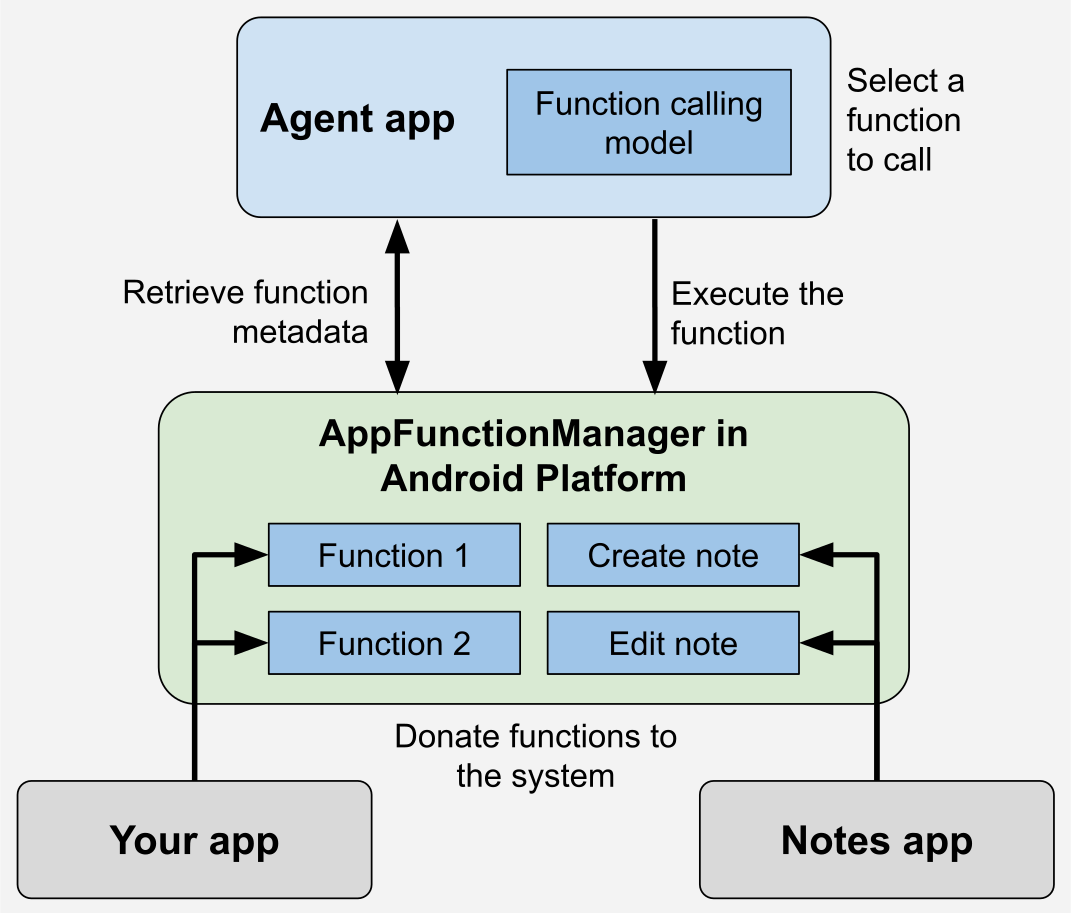
AppFunctions Jetpack 程式庫可簡化公開應用程式功能的程序。使用註解處理工具,為要提供給代理程式使用的函式加上註解。然後,呼叫者可以使用 AppFunctionManager 探索及叫用這些已建立索引的函式。
呼叫函式前,呼叫端應嘗試擷取 AppFunctionManager 的執行個體,確認裝置支援 AppFunctions 功能。支援後,呼叫端可以使用 isAppFunctionEnabled(packageName,functionId) 驗證目標應用程式是否已啟用特定函式。如要查詢其他套件中函式的狀態,必須使用 android.permission.EXECUTE_APP_FUNCTIONSpermission。
應用程式不需驗證是否支援 AppFunction 功能,Jetpack 程式庫會自動處理這項作業。舉例來說,AppFunctionManager 可以驗證功能是否受到支援。
以下是記事應用程式的 AppFunctions 範例,可建立、編輯及列出記事:
@RequiresApi(36) @AndroidEntryPoint @AppFunctionServiceEntryPoint( serviceName = "TaskAppFunctionService", appFunctionXmlFileName = "task_app_function_service", ) abstract class BaseTaskAppFunctionService : AppFunctionService() { @Inject internal lateinit var taskRepository: TaskRepository /** * Creates a task based on [createTaskParams]. * * @param createTaskParams The parameter to describe how to create the task. */ @AppFunction(isDescribedByKDoc = true) suspend fun createTask( createTaskParams: CreateTaskParams, ): Task = withContext(Dispatchers.IO) { // Developers can use predefined exceptions to let the agent know // why it failed. if (createTaskParams.title == null && createTaskParams.content == null) { throw AppFunctionInvalidArgumentException("Title or content should be non-null") } val id = taskRepository.createTask( createTaskParams.title, createTaskParams.content ) return@withContext taskRepository .getTask(id) ?.toTask() ?: throw AppFunctionElementNotFoundException("Task not found for ID = $id") } // Maps internal TaskEntity private fun TaskEntity.toTask() = Task(id = id, title = title, content = description) }
/** The parameter to create the task. */ @AppFunctionSerializable(isDescribedByKDoc = true) data class CreateTaskParams( /** The title of the task. */ val title: String?, /** The content of the task. */ val content: String?, ) /** The user-created task. */ @AppFunctionSerializable(isDescribedByKDoc = true) data class Task( /** The ID of the task. */ val id: String, /** The title of the task. */ val title: String, /** The content of the task. */ val content: String, )
範例、技能和測試工具
為協助您提升 AppFunctions 技能,我們提供下列資源:
- 請參閱 AppFunctions 範例,驗證並瞭解裝置上的所有運作方式。
- 使用 AppFunctions 代理程式技能,加快四階段生命週期的開發速度:
- 探索:分析程式碼集,找出並建議適合 AI 協調作業的高價值功能。
- 實作與設定:產生 Kotlin 實作項目,並設定系統中繼資料和建構依附元件。
- KDoc 修訂:針對 AI 代理程式和 Android MCP,最佳化函式和屬性說明文件。
- 測試與偵錯:提供 ADB 指令,用於在本機評估及裝置端偵錯。
- 如要透過指令列測試及驗證,請使用 ADB 指令 (例如
adb
shell cmd app_function ...
),直接以輕量方式測試函式註冊、檢查中繼資料說明,以及在裝置端執行函式。 - 如要體驗 Android MCP 的實際運作情形,並測試端對端工作流程,完全不需要任何提示,請在裝置上安裝並使用 AppFunctions 測試代理程式 Android 應用程式。
常見問題 (FAQ)
以下是 AppFunctions 的常見問題。
我是應用程式開發人員,我今天可以導入 AppFunctions 嗎?
可以。請按照先前各節的詳細指南,在應用程式中導入及測試 AppFunctions。
AppFunctions 和 MCP 有何不同?
兩者都可讓 AI 代理調度管理工具,但在架構、延遲和開發人員所需投入的心力方面,有顯著差異。AppFunction 是 Android 專屬的內建 OS 層級掛鉤,可在本機執行。相較之下,標準 MCP 伺服器是與平台無關的解決方案,依賴雲端執行和網路往返。
簡而言之,使用 AppFunctions 開發應用程式可讓您直接在裝置端使用現有的應用程式狀態,且不需要在 Android 應用程式外部維護服務。
我在應用程式中導入了 AppFunctions,為什麼系統代理程式無法存取這些函式?
AppFunctions 仍處於實驗階段,為在實驗階段仔細評估整體體驗的品質,只有少數應用程式和系統代理程式可以存取整個管道。
如何準備應用程式,以便在 AppFunctions 正式發布後使用?
請考量要向代理程式自動化功能公開哪些應用程式功能。
您可以在應用程式中實作 AppFunctions。如要這麼做,請按照本頁面先前章節的步驟操作,並呼叫 adb shell cmd app_function list-app-functions,確認這些函式已在裝置上註冊。
我可以搶先體驗端對端代理式開發人員服務嗎?
我們正在進行搶先體驗計畫 (EAP),邀請特定應用程式參與測試,確保在 Android 上推出 AppFunctions 時,開發人員能獲得完整的體驗。如有意整合 AppFunctions,請填寫這份搶先體驗計畫註冊表單。登記意願後,您「不會」自動取得完整整合的存取權。如果您的應用程式獲選加入 EAP,或是 AppFunctions 公開發布時,我們都會透過電子郵件通知您。
如何提供有關 AppFunctions 的意見回饋?
如要提供 API 意見回饋,請提出問題,並填寫搶先體驗計畫意願調查表。