

يقدّم نظام التشغيل Android 15 ميزات وواجهات برمجة تطبيقات رائعة للمطوّرين. توضّح الأقسام التالية هذه الميزات لمساعدتك في البدء باستخدام واجهات برمجة التطبيقات ذات الصلة.
للحصول على قائمة مفصّلة بواجهات برمجة التطبيقات التي تمت إضافتها وتعديلها وإزالتها، يُرجى الاطّلاع على تقرير مقارنة واجهات برمجة التطبيقات. للحصول على تفاصيل حول واجهات برمجة التطبيقات المضافة، يُرجى الانتقال إلى مرجع واجهة برمجة تطبيقات Android. بالنسبة إلى Android 15، ابحث عن واجهات برمجة التطبيقات التي تمت إضافتها في المستوى 35 من واجهة برمجة التطبيقات. للتعرّف على المجالات التي قد تؤثّر فيها تغييرات النظام الأساسي في تطبيقاتك، احرص على الاطّلاع على التغييرات في سلوك Android 15 للتطبيقات التي تستهدف Android 15 ولجميع التطبيقات.
الكاميرا والوسائط
يتضمّن Android 15 مجموعة متنوعة من الميزات التي تحسّن تجربة استخدام الكاميرا والوسائط، وتتيح لك الوصول إلى الأدوات والأجهزة التي تساعد صنّاع المحتوى في تنفيذ أفكارهم الإبداعية على Android.
لمزيد من المعلومات حول أحدث الميزات والحلول المتاحة للمطوّرين في ما يتعلّق بالوسائط والكاميرا على Android، يمكنك الاطّلاع على جلسة إنشاء تجارب حديثة في ما يتعلّق بالوسائط والكاميرا على Android من مؤتمر Google I/O.
تحسين الإضاءة المنخفضة
Android 15 introduces Low Light Boost, an auto-exposure mode available to both Camera 2 and the night mode camera extension. Low Light Boost adjusts the exposure of the Preview stream in low-light conditions. This is different from how the night mode camera extension creates still images, because night mode combines a burst of photos to create a single, enhanced image. While night mode works very well for creating a still image, it can't create a continuous stream of frames, but Low Light Boost can. Thus, Low Light Boost enables camera capabilities, such as:
- Providing an enhanced image preview, so users are better able to frame their low-light pictures
- Scanning QR codes in low light
If you enable Low Light Boost, it automatically turns on when there's a low light level, and turns off when there's more light.
Apps can record off the Preview stream in low-light conditions to save a brightened video.
For more information, see Low Light Boost.
عناصر التحكّم في الكاميرا داخل التطبيق
Android 15 adds an extension for more control over the camera hardware and its algorithms on supported devices:
- Advanced flash strength adjustments enabling precise control of flash
intensity in both
SINGLEandTORCHmodes while capturing images.
التحكّم في مساحة HDR
Android 15 chooses HDR headroom that is appropriate for the underlying device
capabilities and bit-depth of the panel. For pages that have lots of SDR
content, such as a messaging app displaying a single HDR thumbnail, this
behavior can end up adversely influencing the perceived brightness of the SDR
content. Android 15 lets you control the HDR headroom with
setDesiredHdrHeadroom to strike a balance between SDR
and HDR content.

التحكّم في مستوى الصوت

يتيح نظام التشغيل Android 15 معيار CTA-2075 لمساعدتك في معرفة تجنب تناقضات ارتفاع الصوت والتأكد من عدم اضطرار المستخدمين إلى ضبط مستوى الصوت عند التبديل بين المحتوى. يستفيد النظام من البيانات خصائص أجهزة الإخراج (سماعات الرأس ومكبرات الصوت) إلى جانب البيانات الوصفية لارتفاع الصوت المتوفرة في محتوى الصوت بتنسيق AAC لضبط ارتفاع الصوت ومستويات ضغط النطاق الديناميكي
لتفعيل هذه الميزة، عليك التأكّد من توفّر البيانات الوصفية لمستوى الصوت في
محتوى AAC وتفعيل ميزة النظام الأساسي في تطبيقك. ولإجراء ذلك، عليك
إنشاء عنصر LoudnessCodecController من خلال
استدعاء طريقة المصنع create مع معرّف جلسة المحتوى الصوتي من AudioTrack المرتبط، ما يؤدي بدوره إلى
بدء تطبيق تعديلات الصوت تلقائيًا. يمكنك تمرير
OnLoudnessCodecUpdateListener لتعديله أو فلترته
معاملات ارتفاع الصوت قبل تطبيقها
MediaCodec
// Media contains metadata of type MPEG_4 OR MPEG_D
val mediaCodec = …
val audioTrack = AudioTrack.Builder()
                                .setSessionId(sessionId)
                                .build()
...
// Create new loudness controller that applies the parameters to the MediaCodec
try {
   val lcController = LoudnessCodecController.create(mSessionId)
   // Starts applying audio updates for each added MediaCodec
}
سيتم أيضًا تحديث AndroidX media3 ExoPlayer لاستخدام
واجهات برمجة تطبيقات LoudnessCodecController من أجل دمج سلس للتطبيقات
أجهزة MIDI 2.0 الافتراضية
أضاف نظام Android 13 إمكانية الاتصال ب أجهزة MIDI 2.0 باستخدام USB، والتي تتواصل باستخدام حِزم MIDI العالمية (UMP). يوفّر نظام التشغيل Android 15 دعمًا لبروتوكول UMP في تطبيقات MIDI الافتراضية، ما يتيح لتطبيقات إنشاء المحتوى التحكّم في تطبيقات المزج كجهاز MIDI 2.0 افتراضي تمامًا كما لو كانت تستخدم جهاز USB MIDI 2.0.
فك تشفير برامج AV1 بشكل أكثر كفاءة

dav1d, the popular AV1 software decoder from VideoLAN is available for Android devices that don't support AV1 decode in hardware. dav1d is up to 3x more performant than the legacy AV1 software decoder, enabling HD AV1 playback for more users, including some low and mid tier devices.
Your app needs to opt-in to using dav1d by invoking it by name
"c2.android.av1-dav1d.decoder". dav1d will be made the default AV1 software
decoder in a subsequent update. This support is standardized and backported to
Android 11 devices that receive Google Play system updates.
إنتاجية المطوّرين وأدواتهم
في حين أنّ معظم جهودنا لتحسين إنتاجيتك تركّز على أدوات مثل استوديو Android وJetpack Compose ومكتبات Android Jetpack، نبحث دائمًا عن طرق في النظام الأساسي لمساعدتك في تحقيق رؤيتك بسهولة أكبر.
تعديلات OpenJDK 17
Android 15 continues the work of refreshing Android's core libraries to align with the features in the latest OpenJDK LTS releases.
The following key features and improvements are included:
- Quality-of-life improvements around NIO buffers
- Streams
- Additional
mathandstrictmathmethods utilpackage updates including sequencedcollection,map, andsetByteBuffersupport inDeflater- Security updates such as
X500PrivateCredentialand security key updates
These APIs are updated on over a billion devices running Android 12 (API level 31) and higher through Google Play System updates, so you can target the latest programming features.
تحسينات على ملفات PDF
Android 15 includes substantial improvements to the PdfRenderer
APIs. Apps can incorporate advanced features such as rendering
password-protected files, annotations, form editing,
searching, and selection with copy. Linearized PDF
optimizations are supported to speed local PDF viewing and reduce resource use.
The Jetpack PDF library uses these APIs to simplify adding PDF
viewing capabilities to your app.

The PdfRenderer has been moved to a module that can be updated using Google
Play system updates independent of the platform release, and we're supporting
these changes back to Android 11 (API level 30) by creating a compatible
pre-Android 15 version of the API surface, called
PdfRendererPreV.
تحسينات على التبديل التلقائي للغات
Android 14 added on-device, multi-language recognition in audio with automatic
switching between languages, but this can cause words to get dropped,
especially when languages switch with less of a pause between the two
utterances. Android 15 adds additional controls to help apps tune this switching
to their use case.
EXTRA_LANGUAGE_SWITCH_INITIAL_ACTIVE_DURATION_TIME_MILLIS
confines the automatic switching to the beginning of the audio session, while
EXTRA_LANGUAGE_SWITCH_MATCH_SWITCHES deactivates the
language switching after a defined number of switches. These options are
particularly useful if you expect that there will be a single language spoken
during the session that should be autodetected.
تحسين واجهة برمجة التطبيقات للخطوط المتغيّرة OpenType
يعمل نظام التشغيل Android 15 على تحسين سهولة استخدام الخط المتغيّر OpenType. يمكنك إنشاء
مثيل FontFamily من خط متغيّر بدون تحديد محاور الوزن
باستخدام واجهة برمجة التطبيقات buildVariableFamily. يلغي عارض النص القيمة
من المحور wght لمطابقة النص المعروض.
يؤدي استخدام واجهة برمجة التطبيقات إلى تبسيط الرمز البرمجي لإنشاء Typeface بشكل كبير:
Kotlin
val newTypeface = Typeface.CustomFallbackBuilder(
            FontFamily.Builder(
                Font.Builder(assets, "RobotoFlex.ttf").build())
                    .buildVariableFamily())
    .build()
Java
Typeface newTypeface = Typeface.CustomFallbackBuilder(
            new FontFamily.Builder(
                new Font.Builder(assets, "RobotoFlex.ttf").build())
                    .buildVariableFamily())
    .build();
في السابق، لكي تتمكّن من إنشاء Typeface نفسها، كنت تحتاج إلى مزيد من الرموز البرمجية:
Kotlin
val oldTypeface = Typeface.CustomFallbackBuilder(
            FontFamily.Builder(
                Font.Builder(assets, "RobotoFlex.ttf")
                    .setFontVariationSettings("'wght' 400")
                    .setWeight(400)
                    .build())
                .addFont(
                    Font.Builder(assets, "RobotoFlex.ttf")
                        .setFontVariationSettings("'wght' 100")
                        .setWeight(100)
                        .build()
                )
                .addFont(
                    Font.Builder(assets, "RobotoFlex.ttf")
                        .setFontVariationSettings("'wght' 200")
                        .setWeight(200)
                        .build()
                )
                .addFont(
                    Font.Builder(assets, "RobotoFlex.ttf")
                        .setFontVariationSettings("'wght' 300")
                        .setWeight(300)
                        .build()
                )
                .addFont(
                    Font.Builder(assets, "RobotoFlex.ttf")
                        .setFontVariationSettings("'wght' 500")
                        .setWeight(500)
                        .build()
                )
                .addFont(
                    Font.Builder(assets, "RobotoFlex.ttf")
                        .setFontVariationSettings("'wght' 600")
                        .setWeight(600)
                        .build()
                )
                .addFont(
                    Font.Builder(assets, "RobotoFlex.ttf")
                        .setFontVariationSettings("'wght' 700")
                        .setWeight(700)
                        .build()
                )
                .addFont(
                    Font.Builder(assets, "RobotoFlex.ttf")
                        .setFontVariationSettings("'wght' 800")
                        .setWeight(800)
                        .build()
                )
                .addFont(
                    Font.Builder(assets, "RobotoFlex.ttf")
                        .setFontVariationSettings("'wght' 900")
                        .setWeight(900)
                        .build()
                ).build()
        ).build()
Java
Typeface oldTypeface = new Typeface.CustomFallbackBuilder(
    new FontFamily.Builder(
        new Font.Builder(assets, "RobotoFlex.ttf")
            .setFontVariationSettings("'wght' 400")
            .setWeight(400)
            .build()
    )
    .addFont(
        new Font.Builder(assets, "RobotoFlex.ttf")
            .setFontVariationSettings("'wght' 100")
            .setWeight(100)
            .build()
    )
    .addFont(
        new Font.Builder(assets, "RobotoFlex.ttf")
            .setFontVariationSettings("'wght' 200")
            .setWeight(200)
            .build()
    )
    .addFont(
        new Font.Builder(assets, "RobotoFlex.ttf")
            .setFontVariationSettings("'wght' 300")
            .setWeight(300)
            .build()
    )
    .addFont(
        new Font.Builder(assets, "RobotoFlex.ttf")
            .setFontVariationSettings("'wght' 500")
            .setWeight(500)
            .build()
    )
    .addFont(
        new Font.Builder(assets, "RobotoFlex.ttf")
            .setFontVariationSettings("'wght' 600")
            .setWeight(600)
            .build()
    )
    .addFont(
        new Font.Builder(assets, "RobotoFlex.ttf")
            .setFontVariationSettings("'wght' 700")
            .setWeight(700)
            .build()
    )
    .addFont(
        new Font.Builder(assets, "RobotoFlex.ttf")
            .setFontVariationSettings("'wght' 800")
            .setWeight(800)
            .build()
    )
    .addFont(
        new Font.Builder(assets, "RobotoFlex.ttf")
            .setFontVariationSettings("'wght' 900")
            .setWeight(900)
            .build()
    )
    .build()
).build();
في ما يلي مثال على كيفية عرض Typeface تم إنشاؤه باستخدام كلّ من واجهتَي برمجة التطبيقات القديمة والجديدة:

في هذا المثال، لا تملك Typeface التي تم إنشاؤها باستخدام واجهة برمجة التطبيقات القديمة
القدرة على إنشاء قيم دقيقة لوزن الخط لحالات Font التي تبلغ 350 و450 و550 و650
، لذا يعود مُنشئ العرض إلى أقرب قيمة لوزن الخط. ففي
في هذه الحالة، يتم عرض العدد 300 بدلاً من 350، ويتم عرض 400 بدلاً من 450،
وهكذا. في المقابل، فإنّ Typeface الذي تم إنشاؤه باستخدام واجهات برمجة التطبيقات الجديدة ينشئ ديناميكيًا
مثيل Font لوزن معين، لذا يتم عرض الترجيحات الدقيقة بقيمة 350،
450 و550 و650 أيضًا.
عناصر تحكّم دقيقة في فواصل الأسطر
Starting in Android 15, a TextView and the underlying
line breaker can preserve the given portion of text in the same line to improve
readability. You can take advantage of this line break customization by using
the <nobreak> tag in string resources or
createNoBreakSpan. Similarly, you can preserve words from
hyphenation by using the <nohyphen> tag or
createNoHyphenationSpan.
For example, the following string resource doesn't include a line break, and renders with the text "Pixel 8 Pro." breaking in an undesirable place:
<resources>
    <string name="pixel8pro">The power and brains behind Pixel 8 Pro.</string>
</resources>
In contrast, this string resource includes the <nobreak> tag, which wraps the
phrase "Pixel 8 Pro." and prevents line breaks:
<resources>
    <string name="pixel8pro">The power and brains behind <nobreak>Pixel 8 Pro.</nobreak></string>
</resources>
The difference in how these strings are rendered is shown in the following images:

<nobreak> tag.
<nobreak> tag.أرشفة التطبيقات
Android and Google Play announced support for app archiving last year, allowing users to free up space by partially removing infrequently used apps from the device that were published using Android App Bundle on Google Play. Android 15 includes OS level support for app archiving and unarchiving, making it easier for all app stores to implement it.
Apps with the REQUEST_DELETE_PACKAGES permission can call the
PackageInstaller requestArchive method to request archiving an
installed app package, which removes the APK and any cached files, but persists
user data. Archived apps are returned as displayable apps through the
LauncherApps APIs; users will see a UI treatment to highlight that those
apps are archived. If a user taps on an archived app, the responsible installer
will get a request to unarchive it, and the restoration process can be
monitored by the ACTION_PACKAGE_ADDED broadcast.
تفعيل الوضع 16 كيلوبايت على جهاز باستخدام خيارات المطوّرين

فعِّل خيار المطوّر التشغيل مع صفحات حجمها 16 كيلوبايت لتشغيل الجهاز في وضع 16 كيلوبايت.
في إصدارات QPR من نظام التشغيل Android 15، يمكنك استخدام خيار المطوّرين المتاح على أجهزة معيّنة لإعادة تشغيل الجهاز في وضع 16 كيلوبايت وإجراء اختبار على الجهاز فقط. قبل استخدام خيار المطوّرين، انتقِل إلى الإعدادات > النظام > تحديثات البرامج وطبِّق أي تحديثات متوفّرة.
يتوفّر خيار المطوّرين هذا على الأجهزة التالية:
Pixel 8 وPixel 8 Pro (مع الإصدار 1 من حزمة إصلاح الأخطاء في نظام Android 15 أو إصدار أحدث)
Pixel 8a (مع الإصدار 1 من حزمة إصلاح الأخطاء في نظام Android 15 أو إصدار أحدث)
Pixel 9 و9 Pro و9 Pro XL (مع الإصدار الثاني من حزمة Android 15 QPR أو إصدار أحدث)
Pixel 9a (مع نظام التشغيل Android 16 أو إصدار أحدث)
الرسومات
يوفّر Android 15 أحدث التحسينات على الرسومات، بما في ذلك ANGLE وإضافات إلى نظام رسومات Canvas.
تحديث طريقة وصول Android إلى وحدة معالجة الرسومات

Android hardware has evolved quite a bit from the early days where the core OS would run on a single CPU and GPUs were accessed using APIs based on fixed-function pipelines. The Vulkan® graphics API has been available in the NDK since Android 7.0 (API level 24) with a lower-level abstraction that better reflects modern GPU hardware, scales better to support multiple CPU cores, and offers reduced CPU driver overhead — leading to improved app performance. Vulkan is supported by all modern game engines.
Vulkan is Android's preferred interface to the GPU. Therefore, Android 15 includes ANGLE as an optional layer for running OpenGL® ES on top of Vulkan. Moving to ANGLE will standardize the Android OpenGL implementation for improved compatibility, and, in some cases, improved performance. You can test out your OpenGL ES app stability and performance with ANGLE by enabling the developer option in Settings -> System -> Developer Options -> Experimental: Enable ANGLE on Android 15.
The Android ANGLE on Vulkan roadmap

As part of streamlining our GPU stack, going forward we will be shipping ANGLE as the GL system driver on more new devices, with the future expectation that OpenGL/ES will be only available through ANGLE. That being said, we plan to continue support for OpenGL ES on all devices.
Recommended next steps
Use the developer options to select the ANGLE driver for OpenGL ES and test your app. For new projects, we strongly encourage using Vulkan for C/C++.
تحسينات على Canvas
يواصل نظام Android 15 جهودنا لتطوير نظام الرسومات Canvas في Android من خلال إضافة ميزات إضافية:
- يوفّر
Matrix44مصفوفة 4×4 لتحويل الإحداثيات التي يجب استخدامها عندما تريد التحكّم في اللوحة في المساحات الثلاثية الأبعاد. - يقاطع
clipShaderالمقطع الحالي بالshader المحدّد، في حين يضبطclipOutShaderالمقطع على اختلاف المقطع الحالي والshader، مع اعتبار كل منهما shader على أنّه قناع شفافية. يتيح ذلك رسم أشكال معقّدة بكفاءة.
الأداء والبطارية
يواصل نظام التشغيل Android التركيز على مساعدتك في تحسين أداء تطبيقاتك وجودتها. يقدّم نظام التشغيل Android 15 واجهات برمجة تطبيقات تساعد في تنفيذ المهام في تطبيقك بكفاءة أكبر، وتحسين أداء التطبيق، وجمع إحصاءات حول تطبيقاتك.
للاطّلاع على أفضل الممارسات التي تساهم في الحفاظ على البطارية وتصحيح أخطاء استخدام الشبكة والطاقة، وللحصول على تفاصيل حول كيفية تحسين كفاءة البطارية أثناء تنفيذ العمل في الخلفية في Android 15 والإصدارات الحديثة من Android، يمكنك مشاهدة جلسة تحسين كفاءة البطارية أثناء تنفيذ العمل في الخلفية على Android من مؤتمر Google I/O.
ApplicationStartInfo API
في الإصدارات السابقة من Android، كان تشغيل التطبيقات عملية غير معروفة إلى حدٍ ما. كان من الصعوبة تحديد ما إذا كان تطبيقك قد بدأ من حالة التشغيل على البارد أو إعادة التشغيل البطيء
أو إعادة التشغيل السريع. كان من الصعب أيضًا معرفة المدة التي استغرقها تطبيقك أثناء
مراحل الإطلاق المختلفة: إنشاء نسخة من العملية، واستدعاء onCreate، ورسم
الإطار الأول، وغير ذلك. عند إنشاء مثيل لفئة Application، لم يكن لديك
طريقة لمعرفة ما إذا كان التطبيق قد بدأ من بث أو مقدّم محتوى أو
عملية أو خدمة احتياطية أو اكتمال عملية التمهيد أو منبّه أو Activity.
توفّر واجهة برمجة التطبيقات ApplicationStartInfo على Android 15 كل هذه الميزات والمزيد. يمكنك أيضًا اختيار إضافة الطوابع الزمنية الخاصة بك إلى السلسلة للمساعدة في جمع بيانات التوقيت في مكان واحد. بالإضافة إلى جمع القياسات، يمكنك استخدام ApplicationStartInfo للمساعدة في تحسين بدء تشغيل التطبيق مباشرةً. على سبيل المثال، يمكنك إزالة عمليات إنشاء المثيلات المكلّفة للمكتبات ذات الصلة بواجهة المستخدم ضمن فئة Application عند بدء تشغيل تطبيقك بسبب بث.
معلومات مفصّلة عن حجم التطبيق
منذ الإصدار 8.0 من Android (المستوى 26 لواجهة برمجة التطبيقات)، يتضمّن Android واجهة برمجة التطبيقات
StorageStats.getAppBytes التي تلخّص حجم التطبيق المثبَّت كعدد واحد من البايتات، وهو مجموع حجم حزمة APK وحجم الملفات المستخرَجة من حزمة APK والملفات التي تم إنشاؤها على
الجهاز، مثل الرموز البرمجية المجمَّعة مسبقًا (AOT). لا يقدّم هذا الرقم معلومات مفيدة بشأن كيفية استخدام تطبيقك لمساحة التخزين.
يضيف نظام التشغيل Android 15 واجهة برمجة التطبيقات
StorageStats.getAppBytesByDataType([type])، التي تتيح
لك الحصول على إحصاءات عن كيفية استخدام تطبيقك لكل هذه المساحة، بما في ذلك عمليات تقسيم ملف APK، والرموز البرمجية ذات الصلة بميزة AOT والتسريع، والبيانات الوصفية لملف dex، والمكتبات، والملفات الشخصية الإرشادية.
تحديد المواصفات الشخصية لصاحب البيانات من خلال التطبيق
يتضمّن Android 15 فئة ProfilingManager،
التي تتيح لك جمع معلومات الأداء من داخل تطبيقك، مثل ملف تفريغ ذاكرة heap
وملفات تعريف ذاكرة heap وتحليل تسلسل استدعاء الدوال البرمجية وغير ذلك. ويقدّم هذا الإجراء استدعاءً إلى
تطبيقك باستخدام علامة مقدَّمة لتحديد ملف الإخراج الذي يتم إرساله إلى دليل ملفات
تطبيقك. تفرض واجهة برمجة التطبيقات حدودًا على معدّل الإرسال لتقليل تأثير
الأداء.
لتبسيط إنشاء طلبات إنشاء ملفات شخصية في تطبيقك، ننصحك باستخدام واجهة برمجة التطبيقات المتوافقة مع Profiling AndroidX API، والمتوفّرة في الإصدار Core 1.15.0-rc01 أو الإصدارات الأحدث.
تحسينات على قاعدة بيانات SQLite
يوفّر Android 15 واجهات برمجة تطبيقات SQLite تتيح الميزات المتقدّمة من خلال أو محرك SQLite الأساسي الذي يستهدف مشكلات معينة في الأداء يمكن أن البيانات في التطبيقات. يتم تضمين واجهات برمجة التطبيقات هذه مع تحديث SQLite إلى الإصدار 3.44.3
على المطوّرين الرجوع إلى أفضل الممارسات لتحسين أداء SQLite للاستفادة إلى أقصى حد من قاعدة بيانات SQLite، خاصةً عند العمل مع قواعد بيانات كبيرة أو عند تنفيذ طلبات بحث حسّاسة للوقت المستغرَق في الاستجابة.
- المعاملات المؤجلة للقراءة فقط: عند إصدار معاملات
للقراءة فقط (لا تتضمّن عبارات كتابة)، استخدِم
beginTransactionReadOnly()وbeginTransactionWithListenerReadOnly(SQLiteTransactionListener)لإصدار معاملاتDEFERREDللقراءة فقط. يمكن تنفيذ هذه المعاملات بالتزامن مع بعضها، وإذا كانت قاعدة البيانات في وضع WAL، يمكن تنفيذها بالتزامن مع معاملاتIMMEDIATEأوEXCLUSIVE. - أعداد الصفوف وأرقام التعريف: تمت إضافة واجهات برمجة التطبيقات لاسترداد عدد الصفوف التي تم تغييرها
أو رقم تعريف الصف الذي تم إدراجه مؤخرًا بدون إصدار طلب بحث إضافي.
تعرض
getLastChangedRowCount()عدد الصفوف التي قد تم إدراجها أو تحديثها أو حذفها من خلال أحدث عبارة SQL في المعاملة الحالية، في حين أنّgetTotalChangedRowCount()يعرض العدد على الاتصال الحالي. تعرض دالةgetLastInsertRowId()rowidللصف الأخير لإدراجه في الربط الحالي. - الكشوف الأولية: إصدار عبارة SQlite أولية لتجاوز سهولة الاستخدام والبرامج الأخرى وأي نفقات معالجة إضافية قد تتكبدها.
تحديثات "إطار عمل الأداء الديناميكي في Android"
Android 15 continues our investment in the Android Dynamic Performance Framework (ADPF), a set of APIs that allow games and performance intensive apps to interact more directly with power and thermal systems of Android devices. On supported devices, Android 15 adds ADPF capabilities:
- A power-efficiency mode for hint sessions to indicate that their associated threads should prefer power saving over performance, great for long-running background workloads.
- GPU and CPU work durations can both be reported in hint sessions, allowing the system to adjust CPU and GPU frequencies together to best meet workload demands.
- Thermal headroom thresholds to interpret possible thermal throttling status based on headroom prediction.
To learn more about how to use ADPF in your apps and games, head over to the documentation.
الخصوصية
يتضمّن نظام التشغيل Android 15 مجموعة متنوّعة من الميزات التي تساعد مطوّري التطبيقات في حماية خصوصية المستخدمين.
رصد تسجيل الشاشة
يوفّر Android 15 إمكانية استخدام التطبيقات لرصد ما يلي: يتم تسجيلها. يتم استدعاء إجراء معاودة الاتصال عند انتقال التطبيق بين أن تكون مرئية أو غير مرئية ضمن تسجيل الشاشة. التطبيق عبارة عن تُعد مرئية إذا كانت الأنشطة التي يملكها المُعرّف الفريد لعملية التسجيل يتم تسجيلها. بهذه الطريقة، إذا كان تطبيقك يُجري عملية حسّاسة، يمكنك إبلاغ المستخدم بأنّه يتم تسجيله.
val mCallback = Consumer<Int> { state ->
  if (state == SCREEN_RECORDING_STATE_VISIBLE) {
    // We're being recorded
  } else {
    // We're not being recorded
  }
}

override fun onStart() {
   super.onStart()
   val initialState =
      windowManager.addScreenRecordingCallback(mainExecutor, mCallback)
   mCallback.accept(initialState)
}

override fun onStop() {
    super.onStop()
    windowManager.removeScreenRecordingCallback(mCallback)
}
إمكانات IntentFilter الموسّعة
Android 15 builds in support for more precise Intent resolution through
UriRelativeFilterGroup, which contains a set of
UriRelativeFilter objects that form a set of Intent
matching rules that must each be satisfied, including URL query parameters, URL
fragments, and blocking or exclusion rules.
These rules can be defined in the AndroidManifest XML file with the
<uri-relative-filter-group> tag, which can optionally include an
android:allow tag. These tags can contain <data> tags that use existing data
tag attributes as well as the android:query and android:fragment
attributes.
Here's an example of the AndroidManifest syntax:
<intent-filter android:autoVerify="true">
  <action android:name="android.intent.action.VIEW" />
  <category android:name="android.intent.category.BROWSABLE" />
  <category android:name="android.intent.category.DEFAULT" />
  <data android:scheme="http" />
  <data android:scheme="https" />
  <data android:host="astore.com" />
  <uri-relative-filter-group>
    <data android:pathPrefix="/auth" />
    <data android:query="region=na" />
  </uri-relative-filter-group>
  <uri-relative-filter-group android:allow="false">
    <data android:pathPrefix="/auth" />
    <data android:query="mobileoptout=true" />
  </uri-relative-filter-group>
  <uri-relative-filter-group android:allow="false">
    <data android:pathPrefix="/auth" />
    <data android:fragmentPrefix="faq" />
  </uri-relative-filter-group>
</intent-filter>
المساحة الخاصّة
Private space lets users create a separate space on their device where they can keep sensitive apps away from prying eyes, under an additional layer of authentication. The private space uses a separate user profile. The user can choose to use the device lock or a separate lock factor for the private space.
Apps in the private space show up in a separate container in the launcher, and are hidden from the recents view, notifications, settings, and from other apps when the private space is locked. User-generated and downloaded content (such as media or files) and accounts are separated between the private space and the main space. The system sharesheet and the photo picker can be used to give apps access to content across spaces when the private space is unlocked.
Users can't move existing apps and their data into the private space. Instead, users select an install option in the private space to install an app using whichever app store they prefer. Apps in the private space are installed as separate copies from any apps in the main space (new copies of the same app).
When a user locks the private space, the profile is stopped. While the profile is stopped, apps in the private space are no longer active and can't perform foreground or background activities, including showing notifications.
We recommend that you test your app with private space to make sure your app works as expected, especially if your app falls into one of the following categories:
- Apps with logic for work profiles that assumes that any installed copies of their app that aren't in the main profile are in the work profile.
- Medical apps
- Launcher apps
- App store apps
طلب البحث عن أحدث اختيار للمستخدم بشأن إذن الوصول إلى "الصور المحدّدة"
يمكن للتطبيقات الآن إبراز الصور والفيديوهات التي تم اختيارها مؤخرًا فقط عند منح التطبيقات
إذن وصول جزئي إلى أذونات الوصول إلى الوسائط. يمكن أن تحسِّن هذه الميزة
تجربة المستخدم للتطبيقات التي تطلب الوصول إلى الصور
والفيديوهات بشكل متكرر. لاستخدام هذه الميزة في تطبيقك، فعِّل الوسيطة
QUERY_ARG_LATEST_SELECTION_ONLY عند طلب MediaStore
من خلال ContentResolver.
Kotlin
val externalContentUri = MediaStore.Files.getContentUri("external")

val mediaColumns = arrayOf(
   FileColumns._ID,
   FileColumns.DISPLAY_NAME,
   FileColumns.MIME_TYPE,
)

val queryArgs = bundleOf(
   // Return only items from the last selection (selected photos access)
   QUERY_ARG_LATEST_SELECTION_ONLY to true,
   // Sort returned items chronologically based on when they were added to the device's storage
   QUERY_ARG_SQL_SORT_ORDER to "${FileColumns.DATE_ADDED} DESC",
   QUERY_ARG_SQL_SELECTION to "${FileColumns.MEDIA_TYPE} = ? OR ${FileColumns.MEDIA_TYPE} = ?",
   QUERY_ARG_SQL_SELECTION_ARGS to arrayOf(
       FileColumns.MEDIA_TYPE_IMAGE.toString(),
       FileColumns.MEDIA_TYPE_VIDEO.toString()
   )
)
Java
Uri externalContentUri = MediaStore.Files.getContentUri("external");

String[] mediaColumns = {
    FileColumns._ID,
    FileColumns.DISPLAY_NAME,
    FileColumns.MIME_TYPE
};

Bundle queryArgs = new Bundle();
queryArgs.putBoolean(MediaStore.QUERY_ARG_LATEST_SELECTION_ONLY, true);
queryArgs.putString(MediaStore.QUERY_ARG_SQL_SORT_ORDER, FileColumns.DATE_ADDED + " DESC");
queryArgs.putString(MediaStore.QUERY_ARG_SQL_SELECTION, FileColumns.MEDIA_TYPE + " = ? OR " + FileColumns.MEDIA_TYPE + " = ?");
queryArgs.putStringArray(MediaStore.QUERY_ARG_SQL_SELECTION_ARGS, new String[] {
    String.valueOf(FileColumns.MEDIA_TYPE_IMAGE),
    String.valueOf(FileColumns.MEDIA_TYPE_VIDEO)
});
"مبادرة حماية الخصوصية" على Android
Android 15 includes the latest Android Ad Services extensions, incorporating the latest version of the Privacy Sandbox on Android. This addition is part of our work to develop technologies that improve user privacy and enable effective, personalized advertising experiences for mobile apps. Our privacy sandbox page has more information about the Privacy Sandbox on Android developer preview and beta programs to help you get started.
Health Connect
Android 15 integrates the latest extensions around Health Connect by Android, a secure and centralized platform to manage and share app-collected health and fitness data. This update adds support for additional data types across fitness, nutrition, skin temperature, training plans, and more.
Skin temperature tracking allows users to store and share more accurate temperature data from a wearable or other tracking device.
Training plans are structured workout plans to help a user achieve their fitness goals. Training plans support includes a variety of completion and performance goals:
- Completion goals around calories burned, distance, duration, repetition, and steps.
- Performance goals around as many repetitions as possible (AMRAP), cadence, heart rate, power, perceived rate of exertion, and speed.
Learn more about the latest updates to Health Connect in Android in the Building adaptable experiences with Android Health talk from Google I/O.
مشاركة شاشة التطبيق
Android 15 supports app screen sharing so users can share or record just an
app window rather than the entire device screen. This feature, first enabled in
Android 14 QPR2, includes
MediaProjection callbacks that allow your app
to customize the app screen sharing experience. Note that for apps targeting
Android 14 (API level 34) or higher,
user consent is required for each
MediaProjection capture session.
تجربة المستخدم وواجهة مستخدم النظام
يمنح نظام التشغيل Android 15 المطوّرين والمستخدمين المزيد من التحكّم والمرونة في إعداد أجهزتهم بما يتناسب مع احتياجاتهم.
لمزيد من المعلومات حول كيفية استخدام أحدث التحسينات في Android 15 لتحسين تجربة المستخدم في تطبيقك، يمكنك مشاهدة جلسة تحسين تجربة المستخدم في تطبيق Android من مؤتمر Google I/O.
معاينات أكثر تفصيلاً للتطبيقات المصغّرة باستخدام Generated Previews API
قبل الإصدار 15 من Android، كانت الطريقة الوحيدة لتقديم معاينات لأداة اختيار التطبيقات المصغّرة هي تحديد مصدر صورة أو تنسيق ثابت. غالبًا ما تختلف هذه المعاينات عن شكل التطبيق المصغّر الفعلي عند وضعه على الشاشة الرئيسية. بالإضافة إلى ذلك، لا يمكن إنشاء موارد ثابتة باستخدام Jetpack Glance، لذا كان على مطوّر Glance التقاط لقطة شاشة لأداة العرض أو إنشاء تنسيق XML للحصول على معاينة لأداة العرض.
يتيح نظام Android 15 استخدام معاينات تم إنشاؤها. وهذا يعني أنّه يمكن لموفّري التطبيقات المصغرة
إنشاء RemoteViews لاستخدامها كمعاينة لأداة الاختيار، بدلاً من
مورد ثابت.

واجهة برمجة تطبيقات Push
يمكن للتطبيقات تقديم معاينات تم إنشاؤها من خلال واجهة برمجة تطبيقات Push. يمكن للتطبيقات تقديم
معاينات في أي مرحلة من مراحل نشاطها، وعدم تلقّي طلب صريح
من المضيف لتقديم معاينات. يتم الاحتفاظ بالمعاينات في AppWidgetService،
ويمكن للمضيفين طلبها عند الطلب. المثال التالي يحمّل تطبيق مصغّر بتنسيق XML
تنسيق موارد التنسيق وتعيينه كمعاينة:
AppWidgetManager.getInstance(appContext).setWidgetPreview(
   ComponentName(
       appContext,
       SociaLiteAppWidgetReceiver::class.java
   ),
   AppWidgetProviderInfo.WIDGET_CATEGORY_HOME_SCREEN,
   RemoteViews("com.example", R.layout.widget_preview)
)
التدفق المتوقع هو:
- في أي وقت، يستدعي موفّر التطبيق المصغّر
setWidgetPreview. يتم الاحتفاظ بالمعاينات التي تم تقديمها فيAppWidgetServiceمع معلومات مقدّم الخدمة الأخرى. - يرسل "
setWidgetPreview" إشعارًا إلى المضيفين بمعاينة محدَّثة من خلالAppWidgetHost.onProvidersChangedمعاودة الاتصال. استجابةً لذلك، يُعيد مضيف التطبيقات المصغّرة تحميل جميع معلومات مقدّم الخدمة. - عند عرض معاينة التطبيق المصغّر، يتحقق المضيف من العنصر
AppWidgetProviderInfo.generatedPreviewCategories، وإذا كانت الفئة التي تم اختيارها متوفرة، يتصل بالعنصرAppWidgetManager.getWidgetPreviewلعرض المعاينة المحفوظة لهذا الموفِّر.
حالات الاتصال بـ setWidgetPreview
وبما أنّه لا تتوفّر طلبات إعادة اتصال لتقديم المعاينات، يمكن للتطبيقات اختيار إرسال المعاينات في أي وقت أثناء تشغيلها. عدد مرات تعديل المعاينة على حالة استخدام الأداة.
توضِّح القائمة التالية الفئتَين الرئيسيتَين لحالات استخدام المعاينة:
- مقدمو الخدمات الذين يعرضون بيانات فعلية في معاينات الأدوات، مثل أو معلومات حديثة. يمكن لموفّري المحتوى هؤلاء ضبط المعاينة بعد تسجيل دخول المستخدم أو إجراء الإعدادات الأولية في تطبيقه. وبعد ذلك، يمكنهم إعداد مهمة دورية لتعديل المعاينات بالوتيرة التي يختارونها. ومن الأمثلة على هذا النوع من التطبيقات المصغّرة أداة مصوّرة أو أداة تقويم أو أداة طقس أو أداة أخبار.
- مقدّمو الخدمات الذين يعرضون معلومات ثابتة في معاينات التطبيقات المصغّرة أو التطبيقات المصغّرة للإجراءات السريعة ولا يعرضون أي بيانات يمكن لموفّري المحتوى هؤلاء ضبط المعاينات مرة واحدة عند بدء تشغيل التطبيق لأول مرة. تتضمن أمثلة هذا النوع من التطبيقات المصغّرة محرك أقراص تطبيق "الإجراءات" المصغّر أو تطبيق "اختصارات Chrome" المصغّر.
قد يعرض بعض مزوّدي الخدمة معاينات ثابتة في منتقي وضع الإرساء، ولكنّها في الواقع المعلومات الموجودة في منتقي الشاشة الرئيسية. على مقدّمي هذه الخدمات اتّباع الإرشادات لكلتا حالتَي الاستخدام هاتين لضبط المعاينات.
نافذة ضمن النافذة
Android 15 introduces changes in Picture-in-Picture (PiP) ensuring an even smoother transition when entering into PiP mode. This will be beneficial for apps having UI elements overlaid on top of their main UI, which goes into PiP.
Developers use the onPictureInPictureModeChanged callback to define logic
that toggles the visibility of the overlaid UI elements. This callback is
triggered when the PiP enter or exit animation is completed. Beginning in
Android 15, the PictureInPictureUiState class includes another state.
With this UI state, apps targeting Android 15 (API level 35) will observe the
Activity#onPictureInPictureUiStateChanged callback being invoked with
isTransitioningToPip() as soon as the PiP animation starts. There are
many UI elements that are not relevant for the app when it is in PiP mode, for
example views or layout that include information such as suggestions, upcoming
video, ratings, and titles. When the app goes to PiP mode, use the
onPictureInPictureUiStateChanged callback to hide these UI elements. When the
app goes to full screen mode from the PiP window, use
onPictureInPictureModeChanged callback to unhide these elements, as shown in
the following examples:
override fun onPictureInPictureUiStateChanged(pipState: PictureInPictureUiState) {
        if (pipState.isTransitioningToPip()) {
          // Hide UI elements
        }
    }
override fun onPictureInPictureModeChanged(isInPictureInPictureMode: Boolean) {
        if (isInPictureInPictureMode) {
          // Unhide UI elements
        }
    }
This quick visibility toggle of irrelevant UI elements (for a PiP window) helps ensure a smoother and flicker-free PiP enter animation.
قواعد محسّنة لميزة "عدم الإزعاج"
AutomaticZenRule lets apps customize Attention
Management (Do Not Disturb) rules and decide when to activate or deactivate
them. Android 15 greatly enhances these rules with the goal of improving the
user experience. The following enhancements are included:
- Adding types to
AutomaticZenRule, allowing the system to apply special treatment to some rules. - Adding an icon to
AutomaticZenRule, helping to make the modes be more recognizable. - Adding a
triggerDescriptionstring toAutomaticZenRulethat describes the conditions on which the rule should become active for the user. - Added
ZenDeviceEffectstoAutomaticZenRule, allowing rules to trigger things like grayscale display, night mode, or dimming the wallpaper.
ضبط VibrationEffect لقنوات الإشعارات
Android 15 supports setting rich vibrations for incoming notifications by
channel using NotificationChannel.setVibrationEffect, so
your users can distinguish between different types of notifications without
having to look at their device.
شريحة شريط الحالة الخاصة ببث محتوى الشاشة والإيقاف التلقائي
يمكن أن تؤدي ميزة "إلقاء الوسائط" إلى الكشف عن معلومات المستخدمين الخاصة. شريحة بارزة جديدة للحالة تُعلم المستخدمين بأي بث شاشة جارٍ. يمكن للمستخدمين النقر على الشريحة لإيقاف بث الشاشة أو مشاركتها أو تسجيلها. بالإضافة إلى ذلك، لتوفير تجربة مستخدم أكثر سهولة، يتم الآن تلقائيًا إيقاف أي عملية بث شاشة قيد التنفيذ عند قفل شاشة الجهاز.

الشاشات الكبيرة وأشكال الأجهزة
يوفّر Android 15 لتطبيقاتك إمكانية الاستفادة إلى أقصى حدّ من أشكال أجهزة Android، بما في ذلك الشاشات الكبيرة والأجهزة القابلة للطي والأجهزة ذات الشاشة القابلة للطي والفتح.
تحسين تعدُّد المهام على الشاشات الكبيرة
يوفّر Android 15 للمستخدمين طرقًا أفضل لتنفيذ مهام متعددة على الأجهزة ذات الشاشات الكبيرة. بالنسبة يمكن للمستخدمين مثلاً حفظ مجموعات التطبيقات المفضّلة لديهم في "وضع تقسيم الشاشة" للحصول على الوصول إلى شريط التطبيقات وتثبيته على الشاشة للتبديل بسرعة بين التطبيقات. وهذا يعني أنّ التأكّد من توافق تطبيقك مع الأجهزة المختلفة بات أكثر أهمية من أي وقت مضى.
جلسات مؤتمر Google I/O حول تصميم Android التكيُّفي التطبيقات وواجهة مستخدم المبنى باستخدام Material 3 المكتبة التكيّفية التي يمكن أن تساعدك، كما توفر مستنداتنا المزيد من المساعدة لتصميم مواقع الشاشات
إمكانية استخدام الشاشة الخارجية
Your app can declare a property that Android 15 uses to
allow your Application or Activity to be presented on the small cover
screens of supported flippable devices. These screens are too small to be
considered as compatible targets for Android apps to run on, but your app can
opt in to supporting them, making your app available in more places.
إمكانية الاتصال
يعدّل Android 15 النظام الأساسي لمنح تطبيقك إمكانية الوصول إلى أحدث التطورات في تكنولوجيات الاتصال والشبكات اللاسلكية.
التوافق مع الأقمار الصناعية
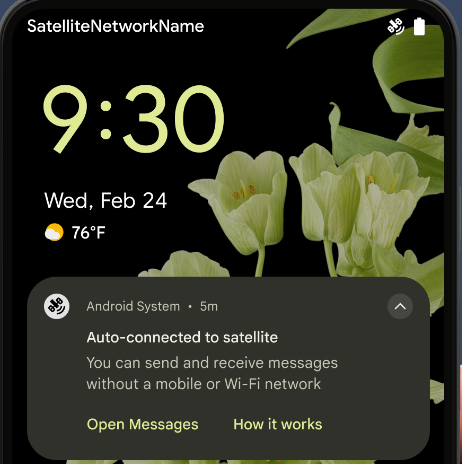
يواصل نظام Android 15 توسيع نطاق توفّر المنصة للاتصال عبر الأقمار الصناعية ويضمّ بعض عناصر واجهة المستخدم لضمان تجربة مستخدم متّسقة على مستوى منظومة الاتصال عبر الأقمار الصناعية.
يمكن للتطبيقات استخدام ServiceState.isUsingNonTerrestrialNetwork() لرصد الحالات التي يكون فيها الجهاز متصلاً بأحد الأقمار الصناعية، ما يمنح التطبيقات المزيد من المعلومات عن سبب عدم توفّر خدمات الشبكة الكاملة. بالإضافة إلى ذلك، يقدّم الإصدار 15 من Android
توافقًا مع تطبيقات الرسائل القصيرة ورسائل الوسائط المتعددة، بالإضافة إلى تطبيقات RCS المحمَّلة مسبقًا لاستخدام
الاتصال عبر الأقمار الصناعية لإرسال الرسائل واستلامها.
تجارب أكثر سلاسة باستخدام تقنية NFC
يعمل نظام التشغيل Android 15 على تحسين تجربة الدفع بدون تلامس الأجهزة وجعلها أكثر سلاسة وموثوقية، مع مواصلة توفير منظومة التطبيقات المتكاملة لتقنية NFC القوية في Android. على
الأجهزة المتوافقة، يمكن للتطبيقات أن تطلب من NfcAdapter الدخول إلى
وضع المراقبة، حيث يستمع الجهاز إلى قراء
NFC ولكنه لا يستجيب لهم، ويرسل خدمة NFC الخاصة بالتطبيق PollingFrame
العناصر لمعالجتها. يمكن استخدام عناصر PollingFrame لمنح الإذن
قبل إجراء عملية التواصل الأولى مع قارئ NFC، ما يتيح إجراء معاملة
بنقرة واحدة في العديد من الحالات.
بالإضافة إلى ذلك، يمكن للتطبيقات تسجيل فلتر على الأجهزة المتوافقة لكي تتم إعلامها بنشاط حلقة الاستطلاع، ما يتيح التشغيل السلس مع تطبيقات متعددة متوافقة مع NFC.
دور المحفظة
Android 15 introduces a Wallet role that allows tighter integration with the user's preferred wallet app. This role replaces the NFC default contactless payment setting. Users can manage the Wallet role holder by navigating to Settings > Apps > Default Apps.
The Wallet role is used when routing NFC taps for AIDs registered in the payment category. Taps always go to the Wallet role holder unless another app that is registered for the same AID is running in the foreground.
This role is also used to determine where the Wallet Quick Access tile should go when activated. When the role is set to "None", the Quick Access tile isn't available and payment category NFC taps are only delivered to the foreground app.
الأمان
يساعدك نظام التشغيل Android 15 في تعزيز أمان تطبيقك وحماية بياناته، كما يتيح للمستخدمين المزيد من الشفافية والتحكّم في بياناتهم. يمكنك مشاهدة جلسة الحفاظ على أمان المستخدمين على Android من مؤتمر Google I/O للتعرّف على المزيد من الإجراءات التي نتّخذها لتحسين وسائل حماية المستخدمين وحماية تطبيقك من التهديدات الجديدة.
دمج Credential Manager مع ميزة "الملء التلقائي"
Starting with Android 15, developers can link specific views like username or password fields with Credential Manager requests, making it easier to provide a tailored user experience during the sign-in process. When the user focuses on one of these views, a corresponding request is sent to Credential Manager. The resulting credentials are aggregated across providers and displayed in autofill fallback UIs, such as inline suggestions or drop-down suggestions. The Jetpack androidx.credentials library is the preferred endpoint for developers to use and will soon be available to further enhance this feature in Android 15 and higher.
دمج ميزة "نقرة واحدة لتسجيل الدخول أو إنشاء حساب" مع طلبات المقاييس الحيوية
Credential Manager integrates biometric prompts into the credential creation and sign-in processes, eliminating the need for providers to manage biometric prompts. As a result, credential providers only need to focus on the results of the create and get flows, augmented with the biometric flow result. This simplified process creates a more efficient and streamlined credential creation and retrieval process.
إدارة المفاتيح للتشفير التام بين الأطراف
We are introducing the E2eeContactKeysManager in Android 15, which
facilitates end-to-end encryption (E2EE) in your Android apps by providing an
OS-level API for the storage of cryptographic public keys.
The E2eeContactKeysManager is designed to integrate with the platform
contacts app to give users a centralized way to manage and verify their
contacts' public keys.
عمليات التحقّق من الأذونات على معرّفات الموارد الموحّدة للمحتوى
Android 15 introduces a set of APIs that perform permission checks on content URIs:
Context.checkContentUriPermissionFull: This performs a full permission check on content URIs.Activitymanifest attributerequireContentUriPermissionFromCaller: This enforces specified permissions on the provided content URIs at activity launch.ComponentCallerclass forActivitycallers: This represents the app that launched the activity.
تسهيل الاستخدام
يضيف Android 15 ميزات تعمل على تحسين إمكانية الوصول للمستخدمين.
Better Braille
In Android 15, we've made it possible for TalkBack to support Braille displays that are using the HID standard over both USB and secure Bluetooth.
This standard, much like the one used by mice and keyboards, will help Android support a wider range of Braille displays over time.
التوافق مع أسواق عالمية
يضيف Android 15 ميزات وإمكانات تكمل تجربة المستخدم عند استخدام الجهاز بلغات مختلفة.
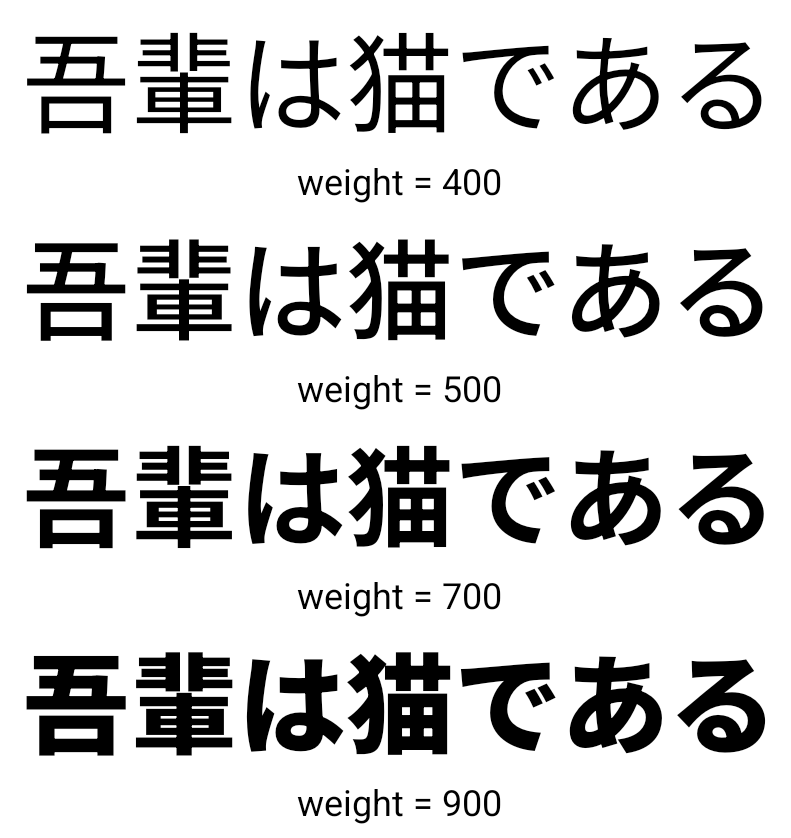
خط CJK متغيّر
Starting with Android 15, the font file for Chinese, Japanese, and Korean (CJK) languages, NotoSansCJK, is now a variable font. Variable fonts open up possibilities for creative typography in CJK languages. Designers can explore a broader range of styles and create visually striking layouts that were previously difficult or impossible to achieve.
ضبط المسافات بين الأحرف
Starting with Android 15, text can be justified utilizing letter spacing by
using JUSTIFICATION_MODE_INTER_CHARACTER. Inter-word justification was
first introduced in Android 8.0 (API level 26), and inter-character
justification provides similar capabilities for languages that use the
whitespace character for segmentation, such as Chinese, Japanese, and others.

JUSTIFICATION_MODE_NONE.
JUSTIFICATION_MODE_NONE.
JUSTIFICATION_MODE_INTER_WORD.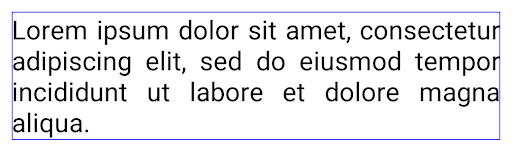
JUSTIFICATION_MODE_INTER_WORD.
JUSTIFICATION_MODE_INTER_CHARACTER.
JUSTIFICATION_MODE_INTER_CHARACTER.إعدادات فاصل الأسطر التلقائي
Android started supporting phrase-based line breaks for Japanese and Korean in
Android 13 (API level 33). However, while phrase-based line breaks improve the
readability of short lines of text, they don't work well for long lines of text.
In Android 15, apps can apply phrase-based line breaks only for short lines
of text, using the LINE_BREAK_WORD_STYLE_AUTO
option. This option selects the best word style option for the text.
For short lines of text, phrase-based line breaks are used, functioning the same
as LINE_BREAK_WORD_STYLE_PHRASE, as shown in the
following image:

LINE_BREAK_WORD_STYLE_AUTO
applies phrase-based line breaks to improve the readability of the text.
This is the same as applying
LINE_BREAK_WORD_STYLE_PHRASE.For longer lines of text, LINE_BREAK_WORD_STYLE_AUTO uses a no
line-break word style, functioning the same as
LINE_BREAK_WORD_STYLE_NONE, as shown in the
following image:
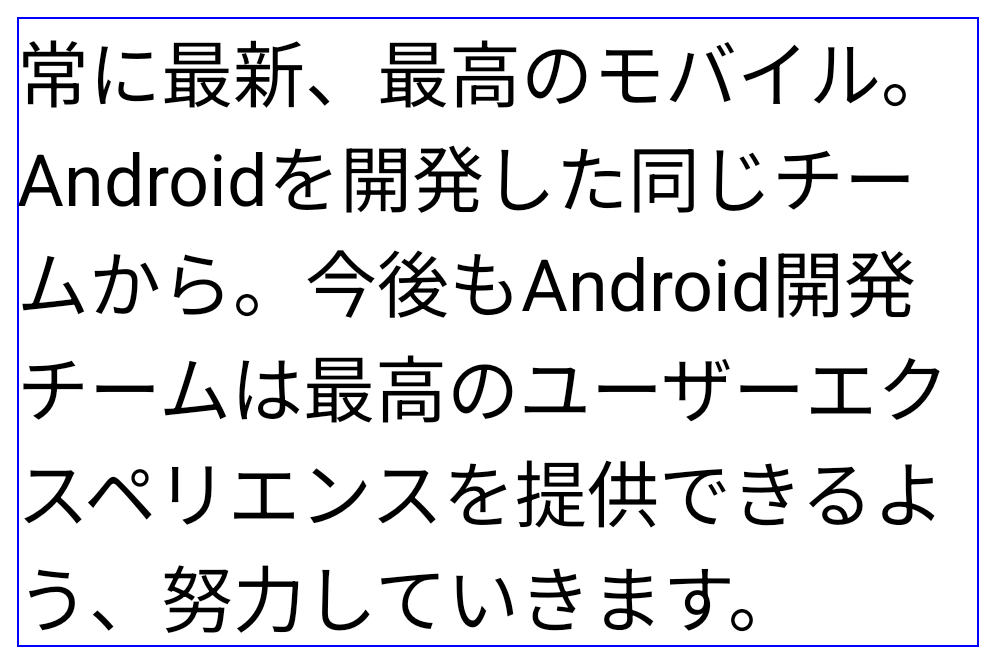
LINE_BREAK_WORD_STYLE_AUTO
applies no line-break word style to improve the readability of the text.
This is the same as applying
LINE_BREAK_WORD_STYLE_NONE.خط إضافي للغة اليابانية Hentaigana
In Android 15, a font file for old Japanese Hiragana (known as Hentaigana) is bundled by default. The unique shapes of Hentaigana characters can add a distinctive flair to artwork or design while also helping to preserve accurate transmission and understanding of ancient Japanese documents.

VideoLAN cone Copyright (c) 1996-2010 VideoLAN. يمكن لأي شخص استخدام هذا الشعار أو نسخة معدَّلة منه أو تعديله للإشارة إلى مشروع VideoLAN أو أي منتج طوَّره فريق VideoLAN، ولكن لا يشير ذلك إلى موافقة المشروع.
Vulkan وشعار Vulkan علامتان تجاريتان مسجّلتان لشركة Khronos Group Inc.
OpenGL هي علامة تجارية مسجّلة وشعار OpenGL ES هو علامة تجارية تابعة للشركة Hewlett Packard Enterprise وتستخدمها شركة Khronos بموجب إذن.