

Android 15 ขอแนะนำฟีเจอร์และ API ที่ยอดเยี่ยมสำหรับนักพัฒนาแอป ส่วนต่อไปนี้จะสรุปฟีเจอร์เหล่านี้เพื่อช่วยให้คุณเริ่มต้นใช้งาน API ที่เกี่ยวข้องได้
หากต้องการดูรายการ API ที่เพิ่ม แก้ไข และนำออกโดยละเอียด โปรดอ่านรายงานการเปรียบเทียบ API หากต้องการดูรายละเอียดเกี่ยวกับ API ที่เพิ่ม โปรดไปที่เอกสารอ้างอิง API ของ Android สำหรับ Android 15 ให้มองหา API ที่เพิ่มในระดับ API 35 หากต้องการดูข้อมูลเกี่ยวกับส่วนที่การเปลี่ยนแปลงแพลตฟอร์มอาจส่งผลต่อแอปของคุณ โปรดดูการเปลี่ยนแปลงลักษณะการทำงานของ Android 15 สำหรับแอปที่กำหนดเป้าหมายเป็น Android 15 และสำหรับแอปทั้งหมด
กล้องและสื่อ
Android 15 มีฟีเจอร์หลากหลายที่ปรับปรุงประสบการณ์การใช้งานกล้องและสื่อ รวมถึงให้คุณเข้าถึงเครื่องมือและฮาร์ดแวร์เพื่อสนับสนุนครีเอเตอร์ในการทำให้วิสัยทัศน์ของตนเป็นจริงบน Android
ดูข้อมูลเพิ่มเติมเกี่ยวกับฟีเจอร์ล่าสุดและโซลูชันสำหรับนักพัฒนาแอปสำหรับสื่อและ กล้องของ Android ได้ที่การพูดคุยเรื่องการสร้างประสบการณ์การใช้งานสื่อและกล้องของ Android ที่ทันสมัยจาก Google I/O
การเพิ่มแสงในสภาวะแสงน้อย
Android 15 introduces Low Light Boost, an auto-exposure mode available to both Camera 2 and the night mode camera extension. Low Light Boost adjusts the exposure of the Preview stream in low-light conditions. This is different from how the night mode camera extension creates still images, because night mode combines a burst of photos to create a single, enhanced image. While night mode works very well for creating a still image, it can't create a continuous stream of frames, but Low Light Boost can. Thus, Low Light Boost enables camera capabilities, such as:
- Providing an enhanced image preview, so users are better able to frame their low-light pictures
- Scanning QR codes in low light
If you enable Low Light Boost, it automatically turns on when there's a low light level, and turns off when there's more light.
Apps can record off the Preview stream in low-light conditions to save a brightened video.
For more information, see Low Light Boost.
ตัวควบคุมกล้องในแอป
Android 15 เพิ่มส่วนขยายเพื่อให้ควบคุมฮาร์ดแวร์กล้องและอัลกอริทึมของกล้องได้มากขึ้นในอุปกรณ์ที่รองรับ ดังนี้
- การปรับความแรงของแฟลชขั้นสูงที่ช่วยควบคุมความเข้มของแฟลชได้อย่างแม่นยำทั้งในโหมด
SINGLEและTORCHขณะถ่ายภาพ
การควบคุมพื้นที่ว่างของ HDR
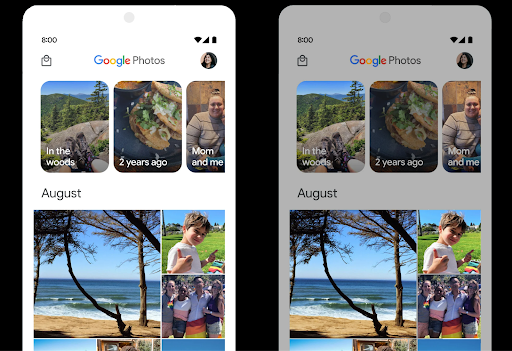
Android 15 จะเลือก Headroom ของ HDR ที่เหมาะสมกับความสามารถของอุปกรณ์และความละเอียดของบิตของแผง สำหรับหน้าเว็บที่มีเนื้อหา SDR จำนวนมาก เช่น แอปรับส่งข้อความที่แสดงภาพขนาดย่อ HDR รายการเดียว ลักษณะการทำงานนี้อาจส่งผลเสียต่อความสว่างที่รับรู้ของเนื้อหา SDR Android 15 ให้คุณควบคุม Headroom ของ HDR ด้วย setDesiredHdrHeadroom เพื่อรักษาสมดุลระหว่างเนื้อหา SDR กับ HDR
การควบคุมความดัง

Android 15 เพิ่มการรองรับ มาตรฐานความดัง CTA-2075 เพื่อช่วยคุณ หลีกเลี่ยงความดังของเสียงที่ไม่สอดคล้องกัน และทำให้ผู้ใช้ไม่ต้องคอยฟัง ปรับระดับเสียงเมื่อสลับระหว่างเนื้อหา ระบบใช้ประโยชน์จากลักษณะที่ทราบของอุปกรณ์เอาต์พุต (หูฟังและลำโพง) พร้อมกับข้อมูลเมตาระดับเสียงที่มีอยู่ในเนื้อหาเสียง AAC เพื่อปรับระดับความดังของเสียงและการบีบอัดช่วงไดนามิกอย่างชาญฉลาด
หากต้องการเปิดใช้ฟีเจอร์นี้ คุณต้องตรวจสอบว่าข้อมูลเมตาระดับเสียงพร้อมใช้งานในเนื้อหา AAC และเปิดใช้ฟีเจอร์แพลตฟอร์มในแอป โดยคุณจะต้องสร้างอินสแตนซ์ออบเจ็กต์ LoudnessCodecController ด้วยการเรียกใช้เมธอด create ของฟีเจอร์ดังกล่าวพร้อมด้วยรหัสเซสชันเสียงจาก AudioTrack ที่เชื่อมโยง ซึ่งจะเริ่มใช้การอัปเดตเสียงโดยอัตโนมัติ คุณสามารถส่ง OnLoudnessCodecUpdateListener เพื่อแก้ไขหรือกรองพารามิเตอร์ระดับเสียงก่อนที่จะนำไปใช้กับ MediaCodec
// Media contains metadata of type MPEG_4 OR MPEG_D
val mediaCodec = …
val audioTrack = AudioTrack.Builder()
                                .setSessionId(sessionId)
                                .build()
...
// Create new loudness controller that applies the parameters to the MediaCodec
try {
   val lcController = LoudnessCodecController.create(mSessionId)
   // Starts applying audio updates for each added MediaCodec
}
นอกจากนี้ AndroidX media3 ExoPlayer จะได้รับการอัปเดตให้ใช้ LoudnessCodecControllerAPI เพื่อการผสานรวมแอปอย่างราบรื่น
อุปกรณ์ MIDI 2.0 เสมือน
Android 13 added support for connecting to MIDI 2.0 devices using USB, which communicate using Universal MIDI Packets (UMP). Android 15 extends UMP support to virtual MIDI apps, enabling composition apps to control synthesizer apps as a virtual MIDI 2.0 device just like they would with an USB MIDI 2.0 device.
การถอดรหัสซอฟต์แวร์ AV1 ที่มีประสิทธิภาพมากขึ้น

dav1d ซึ่งเป็นโปรแกรมถอดรหัส AV1 ยอดนิยมจาก VideoLAN พร้อมให้ใช้งานในอุปกรณ์ Android ที่ไม่รองรับการถอดรหัส AV1 ในฮาร์ดแวร์แล้ว โดยมีประสิทธิภาพมากกว่าโปรแกรมถอดรหัสซอฟต์แวร์ AV1 รุ่นเดิมถึง 3 เท่า ซึ่งช่วยให้ผู้ใช้จำนวนมากขึ้นสามารถเล่น AV1 แบบ HD ได้ รวมถึงอุปกรณ์ระดับกลางและระดับล่างบางรุ่น
แอปของคุณต้องเลือกใช้ dav1d โดยเรียกใช้ตามชื่อ
"c2.android.av1-dav1d.decoder" เราจะกำหนดให้ dav1d เป็นโปรแกรมถอดรหัสซอฟต์แวร์ AV1 เริ่มต้นในการอัปเดตครั้งถัดไป การรองรับนี้ได้รับการกำหนดมาตรฐานและพอร์ตไปยังเวอร์ชันเก่าสำหรับอุปกรณ์ Android 11 ที่ได้รับการอัปเดตระบบ Google Play
ประสิทธิภาพการทำงานและเครื่องมือสำหรับนักพัฒนาแอป
แม้ว่างานส่วนใหญ่ของเราในการปรับปรุงประสิทธิภาพการทำงานของคุณจะมุ่งเน้นไปที่เครื่องมือต่างๆ เช่น Android Studio, Jetpack Compose และไลบรารี Android Jetpack แต่เราก็มองหาวิธีต่างๆ ในแพลตฟอร์มที่จะช่วยให้คุณ ตระหนักถึงวิสัยทัศน์ของคุณได้ง่ายขึ้นเสมอ
การอัปเดต OpenJDK 17
Android 15 ยังคงดำเนินการรีเฟรชไลบรารีหลักของ Android เพื่อปรับให้สอดคล้องกับฟีเจอร์ใน OpenJDK LTS เวอร์ชันล่าสุด
ฟีเจอร์หลักและการปรับปรุงที่สำคัญมีดังนี้
- การปรับปรุงคุณภาพชีวิตเกี่ยวกับบัฟเฟอร์ NIO
- สตรีม
- วิธีเพิ่มเติมสำหรับ
mathและstrictmath - การอัปเดตแพ็กเกจ
utilซึ่งรวมถึงแพ็กเกจcollection,mapและset - การสนับสนุน
ByteBufferในDeflater - การอัปเดตความปลอดภัย เช่น
X500PrivateCredentialและการอัปเดตคีย์ความปลอดภัย
API เหล่านี้ได้รับการอัปเดตในอุปกรณ์กว่า 1 พันล้านเครื่องที่ใช้ Android 12 (API ระดับ 31) ขึ้นไปผ่านการอัปเดตระบบ Google Play เพื่อให้คุณกำหนดเป้าหมายฟีเจอร์การเขียนโปรแกรมล่าสุดได้
การปรับปรุง PDF
Android 15 มีการปรับปรุงที่สำคัญสำหรับ PdfRenderer
API แอปสามารถรวมฟีเจอร์ขั้นสูง เช่น การแสดงผลไฟล์ที่มีการป้องกันด้วยรหัสผ่าน คําอธิบายประกอบ การแก้ไขแบบฟอร์ม การค้นหา และการเลือกพร้อมการคัดลอก PDF เชิงเส้น
รองรับการเพิ่มประสิทธิภาพเพื่อให้ดู PDF ในเครื่องได้เร็วขึ้นและลดการใช้ทรัพยากร
ไลบรารี PDF ของ Jetpack ใช้ API เหล่านี้เพื่อให้การเพิ่ม PDF เป็นเรื่องง่าย
ความสามารถในการดูแอปของคุณ
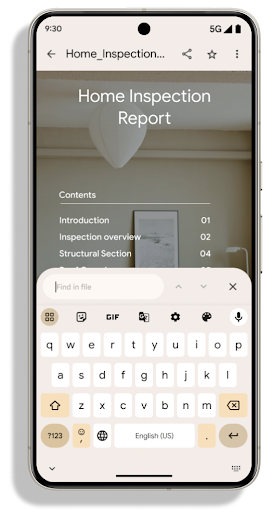
ย้าย PdfRenderer ไปยังโมดูลที่อัปเดตได้โดยใช้ Google แล้ว
การอัปเดตระบบ Play โดยไม่ขึ้นอยู่กับการเปิดตัวแพลตฟอร์ม และเราให้การสนับสนุน
การเปลี่ยนแปลงเหล่านี้กลับไปใช้ Android 11 (API ระดับ 30) โดยการสร้าง
แพลตฟอร์ม API ก่อน Android 15 ที่เรียกว่า
PdfRendererPreV
การปรับแต่งการสลับภาษาอัตโนมัติ
Android 14 เพิ่มการจดจำเสียงหลายภาษาในอุปกรณ์ด้วยการสลับระหว่างภาษาโดยอัตโนมัติ แต่วิธีนี้อาจทำให้คำพูดถูกละทิ้ง โดยเฉพาะเมื่อสลับภาษาโดยเว้นช่วงระหว่างคำพูดน้อยลง Android 15 เพิ่มการควบคุมเพิ่มเติมเพื่อช่วยแอปปรับการเปลี่ยนนี้ให้เหมาะกับกรณีการใช้งาน
EXTRA_LANGUAGE_SWITCH_INITIAL_ACTIVE_DURATION_TIME_MILLIS
จำกัดการเปลี่ยนภาษาอัตโนมัติไว้ที่ช่วงต้นของเซสชันเสียง ส่วน EXTRA_LANGUAGE_SWITCH_MATCH_SWITCHES จะปิดใช้งานการเปลี่ยนภาษาหลังจากเปลี่ยนจำนวนครั้งที่กำหนด ตัวเลือกเหล่านี้มีประโยชน์อย่างยิ่งในกรณีที่คุณคาดว่าจะมีการใช้ภาษาเดียวในเซสชันที่ควรตรวจจับโดยอัตโนมัติ
API แบบอักษรที่ปรับแต่งได้ OpenType ที่ปรับปรุงใหม่
Android 15 improves the usability of the OpenType variable font. You can create
a FontFamily instance from a variable font without specifying weight axes
with the buildVariableFamily API. The text renderer overrides the value
of wght axis to match the displaying text.
Using the API simplifies the code for creating a Typeface considerably:
Kotlin
val newTypeface = Typeface.CustomFallbackBuilder(
            FontFamily.Builder(
                Font.Builder(assets, "RobotoFlex.ttf").build())
                    .buildVariableFamily())
    .build()
Java
Typeface newTypeface = Typeface.CustomFallbackBuilder(
            new FontFamily.Builder(
                new Font.Builder(assets, "RobotoFlex.ttf").build())
                    .buildVariableFamily())
    .build();
Previously, to create the same Typeface, you would need much more code:
Kotlin
val oldTypeface = Typeface.CustomFallbackBuilder(
            FontFamily.Builder(
                Font.Builder(assets, "RobotoFlex.ttf")
                    .setFontVariationSettings("'wght' 400")
                    .setWeight(400)
                    .build())
                .addFont(
                    Font.Builder(assets, "RobotoFlex.ttf")
                        .setFontVariationSettings("'wght' 100")
                        .setWeight(100)
                        .build()
                )
                .addFont(
                    Font.Builder(assets, "RobotoFlex.ttf")
                        .setFontVariationSettings("'wght' 200")
                        .setWeight(200)
                        .build()
                )
                .addFont(
                    Font.Builder(assets, "RobotoFlex.ttf")
                        .setFontVariationSettings("'wght' 300")
                        .setWeight(300)
                        .build()
                )
                .addFont(
                    Font.Builder(assets, "RobotoFlex.ttf")
                        .setFontVariationSettings("'wght' 500")
                        .setWeight(500)
                        .build()
                )
                .addFont(
                    Font.Builder(assets, "RobotoFlex.ttf")
                        .setFontVariationSettings("'wght' 600")
                        .setWeight(600)
                        .build()
                )
                .addFont(
                    Font.Builder(assets, "RobotoFlex.ttf")
                        .setFontVariationSettings("'wght' 700")
                        .setWeight(700)
                        .build()
                )
                .addFont(
                    Font.Builder(assets, "RobotoFlex.ttf")
                        .setFontVariationSettings("'wght' 800")
                        .setWeight(800)
                        .build()
                )
                .addFont(
                    Font.Builder(assets, "RobotoFlex.ttf")
                        .setFontVariationSettings("'wght' 900")
                        .setWeight(900)
                        .build()
                ).build()
        ).build()
Java
Typeface oldTypeface = new Typeface.CustomFallbackBuilder(
    new FontFamily.Builder(
        new Font.Builder(assets, "RobotoFlex.ttf")
            .setFontVariationSettings("'wght' 400")
            .setWeight(400)
            .build()
    )
    .addFont(
        new Font.Builder(assets, "RobotoFlex.ttf")
            .setFontVariationSettings("'wght' 100")
            .setWeight(100)
            .build()
    )
    .addFont(
        new Font.Builder(assets, "RobotoFlex.ttf")
            .setFontVariationSettings("'wght' 200")
            .setWeight(200)
            .build()
    )
    .addFont(
        new Font.Builder(assets, "RobotoFlex.ttf")
            .setFontVariationSettings("'wght' 300")
            .setWeight(300)
            .build()
    )
    .addFont(
        new Font.Builder(assets, "RobotoFlex.ttf")
            .setFontVariationSettings("'wght' 500")
            .setWeight(500)
            .build()
    )
    .addFont(
        new Font.Builder(assets, "RobotoFlex.ttf")
            .setFontVariationSettings("'wght' 600")
            .setWeight(600)
            .build()
    )
    .addFont(
        new Font.Builder(assets, "RobotoFlex.ttf")
            .setFontVariationSettings("'wght' 700")
            .setWeight(700)
            .build()
    )
    .addFont(
        new Font.Builder(assets, "RobotoFlex.ttf")
            .setFontVariationSettings("'wght' 800")
            .setWeight(800)
            .build()
    )
    .addFont(
        new Font.Builder(assets, "RobotoFlex.ttf")
            .setFontVariationSettings("'wght' 900")
            .setWeight(900)
            .build()
    )
    .build()
).build();
Here's an example of how a Typeface created with both the old and new APIs
renders:
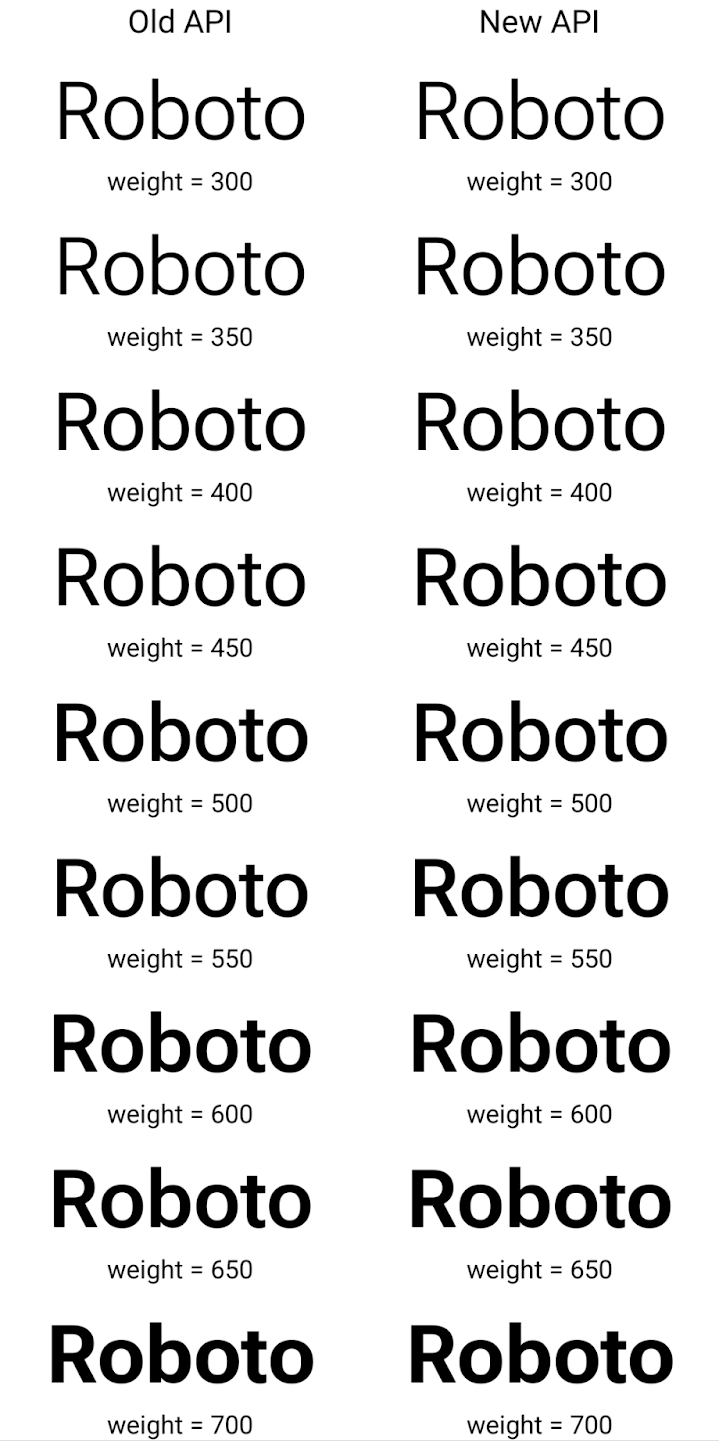
In this example, the Typeface created with the old API doesn't have the
capability to create accurate font weights for the 350, 450, 550 and 650
Font instances, so the renderer falls back to the closest weight. So in
this case, 300 is rendered instead of 350, 400 is rendered instead of 450, and
so on. By contrast, the Typeface created with the new APIs dynamically creates
a Font instance for a given weight, so accurate weights are rendered for 350,
450, 550, and 650 as well.
การควบคุมการขึ้นบรรทัดใหม่แบบละเอียด
ตั้งแต่ Android 15 เป็นต้นไป TextView และตัวแบ่งบรรทัดที่สำคัญจะเก็บรักษาข้อความที่ระบุในบรรทัดเดียวกันไว้เพื่อให้อ่านง่ายขึ้น คุณใช้ประโยชน์จากการปรับเปลี่ยนการขึ้นบรรทัดใหม่นี้ได้โดยการใช้แท็ก <nobreak> ในทรัพยากรสตริงหรือ createNoBreakSpan ในทำนองเดียวกัน คุณสามารถคงคำไม่ให้มีการแบ่งวรรคโดยใช้แท็ก <nohyphen> หรือ createNoHyphenationSpan
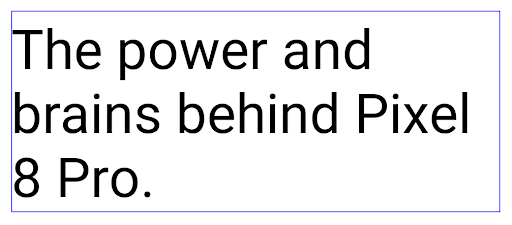
ตัวอย่างเช่น ทรัพยากรสตริงต่อไปนี้ไม่มีการขึ้นบรรทัดใหม่ และแสดงผลโดยตัดข้อความ "Pixel 8 Pro" ตรงที่ไม่ต้องการ
<resources>
    <string name="pixel8pro">The power and brains behind Pixel 8 Pro.</string>
</resources>
ในทางตรงกันข้าม ทรัพยากรสตริงนี้จะมีแท็ก <nobreak> ซึ่งตัดวลี "Pixel 8 Pro" และป้องกันการขึ้นบรรทัดใหม่:
<resources>
    <string name="pixel8pro">The power and brains behind <nobreak>Pixel 8 Pro.</nobreak></string>
</resources>
ความแตกต่างของวิธีแสดงผลสตริงเหล่านี้จะแสดงอยู่ในรูปภาพต่อไปนี้
<nobreak>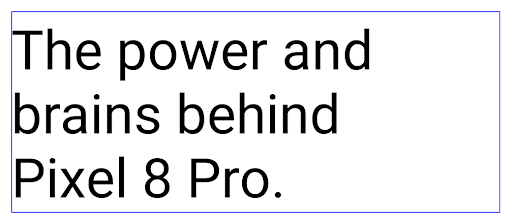
<nobreak>การเก็บถาวรของแอป
Android and Google Play announced support for app archiving last year, allowing users to free up space by partially removing infrequently used apps from the device that were published using Android App Bundle on Google Play. Android 15 includes OS level support for app archiving and unarchiving, making it easier for all app stores to implement it.
Apps with the REQUEST_DELETE_PACKAGES permission can call the
PackageInstaller requestArchive method to request archiving an
installed app package, which removes the APK and any cached files, but persists
user data. Archived apps are returned as displayable apps through the
LauncherApps APIs; users will see a UI treatment to highlight that those
apps are archived. If a user taps on an archived app, the responsible installer
will get a request to unarchive it, and the restoration process can be
monitored by the ACTION_PACKAGE_ADDED broadcast.
เปิดใช้โหมด 16 KB ในอุปกรณ์โดยใช้ตัวเลือกสำหรับนักพัฒนาแอป
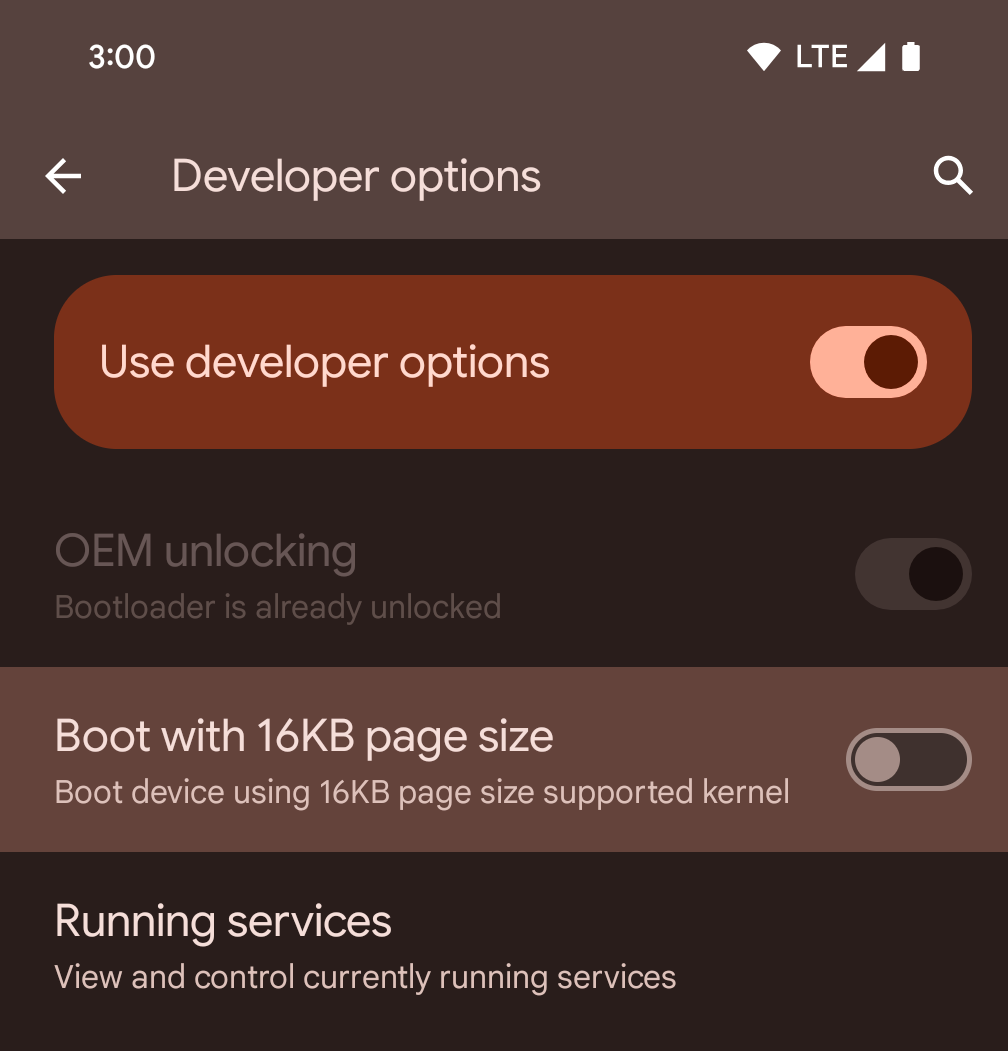
สลับตัวเลือกสำหรับนักพัฒนาแอปบูตโดยใช้หน้าหน่วยความจำขนาด 16 KB เพื่อบูตอุปกรณ์ในโหมด 16 KB
ใน Android 15 เวอร์ชัน QPR คุณสามารถใช้ตัวเลือกสำหรับนักพัฒนาแอปที่มีในอุปกรณ์บางรุ่นเพื่อบูตอุปกรณ์ในโหมด 16 KB และทำการทดสอบในอุปกรณ์ได้ ก่อนใช้ตัวเลือกสำหรับนักพัฒนาซอฟต์แวร์ ให้ไปที่การตั้งค่า > ระบบ > การอัปเดตซอฟต์แวร์ แล้วใช้การอัปเดตที่มี
ตัวเลือกสำหรับนักพัฒนาแอปนี้พร้อมใช้งานในอุปกรณ์ต่อไปนี้
Pixel 8 และ 8 Pro (ที่ใช้ Android 15 QPR1 ขึ้นไป)
Pixel 8a (ใช้ Android 15 QPR1 ขึ้นไป)
Pixel 9, 9 Pro และ 9 Pro XL (ใช้ Android 15 QPR2 ขึ้นไป)
Pixel 9a (ใช้ Android 16 ขึ้นไป)
กราฟิก
Android 15 มาพร้อมกับการปรับปรุงกราฟิกล่าสุด ซึ่งรวมถึง ANGLE และการเพิ่มระบบกราฟิก Canvas
การปรับปรุงการเข้าถึง GPU ของ Android ให้ทันสมัย

Android hardware has evolved quite a bit from the early days where the core OS would run on a single CPU and GPUs were accessed using APIs based on fixed-function pipelines. The Vulkan® graphics API has been available in the NDK since Android 7.0 (API level 24) with a lower-level abstraction that better reflects modern GPU hardware, scales better to support multiple CPU cores, and offers reduced CPU driver overhead — leading to improved app performance. Vulkan is supported by all modern game engines.
Vulkan is Android's preferred interface to the GPU. Therefore, Android 15 includes ANGLE as an optional layer for running OpenGL® ES on top of Vulkan. Moving to ANGLE will standardize the Android OpenGL implementation for improved compatibility, and, in some cases, improved performance. You can test out your OpenGL ES app stability and performance with ANGLE by enabling the developer option in Settings -> System -> Developer Options -> Experimental: Enable ANGLE on Android 15.
The Android ANGLE on Vulkan roadmap
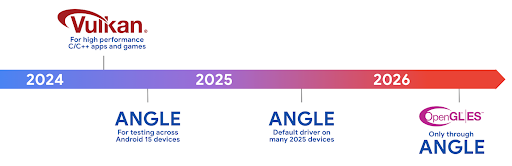
As part of streamlining our GPU stack, going forward we will be shipping ANGLE as the GL system driver on more new devices, with the future expectation that OpenGL/ES will be only available through ANGLE. That being said, we plan to continue support for OpenGL ES on all devices.
Recommended next steps
Use the developer options to select the ANGLE driver for OpenGL ES and test your app. For new projects, we strongly encourage using Vulkan for C/C++.
การปรับปรุง Canvas
Android 15 สานต่อการพัฒนาระบบกราฟิก Canvas ของ Android ให้ทันสมัยยิ่งขึ้นด้วยความสามารถเพิ่มเติมต่อไปนี้
Matrix44มีเมทริกซ์ 4x4 สำหรับการเปลี่ยนรูปแบบพิกัดที่ควรใช้เมื่อคุณต้องการจัดการผืนผ้าใบใน 3 มิติclipShaderจะตัดกันระหว่างคลิปปัจจุบันกับชิเดอร์ที่ระบุ ขณะที่clipOutShaderจะตั้งค่าคลิปเป็นความแตกต่างระหว่างคลิปปัจจุบันกับชิเดอร์ โดยแต่ละรายการจะถือว่าชิเดอร์เป็นมาสก์อัลฟ่า ซึ่งรองรับการวาดรูปทรงที่ซับซ้อนได้อย่างมีประสิทธิภาพ
ประสิทธิภาพและแบตเตอรี่
Android ยังคงมุ่งเน้นที่การช่วยคุณปรับปรุงประสิทธิภาพและคุณภาพของแอป Android 15 ขอแนะนำ API ที่ช่วยให้การทำงานในแอปมีประสิทธิภาพมากขึ้นในการดำเนินการ เพิ่มประสิทธิภาพของแอป และรวบรวมข้อมูลเชิงลึกเกี่ยวกับแอป
ดูแนวทางปฏิบัติแนะนำเพื่อประสิทธิภาพของแบตเตอรี่ การแก้ไขข้อบกพร่องของการใช้เครือข่ายและพลังงาน และ รายละเอียดเกี่ยวกับวิธีที่เราปรับปรุงประสิทธิภาพของแบตเตอรี่ในการทำงานเบื้องหลังใน Android 15 และ Android เวอร์ชันล่าสุดได้ที่ การพูดคุยเรื่องการปรับปรุงประสิทธิภาพของ แบตเตอรี่ในการทำงานเบื้องหลังใน Android จาก Google I/O
ApplicationStartInfo API
ใน Android เวอร์ชันก่อนหน้า การเริ่มต้นแอปเป็นเรื่องที่เข้าใจยากอยู่บ้าง เราพบว่าการระบุภายในแอปว่าแอปเริ่มต้นจากสถานะเย็น อุ่น หรือร้อนนั้นเป็นเรื่องยาก นอกจากนี้ คุณยังทราบระยะเวลาที่แอปใช้ในการดำเนินการต่างๆ ในระยะเริ่มต้น เช่น การแยกกระบวนการ การเรียก onCreate การวาดเฟรมแรก และอื่นๆ ได้ไม่ชัดเจน เมื่อสร้างอินสแตนซ์คลาส Application แล้ว คุณจะไม่มีทางรู้ว่าแอปเริ่มต้นจากบรีดแคสต์ ผู้ให้บริการเนื้อหา งาน การสำรองข้อมูล การบูตเสร็จสมบูรณ์ การปลุก หรือ Activity
ApplicationStartInfo API ใน Android 15 มีฟีเจอร์ทั้งหมดนี้และอีกมากมาย คุณยังเลือกเพิ่มการประทับเวลาของคุณเองลงในขั้นตอนเพื่อรวบรวมข้อมูลการกําหนดเวลาในที่เดียวได้ด้วย นอกจากการเก็บรวบรวมเมตริกแล้ว คุณยังใช้ ApplicationStartInfo เพื่อช่วยเพิ่มประสิทธิภาพการเริ่มต้นของแอปได้โดยตรง เช่น คุณอาจลดการสร้างอินสแตนซ์ของไลบรารีที่เกี่ยวข้องกับ UI ในคลาส Application ที่ไม่จำเป็นได้เมื่อแอปเริ่มต้นขึ้นเนื่องจากการออกอากาศ
ข้อมูลขนาดแอปโดยละเอียด
ตั้งแต่ Android 8.0 (API ระดับ 26) เป็นต้นไป Android ได้รวม StorageStats.getAppBytes API ที่สรุปขนาดของแอปที่ติดตั้งเป็นจำนวนไบต์เดียว ซึ่งเป็นผลรวมของขนาด APK, ขนาดของไฟล์ที่ดึงมาจาก APK และไฟล์ที่สร้างในอุปกรณ์ เช่น โค้ดที่คอมไพล์ล่วงหน้า (AOT) ตัวเลขนี้ไม่ได้ให้ข้อมูลเชิงลึกมากนักเกี่ยวกับวิธีที่แอปใช้พื้นที่เก็บข้อมูล
Android 15 เพิ่ม StorageStats.getAppBytesByDataType([type]) API ซึ่งจะช่วยให้คุณได้รับข้อมูลเชิงลึกเกี่ยวกับวิธีที่แอปใช้พื้นที่ทั้งหมดนั้น รวมถึงการแยกไฟล์ APK, AOT และโค้ดที่เกี่ยวข้องกับการเร่งความเร็ว, ข้อมูลเมตา dex, ไลบรารี และโปรไฟล์ที่แนะนำ
การสร้างโปรไฟล์ที่แอปจัดการ
Android 15 มีคลาส ProfilingManager ซึ่งช่วยให้คุณรวบรวมข้อมูลการโปรไฟล์จากภายในแอปได้ เช่น การดัมพ์กอง โปรไฟล์กอง สุ่มตัวอย่างสแต็ก และอื่นๆ โดยจะทำการเรียกกลับไปยังแอปด้วยแท็กที่ระบุเพื่อระบุไฟล์เอาต์พุต ซึ่งระบบจะส่งไปยังไดเรกทอรีไฟล์ของแอป API จะจำกัดอัตราเพื่อลดผลกระทบด้านประสิทธิภาพ
เราขอแนะนําให้ใช้ Profiling AndroidX API ที่เกี่ยวข้องเพื่อลดความซับซ้อนในการสร้างคําขอโปรไฟล์ในแอป ซึ่งพร้อมใช้งานใน Core 1.15.0-rc01 ขึ้นไป
การปรับปรุงฐานข้อมูล SQLite
Android 15 introduces SQLite APIs that expose advanced features from the underlying SQLite engine that target specific performance issues that can manifest in apps. These APIs are included with the update of SQLite to version 3.44.3.
Developers should consult best practices for SQLite performance to get the most out of their SQLite database, especially when working with large databases or when running latency-sensitive queries.
- Read-only deferred transactions: when issuing transactions that are
read-only (don't include write statements), use
beginTransactionReadOnly()andbeginTransactionWithListenerReadOnly(SQLiteTransactionListener)to issue read-onlyDEFERREDtransactions. Such transactions can run concurrently with each other, and if the database is in WAL mode, they can run concurrently withIMMEDIATEorEXCLUSIVEtransactions. - Row counts and IDs: APIs were added to retrieve the count of changed
rows or the last inserted row ID without issuing an additional query.
getLastChangedRowCount()returns the number of rows that were inserted, updated, or deleted by the most recent SQL statement within the current transaction, whilegetTotalChangedRowCount()returns the count on the current connection.getLastInsertRowId()returns therowidof the last row to be inserted on the current connection. - Raw statements: issue a raw SQlite statement, bypassing convenience wrappers and any additional processing overhead that they may incur.
การอัปเดตเฟรมเวิร์กประสิทธิภาพไดนามิก Android
Android 15 continues our investment in the Android Dynamic Performance Framework (ADPF), a set of APIs that allow games and performance intensive apps to interact more directly with power and thermal systems of Android devices. On supported devices, Android 15 adds ADPF capabilities:
- A power-efficiency mode for hint sessions to indicate that their associated threads should prefer power saving over performance, great for long-running background workloads.
- GPU and CPU work durations can both be reported in hint sessions, allowing the system to adjust CPU and GPU frequencies together to best meet workload demands.
- Thermal headroom thresholds to interpret possible thermal throttling status based on headroom prediction.
To learn more about how to use ADPF in your apps and games, head over to the documentation.
ความเป็นส่วนตัว
Android 15 มีฟีเจอร์หลากหลายที่ช่วยนักพัฒนาแอปปกป้องความเป็นส่วนตัวของผู้ใช้
การตรวจจับการบันทึกหน้าจอ
Android 15 adds support for apps to detect that they are being recorded. A callback is invoked whenever the app transitions between being visible or invisible within a screen recording. An app is considered visible if activities owned by the registering process's UID are being recorded. This way, if your app is performing a sensitive operation, you can inform the user that they're being recorded.
val mCallback = Consumer<Int> { state ->
  if (state == SCREEN_RECORDING_STATE_VISIBLE) {
    // We're being recorded
  } else {
    // We're not being recorded
  }
}

override fun onStart() {
   super.onStart()
   val initialState =
      windowManager.addScreenRecordingCallback(mainExecutor, mCallback)
   mCallback.accept(initialState)
}

override fun onStop() {
    super.onStop()
    windowManager.removeScreenRecordingCallback(mCallback)
}
ความสามารถของ IntentFilter ที่ขยายเพิ่ม
Android 15 รองรับความละเอียดของ Intent ที่แม่นยำยิ่งขึ้นผ่าน UriRelativeFilterGroup ซึ่งมีชุดออบเจ็กต์ UriRelativeFilter ที่ประกอบขึ้นเป็นชุดกฎการจับคู่ Intent ที่ต้องปฏิบัติตามแต่ละส่วน เช่น พารามิเตอร์การค้นหา URL, ส่วนย่อยของ URL และกฎการบล็อกหรือการยกเว้น
คุณกำหนดกฎเหล่านี้ในไฟล์ XML AndroidManifest ได้ด้วยแท็ก <uri-relative-filter-group> ซึ่งอาจรวมแท็ก android:allow หรือไม่ก็ได้ แท็กเหล่านี้อาจมีแท็ก <data> ที่ใช้แอตทริบิวต์แท็กที่มีอยู่ รวมถึงแอตทริบิวต์ android:query และ android:fragment
ตัวอย่างไวยากรณ์ AndroidManifest
<intent-filter android:autoVerify="true">
  <action android:name="android.intent.action.VIEW" />
  <category android:name="android.intent.category.BROWSABLE" />
  <category android:name="android.intent.category.DEFAULT" />
  <data android:scheme="http" />
  <data android:scheme="https" />
  <data android:host="astore.com" />
  <uri-relative-filter-group>
    <data android:pathPrefix="/auth" />
    <data android:query="region=na" />
  </uri-relative-filter-group>
  <uri-relative-filter-group android:allow="false">
    <data android:pathPrefix="/auth" />
    <data android:query="mobileoptout=true" />
  </uri-relative-filter-group>
  <uri-relative-filter-group android:allow="false">
    <data android:pathPrefix="/auth" />
    <data android:fragmentPrefix="faq" />
  </uri-relative-filter-group>
</intent-filter>
พื้นที่ส่วนตัว
Private space lets users create a separate space on their device where they can keep sensitive apps away from prying eyes, under an additional layer of authentication. The private space uses a separate user profile. The user can choose to use the device lock or a separate lock factor for the private space.
Apps in the private space show up in a separate container in the launcher, and are hidden from the recents view, notifications, settings, and from other apps when the private space is locked. User-generated and downloaded content (such as media or files) and accounts are separated between the private space and the main space. The system sharesheet and the photo picker can be used to give apps access to content across spaces when the private space is unlocked.
Users can't move existing apps and their data into the private space. Instead, users select an install option in the private space to install an app using whichever app store they prefer. Apps in the private space are installed as separate copies from any apps in the main space (new copies of the same app).
When a user locks the private space, the profile is stopped. While the profile is stopped, apps in the private space are no longer active and can't perform foreground or background activities, including showing notifications.
We recommend that you test your app with private space to make sure your app works as expected, especially if your app falls into one of the following categories:
- Apps with logic for work profiles that assumes that any installed copies of their app that aren't in the main profile are in the work profile.
- Medical apps
- Launcher apps
- App store apps
ค้นหาการเลือกของผู้ใช้ล่าสุดสำหรับการเข้าถึงรูปภาพที่เลือก
Apps can now highlight only the most-recently-selected photos and videos when
partial access to media permissions is granted. This feature can improve
the user experience for apps that frequently request access to photos and
videos. To use this feature in your app, enable the
QUERY_ARG_LATEST_SELECTION_ONLY argument when querying MediaStore
through ContentResolver.
Kotlin
val externalContentUri = MediaStore.Files.getContentUri("external")

val mediaColumns = arrayOf(
   FileColumns._ID,
   FileColumns.DISPLAY_NAME,
   FileColumns.MIME_TYPE,
)

val queryArgs = bundleOf(
   // Return only items from the last selection (selected photos access)
   QUERY_ARG_LATEST_SELECTION_ONLY to true,
   // Sort returned items chronologically based on when they were added to the device's storage
   QUERY_ARG_SQL_SORT_ORDER to "${FileColumns.DATE_ADDED} DESC",
   QUERY_ARG_SQL_SELECTION to "${FileColumns.MEDIA_TYPE} = ? OR ${FileColumns.MEDIA_TYPE} = ?",
   QUERY_ARG_SQL_SELECTION_ARGS to arrayOf(
       FileColumns.MEDIA_TYPE_IMAGE.toString(),
       FileColumns.MEDIA_TYPE_VIDEO.toString()
   )
)
Java
Uri externalContentUri = MediaStore.Files.getContentUri("external");

String[] mediaColumns = {
    FileColumns._ID,
    FileColumns.DISPLAY_NAME,
    FileColumns.MIME_TYPE
};

Bundle queryArgs = new Bundle();
queryArgs.putBoolean(MediaStore.QUERY_ARG_LATEST_SELECTION_ONLY, true);
queryArgs.putString(MediaStore.QUERY_ARG_SQL_SORT_ORDER, FileColumns.DATE_ADDED + " DESC");
queryArgs.putString(MediaStore.QUERY_ARG_SQL_SELECTION, FileColumns.MEDIA_TYPE + " = ? OR " + FileColumns.MEDIA_TYPE + " = ?");
queryArgs.putStringArray(MediaStore.QUERY_ARG_SQL_SELECTION_ARGS, new String[] {
    String.valueOf(FileColumns.MEDIA_TYPE_IMAGE),
    String.valueOf(FileColumns.MEDIA_TYPE_VIDEO)
});
Privacy Sandbox ใน Android
Android 15 มีชิ้นงานบริการโฆษณา Android เวอร์ชันล่าสุด ซึ่งรวม Privacy Sandbox ใน Android เวอร์ชันล่าสุด การเปิดตัวครั้งนี้เป็นส่วนหนึ่งของความพยายามของเราในการพัฒนาเทคโนโลยีที่ช่วยเพิ่มความเป็นส่วนตัวของผู้ใช้ และสร้างประสบการณ์ใช้งานโฆษณาที่ปรับตามโปรไฟล์ของผู้ใช้ให้มีประสิทธิภาพยิ่งขึ้นสำหรับแอปบนอุปกรณ์เคลื่อนที่ หน้า Privacy Sandbox มีข้อมูลเพิ่มเติมเกี่ยวกับ Privacy Sandbox ในโปรแกรมทดลองใช้ก่อนเปิดตัวและโปรแกรมเบต้าสำหรับนักพัฒนาแอป Android เพื่อช่วยให้คุณเริ่มต้นใช้งาน
Health Connect
Android 15 integrates the latest extensions around Health Connect by Android, a secure and centralized platform to manage and share app-collected health and fitness data. This update adds support for additional data types across fitness, nutrition, skin temperature, training plans, and more.
Skin temperature tracking allows users to store and share more accurate temperature data from a wearable or other tracking device.
Training plans are structured workout plans to help a user achieve their fitness goals. Training plans support includes a variety of completion and performance goals:
- Completion goals around calories burned, distance, duration, repetition, and steps.
- Performance goals around as many repetitions as possible (AMRAP), cadence, heart rate, power, perceived rate of exertion, and speed.
Learn more about the latest updates to Health Connect in Android in the Building adaptable experiences with Android Health talk from Google I/O.
การแชร์หน้าจอเฉพาะแอป
Android 15 รองรับการแชร์หน้าจอแอปเพื่อให้ผู้ใช้แชร์หรือบันทึกเฉพาะหน้าต่างแอปแทนทั้งหน้าจอของอุปกรณ์ได้ ฟีเจอร์นี้เปิดใช้ใน Android 14 QPR2 เป็นครั้งแรก โดยมีMediaProjectionการเรียกกลับที่ช่วยให้แอปของคุณปรับแต่งประสบการณ์การแชร์หน้าจอของแอปได้ โปรดทราบว่าแอปที่กําหนดเป้าหมายเป็น Android 14 (API ระดับ 34) ขึ้นไปต้องได้รับความยินยอมจากผู้ใช้สําหรับเซสชันการจับภาพ MediaProjection แต่ละเซสชัน
ประสบการณ์ของผู้ใช้และ UI ของระบบ
Android 15 ช่วยให้นักพัฒนาแอปและผู้ใช้ควบคุมและปรับเปลี่ยนการกำหนดค่าอุปกรณ์ให้เหมาะกับความต้องการได้มากขึ้น
ดูข้อมูลเพิ่มเติมเกี่ยวกับวิธีใช้การปรับปรุงล่าสุดใน Android 15 เพื่อปรับปรุง ประสบการณ์ของผู้ใช้แอปได้ที่การพูดคุยเรื่องการปรับปรุงประสบการณ์ของผู้ใช้แอป Android จาก Google I/O
ตัวอย่างวิดเจ็ตที่สมบูรณ์ยิ่งขึ้นด้วย Generated Previews API
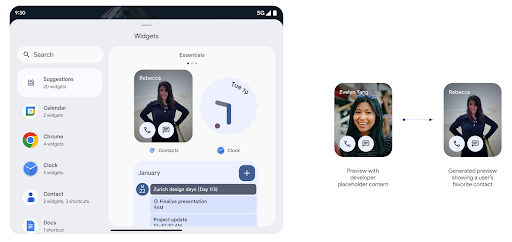
Before Android 15, the only way to provide widget picker previews was to specify a static image or layout resource. These previews often differ significantly from the look of the actual widget when it is placed on the home screen. Also, static resources can't be created with Jetpack Glance, so a Glance developer had to screenshot their widget or create an XML layout to have a widget preview.
Android 15 adds support for generated previews. This means that app widget
providers can generate RemoteViews to use as the picker preview, instead
of a static resource.
Push API
Apps can provide generated previews through a push API. Apps can provide
previews at any point in their lifecycle, and don't receive an explicit request
from the host to provide previews. Previews are persisted in AppWidgetService,
and hosts can request them on-demand. The following example loads an XML widget
layout resource and sets it as the preview:
AppWidgetManager.getInstance(appContext).setWidgetPreview(
   ComponentName(
       appContext,
       SociaLiteAppWidgetReceiver::class.java
   ),
   AppWidgetProviderInfo.WIDGET_CATEGORY_HOME_SCREEN,
   RemoteViews("com.example", R.layout.widget_preview)
)
The expected flow is:
- At any time, the widget provider calls
setWidgetPreview. The provided previews are persisted inAppWidgetServicewith other provider info. setWidgetPreviewnotifies hosts of an updated preview through theAppWidgetHost.onProvidersChangedcallback. In response, the widget host reloads all of its provider information.- When displaying a widget preview, the host checks
AppWidgetProviderInfo.generatedPreviewCategories, and if the chosen category is available, callsAppWidgetManager.getWidgetPreviewto return the saved preview for this provider.
When to call setWidgetPreview
Because there is no callback to provide previews, apps can choose to send previews at any point when they are running. How often to update the preview depends on the widget's use case.
The following list describes the two main categories of preview use cases:
- Providers that show real data in their widget previews, such as personalized or recent information. These providers can set the preview once the user has signed in or has done initial configuration in their app. After this, they can set up a periodic task to update the previews at their chosen cadence. Examples of this type of widget could be a photo, calendar, weather or news widget.
- Providers that show static information in previews or quick-action widgets that don't display any data. These providers can set previews once, when the app first launches. Examples of this type of widget include a drive quick actions widget or chrome shortcuts widget.
Some providers might show static previews on the hub mode picker, but real information on the homescreen picker. These providers should follow the guidance for both of these use cases to set previews.
การแสดงภาพซ้อนภาพ
Android 15 เปิดตัวการเปลี่ยนแปลงในการแสดงภาพซ้อนภาพ (PIP) เพื่อให้ การเปลี่ยนผ่านที่ราบรื่นขึ้นเมื่อเข้าสู่โหมด PIP ซึ่งจะเป็นประโยชน์สำหรับแอปที่มีองค์ประกอบ UI วางซ้อนอยู่ด้านบนของ UI หลักซึ่งจะเข้าสู่โหมด PIP
นักพัฒนาแอปใช้ Callback onPictureInPictureModeChanged เพื่อกำหนดตรรกะ
ที่เปิด/ปิดการมองเห็นองค์ประกอบ UI ที่ซ้อนอยู่ การเรียกกลับนี้
ทริกเกอร์เมื่อภาพเคลื่อนไหวการป้อนหรือออกจาก PIP เสร็จสมบูรณ์ จะเริ่มต้นใน
Android 15 คลาส PictureInPictureUiState จะมีสถานะอื่นรวมอยู่ด้วย
ด้วยสถานะ UI นี้ แอปที่กำหนดเป้าหมายเป็น Android 15 (API ระดับ 35) จะสังเกตเห็น
มีการเรียกใช้ Callback Activity#onPictureInPictureUiStateChanged ด้วย
isTransitioningToPip() ทันทีที่ภาพเคลื่อนไหว PIP เริ่มขึ้น องค์ประกอบ UI จำนวนมากไม่เกี่ยวข้องกับแอปเมื่ออยู่ในโหมด PiP เช่น มุมมองหรือเลย์เอาต์ที่มีข้อมูล เช่น วิดีโอแนะนำ วิดีโอที่กำลังจะเผยแพร่ การจัดประเภท และชื่อ เมื่อแอปเข้าสู่โหมด PIP ให้ใช้
onPictureInPictureUiStateChanged Callback เพื่อซ่อนองค์ประกอบ UI เหล่านี้ เมื่อ
แอปเข้าสู่โหมดเต็มหน้าจอจากหน้าต่าง PIP ให้ใช้
onPictureInPictureModeChanged Callback เพื่อเลิกซ่อนองค์ประกอบเหล่านี้ ดังที่แสดงใน
ตัวอย่างต่อไปนี้
override fun onPictureInPictureUiStateChanged(pipState: PictureInPictureUiState) {
        if (pipState.isTransitioningToPip()) {
          // Hide UI elements
        }
    }
override fun onPictureInPictureModeChanged(isInPictureInPictureMode: Boolean) {
        if (isInPictureInPictureMode) {
          // Unhide UI elements
        }
    }
การเปิด/ปิดการแสดงผลองค์ประกอบ UI ที่ไม่เกี่ยวข้องอย่างรวดเร็ว (สำหรับหน้าต่าง PiP) นี้จะช่วยให้ภาพเคลื่อนไหวของ PiP ปรากฏขึ้นอย่างราบรื่นและไม่มีภาพกะพริบ
กฎห้ามรบกวนที่ปรับปรุงใหม่
AutomaticZenRule อนุญาตให้แอปปรับแต่งความสนใจได้
การจัดการกฎ (ห้ามรบกวน) และเลือกว่าจะเปิดหรือปิดใช้งานเมื่อใด
ให้พวกเขา Android 15 ช่วยเพิ่มประสิทธิภาพให้กฎเหล่านี้อย่างมาก โดยมีเป้าหมายเพื่อปรับปรุง
ประสบการณ์ของผู้ใช้ การปรับปรุงเหล่านี้มีดังนี้
- กำลังเพิ่มประเภทลงใน
AutomaticZenRuleเพื่อให้ระบบใช้แบบพิเศษได้ กับกฎบางอย่าง - การเพิ่มไอคอนลงใน
AutomaticZenRuleช่วยให้โหมดต่างๆ เป็นที่รู้จักมากขึ้น - การเพิ่มสตริง
triggerDescriptionในAutomaticZenRuleที่อธิบาย เงื่อนไขที่กฎควรทำงานสำหรับผู้ใช้ - เพิ่มเมื่อ
ZenDeviceEffectsเป็นAutomaticZenRuleเพื่อให้กฎเรียกใช้สิ่งต่างๆ เช่น โทนสีเทา จอแสดงผล โหมดกลางคืน หรือการหรี่แสงวอลเปเปอร์
ตั้งค่า VibrationEffect สำหรับช่องทางการแจ้งเตือน
Android 15 รองรับการตั้งค่าการสั่นแบบริชมีเดียสำหรับการแจ้งเตือนขาเข้าตามแชแนลโดยใช้ NotificationChannel.setVibrationEffect เพื่อให้ผู้ใช้แยกแยะการแจ้งเตือนประเภทต่างๆ ได้โดยไม่ต้องมองที่อุปกรณ์
ชิปแถบสถานะการฉายภาพสื่อและการหยุดอัตโนมัติ
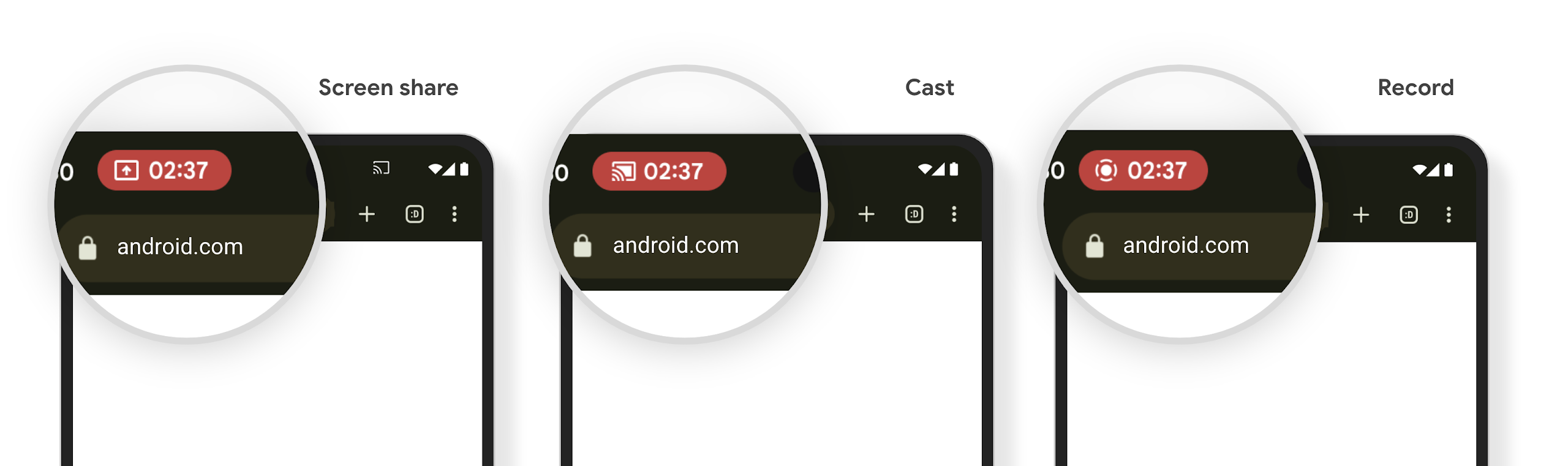
การฉายสื่ออาจเปิดเผยข้อมูลส่วนตัวของผู้ใช้ ชิปแถบสถานะใหม่ที่เห็นได้ชัดจะช่วยให้ผู้ใช้ทราบถึงการฉายหน้าจอที่ดำเนินอยู่ ผู้ใช้สามารถแตะชิปเพื่อหยุดแคสต์ แชร์ หรือบันทึกหน้าจอ นอกจากนี้ การแสดงภาพหน้าจอที่ดำเนินการอยู่จะหยุดโดยอัตโนมัติเมื่อหน้าจออุปกรณ์ล็อกอยู่เพื่อให้ผู้ใช้ได้รับประสบการณ์การใช้งานที่ใช้งานง่ายยิ่งขึ้น
หน้าจอขนาดใหญ่และรูปแบบของอุปกรณ์
Android 15 รองรับแอปของคุณให้ใช้ประโยชน์จากรูปแบบของอุปกรณ์ Android ได้อย่างเต็มที่ ซึ่งรวมถึงหน้าจอขนาดใหญ่ อุปกรณ์แบบพับได้ และอุปกรณ์แบบพลิกได้
การทำงานหลายอย่างพร้อมกันบนหน้าจอขนาดใหญ่ที่ปรับปรุงใหม่
Android 15 ช่วยให้ผู้ใช้ทำงานหลายอย่างพร้อมกันในอุปกรณ์หน้าจอขนาดใหญ่ได้ดียิ่งขึ้น สำหรับ เช่น ผู้ใช้สามารถบันทึกชุดแอปที่ใช้ร่วมกันที่ชอบเพื่อใช้โหมดแยกหน้าจอได้อย่างรวดเร็ว เข้าถึงและปักหมุดแถบงานบนหน้าจอเพื่อสลับไปมาระหว่างแอปต่างๆ ได้อย่างรวดเร็ว ซึ่งหมายความว่า การทำให้แอปของคุณปรับเปลี่ยนได้นั้นสำคัญกว่าที่เคย
Google I/O มีเซสชันเกี่ยวกับการสร้าง Android แบบปรับอัตโนมัติ แอปและการสร้าง UI ด้วย Material 3 ไลบรารีแบบปรับอัตโนมัติ ที่ช่วยได้ และเอกสารของเรายังมีสิ่งอื่นๆ ที่ช่วยคุณออกแบบ
การรองรับหน้าจอด้านนอก
Your app can declare a property that Android 15 uses to
allow your Application or Activity to be presented on the small cover
screens of supported flippable devices. These screens are too small to be
considered as compatible targets for Android apps to run on, but your app can
opt in to supporting them, making your app available in more places.
การเชื่อมต่อ
Android 15 อัปเดตแพลตฟอร์มเพื่อให้แอปของคุณเข้าถึงความก้าวหน้าล่าสุดในด้านเทคโนโลยีการสื่อสารและไร้สาย
การรองรับดาวเทียม
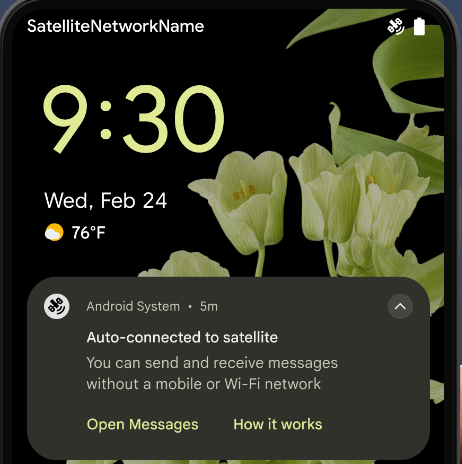
Android 15 ยังคงขยายการรองรับแพลตฟอร์มสำหรับการเชื่อมต่อผ่านดาวเทียมต่อไป และ มีองค์ประกอบ UI บางอย่างเพื่อให้มั่นใจว่าผู้ใช้จะได้รับประสบการณ์ที่สอดคล้องกันทั่วทั้ง การเชื่อมต่อผ่านดาวเทียม
แอปสามารถใช้ ServiceState.isUsingNonTerrestrialNetwork() เพื่อ
ตรวจจับเมื่ออุปกรณ์เชื่อมต่อกับดาวเทียม ทำให้อุปกรณ์รับรู้ถึง
สาเหตุที่บริการเครือข่ายเต็มรูปแบบอาจใช้ไม่ได้ นอกจากนี้ Android 15 ยังรองรับแอป SMS และ MMS รวมถึงแอป RCS ที่โหลดไว้ล่วงหน้าเพื่อใช้การเชื่อมต่อผ่านดาวเทียมสำหรับส่งและรับข้อความ
ประสบการณ์การใช้งาน NFC ที่ราบรื่นยิ่งขึ้น
Android 15 กำลังพัฒนาประสบการณ์การแตะเพื่อจ่ายให้ราบรื่นและเชื่อถือได้มากขึ้น ในขณะเดียวกันก็ยังคงรองรับระบบนิเวศแอป NFC ที่มีประสิทธิภาพของ Android ในอุปกรณ์ที่รองรับ แอปจะขอให้ NfcAdapter เข้าสู่โหมดสังเกตการณ์ ซึ่งอุปกรณ์จะฟังแต่ไม่ตอบสนองต่อเครื่องอ่าน NFC โดยส่งออบเจ็กต์บริการ NFC ของแอป PollingFrame ไปประมวลผล คุณสามารถใช้ออบเจ็กต์ PollingFrame เพื่อตรวจสอบสิทธิ์ก่อนการสื่อสารกับเครื่องอ่าน NFC ครั้งแรก ซึ่งจะช่วยให้ทำธุรกรรมแบบแตะครั้งเดียวได้ในกรณีหลายกรณี
นอกจากนี้ แอปยังลงทะเบียนตัวกรองในอุปกรณ์ที่รองรับเพื่อให้ได้รับการแจ้งเตือนเกี่ยวกับกิจกรรมของลูปการสำรวจ ซึ่งช่วยให้แอปพลิเคชันที่รองรับ NFC หลายรายการทำงานได้อย่างราบรื่น
บทบาทกระเป๋าสตางค์
Android 15 เปิดตัวบทบาท Wallet ที่ช่วยให้ผสานรวมกับแอป Wallet ที่ต้องการของผู้ใช้ได้ดียิ่งขึ้น บทบาทนี้จะแทนที่การตั้งค่าการชำระเงินแบบไม่ต้องสัมผัสเริ่มต้นของ NFC ผู้ใช้สามารถจัดการผู้ถือบทบาท Wallet ได้โดยไปที่การตั้งค่า > แอป > แอปเริ่มต้น
ระบบจะใช้บทบาท Wallet เมื่อกำหนดเส้นทางการแตะ NFC สำหรับ AID ที่ลงทะเบียนไว้ในหมวดหมู่การชำระเงิน การแตะจะไปยังผู้ถือบทบาท Wallet เสมอ เว้นแต่ว่าแอปอื่นที่ลงทะเบียนสำหรับ AID เดียวกันจะทำงานอยู่เบื้องหน้า
บทบาทนี้ยังใช้เพื่อกำหนดตําแหน่งการ์ดการเข้าถึงด่วนของ Wallet เมื่อเปิดใช้งาน เมื่อตั้งค่าบทบาทเป็น "ไม่มี" การ์ดการเข้าถึงด่วนจะใช้งานไม่ได้และการแตะ NFC หมวดหมู่การชำระเงินจะแสดงในแอปที่ทำงานอยู่เบื้องหน้าเท่านั้น
ความปลอดภัย
Android 15 ช่วยให้คุณเพิ่มความปลอดภัยของแอป ปกป้องข้อมูลของแอป และให้ความโปร่งใสและการควบคุมข้อมูลแก่ผู้ใช้มากขึ้น ดูข้อมูลเพิ่มเติมเกี่ยวกับสิ่งที่เรากำลังทำเพื่อปรับปรุงการป้องกันผู้ใช้และ ปกป้องแอปของคุณจากภัยคุกคามใหม่ๆ ได้ที่การพูดคุยเรื่องการรักษาความปลอดภัยของผู้ใช้ใน Android จาก Google I/O
ผสานรวม Credential Manager กับฟีเจอร์การป้อนข้อความอัตโนมัติ
ตั้งแต่ Android 15 เป็นต้นไป นักพัฒนาแอปสามารถลิงก์มุมมองที่เฉพาะเจาะจง เช่น ช่องชื่อผู้ใช้หรือรหัสผ่านกับคำขอของเครื่องมือจัดการข้อมูลเข้าสู่ระบบได้ ซึ่งทำให้มอบประสบการณ์การใช้งานที่ปรับให้เหมาะกับผู้ใช้ได้ง่ายขึ้นในระหว่างกระบวนการลงชื่อเข้าใช้ เมื่อผู้ใช้โฟกัสที่มุมมองใดมุมมองหนึ่ง ระบบจะส่งคําขอที่เกี่ยวข้องไปยังเครื่องมือจัดการข้อมูลเข้าสู่ระบบ ระบบจะรวบรวมข้อมูลเข้าสู่ระบบที่ได้จากผู้ให้บริการต่างๆ และแสดงใน UI สำรองสำหรับการป้อนข้อความอัตโนมัติ เช่น คำแนะนำในบรรทัดหรือคำแนะนำแบบเมนูแบบเลื่อนลง ไลบรารี androidx.credentials ของ Jetpack เป็นปลายทางที่นักพัฒนาแอปควรใช้ และจะพร้อมใช้งานเพื่อปรับปรุงฟีเจอร์นี้ใน Android 15 ขึ้นไปในเร็วๆ นี้
ผสานรวมการลงชื่อสมัครใช้และการลงชื่อเข้าใช้ด้วยการแตะครั้งเดียวเข้ากับข้อความแจ้งไบโอเมตริก
Credential Manager integrates biometric prompts into the credential creation and sign-in processes, eliminating the need for providers to manage biometric prompts. As a result, credential providers only need to focus on the results of the create and get flows, augmented with the biometric flow result. This simplified process creates a more efficient and streamlined credential creation and retrieval process.
การจัดการคีย์สำหรับการเข้ารหัสจากต้นทางถึงปลายทาง
We are introducing the E2eeContactKeysManager in Android 15, which
facilitates end-to-end encryption (E2EE) in your Android apps by providing an
OS-level API for the storage of cryptographic public keys.
The E2eeContactKeysManager is designed to integrate with the platform
contacts app to give users a centralized way to manage and verify their
contacts' public keys.
การตรวจสอบสิทธิ์ใน URI ของเนื้อหา
Android 15 introduces a set of APIs that perform permission checks on content URIs:
Context.checkContentUriPermissionFull: This performs a full permission check on content URIs.Activitymanifest attributerequireContentUriPermissionFromCaller: This enforces specified permissions on the provided content URIs at activity launch.ComponentCallerclass forActivitycallers: This represents the app that launched the activity.
การช่วยเหลือพิเศษ
Android 15 เพิ่มฟีเจอร์ที่ปรับปรุงการช่วยเหลือพิเศษสำหรับผู้ใช้
อักษรเบรลล์ที่ดีขึ้น
ใน Android 15 เราได้ทำให้ TalkBack รองรับจอแสดงผลอักษรเบรลล์ที่ใช้มาตรฐาน HID ผ่านทั้ง USB และบลูทูธที่ปลอดภัย
มาตรฐานนี้ซึ่งคล้ายกับมาตรฐานที่ใช้กับเมาส์และแป้นพิมพ์จะช่วยให้ Android รองรับจอแสดงผลอักษรเบรลล์ได้หลากหลายมากขึ้นในอนาคต
การทำให้เป็นสากล
Android 15 เพิ่มฟีเจอร์และความสามารถที่ช่วยเสริมประสบการณ์ของผู้ใช้เมื่อใช้อุปกรณ์ในภาษาต่างๆ
แบบอักษรที่ปรับแต่งได้ CJK
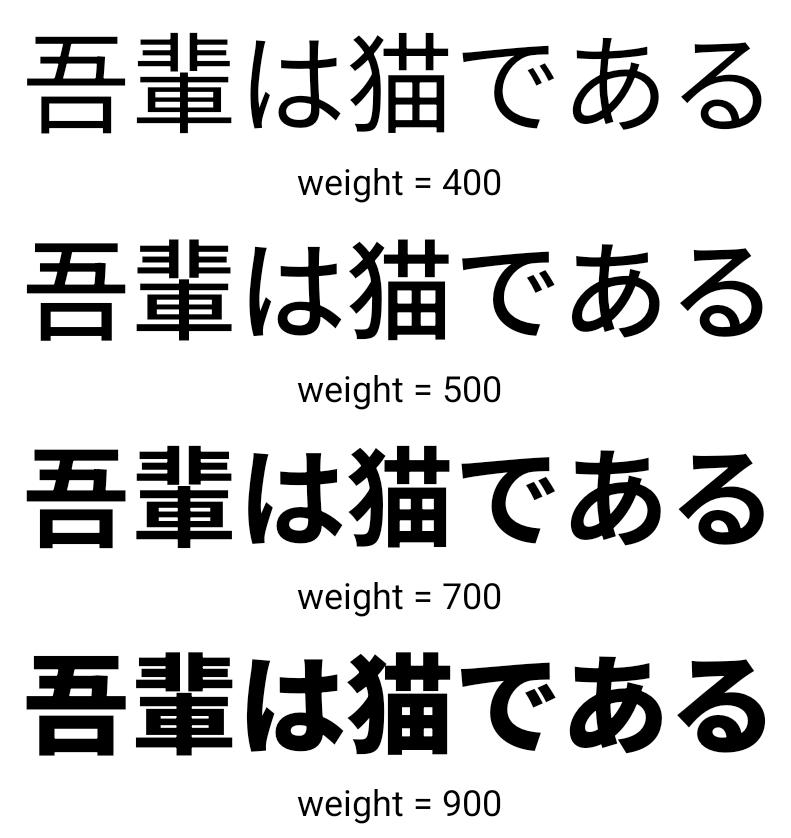
ตั้งแต่ Android 15 เป็นต้นไป ไฟล์แบบอักษรสำหรับภาษาจีน ญี่ปุ่น และเกาหลี (CJK) อย่าง NotoSansCJK จะเป็นแบบอักษรที่เปลี่ยนแปลงได้ แบบอักษรแบบแปรผันเปิดโอกาสให้นักออกแบบตัวอักษรได้สร้างสรรค์งานในภาษา CJK นักออกแบบสามารถสำรวจสไตล์ที่หลากหลายมากขึ้นและสร้างเลย์เอาต์ที่สะดุดตาซึ่งก่อนหน้านี้ทำได้ยากหรือเป็นไปไม่ได้
การจัดชิดขอบระหว่างอักขระ
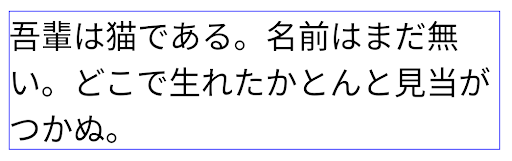
Starting with Android 15, text can be justified utilizing letter spacing by
using JUSTIFICATION_MODE_INTER_CHARACTER. Inter-word justification was
first introduced in Android 8.0 (API level 26), and inter-character
justification provides similar capabilities for languages that use the
whitespace character for segmentation, such as Chinese, Japanese, and others.
JUSTIFICATION_MODE_NONE.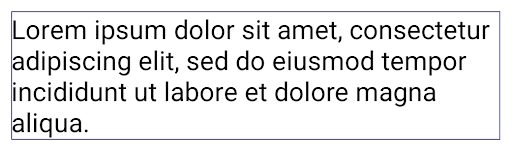
JUSTIFICATION_MODE_NONE.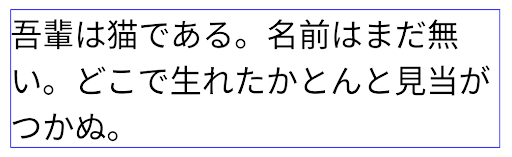
JUSTIFICATION_MODE_INTER_WORD.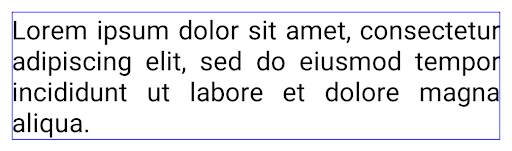
JUSTIFICATION_MODE_INTER_WORD.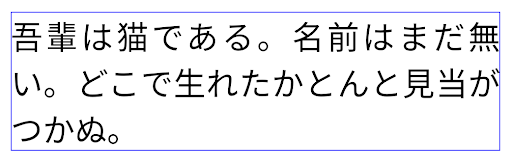
JUSTIFICATION_MODE_INTER_CHARACTER.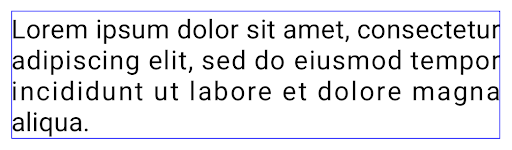
JUSTIFICATION_MODE_INTER_CHARACTER.การกำหนดค่าการขึ้นบรรทัดใหม่โดยอัตโนมัติ
Android เริ่มรองรับการขึ้นบรรทัดใหม่ด้วยวลีสำหรับภาษาญี่ปุ่นและเกาหลีใน
Android 13 (API ระดับ 33) อย่างไรก็ตาม ขณะที่ตัวแบ่งบรรทัดแบบวลีจะปรับปรุง
ความสะดวกในการอ่านข้อความบรรทัดสั้นๆ จะทำงานได้ไม่ดีกับข้อความยาวๆ
ใน Android 15 แอปจะใช้ตัวแบ่งบรรทัดแบบวลีได้เฉพาะกับบรรทัดสั้นๆ เท่านั้น
โดยใช้ฟังก์ชัน LINE_BREAK_WORD_STYLE_AUTO
ตัวเลือก ตัวเลือกนี้จะเลือกตัวเลือกรูปแบบคำที่ดีที่สุดสำหรับข้อความ
สำหรับบรรทัดข้อความสั้นๆ จะมีการใช้ตัวแบ่งบรรทัดโดยใช้วลี โดยทำงานเหมือนเดิม
เป็น LINE_BREAK_WORD_STYLE_PHRASE ดังที่แสดงใน
รูปภาพต่อไปนี้:
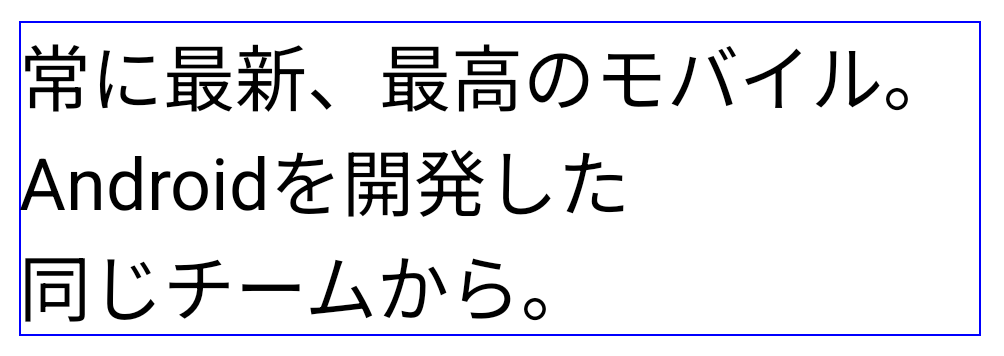
LINE_BREAK_WORD_STYLE_AUTOจะใช้การแบ่งบรรทัดตามวลีเพื่อปรับปรุงความอ่านง่ายของข้อความ
เช่นเดียวกับการสมัคร
LINE_BREAK_WORD_STYLE_PHRASEสำหรับบรรทัดข้อความที่ยาวขึ้น LINE_BREAK_WORD_STYLE_AUTO จะใช้โอเปอเรเตอร์
รูปแบบการขึ้นบรรทัดใหม่ ทำงานเหมือนกับ
LINE_BREAK_WORD_STYLE_NONE ดังที่แสดงใน
รูปภาพต่อไปนี้:
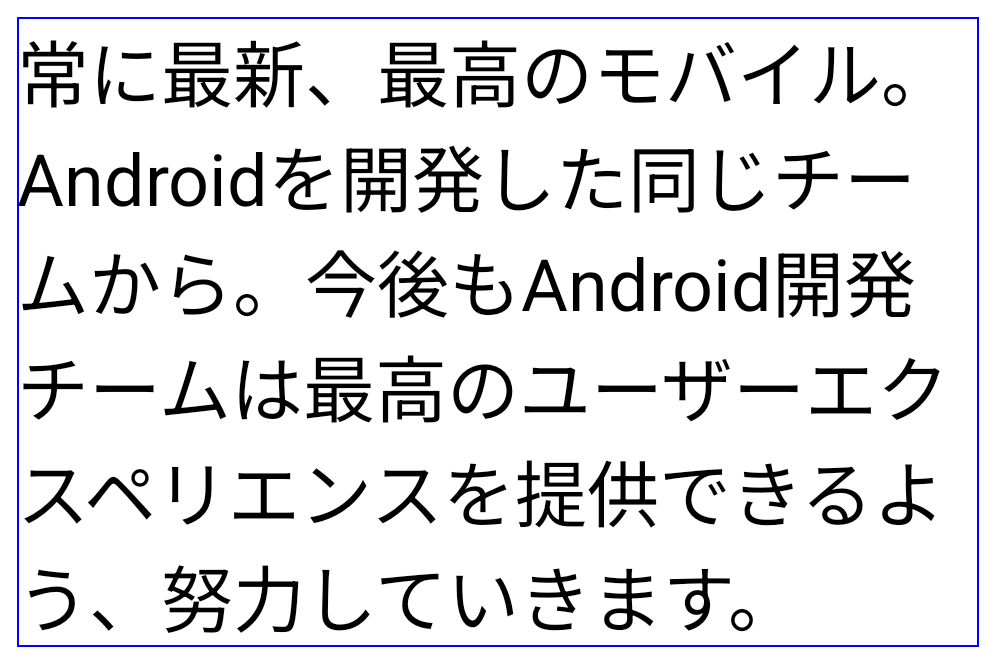
LINE_BREAK_WORD_STYLE_AUTO
ไม่ใช้รูปแบบการขึ้นบรรทัดใหม่ เพื่อทำให้ข้อความอ่านง่ายขึ้น
เช่นเดียวกับการสมัคร
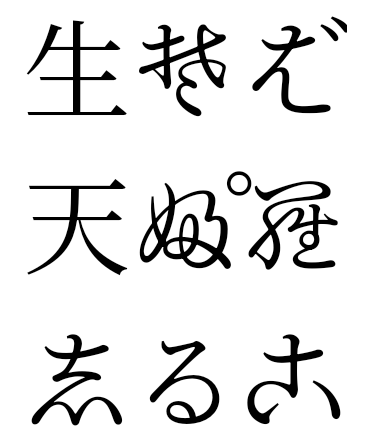
LINE_BREAK_WORD_STYLE_NONEแบบอักษรฮิรางานะแบบเฮนไตเพิ่มเติมของญี่ปุ่น
ใน Android 15 ไฟล์แบบอักษรของฮิรางานะญี่ปุ่นรุ่นเก่า (หรือที่เรียกว่า Hentaigana) จะได้รับการรวมกลุ่มไว้โดยค่าเริ่มต้น รูปทรงที่เป็นเอกลักษณ์ของตัวละคร Hentaigana สามารถเพิ่ม สำนวนของงานศิลปะหรือการออกแบบที่โดดเด่น ในขณะเดียวกันก็ช่วยให้คงความถูกต้องแม่นยำ การถ่ายทอดและความเข้าใจเกี่ยวกับเอกสารโบราณของญี่ปุ่น
VideoLAN cone Copyright (c) 1996-2010 VideoLAN. This logo or a modified version may be used or modified by anyone to refer to the VideoLAN project or any product developed by the VideoLAN team, but does not indicate endorsement by the project.
Vulkan and the Vulkan logo are registered trademarks of the Khronos Group Inc.
OpenGL is a registered trademark and the OpenGL ES logo is a trademark of Hewlett Packard Enterprise used by permission by Khronos.