

অ্যান্ড্রয়েড ১৫ ডেভেলপারদের জন্য দারুণ কিছু ফিচার ও এপিআই নিয়ে এসেছে। নিচের বিভাগগুলোতে এই ফিচারগুলোর সংক্ষিপ্ত বিবরণ দেওয়া হলো, যা আপনাকে সংশ্লিষ্ট এপিআইগুলো ব্যবহার শুরু করতে সাহায্য করবে।
যোগ করা, পরিবর্তন করা এবং সরিয়ে দেওয়া API-গুলির বিস্তারিত তালিকার জন্য, API diff রিপোর্টটি পড়ুন। যোগ করা API-গুলির বিশদ বিবরণের জন্য Android API রেফারেন্স দেখুন — Android 15-এর জন্য, API লেভেল 35-এ যোগ করা API-গুলি খুঁজুন। প্ল্যাটফর্মের পরিবর্তনগুলি আপনার অ্যাপগুলিকে কোন কোন ক্ষেত্রে প্রভাবিত করতে পারে সে সম্পর্কে জানতে, Android 15-কে টার্গেট করা অ্যাপগুলির জন্য এবং সমস্ত অ্যাপের জন্য Android 15-এর আচরণগত পরিবর্তনগুলি অবশ্যই দেখে নিন।
ক্যামেরা এবং মিডিয়া
অ্যান্ড্রয়েড ১৫-এ এমন বিভিন্ন ফিচার রয়েছে যা ক্যামেরা ও মিডিয়ার অভিজ্ঞতাকে উন্নত করে এবং নির্মাতাদের তাদের কল্পনাকে অ্যান্ড্রয়েডে বাস্তবে রূপ দিতে প্রয়োজনীয় টুলস ও হার্ডওয়্যার ব্যবহারের সুযোগ দেয়।
অ্যান্ড্রয়েড মিডিয়া ও ক্যামেরার সর্বশেষ ফিচার এবং ডেভেলপার সমাধান সম্পর্কে আরও জানতে, গুগল আই/ও-তে অনুষ্ঠিত 'বিল্ডিং মডার্ন অ্যান্ড্রয়েড মিডিয়া অ্যান্ড ক্যামেরা এক্সপেরিয়েন্সেস' শীর্ষক আলোচনাটি দেখুন।
কম আলোতে বুস্ট
অ্যান্ড্রয়েড 15 লো লাইট বুস্ট প্রবর্তন করেছে, একটি অটো-এক্সপোজার মোড ক্যামেরা 2 এবং নাইট মোড ক্যামেরা এক্সটেনশন উভয়ের জন্য উপলব্ধ। লো লাইট বুস্ট কম আলোর অবস্থায় প্রিভিউ স্ট্রিমের এক্সপোজার সামঞ্জস্য করে। নাইট মোড ক্যামেরা এক্সটেনশন যেভাবে স্থির চিত্র তৈরি করে তার থেকে এটি আলাদা, কারণ নাইট মোড একটি একক, উন্নত চিত্র তৈরি করতে ফটোগুলির একটি বিস্ফোরণকে একত্রিত করে। যদিও নাইট মোড একটি স্থির চিত্র তৈরি করার জন্য খুব ভাল কাজ করে, এটি একটি ক্রমাগত ফ্রেম তৈরি করতে পারে না, তবে লো লাইট বুস্ট করতে পারে। সুতরাং, লো লাইট বুস্ট ক্যামেরার ক্ষমতা সক্ষম করে, যেমন:
- একটি উন্নত ইমেজ প্রিভিউ প্রদান করা, যাতে ব্যবহারকারীরা তাদের কম-আলোতে ছবি ফ্রেম করতে পারে
- কম আলোতে QR কোড স্ক্যান করা হচ্ছে
আপনি যদি লো লাইট বুস্ট সক্ষম করেন, কম আলোর স্তর থাকলে এটি স্বয়ংক্রিয়ভাবে চালু হয় এবং যখন বেশি আলো থাকে তখন বন্ধ হয়ে যায়।
অ্যাপ্লিকেশানগুলি একটি উজ্জ্বল ভিডিও সংরক্ষণ করতে কম আলোতে প্রিভিউ স্ট্রিম রেকর্ড করতে পারে৷
আরও তথ্যের জন্য, লো লাইট বুস্ট দেখুন।
অ্যাপের মধ্যে ক্যামেরা নিয়ন্ত্রণ
অ্যান্ড্রয়েড 15 সমর্থিত ডিভাইসগুলিতে ক্যামেরা হার্ডওয়্যার এবং এর অ্যালগরিদমগুলির উপর আরও নিয়ন্ত্রণের জন্য একটি এক্সটেনশন যুক্ত করে:
- উন্নত ফ্ল্যাশ শক্তি সমন্বয় ইমেজ ক্যাপচার করার সময়
SINGLEএবংTORCHউভয় মোডে ফ্ল্যাশ তীব্রতার সুনির্দিষ্ট নিয়ন্ত্রণ সক্ষম করে।
HDR হেডরুম নিয়ন্ত্রণ
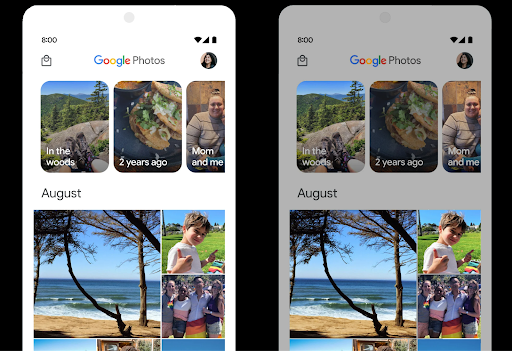
Android 15 HDR হেডরুম বেছে নেয় যা অন্তর্নিহিত ডিভাইসের ক্ষমতা এবং প্যানেলের বিট-গভীরতার জন্য উপযুক্ত। যে পৃষ্ঠাগুলিতে প্রচুর SDR সামগ্রী রয়েছে, যেমন একটি মেসেজিং অ্যাপ একটি একক HDR থাম্বনেল প্রদর্শন করে, এই আচরণটি SDR সামগ্রীর অনুভূত উজ্জ্বলতাকে বিরূপভাবে প্রভাবিত করতে পারে৷ Android 15 আপনাকে SDR এবং HDR সামগ্রীর মধ্যে ভারসাম্য বজায় রাখতে setDesiredHdrHeadroom সহ HDR হেডরুম নিয়ন্ত্রণ করতে দেয়।
শব্দ নিয়ন্ত্রণ
অ্যান্ড্রয়েড 15 CTA-2075 লাউডনেস স্ট্যান্ডার্ডের জন্য সমর্থন প্রবর্তন করে যাতে আপনি অডিও লাউডনেস অসঙ্গতিগুলি এড়াতে এবং কনটেন্টের মধ্যে পরিবর্তন করার সময় ব্যবহারকারীদের ক্রমাগত ভলিউম সামঞ্জস্য করতে না হয় তা নিশ্চিত করতে সহায়তা করে। সিস্টেমটি আউটপুট ডিভাইসের (হেডফোন এবং স্পিকার) পরিচিত বৈশিষ্ট্যগুলির সাথে AAC অডিও সামগ্রীতে উপলব্ধ লাউডনেস মেটাডেটা সহ অডিও লাউডনেস এবং ডাইনামিক রেঞ্জ কম্প্রেশন স্তরগুলিকে বুদ্ধিমত্তার সাথে সামঞ্জস্য করে।
এই বৈশিষ্ট্যটি সক্ষম করতে, আপনাকে আপনার AAC সামগ্রীতে লাউডনেস মেটাডেটা উপলব্ধ রয়েছে তা নিশ্চিত করতে হবে এবং আপনার অ্যাপে প্ল্যাটফর্ম বৈশিষ্ট্যটি সক্ষম করতে হবে। এর জন্য, আপনি একটি LoudnessCodecController অবজেক্টের সাথে যুক্ত AudioTrack থেকে অডিও সেশন আইডি সহ এটির তৈরি ফ্যাক্টরি পদ্ধতিতে কল করে ইনস্ট্যান্টিশিয়েট করেন; এটি স্বয়ংক্রিয়ভাবে অডিও আপডেট প্রয়োগ করা শুরু করে। আপনি একটি OnLoudnessCodecUpdateListener পাস করতে পারেন MediaCodec এ প্রয়োগ করার আগে লাউডনেস প্যারামিটারগুলি সংশোধন বা ফিল্টার করতে।
// Media contains metadata of type MPEG_4 OR MPEG_D
val mediaCodec = …
val audioTrack = AudioTrack.Builder()
                                .setSessionId(sessionId)
                                .build()
...
// Create new loudness controller that applies the parameters to the MediaCodec
try {
   val lcController = LoudnessCodecController.create(mSessionId)
   // Starts applying audio updates for each added MediaCodec
}
একটি নির্বিঘ্ন অ্যাপ ইন্টিগ্রেশনের জন্য LoudnessCodecController API ব্যবহার করার জন্য AndroidX media3 ExoPlayerও আপডেট করা হবে।
ভার্চুয়াল মিডি ২.০ ডিভাইস
Android 13 ইউএসবি ব্যবহার করে MIDI 2.0 ডিভাইসে সংযোগ করার জন্য সমর্থন যোগ করেছে, যা ইউনিভার্সাল MIDI প্যাকেট (UMP) ব্যবহার করে যোগাযোগ করে। Android 15 ভার্চুয়াল MIDI অ্যাপগুলিতে UMP সমর্থন প্রসারিত করে, কম্পোজিশন অ্যাপগুলিকে একটি ভার্চুয়াল MIDI 2.0 ডিভাইস হিসাবে সিন্থেসাইজার অ্যাপগুলিকে নিয়ন্ত্রণ করতে সক্ষম করে ঠিক যেমন তারা একটি USB MIDI 2.0 ডিভাইসের সাথে করে।
আরও কার্যকর AV1 সফটওয়্যার ডিকোডিং

dav1d , VideoLAN-এর জনপ্রিয় AV1 সফ্টওয়্যার ডিকোডার Android ডিভাইসগুলির জন্য উপলব্ধ যা হার্ডওয়্যারে AV1 ডিকোড সমর্থন করে না। dav1d লিগ্যাসি AV1 সফ্টওয়্যার ডিকোডারের চেয়ে 3 গুণ বেশি পারফরম্যান্ট, কিছু নিম্ন এবং মধ্য স্তরের ডিভাইস সহ আরও ব্যবহারকারীদের জন্য HD AV1 প্লেব্যাক সক্ষম করে৷
আপনার অ্যাপটিকে "c2.android.av1-dav1d.decoder" নামে ডাকার মাধ্যমে dav1d ব্যবহার করতে অপ্ট-ইন করতে হবে। পরবর্তী আপডেটে dav1d কে ডিফল্ট AV1 সফ্টওয়্যার ডিকোডার করা হবে। এই সমর্থনটি প্রমিত এবং Android 11 ডিভাইসগুলিতে ব্যাকপোর্ট করা হয়েছে যা Google Play সিস্টেম আপডেটগুলি গ্রহণ করে।
ডেভেলপারদের উৎপাদনশীলতা এবং সরঞ্জাম
আপনার কর্মদক্ষতা বাড়ানোর জন্য আমাদের বেশিরভাগ কাজ অ্যান্ড্রয়েড স্টুডিও , জেটপ্যাক কম্পোজ এবং অ্যান্ড্রয়েড জেটপ্যাক লাইব্রেরির মতো টুলগুলোকে কেন্দ্র করে হলেও, আমরা প্ল্যাটফর্মের মধ্যেই এমন উপায় খুঁজি যা আপনাকে আপনার পরিকল্পনা আরও সহজে বাস্তবায়ন করতে সাহায্য করবে।
OpenJDK 17 আপডেট
Android 15 সর্বশেষ OpenJDK LTS রিলিজের বৈশিষ্ট্যগুলির সাথে সারিবদ্ধ করার জন্য Android এর মূল লাইব্রেরিগুলিকে রিফ্রেশ করার কাজ চালিয়ে যাচ্ছে।
নিম্নলিখিত মূল বৈশিষ্ট্য এবং উন্নতি অন্তর্ভুক্ত করা হয়েছে:
- এনআইও বাফারের চারপাশে জীবনের গুণমানের উন্নতি
- প্রবাহ
- অতিরিক্ত
mathএবংstrictmathপদ্ধতি - অনুক্রম
collection,map, এবংsetসহ প্যাকেজ আপডেটগুলিutil৷ -
DeflaterএByteBufferসমর্থন - নিরাপত্তা আপডেট যেমন
X500PrivateCredentialএবং নিরাপত্তা কী আপডেট
এই APIগুলি Google Play সিস্টেম আপডেটের মাধ্যমে Android 12 (API স্তর 31) এবং উচ্চতর চলমান এক বিলিয়নেরও বেশি ডিভাইসে আপডেট করা হয়, যাতে আপনি সর্বশেষ প্রোগ্রামিং বৈশিষ্ট্যগুলি লক্ষ্য করতে পারেন৷
পিডিএফ উন্নতি
Android 15-এ PdfRenderer API-এর উল্লেখযোগ্য উন্নতি রয়েছে। অ্যাপগুলি পাসওয়ার্ড-সুরক্ষিত ফাইল রেন্ডারিং, টীকা, ফর্ম সম্পাদনা , অনুসন্ধান এবং অনুলিপি সহ নির্বাচনের মতো উন্নত বৈশিষ্ট্যগুলিকে অন্তর্ভুক্ত করতে পারে৷ লিনিয়ারাইজড পিডিএফ অপ্টিমাইজেশানগুলি স্থানীয় পিডিএফ দেখার গতি এবং সম্পদের ব্যবহার কমাতে সমর্থিত। জেটপ্যাক পিডিএফ লাইব্রেরি আপনার অ্যাপে পিডিএফ দেখার ক্ষমতা যোগ করা সহজ করতে এই APIগুলি ব্যবহার করে।
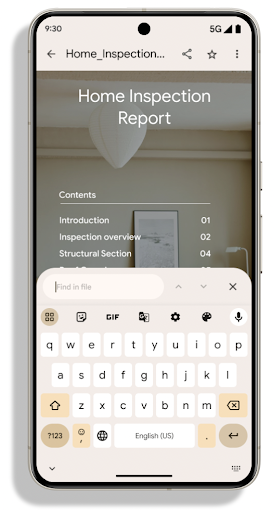
PdfRenderer একটি মডিউলে সরানো হয়েছে যা প্ল্যাটফর্ম রিলিজ ছাড়া Google Play সিস্টেম আপডেটগুলি ব্যবহার করে আপডেট করা যেতে পারে, এবং আমরা এই পরিবর্তনগুলিকে Android 11 (API স্তর 30)-এ একটি সামঞ্জস্যপূর্ণ প্রি-Android 15 সংস্করণ তৈরি করে সমর্থন করছি। API পৃষ্ঠ, PdfRendererPreV নামে পরিচিত।
Android 15-এ PdfRenderer API-এর উল্লেখযোগ্য উন্নতি রয়েছে। অ্যাপগুলি পাসওয়ার্ড-সুরক্ষিত ফাইল রেন্ডারিং, টীকা, ফর্ম সম্পাদনা , অনুসন্ধান এবং অনুলিপি সহ নির্বাচনের মতো উন্নত বৈশিষ্ট্যগুলিকে অন্তর্ভুক্ত করতে পারে৷ লিনিয়ারাইজড পিডিএফ অপ্টিমাইজেশানগুলি স্থানীয় পিডিএফ দেখার গতি এবং সম্পদের ব্যবহার কমাতে সমর্থিত। জেটপ্যাক পিডিএফ লাইব্রেরি আপনার অ্যাপে পিডিএফ দেখার ক্ষমতা যোগ করা সহজ করতে এই APIগুলি ব্যবহার করে।
PdfRenderer একটি মডিউলে সরানো হয়েছে যা প্ল্যাটফর্ম রিলিজ ছাড়া Google Play সিস্টেম আপডেটগুলি ব্যবহার করে আপডেট করা যেতে পারে, এবং আমরা এই পরিবর্তনগুলিকে Android 11 (API স্তর 30)-এ একটি সামঞ্জস্যপূর্ণ প্রি-Android 15 সংস্করণ তৈরি করে সমর্থন করছি। API পৃষ্ঠ, PdfRendererPreV নামে পরিচিত।
Android 15-এ PdfRenderer API-এর উল্লেখযোগ্য উন্নতি রয়েছে। অ্যাপগুলি পাসওয়ার্ড-সুরক্ষিত ফাইল রেন্ডারিং, টীকা, ফর্ম সম্পাদনা , অনুসন্ধান এবং অনুলিপি সহ নির্বাচনের মতো উন্নত বৈশিষ্ট্যগুলিকে অন্তর্ভুক্ত করতে পারে৷ লিনিয়ারাইজড পিডিএফ অপ্টিমাইজেশানগুলি স্থানীয় পিডিএফ দেখার গতি এবং সম্পদের ব্যবহার কমাতে সমর্থিত। জেটপ্যাক পিডিএফ লাইব্রেরি আপনার অ্যাপে পিডিএফ দেখার ক্ষমতা যোগ করা সহজ করতে এই APIগুলি ব্যবহার করে।
PdfRenderer একটি মডিউলে সরানো হয়েছে যা প্ল্যাটফর্ম রিলিজ ছাড়া Google Play সিস্টেম আপডেটগুলি ব্যবহার করে আপডেট করা যেতে পারে, এবং আমরা এই পরিবর্তনগুলিকে Android 11 (API স্তর 30)-এ একটি সামঞ্জস্যপূর্ণ প্রি-Android 15 সংস্করণ তৈরি করে সমর্থন করছি। API পৃষ্ঠ, PdfRendererPreV নামে পরিচিত।
স্বয়ংক্রিয় ভাষা পরিবর্তনের পরিমার্জন
অ্যান্ড্রয়েড 14 অডিওতে অন-ডিভাইস, বহু-ভাষা স্বীকৃতি যোগ করেছে ভাষাগুলির মধ্যে স্বয়ংক্রিয় পরিবর্তনের সাথে, কিন্তু এর ফলে শব্দগুলি বাদ পড়তে পারে, বিশেষ করে যখন ভাষা দুটি উচ্চারণের মধ্যে কম বিরতির সাথে স্যুইচ করে। Android 15 অ্যাপগুলিকে তাদের ব্যবহারের ক্ষেত্রে এই সুইচিং টিউন করতে সাহায্য করার জন্য অতিরিক্ত নিয়ন্ত্রণ যোগ করে। EXTRA_LANGUAGE_SWITCH_INITIAL_ACTIVE_DURATION_TIME_MILLIS স্বয়ংক্রিয় স্যুইচিংকে অডিও সেশনের শুরুতে সীমাবদ্ধ করে, যখন EXTRA_LANGUAGE_SWITCH_MATCH_SWITCHES একটি নির্দিষ্ট সংখ্যক স্যুইচের পরে ভাষা স্যুইচিং নিষ্ক্রিয় করে। এই বিকল্পগুলি বিশেষভাবে উপযোগী যদি আপনি আশা করেন যে অধিবেশন চলাকালীন একটি একক ভাষা বলা হবে যা স্বয়ংক্রিয়ভাবে সনাক্ত করা উচিত।
উন্নত ওপেনটাইপ ভেরিয়েবল ফন্ট এপিআই
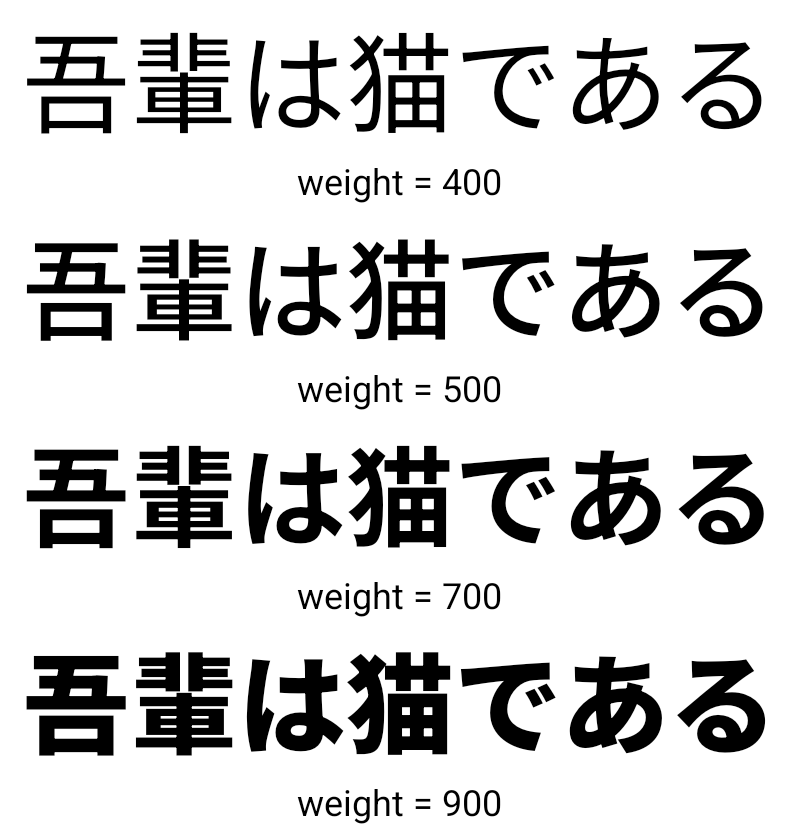
Android 15 OpenType ভেরিয়েবল ফন্টের ব্যবহারযোগ্যতা উন্নত করে। আপনি buildVariableFamily API এর সাথে ওজন অক্ষ উল্লেখ না করে একটি পরিবর্তনশীল ফন্ট থেকে একটি FontFamily উদাহরণ তৈরি করতে পারেন। টেক্সট রেন্ডারার প্রদর্শন করা টেক্সট মেলে wght অক্ষের মান ওভাররাইড করে।
এপিআই ব্যবহার করে একটি Typeface তৈরির জন্য কোডটিকে যথেষ্ট সরল করে:
কোটলিন
val newTypeface = Typeface.CustomFallbackBuilder(
            FontFamily.Builder(
                Font.Builder(assets, "RobotoFlex.ttf").build())
                    .buildVariableFamily())
    .build()
জাভা
Typeface newTypeface = Typeface.CustomFallbackBuilder(
            new FontFamily.Builder(
                new Font.Builder(assets, "RobotoFlex.ttf").build())
                    .buildVariableFamily())
    .build();
পূর্বে, একই Typeface তৈরি করতে, আপনার আরও অনেক কোডের প্রয়োজন হবে:
কোটলিন
val oldTypeface = Typeface.CustomFallbackBuilder(
            FontFamily.Builder(
                Font.Builder(assets, "RobotoFlex.ttf")
                    .setFontVariationSettings("'wght' 400")
                    .setWeight(400)
                    .build())
                .addFont(
                    Font.Builder(assets, "RobotoFlex.ttf")
                        .setFontVariationSettings("'wght' 100")
                        .setWeight(100)
                        .build()
                )
                .addFont(
                    Font.Builder(assets, "RobotoFlex.ttf")
                        .setFontVariationSettings("'wght' 200")
                        .setWeight(200)
                        .build()
                )
                .addFont(
                    Font.Builder(assets, "RobotoFlex.ttf")
                        .setFontVariationSettings("'wght' 300")
                        .setWeight(300)
                        .build()
                )
                .addFont(
                    Font.Builder(assets, "RobotoFlex.ttf")
                        .setFontVariationSettings("'wght' 500")
                        .setWeight(500)
                        .build()
                )
                .addFont(
                    Font.Builder(assets, "RobotoFlex.ttf")
                        .setFontVariationSettings("'wght' 600")
                        .setWeight(600)
                        .build()
                )
                .addFont(
                    Font.Builder(assets, "RobotoFlex.ttf")
                        .setFontVariationSettings("'wght' 700")
                        .setWeight(700)
                        .build()
                )
                .addFont(
                    Font.Builder(assets, "RobotoFlex.ttf")
                        .setFontVariationSettings("'wght' 800")
                        .setWeight(800)
                        .build()
                )
                .addFont(
                    Font.Builder(assets, "RobotoFlex.ttf")
                        .setFontVariationSettings("'wght' 900")
                        .setWeight(900)
                        .build()
                ).build()
        ).build()
জাভা
Typeface oldTypeface = new Typeface.CustomFallbackBuilder(
    new FontFamily.Builder(
        new Font.Builder(assets, "RobotoFlex.ttf")
            .setFontVariationSettings("'wght' 400")
            .setWeight(400)
            .build()
    )
    .addFont(
        new Font.Builder(assets, "RobotoFlex.ttf")
            .setFontVariationSettings("'wght' 100")
            .setWeight(100)
            .build()
    )
    .addFont(
        new Font.Builder(assets, "RobotoFlex.ttf")
            .setFontVariationSettings("'wght' 200")
            .setWeight(200)
            .build()
    )
    .addFont(
        new Font.Builder(assets, "RobotoFlex.ttf")
            .setFontVariationSettings("'wght' 300")
            .setWeight(300)
            .build()
    )
    .addFont(
        new Font.Builder(assets, "RobotoFlex.ttf")
            .setFontVariationSettings("'wght' 500")
            .setWeight(500)
            .build()
    )
    .addFont(
        new Font.Builder(assets, "RobotoFlex.ttf")
            .setFontVariationSettings("'wght' 600")
            .setWeight(600)
            .build()
    )
    .addFont(
        new Font.Builder(assets, "RobotoFlex.ttf")
            .setFontVariationSettings("'wght' 700")
            .setWeight(700)
            .build()
    )
    .addFont(
        new Font.Builder(assets, "RobotoFlex.ttf")
            .setFontVariationSettings("'wght' 800")
            .setWeight(800)
            .build()
    )
    .addFont(
        new Font.Builder(assets, "RobotoFlex.ttf")
            .setFontVariationSettings("'wght' 900")
            .setWeight(900)
            .build()
    )
    .build()
).build();
পুরানো এবং নতুন উভয় API এর সাথে কীভাবে একটি Typeface তৈরি হয় তার একটি উদাহরণ এখানে দেওয়া হল:
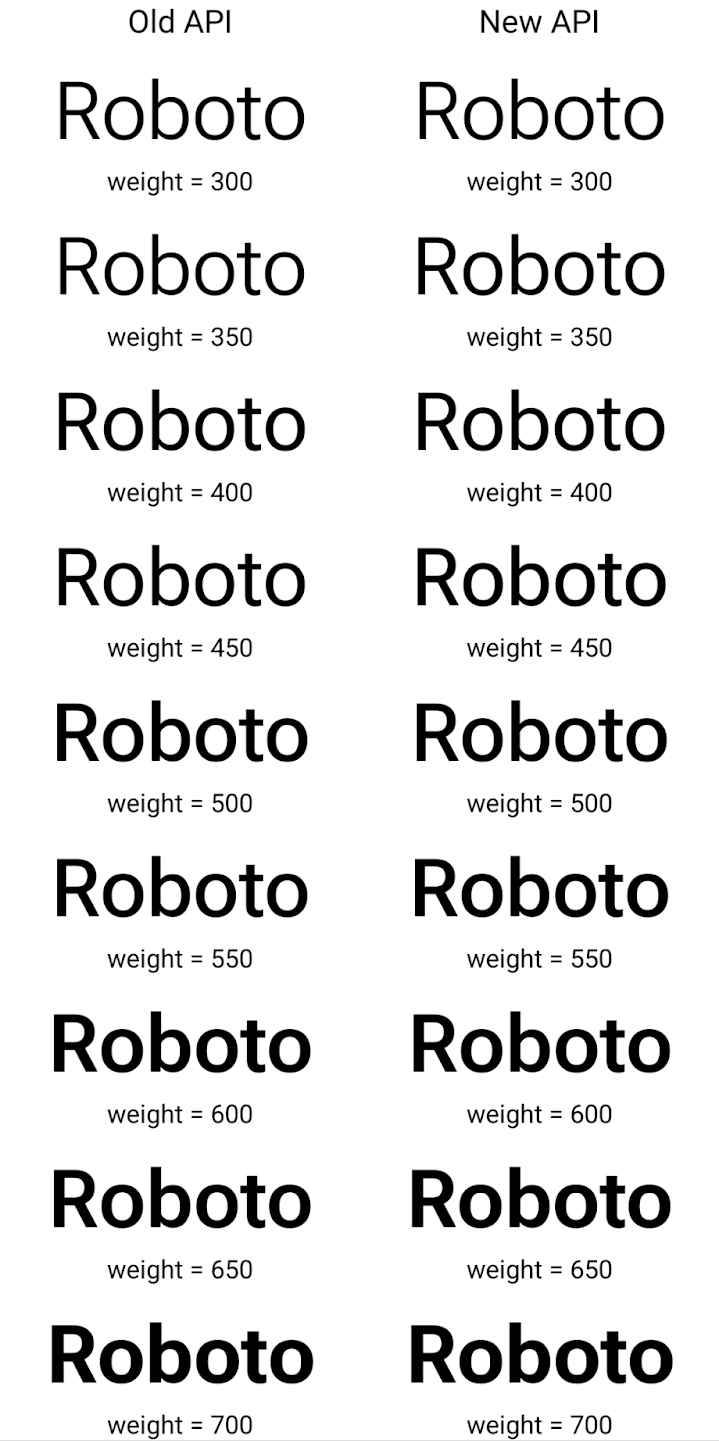
এই উদাহরণে, পুরানো API দিয়ে তৈরি করা Typeface 350, 450, 550 এবং 650 Font উদাহরণগুলির জন্য সঠিক ফন্টের ওজন তৈরি করার ক্ষমতা রাখে না, তাই রেন্ডারার সবচেয়ে কাছের ওজনে ফিরে আসে। সুতরাং এই ক্ষেত্রে, 350 এর পরিবর্তে 300 রেন্ডার করা হয়, 450 এর পরিবর্তে 400 রেন্ডার করা হয়, ইত্যাদি। বিপরীতে, নতুন এপিআইগুলির সাথে তৈরি Typeface গতিশীলভাবে একটি প্রদত্ত ওজনের জন্য একটি Font উদাহরণ তৈরি করে, তাই সঠিক ওজন 350, 450, 550 এবং 650 এর জন্যও রেন্ডার করা হয়।
দানাদার লাইন ব্রেক নিয়ন্ত্রণ
অ্যান্ড্রয়েড 15 থেকে শুরু করে, পাঠযোগ্যতা উন্নত করতে একটি TextView এবং অন্তর্নিহিত লাইন ব্রেকার একই লাইনে পাঠ্যের প্রদত্ত অংশ সংরক্ষণ করতে পারে। আপনি স্ট্রিং রিসোর্সে <nobreak> ট্যাগ ব্যবহার করে অথবা createNoBreakSpan এই লাইন ব্রেক কাস্টমাইজেশনের সুবিধা নিতে পারেন। একইভাবে, আপনি <nohyphen> ট্যাগ বা createNoHyphenationSpan ব্যবহার করে হাইফেনেশন থেকে শব্দ সংরক্ষণ করতে পারেন।
উদাহরণ স্বরূপ, নিম্নলিখিত স্ট্রিং রিসোর্সে লাইন ব্রেক নেই এবং "Pixel 8 Pro" লেখার সাথে রেন্ডার করা হয়। একটি অবাঞ্ছিত জায়গায় ভাঙ্গা:
<resources>
    <string name="pixel8pro">The power and brains behind Pixel 8 Pro.</string>
</resources>
বিপরীতে, এই স্ট্রিং রিসোর্সটিতে <nobreak> ট্যাগ অন্তর্ভুক্ত রয়েছে, যা "Pixel 8 Pro" শব্দটিকে মোড়ানো। এবং লাইন ব্রেক প্রতিরোধ করে:
<resources>
    <string name="pixel8pro">The power and brains behind <nobreak>Pixel 8 Pro.</nobreak></string>
</resources>
এই স্ট্রিংগুলি কীভাবে রেন্ডার করা হয় তার পার্থক্য নিম্নলিখিত চিত্রগুলিতে দেখানো হয়েছে:
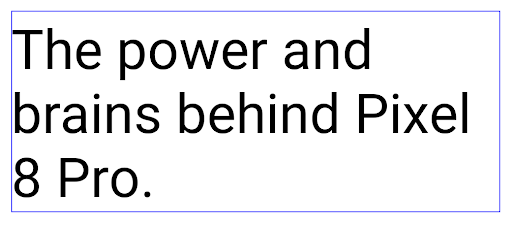
<nobreak> ট্যাগ ব্যবহার করে মোড়ানো হয় না। 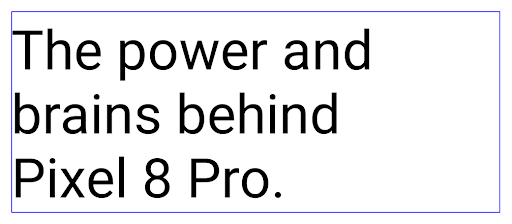
<nobreak> ট্যাগ ব্যবহার করে মোড়ানো হয়।অ্যাপ আর্কাইভ করা
অ্যান্ড্রয়েড এবং গুগল প্লে গত বছর অ্যাপ সংরক্ষণাগারের জন্য সমর্থন ঘোষণা করেছিল , ব্যবহারকারীদেরকে Google Play এ অ্যান্ড্রয়েড অ্যাপ বান্ডেল ব্যবহার করে প্রকাশিত ডিভাইস থেকে কদাচিৎ ব্যবহৃত অ্যাপগুলিকে আংশিকভাবে সরিয়ে দিয়ে স্থান খালি করার অনুমতি দেয়। অ্যান্ড্রয়েড 15 অ্যাপ আর্কাইভিং এবং আনআর্কাইভ করার জন্য ওএস লেভেল সমর্থন অন্তর্ভুক্ত করে, যা সমস্ত অ্যাপ স্টোরের জন্য এটি বাস্তবায়ন করা সহজ করে তোলে।
REQUEST_DELETE_PACKAGES অনুমতি সহ অ্যাপগুলি একটি ইনস্টল করা অ্যাপ প্যাকেজ সংরক্ষণাগার করার অনুরোধ করতে PackageInstaller requestArchive পদ্ধতিতে কল করতে পারে, যা APK এবং যেকোন ক্যাশে করা ফাইলগুলিকে সরিয়ে দেয়, কিন্তু ব্যবহারকারীর ডেটা বজায় রাখে। আর্কাইভ করা অ্যাপগুলি LauncherApps API-এর মাধ্যমে প্রদর্শনযোগ্য অ্যাপ হিসেবে ফেরত দেওয়া হয়; ব্যবহারকারীরা হাইলাইট করার জন্য একটি UI ট্রিটমেন্ট দেখতে পাবেন যে সেই অ্যাপগুলি আর্কাইভ করা হয়েছে। যদি একজন ব্যবহারকারী একটি সংরক্ষণাগারভুক্ত অ্যাপে ট্যাপ করে, তাহলে দায়ী ইনস্টলার এটিকে আনআর্কাইভ করার জন্য একটি অনুরোধ পাবেন, এবং পুনরুদ্ধার প্রক্রিয়াটি ACTION_PACKAGE_ADDED সম্প্রচার দ্বারা নিরীক্ষণ করা যেতে পারে৷
ডেভেলপার অপশন ব্যবহার করে একটি ডিভাইসে ১৬ কেবি মোড সক্ষম করুন
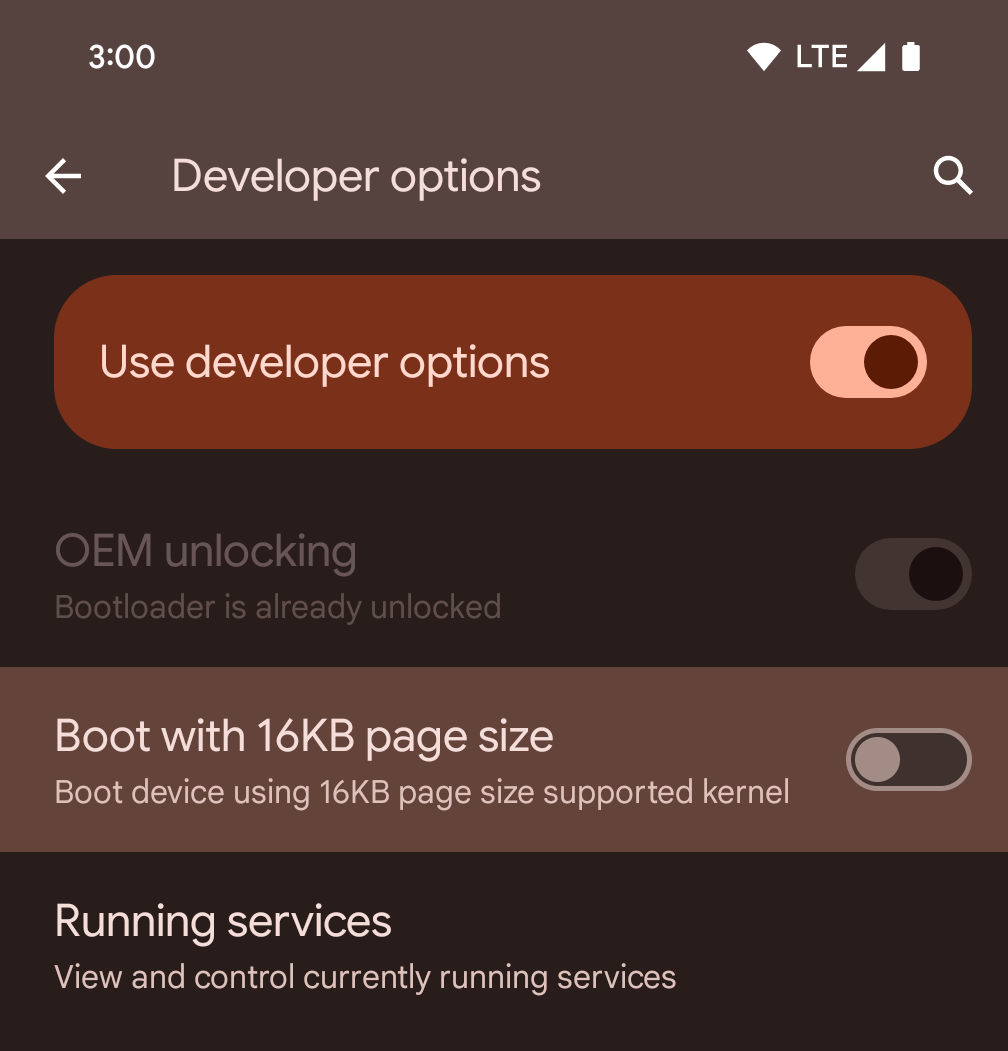
১৬ কেবি মোডে একটি ডিভাইস বুট করতে ১৬ কেবি পৃষ্ঠা আকারের ডেভেলপার বিকল্পটি টগল করুন।
অ্যান্ড্রয়েড ১৫ এর QPR সংস্করণগুলিতে, আপনি নির্দিষ্ট ডিভাইসে উপলব্ধ ডেভেলপার বিকল্পটি ব্যবহার করে ডিভাইসটিকে ১৬ KB মোডে বুট করতে এবং অন-ডিভাইস পরীক্ষা করতে পারেন। ডেভেলপার বিকল্পটি ব্যবহার করার আগে, সেটিংস > সিস্টেম > সফ্টওয়্যার আপডেটে যান এবং উপলব্ধ যেকোনো আপডেট প্রয়োগ করুন।
এই ডেভেলপার বিকল্পটি নিম্নলিখিত ডিভাইসগুলিতে উপলব্ধ:
Pixel 8 এবং 8 Pro (Android 15 QPR1 বা তার উচ্চতর ভার্সন সহ)
Pixel 8a (Android 15 QPR1 বা তার উচ্চতর ভার্সন সহ)
Pixel 9, 9 Pro, এবং 9 Pro XL (Android 15 QPR2 বা তার উচ্চতর ভার্সন সহ)
Pixel 9a (Android 16 বা তার উচ্চতর ভার্সন সহ)
গ্রাফিক্স
অ্যান্ড্রয়েড ১৫ সর্বশেষ গ্রাফিক্স উন্নয়ন নিয়ে এসেছে, যার মধ্যে ANGLE এবং ক্যানভাস গ্রাফিক্স সিস্টেমে নতুন সংযোজন অন্তর্ভুক্ত রয়েছে।
অ্যান্ড্রয়েডের জিপিইউ অ্যাক্সেস আধুনিকীকরণ

অ্যান্ড্রয়েড হার্ডওয়্যার প্রাথমিক দিনগুলি থেকে বেশ কিছুটা বিবর্তিত হয়েছে যেখানে মূল ওএস একটি একক সিপিইউতে চলবে এবং ফিক্সড-ফাংশন পাইপলাইনগুলির উপর ভিত্তি করে এপিআই ব্যবহার করে জিপিইউগুলি অ্যাক্সেস করা হয়েছিল। Vulkan® গ্রাফিক্স API NDK- এ Android 7.0 (API স্তর 24) থেকে একটি নিম্ন-স্তরের বিমূর্ততা সহ উপলব্ধ রয়েছে যা আধুনিক GPU হার্ডওয়্যারকে আরও ভালভাবে প্রতিফলিত করে, একাধিক CPU কোরকে সমর্থন করার জন্য আরও ভাল স্কেল করে এবং কম CPU ড্রাইভার ওভারহেড অফার করে — যা উন্নত করার দিকে নিয়ে যায় অ্যাপ্লিকেশন কর্মক্ষমতা। ভলকান সমস্ত আধুনিক গেম ইঞ্জিন দ্বারা সমর্থিত।
ভলকান হল জিপিইউ-তে অ্যান্ড্রয়েডের পছন্দের ইন্টারফেস। অতএব, Vulkan এর উপরে OpenGL® ES চালানোর জন্য Android 15 একটি ঐচ্ছিক স্তর হিসাবে ANGLE অন্তর্ভুক্ত করে। ANGLE-এ সরানো উন্নত সামঞ্জস্যের জন্য Android OpenGL বাস্তবায়নকে মানসম্মত করবে, এবং কিছু ক্ষেত্রে, উন্নত কর্মক্ষমতা। আপনি সেটিংস -> সিস্টেম -> বিকাশকারী বিকল্প -> পরীক্ষামূলক: Android 15 এ ANGLE সক্ষম করে বিকাশকারী বিকল্পটি সক্ষম করে ANGLE এর সাথে আপনার OpenGL ES অ্যাপের স্থায়িত্ব এবং কার্যকারিতা পরীক্ষা করতে পারেন।
ভলকান রোডম্যাপে Android ANGLE
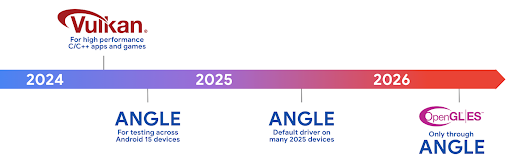
আমাদের GPU স্ট্যাককে স্ট্রীমলাইন করার অংশ হিসাবে, সামনের দিকে আমরা আরও নতুন ডিভাইসে GL সিস্টেম ড্রাইভার হিসাবে ANGLE শিপিং করব, ভবিষ্যতের প্রত্যাশার সাথে OpenGL/ES শুধুমাত্র ANGLE এর মাধ্যমে উপলব্ধ হবে। বলা হচ্ছে, আমরা সব ডিভাইসে OpenGL ES-এর জন্য সমর্থন চালিয়ে যাওয়ার পরিকল্পনা করছি।
প্রস্তাবিত পরবর্তী পদক্ষেপ
OpenGL ES এর জন্য ANGLE ড্রাইভার নির্বাচন করতে এবং আপনার অ্যাপ পরীক্ষা করতে বিকাশকারী বিকল্পগুলি ব্যবহার করুন৷ নতুন প্রকল্পের জন্য, আমরা C/C++ এর জন্য ভলকান ব্যবহারকে দৃঢ়ভাবে উৎসাহিত করি।
ক্যানভাসের জন্য উন্নতি
Android 15 অতিরিক্ত ক্ষমতা সহ Android এর ক্যানভাস গ্রাফিক্স সিস্টেমের আমাদের আধুনিকীকরণ অব্যাহত রেখেছে:
-
Matrix44স্থানাঙ্ক রূপান্তরের জন্য একটি 4x4 ম্যাট্রিক্স প্রদান করে যেটি ব্যবহার করা উচিত যখন আপনি 3D তে ক্যানভাসকে ম্যানিপুলেট করতে চান। -
clipShaderবর্তমান ক্লিপকে নির্দিষ্ট শেডারের সাথে ছেদ করে, যখনclipOutShaderক্লিপটিকে বর্তমান ক্লিপ এবং শেডারের পার্থক্যে সেট করে, প্রতিটি শেডারকে আলফা মাস্ক হিসাবে বিবেচনা করে। এটি জটিল আকারের অঙ্কনকে দক্ষতার সাথে সমর্থন করে।
কর্মক্ষমতা এবং ব্যাটারি
অ্যান্ড্রয়েড আপনার অ্যাপের পারফরম্যান্স এবং গুণমান উন্নত করতে সাহায্য করার উপর মনোযোগ অব্যাহত রেখেছে। অ্যান্ড্রয়েড ১৫ এমন কিছু এপিআই (API) চালু করেছে যা আপনার অ্যাপের কাজগুলোকে আরও দক্ষতার সাথে সম্পাদন করতে, অ্যাপের পারফরম্যান্স অপ্টিমাইজ করতে এবং আপনার অ্যাপ সম্পর্কে তথ্য সংগ্রহ করতে সাহায্য করে।
ব্যাটারি-সাশ্রয়ী সেরা অনুশীলন, নেটওয়ার্ক ও পাওয়ার ব্যবহারের ডিবাগিং, এবং অ্যান্ড্রয়েড ১৫ ও অ্যান্ড্রয়েডের সাম্প্রতিক সংস্করণগুলিতে ব্যাকগ্রাউন্ড কাজের ব্যাটারি দক্ষতা আমরা কীভাবে উন্নত করছি সে সম্পর্কে বিস্তারিত জানতে, গুগল আই/ও (Google I/O)-তে উপস্থাপিত "অ্যান্ড্রয়েডে ব্যাকগ্রাউন্ড কাজের ব্যাটারি দক্ষতা উন্নত করা" শীর্ষক আলোচনাটি দেখুন।
অ্যাপ্লিকেশনস্টার্টইনফো এপিআই
অ্যান্ড্রয়েডের পূর্ববর্তী সংস্করণগুলিতে, অ্যাপ স্টার্টআপটি কিছুটা রহস্যজনক ছিল। এটি ঠান্ডা, উষ্ণ বা গরম অবস্থা থেকে শুরু হয়েছে কিনা তা আপনার অ্যাপের মধ্যে নির্ধারণ করা চ্যালেঞ্জিং ছিল। বিভিন্ন লঞ্চের পর্যায়গুলিতে আপনার অ্যাপটি কতক্ষণ ব্যয় করেছে তা জানাও কঠিন ছিল: প্রক্রিয়াটি কাঁটাচামচ করা, onCreate কল করা, প্রথম ফ্রেম আঁকা এবং আরও অনেক কিছু। যখন আপনার Application ক্লাসটি চালু করা হয়েছিল, তখন আপনার জানার কোন উপায় ছিল না যে অ্যাপটি একটি সম্প্রচার থেকে শুরু হয়েছে, একটি বিষয়বস্তু প্রদানকারী, একটি কাজ, একটি ব্যাকআপ, বুট সম্পূর্ণ হয়েছে, একটি অ্যালার্ম, বা একটি Activity ।
Android 15-এ ApplicationStartInfo API এই সমস্ত এবং আরও অনেক কিছু সরবরাহ করে। এমনকি আপনি এক জায়গায় টাইমিং ডেটা সংগ্রহ করতে সাহায্য করার জন্য প্রবাহে আপনার নিজস্ব টাইমস্ট্যাম্প যোগ করতেও বেছে নিতে পারেন। মেট্রিক্স সংগ্রহের পাশাপাশি, আপনি অ্যাপ স্টার্টআপকে সরাসরি অপ্টিমাইজ করতে সাহায্য করতে ApplicationStartInfo ব্যবহার করতে পারেন; উদাহরণস্বরূপ, যখন আপনার অ্যাপটি একটি সম্প্রচারের কারণে শুরু হয় তখন আপনি আপনার Application ক্লাসের মধ্যে UI-সম্পর্কিত লাইব্রেরিগুলির ব্যয়বহুল ইন্সট্যান্সটি বাদ দিতে পারেন।
অ্যাপের আকারের বিস্তারিত তথ্য
Android 8.0 (API স্তর 26) থেকে, Android StorageStats.getAppBytes API অন্তর্ভুক্ত করেছে যা একটি অ্যাপের ইনস্টল করা আকারকে একক সংখ্যা বাইট হিসাবে সংক্ষিপ্ত করে, যা APK আকারের সমষ্টি, APK থেকে বের করা ফাইলের আকার, এবং ফাইলগুলি যেগুলি ডিভাইসে তৈরি হয়েছিল যেমন আগ-অফ-টাইম (AOT) সংকলিত কোড। আপনার অ্যাপ কীভাবে স্টোরেজ ব্যবহার করছে তার পরিপ্রেক্ষিতে এই সংখ্যাটি খুব অন্তর্দৃষ্টিপূর্ণ নয়।
Android 15 StorageStats.getAppBytesByDataType([type]) API যোগ করে, যা আপনাকে APK ফাইল বিভাজন, AOT এবং স্পিডআপ সম্পর্কিত কোড, ডেক্স মেটাডেটা, লাইব্রেরি এবং নির্দেশিত প্রোফাইল সহ আপনার অ্যাপ কীভাবে সমস্ত স্থান ব্যবহার করছে তার অন্তর্দৃষ্টি পেতে দেয়।
অ্যাপ-পরিচালিত প্রোফাইলিং
অ্যান্ড্রয়েড 15 ProfilingManager ক্লাস অন্তর্ভুক্ত করে, যা আপনাকে আপনার অ্যাপের মধ্যে থেকে প্রোফাইলিং তথ্য সংগ্রহ করতে দেয় যেমন হিপ ডাম্প, হিপ প্রোফাইল, স্ট্যাক স্যাম্পলিং এবং আরও অনেক কিছু। এটি আউটপুট ফাইল সনাক্ত করতে একটি সরবরাহকৃত ট্যাগ সহ আপনার অ্যাপে একটি কলব্যাক প্রদান করে, যা আপনার অ্যাপের ফাইল ডিরেক্টরিতে বিতরণ করা হয়। পারফরম্যান্সের প্রভাব কমানোর জন্য API রেট সীমিত করে।
আপনার অ্যাপে প্রোফাইলিং রিকোয়েস্ট তৈরি করা সহজ করার জন্য, আমরা কোর 1.15.0-rc01 বা উচ্চতর সংস্করণে উপলব্ধ সংশ্লিষ্ট Profiling AndroidX API ব্যবহার করার পরামর্শ দিই।
SQLite ডেটাবেসের উন্নতি
অ্যান্ড্রয়েড 15 SQLite API গুলি প্রবর্তন করে যা অন্তর্নিহিত SQLite ইঞ্জিন থেকে উন্নত বৈশিষ্ট্যগুলিকে প্রকাশ করে যা নির্দিষ্ট কর্মক্ষমতা সমস্যাগুলিকে লক্ষ্য করে যা অ্যাপগুলিতে প্রকাশ করতে পারে। এই APIগুলি SQLite-এর সংস্করণ 3.44.3-এর আপডেটের সাথে অন্তর্ভুক্ত করা হয়েছে।
ডেভেলপারদের তাদের SQLite ডাটাবেস থেকে সর্বাধিক সুবিধা পেতে SQLite পারফরম্যান্সের জন্য সর্বোত্তম অনুশীলনের সাথে পরামর্শ করা উচিত, বিশেষ করে যখন বড় ডাটাবেসের সাথে কাজ করা বা যখন লেটেন্সি-সংবেদনশীল প্রশ্নগুলি চালানো হয়।
- শুধুমাত্র-পঠন স্থগিত লেনদেন : শুধুমাত্র পঠনযোগ্য লেনদেন জারি করার সময় (লেখার বিবৃতি অন্তর্ভুক্ত করবেন না), ব্যবহার করুন
beginTransactionReadOnly()এবংbeginTransactionWithListenerReadOnly(SQLiteTransactionListener)শুধুমাত্র-পঠনDEFERREDলেনদেন ইস্যু করতে। এই ধরনের লেনদেনগুলি একে অপরের সাথে একযোগে চলতে পারে, এবং যদি ডাটাবেসটি WAL মোডে থাকে তবে তারাIMMEDIATEবাEXCLUSIVEলেনদেনের সাথে একযোগে চলতে পারে। - সারি গণনা এবং আইডি : পরিবর্তিত সারিগুলির গণনা বা শেষ সন্নিবেশিত সারি আইডি একটি অতিরিক্ত ক্যোয়ারী ইস্যু না করেই পুনরুদ্ধার করতে API যোগ করা হয়েছে৷
getLastChangedRowCount()বর্তমান লেনদেনের মধ্যে সবচেয়ে সাম্প্রতিক SQL স্টেটমেন্ট দ্বারা সন্নিবেশিত, আপডেট করা বা মুছে ফেলা সারিগুলির সংখ্যা প্রদান করে, যখনgetTotalChangedRowCount()বর্তমান সংযোগের গণনা প্রদান করে।getLastInsertRowId()বর্তমান সংযোগে সন্নিবেশ করা শেষ সারিরrowidপ্রদান করে। - কাঁচা বিবৃতি : একটি কাঁচা SQlite বিবৃতি জারি করুন, সুবিধার র্যাপারগুলিকে বাইপাস করে এবং যেকোন অতিরিক্ত প্রসেসিং ওভারহেড যা তাদের খরচ হতে পারে।
অ্যান্ড্রয়েড ডায়নামিক পারফরম্যান্স ফ্রেমওয়ার্ক আপডেট
Android 15 অ্যান্ড্রয়েড ডায়নামিক পারফরম্যান্স ফ্রেমওয়ার্ক (ADPF) এ আমাদের বিনিয়োগ অব্যাহত রেখেছে, একটি API-এর সেট যা গেমস এবং পারফরম্যান্স নিবিড় অ্যাপগুলিকে Android ডিভাইসের পাওয়ার এবং থার্মাল সিস্টেমের সাথে আরও সরাসরি যোগাযোগ করতে দেয়। সমর্থিত ডিভাইসগুলিতে, Android 15 ADPF ক্ষমতা যুক্ত করে:
- ইঙ্গিত সেশনের জন্য একটি পাওয়ার-দক্ষতা মোড নির্দেশ করে যে তাদের সম্পর্কিত থ্রেডগুলি কার্যক্ষমতার চেয়ে পাওয়ার সাশ্রয়কে পছন্দ করবে, দীর্ঘ-চলমান ব্যাকগ্রাউন্ড ওয়ার্কলোডের জন্য দুর্দান্ত।
- GPU এবং CPU কাজের সময়কাল উভয় ইঙ্গিত সেশনে রিপোর্ট করা যেতে পারে, সিস্টেমকে কাজের চাপের চাহিদা মেটাতে একসাথে CPU এবং GPU ফ্রিকোয়েন্সি সামঞ্জস্য করার অনুমতি দেয়।
- থার্মাল হেডরুম থ্রেশহোল্ড হেডরুম পূর্বাভাসের উপর ভিত্তি করে সম্ভাব্য থার্মাল থ্রটলিং স্ট্যাটাস ব্যাখ্যা করতে।
আপনার অ্যাপস এবং গেমগুলিতে কীভাবে ADPF ব্যবহার করবেন সে সম্পর্কে আরও জানতে, ডকুমেন্টেশনে যান ।
,Android 15 অ্যান্ড্রয়েড ডায়নামিক পারফরম্যান্স ফ্রেমওয়ার্ক (ADPF) এ আমাদের বিনিয়োগ অব্যাহত রেখেছে, একটি API-এর সেট যা গেমস এবং পারফরম্যান্স নিবিড় অ্যাপগুলিকে Android ডিভাইসের পাওয়ার এবং থার্মাল সিস্টেমের সাথে আরও সরাসরি যোগাযোগ করতে দেয়। সমর্থিত ডিভাইসগুলিতে, Android 15 ADPF ক্ষমতা যুক্ত করে:
- ইঙ্গিত সেশনের জন্য একটি পাওয়ার-দক্ষতা মোড নির্দেশ করে যে তাদের সম্পর্কিত থ্রেডগুলি কার্যক্ষমতার চেয়ে পাওয়ার সাশ্রয়কে পছন্দ করবে, দীর্ঘ-চলমান ব্যাকগ্রাউন্ড ওয়ার্কলোডের জন্য দুর্দান্ত।
- GPU এবং CPU কাজের সময়কাল উভয় ইঙ্গিত সেশনে রিপোর্ট করা যেতে পারে, সিস্টেমকে কাজের চাপের চাহিদা মেটাতে একসাথে CPU এবং GPU ফ্রিকোয়েন্সি সামঞ্জস্য করার অনুমতি দেয়।
- থার্মাল হেডরুম থ্রেশহোল্ড হেডরুম পূর্বাভাসের উপর ভিত্তি করে সম্ভাব্য থার্মাল থ্রটলিং স্ট্যাটাস ব্যাখ্যা করতে।
আপনার অ্যাপস এবং গেমগুলিতে কীভাবে ADPF ব্যবহার করবেন সে সম্পর্কে আরও জানতে, ডকুমেন্টেশনে যান ।
,Android 15 অ্যান্ড্রয়েড ডায়নামিক পারফরম্যান্স ফ্রেমওয়ার্ক (ADPF) এ আমাদের বিনিয়োগ অব্যাহত রেখেছে, একটি API-এর সেট যা গেমস এবং পারফরম্যান্স নিবিড় অ্যাপগুলিকে Android ডিভাইসের পাওয়ার এবং থার্মাল সিস্টেমের সাথে আরও সরাসরি যোগাযোগ করতে দেয়। সমর্থিত ডিভাইসগুলিতে, Android 15 ADPF ক্ষমতা যুক্ত করে:
- ইঙ্গিত সেশনের জন্য একটি পাওয়ার-দক্ষতা মোড নির্দেশ করে যে তাদের সম্পর্কিত থ্রেডগুলি কার্যক্ষমতার চেয়ে পাওয়ার সাশ্রয়কে পছন্দ করবে, দীর্ঘ-চলমান ব্যাকগ্রাউন্ড ওয়ার্কলোডের জন্য দুর্দান্ত।
- GPU এবং CPU কাজের সময়কাল উভয় ইঙ্গিত সেশনে রিপোর্ট করা যেতে পারে, সিস্টেমকে কাজের চাপের চাহিদা মেটাতে একসাথে CPU এবং GPU ফ্রিকোয়েন্সি সামঞ্জস্য করার অনুমতি দেয়।
- থার্মাল হেডরুম থ্রেশহোল্ড হেডরুম পূর্বাভাসের উপর ভিত্তি করে সম্ভাব্য থার্মাল থ্রটলিং স্ট্যাটাস ব্যাখ্যা করতে।
আপনার অ্যাপস এবং গেমগুলিতে কীভাবে ADPF ব্যবহার করবেন সে সম্পর্কে আরও জানতে, ডকুমেন্টেশনে যান ।
গোপনীয়তা
অ্যান্ড্রয়েড ১৫-এ বিভিন্ন ধরনের ফিচার রয়েছে যা অ্যাপ ডেভেলপারদের ব্যবহারকারীর গোপনীয়তা রক্ষা করতে সাহায্য করে।
স্ক্রিন রেকর্ডিং সনাক্তকরণ
অ্যান্ড্রয়েড 15 অ্যাপ্লিকেশানগুলির জন্য সমর্থন যোগ করে যাতে সনাক্ত করা যায় যে সেগুলি রেকর্ড করা হচ্ছে। যখনই অ্যাপটি একটি স্ক্রীন রেকর্ডিংয়ের মধ্যে দৃশ্যমান বা অদৃশ্য হওয়ার মধ্যে স্থানান্তরিত হয় তখন একটি কলব্যাক আহ্বান করা হয়। নিবন্ধন প্রক্রিয়ার ইউআইডির মালিকানাধীন কার্যকলাপ রেকর্ড করা হলে একটি অ্যাপ দৃশ্যমান বলে মনে করা হয়। এইভাবে, যদি আপনার অ্যাপটি একটি সংবেদনশীল অপারেশন সম্পাদন করে, আপনি ব্যবহারকারীকে জানাতে পারেন যে সেগুলি রেকর্ড করা হচ্ছে৷
val mCallback = Consumer<Int> { state ->
  if (state == SCREEN_RECORDING_STATE_VISIBLE) {
    // We're being recorded
  } else {
    // We're not being recorded
  }
}

override fun onStart() {
   super.onStart()
   val initialState =
      windowManager.addScreenRecordingCallback(mainExecutor, mCallback)
   mCallback.accept(initialState)
}

override fun onStop() {
    super.onStop()
    windowManager.removeScreenRecordingCallback(mCallback)
}
সম্প্রসারিত ইন্টেন্টফিল্টার ক্ষমতা
Android 15 UriRelativeFilterGroup মাধ্যমে আরও সুনির্দিষ্ট Intent রেজোলিউশনের জন্য সমর্থন করে, যাতে UriRelativeFilter অবজেক্টের একটি সেট রয়েছে যা Intent ম্যাচিং নিয়মগুলির একটি সেট তৈরি করে যা প্রত্যেককে অবশ্যই সন্তুষ্ট হতে হবে, যার মধ্যে URL ক্যোয়ারী প্যারামিটার, URL খণ্ড এবং ব্লক করা বা বর্জনের নিয়ম রয়েছে।
এই নিয়মগুলিকে AndroidManifest XML ফাইলে <uri-relative-filter-group> ট্যাগ দিয়ে সংজ্ঞায়িত করা যেতে পারে, যা ঐচ্ছিকভাবে একটি android:allow ট্যাগ অন্তর্ভুক্ত করতে পারে। এই ট্যাগগুলিতে <data> ট্যাগ থাকতে পারে যা বিদ্যমান ডেটা ট্যাগ বৈশিষ্ট্যগুলির পাশাপাশি android:query এবং android:fragment বৈশিষ্ট্যগুলি ব্যবহার করে৷
এখানে AndroidManifest সিনট্যাক্সের একটি উদাহরণ:
<intent-filter android:autoVerify="true">
  <action android:name="android.intent.action.VIEW" />
  <category android:name="android.intent.category.BROWSABLE" />
  <category android:name="android.intent.category.DEFAULT" />
  <data android:scheme="http" />
  <data android:scheme="https" />
  <data android:host="astore.com" />
  <uri-relative-filter-group>
    <data android:pathPrefix="/auth" />
    <data android:query="region=na" />
  </uri-relative-filter-group>
  <uri-relative-filter-group android:allow="false">
    <data android:pathPrefix="/auth" />
    <data android:query="mobileoptout=true" />
  </uri-relative-filter-group>
  <uri-relative-filter-group android:allow="false">
    <data android:pathPrefix="/auth" />
    <data android:fragmentPrefix="faq" />
  </uri-relative-filter-group>
</intent-filter>
ব্যক্তিগত স্থান
ব্যক্তিগত স্থান ব্যবহারকারীদের তাদের ডিভাইসে একটি পৃথক স্থান তৈরি করতে দেয় যেখানে তারা প্রমাণীকরণের একটি অতিরিক্ত স্তরের অধীনে সংবেদনশীল অ্যাপগুলিকে চোখ থেকে দূরে রাখতে পারে। ব্যক্তিগত স্থান একটি পৃথক ব্যবহারকারী প্রোফাইল ব্যবহার করে। ব্যবহারকারী ব্যক্তিগত স্থানের জন্য ডিভাইস লক বা একটি পৃথক লক ফ্যাক্টর ব্যবহার করতে পারেন।
ব্যক্তিগত স্থানের অ্যাপ্লিকেশনগুলি লঞ্চারে একটি পৃথক পাত্রে প্রদর্শিত হয় এবং ব্যক্তিগত স্থানটি লক করা অবস্থায় সাম্প্রতিক দৃশ্য, বিজ্ঞপ্তি, সেটিংস এবং অন্যান্য অ্যাপ্লিকেশন থেকে লুকিয়ে থাকে৷ ব্যবহারকারী দ্বারা তৈরি এবং ডাউনলোড করা সামগ্রী (যেমন মিডিয়া বা ফাইল) এবং অ্যাকাউন্টগুলি ব্যক্তিগত স্থান এবং প্রধান স্থানের মধ্যে পৃথক করা হয়। সিস্টেম শেয়ারশীট এবং ফটো পিকার ব্যবহার করা যেতে পারে অ্যাপগুলিকে স্পেস জুড়ে সামগ্রীতে অ্যাক্সেস দেওয়ার জন্য যখন ব্যক্তিগত স্থানটি আনলক করা থাকে।
ব্যবহারকারীরা বিদ্যমান অ্যাপ এবং তাদের ডেটা ব্যক্তিগত স্থানে সরাতে পারবেন না। পরিবর্তে, ব্যবহারকারীরা তাদের পছন্দের অ্যাপ স্টোর ব্যবহার করে একটি অ্যাপ ইনস্টল করতে ব্যক্তিগত স্থানে একটি ইনস্টল বিকল্প নির্বাচন করেন। প্রাইভেট স্পেসে অ্যাপগুলি মূল স্পেসের যেকোন অ্যাপ থেকে আলাদা কপি হিসেবে ইনস্টল করা হয় (একই অ্যাপের নতুন কপি)।
যখন একজন ব্যবহারকারী ব্যক্তিগত স্থান লক করে, প্রোফাইলটি বন্ধ হয়ে যায়। প্রোফাইল বন্ধ থাকাকালীন, ব্যক্তিগত স্থানের অ্যাপগুলি আর সক্রিয় থাকে না এবং বিজ্ঞপ্তিগুলি দেখানো সহ ফোরগ্রাউন্ড বা ব্যাকগ্রাউন্ড ক্রিয়াকলাপগুলি সম্পাদন করতে পারে না৷
আমরা সুপারিশ করছি যে আপনি আপনার অ্যাপটি প্রত্যাশিতভাবে কাজ করে তা নিশ্চিত করতে ব্যক্তিগত স্থান দিয়ে আপনার অ্যাপটি পরীক্ষা করুন, বিশেষ করে যদি আপনার অ্যাপ নিম্নলিখিত বিভাগগুলির মধ্যে একটিতে পড়ে:
- কাজের প্রোফাইলের জন্য যুক্তিযুক্ত অ্যাপ যেগুলি ধরে নেয় যে তাদের অ্যাপের ইনস্টল করা কোনো কপি যা মূল প্রোফাইলে নেই সেগুলি কাজের প্রোফাইলে রয়েছে৷
- মেডিকেল অ্যাপস
- লঞ্চার অ্যাপস
- অ্যাপ স্টোর অ্যাপস
নির্বাচিত ফটোগুলোর অ্যাক্সেসের জন্য ব্যবহারকারীর সর্বশেষ নির্বাচন সম্পর্কে জিজ্ঞাসা করুন।
মিডিয়া অনুমতিগুলিতে আংশিক অ্যাক্সেস দেওয়া হলে অ্যাপগুলি এখন শুধুমাত্র সাম্প্রতিক-নির্বাচিত ফটো এবং ভিডিওগুলিকে হাইলাইট করতে পারে৷ এই বৈশিষ্ট্যটি এমন অ্যাপগুলির জন্য ব্যবহারকারীর অভিজ্ঞতা উন্নত করতে পারে যেগুলি প্রায়শই ফটো এবং ভিডিওগুলিতে অ্যাক্সেসের অনুরোধ করে৷ আপনার অ্যাপে এই বৈশিষ্ট্যটি ব্যবহার করতে, ContentResolver মাধ্যমে MediaStore জিজ্ঞাসা করার সময় QUERY_ARG_LATEST_SELECTION_ONLY আর্গুমেন্টটি সক্ষম করুন।
কোটলিন
val externalContentUri = MediaStore.Files.getContentUri("external")

val mediaColumns = arrayOf(
   FileColumns._ID,
   FileColumns.DISPLAY_NAME,
   FileColumns.MIME_TYPE,
)

val queryArgs = bundleOf(
   // Return only items from the last selection (selected photos access)
   QUERY_ARG_LATEST_SELECTION_ONLY to true,
   // Sort returned items chronologically based on when they were added to the device's storage
   QUERY_ARG_SQL_SORT_ORDER to "${FileColumns.DATE_ADDED} DESC",
   QUERY_ARG_SQL_SELECTION to "${FileColumns.MEDIA_TYPE} = ? OR ${FileColumns.MEDIA_TYPE} = ?",
   QUERY_ARG_SQL_SELECTION_ARGS to arrayOf(
       FileColumns.MEDIA_TYPE_IMAGE.toString(),
       FileColumns.MEDIA_TYPE_VIDEO.toString()
   )
)
জাভা
Uri externalContentUri = MediaStore.Files.getContentUri("external");

String[] mediaColumns = {
    FileColumns._ID,
    FileColumns.DISPLAY_NAME,
    FileColumns.MIME_TYPE
};

Bundle queryArgs = new Bundle();
queryArgs.putBoolean(MediaStore.QUERY_ARG_LATEST_SELECTION_ONLY, true);
queryArgs.putString(MediaStore.QUERY_ARG_SQL_SORT_ORDER, FileColumns.DATE_ADDED + " DESC");
queryArgs.putString(MediaStore.QUERY_ARG_SQL_SELECTION, FileColumns.MEDIA_TYPE + " = ? OR " + FileColumns.MEDIA_TYPE + " = ?");
queryArgs.putStringArray(MediaStore.QUERY_ARG_SQL_SELECTION_ARGS, new String[] {
    String.valueOf(FileColumns.MEDIA_TYPE_IMAGE),
    String.valueOf(FileColumns.MEDIA_TYPE_VIDEO)
});
অ্যান্ড্রয়েডে প্রাইভেসি স্যান্ডবক্স
অ্যান্ড্রয়েড 15- এ Android-এ গোপনীয়তা স্যান্ডবক্সের সর্বশেষ সংস্করণকে অন্তর্ভুক্ত করে সর্বশেষ Android বিজ্ঞাপন পরিষেবার এক্সটেনশনগুলি অন্তর্ভুক্ত রয়েছে। এই সংযোজনটি এমন প্রযুক্তি বিকাশের জন্য আমাদের কাজের অংশ যা ব্যবহারকারীর গোপনীয়তা উন্নত করে এবং মোবাইল অ্যাপের জন্য কার্যকর, ব্যক্তিগতকৃত বিজ্ঞাপন অভিজ্ঞতা সক্ষম করে। আমাদের গোপনীয়তা স্যান্ডবক্স পৃষ্ঠায় আপনাকে শুরু করতে সহায়তা করার জন্য Android বিকাশকারী পূর্বরূপ এবং বিটা প্রোগ্রামগুলিতে গোপনীয়তা স্যান্ডবক্স সম্পর্কে আরও তথ্য রয়েছে৷
স্বাস্থ্য সংযোগ
Android 15 Android-এর Health Connect- এর আশেপাশে সাম্প্রতিক এক্সটেনশনগুলিকে একীভূত করে, অ্যাপ-সংগৃহীত স্বাস্থ্য ও ফিটনেস ডেটা পরিচালনা ও শেয়ার করার জন্য একটি নিরাপদ এবং কেন্দ্রীভূত প্ল্যাটফর্ম। এই আপডেটটি ফিটনেস , পুষ্টি , ত্বকের তাপমাত্রা, প্রশিক্ষণ পরিকল্পনা এবং আরও অনেক কিছু জুড়ে অতিরিক্ত ডেটা প্রকারের জন্য সমর্থন যোগ করে।
ত্বকের তাপমাত্রা ট্র্যাকিং ব্যবহারকারীদের পরিধানযোগ্য বা অন্যান্য ট্র্যাকিং ডিভাইস থেকে আরও সঠিক তাপমাত্রার ডেটা সঞ্চয় এবং ভাগ করতে দেয়।
প্রশিক্ষণ পরিকল্পনাগুলি হল একটি ব্যবহারকারীকে তাদের ফিটনেস লক্ষ্য অর্জনে সহায়তা করার জন্য কাঠামোগত ওয়ার্কআউট পরিকল্পনা। প্রশিক্ষণ পরিকল্পনা সমর্থনের মধ্যে বিভিন্ন ধরনের সমাপ্তি এবং কর্মক্ষমতা লক্ষ্য অন্তর্ভুক্ত রয়েছে:
- ক্যালোরি পোড়ানো , দূরত্ব , সময়কাল , পুনরাবৃত্তি এবং পদক্ষেপের চারপাশে সম্পূর্ণ করার লক্ষ্য।
- পারফরম্যান্স লক্ষ্য যতটা সম্ভব পুনরাবৃত্তি (AMRAP) , ক্যাডেন্স , হৃদস্পন্দন , শক্তি , পরিশ্রমের অনুভূত হার এবং গতি ।
Google I/O থেকে অ্যান্ড্রয়েড হেলথ টক সহ অভিযোজনযোগ্য অভিজ্ঞতার বিল্ডিং- এ Android-এ Health Connect-এর সাম্প্রতিক আপডেটগুলি সম্পর্কে আরও জানুন৷
,Android 15 Android-এর Health Connect- এর আশেপাশে সাম্প্রতিক এক্সটেনশনগুলিকে একীভূত করে, অ্যাপ-সংগৃহীত স্বাস্থ্য ও ফিটনেস ডেটা পরিচালনা ও শেয়ার করার জন্য একটি নিরাপদ এবং কেন্দ্রীভূত প্ল্যাটফর্ম। এই আপডেটটি ফিটনেস , পুষ্টি , ত্বকের তাপমাত্রা, প্রশিক্ষণ পরিকল্পনা এবং আরও অনেক কিছু জুড়ে অতিরিক্ত ডেটা প্রকারের জন্য সমর্থন যোগ করে।
ত্বকের তাপমাত্রা ট্র্যাকিং ব্যবহারকারীদের পরিধানযোগ্য বা অন্যান্য ট্র্যাকিং ডিভাইস থেকে আরও সঠিক তাপমাত্রার ডেটা সঞ্চয় এবং ভাগ করতে দেয়।
প্রশিক্ষণ পরিকল্পনাগুলি হল একটি ব্যবহারকারীকে তাদের ফিটনেস লক্ষ্য অর্জনে সহায়তা করার জন্য কাঠামোগত ওয়ার্কআউট পরিকল্পনা। প্রশিক্ষণ পরিকল্পনা সমর্থনের মধ্যে বিভিন্ন ধরনের সমাপ্তি এবং কর্মক্ষমতা লক্ষ্য অন্তর্ভুক্ত রয়েছে:
- ক্যালোরি পোড়ানো , দূরত্ব , সময়কাল , পুনরাবৃত্তি এবং পদক্ষেপের চারপাশে সম্পূর্ণ করার লক্ষ্য।
- পারফরম্যান্স লক্ষ্য যতটা সম্ভব পুনরাবৃত্তি (AMRAP) , ক্যাডেন্স , হৃদস্পন্দন , শক্তি , পরিশ্রমের অনুভূত হার এবং গতি ।
Google I/O থেকে অ্যান্ড্রয়েড হেলথ টক সহ অভিযোজনযোগ্য অভিজ্ঞতার বিল্ডিং- এ Android-এ Health Connect-এর সাম্প্রতিক আপডেটগুলি সম্পর্কে আরও জানুন৷
অ্যাপ স্ক্রিন শেয়ারিং
অ্যান্ড্রয়েড 15 অ্যাপ স্ক্রিন শেয়ারিং সমর্থন করে যাতে ব্যবহারকারীরা পুরো ডিভাইস স্ক্রীনের পরিবর্তে শুধুমাত্র একটি অ্যাপ উইন্ডো শেয়ার বা রেকর্ড করতে পারে। Android 14 QPR2-এ প্রথম সক্রিয় করা এই বৈশিষ্ট্যটিতে MediaProjection কলব্যাক রয়েছে যা আপনার অ্যাপকে অ্যাপ স্ক্রিন শেয়ারিং অভিজ্ঞতা কাস্টমাইজ করতে দেয়। মনে রাখবেন যে Android 14 (API লেভেল 34) বা উচ্চতর টার্গেট করা অ্যাপগুলির জন্য, প্রতিটি MediaProjection ক্যাপচার সেশনের জন্য ব্যবহারকারীর সম্মতি প্রয়োজন ।
ব্যবহারকারীর অভিজ্ঞতা এবং সিস্টেম UI
অ্যান্ড্রয়েড ১৫ অ্যাপ ডেভেলপার এবং ব্যবহারকারীদের নিজেদের প্রয়োজন অনুযায়ী ডিভাইস কনফিগার করার ক্ষেত্রে আরও বেশি নিয়ন্ত্রণ ও নমনীয়তা প্রদান করে।
আপনার অ্যাপের ইউজার এক্সপেরিয়েন্স উন্নত করতে অ্যান্ড্রয়েড ১৫-এর সর্বশেষ উন্নতিগুলো কীভাবে ব্যবহার করবেন সে সম্পর্কে আরও জানতে, গুগল আই/ও (Google I/O)-এর “আপনার অ্যান্ড্রয়েড অ্যাপের ইউজার এক্সপেরিয়েন্স উন্নত করুন” (Improve the user experience of your Android app ) শীর্ষক আলোচনাটি দেখুন।
জেনারেটেড প্রিভিউ এপিআই-এর মাধ্যমে আরও সমৃদ্ধ উইজেট প্রিভিউ
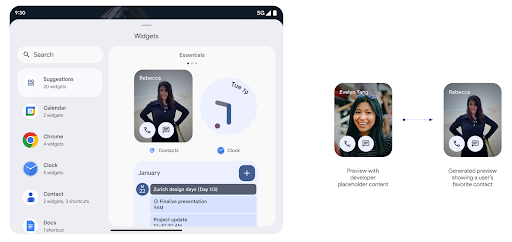
অ্যান্ড্রয়েড 15-এর আগে, উইজেট পিকার প্রিভিউ দেওয়ার একমাত্র উপায় ছিল একটি স্ট্যাটিক ইমেজ বা লেআউট রিসোর্স নির্দিষ্ট করা। এই প্রিভিউগুলি প্রায়ই আসল উইজেটটির চেহারা থেকে উল্লেখযোগ্যভাবে আলাদা হয় যখন এটি হোম স্ক্রিনে স্থাপন করা হয়। এছাড়াও, জেটপ্যাক গ্ল্যান্স দিয়ে স্ট্যাটিক রিসোর্স তৈরি করা যায় না, তাই একজন গ্ল্যান্স ডেভেলপারকে তাদের উইজেট স্ক্রিনশট করতে হবে বা উইজেট প্রিভিউ করার জন্য একটি XML লেআউট তৈরি করতে হবে।
অ্যান্ড্রয়েড 15 জেনারেট করা পূর্বরূপগুলির জন্য সমর্থন যোগ করে। এর মানে হল যে অ্যাপ উইজেট প্রদানকারীরা স্ট্যাটিক রিসোর্সের পরিবর্তে পিকার প্রিভিউ হিসেবে ব্যবহার করার জন্য RemoteViews তৈরি করতে পারে।
পুশ API
অ্যাপগুলি একটি পুশ API এর মাধ্যমে জেনারেটেড প্রিভিউ প্রদান করতে পারে। অ্যাপ্লিকেশানগুলি তাদের জীবনচক্রের যেকোনো সময়ে পূর্বরূপ প্রদান করতে পারে এবং পূর্বরূপ প্রদানের জন্য হোস্টের কাছ থেকে একটি সুস্পষ্ট অনুরোধ গ্রহণ করে না। AppWidgetService এ প্রিভিউ টিকে থাকে, এবং হোস্ট তাদের চাহিদা অনুযায়ী অনুরোধ করতে পারে। নিম্নলিখিত উদাহরণটি একটি XML উইজেট লেআউট সংস্থান লোড করে এবং এটিকে পূর্বরূপ হিসাবে সেট করে:
AppWidgetManager.getInstance(appContext).setWidgetPreview(
   ComponentName(
       appContext,
       SociaLiteAppWidgetReceiver::class.java
   ),
   AppWidgetProviderInfo.WIDGET_CATEGORY_HOME_SCREEN,
   RemoteViews("com.example", R.layout.widget_preview)
)
প্রত্যাশিত প্রবাহ হল:
- যেকোনো সময়, উইজেট প্রদানকারী
setWidgetPreviewকল করে। প্রদত্ত প্রিভিউ অন্যান্য প্রদানকারীর তথ্য সহAppWidgetServiceএ টিকে থাকে। -
setWidgetPreviewAppWidgetHost.onProvidersChangedকলব্যাকের মাধ্যমে একটি আপডেট করা প্রিভিউ হোস্টকে অবহিত করে। প্রতিক্রিয়া হিসাবে, উইজেট হোস্ট তার সমস্ত প্রদানকারীর তথ্য পুনরায় লোড করে। - একটি উইজেট পূর্বরূপ প্রদর্শন করার সময়, হোস্ট
AppWidgetProviderInfo.generatedPreviewCategoriesচেক করে, এবং যদি নির্বাচিত বিভাগটি উপলব্ধ থাকে, তাহলে এই প্রদানকারীর জন্য সংরক্ষিত পূর্বরূপ ফেরত দিতেAppWidgetManager.getWidgetPreviewকল করে।
setWidgetPreview কখন কল করতে হবে
যেহেতু প্রিভিউ প্রদানের জন্য কোন কলব্যাক নেই, তাই অ্যাপগুলি যেকোন সময়ে প্রিভিউ পাঠানোর জন্য বেছে নিতে পারে যখন তারা চলছে। কত ঘন ঘন প্রিভিউ আপডেট করতে হবে তা নির্ভর করে উইজেটের ব্যবহারের ক্ষেত্রে।
নিম্নলিখিত তালিকাটি পূর্বরূপ ব্যবহারের ক্ষেত্রে দুটি প্রধান বিভাগ বর্ণনা করে:
- প্রদানকারীরা তাদের উইজেট প্রিভিউতে বাস্তব ডেটা দেখায়, যেমন ব্যক্তিগতকৃত বা সাম্প্রতিক তথ্য। ব্যবহারকারী একবার সাইন ইন করলে বা তাদের অ্যাপে প্রাথমিক কনফিগারেশন সম্পন্ন করলে এই প্রদানকারীরা পূর্বরূপ সেট করতে পারে। এর পরে, তারা তাদের নির্বাচিত ক্যাডেন্সে পূর্বরূপ আপডেট করার জন্য একটি পর্যায়ক্রমিক কাজ সেট আপ করতে পারে। এই ধরনের উইজেটের উদাহরণ একটি ফটো, ক্যালেন্ডার, আবহাওয়া বা সংবাদ উইজেট হতে পারে।
- প্রোভাইডার যেগুলি প্রিভিউ বা দ্রুত-অ্যাকশন উইজেটগুলিতে স্ট্যাটিক তথ্য দেখায় যা কোনও ডেটা প্রদর্শন করে না। এই প্রদানকারীরা একবার প্রিভিউ সেট করতে পারে, যখন অ্যাপটি প্রথম চালু হয়। এই ধরনের উইজেটের উদাহরণগুলির মধ্যে রয়েছে একটি ড্রাইভ দ্রুত অ্যাকশন উইজেট বা ক্রোম শর্টকাট উইজেট।
কিছু প্রদানকারী হাব মোড পিকারে স্ট্যাটিক প্রিভিউ দেখাতে পারে, কিন্তু হোমস্ক্রিন পিকারে আসল তথ্য। এই সরবরাহকারীদের পূর্বরূপ সেট করতে এই উভয় ব্যবহারের ক্ষেত্রে নির্দেশিকা অনুসরণ করা উচিত।
পিকচার-ইন-পিকচার
অ্যান্ড্রয়েড 15 পিকচার-ইন-পিকচার (পিআইপি) এ পরিবর্তন এনেছে যাতে পিআইপি মোডে প্রবেশ করার সময় আরও মসৃণ রূপান্তর নিশ্চিত করা হয়। এটি তাদের প্রধান UI এর উপরে ওভারলেড থাকা UI উপাদান থাকা অ্যাপগুলির জন্য উপকারী হবে, যা PiP-তে যায়।
বিকাশকারীরা যুক্তি সংজ্ঞায়িত করতে onPictureInPictureModeChanged কলব্যাক ব্যবহার করে যা ওভারলেড UI উপাদানগুলির দৃশ্যমানতা টগল করে৷ PiP এন্টার বা এক্সিট অ্যানিমেশন সম্পন্ন হলে এই কলব্যাকটি ট্রিগার হয়। অ্যান্ড্রয়েড 15 থেকে শুরু করে, PictureInPictureUiState ক্লাসে অন্য রাজ্য অন্তর্ভুক্ত রয়েছে।
এই UI অবস্থার সাথে, Android 15 (API স্তর 35) টার্গেট করা অ্যাপগুলি PiP অ্যানিমেশন শুরু হওয়ার সাথে সাথে isTransitioningToPip() এর সাথে Activity#onPictureInPictureUiStateChanged কলব্যাক আহ্বান করা পর্যবেক্ষণ করবে। এমন অনেক UI উপাদান রয়েছে যা অ্যাপটির জন্য প্রাসঙ্গিক নয় যখন এটি পিআইপি মোডে থাকে, যেমন ভিউ বা লেআউট যাতে পরামর্শ, আসন্ন ভিডিও, রেটিং এবং শিরোনামের মতো তথ্য অন্তর্ভুক্ত থাকে। অ্যাপটি যখন PiP মোডে যায়, তখন এই UI উপাদানগুলি লুকানোর জন্য onPictureInPictureUiStateChanged কলব্যাক ব্যবহার করুন। যখন অ্যাপটি PiP উইন্ডো থেকে ফুল স্ক্রিন মোডে যায়, তখন এই উপাদানগুলিকে আনহাইড করতে onPictureInPictureModeChanged কলব্যাক ব্যবহার করুন, যেমনটি নিম্নলিখিত উদাহরণে দেখানো হয়েছে:
override fun onPictureInPictureUiStateChanged(pipState: PictureInPictureUiState) {
        if (pipState.isTransitioningToPip()) {
          // Hide UI elements
        }
    }
override fun onPictureInPictureModeChanged(isInPictureInPictureMode: Boolean) {
        if (isInPictureInPictureMode) {
          // Unhide UI elements
        }
    }
অপ্রাসঙ্গিক UI উপাদানগুলির এই দ্রুত দৃশ্যমানতা টগল (একটি PiP উইন্ডোর জন্য) একটি মসৃণ এবং ফ্লিকার-মুক্ত PiP এন্টার অ্যানিমেশন নিশ্চিত করতে সহায়তা করে।
উন্নত Do Not Disturb নিয়মাবলী
AutomaticZenRule অ্যাপগুলিকে অ্যাটেনশন ম্যানেজমেন্ট (বিরক্ত করবেন না) নিয়ম কাস্টমাইজ করতে দেয় এবং কখন সেগুলি সক্রিয় বা নিষ্ক্রিয় করতে হবে তা নির্ধারণ করতে দেয়। অ্যান্ড্রয়েড 15 ব্যবহারকারীর অভিজ্ঞতা উন্নত করার লক্ষ্যে এই নিয়মগুলিকে ব্যাপকভাবে উন্নত করে। নিম্নলিখিত উন্নতিগুলি অন্তর্ভুক্ত করা হয়েছে:
-
AutomaticZenRuleতে প্রকারগুলি যোগ করা, সিস্টেমটিকে কিছু নিয়মে বিশেষ চিকিত্সা প্রয়োগ করার অনুমতি দেয়৷ -
AutomaticZenRuleএ একটি আইকন যুক্ত করা, মোডগুলিকে আরও স্বীকৃত করতে সাহায্য করে৷ -
AutomaticZenRuleএ একটিtriggerDescriptionস্ট্রিং যোগ করা যা ব্যবহারকারীর জন্য নিয়মটি সক্রিয় হওয়া উচিত এমন শর্তগুলি বর্ণনা করে। -
AutomaticZenRuleZenDeviceEffectsযোগ করা হয়েছে, নিয়মগুলিকে গ্রেস্কেল ডিসপ্লে, নাইট মোড বা ওয়ালপেপারকে আবছা করার মতো জিনিসগুলিকে ট্রিগার করার অনুমতি দেয়৷
নোটিফিকেশন চ্যানেলগুলির জন্য ভাইব্রেশন এফেক্ট সেট করুন
Android 15 NotificationChannel.setVibrationEffect ব্যবহার করে চ্যানেলের মাধ্যমে ইনকামিং বিজ্ঞপ্তিগুলির জন্য সমৃদ্ধ ভাইব্রেশন সেট করা সমর্থন করে, যাতে আপনার ব্যবহারকারীরা তাদের ডিভাইসের দিকে না তাকিয়ে বিভিন্ন ধরনের বিজ্ঞপ্তির মধ্যে পার্থক্য করতে পারে।
মিডিয়া প্রজেকশন স্ট্যাটাস বার চিপ এবং অটো স্টপ
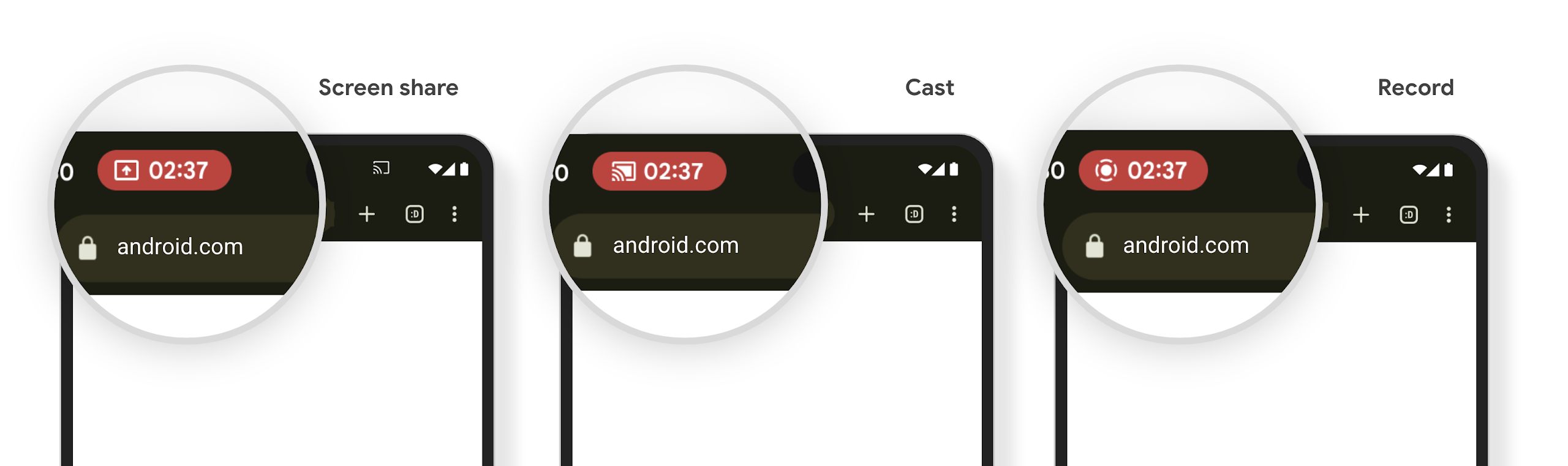
মিডিয়া অভিক্ষেপ ব্যক্তিগত ব্যবহারকারীর তথ্য প্রকাশ করতে পারে। একটি নতুন, বিশিষ্ট স্ট্যাটাস বার চিপ ব্যবহারকারীদের যেকোনো চলমান স্ক্রিন প্রজেকশন সম্পর্কে সচেতন করে। ব্যবহারকারীরা স্ক্রিন কাস্টিং, শেয়ারিং বা রেকর্ডিং বন্ধ করতে চিপটিতে ট্যাপ করতে পারেন। এছাড়াও, আরও স্বজ্ঞাত ব্যবহারকারীর অভিজ্ঞতার জন্য, ডিভাইসের স্ক্রীন লক হয়ে গেলে যেকোনও অগ্রগতি স্ক্রীন প্রজেকশন এখন স্বয়ংক্রিয়ভাবে বন্ধ হয়ে যায়।
বড় পর্দা এবং ফর্ম ফ্যাক্টর
অ্যান্ড্রয়েড ১৫ আপনার অ্যাপগুলোকে অ্যান্ড্রয়েডের বিভিন্ন ফর্ম ফ্যাক্টর, যেমন—বড় স্ক্রিন, ফ্লিপেবল ও ফোল্ডেবল ডিভাইস থেকে সর্বোচ্চ সুবিধা পাওয়ার সুযোগ করে দেয়।
উন্নত বড় স্ক্রিন মাল্টিটাস্কিং
Android 15 ব্যবহারকারীদের বড় স্ক্রিনের ডিভাইসে মাল্টিটাস্ক করার আরও ভাল উপায় দেয়। উদাহরণস্বরূপ, ব্যবহারকারীরা দ্রুত অ্যাক্সেসের জন্য তাদের প্রিয় স্প্লিট-স্ক্রিন অ্যাপ্লিকেশন সংমিশ্রণগুলি সংরক্ষণ করতে পারে এবং অ্যাপ্লিকেশনগুলির মধ্যে দ্রুত স্যুইচ করতে স্ক্রিনে টাস্কবারটি পিন করতে পারে। এর মানে হল যে আপনার অ্যাপটি অভিযোজিত কিনা তা নিশ্চিত করা আগের চেয়ে অনেক বেশি গুরুত্বপূর্ণ।
Google I/O- এ উপাদান 3 অভিযোজিত লাইব্রেরি সহ অভিযোজিত অ্যান্ড্রয়েড অ্যাপস এবং বিল্ডিং UI তৈরির সেশন রয়েছে যা সাহায্য করতে পারে, এবং আমাদের ডকুমেন্টেশনে আপনাকে বড় স্ক্রিনের জন্য ডিজাইন করতে সহায়তা করার জন্য আরও অনেক কিছু রয়েছে৷
কভার স্ক্রিন সমর্থন
আপনার অ্যাপটি এমন একটি সম্পত্তি ঘোষণা করতে পারে যা Android 15 আপনার Application বা Activity সমর্থিত ফ্লিপযোগ্য ডিভাইসের ছোট কভার স্ক্রিনে উপস্থাপন করার অনুমতি দিতে ব্যবহার করে। এই স্ক্রিনগুলিকে Android অ্যাপগুলি চালানোর জন্য সামঞ্জস্যপূর্ণ লক্ষ্য হিসাবে বিবেচনা করা খুব ছোট, কিন্তু আপনার অ্যাপগুলিকে সমর্থন করার জন্য বেছে নিতে পারে, আপনার অ্যাপটিকে আরও জায়গায় উপলব্ধ করে।
সংযোগ
অ্যান্ড্রয়েড ১৫ প্ল্যাটফর্মটিকে আপডেট করে, যার ফলে আপনার অ্যাপ যোগাযোগ এবং ওয়্যারলেস প্রযুক্তির সর্বশেষ অগ্রগতিগুলো ব্যবহারের সুযোগ পায়।
স্যাটেলাইট সমর্থন
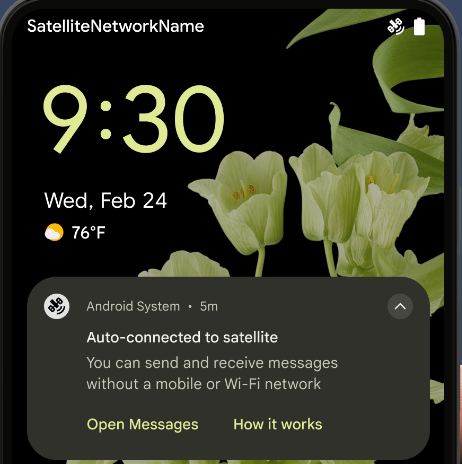
Android 15 স্যাটেলাইট সংযোগের জন্য প্ল্যাটফর্ম সমর্থন প্রসারিত করে চলেছে এবং স্যাটেলাইট সংযোগের ল্যান্ডস্কেপ জুড়ে একটি সামঞ্জস্যপূর্ণ ব্যবহারকারীর অভিজ্ঞতা নিশ্চিত করতে কিছু UI উপাদান অন্তর্ভুক্ত করে।
অ্যাপগুলি ServiceState.isUsingNonTerrestrialNetwork() ব্যবহার করে শনাক্ত করতে পারে যখন একটি ডিভাইস একটি স্যাটেলাইটের সাথে সংযুক্ত থাকে, কেন সম্পূর্ণ নেটওয়ার্ক পরিষেবাগুলি অনুপলব্ধ হতে পারে সে সম্পর্কে তাদের আরও সচেতনতা দেয়৷ উপরন্তু, Android 15 এসএমএস এবং এমএমএস অ্যাপের পাশাপাশি বার্তা পাঠানো এবং গ্রহণ করার জন্য স্যাটেলাইট সংযোগ ব্যবহার করার জন্য প্রিলোড করা RCS অ্যাপগুলির জন্য সমর্থন প্রদান করে।
মসৃণতর এনএফসি অভিজ্ঞতা
অ্যান্ড্রয়েড 15 অ্যানড্রয়েডের শক্তিশালী এনএফসি অ্যাপ ইকোসিস্টেমকে সমর্থন করার সাথে সাথে ট্যাপ টু পে করার অভিজ্ঞতাকে আরও নির্বিঘ্ন এবং নির্ভরযোগ্য করে তুলতে কাজ করছে। সমর্থিত ডিভাইসগুলিতে, অ্যাপগুলি NfcAdapter পর্যবেক্ষণ মোডে প্রবেশ করার জন্য অনুরোধ করতে পারে, যেখানে ডিভাইসটি শোনে কিন্তু NFC পাঠকদের সাড়া দেয় না, অ্যাপের NFC পরিষেবা PollingFrame অবজেক্টগুলিকে প্রসেস করতে পাঠায়৷ PollingFrame অবজেক্টগুলি NFC রিডারের সাথে প্রথম যোগাযোগের আগে প্রমাণীকরণের জন্য ব্যবহার করা যেতে পারে, যা অনেক ক্ষেত্রে এক ট্যাপ লেনদেনের অনুমতি দেয়।
এছাড়াও, অ্যাপগুলি সমর্থিত ডিভাইসগুলিতে একটি ফিল্টার নিবন্ধন করতে পারে যাতে তারা পোলিং লুপ কার্যকলাপ সম্পর্কে অবহিত হতে পারে, যা একাধিক NFC-সচেতন অ্যাপ্লিকেশনগুলির সাথে মসৃণ অপারেশনের অনুমতি দেয়।
ওয়ালেটের ভূমিকা
অ্যান্ড্রয়েড 15 একটি ওয়ালেট ভূমিকা প্রবর্তন করে যা ব্যবহারকারীর পছন্দের ওয়ালেট অ্যাপের সাথে কঠোর সংহতকরণের অনুমতি দেয়। এই ভূমিকাটি NFC ডিফল্ট কন্ট্যাক্টলেস পেমেন্ট সেটিং প্রতিস্থাপন করে। ব্যবহারকারীরা সেটিংস > অ্যাপ্লিকেশান > ডিফল্ট অ্যাপ্লিকেশানগুলিতে নেভিগেট করে Wallet ভূমিকা ধারক পরিচালনা করতে পারেন৷
পেমেন্ট বিভাগে নিবন্ধিত AID-এর জন্য NFC ট্যাপ রাউট করার সময় Wallet ভূমিকা ব্যবহার করা হয়। ট্যাপগুলি সর্বদা Wallet রোল হোল্ডারের কাছে যায় যদি না একই AID-এর জন্য নিবন্ধিত অন্য একটি অ্যাপ অগ্রভাগে চলছে।
ওয়ালেট কুইক অ্যাকসেস টাইল সক্রিয় করার সময় কোথায় যেতে হবে তা নির্ধারণ করতেও এই ভূমিকা ব্যবহার করা হয়। যখন ভূমিকাটি "কোনও নয়" তে সেট করা থাকে, তখন দ্রুত অ্যাক্সেস টাইল উপলব্ধ থাকে না এবং অর্থপ্রদানের বিভাগ NFC ট্যাপগুলি শুধুমাত্র অগ্রভাগের অ্যাপে বিতরণ করা হয়৷
নিরাপত্তা
অ্যান্ড্রয়েড ১৫ আপনার অ্যাপের নিরাপত্তা বাড়াতে, অ্যাপের ডেটা সুরক্ষিত রাখতে এবং ব্যবহারকারীদের তাদের ডেটার উপর আরও বেশি স্বচ্ছতা ও নিয়ন্ত্রণ প্রদান করতে সাহায্য করে। ব্যবহারকারীদের সুরক্ষা উন্নত করতে এবং নতুন হুমকি থেকে আপনার অ্যাপকে রক্ষা করার জন্য আমরা কী কী করছি, সে সম্পর্কে আরও জানতে গুগল আই/ও (Google I/O) -তে ‘অ্যান্ড্রয়েডে ব্যবহারকারীর নিরাপত্তা সুরক্ষা’ (Safeguarding user security on Android) শীর্ষক আলোচনাটি দেখুন।
ক্রেডেনশিয়াল ম্যানেজারকে অটোফিলের সাথে একীভূত করুন
অ্যান্ড্রয়েড 15 দিয়ে শুরু করে, ডেভেলপাররা ব্যবহারকারীর নাম বা পাসওয়ার্ড ক্ষেত্রগুলির মতো নির্দিষ্ট ভিউগুলিকে ক্রেডেনশিয়াল ম্যানেজার অনুরোধের সাথে লিঙ্ক করতে পারে, যাতে সাইন-ইন প্রক্রিয়া চলাকালীন একটি উপযোগী ব্যবহারকারীর অভিজ্ঞতা প্রদান করা সহজ হয়৷ ব্যবহারকারী যখন এই ভিউগুলির একটিতে ফোকাস করেন, তখন একটি সংশ্লিষ্ট অনুরোধ শংসাপত্র ব্যবস্থাপকের কাছে পাঠানো হয়। ফলস্বরূপ শংসাপত্রগুলি সরবরাহকারীদের মধ্যে একত্রিত করা হয় এবং অটোফিল ফলব্যাক UI-তে প্রদর্শিত হয়, যেমন ইনলাইন পরামর্শ বা ড্রপ-ডাউন পরামর্শ৷ Jetpack androidx.credentials লাইব্রেরি হল ডেভেলপারদের ব্যবহার করার জন্য পছন্দের এন্ডপয়েন্ট এবং শীঘ্রই Android 15 এবং উচ্চতর সংস্করণে এই বৈশিষ্ট্যটিকে আরও উন্নত করার জন্য উপলব্ধ হবে৷
বায়োমেট্রিক নির্দেশনার সাথে এক ট্যাপে সাইন-আপ এবং সাইন-ইন সংযুক্ত করুন।
ক্রেডেনশিয়াল ম্যানেজার বায়োমেট্রিক প্রম্পটগুলিকে শংসাপত্র তৈরি এবং সাইন-ইন প্রক্রিয়াগুলিতে সংহত করে , বায়োমেট্রিক প্রম্পটগুলি পরিচালনা করার জন্য প্রদানকারীদের প্রয়োজনীয়তা দূর করে৷ ফলস্বরূপ, শংসাপত্র প্রদানকারীদের শুধুমাত্র বায়োমেট্রিক ফ্লো ফলাফলের সাথে বর্ধিত, তৈরি এবং প্রবাহের ফলাফলের উপর ফোকাস করতে হবে। এই সরলীকৃত প্রক্রিয়াটি আরও দক্ষ এবং সুবিন্যস্ত শংসাপত্র তৈরি এবং পুনরুদ্ধার প্রক্রিয়া তৈরি করে।
এন্ড-টু-এন্ড এনক্রিপশনের জন্য কী ব্যবস্থাপনা
আমরা Android 15-এ E2eeContactKeysManager প্রবর্তন করছি, যা ক্রিপ্টোগ্রাফিক পাবলিক কীগুলির স্টোরেজের জন্য একটি OS-স্তরের API প্রদান করে আপনার Android অ্যাপগুলিতে এন্ড-টু-এন্ড এনক্রিপশন (E2EE) সুবিধা দেয়।
E2eeContactKeysManager ব্যবহারকারীদের তাদের পরিচিতিগুলির সর্বজনীন কীগুলি পরিচালনা এবং যাচাই করার জন্য একটি কেন্দ্রীভূত উপায় দিতে প্ল্যাটফর্ম পরিচিতি অ্যাপের সাথে একীভূত করার জন্য ডিজাইন করা হয়েছে৷
কন্টেন্ট ইউআরআই-এর উপর অনুমতি যাচাই
অ্যান্ড্রয়েড 15 এপিআইগুলির একটি সেট প্রবর্তন করে যা সামগ্রী ইউআরআইগুলিতে অনুমতি পরীক্ষা করে:
-
Context.checkContentUriPermissionFull: এটি কন্টেন্ট ইউআরআই-এ সম্পূর্ণ অনুমতি পরীক্ষা করে। -
Activityম্যানিফেস্ট অ্যাট্রিবিউটেরrequireContentUriPermissionFromCaller: এটি অ্যাক্টিভিটি লঞ্চের সময় প্রদত্ত কন্টেন্ট URI-তে নির্দিষ্ট অনুমতি প্রয়োগ করে। -
Activityকলারদের জন্যComponentCallerক্লাস : এটি সেই অ্যাপের প্রতিনিধিত্ব করে যা অ্যাক্টিভিটি চালু করেছে।
প্রবেশগম্যতা
অ্যান্ড্রয়েড ১৫ এমন কিছু ফিচার যোগ করেছে যা ব্যবহারকারীদের জন্য অ্যাক্সেসিবিলিটি উন্নত করে।
উন্নত ব্রেইল
Android 15-এ, আমরা টকব্যাকের জন্য ব্রেইল ডিসপ্লে সমর্থন করা সম্ভব করেছি যা USB এবং সুরক্ষিত ব্লুটুথ উভয়ের মাধ্যমে HID মান ব্যবহার করছে।
এই স্ট্যান্ডার্ডটি, অনেকটা ইঁদুর এবং কীবোর্ড দ্বারা ব্যবহৃত একটির মতো, সময়ের সাথে সাথে ব্রেইল ডিসপ্লেগুলির একটি বিস্তৃত পরিসরে Android কে সমর্থন করবে৷
আন্তর্জাতিকীকরণ
অ্যান্ড্রয়েড ১৫ এমন সব ফিচার ও সক্ষমতা যোগ করে, যা বিভিন্ন ভাষায় ডিভাইস ব্যবহারের ক্ষেত্রে ব্যবহারকারীর অভিজ্ঞতাকে আরও উন্নত করে।
CJK পরিবর্তনশীল ফন্ট
অ্যান্ড্রয়েড 15 দিয়ে শুরু করে, চাইনিজ, জাপানিজ এবং কোরিয়ান (CJK) ভাষার ফন্ট ফাইল, NotoSansCJK, এখন একটি পরিবর্তনশীল ফন্ট। পরিবর্তনশীল ফন্টগুলি CJK ভাষায় সৃজনশীল টাইপোগ্রাফির জন্য সম্ভাবনা উন্মুক্ত করে। ডিজাইনাররা শৈলীর একটি বিস্তৃত পরিসর অন্বেষণ করতে পারে এবং দৃশ্যত আকর্ষণীয় লেআউট তৈরি করতে পারে যা অর্জন করা আগে কঠিন বা অসম্ভব ছিল।
আন্তঃ-চরিত্র ন্যায্যতা
Android 15 দিয়ে শুরু করে, JUSTIFICATION_MODE_INTER_CHARACTER ব্যবহার করে অক্ষর ব্যবধান ব্যবহার করে পাঠ্যকে ন্যায়সঙ্গত করা যেতে পারে। আন্তঃশব্দ ন্যায্যতা প্রথম Android 8.0 (API স্তর 26) এ প্রবর্তন করা হয়েছিল, এবং আন্তঃ-অক্ষর ন্যায্যতা সেই ভাষাগুলির জন্য অনুরূপ ক্ষমতা প্রদান করে যেগুলি সেগমেন্টেশনের জন্য হোয়াইটস্পেস অক্ষর ব্যবহার করে, যেমন চাইনিজ, জাপানিজ এবং অন্যান্য।
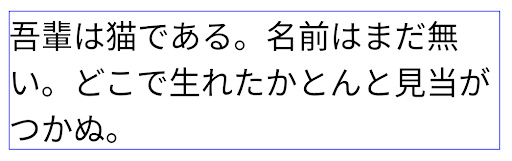
JUSTIFICATION_MODE_NONE ব্যবহার করে জাপানি পাঠ্যের বিন্যাস। 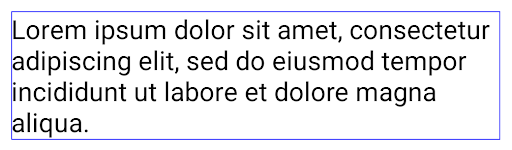
JUSTIFICATION_MODE_NONE ব্যবহার করে ইংরেজি পাঠ্যের বিন্যাস। 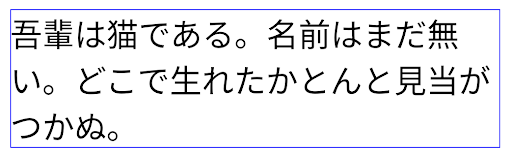
JUSTIFICATION_MODE_INTER_WORD ব্যবহার করে জাপানি পাঠ্যের বিন্যাস। 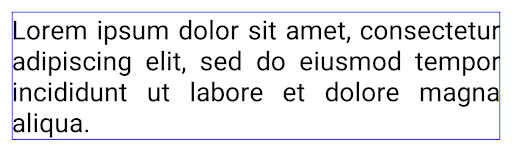
JUSTIFICATION_MODE_INTER_WORD ব্যবহার করে ইংরেজি পাঠ্যের বিন্যাস। 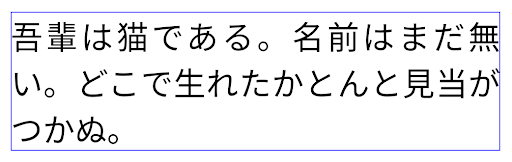
JUSTIFICATION_MODE_INTER_CHARACTER ব্যবহার করে জাপানি পাঠ্যের জন্য লেআউট। 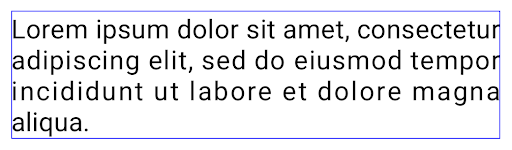
JUSTIFICATION_MODE_INTER_CHARACTER ব্যবহার করে ইংরেজি পাঠ্যের বিন্যাস।স্বয়ংক্রিয় লাইন ব্রেক কনফিগারেশন
অ্যান্ড্রয়েড অ্যান্ড্রয়েড 13 (এপিআই লেভেল 33) এ জাপানি এবং কোরিয়ানদের জন্য বাক্যাংশ-ভিত্তিক লাইন ব্রেক সমর্থন করা শুরু করেছে। যাইহোক, যদিও বাক্যাংশ-ভিত্তিক লাইন বিরতিগুলি পাঠ্যের ছোট লাইনের পাঠযোগ্যতা উন্নত করে, তারা পাঠ্যের দীর্ঘ লাইনের জন্য ভাল কাজ করে না। Android 15-এ, অ্যাপগুলি LINE_BREAK_WORD_STYLE_AUTO বিকল্পটি ব্যবহার করে শুধুমাত্র পাঠ্যের ছোট লাইনের জন্য বাক্যাংশ-ভিত্তিক লাইন বিরতি প্রয়োগ করতে পারে। এই বিকল্পটি পাঠ্যের জন্য সেরা শব্দ শৈলী বিকল্পটি নির্বাচন করে।
পাঠ্যের সংক্ষিপ্ত লাইনের জন্য, বাক্যাংশ-ভিত্তিক লাইন বিরতি ব্যবহার করা হয়, যা LINE_BREAK_WORD_STYLE_PHRASE এর মতোই কাজ করে, যেমনটি নিম্নলিখিত ছবিতে দেখানো হয়েছে:
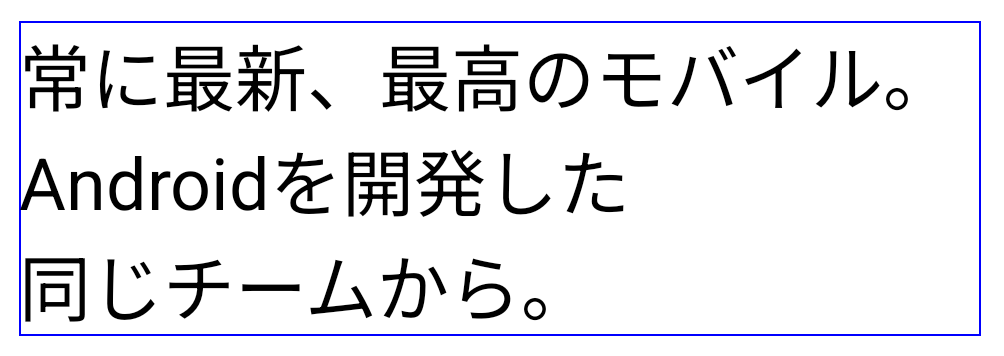
LINE_BREAK_WORD_STYLE_AUTO পাঠ্যের পাঠযোগ্যতা উন্নত করতে বাক্যাংশ-ভিত্তিক লাইন বিরতি প্রয়োগ করে। এটি LINE_BREAK_WORD_STYLE_PHRASE প্রয়োগ করার মতই। পাঠ্যের দীর্ঘ লাইনের জন্য, LINE_BREAK_WORD_STYLE_AUTO একটি নো লাইন-ব্রেক শব্দ শৈলী ব্যবহার করে, যা LINE_BREAK_WORD_STYLE_NONE এর মতোই কাজ করে, যেমনটি নিম্নলিখিত ছবিতে দেখানো হয়েছে:
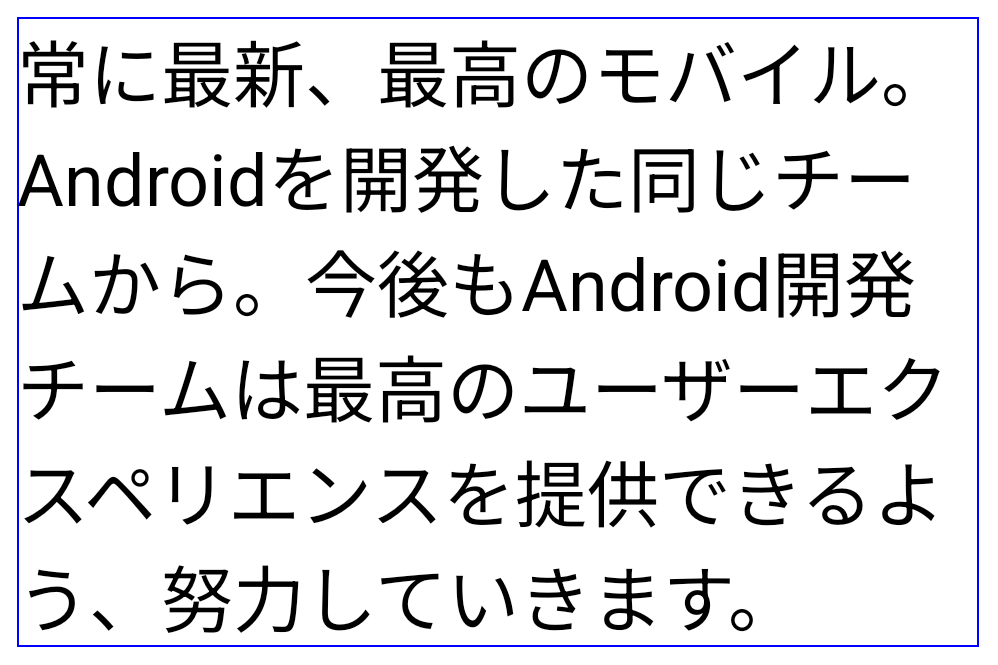
LINE_BREAK_WORD_STYLE_AUTO পাঠ্যের পাঠযোগ্যতা উন্নত করতে কোনো লাইন-ব্রেক শব্দ শৈলী প্রয়োগ করে না। এটি LINE_BREAK_WORD_STYLE_NONE প্রয়োগ করার মতই।অতিরিক্ত জাপানি হেন্টাইগানা ফন্ট
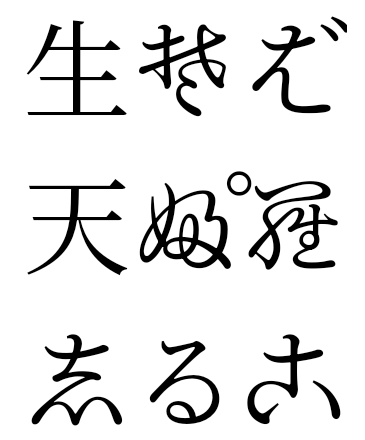
অ্যান্ড্রয়েড 15-এ, পুরানো জাপানি হিরাগানা (হেনটাইগানা নামে পরিচিত) এর জন্য একটি ফন্ট ফাইল ডিফল্টরূপে বান্ডিল করা হয়। হেনটাইগানা অক্ষরের অনন্য আকারগুলি শিল্পকর্ম বা ডিজাইনে একটি স্বতন্ত্র ফ্লেয়ার যোগ করতে পারে এবং প্রাচীন জাপানি নথিগুলির সঠিক সংক্রমণ এবং বোঝার সংরক্ষণ করতে সহায়তা করে।
VideoLAN শঙ্কু কপিরাইট (c) 1996-2010 VideoLAN। এই লোগো বা একটি পরিবর্তিত সংস্করণ যে কেউ VideoLAN প্রকল্প বা VideoLAN টিম দ্বারা বিকশিত কোনো পণ্য উল্লেখ করার জন্য ব্যবহার বা পরিবর্তিত হতে পারে, কিন্তু প্রকল্পের দ্বারা অনুমোদন নির্দেশ করে না।
Vulkan এবং Vulkan লোগো হল Khronos Group Inc এর নিবন্ধিত ট্রেডমার্ক।
OpenGL হল একটি নিবন্ধিত ট্রেডমার্ক এবং OpenGL ES লোগো হল Hewlett Packard Enterprise-এর একটি ট্রেডমার্ক যা Khronos-এর অনুমতিতে ব্যবহৃত হয়।